GoldenShot - Is the back-test too good to be true and how was the EA created?

GoldenShot - The 6 months long journey to unique EA
First, I wanted to thank everyone for supporting me thru GoldenShot - my first attempt at SLTP EA thats built on the platform that ive been working on for quite some time.
I completely understand that when you look at some back-test 2025 - now on selected brokers - its almost too good to be true... and on platform such as MQL5 this immediately means it must be scam or its unrealistic, too over-fitted or just synthetic. This is only because, you are just used to known scam artists and when real EA with real edge appears on the market - its immediately viewed as "the same".
However i can assure you the results you see are real and im gonna show you in this post how they are achieved - layers by layer.
GoldenShots mission and initial idea has been not to create perfect back-test and sell to thousands, but to create innovate EA that knows when not to enter the market, how long stay in the market and especially how to manage losses. In essence its very selective about its entries and can adjust the targets and cut the loosers. Thats how it achieves its back-test results and can see for yourself later on this post.
I have also been transparent from the start - GoldenShot strategies have edge roughly from final quarter of 2024 - NOW. As its unique strategy, not just copy of 90% of breakout EAs out there, this is completely normal for changing market - volatility, price action and market regime has changed since gold was 2K USD.
Live signal: GoldenShot on MQL5 Signals
🎯 How GoldenShot Operates
Think of GoldenShot as a loop with four stages. It spends most of its time in the first one.
1. Wait
New entries are considered only when every gate is open: the broker session is open, the current time is inside your trading windows, no news pause is active, spread is inside your configured limit, the post-close cooldown has expired, and neither daily protection rule has fired. If any gate is closed, the dashboard header tells you which one. None of these gates touches an open position.
2. Qualify, validate, size, enter
- Qualify: Each strategy watches for its own setup on its own timeframes. Whichever qualifies first owns the trade.
- Validate: Before any order is sent, the signal is compared against failure structures measured in real trading history — a bounce inside a collapsing move, a stall after an overextended day, a continuation that has already run out of road. A match means no order. In testing this removed most full-stop losses while skipping fewer than one signal in a hundred.
- Size: The lot is calculated from the trade's actual stop distance and your risk percentage, or taken from your fixed lot size.
- Enter: A market order with a broker-side stop loss and a broker-side take profit attached. No pending orders are ever placed.
3. Manage
- Trailing stop: Once the trade reaches its trailing-start distance, the broker stop loss follows price in fixed steps. Every move is a confirmed broker modification; the previous stop stays in force until the new one is accepted. The separate broker take profit (40 pips for Strategy 1 and 50 pips for Strategy 2) remains active and closes the trade if price reaches it before the trailing stop does.
- Breakeven (Strategy 1 SELL only): After eight pips of favourable movement, the stop is moved to a cost-aware breakeven that covers spread and commission.
- Rapid-failure protection (Strategy 1 only): A narrowly defined rule for a trade that turns against you shortly after entry. It needs the position to be at least 15 minutes old, several closed-candle confirmations that the move has genuinely reversed, and a fast adverse speed. When all agree, the stop is tightened to a small controlled loss (or to breakeven if the trade is still a few pips in profit) instead of waiting for the full 200-pip stop. Strategy 2 deliberately does not use this rule: in testing its losing and recovering trades looked too similar to separate safely, so it keeps its hard stop and wider trail.
- Never a hidden market close: Every protective action is a broker-side stop modification. The only thing that closes a trade at market is Daily Drawdown Protection, and only when you have enabled it.
4. Close and cool down
After the position closes — at the trailing stop, the take profit, the stop loss, or a tightened stop — GoldenShot waits seven minutes before evaluating new entries. The cooldown is restored from trade history after a reload, an input change, or a timeframe change, so restarting the EA cannot skip it.
Only one position exists at any time, across both strategies and both directions. There is no stacking, no hedging against yourself, and no second position opened behind the first.
🎯 The Two Strategies
- Strategy 1 — Pullback: Waits for price to pull back into a short-term support or resistance area and show a genuine rebound, confirmed by trend strength, momentum, and candle structure. Trades BUY and SELL. Higher frequency, tighter management: 200-pip stop, 40-pip take profit, trailing starts at 12 pips profit and steps every 3 pips. It is the only strategy carrying the rapid-failure protection, and its SELL side uses the eight-pip breakeven. Entry window 06:00 to 21:00 server time.
- Strategy 2 — Momentum: Looks for a fresh directional move backed by expanding volatility and healthy trend strength, and joins the continuation while structure holds, with its own guards against late and exhausted entries. Trades BUY and SELL. Fewer trades and a wider profile: 250-pip stop, 50-pip take profit, trailing starts at 24 pips and steps every 6 pips. Entry window 01:15 to 20:00 server time.
Each strategy's stop, target, trailing profile, and entry window were tuned separately in single-position mode across independent broker feeds and are fixed in this build. Their Enable and Magic Number controls are yours. The per-strategy windows sit inside the global Time Management windows; both must allow the time for an entry to happen.
Direction transparency: Trade Direction is a global permission. Both strategies implement both directions, so BUY only or SELL only simply restricts them; neither becomes idle.
🎯 How it was actually developed aka how it achieves the statistics seen in the back-test
Lets divide this whole effort in 4 steps or layers that you cannot as end consumer test yourself but i can explain this step by tep.
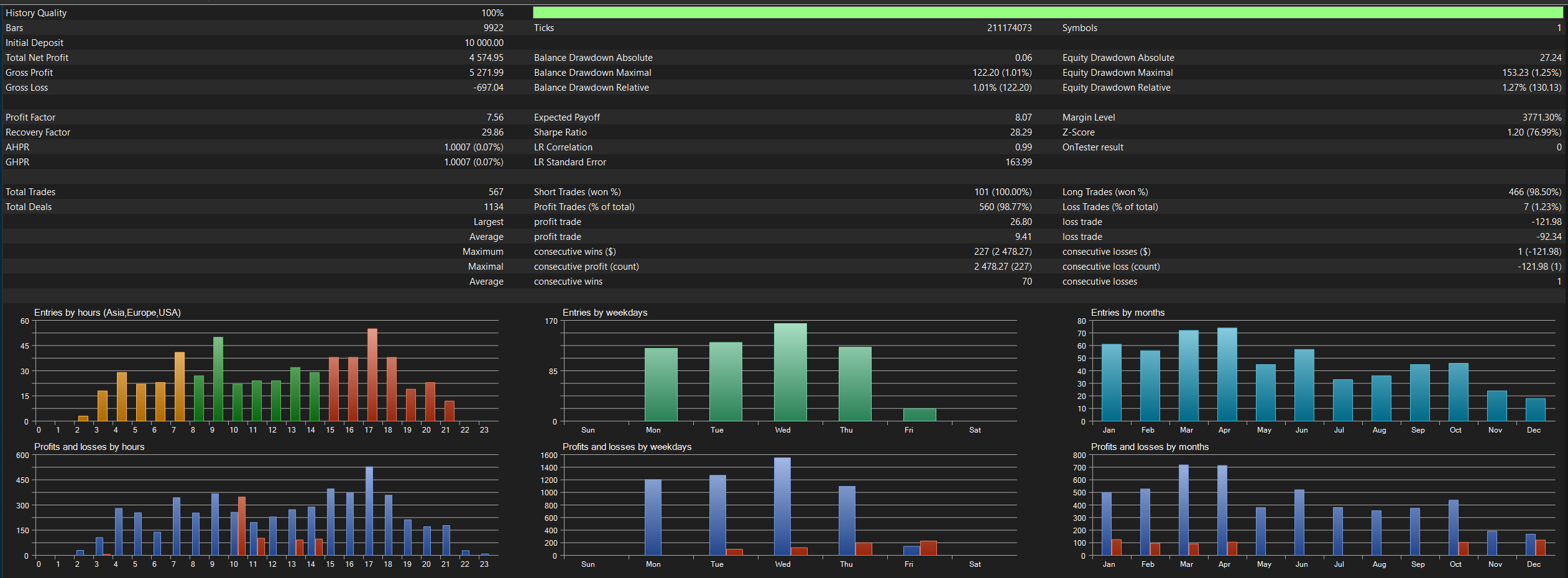
Testing configuration
- 2025 - now
- 1% risk
- Vantage ECN Pro (US feed)
🛡️1st stage - Stable Foundation:
- Pullback SELL breakeven OFF
- Dynamic Protection OFF
- Momentum adaptive trailing OFF
- Ordinary Friday mornings remain enabled
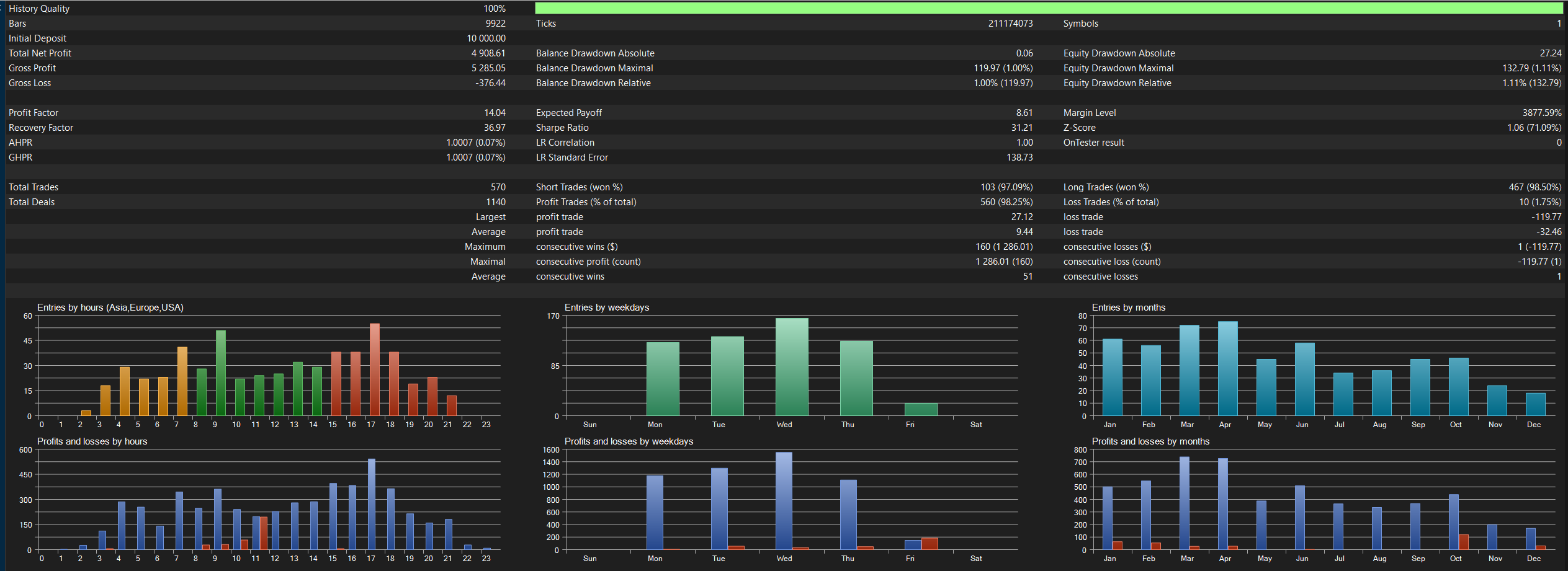
🛡️2nd stage - Reduce avoidable losses (Post-Entry monitoring)
- Adds Pullback SELL breakeven at eight favorable pips and Pullback rapid-failure Dynamic
- Additional protection recognizes when a Pullback trade is beginning to fail or lose its advantage and acts before it becomes a full loss.
🛡️3rd stage - Adapt to changing markets (Adaptive Momentum Management)
- Adds Momentum’s M15 ATR-based trailing start, dynamically adjusting between 18 and 24 pips.
- Friday remains enabled.
Momentum trade management adjusts to current market activity instead of expecting every price move to behave identically. This doesnt have so much impact on Vantage feed but as entry could differ for Momentum strategy on different brokers, this helps to reduce losses on those feeds. Adds 2 extra trades.
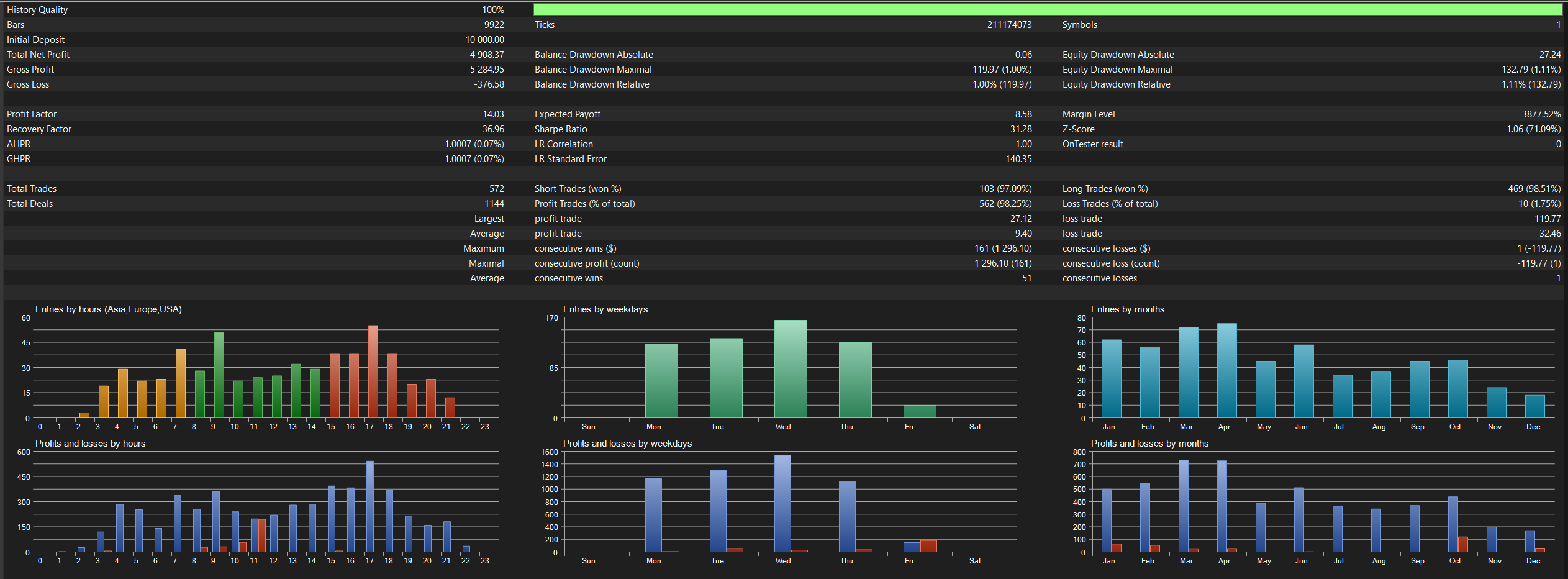
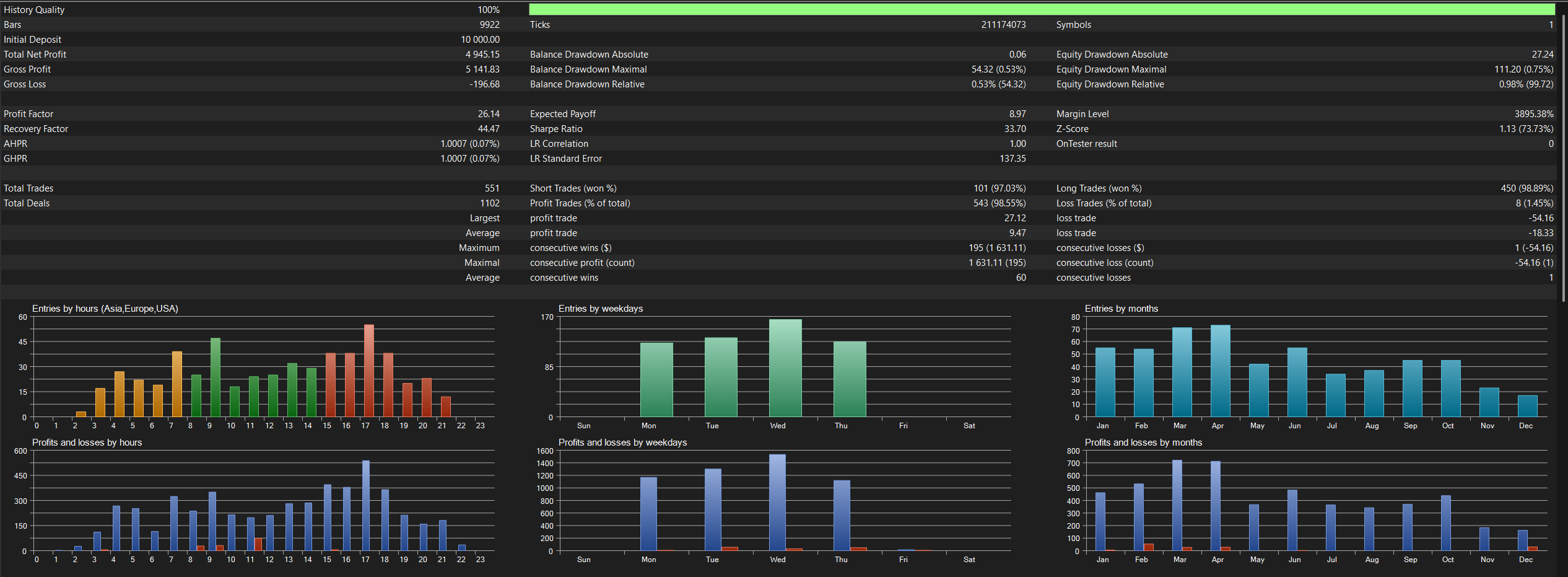
🛡️Final stage - Avoid weaker trading periods and turn on all available protections
- Disables Friday entries.
- Turns on all additional protections
- This is default commerical version build
Have a question this guide did not answer? Reach out through the GoldenShot product page on MQL5 Market and the developer will be glad to help.
Disclaimer: Trading leveraged products carries a high level of risk. Past performance and back-tests do not guarantee future results. Broker feeds, spreads, swaps, commissions, slippage, liquidity, and execution differ. Test on demo, use conservative sizing, and never trade money you cannot afford to lose.