

Strategy Configuration via External JSON Files in MQL5: Replacing Input Parameters with a Runtime Config Loader
 1 657
1 657
 2
2

Introduction
An Expert Advisor with strategy parameters baked into input variables is fast to write and easy to optimize in the Strategy Tester, but it has a hard operational ceiling. Any lot-size, stop-loss, or filter-threshold change requires either recompiling the .mq5 source or reopening the EA's input dialog on each chart. For a single instance on a single symbol this is a minor inconvenience. For traders running the same logic across many symbols or multiple risk variants, this becomes a coordination problem. There is no programmatic way to push changes to all running instances, no shared source of truth for the current configuration, and no way to apply updates without restarting or reattaching the EA.
Operationally, the issue is not compilation speed. The issue is that the Properties dialog is a manual, per-chart operation, even though it can change inputs without touching the source. There is no way to script it, no way to push one change to every running instance at once, and no shared file that all instances read from. A trader must open twenty dialogs and re-enter the same values, and each change still requires detaching and reattaching the EA on that chart. Recompilation only enters the picture when a trader wants to change a default value baked into the source itself, rather than a per-chart override.
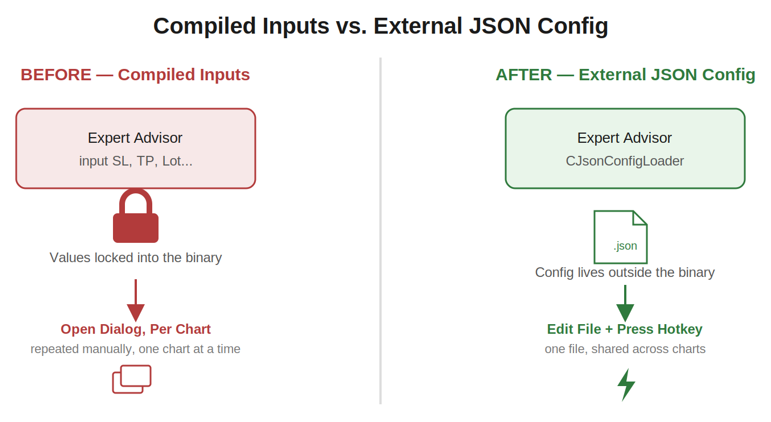
Compiled inputs can be edited through the EA's Properties dialog without recompiling, but that edit has to be repeated by hand, once per chart, with no programmatic or shared update path. An external JSON file moves configuration into a single shared source that any chart's EA instance can re-read on a hotkey press.
Section 1: Why Compiled Parameters Break at Scale
MQL5's input parameter model is a compile-time and dialog-time mechanism. Values are fixed at compilation or set once when the EA is attached to a chart, and from that point forward they are immutable for the lifetime of that chart attachment. Changing them means one of two things: editing the source and recompiling, or detaching the EA, reopening the properties dialog, and reattaching it. Both interrupt the running strategy and both require the trader to be physically present at the terminal.
This model holds up fine for a single EA on a single symbol during manual testing. It does not hold up when the same logic runs as twenty separate chart attachments across twenty symbols, each potentially needing a slightly different lot size or a global stop-loss adjustment in response to changing volatility. There is no shared configuration surface: each chart's inputs are independent, so a change has to be applied twenty times, by hand, once per chart. There is no programmatic update path: nothing outside MetaTrader's own UI can alter an input value while the EA is running. And there is no hot-reload — even if a trader wanted to push a single change, the EA has to be stopped and restarted to pick it up.
An external configuration file changes this picture in three ways. First, it gives the EA a configuration surface that exists outside the compiled binary and outside the input dialog, so it can be edited by a script, a deployment pipeline, or simply a text editor, independent of MetaTrader's UI. Second, multiple EA instances can point at the same file (or at per-symbol files following a naming convention), giving a shared or near-shared configuration model instead of twenty independent ones. Third, because the EA can re-read the file on a trigger — in this design, a keyboard shortcut — configuration changes can take effect without restarting the chart. The tradeoff is a new dependency on a correctly located and well-formed file. If the file is missing or malformed, the loader needs a defined fallback to avoid crashes or invalid values. That fallback is what SStrategyConfig::Default() provides, covered in Section 3.
Section 2: JSON as a Configuration Format
Three plain-text formats are realistic candidates for this kind of file: INI, CSV, and JSON. INI is simple to parse but has no native typing — every value is a string, and the EA has to guess whether "20" means an integer, a float, or literally the two characters 2 and 0. CSV is awkward for key-value configuration because it is fundamentally tabular; representing six unrelated scalar settings as rows and columns is a forced fit and gets worse as the field count grows. JSON sits between these: it has explicit value types (numbers are unquoted, strings are quoted), it is human-readable and human-editable with any text editor, and it has broad tooling support outside MQL5 — a deployment script written in Python or PowerShell can generate or validate a JSON file without needing to understand MQL5 at all.
The tokenizer built in this article does not implement JSON in full. It handles a deliberately narrow subset: a single flat object, double-quoted keys, and values that are either double-quoted strings or unquoted numbers. There is no support for nested objects, no support for arrays, and no support for booleans or null as distinct types. This is a scope decision, not an oversight — SStrategyConfig itself is flat, so a parser capable of arbitrary nesting would be solving a problem the data model does not have.
The tradeoff against a DLL-based full JSON parser (such as a wrapped C++ library) is straightforward: the hand-written tokenizer has no external dependency and compiles in MetaEditor with no linker configuration, but it will silently misbehave on JSON outside its supported subset rather than rejecting it with a precise syntax error. That risk is bounded in this design by validating the result against expected types per known key, rather than attempting full grammar validation. A DLL-based parser would handle arbitrary JSON correctly but introduces a binary dependency, code-signing and broker-permission concerns (ALLOW_DLL_IMPORT), and a build step outside MetaEditor.
Section 3: The Config Struct — StrategyConfig.mqh
SStrategyConfig is the typed contract between the file on disk and the EA's logic. It exists as its own header, separate from the loader, so that any other module — the demo EA, a future risk manager, a future backtesting harness — can include just the data shape without pulling in file I/O or tokenizing code. Keeping the struct dependency-free also makes it trivial to construct a config in memory for testing, as the verification subsection in Section 5 does.
//+------------------------------------------------------------------+
//|                                              StrategyConfig.mqh  |
//+------------------------------------------------------------------+
#ifndef STRATEGYCONFIG_MQH
#define STRATEGYCONFIG_MQH

//+------------------------------------------------------------------+
//| Struct SStrategyConfig                                           |
//| Typed representation of the runtime-tunable strategy parameters  |
//+------------------------------------------------------------------+
struct SStrategyConfig
  {
   double            m_lot_size;
   double            m_stop_loss_pts;
   double            m_take_profit_pts;
   double            m_max_spread_pts;
   long              m_magic_number;
   string            m_comment;
   //--- methods
   static SStrategyConfig Default(void)
     {
      SStrategyConfig cfg;
      cfg.m_lot_size        = 0.01;
      cfg.m_stop_loss_pts   = 300.0;
      cfg.m_take_profit_pts = 600.0;
      cfg.m_max_spread_pts  = 20.0;
      cfg.m_magic_number    = 20260630;
      cfg.m_comment         = "ConfigLoaderDemo";
      return(cfg);
     }
   void              Print(void)
     {
      ::Print("--- SStrategyConfig ---");
      ::Print("m_lot_size        = ", ::DoubleToString(m_lot_size, 2));
      ::Print("m_stop_loss_pts   = ", ::DoubleToString(m_stop_loss_pts, 1));
      ::Print("m_take_profit_pts = ", ::DoubleToString(m_take_profit_pts, 1));
      ::Print("m_max_spread_pts  = ", ::DoubleToString(m_max_spread_pts, 1));
      ::Print("m_magic_number    = ", ::IntegerToString(m_magic_number));
      ::Print("m_comment         = ", m_comment);
     }
  };

#endif // STRATEGYCONFIG_MQH
//+------------------------------------------------------------------+
The six data fields map directly to the six settings that the article's demonstration treats as runtime-tunable: m_lot_size for trade volume, m_stop_loss_pts and m_take_profit_pts for risk levels expressed in points rather than price, m_max_spread_pts as a filter threshold the EA can use to skip entries during wide-spread conditions, m_magic_number to tag orders for this EA instance, and m_comment as the order comment string. m_magic_number is declared as long rather than int because magic numbers are sometimes constructed by combining a strategy ID with a symbol or timeframe code, and a long leaves headroom for that without an explicit design decision being forced later.
Default() is declared static and returns a fully populated SStrategyConfig by value. It exists so the EA always has a known-safe configuration before any file has been read, and so that a failed or malformed load has a defined fallback instead of leaving the struct's fields at whatever uninitialized values the compiler happens to produce. The values chosen — a 0.01 lot, a 300-point stop, a 600-point target, a 20-point spread cap — are intentionally conservative; they are meant to be safe to trade live by accident, not tuned to any particular strategy. Because methods are defined inline inside the struct body here rather than declared and defined separately, the :: scope-resolution operator is used inside Print() when calling Print, DoubleToString, and IntegerToString to avoid the method shadowing the global function of the same name.
Print() writes every field to the Experts tab in a fixed, aligned format. It is intentionally trivial — no logic, no branching — because its only purpose is diagnostic visibility: confirming, at a glance in the log, exactly what configuration the EA is currently holding, whether that came from a successful file load or from the default fallback.
Section 4: The Tokenizer Architecture
Before any tokenizer code is written, it is worth being explicit about the algorithm, because the implementation in Section 5 has no comments explaining "why" — only "what" — and the architecture needs to be understood first.
The tokenizer's job is to take a raw string containing the full contents of the JSON file and extract a flat list of key-value pairs, then map each pair onto the matching field of an SStrategyConfig instance. It does this in four phases. First, it locates the opening brace { using StringFind(); everything before that brace is ignored, which tolerates leading whitespace or a byte-order mark without extra handling. Second, starting just after the brace, it loops: each iteration skips whitespace and comma separators, then expects a double-quoted key, extracts the substring between the quotes via StringSubstr(), and locates the colon that separates the key from its value.
Third, it determines the end of the value by scanning forward character by character, tracking whether the scan position is currently inside a quoted string, and stopping at the first comma or closing brace that occurs outside of quotes — this quote-awareness is what allows m_comment values to safely contain commas. Fourth, it inspects the first non-whitespace character of the extracted value: a double quote means the value is a string and is passed through StripQuotes(); a digit or a minus sign means the value is numeric and is parsed via StringToDouble(). The resolved key name is then matched against a fixed set of known field names in an if-else chain, and the corresponding struct field is assigned.
A hand-written character scan was chosen over StringSplit() because StringSplit() splits unconditionally on every occurrence of a separator character, with no concept of "inside a quoted string." Splitting a JSON object on commas with StringSplit() would incorrectly break apart any string value that itself contains a comma, and splitting on colons would break apart any string value containing a colon (for example, a comment like "Session: London"). The quote-tracking scan in this tokenizer exists specifically to avoid that failure mode, at the cost of being a few more lines of code than a one-line StringSplit() call would be.
Section 5: Implementation — JsonConfigLoader.mqh
CJsonConfigLoader owns the file I/O and the parsing logic. It is a separate class from SStrategyConfig because the struct represents data and the loader represents a process — reading a file, interpreting its contents, and reporting success or failure. Keeping them separate means the struct can be unit-tested or constructed without ever touching the filesystem, which the verification subsection at the end of this section relies on.
//+------------------------------------------------------------------+
//|                                             JsonConfigLoader.mqh |
//+------------------------------------------------------------------+
#ifndef JSONCONFIGLOADER_MQH
#define JSONCONFIGLOADER_MQH

#include "StrategyConfig.mqh"

//+------------------------------------------------------------------+
//| Class CJsonConfigLoader                                          |
//| Reads a flat-object JSON file and populates SStrategyConfig      |
//+------------------------------------------------------------------+
class CJsonConfigLoader
  {
private:
   string            m_filepath;
   datetime          m_last_load_time;
   //--- private helpers
   bool              Tokenize(const string &raw, SStrategyConfig &cfg);
   string            StripQuotes(const string &s);
   string            TrimWhitespace(const string &s);
public:
                     CJsonConfigLoader(void);
                    ~CJsonConfigLoader(void);
   void              SetFilePath(const string &path);
   bool              Load(SStrategyConfig &cfg);
   datetime          GetLastLoadTime(void);
  };
The class holds two private members. m_filepath is the path passed to FileOpen(), relative to MQL5\Files\, and m_last_load_time is a datetime stamp set on the most recent successful load, used both diagnostically and by the demo EA's dashboard. The three private methods are internal mechanics that no caller outside the class needs: Tokenize() does the actual parsing, StripQuotes() and TrimWhitespace() are small string-cleanup helpers it relies on. The public surface is deliberately narrow — a constructor and destructor, a setter for the file path, the Load() entry point, and a getter for the last load timestamp. Private members are declared before public members throughout, following the convention used in MetaQuotes' own Standard Library classes.
Constructor
//+------------------------------------------------------------------+
//| Constructor                                                      |
//+------------------------------------------------------------------+
CJsonConfigLoader::CJsonConfigLoader(void)
  {
   m_filepath       = "";
   m_last_load_time = 0;
  }
The constructor initializes both members to safe empty states: an empty path string and a zero timestamp, which TimeToString() renders as the epoch rather than an uninitialized or garbage value. No file I/O happens here — the loader is inert until SetFilePath() and Load() are called explicitly, which keeps construction cheap and side-effect-free.
Destructor
//+------------------------------------------------------------------+
//| Destructor                                                       |
//+------------------------------------------------------------------+
CJsonConfigLoader::~CJsonConfigLoader(void)
  {
  }
The destructor body is empty because the class holds no dynamically allocated resources and no open file handles between calls — Load() opens and closes its file handle within a single call rather than keeping it open across the object's lifetime. The destructor is still declared and defined explicitly rather than omitted, consistent with the rule that every class declares both regardless of whether the body does anything.
SetFilePath()
//+------------------------------------------------------------------+
//| Sets the JSON file path relative to MQL5\Files                   |
//+------------------------------------------------------------------+
void CJsonConfigLoader::SetFilePath(const string &path)
  {
   m_filepath = path;
  }
SetFilePath() is a plain setter that stores the path the EA will later pass to Load(). It exists as its own method rather than a constructor parameter so that the demo EA can construct the loader at module scope — where input parameters are not yet available — and assign the actual path once OnInit() runs and the EA's input values are populated.
Load()
//+------------------------------------------------------------------+
//| Opens the file, reads it fully, and delegates to Tokenize        |
//+------------------------------------------------------------------+
bool CJsonConfigLoader::Load(SStrategyConfig &cfg)
  {
   int handle = ::FileOpen(m_filepath, FILE_READ | FILE_TXT | FILE_ANSI);
   if(handle == INVALID_HANDLE)
     {
      ::Print("CJsonConfigLoader::Load - cannot open file '", m_filepath,
              "', error code ", ::GetLastError());
      return(false);
     }

   string raw = "";
   while(!::FileIsEnding(handle))
      raw += ::FileReadString(handle) + "\n";

   ::FileClose(handle);

   bool result = Tokenize(raw, cfg);
   if(result)
      m_last_load_time = ::TimeCurrent();

   return(result);
  }
Load() is the only public entry point that touches the filesystem. It opens m_filepath with FileOpen() using FILE_READ | FILE_TXT | FILE_ANSI, which opens the file for reading as ANSI text; if the handle comes back as INVALID_HANDLE, the method logs the failure along with GetLastError() and returns false immediately, leaving cfg untouched so the caller's existing configuration (typically the default) is preserved. If the file opens successfully, the method reads it line by line using FileReadString() inside a loop guarded by FileIsEnding(), concatenating every line into a single raw buffer with a newline appended between lines — newlines are harmless to the tokenizer since they are treated as whitespace.
The handle is closed via FileClose() as soon as the content has been read, rather than being held open for the duration of parsing, so the file is not locked any longer than necessary. The accumulated buffer is then handed to Tokenize(), and m_last_load_time is only updated via TimeCurrent() if tokenizing reports success — a malformed file does not get credited with a "load."
Tokenize()
//+------------------------------------------------------------------+
//| Hand-written flat-object JSON tokenizer                          |
//+------------------------------------------------------------------+
bool CJsonConfigLoader::Tokenize(const string &raw, SStrategyConfig &cfg)
  {
   int brace_pos = ::StringFind(raw, "{");
   if(brace_pos < 0)
     {
      ::Print("CJsonConfigLoader::Tokenize - opening brace not found");
      return(false);
     }

   int pos = brace_pos + 1;
   int len = ::StringLen(raw);

   while(pos < len)
     {
      //--- skip whitespace and comma separators between pairs
      while(pos < len && (::StringGetCharacter(raw, pos) == ' '  ||
                          ::StringGetCharacter(raw, pos) == '\t' ||
                          ::StringGetCharacter(raw, pos) == '\n' ||
                          ::StringGetCharacter(raw, pos) == '\r' ||
                          ::StringGetCharacter(raw, pos) == ','))
         pos++;

      if(pos >= len || ::StringGetCharacter(raw, pos) == '}')
         break;

      if(::StringGetCharacter(raw, pos) != '"')
        {
         ::Print("CJsonConfigLoader::Tokenize - expected key quote at position ", pos);
         return(false);
        }

      //--- locate key boundaries
      int key_start = pos + 1;
      int key_end   = ::StringFind(raw, "\"", key_start);
      if(key_end < 0)
        {
         ::Print("CJsonConfigLoader::Tokenize - unterminated key string");
         return(false);
        }
      string key = ::StringSubstr(raw, key_start, key_end - key_start);

      //--- locate colon separator
      int colon_pos = ::StringFind(raw, ":", key_end);
      if(colon_pos < 0)
        {
         ::Print("CJsonConfigLoader::Tokenize - missing colon after key '", key, "'");
         return(false);
        }

      //--- locate end of value, respecting quoted strings
      int value_start = colon_pos + 1;
      while(value_start < len && (::StringGetCharacter(raw, value_start) == ' ' ||
                                  ::StringGetCharacter(raw, value_start) == '\t'))
         value_start++;

      int  scan      = value_start;
      bool in_quotes = false;
      while(scan < len)
        {
         ushort ch = ::StringGetCharacter(raw, scan);
         if(ch == '"')
            in_quotes = !in_quotes;
         else
           {
            if(!in_quotes && (ch == ',' || ch == '}'))
               break;
           }
         scan++;
        }

      string value_raw = ::StringSubstr(raw, value_start, scan - value_start);
      value_raw = TrimWhitespace(value_raw);

      //--- resolve type and assign to the matching struct field
      string resolved_type = "unknown";
      if(::StringLen(value_raw) > 0 && ::StringGetCharacter(value_raw, 0) == '"')
        {
         string string_value = StripQuotes(value_raw);
         resolved_type = "string";
         if(key == "m_comment")
            cfg.m_comment = string_value;
        }
      else
        {
         resolved_type = "number";
         double number_value = ::StringToDouble(value_raw);
         if(key == "m_lot_size")
            cfg.m_lot_size = number_value;
         else
            if(key == "m_stop_loss_pts")
               cfg.m_stop_loss_pts = number_value;
            else
               if(key == "m_take_profit_pts")
                  cfg.m_take_profit_pts = number_value;
               else
                  if(key == "m_max_spread_pts")
                     cfg.m_max_spread_pts = number_value;
                  else
                     if(key == "m_magic_number")
                        cfg.m_magic_number = (long)number_value;
        }

      ::Print("CJsonConfigLoader::Tokenize - key='", key, "' type=", resolved_type,
              " value=", value_raw);

      pos = scan;
     }

   return(true);
  }
This method implements the four-phase algorithm described in Section 4. The outer while(pos < len) loop runs once per key-value pair. Each pass begins by skipping past whitespace and stray commas left over from the previous pair, then checks whether the current character is the closing } — if so, parsing is complete and the loop breaks normally. If the next non-skipped character is not an opening quote, the file does not match the expected flat-object shape at that position, and the method logs the position and returns false, leaving whatever fields were already assigned in cfg from earlier pairs in place rather than rolling back.
The key is extracted between two quote characters located via StringFind(), and the colon is located immediately afterward. The value-end scan is the quote-aware loop discussed in Section 4: it walks the buffer one character at a time using StringGetCharacter(), toggling in_quotes on every literal quote character and only treating a comma or closing brace as a delimiter when in_quotes is false. Once the value substring is isolated and trimmed, its first character determines whether it is treated as a string or a number; numbers are parsed with StringToDouble() and then, for m_magic_number specifically, cast to long, since the source value in the file is a plain JSON number with no separate integer literal syntax.
Every resolved pair — key, type, and raw value — is logged via Print() before the loop advances pos to the position just after the consumed value, which is what allows the next iteration to pick up at the correct location. Unrecognized keys are silently ignored rather than treated as an error, which means a JSON file with an extra field does not break loading, but also means a typo in a key name (such as m_lotsize instead of m_lot_size) will not populate the intended field and will not be flagged as an error either — this is one of the limitations carried into Section 10.
StripQuotes()
//+------------------------------------------------------------------+
//| Removes surrounding double quotes from a value token             |
//+------------------------------------------------------------------+
string CJsonConfigLoader::StripQuotes(const string &s)
  {
   int len = ::StringLen(s);
   if(len < 2)
      return(s);
   if(::StringGetCharacter(s, 0) == '"' && ::StringGetCharacter(s, len - 1) == '"')
      return(::StringSubstr(s, 1, len - 2));
   return(s);
  }
StripQuotes() removes a single pair of surrounding double quotes from a value token. It first guards against strings shorter than two characters, since such a string cannot validly contain both an opening and closing quote, and returns it unchanged. Otherwise it checks that the first and last characters are both " and, if so, returns the substring between them via StringSubstr(); if either boundary character is not a quote, the original string is returned unmodified rather than partially stripped, which avoids corrupting a malformed token instead of silently mangling it.
TrimWhitespace()
//+------------------------------------------------------------------+
//| Trims leading and trailing spaces and tabs                       |
//+------------------------------------------------------------------+
string CJsonConfigLoader::TrimWhitespace(const string &s)
  {
   string result = s;
   ::StringTrimLeft(result);
   ::StringTrimRight(result);
   return(result);
  }
TrimWhitespace() removes leading and trailing spaces and tabs using StringTrimLeft() and StringTrimRight(). Because these functions modify the string in place, the method copies s into result before trimming. This is applied to every value before type resolution so that incidental whitespace from formatted JSON (such as a space after a colon, or trailing spaces before a comma) never leaks into a parsed string value or interferes with the first-character type check.
GetLastLoadTime()
//+------------------------------------------------------------------+
//| Returns the timestamp of the most recent successful load         |
//+------------------------------------------------------------------+
datetime CJsonConfigLoader::GetLastLoadTime(void)
  {
   return(m_last_load_time);
  }
GetLastLoadTime() is a plain accessor returning the timestamp set by the most recent successful Load() call. It exists so the demo EA's dashboard can display "when was this configuration last refreshed" without the loader needing to expose its internal state directly, keeping m_last_load_time private and read-only from the outside.
Verification
The tokenizer can be checked against a known input without depending on a live trading file, by writing a known JSON string to a temporary file, loading it through a real CJsonConfigLoader instance, and asserting the resulting struct fields against expected values. This is a script (.mq5 with no OnTick()), run manually from MetaEditor or the Navigator, not part of the EA itself.
//+------------------------------------------------------------------+
//|                                          ConfigLoaderVerify.mq5  |
//+------------------------------------------------------------------+

#property script_show_inputs

#include <ConfigLoader\StrategyConfig.mqh>
#include <ConfigLoader\JsonConfigLoader.mqh>

#define ASSERT(cond, msg) \
   if(!(cond)) { Print("FAIL - ", msg); failures++; } \
   else        { Print("PASS - ", msg); }

//+------------------------------------------------------------------+
//| Script program start function                                    |
//+------------------------------------------------------------------+
void OnStart()
  {
   string test_filename = "ConfigLoaderVerify_temp.json";
   string known_json = "{\"m_lot_size\":0.05,\"m_stop_loss_pts\":200,"
                       "\"m_take_profit_pts\":400,\"m_max_spread_pts\":12,"
                       "\"m_magic_number\":777,\"m_comment\":\"VerifyRun\"}";

   int handle = FileOpen(test_filename, FILE_WRITE | FILE_TXT | FILE_ANSI);
   if(handle == INVALID_HANDLE)
     {
      Print("FAIL - could not create temporary verification file");
      return;
     }
   FileWriteString(handle, known_json);
   FileClose(handle);

   SStrategyConfig   cfg = SStrategyConfig::Default();
   CJsonConfigLoader loader;
   loader.SetFilePath(test_filename);

   int  failures = 0;
   bool loaded   = loader.Load(cfg);

   ASSERT(loaded, "Load() returned true");
   ASSERT(MathAbs(cfg.m_lot_size - 0.05) < 0.0001,        "m_lot_size parsed correctly");
   ASSERT(MathAbs(cfg.m_stop_loss_pts - 200.0) < 0.0001,  "m_stop_loss_pts parsed correctly");
   ASSERT(MathAbs(cfg.m_take_profit_pts - 400.0) < 0.0001,"m_take_profit_pts parsed correctly");
   ASSERT(MathAbs(cfg.m_max_spread_pts - 12.0) < 0.0001,  "m_max_spread_pts parsed correctly");
   ASSERT(cfg.m_magic_number == 777,                      "m_magic_number parsed correctly");
   ASSERT(cfg.m_comment == "VerifyRun",                   "m_comment parsed correctly");

   if(failures == 0)
      Print("VERIFICATION SUMMARY: ALL TESTS PASSED");
   else
      Print("VERIFICATION SUMMARY: ", failures, " TEST(S) FAILED");

   FileDelete(test_filename);
  }
//+------------------------------------------------------------------+
This script writes a deliberately constructed JSON string — with known values for all six fields — to a temporary file in MQL5\Files\, then runs it through the same Load() and Tokenize() path the live EA uses, rather than calling the private Tokenize() method directly, which keeps the test honest about exercising the actual public interface. The ASSERT macro prints PASS or FAIL per check and increments a failures counter, and numeric comparisons use a small epsilon via MathAbs() rather than exact equality, since m_lot_size, the SL/TP fields, and the spread threshold are all double values that have passed through a string-to-double conversion. The temporary file is deleted at the end via FileDelete() so the verification leaves no residue in the Files sandbox.
Section 6: Implementation — ConfigLoaderDemo.mq5
//+------------------------------------------------------------------+
//|                                             ConfigLoaderDemo.mq5 |
//+------------------------------------------------------------------+

#property strict

#include <ConfigLoader\StrategyConfig.mqh>
#include <ConfigLoader\JsonConfigLoader.mqh>
#include <Canvas\Canvas.mqh>

//--- Input parameters
input string InpConfigFile = "ConfigLoader\\StrategyConfig.json"; // JSON file in MQL5\Files
input ushort InpReloadKey  = 82;                     // Key code for hot-reload ('R')
input int    InpDashWidth  = 320;                    // Dashboard width in pixels
input int    InpDashHeight = 170;                    // Dashboard height in pixels

//--- Module-scope state
SStrategyConfig   g_config;
CJsonConfigLoader g_loader;
CCanvas           g_canvas;
The global declarations section establishes three module-scope objects: g_config, the live SStrategyConfig the EA's trading logic would read from; g_loader, a single CJsonConfigLoader instance reused for both the initial load and every subsequent hot-reload; and g_canvas, a CCanvas object from the Standard Library used to render the dashboard panel. Four input parameters expose the file name, the hot-reload key code, and the dashboard dimensions to the trader without requiring source changes — note that InpReloadKey is an input precisely so the keyboard shortcut itself is configurable per chart, in case a trader runs several EAs that would otherwise compete for the same key.
DrawDashboard()
//+------------------------------------------------------------------+
//| Draws the current configuration values onto the canvas           |
//+------------------------------------------------------------------+
void DrawDashboard(void)
  {
   g_canvas.Erase(ColorToARGB(clrWhiteSmoke, 230));
   g_canvas.FontSet("Consolas", 14);
   g_canvas.TextOut(10, 8, "Strategy Config Dashboard", ColorToARGB(clrBlack, 255));

   string lines[7];
   lines[0] = "Lot size:     " + DoubleToString(g_config.m_lot_size, 2);
   lines[1] = "Stop loss:    " + DoubleToString(g_config.m_stop_loss_pts, 1) + " pts";
   lines[2] = "Take profit:  " + DoubleToString(g_config.m_take_profit_pts, 1) + " pts";
   lines[3] = "Max spread:   " + DoubleToString(g_config.m_max_spread_pts, 1) + " pts";
   lines[4] = "Magic number: " + IntegerToString(g_config.m_magic_number);
   lines[5] = "Comment:      " + g_config.m_comment;
   lines[6] = "Last loaded:  " + TimeToString(g_loader.GetLastLoadTime(), TIME_DATE | TIME_SECONDS);

   int y = 36;
   for(int i = 0; i < 7; i++)
     {
      g_canvas.TextOut(10, y, lines[i], ColorToARGB(clrBlack, 255));
      y += 18;
     }

   g_canvas.Update();
  }
DrawDashboard() is the rendering routine shared by initialization, the timer, and the hot-reload handler. It clears the canvas, sets a fixed-width font for readability, and writes a title line followed by one line per configuration field plus a "Last loaded" timestamp pulled from g_loader.GetLastLoadTime(). Calling g_canvas.Update() at the end is what actually pushes the rendered bitmap to the chart; without it, the drawing calls only modify an in-memory buffer.
OnInit()
//+------------------------------------------------------------------+
//| Expert initialization function                                   |
//+------------------------------------------------------------------+
int OnInit()
  {
   g_config = SStrategyConfig::Default();
   g_loader.SetFilePath(InpConfigFile);

   if(g_loader.Load(g_config))
      Print("OnInit - configuration loaded successfully from ", InpConfigFile);
   else
      Print("OnInit - configuration load failed, using default values");

   g_config.Print();

   if(!g_canvas.CreateBitmapLabel("ConfigDashboard", 10, 10, InpDashWidth, InpDashHeight,
                                  COLOR_FORMAT_ARGB_NORMALIZE))
     {
      Print("OnInit - failed to create dashboard canvas, error code ", GetLastError());
      return(INIT_FAILED);
     }

   DrawDashboard();
   EventSetTimer(5);

   return(INIT_SUCCEEDED);
  }
OnInit() establishes the starting state: it sets g_config to SStrategyConfig::Default() before attempting any file load, so that even a failed load leaves the EA with safe values rather than zeroed-out memory. It then sets the loader's file path from the input parameter and calls Load(), logging success or failure, and unconditionally calls g_config.Print() afterward so the Experts tab always shows what configuration is actually in effect, regardless of whether it came from the file or the fallback.
The dashboard canvas is created via CreateBitmapLabel(), and if that call fails — for example, due to insufficient chart object resources — OnInit() returns INIT_FAILED rather than continuing with a half-initialized EA. EventSetTimer(5) arms a five-second timer used to keep the dashboard's displayed values current even when no hot-reload has occurred.
OnDeinit() and OnTick()
//+------------------------------------------------------------------+
//| Expert deinitialization function                                 |
//+------------------------------------------------------------------+
void OnDeinit(const int reason)
  {
   EventKillTimer();
   g_canvas.Destroy();
  }

//+------------------------------------------------------------------+
//| Expert tick function                                             |
//+------------------------------------------------------------------+
void OnTick()
  {
  }
OnDeinit() calls EventKillTimer() to stop the five-second timer and g_canvas.Destroy() to release the canvas's underlying chart object, preventing an orphaned dashboard panel from persisting after the EA is removed.
OnTick() is left empty in this demonstration because the article's focus is configuration loading, not trading logic; a real strategy would read from g_config inside OnTick() when sizing orders or evaluating SL/TP and spread-filter conditions.
OnTimer()
//+------------------------------------------------------------------+
//| Timer function - keeps the dashboard values current              |
//+------------------------------------------------------------------+
void OnTimer()
  {
   DrawDashboard();
  }
OnTimer() calls DrawDashboard() every five seconds. This keeps the "Last loaded" timestamp visually current and prevents the panel from showing a stale render.
OnChartEvent()
//+------------------------------------------------------------------+
//| ChartEvent function - listens for the hot-reload hotkey          |
//+------------------------------------------------------------------+
void OnChartEvent(const int id, const long &lparam, const double &dparam, const string &sparam)
  {
   if(id == CHARTEVENT_KEYDOWN && lparam == InpReloadKey)
     {
      SStrategyConfig previous = g_config;

      if(g_loader.Load(g_config))
        {
         Print("OnChartEvent - hot-reload succeeded at ",
               TimeToString(g_loader.GetLastLoadTime(), TIME_DATE | TIME_SECONDS));
         Print("OnChartEvent - lot size old=", DoubleToString(previous.m_lot_size, 2),
               " new=", DoubleToString(g_config.m_lot_size, 2));
         Print("OnChartEvent - stop loss old=", DoubleToString(previous.m_stop_loss_pts, 1),
               " new=", DoubleToString(g_config.m_stop_loss_pts, 1));
         Print("OnChartEvent - take profit old=", DoubleToString(previous.m_take_profit_pts, 1),
               " new=", DoubleToString(g_config.m_take_profit_pts, 1));
         DrawDashboard();
        }
      else
        {
         Print("OnChartEvent - hot-reload failed, retaining previous configuration");
         g_config = previous;
        }
     }
  }
OnChartEvent() is where the hot-reload mechanism lives. It filters for CHARTEVENT_KEYDOWN events where lparam — which carries the virtual key code for keyboard events — matches InpReloadKey. On a match, it saves the current configuration into a local previous copy before attempting g_loader.Load(g_config). If the reload succeeds, it logs the new load timestamp along with an explicit old-versus-new comparison for the three fields most likely to matter operationally (lot size, stop loss, take profit), then redraws the dashboard so the chart reflects the change immediately.
If the reload fails — file missing, malformed, or otherwise unreadable — g_config is explicitly reset back to previous, since Load() may have partially mutated fields before encountering a parse error partway through the file; this guarantees the EA never ends up trading on a half-updated configuration.
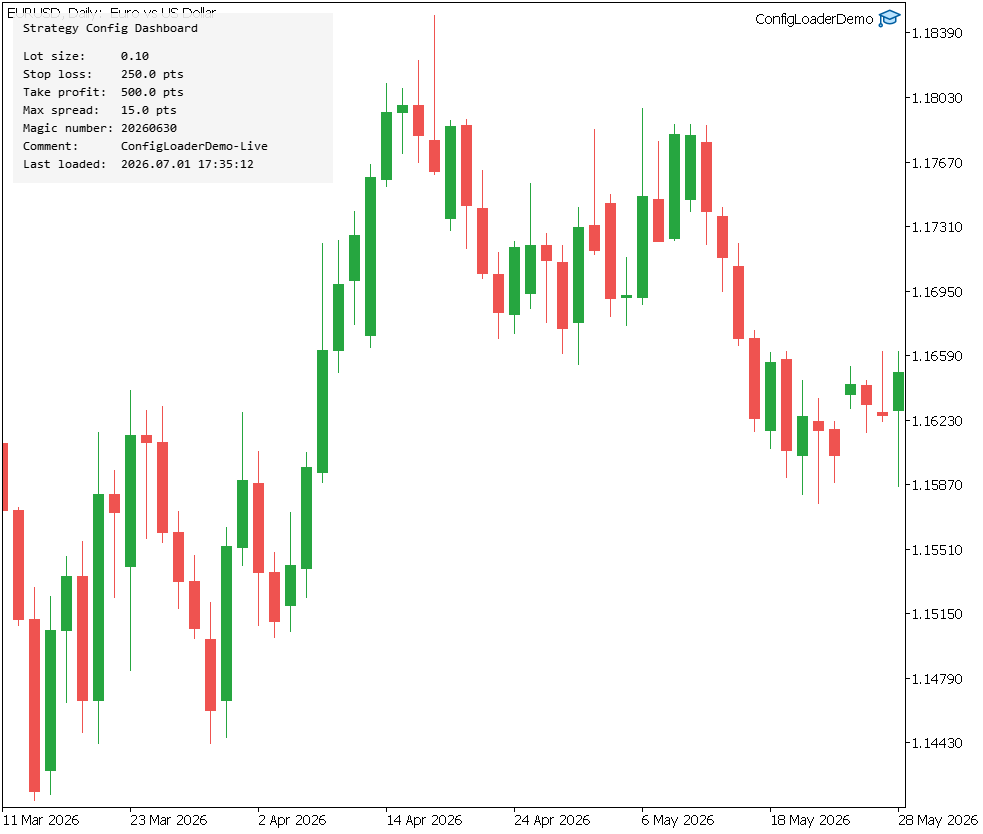
The ConfigLoaderDemo dashboard rendered via CCanvas on a EURUSD Daily chart, showing all six SStrategyConfig fields and the "Last loaded" timestamp of the most recent successful configuration read.
Section 7: The JSON Config File
The StrategyConfig.json file must be placed inside the terminal's MQL5\Files\ directory or a subfolder of it, because MQL5's file functions are sandboxed and cannot read or write arbitrary filesystem paths outside that directory tree. InpConfigFile is therefore a path relative to MQL5\Files\ — in this implementation the file sits in a dedicated subfolder, so the path is set to ConfigLoader\StrategyConfig.json, which resolves to MQL5\Files\ConfigLoader\StrategyConfig.json. The EA does not need to know the terminal's installation directory or data folder location; FileOpen() resolves the relative path against the sandbox root automatically, which makes the same file path portable across terminals with different installation directories.
Before any edits, the file looks like this:
{
  "m_lot_size": 0.10,
  "m_stop_loss_pts": 250,
  "m_take_profit_pts": 500,
  "m_max_spread_pts": 15,
  "m_magic_number": 20260630,
  "m_comment": "ConfigLoaderDemo-Live"
}
A trader who wants to tighten the stop and target — for example, in response to falling volatility — edits the file directly in a text editor and saves it:
{
  "m_lot_size": 0.10,
  "m_stop_loss_pts": 180,
  "m_take_profit_pts": 420,
  "m_max_spread_pts": 15,
  "m_magic_number": 20260630,
  "m_comment": "ConfigLoaderDemo-Live"
}
With the EA already running and attached to a chart, pressing the configured hot-reload key (R by default, key code 82) triggers OnChartEvent(), which calls g_loader.Load() against the now-modified file, parses the new SL/TP values, updates g_config, and redraws the dashboard — all without detaching the EA, without reopening the input dialog, and without recompiling anything.
Section 8: Expected Log Output
Initial load in OnInit():
2026.06.30 09:14:02   CJsonConfigLoader::Tokenize - key='m_lot_size' type=number value=0.10
2026.06.30 09:14:02   CJsonConfigLoader::Tokenize - key='m_stop_loss_pts' type=number value=250
2026.06.30 09:14:02   CJsonConfigLoader::Tokenize - key='m_take_profit_pts' type=number value=500
2026.06.30 09:14:02   CJsonConfigLoader::Tokenize - key='m_max_spread_pts' type=number value=15
2026.06.30 09:14:02   CJsonConfigLoader::Tokenize - key='m_magic_number' type=number value=20260630
2026.06.30 09:14:02   CJsonConfigLoader::Tokenize - key='m_comment' type=string value="ConfigLoaderDemo-Live"
2026.06.30 09:14:02   OnInit - configuration loaded successfully from StrategyConfig.json
2026.06.30 09:14:02   --- SStrategyConfig ---
2026.06.30 09:14:02   m_lot_size        = 0.10
2026.06.30 09:14:02   m_stop_loss_pts   = 250.0
2026.06.30 09:14:02   m_take_profit_pts = 500.0
2026.06.30 09:14:02   m_max_spread_pts  = 15.0
2026.06.30 09:14:02   m_magic_number    = 20260630
2026.06.30 09:14:02   m_comment         = ConfigLoaderDemo-Live
Hot-reload triggered after the file edit in Section 7:
2026.06.30 09:41:17   CJsonConfigLoader::Tokenize - key='m_lot_size' type=number value=0.10
2026.06.30 09:41:17   CJsonConfigLoader::Tokenize - key='m_stop_loss_pts' type=number value=180
2026.06.30 09:41:17   CJsonConfigLoader::Tokenize - key='m_take_profit_pts' type=number value=420
2026.06.30 09:41:17   CJsonConfigLoader::Tokenize - key='m_max_spread_pts' type=number value=15
2026.06.30 09:41:17   CJsonConfigLoader::Tokenize - key='m_magic_number' type=number value=20260630
2026.06.30 09:41:17   CJsonConfigLoader::Tokenize - key='m_comment' type=string value="ConfigLoaderDemo-Live"
2026.06.30 09:41:17   OnChartEvent - hot-reload succeeded at 2026.06.30 09:41:17
2026.06.30 09:41:17   OnChartEvent - lot size old=0.10 new=0.10
2026.06.30 09:41:17   OnChartEvent - stop loss old=250.0 new=180.0
2026.06.30 09:41:17   OnChartEvent - take profit old=500.0 new=420.0
Section 9: Limitations
The tokenizer performs no schema validation. A malformed file — a missing closing brace, an unterminated string, an unexpected character where a key is expected — causes Tokenize() to return false, and Load() propagates that failure, but no diagnostic distinguishes "the file does not exist" from "the file exists but is not valid JSON" beyond the position-specific log lines Tokenize() emits before bailing out. The caller's only contract is a boolean success flag; on failure, the EA's design falls back to whatever configuration it already held (the default at startup, or the previous values on a failed hot-reload), rather than attempting partial recovery.
The tokenizer handles flat objects only. There is no support for nested objects or arrays anywhere in the grammar it accepts; a JSON file containing "thresholds": {"min": 1, "max": 2} would not parse correctly, because the value-end scan treats { as an ordinary character rather than as a structure that needs its own balanced-brace tracking. Extending the tokenizer to nested objects would require recursive or stack-based brace tracking, which is a meaningfully larger undertaking than the flat case this article covers.
The loader is bound by the MQL5 file sandbox: the configuration file must live under MQL5\Files\ or one of its subfolders, which means it cannot be shared directly with processes outside the sandbox (a separate Python deployment script, for instance) without that script also having access to the terminal's data folder. There is no file-change watcher — the EA never detects that the file changed on its own; reload only happens on the keyboard shortcut or, if a future version added it, a periodic timer-driven check. Finally, the design assumes MQL5's single-threaded execution model and makes no provision for concurrent access; a file being written by an external process at the exact moment Load() reads it could, in principle, be read mid-write, though MQL5's strategies typically run on a single chart thread, which limits this risk to genuinely external writers.
Conclusion
The reader now has a working separation between strategy logic and strategy configuration: the CJsonConfigLoader class with its hand-written, quote-aware tokenizer; the typed SStrategyConfig struct with a safe Default() fallback; a hot-reload mechanism wired through OnChartEvent() and a configurable keyboard shortcut; and a complete demonstration EA that loads configuration at startup, displays it on a CCanvas dashboard, and refreshes that dashboard both on a five-second timer and on demand. The concrete guarantee this design provides is that lot size, stop-loss and take-profit levels, the spread filter threshold, the magic number, and the order comment can all be changed by editing a text file and pressing a key, with no recompilation and no detaching the EA from its chart — and that a malformed or missing file at any point, whether at startup or at reload time, leaves the EA holding the last known-good configuration rather than corrupted or partially-applied values.
What this design does not provide is equally specific: there is no schema validation beyond per-key type inspection, no support for nested JSON structures, no mechanism for sharing the file outside the MQL5 sandbox, and no automatic detection of file changes absent the keyboard trigger. A natural extension is a periodic OnTimer()-driven check of the file's modification time, so configuration updates apply without the trader needing to focus the chart and press a key. Another is extending the tokenizer to support arrays for cases like a list of permitted trading sessions, which would require balanced bracket tracking similar to the brace tracking already used for the colon-comma scan. A third is per-symbol configuration files, where the EA derives its file name from the chart's symbol automatically, removing the need for a separate input per chart entirely.
Programs used in the article:
| # | Name | Type | Description |
|---|---|---|---|
| 1 | StrategyConfig.mqh | Include File | Declares the SStrategyConfig struct holding all six runtime-tunable strategy parameters, along with a Default() fallback method and a Print() diagnostic method. |
| 2 | JsonConfigLoader.mqh | Include File | Declares and implements the CJsonConfigLoader class, which reads a JSON file from the MQL5 file sandbox and populates an SStrategyConfig instance via a hand-written tokenizer. |
| 3 | ConfigLoaderDemo.mq5 | Demo EA | Demonstrates the loader in a running EA, loading configuration at startup, rendering a CCanvas dashboard, and supporting hot-reload via a configurable keyboard shortcut. |
| 4 | ConfigLoaderVerify.mq5 | Script | Verifies the tokenizer against a known JSON string written to a temporary file, asserting each parsed field against an expected value and printing a pass/fail summary. |
| 5 | ConfigLoader.zip | Zip Archive | Zip archive containing all the attached files and their paths relative to the terminal's root folder. |
Warning: All rights to these materials are reserved by MetaQuotes Ltd. Copying or reprinting of these materials in whole or in part is prohibited.
This article was written by a user of the site and reflects their personal views. MetaQuotes Ltd is not responsible for the accuracy of the information presented, nor for any consequences resulting from the use of the solutions, strategies or recommendations described.

 From Basic to Intermediate: Working with Files in the MetaTrader 5 Sandbox
 OrderSend retries and circuit breaker in MQL5
 Market Simulation: Position View (III)
 Beyond GARCH (Part VIII): The MMAR Library And Putting it to Work in an Expert Advisor

- Free trading apps
- Over 8,000 signals for copying
- Economic news for exploring financial markets
You agree to website policy and terms of use
I've been using a similar config loader architecture for multi-symbol/strategy EA's, initially as a solution to a cluttered EA Input Dialog Menu, especially with multi-symbol programs.
But I've only been using a .mqh file as the store with a config loader class to work with loading parameters during initialization/runtime.
Do you think using JSON provides added benefits, perhaps down the line when scaling?