

Developing a Multi-Currency Expert Advisor (Part 32): Secrets of the Optimization Project Creation Step (II)
 68
68
 0
0

Introduction
Having previously broken down the entire process of creating a multi-currency Expert Advisor into specific steps in the penultimate Part 30, we have now begun to examine each step in greater detail. In the previous Part 31, we covered the first part of the step for creating an optimization project. As a reminder, this step comes second after developing a simple trading strategy. At this stage, we want to create what is known as an optimization pipeline. By this, we mean a database containing information about a large number of optimization tasks for specific Expert Advisors, which must be run sequentially in the Strategy Tester. One or more optimization projects can be created within a single pipeline. Each project, once executed, is intended to produce a final multi-currency Expert Advisor.
This is a brief overview of the methodology for which we are developing automation tools. We have now systematized and automated most of the operations that were previously performed manually. For example, three stages of similar optimization tasks to be performed within a single project have been identified, and a tool has been created that can generate the required number of optimization tasks to be stored in the database. This is a project creation script-like Expert Advisor. It is called a “script” because it is not intended for trading; once it has completed its job of populating the database according to the specified parameters, this Expert Advisor automatically stops running.
Last time, we began discussing how to form or select the values of the launch parameters for the project creation Expert Advisor. We have already discussed the parameters that determine the creation of first-stage optimization tasks. But the parameters of the second and third stages still remain. Let's take a look at what they consist of, what values to set for them, and how to make an informed choice.
Planning the Route
Now that we have briefly reviewed the preparations we made for the first stage, let's proceed to a detailed examination of all the parameters of the second optimization stage. We will use the same filenames for the project creation Expert Advisors, stage Expert Advisors, and optimization database as we did in the previous part. The test project will be our first project, in which we plan to obtain a multi-currency Expert Advisor that works with three trading instruments (GBPUSD, EURUSD, EURGBP). Its trading strategies work on three timeframes (M3, M5, M12). The optimization period is the first nine months of 2025.
This project is fairly small. It was deliberately made this way so that we could work through the issues of launching and completing all the stages on it, and then move on to expanding it.
At the same time, we will also look at what else could have caused the absence of the final Expert Advisor's database after all tasks in the automated optimization pipeline have been completed. To do this, we will try changing some of the project settings and trace how they affect whether results are obtained successfully.
Parameters for the First Stage
In the previous part, the first-stage Expert Advisor was launched before the optimization project was created. In its parameters, we did not specify either the name of the current optimization database or the identifier of the current optimization task under which information about the optimization passes should be stored in the database. Therefore, we could only view the results of the first optimization stage while it was running, or by using the option to reload the results of previous optimizations into the Strategy Tester. Although the optimization database was created with the default name, no information about the optimization passes was written to it.
After conducting preliminary research, we selected the desired values for the first-stage parameters and specified them in the optimization project creation Expert Advisor file, located in the project repository at Optimization/CreateProject.1968401.mq5:
sinput group "::: Stage 1. Search"
sinput string   stage1ExpertName_ = "Stage1.ex5";     // - Stage Expert Advisor
sinput string   stage1Criterions_ = "6,6,6,6,6,6";    // - Optimization criteria for tasks
sinput long     stage1MaxDuration_ = 120;             // - Max. task duration (s)

//...

// Optimization parameter template for the first stage
string paramsTemplate1(COptimizationProject *p) {
   string params = StringFormat(
                      "symbol_=%s\n"
                      "period_=%d\n"
                      "; ===  Open signal parameters\n"
                      "signalSeqLen_=6||4||1||8||Y\n"
                      "periodATR_=28||28||2||210||N\n"
                      "; ===  Pending order parameters\n"
                      "stopLevel_=25000.0||1||0.01||5||Y\n"
                      "takeLevel_=3630.0||1||0.01||5||Y\n"
                      "; ===  Money management parameters\n"
                      "maxCountOfOrders_=10||1||1||10||N\n"
                      "maxSpread_=100||10||1||100||N\n",
                      p.m_symbol, p.StringToTimeframe(p.m_timeframe));
   return params;
}
They made it possible to obtain a sufficient number of passes. Why is this sufficient? This can be said based on previous experience we already have. However, if we did not yet have such experience, only further steps would allow us to confirm or refute the hypothesis regarding the sufficiency of the number of passes. In other words, it might very well turn out to be insufficient. In that case, we will have to go back to selecting the parameters for the first stage.
Parameters for the Second Stage
Just as, when preparing to select the parameters for the first optimization stage, we performed trial optimization runs, to plan the second stage of the automated optimization pipeline we will need to perform several preliminary runs, as if outside the pipeline.
However, this will not be as straightforward for the second stage, since it must use the optimization results from the first stage. Therefore, we will either create a small test project (with a small number of trading instruments and timeframes, a short optimization interval, and a limited execution time for each optimization task), or arrange for the results of the first-stage Expert Advisor's optimization passes to be stored in the optimization database.
All of this is necessary so that, without spending too much time, we can proceed to modeling and testing the launch of the second stage. It may seem strange that, as part of the step for creating an optimization project, we essentially have to create it, launch it, and look at the results. But there is nothing strange about this; this methodology assumes iterative execution. This means that we first experiment and practice, accumulating information that we use to adjust the parameters of the optimization projects being created; then we create them again, try to run them, and go back one step if necessary. Let's take a look in practice at how such a need may arise.
As a reminder, in the second stage of optimization, we will combine the parameters of several good passes obtained in the first stage into a single group that works together within one Expert Advisor. Each optimization pass in the second stage will give us the results of the combined operation of the strategies in such groups.
When creating the optimization project for the second stage, we must specify the parameter values in the following code block:
sinput group "::: Stage 2. Grouping"
sinput string   stage2ExpertName_ = "Stage2.ex5";     // - Stage Expert Advisor
sinput string   stage2Criterion_  = "6";              // - Optimization criterion for tasks
sinput long     stage2MaxDuration_ = 300;             // - Max. task duration (s)
//sinput bool     stage2UseClusters_= false;          // - Use clustering?
sinput double   stage2MinCustomOntester_ = 500;       // - Minimum normalized profit value
sinput uint     stage2MinTrades_  = 20;               // - Minimum number of trades
sinput double   stage2MinSharpeRatio_ = 0.7;          // - Min. Sharpe ratio
sinput uint     stage2Count_      = 8;                // - Number of strategies in the group (1–16)
Let's take a closer look at each parameter. First come three parameters that specify what will be optimized, how it will be optimized, and for how long:
- stage2ExpertName_ — stage Expert Advisor. The name of the compiled Expert Advisor file for stage 2. As with the name of the stage 1 Expert Advisor, it can be left as Stage2.ex5 for all projects, unless we specifically rename the file Stage2.mq5 in the project repository.
- stage2Criterion_ — optimization criterion for optimization tasks. As with the corresponding parameter for the first stage, this string parameter can contain one or more numbers in the range from 0 to 7, separated by commas. The number of digits determines how many times the optimization process will run for a single set of input parameters. The numbers themselves specify the optimization criterion used for each optimization task, as shown in the following table:
Based on our experience, in the second stage, it is sufficient for us to run a single optimization task and let it run for a longer period of time. We will estimate a little later how large this time value can be. As the optimization criterion, we will also use normalized average annual profit, implemented as a custom criterion (Custom max).Value Criterion 0 Balance max 1 Profit Factor max 2 Expected Payoff max 3 Drawdown min 4 Recovery Factor max 5 Sharpe Ratio max 6 Custom max 7 Complex Criterion max - stage2MaxDuration_ — the maximum duration of the optimization task in seconds. During trial runs using the available testing agent resources, we can estimate the time required for a single optimization process (or optimization task). By observing the process after it is launched in the Strategy Tester, you can see that fairly good results start to appear much earlier than the tester decides to stop the optimization. Therefore, we can reduce the duration of the second stage of automated optimization by limiting the execution time of its optimization task. You can do this by specifying a number greater than 0 for this parameter. If 0 is specified, this means there is no time limit.
We have currently set the value to 300 seconds, which is 5 minutes. Next, we will see if this amount of time will be sufficient for the optimization process in the second stage.
- stage2MinCustomOntester_ — The minimum value of normalized profit. Only those passes that exceed the specified value for normalized profit will advance to the second stage. However, if we use a different criterion in the first stage (for example, maximum balance), then this parameter should specify a threshold value for the maximum balance. As mentioned earlier, we use only the user-defined criterion of normalized average annual profit for optimization, so that is what we are referring to here as well.
By setting the value to 500, we mean that all passes that generated a profit of more than $500 on an initial deposit of $10,000 will advance to the second stage. This is a fairly lenient threshold that filters out unprofitable passes and passes with relatively low profit of less than 5% per year. However, even though there are passes with significantly higher profits, we usually set this filter low enough so that the number of passes selected is not too small. - stage2MinTrades_ — minimum number of trades. Passes that have made fewer trades than the number specified in this parameter will not advance to the second stage. A reasonable value for this parameter depends on the duration of the optimization interval and the trading strategy being used. For short intervals or strategies with infrequent entries, this parameter should be set to a lower value, while for longer intervals or high-frequency strategies — to a higher one.
Typically, this value is also determined empirically: run a trial first stage, examine the number of trades per pass, and select a value such that, for a fairly large number of passes, the number of trades exceeds the selected value. Keep in mind that even for a single trading strategy run on different instruments and timeframes, the average number of trades can vary significantly.
In this parameter, we specify a single value that will be applied to all passes of the first stage. Therefore, when making a selection, you should base your decision on the results of the first stage for the symbol and timeframe with the fewest trades. Otherwise, it may turn out that no group is found for a given symbol and timeframe in the second stage. On the other hand, though, this is not a bad thing either—excluding certain underperforming trading instruments or timeframes from the final Expert Advisor can improve its stability. - stage2MinSharpeRatio_ — minimum Sharpe ratio. Passes with a Sharpe ratio greater than the specified value will advance to the second stage. The same rules apply to choosing the value of this parameter as to the previous two: we base our decision on the results of the first stage, taking care not to reduce the number of suitable passes too much.
- stage2Count_ — the number of strategies in the group. We can enter a number between 2 and 16 here. Fewer than two instances will not form a group, and the current implementation of the second-stage Expert Advisor does not support more than 16. If desired, the upper limit can easily be increased by making changes to the library part, but we have not yet seen a need to do so.
The value chosen for this parameter depends on how many first-stage passes will pass through the specified filters to the second stage. The more of them there are, the more strategies you can include in a single group. For example, if we set the value to 16, then for genetic optimization to work successfully, when 16 optimization passes are randomly selected from all available ones, there must be a high probability that all 16 will be different. If at least two of them are the same, that combination will be discarded. If too many combinations are discarded, the genetic algorithm may degenerate, concluding that there are no suitable combinations at all.
We used a rough estimate that for a number of passes around 10,000 or more, the value 16 can be used, and for fewer passes — 8.
Let's now proceed to verify the preselected parameters for the second stage.
Running the Second Stage in the Trial Project
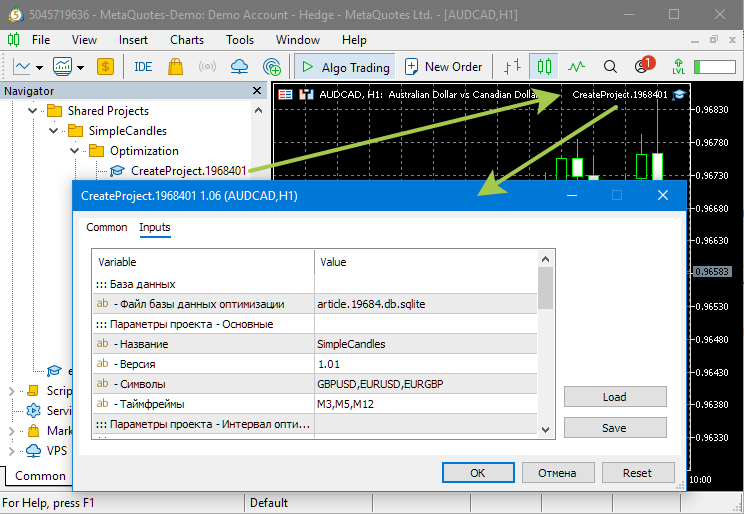
To keep the experiment clean, let's recreate the project and the database. To do this, simply delete the file article.19684.db.sqlite from the terminal's common data folder. If your database has a different name, be sure to delete that one. Next, run the Expert Advisor for creating the optimization project on any chart in the terminal. We agreed to work with the first optimization project, for which the project creation Expert Advisor is named Optimization/CreateProject.1968401.ex5:
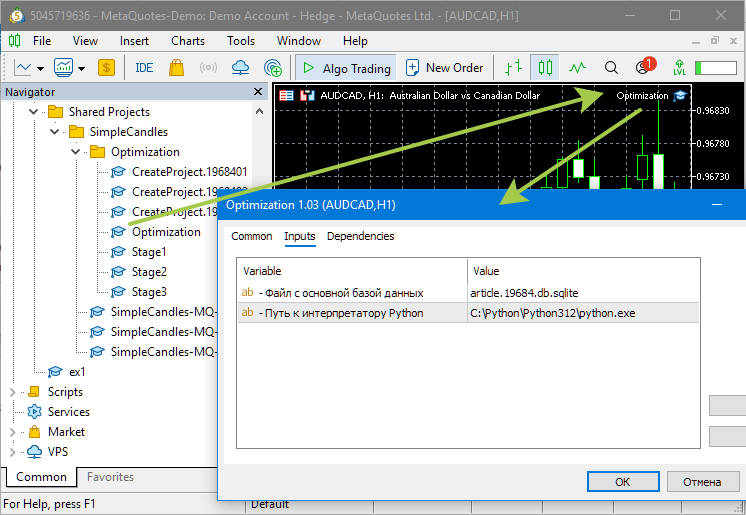
Once the optimization project has been created, let's run the optimization Expert Advisor. It is the same for all projects and is called Optimization/Optimization.ex5:
We should see something like this, indicating that optimization has started:
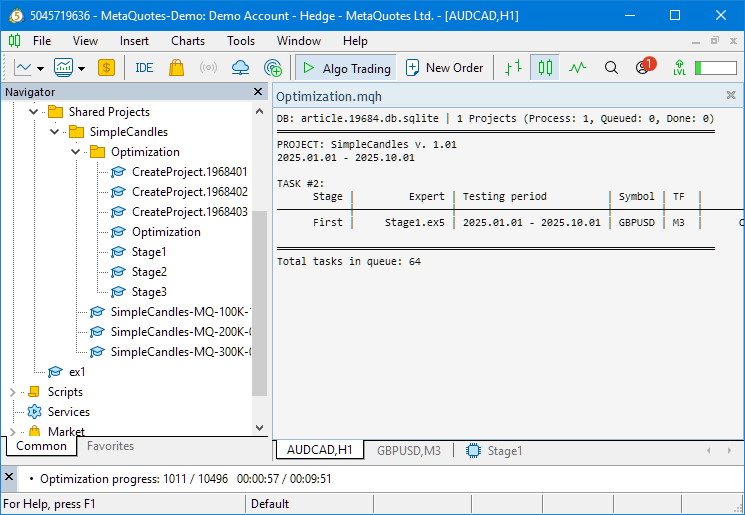
As you can see, the current database contains one project, which is currently in the Process state, meaning it is running. The current optimization task is the first-stage task for the GBPUSD symbol and the M3 timeframe. In total, 64 optimization tasks remain to be completed within the project, including all three stages.
Let's wait for the first stage to finish. Given the specified parameters, it will take about 108 minutes to complete (3 symbols * 3 timeframes * 6 tasks * 2 minutes = 108). It is not that long.
During this test run, we managed to identify a bug that prevented the optimization from starting, even though the optimization task was marked as completed. It seems that this was the reason why the final Expert Advisor was not created for the first project last time. After stopping the pipeline by removing the automatic optimization Expert Advisor from the chart, we ran the optimization process manually several times in the Strategy Tester using the most recent settings.
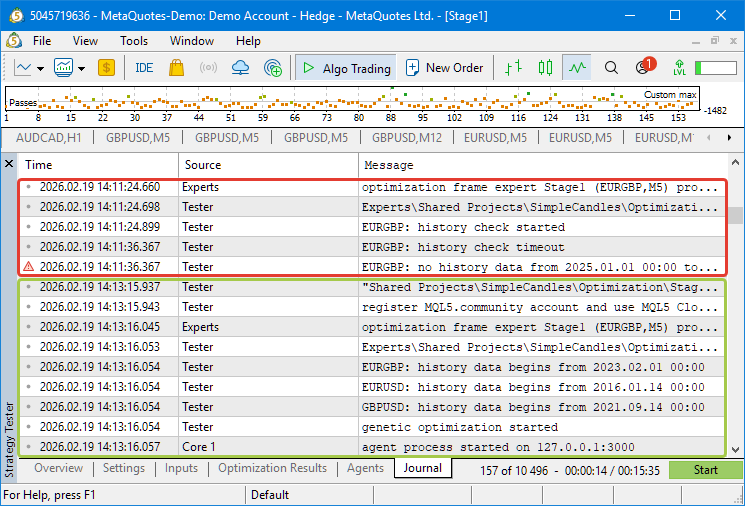
This was necessary because, when the automatic optimization pipeline is running, the logs are cleared before each optimization task is launched to save space. Since the new task automatically started immediately after the previous one failed, it was difficult to catch the brief error message in the log. Here are the results obtained from two consecutive manual runs:
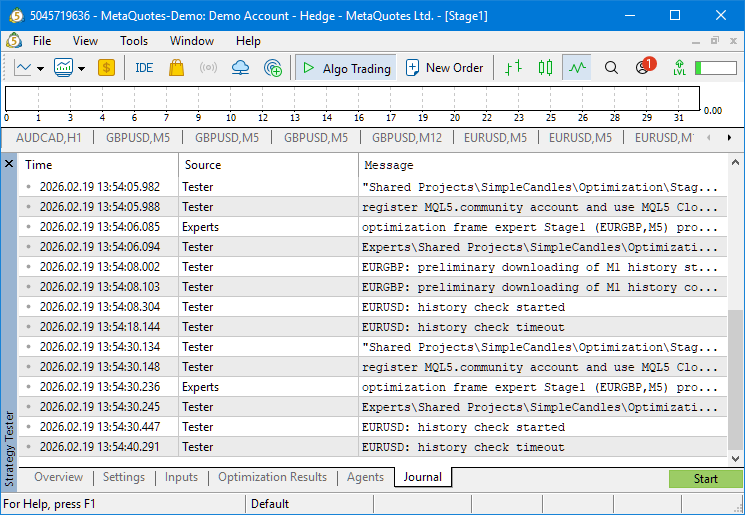
It appears that the error is caused by the trading history for the required symbol being unavailable. That seems a little strange. But let's see what this looks like in the database. Let's open it in SQLite Studio and view the contents of the tasks table (tasks):
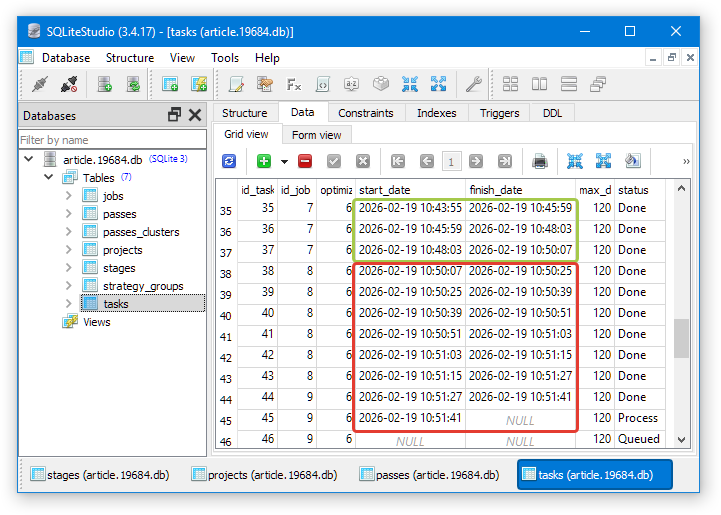
The green border highlights the optimization tasks that completed successfully — that is, their execution time was about two minutes. The red border highlights the optimization tasks for which the runtime was significantly shorter (about 15 seconds). It is clear that the error appeared after switching to the job with the identifier id_job=8. Let's take a look at this job in the jobs table (jobs):
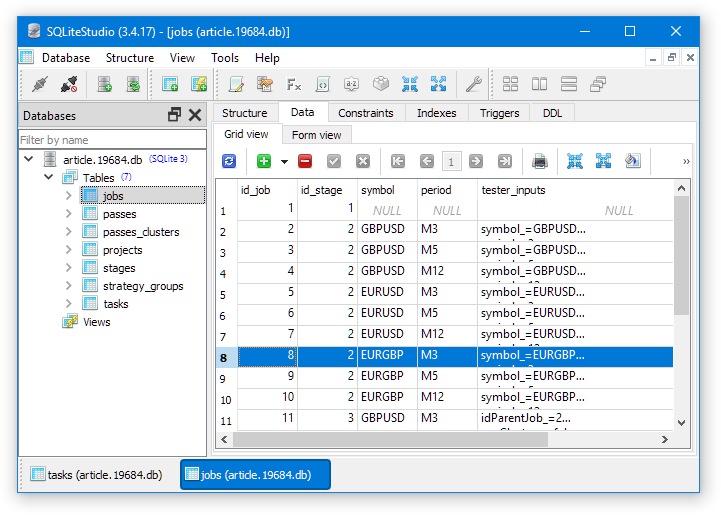
As can be seen, optimization for the EURGBP symbol starts for the first time in this job. For some reason, this required downloading the history for the EURUSD symbol again, even though optimizations on that symbol and over the same timeframe had successfully completed shortly before. Apparently, the problem was that the terminal lost its connection to the MetaQuotes trading demo server.
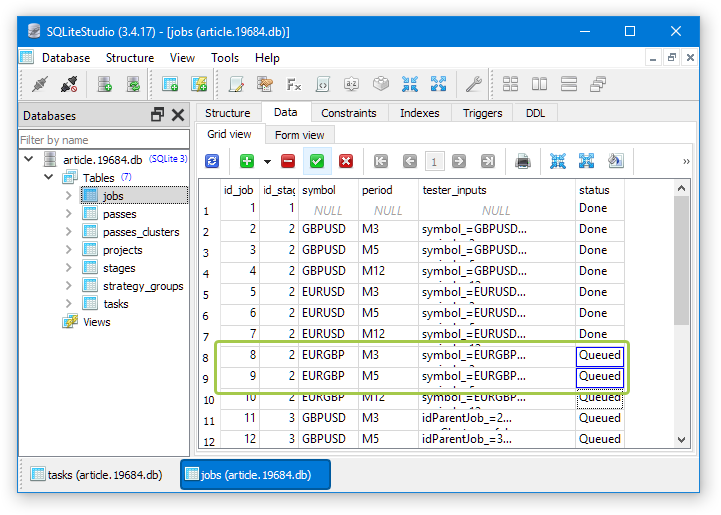
We will roll back the statuses of the jobs that could not be completed. To do this, change the value in the status column of the jobs table (jobs) to Queued. This change will automatically update the statuses of all tasks included in these jobs:
For a while, the terminal was unable to connect to the server, but then the connection was reestablished. We noticed this during another manual optimization run, when the error messages regarding the history check were replaced by messages indicating that the genetic optimization had started normally:
Let's run the optimization Expert Advisor again and hope that this time everything completes successfully. However, in light of this experience, we will need to consider ways to protect against such situations in the near future. If the reason is that the terminal cannot connect to the server, you can add a connection status check at the start and end of the pass. If the terminal is in the “not connected” status, the next optimization task is either not started or not marked as completed. However, the optimization Expert Advisor will not immediately attempt to restart the task; instead, it will periodically check whether the terminal's connection to the server has been restored.
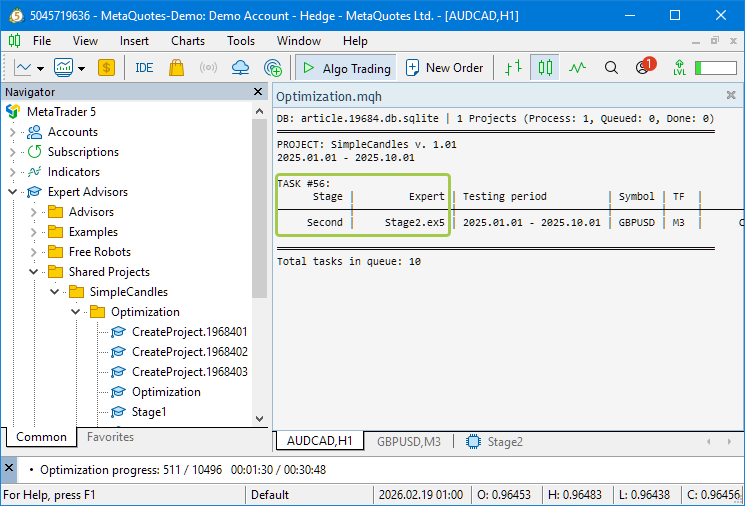
Fortunately, this time the first optimization stage completed successfully, and the queue finally reached the second-stage tasks:
Let's switch to the Inputs tab to see what the optimization parameters for the second-stage Expert Advisor look like:
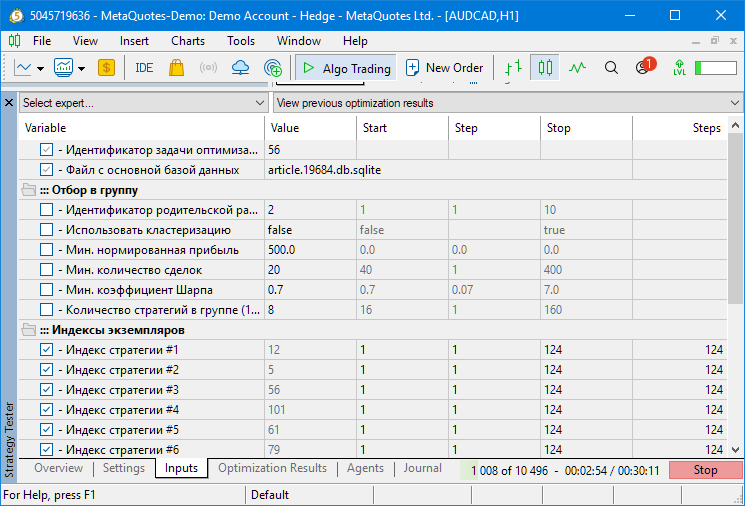
As you can see, it includes the parameters we are already familiar with: the optimization task ID and the name of the database being used. We've already seen them in the first-stage Expert Advisor, and we will see them again in the third-stage Expert Advisor. Next come the parameters for filtering the first-stage passes (selection into a group). We have already described them above as well. This is followed by 16 parameters that specify the indices of the first-stage passes selected from those obtained after filtering.
Since the first optimization stage may yield a different number of suitable passes each time, we do not set the range of these parameters manually. They are set by the second-stage Expert Advisor itself using the function ParameterSetRange(). Because of this, the actual values used there are not visible on the Inputs tab of the Strategy Tester.
If we switch to the optimization results tab, we can see that the pass numbers reach 5,000 and higher:
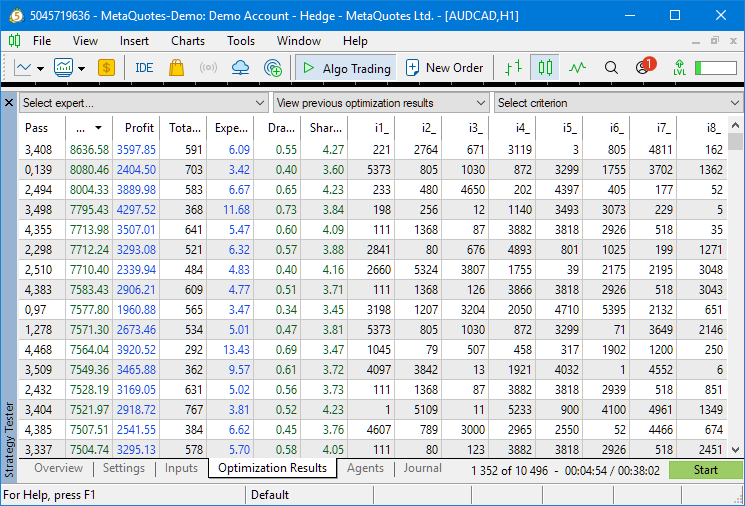
This means that, for the GBPUSD M3 optimization task, more than 5,000 passes were selected for the second stage of the automated optimization pipeline. That is quite enough to form groups of 8 instances. When you switch to the optimization visualization tab, you can see that the optimization is readily finding good groups:
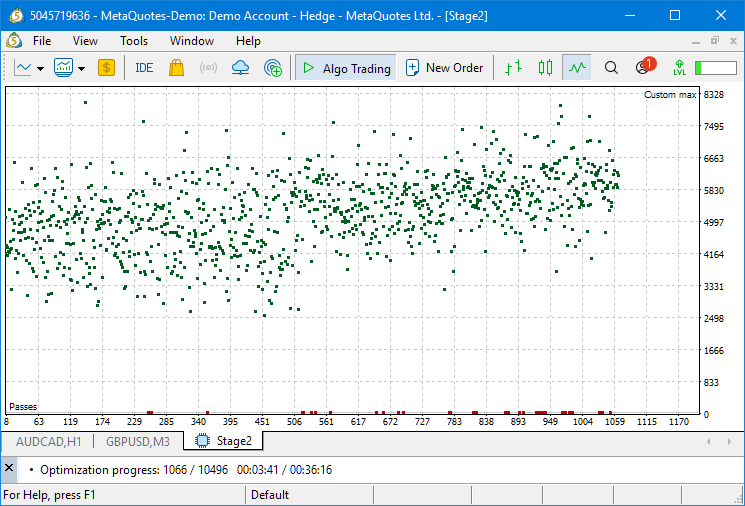
More than a thousand passes were completed in less than four minutes. Each pass — is a run of the Expert Advisor with a group of 8 instances. The normalized profit for successfully tested groups is concentrated in the range from $3,000 to $8,000. The number of failed groups, where duplicate indices occurred among the eight indices (red dots at the bottom of the graph), is relatively small.
But let's not wait for the optimization process to finish; let's stop it. To do this, we will first remove the optimization Expert Advisor from the chart to which it was attached, and only then click the "Stop" button in the Strategy Tester. If you do it the other way around, you might not have time to remove the optimization Expert Advisor before it gives the tester a new job and starts the next optimization task.
Now that the optimization database already contains the results of the first run, we can see how the second-stage parameters affect its execution.
Let's try tightening the selection criteria and putting more strategies in the group: 16 instead of 8. To better understand how the other parameters affect the process, let’s look at the SQL query that, in the Stage 2 Expert Advisor, retrieves the results of the first optimization stage (passes of single instances of the trading strategy with different parameter values):
// Query for retrieving the required information from the main database
   string query = StringFormat("SELECT DISTINCT p.params"
                               " FROM passes p"
                               "      JOIN "
                               "      tasks t ON p.id_task = t.id_task "
                               "      JOIN "
                               "      jobs j ON t.id_job = j.id_job "
                               "      %s "
                               "WHERE (j.id_job = %d AND  "
                               "       p.custom_ontester >= %.2f AND  "
                               "       trades >= %d AND  "
                               "       p.sharpe_ratio >= %.2f)  "
                               "ORDER BY p.custom_ontester DESC;",
                               clusterJoin,
                               idParentJob_,
                               minCustomOntester_,
                               minTrades_,
                               minSharpeRatio_);
You can copy this SQL query into SQLite Studio and run it there, substituting different parameter values. For example, this query will show how many first-stage passes will be taken for the parent job with id_job=2 (the first stage for GBPUSD, M3)
SELECT DISTINCT p.params
  FROM passes p
       JOIN
       tasks t ON p.id_task = t.id_task
       JOIN
       jobs j ON t.id_job = j.id_job
 WHERE (j.id_job = 2 AND
        p.custom_ontester >= 500 AND
        trades >= 20 AND
        p.sharpe_ratio >= 0.7)
 ORDER BY p.custom_ontester DESC;
When we ran this query, we got 5,544 rows. However, if you raise the minimum Sharpe ratio in the query to 3 (p.sharpe_ratio >= 3), only 577 rows remain. That is already significantly less. In other runs of the optimization project, we may get different exact values for the number of selected passes, but the ratio will be similar.
But there is another way: you can change the parameter values of the second-stage Expert Advisor in the Strategy Tester after stopping the automated optimization pipeline and see how the optimization process changes. In this case, we do not need to look up the parent job's ID in the database ourselves. The second-stage Expert Advisor will determine it itself based on the ID of the current optimization task specified in the first input parameter.
Let's try using more strategies in the group by increasing this value to 16. At the same time, we will increase the minimum normalized profit to $6,000 and the minimum Sharpe ratio to 3 (in this case, the number of selected passes was 266):
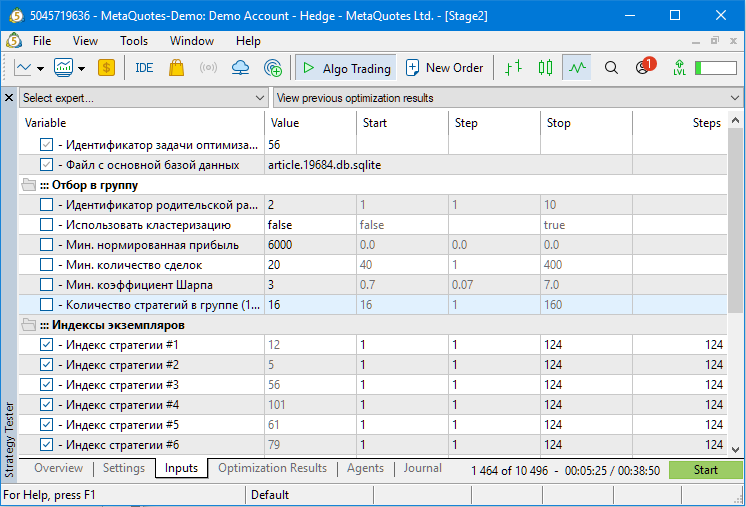
We run the optimization and see the following:
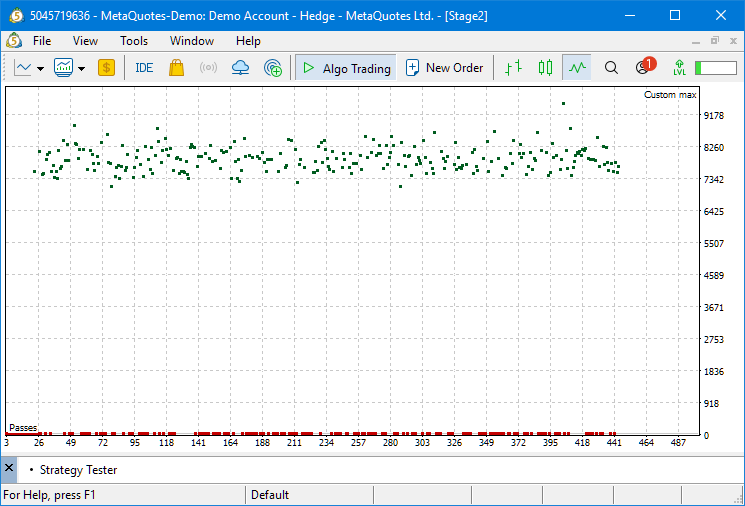
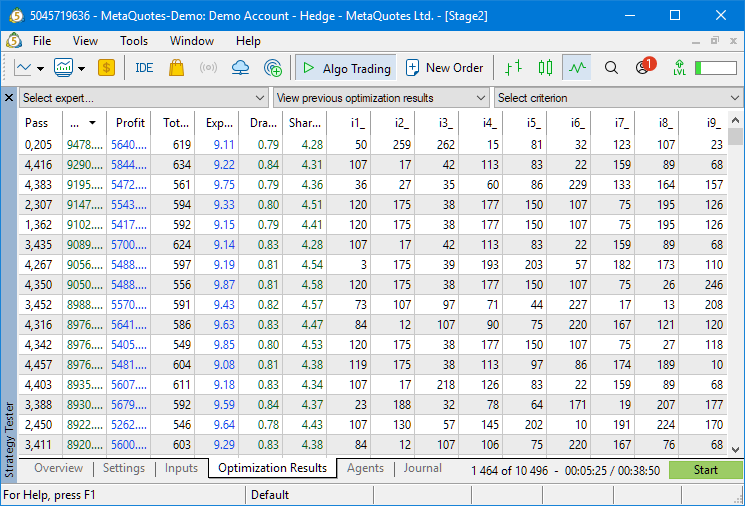
Now there are far more failed tester pass launches, but because of the higher quality requirements for first-stage passes, successful launches immediately yield higher normalized profit results, with the minimum value starting at $7,000 rather than $3,000 as before:
Let's try increasing the minimum normalized profit to $8,000, while reducing the number of strategies in the group to 8:
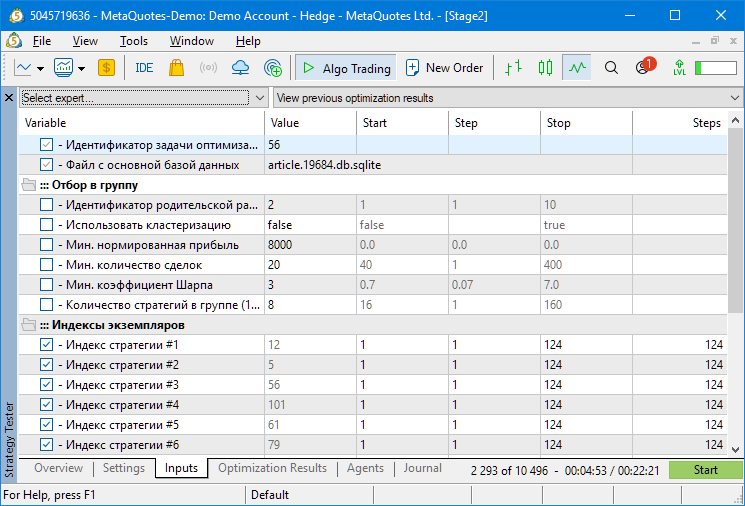
In this case, only 46 first-stage passes are taken, so had we left the number of strategies in the group at 16, genetic optimization would most likely have been unable to find a single combination in which all 16 indices of the first-stage passes in one group were different. However, such combinations were found for eight strategies in the group:
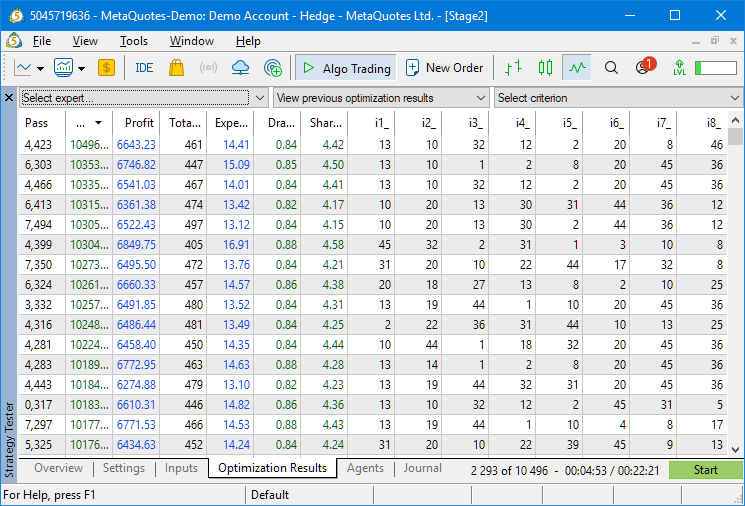
But we need to be careful here. As mentioned above, setting the initial requirements for the first-pass results too high may mean that, for some symbol-timeframe pairs, we do not have enough passes to successfully complete the second stage. For diversification, it is advisable to ensure the widest possible variety of individual instances of trading strategies. Even if lower profit is obtained in some sections, larger losses can be avoided in others.
Therefore, let's return to the previously set default values for the second stage and run the automated optimization pipeline through to the end. For now, let's just take a look at the results of the third stage this time around:
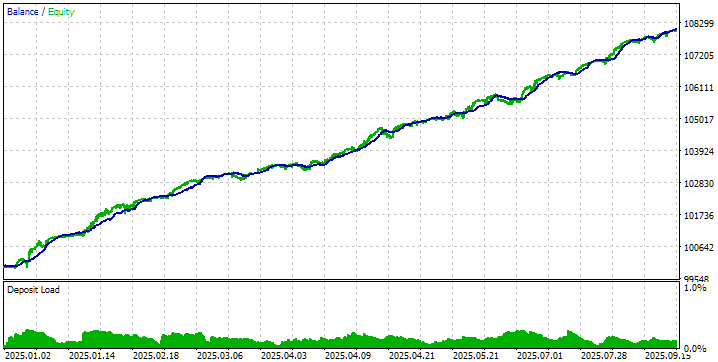
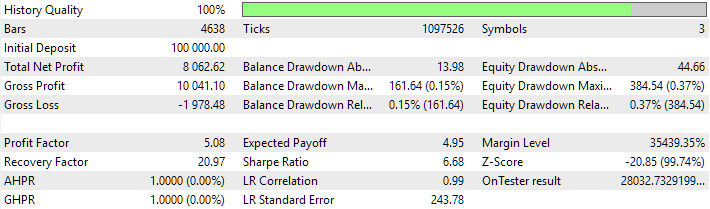
These are very encouraging results. Judging by the value of the OnTester result parameter, the expected average annual profit at a 10% drawdown will be about 280%. But let's not forget that it is one thing to get good-looking results in the Strategy Tester on historical data and quite another thing — to be able to repeat them in the future on a trading account.
Conclusion
In this part, we have completed our review of the parameters of the second stage of the automated optimization pipeline for the multi-currency Expert Advisor. The settings responsible for filtering passes from the first stage and forming groups of trading strategies were analyzed in detail. Practical runs have shown that successful operation of the genetic algorithm requires balance: overly lenient selection criteria reduce the quality of the resulting combinations, while excessively strict requirements may leave too few candidates for an effective search.
An important aspect of the methodology remains the iterative nature of the process. Test runs on scaled-down projects allow you to quickly gather statistics and adjust parameters before full-scale optimization, saving time and computational resources. In addition, testing revealed a vulnerability in the pipeline when the connection to the history server is lost, underscoring the need to implement additional connection status checks to ensure the reliability of the automated process.
With that, we have generally completed our discussion of the project creation step. The first and second stages were described in detail. And although there is also a third stage, which we have not really touched on yet, it would make more sense to address it as part of the next step — launching the optimization project. But we will begin discussing it in the next part.
Thank you for your attention, and see you next time!
Important Warning
All results presented in this article and in all previous articles in the series are based solely on historical testing data and do not guarantee any profit in the future. The work carried out as part of this project is research-oriented. All published results may be used by anyone at their own risk.
| # | Name | Version | Description | Latest Changes |
|---|---|---|---|---|
| SimpleCandles | Project working folder (inside MQL5/Shared Projects) | |||
| 1 | SimpleCandles-MQ-100K-10.mq5 SimpleCandles-MQ-200K-07.mq5 SimpleCandles-MQ-300K-05.mq5 | 1.05 | Final Expert Advisors for running multiple groups of model strategies in parallel. The parameters will be taken from the built-in group library. There may be more of them, and each one can be used as a template. | Part 30 |
| └ Optimization | Folder for the project's optimization Expert Advisors | |||
| 2 | CreateProject.1968401.mq5 CreateProject.1968401.mq5 CreateProject.1968401.mq5 | 1.06 1.05 1.05 | Project creation script-like Expert Advisor that creates a project with stages, jobs, and optimization tasks. | Part 31 |
| 3 | Optimization.mq5 | 1.03 | Expert Advisor for automatic project optimization | Part 29 |
| 4 | Stage1.mq5 | 1.04 | Optimization Expert Advisor for a single trading strategy instance (Stage 1) | Part 30 |
| 5 | Stage2.mq5 | 1.04 | Optimization Expert Advisor for a group of trading strategy instances (Stage 2) | Part 30 |
| 6 | Stage3.mq5 | 1.04 | Expert Advisor that saves the generated normalized strategy group to the Expert Advisor database under the specified name. | Part 30 |
| └ Strategies | Project strategies folder | Part 25 | ||
| 7 | SimpleCandlesStrategy.mqh | 1.03 | SimpleCandles trading strategy class | Part 30 |
| Adwizard | Adwizard library folder (inside MQL5/Shared Projects) | |||
| └ Base | Base classes from which other project classes inherit | |||
| 8 | Advisor.mqh | 1.04 | Base Expert Advisor class | Part 10 |
| 9 | Factorable.mqh | 1.06 | Base class for objects created from a string | Part 28 |
| 10 | FactorableCreator.mqh | 1.00 | Class for creators that map names to static constructors of CFactorable subclasses | Part 24 |
| 11 | Interface.mqh | 1.01 | Base class for visualizing various objects | Part 4 |
| 12 | Receiver.mqh | 1.04 | Base class for converting open volumes into market positions | Part 12 |
| 13 | Strategy.mqh | 1.04 | Base class for a trading strategy | Part 10 |
| └ Database | Files for working with all types of databases used by the project's Expert Advisors | |||
| 14 | Database.mqh | 1.13 | Class for working with a database | Part 29 |
| 15 | db.adv.schema.sql | 1.00 | Database schema for the final Expert Advisor | Part 22 |
| 16 | db.cut.schema.sql | 1.00 | Database schema for the cut-down optimization database | Part 22 |
| 17 | db.opt.schema.sql | 1.06 | Optimization database schema | Part 29 |
| 18 | Storage.mqh | 1.01 | Class for working with a key-value store for the final Expert Advisor in the Expert Advisor database | Part 23 |
| └ Experts | Files containing common components used by different types of Expert Advisors | |||
| CreateProject.mqh | 1.07 | Library file for a project creation script-like Expert Advisor to create a project with stages, jobs, and optimization tasks | Part 30 | |
| 19 | Expert.mqh | 1.24 | Library file for the final Expert Advisor. Group parameters can be taken from the Expert Advisor database | Part 28 |
| 20 | Optimization.mqh | 1.06 | Library file for the Expert Advisor that manages the launch of optimization tasks | Part 29 |
| 21 | Stage1.mqh | 1.19 | Library file for the optimization Expert Advisor for a single trading strategy instance (Stage 1) | Part 23 |
| 22 | Stage2.mqh | 1.04 | Library file for the optimization Expert Advisor for a group of trading strategy instances (Stage 2) | Part 23 |
| 23 | Stage3.mqh | 1.04 | Library file for an Expert Advisor that saves the generated normalized strategy group to the Expert Advisor database under a specified name. | Part 23 |
| └ Optimization | Classes responsible for automatic optimization | |||
| 24 | OptimizationJob.mqh | 1.00 | Class for managing an optimization project stage | Part 25 |
| 25 | OptimizationProject.mqh | 1.00 | Class for the optimization project | Part 25 |
| 26 | OptimizationStage.mqh | 1.00 | Class for an optimization project stage | Part 25 |
| 27 | OptimizationTask.mqh | 1.01 | Class for an optimization task (for creation) | Part 29 |
| 28 | Optimizer.mqh | 1.04 | Class for the automated project optimization manager | Part 29 |
| 29 | OptimizerTask.mqh | 1.06 | Class for an optimization task (for the optimization pipeline) | Part 29 |
| └ Strategies | Examples of trading strategies used to demonstrate how the project works | |||
| 24 | HistoryStrategy.mqh | 1.00 | Class for a trading strategy that reproduces trade history | Part 16 |
| 25 | SimpleVolumesStrategy.mqh | 1.11 | Class for a trading strategy using tick volumes | Part 22 |
| └ Utils | Auxiliary utilities and macros for shortening code | |||
| 26 | ConsoleDialog.mqh | 1.01 | Class for displaying text information on a chart | Part 28 |
| 26 | ExpertHistory.mqh | 1.00 | Class for exporting trade history to a file | Part 16 |
| 27 | Macros.mqh | 1.07 | Useful macros for array operations | Part 26 |
| 28 | MTTester.mqh | — | File for working with the Strategy Tester from the MultiTester library | Part 28 |
| 29 | NewBarEvent.mqh | 1.00 | Class for detecting a new bar for a specific symbol | Part 8 |
| 30 | SymbolsMonitor.mqh | 1.01 | Class for obtaining information about trading instruments (symbols) | Part 28 |
| └ Virtual | Classes for creating various objects that share the use of a virtual trading order and position system | |||
| 31 | Money.mqh | 1.01 | Base money management class | Part 12 |
| 32 | TesterHandler.mqh | 1.07 | Class for handling optimization events | Part 23 |
| 33 | VirtualAdvisor.mqh | 1.12 | Expert Advisor class for working with virtual positions (orders) | Part 28 |
| 34 | VirtualChartOrder.mqh | 1.02 | Graphical virtual position class | Part 28 |
| 35 | VirtualCloseManager.mqh | 1.00 | Close manager class | Part 28 |
| 36 | VirtualHistoryAdvisor.mqh | 1.00 | Trade history playback Expert Advisor class | Part 16 |
| 37 | VirtualInterface.mqh | 1.00 | Expert Advisor graphical user interface class | Part 4 |
| 38 | VirtualOrder.mqh | 1.09 | Virtual orders and positions class | Part 22 |
| 39 | VirtualReceiver.mqh | 1.04 | Class for converting open volumes into market positions (receiver) | Part 23 |
| 40 | VirtualRiskManager.mqh | 1.06 | Risk management class (risk manager) | Part 28 |
| 41 | VirtualStrategy.mqh | 1.09 | Trading strategy class with virtual positions | Part 23 |
| 42 | VirtualStrategyGroup.mqh | 1.04 | Class for a group of trading strategies or trading strategy groups | Part 28 |
| 43 | VirtualSymbolReceiver.mqh | 1.00 | Symbol Receiver Class | Part 3 |
The source code is also available in the public repositories SimpleCandles and Adwizard.
Translated from Russian by MetaQuotes Ltd.
Original article: https://www.mql5.com/ru/articles/21323
Warning: All rights to these materials are reserved by MetaQuotes Ltd. Copying or reprinting of these materials in whole or in part is prohibited.
This article was written by a user of the site and reflects their personal views. MetaQuotes Ltd is not responsible for the accuracy of the information presented, nor for any consequences resulting from the use of the solutions, strategies or recommendations described.

 Features of Custom Indicators Creation
 Python-MetaTrader 5 Strategy Tester (Part 06): MQL5-Style Backtesting for Python Expert Advisors
 Features of Experts Advisors
 Building an Adaptive Fibonacci Volatility Band Indicator in MQL5

- Free trading apps
- Over 8,000 signals for copying
- Economic news for exploring financial markets
You agree to website policy and terms of use