

Developing a multi-currency Expert Advisor (Part 22): Starting the transition to hot swapping of settings
 5 590
5 590
 0
0

Introduction
In the previous two parts of our article series, we made serious preparations for further experiments with auto optimization of trading EAs. The main focus was on creating an optimization conveyor, which currently consists of three stages:
- Optimization of single strategy instances for specific combinations of symbols and timeframes.
- Forming groups from the best single specimens obtained in the first stage.
- Generating the initialization string of the final EA, combining the formed groups, and saving it in the library.
To ensure the possibility of automating the creation of the conveyor itself, a specialized EA script was developed. It allows filling the database with optimization projects, creating stages, jobs, and tasks for them according to specified parameters and templates. This approach provides the possibility of further execution of optimization tasks in a given order, moving from stage to stage.
We also looked for ways to improve performance using profiling and code optimization. The main focus was on working with objects that arrange the receipt of information about trading instruments (symbols). This has significantly reduced the number of method calls required to retrieve price and symbol specification data.
The result of this work was the automatic generation of results that can be used for further experiments and analysis. This opens the way to testing hypotheses about how the frequency and order of re-optimization may affect trading performance.
In this new article, we will delve into the implementation of a new mechanism for loading parameters of final EAs, which should allow for partial or complete replacement of the composition and parameters of single instances of trading strategies, both during a single run in the strategy tester and when the final EA is running on a trading account.
Mapping out the path
Let's try to describe in more detail what we want to achieve. Ideally, the system should work something like this:
- A project is generated with the current date as the end date of the optimization period.
- The project is launched on the conveyor. Its implementation takes some time - from several days to several weeks.
- The results are loaded into the final EA. If the final EA has not yet traded, it is launched on a real account. If it was already working on the account, then its parameters are replaced with new ones received after the last project completed passing through the conveyor.
- Let's move on to point 1.
Let's consider each of these points. To implement the first point, we already have a project generation script EA from the previous part, in which we can use parameters to select the end date of the optimization. But for now it can only be launched manually. This can be fixed by adding an additional stage to the project execution conveyor that generates a new project once all other stages of the current project are completed. Then we can only run it manually the first time.
For the second point, we only need to have a terminal with the installed Optimization.ex5 EA, which has the required database specified in its parameters. As soon as new outstanding project tasks appear in it, they will be launched for execution in the order of the queue. The last stage, which comes before the stage of creating a new project, should in some form transfer the results of the project optimization to the final EA.
The third point is the most difficult. We have already implemented a single option of passing parameters to the final EA, but it still requires manual operations: you need to run a separate EA that exports the parameter library to a file, then copy this file to the project folder, and then recompile the final EA. Although we can now delegate the execution of these operations to program code, the structure itself begins to seem unnecessarily cumbersome. I would like to do something simpler and more reliable.
Another drawback of the implemented method of passing parameters to the final EA is the inability to partially replace parameters. Only a complete replacement, which leads to the closure of all open positions, if any, and the start of trading from scratch. And this drawback cannot be fundamentally eliminated if we remain within the framework of the existing method.
Let's remember that by parameters we now mean the parameters of a large number of instances of single trading strategies that operate in parallel in one final EA. If old parameters are instantly replaced with new ones, even if they are mostly identical to the old ones, then the current implementation will most likely not be able to correctly load information about previously opened virtual positions. This will be possible only if the number and order, in which the parameters of the single instances were located in the initialization string of the final EA are completely identical.
To enable partial parameter replacement, it is necessary to somehow manage the simultaneous existence of both old and new parameters. In this case, a smooth transition algorithm can be developed, leaving some individual instances unchanged. Their virtual positions should remain in operation. The positions of those instances that are not among the new parameters should be closed correctly. Newly added instances should start working from scratch.
It looks like more significant changes are brewing than we would like. But what can we do if we do not see any other way to achieve the desired result? It is better to accept the need for change earlier. If we continue moving in a direction that is not entirely right, then the further we go, the more difficult it will be to move from it to a new road.
So, it is time to move on to the dark side of storing all the information about the EA's work in the database. Moreover, in a separate database, since the databases used for optimization are very heavy (several gigabytes per project). There is no point in keeping them available to the final EA, since only a tiny portion of the information from them will be needed for actual work.
We would also like to be able to re-arrange the order of the auto optimization stages. We mentioned that in Part 20 calling it grouping by symbol and timeframe. But we did not choose it at the time, since without the possibility of partial replacement of parameters, there was no need for such an order. Now, if everything works out, it will turn out to be more preferable. But let's first try to make the transition to using a separate database for the final EA, ensuring hot swapping of parameters of single instances of trading strategies.
Transforming the initialization string
The task at hand is quite extensive, so we will move in small steps. Let's start with the fact that we will need to store information about individual instances of trading strategies in the EA database. This information is now provided in the EA initialization string. The EA can obtain it either from the optimization database or from the data (string constants) built into the EA code, taken from the parameter library at the compilation stage. The first method is used in optimization EAs (SimpleVolumesStage2.mq5 and SimpleVolumesStage3.mq5), and the second way is in the final EA (SimpleVolumesExpert.mq5).
We want to add a third way: the initialization string should be divided into parts related to different single instances of trading strategies, these parts are stored in the EA database. Then, the EA will be able to read them from its database and form a complete initialization string from the pieces. It will be used to create an EA object that will perform all further work.
To understand how we can split the initialization string, let's look at a typical example from the previous article. It is quite large (~200 strings), so we will show only the minimum necessary part, giving an idea of its structure.
class CVirtualStrategyGroup([
    class CVirtualStrategyGroup([
        class CVirtualStrategyGroup([
            class CSimpleVolumesStrategy("GBPUSD",16385,12,1.00,1.30,80,3200.00,930.00,12000,3)
        ],8.428150),
        class CVirtualStrategyGroup([
            class CSimpleVolumesStrategy("GBPUSD",16385,172,1.40,1.20,140,2200.00,1220.00,19000,3)
        ],12.357884),
        class CVirtualStrategyGroup([
            class CSimpleVolumesStrategy("GBPUSD",16385,12,1.20,0.10,0,1800.00,780.00,8000,3)
        ],4.756016),
        class CVirtualStrategyGroup([
            class CSimpleVolumesStrategy("GBPUSD",16385,172,0.30,0.10,150,4400.00,1000.00,1000,3)
        ],4.459508),
        class CVirtualStrategyGroup([
            class CSimpleVolumesStrategy("GBPUSD",16385,12,0.50,1.10,200,2800.00,1030.00,32000,3)
        ],5.021593),
        class CVirtualStrategyGroup([
            class CSimpleVolumesStrategy("GBPUSD",16385,172,1.40,1.70,100,200.00,1640.00,32000,3)
        ],18.155410),
        class CVirtualStrategyGroup([
            class CSimpleVolumesStrategy("GBPUSD",16385,12,0.10,0.40,160,8400.00,1080.00,44000,3)
        ],4.313320),
        class CVirtualStrategyGroup([
            class CSimpleVolumesStrategy("GBPUSD",16385,52,0.50,1.00,110,3600.00,1030.00,53000,3)
        ],4.490144),
    ],4.615527),
    class CVirtualStrategyGroup([
        class CVirtualStrategyGroup([
            class CSimpleVolumesStrategy("GBPUSD",16385,12,0.10,0.80,240,4800.00,1620.00,57000,3)
        ],6.805962),
        class CVirtualStrategyGroup([
            class CSimpleVolumesStrategy("GBPUSD",16385,52,0.50,1.80,40,400.00,930.00,53000,3)
        ],11.825922),
        class CVirtualStrategyGroup([
            class CSimpleVolumesStrategy("GBPUSD",16385,212,1.30,1.50,160,600.00,1000.00,28000,3)
        ],16.866251),
        class CVirtualStrategyGroup([
            class CSimpleVolumesStrategy("GBPUSD",16385,12,0.30,1.50,30,3000.00,1280.00,28000,3)
        ],5.824790),
        class CVirtualStrategyGroup([
            class CSimpleVolumesStrategy("GBPUSD",16385,12,1.30,0.10,10,2000.00,780.00,1000,3)
        ],3.476085),
        class CVirtualStrategyGroup([
            class CSimpleVolumesStrategy("GBPUSD",16385,12,0.10,0.10,0,16000.00,700.00,11000,3)
        ],4.522636),
        class CVirtualStrategyGroup([
            class CSimpleVolumesStrategy("GBPUSD",16385,52,0.40,1.80,80,2200.00,360.00,25000,3)
        ],8.206812),
        class CVirtualStrategyGroup([
            class CSimpleVolumesStrategy("GBPUSD",16385,12,0.10,0.10,0,19200.00,700.00,44000,3)
        ],2.698618),
    ],5.362505),
    class CVirtualStrategyGroup([
        ...
    ],5.149065),

    ...

    class CVirtualStrategyGroup([
        ...
    ],2.718278),
],2.072066)
This initialization string consists of nested groups of trading strategies of the first, second and third level. The single instances of trading strategies are nested only in third-level groups. Each instance has parameters specified. Each group has scaling factor, it is present on the first, second and third levels. The use of scaling factors was discussed in Part 5. They are needed to normalize the maximum drawdown achieved during the test period to the value of 10%. Moreover, the value of the scaling factor for a group containing several nested groups, or several nested instances of strategies, is first divided by the number of elements in this group, and then this new factor is applied to all nested elements. This is what it looks like in the VirtualStrategyGroup.mqh file code:
//+------------------------------------------------------------------+
//| Constructor                                                      |
//+------------------------------------------------------------------+
CVirtualStrategyGroup::CVirtualStrategyGroup(string p_params) {
// Save the initialization string
   m_params = p_params;

   ...

// Read the scaling factor
   m_scale = ReadDouble(p_params);

// Correct it if necessary
   if(m_scale <= 0.0) {
      m_scale = 1.0;
   }

   if(ArraySize(m_groups) > 0 && ArraySize(m_strategies) == 0) {
      // If we filled the array of groups, and the array of strategies is empty, then
      PrintFormat(__FUNCTION__" | Scale = %.2f, total groups = %d", m_scale, ArraySize(m_groups));
      // Scale all groups
      Scale(m_scale / ArraySize(m_groups));
   } else if(ArraySize(m_strategies) > 0 && ArraySize(m_groups) == 0) {
      // If we filled the array of strategies, and the array of groups is empty, then
      PrintFormat(__FUNCTION__" | Scale = %.2f, total strategies = %d", m_scale, ArraySize(m_strategies));
      // Scale all strategies
      Scale(m_scale / ArraySize(m_strategies));
   } else {
      // Otherwise, report an error in the initialization string
      SetInvalid(__FUNCTION__, StringFormat("Groups or strategies not found in Params:\n%s", p_params));
   }
}
Thus, the initialization string has a hierarchical structure, in which the upper levels are occupied by groups of strategies, and the strategies themselves are located at the very bottom. Although a strategy group can contain several strategies, during the development of the project we came to the conclusion that it is more convenient for us to use not several strategies in one group, but to wrap each instance of a strategy in its own personal group at the lower level. This is where the third level comes from. The first two levels are the result of grouping the results of the first stage of optimization, and then grouping the results of the second stage of optimization on the conveyor.
We can, of course, create a table structure in the database to preserve the existing hierarchy between strategies and groups, but is this really necessary? Not really. A hierarchical structure is required in the optimization conveyor. When it comes to the final EA performance on a trading account, all that matters is a list of single instances of trading strategies with correctly calculated scaling factors. Such a list will require one simple table for storing in a database. Therefore, let's add a method that fills such a list from the initialization string, and a method that performs the inverse task of forming an initialization string for the final EA while using a list of single instances of trading strategies with the corresponding multipliers.
Exporting a list of strategies
Let's start with the method for obtaining a list of EA strategies. This method should be a method of the EA class, since in it we have all the information that we want to transform into the desired form for storage. What do we want to store for each single instance of a trading strategy? First of all, its initialization parameters and scaling factor.
When the previous paragraph was written, there was not even the beginnings of code that would do this job. It seemed that the uncertainty in the form of freedom of choice of implementation simply would not allow me to settle on any specific one. A lot of questions arose about how to make it better with the future use in mind. But the lack of a clear idea of what we would and would not need in the future prevented us from making even the most trivial choice. For example, is it necessary to include the version number in the file name of the database that the EA will use? And what about the magic number? Should this name be specified in the parameters of the final EA, or should it be generated according to a specified algorithm from the strategy name and magic number? Or something else?
In general, for such cases there is only one way to break out of this vicious circle of endless questions. We need to make at least some choice, even if it is not the best one. Based on it, we will make the next one and so on. Otherwise, we will not get off the ground. Now that the code is written, we can calmly look back and go through the steps you had to go through during the development. Not every solution made it into the final code, and not every solution was not subject to adjustment, but they all helped to arrive at the current state, which we will try to describe further.
So, let's deal with exporting the list of strategies. First, let's decide where it will be called from. Let this be the third stage EA, which has previously exported a group of strategies for the final EA. But as mentioned above, in order to use this information in the final EA, it was necessary to additionally perform other manipulations. At the output of the third stage, we received only the IDs of the passes with the assigned names in the strategy_groups table in the optimization database. This is what its content looked like after optimization carried out while working on the Part 21:
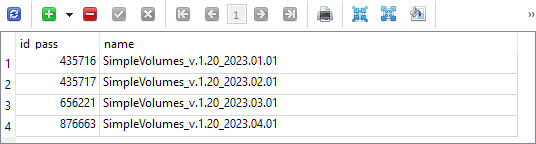
Each of these four passes contains a saved initialization string for a group of single trading strategy instances, selected during optimization on a testing interval with the same start date (2018.01.01) and a slightly different end date specified in the group name.
In the SimpleVolumesStage3.mq5 file, replace calling the function that performed the export in this form, to calling another (still absent) function:
//+------------------------------------------------------------------+
//| Test results                                                     |
//+------------------------------------------------------------------+
double OnTester(void) {
   // Handle the completion of the pass in the EA object
   double res = expert.Tester();

   // If the group name is not empty, save the pass to the library
   if(groupName_ != "") {
      // CGroupsLibrary::Add(CTesterHandler::s_idPass, groupName_, fileName_);
      expert.Export(groupName_, advFileName_);
   }

   return res;
}
Add a new method Export() to the CVirtualAdvisor EA class. The parameters passed to it will be the name of the new group and the name of the EA database file the export should be performed to. Please note that this is a new database and not the previously used optimization database. To assign a value to this argument, we will add an input to the third stage EA:
input group "::: Saving to library"
input string groupName_  = "SimpleVolumes_v.1.20_2023.01.01";      // - Version name (if empty - not saving)
input string advFileName_  = "SimpleVolumes-27183.test.db.sqlite"; // - EA database name
We have never worked directly with the database anywhere at the EA class level. All methods that directly generate SQL queries were moved to the separate CTesterHandler static class. So let's not break this structure, and redirect the received arguments to the new method CTesterHandler::Export() adding the array of EA strategies to them:
//+------------------------------------------------------------------+
//| Export the current strategy group to the specified EA database   |
//+------------------------------------------------------------------+
void CVirtualAdvisor::Export(string p_groupName, string p_advFileName) {
   CTesterHandler::Export(m_strategies, p_groupName, p_advFileName);
}
To implement this method, we will need to determine the structure of the tables in the EA database, and the presence of a new database will entail the need to ensure the ability to connect to different databases.
Access to different databases
After prolonged consideration, I settled on the following option. Let's modify the existing CDatabase class so that we can specify not only the name of the database file, but also its type. Given the new database type, we will need to use three different types:
- Optimization database. Used to arrange auto optimization projects and to store information about strategy tester passes performed within the auto optimization conveyor.
- Database for group selection (truncated optimization database). Used to send the required portion of the optimization database to remote test agents in the second stage of the auto optimization conveyor.
- Expert database (final EA). A database that will be used by the final EA working on the trading account to store all the necessary information about its work, including the composition of the group of single instances of trading strategies used.
Let's create three files to store the SQL code for creating each type of database, connect them as resources to the Database.mqh file, and create an enumeration for the three types of databases:
// Import SQL files for creating database structures of different types
#resource "db.opt.schema.sql" as string dbOptSchema
#resource "db.cut.schema.sql" as string dbCutSchema
#resource "db.adv.schema.sql" as string dbAdvSchema

// Database type
enum ENUM_DB_TYPE {
   DB_TYPE_OPT,   // Optimization database
   DB_TYPE_CUT,   // Database for group selection (stripped down optimization database)
   DB_TYPE_ADV,   // EA (final EA) database
};
Since we will now have access to scripts for creating any of these three types of databases (of course, when we fill them with the appropriate content), we can change the logic of the Connect() database connection method. If it turns out that the database with the passed name does not exist, then instead of an error message, we will create it from the script and connect to the newly created database.
But to understand what type of database we need, let's add an input to the connection method, through which we can pass the desired type. To reduce the need to edit existing code, we will set the default value for this parameter to the optimization database type, since we have been connecting to it everywhere previously:
//+------------------------------------------------------------------+
//| Create an empty DB                                               |
//+------------------------------------------------------------------+
void CDatabase::Create(string p_schema) {
   bool res = Execute(p_schema);
   if(res) {
      PrintFormat(__FUNCTION__" | Database successfully created from %s", "db.*.schema.sql");
   }
}

//+------------------------------------------------------------------+
//| Check connection to the database with the given name             |
//+------------------------------------------------------------------+
bool CDatabase::Connect(string p_fileName, ENUM_DB_TYPE p_dbType = DB_TYPE_OPT) {
// If the database is open, close it
   Close();

// If a file name is specified, save it
   s_fileName = p_fileName;

// Set the shared folder flag for the optimization and EA databases
   s_common = (p_dbType != DB_TYPE_CUT ? DATABASE_OPEN_COMMON : 0);

// Open the database
// Try to open an existing DB file
   s_db = DatabaseOpen(s_fileName, DATABASE_OPEN_READWRITE | s_common);

// If the DB file is not found, try to create it when opening
   if(!IsOpen()) {
      s_db = DatabaseOpen(s_fileName,
                          DATABASE_OPEN_READWRITE | DATABASE_OPEN_CREATE | s_common);

      // Report an error in case of failure
      if(!IsOpen()) {
         PrintFormat(__FUNCTION__" | ERROR: %s Connect failed with code %d",
                     s_fileName, GetLastError());
         return false;
      }
      if(p_dbType == DB_TYPE_OPT) {
         Create(dbOptSchema);
      } else if(p_dbType == DB_TYPE_CUT) {
         Create(dbCutSchema);
      } else {
         Create(dbAdvSchema);
      }
   }

   return true;
}
Please note that I decided to store the optimization and EA databases in the terminal shared folder, and the group selection database in the terminal working folder. Otherwise, it will not be possible to arrange its automatic sending to test agents.
EA database
To store information about the generated strategy groups in the EA database, I decided to use two tables: strategy_groups and strategies with the following structure:
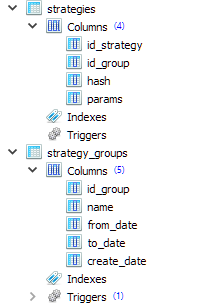
CREATE TABLE strategies (
    id_strategy INTEGER PRIMARY KEY AUTOINCREMENT
                        NOT NULL,
    id_group    INTEGER REFERENCES strategy_groups (id_group) ON DELETE CASCADE
                                                              ON UPDATE CASCADE,
    hash        TEXT    NOT NULL,
    params      TEXT    NOT NULL
);

CREATE TABLE strategy_groups (
    id_group    INTEGER PRIMARY KEY AUTOINCREMENT,
    name        TEXT,
    from_date   TEXT,
    to_date     TEXT,
    create_date TEXT
);
As we can see, each entry in the strategy table refers to some entry in the strategy group table. Therefore, we can store many different groups of strategies in this database at the same time.
The hash field in the strategies table will store the hash value of the parameters of a single instance of a trading strategy. It will be possible to use it later to understand whether a single instance from a certain group is identical to an instance from another group.
The params field in the strategies table will store the initialization string of a single instance of a trading strategy. From that instance, it will be possible to form a common initialization string for the entire group of strategies to create an EA object (CVirtualAdvisor class) in the final EA.
The from_date and to_date fields in the strategy_groups table will continue to store the start and end dates of the optimization interval used to obtain this group. For now they will simply remain empty.
Exporting strategies again
Now we are ready to implement the method of exporting a group of strategies to the EA database in TesterHandler.mqh. To do this, we need to connect to the required database, create a record for the new strategy group in the strategy_groups table, generate an initialization string for each strategy from the group with its current normalizing factor (wrapping in "class CVirtualStrategyGroup([strategy], scale)") and save them in the strategies table.
//+------------------------------------------------------------------+
//| Export an array of strategies to the specified EA database       |
//| as a new group of strategies                                     |
//+------------------------------------------------------------------+
void CTesterHandler::Export(CStrategy* &p_strategies[], string p_groupName, string p_advFileName) {
// Connect to the required EA database
   if(DB::Connect(p_advFileName, DB_TYPE_ADV)) {

      string fromDate = "";   // Start date of the optimization interval
      string toDate = "";     // End date of the optimization interval

      // Create an entry for a new strategy group
      string query = StringFormat("INSERT INTO strategy_groups VALUES(NULL, '%s', '%s', '%s', NULL) RETURNING rowid;",
                                  p_groupName, fromDate, toDate);
      ulong groupId = DB::Insert(query);

      PrintFormat(__FUNCTION__" | Export %d strategies into new group [%s] with ID=%I64u",
                  ArraySize(p_strategies), p_groupName, groupId);

      // For each strategy
      FOREACH(p_strategies, {
         CVirtualStrategy *strategy = p_strategies[i];
         // Form an initialization string as a group of one strategy with a normalizing factor
         string params = StringFormat("class CVirtualStrategyGroup([%s],%0.5f)",
                                      ~strategy,
                                      strategy.Scale());

         // Save it in the EA database with the new group ID specified
         string query = StringFormat("INSERT INTO strategies "
                                     "VALUES (NULL, %I64u, '%s', '%s')",
                                     groupId, strategy.Hash(~strategy), params);
         DB::Execute(query);
      });

      // Close the database
      DB::Close();
   }
}
To calculate the hash value from the strategy parameters, we moved the existing method from the EA class to the CFactorable parent class. Therefore, it has now become available to all descendants of this class, including trading strategy classes.
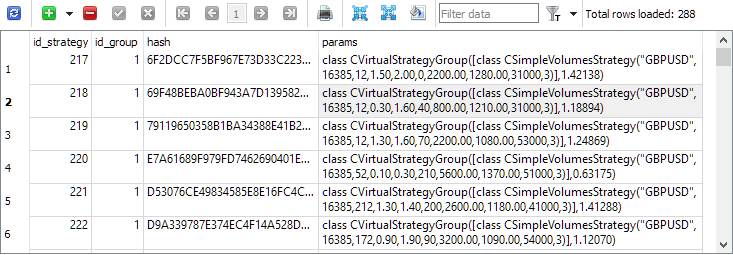
Now, if we re-run the third stages of the optimization projects, we will see that the strategies table features entries with single instances of trading strategies:
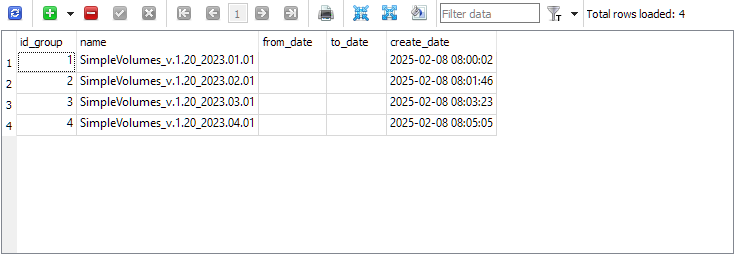
The strategy_group table now features entries of the final groups for each project:
We have sorted out the export, now let's move on to the reverse operation - importing these groups into the final EA.
Importing strategies
I am not going to completely abandon the previously implemented method of exporting groups for now. Let's make it possible to use both the new and the old methods in parallel. If the new method proves to be successful, then we can think about abandoning the old one.
Let's take our final EA SimpleVolumesExpert.mq5 and add a new input newGroupId_, through which we can set the value of the strategy group ID from the new library:
input group "::: Use a strategy group"
input ENUM_GROUPS_LIBRARY groupId_     = -1; // - Group from the old library OR:
input int                 newGroupId_  = 0;  // - ID of the group from the new library (0 - last)
Let's add a constant for the name of the final EA:
#define __NAME__ "SimpleVolumes"
In the final EA initialization function, first check if any group from the old library is selected in the groupId_ parameter. If not, then we will get the initialization string from the new library. For this purpose, the CVirtualAdvisor EA class receives two new static methods: FileName() and Import(). They can be called before the EA object is created.
//+------------------------------------------------------------------+
//| Expert initialization function                                   |
//+------------------------------------------------------------------+
int OnInit() {
// ...

// Initialization string with strategy parameter sets
   string strategiesParams = NULL;

// If the selected strategy group index from the library is valid, then
   if(groupId_ >= 0 && groupId_ < ArraySize(CGroupsLibrary::s_params)) {
      // Take the initialization string from the library for the selected group
      strategiesParams = CGroupsLibrary::s_params[groupId_];
   } else {
      // Take the initialization string from the new library for the selected group
      // (from the EA database)
      strategiesParams = CVirtualAdvisor::Import(
                            CVirtualAdvisor::FileName(__NAME__, magic_),
                            newGroupId_
                         );
   }

// If the strategy group from the library is not specified, then we interrupt the operation
   if(strategiesParams == NULL) {
      return INIT_FAILED;
   }

// ...

// Successful initialization
   return(INIT_SUCCEEDED);
}
We will make further changes in the VirtualAdvisor.mqh file. Let's add the two methods mentioned above:
//+------------------------------------------------------------------+
//| Class of the EA handling virtual positions (orders)              |
//+------------------------------------------------------------------+
class CVirtualAdvisor : public CAdvisor {
protected:
   // ...
public:
   // ...

   // Name of the file with the EA database
   static string     FileName(string p_name, ulong p_magic = 1);

   // Get the strategy group initialization string
   // from the EA database with the given ID
   static string     Import(string p_fileName, int p_groupId = 0);

};
In the FileName() method, we set the rule for forming the name of the EA database file. It includes the name of the final EA and its magic number, so that EAs with different magic numbers always use different databases. The suffix ".test" is also automatically added if the EA is launched in the strategy tester. This is done to prevent an EA running in the tester from accidentally overwriting information in the database of an EA already running on a trading account.
//+------------------------------------------------------------------+
//| Name of the file with the EA database                            |
//+------------------------------------------------------------------+
string CVirtualAdvisor::FileName(string p_name, ulong p_magic = 1) {
   return StringFormat("%s-%d%s.db.sqlite",
                       (p_name != "" ? p_name : "Expert"),
                       p_magic,
                       (MQLInfoInteger(MQL_TESTER) ? ".test" : "")
                      );
}
In the Import() method, we get the list of initialization strings of single instances of trading strategies belonging to a given group from the EA database. If the ID of the required group is zero, then the list of strategies of the group that was created last is loaded.
From the resulting list, we form a strategy group initialization string by joining the strategy initialization strings separated by commas and inserting the resulting string into the desired location in the group initialization string being formed. The scaling factor for the group in the initialization string is set equal to the number of strategies. This is necessary so that when creating an EA using such a group initialization string, the scaling factors of all strategies are equal to those stored in the expert database. After all, during the creation process, the multipliers of all strategies in the group are automatically divided by the number of strategies in the group. In this case, this was precisely what was bothering us, and in order to get around this obstacle, we specifically increase the group multiplier by the same number of times that it should then decrease.
//+------------------------------------------------------------------+
//| Get the strategy group initialization string                     |
//| from the EA database with the given ID                           |
//+------------------------------------------------------------------+
string CVirtualAdvisor::Import(string p_fileName, int p_groupId = 0) {
   string params[];   // Array for strategy initialization strings

   // Request to get strategies of a given group or the last group
   string query = StringFormat("SELECT id_group, params "
                               "  FROM strategies"
                               " WHERE id_group = %s;",
                               (p_groupId > 0 ? (string) p_groupId
                                : "(SELECT MAX(id_group) FROM strategy_groups)"));

// Open EA database
   if(DB::Connect(p_fileName, DB_TYPE_ADV)) {
      // Execute the request
      int request = DatabasePrepare(DB::Id(), query);

      // If there is no error
      if(request != INVALID_HANDLE) {
         // Data structure for reading a single string of a query result
         struct Row {
            int      groupId;
            string   params;
         } row;

         // Read data from the first result string
         while(DatabaseReadBind(request, row)) {
            // Remember the strategy group ID
            // in the static property of the EA class
            s_groupId = row.groupId;

            // Add another strategy initialization string to the array
            APPEND(params, row.params);
         }
      } else {
         // Report an error if necessary
         PrintFormat(__FUNCTION__" | ERROR: request \n%s\nfailed with code %d",
                     query, GetLastError());
      }

      // Close the EA database
      DB::Close();
   }

   // Strategy group initialization string
   string groupParams = NULL;

   // Total number of strategies in the group
   int totalStrategies = ArraySize(params);

   // If there are strategies, then
   if(totalStrategies > 0) {
      // Concatenate their initialization strings with commas
      JOIN(params, groupParams, ",");

      // Create a strategy group initialization string
      groupParams = StringFormat("class CVirtualStrategyGroup([%s], %.5f)",
                                 groupParams,
                                 totalStrategies);
   }

   // Return the strategy group initialization string
   return groupParams;
}
This method is not entirely pure because in addition to returning the group initialization string, it also sets the value of a static property of the CVirtualAdvisor::s_groupId class equal to the ID of the loaded strategy group. This method of remembering which group was loaded from the library seemed quite simple and reliable, although not very pretty.
Transferring the final EA data
Since we have already set up a separate database for storing the parameters for creating single instances of trading strategies used by the final EA, we will not stop halfway and will transfer the storage of the remaining information about the final EA's operation on the trading account to the same database. Previously, such information was saved in a separate file using the CVitrualAdvisor::Save() method and could be loaded from it if necessary using the CVitrualAdvisor::Load() method.
The information saved in the file includes:
- General EA parameters: last save time, and... that is all for now. But this list may be expanded in the future.
- Each strategy's data: a list of virtual positions and any data the strategy may need to store. Currently, the strategies used do not require storing any additional data, but for other types of strategies this need may arise.
- Risk manager data: current status, latest balance and equity levels, position size multipliers, etc.
The disadvantage of the previously chosen implementation method is that the data file could only be read and interpreted in its entirety. If we want, for example, to increase the number of strategies in the initialization string and restart the final EA, it will not be able to read the file with saved data without errors. When reading, the final EA will expect that information for the added strategies should also be present in the file. But it is not there. Therefore, the loading method will attempt to interpret the next data from the file, which will in fact already relate to the risk manager data, as data related to additional trading strategies. It is clear that this will not end well.
To solve this problem, we need to move away from strictly sequential storage of all information about the final EA's work, and using a database will be very useful here. Let's arrange a simple storage of arbitrary data in it in the key-value form (Key-Value).
Key-Value storage
Although we mentioned storing arbitrary data above, the task does not have to be set so broadly. Having looked at what is currently saved in the final EA data file, we can limit ourselves to ensuring the preservation of individual numbers (integer and real) and virtual position objects. Let us also remember that each strategy has an array of virtual positions of a fixed size. This size is specified in the strategy initialization parameters. So virtual position objects always exist as part of some array. And for the future, we will immediately provide the ability to save not only individual numbers, but also an array of numbers of different types.
Taking into account the above, let's create a new static class that will contain the following methods:
- Connections to the desired database: Connect()/Close()
- Setting values of different types: Set(...)
- Reading values of different types: Get(...)
//+------------------------------------------------------------------+
//| Class for working with the EA database in the form of            |
//| Key-Value storage for properties and virtual positions           |
//+------------------------------------------------------------------+
class CStorage {
protected:
   static bool       s_res; // Result of all database read/write operations
public:
   // Connect to the EA database
   static bool       Connect(string p_fileName);

   // Close connection to the database
   static void       Close();

   // Save a virtual order/position
   static void       Set(int i, CVirtualOrder* order);

   // Store a single value of an arbitrary simple type
   template<typename T>
   static void       Set(string key, const T &value);

   // Store an array of values of an arbitrary simple type
   template<typename T>
   static void       Set(string key, const T &values[]);

   // Get the value as a string for the given key
   static string     Get(string key);

   // Get an array of virtual orders/positions for a given strategy hash
   static bool       Get(string key, CVirtualOrder* &orders[]);

   // Get the value for a given key into a variable of an arbitrary simple type
   template<typename T>
   static bool       Get(string key, T &value);

   // Get an array of values of a simple type by a given key into a variable
   template<typename T>
   static bool       CStorage::Get(string key, T &values[]);

   // Result of operations
   static bool       Res() {
      return s_res;
   }
};
We have added the s_res static property and the method to read its value to the class. It will store an indication of any error that occurred during database read/write operations.
Since this class is intended to be used only for saving and loading the state of the final EA, the connection to the database will also be performed only at these moments. Until the connection is closed, no other meaningful operations will be performed with the database. Therefore, in the database connection method, a transaction will be immediately opened, within which all operations with the database will occur, and in the connection closing method, this transaction will either be confirmed or canceled:
//+------------------------------------------------------------------+
//| Connect to the EA database                                       |
//+------------------------------------------------------------------+
bool CStorage::Connect(string p_fileName) {
   // Connect to the EA database
   if(DB::Connect(p_fileName, DB_TYPE_ADV)) {
      // No errors yet
      s_res = true;

      // Start a transaction
      DatabaseTransactionBegin(DB::Id());

      return true;
   }
   return false;
}

//+------------------------------------------------------------------+
//| Close the database connection                                    |
//+------------------------------------------------------------------+
void CStorage::Close() {
   // If there are no errors,
   if(s_res) {
      // Confirm the transaction
      DatabaseTransactionCommit(DB::Id());
   } else {
      // Otherwise, cancel the transaction
      DatabaseTransactionRollback(DB::Id());
   }

   // Close connection to the database
   DB::Close();
}
Let's add two more tables with the following set of columns to the final EA's database structure:
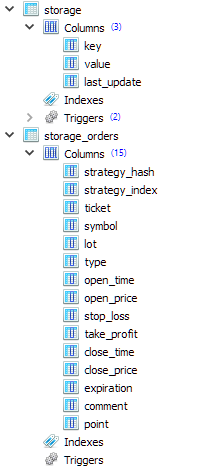
The first table (strorage) will be used to store individual numeric values and arrays of numeric values. Strings, however, can also be stored there. The second table (storage_orders) will be used to store information about the elements of virtual position arrays for different instances of trading strategies. That is why the strategy_hash and strategy_index columns are located at the beginning of the table and store the hash value of the strategy parameters (unique for each strategy) and the index of the virtual position in the array of virtual positions of the strategy.
All individual numeric values are stored by calling the Set() template method, which takes a string with the key name and a variable of an arbitrarily simple T type as parameters. This could be, for example, int, ulong or double. When generating an SQL query for saving, the value of this variable is converted to string type and is stored in the database as a string:
//+------------------------------------------------------------------+
//| Store a single value of an arbitrary simple type                 |
//+------------------------------------------------------------------+
template<typename T>
void CStorage::Set(string key, const T &value) {
// Escape single quotes (can't avoid using them yet)
// StringReplace(key, "'", "\\'");
// StringReplace(value, "'", "\\'");

// Request to save the value
   string query = StringFormat("REPLACE INTO storage(key, value) VALUES('%s', '%s');",
                               key, (string) value);

// Execute the request
   s_res &= DatabaseExecute(DB::Id(), query);

   if(!s_res) {
      // Report an error if necessary
      PrintFormat(__FUNCTION__" | ERROR: Execution failed in DB [adv], query:\n"
                  "%s\n"
                  "error code = %d",
                  query, GetLastError());
   }
}
In the case where we want to store an array of simple type values for one key, we first create a string with a separator from all the values of the passed array. The comma symbol is used as a separator. This happens in another template method with the same name of Set(), only its second parameter is not a reference to a variable of a simple type, but a reference to an array of values of a simple type:
//+------------------------------------------------------------------+
//| Store an array of values of an arbitrary simple type             |
//+------------------------------------------------------------------+
template<typename T>
void CStorage::Set(string key, const T &values[]) {
   string value = "";

   // Concatenate all values from the array into one string separated by commas
   JOIN(values, value, ",");

   // Save a string with a specified key
   Set(key, value);
}
To perform the reverse operations - reading from the database - we will add the Get() method, which will, given a key value, return the row stored in the database under that key. To obtain a value of the required simple type, we will create a template method with the same name, but additionally accepting a reference to a variable of an arbitrary simple type as a second argument. In this method, we will first receive a value from the database as a string, and if we were able to obtain it, we will convert it from a string to the required type and write it to the passed variable.
//+------------------------------------------------------------------+
//| Get the value as a string for the given key                      |
//+------------------------------------------------------------------+
string CStorage::Get(string key) {
   string value = NULL; // Return value

// Request to get the value
   string query = StringFormat("SELECT value FROM storage WHERE key='%s'", key);

// Execute the request
   int request = DatabasePrepare(DB::Id(), query);

// If there is no error
   if(request != INVALID_HANDLE) {
      // Read data from the first result string
      DatabaseRead(request);

      if(!DatabaseColumnText(request, 0, value)) {
         // Report an error if necessary
         PrintFormat(__FUNCTION__" | ERROR: Reading row in DB [adv] for request \n%s\n"
                     "failed with code %d",
                     query, GetLastError());
      }
   } else {
      // Report an error if necessary
      PrintFormat(__FUNCTION__" | ERROR: Request in DB [adv] \n%s\nfailed with code %d",
                  query, GetLastError());
   }

   return value;
}

//+------------------------------------------------------------------+
//| Get the value for a given key into a variable                    |
//| of an arbitrary simple type                                      |
//+------------------------------------------------------------------+
template<typename T>
bool CStorage::Get(string key, T &value) {
// Get the value as a string
   string res = Get(key);

// If the value is received
   if(res != NULL) {
      // Cast it to type T and assign it to the target variable
      value = (T) res;
      return true;
   }
   return false;
}
Let's use the added methods to save and load the state of the final EA.
Saving and downloading an EA
In the CVirtualAdvisor::Save() EA state saving method, we only need to connect to the EA database and save everything we need by directly calling either the CStorage class methods or indirectly by calling the Save()/Load() methods for those objects that need saving.
We currently only store two values directly: the time of the last changes in the composition of virtual positions and the strategy group ID. Next, call the Save() method for all strategies in the loop. And finally the risk manager saving method is called. We will also need to make changes to the methods mentioned so that they also save to the EA database.
//+------------------------------------------------------------------+
//| Save status                                                      |
//+------------------------------------------------------------------+
bool CVirtualAdvisor::Save() {
// Save status if:
   if(true
// later changes appeared
         && m_lastSaveTime < CVirtualReceiver::s_lastChangeTime
// currently, there is no optimization
         && !MQLInfoInteger(MQL_OPTIMIZATION)
// and there is no testing at the moment or there is a visual test at the moment
         && (!MQLInfoInteger(MQL_TESTER) || MQLInfoInteger(MQL_VISUAL_MODE))
     ) {
      // If the connection to the EA database is established
      if(CStorage::Connect(m_fileName)) {
         // Save the last modification time
         CStorage::Set("CVirtualReceiver::s_lastChangeTime", CVirtualReceiver::s_lastChangeTime);
         CStorage::Set("CVirtualAdvisor::s_groupId", CVirtualAdvisor::s_groupId);

         // Save all strategies
         FOREACH(m_strategies, ((CVirtualStrategy*) m_strategies[i]).Save());

         // Save the risk manager
         m_riskManager.Save();

         // Update the last save time
         m_lastSaveTime = CVirtualReceiver::s_lastChangeTime;
         PrintFormat(__FUNCTION__" | OK at %s to %s",
                     TimeToString(m_lastSaveTime, TIME_DATE | TIME_MINUTES | TIME_SECONDS),
                     m_fileName);

         // Close the connection
         CStorage::Close();

         // Return the result
         return CStorage::Res();
      } else {
         PrintFormat(__FUNCTION__" | ERROR: Can't open database [%s], LastError=%d",
                     m_fileName, GetLastError());
         return false;
      }
   }
   return true;
}
In the CVirtualAdvisor::Load() download method, the reverse operations are performed: read the last change time value and the strategy group ID from the database, after which each strategy and risk manager loads its information. If it turns out that the time of the last modification is in the future, then we do not load anything else. This situation may arise when we run the strategy tester visually again. The previous pass saved information at the end of the test, and when starting the second pass, the EA will use the same database as in the first pass. Therefore, we just need to ignore the information that was previously there and start working from scratch.
By the time the loading method is called, the EA object has already been created with a strategy group, whose ID is taken from the EA inputs. This ID is saved inside the CVirtualAdvisor::Import() method in the CVirtualAdvisor::s_groupId static property. Therefore, when loading a strategy group ID from the EA database, we have the opportunity to compare it with an existing value. If they differ, it means that the final EA has been restarted with a new group of strategies and may require some additional actions. But it is not yet entirely clear what actions we will definitely need to take in this case. So let's just leave a corresponding comment in the code for the future.
//+------------------------------------------------------------------+
//| Load status                                                      |
//+------------------------------------------------------------------+
bool CVirtualAdvisor::Load() {
   bool res = true;
   ulong groupId = 0;

// Load status if:
   if(true
// file exists
         && FileIsExist(m_fileName, FILE_COMMON)
// currently, there is no optimization
         && !MQLInfoInteger(MQL_OPTIMIZATION)
// and there is no testing at the moment or there is a visual test at the moment
         && (!MQLInfoInteger(MQL_TESTER) || MQLInfoInteger(MQL_VISUAL_MODE))
     ) {
      // If the connection to the EA database is established
      if(CStorage::Connect(m_fileName)) {
         // Download the last modification time
         res &= CStorage::Get("CVirtualReceiver::s_lastChangeTime", m_lastSaveTime);

         // Download the saved strategy group ID
         res &= CStorage::Get("CVirtualAdvisor::s_groupId", groupId);

         // If the last modification time is in the future, then ignore the download
         if(m_lastSaveTime > TimeCurrent()) {
            PrintFormat(__FUNCTION__" | IGNORE LAST SAVE at %s in the future",
                        TimeToString(m_lastSaveTime, TIME_DATE | TIME_MINUTES | TIME_SECONDS));
            m_lastSaveTime = 0;
            return true;
         }

         PrintFormat(__FUNCTION__" | LAST SAVE at %s",
                     TimeToString(m_lastSaveTime, TIME_DATE | TIME_MINUTES | TIME_SECONDS));

         if(groupId != CVirtualAdvisor::s_groupId) {
            // Actions when launching an EA with a new group of strategies.
            // Nothing is happening here yet
         }

         // Load all strategies
         FOREACH(m_strategies, {
            res &= ((CVirtualStrategy*) m_strategies[i]).Load();
            if(!res) break;
         });

         if(!res) {
            PrintFormat(__FUNCTION__" | ERROR loading strategies from file %s", m_fileName);
         }

         // Download the risk manager
         res &= m_riskManager.Load();

         if(!res) {
            PrintFormat(__FUNCTION__" | ERROR loading risk manager from file %s", m_fileName);
         }

         // Close the connection
         CStorage::Close();

         return res;
      }
   }

   return true;
}
Now let's go down a level and look at the implementation of methods for saving and loading strategies.
Saving and downloading a strategy
In the CVirtualStrategy class, we implement in these methods only the things that will be common to all strategies using virtual positions. Each of them contains an array of virtual position objects that need to be saved and loaded. We will set the detailed implementation to an even lower level, and here we will call only specially created CStorage class methods:
//+------------------------------------------------------------------+
//| Save status                                                      |
//+------------------------------------------------------------------+
void CVirtualStrategy::Save() {
// Save virtual positions (orders) of the strategy
   FOREACH(m_orders, CStorage::Set(i, m_orders[i]));
}

//+------------------------------------------------------------------+
//| Load status                                                      |
//+------------------------------------------------------------------+
bool CVirtualStrategy::Load() {
   bool res = true;

// Download virtual positions (orders) of the strategy
   res = CStorage::Get(this.Hash(), m_orders);

   return res;
}
In case of the CVirtualStrategy class descendants (including CSimpleVolumnesStrategy), we might also need to save some additional data in relation to the array of virtual positions. Our model strategy is too simple and does not require storing anything other than a list of virtual positions. But let's imagine that for some reason we wanted to save an array of tick volumes and the value of the average tick volume. Since the save and load methods are declared virtual, we can override them in the derived classes, adding work with the required data and calling the base class methods to save and load virtual positions:
//+------------------------------------------------------------------+
//| Save status                                                      |
//+------------------------------------------------------------------+
void CSimpleVolumesStrategy::Save() {
   double avrVolume = ArrayAverage(m_volumes);

// Let's form the common part of the key with the type and hash of the strategy
   string key = "CSimpleVolumesStrategy[" + this.Hash() + "]";

// Save the average tick volume
   CStorage::Set(key + ".avrVolume", avrVolume);

// Save the array of tick volumes
   CStorage::Set(key + ".m_volumes", m_volumes);

// Call the base class method (to save virtual positions)
   CVirtualStrategy::Save();
}

//+------------------------------------------------------------------+
//| Load status                                                      |
//+------------------------------------------------------------------+
bool CSimpleVolumesStrategy::Load() {
   bool res = true;

   double avrVolume = 0;

// Let's form the common part of the key with the type and hash of the strategy
   string key = "CSimpleVolumesStrategy[" + this.Hash() + "]";

// Load the tick volume array
   res &= CStorage::Get(key + ".avrVolume", avrVolume);

// Load the tick volume array
   res &= CStorage::Get(key + ".m_volumes", m_volumes);

// Call the base class method (to load virtual positions)
   res &= CVirtualStrategy::Load();

   return res;
}
All that remains is to implement saving and loading of virtual positions.
Saving/loading virtual positions
Previously, the Save() and Load() methods directly performed saving of the required information about the current virtual position object into a data file in the class of virtual positions. Now we will change the structure a little. Add a simple CVirtualOrderStruct structure containing fields for all the necessary data for the virtual position:
// Structure for reading/writing
// basic properties of a virtual order/position from the database
struct VirtualOrderStruct {
   string            strategyHash;
   int               strategyIndex;
   ulong             ticket;
   string            symbol;
   double            lot;
   ENUM_ORDER_TYPE   type;
   datetime          openTime;
   double            openPrice;
   double            stopLoss;
   double            takeProfit;
   datetime          closeTime;
   double            closePrice;
   datetime          expiration;
   string            comment;
   double            point;
};
Unlike virtual position objects, for which all created instances are strictly recorded and automatically processed in the trading volume receiver module, such structures can be created whenever and as many times as desired. We will use them to transfer information between virtual position objects and methods for saving/loading them in the EA database implemented in the CStorage class. Then the save and load methods in the class of virtual positions themselves will only fill the passed structure or take the values of the fields of the passed structure to write to their properties:
//+------------------------------------------------------------------+
//| Load status                                                      |
//+------------------------------------------------------------------+
void CVirtualOrder::Load(const VirtualOrderStruct &o) {
   m_ticket = o.ticket;
   m_symbol = o.symbol;
   m_lot = o.lot;
   m_type = o.type;
   m_openPrice = o.openPrice;
   m_stopLoss = o.stopLoss;
   m_takeProfit = o.takeProfit;
   m_openTime = o.openTime;
   m_closePrice = o.closePrice;
   m_closeTime = o.closeTime;
   m_expiration = o.expiration;
   m_comment = o.comment;
   m_point = o.point;

   PrintFormat(__FUNCTION__" | %s", ~this);

   s_ticket = MathMax(s_ticket, m_ticket);

   m_symbolInfo = m_symbols[m_symbol];

// Notify the recipient and the strategy that the position (order) is open
   if(IsOpen()) {
      m_receiver.OnOpen(&this);
      m_strategy.OnOpen(&this);
   } else {
      m_receiver.OnClose(&this);
      m_strategy.OnClose(&this);
   }
}

//+------------------------------------------------------------------+
//| Save status                                                      |
//+------------------------------------------------------------------+
void CVirtualOrder::Save(VirtualOrderStruct &o) {
   o.ticket = m_ticket;
   o.symbol = m_symbol;
   o.lot = m_lot;
   o.type = m_type;
   o.openPrice = m_openPrice;
   o.stopLoss = m_stopLoss;
   o.takeProfit = m_takeProfit;
   o.openTime = m_openTime;
   o.closePrice = m_closePrice;
   o.closeTime = m_closeTime;
   o.expiration = m_expiration;
   o.comment = m_comment;
   o.point = m_point;
}
Finally, let's use the created storage_orders table in the EA database to save the properties of each virtual position. The method handling it is CStorage::Set(). It is this method that should receive the virtual position index and the virtual position object itself:
//+------------------------------------------------------------------+
//| Save a virtual order/position                                    |
//+------------------------------------------------------------------+
void CStorage::Set(int i, CVirtualOrder* order) {
   VirtualOrderStruct o;   // Structure for virtual position data
   order.Save(o);          // Fill it

// Escape quotes in the comment
   StringReplace(o.comment, "'", "\\'");

// Request to save
   string query = StringFormat("REPLACE INTO storage_orders VALUES("
                               "'%s',%d,%I64u,"
                               "'%s',%.2f,%d,%I64d,%f,%f,%f,%I64d,%f,%I64d,'%s',%f);",
                               order.Strategy().Hash(), i, o.ticket,
                               o.symbol, o.lot, o.type,
                               o.openTime, o.openPrice,
                               o.stopLoss, o.takeProfit,
                               o.closeTime, o.closePrice,
                               o.expiration, o.comment,
                               o.point);

// Execute the request
   s_res &= DatabaseExecute(DB::Id(), query);

   if(!s_res) {
      // Report an error if necessary
      PrintFormat(__FUNCTION__" | ERROR: Execution failed in DB [adv], query:\n"
                  "%s\n"
                  "error code = %d",
                  query, GetLastError());
   }
}
The CStorage::Get() method, which receives an array of virtual position objects as its second argument, downloads info on the virtual positions of the strategy with the hash value specified in the first argument from the storage_orders table:
//+------------------------------------------------------------------+
//| Get an array of virtual orders/positions                         |
//| by the given strategy hash                                       |
//+------------------------------------------------------------------+
bool CStorage::Get(string key, CVirtualOrder* &orders[]) {
// Request to obtain data on virtual positions
   string query = StringFormat("SELECT * FROM storage_orders "
                               " WHERE strategy_hash = '%s' "
                               " ORDER BY strategy_index ASC;",
                               key);

// Execute the request
   int request = DatabasePrepare(DB::Id(), query);

// If there is no error
   if(request != INVALID_HANDLE) {
      // Structure for virtual position information
      VirtualOrderStruct row;

      // Read the data from the query result string by string
      while(DatabaseReadBind(request, row)) {
         orders[row.strategyIndex].Load(row);
      }
   } else {
      // Save the error and report it if necessary
      s_res = false;
      PrintFormat(__FUNCTION__" | ERROR: Execution failed in DB [adv], query:\n"
                  "%s\n"
                  "error code = %d",
                  query, GetLastError());
   }

   return s_res;
}
This completes the bulk of the changes related to the transition to storing information about the final EA operation in a separate database.
Small test
Despite the large volume of changes made, we have not yet reached the stage where we can test true hot swapping of the final EA's settings during its operation. But we can already make sure that we have not messed up the final EA's initialization mechanism.
To do this, we exported the initialization string array from the optimization database using both the old and new methods. Now information about four groups of strategies is present both in the ExportedGroupsLibrary.mqh file and in the EA database called SimpleVolumes-27183.test.db.sqlite. Let's compile the file with the final SimpleVolumesExpert.mq5 EA code.
If we set the values of the inputs the following way,

then the selected initialization string will be loaded from the internal array of the final EA. This array was filled during compilation from data located in the ExportedGroupsLibrary.mqh file (old method).
If the parameter values are specified in this way,

then the initialization string will be generated based on information received from the EA database (new method).
Let's run the final EA with the old initialization method over a short interval, for example, over the last month. We will get the following results:
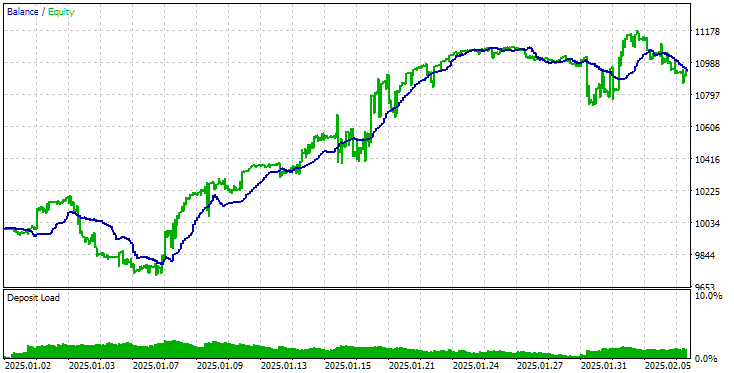
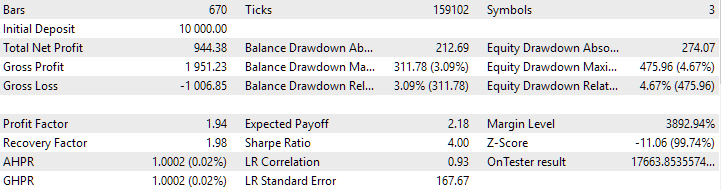
Results of the final EA operation with the old method of downloading strategies
Now let's run the final EA with the new initialization method on the same time interval. The results are as follows:
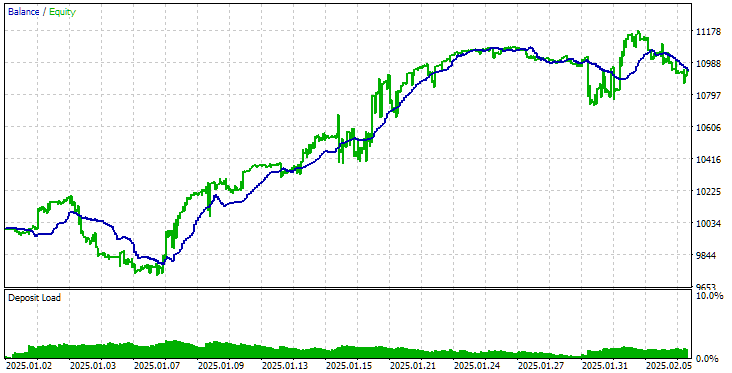
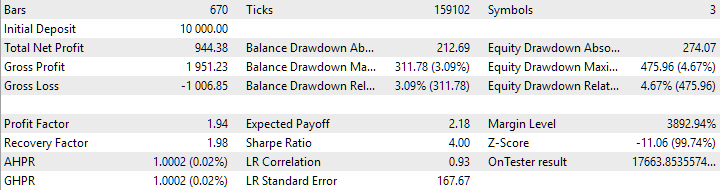
Results of the final EA operation with the new method of downloading strategies
As you can see, the results obtained using the old and new methods are completely identical.
Conclusion
The task we took on turned out to be somewhat more difficult than initially imagined. Although we have not yet achieved all the expected results, we have obtained a fully functional solution suitable for further testing and development. We can now run optimization projects by exporting new groups of trading strategies directly to the database used by a final Expert Advisor running on a trading account. But the correctness of this mechanism remains to be tested.
We will begin testing it, as usual, by simulating the desired behavior in an EA running in the strategy tester. If the results there are satisfactory, then we will move on to using it in the final EAs, which will no longer work in the tester. But more about that next time.
Thank you for your attention! See you soon!
Important warning:
All results presented in this article and all previous articles in the series are based only on historical testing data and are not a guarantee of any profit in the future. The work within this project is of a research nature. All published results can be used by anyone at their own risk.
Archive contents
| # | Name | Version | Description | Recent changes |
|---|---|---|---|---|
| MQL5/Experts/Article.16452 | ||||
| 1 | Advisor.mqh | 1.04 | EA base class | Part 10 |
| 2 | ClusteringStage1.py | 1.01 | Program for clustering the results of the first stage of optimization | Part 20 |
| 3 | CreateProject.mq5 | 1.00 | EA script for creating a project with stages, jobs and optimization tasks. | Part 21 |
| 4 | Database.mqh | 1.10 | Class for handling the database | Part 22 |
| 5 | db.adv.schema.sql | 1.00 | Final EA's database structure | Part 22 |
| 6 | db.cut.schema.sql | 1.00 | Structure of the truncated optimization database | Part 22 |
| 7 | db.opt.schema.sql | 1.05 | Optimization database structure | Part 22 |
| 8 | ExpertHistory.mqh | 1.00 | Class for exporting trade history to file | Part 16 |
| 9 | ExportedGroupsLibrary.mqh | — | Generated file listing strategy group names and the array of their initialization strings | Part 22 |
| 10 | Factorable.mqh | 1.03 | Base class of objects created from a string | Part 22 |
| 11 | GroupsLibrary.mqh | 1.01 | Class for working with a library of selected strategy groups | Part 18 |
| 12 | HistoryReceiverExpert.mq5 | 1.00 | EA for replaying the history of deals with the risk manager | Part 16 |
| 13 | HistoryStrategy.mqh | 1.00 | Class of the trading strategy for replaying the history of deals | Part 16 |
| 14 | Interface.mqh | 1.00 | Basic class for visualizing various objects | Part 4 |
| 15 | LibraryExport.mq5 | 1.01 | EA that saves initialization strings of selected passes from the library to the ExportedGroupsLibrary.mqh file | Part 18 |
| 16 | Macros.mqh | 1.05 | Useful macros for array operations | Part 22 |
| 17 | Money.mqh | 1.01 | Basic money management class | Part 12 |
| 18 | NewBarEvent.mqh | 1.00 | Class for defining a new bar for a specific symbol | Part 8 |
| 19 | Optimization.mq5 | 1.04 | EA managing the launch of optimization tasks | Part 22 |
| 20 | Optimizer.mqh | 1.03 | Class for the project auto optimization manager | Part 22 |
| 21 | OptimizerTask.mqh | 1.03 | Optimization task class | Part 22 |
| 22 | Receiver.mqh | 1.04 | Base class for converting open volumes into market positions | Part 12 |
| 23 | SimpleHistoryReceiverExpert.mq5 | 1.00 | Simplified EA for replaying the history of deals | Part 16 |
| 24 | SimpleVolumesExpert.mq5 | 1.21 | Final EA for parallel operation of several groups of model strategies. The parameters will be taken from the built-in group library. | Part 22 |
| 25 | SimpleVolumesStage1.mq5 | 1.18 | Trading strategy single instance optimization EA (stage 1) | Part 19 |
| 26 | SimpleVolumesStage2.mq5 | 1.02 | Trading strategies instances group optimization EA (stage 2) | Part 19 |
| 27 | SimpleVolumesStage3.mq5 | 1.03 | The EA that saves a generated standardized group of strategies to a library of groups with a given name. | Part 22 |
| 28 | SimpleVolumesStrategy.mqh | 1.11 | Class of trading strategy using tick volumes | Part 22 |
| 29 | Storage.mqh | 1.00 | Class for handling the Key-Value storage for the final EA | Part 22 |
| 30 | Strategy.mqh | 1.04 | Trading strategy base class | Part 10 |
| 31 | SymbolsMonitor.mqh | 1.00 | Class for obtaining information about trading instruments (symbols) | Part 21 |
| 32 | TesterHandler.mqh | 1.06 | Optimization event handling class | Part 22 |
| 33 | VirtualAdvisor.mqh | 1.09 | Class of the EA handling virtual positions (orders) | Part 22 |
| 34 | VirtualChartOrder.mqh | 1.01 | Graphical virtual position class | Part 18 |
| 35 | VirtualFactory.mqh | 1.04 | Object factory class | Part 16 |
| 36 | VirtualHistoryAdvisor.mqh | 1.00 | Trade history replay EA class | Part 16 |
| 37 | VirtualInterface.mqh | 1.00 | EA GUI class | Part 4 |
| 38 | VirtualOrder.mqh | 1.09 | Class of virtual orders and positions | Part 22 |
| 39 | VirtualReceiver.mqh | 1.03 | Class for converting open volumes to market positions (receiver) | Part 12 |
| 40 | VirtualRiskManager.mqh | 1.02 | Risk management class (risk manager) | Part 15 |
| 41 | VirtualStrategy.mqh | 1.08 | Class of a trading strategy with virtual positions | Part 22 |
| 42 | VirtualStrategyGroup.mqh | 1.00 | Class of trading strategies group(s) | Part 11 |
| 43 | VirtualSymbolReceiver.mqh | 1.00 | Symbol receiver class | Part 3 |
| MQL5/Common/Files | Shared terminal folder | |||
| 44 | SimpleVolumes-27183.test.db.sqlite | — | EA database with four added strategy groups | |
Translated from Russian by MetaQuotes Ltd.
Original article: https://www.mql5.com/ru/articles/16452
Warning: All rights to these materials are reserved by MetaQuotes Ltd. Copying or reprinting of these materials in whole or in part is prohibited.
This article was written by a user of the site and reflects their personal views. MetaQuotes Ltd is not responsible for the accuracy of the information presented, nor for any consequences resulting from the use of the solutions, strategies or recommendations described.

 Risk-Based Trade Placement EA with On-Chart UI (Part 1): Designing the User Interface
 Neural Networks in Trading: Memory Augmented Context-Aware Learning (MacroHFT) for Cryptocurrency Markets
 Bivariate Copulae in MQL5 (Part 2): Implementing Archimedean copulae in MQL5
 Price Action Analysis Toolkit Development (Part 49): Integrating Trend, Momentum, and Volatility Indicators into One MQL5 System

- Free trading apps
- Over 8,000 signals for copying
- Economic news for exploring financial markets
You agree to website policy and terms of use