Market Replay: Unity Is Strength (II)
 581
581
 0
0

Introduction
Hello, everyone, and welcome to a new article in our series on building a replay/simulation system.
In the previous article “Market Replay: Unity Is Strength (I)”, we began the final stage of developing the replay/simulation system. There, I explained the directive we will use to ensure that all the developed applications work both when connected to a live server—whether via a demo account or a live account—and when running in the replay/simulation system. In this article, we will simulate the behavior of the entire trading process.
Many people will probably doubt that the system is actually capable of doing what I'm talking about. However, you will see for yourself that the system will be able to achieve this goal. From this point on, development may become significantly more challenging due to what we're planning to implement. Therefore, if you don't have much experience working across multiple source files or working with multiple languages in a single program, I recommend that you carefully read not only this article but also the previous ones, as well as those that will be published later, since the material will be especially rich in content. I will not explain in detail every element we are going to program, so that the article does not become overly dense and tiring, either to write or to read.
Nevertheless, I'll maintain a didactic approach so that you can understand what we're doing. I apologize to those who are just starting out in programming, but from this point on, development will move along much more quickly. Otherwise, it would take too long for the system to reach its final stage.
Preparing to Simulate the Trading Server
First, we’ll prepare the database so we can add new records, update existing ones, and search for the ones we need. This is the starting point, since the database will enable interaction between all the applications involved in simulating a real server. Please note this distinction: I am not saying that we are going to create a simulated server. We will create a mechanism capable of modeling what would happen on the server in a real trading situation.
This mechanism will allow us to perform simulations with positions and pending orders. Although I haven't yet explained how the pending order system will work, it is actually already included in the code of the position indicator itself. All that's needed is to adapt the code, but the operation of the pending order system will be discussed later. Let's start by creating a database. The following figure essentially shows the data we need to store in the database.
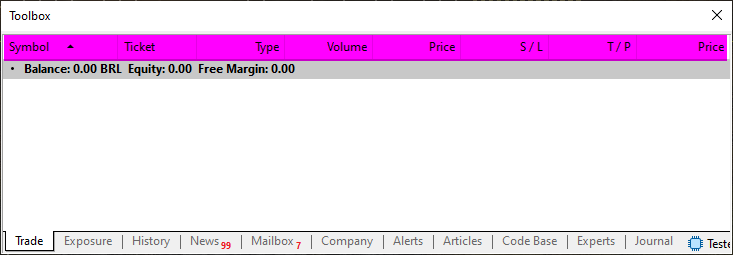
Obviously, each of these data elements will correspond to a separate column, and the columns may be distributed across one or more tables. However, for educational purposes, I can combine all the columns into a single table. Before combining all the data into a single table, I wondered whether it really made sense to prepare these values in the Expert Advisor. The thing is, I want to prevent the user from submitting a market order while the replay/simulation system is paused, and the most appropriate place to check this is in the control indicator.
However, there is an option that might allow us to retain the original approach: reading the control indicator's buffer to check whether the system is in pause or replay mode. In any case, I'll leave it up to each person to decide on this matter. If a user truly wants to learn to trade more consistently, they will not place market orders while the replay/simulation system is paused. The user will place market orders when the data is being streamed and displayed on the chart. Therefore, we will stick to the original plan.
In the previous article, we already looked at the class that will handle database operations. Now all that's left is to create the SQL statements needed to create the columns. Keep in mind that I'll be using the simplest possible structure: just one table and no data validation checks. That way, we'll avoid unnecessarily prolonging this final stage of development. I assume that you, dear reader, will not attempt to enter invalid data into the database. So, let's start adapting the Expert Advisor code so that it creates a database when using the replay/simulation system. To adapt the Expert Advisor, we need to modify the source code according to the code snippet below.
030. //+------------------------------------------------------------------+
031. void OnChartEvent(const int id, const long &lparam, const double &dparam, const string &sparam)
032. {
033.     int handle;
034.     ulong ul;
035.
036.     (*Orders).DispatchMessage(id, lparam, dparam, sparam);
037.     switch (id)
038.     {
039.         case CHARTEVENT_CHART_CHANGE:
040.             if (Terminal != NULL) break;
041.             else
042.             {
043.                 Terminal = new C_Terminal(0, 0, user00);
044.                 if (_Symbol != def_SymbolReplay)
045.                 {
046.                     for (int count = PositionsTotal() - 1; count >= 0; count--)
047.                     {
048.                         ul = PositionGetTicket(count);
049.                         if (PositionGetString(POSITION_SYMBOL) != (*Terminal).GetInfoTerminal().szSymbol)
050.                         {
051.                             ChartIndicatorDelete(0, 0, IntegerToString(ul));
052.                             continue;
053.                         }
054.                         handle = iCustom(NULL, PERIOD_CURRENT, "\\Indicators\\Position View.ex5", ul);
055.                         ChartIndicatorAdd(0, 0, handle);
056.                         IndicatorRelease(handle);
057.                     }
058.                 } else
059.                 {
060. //... NEW CODE ...
061.                 }
062.             }
063.         case CHARTEVENT_CUSTOM + evChartTrade_At_EA:
064.             EventChartCustom(0, evEA_At_ChartTrade, user00, 0, "");
065.             break;
066.     }
067. }
068. //+------------------------------------------------------------------+
069. void OnTradeTransaction(const MqlTradeTransaction &trans, const MqlTradeRequest &request, const MqlTradeResult &result)
070. {
071.     if (Terminal == NULL) return;
072.     static ulong ticket = 0;
073.     switch (trans.type)
074.     {
075.         case TRADE_TRANSACTION_HISTORY_ADD:
076.             EventChartCustom(0, evUpdate_Position, trans.position, 0, "");
077.             ticket = (trans.order != trans.position ? trans.position : 0);
078.             break;
079.         case TRADE_TRANSACTION_REQUEST:
080.             if ((request.symbol == (*Terminal).GetInfoTerminal().szSymbol) && (result.retcode == TRADE_RETCODE_DONE)) switch (request.action)
081.             {
082.                 case TRADE_ACTION_DEAL:
083.                     if (ticket > 0) EventChartCustom(0, evUpdate_Position, ticket, 0, "");
084.                     else
085.                     {
086.                         int handle = iCustom(NULL, PERIOD_CURRENT, "\\Indicators\\Position View.ex5", result.order);
087.                         ChartIndicatorAdd(0, 0, handle);
088.                         IndicatorRelease(handle);
089.                     }
090.                     ticket = 0;
091.                     break;
092.                 case TRADE_ACTION_SLTP:
093.                     EventChartCustom(0, evUpdate_Position, request.position, 0, "");
094.                     break;
095.             }
096.             break;
097.     };
098. }
099. //+------------------------------------------------------------------+
100. void OnDeinit(const int reason)
101. {
102.     ulong ul;
103.
104.     switch (reason)
105.     {
106.         case REASON_REMOVE:
107.         case REASON_INITFAILED:
108.             EventChartCustom(0, evEA_At_ChartTrade, -1, 0, "");
109.             break;
110.     }
111.     if (Terminal != NULL)
112.     {
113.         if (_Symbol != def_SymbolReplay)
114.         {
115.             for (int count = PositionsTotal() - 1; count >= 0; count--)
116.             {
117.                 ul = PositionGetTicket(count);
118.                 if (PositionGetString(POSITION_SYMBOL) != (*Terminal).GetInfoTerminal().szSymbol) continue;
119.                 ChartIndicatorDelete(0, 0, IntegerToString(ul));
120.             }
121.         } else
122.         {
123. // ... NEW CODE ...
124.         }
125.     }
126.     delete Orders;
127.     delete Terminal;
128.     delete DB;
129. }
130. //+------------------------------------------------------------------+
Expert Advisor snippet
Please note that we are making a few minor changes to the code provided in the previous article. Now, pay attention. There are two places where new code will be added to the Expert Advisor. These two locations are on lines 60 and 123 of the snippet, to make it easier for you to understand. On line 60, we'll add the code responsible for placing the position indicator on the chart. This code will be equivalent to the code between lines 46 and 57. On line 123, we will implement code equivalent to the code between lines 115 and 119. Thus, only a few changes will be made to the Expert Advisor. The code for the OnTradeTransaction event handler, on the other hand, will remain unchanged, as I explained in my previous article. Nevertheless, this event handler will be used extensively in the Expert Advisor, even when we run the Expert Advisor in the replay/simulation system. Do not worry. I'll explain in detail how the OnTradeTransaction event handler will be used.
All right. Viewed this way, it seems that we really do have to implement something extremely complex. However, you'll find that it's much easier than you probably imagine right now. The procedure itself will seem only slightly more advanced if you already know MQL5 and SQL well, but do not yet know how to simulate a trading server using only MQL5 and SQL.
However, if you've been paying close attention, you might think that some code is missing here, or that we aren't isolating the C_Orders class, as you might have expected based on the explanations in the previous article. At first, I even considered isolating the C_Orders class. However, isolating the C_Orders class would require us to implement yet another equivalent class, which would be completely unnecessary work. We can directly adapt C_Orders so that it can simulate the server. So, let's see what changes we'll make to this class.
To start with, solely for testing purposes, we can do what is shown in the following code snippet.
067. //+------------------------------------------------------------------+
068.         ulong SendToPhysicalServer(void)
069.             {
070.                 MqlTradeCheckResult     TradeCheck;
071.                 MqlTradeResult          TradeResult;
072.                 MqlTradeTransaction     TradeTrans;
073.
074.                 ZeroMemory(TradeCheck);
075.                 ZeroMemory(TradeResult);
076.                 if (_Symbol == def_SymbolReplay)
077.                 {
078.                     TradeTrans.type = TRADE_TRANSACTION_REQUEST;
079.                     m_Base.TradeRequest.symbol = _Symbol;
080.                     m_Base.TradeRequest.action = TRADE_ACTION_DEAL;
081.                     TradeResult.order = 2048;
082.                     TradeResult.retcode = TRADE_RETCODE_DONE;
083.                     OnTradeTransaction(TradeTrans, m_Base.TradeRequest, TradeResult);
084.                     TradeTrans.type = TRADE_TRANSACTION_HISTORY_ADD;
085.                     TradeTrans.order = 0;
086.                     TradeTrans.position = TradeResult.order;
087.                     OnTradeTransaction(TradeTrans, m_Base.TradeRequest, TradeResult);
088.                 } else {
089.                     if (!OrderCheck(m_Base.TradeRequest, TradeCheck))
090.                     {
091.                         PrintFormat("Order System - Check Error: %d", GetLastError());
092.                         return 0;
093.                     }
094.                     m_Base.bTrash = OrderSend(m_Base.TradeRequest, TradeResult);
095.                 }
096.                 if (TradeResult.retcode != TRADE_RETCODE_DONE)
097.                 {
098.                     PrintFormat("Order System - Send Error: %d", TradeResult.retcode);
099.                     return 0;
100.                 };
101.
102.                 return TradeResult.order;
103.             }
104. //+------------------------------------------------------------------+
Snippet from C_Orders
This is where the process starts to get more interesting. Keep in mind that this code is only meant to verify what we actually plan to implement. Please note that on line 72, we added a new structure defined in MQL5. Then, on line 76, we check by the symbol name whether we are using the replay/simulation system. If we are using a symbol that is likely registered on a real trading server, we go to line 89, and the code continues to run as we already know. If, on the other hand, we are using a replay/simulation system symbol, we will simulate the server's response. This process is carried out in two stages. In the first stage, we simulate the response corresponding to a market order for opening a position. After configuring the data, we call the OnTradeTransaction event handler for the first time, as shown on line 83. Then, on line 87, we simulate another event related to a market order. In both cases, the Expert Advisor's OnTradeTransaction event handler will be called, and it will attempt to place a position indicator on the chart.
This mechanism will work. However, since the position indicator currently has no source from which it can obtain position data, it will ultimately be removed from the chart. You can add a few messages to the code to track this process. I'll leave it to you, dear reader, to add these messages as an exercise. This will help you understand all the steps in the process: from the moment we use the Mouse Study indicator to interact with the buy and sell buttons of the Chart Trade indicator, through sending a message from the Chart Trade indicator to the Expert Advisor, to the point where the Expert Advisor uses the C_Orders class to simulate opening a position.
When that happens, the Expert Advisor will immediately request that MetaTrader 5 load the position indicator. After being added to the chart, the indicator will attempt to find the position simulated by the C_Orders class. However, since we are not yet using SQL to provide this data, the indicator will not find the necessary data and will be removed from the chart. That’s the beauty of programming. Simply wonderful.
Although the code snippet above allows you to perform only one transaction, it is already a good starting point, especially given the simplicity of the approach used. At this point, you may be wondering why we can simulate only one transaction. That's a good question. To understand why we can simulate only one transaction, let's take a look at the code for the OnTradeTransaction event handler shown in the previous code snippet. Please note: when line 83 of the SendToPhysicalServer code is executed for the second time, the condition in line 83 of the OnTradeTransaction event handler will evaluate to true. If this condition is met, it will prevent line 86 from executing, which would have attempted to place the position indicator on the chart.
But wait a minute. This system works with a hedging account when connected to a real server. Why isn't this working now when we try to simulate the server? The problem lies in the order in which we send the simulation events. Please note that in the SendToPhysicalServer function, we first send a TRADE_TRANSACTION_REQUEST event, and then an event of type TRADE_TRANSACTION_HISTORY_ADD. This sequence is incorrect. I deliberately used this incorrect sequence to show you that, from this point on, you will need to pay the utmost attention when implementing each step.
The order in which events are dispatched will inevitably affect the behavior of the code. Even if the code is completely correct, it will not work the way you expect, and will turn something feasible into something impossible. That is why, in my previous article, I pointed out that from this point on, each new step will be significantly more difficult. In any case, this modification to the C_Orders class was intended solely to demonstrate how this mechanism would work.
You can see the result in the following image.
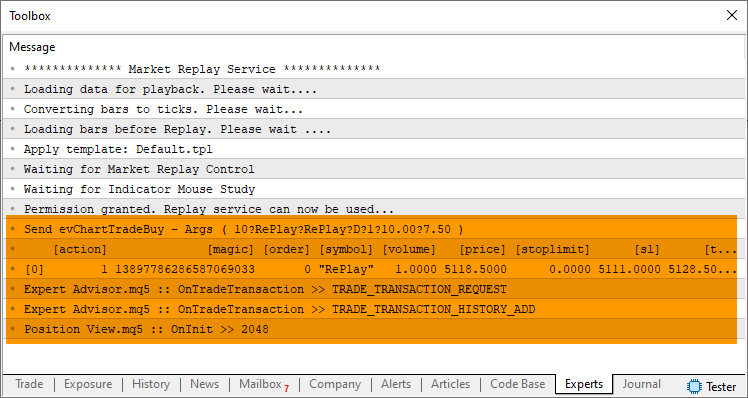
In the highlighted area of the previous image, you can see an attempt to simulate the server. As can be seen, the process went as expected and confirmed that the behavior of a real server can be simulated. We just need to simulate the server's behavior. However, before we continue, we will start using SQL, since it is necessary for simulating a real server. To keep these two aspects separate, let’s move on to a new section.
Database Design
Designing a database can be a very interesting and even relaxing activity, because it allows us to shift our focus for a while and focus on a particularly engaging task: programming in SQL. As I mentioned at the beginning, I won't explain how to design a complex structure in SQL. I'll use the simplest possible model, but it will be sufficient for our purposes. Let's start by making the following changes to the code.
001. //+------------------------------------------------------------------+
002. #property copyright "Daniel Jose"
003. //+------------------------------------------------------------------+
004. #include "..\Defines.mqh"
005. #include "..\SQL\C_ReplayDataBase.mqh"
006. //+------------------------------------------------------------------+
007. class C_Orders : public C_ReplayDataBase
008. {
                                   .
                                   .
                                   .
164. //+------------------------------------------------------------------+
165.     public    :
166. //+------------------------------------------------------------------+
167.         C_Orders(const ulong magic)
168.             :C_ReplayDataBase()
169.             {
170.                 m_Base.MagicNumber = magic;
171.                 ExecCommandSQL("CREATE TABLE IF NOT EXISTS tb_Replay ( ticket, type, volume, price, sl, tp, history );");
172.             }
173. //+------------------------------------------------------------------+
C_Orders snippet
Please note that in line 5, I added the header file for the C_ReplayDataBase class. In line 7, we specify that the C_Orders class will publicly inherit from C_ReplayDataBase. As a result, C_Orders will gain new functionality. To ensure everything works correctly, we initialize C_ReplayDataBase in the C_Orders constructor on line 168. This way, we'll need less code in the Expert Advisor, while still being able to implement everything necessary to simulate the trading server. Okay, but we need a table in the database. Using the statement on line 171, we create a table that we will use in the simulation. Now the system is starting to take shape.
The next step is to simulate the behavior described in the previous section, but this time with the data saved to the database. To implement this simulation while saving data to the database, we added a new function to the C_Orders class.
041. //+------------------------------------------------------------------+
042.         struct stChartTrade
043.         {
044.             struct stEvent
045.             {
046.                 EnumEvents  ev;
047.                 string      szSymbol,
048.                             szContract;
049.                 bool        IsDayTrade;
050.                 ushort      Leverange;
051.                 double      PointsTake,
052.                             PointsStop;
053.             }Data;
054. //---
055.             bool Decode(const EnumEvents ev, const string sparam)
056.                 {
057.                     string Res[];
058.
059.                     if (StringSplit(sparam, '?', Res) != 7) return false;
060.                     stEvent loc = {(EnumEvents) StringToInteger(Res[0]), Res[1], Res[2], (bool)(Res[3] == "D"), (ushort) StringToInteger(Res[4]), StringToDouble(Res[5]), StringToDouble(Res[6])};
061.                     if ((ev == loc.ev) && (loc.szSymbol == _Symbol)) Data = loc;
062.                     else return false;
063.
064.                     return true;
065.                 }
066. //---
067.         }m_ChartTrade;
068. //+------------------------------------------------------------------+
069.         ulong SimulateServer(void)
070.         {
071.             MqlTradeResult        TradeResult;
072.             MqlTradeTransaction   TradeTrans;
073.
074.             ZeroMemory(TradeResult);
075.             ZeroMemory(TradeTrans);
076.             TradeTrans.type = TRADE_TRANSACTION_HISTORY_ADD;
077.             TradeTrans.order = 0;
078.             TradeTrans.position = TradeResult.order;
079.             OnTradeTransaction(TradeTrans, m_Base.TradeRequest, TradeResult);
080.             TradeTrans.type = TRADE_TRANSACTION_REQUEST;
081.             m_Base.TradeRequest.symbol = _Symbol;
082.             m_Base.TradeRequest.action = TRADE_ACTION_DEAL;
083.             TradeResult.order = 2048;
084.             TradeResult.retcode = TRADE_RETCODE_DONE;
085.             OnTradeTransaction(TradeTrans, m_Base.TradeRequest, TradeResult);
086.
087.             return TradeResult.order;
088.         }
089. //+------------------------------------------------------------------+
090.         ulong SendToPhysicalServer(void)
091.         {
092.             MqlTradeCheckResult   TradeCheck;
093.             MqlTradeResult        TradeResult;
094.
095.             ZeroMemory(TradeCheck);
096.             ZeroMemory(TradeResult);
097.             if (_Symbol == def_SymbolReplay)
098.                 return SimulateServer();
099.             if (!OrderCheck(m_Base.TradeRequest, TradeCheck))
100.             {
101.                 PrintFormat("Order System - Check Error: %d", GetLastError());
102.                 return 0;
103.             }
104.             m_Base.bTrash = OrderSend(m_Base.TradeRequest, TradeResult);
105.             if (TradeResult.retcode != TRADE_RETCODE_DONE)
106.             {
107.                 PrintFormat("Order System - Send Error: %d", TradeResult.retcode);
108.                 return 0;
109.             };
110.
111.             return TradeResult.order;
112.         }
113. //+------------------------------------------------------------------+
C_Orders snippet
Note that in this SimulateServer function, where we will implement all the simulation logic, the order of events is already correct. Thus, using the Chart Trade indicator, we can place multiple buy or sell market orders. This is the same code we saw earlier. On line 97, we check whether the replay/simulation system is being used. If so, on line 98 we call the server simulator. From now on, we will focus exclusively on this new function. For now, don't worry about how it will work in the Expert Advisor or in the position indicator. First, we need to give our simulated server some truly useful functionality.
Let's start simulating the server
Before implementing what the title of this section refers to, you need to understand what we're going to do. Simulating the server will be one of the most interesting tasks in this series of articles, as it will help you understand many other aspects related to a real server. First of all, you should know that the requests we will be simulating will already have been created by other functions and procedures of the C_Orders class and stored in the m_Base.TradeRequest structure.
Thus, all that remains for us to do is to interpret the contents of this structure correctly. Keep in mind that I won't be checking whether the data is correct. Checking the validity of the data would be equivalent to calling the MQL5 OrderCheck function. Therefore, try not to enter incorrect data into `m_Base.TradeRequest`, as the system may return incorrect results.
Essentially, we'll need to simulate two types of requests: TRADE_ACTION_DEAL and TRADE_ACTION_SLTP, since those are the only ones used in the C_Orders code. That is why it was important to first develop the entire system connected to a live server. Therefore, at this stage, we will not waste time implementing unnecessary requests. Using these two types of requests, we can buy and sell at market prices, as well as close a position or adjust the Take Profit and Stop Loss levels.
Many people would probably prefer to skip the stage of developing a system connected to a live server and move straight to simulating orders and positions. However, this would cause us far more difficulties than benefits. Similarly, we will first implement a system for buying and selling at market prices, and then we will move on to pending orders. Once market operations have been completed, implementing pending orders will be very simple. It couldn't be simpler.
To begin the simulation, we'll start with the simplest operation: implementing the simulation of the TRADE_ACTION_SLTP request. The choice of this particular operation is due to the fact that the request is completely independent of the type of account being simulated—or, more precisely, of the symbol we are working with in the replay/simulation system. Essentially, the TRADE_ACTION_SLTP request has only one purpose: to change the Stop Loss or Take Profit value. That is all that is required. Since the request itself specifies which data to use, all we have to do is update the database. There's nothing complicated about it. However, we will not simulate all the messages sent by the server here. We'll make everything as simple as possible. If you really want to simulate all the messages, you can implement their full simulation. However, since the purpose of these articles is to teach, we'll implement the simulation in the simplest way possible. So, the new code is shown in the following snippet.
068. //+------------------------------------------------------------------+
069.         ulong SimulateServer(void)
070.         {
071.             MqlTradeResult        TradeResult;
072.             MqlTradeTransaction   TradeTrans;
073.             bool                  bResult = false;
074.
075.             ZeroMemory(TradeResult);
076.             ZeroMemory(TradeTrans);
077.
078.             switch (m_Base.TradeRequest.action)
079.             {
080.                 case TRADE_ACTION_SLTP:
081.                     bResult = ExecCommandSQL(StringFormat("UPDATE tb_Replay SET sl = %f, tp = %f WHERE ticket = %d;",
082.                                                                         m_Base.TradeRequest.sl,
083.                                                                         m_Base.TradeRequest.tp,
084.                                                                         m_Base.TradeRequest.position));
085.                     TradeTrans.type = TRADE_TRANSACTION_REQUEST;
086.                     TradeResult.retcode = TRADE_RETCODE_DONE;
087.                     if (bResult)
088.                     {
089.                         OnTradeTransaction(TradeTrans, m_Base.TradeRequest, TradeResult);
090.                         return m_Base.TradeRequest.position;
091.                     }
092.                     break;
093.                 case TRADE_ACTION_DEAL:
094.                     break;
095.             }
096.             TradeResult.retcode = TRADE_RETCODE_INVALID;
097.             OnTradeTransaction(TradeTrans, m_Base.TradeRequest, TradeResult);
098.             return 0;
099.         }
100. //+------------------------------------------------------------------+
C_Orders snippet
Notice that everything is very simple and straightforward. Line 80 specifies the branch that will handle this case. On line 81, we perform a database operation. If the operation is successful, then on line 89 we simulate, in MetaTrader 5, the effect of the operation performed in the database as the server's response. And if the operation fails due to some kind of database error, then on line 97 we simulate the same type of response from the server.
However, there is one thing to keep in mind. Although the code above simulates, in a very condensed form, what the server would do, at the moment the C_Orders class cannot generate a TRADE_ACTION_SLTP request. The C_Orders class is still connected to the real trading server. Keep in mind that the tests shown above simulate opening or closing a position. To properly handle the TRADE_ACTION_SLTP request, we'll need to modify the ModifyValueSLTP procedure in the C_Orders class. So, before we continue, let's take a look at the code for the ModifyValueSLTP procedure. This is shown in the following snippet.
129. //+------------------------------------------------------------------+
130.         void ModifyValueSLTP(const ulong ticket, const string symbol, const double sl, const double tp)
131.         {
132.             ZeroMemory(m_Base.TradeRequest);
133.             MqlTradeRequest TradeRequest[1];
134.
135.             if ((sl < 0) || (tp < 0)) if (!PositionSelectByTicket(ticket)) return;
136.             m_Base.TradeRequest.magic      = m_Base.MagicNumber;
137.             m_Base.TradeRequest.action     = TRADE_ACTION_SLTP;
138.             m_Base.TradeRequest.symbol     = symbol;
139.             m_Base.TradeRequest.position   = ticket;
140.             m_Base.TradeRequest.sl         = (sl < 0 ? PositionGetDouble(POSITION_SL) : sl);
141.             m_Base.TradeRequest.tp         = (tp < 0 ? PositionGetDouble(POSITION_TP) : tp);
142.
143.             TradeRequest[0] = m_Base.TradeRequest;
144.             ArrayPrint(TradeRequest);
145.
146.             SendToPhysicalServer();
147.         }
148. //+------------------------------------------------------------------+
Snippet from the C_Orders class
Please note that we have some issues here. This is the same type of problem we'll encounter in the position indicator code, specifically when calling the MQL5 library to read position data. So we'll take a slightly different approach. Although this will require us to change some things in the code. Thus, we are creating a new header file. This is shown below.
01. //+------------------------------------------------------------------+
02. #property copyright "Daniel Jose"
03. //+------------------------------------------------------------------+
04. #include "..\Defines.mqh"
05. #include "..\SQL\C_ReplayDataBase.mqh"
06. //+------------------------------------------------------------------+
07. class C_InServer : public C_ReplayDataBase
08. {
09.     private   :
10.         bool    m_IsReplay;
11.     public    :
12. //+------------------------------------------------------------------+
13.         C_InServer()
14.             :C_ReplayDataBase(),
15.             m_IsReplay(_Symbol == def_SymbolReplay)
16.         {
17.             ExecCommandSQL("CREATE TABLE IF NOT EXISTS tb_Replay ( ticket, type, volume, price, sl, tp, history );");
18.         }
19. //+------------------------------------------------------------------+
20.     inline const double _PositionGetDouble(ENUM_POSITION_PROPERTY_DOUBLE arg)
21.     {
22.         if (!m_IsReplay)
23.             return PositionGetDouble(arg);
24.
25.         return 0;
26.     }
27. //+------------------------------------------------------------------+
28.     inline const long _PositionGetInteger(ENUM_POSITION_PROPERTY_INTEGER arg)
29.     {
30.         if (!m_IsReplay)
31.             return PositionGetInteger(arg);
32.
33.         return 0;
34.     }
35. //+------------------------------------------------------------------+
36.     inline const bool _PositionSelectByTicket(ulong arg)
37.     {
38.         if (!m_IsReplay)
39.             return PositionSelectByTicket(arg);
40.
41.         return false;
42.     }
43. //+------------------------------------------------------------------+
44.     inline const string _PositionGetString(ENUM_POSITION_PROPERTY_STRING arg)
45.     {
46.         if (!m_IsReplay)
47.             return PositionGetString(arg);
48.
49.         return "";
50.     }
51. //+------------------------------------------------------------------+
52.     inline const string _PositionGetSymbol(int arg)
53.     {
54.         return (m_IsReplay ? def_SymbolReplay : PositionGetSymbol(arg));
55.     }
56. //+------------------------------------------------------------------+
57.     inline const int _PositionsTotal(void)
58.     {
59.         if (!m_IsReplay)
60.             return PositionsTotal();
61.
62.         return 0;
63.     }
64. //+------------------------------------------------------------------+
65. };
66. //+------------------------------------------------------------------+
C_InServer
Now we'll solve two problems at once. By resolving these issues in the C_Orders class, we will simultaneously resolve the same problems in the position indicator. Therefore, we need to update the code for the C_Orders class as shown below.
001. //+------------------------------------------------------------------+
002. #property copyright "Daniel Jose"
003. //+------------------------------------------------------------------+
004. #include "C_InServer.mqh"
005. //+------------------------------------------------------------------+
006. class C_Orders : public C_InServer
007. {
008.     protected:
009. //+------------------------------------------------------------------+
010. inline const ulong GetMagicNumber(void) const { return m_Base.MagicNumber; }
011. //+------------------------------------------------------------------+
012.         bool ClosePosition(const ulong ticket)
013.         {
014.             bool     IsBuy;
015.             string szContract;
016.
017.             if    (!_PositionSelectByTicket(ticket)) return false;
018.             IsBuy = _PositionGetInteger(POSITION_TYPE) == POSITION_TYPE_BUY;
019.             szContract = _PositionGetString(POSITION_SYMBOL);
020.             ZeroMemory(m_Base.TradeRequest);
021.             m_Base.TradeRequest.action      = TRADE_ACTION_DEAL;
022.             m_Base.TradeRequest.type        = (IsBuy ? ORDER_TYPE_SELL : ORDER_TYPE_BUY);
023.             m_Base.TradeRequest.price       = NormalizeDouble(SymbolInfoDouble(szContract, (IsBuy ? SYMBOL_BID : SYMBOL_ASK)), (int)SymbolInfoInteger(szContract, SYMBOL_DIGITS));
024.             m_Base.TradeRequest.position    = ticket;
025.             m_Base.TradeRequest.symbol      = szContract;
026.             m_Base.TradeRequest.volume      = _PositionGetDouble(POSITION_VOLUME);
027.             m_Base.TradeRequest.deviation   = 1000;
028.
029.             return SendToPhysicalServer() != 0;
030.         };
031. //+------------------------------------------------------------------+
032.     private    :
033. //+------------------------------------------------------------------+
034.         struct stBase
035.         {
036.             MqlTradeRequest TradeRequest;
037.             ulong           MagicNumber;
038.             bool            bTrash;
039.         }m_Base;
040. //+------------------------------------------------------------------+
041.         struct stChartTrade
042.         {
043.             struct stEvent
044.             {
045.                 EnumEvents  ev;
046.                 string      szSymbol,
047.                             szContract;
048.                 bool        IsDayTrade;
049.                 ushort      Leverange;
050.                 double      PointsTake,
051.                             PointsStop;
052.             }Data;
053. //---
054.             bool Decode(const EnumEvents ev, const string sparam)
055.                 {
056.                     string Res[];
057.
058.                     if (StringSplit(sparam, '?', Res) != 7) return false;
059.                     stEvent loc = {(EnumEvents) StringToInteger(Res[0]), Res[1], Res[2], (bool)(Res[3] == "D"), (ushort) StringToInteger(Res[4]), StringToDouble(Res[5]), StringToDouble(Res[6])};
060.                     if ((ev == loc.ev) && (loc.szSymbol == _Symbol)) Data = loc;
061.                     else return false;
062.
063.                     return true;
064.                 }
065. //---
066.         }m_ChartTrade;
067. //+------------------------------------------------------------------+
068.         ulong SimulateServer(void)
069.         {
070.             MqlTradeResult        TradeResult;
071.             MqlTradeTransaction   TradeTrans;
072.             bool bResult = false;
073.
074.             ZeroMemory(TradeResult);
075.             ZeroMemory(TradeTrans);
076.
077.             switch (m_Base.TradeRequest.action)
078.             {
079.                 case TRADE_ACTION_SLTP:
080.                     bResult = ExecCommandSQL(StringFormat("UPDATE tb_Replay SET sl = %f, tp = %f WHERE ticket = %d;",
081.                                                                         m_Base.TradeRequest.sl,
082.                                                                         m_Base.TradeRequest.tp,
083.                                                                         m_Base.TradeRequest.position));
084.                     TradeTrans.type = TRADE_TRANSACTION_REQUEST;
085.                     TradeResult.retcode = TRADE_RETCODE_DONE;
086.                     if (bResult)
087.                     {
088.                         OnTradeTransaction(TradeTrans, m_Base.TradeRequest, TradeResult);
089.                         return m_Base.TradeRequest.position;
090.                     }
091.                     break;
092.                 case TRADE_ACTION_DEAL:
093.                     break;
094.             }
095.             TradeResult.retcode = TRADE_RETCODE_INVALID;
096.             OnTradeTransaction(TradeTrans, m_Base.TradeRequest, TradeResult);
097.             return 0;
098.         }
099. //+------------------------------------------------------------------+
100.         ulong SendToPhysicalServer(void)
101.         {
102.             MqlTradeCheckResult   TradeCheck;
103.             MqlTradeResult        TradeResult;
104.
105.             ZeroMemory(TradeCheck);
106.             ZeroMemory(TradeResult);
107.             if (_Symbol == def_SymbolReplay)
108.                 return SimulateServer();
109.             if (!OrderCheck(m_Base.TradeRequest, TradeCheck))
110.             {
111.                 PrintFormat("Order System - Check Error: %d", GetLastError());
112.                 return 0;
113.             }
114.             m_Base.bTrash = OrderSend(m_Base.TradeRequest, TradeResult);
115.             if (TradeResult.retcode != TRADE_RETCODE_DONE)
116.             {
117.                 PrintFormat("Order System - Send Error: %d", TradeResult.retcode);
118.                 return 0;
119.             };
120.
121.             return TradeResult.order;
122.         }
123. //+------------------------------------------------------------------+
124.         ulong ToMarket(const ENUM_ORDER_TYPE type)
125.         {
126.             double price     = SymbolInfoDouble(m_ChartTrade.Data.szContract, (type == ORDER_TYPE_BUY ? SYMBOL_ASK : SYMBOL_BID));
127.             double vol       = SymbolInfoDouble(m_ChartTrade.Data.szContract, SYMBOL_VOLUME_STEP);
128.             uchar  nDigit    = (uchar)SymbolInfoInteger(m_ChartTrade.Data.szContract, SYMBOL_DIGITS);
129.
130.             ZeroMemory(m_Base.TradeRequest);
131.             m_Base.TradeRequest.magic         = m_Base.MagicNumber;
132.             m_Base.TradeRequest.symbol        = m_ChartTrade.Data.szContract;
133.             m_Base.TradeRequest.price         = NormalizeDouble(price, nDigit);
134.             m_Base.TradeRequest.action        = TRADE_ACTION_DEAL;
135.             m_Base.TradeRequest.sl            = NormalizeDouble(m_ChartTrade.Data.PointsStop == 0 ? 0 : price + (m_ChartTrade.Data.PointsStop * (type == ORDER_TYPE_BUY ? -1 : 1)), nDigit);
136.             m_Base.TradeRequest.tp            = NormalizeDouble(m_ChartTrade.Data.PointsTake == 0 ? 0 : price + (m_ChartTrade.Data.PointsTake * (type == ORDER_TYPE_BUY ? 1 : -1)), nDigit);
137.             m_Base.TradeRequest.volume        = NormalizeDouble(vol + (vol * (m_ChartTrade.Data.Leverange - 1)), nDigit);
138.             m_Base.TradeRequest.type          = type;
139.             m_Base.TradeRequest.type_time     = (m_ChartTrade.Data.IsDayTrade ? ORDER_TIME_DAY : ORDER_TIME_GTC);
140.             m_Base.TradeRequest.stoplimit     = 0;
141.             m_Base.TradeRequest.expiration    = 0;
142.             m_Base.TradeRequest.type_filling  = ORDER_FILLING_RETURN;
143.             m_Base.TradeRequest.deviation     = 1000;
144.             m_Base.TradeRequest.comment       = "Order Generated by Experts Advisor.";
145.
146.             MqlTradeRequest TradeRequest[1];
147.
148.             TradeRequest[0] = m_Base.TradeRequest;
149.             ArrayPrint(TradeRequest);
150.
151.             return (((type == ORDER_TYPE_BUY) || (type == ORDER_TYPE_SELL)) ? SendToPhysicalServer() : 0);
152.         };
153. //+------------------------------------------------------------------+
154.         void CloseAllsPosition(void)
155.         {
156.             for (int count = _PositionsTotal() - 1; count >= 0; count--)
157.             {
158.                 if (_PositionGetSymbol(count) != m_ChartTrade.Data.szContract) continue;
159.                 if (_PositionGetInteger(POSITION_MAGIC) != m_Base.MagicNumber) continue;
160.                 ClosePosition(_PositionGetInteger(POSITION_TICKET));
161.             }
162.         };
163. //+------------------------------------------------------------------+
164.         void ModifyValueSLTP(const ulong ticket, const string symbol, const double sl, const double tp)
165.         {
166.             ZeroMemory(m_Base.TradeRequest);
167.             MqlTradeRequest TradeRequest[1];
168.
169.             if ((sl < 0) || (tp < 0)) if (!_PositionSelectByTicket(ticket)) return;
170.             m_Base.TradeRequest.magic      = m_Base.MagicNumber;
171.             m_Base.TradeRequest.action     = TRADE_ACTION_SLTP;
172.             m_Base.TradeRequest.symbol     = symbol;
173.             m_Base.TradeRequest.position   = ticket;
174.             m_Base.TradeRequest.sl         = (sl < 0 ? _PositionGetDouble(POSITION_SL) : sl);
175.             m_Base.TradeRequest.tp         = (tp < 0 ? _PositionGetDouble(POSITION_TP) : tp);
176.
177.             TradeRequest[0] = m_Base.TradeRequest;
178.             ArrayPrint(TradeRequest);
179.
180.             SendToPhysicalServer();
181.         }
182. //+------------------------------------------------------------------+
183.     public    :
184. //+------------------------------------------------------------------+
185.         C_Orders(const ulong magic)
186.             :C_InServer()
187.         {
188.             m_Base.MagicNumber = magic;
189.         }
190. //+------------------------------------------------------------------+
191.         void DispatchMessage(const int id, const long &lparam, const double &dparam, const string &sparam)
192.         {
193.             switch (id)
194.             {
195.                 case CHARTEVENT_CUSTOM + evChartTradeBuy     :
196.                 case CHARTEVENT_CUSTOM + evChartTradeSell    :
197.                 case CHARTEVENT_CUSTOM + evChartTradeCloseAll:
198.                     if (m_ChartTrade.Decode((EnumEvents)(id - CHARTEVENT_CUSTOM), sparam)) switch (m_ChartTrade.Data.ev)
199.                     {
200.                         case evChartTradeBuy:
201.                             ToMarket(ORDER_TYPE_BUY);
202.                             break;
203.                         case evChartTradeSell:
204.                             ToMarket(ORDER_TYPE_SELL);
205.                             break;
206.                         case evChartTradeCloseAll:
207.                             CloseAllsPosition();
208.                             break;
209.                     }
210.                     break;
211.                 case CHARTEVENT_CUSTOM + evMsgClosePositionEA:
212.                     ClosePosition((ulong)(lparam));
213.                     break;
214.                 case CHARTEVENT_CUSTOM + evMsgCloseTakeProfit:
215.                     ModifyValueSLTP((ulong)(lparam), sparam, dparam, 0);
216.                     break;
217.                 case CHARTEVENT_CUSTOM + evMsgCloseStopLoss:
218.                     ModifyValueSLTP((ulong)(lparam), sparam, 0, dparam);
219.                     break;
220.                 case CHARTEVENT_CUSTOM + evMsgNewTakeProfit:
221.                     ModifyValueSLTP((ulong)(lparam), sparam, -1, dparam);
222.                     break;
223.                 case CHARTEVENT_CUSTOM + evMsgNewStopLoss:
224.                     ModifyValueSLTP((ulong)(lparam), sparam, dparam, -1);
225.                     break;
226.             }
227.         }
228. //+------------------------------------------------------------------+
229. };
230. //+------------------------------------------------------------------+
C_Orders
I know that what I'm doing—and how I'm doing it—might seem like pure madness. However, I want to show that there is no such thing as a magic box: we can create and implement anything we can imagine. It all depends on having a clear understanding of what we want to achieve. That's exactly why programming is so interesting. We always have to solve one problem or another. Pay close attention to the code, because I won't explain in detail where the changes were made. After these changes, the C_Orders class has finally been updated. Now let's return to the code in the C_InServer.mqh header file to implement the parts that will be used in the replay/simulation system. This will allow us to simulate the trading server, at least for the market order system, which is our current goal.
Simulating a Trading Server
Here, I will present just a few aspects that we will explore in more detail in the following articles. The point is that this article already contains enough information for you to digest properly. So, let's take a look at what the C_InServer class will look like. Let's start with the simplest part and examine each element separately so you can follow the entire process. The first snippet is shown below.
56. //+------------------------------------------------------------------+
57.     inline const int _PositionsTotal(void)
58.     {
59. #define macro_ERROR { Print("Error in accessing the database..."); return 0; }
60.
61.         struct stLocal
62.         {
63.             int value;
64.         }Info;
65.
66.         if (!m_IsReplay)
67.             return PositionsTotal();
68.
69.         if (!ExecRequestOfData("SELECT COUNT(*) FROM tb_Replay AS tb WHERE tb.history = 0;")) macro_ERROR
70.         if (!GetRegisterOfRequest(Info)) macro_ERROR
71.
72.         return Info.value;
73.
74. #undef macro_ERROR
75.     }
76. //+------------------------------------------------------------------+
C_InServer snippet
Take a look at what I do in this snippet. On line 59, I define a macro that will be used only here. Each function of the C_InServer class will follow a very similar pattern, with minor differences depending on the return type. However, the macro is used only locally, so we remove it on line 74. Now take a look at line 61, where we create a structure. We will use this structure to access the database and determine how many positions remain open, thereby simulating the PositionsTotal function from the MQL5 library.
We use line 69 for the count. If everything is executed correctly, on line 70 we attempt to retrieve the value returned by the SQL query. If this operation also completes without any problems, on line 72 we return the result to the calling code. Thus, the calling code will receive the corresponding value. From the perspective of the calling code, the real and simulated servers will be virtually identical, since the database will provide the data that we would normally receive from the server.
This same approach will be used throughout the C_InServer class. So that everyone is satisfied, here is the full code for the C_InServer class. It remains as an exercise to explore how each of these functions works.
001. //+------------------------------------------------------------------+
002. #property copyright "Daniel Jose"
003. //+------------------------------------------------------------------+
004. #include "..\Defines.mqh"
005. #include "..\SQL\C_ReplayDataBase.mqh"
006. //+------------------------------------------------------------------+
007. class C_InServer : public C_ReplayDataBase
008. {
009.     private    :
010.         bool    m_IsReplay;
011.         struct stLocal
012.         {
013.             ulong   ticket;
014.             int     type;
015.             double  volume,
016.                     price,
017.                     sl,
018.                     tp;
019.         }m_Info;
020.     public    :
021. //+------------------------------------------------------------------+
022.         C_InServer()
023.             :C_ReplayDataBase(),
024.             m_IsReplay(_Symbol == def_SymbolReplay)
025.         {
026.             ZeroMemory(m_Info);
027.             ExecCommandSQL("CREATE TABLE IF NOT EXISTS tb_Replay ( ticket, type, volume, price, sl, tp, history );");
028.         }
029. //+------------------------------------------------------------------+
030.     inline const double _PositionGetDouble(ENUM_POSITION_PROPERTY_DOUBLE arg)
031.     {
032.         if (!m_IsReplay)
033.             return PositionGetDouble(arg);
034.
035.         switch (arg)
036.         {
037.             case POSITION_VOLUME        : return m_Info.volume;
038.             case POSITION_PRICE_OPEN    : return m_Info.price;
039.             case POSITION_SL            : return m_Info.sl;
040.             case POSITION_TP            : return m_Info.tp;
041.             case POSITION_PRICE_CURRENT : break;
042.             case POSITION_SWAP          : break;
043.             case POSITION_PROFIT        : break;
044.         }
045.
046.         return 0;
047.     }
048. //+------------------------------------------------------------------+
049.     inline const long _PositionGetInteger(ENUM_POSITION_PROPERTY_INTEGER arg)
050.     {
051.         if (!m_IsReplay)
052.             return PositionGetInteger(arg);
053.
054.         switch (arg)
055.         {
056.             case POSITION_TICKET            : return (long) m_Info.ticket;
057.             case POSITION_TIME              : break;
058.             case POSITION_TIME_MSC          : break;
059.             case POSITION_TIME_UPDATE       : break;
060.             case POSITION_TIME_UPDATE_MSC   : break;
061.             case POSITION_TYPE              : return (long) m_Info.type;
062.             case POSITION_MAGIC             : break;
063.             case POSITION_IDENTIFIER        : break;
064.         }
065.
066.         return 0;
067.     }
068. //+------------------------------------------------------------------+
069.     inline const bool _PositionSelectByTicket(ulong arg)
070.     {
071.         bool ret;
072.
073.         if (!m_IsReplay)
074.             return PositionSelectByTicket(arg);
075.
076.         ZeroMemory(m_Info);
077.         if (!ExecRequestOfData(StringFormat("SELECT * FROM tb_Replay AS tb WHERE (tb.history = 0) AND (tb.ticket = %d);", arg)))
078.         {
079.              Print("Error in accessing the database...");
080.              return false;
081.          }
082.
083.         ret = GetRegisterOfRequest(m_Info);
084.
085.         return ret;
086.     }
087. //+------------------------------------------------------------------+
088.     inline const string _PositionGetString(ENUM_POSITION_PROPERTY_STRING arg)
089.     {
090.         if (!m_IsReplay)
091.             return PositionGetString(arg);
092.
093.         switch (arg)
094.         {
095.             case POSITION_SYMBOL     : return def_SymbolReplay;
096.             case POSITION_COMMENT    : break;
097.             case POSITION_EXTERNAL_ID: break;
098.         }
099.
100.         return "";
101.     }
102. //+------------------------------------------------------------------+
103.     inline const string _PositionGetSymbol(int arg)
104.     {
105.         return (!m_IsReplay ? PositionGetSymbol(arg) : (_PositionGetTicket(arg) > 0 ? def_SymbolReplay : ""));
106.     }
107. //+------------------------------------------------------------------+
108.     inline const int _PositionsTotal(void)
109.     {
110. #define macro_ERROR { Print("Error in accessing the database..."); return 0; }
111.
112.         struct stLocal
113.         {
114.             int value;
115.         }Info;
116.
117.         if (!m_IsReplay)
118.             return PositionsTotal();
119.
120.         if (!ExecRequestOfData("SELECT COUNT(*) FROM tb_Replay AS tb WHERE tb.history = 0;")) macro_ERROR
121.         if (!GetRegisterOfRequest(Info)) macro_ERROR
122.
123.         return Info.value;
124.
125. #undef macro_ERROR
126.     }
127. //+------------------------------------------------------------------+
128. };
129. //+------------------------------------------------------------------+
C_InServer
Although this code may seem rather strange and confusing, it does exactly what is well known and commonly used by those who already develop Expert Advisors. In other words, we use a function from the MQL5 library to retrieve the most up-to-date data for a specific position. During this request, we can verify whether the position ticket is valid. When a position ticket is valid, all position data is loaded into memory. Thus, MetaTrader 5 can provide us with data as quickly as possible, avoiding—or at least reducing—the number of redundant requests to the trading server.
It is much faster to retrieve the data once and, as long as it does not change, fetch it directly from memory. Examples of data that change infrequently include position volume, as well as Take Profit and Stop Loss levels. However, the system shown above stores only one block. Although I cannot say for sure how many blocks MetaTrader 5 stores, I believe it must store several, since we can hold open positions on different symbols. In our case, we will use only one block: the one that corresponds to the symbol specified for the replay/simulation system. Therefore, I do not see any problems with using a single memory block. In addition, before executing any operation, even Expert Advisors must verify whether the saved position ticket is still valid.
Concluding Thoughts
In this article, I showed how to get started with simulating the trading server. Until now, the application being developed as part of this series of articles has focused exclusively on simulating the graphical component. However, to create a more complete system in which we can test an Expert Advisor using the replay/simulation service, we also need to simulate the trading server. As you have probably noticed, the simulation will include only the most essential elements. Nevertheless, you, dear reader, will be able to fill in the missing parts. Since these additional components do not affect what I want to demonstrate, we already have more than enough to continue in the next article. So take your time to study this material and understand how it all actually works. See you in the next article in this series, which is already approaching its "grand finale".
| File | Description |
|---|---|
| Experts\Expert Advisor.mq5 | Shows interaction between Chart Trade and the Expert Advisor. The Mouse Study indicator is required for interaction. |
| Indicators\Chart Trade.mq5 | Creates a window in which the order to be sent is configured. The Mouse Study indicator is required for interaction. |
| Indicators\Market Replay.mq5 | Creates the controls needed to interact with the replay/simulation service. The Mouse Study indicator is required for interaction. |
| Indicators\Mouse Study.mq5 | Enables user interaction with the graphical controls. This is necessary both for using the replay/simulation system and for trading in the real market. |
| Indicators\Order Indicator.mq5 | Displays market orders and allows users to interact with and manage them. |
| Indicators\Position View.mq5 | Displays market positions and allows users to interact with and manage them. |
| Services\Market Replay.mq5 | Creates and maintains the market replay/simulation service. This is the main file for the entire system. |
Translated from Portuguese by MetaQuotes Ltd.
Original article: https://www.mql5.com/pt/articles/13553
Warning: All rights to these materials are reserved by MetaQuotes Ltd. Copying or reprinting of these materials in whole or in part is prohibited.
This article was written by a user of the site and reflects their personal views. MetaQuotes Ltd is not responsible for the accuracy of the information presented, nor for any consequences resulting from the use of the solutions, strategies or recommendations described.