Market Simulation: Position View (XIX)
 568
568
 0
0

Introduction
Hello, everyone, and welcome to a new article in this series devoted to developing a replay/simulation service.
In the previous article Market Simulation: Position View (XVIII), I showed how to handle certain situations. For example, I explained how to prevent a user or trader from deleting graphical objects created by the position indicator. We did this very simply, without any major complications, since repositioning the objects in the correct order can be quite time-consuming and require some real programming ingenuity on our part. In addition, we added a volume display—a value that some traders use to determine whether a particular strategy is applicable to a given position.
This information helps you increase an already profitable position in an informed way or reduce risk. If your volume is too large, a market move against your position could result in a very large loss. In many cases, this results in the trade being closed because of the risk, and shortly afterward you see the market moving in the direction you had predicted. Not only is this a very unpleasant situation, but it also has a serious psychological impact on the trader and can seriously undermine their confidence.
All of this was implemented quite simply and with very few changes to the existing code. I hope you're following the progress of the work and seeing for yourself that it's not really that difficult. We just need to calmly analyze each situation before making changes to the code. Depending on the situation, a small change in how a particular part of the system is implemented may be more than enough to solve a specific problem.
Now, however, we need to address a somewhat more complicated issue, one that I've been putting off for quite some time. Don't think the work will be extremely difficult. You'll notice that, even though the problem is somewhat complex, I'll explain it simply and clearly. All right, let's get down to business.
Free the C_ElementsTrade class from dependencies
One of the things that has concerned me the most is that the C_ElementsTrade class contains code for accessing positions. Don't take this as a mistake, because it really isn't one. However, because of this, some of the tasks we will need to handle later, become more prone to errors. All work on implementing the position indicator was carried out with a view to its use in the replay/simulation service. However, when running in this environment, we will have no access to actual positions. Consequently, any call to the MQL5 library to retrieve position data will have no effect in this environment and will be more of a drawback than an advantage, as it will introduce dependencies into the C_ElementsTrade class.
These dependencies aren't a problem when they're in the main code—that is, in the code where the indicator is created. However, their presence in the header file does pose a problem that we need to resolve before making the changes required to use the position indicator together with the replay/simulation service.
Fortunately, at this stage of development, we took a very careful approach to implementation in order to minimize dependencies on, or connections to, calls intended to retrieve position data. Essentially, they are all concentrated in a single procedure: DispatchMessage. Let's take a look at where these dependencies arise. To do this, take a look at the following code snippet, which contains the code for the `DispatchMessage` procedure of the `C_ElementsTrade` class.
240. //+------------------------------------------------------------------+
241.         void DispatchMessage(const int id, const long &lparam, const double &dparam, const string &sparam)
242.         {
243.             string sz0;
244.             long _lparam = lparam;
245.             double _dparam = dparam;
246.
247.             C_Mouse::DispatchMessage(id, lparam, dparam, sparam);
248.             switch (id)
249.             {
250.                 case (CHARTEVENT_KEYDOWN):
251.                     if (!TerminalInfoInteger(TERMINAL_KEYSTATE_ESCAPE)) break;
252.                     _lparam = (long) m_Info.ticket;
253.                     _dparam = 0;
254.                     EventChartCustom(0, evUpdate_Position, _lparam, 0, "");
255.                 case CHARTEVENT_CUSTOM + evMsgSetFocus:
256.                     if ((m_Info.ticket == (ulong)(_lparam)) && ((EnumEvents)(_dparam) == m_Info.ev))
257.                         UpdatePrice(m_Info.open, GetPositionsMouse().Position.Price);
258.                     macro_LineInFocus((m_Info.ticket == (ulong)(_lparam)) && ((EnumEvents)(_dparam) == m_Info.ev));
259.                     EventChartCustom(0, (ushort)(_dparam ? evHideMouse : evShowMouse), 0, 0, "");
260.                     m_Info.bClick = false;
261.                 case CHARTEVENT_CHART_CHANGE:
262.                     ChartChange();
263.                     break;
264.                 case CHARTEVENT_CUSTOM + evMsgSwapViewModePosition:
265.                     m_Info.ViewMode = (stInfos::e1)((((stInfos::e1)_dparam) + 1) & 0x03);
266.                     for (int c0 = PositionsTotal() - 1; c0 >= 0; c0--)
267.                         EventChartCustom(0, evUpdate_Position, PositionGetTicket(c0), 0, NULL);
268.                     break;
269.                 case CHARTEVENT_OBJECT_CLICK:
270.                     sz0 = GetPositionsMouse().szObjNameClick;
271.                     if (m_Info.bClick)
272.                     {
273.                         if (sz0 == def_NameBtnMove)
274.                             EventChartCustom(0, evMsgSetFocus, m_Info.ticket, m_Info.ev, "");
275.                         if (sz0 == def_NameBtnClose)
276.                             EventChartCustom(0, (ushort) m_Info.ev, m_Info.ticket, PositionGetDouble(m_Info.ev == evMsgCloseTakeProfit ? POSITION_SL : POSITION_TP), PositionGetString(POSITION_SYMBOL));
277.                         if (sz0 == def_NameObjLabel)
278.                             EventChartCustom(0, evMsgSwapViewModePosition, m_Info.ticket, (double)m_Info.ViewMode, NULL);
279.                     }
280.                     m_Info.bClick = false;
281.                     break;
282.                 case CHARTEVENT_MOUSE_MOVE:
283.                     m_Info.bClick = (CheckClick(C_Mouse::eClickLeft) ? true : m_Info.bClick);
284.                     if (m_Info.weight > 1)
285.                     {
286.                         UpdateViewPort(_dparam = GetPositionsMouse().Position.Price);
287.                         if (m_Info.ev != evMsgClosePositionEA)
288.                             ViewValue(m_Info.bIsBuy ? _dparam - m_Info.open : m_Info.open - _dparam);
289.                         if (m_Info.bClick)
290.                         {
291.                             if ((m_Info.ev == evMsgCloseTakeProfit) || (m_Info.ev == evMsgCloseStopLoss))
292.                                 EventChartCustom(0, (ushort)(m_Info.ev == evMsgCloseTakeProfit ? evMsgNewTakeProfit : evMsgNewStopLoss), m_Info.ticket, GetPositionsMouse().Position.Price, PositionGetString(POSITION_SYMBOL));
293.                             EventChartCustom(0, evMsgSetFocus, 0, 0, "");
294.                         }
295.                     }
296.                     break;
297.                 case CHARTEVENT_OBJECT_DELETE:
298.                     if (StringFind(sparam, m_Info.szPrefixName) < 0) break;
299.                     UpdatePrice(m_Info.open, m_Info.price);
300.                     break;
301.             }
302.         }
303. //+------------------------------------------------------------------+
Snippet from C_ElementsTrade
This code snippet primarily contains calls to the `PositionsTotal`, `PositionGetTicket`, `PositionGetDouble`, and `PositionGetString` functions. We can easily remove the `PositionGetString` function, which, in our case, returns the symbol name. It is enough to pass the symbol name as a parameter when calling the class constructor and store it in a private class member. The remaining three calls will require a little more work—or, more precisely, a different approach. So, let's start by solving the problem related to the symbol name.
To do this, we need to modify the class code as shown in the following code snippet.
026. //+------------------------------------------------------------------+
027. class C_ElementsTrade : private C_Mouse
028. {
029.     private    :
030. //+------------------------------------------------------------------+
031.         struct stInfos
032.         {
033.             struct st_01
034.             {
035.                 short   Width,
036.                         Height,
037.                         digits;
038.             }Text;
039.             ulong       ticket;
040.             string      szPrefixName,
041.                         szDescr,
042.                         szSymbol;
043.             EnumEvents  ev;
044.             double      price,
045.                         open,
046.                         volume,
047.                         var,
048.                         tickSize;
049.             bool        bClick,
050.                         bIsBuy;
051.             char        weight;
052.             color       _color;
053.             int         sizeText;
054.             enum e1 {eValue, eFinance, eTicks, ePercentage} ViewMode;
055.         }m_Info;
056. //+------------------------------------------------------------------+

                                   .
                                   .
                                   .

169. //+------------------------------------------------------------------+
170.     public    :
171. //+------------------------------------------------------------------+
172.         C_ElementsTrade(const ulong ticket, string szSymbol, const EnumEvents ev, color _color, char digits, double ticksize, string szDescr = "\n", const bool IsBuy = true)
173.             :C_Mouse(0, "")
174.         {
175.             ZeroMemory(m_Info);
176.             m_Info.szPrefixName = StringFormat("%I64u@%03d", m_Info.ticket = ticket, (int)(m_Info.ev = ev));
177.             m_Info._color = _color;
178.             m_Info.szDescr = szDescr;
179.             m_Info.bIsBuy = IsBuy;
180.             m_Info.Text.digits = digits;
181.             m_Info.tickSize = ticksize;
182.             m_Info.szSymbol = szSymbol;
183.         }
184. //+------------------------------------------------------------------+

                                   .
                                   .
                                   .

242. //+------------------------------------------------------------------+
243.         void DispatchMessage(const int id, const long &lparam, const double &dparam, const string &sparam)
244.         {

                                   .
                                   .
                                   .

266.                 case CHARTEVENT_CUSTOM + evMsgSwapViewModePosition:
267.                     m_Info.ViewMode = (stInfos::e1)((((stInfos::e1)_dparam) + 1) & 0x03);
268.                     for (int c0 = PositionsTotal() - 1; c0 >= 0; c0--)
269.                         EventChartCustom(0, evUpdate_Position, PositionGetTicket(c0), 0, NULL);
270.                     break;
271.                 case CHARTEVENT_OBJECT_CLICK:
272.                     sz0 = GetPositionsMouse().szObjNameClick;
273.                     if (m_Info.bClick)
274.                     {
275.                         if (sz0 == def_NameBtnMove)
276.                             EventChartCustom(0, evMsgSetFocus, m_Info.ticket, m_Info.ev, "");
277.                         if (sz0 == def_NameBtnClose)
278.                             EventChartCustom(0, (ushort) m_Info.ev, m_Info.ticket, PositionGetDouble(m_Info.ev == evMsgCloseTakeProfit ? POSITION_SL : POSITION_TP), m_Info.szSymbol);
279.                         if (sz0 == def_NameObjLabel)
280.                             EventChartCustom(0, evMsgSwapViewModePosition, m_Info.ticket, (double)m_Info.ViewMode, NULL);
281.                     }
282.                     m_Info.bClick = false;
283.                     break;
284.                 case CHARTEVENT_MOUSE_MOVE:
285.                     m_Info.bClick = (CheckClick(C_Mouse::eClickLeft) ? true : m_Info.bClick);
286.                     if (m_Info.weight > 1)
287.                     {
288.                         UpdateViewPort(_dparam = GetPositionsMouse().Position.Price);
289.                         if (m_Info.ev != evMsgClosePositionEA)
290.                             ViewValue(m_Info.bIsBuy ? _dparam - m_Info.open : m_Info.open - _dparam);
291.                         if (m_Info.bClick)
292.                         {
293.                             if ((m_Info.ev == evMsgCloseTakeProfit) || (m_Info.ev == evMsgCloseStopLoss))
294.                                 EventChartCustom(0, (ushort)(m_Info.ev == evMsgCloseTakeProfit ? evMsgNewTakeProfit : evMsgNewStopLoss), m_Info.ticket, GetPositionsMouse().Position.Price, m_Info.szSymbol);
295.                             EventChartCustom(0, evMsgSetFocus, 0, 0, "");
296.                         }
297.                     }
298.                     break;
Snippet from the C_ElementsTrade class
In this excerpt, I've included only the parts that are necessary so you can see where changes were made. Let's start with line 42, where a new variable is declared to store the symbol name. As I mentioned earlier, the constructor will receive the symbol name. This can be seen on line 172. On line 182, we save the value passed by the caller. Next, in `DispatchMessage`, we replace the calls to `PositionGetString` with the value of the variable declared on line 42. In doing so, we solve the first of these problems. Don't worry about the indicator's main code just yet. Once we've resolved all the remaining issues and dependencies in the `C_ElementsTrade` class, we'll see what the new main code will look like.
Great. Now we'll address another issue: the calls to the `PositionsTotal` and `PositionGetTicket` functions, which appear on lines 268 and 269 of this code snippet. If you've been following this series, you probably already know why these calls were included in the code. However, even though there is a reason for them, there is no longer any point in keeping them. The custom event will be received by all programs running on the chart, so we can achieve the same result by using a different approach in the code itself. The updated snippet is shown below.
266.                 case CHARTEVENT_CUSTOM + evMsgSwapViewModePosition:
267.                     m_Info.ViewMode = (stInfos::e1)((((stInfos::e1)_dparam) + 1) & 0x03);
268.                     EventChartCustom(0, evUpdate_Position, m_Info.ticket, 0, NULL);
269.                     break;
Snippet from the C_ElementsTrade class
It is worth pausing to think about what we just did and why we didn't do it sooner. Many people believe that when we're programming or building something entirely new, we're capable of writing perfect code right from the start. However, that is not quite true. When we review the code again, we notice that some parts of it no longer make much sense or could be improved. That is exactly what we are doing in the previous excerpt.
When we generate a custom event to change the position result display mode, all applications on the chart receive this event. However, this isn't obvious while programming; it only becomes apparent when the code is tested in practice. At this stage, we remove the previous restriction. Even on a HEDGING account, all position indicators will receive and execute the same command: change how the result is displayed. However, simply changing the display mode does not refresh the data, so we need to generate a new event. This event requests that the indicator update its information. Since each indicator knows the ticket of the position it represents, line 268 completely replaces the code from the previous snippet, where we had to call `PositionsTotal` and `PositionGetTicket` to cover all positions. However, there is still room for improvement in this code. For now, let's leave it as is.
One more issue remains: the call to PositionGetDouble. At first glance, it seems much harder to get rid of it, but is that really the case? Let's take a look at where and why it's used. That way, you'll understand how we'll replace this call. The line containing this call is shown below.
270.                 case CHARTEVENT_OBJECT_CLICK:
271.                     sz0 = GetPositionsMouse().szObjNameClick;
272.                     if (m_Info.bClick)
273.                     {
274.                         if (sz0 == def_NameBtnMove)
275.                             EventChartCustom(0, evMsgSetFocus, m_Info.ticket, m_Info.ev, "");
276.                         if (sz0 == def_NameBtnClose)
277.                             EventChartCustom(0, (ushort) m_Info.ev, m_Info.ticket, PositionGetDouble(m_Info.ev == evMsgCloseTakeProfit ? POSITION_SL : POSITION_TP), m_Info.szSymbol);
278.                         if (sz0 == def_NameObjLabel)
279.                             EventChartCustom(0, evMsgSwapViewModePosition, m_Info.ticket, (double)m_Info.ViewMode, NULL);
280.                     }
281.                     m_Info.bClick = false;
282.                     break;
Snippet from the C_ElementsTrade class
Notice line 277. Here, we use the PositionGetDouble function to retrieve the take profit or stop loss values for a position. This allows us to close or remove the selected limit level that was clicked. In other words, when we click to close the take profit, we need to know the stop loss value. Similarly, when we close the stop loss, we need to know the take profit value. Thus, there is a cross-dependency between these values. This issue is of interest because each segment will be associated with the current value. What I'm about to do might seem a little confusing to you at first, but you'll soon understand how it works. To remove the call to `PositionGetDouble`, we will modify the `C_ElementsTrade` class as shown in the following code snippet.
026. //+------------------------------------------------------------------+
027. class C_ElementsTrade : private C_Mouse
028. {
029.     private    :
030. //+------------------------------------------------------------------+
031.         struct stInfos
032.         {
033.             struct st_01
034.             {
035.                 short   Width,
036.                         Height,
037.                         digits;
038.             }Text;
039.             ulong       ticket;
040.             string      szPrefixName,
041.                         szDescr,
042.                         szSymbol;
043.             EnumEvents  ev;
044.             double      price,
045.                         open,
046.                         volume,
047.                         var,
048.                         tickSize,
049.                         tpsl;
050.             bool        bClick,
051.                         bIsBuy;
052.             char        weight;
053.             color       _color;
054.             int         sizeText;
055.             enum e1 {eValue, eFinance, eTicks, ePercentage} ViewMode;
056.         }m_Info;
057. //+------------------------------------------------------------------+

                                   .
                                   .
                                   .

190. //+------------------------------------------------------------------+
191. inline void UpdatePrice(const double open, const double price, const double vol = 0, const double var = 0, const double special = -1)
192.         {
193.             m_Info.sizeText = 0;
194.             RemoveAllsObjects();
195.             m_Info.volume = (vol > 0 ? vol : m_Info.volume);
196.             m_Info.var = (var > 0 ? var : m_Info.var);
197.             m_Info.tpsl = (special >= 0 ? special : m_Info.tpsl);

                                   .
                                   .
                                   .

244. //+------------------------------------------------------------------+
245.         void DispatchMessage(const int id, const long &lparam, const double &dparam, const string &sparam)
246.         {

                                   .
                                   .
                                   .

272.                 case CHARTEVENT_OBJECT_CLICK:
273.                     sz0 = GetPositionsMouse().szObjNameClick;
274.                     if (m_Info.bClick)
275.                     {
276.                         if (sz0 == def_NameBtnMove)
277.                             EventChartCustom(0, evMsgSetFocus, m_Info.ticket, m_Info.ev, "");
278.                         if (sz0 == def_NameBtnClose)
279.                             EventChartCustom(0, (ushort) m_Info.ev, m_Info.ticket, m_Info.tpsl, m_Info.szSymbol);
280.                         if (sz0 == def_NameObjLabel)
281.                             EventChartCustom(0, evMsgSwapViewModePosition, m_Info.ticket, (double)m_Info.ViewMode, NULL);
282.                     }
283.                     m_Info.bClick = false;
284.                     break;
Snippet from the C_ElementsTrade class
Notice that on line 49, we declare a new variable. This is where our solution begins. Next, on line 191, we modify the declaration of the UpdatePrice procedure to specify what value the variable declared on line 49 will receive. Now pay attention. On line 197, we check whether the value is greater than or equal to zero. Why? Because if no take profit or stop loss is set, the value returned will be zero. This way, we can correctly set the appropriate value. In the DispatchMessage procedure, the change can be seen on line 279.
By now, you may be starting to doubt my sanity, since we're doing exactly the same things as before, but without using any calls that create dependencies. Keep in mind that the dependencies I'm referring to are related to the presence of positions on the trading server. Thus, the C_ElementsTrade class becomes suitable for use with the replay/simulation service.
However, all these changes force us to modify the main code. Only the necessary part is shown below, since it did not need to be updated completely.
084. //+------------------------------------------------------------------+
085. void OnChartEvent(const int id, const long &lparam, const double &dparam, const string &sparam)
086. {
087.     double volume;
088.
089.     if (Open != NULL) (*Open).DispatchMessage(id, lparam, dparam, sparam);
090.     if (Take != NULL) (*Take).DispatchMessage(id, lparam, dparam, sparam);
091.     if (Stop != NULL) (*Stop).DispatchMessage(id, lparam, dparam, sparam);
092.     switch (id)
093.     {
094.         case CHARTEVENT_CUSTOM + evUpdate_Position:
095.             if (lparam != m_Infos.ticket) break;
096.             if (!PositionSelectByTicket(m_Infos.ticket))
097.             {
098.                 ChartIndicatorDelete(0, 0, m_Infos.szShortName);
099.                 return;
100.             };
101.             if (Open == NULL) Open = new C_ElementsTrade(
102.                                                         m_Infos.ticket,
103.                                                         m_Infos.szSymbol,
104.                                                         evMsgClosePositionEA,
105.                                                         clrRoyalBlue,
106.                                                         m_Infos.digits,
107.                                                         m_Infos.tickSize,
108.                                                         StringFormat("%I64u : Position opening price.", m_Infos.ticket),
109.                                                         m_Infos.bIsBuy = (PositionGetInteger(POSITION_TYPE) == POSITION_TYPE_BUY)
110.                                                         );
111.             if (Take == NULL) Take = new C_ElementsTrade(
112.                                                         m_Infos.ticket,
113.                                                         m_Infos.szSymbol,
114.                                                         evMsgCloseTakeProfit,
115.                                                         clrForestGreen,
116.                                                         m_Infos.digits,
117.                                                         m_Infos.tickSize,
118.                                                         StringFormat("%I64u : Take Profit price.", m_Infos.ticket),
119.                                                         m_Infos.bIsBuy
120.                                                         );
121.             if (Stop == NULL) Stop = new C_ElementsTrade(
122.                                                         m_Infos.ticket,
123.                                                         m_Infos.szSymbol,
124.                                                         evMsgCloseStopLoss,
125.                                                         clrFireBrick,
126.                                                         m_Infos.digits,
127.                                                         m_Infos.tickSize,
128.                                                         StringFormat("%I64u : Stop Loss price.", m_Infos.ticket),
129.                                                         m_Infos.bIsBuy
130.                                                         );
131.             volume = PositionGetDouble(POSITION_VOLUME);
132.             (*Open).UpdatePrice(0, m_Infos.priceOpen = PositionGetDouble(POSITION_PRICE_OPEN), volume, m_Infos.var);
133.             (*Take).UpdatePrice(m_Infos.priceOpen, PositionGetDouble(POSITION_TP), volume, m_Infos.var, PositionGetDouble(POSITION_SL));
134.             (*Stop).UpdatePrice(m_Infos.priceOpen, PositionGetDouble(POSITION_SL), volume, m_Infos.var, PositionGetDouble(POSITION_TP));
135.             ProfitNow();
136.             break;
137.     }
138.     ChartRedraw();
139. };
140. //+------------------------------------------------------------------+
Position indicator code snippet
Carefully review the OnChartEvent procedure, which is part of the main code. There aren't that many changes, although you may notice that we had to add the symbol name to all the constructors defined here. However, that's not what I want to emphasize. Notice lines 133 and 134. In these lines, the fifth parameter doesn't quite mean what many people might imagine, since we're using a cross-reference. If you analyze these two lines along with the previous snippet, you'll understand why the code was implemented this way.
Notice this: although we removed the calls intended to retrieve position data from the C_ElementsTrade class, those same calls are now located in the main code. The difference is that we now have better control over how they will be used. This will allow us to adapt this same indicator for use with the replay/simulation service.
Good. At this stage, the indicator works the same way it did before the changes were made. However, there is another issue that has gone unnoticed until now. I don't know why it took me so long to notice this mistake. Perhaps I didn't notice it because I always used the full set of components during testing and didn't try to add the indicator manually. In any case, let's fix that right now. Take a look at the following snippet.
30. //+------------------------------------------------------------------+
31. C_ElementsTrade *Open = NULL, *Stop = NULL, *Take = NULL;
32. //+------------------------------------------------------------------+
33. bool CheckCatch(ulong ticket)
34. {
35.     double vv;
36.
37.     ZeroMemory(m_Infos);
38.     m_Infos.szShortName = StringFormat("%I64u", m_Infos.ticket = ticket);
39.     if (!PositionSelectByTicket(m_Infos.ticket)) return false;
40.     if (ChartWindowFind(0, m_Infos.szShortName) >= 0)
41.     {
42.         m_Infos.ticket = 0;
43.         return false;
44.     }
45.     m_Infos.szSymbol = PositionGetString(POSITION_SYMBOL);
46.     m_Infos.digits = (char)SymbolInfoInteger(m_Infos.szSymbol, SYMBOL_DIGITS);
47.     m_Infos.tickSize = SymbolInfoDouble(m_Infos.szSymbol, SYMBOL_TRADE_TICK_SIZE);
48.     vv = SymbolInfoDouble(m_Infos.szSymbol, SYMBOL_TRADE_TICK_VALUE);
49.     m_Infos.var = m_Infos.tickSize / vv;
50.     IndicatorSetString(INDICATOR_SHORTNAME, m_Infos.szShortName);
51.     EventChartCustom(0, evUpdate_Position, ticket, 0, "");
52.
53.     return true;
54. }
55. //+------------------------------------------------------------------+
Position indicator code snippet
Yes, we're still working on the indicator's main code. Note line 40. Even in the code from the previous article, the `ObjectFind` call was used there. Don't ask me why, because I can't explain why I used that particular call. The correct call is exactly the one you see now. What is the purpose of line 40? To prevent the trader or user from trying to add two indicators to the chart when one is enough. If you try to do this, the call to ChartWindowFind on line 40 will check whether an indicator with the same short name already exists on the chart. In this case, the indicator that the user is trying to add will be removed immediately. Thus, the chart will always have only one indicator associated with each open position. It is important to note that a HEDGING account may have more than one position indicator, but each one will be linked to a separate position. There will never be two indicators associated with the same position.
With that, the position indicator is practically ready. However, before I begin adapting the code for use in the replay/simulation service, I want to make two more changes. You may find them unnecessary. If you do not see any benefit in them, you can ignore them. In any case, the compiled applications that will be included in the attachments will already contain these changes. To separate these two topics, let's move on to a new section.
Indicating whether take profit and stop loss are correct
You may not know this, or you may simply never have noticed it, but MetaTrader 5 uses color coding that is displayed in the Messages window, on the Trade tab. These colors usually indicate the status of a trade. You can often see this color coding when everything is working normally. However, there is another color that appears when a problem arises. Because this situation is rare, it is usually difficult to demonstrate. When the price jumps past a stop loss or take profit level, the position is highlighted in yellow. This means that something is not working properly and requires special attention. Personally, I've only seen it once. Over more than four years of trading. This happened during a period of extreme volatility in the dollar futures contract, when the price jumped past the order to exit the position. What caught my attention the most was that this situation is hardly ever discussed. Perhaps this is because it is relatively rare to see a position highlighted in yellow.
Right now, I'm planning to implement this in the position indicator. So, when you use it, you'll notice if any problems arise and will be able to take the necessary steps. This is not a difficult task; it only requires a few small changes to the existing code. However, I'll do it a little differently than it is done on the Trade tab in the MetaTrader 5 message window. My main goal is to alert a trader or user if the stop loss or take profit is at an incorrect level. That is, when they are positioned incorrectly and do not define a valid range. If you try to explain this using only words, it might seem a little difficult to understand, but the point will soon become clear. To do what we need, we'll have to add a few elements to the C_ElementsTrade class. The following snippet shows where changes were made.
026. //+------------------------------------------------------------------+
027. class C_ElementsTrade : private C_Mouse
028. {
029.     private    :
030. //+------------------------------------------------------------------+
031.         struct stInfos
032.         {
033.             struct st_01
034.             {
035.                 short   Width,
036.                         Height,
037.                         digits;
038.             }Text;
039.             ulong       ticket;
040.             string      szPrefixName,
041.                         szDescr,
042.                         szSymbol;
043.             EnumEvents  ev;
044.             double      price,
045.                         open,
046.                         volume,
047.                         var,
048.                         tickSize,
049.                         tpsl,
050.                         limit;
051.             bool        bClick,
052.                         bIsBuy;
053.             char        weight;
054.             color       _color;
055.             int         sizeText;
056.             enum e1 {eValue, eFinance, eTicks, ePercentage} ViewMode;
057.         }m_Info;
058. //+------------------------------------------------------------------+

                                   .
                                   .
                                   .

164. //+------------------------------------------------------------------+
165. inline void ChartChange(void)
166.         {
167.             UpdateViewPort(MathAbs(m_Info.price));
168.             m_Info.limit = (m_Info.bIsBuy ? m_Info.price - m_Info.open : m_Info.open - m_Info.price);
169.             if (m_Info.ev != evMsgClosePositionEA)
170.                 ViewValue(m_Info.limit);
171.         }
172. //+------------------------------------------------------------------+

                                   .
                                   .
                                   .
218. //+------------------------------------------------------------------+
219.         void ViewValue(const double profit, const bool Enabled = true)
220.         {
221.             string szTxt;
222.             color  _cor;
223.             static double memSL, memTP;
224.
225.             if (Enabled)
226.             {
227.                 switch (m_Info.ViewMode)
228.                 {
229.                     case stInfos::eValue:
230.                         szTxt = StringFormat("%." + (string)m_Info.Text.digits + "f", MathAbs(profit));
231.                         break;
232.                     case stInfos::eFinance:
233.                         szTxt = StringFormat("$ %." + (string)m_Info.Text.digits + "f", (MathAbs(profit) / m_Info.var) * m_Info.volume);
234.                         break;
235.                     case stInfos::eTicks:
236.                         szTxt = StringFormat("%d", (uint)MathRound(MathAbs(profit) / m_Info.tickSize));
237.                         break;
238.                     case stInfos::ePercentage:
239.                         szTxt = StringFormat("%.2f%%", NormalizeDouble((MathAbs(profit) / (m_Info.open ? m_Info.open : m_Info.price)) * 100, 2));
240.                         break;
241.                 }
242.                 ObjectSetString(0, def_NameObjLabel, OBJPROP_TEXT, szTxt);
243.                 if (StringLen(szTxt) != m_Info.sizeText)
244.                 {
245.                     AdjustDinamic(def_NameObjLabel, szTxt);
246.                     m_Info.sizeText = StringLen(szTxt);
247.                 }
248.             }
249.             _cor = (m_Info.limit >= 0 ? clrPaleGreen : clrCoral);
250.             switch (m_Info.ev)
251.             {
252.                 case evMsgCloseTakeProfit:
253.                     memTP = (Enabled ? memTP : profit);
254.                     _cor = (m_Info.limit < memTP ? clrYellow : _cor);
255.                     break;
256.                 case evMsgCloseStopLoss:
257.                     memSL = (Enabled ? memSL : profit);
258.                     _cor = (m_Info.limit > memSL ? clrYellow : _cor);
259.                     break;
260.                 case evMsgClosePositionEA:
261.                     _cor = (profit >= 0 ? clrPaleGreen : clrCoral);
262.                     break;
263.             }
264.             ObjectSetInteger(0, def_NameObjLabel, OBJPROP_BGCOLOR, _cor);
265.         }
266. //+------------------------------------------------------------------+
267.         void DispatchMessage(const int id, const long &lparam, const double &dparam, const string &sparam)
268.         {
269.             string sz0;
270.             long _lparam = lparam;
271.             double _dparam = dparam;
272.
273.             C_Mouse::DispatchMessage(id, lparam, dparam, sparam);
274.             switch (id)
275.             {

                                   .
                                   .
                                   .

307.                 case CHARTEVENT_MOUSE_MOVE:
308.                     m_Info.bClick = (CheckClick(C_Mouse::eClickLeft) ? true : m_Info.bClick);
309.                     if (m_Info.weight > 1)
310.                     {
311.                         UpdateViewPort(_dparam = GetPositionsMouse().Position.Price);
312.                         ViewValue(m_Info.limit = (m_Info.bIsBuy ? _dparam - m_Info.open : m_Info.open - _dparam));
313.                         if (m_Info.bClick)
314.                         {
315.                             if ((m_Info.ev == evMsgCloseTakeProfit) || (m_Info.ev == evMsgCloseStopLoss))
316.                                 EventChartCustom(0, (ushort)(m_Info.ev == evMsgCloseTakeProfit ? evMsgNewTakeProfit : evMsgNewStopLoss), m_Info.ticket, GetPositionsMouse().Position.Price, m_Info.szSymbol);
317.                             EventChartCustom(0, evMsgSetFocus, 0, 0, "");
318.                         }
319.                     }
320.                     break;
Snippet from C_ElementsTrade
I know this might seem confusing, but it all starts with a new variable declared on line 50. This variable is assigned a value in two places. The first is on line 168. The way it works is quite simple: the value depends on whether we are on the buy or sell side, as well as on the segment used by the C_ElementsTrade class. This means we'll have one value for the stop loss and another for the take profit. For now, let's set aside the ViewValue procedure on line 219 and look at the second point where the variable declared on line 50 is assigned a value. This second point is located on line 312. Note the difference: on line 168, the value depends on the position registered on the trading server; on line 312, it depends on the mouse movement. This is because at that point we will be adjusting the position—specifically, its take profit or stop loss level.
Before analyzing the ViewValue procedure starting on line 219, we need to examine the main code of the indicator. I'll show only the modified section, which is provided below.
55. //+------------------------------------------------------------------+
56. inline void ProfitNow(void)
57. {
58.     double ask, bid, value;
59.
60.     ask = SymbolInfoDouble(m_Infos.szSymbol, SYMBOL_ASK);
61.     bid = SymbolInfoDouble(m_Infos.szSymbol, SYMBOL_BID);
62.     if (Open != NULL)
63.     {
64.         (*Open).ViewValue(value = (m_Infos.bIsBuy ? bid - m_Infos.priceOpen : m_Infos.priceOpen - ask));
65.         (*Take).ViewValue(value, false);
66.         (*Stop).ViewValue(value, false);
67.     }
68. }
69. //+------------------------------------------------------------------+
Position indicator code snippet
Notice that on lines 65 and 66, we call a procedure from line 219 of the header file containing the C_ElementsTrade class. However, observe one detail: the value being passed exactly matches the value received by the segment corresponding to the opening price line. Therefore, every time the value displayed as the result for a position is updated, we will also update the color of the take profit and stop loss levels as needed. Please also note that in both cases, the second argument is assigned the value false. Now we can return to line 219 of the previous excerpt, because the explanation that follows will now make sense. To help you focus on the explanation, the result is shown in the following animation.
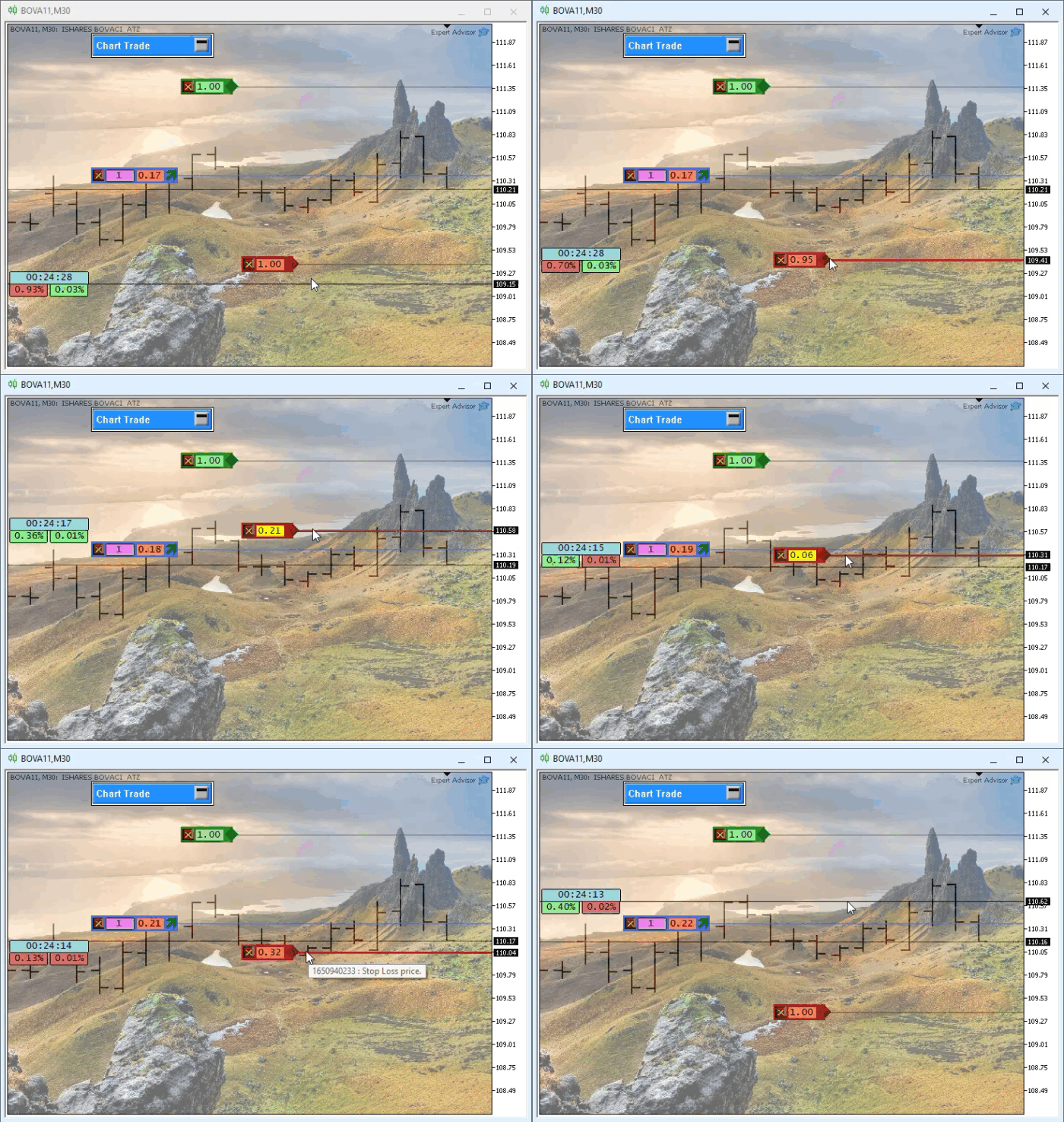
Let's start with line 223. There, we see two static variables. The principle is almost the same as the one we used in the UpdateViewPort procedure. However, since the ViewValue procedure will be used for two segments—take profit and stop loss—we need two static variables. We could declare another variable next to the one we created on line 50. However, naming variables is often a challenging task. Actually, the problem isn't choosing a name, but rather making sure not to use the variable in the wrong place. But that's just a minor detail. After declaring the static variables, note that on line 225 we check the second argument of the procedure. Keep in mind that it takes the value false only in the two places shown in the main code. In any other case, its value will be true. If this value is true, we do the same work as before. If this value is false, we do not take any action. However, the real work begins on line 249. This is when we begin to determine whether the price falls outside the valid range formed by the stop-loss and take-profit lines. When the price breaks out of this channel, that's when things really get interesting.
Let's see how it works. On line 249, we use a limit value to determine whether the background color should be green or red, regardless of which segment is executing the code. On line 250, we choose between segments to determine the colors correctly. You might be wondering why we use line 249 to set them if we then override them anyway through this selection. The answer is in lines 254 and 258. Without line 249, we would have to repeat the same code used to assign a value to the _cor variable in both cases. Now let's take a look at what happens on lines 252 through 259, since line 260 is fairly straightforward.
I'll explain the evMsgCloseTakeProfit case, although the same reasoning applies to evMsgCloseStopLoss as well. On lines 253 and 257, we perform the same check: we check whether we are getting the value from lines 65 and 66 of the main code. In this case, we will store it in the corresponding static variable. Otherwise, we reuse the stored value to use it in the ternary operator. Then, also using ternary operators, on lines 254 and 258 we check whether the symbol's price is within the channel. Note that this price includes the spread. For this reason, even if everything appears to be fine at first glance, that may not actually be the case. If the price is outside the corresponding channel, the background will turn yellow. If the price is within the appropriate zone, the background may be displayed in green or red, depending on the situation. You can see this in the previous animation. When we try to set a stop loss to an invalid position, the background turns yellow as soon as the stop-loss line enters the invalid zone.
When the line returns to a valid position, the indication changes from yellow to green or red, depending on whether that price level represents a profit or a loss. Finally, to apply the update, line 264 is executed; it sets the corresponding background color of the OBJ_EDIT object, in which the result is displayed for this level.
Concluding Thoughts
I realize that all of this might seem rather confusing and complicated. However, if you try out the system on a demo account—which is exactly what I recommend—you'll notice something interesting. Whenever the background is displayed in yellow and you try to set a price line at that level, the trade request result will show an error returned by the trade server. This is usually error 4756, as you can see in the following image.

Although this error does not actually originate from the server and appears among the runtime errors—which is quite curious—it indicates that the trade request could not be sent. It is labeled ERR_TRADE_SEND_FAILED. Therefore, if the background of the OBJ_EDIT object is yellow, keep in mind that this error will appear in the message window if you, as a user or trader, attempt to set a price at that level.
In any case, the implementation is already complete. I hope you understand its purpose and how it works. Although under normal trading conditions the background is not usually displayed in yellow, this situation may occur. If that happens, you'll need to take steps to resolve the issue. This implementation is not intended to frighten you or cause you concern. Its sole purpose is to make the position indicator much more practical and safer.
The necessary files and applications for local testing of the system will be available in the attachments, in case you do not know how to use the information from the articles to create the source code. That’s all for now. See you in the next article in this series on building the replay/simulation service. See you next time!
| File | Description |
|---|---|
| Experts\Expert Advisor.mq5 | Shows interaction between Chart Trade and the Expert Advisor. Mouse Study is required for this interaction. |
| Indicators\Chart Trade.mq5 | Creates a window for configuring the order to be sent. Mouse Study is required for this interaction. |
| Indicators\Market Replay.mq5 | Creates controls that allow you to interact with the replay/simulation service. Mouse Study is required for this interaction. |
| Indicators\Mouse Study.mq5 | Provides interaction between the graphical controls and the user. This is necessary both for working with the replay/simulation service and in the real market. |
| Indicators\Order Indicator.mq5 | Responsible for displaying market orders and allowing users to interact with and manage them. |
| Indicators\Position View.mq5 | Responsible for displaying market positions and allowing users to interact with and manage them. |
| Services\Market Replay.mq5 | Creates and maintains the market replay and simulation service (the main file of the entire system). |
Translated from Portuguese by MetaQuotes Ltd.
Original article: https://www.mql5.com/pt/articles/13483
Warning: All rights to these materials are reserved by MetaQuotes Ltd. Copying or reprinting of these materials in whole or in part is prohibited.
This article was written by a user of the site and reflects their personal views. MetaQuotes Ltd is not responsible for the accuracy of the information presented, nor for any consequences resulting from the use of the solutions, strategies or recommendations described.