

Larry Williams Market Secrets (Part 4): Automating Short-Term Swing Highs and Lows in MQL5
 11 371
 4
4

Introduction
Markets often appear chaotic when viewed candle by candle. Price moves up, then down, then sideways, leaving many traders unsure whether these movements follow any structure at all. However, long before algorithmic trading became popular, Larry Williams proposed a different view. In his book Long-Term Secrets to Short-Term Trading, he argued that price action is not purely random and that specific short-term swing patterns repeat often enough to offer a measurable edge. These ideas were based on observation, statistics, and decades of real market experience.
In the previous part of this series, we tested several of Larry Williams’ ideas using code and real historical data. One result stood out clearly. Markets responded strongly and consistently bullish after the formation of a short-term swing low. This behavior appeared across different asset classes and time periods, suggesting that the pattern is not accidental. Such findings naturally raise an essential question. If this behavior can be measured and verified, can it also be automated and tested as a complete trading system?
This article takes that next step. We move from analysis to execution by building a fully automated Expert Advisor in MQL5 that trades Larry Williams’ short-term swing lows and highs. The goal is not optimization or curve fitting, but structure and clarity. By translating a well-defined price-action concept into precise rules and code, we create a tool that enables traders to test, validate, and refine these ideas independently. By the end of this article, the reader will have a practical framework for turning observed market behavior into a systematic and testable trading approach.
Defining and Identifying Larry Williams’ Short-Term Swing Points
At the heart of Larry Williams' work lies a simple but powerful observation: price does not move randomly—it oscillates rhythmically between short-term extremes. These short-term highs and lows form the smallest, most reactive layer of market structure, acting as the building blocks from which intermediate and long-term trends emerge.
In Long-Term Secrets to Short-Term Trading, Larry Williams emphasizes that understanding this micro-structure allows traders to align themselves with the market's natural ebb and flow rather than reacting emotionally to isolated candles. In this section, we distill that philosophy down to its operational core and translate it into precise, rule-based logic suitable for automation.
As illustrated in Figure 1, a valid short-term swing low occurs when price forms a clear pivot: a bar whose low is flanked by higher lows on both sides.
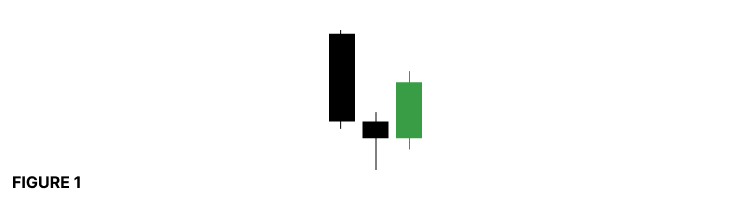
This central bar marks a temporary exhaustion of selling pressure, with the market briefly pausing before resuming its broader rhythm. Conversely, Figure 2 shows a short-term swing high, with lower highs surrounding the central bar's high, signaling short-term buyer exhaustion.
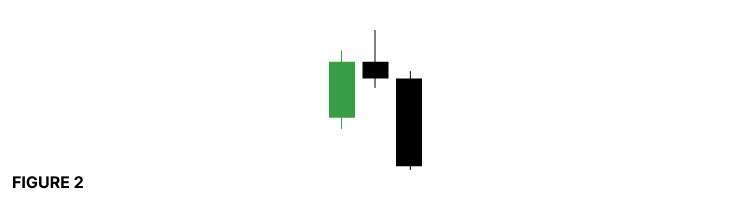
However, not every apparent pivot qualifies as a tradable swing point. One of the most critical aspects of Williams' methodology—and one that is often overlooked—is filtering. The quality of a swing point matters far more than its frequency.
You can direct your attention to Figure 3, where a potential swing low is invalidated because of an outside bar.
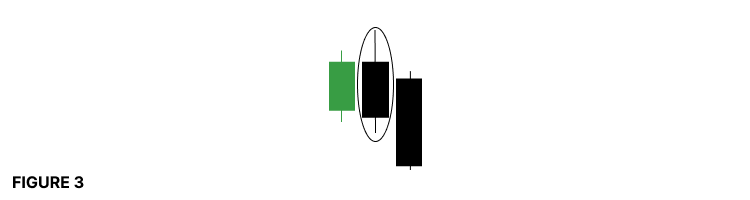
Outside bars, by definition, encompass the surrounding bars and introduce excessive volatility. Rather than signaling controlled exhaustion, they reflect instability and imbalance—conditions that distort the natural market rhythm Williams sought to exploit. For this reason, any swing candidate formed by an outside bar is immediately disqualified.
Similarly, Figure 4highlights the impact of inside bars. 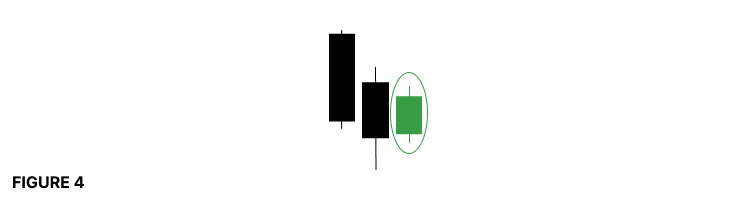
An inside bar represents contraction and indecision, not resolution. When a swing candidate forms on or adjacent to an inside bar, the structure lacks market participants' commitment. In keeping with Larry Williams' original principles, such formations are filtered out, preserving only the most explicit expressions of short-term intent.
By enforcing these exclusions, we are not merely identifying highs and lows—we are isolating meaningful turning points that reflect genuine shifts in short-term order flow. This disciplined filtering is what transforms a visual chart pattern into a repeatable, testable market behavior.With these definitions firmly established, we now possess a precise framework for detecting short-term swing highs and lows that faithfully reflect the market's internal rhythm.
General Design of the Expert Advisor
A well-designed system is easier to test, extend, and trust. In this section, we outline the core design principles that guide the construction of our Larry Williams short-term swing trading EA.
At its foundation, the EA is built to be configurable rather than opinionated. Market behavior is not identical across instruments or timeframes, and no single execution rule should be forced on every trader. For that reason, the EA exposes key behavioral choices as user inputs, allowing the same core logic to be evaluated under different trading assumptions.
Trade Direction Control
The first design decision concerns trade direction. The EA allows the user to restrict trading to long positions only, short positions only, or to trade both directions. This is especially useful for traders who already have a directional bias derived from higher-timeframe analysis or trend-following techniques.
Position Sizing and Risk Control
The EA supports both manual position sizing and automatic lot calculation based on a predefined percentage of the current account balance. This allows traders to choose between fixed exposure and adaptive risk that scales with account growth or drawdown. Importantly, this design ensures that the same strategy logic can be evaluated under different risk models without modifying the core code.
Trade Exit Logic
Based on the insights from our previous experiments in Part 3 of this series, the EA supports two distinct exit modes. The first closes trades at the end of a single bar, aligning with the observed short-term directional bias following swing formations. The second uses a predefined take-profit level derived from a configurable risk-reward ratio.
Protective Stop Placement
A hard stop loss protects every trade executed by the EA. This stop is placed at the extreme of the swing bar that defines the short-term high or low. This choice is intentional. It ties risk directly to market structure rather than arbitrary point distances.
Modular Architecture
The EA is designed with modularity in mind. Swing detection, trade validation, risk calculation, and order execution are kept logically separate. This approach improves readability and encourages best practices in MQL5 development. More importantly, it allows readers to reuse individual components when building their own systems or extending this one with additional filters and ideas.
Additional Design Considerations
To support research and experimentation, the EA also ensures that only one trade decision is made per completed bar. This prevents signal duplication and maintains consistent behavior between live trading and strategy testing.
With these design principles in place, we now have a solid foundation. In the next section, we will move from design to implementation and begin translating Larry Williams’ short-term swing concepts into executable logic.
Writing the Expert Advisor Step by Step
With the design decisions in place, we can now move to the practical part of this article and begin writing the Expert Advisor itself. This section is written as a guided walkthrough. The goal is not only to show what to write, but also to explain why each part exists and how it fits into the complete system we are building.
Before following along, there are a few things that I think are worth mentioning. This article assumes that the reader already has working knowledge of the MQL5 programming language. You should be comfortable reading and writing Expert Advisors without needing an introduction to basic syntax. You should also be familiar with MetaTrader 5 and MetaEditor 5, including how to create new Expert Advisor files, compile MQL5 programs, attach them to charts, and read compiler messages. Basic experience with the Strategy Tester is also expected, as this EA is designed to be tested and evaluated under different market conditions.
To make the learning process easier, a complete source file named lwShortTermStructureExpert.mq5 is attached to this article. This file contains the finished version of the Expert Advisor we are about to build. I would encourage you to download it and keep it open for reference. You can compare it with your own implementation whenever something feels unclear. The best way to learn programming is to write the code yourself, compile it often, and observe how the platform responds.
To begin, open MetaEditor 5 and create a new empty Expert Advisor file. Name it lwShortTermStructureExpert.mq5. Once the file is created, paste the source code provided below into the editor and compile it.
//+------------------------------------------------------------------+
//|                                   lwShortTermStructureExpert.mq5 |
//|          Copyright 2025, MetaQuotes Ltd. Developer is Chacha Ian |
//|                          https://www.mql5.com/en/users/chachaian |
//+------------------------------------------------------------------+

#property copyright   "Copyright 2025, MetaQuotes Ltd. Developer is Chacha Ian"
#property link        "https://www.mql5.com/en/users/chachaian"
#property version     "1.00"
#property description "This Expert Advisor automates Larry Williams’ short-term swing high and swing low trading methodology."
#property description "Trades are executed based on validated short-term swing formations derived from market structure."
#property description "The EA supports both time-based exits (single-bar holding) and risk-reward–based take-profit models."

//+------------------------------------------------------------------+
//| Standard Libraries                                               |
//+------------------------------------------------------------------+
#include <Trade\Trade.mqh>

//+------------------------------------------------------------------+
//| User input variables                                             |
//+------------------------------------------------------------------+
input group "Information"
input ulong           magicNumber           = 254700680002;
input ENUM_TIMEFRAMES timeframe             = PERIOD_CURRENT;

//+------------------------------------------------------------------+
//| Global Variables                                                 |
//+------------------------------------------------------------------+
//--- Create a CTrade object to handle trading operations

CTrade Trade;

//--- Bid and Ask
double   askPrice;
double   bidPrice;

//+------------------------------------------------------------------+
//| Expert initialization function                                   |
//+------------------------------------------------------------------+
int OnInit(){

   //---  Assign a unique magic number to identify trades opened by this EA
   Trade.SetExpertMagicNumber(magicNumber);

   return(INIT_SUCCEEDED);
}

//+------------------------------------------------------------------+
//| Expert deinitialization function                                 |
//+------------------------------------------------------------------+
void OnDeinit(const int reason){

   //--- Notify why the program stopped running
   Print("Program terminated! Reason code: ", reason);

}

//+------------------------------------------------------------------+
//| Expert tick function                                             |
//+------------------------------------------------------------------+
void OnTick(){

   //--- Retrieve current market prices for trade execution
   askPrice      = SymbolInfoDouble (_Symbol, SYMBOL_ASK);
   bidPrice      = SymbolInfoDouble (_Symbol, SYMBOL_BID);

}

//+------------------------------------------------------------------+
//| TradeTransaction function                                        |
//+------------------------------------------------------------------+
void OnTradeTransaction(const MqlTradeTransaction& trans,
                        const MqlTradeRequest& request,
                        const MqlTradeResult& result)
{

   //--- To handle trade transaction events

}

//+------------------------------------------------------------------+
At this stage, the code will not trade or generate signals. It serves as a clean, stable foundation that we will expand on step by step in the sections that follow.
The first part of the file contains the header and property definitions. This section documents the purpose of the Expert Advisor, its author, version, and general behavior. These properties are also shown when the EA is attached to a chart, making them useful for both users and future maintenance.
Next, we include the standard trading library provided by MQL5. This allows us to use the CTrade class, which simplifies order execution and trade management. Using standard libraries improves reliability and keeps the code clean.
The user input section defines parameters that the trader can configure without touching the source code. At this stage, we only define general information such as the magic number and the working timeframe. More inputs will be added later as we introduce trade direction filters, position sizing logic, and exit modes.
The global variables section holds objects and values that need to be accessed throughout the Expert Advisor. Here, we create a CTrade object that will handle all trading operations. We also declare variables to store the current bid and ask prices, which are required when executing trades.
The initialization function is called once when the Expert Advisor starts. Its primary role here is to assign a unique magic number to the trading object. This allows the EA to correctly identify and manage only its own positions.
The deinitialization function is executed when the Expert Advisor is removed or stopped. For now, it simply reports the reason why the program was terminated. This becomes useful during debugging and testing.
The tick function is where the EA reacts to market activity. At this stage, it only retrieves the current bid and ask prices. In later sections, this function will contain the core logic for detecting short-term swing structures and executing trades.
Finally, the trade transaction function is included as a placeholder. It allows the EA to respond to trade-related events such as order execution or position closure. We will use this later to monitor and manage trade behavior more precisely.
This boilerplate code provides a solid, organized starting point. From here, we will gradually introduce the logic that detects Larry Williams’ short-term swing highs and lows, applies trade filters, and manages risk in a controlled and testable way.
Signal Detection Logic
With the EA foundation in place, we now move into the most critical phase of development: signal detection. This is where market structure is translated into executable logic.
For this Expert Advisor, we deliberately avoid calling a custom indicator. Instead, we detect Larry Williams ' short-term swing formations directly from price data. This design choice keeps the EA lightweight, easier to distribute, and fully self-contained—everything required to identify the pattern is contained within the EA itself.
Detecting Signals at the Right Time
Larry Williams ' short-term swings are three-bar structures. To detect them reliably, we must wait until all required bars have fully closed. For this reason, signal detection is performed only when a new bar opens.
When a new bar appears, it occupies index zero in the price series. The three completed bars immediately before it are at indices 1, 2, and 3. These are the bars that may form a valid short-term swing.
To support this logic, we define a small utility function that detects the opening of a new bar.
//--- UTILITY FUNCTIONS
//+------------------------------------------------------------------+
//| Function to check if there's a new bar on a given chart timeframe|
//+------------------------------------------------------------------+
bool IsNewBar(string symbol, ENUM_TIMEFRAMES tf, datetime &lastTm)
{

   datetime currentTm = iTime(symbol, tf, 0);
   if(currentTm != lastTm){
      lastTm       = currentTm;
      return true;
   }
   return false;

}
This function compares the current bar time with the previously recorded bar time. If the time changes, a new bar has formed, and the function returns true.
The function accepts three parameters. The symbol and timeframe tell it which chart to monitor. The datetime variable is passed by reference and stores the timestamp of the last processed bar. This ensures the logic runs once per bar and not on every tick.
To make this work, we also define a global datetime variable. This variable holds the timestamp of the last bar we processed and allows the EA to maintain state across ticks.
//--- To help track new bar open
datetime lastBarOpenTime;
After declaring the variable, we assign its initial value inside the OnInit function as shown below.
//+------------------------------------------------------------------+
//| Expert initialization function                                   |
//+------------------------------------------------------------------+
int OnInit(){

   ...

   //--- Initialize global variables
   lastBarOpenTime       = 0;

   return(INIT_SUCCEEDED);
}
Detecting a Short-Term Swing Low
Once a new bar is confirmed, we can safely inspect the previous three bars for a short-term swing formation.
//+------------------------------------------------------------------+
//| Detects a Larry Williams short-term low on the last three bars   |
//| Bar index 2 must be a swing low with higher lows on both sides   |
//| Bar 2 must NOT be an outside bar                                 |
//| Bar 1 must NOT be an inside bar                                  |
//+------------------------------------------------------------------+
bool IsLarryWilliamsShortTermLow(string symbol, ENUM_TIMEFRAMES tf){

   //--- Price data for the three bars
   double high1 = iHigh(symbol, tf, 1);
   double low1  = iLow (symbol, tf, 1);

   double high2 = iHigh(symbol, tf, 2);
   double low2  = iLow (symbol, tf, 2);

   double high3 = iHigh(symbol, tf, 3);
   double low3  = iLow (symbol, tf, 3);

   //--- Condition 1: Bar 2 must be a swing low
   bool isSwingLow =
      (low2 < low1) &&
      (low2 < low3);

   if(!isSwingLow){
      return false;
   }

   //--- Condition 2: Bar 2 must NOT be an outside bar relative to bar 3
   bool isOutsideBar =
      (high2 > high3) &&
      (low2  < low3);

   if(isOutsideBar){
      return false;
   }

   //--- Condition 3: Bar 1 must NOT be an inside bar relative to bar 2
   bool isInsideBar =
      (high1 < high2) &&
      (low1  > low2);

   if(isInsideBar){
      return false;
   }

   //--- All conditions satisfied
   lwShortTermSwingLevel = NormalizeDouble(low2, Digits());
   return true;
}
The function that detects a Larry Williams short-term low begins by retrieving the high and low prices for bars 1, 2, and 3. Bar two is the middle bar and is the candidate swing bar.
The first condition checks whether bar two is a genuine swing low. Its low must be lower than the lows of the bars on both sides. If this condition fails, the pattern is immediately rejected.
The second condition filters out outside bars. Bar two must not fully engulf bar three. Outside bars often distort structure and are excluded to keep the pattern clean and consistent.
The third condition checks bar one. It must not be an inside bar relative to bar two. Inside bars represent contraction and uncertainty, which Larry Williams explicitly avoids when defining valid swing points.
Only when all three conditions are satisfied do we confirm a valid short-term swing low. At this point, we store the swing bar's low price in a global variable. This price level marks a structurally important point in the market and will later inform risk management decisions.
Detecting a Short-Term Swing High
The logic for detecting a short-term swing high is the inverse of the swing low logic.
//+------------------------------------------------------------------+
//| Detects a Larry Williams short-term high on the last three bars  |
//| Bar index 2 must be a swing high with lower highs on both sides  |
//| Bar 2 must NOT be an outside bar                                 |
//| Bar 1 must NOT be an inside bar                                  |
//+------------------------------------------------------------------+
bool IsLarryWilliamsShortTermHigh(string symbol, ENUM_TIMEFRAMES tf){

   //--- Price data for the three bars
   double high1 = iHigh(symbol, tf, 1);
   double low1  = iLow (symbol, tf, 1);

   double high2 = iHigh(symbol, tf, 2);
   double low2  = iLow (symbol, tf, 2);

   double high3 = iHigh(symbol, tf, 3);
   double low3  = iLow (symbol, tf, 3);

   //--- Condition 1: Bar 2 must be a swing high
   bool isSwingHigh =
      (high2 > high1) &&
      (high2 > high3);

   if(!isSwingHigh){
      return false;
   }

   //--- Condition 2: Bar 2 must NOT be an outside bar relative to bar 3
   bool isOutsideBar =
      (high2 > high3) &&
      (low2  < low3);

   if(isOutsideBar){
      return false;
   }

   //--- Condition 3: Bar 1 must NOT be an inside bar relative to bar 2
   bool isInsideBar =
      (high1 < high2) &&
      (low1  > low2);

   if(isInsideBar){
      return false;
   }

   //--- All conditions satisfied
   lwShortTermSwingLevel = NormalizeDouble(high2, Digits());
   return true;
}
Instead of looking for lower lows, we look for higher highs. Instead of rejecting downside outside bars, we reject upside ones. The same structural filters apply, only mirrored.
Because the logic follows the same structure and flow, there is no need to break it down in detail again. If the swing low function is well understood, the swing high function becomes intuitive.
When a valid swing high is detected, the high price of the middle bar is stored in the same global variable. This allows the EA to track the most recent swing point regardless of direction.
Tracking the Most Recent Swing Level
At this stage, if you attempt to compile the EA, you will encounter undeclared identifier errors. This happens because we assign a value to a variable that has not yet been defined.
To resolve this, we declare a global variable that stores the price level of the most recently detected short-term swing, whether high or low.
//--- Stores the price level of the most recently detected Larry Williams' short-term swing high or low
double lwShortTermSwingLevel;
This variable serves a single purpose. It tracks the last confirmed structural extreme. Later in the EA, this value will be used to place protective stop levels at logical market points rather than arbitrary distances.
After declaring the variable, we assign its initial value inside the OnInit function as shown below.
//+------------------------------------------------------------------+
//| Expert initialization function                                   |
//+------------------------------------------------------------------+
int OnInit(){

   ...

   //--- Initialize global variables

   ...

   lwShortTermSwingLevel = DBL_MAX;

   return(INIT_SUCCEEDED);
}
By separating signal detection from trade execution, we keep the logic modular and easy to extend. In the next phase, this detected structure will be connected to trade entries, exits, and risk management rules.
At this point, the EA can observe the market, recognize valid Larry Williams short-term swing formations, and record their price levels accurately and consistently. This forms the core intelligence of the system, and everything that follows builds on this foundation.
Trading Logic and Order Execution
This section focuses on how signals are translated into real positions, while respecting the design rules we agreed on earlier.
The trading logic is built around clarity and control. Every decision the EA makes is guided by explicit rules that the user can configure. To achieve this, we introduce several custom enumerations, user inputs, and helper functions that work together as a single system.
Controlling Trade Direction
The first design decision we implement is trade direction flexibility. Not every trader wants to trade both sides of the market at all times. Some prefer to align with a dominant trend and restrict entries to a single direction.
To support this, we define a custom enumeration that allows the EA to operate in three modes. Long only, short only, or both directions. The selected mode determines which signals trigger trades.
//--- CUSTOM ENUMERATIONS
enum ENUM_TRADE_DIRECTION
{
   ONLY_LONG,
   ONLY_SHORT,
   TRADE_BOTH
};
We then present this choice to the user as an input option.
input group "Trade And Risk Management"
input ENUM_TRADE_DIRECTION direction        = TRADE_BOTH;
When the EA runs, it checks this setting before executing any order. Signals that do not match the selected direction are ignored entirely.
Lot Size Determination Modes
Next, we address position sizing. Risk management is not optional, and different traders prefer different approaches. The EA supports two lot size modes. In manual mode, the user provides a fixed lot size. Every trade uses the same volume regardless of stop distance or account size.
enum ENUM_LOT_SIZE_INPUT_MODE
{
   MODE_MANUAL,
   MODE_AUTO
};
In automatic mode, the EA dynamically calculates the lot size. The calculation is based on a percentage of the current account balance and the distance between the entry price and the protective stop. This ensures that risk remains consistent across trades, even when market volatility changes.
Both modes are exposed as inputs.
input ENUM_LOT_SIZE_INPUT_MODE lotSizeMode  = MODE_AUTO;
input double riskPerTradePercent            = 1.0;
input double positionSize                   = 0.01;
If automatic mode is selected, the EA ignores the fixed lot size input and uses the risk percentage instead. If manual mode is selected, the risk percentage is ignored.
Profit Taking Modes and Risk Reward Control
The next layer of flexibility is trade exit logic. Based on earlier experiments, we know that short-term swing patterns often produce a directional move within the next bar. However, some traders prefer structured reward targets.
To support both approaches, we define an enumeration of take-profit modes.
enum ENUM_TAKE_PROFIT_MODE
{
   TP_HOLD_ONE_BAR,
   TP_FIXED_RRR_1_ONE,
   TP_FIXED_RRR_1_ONEptFIVE,
   TP_FIXED_RRR_1_TWO,
   TP_FIXED_RRR_1_THREE
};
The first option closes trades after exactly one bar. In this mode, no take profit is set. Trades are exited by time rather than price.
The remaining options apply fixed risk-to-reward ratios. These modes calculate a take-profit level based on the stop distance and the selected reward multiple. The EA then places both a stop loss and a take profit at execution.
A single input parameter allows the user to select the desired exit style. The EA adapts its behavior automatically based on this choice.
input ENUM_TAKE_PROFIT_MODE takeProfitMode = TP_HOLD_ONE_BAR;
Enforcing One Trade at a Time
One of the most critical design rules is that the EA can only hold one position at a time. This avoids overlapping trades and keeps results clean and interpretable.
To enforce this rule, we define helper functions that check whether an active buy or sell position already exists.
//+------------------------------------------------------------------+
//| To verify whether this EA currently has an active buy position.  |                                 |
//+------------------------------------------------------------------+
bool IsThereAnActiveBuyPosition(ulong magic){

   for(int i = PositionsTotal() - 1; i >= 0; i--){
      ulong ticket = PositionGetTicket(i);
      if(ticket == 0){
         Print("Error while fetching position ticket ", _LastError);
         continue;
      }else{
         if(PositionGetInteger(POSITION_MAGIC) == magic && PositionGetInteger(POSITION_TYPE) == POSITION_TYPE_BUY){
            return true;
         }
      }
   }

   return false;
}

//+------------------------------------------------------------------+
//| To verify whether this EA currently has an active sell position. |                                 |
//+------------------------------------------------------------------+
bool IsThereAnActiveSellPosition(ulong magic){

   for(int i = PositionsTotal() - 1; i >= 0; i--){
      ulong ticket = PositionGetTicket(i);
      if(ticket == 0){
         Print("Error while fetching position ticket ", _LastError);
         continue;
      }else{
         if(PositionGetInteger(POSITION_MAGIC) == magic && PositionGetInteger(POSITION_TYPE) == POSITION_TYPE_SELL){
            return true;
         }
      }
   }

   return false;
}
These functions scan all open positions and find one that matches the EA's magic number and the required trade type.
If a matching position is found, the EA knows it is already in a trade and ignores any new signals. This logic ensures discipline and prevents overexposure.
The functions that check for a buy or sell position follow the same structure. Once the reader understands one, the other becomes immediately clear.
Closing Trades Held for One Bar
For trades that are held only for a single bar, we need a reliable way to close them. For this purpose, we define a function that closes all positions associated with the EA magic number.
//+------------------------------------------------------------------+
//| To close all positions with a specified magic number             |
//+------------------------------------------------------------------+
void ClosePositionsByMagic(ulong magic) {

    for (int i = PositionsTotal() - 1; i >= 0; i--) {
        ulong ticket = PositionGetTicket(i);
        if (PositionSelectByTicket(ticket)) {
            if (PositionGetInteger(POSITION_MAGIC) == magic) {
                ulong positionType = PositionGetInteger(POSITION_TYPE);
                double volume = PositionGetDouble(POSITION_VOLUME);
                if (positionType == POSITION_TYPE_BUY) {
                    Trade.PositionClose(ticket);
                } else if (positionType == POSITION_TYPE_SELL) {
                    Trade.PositionClose(ticket);
                }
            }
        }
    }
}
This function loops through all open positions, identifies those belonging to the EA, and closes them using the trade object. It does not care whether the position is long or short. If the magic number matches, the position is closed.
This function will later be called when a new bar opens, ensuring that time-based exits behave exactly as intended.
Opening a Buy Position
With all supporting components in place, we can now open trades.
The buy execution function handles everything required to safely and consistently place an extended position.
//+------------------------------------------------------------------+
//| Function to open a market long position                          |
//+------------------------------------------------------------------+
bool OpenBuy(double entryPrice, double lotSize){

   double stopLevel      = lwShortTermSwingLevel;
   double stopDistance   = entryPrice - stopLevel;
   double contractSize   = SymbolInfoDouble(_Symbol, SYMBOL_TRADE_CONTRACT_SIZE);
   double accountBalance = AccountInfoDouble(ACCOUNT_BALANCE);

   if(takeProfitMode == TP_HOLD_ONE_BAR){

      if(lotSizeMode == MODE_AUTO){
         double amountAtRisk = (riskPerTradePercent / 100.0) *  accountBalance;
         lotSize             = amountAtRisk / (contractSize * stopDistance);
         lotSize             = NormalizeDouble(lotSize, 2);
      }

      if(!Trade.Buy(NormalizeDouble(lotSize, 2), _Symbol, entryPrice, stopLevel)){
         Print("Error while executing a market buy order: ", GetLastError());
         Print(Trade.ResultRetcode());
         Print(Trade.ResultComment());
         return false;
      }

   }

   else{

      double rewardValue              = 1.0;

      switch(takeProfitMode){
         case TP_FIXED_RRR_1_ONE:
            rewardValue = 1.0;
            break;
         case TP_FIXED_RRR_1_ONEptFIVE:
            rewardValue = 1.5;
            break;
         case TP_FIXED_RRR_1_TWO:
            rewardValue = 2.0;
            break;
         case TP_FIXED_RRR_1_THREE:
            rewardValue = 3.0;
            break;
         default:
            rewardValue = 1.0;
            break;
      }

      double targetLevel = NormalizeDouble(entryPrice + stopDistance * rewardValue ,Digits());
      if(!Trade.Buy(NormalizeDouble(lotSize, 2), _Symbol, entryPrice, stopLevel, targetLevel)){
         Print("Error while executing a market buy order: ", GetLastError());
         Print(Trade.ResultRetcode());
         Print(Trade.ResultComment());
         return false;
      }
   }

   return true;
}
It uses the most recently detected swing level as the protective stop. The distance between the entry price and this stop defines the trade risk.
If automatic lot sizing is enabled, the function calculates the lot size to keep the predefined percentage of the account balance at risk. If manual sizing is selected, the provided lot size is used directly.
The function then checks the selected take profit mode. If the trade is meant to be held for one bar, only a stop loss is placed. If a fixed reward mode is selected, a take profit level is calculated based on the chosen risk-to-reward ratio.
Finally, the function sends the buy order using the trade object and returns a success or failure status. Any execution errors are logged for debugging.
Opening a Sell Position
The sell execution function follows the same logic as the buy function, but in the opposite direction.
//+------------------------------------------------------------------+
//| Function to open a market short position                         |
//+------------------------------------------------------------------+
bool OpenSel(double entryPrice, double lotSize){

   double stopLevel      = lwShortTermSwingLevel;
   double stopDistance   = stopLevel - entryPrice;
   double contractSize   = SymbolInfoDouble(_Symbol, SYMBOL_TRADE_CONTRACT_SIZE);
   double accountBalance = AccountInfoDouble(ACCOUNT_BALANCE);

   if(takeProfitMode == TP_HOLD_ONE_BAR){
      if(lotSizeMode == MODE_AUTO){
         double amountAtRisk = (riskPerTradePercent / 100.0) *  accountBalance;
         lotSize             = amountAtRisk / (contractSize * stopDistance);
         lotSize             = NormalizeDouble(lotSize, 2);
      }

      if(!Trade.Sell(NormalizeDouble(lotSize, 2), _Symbol, entryPrice, stopLevel)){
         Print("Error while executing a market buy order: ", GetLastError());
         Print(Trade.ResultRetcode());
         Print(Trade.ResultComment());
         return false;
      }
   }

   else{

      double rewardValue              = 1.0;

      switch(takeProfitMode){
         case TP_FIXED_RRR_1_ONE:
            rewardValue = 1.0;
            break;
         case TP_FIXED_RRR_1_ONEptFIVE:
            rewardValue = 1.5;
            break;
         case TP_FIXED_RRR_1_TWO:
            rewardValue = 2.0;
            break;
         case TP_FIXED_RRR_1_THREE:
            rewardValue = 3.0;
            break;
         default:
            rewardValue = 1.0;
            break;
      }

      double targetLevel = NormalizeDouble(entryPrice - stopDistance * rewardValue ,Digits());
      if(!Trade.Sell(NormalizeDouble(lotSize, 2), _Symbol, entryPrice, stopLevel, targetLevel)){
         Print("Error while executing a market buy order: ", GetLastError());
         Print(Trade.ResultRetcode());
         Print(Trade.ResultComment());
         return false;
      }

   }

   return true;
}
The protective stop is placed at the most recent swing high. The stop distance is calculated accordingly. Lot size determination follows the same rules, and take profit placement mirrors the buy logic.
Because the structure and flow are identical, understanding the buy function makes the sell function easy to follow. Together, they form a balanced and consistent execution layer.
Bringing Everything Together in OnTick
At this stage, we have already built all the essential parts of the Expert Advisor. We can detect valid short-term swing signals, calculate risk, and open and manage trades. What remains is to connect these pieces so that the EA behaves exactly as intended in real time.
This final integration happens inside the OnTick function.
//+------------------------------------------------------------------+
//| Expert tick function                                             |
//+------------------------------------------------------------------+
void OnTick(){

   ...

   //--- Run this block only when a new bar is detected on the selected timeframe
   if(IsNewBar(_Symbol, timeframe, lastBarOpenTime)){

      if(takeProfitMode == TP_HOLD_ONE_BAR){

         //--- Close any existing buy positions for this EA before opening a new one
         if(IsThereAnActiveBuyPosition(magicNumber)){
            ClosePositionsByMagic(magicNumber);
            Sleep(100);
         }

         if(IsThereAnActiveSellPosition(magicNumber)){
            ClosePositionsByMagic(magicNumber);
            Sleep(100);
         }

      }

      //---  Enter a buy position when a Larry Williams-defined short-term low swing pattern is detected
      if(direction == ONLY_LONG || direction == TRADE_BOTH){

         if(IsLarryWilliamsShortTermLow(_Symbol, timeframe) && !IsThereAnActiveBuyPosition(magicNumber) && !IsThereAnActiveSellPosition(magicNumber)){
            OpenBuy(askPrice, positionSize);
         }

      }

      //---  Enter a short position when a Larry Williams-defined short-term high swing pattern is detected
      if(direction == ONLY_SHORT || direction == TRADE_BOTH){

         if(IsLarryWilliamsShortTermHigh(_Symbol, timeframe) && !IsThereAnActiveSellPosition(magicNumber) && !IsThereAnActiveBuyPosition(magicNumber)){
            OpenSel(bidPrice, positionSize);
         }
      }
   }
}
This function is called whenever the market price updates and serves as the EA's control center. Here is where we decide when to evaluate signals, open trades, and close them.
Why We Trade Only on a New Bar
The first and most crucial decision inside OnTick is that all logic runs only when a new bar is detected on the selected timeframe.
By doing this, we avoid reacting to price noise inside a candle. Larry Williams’ short-term swing logic is based on completed bars, not forming ones. Running the logic only at the opening of a new bar ensures that all price data we analyze is final and stable.
This also keeps the EA efficient. Instead of evaluating conditions on every tick, the EA makes decisions once per bar, which is precisely what we want for this type of strategy.
Managing One Bar Trades
When the take profit mode is set to hold for 1 bar, trade management becomes time-based rather than price-based.
As soon as a new bar is detected, the EA checks whether any active positions are open for this Expert Advisor. If such positions exist, they are closed immediately. This guarantees that trades opened on the previous bar do not spill into the next one.
This logic enforces discipline. Every trade lives for exactly one bar and no more. After closing existing positions, the EA is free to evaluate new signals on the freshly opened candle.
Evaluating Buy Signals
Once trade cleanup is complete, the EA moves on to signal evaluation.
If the user has allowed long trades, the EA checks whether a valid Larry Williams short-term low pattern has formed. At the same time, it confirms that there is no active buy or sell position. This ensures that only one trade can exist at any given moment.
When all conditions are satisfied, the EA opens a buy position using the previously defined execution logic. The entry price, stop level, lot size, and take profit behavior are all handled automatically based on the user’s settings.
Evaluating Sell Signals
The logic for sell trades follows the same structure.
If short trades are allowed, the EA looks for a valid Larry Williams short-term high pattern. It again confirms that no active position exists before proceeding.
When the conditions are met, a sell position is opened using the same risk management and execution rules, but in the opposite direction. Because the buy-and-sell logic was designed as mirror images, the behavior remains consistent and predictable.
The Essence of the Flow
What makes this structure powerful is its simplicity.
Every new bar triggers a clean decision cycle. Existing trades are managed first, signals are evaluated next, and entries are executed only when all rules align. There is no overlap, no ambiguity, and no hidden behavior.
The EA now behaves like a disciplined trader. It waits patiently, acts only on confirmed structure, respects risk rules, and never overtrades.
Before moving on to testing, please make sure the chart remains clean and easy to read when the EA is attached. A clean visual environment makes it much easier to verify that trades are being executed exactly where the intended swing structures form. This is especially helpful during strategy testing and debugging.
The ConfigureChartAppearance function handles this task.
//+------------------------------------------------------------------+
//| This function configures the chart's appearance.                 |
//+------------------------------------------------------------------+
bool ConfigureChartAppearance()
{
   if(!ChartSetInteger(0, CHART_COLOR_BACKGROUND, clrWhite)){
      Print("Error while setting chart background, ", GetLastError());
      return false;
   }

   if(!ChartSetInteger(0, CHART_SHOW_GRID, false)){
      Print("Error while setting chart grid, ", GetLastError());
      return false;
   }

   if(!ChartSetInteger(0, CHART_MODE, CHART_CANDLES)){
      Print("Error while setting chart mode, ", GetLastError());
      return false;
   }

   if(!ChartSetInteger(0, CHART_COLOR_FOREGROUND, clrBlack)){
      Print("Error while setting chart foreground, ", GetLastError());
      return false;
   }

   if(!ChartSetInteger(0, CHART_COLOR_CANDLE_BULL, clrSeaGreen)){
      Print("Error while setting bullish candles color, ", GetLastError());
      return false;
   }

   if(!ChartSetInteger(0, CHART_COLOR_CANDLE_BEAR, clrBlack)){
      Print("Error while setting bearish candles color, ", GetLastError());
      return false;
   }

   if(!ChartSetInteger(0, CHART_COLOR_CHART_UP, clrSeaGreen)){
      Print("Error while setting bearish candles color, ", GetLastError());
      return false;
   }

   if(!ChartSetInteger(0, CHART_COLOR_CHART_DOWN, clrBlack)){
      Print("Error while setting bearish candles color, ", GetLastError());
      return false;
   }

   return true;
}
It programmatically sets the chart to a neutral and straightforward layout by applying a white background, turning off the grid, switching to candlestick mode, and defining clear bullish and bearish candle colors. These settings remove visual noise, allowing swing levels and the price structure to stand out clearly. Each chart property is applied safely, and if any setting fails, the function reports the error and stops further execution. This ensures that the EA runs only when the chart environment is adequately prepared.
Once the function is defined, it is called from within the OnInit function.
//+------------------------------------------------------------------+
//| Expert initialization function                                   |
//+------------------------------------------------------------------+
int OnInit(){

   ...

   //--- To configure the chart's appearance
   if(!ConfigureChartAppearance()){
      Print("Error while configuring chart appearance", GetLastError());
      return INIT_FAILED;
   }

   return(INIT_SUCCEEDED);
}
This guarantees that the chart is configured immediately when the EA is loaded, before any trading logic starts running. If the configuration fails, the EA initialization is aborted to prevent trading under unclear or unintended chart conditions. This approach follows good defensive programming practices and helps avoid confusion during live trading or backtesting.
With this final step, the development phase of the Expert Advisor is complete. We now have a fully functional EA that detects signals, manages trades, and presents a clean visual context for analysis. The next phase is testing, where we will run back tests on several financial instruments to evaluate how the strategy performs on historical data and to validate that the logic behaves as expected under different market conditions.
Putting the EA to the Test
Before considering any strategy complete, it must be tested against historical data. This phase allows us to observe how the EA behaves across different market conditions and asset classes while consistently applying the same rules and constraints.
For this study, we ran back tests from January 1st, 2024, to November 30th, 2025. At the time of writing, this covers approximately twenty-three months of market data. All tests were conducted only daily.
The EA was tested on four instruments representing different market types: a commodity, an index, a cryptocurrency, and a major forex pair. To ensure fairness and repeatability, the same configuration and input parameters were used across all tests. These have been attached to this article as configurations.ini and parameters.set, allowing you to reproduce the same results on your own platform.
Each test began with an initial balance of $10,000.
Gold
Gold produced the strongest performance among all tested instruments. Over the test period, the EA generated a total net profit of $ 9,123.25, with a win rate of 55%.
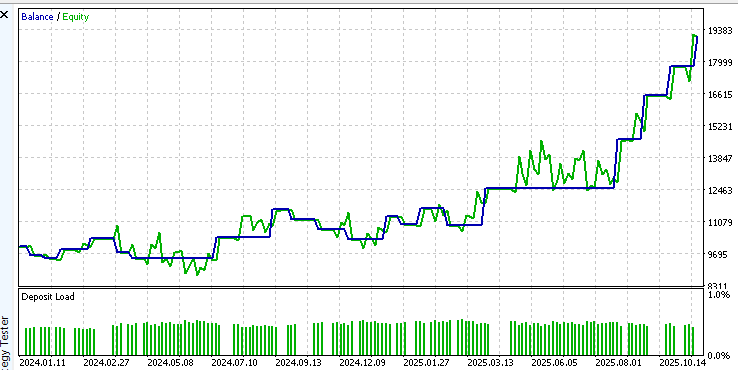
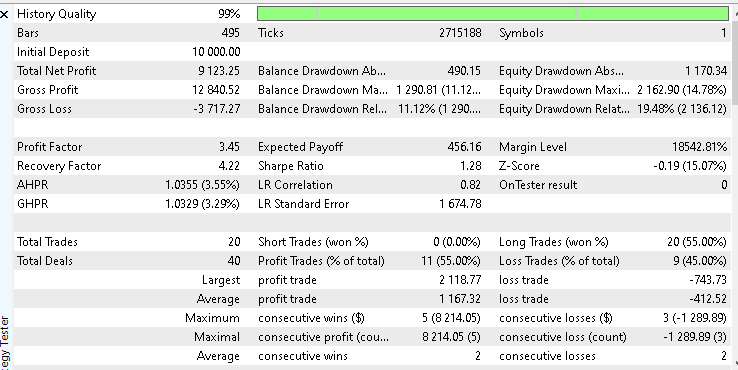
As shown in the accompanying equity curve screenshot, gold price movements align well with the short-term swing structure defined by Larry Williams. The market’s tendency to trend cleanly on higher timeframes allows the EA to capture sustained directional moves while keeping risk controlled.
This result highlights why gold is often a favorable instrument for swing-based strategies on the daily timeframe.
S&P 500
The S&P 500 delivered modest but stable results. The total net profit for the period was $ 158, with a win rate of 42.11%.
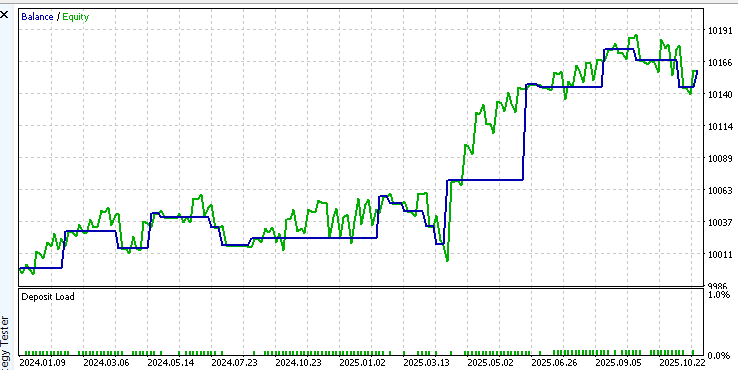
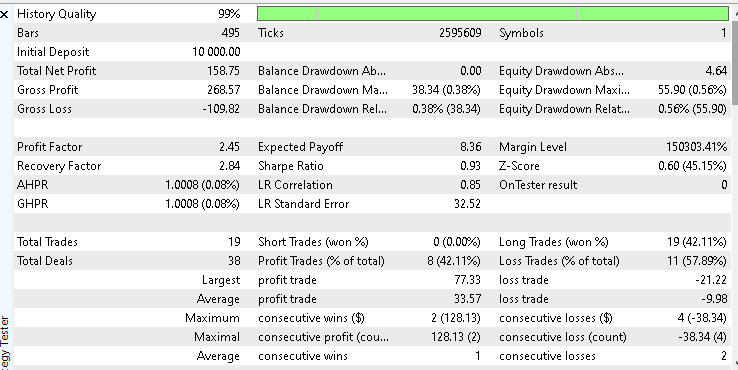
While the overall profit is small, the equity curve shows relatively smooth behavior with limited drawdowns. This suggests that the strategy remains structurally sound in index markets, though it may benefit from further tuning of exits or position sizing to better capture longer directional moves.
A screenshot of the equity curve and a detailed test report are provided to visually confirm this behavior.
Bitcoin
On Bitcoin, the EA delivered a solid performance over the test period. Starting with an initial balance of 10,000 dollars, the system achieved a total net profit of 4,572.63 dollars, with a win rate of 42.42 percent.
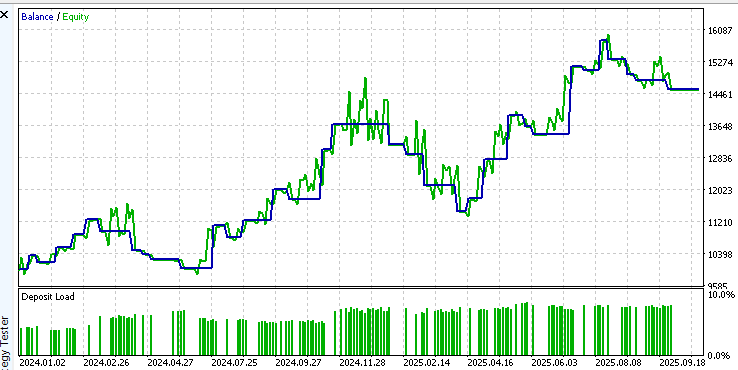
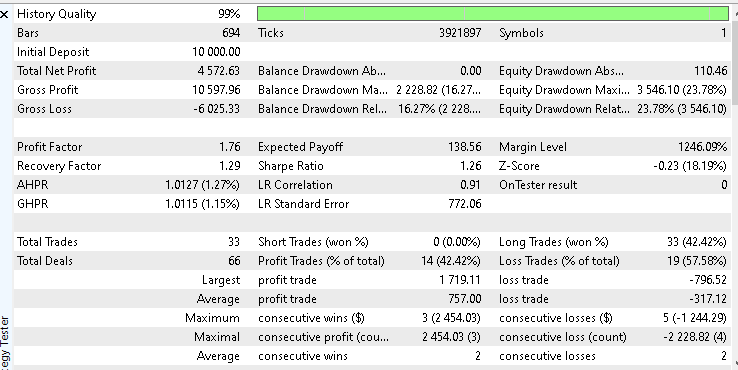
The equity curve shows sustained growth during periods where Bitcoin exhibited precise directional movement on the daily timeframe. This behavior aligns well with the strategy's short-term swing structure, enabling profitable trades when momentum is present.
Although Bitcoin is known for its volatility, trading it on a higher timeframe helps smooth out short-term noise. These results suggest that the strategy can perform effectively in cryptocurrency markets, provided risk management rules are adhered to, and expectations remain realistic.
Great British Pound
The British Pound recorded a net loss of 279 dollars from the same starting balance of 10,000 dollars, with a win rate of 19.05 percent.
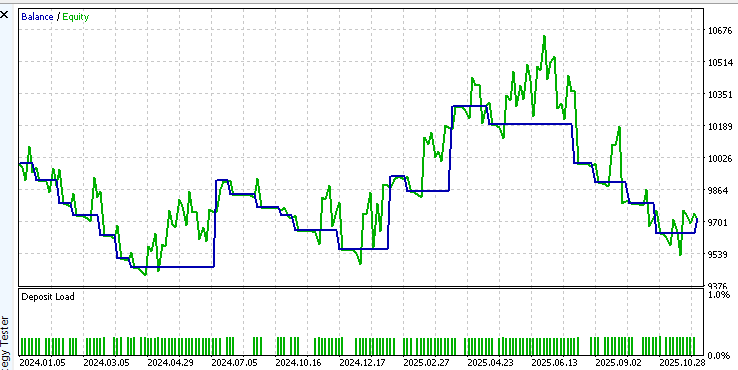
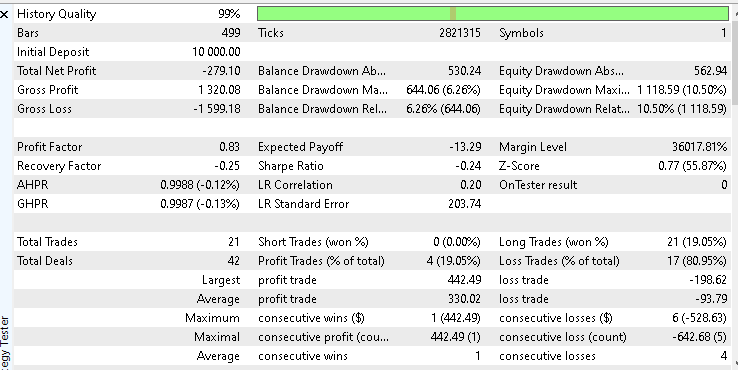
The equity curve shows many small losing trades rather than a single significant failure. This is typical when a market is range-bound and lacks persistent directional moves. For GBPUSD, the swing-based entries produced limited follow-through and a low win rate.
This outcome suggests two options. One is to reduce exposure to this instrument. The other is to adjust the exit and reward settings and add filters so that trades are taken only under stronger trend conditions.
Test Summary
These results demonstrate an essential truth in system development: no single configuration performs equally well across all markets. The same logic that excels in trending instruments like gold may struggle in ranging or highly volatile environments.
This is exactly where your own experimentation becomes valuable. By loading the provided configurations.ini and parameters.set files, you can replicate these tests, adjust individual inputs, and observe how performance changes across different markets and timeframes.
Please treat this EA as a research framework rather than a finished product. Run your own back tests, test alternative reward ratios, explore different exit modes, and study the equity curves closely. This process is where real understanding and edge are built.
Conclusion
This article set out to do more than present a finished Expert Advisor. It walked through a complete and practical development process, from signal detection and design decisions to execution logic, risk management, and testing. By the end of this journey, the reader is not only left with a working EA but with a clear understanding of why it behaves the way it does.
The strategy itself is intentionally simple in structure, yet disciplined in execution. It trades well-defined swing formations, limits exposure through a hard protective stop, and enforces strict position control by allowing only one active trade at a time. These choices are not accidental. They reflect a measured approach to risk and a mindset that prioritizes capital preservation alongside growth. This makes the EA suitable not only for experimentation but also as a foundation that can be refined and deployed responsibly.
The backtesting results further reinforce an important lesson. No strategy performs equally well across all markets. By testing the EA across different instruments and observing where it excels and struggles, the reader is reminded that testing, evaluation, and adaptation are essential to systematic trading. The provided configuration and parameter files make it easy to reproduce the results and, more importantly, to run new experiments and explore improvements.
In the end, this article gives the reader something tangible. A complete Expert Advisor that they can study, test, modify, and extend. At the same time, it provides a clear framework for building robust trading systems in MQL5. Whether the goal is learning, experimentation, or eventual deployment, the knowledge gained here provides a solid, practical starting point.
The following table provides an overview of the files included with this article, detailing their specific roles and how to use them within the MetaTrader 5 platform.
| File Name | Description | |
|---|---|---|
| 1. | lwShortTermStructureExpert.mq5 | The main source code for the Expert Advisor is detailed in this article, containing the implementation of the short-term structure logic |
| 2. | configurations.ini | A configuration file containing global environment settings required for the EA's testing |
| 3. | parameters.set | A standardized input parameter file that allows you to load the user input parameters used for back testing quickly |
Warning: All rights to these materials are reserved by MetaQuotes Ltd. Copying or reprinting of these materials in whole or in part is prohibited.
This article was written by a user of the site and reflects their personal views. MetaQuotes Ltd is not responsible for the accuracy of the information presented, nor for any consequences resulting from the use of the solutions, strategies or recommendations described.

 Neuroboids Optimization Algorithm (NOA)
 Building Volatility models in MQL5 (Part I): The Initial Implementation
 Sigma Score Indicator for MetaTrader 5: A Simple Statistical Anomaly Detector
 Introduction to MQL5 (Part 33): Mastering API and WebRequest Function in MQL5 (VII)

- Free trading apps
- Over 8,000 signals for copying
- Economic news for exploring financial markets
You agree to website policy and terms of use
Buy order is not taking we are facing 2026.01.30 14:06:59.971 lwShortTermStructureExpert (XAUUSDm,M1) Error while executing a market buy order : 0
Hi ,
Buy order is not taking we are facing 2026.01.30 14:06:59.971 lwShortTermStructureExpert (XAUUSDm,M1) Error while executing a market buy order : 0
Hello. In automatic mode, the lot size based on the selected risk percentage only works in TP = HOLD ONE BAR mode; in all other modes, the lot size is selected from the value for manual mode!