

Larry Williams Market Secrets (Part 9): Patterns to Profit
 4 743
4 743
 0
0

Introduction
Markets have always invited traders to search for meaning in price. Over the decades, countless chart patterns have been named, classified, and taught as if they carried universal predictive power. Head-and-shoulders, triangles, flags, and countless variations have shaped how many traders read charts.
Larry Williams challenges this tradition. He does not dismiss patterns entirely, but he questions their practical value when they are vague, subjective, and spread across long horizons. Classical formations often require interpretation, depend on hindsight, and unfold over periods where too many variables can interfere with the outcome. By the time a long-term pattern completes, the market environment may already have changed.
Instead, Larry Williams focuses on short-term price behavior. Short-term patterns form quickly, resolve quickly, and can be measured with precision. They are built from simple relationships between opens, closes, highs, and lows. They reflect immediate market emotion rather than long-term opinion. Most importantly, they can be tested objectively. This shift from visual storytelling to measurable behavior changes everything. When patterns are clearly defined, they can be transformed into rules. When rules are precise, they can be automated. When automation is possible, performance can be studied across thousands of trades rather than remembered from a handful of examples.
In this article, we begin that process. We take several of the short-term patterns introduced in his book, Long-term Secrets to Short-term Trading, and transform them into a research-driven Expert Advisor. Each pattern is implemented as an independent strategy. Each strategy can be tested in isolation. Each trade is managed using consistent risk and exit rules. The goal is not to prove that any single pattern is perfect, but to understand how structure, emotion, time, and volatility interact in real market data.
This article is part of a continuing series. Together, we are building a framework where ideas are not accepted by reputation alone, but evaluated by evidence, where trading concepts are not admired from charts alone, but measured through code, and where curiosity naturally leads to experimentation.
From theory to implementation, from patterns to profit, we now begin building a short-term pattern research engine in MQL5.
Short-Term Patterns Selected for Automation
Why These Patterns Matter
Larry Williams did not search for complex formations. He looked for simple events that reflect short-term emotion and exhaustion. Each pattern described here forms quickly, resolves quickly, and can be measured without interpretation. That is exactly what makes them suitable for automation.
In this section, we describe the patterns that will be implemented in our Expert Advisor. Each one represents a different view of market behavior. Some follow momentum. Some trade against it. All of them can be tested objectively. We also apply the trade day of the week filter to every strategy. This allows us to study how the same pattern behaves across different days of the week.
Buying on the Open
Well, this does not qualify as a pattern, but it exists as a baseline of the experiment. At the start of each trading day, we place a buy order with no additional conditions. The stop loss is placed either at the low of the previous bar or at a distance derived from the previous bar range. The selected exit model determines the take profit.
This pattern does not attempt to predict direction. It simply measures whether the market shows a natural upward bias over time. It gives us a neutral reference point against which all other strategies can be compared. If more selective patterns outperform this simple rule, then the added logic is justified.
Buying After a Down Close
This pattern introduces the first emotional filter. We buy only when the previous day closed lower than it opened. The idea is simple. A single down close often reflects short-term selling pressure. In an uptrending market, this may represent nothing more than a brief pause. By buying after a down close, we attempt to enter during a minor pullback rather than at strength. The goal is to test whether mild weakness improves entry quality.
Buying After Three Consecutive Down Closes
This pattern deepens the same idea. Instead of a single down bar, we require several consecutive bearish bars. Larry Williams observed that short runs of selling often exhaust quickly. When three or more down closes appear in sequence, the market may already be near a short-term turning point.
Here, we buy only after a defined number of bearish bars. This pattern tests whether repeated weakness creates opportunity rather than danger.
Buying After an Objectively Measured Pullback
This is the most structured trend pattern. First, we confirm that the price is above the close of a bar far in the past. This establishes an uptrend. Next, we confirm that the price is below the close of a nearer bar. This defines a controlled pullback. When both conditions are satisfied, we buy at the next valid entry.
This pattern avoids visual judgment. Trend and pullback are measured using fixed reference bars. The logic remains consistent across all markets and all tests. It reflects one of Larry Williams' most important ideas. Strong trends often reward those who buy weakness rather than strength.
Buying After a Bearish Outside Bar
This is a classic example of emotional exhaustion. An outside bar expands beyond the previous day's high and low. When such a bar closes near its low, the market appears extremely bearish. Fear is visible on the chart. Most traders interpret this as a sell signal.
Larry Williams observed the opposite. In many cases, this pattern marks the end of panic rather than its beginning. When selling reaches an extreme, buyers often step in on the following day. Here we buy after a bearish outside bar with a close below the prior low.
This pattern directly tests whether extreme fear creates short-term opportunity.
Fading Three Consecutive Bullish Closes
This is the only short strategy in the group. We look for three consecutive bullish closes. Such sequences often attract late buyers. Strength becomes visible. Optimism increases. Instead of joining the move, we fade it. When price shows a loss of momentum and crosses below our entry level, we sell.
This pattern tests whether short-term strength often marks exhaustion rather than continuation.
Every pattern can be traded on all days or only on selected days. Larry Williams showed that many short-term patterns behave very differently across the week. Monday often reflects a reaction to weekend news. Friday often reflects a position reduction. Thursday frequently shows pressure before the close of the week. By enabling the trade day filter, we can measure how each strategy performs on specific days. This allows us to study not only price behavior, but also time behavior.
These patterns represent different forces. Some follow weakness within strength. Some fade emotion. Some trade continuation.Some trade exhaustion. By placing them within a single framework, using the same risk model and exit rules, we can compare them fairly.
The purpose is not to declare a winner. The purpose is to understand which ideas survive contact with historical data and which ones remain attractive only on paper. With the patterns defined, we now begin the technical construction of the Expert Advisor to test them with discipline and clarity.
Core Trading Rules and System Architecture
A Single System with One Active Strategy
This Expert Advisor is designed as a unified trading system that can operate in several modes, but only one mode at a time. At launch, we select exactly one pattern from the available strategies. The selected pattern becomes the only source of signals until the EA is restarted or the configuration is changed. This approach allows us to test each idea independently and prevents interactions between unrelated logics.
Equally important, the system maintains only one open position at any given moment: no pyramiding, no hedging, no overlapping trades. Every new opportunity must wait until the previous position has been fully closed. This rule keeps the behavior simple, the statistics clean, and the interpretation of results reliable.
Entry Logic and Volatility-Based Confirmation
Except for the baseline strategy, all patterns rely on a volatility-based entry model. Once a valid pattern is detected on the completed bar, we do not enter immediately. Instead, we project an entry level using the simple volatility breakout technique. The range of the previous bar is measured and multiplied by a user-defined factor. This distance is added to or subtracted from the current open to produce the working entry price.
A position is opened only when the price crosses this projected level in the expected direction. This rule serves two purposes. First, it aligns the entry with short-term momentum. Second, it avoids entering during hesitation or low activity periods. The baseline strategy is the only exception. In that mode, we enter directly on the open without waiting for a breakout.
Configurable Stop Loss Placement
A stop-loss must protect every trade from the moment it is opened. We allow two placement models. In the first model, the stop-loss is set as a percentage of the previous bar's range from the entry price. This creates a volatility-adjusted protective level that expands and contracts with market activity.
In the second model, the stop-loss is placed at the extreme of the previous bar. For long trades, this is the previous low. For short trades, this is the previous high. Both methods are objective, simple, and fully configurable. The chosen model applies uniformly across all strategies.
Flexible Profit Taking Models
Exit logic plays a central role in this system. We support three profit-taking modes. In the first mode, the position is closed on the first new bar open that shows a floating profit. This model's fast reaction behavior reflects Larry Williams preference for quick exits.
In the second mode, the position is closed after a fixed number of completed bars. This allows us to study how long each pattern tends to remain effective.
In the third mode, the take profit is calculated using a fixed risk-to-reward ratio. The stop distance defines the risk. The reward distance is calculated as a multiple of that risk.
Only one exit model is active at a time. The selected model governs every trade regardless of strategy.
Trade Day Filtering
Every signal can be filtered by day of the week. We can allow trading on all days or restrict execution to selected days only. This rule applies before any trade is opened. This filter allows us to study time behavior independently of price behavior. The same pattern may perform very differently on different days. By isolating these effects, we gain insight into when a pattern is strongest and when it should be avoided.
Position Sizing and Risk Control
Position size can be defined in two ways. In manual mode, a fixed lot size is used for every trade. In automatic mode, the position size is calculated as a percentage of the account balance, based on the stop-loss distance. This keeps risk proportional and stable as equity changes.
This rule ensures that all strategies are tested under consistent risk conditions. Performance differences then reflect logic quality rather than position sizing artifacts.
Execution Discipline and Safety Rules
All price levels are recalculated only at the opening of each new bar. No trade is opened if any position from this EA is already active. All orders are tagged with a unique magic number to prevent interference with other systems. These safeguards prevent overtrading, conflicting signals, and unintended position stacking.
Design Philosophy
The architecture follows a simple principle.
- One idea at a time.
- One trade at a time.
- One risk model at a time.
Every component is isolated, configurable, and testable.
With the rules now clearly defined, we can move forward to the technical construction of the Expert Advisor and translate these concepts into working MQL5 code.
Laying the Groundwork for the Expert Advisor
In this section, we construct the initial framework of the Expert Advisor, define all configuration structures, and prepare the core objects and data containers that will later support every decision made by the program. This stage may appear simple, yet it is one of the most important phases of the entire project. A clear, well-organized foundation makes the strategy easier to understand, extend, and test in a controlled way.
Prerequisites for Following Along
To benefit fully from this section, a few basic skills are required. First, familiarity with the MQL5 language is essential. Core concepts such as variables, functions, conditional statements, loops, enumerations, and the use of standard libraries should already be comfortable. If these topics are still new, the official MQL5 reference is an excellent starting point before continuing further.
Second, prior experience with the MetaTrader platform is assumed. Navigation through charts, attaching Expert Advisors, and using the Strategy Tester should already be routine tasks.
Third, regular use of MetaEditor is required. Creating new source files, compiling code, reading compiler messages, and tracing simple errors should already be part of the normal workflow. With these conditions in place, we can now begin building the Expert Advisor step by step.
Working Alongside the Reference Implementation
Programming is best learned by writing code, not just by reading. For that reason, the completed source file for the Expert Advisor is attached to this article as lwPatternsToprofit.mq5.
Keeping this file open in a separate tab while following the tutorial allows direct comparison between each construction step and the final working system. This approach helps confirm understanding and prevents small mistakes from accumulating unnoticed.
Creating the Initial Source File
We begin by opening MetaEditor and creating a new empty Expert Advisor source file. The file may be given any preferred name. Into this file, we paste the initial boilerplate code shown below.
//+------------------------------------------------------------------+
//|                                           lwPatternsToprofit.mq5 |
//|          Copyright 2026, MetaQuotes Ltd. Developer is Chacha Ian |
//|                          https://www.mql5.com/en/users/chachaian |
//+------------------------------------------------------------------+

#property copyright "Copyright 2026, MetaQuotes Ltd. Developer is Chacha Ian"
#property link      "https://www.mql5.com/en/users/chachaian"
#property version   "1.00"

//+------------------------------------------------------------------+
//| Standard Libraries                                               |
//+------------------------------------------------------------------+
#include <Trade\Trade.mqh>

//+------------------------------------------------------------------+
//| Custom Enumerations                                              |
//+------------------------------------------------------------------+

enum ENUM_LW_STRATEGY_MODE
{
   LW_STRATEGY_BASELINE_BUY_OPEN,
   LW_STRATEGY_CONSECUTIVE_BEARISH_BARS,
   LW_STRATEGY_UPTREND_WITH_PULLBACK,
   LW_STRATEGY_OUTSIDE_DAY_DOWN_CLOSE,
   LW_STRATEGY_THIRD_BULLISH_DAY_FADE
};

enum ENUM_TDW_MODE
{
   TDW_ALL_DAYS,
   TDW_SELECTED_DAYS
};

enum ENUM_BAR_CLOSE_STATE
{
   BAR_CLOSE_UP,
   BAR_CLOSE_DOWN
};

enum ENUM_STOP_LOSS_MODE
{
   SL_BY_RANGE_PERCENT,
   SL_AT_PREVIOUS_BAR
};

enum ENUM_TAKE_PROFIT_MODE
{
   TP_FIRST_PROFITABLE_OPEN,
   TP_AFTER_N_CANDLES,
   TP_BY_RISK_REWARD
};

enum ENUM_LOT_SIZE_INPUT_MODE
{
   MODE_MANUAL,
   MODE_AUTO
};

//+------------------------------------------------------------------+
//| User input variables                                             |
//+------------------------------------------------------------------+
input group "Information"
input ulong magicNumber         = 254700680002;
input ENUM_TIMEFRAMES timeframe = PERIOD_CURRENT;

input group "Strategy Configuration"
input ENUM_LW_STRATEGY_MODE lwStrategyMode = LW_STRATEGY_BASELINE_BUY_OPEN;
input int requiredConsecutiveBearishBars   = 3;
input int requiredConsecutiveBullishBars   = 3;
input int uptrendLookbackBars              = 30;
input int pullbackLookbackBars             = 9;

input group "Volatility Breakout Parameters"
input double inpBuyRangeMultiplier   = 0.50;
input double inpSellRangeMultiplier  = 0.50;
input double inpStopRangeMultiplier  = 0.50;

input group "TDW filter"
input ENUM_TDW_MODE tradeDayMode = TDW_SELECTED_DAYS;
input bool tradeSunday           = false;
input bool tradeMonday           = true;
input bool tradeTuesday          = false;
input bool tradeWednesday        = false;
input bool tradeThursday         = false;
input bool tradeFriday           = false;
input bool tradeSaturday         = false;

input group "Trade and Risk Management"
input ENUM_STOP_LOSS_MODE stopLossMode      = SL_BY_RANGE_PERCENT;
input ENUM_TAKE_PROFIT_MODE takeProfitMode  = TP_BY_RISK_REWARD;
input double riskRewardRatio                = 3.0;
input int exitAfterCandles                  = 3;
input ENUM_LOT_SIZE_INPUT_MODE lotSizeMode  = MODE_AUTO;
input double riskPerTradePercent            = 1.0;
input double positionSize                   = 0.1;

//+------------------------------------------------------------------+
//| Global Variables                                                 |
//+------------------------------------------------------------------+
//--- Create a CTrade object to handle trading operations
CTrade Trade;

//--- To hep track current market prices for Buying (Ask) and Selling (Bid)
double askPrice;
double bidPrice;

//--- To store current time
datetime currentTime;

//--- Holds all price levels derived from Larry Williams' volatility breakout calculations
struct MqlLwVolatilityLevels
{
   double yesterdayRange;
   double buyEntryPrice;
   double sellEntryPrice;
   double bullishStopLoss;
   double bearishStopLoss;
   double bullishTakeProfit;
   double bearishTakeProfit;
   double bullishStopDistance;
   double bearishStopDistance;
};

MqlLwVolatilityLevels lwVolatilityLevels;

//--- To store minutes data
double closePriceMinutesData [];

//+------------------------------------------------------------------+
//| Expert initialization function                                   |
//+------------------------------------------------------------------+
int OnInit(){

   //---  Assign a unique magic number to identify trades opened by this EA
   Trade.SetExpertMagicNumber(magicNumber);

   //--- Reset Larry Williams' volatility levels
   ZeroMemory(lwVolatilityLevels);

   //--- Treat the following arrays as timeseries (index 0 becomes the most recent bar)
   ArraySetAsSeries(closePriceMinutesData, true);

   return(INIT_SUCCEEDED);
}

//+------------------------------------------------------------------+
//| Expert deinitialization function                                 |
//+------------------------------------------------------------------+
void OnDeinit(const int reason){

   //--- Notify why the program stopped running
   Print("Program terminated! Reason code: ", reason);
}

//+------------------------------------------------------------------+
//| Expert tick function                                             |
//+------------------------------------------------------------------+
void OnTick(){

   //--- Retrieve current market prices for trade execution
   askPrice    = SymbolInfoDouble (_Symbol, SYMBOL_ASK);
   bidPrice    = SymbolInfoDouble (_Symbol, SYMBOL_BID);
   currentTime = TimeCurrent();

   //--- Get some minutes data
   if(CopyClose(_Symbol, PERIOD_M1, 0, 7, closePriceMinutesData) == -1){
      Print("Error while copying minutes datas ", GetLastError());
      return;
   }
}

//--- UTILITY FUNCTIONS

//+------------------------------------------------------------------+
This code does not yet contain any strategy logic. Instead, it defines the structure that will later support all patterns, filters, and execution rules. Every section added here has a specific role in the system architecture.
Program Identity and Basic Properties
//+------------------------------------------------------------------+
//|                                           lwPatternsToprofit.mq5 |
//|          Copyright 2026, MetaQuotes Ltd. Developer is Chacha Ian |
//|                          https://www.mql5.com/en/users/chachaian |
//+------------------------------------------------------------------+

#property copyright "Copyright 2026, MetaQuotes Ltd. Developer is Chacha Ian"
#property link      "https://www.mql5.com/en/users/chachaian"
#property version   "1.00"
The opening lines define the program name, author information, and version number. These properties document the source file's origin and enable the platform to identify the Expert Advisor during testing and execution. At this stage, no logic is introduced. We are simply establishing a formal identity for the program.
Including the Trading Library
The trading library is included next.
//+------------------------------------------------------------------+
//| Standard Libraries                                               |
//+------------------------------------------------------------------+
#include <Trade\Trade.mqh>
This library provides the CTrade class, which offers a reliable and consistent interface for opening and closing positions, modifying orders, and reading execution results.
Defining Strategy and Configuration Enumerations
We now introduce a set of enumerations that describe all selectable behaviors of the system.
//+------------------------------------------------------------------+
//| Custom Enumerations                                              |
//+------------------------------------------------------------------+

enum ENUM_LW_STRATEGY_MODE
{
   LW_STRATEGY_BASELINE_BUY_OPEN,
   LW_STRATEGY_CONSECUTIVE_BEARISH_BARS,
   LW_STRATEGY_UPTREND_WITH_PULLBACK,
   LW_STRATEGY_OUTSIDE_DAY_DOWN_CLOSE,
   LW_STRATEGY_THIRD_BULLISH_DAY_FADE
};

enum ENUM_TDW_MODE
{
   TDW_ALL_DAYS,
   TDW_SELECTED_DAYS
};

enum ENUM_BAR_CLOSE_STATE
{
   BAR_CLOSE_UP,
   BAR_CLOSE_DOWN
};

enum ENUM_STOP_LOSS_MODE
{
   SL_BY_RANGE_PERCENT,
   SL_AT_PREVIOUS_BAR
};

enum ENUM_TAKE_PROFIT_MODE
{
   TP_FIRST_PROFITABLE_OPEN,
   TP_AFTER_N_CANDLES,
   TP_BY_RISK_REWARD
};

enum ENUM_LOT_SIZE_INPUT_MODE
{
   MODE_MANUAL,
   MODE_AUTO
};
The strategy enumeration lists every trading pattern that can be tested. Only one strategy will be active at any given time. This design allows each pattern to be tested independently and compared objectively. The stop-loss mode enumeration defines how protective exits are placed. The take profit mode enumeration defines how profits will be realized. The lot-size mode enumeration defines how position volume is calculated. The bar close state enumeration provides a clean way to classify candle direction. The trade day mode enumeration prepares the system for optional day-based filtering. These enumerations form the backbone of the configuration model. They transform trading ideas into structured states that the program can process systematically.
User Input Parameters and Strategy Controls
//+------------------------------------------------------------------+
//| User input variables                                             |
//+------------------------------------------------------------------+
input group "Information"
input ulong magicNumber         = 254700680002;
input ENUM_TIMEFRAMES timeframe = PERIOD_CURRENT;

input group "Strategy Configuration"
input ENUM_LW_STRATEGY_MODE lwStrategyMode = LW_STRATEGY_BASELINE_BUY_OPEN;
input int requiredConsecutiveBearishBars   = 3;
input int requiredConsecutiveBullishBars   = 3;
input int uptrendLookbackBars              = 30;
input int pullbackLookbackBars             = 9;

input group "Volatility Breakout Parameters"
input double inpBuyRangeMultiplier   = 0.50;
input double inpSellRangeMultiplier  = 0.50;
input double inpStopRangeMultiplier  = 0.50;

input group "TDW filter"
input ENUM_TDW_MODE tradeDayMode = TDW_SELECTED_DAYS;
input bool tradeSunday           = false;
input bool tradeMonday           = true;
input bool tradeTuesday          = false;
input bool tradeWednesday        = false;
input bool tradeThursday         = false;
input bool tradeFriday           = false;
input bool tradeSaturday         = false;

input group "Trade and Risk Management"
input ENUM_STOP_LOSS_MODE stopLossMode      = SL_BY_RANGE_PERCENT;
input ENUM_TAKE_PROFIT_MODE takeProfitMode  = TP_BY_RISK_REWARD;
input double riskRewardRatio                = 3.0;
input int exitAfterCandles                  = 3;
input ENUM_LOT_SIZE_INPUT_MODE lotSizeMode  = MODE_AUTO;
input double riskPerTradePercent            = 1.0;
input double positionSize                   = 0.1;
Next, we define all user-configurable input parameters. This section represents the public interface of the Expert Advisor. Every parameter declared here becomes visible in the platform and can be adjusted without modifying the source code. The strategy configuration group allows selecting the active pattern and fine-tuning pattern-specific values, such as the number of consecutive bars, the trend reference window, and the pullback reference window. The volatility breakout group controls how entry and stop distances are calculated based on the previous bar's range. The trade day filter group defines which days of the week are permitted for execution. The trade and risk management group defines stop-loss and profit-taking logic, position-sizing rules, and risk exposure.
At this stage, we are not yet applying any logic. We are only describing the full control surface of the system that will later guide every trading decision.
Creating Core Trading Objects and Price Containers
We now create the CTrade object that will manage all trading operations.
//+------------------------------------------------------------------+
//| Global Variables                                                 |
//+------------------------------------------------------------------+
//--- Create a CTrade object to handle trading operations
CTrade Trade;
This object becomes the single execution channel for opening and closing positions. Every order sent by the program will pass through this interface.
We then declare variables to store the current ask price, bid price, and current time.
//--- To hep track current market prices for Buying (Ask) and Selling (Bid)
double askPrice;
double bidPrice;

//--- To store current time
datetime currentTime;
These values will be refreshed on every tick and later serve as the base inputs for all price-based calculations.
Preparing the Volatility Level Structure
A central concept in this system is the projection of entry, stop, and target levels from recent market ranges. To manage these values cleanly, we define a structure that holds all volatility-derived price levels.
//--- Holds all price levels derived from Larry Williams' volatility breakout calculations
struct MqlLwVolatilityLevels
{
   double yesterdayRange;
   double buyEntryPrice;
   double sellEntryPrice;
   double bullishStopLoss;
   double bearishStopLoss;
   double bullishTakeProfit;
   double bearishTakeProfit;
   double bullishStopDistance;
   double bearishStopDistance;
};

MqlLwVolatilityLevels lwVolatilityLevels;
This structure stores the previous bar range, projected entry prices, projected stop prices, projected take profit prices, and measured stop distances.
By grouping these values into a single structure, related data remains organized and easy to maintain. Later calculations can update this structure once per bar, while entry and exit logic can read from it.
Preparing Intraday Price Tracking
We also declare an array to store the recent one-minute closing prices.
//--- To store minutes data
double closePriceMinutesData [];
This array will later enable precise detection of crossover and crossunder events relative to projected entry levels. Without this array, entry signals would be delayed until the bar closes, losing their intended timing accuracy.
During initialization, the array is configured as a time series so that index zero always refers to the most recent price.
Initialization of the Expert Advisor
//+------------------------------------------------------------------+
//| Expert initialization function                                   |
//+------------------------------------------------------------------+
int OnInit(){

   //---  Assign a unique magic number to identify trades opened by this EA
   Trade.SetExpertMagicNumber(magicNumber);

   //--- Reset Larry Williams' volatility levels
   ZeroMemory(lwVolatilityLevels);

   //--- Treat the following arrays as timeseries (index 0 becomes the most recent bar)
   ArraySetAsSeries(closePriceMinutesData, true);

   return(INIT_SUCCEEDED);
}
Inside the initialization function, we perform three essential actions. First, we assign a unique magic number to the trading object. This allows the program to identify later which positions belong to this specific Expert Advisor instance. Second, we reset the volatility level structure to zero. This guarantees that no uninitialized values are used when the first bar arrives. Third, we configure the price array as a time series. This ensures that price indexing remains consistent throughout the program.
At this point, the Expert Advisor is fully initialized but contains no trading intelligence. It is now ready to receive ticks and store market data safely.
Deinitialization and Program Shutdown
//+------------------------------------------------------------------+
//| Expert deinitialization function                                 |
//+------------------------------------------------------------------+
void OnDeinit(const int reason){

   //--- Notify why the program stopped running
   Print("Program terminated! Reason code: ", reason);
}
The deinitialization function performs a simple reporting task. When the program stops running, it prints the termination reason provided by the platform. This information is useful during testing to diagnose unexpected shutdowns or manual removals.
The Initial Tick Handler
//+------------------------------------------------------------------+
//| Expert tick function                                             |
//+------------------------------------------------------------------+
void OnTick(){

   //--- Retrieve current market prices for trade execution
   askPrice    = SymbolInfoDouble (_Symbol, SYMBOL_ASK);
   bidPrice    = SymbolInfoDouble (_Symbol, SYMBOL_BID);
   currentTime = TimeCurrent();

   //--- Get some minutes data
   if(CopyClose(_Symbol, PERIOD_M1, 0, 7, closePriceMinutesData) == -1){
      Print("Error while copying minutes datas ", GetLastError());
      return;
   }
}
The first version of the tick function performs only two tasks. It refreshes the current bid price, ask price, and current time. It copies the recent one-minute closing prices into the intraday array. No trading decisions have been made yet. No signals are evaluated. No orders are sent. This simplicity is intentional. Before introducing strategy logic, we first confirm that price data updates correctly, time is synchronized properly, and intraday arrays are filled without errors. Only after this foundation is stable do we begin layering pattern detection, filters, and execution rules.
At this stage, the Expert Advisor contains no trading logic, yet it already expresses the complete architecture of the system. We have defined all strategies, exit frameworks, filters, risk controls, and core data containers. Every future function will now attach naturally to an existing structure.
In the next section, we begin adding the first logical building blocks, starting with bar detection and basic pattern classification, and gradually transform this empty framework into a fully operational multi-strategy trading system.
Detecting Patterns and Projecting Volatility Levels
With the foundation in place, we now begin shaping the Expert Advisor's real intelligence. This phase introduces pattern recognition, volatility projection, trade timing, and the internal tools that enable the system to behave like a disciplined short-term trader.
At this stage, the goal is not yet to open trades, but to build a reliable environment in which valid opportunities can be detected, measured, filtered, and later executed with precision.
Why New Bar Detection Matters
Almost every important decision in this system begins when a new bar forms. At that instant, we want to achieve three objectives. First, we must project fresh volatility-based entry and exit levels from the previous bar. Second, we must update the internal counters used by time-based exits. Third, we must evaluate exit conditions before considering any new signals.
For this reason, the program needs a reliable way to detect when a new bar opens on the selected timeframe. We introduce a small utility function whose only role is to detect this event.
//+------------------------------------------------------------------+
//| Function to check if there's a new bar on a given chart timeframe|
//+------------------------------------------------------------------+
bool IsNewBar(string symbol, ENUM_TIMEFRAMES tf, datetime &lastTm){

   datetime currentTm = iTime(symbol, tf, 0);
   if(currentTm != lastTm){
      lastTm       = currentTm;
      return true;
   }
   return false;
}
The function compares the current bar's opening time with the previous bar's stored opening time. When the two values differ, a new bar has formed. The third parameter is passed by reference so that the function can update the stored time internally. This avoids duplicate detection and ensures the logic runs only once per bar.
To support this mechanism, we define a global variable that stores the last bar opening time.
//--- To help track new bar open
datetime lastBarOpenTime;
During initialization, it is set to zero so that the very first bar is detected correctly.
//+------------------------------------------------------------------+
//| Expert initialization function                                   |
//+------------------------------------------------------------------+
int OnInit(){

   ...

   //--- Initialize global variables
   lastBarOpenTime = 0;

   return(INIT_SUCCEEDED);
}
This single tool becomes the heartbeat of the entire system. Every volatility projection, bar counter update, and daily reset flows from this moment.
Tracking Consecutive Candle Closes
Two of the strategies depend on sequences of consecutive closes in the same direction. One looks for several bearish closes before buying. The other looks for several bullish closes before fading the move. Rather than duplicating this logic in multiple places, we define a general-purpose function that checks whether the last N completed bars all closed in the same direction.
//+------------------------------------------------------------------+
//| Checks whether the last N completed bars all closed              |
//| either up or down relative to their open                         |
//+------------------------------------------------------------------+
bool IsConsecutiveBarCloseState(string symbol, ENUM_TIMEFRAMES tf, int barsToCheck, ENUM_BAR_CLOSE_STATE closeState)
{
   // Start from bar index 1 (last fully closed bar)
   for(int i = 1; i <= barsToCheck; i++){

      double openPrice  = iOpen (symbol, timeframe, i);
      double closePrice = iClose(symbol, timeframe, i);

      // Safety check (in case of missing data)
      if(openPrice == 0.0 || closePrice == 0.0){
         return false;
      }

      // Validate close direction
      if(closeState == BAR_CLOSE_UP && closePrice <= openPrice){
         return false;
      }

      if(closeState == BAR_CLOSE_DOWN && closePrice >= openPrice){
         return false;
      }
   }
   return true;
}
The function starts from bar index one, which is the last fully closed bar. For each bar, it compares the close price with the open price. If any bar violates the required direction, the pattern fails immediately. If all bars satisfy the condition, the function confirms the sequence. This function converts a visual chart idea into an objective rule that the program can test without ambiguity.
Detecting a Uptrend With a Measured Pullback
Larry Williams proposed a simple and powerful way to define a pullback without subjective judgment. Two historical reference points are used. One bar confirms the broader trend by comparing today's open with a close far in the past. Another bar confirms the pullback by comparing today's open with a more recent close. If today's open is higher than the distant close, an uptrend exists. If today's open is lower than the nearest close, a pullback has occurred.
The function implementing this logic receives the lookback distances as parameters.
//+------------------------------------------------------------------+
//| Detects an uptrend with a small pullback based on Larry Williams'|
//| logic using historical reference bars                            |
//+------------------------------------------------------------------+
bool IsUptrendWithPullback(string symbol,
                           ENUM_TIMEFRAMES tf,
                           int index,
                           int trendLookback,
                           int pullbackLookback)
{
   //--- Today's open
   double todayOpen = iOpen(symbol, tf, index);

   //--- Reference closes
   double closeTrendBar    = iClose(symbol, tf, index + trendLookback);
   double closePullbackBar = iClose(symbol, tf, index + pullbackLookback);

   //--- Validate data
   if(todayOpen == 0.0 || closeTrendBar == 0.0 || closePullbackBar == 0.0)
      return false;

   //--- Condition 1: Uptrend confirmation
   bool isInUptrend = (todayOpen > closeTrendBar);

   if(!isInUptrend)
      return false;

   //--- Condition 2: Pullback confirmation
   bool isPullback = (todayOpen < closePullbackBar);

   if(!isPullback)
      return false;

   return true;
}
This makes the pattern fully configurable and suitable for testing across different market conditions. This approach removes opinion from the process. Trend and pullback are no longer visual guesses but strict price relationships.
Detecting Emotional Selling Through Outside Bars
Another important pattern described by Larry Williams is the bearish outside bar with a down close. This formation captures a moment of panic where price expands in both directions but closes near the low. The detection function enforces three conditions.
//+-----------------------------------------------------------------------+
//| Detects an outside bar with a bearish close relative to the prior bar |
//+-----------------------------------------------------------------------+
bool IsOutsideBarWithDownClose(string symbol, ENUM_TIMEFRAMES tf, int index){

   //--- Current bar data
   double open0  = iOpen (symbol, tf, index);
   double high0  = iHigh (symbol, tf, index);
   double low0   = iLow  (symbol, tf, index);
   double close0 = iClose(symbol, tf, index);

   //--- Previous bar data
   double high1 = iHigh(symbol, tf, index + 1);
   double low1  = iLow (symbol, tf, index + 1);

   //--- Condition 1: Outside bar range
   bool isOutsideBar =
      (high0 > high1) &&
      (low0  < low1);

   if(!isOutsideBar)
      return false;

   //--- Condition 2: Bearish close below previous low
   bool isDownClose = (close0 < low1);

   if(!isDownClose)
      return false;

   //--- Condition 3: Bearish bar
   bool isBearishBar = (open0 > close0);

   if(!isBearishBar)
      return false;

   return true;
}
First, the current bar must exceed the previous bar at both the high and the low. Second, the close must fall below the previous low. Third, the bar must close below its open to confirm bearish pressure. Only when all three conditions are present does the function confirm the pattern. This transforms a visually complex bar formation into a precise mechanical rule.
Measuring Volatility From the Previous Bar
Every volatility projection in this system begins with a simple measurement. The high minus the low of the previous bar defines the working range. A helper function retrieves this range and normalizes it to the correct symbol precision.
//+------------------------------------------------------------------+
//| Returns the price range (high - low) of a bar at the given index |
//+------------------------------------------------------------------+
double GetBarRange(const string symbol, ENUM_TIMEFRAMES tf, int index){

   double high = iHigh(symbol, tf, index);
   double low  = iLow (symbol, tf, index);

   if(high == 0.0 || low == 0.0){
      return 0.0;
   }

   return NormalizeDouble(high - low, Digits());
}
This single value serves as the foundation for projecting entry, stop, and later take-profit levels. Without this measurement, the breakout model cannot function.
Projecting Entry Prices
Once the range is known, projecting entry prices becomes straightforward. For a bullish setup, the entry price is the current open plus a fraction of the previous range.
//+--------------------------------------------------------------------------------------+
//| Calculates the bullish breakout entry price using today's open and yesterday's range |
//+--------------------------------------------------------------------------------------+
double CalculateBuyEntryPrice(double todayOpen, double yesterdayRange, double buyMultiplier){

   return todayOpen + (yesterdayRange * buyMultiplier);
}
For a bearish setup, the entry price is the current open minus a fraction of the previous range.
//+--------------------------------------------------------------------------------------+
//| Calculates the bearish breakout entry price using today's open and yesterday's range |
//+--------------------------------------------------------------------------------------+
double CalculateSellEntryPrice(double todayOpen, double yesterdayRange, double sellMultiplier){

   return todayOpen - (yesterdayRange * sellMultiplier);
}
The multipliers are user-configurable, allowing testing of how aggressive or conservative the breakout threshold should be. These projections define where momentum must prove itself before any trade is allowed.
Projecting Stop Loss Levels
Protective exits can be built in two different ways. In the volatility-based mode, the stop loss is projected from the entry price using a fraction of the same previous range. For bullish trades, the stop is placed below the entry.
//+--------------------------------------------------------------------------------------------------+
//| Calculates the stop-loss price for a bullish position based on entry price and yesterday's range |
//+--------------------------------------------------------------------------------------------------+
double CalculateBullishStopLoss(double entryPrice, double yesterdayRange, double stopMultiplier){

   return entryPrice - (yesterdayRange * stopMultiplier);
}
For bearish trades, the stop is placed above the entry.
//+--------------------------------------------------------------------------------------------------+
//| Calculates the stop-loss price for a bearish position based on entry price and yesterday's range |
//+--------------------------------------------------------------------------------------------------+
double CalculateBearishStopLoss(double entryPrice, double yesterdayRange, double stopMultiplier){

   return entryPrice + (yesterdayRange * stopMultiplier);
}
This keeps risk proportional to recent volatility and adapts naturally across markets and timeframes.
Projecting Take Profit Levels Using Risk to Reward
When the take profit mode is set to risk-to-reward, targets are derived directly from the measured stop distance. The distance between entry and stop becomes the unit of risk. This distance is multiplied by the selected reward ratio.
The result is added or subtracted from the entry to obtain the target price.
//+--------------------------------------------------------------------------+
//| Calculates take-profit level for a bullish trade using risk-reward logic |
//+--------------------------------------------------------------------------+
double CalculateBullishTakeProfit(double entryPrice, double stopLossPrice, double rewardValue){

   double stopDistance   = entryPrice - stopLossPrice;
   double rewardDistance = stopDistance * rewardValue;
   return NormalizeDouble(entryPrice + rewardDistance, Digits());
}

//+--------------------------------------------------------------------------+
//| Calculates take-profit level for a bearish trade using risk-reward logic |
//+--------------------------------------------------------------------------+
double CalculateBearishTakeProfit(double entryPrice, double stopLossPrice, double rewardValue){

   double stopDistance   = stopLossPrice - entryPrice;
   double rewardDistance = stopDistance * rewardValue;
   return NormalizeDouble(entryPrice - rewardDistance, Digits());
}
This approach guarantees consistent risk and reward geometry across all trades.
Detecting Level Crossings in Real Time
Signals in this system are not triggered by bar closes. They are triggered when the price actually crosses the projected entry level. To achieve this, we store recent one-minute closes and compare two consecutive values. A crossover occurs when the price moves from below a level to above it.
//+------------------------------------------------------------------+
//| To detect a crossover at a given price level                     |
//+------------------------------------------------------------------+
bool IsCrossOver(const double price, const double &closePriceMinsData[]){
   if(closePriceMinsData[1] <= price && closePriceMinsData[0] > price){
      return true;
   }
   return false;
}
A crossunder is detected when the price moves from above a level to below it.
//+------------------------------------------------------------------+
//| To detect a crossunder at a given price level                    |
//+------------------------------------------------------------------+
bool IsCrossUnder(const double price, const double &closePriceMinsData[]){
   if(closePriceMinsData[1] >= price && closePriceMinsData[0] < price){
      return true;
   }
   return false;
}
This allows the system to react immediately when momentum confirms the setup.
Filtering Trades by Day of the Week
Trade-day filtering is implemented using two small helper functions. The first converts the current time into a day index.
//+------------------------------------------------------------------------------------+
//| Returns the day of the week (0 = Sunday, 6 = Saturday) for the given datetime value|
//+------------------------------------------------------------------------------------+
int TimeDayOfWeek(datetime time){
   MqlDateTime timeStruct = {};
   if(!TimeToStruct(time, timeStruct)){
      Print("TimeDayOfWeek: TimeToStruct failed");
      return -1;
   }
   return timeStruct.day_of_week;
}
The second checks whether that day is enabled in the configuration.
//+-----------------------------------------------------------------------------------------------------+
//| Determines whether trading is permitted for the given datetime based on the selected trade-day mode |
//+-----------------------------------------------------------------------------------------------------+
bool IsTradingDayAllowed(datetime time)
{
   // Baseline mode: no filtering
   if(tradeDayMode == TDW_ALL_DAYS){
      return true;
   }

   int day = TimeDayOfWeek(time);

   switch(day)
   {
      case 0: return tradeSunday;
      case 1: return tradeMonday;
      case 2: return tradeTuesday;
      case 3: return tradeWednesday;
      case 4: return tradeThursday;
      case 5: return tradeFriday;
      case 6: return tradeSaturday;
   }

   return false;
}
This mechanism allows selective testing of patterns on specific days, which is central to the Trade Day Of The Week concept. The filter is optional. When disabled, all days are accepted.
Projecting Volatility Levels on New Bar Formation
With all tools ready, we now update the tick function so that volatility levels are projected only when a new bar forms. Inside the new block, we perform a strict sequence of actions.
//+------------------------------------------------------------------+
//| Expert tick function                                             |
//+------------------------------------------------------------------+
void OnTick(){

   ...

   //--- Run this block only when a new bar is detected on the selected timeframe
   if(IsNewBar(_Symbol, timeframe, lastBarOpenTime)){

      //--- Increment the number of completed bars since the position was opened
      if(barsSinceEntry > 0){
         barsSinceEntry = barsSinceEntry + 1;
      }

      //--- Handle exit conditions for the currently active position based on the configured take-profit mode
      if(takeProfitMode == TP_FIRST_PROFITABLE_OPEN){
         ManageOpenPositionExits();
      }

      lwVolatilityLevels.yesterdayRange    = GetBarRange(_Symbol, timeframe, 1);

      if(lwStrategyMode == LW_STRATEGY_BASELINE_BUY_OPEN){
         lwVolatilityLevels.buyEntryPrice  = askPrice;
         lwVolatilityLevels.sellEntryPrice = bidPrice;
      }else{
         lwVolatilityLevels.buyEntryPrice  = CalculateBuyEntryPrice (askPrice, lwVolatilityLevels.yesterdayRange, inpBuyRangeMultiplier );
         lwVolatilityLevels.sellEntryPrice = CalculateSellEntryPrice(bidPrice, lwVolatilityLevels.yesterdayRange, inpSellRangeMultiplier);
      }
      if(stopLossMode == SL_BY_RANGE_PERCENT){
         lwVolatilityLevels.bullishStopLoss = CalculateBullishStopLoss(lwVolatilityLevels.buyEntryPrice, lwVolatilityLevels.yesterdayRange,  inpStopRangeMultiplier);
         lwVolatilityLevels.bearishStopLoss = CalculateBearishStopLoss(lwVolatilityLevels.sellEntryPrice, lwVolatilityLevels.yesterdayRange, inpStopRangeMultiplier);
      }
      if(stopLossMode == SL_AT_PREVIOUS_BAR){
         lwVolatilityLevels.bullishStopLoss = iLow (_Symbol, timeframe, 1);
         lwVolatilityLevels.bearishStopLoss = iHigh(_Symbol, timeframe, 1);
      }
      if(takeProfitMode == TP_BY_RISK_REWARD){
         lwVolatilityLevels.bullishTakeProfit = CalculateBullishTakeProfit(lwVolatilityLevels.buyEntryPrice, lwVolatilityLevels.bullishStopLoss,  riskRewardRatio);
         lwVolatilityLevels.bearishTakeProfit = CalculateBearishTakeProfit(lwVolatilityLevels.sellEntryPrice, lwVolatilityLevels.bearishStopLoss, riskRewardRatio);
      }

      lwVolatilityLevels.bullishStopDistance = lwVolatilityLevels.buyEntryPrice   - lwVolatilityLevels.bullishStopLoss;
      lwVolatilityLevels.bearishStopDistance = lwVolatilityLevels.bearishStopLoss - lwVolatilityLevels.sellEntryPrice;

   }
}
First, the bar counter is updated if a position is active. Second, exit conditions are evaluated for the first profitable open mode. Third, the previous bar range is measured. Fourth, entry prices are projected depending on the selected strategy. Fifth, stop-loss prices are projected using the selected stop model. Sixth, projected take-profit prices are shown if the risk-to-reward mode is active. Finally, stop distances are computed for later position sizing.
This block resets the entire trading framework at the start of every bar. If a projected level is not breached during the bar, it is discarded and replaced on the next bar. No recurring signals are allowed.
Ensuring Only One Position Exists at Any Time
One of the core design rules is that only a single position may exist at any moment. Two helper functions scan all open positions and confirm whether a buy or sell position already exists for this Expert Advisor instance.
//+------------------------------------------------------------------+
//| To verify whether this EA currently has an active buy position.  |                                 |
//+------------------------------------------------------------------+
bool IsThereAnActiveBuyPosition(ulong magic){

   for(int i = PositionsTotal() - 1; i >= 0; i--){
      ulong ticket = PositionGetTicket(i);
      if(ticket == 0){
         Print("Error while fetching position ticket ", _LastError);
         continue;
      }else{
         if(PositionGetInteger(POSITION_MAGIC) == magic && PositionGetInteger(POSITION_TYPE) == POSITION_TYPE_BUY){
            return true;
         }
      }
   }
   return false;
}

//+------------------------------------------------------------------+
//| To verify whether this EA currently has an active sell position. |                                 |
//+------------------------------------------------------------------+
bool IsThereAnActiveSellPosition(ulong magic){

   for(int i = PositionsTotal() - 1; i >= 0; i--){
      ulong ticket = PositionGetTicket(i);
      if(ticket == 0){
         Print("Error while fetching position ticket ", _LastError);
         continue;
      }else{
         if(PositionGetInteger(POSITION_MAGIC) == magic && PositionGetInteger(POSITION_TYPE) == POSITION_TYPE_SELL){
            return true;
         }
      }
   }

   return false;
}
These checks are applied before every trade execution. If any position is found, no new trade is allowed. This rule keeps the system simple and prevents unintended position stacking.
Closing Positions Programmatically
When profit-taking modes do not use a fixed target, the system must close trades based on logic rather than price. A general closing function scans all open positions belonging to this Expert Advisor and closes them immediately.
//+------------------------------------------------------------------+
//| To close all position with a specified magic number              |
//+------------------------------------------------------------------+
void ClosePositionsByMagic(ulong magic) {

    for (int i = PositionsTotal() - 1; i >= 0; i--) {
        ulong ticket = PositionGetTicket(i);
        if (PositionSelectByTicket(ticket)) {
            if (PositionGetInteger(POSITION_MAGIC) == magic) {
                ulong positionType = PositionGetInteger(POSITION_TYPE);
                double volume = PositionGetDouble(POSITION_VOLUME);
                if (positionType == POSITION_TYPE_BUY) {
                    Trade.PositionClose(ticket);
                } else if (positionType == POSITION_TYPE_SELL) {
                    Trade.PositionClose(ticket);
                }
            }
        }
    }
}
This function is later reused for both time-based exits and first-profitable-open exits.
Calculating Automatic Position Size
When the lot size mode is automatic, position volume is derived from account risk.
//+----------------------------------------------------------------------------------+
//| Calculates position size based on a fixed percentage risk of the account balance |
//+----------------------------------------------------------------------------------+
double CalculatePositionSizeByRisk(double stopDistance){
   double amountAtRisk = (riskPerTradePercent / 100.0) * AccountInfoDouble(ACCOUNT_BALANCE);
   double contractSize = SymbolInfoDouble(_Symbol, SYMBOL_TRADE_CONTRACT_SIZE);
   double volume       = amountAtRisk / (contractSize * stopDistance);
   return NormalizeDouble(volume, 2);
}
The function computes the amount of money that may be risked based on the selected percentage. It then divides this amount by the product of contract size and stop distance. The result is a position volume that risks exactly the desired portion of the account. This keeps risk stable across different instruments and volatility regimes.
Executing Buy and Sell Orders
Two execution functions handle trade placement.
//+------------------------------------------------------------------+
//| Function to open a market buy position                           |
//+------------------------------------------------------------------+
bool OpenBuy(double stopLoss, double takeProfit, double lotSize){

   if(lotSizeMode == MODE_AUTO){
      lotSize = CalculatePositionSizeByRisk(lwVolatilityLevels.bullishStopDistance);
   }

   if(!Trade.Buy(lotSize, _Symbol, askPrice, lwVolatilityLevels.bullishStopLoss)){
      Print("Error while executing a market buy order: ", GetLastError());
      Print(Trade.ResultRetcode());
      Print(Trade.ResultComment());
      return false;
   }

   if(takeProfitMode  == TP_AFTER_N_CANDLES){
      barsSinceEntry = 1;
   }

   return true;
}

//+------------------------------------------------------------------+
//| Function to open a market sell position                          |
//+------------------------------------------------------------------+
bool OpenSel(double stopLoss, double takeProfit, double lotSize){

   if(lotSizeMode == MODE_AUTO){
      lotSize = CalculatePositionSizeByRisk(lwVolatilityLevels.bearishStopDistance);
   }

   if(!Trade.Sell(lotSize, _Symbol, bidPrice, lwVolatilityLevels.bearishStopLoss)){
      Print("Error while executing a market buy order: ", GetLastError());
      Print(Trade.ResultRetcode());
      Print(Trade.ResultComment());
      return false;
   }

   if(takeProfitMode  == TP_AFTER_N_CANDLES){
      barsSinceEntry = 1;
   }

   return true;
}
Before sending any order, the lot size is recalculated if automatic sizing is active. Orders are sent with the projected stop loss attached. If the exit mode is based on candle count, the bar counter is initialized immediately after entry.
Each function reports execution errors, allowing failures to be diagnosed during testing.
Managing Exits Without Fixed Targets
When a fixed price does not define the take profit, exits must be managed manually.
//+-------------------------------------------------------------------------------------------+
//| Manages exit logic for the currently open position based on the selected take-profit mode |
//+-------------------------------------------------------------------------------------------+
void ManageOpenPositionExits(){

   if(takeProfitMode == TP_FIRST_PROFITABLE_OPEN){
      for(int i = PositionsTotal() - 1; i >= 0; i--){
         ulong ticket = PositionGetTicket(i);
         if(ticket == 0){
            Print("Error while fetching position ticket ", GetLastError());
            continue;
         }else{
            if(PositionGetDouble(POSITION_PROFIT) > 0 ){
               ClosePositionsByMagic(magicNumber);
            }
         }
      }
   }

   if(takeProfitMode == TP_AFTER_N_CANDLES){
      if(barsSinceEntry > exitAfterCandles){
         ClosePositionsByMagic(magicNumber);
         barsSinceEntry = 0;
      }
   }
}
Two exit models are supported. In the first profitable open mode, the system scans open positions and closes them as soon as the floating profit becomes positive. In candle-based mode, the system closes the position when the bar counter exceeds the configured limit, then resets the counter. This function is called at precise points in the tick cycle to ensure exits are never missed.
Tracking Bars Elapsed Since Entry
Some exit models depend on time rather than price. For this reason, the system must keep track of how many completed bars have passed since a position was opened.
Inside the exit management logic, we refer to a variable named barsSinceEntry. This variable counts the number of bars that have elapsed since the current trade was placed and is used to decide when a position should be closed. We first define it at the global scope.
//--- Tracks the number of completed bars elapsed since the current trade was opened
int barsSinceEntry;
Before it can be used safely, it must be initialized during expert startup.
//+------------------------------------------------------------------+
//| Expert initialization function                                   |
//+------------------------------------------------------------------+
int OnInit(){

   ...

   //--- Initialize bar counter for time-based trade exit tracking
   barsSinceEntry = 0;

   return(INIT_SUCCEEDED);
}
This counter will be incremented on every new bar after a trade is opened and reset once the position is closed. It becomes the reference for all-time-based exit decisions later in the system.
Assembling the Strategy Execution Logic
With all building blocks in place, we now assemble the trading logic in the tick function. Each strategy is isolated inside its own conditional block. The baseline strategy runs only on new bar formation because it enters immediately on the open.
//+------------------------------------------------------------------+
//| Expert tick function                                             |
//+------------------------------------------------------------------+
void OnTick(){

   ...

   //--- Run this block only when a new bar is detected on the selected timeframe
   if(IsNewBar(_Symbol, timeframe, lastBarOpenTime)){

      ...

      //---
      if(lwStrategyMode == LW_STRATEGY_BASELINE_BUY_OPEN){
         if(IsThereAnActiveBuyPosition(magicNumber) || IsThereAnActiveSellPosition(magicNumber)){
            ClosePositionsByMagic(magicNumber);
            Sleep(50);
         }

         if(tradeDayMode == TDW_SELECTED_DAYS){
            if(IsTradingDayAllowed(currentTime)){
               if(!IsThereAnActiveBuyPosition(magicNumber) && !IsThereAnActiveSellPosition(magicNumber)){
                  OpenBuy(lwVolatilityLevels.bullishStopLoss, lwVolatilityLevels.bullishTakeProfit, positionSize);
               }
            }
         }else{
            if(!IsThereAnActiveBuyPosition(magicNumber) && !IsThereAnActiveSellPosition(magicNumber)){
               OpenBuy(lwVolatilityLevels.bullishStopLoss, lwVolatilityLevels.bullishTakeProfit, positionSize);
            }
         }
      }
   }
}
All other strategies run continuously during the bar because their signals depend on price crossing projected levels.
//+------------------------------------------------------------------+
//| Expert tick function                                             |
//+------------------------------------------------------------------+
void OnTick(){

   ...

   //---
   if(lwStrategyMode == LW_STRATEGY_CONSECUTIVE_BEARISH_BARS){
      if(!IsThereAnActiveBuyPosition(magicNumber) && !IsThereAnActiveSellPosition(magicNumber)){
         if(IsConsecutiveBarCloseState(_Symbol, timeframe, requiredConsecutiveBearishBars, BAR_CLOSE_DOWN)){
            if(IsCrossOver(lwVolatilityLevels.buyEntryPrice, closePriceMinutesData)){
               if(tradeDayMode == TDW_SELECTED_DAYS){
                  if(IsTradingDayAllowed(currentTime)){
                     OpenBuy(lwVolatilityLevels.bullishStopLoss, lwVolatilityLevels.bullishTakeProfit, positionSize);
                  }
               }else{
                  OpenBuy(lwVolatilityLevels.bullishStopLoss, lwVolatilityLevels.bullishTakeProfit, positionSize);
               }
            }
         }
      }
   }

   //---
   if(lwStrategyMode == LW_STRATEGY_UPTREND_WITH_PULLBACK){
      if(!IsThereAnActiveBuyPosition(magicNumber) && !IsThereAnActiveSellPosition(magicNumber)){
         if(IsUptrendWithPullback(_Symbol, timeframe, 1, uptrendLookbackBars, pullbackLookbackBars)){
            if(IsCrossOver(lwVolatilityLevels.buyEntryPrice, closePriceMinutesData)){
               if(tradeDayMode == TDW_SELECTED_DAYS){
                  if(IsTradingDayAllowed(currentTime)){
                     OpenBuy(lwVolatilityLevels.bullishStopLoss, lwVolatilityLevels.bullishTakeProfit, positionSize);
                  }
               }else{
                  OpenBuy(lwVolatilityLevels.bullishStopLoss, lwVolatilityLevels.bullishTakeProfit, positionSize);
               }
            }
         }
      }
   }

   //---
   if(lwStrategyMode == LW_STRATEGY_OUTSIDE_DAY_DOWN_CLOSE){
      if(!IsThereAnActiveBuyPosition(magicNumber) && !IsThereAnActiveSellPosition(magicNumber)){
         if(IsOutsideBarWithDownClose(_Symbol, timeframe, 1)){
            if(IsCrossOver(lwVolatilityLevels.buyEntryPrice, closePriceMinutesData)){
               if(tradeDayMode == TDW_SELECTED_DAYS){
                  if(IsTradingDayAllowed(currentTime)){
                     OpenBuy(lwVolatilityLevels.bullishStopLoss, lwVolatilityLevels.bullishTakeProfit, positionSize);
                  }
               }else{
                  OpenBuy(lwVolatilityLevels.bullishStopLoss, lwVolatilityLevels.bullishTakeProfit, positionSize);
               }
            }
         }
      }
   }

   //---
   if(lwStrategyMode == LW_STRATEGY_THIRD_BULLISH_DAY_FADE){
      if(!IsThereAnActiveBuyPosition(magicNumber) && !IsThereAnActiveSellPosition(magicNumber)){
         if(IsConsecutiveBarCloseState(_Symbol, timeframe, requiredConsecutiveBullishBars, BAR_CLOSE_UP)){
            if(IsCrossUnder(lwVolatilityLevels.sellEntryPrice, closePriceMinutesData)){
               if(tradeDayMode == TDW_SELECTED_DAYS){
                  if(IsTradingDayAllowed(currentTime)){
                     OpenSel(lwVolatilityLevels.bearishStopLoss, lwVolatilityLevels.bearishTakeProfit, positionSize);
                  }
               }else{
                  OpenSel(lwVolatilityLevels.bearishStopLoss, lwVolatilityLevels.bearishTakeProfit, positionSize);
               }
            }
         }
      }
   }
}
Before any trade is executed, three conditions must always be satisfied. No active position exists. The selected pattern is valid. The Trade Day filter allows execution. Only when all conditions align is a trade sent. This structure allows each strategy to operate independently while sharing the same execution engine.
Placing Exit Logic at the Correct Time
Exit logic is evaluated in two places. On new bar formation, exits for the first profitable open mode are checked. On every tick, the candle-based mode's exit conditions are checked.
//+------------------------------------------------------------------+
//| Expert tick function                                             |
//+------------------------------------------------------------------+
void OnTick(){

   ...

   //--- Run this block only when a new bar is detected on the selected timeframe
   if(IsNewBar(_Symbol, timeframe, lastBarOpenTime)){

      //--- Increment the number of completed bars since the position was opened
      if(barsSinceEntry > 0){
         barsSinceEntry = barsSinceEntry + 1;
      }

      //--- Handle exit conditions for the currently active position based on the configured take-profit mode
      if(takeProfitMode == TP_FIRST_PROFITABLE_OPEN){
         ManageOpenPositionExits();
      }
      ...
   }

   //--- Handle exit conditions for the currently active position based on the configured take-profit mode
   if(takeProfitMode == TP_AFTER_N_CANDLES){
      ManageOpenPositionExits();
   }

   ...
}
This separation ensures that each exit model is evaluated at the correct frequency without unnecessary processing.
Configuring a Clean Chart Environment
Finally, we prepare the visual workspace.
//+------------------------------------------------------------------+
//| This function configures the chart's appearance.                 |
//+------------------------------------------------------------------+
bool ConfigureChartAppearance()
{
   if(!ChartSetInteger(0, CHART_COLOR_BACKGROUND, clrWhite)){
      Print("Error while setting chart background, ", GetLastError());
      return false;
   }

   if(!ChartSetInteger(0, CHART_SHOW_GRID, false)){
      Print("Error while setting chart grid, ", GetLastError());
      return false;
   }

   if(!ChartSetInteger(0, CHART_MODE, CHART_CANDLES)){
      Print("Error while setting chart mode, ", GetLastError());
      return false;
   }

   if(!ChartSetInteger(0, CHART_COLOR_FOREGROUND, clrBlack)){
      Print("Error while setting chart foreground, ", GetLastError());
      return false;
   }

   if(!ChartSetInteger(0, CHART_COLOR_CANDLE_BULL, clrSeaGreen)){
      Print("Error while setting bullish candles color, ", GetLastError());
      return false;
   }

   if(!ChartSetInteger(0, CHART_COLOR_CANDLE_BEAR, clrBlack)){
      Print("Error while setting bearish candles color, ", GetLastError());
      return false;
   }

   if(!ChartSetInteger(0, CHART_COLOR_CHART_UP, clrSeaGreen)){
      Print("Error while setting bearish candles color, ", GetLastError());
      return false;
   }

   if(!ChartSetInteger(0, CHART_COLOR_CHART_DOWN, clrBlack)){
      Print("Error while setting bearish candles color, ", GetLastError());
      return false;
   }

   return true;
}
The chart appearance function removes the grid, selects candle mode, sets clear background and foreground colors, and assigns consistent candle colors. This creates a clean environment where price action and executed trades can be observed without distraction. The function is called during initialization so that the chart is configured immediately when the Expert Advisor starts.
//+------------------------------------------------------------------+
//| Expert initialization function                                   |
//+------------------------------------------------------------------+
int OnInit(){

   ...

   //--- To configure the chart's appearance
   if(!ConfigureChartAppearance()){
      Print("Error while configuring chart appearance", GetLastError());
      return INIT_FAILED;
   }

   return(INIT_SUCCEEDED);
}
At this point, the Expert Advisor is complete. Every pattern can be detected objectively. Every volatility level is projected consistently. Every trade is filtered, sized, executed, and exited by rule. Every strategy runs independently within the same framework. The system is now ready for testing.
Testing the Patterns on Gold
Test Environment and Configuration
Before reviewing individual strategies, it is important to describe the environment under which all experiments were conducted. Every strategy was tested under the same controlled conditions to ensure comparable results. All tests were performed with the following settings:
- Instrument:Gold XAUUSD
- Initial balance:10,000 dollars
- Period tested: 1 January 2025 to 30 December 2025
- Timeframe: Daily
- Stop loss: Percentage of the previous day's range
- Take profit: Risk-to-reward model
- Trading days: All days allowed
- Position size: Percentage of account balance
This setup closely follows the spirit of Larry Williams' original studies and provides a realistic trading environment.
Baseline Strategy: Buying on the Open
This first test represents the simplest possible model. A position opens at the start of each day and closes at the end of that day.
Results:
- Total Net Profit: 8,187.44 dollars
- Win Rate: 50.40 percent
Insight
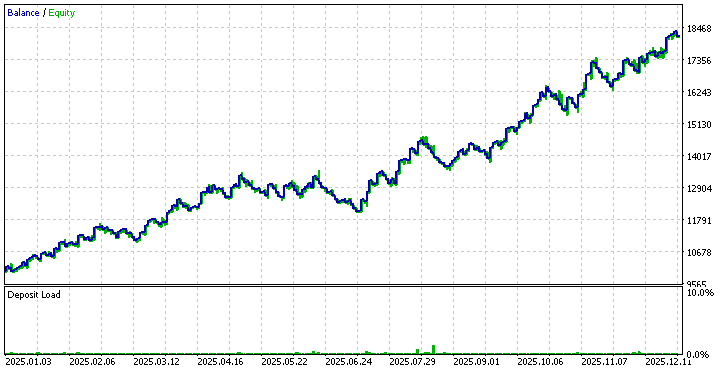
This result confirms an important point made in the book. When a market trends strongly, even a naive strategy can generate profit. Gold was broadly bullish in 2025. Buying every open allowed the system to benefit from this directional bias. However, the win rate remains close to random. Profit here comes mainly from market direction, not from pattern quality. This strategy establishes a useful reference level for all others.
Buying After One Down Close
Results:
- Total Net Profit: 662.40 dollars
- Win Rate: 36.36 percent
Insight
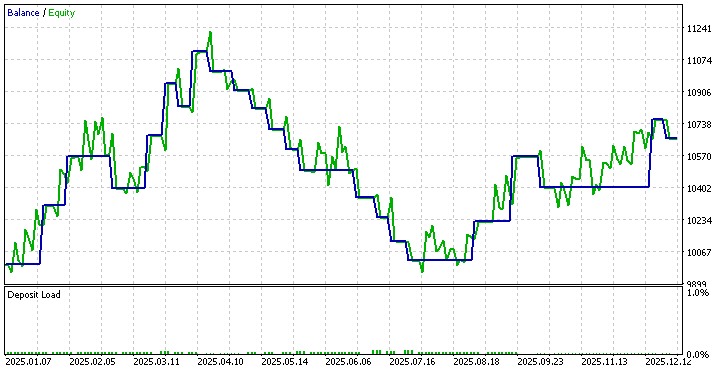
This variation performs poorly. A single bearish day provides very little information about exhaustion or reversal. The low win rate shows that most pullbacks continue rather than reverse. This confirms that not all patterns deserve equal confidence.
Buying After Three Consecutive Down Closes
Results:
- Total Net Profit:1,309.55 dollars
- Win Rate: 71.43 percent
Insight
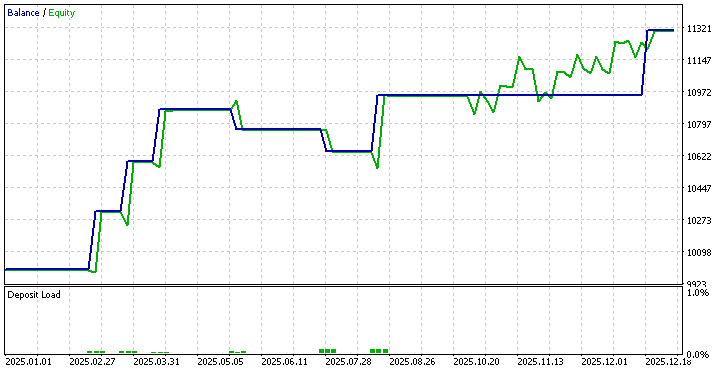
Here, the picture changes dramatically. Three consecutive bearish closes represent emotional pressure and short-term exhaustion. The win rate rises sharply, and profitability improves. This supports one of Larry Williams' key ideas. Patterns that represent extreme behavior offer a real advantage. Selectivity clearly improves performance.
Uptrend With Pullback
Results:
- Total Net Profit: 1,343.43 dollars
- Win Rate: 100.00 percent
Insight
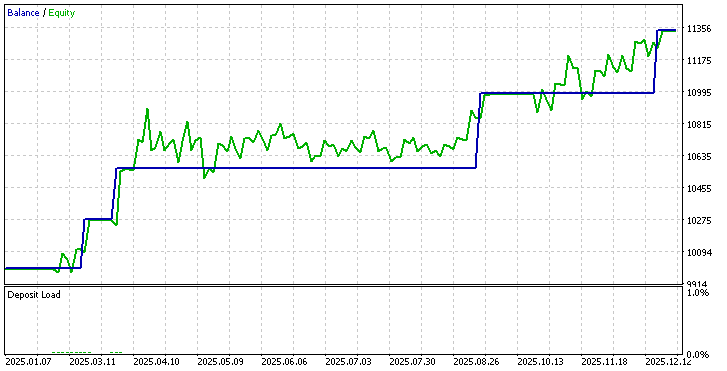
This is the strongest performer in the entire study. The pattern combines two forces:
- Long-term trend confirmation
- Short-term pullback entry
Trades are aligned with the main direction upon entry after a temporary weakness. Even though the sample size is small, the result demonstrates why this model is one of Larry Williams' favorites. A trend plus pullback produces high-quality opportunities. This confirms that structure matters more than raw frequency.
Outside Day With Down Close
Results:
- Total Net Profit: 0.00 dollars
- Win Rate:0.00 percent
Insight
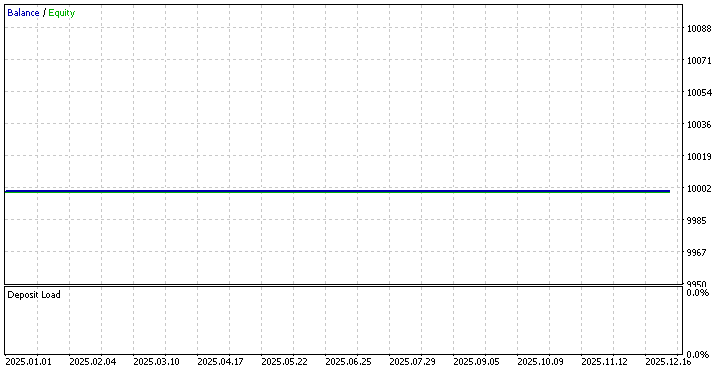
No trades were triggered during the entire year. This result is as important as any profitable outcome. Larry Williams already warned that this pattern appears rarely. Testing confirms that scarcity is real. Rare patterns may be powerful, but they are unsuitable as standalone systems. They work best as filters or occasional opportunity models.
Fading Three Consecutive Bullish Bars
Results:
- Total Net Profit: minus -1,043.81 dollars
- Win Rate: 0.00 percent
Insight
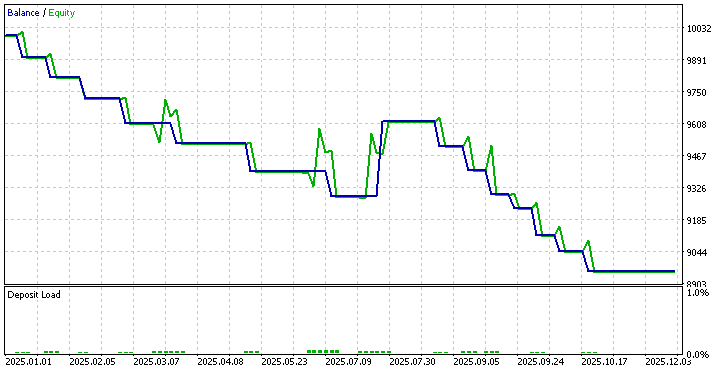
This strategy performs the worst of all. Attempting to fade strength in a bullish year leads to repeated failure. Momentum continues rather than reverses. This confirms a core principle. Counter-trend patterns are dangerous unless supported by a strong context. Without exhaustion or volatility filters, fading becomes a losing game. This test explains clearly why Larry Williams prefers trading with pressure, not against it.
Cross Strategy Observations
Several important conclusions emerge from these results.
Market Direction Matters
The baseline strategy performed well only because Gold was trending strongly. In a sideways or bearish year, the same model would likely fail. Patterns must always be evaluated within the market context.
Selectivity Improves Quality
As patterns become more selective, performance improves.
- One down close performs poorly
- Three down closes perform well
- Trend plus pullback performs best
Filtering reduces trade frequency but increases trade quality. This supports the idea that fewer, better-structured trades produce better results.
Emotion-Based Patterns Work Better
The strongest patterns all represent emotional behavior.
- Multiple down closes
- Pullbacks in trends
- Exhaustion after pressure
These patterns capture short-term imbalance rather than visual shape. This confirms Larry Williams' view that emotion drives short-term opportunity.
Fading Strength Is Dangerous
The losing strategy shows the risk of fading strong momentum. Without evidence of exhaustion, counter-trend trades fight market pressure. This explains why many reversal systems fail in trending environments.
What These Tests Teach Us
This study validates several of Larry Williams' central ideas.
- Markets are not random in the short term
- Some days and patterns offer a real advantage
- Selectivity creates stability
- Trend alignment improves survival
Most importantly, it shows that patterns must be tested, not assumed. Some ideas look powerful in theory, but disappear in real data. Others quietly produce a consistent edge.
Why This Matters
The purpose of this testing phase is not to find a perfect system. It is to demonstrate a disciplined way of studying market behavior. Every pattern in this article can now be:
- Re-tested on other markets
- Combined with filters
- Enhanced with volatility conditions
- Studied across time
This forms a foundation for systematic research rather than subjective belief. Moreover, that is ultimately the real lesson of Patterns to Profit.
Conclusion
In this article, we did more than translate ideas from a book into code. We built a small research system that allows patterns to be tested, compared, and measured in a disciplined way. Step by step, we transformed Larry Williams's short-term observations into a working Expert Advisor that can be executed, repeated, and verified on historical data.
The results show an important lesson. Some patterns offer a clear edge, some perform only in specific conditions, and some fail when exposed to real market behavior. This confirms one of the book's main themes. Markets are not random in the short term, but not every pattern deserves our capital. Only those that survive objective testing are worth attention.
The real value of this work is not in the numbers alone. It lies in the framework that was built. We now have a flexible engine that can host many ideas, apply consistent risk rules, filter trades by time, and evaluate performance without emotion. This approach allows trading research to move from belief to evidence.
From here, the path is open. New patterns can be added. Existing rules can be refined. Different markets, timeframes, and risk models can be tested. Each change becomes a controlled experiment rather than a guess.
In the end, profitable trading is not about finding a single perfect pattern. It is about building a process that discovers what truly works, protects capital when it does not, and keeps improving through disciplined research.
Warning: All rights to these materials are reserved by MetaQuotes Ltd. Copying or reprinting of these materials in whole or in part is prohibited.
This article was written by a user of the site and reflects their personal views. MetaQuotes Ltd is not responsible for the accuracy of the information presented, nor for any consequences resulting from the use of the solutions, strategies or recommendations described.

 MQL5 Trading Tools (Part 15): Canvas Blur Effects, Shadow Rendering, and Smooth Mouse Wheel Scrolling
 Visualizing Strategies in MQL5: Laying Out Optimization Results Across Criterion Charts
 From Novice to Expert: Creating a Liquidity Zone Indicator
 Database Is Easy (Part 1): A Lightweight ORM Framework for MQL5 Using SQLite

- Free trading apps
- Over 8,000 signals for copying
- Economic news for exploring financial markets
You agree to website policy and terms of use