

Larry Williams Market Secrets (Part 10): Automating Smash Day Reversal Patterns
 3 428
3 428
 0
0

Introduction
Markets don’t move on logic alone — emotions drive the sharpest moves. Fear speeds up selling, greed pushes people to buy late. Larry Williams studied these emotional extremes for decades and showed that short-term opportunities often appear right after the crowd overreacts.
A clear example is the smash day reversal: price looks like it breaks out strongly, then quickly fails. That failure traps late buyers or sellers, and their forced exits often power the reversal.
Williams also warns that this isn’t a “push-button” signal — context matters. The problem is that most traders see the pattern but don’t know how it actually performs across markets, timeframes, and risk settings.
This article tackles that gap. We’ll build an Expert Advisor that follows Larry Williams’ rules as closely as possible and executes them without emotion. The goal isn’t blind automation — it’s to make the idea testable, so we can measure what works, what doesn’t, and under what conditions.
Understanding Smash Day Reversal Patterns
Before writing a single line of code, we must be clear on what a smash day truly represents. This pattern is not about clever chart drawings or hindsight interpretation. It is about identifying moments when the market moves aggressively in one direction, then fails to follow through, exposing emotional imbalance. Larry Williams built this idea around observable price behavior, not opinion.
What Is a Smash Day?
In Larry Williams’ framework, a smash day is a session in which price appears to break decisively beyond the recent price structure, triggering strong emotional participation from the public. This break convinces traders that a new trend has begun. Stops are hit, breakout orders are filled, and confidence peaks or collapses in a single day.
A smash day is defined by how the price closes relative to prior bars. On the downside, it closes below prior lows. On the upside, it closes above prior highs. What makes this day special is not the direction of the move, but the emotional response it creates. Traders act as if the market has revealed its true intent.
These days represent emotional extremes because they force people to make decisions. Fear pushes sellers to exit or sell short aggressively. Greed pulls buyers into late breakouts. The market appears to offer certainty, and that illusion is what creates opportunity.
This is where smash days differ from classical breakout patterns. Traditional breakouts assume follow-through. Smash days question it. Larry Williams observed that many strong-looking breakouts fail quickly. When that failure happens immediately, the emotional traders who acted on the breakout are suddenly trapped. That trap is the foundation of the reversal.
Smash Day Buy Reversal Logic
A smash-day buy-reversal begins with a downside shock.
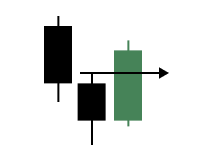
Price closes below the lows of one or more prior bars, suggesting that selling pressure has finally overwhelmed the market. To most traders, this looks bearish and convincing. Stops are triggered, and short positions are added late in the move.
The psychology is simple. Traders expect continuation. When prices break below recent lows, they believe lower prices are inevitable. What they rarely expect is an immediate failure.
The reversal logic appears when the market refuses to follow through. If the price rallies back above the smash day’s high, it signals that sellers have lost control. Those who sold late are now under pressure. Short covering begins, and new buyers enter with confidence. The result is often a sharp move in the opposite direction.
In this Expert Advisor, the pattern is defined objectively. The smash day candle must close below the lows of a user-defined number of prior bars. The candle must not be an outside bar, as this would make the move directional rather than chaotic. Once identified, the high of the smash day becomes a critical reference level. A long position is triggered only if the price breaks above that level on the following bar, either immediately or after confirmation, depending on the selected entry mode.
Smash Day Sell Reversal Logic
The sell reversal follows the same logic, but in the opposite emotional direction.
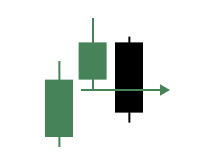
The price closes above the recent bar highs, creating excitement and confidence among buyers. Breakout traders enter aggressively, convinced that momentum will continue.
This upside-down smash day represents greed at work. Traders fear missing out and buy late, assuming that strength will continue. However, strong-looking upside moves are often the most vulnerable to failure.
The reversal is confirmed when the price cannot sustain the breakout. If the market falls back below the low of the smash day, it signals that buyers are trapped. Long positions entered late are now in the red. As they exit, selling pressure increases, often accelerating the move downward.
The EA defines this pattern with the same objectivity. The smash day candle must close above the highs of a specified number of prior bars and must not be an outside bar. The low of that candle becomes the key level. A short position is opened only if the price breaks below that level on the next bar, ensuring that the failure is real and not speculative.
By structuring both buy and sell reversals around the same principles, the system remains symmetric, measurable, and faithful to Larry Williams’ original intent.
How the Smash Day EA Is Structured and Why
Before we look at results or performance, it is important to understand how this Expert Advisor is structured and why certain rules were enforced. The goal here is not to create a complex trading machine, but to translate Larry Williams’ smash day ideas into a clean, testable framework that respects both market behavior and practical automation limits.
This EA is designed first as a research and validation tool. Every rule exists to remove ambiguity, reduce overfitting, and ensure that what we test is exactly what the pattern describes, nothing more and nothing less.
One Pattern Family, One System at a Time
We focus on two closely related patterns: smash-day buy reversals and smash-day sell reversals. Although they are mirror images of each other, they are evaluated independently and can be turned on or off through input parameters.
At any given time, the EA can be configured to trade only buy reversals, only sell reversals, or both. Regardless of the chosen mode, the system always enforces a single active position. This decision is intentional. Smash day reversals are discrete events, not continuous signals. Allowing multiple positions would blur cause and effect and make performance harder to interpret. By keeping one position at a time, every trade can be traced directly back to a single smash day event.
Clear and Objective Pattern Rules
Both smash day buy and sell reversals are defined by strict, measurable rules. For a smash day buy reversal, the most recently closed bar must close below the lows of a user-specified number of prior bars. This number is configurable so that we can study how shallow or deep breakdowns affect outcomes. The smash bar must also not be an outside bar. This avoids candles that expand in both directions and often represent noise rather than directional intent. Once a valid smash day is identified, the market must prove failure. A long trade is considered only if the price rallies above the smash day’s high. This ensures sellers have lost control and that the reversal is already underway.
The same logic applies to smash day sell reversals, but in the opposite direction. The smash bar must close above the highs of prior bars, must not be an outside bar, and the price must later fall below the low of that smash day to confirm failure. These rules are intentionally strict. If a pattern cannot be described clearly, it cannot be tested reliably.
Entry Confirmation and Execution Control
Not all traders agree on how much confirmation is enough. Some prefer immediate execution, while others want a full bar close to confirm the breakout. To respect this difference, the EA supports two entry modes.
The first mode enters immediately when the price crosses the smash day level. The second waits until the current bar closes beyond that level. Both approaches are valid, and allowing this flexibility lets us study how confirmation timing affects results without changing the core pattern logic.
Risk Management That Matches the Pattern
Risk control is kept simple and consistent with Larry Williams’ original intent. For buy reversals, the stop loss is placed at the low of the smash day. For sell reversals, it is placed at the high of the smash day. These levels mark the point at which the pattern is clearly invalid.
Take profit is handled using a user-configurable risk-to-reward ratio. This keeps the exits objective and scalable across markets and timeframes.
Position sizing is also flexible. We can use a fixed lot size for simplicity or calculate position size automatically based on a percentage of account balance. When automatic sizing is selected, each trade risks a consistent portion of capital, allowing results to reflect strategy performance rather than position size bias.
This structure allows us to study smash day reversals as they are, not as we wish they were. It also lays a clean foundation for future variations, filters, and discretionary overlays without breaking the integrity of the original pattern.
Building the Smash Day Reversal Expert Advisor
This section marks the transition from ideas and rules to actual implementation. We are no longer discussing what smash day reversals are or why they work. We are now translating that logic into an Expert Advisor that can execute, test, and validate these ideas in a controlled and repeatable way.
Before we begin writing logic, it is important to set expectations. This is a hands-on build. Concepts are best understood when they are implemented, observed, and questioned. For that reason, we encourage coding alongside this walkthrough rather than reading passively.
To support that process, the complete, working source file is attached to this article as lwSmashDayReversalExpert.mq5. Keeping it open in a separate tab while following along allows us to cross-reference ideas, verify assumptions, and understand how each piece fits into the larger system.
Prerequisites for Following Along
To benefit fully from this section, a few baseline skills are assumed. First, familiarity with the MQL5 language is required. Core concepts such as variables, functions, loops, conditional logic, enumerations, structures, and standard libraries should already be understood. If this foundation is still developing, the official MQL5 reference provides an excellent starting point.
Second, prior experience with the MetaTrader 5 platform is necessary. This includes navigating charts, attaching Expert Advisors, opening the Strategy Tester, and managing basic platform windows such as the Navigator.
Third, comfort with MetaEditor is expected. We will create source files, compile code, and inspect errors when they occur. These are essential skills for any serious MQL5 development work. With these prerequisites in place, we can begin constructing the EA from the ground up.
Laying the Foundation with Boilerplate Code
Every robust Expert Advisor starts with a clean, well-structured foundation.
//+------------------------------------------------------------------+
//|                                     lwSmashDayReversalExpert.mq5 |
//|          Copyright 2026, MetaQuotes Ltd. Developer is Chacha Ian |
//|                          https://www.mql5.com/en/users/chachaian |
//+------------------------------------------------------------------+

#property copyright "Copyright 2026, MetaQuotes Ltd. Developer is Chacha Ian"
#property link      "https://www.mql5.com/en/users/chachaian"
#property version   "1.00"

//+------------------------------------------------------------------+
//| Standard Libraries                                               |
//+------------------------------------------------------------------+
#include <Trade\Trade.mqh>

//+------------------------------------------------------------------+
//| Custom Enumerations                                              |
//+------------------------------------------------------------------+
enum ENUM_SMASH_ENTRY_MODE{
   ENTRY_ON_LEVEL_CROSS,
   ENTRY_ON_BAR_CLOSE
};

enum ENUM_SMASH_TRADE_MODE{
   SMASH_TRADE_BUY_ONLY,
   SMASH_TRADE_SELL_ONLY,
   SMASH_TRADE_BOTH
};

enum ENUM_LOT_SIZE_INPUT_MODE {
   MODE_MANUAL,
   MODE_AUTO
};

//+------------------------------------------------------------------+
//| User input variables                                             |
//+------------------------------------------------------------------+
input group "Information"
input ulong magicNumber         = 254700680002;
input ENUM_TIMEFRAMES timeframe = PERIOD_CURRENT;

input group "Smash Day Pattern Rules"
input int smashBuyLookbackBars  = 1;
input int smashSellLookbackBars = 1;

input group "Smash Day Entry Settings"
input ENUM_SMASH_ENTRY_MODE smashEntryMode = ENTRY_ON_LEVEL_CROSS;
input ENUM_SMASH_TRADE_MODE smashTradeMode = SMASH_TRADE_BOTH;

input group "Trade and Risk Management"
input ENUM_LOT_SIZE_INPUT_MODE lotSizeMode  = MODE_AUTO;
input double riskPerTradePercent            = 1.0;
input double positionSize                   = 0.1;
input double riskRewardRatio                = 3.0;

//+------------------------------------------------------------------+
//| Global Variables                                                 |
//+------------------------------------------------------------------+
//--- Create a CTrade object to handle trading operations
CTrade Trade;

//--- To hep track current market prices for Buying (Ask) and Selling (Bid)
double askPrice;
double bidPrice;

//--- To store current time
datetime currentTime;

struct MqlSmashDayPatternState{

   //--- Pattern detection flags
   bool hasBuySmashSetup;
   bool hasSellSmashSetup;

   //--- Reference breakout levels from smash bar
   double buyBreakoutLevel;
   double sellBreakoutLevel;

   //--- Pattern bar reference data
   datetime smashBarTime;

   //--- Entry status tracking
   bool entryPending;

   //--- Stop-Loss levels
   double buyStopLoss;
   double sellStopLoss;

};

MqlSmashDayPatternState smashState;

//--- To store minutes data
double closePriceMinutesData [];

//+------------------------------------------------------------------+
//| Expert initialization function                                   |
//+------------------------------------------------------------------+
int OnInit(){

   //---  Assign a unique magic number to identify trades opened by this EA
   Trade.SetExpertMagicNumber(magicNumber);

   //--- Reset
   ZeroMemory(smashState);

   //--- Treat the following arrays as timeseries (index 0 becomes the most recent bar)
   ArraySetAsSeries(closePriceMinutesData, true);

   return(INIT_SUCCEEDED);
}

//+------------------------------------------------------------------+
//| Expert deinitialization function                                 |
//+------------------------------------------------------------------+
void OnDeinit(const int reason){

   //--- Notify why the program stopped running
   Print("Program terminated! Reason code: ", reason);

}

//+------------------------------------------------------------------+
//| Expert tick function                                             |
//+------------------------------------------------------------------+
void OnTick(){

   //--- Retrieve current market prices for trade execution
   askPrice    = SymbolInfoDouble (_Symbol, SYMBOL_ASK);
   bidPrice    = SymbolInfoDouble (_Symbol, SYMBOL_BID);
   currentTime = TimeCurrent();

   //--- Get some minutes data
   if(CopyClose(_Symbol, PERIOD_M1, 0, 7, closePriceMinutesData) == -1){
      Print("Error while copying minutes datas ", GetLastError());
      return;
   }
}

//--- UTILITY FUNCTIONS

//+------------------------------------------------------------------+
The code below establishes that foundation. At this stage, there is no trading logic yet. Instead, we are defining identity, configuration, data structures, and the environment in which the logic will later operate. This approach keeps complexity under control and ensures that each layer of logic has a clear purpose.
File Header and Properties
//+------------------------------------------------------------------+
//|                                     lwSmashDayReversalExpert.mq5 |
//|          Copyright 2026, MetaQuotes Ltd. Developer is Chacha Ian |
//|                          https://www.mql5.com/en/users/chachaian |
//+------------------------------------------------------------------+

#property copyright "Copyright 2026, MetaQuotes Ltd. Developer is Chacha Ian"
#property link      "https://www.mql5.com/en/users/chachaian"
#property version   "1.00"
The opening section defines the source file's identity and provides metadata displayed in MetaTrader. This includes the file name, author information, version number, and a reference link. While this information does not affect execution, it is critical for long-term maintenance, version tracking, and distribution.
Including Standard Libraries
//+------------------------------------------------------------------+
//| Standard Libraries                                               |
//+------------------------------------------------------------------+
#include <Trade\Trade.mqh>
We include the Trade library to gain access to the CTrade class. This class provides a clean and reliable interface for opening, managing, and closing positions. By relying on the standard library rather than custom order handling code, we reduce error risk and improve readability.
Defining Custom Enumerations
//+------------------------------------------------------------------+
//| Custom Enumerations                                              |
//+------------------------------------------------------------------+
enum ENUM_SMASH_ENTRY_MODE{
   ENTRY_ON_LEVEL_CROSS,
   ENTRY_ON_BAR_CLOSE
};

enum ENUM_SMASH_TRADE_MODE{
   SMASH_TRADE_BUY_ONLY,
   SMASH_TRADE_SELL_ONLY,
   SMASH_TRADE_BOTH
};

enum ENUM_LOT_SIZE_INPUT_MODE {
   MODE_MANUAL,
   MODE_AUTO
};
Enumerations are used to convert abstract decisions into explicit and controlled choices. We define three core enumerations.
The first controls how entries are triggered. A trade can be opened immediately when the price crosses a breakout level or only after the bar has fully closed and confirmed the move.
The second defines which smash day patterns are allowed to trade. Buy only, sell only, or both can be selected. This is important for research and testing because it allows us to isolate directional behavior.
The third controls position sizing behavior. Lot size can be fixed or calculated automatically based on risk. These enumerations form the backbone of flexibility in the EA without introducing complexity into the execution logic.
User Input Parameters
//+------------------------------------------------------------------+
//| User input variables                                             |
//+------------------------------------------------------------------+
input group "Information"
input ulong magicNumber         = 254700680002;
input ENUM_TIMEFRAMES timeframe = PERIOD_CURRENT;

input group "Smash Day Pattern Rules"
input int smashBuyLookbackBars  = 1;
input int smashSellLookbackBars = 1;

input group "Smash Day Entry Settings"
input ENUM_SMASH_ENTRY_MODE smashEntryMode = ENTRY_ON_LEVEL_CROSS;
input ENUM_SMASH_TRADE_MODE smashTradeMode = SMASH_TRADE_BOTH;

input group "Trade and Risk Management"
input ENUM_LOT_SIZE_INPUT_MODE lotSizeMode  = MODE_AUTO;
input double riskPerTradePercent            = 1.0;
input double positionSize                   = 0.1;
input double riskRewardRatio                = 3.0;
Inputs are grouped logically to make the configuration intuitive. The Information group defines the magic number and timeframe. The magic number ensures that this EA manages only its own positions, while the timeframe determines where to evaluate smash day patterns.
The Smash Day Pattern Rules group defines how strict the pattern qualification should be. The lookback parameters control how many prior bars must be violated for a smash day to be considered valid. This directly affects pattern frequency and selectivity.
The Smash Day Entry Settings group defines execution behavior and trade direction. These inputs determine how aggressive or conservative the entry logic should be, and whether long, short, or both trades are allowed.
The Trade and Risk Management group defines position sizing and reward expectations. Risk can be fixed or dynamic, and take-profit levels are derived from a configurable risk-to-reward ratio.
Global Trading Objects and Market State
//+------------------------------------------------------------------+
//| Global Variables                                                 |
//+------------------------------------------------------------------+
//--- Create a CTrade object to handle trading operations
CTrade Trade;

//--- To hep track current market prices for Buying (Ask) and Selling (Bid)
double askPrice;
double bidPrice;

//--- To store current time
datetime currentTime;
We create a single instance of the CTrade object. This object will later be responsible for all trade execution. We also define variables to track the current bid and ask prices, as well as the server time. These values are updated on every tick and serve as the live data feed for execution logic.
Structuring Smash Day Pattern State
One of the most important design decisions in this EA is the use of a dedicated structure to track the smash day pattern state.
The MqlSmashDayPatternState structure acts as memory.
struct MqlSmashDayPatternState{

   //--- Pattern detection flags
   bool hasBuySmashSetup;
   bool hasSellSmashSetup;

   //--- Reference breakout levels from smash bar
   double buyBreakoutLevel;
   double sellBreakoutLevel;

   //--- Pattern bar reference data
   datetime smashBarTime;

   //--- Entry status tracking
   bool entryPending;

   //--- Stop-Loss levels
   double buyStopLoss;
   double sellStopLoss;

};

MqlSmashDayPatternState smashState;
It allows us to detect a pattern once and then monitor price behavior afterward without repeatedly re-evaluating historical bars.
Inside this structure, we track whether a valid buy or sell smash setup exists, the breakout levels derived from the smash bar, the time of the smash bar, and whether an entry is currently pending.
We also store stop loss levels derived directly from the smash bar. This keeps all pattern-related information in one place and prevents the proliferation of global variables. This structure will later become the bridge between pattern detection and trade execution.
Handling Price Data for Intrabar Detection
To reliably detect level crosses, we need access to recent minute-by-minute closing prices.
//--- To store minutes data
double closePriceMinutesData [];
We allocate an array to store minute data and explicitly set it as a time series. This ensures that index zero always refers to the most recent value.
This data will later be used to detect real-time price movement across breakout levels when the entry mode is set to immediate execution.
Initialization and Cleanup
//+------------------------------------------------------------------+
//| Expert initialization function                                   |
//+------------------------------------------------------------------+
int OnInit(){

   //---  Assign a unique magic number to identify trades opened by this EA
   Trade.SetExpertMagicNumber(magicNumber);

   //--- Reset
   ZeroMemory(smashState);

   //--- Treat the following arrays as timeseries (index 0 becomes the most recent bar)
   ArraySetAsSeries(closePriceMinutesData, true);

   return(INIT_SUCCEEDED);
}
The OnInit function assigns the magic number to the trade object, clears the smash day state structure, and prepares the minute data array. This ensures that every time the EA is attached, it starts in a clean, predictable state.
The OnDeinit function reports the termination reason. This is useful during testing and debugging.
//+------------------------------------------------------------------+
//| Expert deinitialization function                                 |
//+------------------------------------------------------------------+
void OnDeinit(const int reason){

   //--- Notify why the program stopped running
   Print("Program terminated! Reason code: ", reason);

}
Establishing the OnTick Framework
The OnTick function currently performs only basic tasks.
//+------------------------------------------------------------------+
//| Expert tick function                                             |
//+------------------------------------------------------------------+
void OnTick(){

   //--- Retrieve current market prices for trade execution
   askPrice    = SymbolInfoDouble (_Symbol, SYMBOL_ASK);
   bidPrice    = SymbolInfoDouble (_Symbol, SYMBOL_BID);
   currentTime = TimeCurrent();

   //--- Get some minutes data
   if(CopyClose(_Symbol, PERIOD_M1, 0, 7, closePriceMinutesData) == -1){
      Print("Error while copying minutes datas ", GetLastError());
      return;
   }
}
It updates bid and ask prices, captures the current time, and refreshes minute close data. No trading decisions have been made yet. This is intentional. At this stage, we are building the EA's skeleton. Pattern detection, state management, and trade execution will be layered on top of this framework in the next sections. At this point, we have a stable and extensible foundation. The EA knows who it is, how it should behave, and how to store information about detected smash day patterns.
With this groundwork in place, we are now ready to begin implementing the logic that detects smash day reversals and transforms them into actionable trade setups.
Detecting New Trading Days and Tracking Pattern State
The smash day logic is evaluated once per completed daily bar. For that reason, the first building block we add is a way to detect when a new bar opens within the selected timeframe. This is achieved with a small helper function. Add the following function to the utility functions section of the source file.
//--- UTILITY FUNCTIONS
//+------------------------------------------------------------------+
//| Function to check if there's a new bar on a given chart timeframe|
//+------------------------------------------------------------------+
bool IsNewBar(string symbol, ENUM_TIMEFRAMES tf, datetime &lastTm){

   datetime currentTm = iTime(symbol, tf, 0);
   if(currentTm != lastTm){
      lastTm       = currentTm;
      return true;
   }
   return false;
}
This function compares the current bar's open time with the last recorded bar's time. If the time has changed, a new bar has formed.
The third parameter is passed by reference. That allows the function to update the stored time as soon as a new bar is detected. In other words, this function not only checks for a new bar, but it also remembers that it has already reacted to it. To support this behaviour, add a global variable in the global variables section.
//--- To help track new bar open
datetime lastBarOpenTime;
This variable holds the timestamp of the most recent bar that has already been processed. Inside the initialization function, set its value to zero so that the very first tick after attaching the EA is treated as a new bar event.
//+------------------------------------------------------------------+
//| Expert initialization function                                   |
//+------------------------------------------------------------------+
int OnInit(){

   //--- Initialize global variables
   lastBarOpenTime = 0;

   return(INIT_SUCCEEDED);
}
From this point forward, all daily decisions will be made only once per new bar. This prevents repeated signals and keeps the logic clean and predictable.
Rejecting Outside Bars
One of the design rules of smash day reversals is that the smash bar must not engulf the entire previous bar. That type of bar represents a different market behaviour and must be filtered out. Add the following helper function in the utility section.
//+-----------------------------------------------------------------------------+
//| Checks whether the bar at the given index fully engulfs the prior bar range |
//+-----------------------------------------------------------------------------+
bool IsOutsideBar(string symbol, ENUM_TIMEFRAMES tf, int index){

   double high0 = iHigh(symbol, tf, index);
   double low0  = iLow (symbol, tf, index);

   double high1 = iHigh(symbol, tf, index + 1);
   double low1  = iLow (symbol, tf, index + 1);

   return (high0 > high1 && low0 < low1);
}
This function compares the current bar range with the previous bar range. If both the high and the low are higher and lower, respectively, the bar is an outside bar and is rejected during pattern checks. This simple filter protects the strategy from reacting to extreme volatility bars that do not match the clean smash structure we are looking for.
Detecting Smash Day Buy Reversals
We now define the first true pattern detector. Place the following function below the outside bar function.
//+-----------------------------------------------------------------------------------+
//| Detects a Smash Day Buy Reversal where the close breaks below multiple prior lows |
//+-----------------------------------------------------------------------------------+
bool IsSmashDayBuyReversal(string symbol,
                           ENUM_TIMEFRAMES tf,
                           int index,
                           int lookbackBars)
{
   // Bar must not be an outside bar
   if(IsOutsideBar(symbol, tf, index))
      return false;

   double close1 = iClose(symbol, tf, index);

   // Validate close breaks below N prior lows
   for(int i = 2; i <= lookbackBars + 1; i++)
   {
      double priorLow = iLow(symbol, tf, index + i);

      if(close1 >= priorLow)
         return false;
   }

   return true;
}
This logic checks three things. First, the bar must not be an outside bar. Second, we take the smash bar closure. Third, we compare that closely with the lows of several earlier bars. If the close is lower than all those prior lows, the market has pushed strongly downward and closed beyond recent support. That is the emotional selloff we want to detect. The input parameter controls the number of prior bars inspected. This makes the pattern more or less strict depending on user preference.
Detecting Smash Day Sell Reversals
The sell side is the mirror image of the buy logic. Add the following function right after the buy detector.
//+-------------------------------------------------------------------------------------+
//| Detects a Smash Day Sell Reversal where the close breaks above multiple prior highs |
//+-------------------------------------------------------------------------------------+
bool IsSmashDaySellReversal(string symbol,
                            ENUM_TIMEFRAMES tf,
                            int index,
                            int lookbackBars)
{
   // Bar must not be an outside bar
   if(IsOutsideBar(symbol, tf, index))
      return false;

   double close1 = iClose(symbol, tf, index);

   // Validate close breaks above N prior highs
   for(int i = 2; i <= lookbackBars + 1; i++)
   {
      double priorHigh = iHigh(symbol, tf, index + i);

      if(close1 <= priorHigh)
         return false;
   }

   return true;
}
Here, we check whether the smash bar closes above the highs of several prior bars. This represents an emotional buying surge that often traps late buyers when the move fails to continue. Together, these two functions give us objective detection of downside panic and upside euphoria.
Resetting Pattern State on Each New Day
Each new daily bar must begin with a clean internal state. Old breakout levels must not leak into the next day. Add this function to the utility section.
//+--------------------------------------------------------------------+
//| Resets all Smash Day detection flags and breakout reference levels |
//+--------------------------------------------------------------------+
void ResetSmashDaySetupState(){

   smashState.hasBuySmashSetup  = false;
   smashState.hasSellSmashSetup = false;

   smashState.buyBreakoutLevel  = iHigh(_Symbol, timeframe, 1);
   smashState.sellBreakoutLevel = iLow(_Symbol, timeframe, 1);

   smashState.smashBarTime      = iTime(_Symbol, timeframe, 1);

}
This function clears the detection flags and refreshes the reference levels using the just-completed bar. From this point on, every new day starts fresh, and pattern detection runs again. This is essential because smash day setups are only valid for one day.
Detecting Real-Time Breakouts
The strategy supports two entry styles. One enters immediately when the price breaks a level. The other waits for the bar to close beyond the level. For immediate entry, we need to detect level crossings using minute data. Add the following helper functions.
//+------------------------------------------------------------------+
//| To detect a crossover at a given price level                     |
//+------------------------------------------------------------------+
bool IsCrossOver(const double price, const double &closePriceMinsData[]){
   if(closePriceMinsData[1] <= price && closePriceMinsData[0] > price){
      return true;
   }
   return false;
}


//+------------------------------------------------------------------+
//| To detect a crossunder at a given price level                    |
//+------------------------------------------------------------------+
bool IsCrossUnder(const double price, const double &closePriceMinsData[]){
   if(closePriceMinsData[1] >= price && closePriceMinsData[0] < price){
      return true;
   }
   return false;
}
These compare the last two-minute closes. If the price was below the level and is now above it, we have a breakout. If the price was above the level and is now below it, we have a breakdown. This provides fast, precise intraday confirmation.
Enforcing One Position at a Time
Before opening any trade, we must confirm that no position from this EA is already active. Add these two functions.
//+------------------------------------------------------------------+
//| To verify whether this EA currently has an active buy position.  |                                 |
//+------------------------------------------------------------------+
bool IsThereAnActiveBuyPosition(ulong magic){

   for(int i = PositionsTotal() - 1; i >= 0; i--){
      ulong ticket = PositionGetTicket(i);
      if(ticket == 0){
         Print("Error while fetching position ticket ", _LastError);
         continue;
      }else{
         if(PositionGetInteger(POSITION_MAGIC) == magic && PositionGetInteger(POSITION_TYPE) == POSITION_TYPE_BUY){
            return true;
         }
      }
   }

   return false;
}

//+------------------------------------------------------------------+
//| To verify whether this EA currently has an active sell position. |                                 |
//+------------------------------------------------------------------+
bool IsThereAnActiveSellPosition(ulong magic){

   for(int i = PositionsTotal() - 1; i >= 0; i--){
      ulong ticket = PositionGetTicket(i);
      if(ticket == 0){
         Print("Error while fetching position ticket ", _LastError);
         continue;
      }else{
         if(PositionGetInteger(POSITION_MAGIC) == magic && PositionGetInteger(POSITION_TYPE) == POSITION_TYPE_SELL){
            return true;
         }
      }
   }

   return false;
}
These functions scan all open positions and return true if a matching trade exists. Every entry decision later calls these checks to enforce the one trade rule.
Automatic Position Sizing Based on Account Risk
When automatic lot sizing is enabled, trade volume is calculated so that only a fixed percentage of the account balance is at risk on each trade. Add the following helper function in the utility section:
//+------------------------------------------------------------------+
//| Calculates position size based on a fixed percentage risk of the account balance |
//+------------------------------------------------------------------+
double CalculatePositionSizeByRisk(double stopDistance){
   double amountAtRisk = (riskPerTradePercent / 100.0) * AccountInfoDouble(ACCOUNT_BALANCE);
   double contractSize = SymbolInfoDouble(_Symbol, SYMBOL_TRADE_CONTRACT_SIZE);
   double volume       = amountAtRisk / (contractSize * stopDistance);
   return NormalizeDouble(volume, 2);
}
This function converts the selected risk percentage into a lot size based on the stop-loss distance. Wider stops produce smaller lot sizes, while tighter stops produce larger ones, keeping the risked money per trade constant.
Projecting Take Profit Levels
Take profit is based on risk-to-reward. Add these two functions.
//+------------------------------------------------------------------+
//| Computes the bullish take profit level based on entry price, stop loss, and risk to reward ratio |
//+------------------------------------------------------------------+
double GetBuyTakeProfit(double entryPrice, double stopLoss){
   double riskDistance = entryPrice - stopLoss;
   double rewardDistance = riskDistance * riskRewardRatio;
   rewardDistance = MathAbs(rewardDistance);
   return NormalizeDouble((entryPrice + rewardDistance), Digits());
}

//+------------------------------------------------------------------+
//| Computes the bearish take profit level based on entry price, stop loss, and risk to reward ratio |
//+------------------------------------------------------------------+
double GetSellTakeProfit(double entryPrice, double stopLoss){
   double riskDistance = stopLoss - entryPrice;
   double rewardDistance = riskDistance * riskRewardRatio;
   rewardDistance = MathAbs(rewardDistance);
   return NormalizeDouble((entryPrice - rewardDistance), Digits());
}
They measure the distance between entry and stop loss, multiply it by the chosen ratio, and project the target price. This keeps the reward proportional to the risk at all times.
Opening Trades
Now we wrap execution into two simple functions.
//+------------------------------------------------------------------+
//| Function to open a market buy position                           |
//+------------------------------------------------------------------+
bool OpenBuy(double entryPrice, double stopLoss, double takeProfit, double lotSize){

   if(lotSizeMode == MODE_AUTO){
      lotSize = CalculatePositionSizeByRisk(entryPrice - stopLoss);
   }

   if(!Trade.Buy(lotSize, _Symbol, entryPrice, stopLoss, takeProfit)){
      Print("Error while executing a market buy order: ", GetLastError());
      Print(Trade.ResultRetcode());
      Print(Trade.ResultComment());
      return false;
   }
   return true;
}

//+------------------------------------------------------------------+
//| Function to open a market sell position                          |
//+------------------------------------------------------------------+
bool OpenSel(double entryPrice, double stopLoss, double takeProfit, double lotSize){

   if(lotSizeMode == MODE_AUTO){
      lotSize = CalculatePositionSizeByRisk(stopLoss - entryPrice);
   }

   if(!Trade.Sell(lotSize, _Symbol, entryPrice, stopLoss, takeProfit)){
      Print("Error while executing a market sell order: ", GetLastError());
      Print(Trade.ResultRetcode());
      Print(Trade.ResultComment());
      return false;
   }
   return true;
}
They handle automatic sizing and then submit the order through the trade object. Execution logic is now fully isolated from detection logic.
Bringing Everything Together Inside OnTick
//+------------------------------------------------------------------+
//| Expert tick function                                             |
//+------------------------------------------------------------------+
void OnTick(){

   //--- Retrieve current market prices for trade execution
   askPrice    = SymbolInfoDouble (_Symbol, SYMBOL_ASK);
   bidPrice    = SymbolInfoDouble (_Symbol, SYMBOL_BID);
   currentTime = TimeCurrent();

   //--- Get some minutes data
   if(CopyClose(_Symbol, PERIOD_M1, 0, 7, closePriceMinutesData) == -1){
      Print("Error while copying minutes datas ", GetLastError());
      return;
   }

   //--- Execute this block on new bar formation
   if(IsNewBar(_Symbol, timeframe, lastBarOpenTime)){

      //---
      if(smashEntryMode == ENTRY_ON_BAR_CLOSE){

         //---
         if(smashState.hasBuySmashSetup && smashState.entryPending){
            if(!IsThereAnActiveBuyPosition(magicNumber) && !IsThereAnActiveSellPosition(magicNumber)){
               if(smashTradeMode == SMASH_TRADE_BUY_ONLY || smashTradeMode == SMASH_TRADE_BOTH){
                  OpenBuy(askPrice, smashState.buyStopLoss, GetBuyTakeProfit(askPrice, smashState.buyStopLoss), positionSize);
                  smashState.entryPending = false;
               }
            }
         }

         //---
         if(smashState.hasSellSmashSetup && smashState.entryPending){
            if(!IsThereAnActiveBuyPosition(magicNumber) && !IsThereAnActiveSellPosition(magicNumber)){
               if(smashTradeMode == SMASH_TRADE_SELL_ONLY || smashTradeMode == SMASH_TRADE_BOTH){
                  OpenSel(bidPrice, smashState.sellStopLoss, GetSellTakeProfit(bidPrice, smashState.sellStopLoss), positionSize);
                  smashState.entryPending = false;
               }
            }
         }

      }

      //---
      ResetSmashDaySetupState();

      //---
      if(IsSmashDayBuyReversal(_Symbol, timeframe, 1,  smashBuyLookbackBars)){
         smashState.hasBuySmashSetup = true;
         smashState.entryPending     = true;
         smashState.buyStopLoss      = iLow(_Symbol, timeframe, 1);
      }

      //---
      if(IsSmashDaySellReversal(_Symbol, timeframe, 1, smashSellLookbackBars)){
         smashState.hasSellSmashSetup = true;
         smashState.entryPending      = true;
         smashState.sellStopLoss      = iHigh(_Symbol, timeframe, 1);
      }

   }

   //---
   if(smashEntryMode == ENTRY_ON_LEVEL_CROSS){

      //---
      if(smashState.hasBuySmashSetup && smashState.entryPending){
         // ---
         if(IsCrossOver(smashState.buyBreakoutLevel, closePriceMinutesData)){
            if(!IsThereAnActiveBuyPosition(magicNumber) && !IsThereAnActiveSellPosition(magicNumber)){
               if(smashTradeMode == SMASH_TRADE_BUY_ONLY || smashTradeMode == SMASH_TRADE_BOTH){
                  OpenBuy(askPrice, smashState.buyStopLoss, GetBuyTakeProfit(askPrice, smashState.buyStopLoss), positionSize);
               }
               smashState.hasBuySmashSetup = false;
               smashState.entryPending     = false;
            }
         }
      }

      //---
      if(smashState.hasSellSmashSetup && smashState.entryPending){
         // ---
         if(IsCrossUnder(smashState.sellBreakoutLevel, closePriceMinutesData)){
            if(!IsThereAnActiveBuyPosition(magicNumber) && !IsThereAnActiveSellPosition(magicNumber)){
               if(smashTradeMode == SMASH_TRADE_SELL_ONLY || smashTradeMode == SMASH_TRADE_BOTH){
                  OpenSel(bidPrice, smashState.sellStopLoss, GetSellTakeProfit(bidPrice, smashState.sellStopLoss), positionSize);
               }
               smashState.hasSellSmashSetup = false;
               smashState.entryPending      = false;
            }
         }
      }

   }
}
Inside the OnTick function, we first update prices and minute data. Then we react to a new daily bar. On a new bar, we do three things in order.
1. Handle delayed entries when the entry mode waits for the bar close
2. Reset the internal smash day state
3. Detect fresh smash patterns on the completed bar
After that, outside the new bar block, we handle real-time breakout entries when immediate entry mode is active. This structure guarantees that.
- Pattern detection happens once per day
- Breakout monitoring happens continuously
- Entries never repeat
- Only one trade can exist at a time
The smash state flags guide the flow from detection to entry and then automatically switch off after execution. This clean separation between detection and execution keeps behaviour predictable and easy to reason about.
Improving Visual Clarity During Testing
Before testing, we configure the chart for visibility.
//+------------------------------------------------------------------+
//| This function configures the chart's appearance.                 |
//+------------------------------------------------------------------+
bool ConfigureChartAppearance()
{
   if(!ChartSetInteger(0, CHART_COLOR_BACKGROUND, clrWhite)){
      Print("Error while setting chart background, ", GetLastError());
      return false;
   }

   if(!ChartSetInteger(0, CHART_SHOW_GRID, false)){
      Print("Error while setting chart grid, ", GetLastError());
      return false;
   }

   if(!ChartSetInteger(0, CHART_MODE, CHART_CANDLES)){
      Print("Error while setting chart mode, ", GetLastError());
      return false;
   }

   if(!ChartSetInteger(0, CHART_COLOR_FOREGROUND, clrBlack)){
      Print("Error while setting chart foreground, ", GetLastError());
      return false;
   }

   if(!ChartSetInteger(0, CHART_COLOR_CANDLE_BULL, clrSeaGreen)){
      Print("Error while setting bullish candles color, ", GetLastError());
      return false;
   }

   if(!ChartSetInteger(0, CHART_COLOR_CANDLE_BEAR, clrBlack)){
      Print("Error while setting bearish candles color, ", GetLastError());
      return false;
   }

   if(!ChartSetInteger(0, CHART_COLOR_CHART_UP, clrSeaGreen)){
      Print("Error while setting bearish candles color, ", GetLastError());
      return false;
   }

   if(!ChartSetInteger(0, CHART_COLOR_CHART_DOWN, clrBlack)){
      Print("Error while setting bearish candles color, ", GetLastError());
      return false;
   }

   return true;
}
Add the ConfigureChartAppearance function in the utility section and call it from OnInit.
//+------------------------------------------------------------------+
//| Expert initialization function                                   |
//+------------------------------------------------------------------+
int OnInit(){

   ...

   //--- To configure the chart's appearance
   if(!ConfigureChartAppearance()){
      Print("Error while configuring chart appearance", GetLastError());
      return INIT_FAILED;
   }

   return(INIT_SUCCEEDED);
}
This sets clear candle and background colours so trades and price action are easy to observe during visual backtests. At this stage, the Expert Advisor is complete. All core pieces are in place. New day detection, Smash pattern recognition, Breakout monitoring, Risk-based position sizing, Single trade enforcement, and Automatic state reset
The full source file is provided as lwSmashDayReversalExpert.mq5. We now have a fully functional research tool that converts Larry Williams smash day reversals into precise, testable, and repeatable trading rules.
Testing the Smash Day Buy Reversal on Gold
To evaluate how this idea performs in practice, a controlled backtest was conducted on Gold using the daily timeframe. The test covered one full year of market data from the first day of January 2025 to the last day of December 2025.
Only the Smash Day Buy mode was enabled, so the system was allowed to take only long trades. Position sizing was set to automatic risk mode, with each trade risking 1% of the current account balance. This means the position size grows and shrinks with the account and keeps risk consistent from one trade to the next.
The test started with an initial balance of $10,000. Over the year, the system produced a total net profit of $2307.25 dollars.
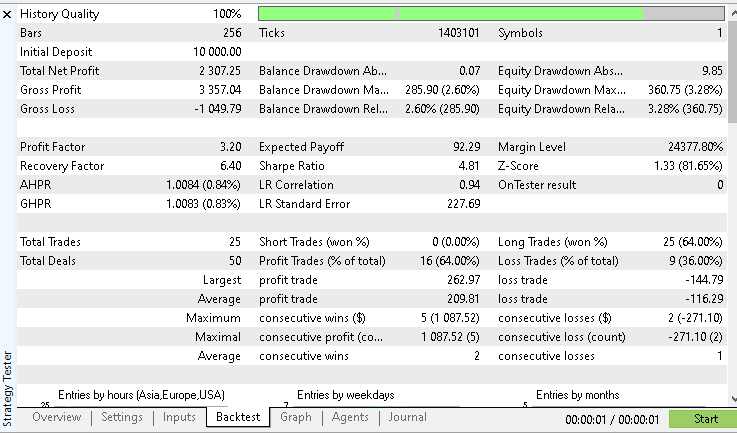
This is above a twenty percent return on investment. The win rate came in at sixty-four percent.
While the win rate is not extremely high, the overall equity curve tells a more important story. The account's growth is steady and smooth, without violent drops.
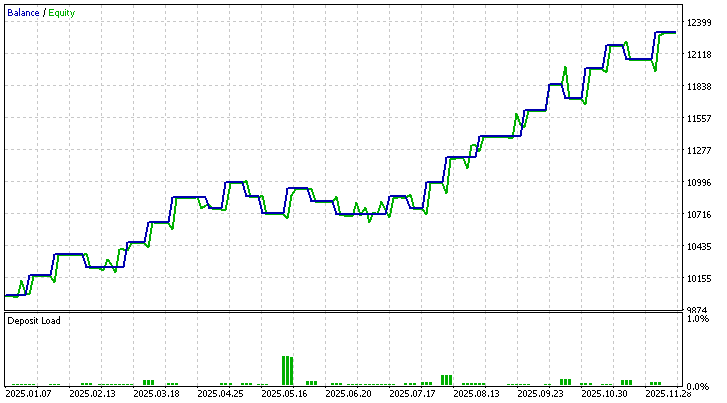
There are no dramatic equity collapses or long flat periods. Instead, the curve rises gradually and in a controlled manner, suggesting that losses are well contained and gains are allowed to compound over time. This behaviour is a direct result of two design choices—first, every trade risks only a small fixed portion of the account. Second, trades are taken only when a clear objective pattern emerges, rather than forcing constant market exposure.
To make this test fully repeatable, two files are provided alongside this article. The configuration file contains the tester environment settings. The parameters file contains the exact input values used by the Expert Advisor. By loading these files into the strategy tester, the same results should be reproduced on the same symbol and date range.
This single test does not prove that the pattern will always work in every market or every year. It shows that under one clear, well-defined configuration, the idea produced stable growth with controlled risk in Gold during this period. The real strength of this project lies in its flexibility. All major behaviours, such as lookback depth, entry mode, and risk level, can be changed through input parameters. This allows endless variations to be explored.
Further testing on other symbols, different years, and alternative parameter values may reveal new strengths or weaknesses. Different combinations may uncover an even better edge. Running independent experiments is strongly encouraged. Findings, ideas, and improvements can be shared in the comment section so the research can continue to grow through collective effort.
Conclusion
In this work, a discretionary trading idea from Larry Williams was transformed into a fully objective and testable trading system. The Smash Day reversal pattern, based on emotional breakouts that quickly fail, was distilled into clear rules that a machine can recognise and trade without hesitation.
An Expert Advisor was built to detect these conditions in real time, manage risk automatically, and execute trades with strict discipline. The system enforces one position at a time, uses clearly defined stop losses and reward targets, and adapts its position size to a fixed percentage of account risk. This turns a loosely described market behaviour into a structured research tool.
A full-year test on Gold showed steady account growth, controlled drawdowns, and consistent compounding. This demonstrates that the pattern is not just visually appealing on charts but can be quantified, measured, and evaluated under real market conditions.
More importantly, the program was designed for exploration, not blind automation. Every major rule can be adjusted through input parameters. This allows further testing of different lookback depths, entry styles, and risk levels across any symbol or timeframe. The reader is not limited to the single example presented here.
What has been achieved is a bridge between trading psychology and programmable logic. Emotional traps that were once interpreted by eye can now be scanned across years of historical data in seconds. This opens the door to deeper research, faster validation of ideas, and more confident decision-making.
The Smash Day reversal is only one pattern. The same process can be repeated for many other concepts found in classic trading literature. By combining clear rules, strict risk control, and systematic testing, it becomes possible to separate intuition from evidence.
The next step is independent experimentation. Running new tests, modifying parameters, and comparing results across markets may reveal even stronger variations of this idea. Sharing those findings helps push the research further and turns a single article into a growing body of practical knowledge.
Attached Files and How to Use Them
To facilitate replication and further research, all essential resources used in this project are attached to this article. These files allow the same trading logic, environment settings, and test parameters to be loaded without manual reconfiguration.
This setup allows reproducing the demonstrated results, inspecting the full source code, and adjusting inputs to explore new ideas. In this way, the Expert Advisor becomes not just a finished tool, but a starting point for deeper experimentation.
The table below summarises each attached file and its purpose.
| File Name | Description |
|---|---|
| lwSmashDayReversalExpert.mq5 | Complete MQL5 Expert Advisor source code that implements Smash Day reversals |
| configurations.ini | Strategy Tester environment configuration for consistent backtest setup |
| parameters.set | Input parameter preset used to produce the showcased backtest results |
The source file can be opened directly in MetaEditor for study, modification, and compilation. The configuration file can be loaded into the Strategy Tester to match the exact testing environment. The parameter file can be applied in the tester inputs tab to instantly load the same trading settings used in the reported results.
Together, these files form a ready-to-use research package. They allow the strategy to be verified, stress tested under different market conditions, and extended with additional filters or ideas.
Warning: All rights to these materials are reserved by MetaQuotes Ltd. Copying or reprinting of these materials in whole or in part is prohibited.
This article was written by a user of the site and reflects their personal views. MetaQuotes Ltd is not responsible for the accuracy of the information presented, nor for any consequences resulting from the use of the solutions, strategies or recommendations described.

 The MQL5 Standard Library Explorer (Part 7): Interactive Position Labeling with CCanvas
 Integrating Computer Vision into Trading in MQL5 (Part 1): Creating Basic Functions
 From Basic to Intermediate: Indicator (I)
 Using Deep Reinforcement Learning to Enhance Ilan Expert Advisor

- Free trading apps
- Over 8,000 signals for copying
- Economic news for exploring financial markets
You agree to website policy and terms of use