

Larry Williams Market Secrets (Part 11): Detecting Smash Day Reversals with a Custom Indicator
 7 132
7 132
 7
7

Introduction
Trying to trade every smash day reversal on the chart can quickly lead to noise, frustration, and inconsistent results. At first, this feels logical. A sharp break followed by an immediate failure often leads to strong moves in the opposite direction. However, taking every signal at face value without context usually creates noise, frustration, and inconsistent results.
In his book Long-term Secrets to Short-term Trading, Larry Williams makes an important point. These patterns represens moments of emotional excess in which the crowd chases what appears to be a breakout, only to be trapped by a sudden reversal. This emotional trap is powerful, but it is not meant to be traded unquestioningly. Williams repeatedly emphasizes that the best results come when these patterns align with the broader market picture, including prevailing trends and other supporting conditions.
This creates a practical challenge for discretionary traders. How can these rare but meaningful patterns be spotted quickly and objectively without turning them into a rigid automated system that ignores context?
The solution presented in this article is a custom MQL5 indicator that visualizes smash-day reversals. Instead of opening trades automatically, it highlights exactly where a valid pattern has formed and when the price confirms the reversal by breaking the smash bar level. A clear up arrow appears for bullish reversals, and a clear down arrow appears for bearish reversals. From that moment, the final decision is left to human judgment.
By turning Larry Williams’ objective pattern rules into clean, timely chart signals, this indicator removes guesswork from detection while still allowing traders to apply their own filters, such as trend direction, news impact, and market structure. It serves as a bridge between raw price action and thoughtful discretionary trading, rather than a mechanical black box.
Recognising Smash Day Reversals at a Glance
A smash day reversal begins with a strong and emotional push in one direction that appears to confirm a breakout. The price closed beyond the recent range, suggesting momentum will continue. Instead of following through, the market quickly fails and turns back the other way on the next session. This sudden failure traps late breakout traders and often fuels a sharp move in the opposite direction.
A bullish smash reversal appears after an aggressive selloff. The smash bar closes below the lows of one or several previous bars, yet it is not an outside bar. This detail is important because the move is driven by pressure rather than by indecision. When the next bar rallies above the high of that smash bar, the downside break is proven false, and a reversal to the upside is signalled.
A bearish smash reversal is the mirror image. The smash bar closes above the highs of several previous bars without engulfing the prior range. When the next bar falls below the low of that smash bar, the upside break fails, and a downward reversal is triggered.
The key idea is simple. A move that looks strong enough to continue suddenly cannot hold its ground. That failure creates opportunity.
The full rule set and the reasoning behind each condition were covered in detail in the previous article of this series, where an Expert Advisor was built to trade these patterns automatically. In this article, we focus on visual detection. The same objective rules are used, but instead of opening trades, the indicator marks the chart when a valid reversal is confirmed. This allows the pattern to be seen instantly while leaving the final trading decision to human judgment.
Turning Smash Patterns into Clear Visual Signals
The goal of this indicator is not to trade on our behalf, but to make important chart moments impossible to miss. Instead of scanning candle by candle to see whether a smash reversal has just occurred, the indicator performs the check continuously and marks the exact bar where confirmation happens.
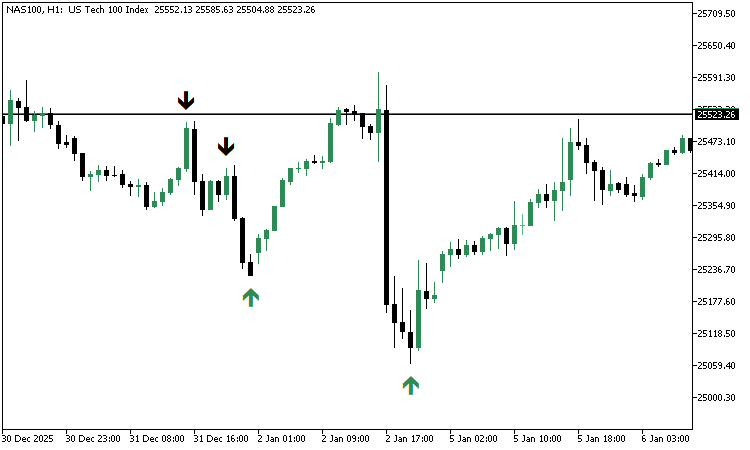
When a bullish smash reversal is confirmed, a sea green arrow is drawn below the smash bar. This happens at the moment the current forming bar rises above the high of that smash bar. That upward break tells us that the heavy selling of the previous day has failed and that the price is attempting to reverse higher.
When a bearish smash reversal is confirmed, a black arrow is drawn above the smash bar. This appears as soon as the current forming bar drops below the low of the smash bar. The downward break shows that the strong buying pressure could not hold, indicating the price is turning lower.
These arrows act as immediate visual cues. They highlight the exact candle at which the breakout failure becomes clear. From that point onward, trade execution is left to the discretion of the parties. One trader may take the signal only when it agrees with the broader trend. Another may wait for news-driven volatility or a specific day of the week. The indicator provides the event. The trader provides the context.
Larry Williams also stressed that the definition of a smash bar should be objective but flexible. In practice, this means that the smash bar must push beyond the extremes of a chosen number of previous bars. Some traders prefer a shallow look back to capture more signals. Others prefer a deeper look back, focusing only on stronger extremes. To support both approaches, the indicator exposes input parameters that allow the look-back depth to be adjusted freely.
This design keeps the logic strict and mechanical while still respecting personal trading style. The indicator answers one question with precision. A valid smash reversal has just been confirmed. What happens next is guided by the trader’s own filters and judgment.
To help visualize the result, here is a screenshot of the indicator we will be building, launched on a live chart.
Building the Indicator Step by Step
Prerequisites Before We Begin
Before moving into the actual coding work, a few basic skills are required so that the process flows smoothly. We assume familiarity with the MQL5 programming language and its basic building blocks, such as variables, functions, arrays, and conditional logic. We also assume prior experience with the MetaTrader 5 desktop terminal, including opening charts and attaching indicators.
In addition, the development will take place inside MetaEditor, so it is important to be comfortable creating new source files, compiling code, and inspecting any errors that may appear during compilation. With these basics in place, we can confidently proceed to build the indicator from the ground up.
Coding Alongside the Finished Version
The complete and fully working indicator source code is attached to this article under the name lwSmashDayReversalIndicator.mq5. Coding along with the tutorial is strongly encouraged. Writing each line and then comparing the result with the attached finished file makes the learning process practical and reliable. If something does not compile or behave as expected, the attached source acts as a clean reference point for quick correction. The goal is not only to end up with a working indicator, but also to understand how each part is clearly constructed.
Creating the Base Indicator File
The first practical step is to open MetaEditor and create a new Custom Indicator source file. The file name can be anything meaningful. After the empty file is created, the following base code is pasted into it.
//+------------------------------------------------------------------+
//|                                  lwSmashDayReversalIndicator.mq5 |
//|          Copyright 2026, MetaQuotes Ltd. Developer is Chacha Ian |
//|                          https://www.mql5.com/en/users/chachaian |
//+------------------------------------------------------------------+

#property copyright "Copyright 2026, MetaQuotes Ltd. Developer is Chacha Ian"
#property link      "https://www.mql5.com/en/users/chachaian"
#property version   "1.00"

//+------------------------------------------------------------------+
//| Custom Indicator specific directives                             |
//+------------------------------------------------------------------+
#property indicator_chart_window
#property indicator_plots 2
#property indicator_buffers 2

//+------------------------------------------------------------------+
//| User input variables                                             |
//+------------------------------------------------------------------+
input int smashBuyLookbackBars  = 1;
input int smashSellLookbackBars = 1;

//+------------------------------------------------------------------+
//| Global Variables                                                 |
//+------------------------------------------------------------------+
ENUM_TIMEFRAMES timeframe = PERIOD_CURRENT;

//+------------------------------------------------------------------+
//| Indicator buffers                                                |
//+------------------------------------------------------------------+
double buySmashArrowBuffer [];
double sellSmashArrowBuffer[];

//+------------------------------------------------------------------+
//| Custom indicator initialization function                         |
//+------------------------------------------------------------------+
int OnInit(){

   //--- To configure the chart's appearance
   if(!ConfigureChartAppearance()){
      Print("Error while configuring chart appearance", GetLastError());
      return INIT_FAILED;
   }

   return(INIT_SUCCEEDED);
 }

//+------------------------------------------------------------------+
//| Custom indicator iteration function                              |
//+------------------------------------------------------------------+
int OnCalculate(const int32_t  rates_total,
                const int32_t  prev_calculated,
                const datetime &time[],
                const double   &open[],
                const double   &high[],
                const double   &low[],
                const double   &close[],
                const long     &tick_volume[],
                const long     &volume[],
                const int32_t  &spread[])
{

   return(rates_total);
}

//+------------------------------------------------------------------+
//| This function configures the chart's appearance.                 |
//+------------------------------------------------------------------+
bool ConfigureChartAppearance()
{
   if(!ChartSetInteger(0, CHART_COLOR_BACKGROUND, clrWhite)){
      Print("Error while setting chart background, ", GetLastError());
      return false;
   }

   if(!ChartSetInteger(0, CHART_SHOW_GRID, false)){
      Print("Error while setting chart grid, ", GetLastError());
      return false;
   }

   if(!ChartSetInteger(0, CHART_MODE, CHART_CANDLES)){
      Print("Error while setting chart mode, ", GetLastError());
      return false;
   }

   if(!ChartSetInteger(0, CHART_COLOR_FOREGROUND, clrBlack)){
      Print("Error while setting chart foreground, ", GetLastError());
      return false;
   }

   if(!ChartSetInteger(0, CHART_COLOR_CANDLE_BULL, clrSeaGreen)){
      Print("Error while setting bullish candles color, ", GetLastError());
      return false;
   }

   if(!ChartSetInteger(0, CHART_COLOR_CANDLE_BEAR, clrBlack)){
      Print("Error while setting bearish candles color, ", GetLastError());
      return false;
   }

   if(!ChartSetInteger(0, CHART_COLOR_CHART_UP, clrSeaGreen)){
      Print("Error while setting bearish candles color, ", GetLastError());
      return false;
   }

   if(!ChartSetInteger(0, CHART_COLOR_CHART_DOWN, clrBlack)){
      Print("Error while setting bearish candles color, ", GetLastError());
      return false;
   }

   return true;
}

//+------------------------------------------------------------------+
This initial block sets up the basic structure of the indicator. It does not yet perform any pattern detection. Instead, it prepares the environment that later logic will rely on.
This starting code can be divided into several logical parts. Each part has a clear purpose and prepares the indicator for future expansion.
Indicator Properties
//+------------------------------------------------------------------+
//|                                  lwSmashDayReversalIndicator.mq5 |
//|          Copyright 2026, MetaQuotes Ltd. Developer is Chacha Ian |
//|                          https://www.mql5.com/en/users/chachaian |
//+------------------------------------------------------------------+

#property copyright "Copyright 2026, MetaQuotes Ltd. Developer is Chacha Ian"
#property link      "https://www.mql5.com/en/users/chachaian"
#property version   "1.00"

//+------------------------------------------------------------------+
//| Custom Indicator specific directives                             |
//+------------------------------------------------------------------+
#property indicator_chart_window
#property indicator_plots 2
#property indicator_buffers 2
The property section defines how the indicator will behave on the chart. The indicator is drawn directly in the main chart window rather than in a separate panel. Two plots and two buffers are reserved. These buffers will later hold the price values where buy and sell arrows will appear. At this stage, no drawing style is defined yet. The buffers act as empty containers waiting to be filled.
User Input Settings
Two input variables are declared.
//+------------------------------------------------------------------+
//| User input variables                                             |
//+------------------------------------------------------------------+
input int smashBuyLookbackBars  = 1;
input int smashSellLookbackBars = 1;
These values control how many previous bars must be broken by the smash bar close. Keeping them as inputs makes the indicator flexible. The same code can later be tested with different strictness levels without having to edit the source.
This reflects Larry Williams’ idea that the strength of the pattern depends on how far back the market is pushed to an extreme.
Timeframe Reference
//+------------------------------------------------------------------+
//| Global Variables                                                 |
//+------------------------------------------------------------------+
ENUM_TIMEFRAMES timeframe = PERIOD_CURRENT;
A timeframe variable is set to the current chart period. This makes the indicator automatically adapt to whichever chart it is attached to. There is no need to select a timeframe in the indicator settings manually. All price checks will therefore match the visible chart.
Indicator Buffers
Two arrays are declared.
//+------------------------------------------------------------------+
//| Indicator buffers                                                |
//+------------------------------------------------------------------+
double buySmashArrowBuffer [];
double sellSmashArrowBuffer[];
Each array will later store price levels where arrows should be drawn. When a value is written into a buffer at a specific bar index, an arrow will appear at that bar. When an empty value is written, nothing is drawn. These buffers are the visual output of the entire indicator.
Initialization Phase
//+------------------------------------------------------------------+
//| Custom indicator initialization function                         |
//+------------------------------------------------------------------+
int OnInit(){

   //--- To configure the chart's appearance
   if(!ConfigureChartAppearance()){
      Print("Error while configuring chart appearance", GetLastError());
      return INIT_FAILED;
   }

   return(INIT_SUCCEEDED);
}
The OnInit function runs once when the indicator is attached to the chart. Here, the chart appearance is configured through a helper function. The background is set to white, bullish candles are colored green, bearish candles are colored black, and the grid is hidden. This creates a clean, high-contrast chart so that future arrows and lines will be easy to see during testing. If any chart setting fails, initialization stops and reports an error. This prevents the indicator from running in a half-configured state.
Calculation Loop
//+------------------------------------------------------------------+
//| Custom indicator iteration function                              |
//+------------------------------------------------------------------+
int OnCalculate(const int32_t  rates_total,
                const int32_t  prev_calculated,
                const datetime &time[],
                const double   &open[],
                const double   &high[],
                const double   &low[],
                const double   &close[],
                const long     &tick_volume[],
                const long     &volume[],
                const int32_t  &spread[])
{

   return(rates_total);
}
The OnCalculate function is where all future detection logic will live. For now, it simply returns the total number of bars. This means the indicator is active but has not yet performed any analysis. Later sections will expand this function so that each new tick and each new bar can update the arrow buffers in real time.
Chart Appearance Helper
//+------------------------------------------------------------------+
//| This function configures the chart's appearance.                 |
//+------------------------------------------------------------------+
bool ConfigureChartAppearance()
{
   if(!ChartSetInteger(0, CHART_COLOR_BACKGROUND, clrWhite)){
      Print("Error while setting chart background, ", GetLastError());
      return false;
   }

   if(!ChartSetInteger(0, CHART_SHOW_GRID, false)){
      Print("Error while setting chart grid, ", GetLastError());
      return false;
   }

   if(!ChartSetInteger(0, CHART_MODE, CHART_CANDLES)){
      Print("Error while setting chart mode, ", GetLastError());
      return false;
   }

   if(!ChartSetInteger(0, CHART_COLOR_FOREGROUND, clrBlack)){
      Print("Error while setting chart foreground, ", GetLastError());
      return false;
   }

   if(!ChartSetInteger(0, CHART_COLOR_CANDLE_BULL, clrSeaGreen)){
      Print("Error while setting bullish candles color, ", GetLastError());
      return false;
   }

   if(!ChartSetInteger(0, CHART_COLOR_CANDLE_BEAR, clrBlack)){
      Print("Error while setting bearish candles color, ", GetLastError());
      return false;
   }

   if(!ChartSetInteger(0, CHART_COLOR_CHART_UP, clrSeaGreen)){
      Print("Error while setting bearish candles color, ", GetLastError());
      return false;
   }

   if(!ChartSetInteger(0, CHART_COLOR_CHART_DOWN, clrBlack)){
      Print("Error while setting bearish candles color, ", GetLastError());
      return false;
   }

   return true;
}
The ConfigureChartAppearance function consolidates all visual chart settings into a single location. Separating this logic keeps the initialization clean and readable. If visual adjustments are needed later, they can be changed here without touching the main logic. This also ensures that the chart is prepared consistently every time the indicator is attached.
Although this code does not yet draw any arrows, it is an essential base. It defines how many visual outputs will exist, prepares memory for them, ensures the chart is readable, and sets up the main calculation loop that will later host the smash day detection logic. By starting with a clear and minimal foundation, each new feature can be added step by step without confusion.
Building the Smash Day Reversal Indicator LogicAt this stage the indicator has its base structure and empty buffers. The next goal is to connect those buffers to the terminal and then create the logic that fills them with meaningful values at the correct bars. The process follows three simple steps. First, we make sure there is enough historical data.
Second, we bind our arrays to indicator buffers. Third, we write small focused functions that detect patterns and update the buffers both in history and in real time.
Checking for Enough Historical Data
//+------------------------------------------------------------------+
//| Custom indicator initialization function                         |
//+------------------------------------------------------------------+
int OnInit(){

   ...

   //--- Ensure there are enough historical bars available before running smash pattern detection
   int totalRates = iBars(_Symbol, timeframe);
   if(totalRates <= smashBuyLookbackBars || totalRates <= smashSellLookbackBars){
      Print("There is not enough historical data!");
      return INIT_FAILED;
   }

   return(INIT_SUCCEEDED);
}
Before any pattern detection begins, we confirm that the chart has enough bars to safely perform the required lookback checks. If the number of available bars is less than or equal to the chosen lookback depth, the indicator stops initialization. This prevents out of range indexing when accessing older candles. This simple guard ensures that every later function works with valid data and avoids runtime errors.
Linking Arrays to Indicator Buffers
//+------------------------------------------------------------------+
//| Custom indicator initialization function                         |
//+------------------------------------------------------------------+
int OnInit(){

   ...

   //--- Bind arrays to indicator buffers
   SetIndexBuffer(0, buySmashArrowBuffer,  INDICATOR_DATA);
   SetIndexBuffer(1, sellSmashArrowBuffer, INDICATOR_DATA);

   return(INIT_SUCCEEDED);
}
After validating the data, the arrays that will hold arrow values are linked to buffer indices using SetIndexBuffer inside the initialization routine. Each buffer index represents one visual plot on the chart. Buffer zero is used for buy arrows. Buffer one is used for sell arrows. From this point forward, writing a price value into a buffer element will place a graphical object at that exact bar. Writing EMPTY_VALUE will hide it.
Detecting Outside Bars
A small helper function checks whether a candle fully engulfs the previous candle range.
//+-----------------------------------------------------------------------------+
//| Checks whether the bar at the given index fully engulfs the prior bar range |
//+-----------------------------------------------------------------------------+
bool IsOutsideBar(double &open[], double &high[], double &low[], double &close[], int index){

   double high0 = high[index];
   double low0  = low [index];

   double high1 = high[index - 1];
   double low1  = low [index - 1];

   return (high0 > high1 && low0 < low1);
}
An outside bar is ignored for smash detection because it represents expansion in both directions rather than a clear emotional push in one direction. By filtering these bars early, the later logic becomes cleaner and more objective. This function becomes a shared building block for both bullish and bearish smash checks.
Identifying a Bullish Smash Reversal
//+-----------------------------------------------------------------------------------+
//| Detects a Smash Day Buy Reversal where the close breaks below multiple prior lows |
//+-----------------------------------------------------------------------------------+
bool IsSmashDayBuyReversal(double &open[], double &high[], double &low[], double &close[],
                           int index,
                           int lookbackBars)
{
   // Bar must not be an outside bar
   if(IsOutsideBar(open, high, low, close, index)){
      return false;
   }

   double close1 = close[index];
   double close2 = close[index + 1];
   double high1  = high[index];

   // Validate close breaks below N prior lows
   for(int i = index-1; i>=(index - lookbackBars); i--){

      double priorLow = low[i];

      if(close1 >= priorLow){
         return false;
      }
   }

   return close2 > high1;
}
A bullish smash reversal is detected when three conditions are met. The bar must not be an outside bar. Its close must break below the lows of a chosen number of earlier bars.The next bar must close back above the high of the smash bar. This final confirmation shows that the breakdown failed and buyers regained control. When all conditions are true, the function returns true and the low of that bar is written into the buy buffer.
Identifying a Bearish Smash Reversal
//+-------------------------------------------------------------------------------------+
//| Detects a Smash Day Sell Reversal where the close breaks above multiple prior highs |
//+-------------------------------------------------------------------------------------+
bool IsSmashDaySellReversal(double &open[], double &high[], double &low[], double &close[],
                            int index,
                            int lookbackBars)
{
   // Bar must not be an outside bar
   if(IsOutsideBar(open, high, low, close, index)){
      return false;
   }

   double close1 = close[index];
   double close2 = close[index + 1];
   double low1   = low  [index];

   // Validate close breaks above N prior highs
   for(int i = index-1; i>=(index - lookbackBars); i--){

      double priorHigh = high[i];

      if(close1 <= priorHigh){
         return false;
      }

   }

   return close2 < low1;
}
The bearish logic mirrors the bullish one. The bar must not be an outside bar. Its close must break above the highs of earlier bars. The next bar must close back below the low of the smash bar. This signals that an upside breakout failed and sellers took over. When detected, the high of that bar is written into the sell buffer.
Mapping All Historical Patterns
When the indicator is first attached to the chart, it must scan the full history and mark every valid smash pattern. Two mapping functions perform this task.
//+-------------------------------------------------------------------------------------------------+
//| Scans historical price data to identify buy-side smash day reversals and populate the buy arrow |
//+-------------------------------------------------------------------------------------------------+
void MapBuySmashDayReversals(double &open[], double &high[], double &low[], double &close[]){
   int totalRates = ArraySize(open);
   for(int i = smashBuyLookbackBars; i < totalRates - 1; i++){
      if(IsSmashDayBuyReversal(open, high, low, close, i, smashBuyLookbackBars)){
         buySmashArrowBuffer[i] = low[i];
      }else{
         buySmashArrowBuffer[i] = EMPTY_VALUE;
      }
   }
}

//+--------------------------------------------------------------------------------------------------------------------+
//| Scans historical price data to identify sell-side smash day reversals and populate the sell arrow and line buffers |
//+--------------------------------------------------------------------------------------------------------------------+
void MapSelSmashDayReversals(double &open[], double &high[], double &low[], double &close[]){
   int totalRates = ArraySize(open);
   for(int i = smashSellLookbackBars; i < totalRates - 1; i++){
      if(IsSmashDaySellReversal(open, high, low, close, i, smashSellLookbackBars)){
         sellSmashArrowBuffer[i] = high[i];
      }else{
         sellSmashArrowBuffer[i] = EMPTY_VALUE;
      }
   }
}
One scans and fills the buy buffer. The other scans and fills the sell buffer. Each bar is tested using the detection functions. If a valid pattern is found, the buffer receives the candle extreme. Otherwise the buffer element is set to EMPTY_VALUE. This step builds the full visual history at once.
Updating Buffers in Real Time
After the initial mapping, the indicator must stay responsive as new prices arrive. Two update modes are used. When a new bar opens, the previous completed bar is checked and committed if it forms a confirmed smash reversal.
//+----------------------------------------------------------------------------------------------------------------+
//|Updates the buy arrow buffer in real time when a bullish smash reversal is detected on the latest completed bar |
//+----------------------------------------------------------------------------------------------------------------+
void UpdateBuySmashArrowBufferOnTick (double &open[], double &high[], double &low[], double &close[], int32_t rates_total){

   if(IsSmashDayBuyReversal(open, high, low, close, rates_total - 2, smashBuyLookbackBars)){
      buySmashArrowBuffer[rates_total - 2] = low[rates_total - 2];
   }else{
      buySmashArrowBuffer[rates_total - 2] = EMPTY_VALUE;
   }
}

//+-----------------------------------------------------------------------------------------------------------------+
//|Updates the sell arrow buffer in real time when a bearish smash reversal is detected on the latest completed bar |
//+-----------------------------------------------------------------------------------------------------------------+
void UpdateSellSmashArrowBufferOnTick(double &open[], double &high[], double &low[], double &close[], int32_t rates_total){

   if(IsSmashDaySellReversal(open, high, low, close, rates_total - 2, smashSellLookbackBars)){
      sellSmashArrowBuffer[rates_total - 2] = high[rates_total - 2];
   }else{
      sellSmashArrowBuffer[rates_total - 2] = EMPTY_VALUE;
   }
}
When price ticks arrive inside the current bar, the most recent completed bar is checked again.
//+-----------------------------------------------------------------------------------------------------+
//|Updates the buy arrow buffer at the moment a new bar forms to mark confirmed bullish smash reversals |
//+-----------------------------------------------------------------------------------------------------+
void UpdateBuySmashArrowBufferOnNewBar (double &open[], double &high[], double &low[], double &close[], int32_t rates_total){

   if(IsSmashDayBuyReversal(open, high, low, close, rates_total - 3, smashBuyLookbackBars)){
      buySmashArrowBuffer[rates_total - 3] = low[rates_total - 3];
   }else{
      buySmashArrowBuffer[rates_total - 3] = EMPTY_VALUE;
   }
}

//+------------------------------------------------------------------------------------------------------+
//|Updates the sell arrow buffer at the moment a new bar forms to mark confirmed bearish smash reversals |
//+------------------------------------------------------------------------------------------------------+
void UpdateSellSmashArrowBufferOnNewBar(double &open[], double &high[], double &low[], double &close[], int32_t rates_total){

   if(IsSmashDaySellReversal(open, high, low, close, rates_total - 3, smashSellLookbackBars)){
      sellSmashArrowBuffer[rates_total - 3] = high[rates_total - 3];
   }else{
      sellSmashArrowBuffer[rates_total - 3] = EMPTY_VALUE;
   }
}
This allows the arrow to appear as soon as the confirmation happens without waiting for another bar. These small update functions only touch the latest relevant index. This keeps the calculation light and fast.
Preparing Price Data for Safe Processing
The source price arrays provided by the platform are read only. To work freely with them, their values are copied into local arrays.
//+------------------------------------------------------------------+
//| Custom indicator iteration function                              |
//+------------------------------------------------------------------+
int OnCalculate(const int32_t  rates_total,
                const int32_t  prev_calculated,
                const datetime &time[],
                const double   &open[],
                const double   &high[],
                const double   &low[],
                const double   &close[],
                const long     &tick_volume[],
                const long     &volume[],
                const int32_t  &spread[])
{
   ...

   //--- Temporary buffers used to store price data for rendering custom colored candles
   double lwOpen [];
   double lwHigh [];
   double lwLow  [];
   double lwClose[];

   //--- Copy price data into local working buffers to safely manipulate candle values without altering the original price arrays
   ArrayCopy(lwOpen, open);
   ArrayCopy(lwHigh, high);
   ArrayCopy(lwLow, low);
   ArrayCopy(lwClose, close);

   return(rates_total);
}
The indexing order is also changed so that index zero refers to the oldest bar and the last index refers to the newest bar. All utility functions assume this forward order. This preparation step ensures consistent indexing and avoids modifying platform owned data.
First Time Load Versus Live Updates
The calculation routine distinguishes between two moments. When the indicator is first attached, all historical patterns are mapped and both buffers are initialized to EMPTY_VALUE before writing any signals.
//+------------------------------------------------------------------+
//| Custom indicator iteration function                              |
//+------------------------------------------------------------------+
int OnCalculate(const int32_t  rates_total,
                const int32_t  prev_calculated,
                const datetime &time[],
                const double   &open[],
                const double   &high[],
                const double   &low[],
                const double   &close[],
                const long     &tick_volume[],
                const long     &volume[],
                const int32_t  &spread[])
{
   ...

   //--- This block will be executed whenever the indicator is initially attached on a chart
   if(prev_calculated == 0){
      ArrayInitialize(buySmashArrowBuffer,  EMPTY_VALUE);
      ArrayInitialize(sellSmashArrowBuffer, EMPTY_VALUE);

      //---
      MapBuySmashDayReversals(lwOpen, lwHigh, lwLow, lwClose);
      MapSelSmashDayReversals(lwOpen, lwHigh, lwLow, lwClose);

   }

   return(rates_total);
}
After that, each new bar and each incoming tick triggers only small targeted updates using the real time update functions.
//+------------------------------------------------------------------+
//| Custom indicator iteration function                              |
//+------------------------------------------------------------------+
int OnCalculate(const int32_t  rates_total,
                const int32_t  prev_calculated,
                const datetime &time[],
                const double   &open[],
                const double   &high[],
                const double   &low[],
                const double   &close[],
                const long     &tick_volume[],
                const long     &volume[],
                const int32_t  &spread[])
{
   ...

   //--- This block is executed on new bar open
   if(prev_calculated != rates_total && prev_calculated != 0){

      //---
      UpdateBuySmashArrowBufferOnNewBar (lwOpen, lwHigh, lwLow, lwClose, rates_total);
      UpdateSellSmashArrowBufferOnNewBar(lwOpen, lwHigh, lwLow, lwClose, rates_total);

   }

   //--- This block is executed on arrival of new price (tick) data
   if(prev_calculated == rates_total){

      //---
      UpdateBuySmashArrowBufferOnTick (lwOpen, lwHigh, lwLow, lwClose, rates_total);
      UpdateSellSmashArrowBufferOnTick(lwOpen, lwHigh, lwLow, lwClose, rates_total);
   }
   return(rates_total);
}
This split keeps the logic clear and efficient.
Below is the final form of the OnCalculate function after completing the indicator development.
//+------------------------------------------------------------------+
//| Custom indicator iteration function                              |
//+------------------------------------------------------------------+
int OnCalculate(const int32_t  rates_total,
                const int32_t  prev_calculated,
                const datetime &time[],
                const double   &open[],
                const double   &high[],
                const double   &low[],
                const double   &close[],
                const long     &tick_volume[],
                const long     &volume[],
                const int32_t  &spread[])
{

   ArraySetAsSeries(open, false);
   ArraySetAsSeries(high, false);
   ArraySetAsSeries(low, false);
   ArraySetAsSeries(close, false);

   //--- Temporary buffers used to store price data for rendering custom colored candles
   double lwOpen [];
   double lwHigh [];
   double lwLow  [];
   double lwClose[];

   //--- Copy price data into local working buffers to safely manipulate candle values without altering the original price arrays
   ArrayCopy(lwOpen, open);
   ArrayCopy(lwHigh, high);
   ArrayCopy(lwLow, low);
   ArrayCopy(lwClose, close);

   //--- This block will be executed whenever the indicator is initially attached on a chart
   if(prev_calculated == 0){
      ArrayInitialize(buySmashArrowBuffer,  EMPTY_VALUE);
      ArrayInitialize(sellSmashArrowBuffer, EMPTY_VALUE);

      //---
      MapBuySmashDayReversals(lwOpen, lwHigh, lwLow, lwClose);
      MapSelSmashDayReversals(lwOpen, lwHigh, lwLow, lwClose);

   }

   //--- This block is executed on new bar open
   if(prev_calculated != rates_total && prev_calculated != 0){

      //---
      UpdateBuySmashArrowBufferOnNewBar (lwOpen, lwHigh, lwLow, lwClose, rates_total);
      UpdateSellSmashArrowBufferOnNewBar(lwOpen, lwHigh, lwLow, lwClose, rates_total);

   }

   //--- This block is executed on arrival of new price (tick) data
   if(prev_calculated == rates_total){

      //---
      UpdateBuySmashArrowBufferOnTick (lwOpen, lwHigh, lwLow, lwClose, rates_total);
      UpdateSellSmashArrowBufferOnTick(lwOpen, lwHigh, lwLow, lwClose, rates_total);
   }

   return(rates_total);
}
This function serves as the indicator's execution engine, coordinating all pattern detection and buffer updates in a controlled, efficient manner.
At the beginning of each call, the price arrays are converted to non-series indexing. This is intentional, as all supporting utility functions assume forward-indexed data where older bars appear first, and newer bars appear last. Keeping a consistent indexing model prevents subtle logic errors later in the detection process.
Next, local working arrays are created and populated with copies of the price data. The source arrays provided by the terminal are read-only, so copying them allows safe manipulation and reuse across helper functions without altering the original data.
When the indicator is first attached to a chart, the function performs a full historical scan. All indicator buffers are initialized with empty values to ensure a clean starting state, after which every valid smash day reversal in the available history is detected and mapped. This ensures the chart is populated with all relevant signals immediately.
On subsequent calls, the function separates its logic into two cases: whether a new bar has formed and whether new price data has arrived within the current bar. When a new bar opens, confirmed smash reversals from the recently closed bar are evaluated and committed to the buffers. When only tick data is received, the function checks for real-time confirmation of smash reversals and updates the most recent buffer values accordingly.
This structure ensures that historical patterns, newly confirmed bars, and live price movements are all handled correctly without duplication or missed signals. The function always returns the total number of calculated bars, enabling the terminal to manage incremental updates efficiently.
Making Arrows Visible on the Chart.
//+------------------------------------------------------------------+
//| Custom indicator initialization function                         |
//+------------------------------------------------------------------+
int OnInit(){

   ...

   //--- Configure Graphic Plots
   PlotIndexSetInteger(0, PLOT_DRAW_TYPE, DRAW_ARROW);
   PlotIndexSetInteger(0, PLOT_ARROW, 233);
   PlotIndexSetInteger(0, PLOT_LINE_COLOR, clrSeaGreen);
   PlotIndexSetInteger(0, PLOT_ARROW_SHIFT, +20);
   PlotIndexSetInteger(0, PLOT_LINE_WIDTH, 2);
   PlotIndexSetDouble (0, PLOT_EMPTY_VALUE, EMPTY_VALUE);
   PlotIndexSetString (0, PLOT_LABEL, "Smash Buy Bar");

   PlotIndexSetInteger(1, PLOT_DRAW_TYPE, DRAW_ARROW);
   PlotIndexSetInteger(1, PLOT_ARROW, 234);
   PlotIndexSetInteger(1, PLOT_LINE_COLOR, clrBlack);
   PlotIndexSetInteger(1, PLOT_ARROW_SHIFT, -20);
   PlotIndexSetInteger(1, PLOT_LINE_WIDTH, 2);
   PlotIndexSetDouble (1, PLOT_EMPTY_VALUE, EMPTY_VALUE);
   PlotIndexSetString (1, PLOT_LABEL, "Smash Sell bar");

   return(INIT_SUCCEEDED);
}
Even after buffers are filled, nothing appears until the terminal is told how to draw them. Each buffer is configured as an arrow plot. A sea green arrow is drawn below bullish smash bars. A black arrow is drawn above bearish smash bars. Arrow codes, colors, width, vertical shift, and empty values are all defined during initialization. This turns raw buffer data into visible chart signals.
Giving the Indicator a Clear Name
A short descriptive name is assigned so the indicator is easy to recognize in the chart and navigator panel.
//+------------------------------------------------------------------+
//| Custom indicator initialization function                         |
//+------------------------------------------------------------------+
int OnInit(){

   ...

   //--- General indicator configurations
   IndicatorSetString(INDICATOR_SHORTNAME, "Larry Williams Market Structure Indicator");

   return(INIT_SUCCEEDED);
}
This small detail improves usability and makes the tool feel complete.
Final Result
At the end of this process the indicator performs three key tasks. It scans the past and marks every valid smash reversal. It watches every new bar and updates confirmed signals. It reacts to live price changes and shows new signals immediately.
All arrows are drawn directly on the chart at the exact bars where reversals occur. This provides a clean visual guide that can later be combined with trend, timing, or other filters.
With this foundation in place, the smash day reversal concept becomes a practical visual tool that supports fast and objective discretionary decisions.
Testing and Verifying the Indicator Output
With the indicator logic fully in place, the next step is to verify that everything compiles and renders as expected. At this stage, the source code should be compiled inside MetaEditor. If all previous steps were followed correctly, the compilation process should complete without errors or warnings. A successful compile confirms that the indicator structure, buffer bindings, and calculation logic are all consistent.
If any compilation errors occur, the most effective approach is to compare the current source code with the attached reference file, lwSmashDayReversalIndicator.mq5. This comparison usually makes it easy to spot missing lines, misplaced blocks, or small syntax mistakes that may have slipped in during implementation.
Once the indicator is compiled successfully, it can be attached to a chart from the MetaTrader terminal. At this point, arrows should begin to appear at valid smash day reversal points.
To help visualize the final result, a screenshot is shared in this section showing the indicator applied to the NASDAQ 100 Stock Index on the hourly timeframe.
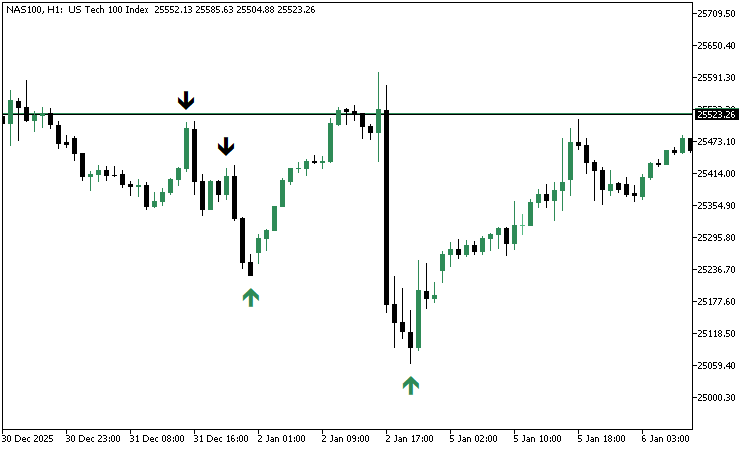
The arrows clearly mark bullish and bearish smash reversals directly on the price chart, making it easy to see how the indicator behaves in real market conditions. This completes the testing phase and confirms that the indicator is functioning as intended.
Using the Smash Day Reversal Indicator in Trading Practice
With the indicator fully implemented and tested, the next step is to understand how it can be applied in a practical trading workflow. The indicator is designed as a decision support tool, not as a standalone trading system. Its primary role is to objectively highlight the formation of Smash Day Reversal patterns directly on the chart, allowing traders to apply discretion and context before acting.
When a bullish Smash Day Reversal forms, a seaGreen colored arrow appears below the smash bar after price confirms the reversal by breaking above the bar’s high; likewise, a bearish Smash Day Reversal is marked with a black arrow above the smash bar once price confirms the downside break. These visual cues eliminate the need to manually scan historical candles and draw attention to potential turning points as they develop.
In practice, traders may combine these signals with broader market context. Some may choose to trade only in the direction of the dominant trend, while others may use a higher time frame structure to filter signals. Additional considerations, such as recent news events, volatility conditions, or market session timing, can further refine decision-making. The indicator remains neutral to these filters and consistently and repeatably presents the raw pattern.
The configurable lookback inputs allow traders to adjust the strictness of the Smash Day definition. A smaller lookback produces more frequent signals, while a larger lookback highlights only stronger emotional extremes. This flexibility makes the indicator suitable for a range of instruments and trading styles without altering its underlying logic.
Most importantly, the indicator helps transform a subtle visual pattern into a clear, objective chart element. By doing so, it supports disciplined analysis, reduces emotional bias, and allows traders to focus on execution quality rather than pattern detection.
Conclusion
In this article, we moved beyond theory and transformed Larry Williams' smash day reversal concepts into a practical, visual trading tool. The result is a custom MQL5 indicator that objectively identifies smash day reversals, highlights the exact bars where emotional extremes occur, and marks the precise moment when price confirms the reversal. This alone removes much of the guesswork that often surrounds discretionary pattern trading.
More importantly, the indicator was designed to support decision-making rather than replace it. Smash day reversals carry the strongest meaning when evaluated in the context of trend direction, market environment, or timing factors. By clearly projecting these patterns on the chart, the indicator allows that context to be judged calmly and consistently, instead of reacting emotionally in the moment.
The development process itself also serves as a blueprint. We broke down a discretionary market idea, defined objective rules, and implemented them step by step using clean and modular MQL5 code. This approach can be reused to study other price patterns, test variations, or build additional tools that align with personal trading beliefs.
At this point, the indicator is ready to be explored further. Different lookback values, timeframes, and markets may reveal new insights that were not obvious before. Readers are encouraged to experiment, observe how these patterns behave in different conditions, and share their findings in the article comments. That process of testing and observation is where real trading edges are discovered.
Warning: All rights to these materials are reserved by MetaQuotes Ltd. Copying or reprinting of these materials in whole or in part is prohibited.
This article was written by a user of the site and reflects their personal views. MetaQuotes Ltd is not responsible for the accuracy of the information presented, nor for any consequences resulting from the use of the solutions, strategies or recommendations described.

 From Basic to Intermediate: Struct (III)
 Bivariate Copulae in MQL5 (Part 3): Implementation and Tuning of Mixed Copula Models in MQL5
 Market Simulation (Part 14): Sockets (VIII)
 Price Action Analysis Toolkit Development (Part 60): Objective Swing-Based Trendlines for Structural Analysis

- Free trading apps
- Over 8,000 signals for copying
- Economic news for exploring financial markets
You agree to website policy and terms of use
Can we develop EA for this indicator?
is this indicator repaint or delayed?
It's not
Arrows are delayed
The hands are stuck