StructMemory Pro
- Эксперты
- Версия: 1.4
- Активации: 5

STRUCTMEMORY PRO
StructMemory Pro is a fully automated Expert Advisor for MetaTrader 5, developed primarily for XAUUSD (Gold) trading.
The system combines market structure analysis, a statistical memory filter, and optional Order Block limit entries. It is designed for traders who prefer quality over quantity: fewer trades, hard Stop Loss on every position, and no martingale / no grid / no averaging.
--------------------------------------------------------------------------------
WHY STRUCTMEMORY PRO?
--------------------------------------------------------------------------------
• No Grid / No Martingale / No DCA / No recovery stacking
• One position at a time (clean risk, clear tracking)
• Hard Stop Loss and Take Profit on every trade
• ATR-based dynamic SL/TP with min/max safety caps
• Spread filter before entry
• Session time filter (GMT)
• Daily profit / daily loss protection
• Trailing stop with anti-spam protection
• Auto filling mode detection (IOC / FOK / RETURN) for better broker compatibility on Gold
• Built-in decision journal + memory CSV (Common\Files) for transparency and later analysis
--------------------------------------------------------------------------------
HOW THE EA WORKS
--------------------------------------------------------------------------------
1) TREND ENGINE
The EA evaluates direction using:
• EMA stack (21 / 34 / 89)
• Market structure elements (swing behaviour, BOS / CHOCH style logic)
Only when a directional bias is present does the system continue to the next layer.
2) MEMORY FILTER (statistical case matching)
After a direction is proposed, the EA compares the current market state with similar historical setups stored from previously closed trades.
A trade is allowed only when memory statistics pass internal thresholds, including:
• Win Rate
• Profit Factor
• Confidence
• Minimum matched samples
This reduces random entries when similar past conditions performed poorly.
3) ENTRY ENGINE
• If a valid Order Block zone is available in the trade direction → pending Limit entry
• If not → Market entry (configurable)
4) TRADE MANAGEMENT
• ATR-based Stop Loss / Take Profit
• Optional trailing
• Daily stop rules
• Memory is updated only after a trade is fully closed
--------------------------------------------------------------------------------
OPERATING PHASES
--------------------------------------------------------------------------------
TEACHER — Memory count is still small → rule/trend driven entries
COPILOT — Memory confirmation required
EXPERT — Memory-driven decisions with stricter statistical filters
The EA becomes more selective as memory grows.
--------------------------------------------------------------------------------
HOW TO USE (RECOMMENDED WORKFLOW)
--------------------------------------------------------------------------------
STEP 1 — BUILD MEMORY (first backtest / first months)
Before the EA can filter trades by history, it needs closed-trade data.
1. Attach StructMemory Pro to XAUUSD (M1 or M5).
2. In inputs, set:
InpPhaseTeacherMax = 2000
InpPhaseCopilotMax = 2500
InpTeacherTrade = true
3. Run Strategy Tester for about 6 months (or longer) with realistic spread.
4. In this phase the EA mainly trades by trend/structure rules and saves every closed trade into:
...\Terminal\Common\Files\StructMemory_Memory_V1.csv
Journal decisions are stored in:
StructMemory_Journal_V1.csv
Do NOT delete these files if you want the EA to remember later.
You can open the CSV files with Excel.
STEP 2 — SWITCH TO MEMORY MODE
After the long test has filled the memory file:
1. Set phases back to normal production values:
InpPhaseTeacherMax = 100
InpPhaseCopilotMax = 500
2. Run again 1–2 shorter tests (or forward demo) with the same memory file still present.
3. On startup the EA loads StructMemory_Memory.csv.
• If memory size >= 500 → EXPERT mode (memory decides)
• If 100–499 → COPILOT
• If < 100 → TEACHER
This workflow lets the EA collect experience first, then use it to filter new entries.
IMPORTANT NOTES
• Memory is stored as CSV (openable in Excel), not a secret binary database.
• If you delete the CSV, the EA starts from zero again (Teacher phase).
• Keep one memory file per symbol/setup you care about.
• Always enable AutoTrading and allow Algo Trading on the chart.
--------------------------------------------------------------------------------
MAIN SETTINGS EXPLAINED
--------------------------------------------------------------------------------
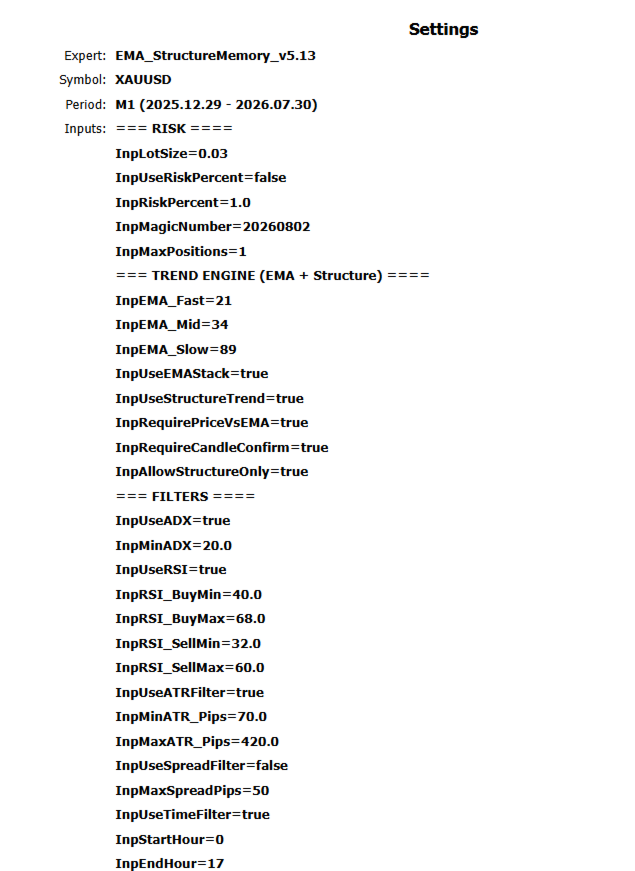
=== RISK ===
InpLotSize — Fixed lot size (e.g. 0.01)
InpUseRiskPercent — If true, lot is calculated from risk % of balance
InpRiskPercent — Risk per trade when risk-% mode is on
InpMagicNumber — Unique ID so the EA only manages its own orders
InpMaxPositions — Keep 1 (single-position design)
=== TREND ENGINE ===
InpEMA_Fast / Mid / Slow — EMA periods (default 21 / 34 / 89)
InpUseEMAStack — Require EMA alignment for trend
InpUseStructureTrend — Use swing / BOS / CHOCH-style structure
InpAllowStructureOnly — Allow structure trend even if EMA not fully stacked
InpRequireCandleConfirm — Wait for closed-candle confirmation
=== FILTERS ===
InpUseADX / InpMinADX — Trend strength filter
InpUseRSI + RSI min/max — Momentum band filter
InpUseATRFilter — Avoid too quiet / too violent markets
InpMaxSpreadPips — Block entries when spread is too wide
InpStartHour / InpEndHour — Trading session window (GMT)
=== CONTEXT CUTS ===
InpSkipEarlyTrend — Skip very early trend stage (often weaker)
InpSkipBadCombos — Skip historically weaker regime/session combinations
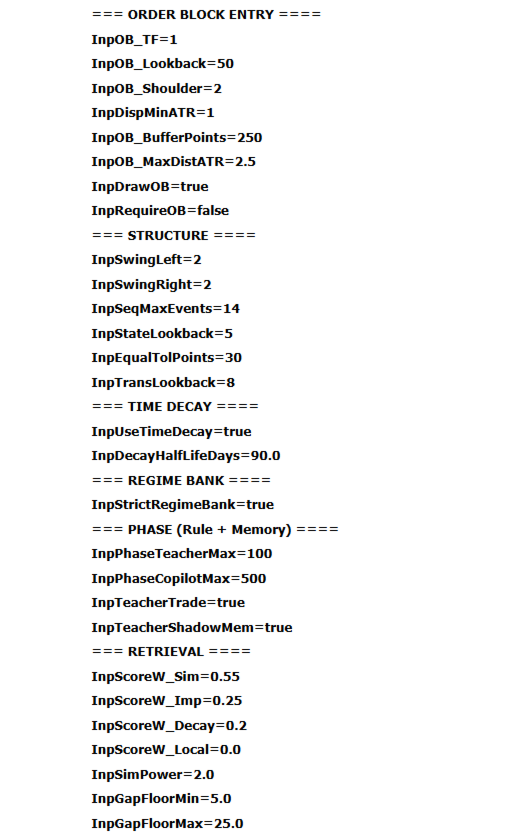
=== ORDER BLOCK ENTRY ===
InpRequireOB — false = Limit if OB exists, otherwise Market; true = only trade with OB
InpOB_Lookback — How far back to search for OB
InpOB_MaxDistATR — Ignore OB that is too far from price
InpOB_BufferPoints — Offset inside the OB zone for limit price
=== PHASES (RULE + MEMORY) ===
InpPhaseTeacherMax — Memory count below this → TEACHER (rule entries)
InpPhaseCopilotMax — Between Teacher and this → COPILOT; above → EXPERT
InpTeacherTrade — Allow real trades in Teacher phase
InpTeacherShadowMem — Still score memory in Teacher for logging only
Suggested first run: Teacher 2000 , Copilot 2500
Suggested after memory: Teacher 100 , Copilot 500
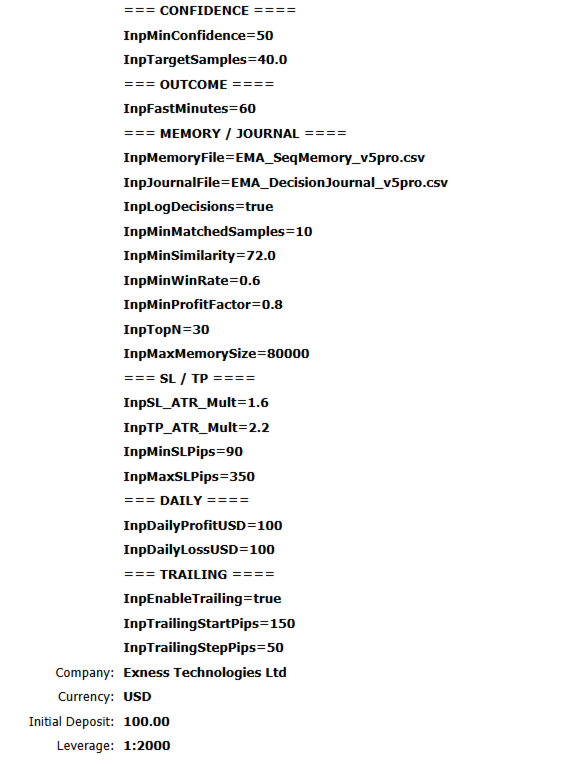
=== MEMORY DECISION THRESHOLDS ===
InpMinWinRate — Minimum historical win rate of similar setups
InpMinProfitFactor — Minimum profit factor of similar setups
InpMinConfidence — Minimum statistical confidence score
InpMinMatchedSamples — Minimum number of similar past trades
InpMinSimilarity — How similar a past setup must be
InpMaxMemorySize — Max rows kept in memory (oldest trimmed)
Higher thresholds = fewer trades, stricter filter.
Lower thresholds = more trades, looser filter.
=== SL / TP / TRAILING / DAILY ===
InpSL_ATR_Mult / InpTP_ATR_Mult — SL and TP as multiples of ATR
InpMinSLPips / InpMaxSLPips — Safety caps for SL distance
InpEnableTrailing — Enable trailing stop
InpTrailingStartPips / Step — When trailing starts and step size
InpDailyProfitUSD / LossUSD — Stop new entries after daily target or daily loss (GMT day)
=== FILES ===
InpMemoryFile — Memory CSV name (default StructMemory_Memory_V1.csv)
InpJournalFile — Decision log CSV
InpDebugLog — Verbose Experts log (false for normal use)
--------------------------------------------------------------------------------
RECOMMENDATIONS
--------------------------------------------------------------------------------
Symbol: XAUUSD (Gold) / broker equivalent
Timeframe: M1 or M5
Account type: ECN / Raw / low-spread preferred
Minimum deposit: from $100–$200 (with 0.01 lot)
Leverage: 1:100 or higher
VPS: Recommended for stable 24/5 operation
Hedging/Netting: Supported (single-position logic)
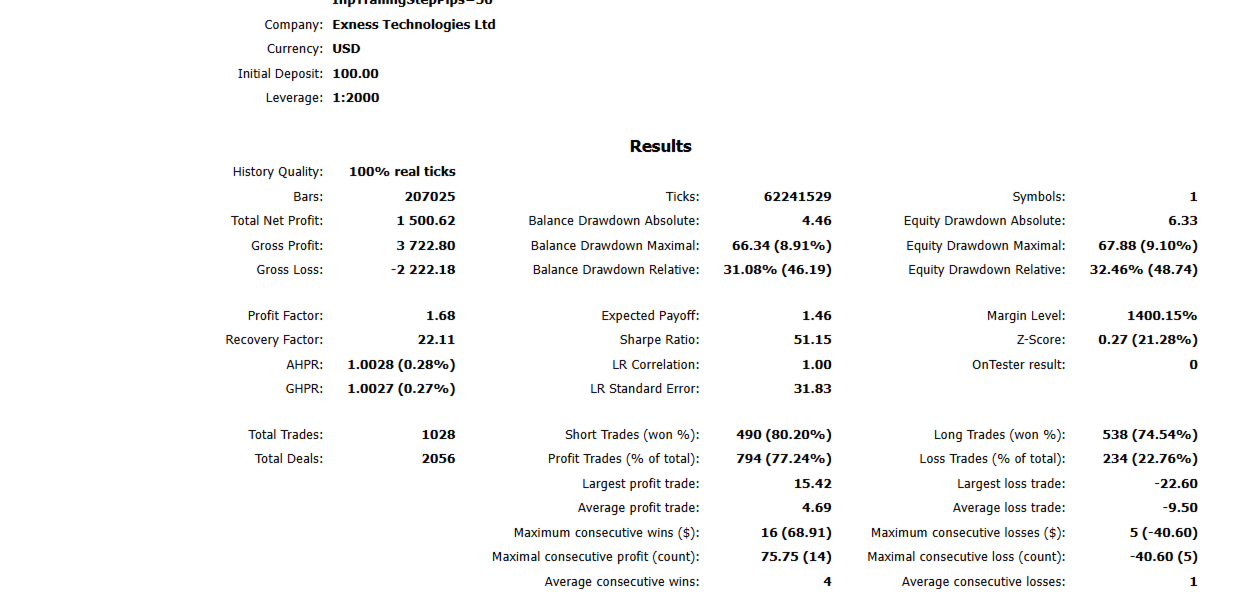
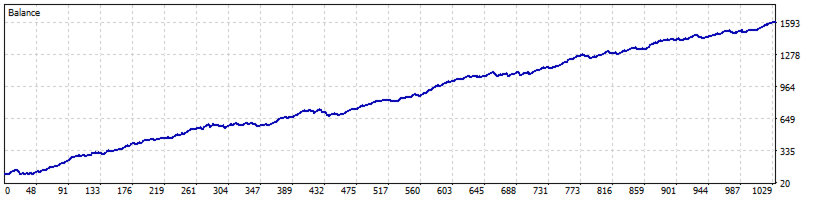
Results depend on broker spread, execution, symbol specification and filling rules.
Always validate on YOUR broker.
--------------------------------------------------------------------------------
QUICK INSTALLATION
--------------------------------------------------------------------------------
1. Purchase / download from MQL5 Market
2. Open MetaTrader 5 → Navigator → Market → Experts
3. Attach StructMemory Pro to an XAUUSD chart (M1 or M5)
4. Enable Algo Trading in EA properties
5. Enable the terminal AutoTrading button
6. Start with default settings on a DEMO account first
Files created in Terminal\Common\Files:
• StructMemory_Memory_V1.csv
• StructMemory_Journal_V1.csv
--------------------------------------------------------------------------------
RECOMMENDED PATH FOR NEW USERS
--------------------------------------------------------------------------------
1. Demo or Tester, 6 months, Teacher 2000 / Copilot 2500 → build CSV memory
2. Confirm StructMemory_Memory.csv exists and has many rows (open in Excel if needed)
3. Set Teacher 100 / Copilot 500
4. Retest 1–2 periods or run forward demo
5. Only then consider live with small lot
--------------------------------------------------------------------------------
FAQ
--------------------------------------------------------------------------------
Q: Does the EA use martingale or grid?
A: No.
Q: Does every trade have Stop Loss?
A: Yes.
Q: Why are there periods with no trades?
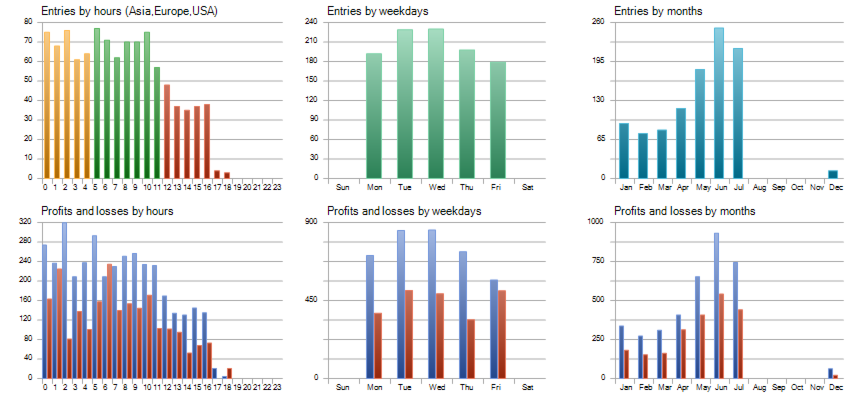
A: Filters (spread, session, structure, memory thresholds) can skip low-quality conditions. This is by design.
Q: Can I change lot size?
A: Yes — fixed lot or optional risk percent.
Q: Do I need VPS?
A: Strongly recommended for continuous operation.
Q: Where is the memory stored?
A: In StructMemory_Memory_V1.csv under Terminal\Common\Files. You can open it with Excel.
Q: What if I delete the memory file?
A: The EA starts over in Teacher phase and must collect data again.
--------------------------------------------------------------------------------
RISK NOTE
--------------------------------------------------------------------------------
Trading gold involves high volatility and risk of loss.
Past performance (backtest or live history) does not guarantee future results.
Use risk capital only. Test on demo before any live deployment.
This product is a trading tool, not financial advice.