TimeLeft
- Utilities
-
Shi Yuan Wang
 I write custom indicators, Expert Advisors (EAs), scripts and trading tools
for MetaTrader 4 and MetaTrader 5, and indicators for TradingView (Pine Script).
What I can do for you:
- Convert a clearly described trading rule into a backtestable MQL4/MQL5 EA - Version: 1.11
Overview
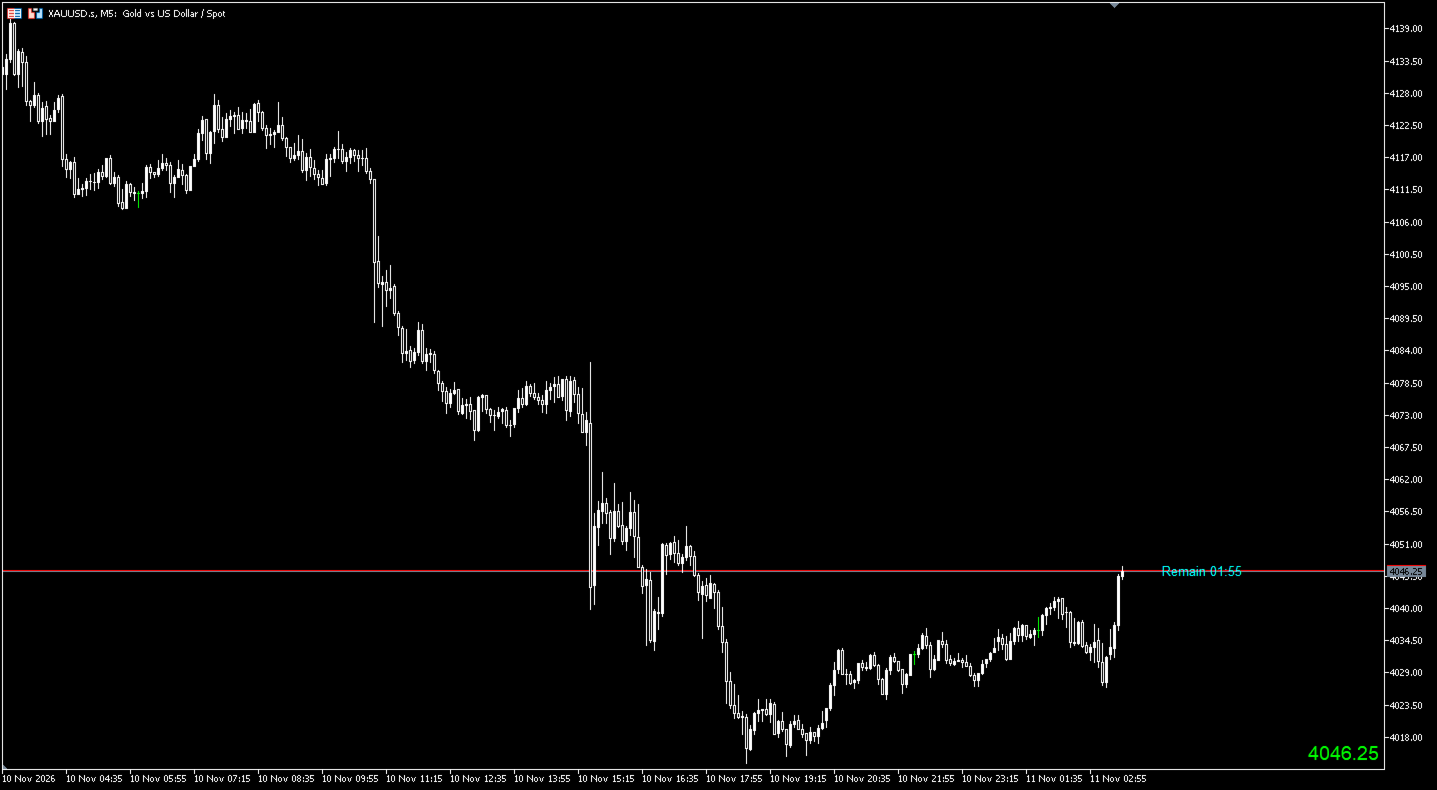
JK-TimeLeft is a chart display indicator for MetaTrader 5. It shows the remaining time of the current bar as a text label placed a chosen number of bars to the right of the current bar, and it shows the current Bid or Ask price as a label in the bottom-right corner of the chart. It is a visual aid only. It does not place orders, manage positions, or provide trading advice.
What the indicator shows
Countdown label. The remaining time of the current bar is shown using the trading server time. When at least one hour remains, the text uses hours, minutes and seconds; otherwise it uses minutes and seconds. If seconds are turned off, the value is shown in minutes rounded up, with a minimum of one minute. Before a new bar starts, the label displays "Waiting new bar".
Label position. The label is placed a configurable number of bars to the right of the current bar. Its vertical position can follow the latest price of the current bar or stay at the bar open price, and it can be shifted slightly with a price offset. The chart right margin can be enabled automatically so that the label stays visible in the space to the right of the last bar.
Price label. The bottom-right label shows the Bid or Ask price with automatic or fixed decimal places. Separate colors are used when the price rises and when it falls; when the price is unchanged, the previous color is kept. Font, size, and the distance from the bottom-right corner in pixels are configurable. The label can be switched off.
General behaviour. The display works on any symbol and on all standard timeframes, including weekly and monthly. Weekly and monthly charts use their own bar length, so the countdown can span several days or weeks. It refreshes every second and on new quotes, so the countdown continues when no new tick arrives. It repositions when the chart is zoomed or scrolled. The indicator removes its labels when it is removed from the chart. An object name prefix keeps multiple instances on the same chart separate.
Input parameters
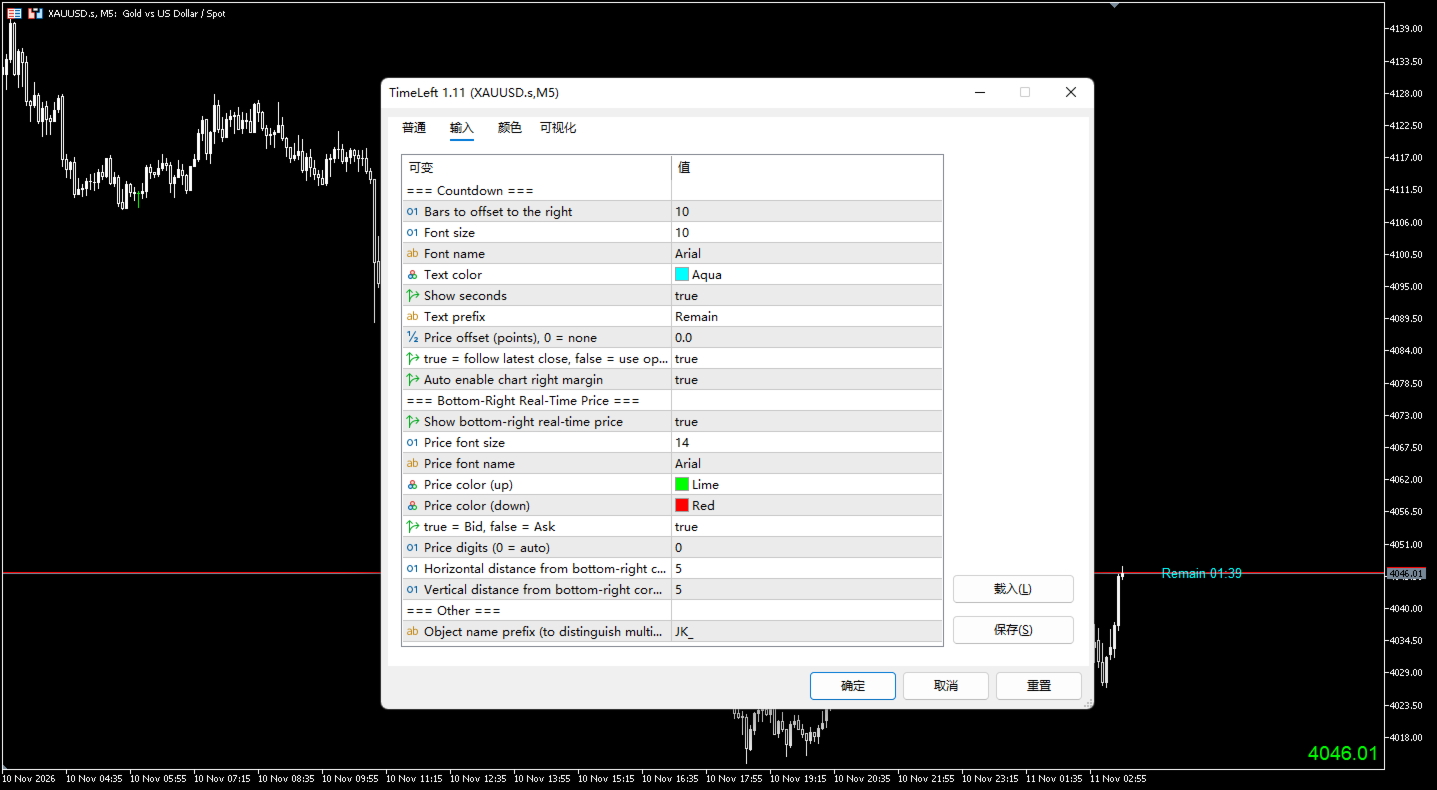
Countdown
- Bars to offset to the right: 10. Number of bars between the current bar and the countdown label.
- Font size: 10. Size of the countdown text.
- Font name: Arial. Font of the countdown text.
- Text color: Aqua. Color of the countdown text.
- Show seconds: true. Show seconds; when false, minutes are shown.
- Text prefix: "Remain ". Text placed before the countdown value.
- Price offset (points), 0 = none: 0.0. Small vertical adjustment of the label.
- true = follow latest close, false = use open: true. Follow the latest price of the current bar, or use the bar open price.
- Auto enable chart right margin: true. Enable the chart right margin for the label placed in future space.
Bottom-right real-time price
- Show bottom-right real-time price: true. Enable or disable the price label.
- Price font size: 14. Size of the price text.
- Price font name: Arial. Font of the price text.
- Price color (up): Lime. Color used when the displayed price rises.
- Price color (down): Red. Color used when the displayed price falls.
- true = Bid, false = Ask: true. Quote shown by the price label.
- Price digits (0 = auto): 0. Decimal places; 0 uses the symbol setting.
- Horizontal distance from bottom-right corner (pixels): 5. Distance from the right edge.
- Vertical distance from bottom-right corner (pixels): 5. Distance from the bottom edge.
Other
- Object name prefix (to distinguish multiple instances): JK_. Use a different prefix for each instance on the same chart.
How to use
- Attach the indicator to a chart in MetaTrader 5.
- Set "Bars to offset to the right" and keep "Auto enable chart right margin" enabled if the countdown label is not visible.
- Choose the quote, decimal places, colors, font, and corner distances for the price label.
- To run more than one instance on the same chart, set a different "Object name prefix" for each instance.
- Set "Show bottom-right real-time price" to false to hide the price label.