NzdCad Pulse
- Experts
-
Yury Orlov
 Trading since 1999 — Forex, CME, Crypto. One model survived a quarter of a century: enter the trend after its correction completes — short stop, large potential.
- Version: 1.0
- Activations: 10
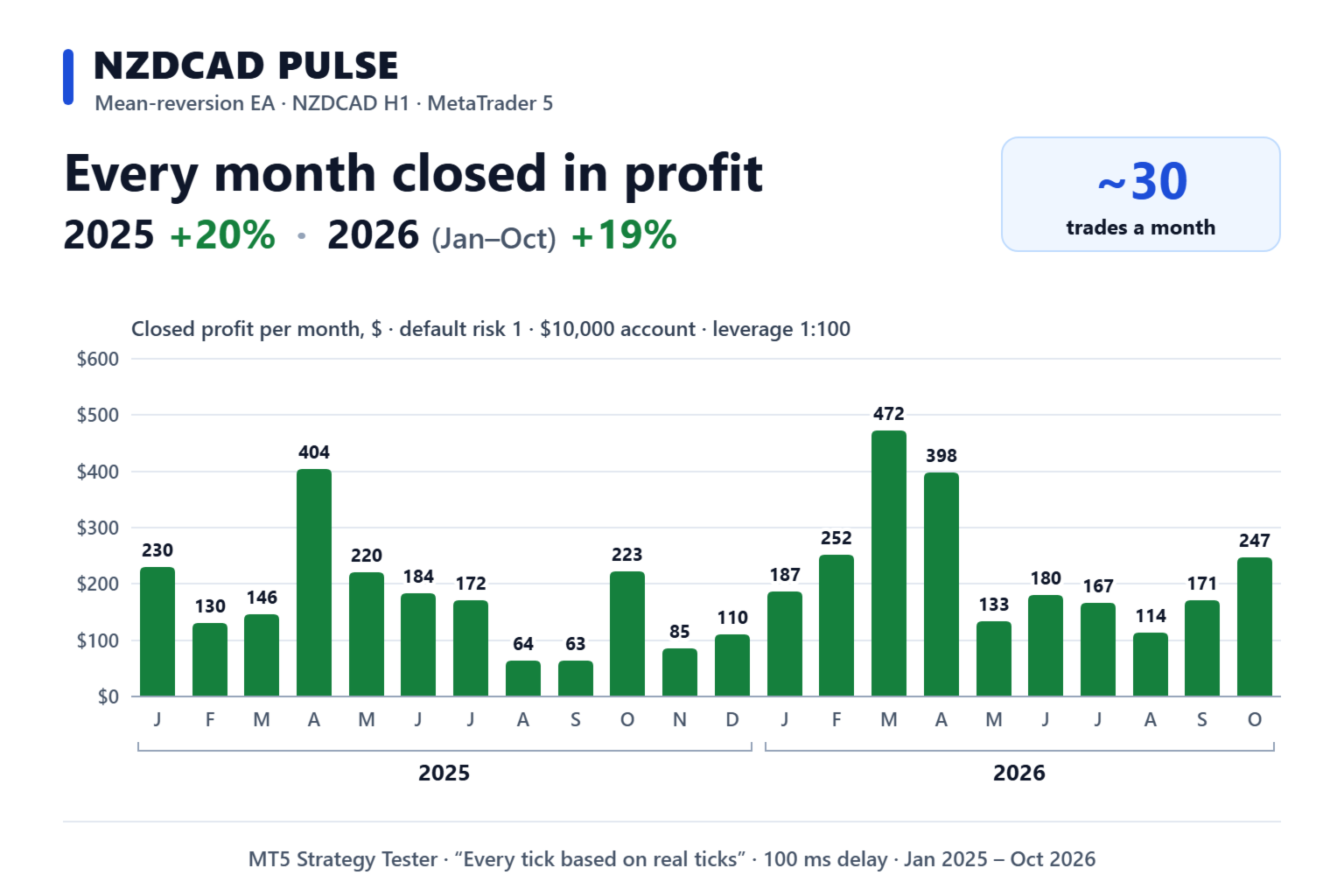
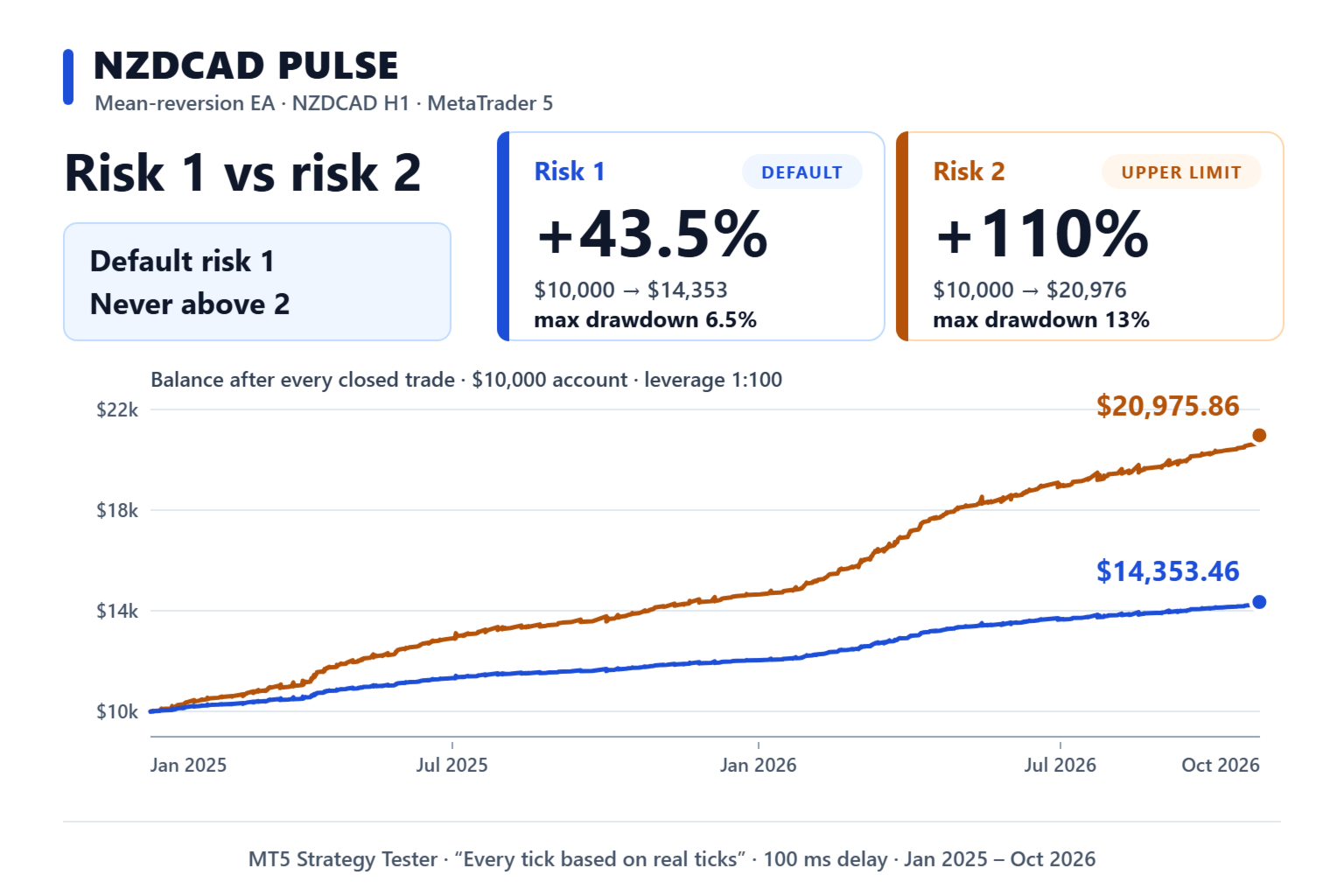
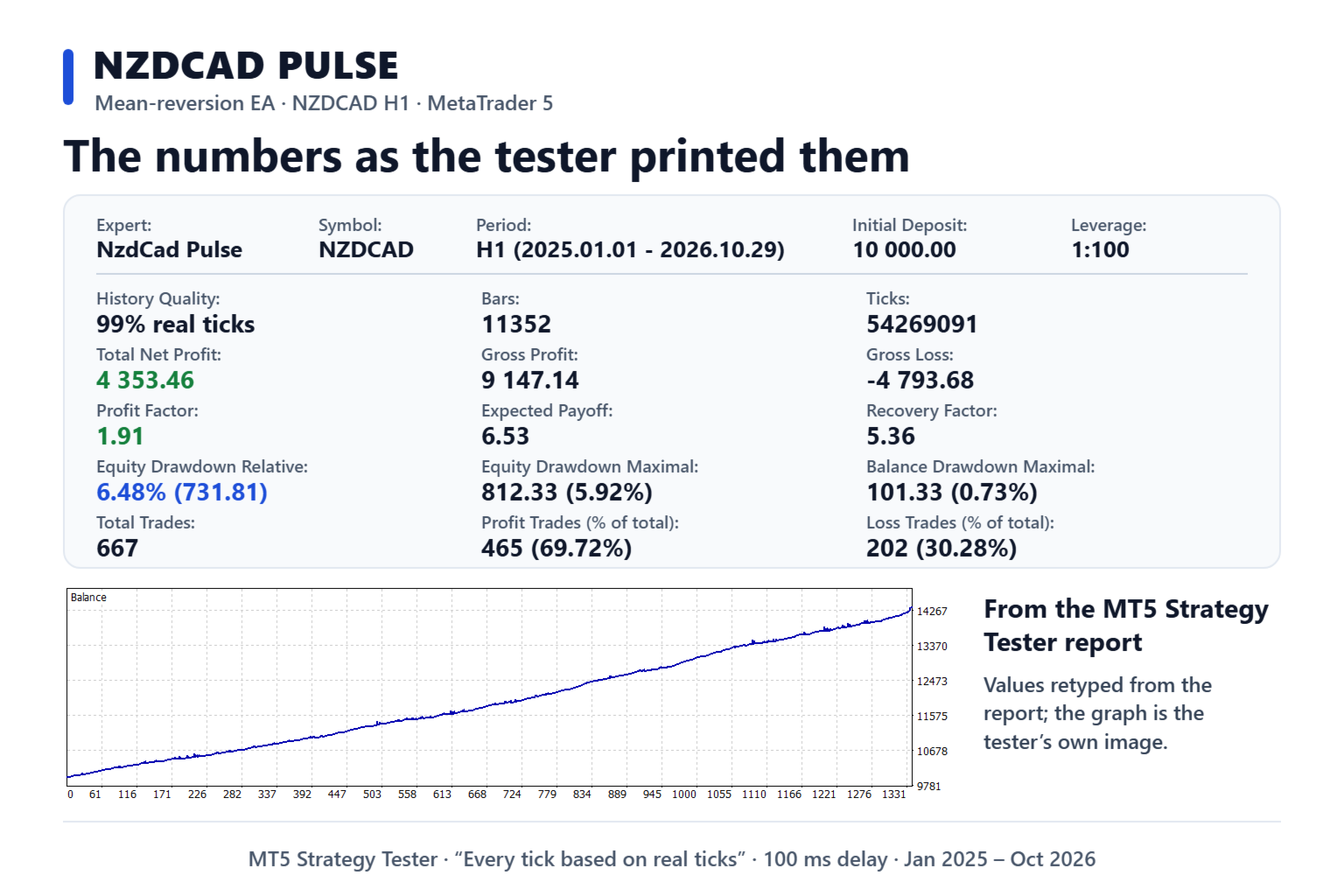
Not a single losing month in 22 months of testing. From January 2025 to October 2026 a $10,000 deposit became $14,353 (+43.5%) on default settings, and the temporary loss never went above 6.5% of the account. That was +20% in 2025 and +19% in 2026. Don't take my word for it: run it through the tester yourself. It's free, and the instructions are below.
NZDCAD Pulse is an automated EA that trades a single pair, NZDCAD. You put it on a chart, pick your risk, and it does the rest on its own. The test was run under strict conditions: real ticks, a 100 ms execution delay and a $10,000 deposit.
Send me a private message as soon as you buy: I'll help with installation and setup, and send you the manual plus a link to our community.
I raise the price after every 10 copies sold: that's how I keep the support quality high. At the current price, 10 of 10 copies are still available.
Why NZDCAD
NZDCAD is a calm pair. The New Zealand and Canadian dollars depend on similar things — commodities and market mood — so the pair spends more time moving inside a range than running off into a long trend. That is exactly the kind of market this method works in. My clients have been trading NZDCAD with this model on real money for more than a year, and they are the ones who asked for a dedicated EA for this pair.
How it trades
The NZDCAD price keeps drifting away from its average level and then coming back to it. The EA waits until that move becomes noticeable, opens a trade against it, and closes that trade in profit when price returns. The profits are small but frequent: about 30 trades a month. If price doesn't come back right away, it carefully adds to the position and closes everything together once the market turns. If a single trade gets well into profit, it locks in most of that profit and doesn't hand it back to the market. A model tuned specifically for NZDCAD decides what counts as "noticeable" and when to add.
What the test showed
- The worst temporary loss in 22 months was 6.5% of the account on default settings.
- Both years were in profit by almost the same amount: +20% in 2025, +19% in 2026. The result did not hinge on one lucky period.
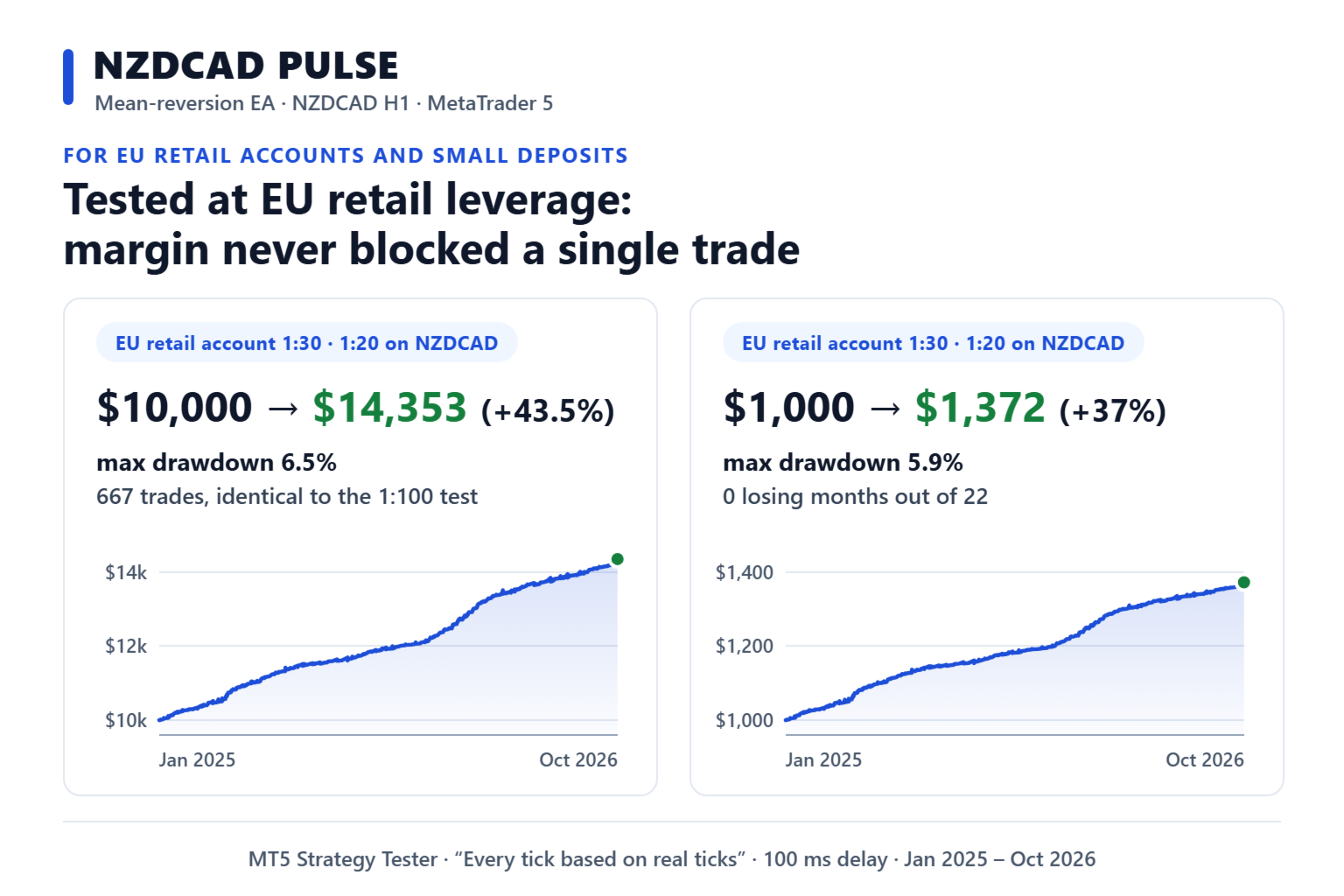
- With 1:20 leverage, as offered by European brokers, the result matched the main test trade for trade, with plenty of margin to spare.
- On a $1,000 deposit, the same 22 months gave +37%, with a temporary loss of up to 5.9%.
How it protects your account
- The lot in a series grows only up to a set limit, so one strong move doesn't send the risk out of control.
- No new series open on Fridays, which means fewer weekend surprises.
- The only setting you need to touch is risk. The rest is already matched to NZDCAD.
Temporary loss and the safety switch
Until price returns, you will sometimes see a temporary loss on the account. That's part of the method: the EA doesn't bail out of trades at a loss on the first pullback; it holds and waits for the return. Over the whole test this loss never exceeded 6.5% of the account. As a last resort there is a safety switch: if the temporary loss hits 30% of the account (you can change this in the settings), the EA closes every position and stays stopped until you decide. It's a safeguard, not a guarantee: the EA exits at market price, a gap at the weekly open can make the loss bigger, and the safeguard only works while the terminal is running.
Who it's for and who it isn't
A good fit for anyone who wants calm trading without sharp swings and is ready to give the EA time. Not a fit for anyone who wants to double their account in a month, or who can't sit through a temporary loss and closes trades by hand.
Risk is the main setting
- Risk defaults to 1: the EA opens 0.01 lot per $1,000 of deposit. The test was run in this mode, so start with it.
- For less risk, set 0.5 (on a deposit under $2,000 the EA will still open the minimum lot of 0.01). For more, set 2: in the same test $10,000 became $20,976 (+110%), while the temporary loss reached 13%. Switch to 2 only after a month on 1, and only if that month matched the test. Don't go above 2.
- Everything else is already set up for NZDCAD, so there's no need to change anything.
What you need to start
- A deposit of $1,000 or more.
- A hedging account. Not sure which type you have? Ask your broker or message me. If the account type is wrong, the EA will tell you so and won't trade.
- Leverage of 1:20 or higher.
- A terminal that runs around the clock, on your computer or a VPS. Need advice on a broker or a VPS? Send me a private message.
Installation
- Open an NZDCAD chart in MetaTrader 5, any timeframe. If your broker names the pair differently, for example NZDCAD.r, the EA will find it on its own.
- Drag NzdCad Pulse onto that chart and press OK.
- Click the Algo Trading button in the terminal's top toolbar so it turns green. Done.
Check it before you buy
- Download the Free Demo, then in MetaTrader 5 open the Strategy Tester (Ctrl+R).
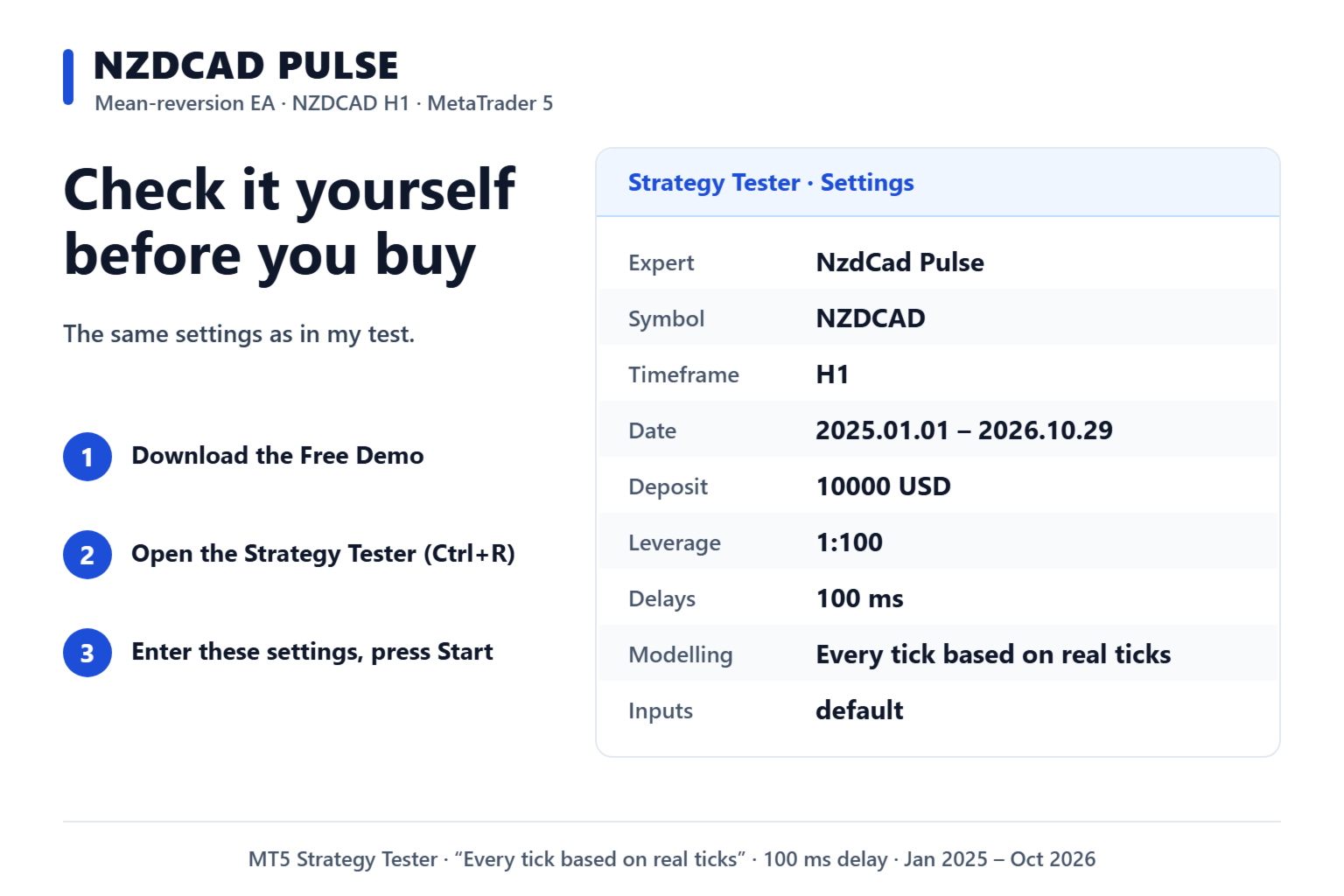
- Select NzdCad Pulse, symbol NZDCAD, timeframe H1, period from 2025.01.01 to 2026.10.29, deposit 10000 USD, leverage 1:100, delay 100 ms and the "Every tick based on real ticks" mode. Leave the EA settings alone.
- Click Start, wait a few minutes and compare the result with the numbers on this page. The exact figures vary a little between brokers, but the picture stays the same.
About the author
- I've been trading since 1999: currencies, stocks, indices and futures.
- Nearly 12 years on MQL5, with over 5,000 sales and over 600 reviews.
- I've been writing trading software since 2006. In 2021 Entry Points Pro was the world's number 1 indicator for MT5.
- I make my living from trading, and I trade with my own products.
Three mistakes that ruin trading accounts: running other EAs next to it that keep adding to losing trades; closing trades by hand while they are in a temporary loss; cranking the risk past what you can live through. Don't get in the EA's way.
Your next step: download the demo, run the test and compare the result with the numbers above. If they match, get it at the current price. Questions? Send me a private message. I answer them myself.