Gold Stop Hunt
- Experts
-
Minh Thoai Le
 NoOne Trade - stop-hunt scalping robots for MetaTrader 5.
My Expert Advisors wait for price to sweep the stop-losses beyond a range, then trade the snap-back. Every trade has a stop-loss and a take-profit. No grid, no martingale.
Products - Version: 1.11
- Updated: 27 October 2026
- Activations: 5
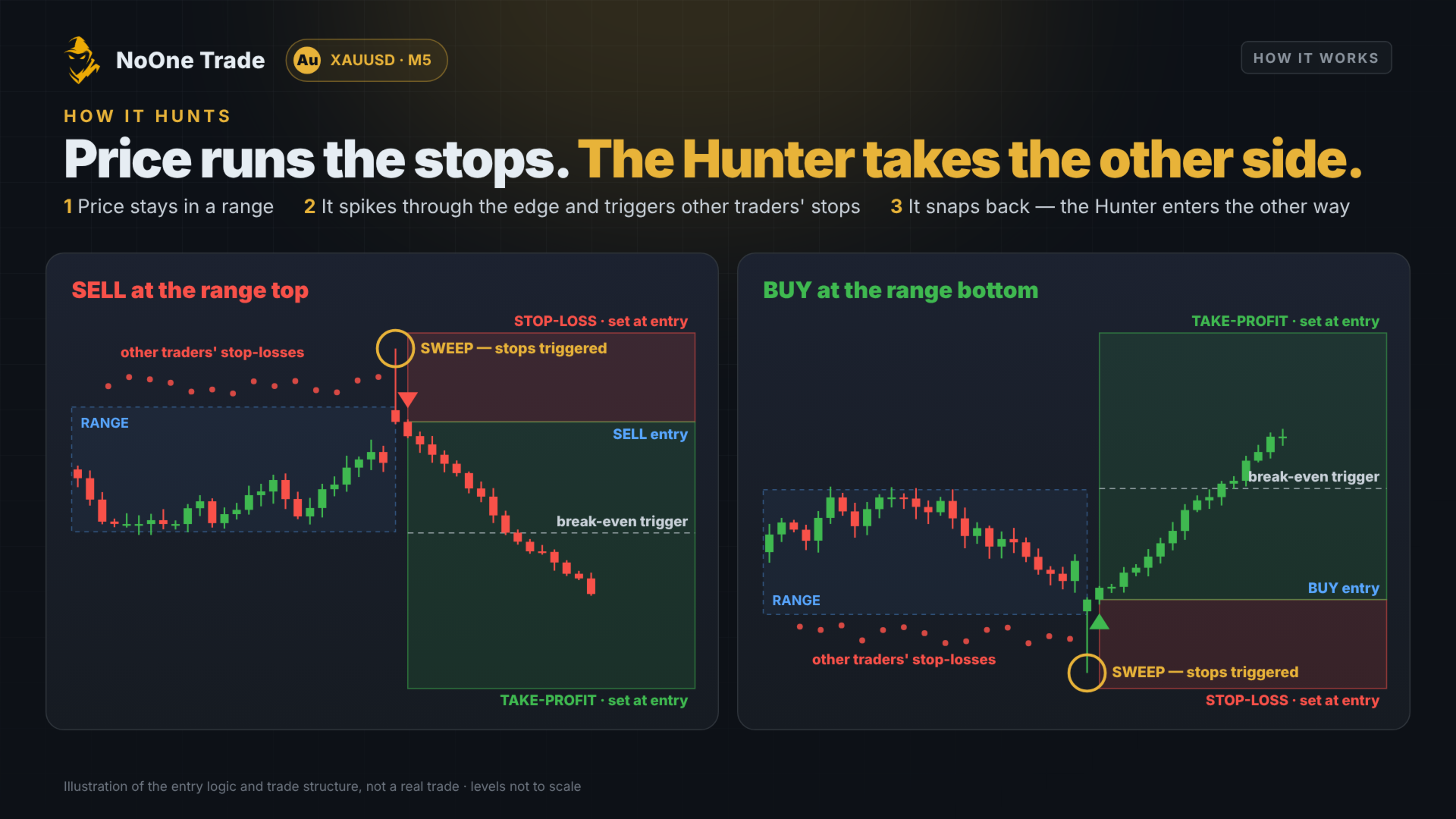
Gold Stop Hunt is a scalping Expert Advisor for XAUUSD M5. Gold often spikes through the stop-losses just beyond a range, then snaps back. The EA waits for that sweep to fail and trades the snap-back - with a stop-loss and take-profit on every trade.
How it trades
- Finds the range where price has been boxed in.
- Waits for price to sweep through the edge, where other traders' stops sit.
- Enters the other way only after price comes back inside.
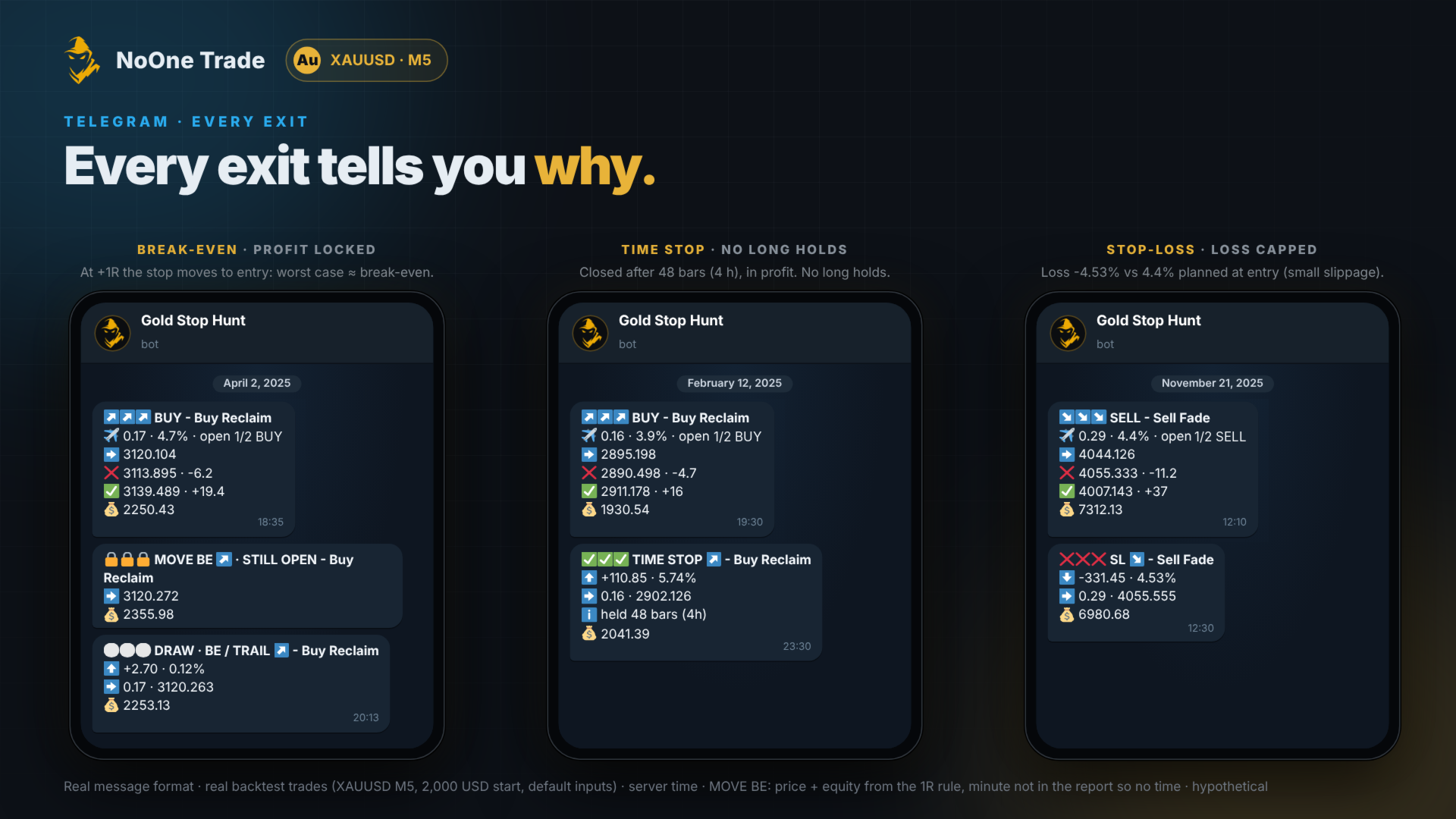
- Exits with a plan: stop-loss, break-even, take-profit and a time limit.
Key features
- Two engines: sells false breaks at the top, buys reclaims at the bottom.
- Reads the market state first - stays out of choppy markets and strong daily trends.
- Skips trades when the spread is too expensive for the current movement.
- Locks profit on winning sells and closes any entry filled at a bad price.
- Short scalps: most trades last a few hours, none longer than 12 hours.
Protection
- Stop-loss and take-profit on every trade. No grid, no martingale.
- Maximum 2 open trades per direction.
- Drawdown brake: smaller trades while the account is below its peak.
- Spread guard, holiday filter, Friday cut-off and margin check.
Inputs
- Risk per trade (4.5%) - how much of the account one trade can lose at its stop. Range 2 - 5. Choose it from the list - each option shows its minimum deposit (2,763 ÷ risk %).
- Daily loss limit (off) - no new trades for the rest of the day after losing this %.
- Account protection (15.5%) - closes all and stops if the account falls this far below its start. 0 = off.
- Trade direction - Buy and Sell, Buy only, or Sell only.
- Open trades at the same time - up to 2 per direction, or only 1 at a time.
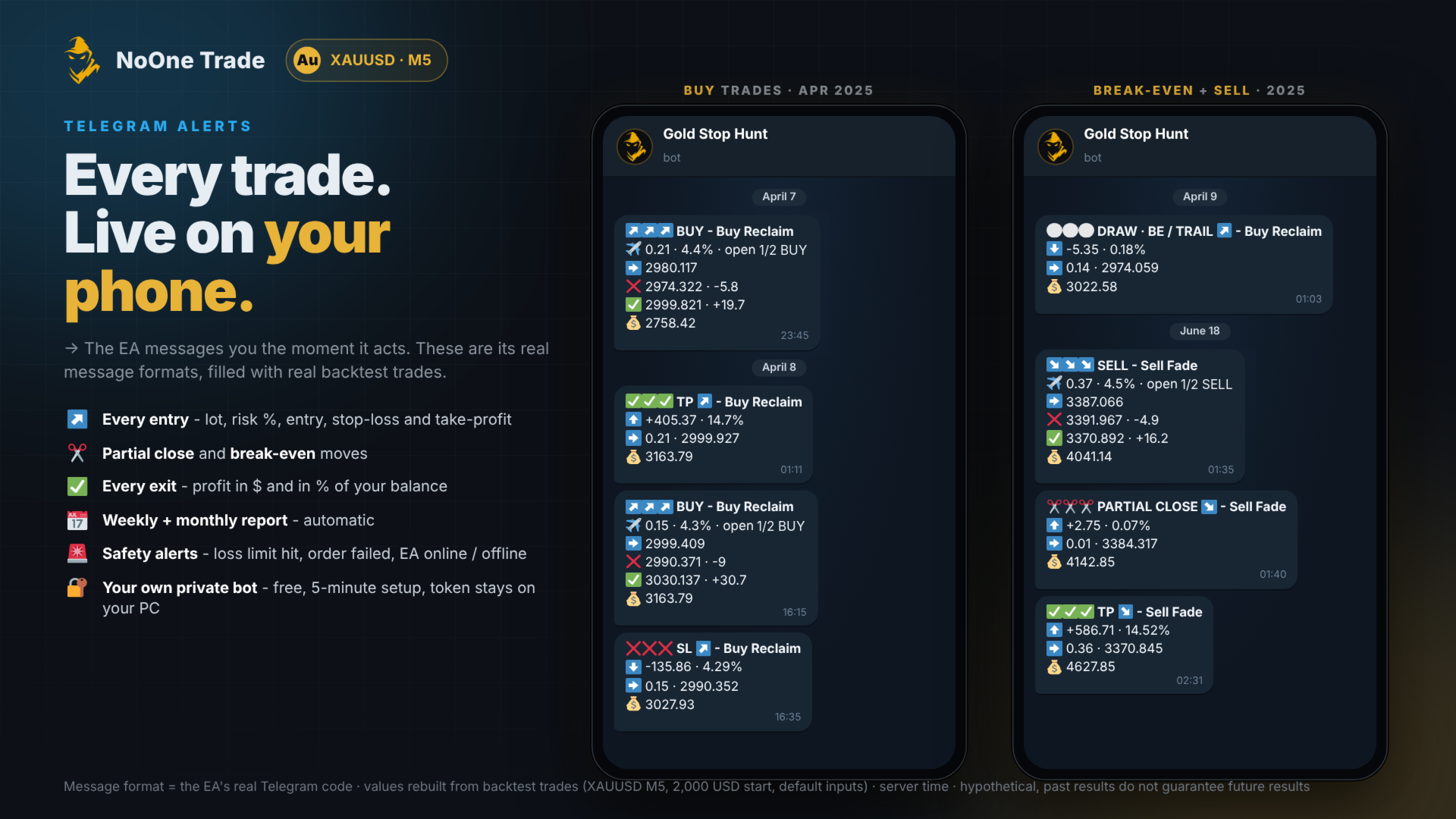
- Telegram alerts - bot token and chat ID; choose trade messages, weekly and monthly reports.
- Max spread (0.40 USD) - no new trade when the spread is wider.
- Spread spike guard (on) and Holiday filter (on).
Requirements
- XAUUSD, M5, one chart. Hedging account with low spreads.
- Minimum deposit 620 USD at the default 4.5% risk - see How much to deposit.
- VPS recommended.
How much to deposit
The smallest trade a broker allows is 0.01 lot. A trade that would need less than 0.01 lot at your risk setting is skipped. So choose your risk first, then deposit at least (USD, or the same value in your account currency):
- 2% risk - 1,390 USD
- 2.5% risk - 1,110 USD
- 3% risk - 930 USD
- 3.5% risk - 790 USD
- 4% risk - 700 USD
- 4.5% risk - 620 USD (default)
- 5% risk - 620 USD (above the tested 4.5%; same minimum as 4.5%)
- Formula: minimum deposit = 2,763 ÷ risk %. Lower risk needs a bigger deposit, because every trade is smaller.
- Tested at every risk in the list with its minimum deposit (last 6 months): at most 1 trade skipped.
- With less, the EA still runs: it shows one warning at start and skips the trades it cannot open.
- Strategy Tester: under about half the minimum (1,280 ÷ risk %) most trades cannot open, so the tester runs a short technical check instead of the strategy and writes this in the Journal.
Testing
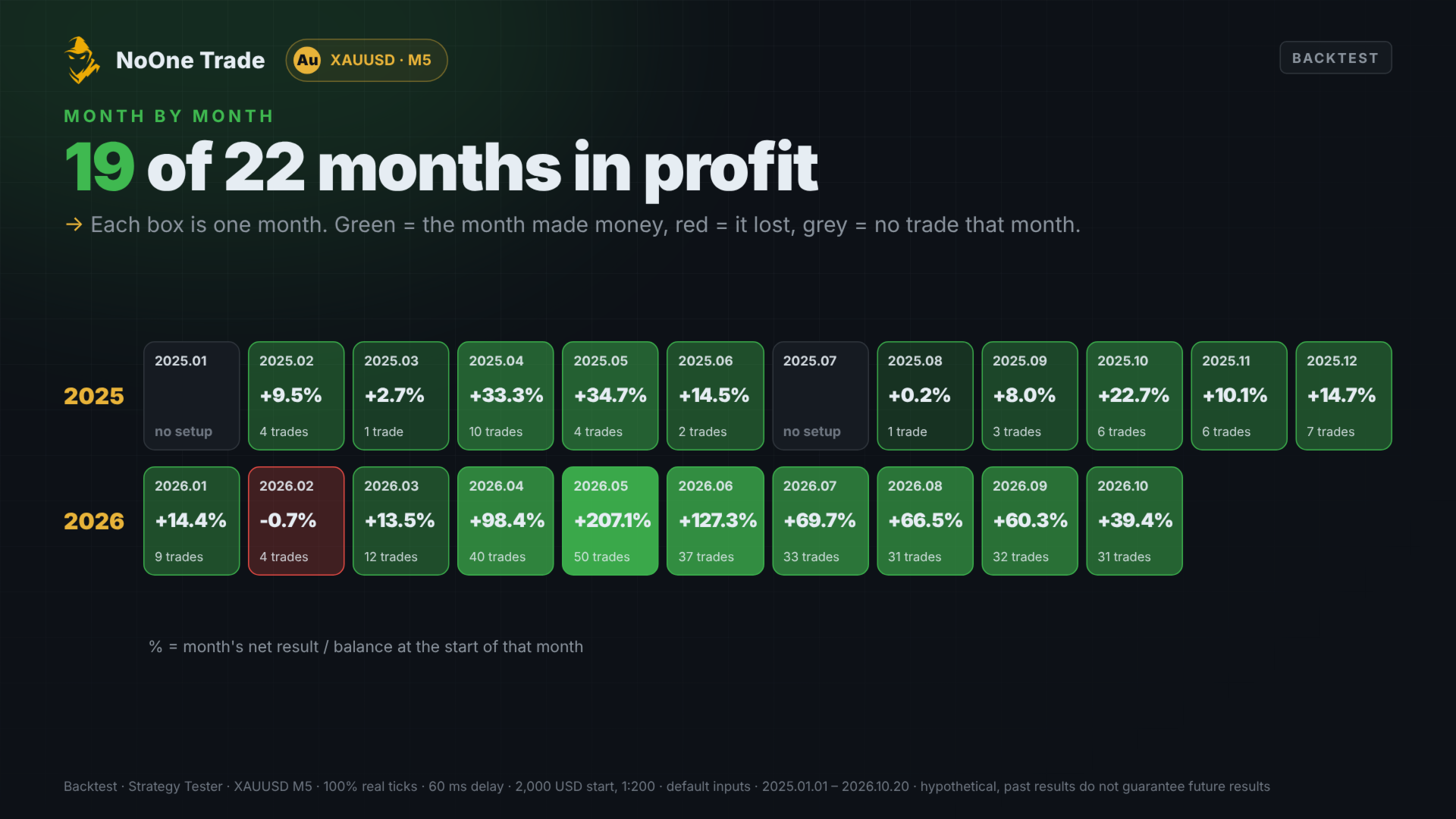
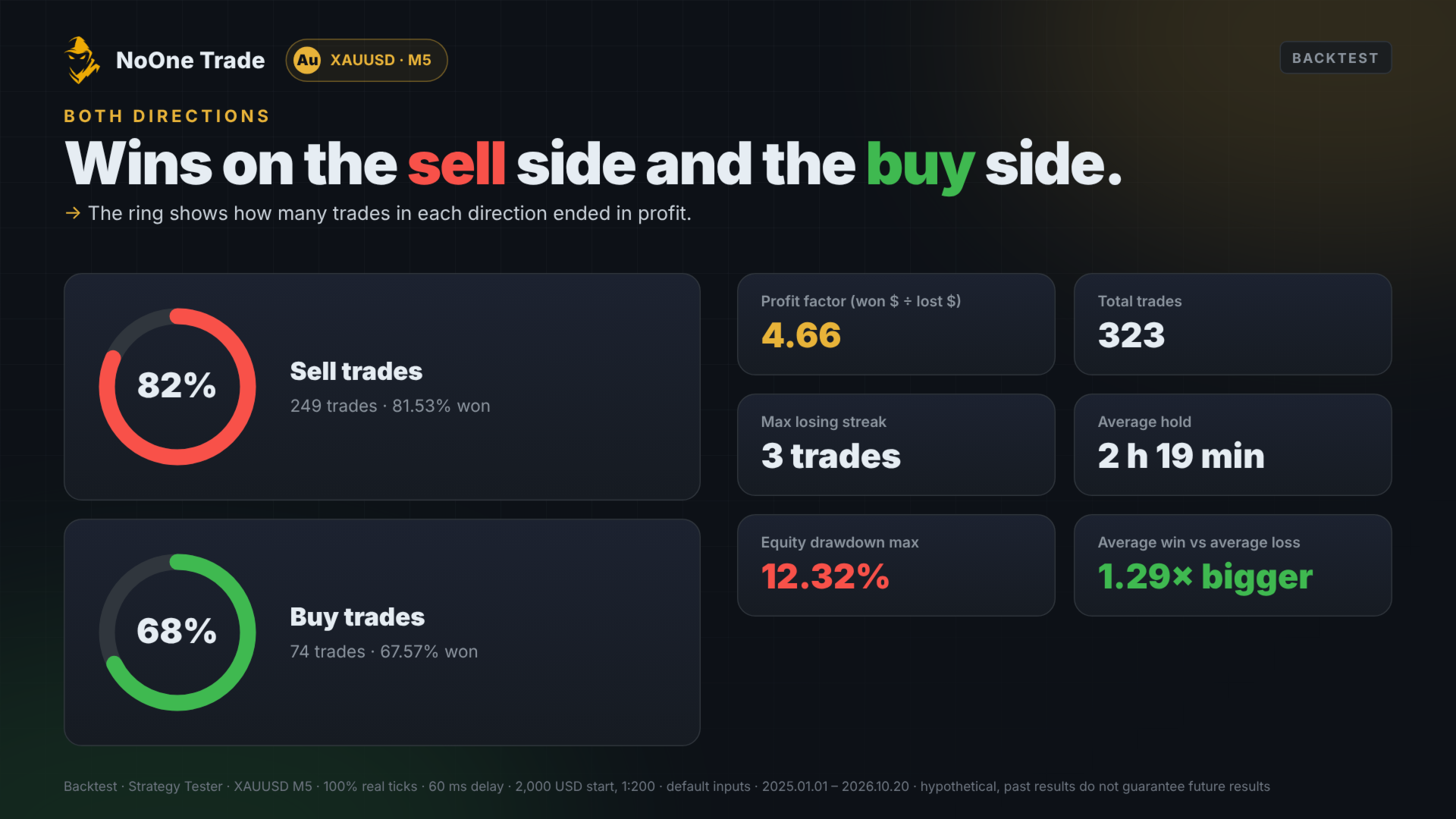
Tested in the MT5 Strategy Tester with every tick based on real ticks (100% quality), 60 ms delay, January 2025 - October 2026, one fixed set of inputs. Results are in the screenshots. The test used zero commission; results are lower on commission accounts.
Telegram setup (about 5 minutes)
Step 1 - Create your bot
- Open Telegram and search for @BotFather (the official one has a blue check mark). Press Start.
- Send /newbot.
- Type a name for your bot, for example My Gold Alerts.
- Type a username that ends with bot, for example mygold_alerts_bot.
- BotFather replies with a token like 123456789:AAE.... Copy it and keep it private.
Step 2 - Start your bot
- Tap the link to your new bot in BotFather's message (t.me/your_bot_name).
- Press Start. A bot cannot message you until you do this.
Step 3 - Get your chat ID
- Search for @userinfobot and press Start.
- It replies with your Id, a number like 123456789. Copy it.
- For a channel or group instead: add your bot as an admin. The channel ID starts with -100 (open the channel in web.telegram.org - the number after # in the address bar).
Step 4 - Allow MT5 to send messages
- In MetaTrader 5: Tools > Options > Expert Advisors.
- Tick Allow WebRequest for listed URL.
- Add https://api.telegram.org and press OK.
- Using a VPS? Do the same on the VPS terminal.
Step 5 - Enter it in the EA
- Attach the EA to an XAUUSD M5 chart and open the Inputs tab.
- Telegram alerts = true.
- Paste your token into Bot token and your number into Chat ID (no spaces).
- Choose which messages you want: every trade, weekly and monthly reports. Press OK.
Step 6 - Check
- Within a few seconds your bot sends an ONLINE message. Done.
- Telegram works on live and demo charts only, not in the Strategy Tester.
No message? Look at the Experts tab at the bottom of MT5:
- WebRequest not allowed or err 4014 - the address from Step 4 is missing. Add it, then remove and re-attach the EA.
- rc=401 - the token is wrong. Copy it again from BotFather.
- rc=400 - the chat ID is wrong, or you did not press Start in your bot (Step 2). For a channel: the bot must be admin and the ID must start with -100.
- token or chat ID incomplete - one of the two inputs is empty.
The EA keeps trading even if Telegram fails; the chart panel then shows TELEGRAM: DOWN.
Risk warning: trading leveraged gold carries a high risk of loss. Backtest results are hypothetical and do not guarantee future results. Test on a demo account first.