Trade Manager ZeroLogics

ZeroLogics. Basic tool for trade management, risk management, and planning, featuring visual levels, TPs, RR, lot sizing, profit/loss tracking, and draggable SL and TP, along with basic automatic per-trade options such as trailing stop, auto breakeven, and auto partials. It is a tool designed to simplify your trades — it is not a professional tool nor does it claim to be, and it includes 2 interface languages: ENGLISH and SPANISH.


Trade Manager Assistant 

Comprehensive User Guide and Technical Operation Manual

ZeroLogics • MetaTrader 5 (MQL5) • Official Manual

1. Introduction and Architecture

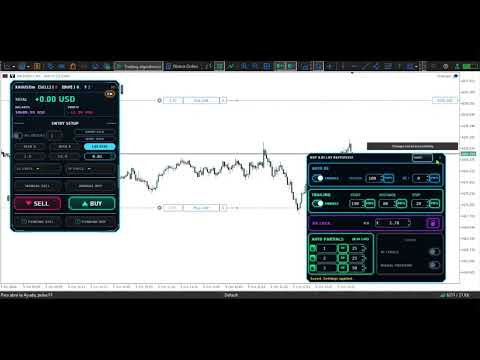
The Trade Manager (TM) is a basic assistant for execution, monetary risk calculation, and dynamic trade management in MetaTrader 5. It is built directly on the CCanvas vector graphics engine, eliminating the need for external fonts, DLL libraries, or secondary image files, ensuring optimal refresh performance with zero latency during order entry.

Core Capabilities:
  • Visual Execution & Management: Interactive creation and drag-and-drop (Drag & Drop) of market orders, pending orders, Stop Loss, and Take Profit levels.
  • Real Monetary Mapping: Real-time breakdown of profit and loss in the exact account currency, accounting for spread, accumulated swap, and round-trip commissions.
  • Detachable Modules: Floating execution and close panels that can be positioned independently anywhere across the chart.
  • Parametric Automation: Auto Break Even, Progressive Trailing Stop, RR Lock (risk-to-reward ratio lock), and 3 automatic partial profit targets.

2. Input Parameters (Inputs)

Expert Advisor configuration available under the Inputs tab when attaching it to a chart:

Parameter Type / Default Operational Description
ShowHUD bool (true) Shows or hides the main graphical interface on the chart.
PanelX / PanelY int (12 / 84) Initial coordinates in pixels (top-left chart origin).
PanelWidth / PanelHeight int (320 / 535) Base panel dimensions (width: 250–1000 px, height: 430–1600 px).
FontSize int (8) Base font size for on-chart control labels.
InpMagic long (460129) Unique magic number identifier assigned to orders generated by the bot.
ManageOnlyOwnMagic bool (false) false = manages all active symbol orders; true = manages only orders matching this bot's magic number.
BurstDeviationPoints ulong (10) Maximum slippage deviation tolerated in points for market order dispatch.
RiskCommissionPerLot double (-1.0) -1.0 = auto-calculated round-trip commission via account history; 0.0 = zero-commission account; >0 = fixed monetary cost per lot.
BreakEvenSafetyPips double (0.0) Extra buffer in pips beyond the break-even price. If 0.0, guarantees at least 1 net tick.
PartialClose1/2/3Percent double (25 / 50 / 75) Volume percentage to close assigned to the 3 quick-close buttons on the panel.
EnableTradeSounds bool (true) Enables embedded native WAV sound alerts on order execution, openings, and TP/SL exits.
EnableButtonSounds bool (true) Enables audible feedback clicks when clicking controls, buttons, and input fields.
EnablePushNotifications bool (false) Sends mobile MT5 push notifications upon broker rejections or safety pauses.
HideNativeTradeLevels bool (true) Hides default native MT5 chart trade levels to prevent visual clutter with bot labels.
TradeRowsRightMargin int (7) Pixel margin separating the right edge of the chart from active position rows.
VisualRefreshMs int (250) Minimum interval (ms) between full user interface redraw cycles.
TimerIntervalMs int (100) Internal Expert Advisor timer cycle interval in milliseconds (allowed range: 20 to 1000 ms).
VisualTP/SLTransparency double (81.2) Fill transparency percentage for TP and SL projection zones (0 = opaque, 100 = invisible).
VisualTP/SLOpacity double (100.0) Overall opacity of the on-chart graphical projection containers.
VisualTP/SLProgressOpacity double (43.1) Opacity of the dynamic progress shadow advancing toward the target price.
VisualTP/SLBorderOpacity double (58.8) Perimeter border opacity for visual projection boxes.
VisualRepaintIntensity double (100.0) Shading intensity of the price progress tracker inside the projection range.
TPLevelFillOpacity double (70.6) Background fill opacity for saved TP level badge labels on the chart.
NeonGlow bool (true) Enables smooth exterior neon-style border glow on visual controls.
NeonFont / NeonNumberFont string Typefaces used across the interface ("Bahnschrift" for text / "Consolas" for digits).

3. Main Control Panel (HUD) Structure and Operation

3.1. Informational Header

  • Position Counter: Displays the real-time breakdown of open positions ( [SELL] X and [BUY] Y ).
  • Active Pending Orders ( ? N ): Real-time counter of pending orders placed on the broker awaiting activation.
  • Timeframe: Shows the active chart period (M1, M5, H1, etc.).
  • Language Selector ( [ES] / [EN] ): Dropdown selector to switch the entire interface and messages between Spanish and English instantly.

3.2. Real-Time Account Metrics

  • TOTAL: Consolidated live floating P&L of all open trades on the current symbol.
  • BALANCE: Net closed account balance along with the account base currency.
  • DAILY PROFIT: Net closed profit or loss achieved since broker 00:00 server time (includes paid commissions and swaps).

3.3. Sizing Modes and Risk Management

  • RISK %: Calculates lot sizing automatically to risk an exact percentage of account balance if Stop Loss is hit.
  • RISK $: Calculates lot sizing to risk a precise monetary amount in the account currency.
  • LOT SIZE (LOTAJE): Disables automated risk calculation and executes an exact manual volume of lots/contracts.
Standardized Pip Engine by Asset Class
  • Gold (XAUUSD / GOLD): $1.00 move = 10 pips ($0.10 per pip).
  • Indices (US30, NAS100, SPX500): $1.00 move = 1 pip.
  • Crude Oil (WTI / BRENT / USOIL): $0.10 move = 10 pips ($0.01 per pip).
  • Cryptocurrencies (BTCUSD): $1.00 move = 1 pip.
  • Forex JPY Pairs: 0.01 move = 1 pip.
  • Standard Forex: 0.0001 move = 1 pip.

3.4. Burst Trading (Multiple Order Entry)

Splits a market execution into multiple sub-orders dispatched asynchronously to the server:

  • Circular Toggle: Enables or disables the burst order functionality.
  • Number Box: Accepts from 1 up to 100 simultaneous orders per burst.
  • GROUP RISK (RISK GRUPAL): Divides total risk (or entered lot size) equally across the total number of orders.
  • INDIVIDUAL RISK: Assigns the full configured risk or lot size to each individual order in the burst.

4. Detachable Floating Modules

Both the Execution block (SELL / BUY) and the Close block feature a grey side handle ( [::] ) that allows them to be detached from the main panel and moved anywhere on the chart.

Floating Execution Module

Positions buy and sell buttons right next to the active candle for ultra-fast scalping entries.

Floating Close Module

Provides immediate access to quick partial closes (25%, 50%, 75%), Break Even, and emergency close without cluttering the main panel.

Once detached, an [X] button appears on the tab. Clicking it docks the module back into its compartment inside the main HUD.

5. Visual On-Chart Trading

5.1. Preliminary Manual Market Preview

Clicking MANUAL BUY or MANUAL SELL generates a preliminary simulated order on the chart:

  • Entry Line: Follows the live Ask/Bid price with a dotted horizontal line.
  • Draggable SL & TP Levels: If no values are entered in the HUD, draggable tags appear to set levels directly on the chart.
  • Live R:R & Monetary Value: Displays projected risk-to-reward ratio and expected monetary gain or loss in real time.
  • Dispatch: Confirm entry by pressing the main BUY or SELL button. Cancel preview by pressing Esc or the X button on the row.

5.2. Visual Pending Orders

Clicking PENDIENTE BUY or PENDIENTE SELL renders an interactive pending setup on the chart:

  • Automatic Limit / Stop Detection: Dragging the entry line above or below current market price automatically switches the order type between Buy Limit, Buy Stop, Sell Limit, or Sell Stop.
  • Connector Bracket: Visually links entry price with projected Stop Loss and Take Profit levels.
  • Double-Click Editing: Double-clicking any active broker pending order opens its visual draft to modify price, SL, or TP directly on the chart.

5.3. Open Trade Rows

Every active position generates an interactive row anchored at its respective price level:

  • Dynamic Drag & Drop: Dragging SL or TP tags recalculates broker levels while displaying projected monetary P&L and exact price.
  • Blue BE Tab: Appears when SL covers entry plus swap and round-trip commissions, acting also as a draggable level handle.
  • Overlap Fan Menu: Hovering for 2 seconds over multiple stacked orders at the same price unfolds an interactive vertical cascade with < and > pagination to manage each order independently.

6. Advanced Settings Panel (The Gear [⚙] )

Clicking the hexagonal gear icon on any order row or preview draft opens the advanced automation modal:

6.1. AUTO BE (Automatic Break Even)

Moves Stop Loss to a protected price once profit reaches the defined threshold:

  • TRIGGER: Profit needed to trigger movement (configurable in PIPS , % OF TP , MONEY , or R:R ).
  • BE +: Extra profit buffer added beyond entry price to ensure a net positive result.
  • Real Cost Calculation: Automatically factors in entry price, spread, accumulated swap, and round-trip commissions.

6.2. TRAILING (Progressive Trailing Stop)

  • START: Profit distance required before trailing begins.
  • DISTANCE: Distance at which Stop Loss trails behind current price.
  • STEP: Minimum price advance required before submitting a new level update to the broker.

6.3. RR LOCK (Risk-to-Reward Ratio Lock)

Locking this feature locks the R:R ratio. If Stop Loss is moved manually or shifted by the trailing stop, Take Profit is automatically recalculated and repositioned on the broker to preserve the exact mathematical ratio.

6.4. AUTO PARTIALS (Automated Partial Profit Taking)

Enables scheduling up to 3 independent automated partial closes:

  • Target Modes:
    1. R:R : Closes upon reaching multiples of initial risk (e.g., 1R, 2R, 3R).
    2. TP : Places an on-chart price level that can be positioned visually.
    3. % DIST. TP : Closes upon covering a percentage of the total entry-to-TP distance.
  • CLOSE % (CERRAR %): Percentage of base volume to close at each target (total sum cannot exceed 100%).

6.5. Advanced Visualization

  • TP LEVELS (SHOW): Draws badge tags on the chart. When a target is reached and the partial close executes, a green checkmark (✔) appears inside the label.
  • VISUAL POSITION: Projects shaded transparent boxes on the chart (green toward TP, red toward SL) with dynamic real-time progress shading as price moves toward targets.

7. Auxiliary Features and Safety System

Candle Timer

Floating countdown box next to the active candle calculating exact remaining time in milliseconds using broker server ticks (formatted as MM:SS or HH:MM:SS).

Embedded WAV Audio

Generates and extracts its own audio files into MQL5\Files\VTM_Audio\ for trade open/close alerts and click feedback.

Data Persistence and Crash Recovery:
All gear settings, partial close execution progress, and panel positions are stored in local binary state files under VTM_State\ linked to the specific account and symbol. Changing timeframes, restarting MT5, or temporary network disconnects will safely restore all tracking without duplicating orders or losing levels.
Recommended products
================================================================ MATRIX CONDITION MONITOR Live Trade Condition Panel for MetaTrader 5 Fully Automatic -- Works with ALL Matrix EAs ================================================================ NEVER MISS A TRADE SETUP AGAIN Matrix Condition Monitor is a free utility that attaches to any chart and automatically checks all 10 trade conditions in real time -- showing you exactly why a trade will or will not open, and alerting you the moment ever
FREE
ABQ Visual Risk Sizer
Cristian David Castillo Arrieta
ABQ Visual Risk Sizer - Institutional Risk & Trade Execution Category: Utilities / Risk Management Manual lot calculation costs time and money. In modern trading, especially when operating with funded accounts (Prop Firms), a lot sizing error or a 5-second delay in entering an order can mean violating the Daily Drawdown rule or missing the perfect entry price. ABQ Visual Risk Sizer is an institutional-grade tool designed to solve this problem permanently. It transforms complex mathematical risk
FREE
Account Info Panel Neon (MT5) All-in-one live account telemetry, smart lot calculator and one-click trade execution panel. Account Info Panel Neon is a utility for MetaTrader 5 that combines account monitoring, spread tracking, custom lot sizing and one-click trade management in a single on-chart panel with a neon-styled interface. The panel does not place trades automatically and does not use any external signals. All actions are performed manually by the user through the on-chart controls. Acc
FREE
LT Round Numbers MT5
Thiago Duarte
4.86 (21)
Round numbers (or key levels) is an amazing strategy. These numbers are strong support and resistance levels. So what this indicator does is draw horizontal lines on the chart to help you find these levels. Configurations: Key levels in pips - distance between the lines. Color -   lines color. Style -   lines style. Width -  lines width. Display at background -  draw lines in front or back of candles. Selectable -  turn on or off the option to select the lines. Lines identification -  identifica
FREE
Smart RR Pro Drx
Simon Draxler
5 (1)
SMART RR  is a utility designed to assist with risk management and trade execution on MetaTrader 5. It provides visual tools to calculate lot sizes, monitor risk-reward ratios, and place orders directly from the chart. This tool focuses on transparent position sizing based on account balance and stop-loss distance, taking real-time market spread into consideration. Key Features Spread-Aware Calculation: The Risk-Reward Ratio (R:R) incorporates the current ask/bid spread to provide realistic proj
FREE
ModifyTPSL
Yun Fei Kang
批量止損止盈同步管理器 這是一款專為 MT5 多持倉交易者 設計的持倉管理工具。 當同一個商品、同一個方向同時有多張持倉時,只需要手動修改其中一張持倉的 Stop Loss(SL)或 Take Profit(TP) ,工具就會自動把該持倉目前完整的 SL / TP,同步到其他相同商品、相同方向的持倉。 例如: XAUUSD BUY #1 XAUUSD BUY #2 XAUUSD BUY #3 如果將 #1 修改為: SL = 3300 TP = 3500 其他 XAUUSD BUY 持倉會自動同步成相同設定。 主要功能 批量同步 Stop Loss 批量同步 Take Profit 可同時同步 SL + TP 支援將 SL 或 TP 設為 0,批量移除 BUY 與 SELL 分開管理 不同商品分開管理 新開持倉不會立即觸發整批同步 啟動時只記錄現有持倉,不會自動修改 平倉後自動移除內部紀錄 一個圖表即可管理帳戶中的多個商品 分組方式 工具以: 商品 + 交易方向 作為同步群組。 例如: XAUUSD BUY XAUUSD SELL EURUSD BUY EURUSD SELL 全部視
FREE
Click Trading
Jawad Tauheed
5 (2)
One Click Trading – Auto TP SL Developer TraderLinkz Version 1.00 Category Utility What it does Adds missing TP and SL to your manual trades and pending orders Sets them once per ticket Lets you move TP and SL afterward Works on hedging and netting accounts Scans on every tick and reacts on trade events Why you want it You place faster entries You get consistent risk and exit targets You reduce fat finger errors You keep full manual control Quick start Attach the EA to any chart Keep TP and SL e
FREE
FiT Panel Pro
Thonglak Janyakorn
Overview FiT Panel Pro is a professional-grade trade management panel designed for MetaTrader 5 traders who demand speed, precision, and full control over their trades. Built with a modern dark-theme UI, it combines one-click execution with advanced risk management, visual SL/TP drag lines, automatic Fibonacci-based levels, and comprehensive order management — all in a single, compact panel. Whether you are a scalper, day trader, or swing trader, FiT Panel Pro gives you the edge you need to exec
FREE
Risk Manager – Account Protection Tool Risk Manager is an Expert Advisor for MetaTrader 5 designed to protect your trading account by applying automatic risk management rules. This tool does not open trades . It continuously monitors your account and enforces predefined limits to help prevent excessive losses and maintain disciplined trading. Risk Manager works in the background and can manage positions opened by manual trading or other Expert Advisors. It is particularly useful for: • Manual tr
FREE
Tollan Account Information
Marcela Martinez Quiroga
This script allows you to visualize the risk of your account based on the open orders you have. * Low risk is between 0 and 10% of handicap * Medium risk is between 11% and 30% of handicap * High risk is more than 31% of handicap The script displays the spread of the current pair, the total of open positions, showing the lotage for both directions (buy, sell) as well as the number of buy and sell operations.
FREE
Boleta Easy Trade
Silvio Garcia Wohl
When executing an order, whether through the Metatrader ticket on a computer or the Metatrader app on a mobile device, either manual or pending, Easy Trade will automatically set the take profit and stop loss levels, as well as a limit order with its respective take profit and stop loss levels. It follows the trading strategy for market open (US30, US100, US500), but it can be applied to any market asset.
FREE
Short description Position sizing and margin calculator for MetaTrader 5 with separate BUY and SELL calculations. Full description QRM Risk Calculator is a position sizing and margin calculation utility for MetaTrader 5. It calculates BUY and SELL volume separately according to the selected percentage risk, stop-loss distance, account data, symbol specifications, and current Bid and Ask prices. The calculator displays the estimated monetary loss at the stop loss, theoretical reward at the take p


FREE
Noetrix Partial Entry
Julien Jeremy Rodrigue Gazagnaire
Noetrix Partial Entry Noetrix Partial Entry is a visual scale-in planning utility for MetaTrader 5. It helps discretionary traders build and manage a staggered pending-entry plan directly on the chart. The utility does not generate trading signals and does not place orders automatically. A plan is sent only after an explicit click on PLACE ALL and, by default, a confirmation dialog. MAIN FEATURES • Build from 1 to 5 Buy Limit or Sell Limit entries. • Split a total volume across the enabled e
FREE
Trade assistant pro v8
Ahmed Mohammed Bakr Bakr
2 (1)
FREE FREE FREE Trade Assistant MT5 – Professional Trading & Risk Management Panel Trade Assistant MT5 is an advanced trading panel designed to help traders execute orders faster, safer, and more professionally . It simplifies manual trading by combining smart order management , precise risk control , and one-click execution , making it ideal for both beginners and advanced traders. This tool does not trade automatically . Instead, it empowers you with full control while applying professional-gra
FREE
Live Risk Dashboard MT5 EA Monitor your account risk clearly and trade within your limits Live Risk Dashboard MT5 EA is a practical account-monitoring utility for MetaTrader 5. It displays your most important trading and risk information directly on the chart, helping remove the "math anxiety" of managing open positions. Instead of repeatedly checking different MT5 windows or manually calculating floating profit, drawdown usage, and remaining limits, you can view everything in one clean, compact
FREE
Ultimate MT5 Auto SL/TP Assistant EA Our MT5 Expert Advisor is designed to automatically apply predefined SL and TP levels to any order you place – Fast, accurate, and fully automated, no manual errors, no delays. Perfect for scalpers, intraday traders, and anyone who values precision and speed. Auto SLTP Auto SL TP this is Utilities  Scalper Auto SL TP fast Open Close  https://www.mql5.com/en/market/product/158389
FREE
Manual Assistant MT5
Igor Kotlyarov
4.75 (4)
Bonus when buying an indicator or an advisor from my list. Write to me in private messages to receive a bonus. Manual Assistant MT5 is a professional manual trading tool that will make your trading fast and comfortable. It is equipped with all the necessary functions that will allow you to open, maintain and close orders and positions with one click. It has a simple and intuitive interface and is suitable for both professionals and beginners. The panel allows you to place buy and sell orders w
FREE
Breakeven Bot
Gabriel Paul Ange Perrin
Optimize your trading management with Breakeven Bot, the essential tool for active traders managing multiple positions at once. No more wasting time manually adjusting your stops—one click is all it takes to secure your profits! Main Feature: ️ "BREAKEVEN" Button – Instantly set all profitable positions to breakeven and protect your gains quickly. ️ Customization Options: Set breakeven in pips or currency, depending on your preference. Choose whether breakeven should be at the entr
FREE
CloseAllPosition
Konstantin Chernov
4 (2)
A script for closing positions If you need to quickly close several positions, this script will make all the routine for you! The script does not have any input parameters. Allow AutoTrading before running the script. Usage: Run the script on a chart. If you need to specify the maximal deviation and the number of attempts to close positions, use the script with input parameters https://www.mql5.com/en/market/product/625 You can download MetaTrader 4 version here: https://www.mql5.com/en/market/
FREE
Martingale Assistant
Mohammad Elyas Qaderi
Donation: USDT (TRC20) : TQJsYp64FgLLeQiyNnS6hhCNBjnz4ykbT1 USDT (BEP20, Polygon) : 0x5b50AaaE515452071D395D28BC3D78d16279D168 You can use this expert to execute Martingale orders for you open positions. This expert will add to your positions with a pre-defined loss step. For choosing open positions you can use Symbol Name or Magic Number . Also the loss step will be defined by currency or pips. All positions that refer to a certain order will be closed by entered Profit from input section. For
FREE
WAP TP Stealth EA – Intelligent Basket Management for Precision Exits WAP TP Stealth EA is a specialized trade management expert advisor designed for traders who rely on basket strategies, recovery systems, and multi-position workflows. Instead of closing trades individually, the EA dynamically calculates the Weighted Average Price (WAP) of all open positions and executes a coordinated closure once your defined profit target is reached. This approach enables efficient drawdown management, smooth
FREE
Lot by Risk MT5
Sergey Vasilev
4.88 (16)
The Lot by Risk trading panel is designed for manual trading. This is an alternative means for sending orders. The first feature of the panel is convenient placing of orders using control lines. The second feature is the calculation of the order volume for a given risk in the presence of a stop loss line.   Control lines are set using hot keys: take profit – T key by default; price – P key by default; stop loss – S key by default; You can configure the keys in the settings of the trading panel.
FREE
EA Utility Tool: Risk Consistency Manager The Risk Consistency Manager EA is a simple yet powerful tool that automates risk management across multiple open positions. It dynamically adjusts stop-loss levels to distribute a predefined total risk value (e.g., $10,000) evenly among all active trades. Key Features: Dynamic Risk Distribution: Automatically allocates an equal share of risk to each position (e.g. with total risk capital of $10,000, its will be distribute each trade with $3,333.33 risk
FREE
This Expert Advisor provides an advanced on-chart trading panel designed for discretionary traders. It simplifies position sizing, risk management, and trade execution directly from the chart without manual calculations. Key Features  On-chart trading panel  Fixed lot and balance percentage risk mode  Risk-based lot calculation using stop loss  Market and pending order execution  Partial close management  Break-even automation  Trailing stop control  Equity protection system  Daily loss lock  S
FREE
Q Panel
Amon Cheruiyot
Q-Panel : Precision Order Management for MetaTrader 5 Q-Panel is a chart-based order-management tool built for traders who want full control over how a position is placed, tracked, and closed; without leaving the chart. Instead of typing prices into a ticket, you drag your entry, stop loss, and take profit directly on the price axis, and Q-Panel handles the rest: visual zones, live P/L, and one-click management for every trade you open. Key Features Visual Order Placement Drag Take Profit, Stop
FREE
This utility EA closes any buy or sell order when it reaches the desired profit value, or when the stop gain is activated. Closes orders opened manually or by other robots.  Very effective for protecting or guaranteeing gains in rapid price movements. It works on any period and any asset available on MT5. Trailing Start: Example, if the price moves 70 pips in favor, it activates the stop gain.  Traling Stop: or Traling Step: If the price moves by the amount defined above the Trailing Start it w
FREE
Trade Assistant JJC Academy
Jhonathan Alexis Jaramillo Cortez
JJC Academy Trade Assistant — Risk Calculator & Position Management Panel Stop calculating your lot size by hand. Stop blowing your drawdown over a calculation mistake. JJC Academy Trade Assistant is the trading panel I built and use myself to manage a portfolio of funded accounts — designed so every entry respects exactly the risk you defined, no matter the pair, the broker, or the prop firm you trade with. Real-time risk calculator Set your Risk % and your R:R — lot size is calculated insta
FREE
Prop Firm Protector
Janitha Sandaruwan Amaradasa Wickramasingha Arachchilage
Prop Firm Protector - Complete Risk Management Suite (Most capable Protector in the market)  A comprehensive risk management tool designed to help traders monitor and manage their trading according to predefined rules and limits. --- Protection Features This EA provides automated monitoring and management across multiple risk categories: Symbol and Lot Management - Whitelist allowed symbols with automatic monitoring of unauthorized pairs - Maximum lot size enforcement with configurable act
FREE
Dynamic Candle Timer
Channaphat Yamuangmorn
Overview The Dynamic Candle Timer is a lightweight and efficient utility designed for MetaTrader 5. Unlike traditional candle timers that remain static in the corner of the chart, this indicator dynamically attaches to the current Bid price line. This allows traders to monitor the remaining candle time directly at the point of action, enhancing focus during fast-paced market movements. It is highly suitable for day traders and scalpers operating on XAUUSD, Forex, Crypto, or Indices. Key Feature
FREE
Purpose: Automatically opens charts for all symbols from the Market Watch using the default.tpl template on the current timeframe (TF) , while closing all other open charts (except the active one). Perfect for quick analysis of multiple instruments without manual work! Features: Automation: Opens dozens of charts with a single click. Safety: Closes unnecessary charts, keeping the current one active. Flexibility: Uses your default.tpl template (pre-configure it as needed!). Current
FREE
Buyers of this product also purchase
Trade Assistant MT5
Evgeniy Kravchenko
4.43 (216)
It helps to calculate the risk per trade, the easy installation of a new order, order management with partial closing functions, trailing stop of 7 types and other useful functions. Additional materials and instructions Installation instructions - Application instructions Line function -   shows on the chart the Opening line, Stop Loss, Take Profit. With this function it is easy to set a new order and see its additional characteristics before opening.   Risk management  - The risk calculation
Forex Trade Manager MT5
InvestSoft
4.98 (689)
Trade Manager MT5 is an advanced position size calculator and trade management tool for MetaTrader 5, designed to help traders plan trades faster, control risk more precisely, and manage open positions directly from the chart. It combines order placement, risk based lot calculation, Stop Loss and Take Profit management, Break Even, Trailing Stop, Partial Close, Equity Protection, and external trade management in one panel. Whether you trade forex, indices, metals, commodities, crypto, or future
Local Trade Copier EA MT5
Juvenille Emperor Limited
4.94 (149)
Local Trade Copier EA MT5 is a fast and flexible trade copier for copying and managing trades between multiple MetaTrader 5 accounts on the same Windows computer or Windows VPS. It combines local trade synchronization with Receiver-side controls for lot sizing, risk management, trade filtering, symbol mapping, trade management and account protection. Set up your Transmitter and Receiver terminals in about 1 minute and copy manual or EA trades between accounts at the same or different brokers. U
Telegram to MT5 MultiChannel Copier
Sergio Marquez Uroz
4.67 (21)
Telegram to MT5 Multi-Channel Copier   automatically copies trading signals from your Telegram and Discord channels straight to MetaTrader 5. No bots, no browser extensions, no manual copying. A signal arrives in Telegram or Discord and the EA opens the trade in your terminal within seconds. And before you copy a channel, the built-in backtester shows you what that channel would have done in your account. The product has two components: a Windows application that listens to your Telegram channel
News Trade EA MT5
Konstantin Kulikov
4.55 (11)
Present to you the useful robot that I have been using for several years. It can be used in both semi-automatic mode and fully automatic mode. >>> Chat <<< The program contains flexible settings for trading on the news of the economic calendar. It cannot be checked in the strategy tester. Only real work. In the terminal settings, you need to add the news site to the list of allowed URLs. Click Tools > Options > Expert Advisors. Check the option "Allow WebRequests for listed URL:". Add this (de
TradePanel MT5
Alfiya Fazylova
4.88 (170)
Trade Panel is a multi-functional trading assistant. The app contains over 50 trading functions for manual trading and allows you to automate most trading tasks. Application instructions: https://www.mql5.com/en/blogs/post/756482 Trial version of the application for a demo account: https://www.mql5.com/en/blogs/post/750865 How to install the application: https://www.mql5.com/en/blogs/post/756239 How to test the application in visual mode: https://www.mql5.com/en/blogs/post/770277 How to install
Copy Telegram signals with your own trading rules Telegram to MT5 Signal Trader automatically copies text-based trading signals from public and private Telegram channels and groups into MetaTrader 5. Manage multiple providers and MT5 accounts from one desktop app, with individual risk and trade settings for each provider . No Telegram bot or API setup needed for copying. Simply sign in with your own Telegram account by phone or QR code and select the channels or groups you have already joined. Y
FarmedHedge Pair Trading Dashboard
Tanapisit Tepawarapruek
5 (7)
Farmed Hedge Yield Farming | All Markets (Manual - Hybrid - Semi/Automated EA) VERIFIED TRADING RESULTS - Farmed Hedge Yield Axi Copy:  https://www.mql5.com/en/signals/2356376 - Farmed Hedge Yield Exn Copy:   https://www.mql5.com/en/signals/2356404 - Farmed Hedge Yield V Copy:  https://www.mql5.com/en/signals/2357156 IMPORTANT NOTICE: FarmedHedge is a MANUAL-FOCUSED TRADING UTILITY ,not a fully automated EA. Results shown on this Signal include manual trades and overall strategic management.
================================================================================ POC BREAKOUT - V20.72. Full Professional Grade Toolkit ================================================================================ POC Breakout is a full MetaTrader 5 trading dashboard for discretionary traders who want breakout signals, Point of Control (POC) context, volume profiles, order flow, market structure, news, alerts, and advanced trade planning in one professional workspace. Attached directly to you
Strategy Ledger Pro
Abdullah Uygar Tuna
5 (13)
Strategy Ledger Pro is a read-only account analysis panel for MetaTrader 5. It separates account results by Expert Advisor, strategy, symbol, and magic number, so you can see what each one really contributes. The panel is available in 11 languages: English, Français, Deutsch, Español, Italiano, Português, Русский, Türkçe, 中文, 日本語 and 한국어. Before you download the demo. The Market runs the demo of any paid product in the Strategy Tester only. This panel analyses the trades on your own account, and
Dealer Panel
Mian Rameez Ali
Dealer's Panel No signal decides anything here — a hand does. One click, and the panel calculates what's underneath: lot size from risk, target from a 30-step balance ladder that remembers exactly how far an account has climbed. Toggle between market and pending without touching an input field. Set a stop, and the take-profit can write itself — a fixed share of the balance, translated into price with no arithmetic left for the trader to get wrong. One trade live at a time; it won't let a seco
Exp COPYLOT CLIENT for MT5
Vladislav Andruschenko
3.97 (35)
Professional Trade Copier for MetaTrader 5 Fast, professional, and reliable trade copier for MetaTrader . COPYLOT allows you to copy Forex trades between MT4 and MT5 terminals with support for Hedge and Netting accounts. COPYLOT MT5 version supports: - MT5 Hedge to MT5 Hedge - MT5 Hedge to MT5 Netting - MT5 Netting to MT5 Hedge - MT5 Netting to MT5 Netting - MT4 to MT5 Hedge - MT4 to MT5 Netting MT4 version Full Description +DEMO +PDF How To Buy How To Install How to get Log Files H
Next Update — Version 2.52 Coming Soon! [NEW] Get Ready for 4 Major New Features Designed to Enhance Your Market Analysis and Trading Workflow We’re taking market analysis to the next level with 4   new features designed to meet your trading needs. Introducing: TRADE OVERVIEW DASHBOARD CONFLUENCE AT ZONE STRONG & WEAK HIGH/LOW OTE 1. TADE OVERVIEW DASHBOARD  A dashboard that helps you understand the overall market picture more easily, providing guidance to support your trading decisions and h
Telegram To MT5 Ultra
Mirel Daniel Gheonu
5 (5)
Telegram To MT5 — Signal Copier Turn the trading calls from your Telegram channels into real MT5 orders — automatically, on as many accounts as you like, with risk and rules fully under your control. Telegram To MT5 connects the VIP / signal channels you already follow on Telegram to your MetaTrader 5 terminal. A free companion desktop app reads the messages (even from channels that block bots), and this Expert Advisor executes them on your account — applying your own risk settings, symbol mappi
The product will copy all telegram signal to MT5 ( which you are member) , also it can work as remote copier.  Easy to set up, copy order instant, can work with almost signal formats, image signal,  s upport to translate other language to English Work with all type of channel or group, even channel have "Restrict Saving Content", work with  multi channel, multi MT5 Work as remote copier: with signal have ticket number, it will copy exactly via ticket number. Support to backtest signal. How to s
Trade copier MT5
Alfiya Fazylova
4.61 (57)
Trade Copier is a professional utility designed to copy and synchronize trades between trading accounts. Copying occurs from the account / terminal of the supplier to the account / terminal of the recipient, which are installed on the same computer or VPS . Before buying, you can test the demo version on a demo account. Demo version here . Full instruction here . Main functionality and benefits: Supports copying MT5> MT5, MT4> MT5, MT5> MT4, including MT5 netting accounts. * Supports copying Dem
HINN MagicEntry Extra
ALGOFLOW OÜ
4.74 (19)
HINN MAGIC ENTRY – the ultimate tool for entry and position management! SIMPLE. FASTEST. INTUITIVE. MAX AUTOMATED. Place orders by selecting a level directly on the chart! full description   ::  demo-version  :: 60-sec-video-description Key features: - Market, limit, and pending orders - Automatic lot size calculation - Automatic spread and commission accounting - Unlimited partitial take-profits  - Breakeven and trailing stop-loss and take-profit  functions - Invalidation leves - Intuitive, a
RETAILBERG FOOTPRINT CHART PRO — Order-Flow Workspace for MetaTrader 5 Version 7.00  |  Professional System  |  31 tools  |  One chart A full 150-page illustrated User Manual is included. Please read the full manual to understand this feature packed footprint chart elements and ui. https://www.mql5.com/en/blogs/post/777982 DEMO / STRATEGY TESTER — PLEASE READ FIRST
Grid Manual MT5
Alfiya Fazylova
4.73 (22)
Grid Manual is a trading panel for working with grid strategies. The utility is universal, has flexible settings and an intuitive interface. It works with a grid of orders not only in the direction of averaging losses, but also in the direction of increasing profits. The trader does not need to create and maintain a grid of orders, the utility will do it. It is enough to open an order and the "Grid manual" will automatically create a grid of orders for it and will accompany it until the close. F
MT5 to Telegram Signal Provider turns your trading account into a signal provider. Every trade action, whether manual, by EA or from your phone, is instantly sent as a message to Telegram. You can fully customize the format or use a ready-made template for quick setup. [ Demo ] [ Manual ] [ MT4 Version ] [ Discord Version ]     New: [ Telegram To MT5 ] Setup A step by step user guide is available. Key Features Ability to customize order details sent to subscribers You can create a tiered subs
The Patch
Mian Rameez Ali
The Patch It never opens a trade. It walks behind the ones that did. Every open position, every pending order — checked twice a second for the one thing that's easy to forget: a stop, a target. Found bare, it doesn't ask. It writes the missing number in, measured in points from wherever the position began, and moves on to the next. No strategy, no opinion on direction. Just the quiet assumption that nothing should ever sit on the market unprotected — not because someone decided it shouldn't,
Signal Trading View to MT5 Pro
Mirel Daniel Gheonu
4.5 (2)
Signal TradingView to MT5 Pro  Instant professional execution between TradingView and MetaTrader 5 Automate your trading strategy with the most robust communication bridge between TradingView alerts and real execution in MT5. Designed for traders who demand speed, flexibility, and impeccable risk management, this Expert Advisor transforms any alert message into a precise market or limit order.   Install and TEST the TRIAL version HERE STRENGTHS AND ADVANTAGES Universal Parsing Engine (Propriet
Power Candles Strategy Scanner - Self-Optimizing Multi-Symbol Setup Finder Self-optimizing settings work one chart at a time, and finding where they pay off right now means opening chart after chart. Power Candles Strategy Scanner runs the same self-optimizing engine as the Power Candles indicator on every symbol in your Market Watch, side by side. One panel ranks where it pays off: the winning strategy per symbol, its optimized Stop Loss and Take Profit. An alert fires the moment a fresh signal
Anchor Trade Manager
Kalinskie Gilliam
5 (9)
Your EAs cannot see each other, but Anchor can. Anchor gives you one place to coordinate your EAs, manage risk, and decide when trading is allowed. It works alongside the trading bots you already use without any changes to them. The Problem One EA opens a trade. Then another starts trading. The next thing you know, you wake up to multiple grids built across your account. Each EA may be doing exactly what it was designed to do, but together they can place far more risk on your account than you in
VirtualTradePad PRO SE MT5 — professional trading control center for MetaTrader 5 VirtualTradePad PRO SE is a premium chart-based trading panel and trade-management workspace for MetaTrader 5 . It is designed for traders who want faster execution, clearer position control, structured trade management, visual level planning and a professional workflow directly from the chart. This is not only a BUY / SELL panel. PRO SE combines manual trading, pending orders, position management, partial exits, b
Prop Guardian Risk Manager MT5 – Drawdown, Risk & Hedge Protection for Prop Firm and Managed Accounts Prop Guardian Risk Manager is a professional risk-control utility for MetaTrader 5, designed for prop firm traders, money managers and anyone who wants strict account-level risk protection. It does not generate trading signals, strategy entries or trading decisions. Instead, it runs in the background, monitors your account risk and can automatically block new exposure, close managed positions or
The News Filter MT5
Leolouiski Gan
4.79 (24)
This product filters   all expert advisors and manual charts   during news time.  It is able to remove any of your EA during news and automatically reattach them after news ends. This product also comes with a complete  order management system   that can handle your open positions and pending orders before the release of any news. Once you purchase   The News Filter , you will no longer need to rely on built-in news filters for future expert advisors, as this product can filter them all from her
Floor Watch
Syed Tauqeer Hussain Shah
Floor Watch One number, watched every thirty seconds: how far equity has fallen since the day began — or since its highest point, if it's told to trail the peak instead of the open. Cross the line and it doesn't argue. Every open position closes, every pending order vanishes, and anything that slips through afterward gets shut the moment it appears. Not asked. Removed. The floor holds until the clock turns 5 AM Pakistan time — then, and only then, does the day start over. One rule. No except
VirtualTradePad One Click Trading Panel
Vladislav Andruschenko
4.59 (74)
Trading Panel for MetaTrader 5 — professional one-click trading from chart and keyboard A powerful trading panel for active manual trading, designed to open, manage, and close trades far faster and more efficiently than the standard MetaTrader interface. This panel is built for traders who want full control over positions, pending orders, profit management, and trading execution inside one professional workspace. This is not just another utility. It is a complete trading cockpit for MetaTrader
EA Auditor
Stephen J Martret
5 (6)
EA Auditor is an independent analysis tool for traders evaluating Expert Advisors and trading signals on MetaTrader 5. It audits backtest reports, reviews posted developer signals, and cross-verifies the two against each other to help traders assess strategies before committing capital. The MQL5 market offers a wide range of Expert Advisors from many developers, with varying approaches, quality, and transparency. EA Auditor provides a consistent, data-driven framework for reviewing them, answer
Filter:
No reviews
Reply to review