Smoothed Candles
- Indicators
- Version: 1.0
- Activations: 5

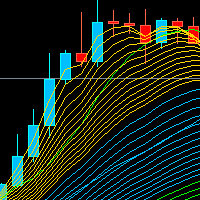
MQLTeam Smoothed Candles turns a noisy MetaTrader 5 chart into quieter price candles you can read at a glance. Hide the broker candles, or leave them under the overlay: instead of jagged back-and-forth, you see clear color waves — solid stretches of bull or bear that show the market’s flow.
Each candle still uses the real close of that bar, so the chart stays honest to price. Only the range is calmer, so wicks stop shouting and the path of the wave stands out. This is not Heikin Ashi and not a merge of higher-timeframe bars — it is the same market, drawn quieter.
UpSignal and DownSignal mark the start of a new color wave: the first quiet candle that closes cleanly through the wave extreme (no wick fighting the signal direction). A better-price filter prefers the beginning of the wave, or a later same-side arrow only when price is better than the last one. On the live bar a muted pending arrow can appear; it confirms after the bar closes, or it disappears if the bar fails.
Settings are changed on the chart, in a TradingView style panel. Period, signal window, timeframe, colors, and arrow shape update immediately. A copy you do not need can be hidden. Its settings stay until you show it again.
Key Features
- Quieter candles on the chart: Clear bull and bear color waves instead of noisy broker candles. Open, High, Low, and Close stay available in the Data Window under the same names.
- Hide chart candles: On by default. Hides the broker candles so only the smoothed candles show. Turn Off in the inputs or the panel to compare. The eye and removing the indicator restore the chart candles.
- Period: Default 23. Longer periods quiet the candles more. The chip title shows the period, as in Smoothed Candles(23).
- Signal within first N: 0 means the first matching candle anywhere in the color run. A positive N limits the search to the first N bars of that run. If none match inside the window, there is no signal.
- Better-price filter: Prefers the start of a wave. A later same-side signal is kept only when its price is better than the last one. An opposite signal opens a new wave.
- Confirmed and pending arrows: Confirmed arrows use your up and down colors. Pending arrows on the forming bar use a fixed muted color in the code. They share the same UpSignal and DownSignal plots.
- Arrow style: Set color, width, and shape for up and down confirmed arrows.
- Higher timeframe: Keep the chart timeframe, or pick a higher one. MTF steps those smoothed candles onto the chart bars. Each HTF signal draws one arrow on the last chart bar of that higher bar (no repeated stair arrows). The chip adds the timeframe when it is not the chart.
- Live panel: Open it from the chip. Change period, signal window, timeframe, colors, arrow width, and arrow shape there. Drag the panel. Delete that copy from the panel only when you want it gone.
- Chip on the chart: The name shows the period. On a signal bar the cell shows 1. On other bars it shows a dash. Close price can follow the candle under the mouse.
- Hide without deleting: The eye hides that copy and leaves its settings. Show it again from the same chip.
- Alerts: Turn on from the chip bell or the Alerts input. A popup fires only when a confirmed signal sits on the bar that just closed. Pending arrows never alert.
- Several copies: More than one Smoothed Candles can share the chart, each with its own period, signal window, or timeframe. Each copy keeps its settings when the chart timeframe changes.
- Inputs and the panel: The inputs are the saved settings. Editing in the panel updates the candles and arrows immediately. Closing the panel writes those settings back into the inputs.
- Panel off: Turn Show panel off and the candles still draw, without the chip or the panel.
- History limit: Max bars to calculate caps how far back the candles are drawn. The default is 5000.
=================== Arabic Description - الوصف باللغة العربية ===================
MQLTeam Smoothed Candles يرسم على شارت ميتاتريدر 5 شموعاً أسهل في القراءة من حركة السعر المتقطعة. يمكنك إخفاء شموع السعر الأصلية، أو إبقاؤها ظاهرة تحت الشموع الجديدة. بدل التذبذب القصير ترى موجات متصلة: مجموعة صاعدة ثم مجموعة هابطة، فيتضح اتجاه السوق.
إغلاق كل شمعة هو سعر الإغلاق الحقيقي لتلك الشمعة، فالسعر لا يُغيَّر. الذي يهدأ هو مدى الشمعة فقط، فيقل تشتيت الفتائل ويظهر مسار الموجة. هذا ليس Heikin Ashi، وليس دمج شموع من إطار زمني أعلى. هو نفس السوق، برسم أوضح.
UpSignal وDownSignal يشيران إلى بداية موجة جديدة: أول شمعة هادئة تُغلق بوضوح عند طرف الموجة، من غير فتيل يعارض اتجاه السهم. فلتر السعر يفضّل سهم بداية الموجة. والسهم اللاحق في الاتجاه نفسه يُقبل فقط إذا كان سعره أفضل من آخر سهم. على الشمعة التي لم تُغلق بعد قد يظهر سهم باهت غير مؤكد. بعد الإغلاق يثبت، أو يختفي إذا لم تكتمل الشروط.
الإعدادات تُغيَّر من الشارت مباشرة، عبر لوحة بأسلوب TradingView. الفترة، ومدى البحث عن الإشارة، والإطار الزمني، والألوان، وشكل السهم تُحدَّث فوراً. إذا لم تحتج إلى نسخة الآن يمكنك إخفاءها، وتبقى إعداداتها إلى أن تُظهرها مرة أخرى.
أبرز المميزات
- شموع أوضح على الشارت: موجات صاعدة وهابطة بدل شموع السعر المتقطعة. أسعار الفتح والأعلى والأدنى والإغلاق تبقى في نافذة البيانات بالأسماء Open وHigh وLow وClose.
- إخفاء شموع الشارت: الخيار Hide chart مفعّل افتراضياً. تختفي شموع السعر الأصلية وتبقى الشموع المهدّأة. عطّله من الإعدادات أو من اللوحة إذا أردت المقارنة. إخفاء الأداة بزر العين، أو حذف المؤشر، يعيد شموع الشارت.
- الفترة: الافتراضي 23. كلما زادت الفترة هدأت الشموع أكثر. اسم الشريحة يعرض الفترة، مثل Smoothed Candles(23).
- الإشارة ضمن أول N شموع: هذا هو الخيار Signal within. القيمة 0 تبحث عن أول شمعة مطابقة في أي موضع من تتابع اللون. والقيمة الموجبة تحصر البحث في أول N شموع من هذا التتابع. إذا لم يوجد تطابق داخل هذا المدى فلا تظهر إشارة.
- فلتر السعر الأفضل: يفضّل بداية الموجة. السهم اللاحق في الاتجاه نفسه يُقبل فقط إذا كان سعره أفضل من الأخير. السهم المعاكس يبدأ موجة جديدة.
- أسهم مؤكدة وأسهم غير مؤكدة: الأسهم المؤكدة تستخدم ألوان الصعود والهبوط التي تختارها. السهم على الشمعة الجارية يظهر بلون باهت ثابت. الاثنان يظهران على نفس إشارتي UpSignal وDownSignal.
- شكل السهم: اضبط اللون والعرض والشكل لأسهم الصعود والهبوط المؤكدة.
- إطار زمني أعلى: أبقِ إطار الشارت، أو اختر إطاراً أعلى. تُرسم الشموع المهدّأة على شكل درجات فوق شموع الشارت. كل إشارة من الإطار الأعلى تظهر سهماً واحداً على آخر شمعة شارت تقابل تلك الشمعة، من غير تكرار السهم. الشريحة تعرض الإطار إذا كان مختلفاً عن إطار الشارت.
- لوحة على الشارت: تُفتح من الشريحة. منها تغيّر الفترة ومدى الإشارة والإطار والألوان وعرض السهم وشكله. يمكنك سحب اللوحة. احذف النسخة من اللوحة فقط حين تريد إزالتها.
- شريحة على الشارت: الاسم يعرض الفترة. على شمعة الإشارة تظهر القيمة 1، وعلى بقية الشموع تظهر شرطة. سعر الإغلاق يمكن أن يتبع الشمعة التي يقف عليها مؤشر الفأرة.
- إخفاء من غير حذف: زر العين يخفي هذه النسخة ويبقي إعداداتها. إظهارها يكون من الشريحة نفسها.
- التنبيهات: من جرس الشريحة أو من إعداد Alerts. التنبيه يظهر فقط لإشارة مؤكدة على الشمعة التي أغلقت للتو. السهم غير المؤكد لا يُصدر تنبيهاً.
- أكثر من نسخة: يمكن وضع أكثر من Smoothed Candles على الشارت نفسه، ولكل نسخة فترتها أو مدى إشارتها أو إطارها. كل نسخة تحتفظ بإعداداتها عند تغيير إطار الشارت.
- الإعدادات واللوحة: مدخلات المؤشر هي الإعدادات المحفوظة. التعديل من اللوحة يحدّث الشموع والأسهم فوراً. إغلاق اللوحة يعيد كتابة هذه الإعدادات في المدخلات.
- إخفاء اللوحة: إذا أوقفت الخيار Show panel تبقى الشموع مرسومة، من غير شريحة ومن غير لوحة.
- عدد الشموع المحسوبة: الخيار Max bars to calculate يحدد كم شمعة تُرسم للخلف. الافتراضي 5000.