Multiple Timeframe Filtered MA Crossover Signals

Please feel free to join this Telegram group where users can share their strategies and settings that work for them using this indicator --> t.me/MTFMACS
═══════════════════════════════════════════════════════════════════

ALSO AVAILABLE ON TRADINGVIEW

The MTFMACS family is now available on TradingView for

users who prefer charting on that platform. Contact me via the Telegram group for direct access.

═══════════════════════════════════════════════════════════════════

ABOUT THIS FREE VERSION


This is the free version of the Multiple Timeframe Filtered Moving Average Crossover Indicator. It runs the complete signal engine — Early and Full crossovers, the MA validation stack, the MTF trend filter, RSI, MACD, and the Previous Candle Price filter — but with two constraints compared to the paid version:


1. Moving averages are chosen from a preset library of EMAs, WMAs, and SMAs at common periods from 1 up to 200.

2. The moving averages that drive the logic are computed in memory and never drawn on the chart. If you want to see them, you can add them manually one by one using the same periods you configured, then save the chart as a template.


For $30 you can upgrade to the paid version, which removes both constraints and adds VWMA and native MA plotting. Full detail at the bottom of this description.


═══════════════════════════════════════════════════════════════════


WHAT MAKES THIS INDICATOR DIFFERENT?


Most moving average crossover indicators on the market do one thing: they watch two moving averages cross and fire an arrow the moment the cross happens. Every cross. Every time. Whether the market is ranging, whether the higher timeframe agrees, whether momentum supports the move, whether price is at a logical entry point — none of that matters to them. You get arrows. Lots of arrows. Most of them useless.


This indicator was built on a different premise — that a crossover is only as valuable as the context that confirms it.


Instead of two moving averages, you can stack more than ten moving averages on a single timeframe and require all of them to be in a specific order before a signal is considered valid. Instead of ignoring the higher timeframe, you can filter every signal through an MA trend check on any timeframe. Instead of ignoring momentum, you can require RSI and MACD to agree. Instead of ignoring where price actually is, you can require the signal to happen at a Fibonacci retracement level inside the previous higher-timeframe candle.


Combine as many or as few of these layers as your strategy demands. The result is not a flood of arrows and alerts — it is a small, deliberate set of signals that survived every filter you chose to enable.


═══════════════════════════════════════════════════════════════════


A NOTE ON THE FREE VERSION'S HIDDEN MAs


After you apply the indicator and configure it, you will notice that no moving averages appear on the chart. This is a limitation of the free version. The MAs that drive the signal logic are computed in memory and never plotted.


The advantage of this limitation is that you get a chart free of MA noise — useful if you practise other forms of analysis on the same chart: drawing trendlines, marking order blocks, applying other indicators, or reading price action directly.


The disadvantage is that you cannot visually verify which MAs are where without extra effort. If you want to see them, add them manually — one by one — using the same periods you configured in the indicator's inputs. Once arranged, save the chart as a template, and next time loading that template restores all of them in a single click.


The paid version plots every MA that drives the logic directly — with per-MA color, width, and a visibility toggle — so you never need to add them manually.


═══════════════════════════════════════════════════════════════════


HOW THE INDICATOR WORKS, SECTION BY SECTION


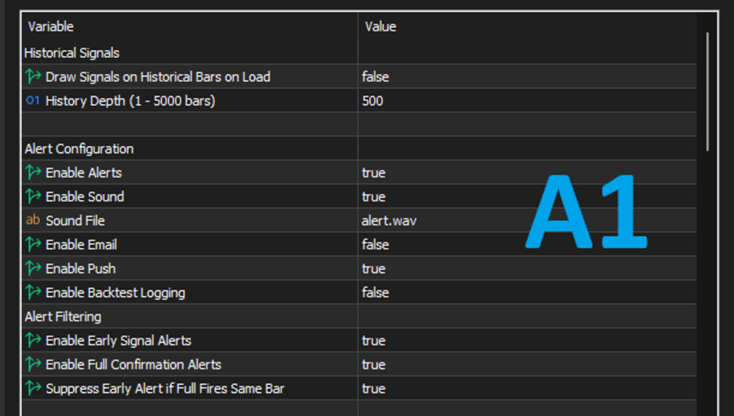
1. ALERT CONFIGURATION

Decide how a signal reaches you. Each option is independent.


• Enable Alerts — pop-up alert window.

• Enable Sound — plays your chosen .wav file.

• Enable Email — sends to your terminal-configured email.

• Enable Push — sends to your MetaTrader mobile app.

• Enable Backtest Logging — writes diagnostic values to the Experts log for tuning.


2. ALERT FILTERING

• Enable Early Signal Alerts — receive Early signal alerts.

• Enable Full Signal Alerts — receive Full signal alerts.

• Suppress Early Alert if Full Fires Same Bar — when Early and Full fire on the same bar for the same direction, only the Full alert is sent, avoiding a duplicate notification.


3. ARROW APPEARANCE

• Draw Arrows — No Arrows (alerts only), Early + Full Signals, or Full Signals Only.

• Arrow Size — 1 to 5.

• Arrow Distance from Candle — pixel offset for the arrows.


Image A1 — Screenshot showing the indicator's arrow input section.

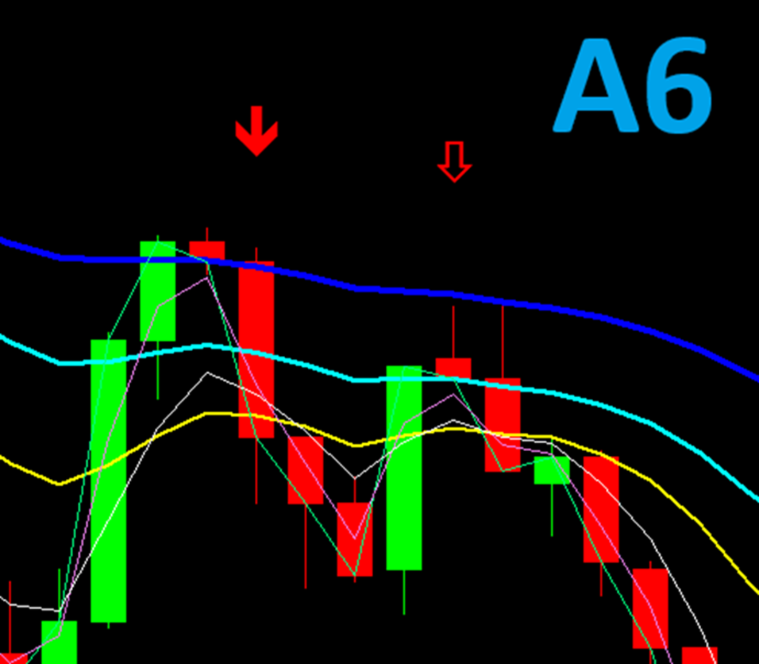
Image A6 — Screenshot showing the indicator's arrow appearance, with hollow arrows representing early signals and full body colored arrows representing full signals.


4. SIGNAL FILTER

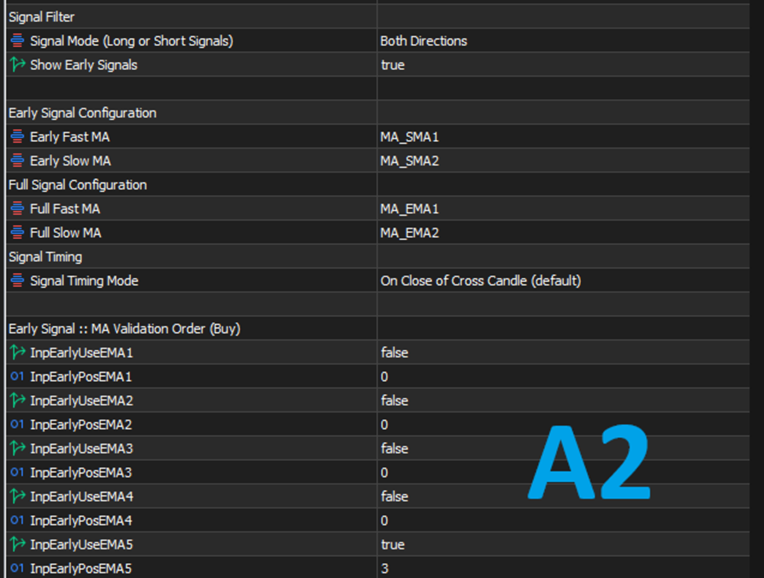
• Signal Mode — Long Only, Short Only, or Both Directions.

• Show Early Signals — master switch for the Early subsystem.


5. EARLY SIGNAL CONFIGURATION

The Early signal is designed to detect the crossover earlier in its development — before the full validation stack lines up — giving you a heads-up that a Full signal may be forming.


• Early Fast MA — the fast moving average for the Early cross.

• Early Slow MA — the slow moving average for the Early cross.


Both are chosen from a large library that includes Exponential, Weighted, and Simple moving averages at every common period from 1 up to 200. You are not restricted to "EMA 9 and EMA 21" or any other preset pairing — pick whichever pair best matches the market you trade.


6. FULL SIGNAL CONFIGURATION

The Full signal is the confirmed crossover — the one that fires only when the crossover has occurred and all enabled validation and filter layers have agreed.


• Full Fast MA — the fast moving average for the Full cross.

• Full Slow MA — the slow moving average for the Full cross.


You can run a completely different MA pair here than you use for Early, which means you can build a two-stage system: an aggressive Early pair that gets your attention, and a stricter Full pair that confirms the trade.


7. SIGNAL TIMING

This is one of the most important settings in the entire indicator, and it deserves careful attention.


• Intrabar — signals are detected on the live, still-forming candle. The fastest detection but the noisiest — the candle can still change. Alerts fire, but no arrows are drawn in this mode, by design.


• On Close of Cross Candle — the default. Signals are detected only after the crossover candle has closed. Arrows are drawn. No repainting.


• One Candle After Close — the strictest mode. The crossover must have occurred on the previous closed candle and the relationship must still hold on the current closed candle. This eliminates false crosses that immediately reverse.


Image A2 — Screenshot showing the indicator's MA crossover input section.


8. THE MA VALIDATION ORDER — THE HEART OF THE INDICATOR

This is where the indicator leaves every other crossover tool behind. There are two identical sections in the inputs:


• Early Signal :: MA Validation Order (Buy)

• Full Signal :: MA Validation Order (Buy)


Each contains the full MA library (every EMA, WMA, and SMA from period 1 up to 200). For each MA you get two inputs: an Enable checkbox and a Position number.


HOW THE POSITION NUMBERING WORKS


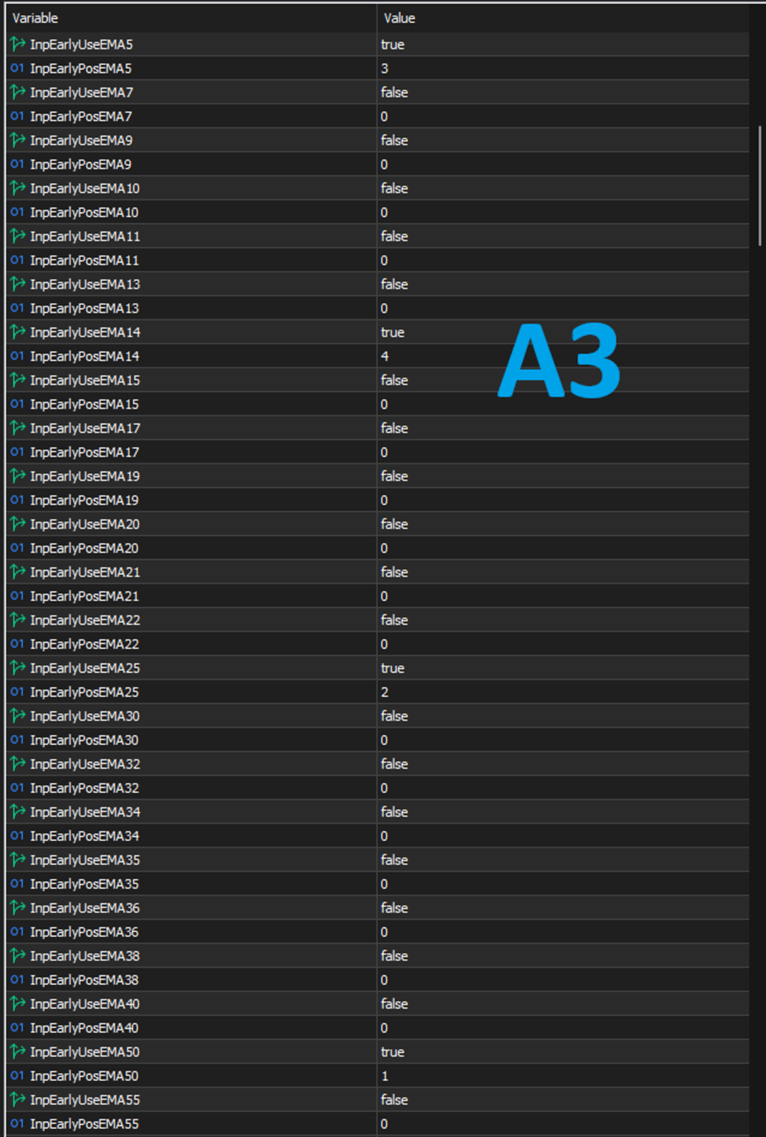
You enable the MAs you want to use — say, EMA 14, EMA 5, EMA 25, and EMA 50.


You assign each one a position number. The number is not the MA period — it is the slot that MA occupies in your validation stack. You are telling the indicator which MA is the strongest leg of your setup, which is second, and so on.


When a candidate crossover fires, the indicator collects the current values of every enabled MA, sorts them by the positions you assigned, and checks whether the sorted values are in the exact order you described:


• Buy signal — values must be in strictly descending order. The MA in the top slot must currently have the highest value, the next slot the next-highest, and so on.

• Sell signal — the same check in reverse: strictly ascending order.


If the order does not match exactly, the signal is rejected. No arrow, no alert.


A CONCRETE EXAMPLE


You want a bullish stack to look like this on the chart:


EMA 14 (top — highest value) > EMA 5 > EMA 25 > EMA 50 (bottom — lowest value)


You also want the early crossover to be 1 SMA crossing 2 SMA upwards for the bullish signal, and 1 EMA crossing 2 EMA upwards for the full confirmation signal.


You would set:


MA      | Enable | Position

EMA 14  | yes    | 4

EMA 5   | yes    | 3

EMA 25  | yes    | 2

EMA 50  | yes    | 1


The indicator sorts these by position, giving [EMA 14, EMA 5, EMA 25, EMA 50]. For a Buy signal it then requires:


EMA 14 > EMA 5 > EMA 25 > EMA 50


If that chain holds at the moment of the crossover, the Buy is valid. If EMA 14 pokes above EMA 5, or EMA 25 above EMA 14, the signal is discarded.


Image A3 — Screenshot showing the indicator's MA validation order settings.

Image A6 — Screenshot showing how the example above would look for a bearish signal.


NOTE: If you want to include the moving averages involved in the crossover in the MA validation order section, you can — but only the Slow MA. If you include the Fast MA as well, the logic will not work.


WHY THIS MATTERS

Two-MA crossover indicators fail in one specific way: they generate signals in choppy, non-trending conditions where the two MAs tangle and cross repeatedly. By requiring a full stack of MAs to line up at the same moment, this indicator refuses to fire in those conditions.


You are effectively saying: "Only tell me about crossovers that happen when the market structure supports them."


Because you can enable up to 10+ MAs, the depth of validation is entirely up to you. Some traders use two MAs for a fast, loose filter. Others use eight or nine for an extremely strict one.


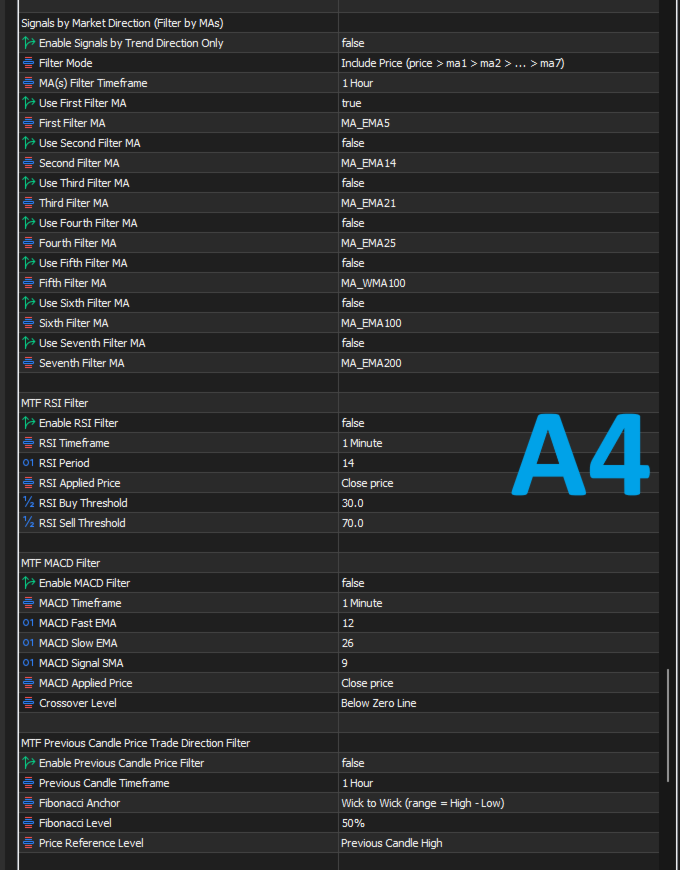
9. SIGNALS BY MARKET DIRECTION (FILTER BY MAs)

This is the higher-timeframe trend filter. It is separate from the validation stack above — validation checks the current timeframe, this checks another timeframe.


• Enable Signals by Trend Direction Only — on/off.

• Filter Mode — Include Price (chains Price > MA1 > MA2 > ... > MAn for buys) or MA Only (chains MA1 > MA2 > ... > MAn, ignoring price).

• MA(s) Filter Timeframe — the timeframe the filter MAs are evaluated on. Set this to whatever higher timeframe defines your trend.

• Use First through Seventh Filter MA — up to seven filter MAs, each with its own enable checkbox and MA type.


If you trade M5 but want to only take signals in the direction of the H1 trend, set the filter timeframe to H1, enable two filter MAs (say EMA 50 and EMA 200), and use MA Only mode. Every signal from your M5 engine is now checked against H1 first. If H1 says down and your signal is a buy, it is silently discarded.


10. MTF RSI FILTER

The same principle applied to momentum.


• Enable RSI Filter — on/off.

• RSI Timeframe — RSI is evaluated on a completely different timeframe from your chart.

• RSI Period, RSI Applied Price — standard RSI configuration.

• RSI Buy Threshold — Buy signals pass only if RSI is at or below this level (default 30).

• RSI Sell Threshold — Sell signals pass only if RSI is at or above this level (default 70).


11. MTF MACD FILTER

• Enable MACD Filter — on/off.

• MACD Timeframe, MACD Fast, MACD Slow, MACD Signal, MACD Applied Price — standard MACD configuration on any timeframe.

• Crossover Level — Below Zero (momentum reversal from a low) or Above Zero (continuation in an established trend).


12. MTF PREVIOUS CANDLE PRICE TRADE DIRECTION FILTER

This filter is one of the greatest strengths of this indicator. It implements what is often called the one-candle theory — a single completed higher-timeframe candle is enough to define a tradable range for the session or day. After a strong directional candle, price often retraces back into it before the trend continues. Wait for the retracement, and accept a crossover only when it fires inside a specific area of that candle, and you get an entry with natural context and a natural invalidation point.


The filter is off by default. When enabled, it becomes the final arbiter: any signal that does not fit inside the range you have defined is silently discarded, no matter how many other filters agreed.


THE ELEMENTS YOU CONFIGURE


1. Previous Candle Timeframe — the timeframe whose most recently closed candle defines the reference. Typically H4, D1, or W1. Must be higher than your chart timeframe; a lower setting is blocked on load with a clear error message.


2. Fibonacci Anchor — which part of the previous candle defines the 0% and 100% boundaries of the Fibonacci grid:

   • Wick to Wick — from the candle's High (100%) down to its Low (0%). Wicks included.

   • Body to Body — from the top of the body (100%) down to the bottom (0%). Wicks ignored. Useful when the previous candle had unusually long wicks, since it compresses the levels into the meaningful part of the candle.


3. Fibonacci Level — the retracement level price should reach before a crossover is accepted:


   Level    | Meaning

   23.6%    | Shallowest retracement

   38.2%    | Moderate

   50.0%    | Mid-candle

   61.8%    | Deep

   78.6%    | Very deep

   100.0%   | Full retracement to the opposite extreme

   107.0%   | Sweep past the opposite extreme — the stop-hunt zone


The 107% level exists for a specific reason. Many traders place stop losses just below the low of a bullish candle, or just above the high of a bearish candle. Price frequently spikes through those levels to trigger stops, then reverses and resumes the trend. If you want to catch that move, 107% is the level to select.


4. Price Reference Level — the second boundary of the acceptance zone, taken from the previous candle's actual OHLC: Open, High, Low, or Close.


The Fib level and the Reference level together define a zone. The crossover must occur with price inside that zone.


HOW THE ZONE IS BUILT


Two prices are extracted from the previous candle:

• Fib Price — the value of your chosen Fibonacci level across the anchor.

• Reference Price — the value of your chosen OHLC level.


The zone is the range between those two prices, sorted so it is always well-defined.


• Buy signal: the previous HTF candle must be bullish. Zone runs between the Fib level and the Reference level.

• Sell signal: the previous HTF candle must be bearish. Same construction, mirrored.


If the previous candle's direction does not match the signal, the signal is rejected before the zone is even computed.


WORKED EXAMPLE


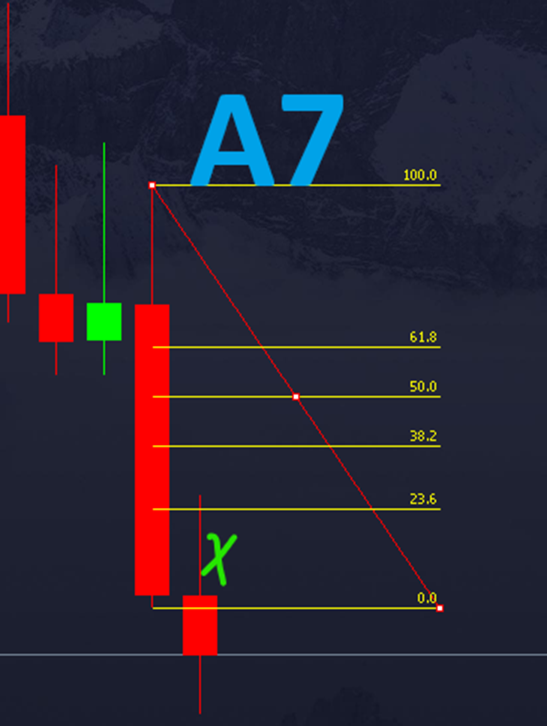
Look at reference image A7. The bearish previous candle is the large red body on the left. The Fibonacci grid is drawn from the 100% line at the top (high) to the 0% line at the bottom (low). The blue X marks the exact crossover point — it fired inside the 23.6% level of the previous bearish candle. Because the previous candle was bearish and the signal was a sell that occurred inside the retracement zone, the filter accepted it. The green X below shows where a subsequent signal would have been rejected — price had already broken past the 23.6% level, so the retracement was spent.


THE RULE THAT SURPRISES PEOPLE — DIPS ARE FORGIVEN


This is the single most important thing to understand about this filter. The check is evaluated only at the moment of the crossover. Past price action within the current period does not disqualify a signal.


SUGGESTED HTF PAIRINGS


If you are new to this one-candle method, here is a practical starting point:


• H4 reference candle → pair with M1 for the crossover signals.

• D1 reference candle → pair with M15 for the crossover signals.

• W1 reference candle → pair with H4 for the crossover signals.


These pairings are a starting point, not a rule. You are free to combine any higher-timeframe reference candle with any lower timeframe for the crossover signals — whatever best fits the market you trade and the pace at which you like to work.


Image A4 — Screenshot showing the indicator's MTF signals filter.


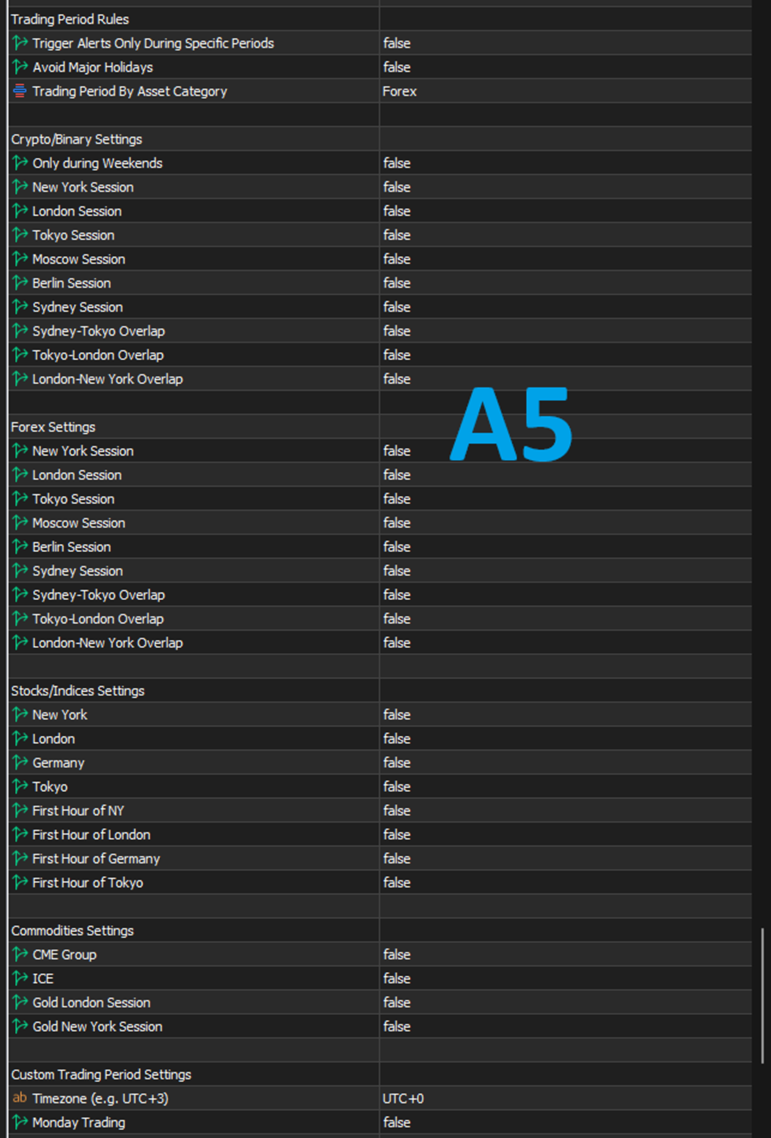
13. TRADING PERIOD RULES

Restrict signals to specific hours — London session, the first hour of the New York open, and so on.


• Trigger Alerts Only During Specific Periods — master on/off.

• Avoid Major Holidays — suppresses signals during New Year, Christmas, US Independence Day, and US Thanksgiving.

• Trading Period By Asset Category — pick the category that matches your instrument:


   Crypto / Binary — including a weekends-only option.

   Forex — New York, London, Tokyo, Moscow, Berlin, Sydney sessions, plus three overlap periods (Sydney–Tokyo, Tokyo–London, London–New York).

   Stocks / Indices — NYSE, LSE, FWB, and TSE hours, plus first-hour-after-open filters.

   Commodities — CME, ICE, London Gold, and New York Gold sessions.

   Custom — your own day-by-day schedule with a timezone offset, start hour, and end hour per day.


═══════════════════════════════════════════════════════════════════


HOW TO COMBINE THE LAYERS


The real strength of this indicator is not any single filter. It is that all the filters are independent and composable. You decide how strict you want to be.


A simple configuration looks like this:

• Multiple MAs in the validation stack (say four or five).

• On Close timing.

• Everything else off.


You will get more signals, filtered primarily by the MA structure.


A strict configuration looks like this:

• Six or more MAs in the validation stack.

• One Candle After Close timing.

• Trend filter on H4 using 3, 5, or 7 MAs.

• RSI filter on M15 with default thresholds.

• Previous candle filter on H4 at the 50% level.

• Trading periods restricted to London and New York.


You will get very few signals. Every one of them will have passed every single layer you turned on.


The indicator does not force a particular trading style on you. It gives you the building blocks and lets you assemble the combination that matches the way you actually trade.


Image A5 — Screenshot showing the indicator's signal filter by trading period rules.


═══════════════════════════════════════════════════════════════════


UPGRADE TO THE PAID VERSION — $30


The paid version — Multiple Timeframe Filtered Moving Average Crossover Indicator — runs the exact same signal engine you are using here, plus three upgrades that remove the free version's constraints:


1. FULL MA FREEDOM

Every moving average in the system — the Early crossover pair, the Full crossover pair, all eleven Early validation slots, all eleven Full validation slots, all eleven filter MAs — is now configured with three separate inputs:


• Period — any integer from 1 upward. No preset list.

• Shift — any integer, including non-zero. Useful if you want your MAs to lead or lag by one or two bars.

• Method + Applied Price — a 35-option dropdown.


The 35 options are built from five MA methods × seven applied prices:

   Simple, Exponential, Smoothed, Linear Weighted, and Volume Weighted,

   applied to Close, Open, High, Low, Median (HL/2), Typical (HLC/3), or Weighted Close (HLCC/4).


That is 5 × 7 = 35 combinations per MA slot. You can now do things like:

• EMA 17 applied to Typical Price — smoother through chop, more responsive to wicks that matter.

• SMMA 21 applied to Median Price — a quiet, smoothed filter that ignores extreme wick noise.

• LWMA 9 applied to Weighted Close — faster reaction to the final bars of the candle.

• VWMA 20 applied to Close — a volume-aware trend anchor. VWMA is new and unique to the paid version.

• Any period, any shift, in any combination. If your edge is EMA 12 vs EMA 26 vs SMMA 55, you no longer approximate it with the nearest preset.


2. NATIVE MA PLOTTING ON THE CHART

The paid version plots every MA that drives the logic directly on the chart:


• Early Fast and Slow crossover MAs (4 plots — Early and Full, Fast and Slow).

• Full Fast and Slow crossover MAs.

• All 22 validation MAs (11 Early + 11 Full).


That is 26 MAs total. For each one you get:

• Its own Color input.

• Its own Width input (1–5).

• A visibility toggle in the MA Visibility group.


Four group-level toggles control which categories draw:

• Show Early Crossover MAs.

• Show Full Crossover MAs.

• Show Early Validation MAs.

• Show Full Validation MAs.


You get the best of both worlds: a chart with every MA visible for visual verification and stack inspection, or a chart kept clean by turning the toggles off — all without ever removing the indicator or re-adding it.


3. INDEPENDENT EARLY AND FULL SIGNAL TIMING

In the free version, one Signal Timing input drives both the Early and Full subsystems. The paid version replaces that with two independent inputs:


• Early Signal Timing Mode.

• Full Signal Timing Mode.


This lets you build a shape the free version cannot produce. For example, Early on Intrabar and Full on On Close gives you the classic "fast alert, slow confirm" pattern — Early alerts fire live on the forming candle as a heads-up, while Full confirmation waits until the crossover candle has closed.


═══════════════════════════════════════════════════════════════════


ALSO AVAILABLE ON TRADINGVIEW


The same signal engine is available on TradingView as an indicator:


Multi-Timeframe Filtered MA Crossover Indicator


The TradingView version includes:

• The full 35-option MA dropdown (including VWMA via ta.vwma()).

• MA visibility toggles and per-MA color and width inputs for all 26 MAs.

• Independent Early and Full signal timing modes.

• All the filters — validation stack, MTF trend, RSI, MACD, Previous Candle Price, Trading Periods.


Two platform-specific notes:

• On TradingView, alerts are configured through TradingView's own alert dialog. The indicator supplies the alert text; the channel selection (popup, sound, email, mobile push, webhook) is handled by the platform.

• The TradingView version does not require MetaTrader to be running, and works on any symbol TradingView provides data for.


If you prefer to work in TradingView for charting and alerts but trade through MetaTrader, the two versions can run side by side and will fire on the same bars.


═══════════════════════════════════════════════════════════════════


ALSO AVAILABLE AS A FULLY AUTOMATED EA


If you would like the exact same signal engine delivered as a fully automated trading system, there is an Expert Advisor:


Multiple Timeframe Filtered Moving Average Crossover EA


What the EA adds on top of the paid indicator:

• Automated trade execution on any symbol your broker supports.

• Three-tier take profit system — TP1 at a fixed risk-reward ratio, TP2 and TP3 trailed by their own MAs, each with an optional fixed RR target.

• TP1-gated trailing — TP2 and TP3 only begin trailing once TP1 has closed in profit.

• PCC/CCC TP1 override — TP1 can exit at the previous HTF candle's close/high/low or at the current HTF candle's close.

• Risk management — loss-based trading halt, daily drawdown limit, recovery-aware position sizing.

• The same VWMA-enabled MA library, validation stack, and MTF filters as the paid indicator.

• The EA also draws the same signal arrows on the chart, so you can watch the system work in real time.


═══════════════════════════════════════════════════════════════════


Please feel free to join this Telegram group where users can share their strategies and settings that work for them using this indicator --> t.me/MTFMACS
Recommended products
The indicator detects and displays М. Gartley's Butterfly pattern. The pattern is plotted by the extreme values of the ZigZag indicator (included in the resources, no need to install). After detecting the pattern, the indicator notifies of that by the pop-up window, a mobile notification and an email. The pattern and wave parameters are displayed on the screenshots. The default parameters are used for demonstration purposes only in order to increase the amount of detected patterns. Parameters z
Liquidity Zones is a free MetaTrader 5 indicator by MarketStructureLab. It automatically highlights support and resistance zones, counts separate price returns and marks broken zones. The indicator helps you keep important price areas in view and assess how the market reacts to them. Colored zones, compact labels and historical levels make it useful for both beginners and experienced traders with their own analysis methods. Main features Zones based on confirmed price swings. Support zones come
FREE
This indicator automatically detects harmonic price patterns on your chart, both bullish and bearish, and shows them as soon as they form, including potential patterns that are still developing. For every pattern it draws the Potential Reversal Zone (PRZ), and for completed patterns it also draws two take-profit and two stop-loss levels. Supported Patterns: Gartley, Bat, Butterfly, Crab, Deep Crab, Shark and Cypher. Each pattern can be switched on or off individually. Key Features: Completed
FREE
Synthetic Timeframe Creator Professional Custom Timeframe Visualization for MetaTrader 5 Revolutionize your multi-timeframe analysis with Synthetic Timeframe Creator. Tired of switching between charts? Need to analyze specific time cycles that don't exist in standard timeframes?  This is your ultimate solution. Create custom D2, D3, W2, W3 (or any N-period) candles directly on your MT5 chart without needing custom symbols or complex workarounds. KEY FEATURES Flexible Timeframe Synthesis Choos
FREE
Aussenstab
Rainer Schnoege
5 (4)
The outside bar indicator shows a range of inside bars and the breakout up and down from the range. The breakout is always displayed at the start of a new range and is extended until another breakout. The calculation always takes place at the start of a new candle. So it is displayed accordingly in all time frames. In inside bar (  insidebar ) trading you can see the top and bottom of a range. In outside bar (  outsidebar ) trading, the breakout from a range and thus the trend following. The col
FREE
PZ Turtle Trading MT5
PZ TRADING SLU
4.67 (6)
The Turtle Trading Indicator implements the original Dennis Richards and Bill Eckhart trading system, commonly known as The Turtle Trader. This trend following system relies on breakouts of historical highs and lows to take and close trades: it is the complete opposite to the "buy low and sell high" approach. The main rule is "Trade an N-day breakout and take profits when an M-day high or low is breached (N must me above M)".  [ Installation Guide | Update Guide | Troubleshooting | FAQ | All Pr
FREE
Dynamic Supply and Demand indicator automatically identifies and displays Supply and Demand Zones on your chart based on price action patterns and market structure.  These zones represent areas where institutional buying or selling pressure has historically occurred, making them key levels for potential price reactions. This form of indicator takes inspiration from ICT as well as traditional Support & Resistance formation. **For the first 50 candles (number depends on LookBackCandles) when indic
FREE
Crypto_Forex Indicator "Double Shooting Star pattern" for MT5, No repaint, No delay. - Indicator "Double Shooting Star pattern" is very powerful indicator for Price Action trading - great for Down-trending markets. - Indicator detects rare but efficient pattern: bearish Double Shooting Star on chart: - Bearish Double Shooting Star pattern - Red arrow signal on chart (see pictures). - It has built-in PC and Mobile alerts. - Indicator "Double Shooting Star pattern" is excellent to combine with Su
Professional Support & Resistance PRO Trade with Confidence. Let the Market Structure Guide You. Professional Support & Resistance PRO is an advanced MT5 indicator that automatically detects and plots high-probability Support and Resistance levels using intelligent price action analysis. Instead of cluttering your chart with unnecessary lines, it identifies the most significant levels where the market is most likely to react. Whether you're a scalper, day trader, swing trader, or position trader
FREE
Two lines that measure the actual rotation of a market rather than the shape of an average. Vortex Indicator MTF sums the upward and downward vortex movements over a window, divides each by the true range, and takes its signal from the crossing of the resulting pair, which is a direction change measured from the bars themselves. It carries no recursion at all, so a continuation from any bar is exact by construction. It is free: no trial, no locked features, no upgrade page. Over a window three s
FREE
PZ Penta O MT5
PZ TRADING SLU
3.8 (5)
The Penta-O is a 6-point retracement harmonacci pattern which usually precedes big market movements. Penta-O patterns can expand and repaint quite a bit. To make things easier this indicator implements a twist: it waits for a donchian breakout in the right direction before signaling the trade. The end result is an otherwise repainting indicator with a very reliable trading signal. The donchian breakout period is entered as an input. [ Installation Guide | Update Guide | Troubleshooting | FAQ | A
FREE
RelicusRoad Fractals is a fractal indicator for MetaTrader 4 and MetaTrader 5 that marks swing highs and swing lows at two strengths, a Fast test of 7 bars on each side and a Slow test of 15 bars on each side. A 7-bar window on each side already filters out many small wiggles, and the Slow test asks for more than twice that, so its thicker arrows pick out the swings that held over a much wider stretch of the chart. Both strengths are shown together, so minor and larger swings can be told apart a
FREE
Strifor Pivot ATR Target
Strifor (Mauritius) Ltd
5 (14)
Strifor Pivot + ATR Target Pivot Levels Indicator with ATR-Based Targets and Analytics Panel for MetaTrader 5 Strifor Pivot + ATR Target is a tool for intraday and medium-term trading that combines classic pivot levels with dynamic ATR targets and an informational analytics panel. The indicator helps you assess the trading range in advance, identify likely price reaction zones, and estimate movement potential — eliminating manual calculations and subjective assumptions. Key Features Automatic c
FREE
Alligator Window
Anderson De Assis
5 (1)
Alligator Window Indicator : Potencialize suas análises no MetaTrader com o Alligator Window. Este indicador coloca o clássico Alligator de Bill Williams em uma janela separada, permitindo uma visualização mais clara e organizada. Ideal para traders que buscam precisão e eficiência em suas operações, o Alligator Window proporciona insights nítidos e facilita a identificação de tendências sem poluir o gráfico principal. Experimente agora e leve suas estratégias de trading a um novo patamar!
FREE
Demand and supply zones Support and Resistance areas Show broken zones Show tested and untested zones Show weak zones Fractal factors Notifications when price reaches point of Interest with Push notifications and pop ups Customizable History Clickable Works on all Timeframes Works on all pairs. Free for a while till further notice and changes. The demand and supply bot coming soon
FREE
Price Action Auxiliary Indicator Suite 4-3: PivotPoints Indicator This is a price action auxiliary indicator suite that I use regularly in my trading, covering the basic needs of price action trading. It can be loaded and used on any instrument. A boon for manual price action trading, providing multiple auxiliary functions. Non-price action traders should purchase with caution, as this indicator suite does not provide any buy or sell signals; it is purely auxiliary. This indicator suite cont
FREE
Basic Candlestick Patterns MT5
Mehran Sepah Mansoor
4.77 (31)
Our   Basic Candlestick Patterns   indicator makes identifying major candlestick patterns easier than ever. Discover patterns such as the Hammer, the Evening Star, the Three White Soldiers and many more with just a glance at your chart. With an intuitive interface and clear visual cues, our indicator helps you identify trading opportunities quickly and accurately /  MT4 version Dashboard Scanner for this indicator: ( Basic Candlestick Patterns Dashboard ) Features Accuracy : Automatically iden
FREE
Golden Hunter MT5
Rodrigo Arana Garcia
4.88 (48)
MT4 Version Golden Hunter   has been developed for traders who trade manually in the markets. It is a very powerful tool consisting of 3 different indicators: Powerful entry strategy: Formed by an indicator that measures the volatility of the currency pair and identifies the market trend. LSMA: Smoothes the price data and is useful to detect the short term trend. Heikin Ashi: Once the indicator is attached to the chart, the Japanese candlesticks will change to Heikin Ashi candlesticks. This
FREE
Your chart. One glance. Total clarity. Built by @Ash_TheTrader for traders who are tired of guessing, Extreme Trading Dashboard is a professional-grade heads-up display that sits quietly in the corner of your chart — dark charcoal, rounded, semi-transparent, and genuinely easy on the eyes — until the moment it matters. Dual Session Highlighter Shade up to two independent time windows directly on your chart — London, New York, or your own custom kill-zone. Each gets its own color, so overlapp
FREE
AI Weekly Open Bias Trader
Fadi Hassan Khaled Ghanem
Uses the weekly opening price as the bias line and trades rejections of that line in the direction of the weekly bias. How it works The EA evaluates its rules once per closed bar of the signal timeframe (H1 by default), so signals do not repaint and the logic is the same in the tester and on a live chart. When the setup appears and no position of this EA is open on the symbol, it opens one market order with a stop loss and a target. Key features Risk based lot size from a percent of balance, wit
FREE
Previous High Low Daily Weekly
Marc Guy Verzotti
4.57 (7)
Understanding the levels of the previous day or week is very important information for your trading. This indicateur allow to draw Previous day High/Low Previous week High/Low Congifuration High & Low for: Previous day, week Line Style, color Label position, size, color Any questions or comments, send me a direct message here  https://www.mql5.com/en/users/mvonline
FREE
PZ HHHc LLLc MT5
PZ TRADING SLU
5 (2)
A personal implementation of a famous trend principle known as higher high, higher close, lower low, lower close (HHHC - HHHL). It uses price action alone to determine trend direction, trend changes and pullback zones.  [ Installation Guide | Update Guide | Troubleshooting | FAQ | All Products   |  Get Help ] Customizable breakout period Customizable colors and sizes It is non-repainting and non-backpainting It implements alerts of all kinds The indicator defines three price zones: Buy zones a
FREE
Product Overview Pattern Recognition Master System is a main‑chart classic candlestick pattern auto‑recognition indicator designed for both the   MT4 and MT5   platforms. It automatically detects and labels eleven classic reversal and continuation patterns on the main chart, covering double tops and bottoms, head‑and‑shoulders tops and bottoms, hammer and hanging man, engulfing, doji, and morning and evening stars, with an independent cooldown period assigned to each pattern category to suppres
FREE
Draws the current and previous daily, weekly and monthly opening prices as labelled lines, the levels many intraday traders use as bias and reaction points. Key features Calculated on closed bars, values do not repaint Works on any symbol and timeframe All periods, levels and colours can be changed in the inputs Light on resources with a maximum bars setting Objects are removed automatically when the indicator is deleted Inputs Lines: Show daily opens, Show weekly opens, Show monthly opens, Peri
FREE
Automatic Fair Value Gap (FVG) detection with full multi-timeframe support. The indicator finds price imbalances (a gap between candle 1 and candle 3 of a three-candle sequence) and draws them as live zones that stretch with the chart in real time. • Multi-timeframe: select several TFs at once (M1…MN) and see HTF imbalances right on your LTF chart — D1 gaps on an M5 chart, updated live. • Full zone lifecycle: recolor on touch, delete broken zones, delete touched zones, or extend a zone until it
FREE
Morning Range Breakout (Free Version) Morning Range Breakout (Free Version) is a straightforward trading advisor that implements a breakout strategy based on the morning range. It identifies the high and low within a specified time interval (e.g., 08:00–10:00 UTC) and opens a trade on a breakout upward or downward. The free version includes core functionality without restrictions. All parameters and messages are in English, per MQL5 Market requirements. Key Features Detects morning range based
FREE
Grazia Adaptive Trend Channel Sync with the Market’s Pulse. The Ultimate Volatility-Adaptive Channel. "Limited time offer! Free" 【Recommended for traders who:】 Find that traditional fixed-width channels are easily broken and become useless. Struggle with "stop-loss hunting" due to an inability to adapt to changing volatility. Want to objectively visualize the current market’s "room to move." 【Product Overview】 "Fixed channels cannot keep up with a constantly changing market." Grazia Adaptive
FREE
Marks the high and low of the first minutes after a chosen session start (server time) for each day, plus optional target lines at a multiple of the range. Key features Calculated on closed bars, values do not repaint Works on any symbol and timeframe All periods, levels and colours can be changed in the inputs Light on resources with a maximum bars setting Objects are removed automatically when the indicator is deleted Inputs Opening Range (server time): Session start, Opening range length (min
FREE
======================================================== XAUUSD ELLIOTT WAVE + REAL YIELD (MTF LEVELS/TARGETS) - MQL5/MT5 MARKET DESCRIPTION (formatting: **bold** = Bold button; lines with • = bullet list; UPPERCASE = heading) ======================================================== OVERVIEW ------------------------------------------------------- **XAUUSD Elliott Wave + Real Yield** maps Elliott structure with ZigZag pivots and motive/corrective checks, then filters signals with a **real-yield
FREE
Daily and Previous Day Levels draws the reference levels intraday traders check every morning: the previous day's high, low and close, today's open, today's running high and low, and the previous week's high and low. How it works - Values come straight from the symbol's own D1 and W1 bars, so the day follows your broker's server day. - Each day gets its own line segment, from the day's first bar to its last. Past days stay readable and old lines never shift. You choose how many days to keep (5
FREE
Buyers of this product also purchase
Trend Sniper X
Sarvarbek Abduvoxobov
4.86 (44)
Trend Sniper X is a multi-timeframe trend-following indicator for MetaTrader 5 that helps traders identify trend direction and potential reversal points with clarity and precision. for MT4: https://www.mql5.com/en/market/product/193245 Price Information: The current price is promotional and is subject to change as upcoming updates and new features are released. Bonus Offer: To get the FREE Auto-Trade Assistant EA for this indicator, please message the author after purchasing. Code2Profit Channe
A new King in town - Indicator + Order management indications(tp1+tp2+tp3) + Optional Telegram Signal sender   INCLUDED (FREE) + Bonus EA Robot ( FULL TRADING  and SIGNAL SYSTEM ) Our best EA for Gold: Gold Slayer TRY > Reversion Queen  Expert advisor >JOIN Community Channel < NEW Free Automation EA link < click here ( disclaimer: this is new and still on testing and phase , use at your risk on demo) Free Telegram Bridge < click here  This indicator includes an advanced Strategy, a trading sys
Smart Trend Trading System — MetaTrader 5 Message me on MQL5 after purchase to receive Smart Universal Expert Advisor for FREE, plus the online course, PDF manual, and private group access. STTS brings trend direction, entry and exit signals, reversal zones, and important price levels together on your chart. Follow the system manually, or connect a separate compatible EA for automated execution using your chosen settings. ONE SYSTEM. FOUR TRADING APPROACHES. STTS organizes its trading approaches
Zoryk Gold
Reda El Koutbane
4.78 (18)
discount ends SOON next price 69 $ ZORYK — Advanced XAUUSD Signal System for MetaTrader 5 You know the feeling. You spend time analyzing gold. You wait for the entry. You finally open the trade, and price immediately moves against you. You close too early, move the Stop Loss or hesitate for a few seconds. Then the market reaches the exact destination you originally expected without you. The direction was not always the problem. The real problem was uncertainty. You did not know exactly where th
Entry Points Pro shows you where to enter, where to put the stop and what lot to trade — before you place the order. PRICE Now 149 USD, and this is the last copy at this price. After it the price goes up to 199 USD, and the final price is 349 USD. I make my money trading the markets, and I show it, so I don't need to sell this indicator to everyone. It is a tool for traders who think for themselves, not a magic button. The arrow appears when the candle closes and does not repaint. Two setting
M5 Sniper
MeanFX
5 (4)
Get your trading edge in the line of sight M5 Sniper   is a new indicator by MeanFX. It combines   precise trading signals   with   adaptive TP/SL levels   - creating best possible statistical trades as a result! The price increases every 5 purchases, the next price is 79$ Message me after purchase to receive tips/guide and bonus EA plus trading methodology Auto Optimisation only works on LIVE chart , needs data feed >JOIN Community Channel < What makes it stand out?   Proven statistical per
SuperScalp Pro
Van Minh Nguyen
4.54 (37)
SuperScalp Pro - Professional Multi-Layer Confluence Scalping System SuperScalp Pro is an advanced scalping indicator that upgrades the classic Supertrend with multiple intelligent confirmation filters. It helps you identify higher-probability Buy/Sell opportunities while significantly reducing false signals. Clear Buy and Sell arrows appear directly on the chart, along with automatic ATR-based Stop Loss and Take Profit levels calculated in real time. After purchase, please message me on MQL5 to
Gold Trend Coach MT5
Cristhian Alexander Gaibor Cuasquer
4.2 (10)
Gold Trend Coach is a gold (XAUUSD) trend indicator for MetaTrader 5 with buy and sell signals, stop loss and three take profit targets confirmed on candle close (no repaint), a coach that guides you from the entry to TP3, a multi-timeframe dashboard and alerts to your phone and Telegram. Built for M1 and M5 scalping and M15 intraday during the London and New York sessions. BONUS: FREE Auto-Trade EA for Gold Trend Coach. Message me after purchase and I send you the EA that trades the indicator s
GoldenX Entry MT5
VividMind Digital Solutions
5 (17)
Price will increase by $20 every 10 buyers to maintain premium value. After purchase, contact via   MQL5 inbox   to receive your buyer kit and bonus. You have probably tested dozens of indicators before. But we are not here to be “just another signals indicator.” Behind GoldenX Entry is intensive research & development focused on building sophisticated algorithms designed to adapt to the real behavior of every instrument — not generic signals recycled everywhere else. From advanced Auto Optim
SMC Intraday Formula
VividMind Digital Solutions
5 (26)
Secure the Lowest Price Today. After purchase, contact via   MQL5 inbox   to receive your buyer kit and bonus. Let's be honest first. No indicator will make you profitable on its own. If someone tells you otherwise, they're selling you a dream. Every indicator that shows perfect buy/sell arrows can be made to look flawless — just zoom into the right window of history and screenshot the winners. We won't do that. SMC Intraday Formula is a tool. It reads the market structure for you, maps the hig
Gann Made Easy   is a professional and easy to use Forex trading system which is based on the best principles of trading using the theory of W.D. Gann. The indicator provides accurate BUY and SELL signals including Stop Loss and Take Profit levels. You can trade even on the go using PUSH notifications. PLEASE CONTACT ME AFTER PURCHASE TO GET TRADING  INSTRUCTIONS   AND GREAT EXTRA INDICATORS  FOR FREE! Probably you already heard about the Gann trading methods before. Usually the Gann theory is a
Ultra Indicator
Ihor Otkydach
5 (1)
ULTRA is a technical indicator that operates on an “all-in-one” basis—it independently analyzes the market, generates trading signals, displays levels for setting stop-loss orders, and suggests when to close trades to lock in profits or minimize losses. In other words, it doesn't matter if you don't know how to analyze the market, determine levels—where to set your stop-loss—or struggle with money management. ULTRA will do all of that for you! BUYER BONUS: After purchasing the ULTRA indicator, s
Boba Analysis Suite
Trade Ready Solutions LLC
5 (2)
Boba Analysis Suite Boba Analysis Suite is an analytical indicator for MetaTrader 5. It brings market structure, relevant price zones and broader market context together in a single chart view. Developed through practical experience as a trader and trading coach, it supports a structured analysis process: assessing market direction, identifying important levels and considering multiple timeframes together. Analysis in Context Individual signals gain meaning through context. Boba Analysis Suite h
Welcome to Entry In The Zone & SMC Multi Timeframe —  COMPLETE SMC ANALYSIS SYSTEM — ALL IN ONE INDICATOR Entry In The Zone & SMC Multi Timeframe  An indicator designed for market analysis based on Smart Money Concepts (SMC), displaying Market Structure, Key Zones (Order Blocks, Supply & Demand Zones, and Fair Value Gaps), Liquidity, and real-time BUY / SELL signals. It supports both Single-Timeframe and Multi-Timeframe analysis, along with the Confluence at Zone feature, which helps you evaluat
M1 Sniper MT5
Oleg Rodin
5 (7)
M1 SNIPER  is an easy to use trading indicator system. It is an arrow indicator which is designed for M1 time frame. The indicator can be used as a standalone system for scalping on M1 time frame and it can be used as a part of your existing trading system. Though this trading system was designed specifically for short-term trading, it still can be helpful for all traders. This trading system can be used with any forex pair and time frame, though lower time frames are recommended from M1 up to M
Gold Entry Sniper
Tahir Mehmood
5 (22)
Gold Entry Sniper – Professional Multi-Timeframe ATR Dashboard for Gold Scalping & Swing Trading Gold Entry Sniper is a cutting-edge MetaTrader 5 indicator designed to give traders precise buy/sell signals for XAUUSD and other symbols, powered by ATR Trailing Stop logic and a multi-timeframe analysis dashboard . Built for both scalpers and swing traders, it combines real-time market direction , dynamic stop levels , and professional visual dashboards to help you identify high-probability gold en
FiboSniper Pro
Van Minh Nguyen
5 (4)
FiboSniper Pro - Multi-Filter Fibonacci System with Auto SL/TP and Control Panel FiboSniper Pro is a technical indicator that combines dynamic Fibonacci Envelopes with multiple confirmation filters to generate selective Buy and Sell signals. Fibonacci levels are calculated from Moving Average and ATR, then filtered by ADX, EMA, RSI, ATR, Volume, Time and Candle structure. The indicator displays automatic ATR-based Stop Loss and Take Profit levels directly on the chart, along with an interactive
ARICoins
Temirlan Kdyrkhan
ARICoin is a powerful trading companion designed to generate high-probability entry signals with dynamic TP/SL/DP levels based on volatility. Built-in performance tracking shows win/loss stats, PP1/PP2 hits, and success rates all updated live. Key Features: Buy/Sell signals with adaptive volatility bands Real-time TP/SL/DP levels based on ATR Built-in MA Filter with optional ATR/StdDev volatility Performance stats panel (Success, Profit/Loss, PP1/PP2) Alerts via popup, sound, push, or email Cust
ScalpPoint
Temirlan Kdyrkhan
ScalpPoint is a powerful trading companion designed to generate high-probability entry signals with dynamic TP/SL/DP levels based on volatility. Built-in performance tracking shows win/loss stats, PP1/PP2 hits, and success rates — all updated live. Key Features: Buy/Sell signals with adaptive volatility bands Real-time TP/SL/DP levels based on ATR Built-in MA Filter with optional ATR/StdDev volatility Performance stats panel (Success, Profit/Loss, PP1/PP2) Alerts via popup, sound, push, or emai
Auto Optimized SpeedAngle is an institutional-grade momentum vectoring system that eliminates curve-fitting through continuous Walk-Forward Optimization (WFO). Rather than relying on static inputs that degrade when market regimes shift, the indicator dynamically recalibrates its parameters using Out-of-Sample (OOS) validation, ensuring the displayed signals represent genuine statistical edges rather than historical anomalies. By shifting the focus from subjective visual angles to normalized, qua
Adaptive Price Action Engine Buy Indicator- Get EA Based on it for FREE. Self-Optimizing Multi-Timeframe Trend & Candlestick Intelligence Markets do not behave the same way all the time—and not every price-action pattern has the same value in every market regime. Adaptive Price Action Engine is designed to adapt to changing market conditions by combining trend structure, multi-timeframe analysis, candlestick patterns, and statistical optimization into one analytical framework. Two Adaptive Mode
Crystal Heikin Ashi Signals
Muhammad Jawad Shabir
5 (5)
Crystal Heikin Ashi Signals—Professional Trend & Signal Detection Indicator Advanced Heikin Ashi Visualization with Intelligent Signal System for Manual & Automated Trading Final Price: $149 ---------> Price goes up $10 after every 10 sales . Limited slots available — act fast . Overview User Guide PDF Crystal Heikin Ashi Signals is a professional-grade MetaTrader 5 indicator that combines pure Heikin Ashi candle visualization with an advanced momentum-shift detection system. Designed for both m
Scalper Vault is a powerful, fully-equipped trading system designed for traders who want to achieve consistency in intraday trading . This high-precision indicator serves as a complete, standalone trading system that delivers institutional-grade analysis for both Forex and Binary Options traders. PLEASE CONTACT ME AFTER PURCHASE TO GET MY TRADING TIPS PLUS A GREAT BONUS! By eliminating the guesswork and complex manual analysis, Scalper Vault allows you to focus purely on execution using easy to
Trend Catcher ind mt5
Ramil Minniakhmetov
5 (18)
TREND CATCHER INDICATOR Trend Catcher Indicator analyzes market price movements, using a combination of the author’s proprietary and customized adaptive trend-analysis indicators.  It identifies the true market direction by filtering out short-term noise and focusing on underlying momentum strength, volatility expansion, and price structure behavior.  It also uses a combination of smoothing and trend-filtering customized indicators such as moving averages, RSI, and volatility filters.   Real ope
Tokyo mt5 Indicator
Vasiliy Strukov
5 (15)
Tokyo Indicator provides a clear visual overview of trend direction, potential trading signals, and market conditions. Its colour-coded, stepped trend line distinguishes bullish phases in blue from bearish phases in magenta. Matching directional arrows highlight potential buying and selling opportunities when the displayed trend changes. An integrated dashboard brings together the current signal, market bias, momentum, volatility, and signal quality in one convenient view. This allows traders t
Atomic Analyst MT5
Issam Kassas
4.5 (64)
Atomic Analyst — MetaTrader 5 Message me on MQL5 after purchase to receive Smart Universal Expert Advisor for FREE, plus the online course, PDF manual, and private group access. Atomic Analyst brings price action, trend direction, entry and exit signals, Stop Loss and multiple Take Profit levels together on your chart. SEE THE SIGNAL. UNDERSTAND THE SETUP. Atomic Analyst organizes its analysis into clear visual information: • Buy and sell arrows to identify potential entries. • Stop Loss and mul
Unix Scalper
Issam Kassas
4 (4)
Unix Scalper — MetaTrader 5 Message me on MQL5 after purchase to receive Smart Universal Expert Advisor for FREE, plus the online course, PDF manual, and private group access. Find the setup. See the plan. Choose how to trade it. UNIX Scalper brings market analysis, BUY/SELL/WAIT decisions and Entry, Stop Loss, TP1 and TP2 levels into one organized panel. SEE THE SIGNAL AND THE PLAN • Clear decisions: BUY, SELL or WAIT. • Defined levels: Entry, Stop Loss, TP1 and TP2. • Multi-timeframe overvie
SIO Oscillator: Self-Optimizing Semivariance Imbalance Oscillator Buy the indicator and get the Expert Advisor based on it for FREE. Most oscillators treat all price movement the same. SIO separates upside and downside market pressure and measures the imbalance between them, showing which side is really in control: buyers or sellers. When the imbalance reaches an extreme, SIO prints a clear signal with entry, Stop Loss and Take Profit levels. What makes SIO different is that it doesn’t rely on f
Volatility Master for MetaTrader is a real-time dashboard tool that scans up to  50 symbols  to identify high-volatility , trending markets instantly. With bullish/bearish signals, customizable alerts, and a user-friendly interface, it helps you avoid range-bound conditions and focus on high-probability trades. Clarity leads to confidence. Trade confidently and protect your capital effectively with this powerful dashboard. We don't offer free or bonus indicators in exchange of reviews from you.
Smc Pro ToolKit
Talal N Z Aljarusha
5 (14)
SMC PRO TOOLKIT — SMART MONEY ANALYSIS & STRUCTURED TRADE PLANNING SMC Pro ToolKit is a professional Smart Money Concepts analysis workspace for MetaTrader 5. It combines market structure, multi-timeframe analysis, institutional price zones, setup evaluation, confirmation tools, volume context, alerts, and risk planning inside one organized chart environment. One workspace. Multiple layers of confirmation. One structured trading plan. OPEN COMPLETE USER GUIDE MULTI-CONDITION SETUP ENGINE At
More from author
Please feel free to join this Telegram group where users can share their strategies and settings that work for them using this indicator --> t.me/MTFMACS ALSO AVAILABLE ON TRADINGVIEW The MTFMACS family is now available on TradingView for users who prefer charting on that platform. Contact me via the Telegram group for direct access. ————————————————————————————————— BEFORE YOU PURCHASE — PLEASE READ A free version of this indicator is available. Please purchase this paid version only if you
Please feel free to join this Telegram group where users can share their strategies and settings that work for them using this Expert Advisor --> t.me/MTFMACS ALSO AVAILABLE ON TRADINGVIEW The signal engine of this EA is available on TradingView as a backtesting and study tool. The TradingView version runs the same crossover, validation, and MTF filter logic and includes all 35 MA method/price combinations (including VWMA). Use it to evaluate your configuration against historical data, then re

Filter:
No reviews
Reply to review