TradeOS
- Utilities
- Version: 22.0
- Updated: 18 August 2026
- Activations: 5

TradeOS MT5 — Professional Trading Workstation
Trade planning, risk control, position management, news protection, prop limits and analytics — directly on the MetaTrader 5 chart.
TradeOS does not search for entries and does not trade instead of you. You make the trading decision — TradeOS helps you plan, execute, protect and analyze it.
PLAN → ENTRY → PROTECTION → MANAGEMENT → ANALYSIS
Launch price — for the first 10 copies only
The first 10 copies of TradeOS are available at the launch price of $59.
After the first 10 copies are sold, the planned TradeOS price will be $100.
This is a special launch price for the first users of the product.
Key features
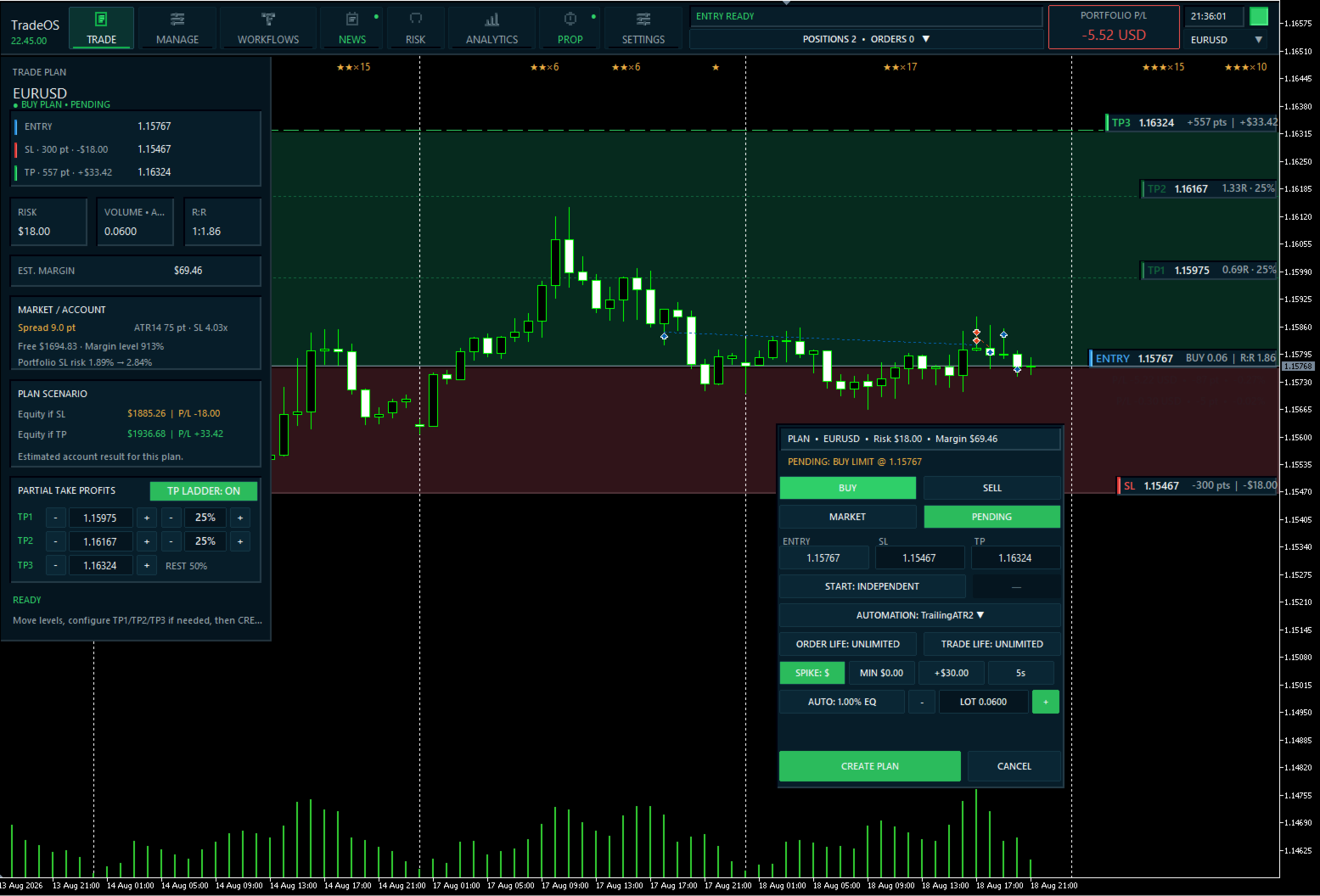
- Visual Trade Planner — set ENTRY, SL and TP with the mouse or enter exact prices from the keyboard.
- Risk & Position Sizing — automatic calculation of volume, risk, R:R and estimated margin.
- MARKET and PENDING — explicit execution mode for every trade plan.
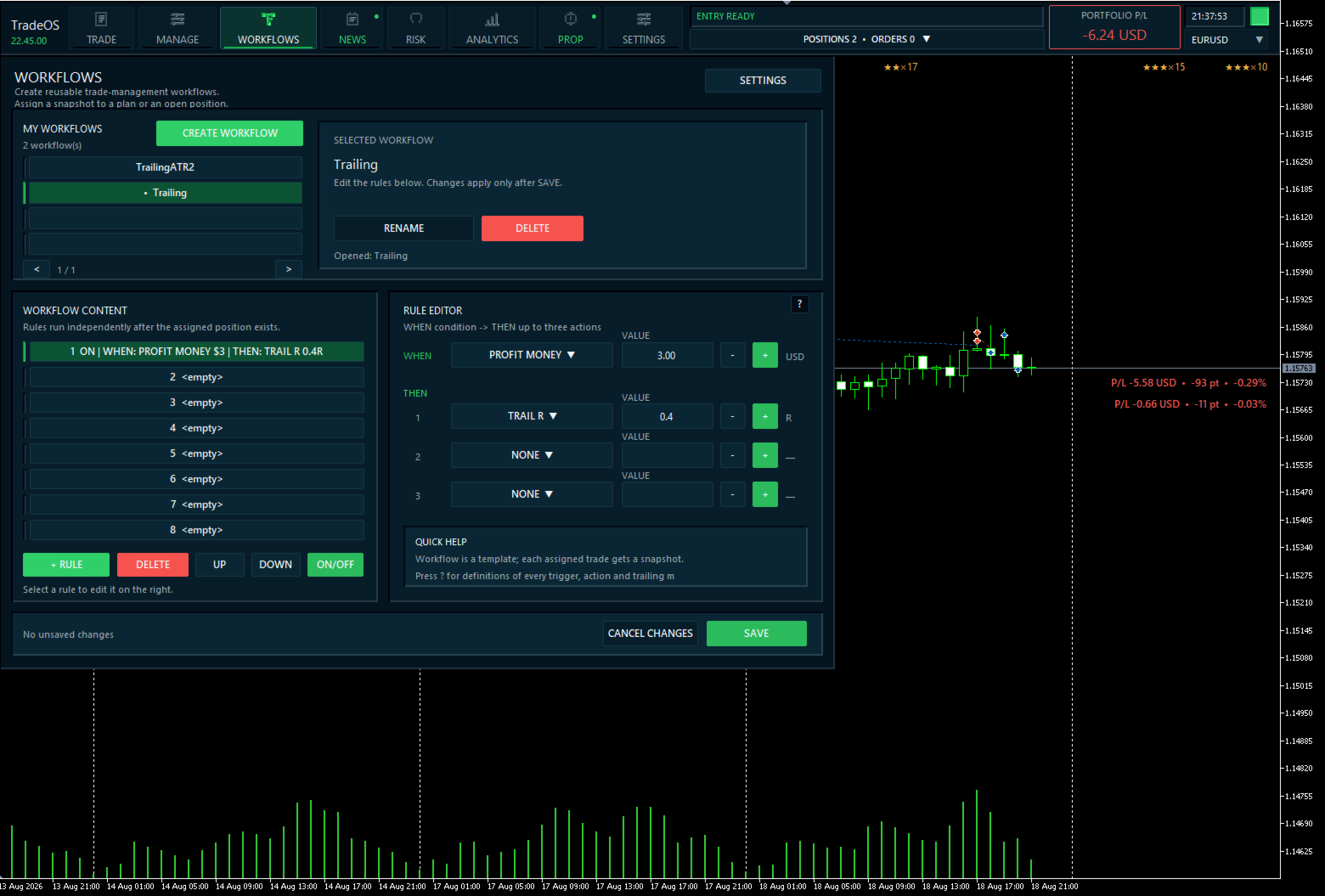
- Workflows — automate position management with your own WHEN → THEN rules.
- Profit Spike Protection — protect sudden profit spikes using a threshold in money or R.
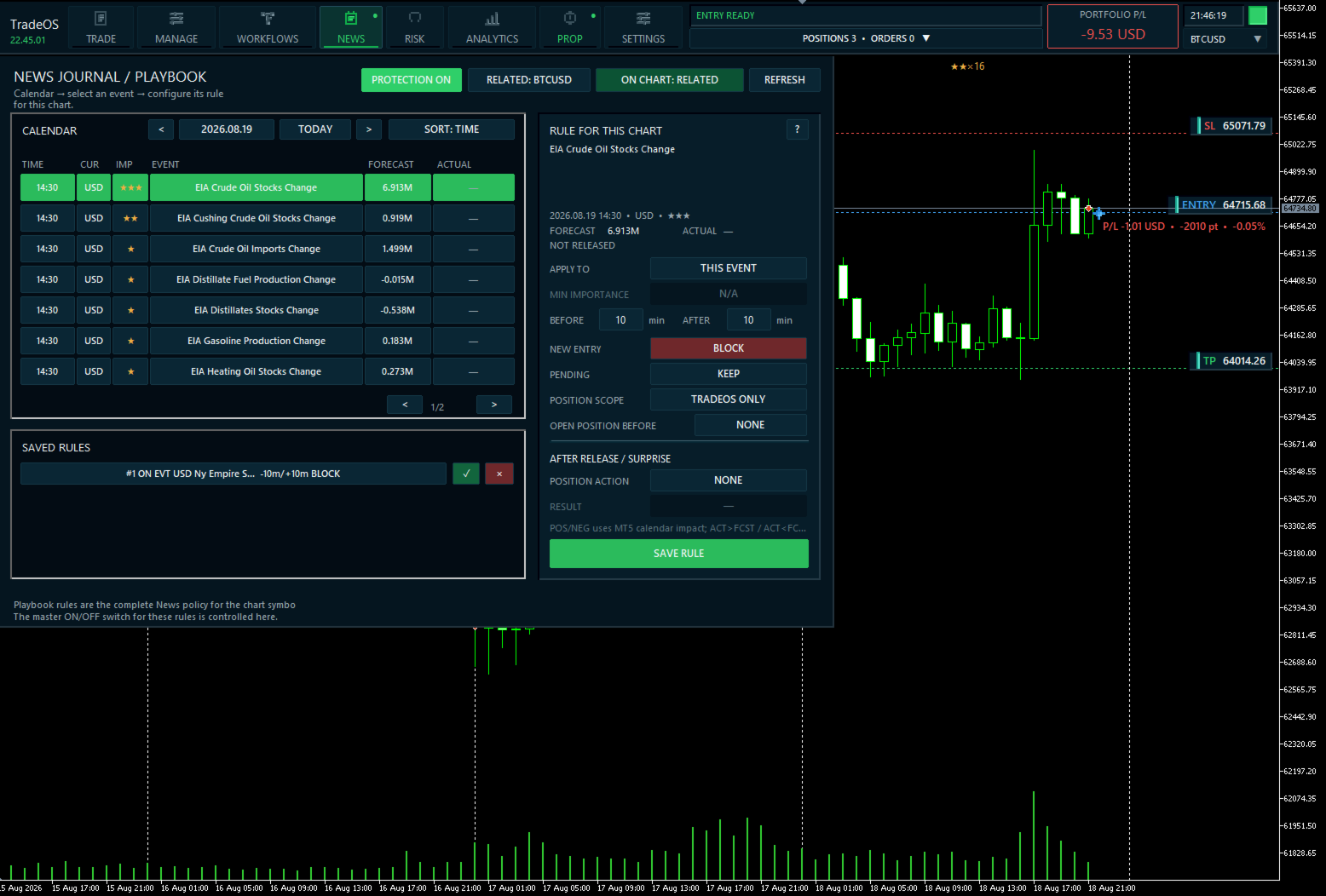
- News Playbook — individual protection rules for MT5 economic-calendar events.
- Risk & Discipline Guards — control risk, losses, trade count, sessions and other limits.
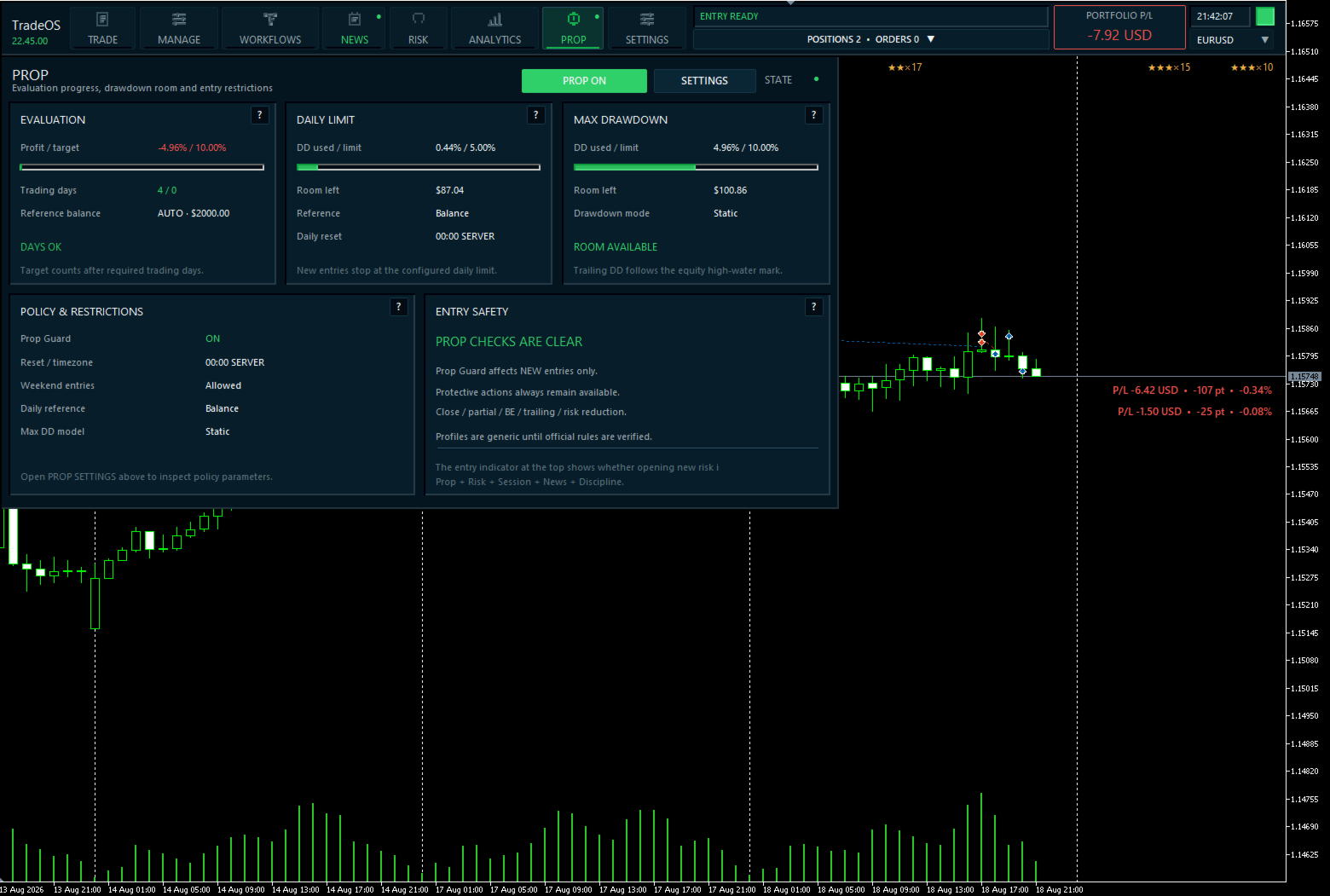
- Prop Guard — monitor Daily Loss, Maximum Drawdown, Profit Target and other prop-account rules.
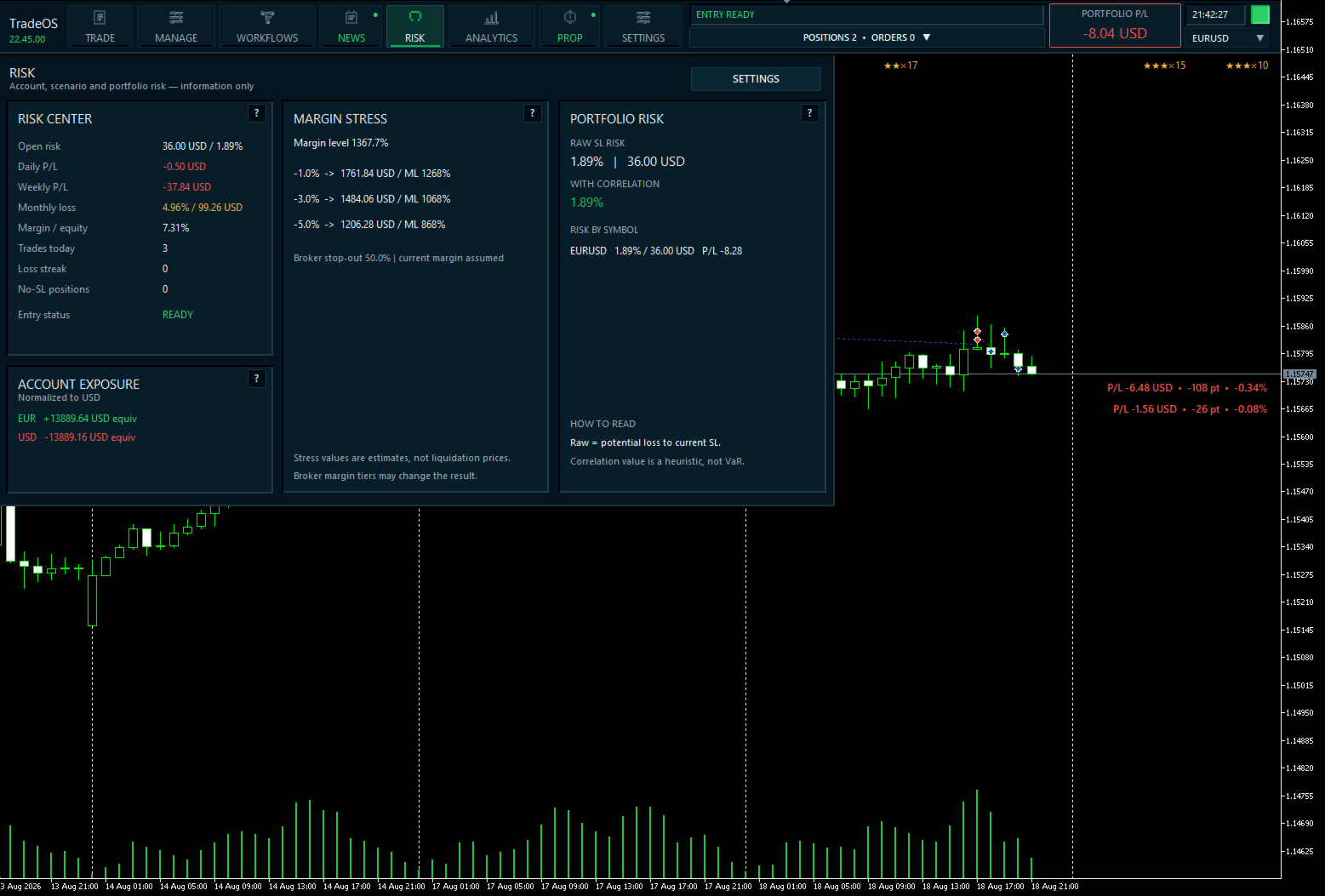
- Portfolio Risk — open risk, currency exposure, correlation and margin stress.
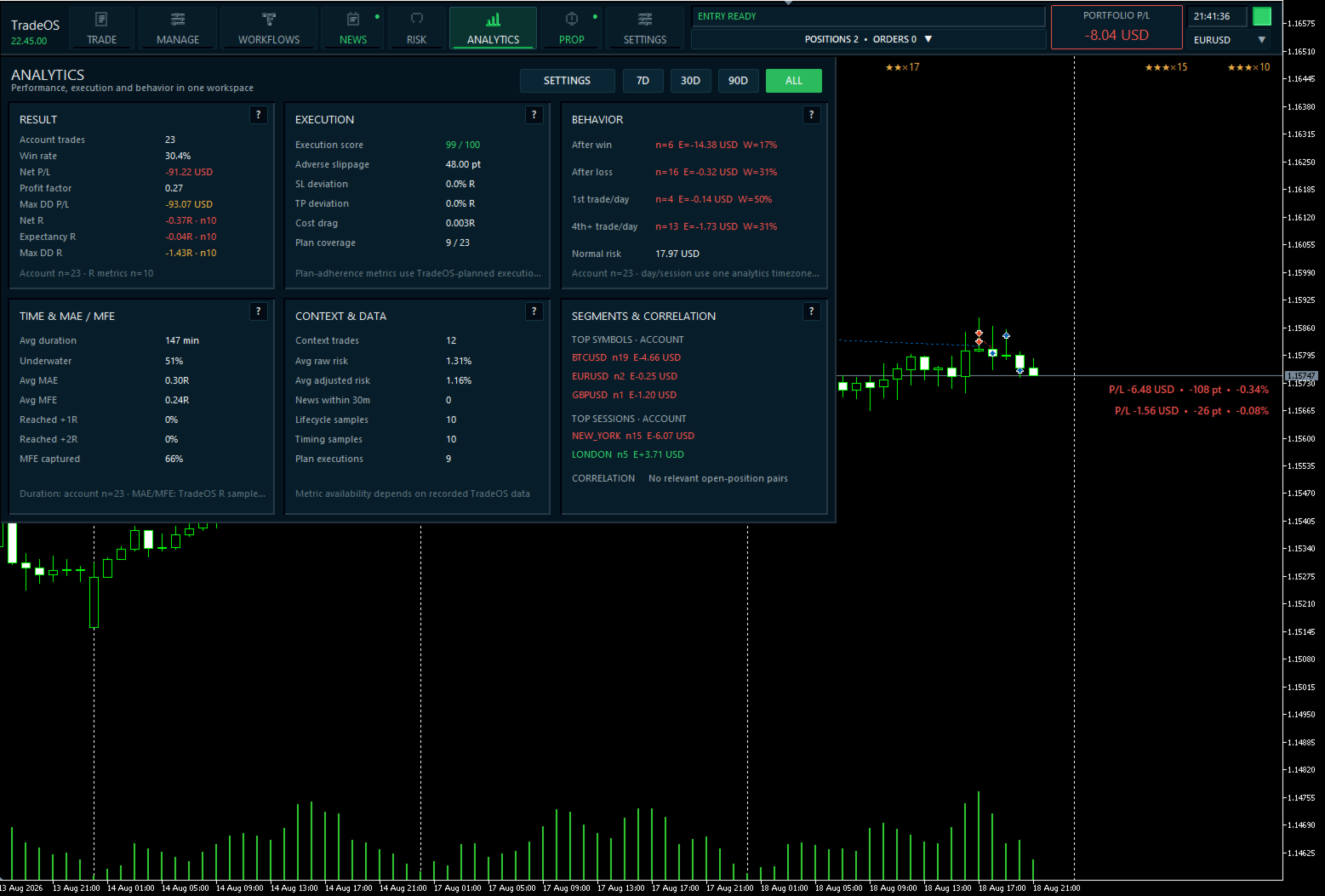
- Analytics — R-based performance, Expectancy, MAE/MFE, execution quality and behavior statistics.
- PlanBook — multiple trade plans and dependent scenarios.
- 7 interface languages and scalable UI.
Plan the trade before entry
Create a plan, choose BUY / SELL and MARKET / PENDING.
ENTRY, Stop Loss and Take Profit can be dragged directly on the chart or entered from the keyboard. TradeOS immediately calculates:
- money risk;
- position size;
- Risk/Reward;
- estimated margin.
Position size can be calculated from a percentage of Balance or Equity, a fixed cash risk, or a fixed lot size.
All key trade parameters are visible before an order is sent to the broker.
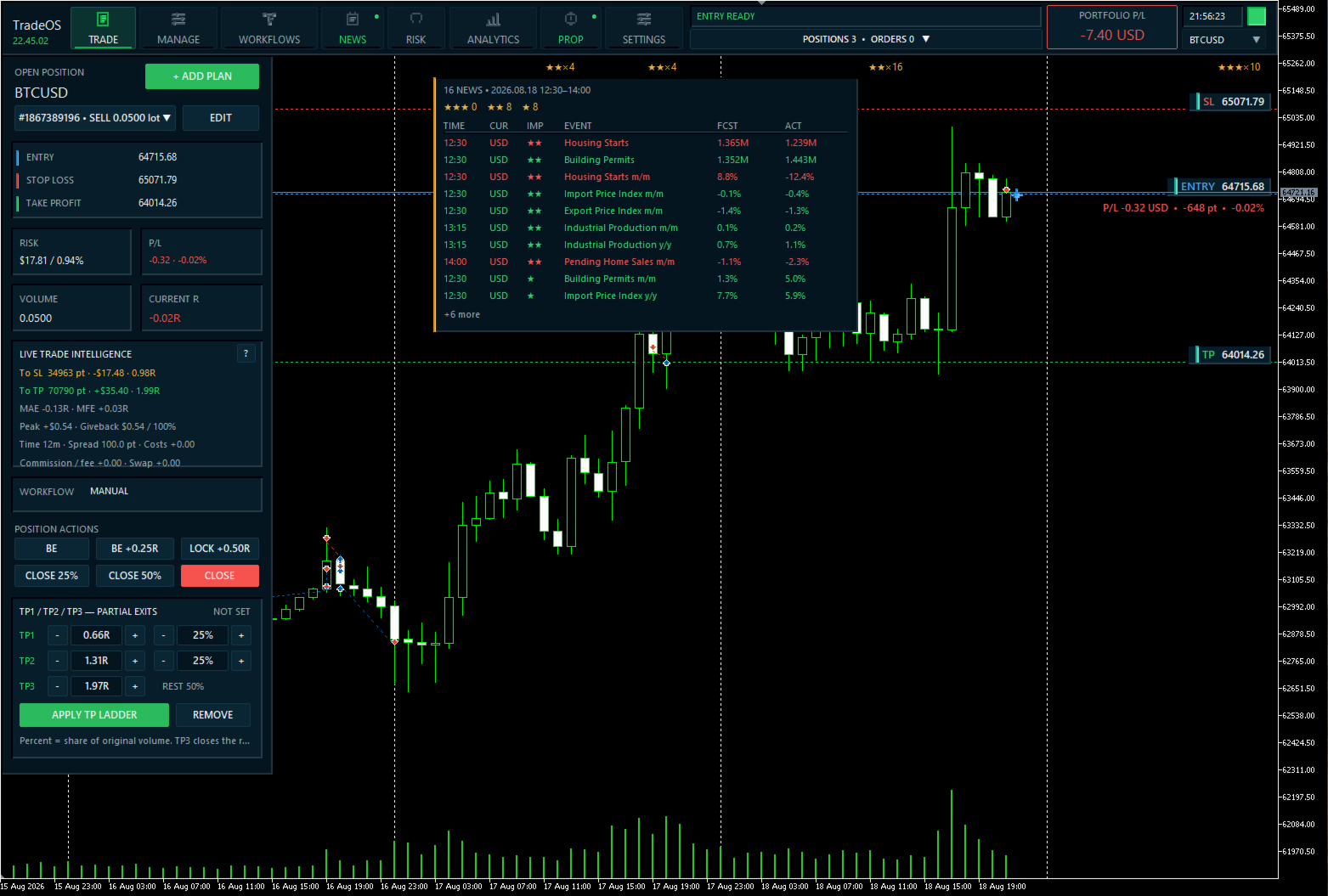
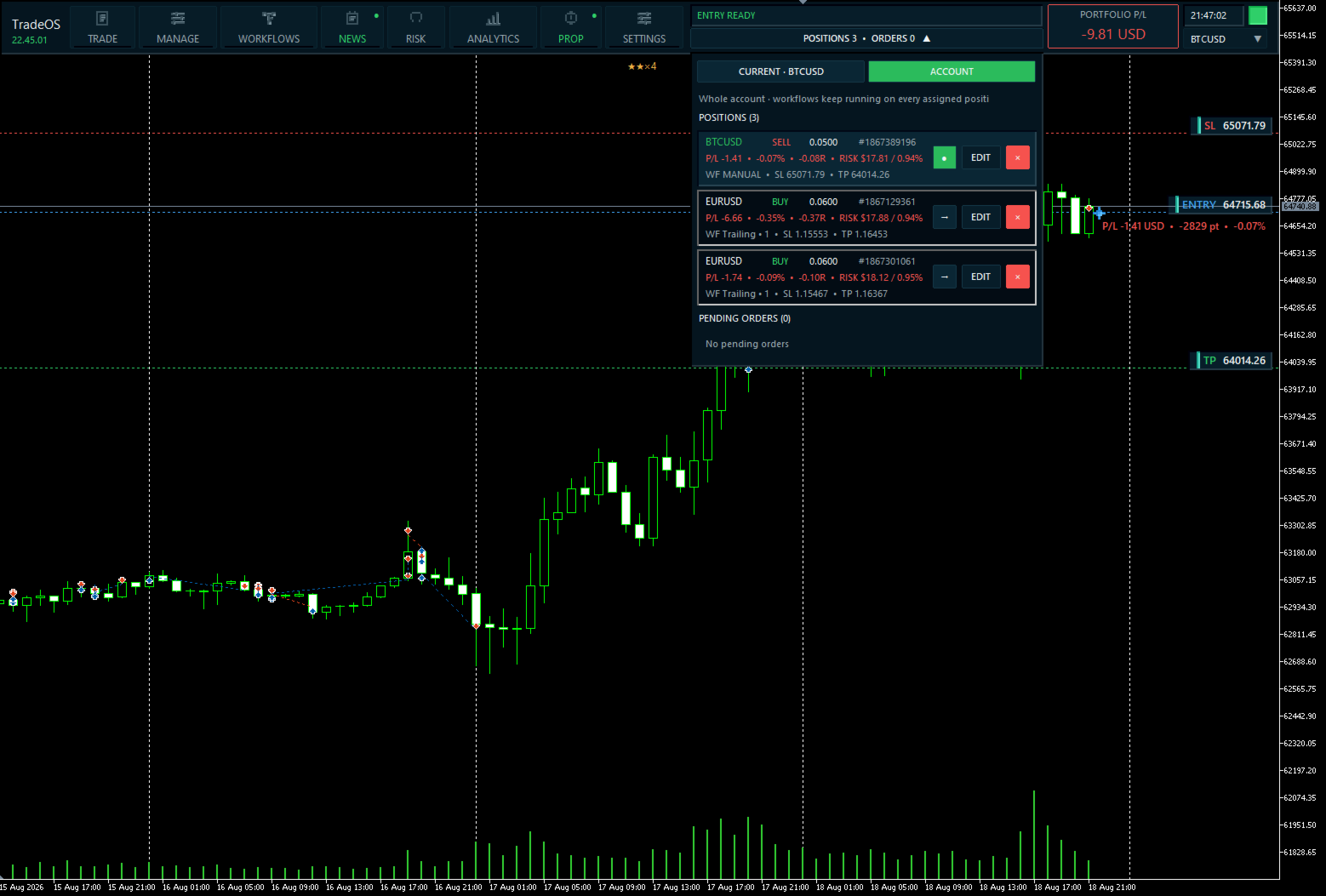
After a position is opened, its protective levels can be edited directly on the chart: TradeOS displays the ENTRY, SL and TP of each trade separately and lets you visually adjust protection for an existing position.
Workflows — manage positions by your rules
Create your own position-management scenarios in the WHEN → THEN format.
For example:
- +1R reached → move SL to break-even;
- price reaches a level → partially close the position;
- specified time elapsed → perform an action;
- candle closes → adjust protection;
- enable ATR trailing;
- trail Stop Loss by the previous candle or by R.
A Workflow is assigned to a specific plan or position. Editing the template does not change the rules of an already managed trade.
Profit Spike Protection
TradeOS can monitor a sharp increase in floating profit and react automatically when a configured threshold is reached.
The threshold can be defined in money or in R. This lets you define the system's response to a sudden profit spike in advance instead of deciding only after a pullback.
News Playbook
TradeOS uses the MetaTrader 5 economic calendar and lets you create your own protection rules for specific news events.
Select an upcoming event directly in the TradeOS calendar and define the system behavior before and after the release: restrict new entries, manage pending orders, or protect an existing position.
Each rule can define the time window before and after the event, its scope, and post-release actions using Actual / Forecast.
Past events remain visible for analysis, but new rules can only be created for upcoming events.
The News Playbook is saved and restored after terminal restart.
Risk & Discipline Guards
TradeOS checks new risk before a position is opened.
You can control:
- maximum risk per trade;
- total open risk;
- number of open positions;
- daily and weekly losses;
- trades per day;
- losing streaks;
- trading sessions;
- minimum R:R;
- margin usage.
Rules can operate in OFF / WARN / BLOCK modes.
TradeOS principle: restrictions on new risk must not prevent capital protection.
Even when new entries are blocked, closing positions, partial close, break-even and other protective actions remain available.
If entry is prohibited, TradeOS shows the reason directly in the workspace.
Prop Trading
A dedicated PROP workspace keeps prop-account limits visible:
- Profit Target;
- Daily Loss Limit;
- Maximum Drawdown;
- Static / Trailing Drawdown;
- Balance / Equity reference;
- Minimum Trading Days;
- daily reset time;
- weekend and Friday restrictions.
TradeOS shows the used limit and remaining room before a restriction is reached.
Prop Guard blocks only new risk — protective actions on existing positions remain available.
Important: prop-firm rules differ and may change. Configure TradeOS according to your firm's current rules before starting an evaluation.
Risk & Portfolio
A separate Risk workspace shows the state of risk without mixing it with trading actions.
- open Stop Loss risk;
- currency exposure;
- risk by symbol;
- correlation-adjusted portfolio risk;
- What-If scenarios;
- Margin Stress under adverse market movement.
Portfolio actions are separated into Manage and require confirmation.
Analytics
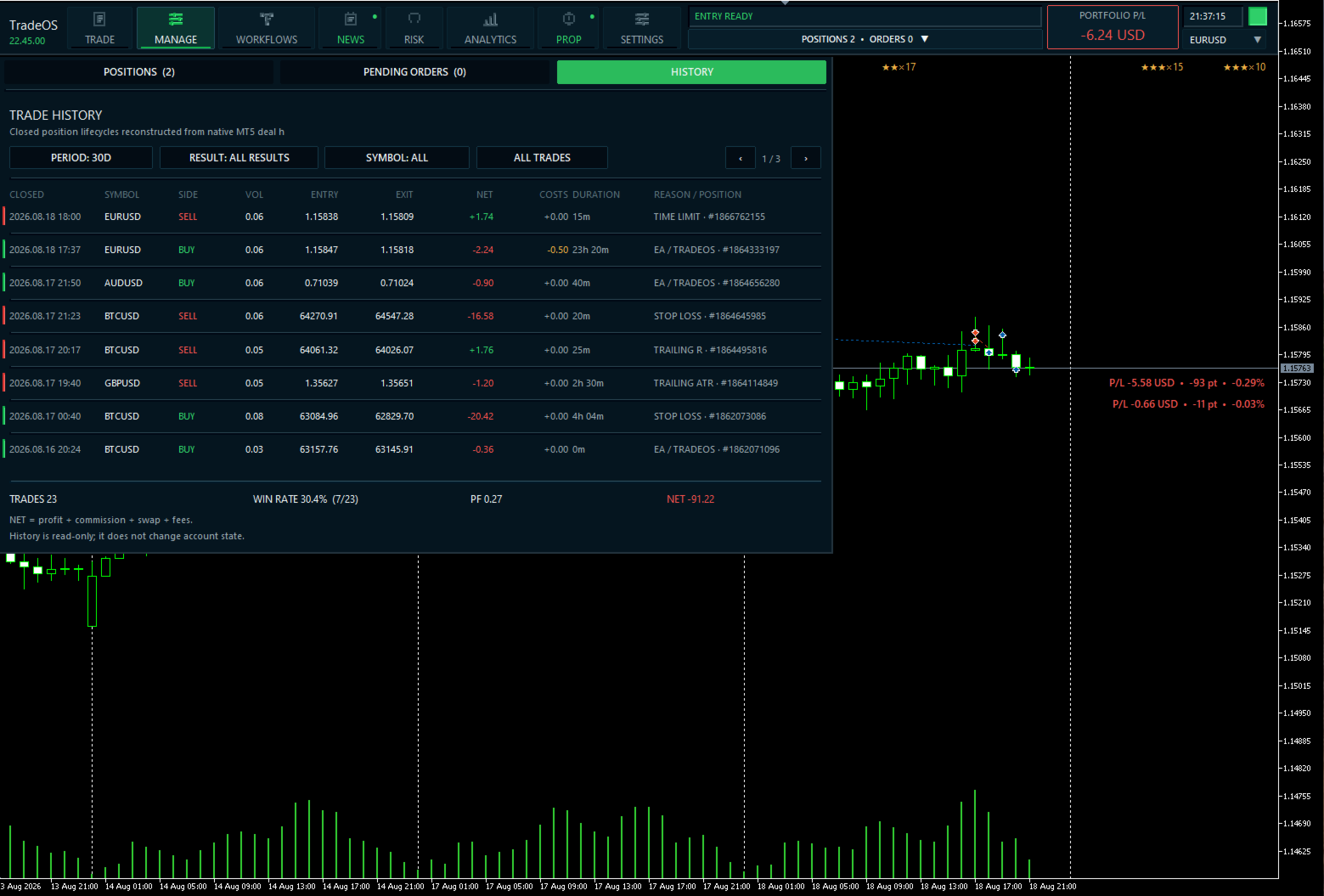
TradeOS analyzes not only profit, but also the quality of trade-plan execution.
- Trades and Win Rate;
- Net R and Expectancy;
- Profit Factor and Drawdown;
- MAE / MFE;
- reaching +1R / +2R;
- how much of MFE was actually captured;
- deviation of actual ENTRY, SL and TP from the plan;
- slippage and execution cost;
- statistics by symbol and trading session;
- behavior after winning and losing trades.
Available periods: 7D / 30D / 90D / ALL.
Manage & PlanBook
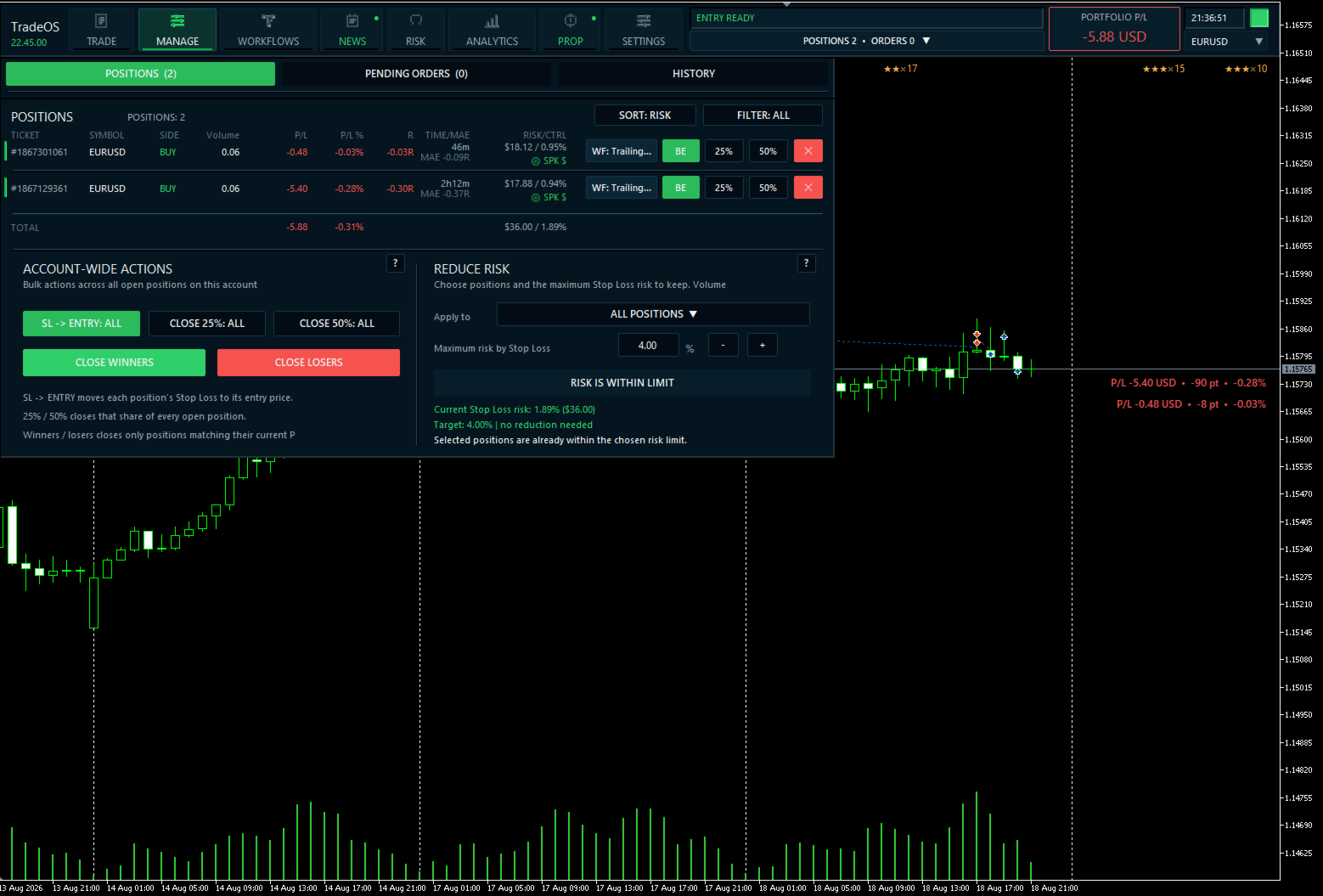
Manage combines open positions, pending orders and portfolio management.
Quick protective actions for a position include:
- SL → Break Even;
- close 25%;
- close 50%;
- full close;
- assign and inspect a Workflow.
PlanBook lets you keep multiple trade plans and connect them with conditions.
For example, the next plan can wait for the entry, close, Stop Loss or Take Profit of the previous plan.
Additional features
- TTL — limit the lifetime of a pending order or position.
- Hotkeys — fast protective actions.
- Hedging and Netting.
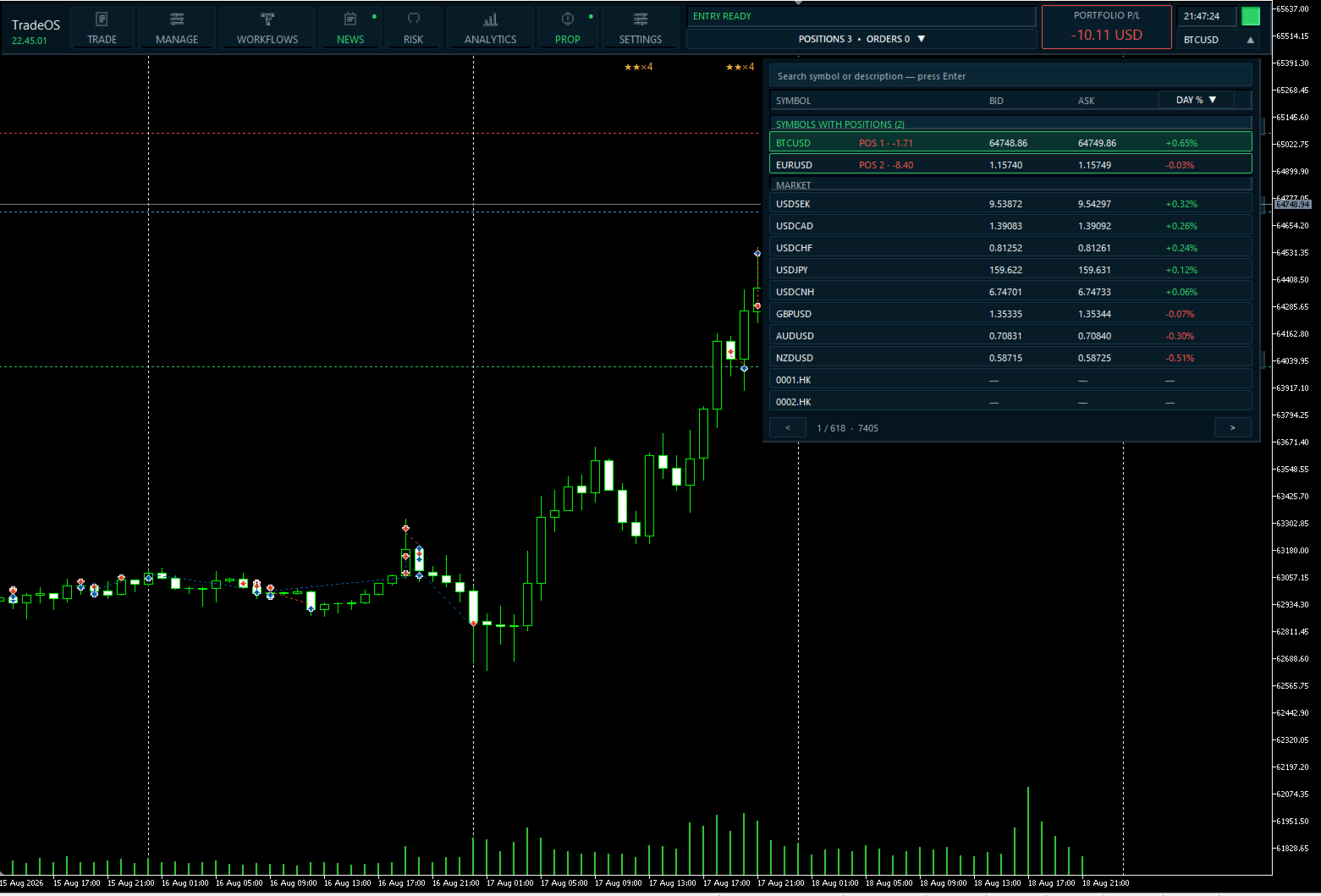
- Works with different MT5 symbols and brokers.
- Plans, Workflows, News Playbook and workspace state persist across restarts.
- Context help directly in the interface.
- Scalable interface for different screen resolutions.
- 7 languages: English, Русский, Español, Deutsch, Français, Português, 中文.
Who TradeOS is for
TradeOS is built for discretionary and semi-automatic traders who need not another signal system, but infrastructure for executing their own trading process.
It is especially useful if you:
- trade with fixed risk;
- use partial closes and trailing;
- work with multiple management scenarios;
- take prop evaluations;
- trade around economic news;
- want to control trading discipline;
- manage several positions at once;
- want to separate the quality of a trading idea from the quality of its execution.
Quick start
- Add TradeOS to a chart.
- Enable Algo Trading.
- Configure the risk mode.
- Click ADD PLAN.
- Choose BUY/SELL and MARKET/PENDING.
- Set ENTRY, SL and TP.
- Assign a Workflow if needed.
- Create the plan.
Main Risk, Workflows, News, Prop and Analytics settings are available directly in the corresponding TradeOS workspaces.
Requirements
- MetaTrader 5.
- Algo Trading enabled.
- Hedging or Netting account.
- News Playbook requires access to the MetaTrader 5 economic calendar.
Important
TradeOS is not a trading signal, trading strategy or market-prediction system.
The trader makes the entry decision. TradeOS provides tools for planning, risk calculation, execution, automated management and post-trade analysis according to rules defined by the user.
Correlation and stress calculations are risk-management estimates and are not forecasts of future market movement.