TradeOS

TradeOS MT5 — Trading Workstation professionale

Pianificazione del trade, controllo del rischio, gestione delle posizioni, protezione news, limiti prop e analytics — direttamente sul grafico MetaTrader 5.

TradeOS non cerca ingressi e non decide al posto tuo. La decisione è del trader; TradeOS aiuta a pianificare, eseguire, proteggere e analizzare.

PIANO → INGRESSO → PROTEZIONE → GESTIONE → ANALISI

Prezzo di lancio — solo per le prime 10 copie

Le prime 10 copie di TradeOS sono disponibili al prezzo di lancio di $59.

Dopo la vendita delle prime 10 copie, il prezzo previsto di TradeOS sarà di $100.

È un prezzo speciale di lancio dedicato ai primi utenti del prodotto.

Funzioni principali

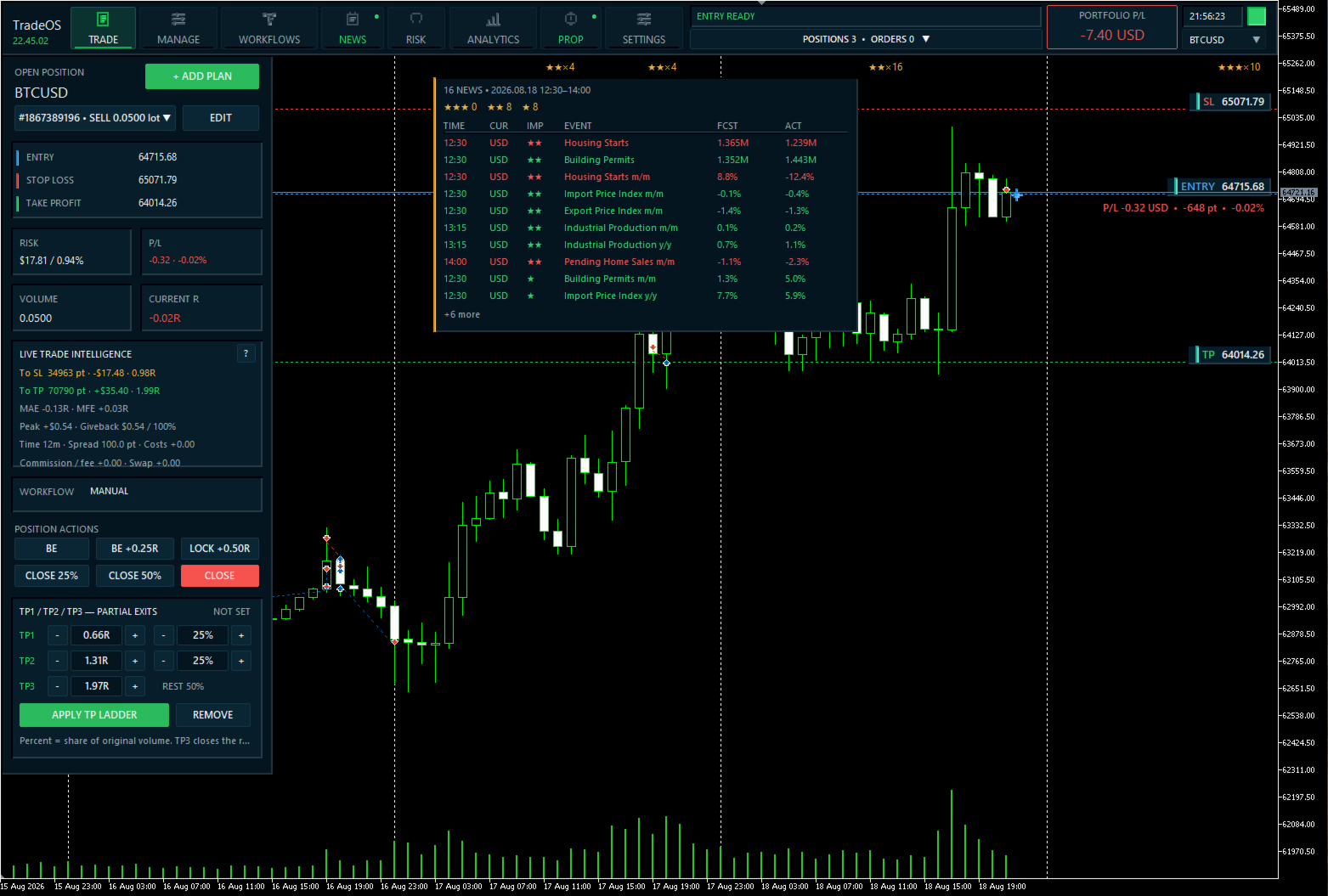
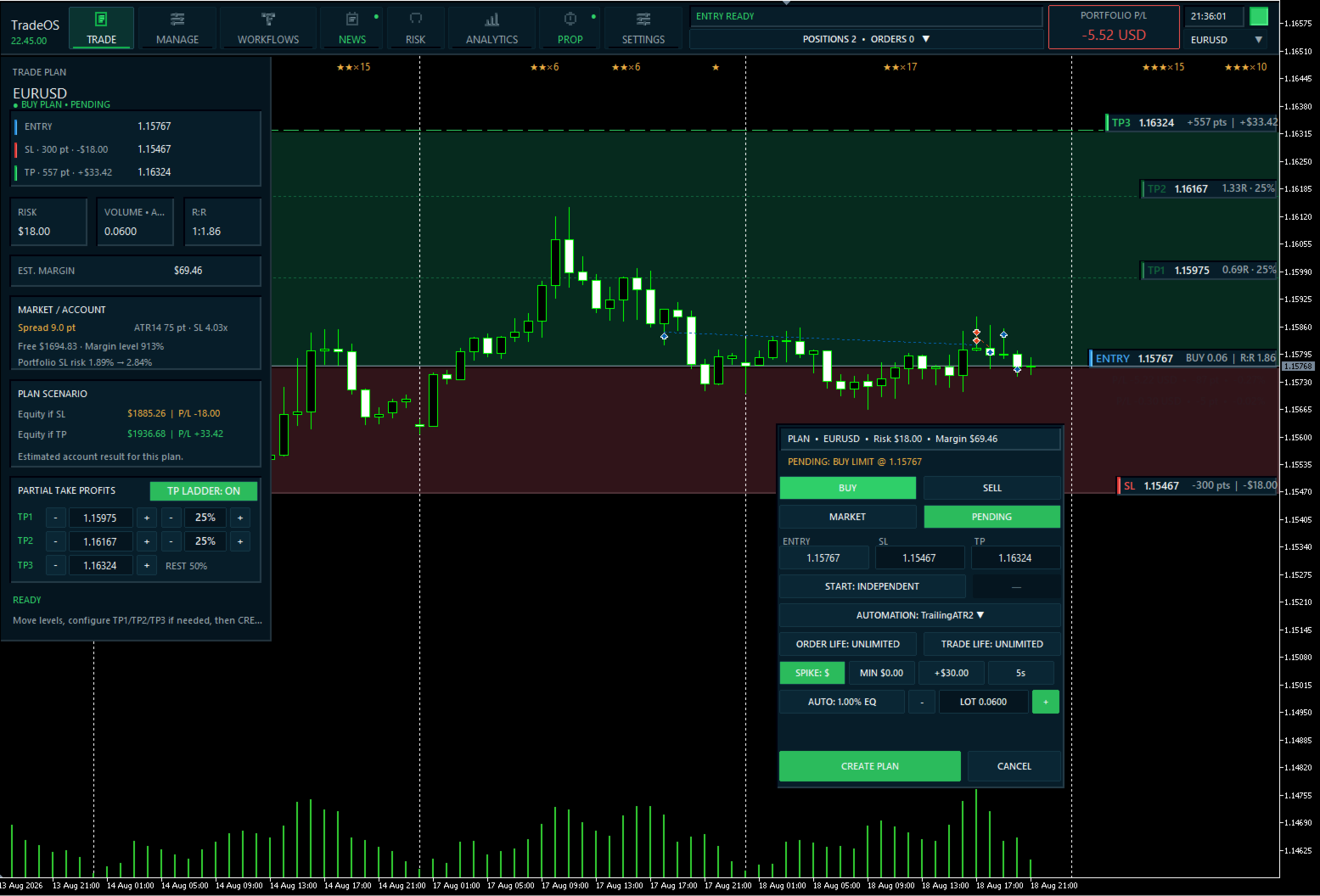
  • Visual Trade Planner — ENTRY, SL e TP con il mouse o con inserimento preciso da tastiera.
  • Risk & Position Sizing — calcolo automatico di volume, rischio, R:R e margine stimato.
  • MARKET / PENDING — modalità di esecuzione esplicita per ogni piano.
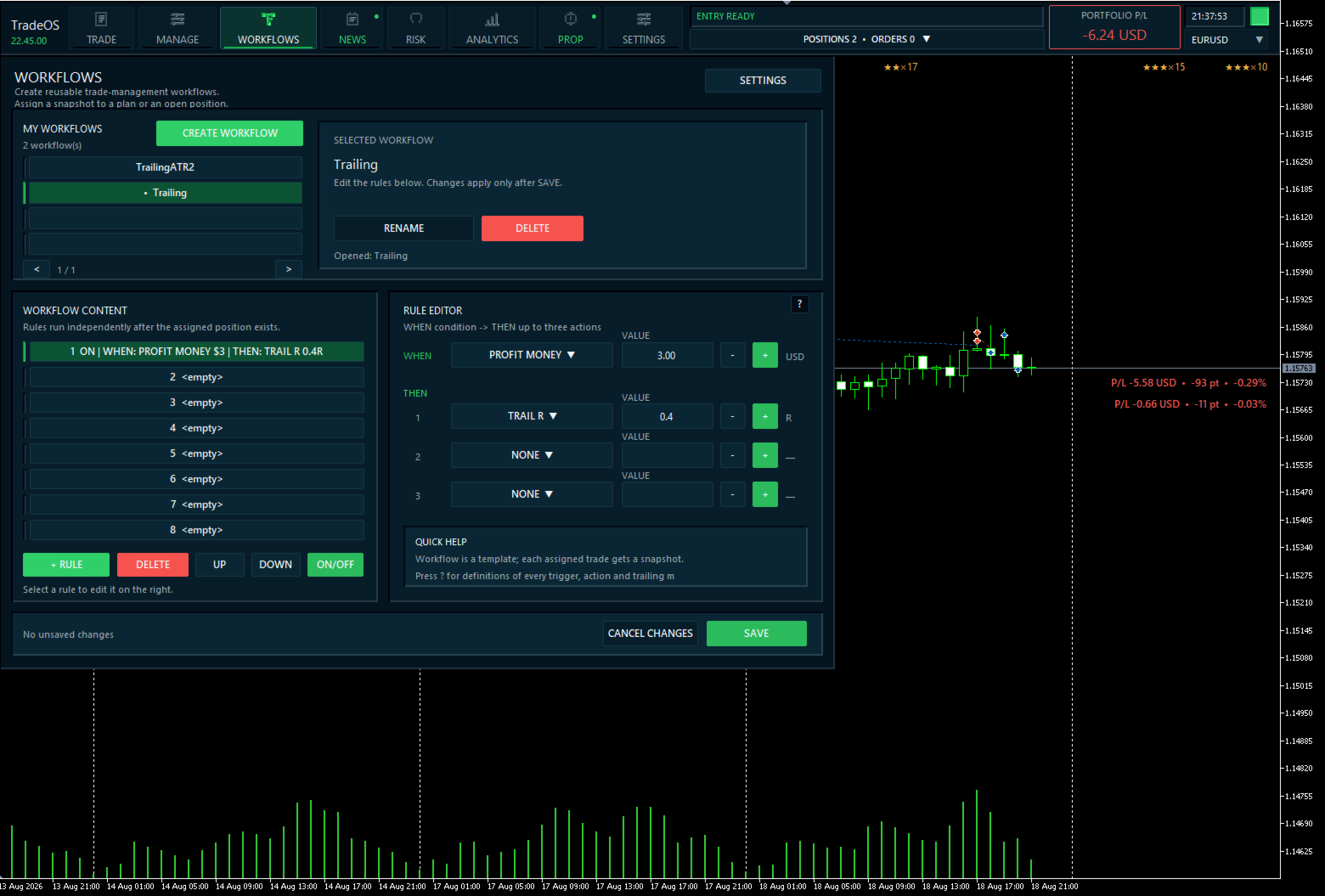
  • Workflows — gestione automatica con regole QUANDO → ALLORA.
  • Profit Spike Protection — protezione dei picchi improvvisi di profitto tramite soglia in denaro o R.
  • News Playbook — regole individuali per gli eventi del calendario economico MT5.
  • Risk & Discipline Guards — controllo di rischio, perdite, numero di trade, sessioni e altri limiti.
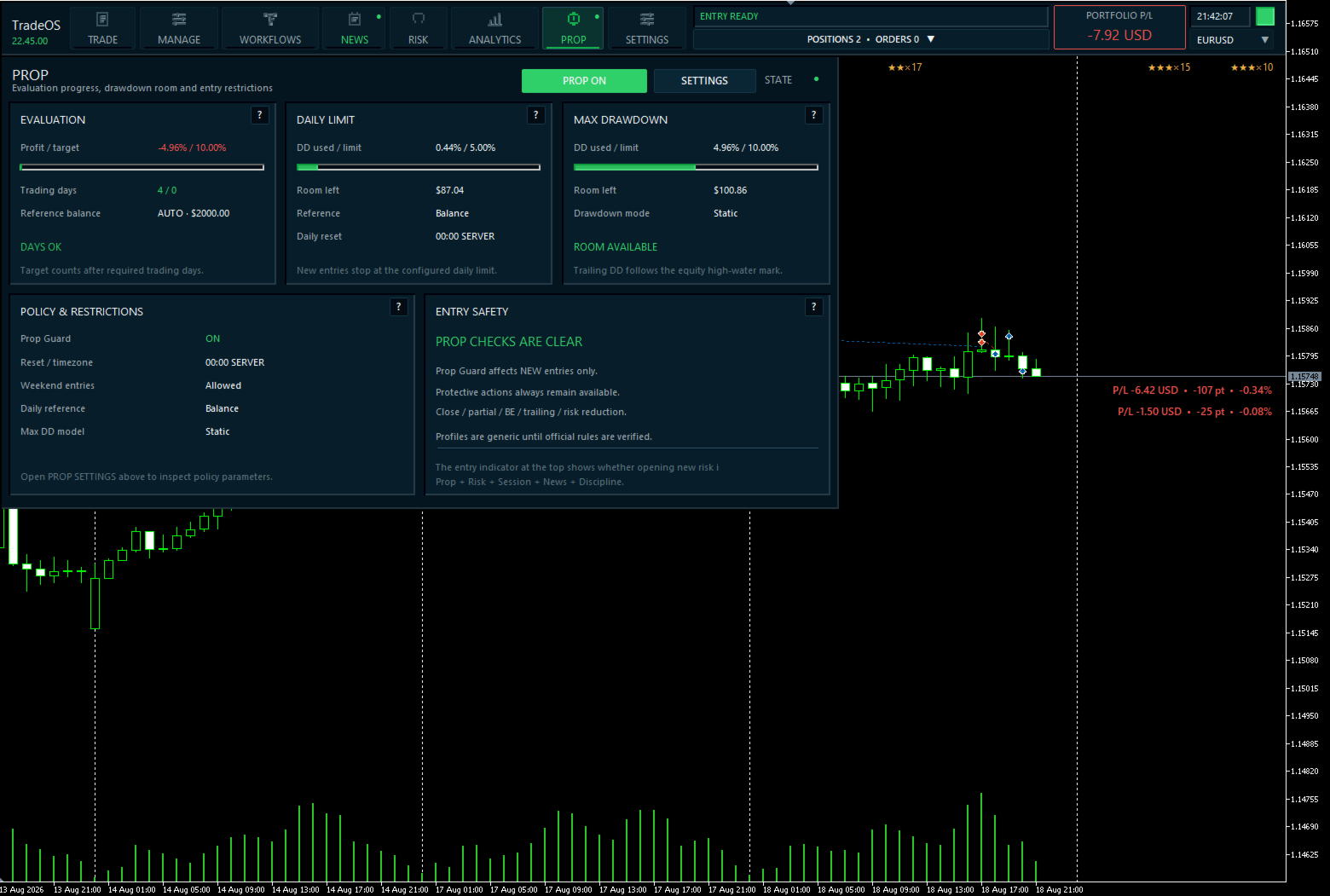
  • Prop Guard — Daily Loss, Maximum Drawdown, Profit Target e altre regole prop.
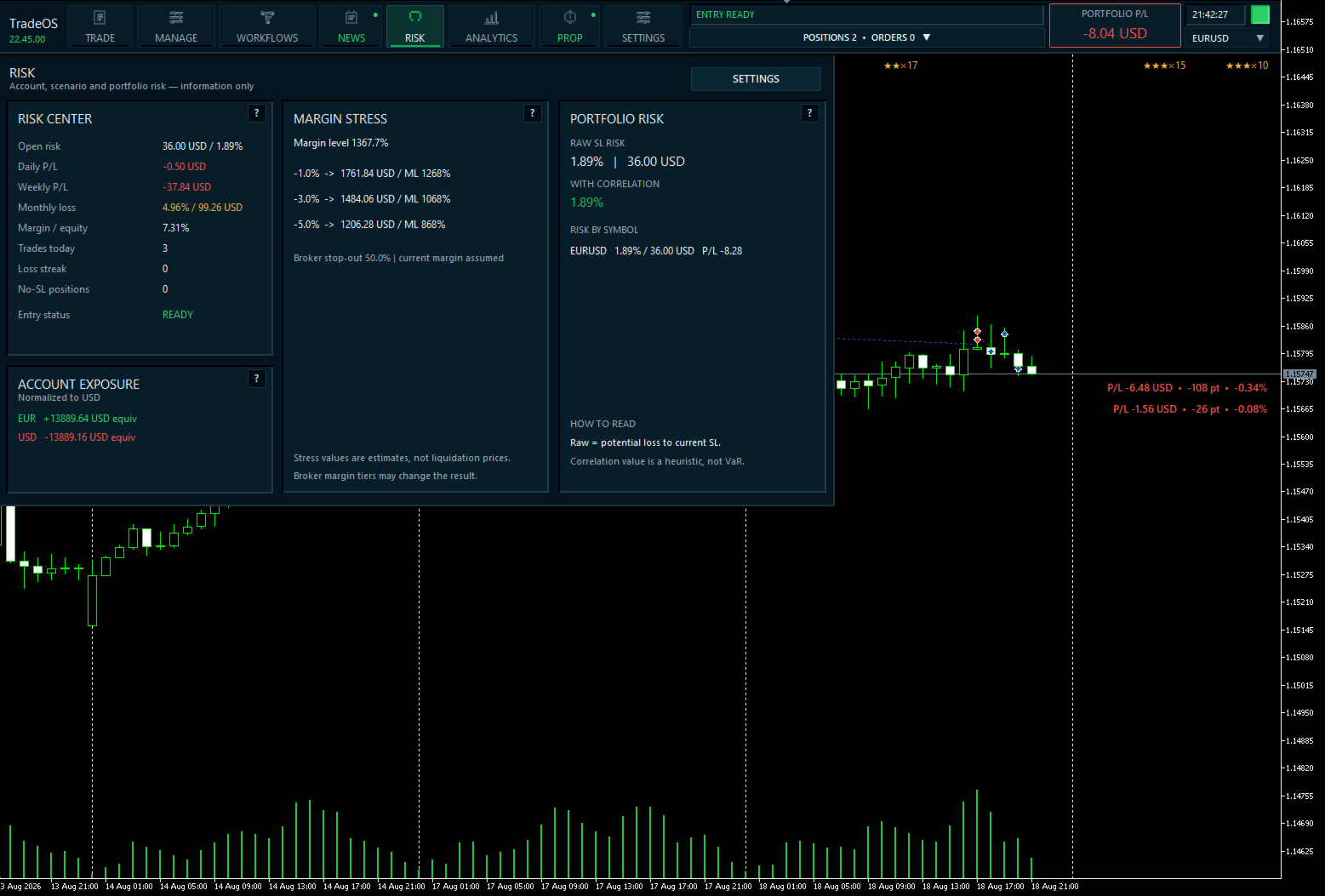
  • Portfolio Risk — rischio aperto, esposizione valutaria, correlazione e stress del margine.
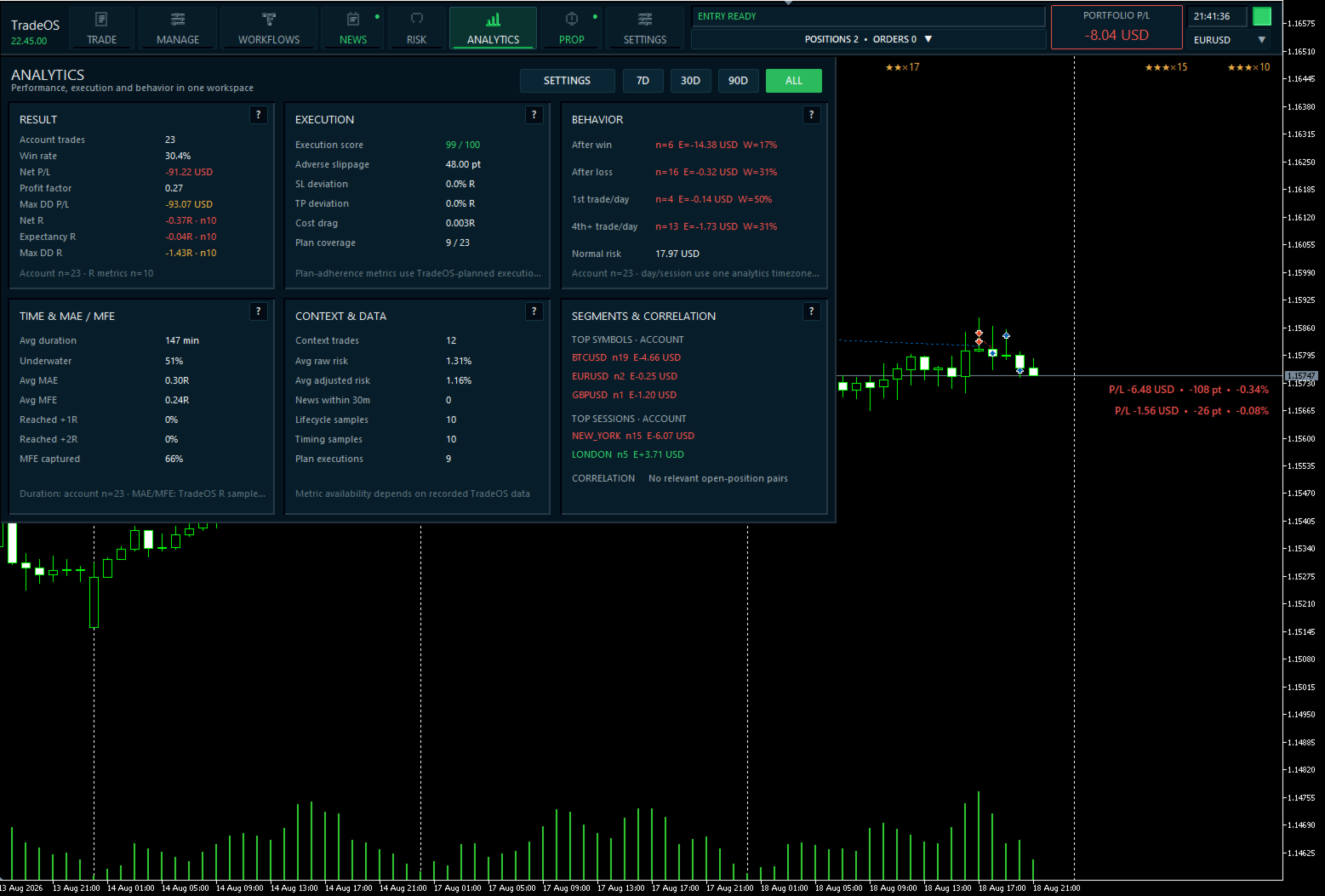
  • Analytics — performance in R, Expectancy, MAE/MFE, qualità di esecuzione e statistiche comportamentali.
  • PlanBook — più piani e scenari dipendenti.
  • 7 lingue UI e interfaccia scalabile.

Pianifica prima dell’ingresso

Crea un piano e scegli BUY / SELL e MARKET / PENDING.

ENTRY, Stop Loss e Take Profit possono essere trascinati sul grafico o inseriti da tastiera. TradeOS calcola subito:

  • rischio monetario;
  • dimensione posizione;
  • Risk/Reward;
  • margine stimato.

La size può essere calcolata come percentuale di Balance/Equity, rischio monetario fisso o lotto fisso.

I parametri principali sono visibili prima dell’invio dell’ordine al broker.

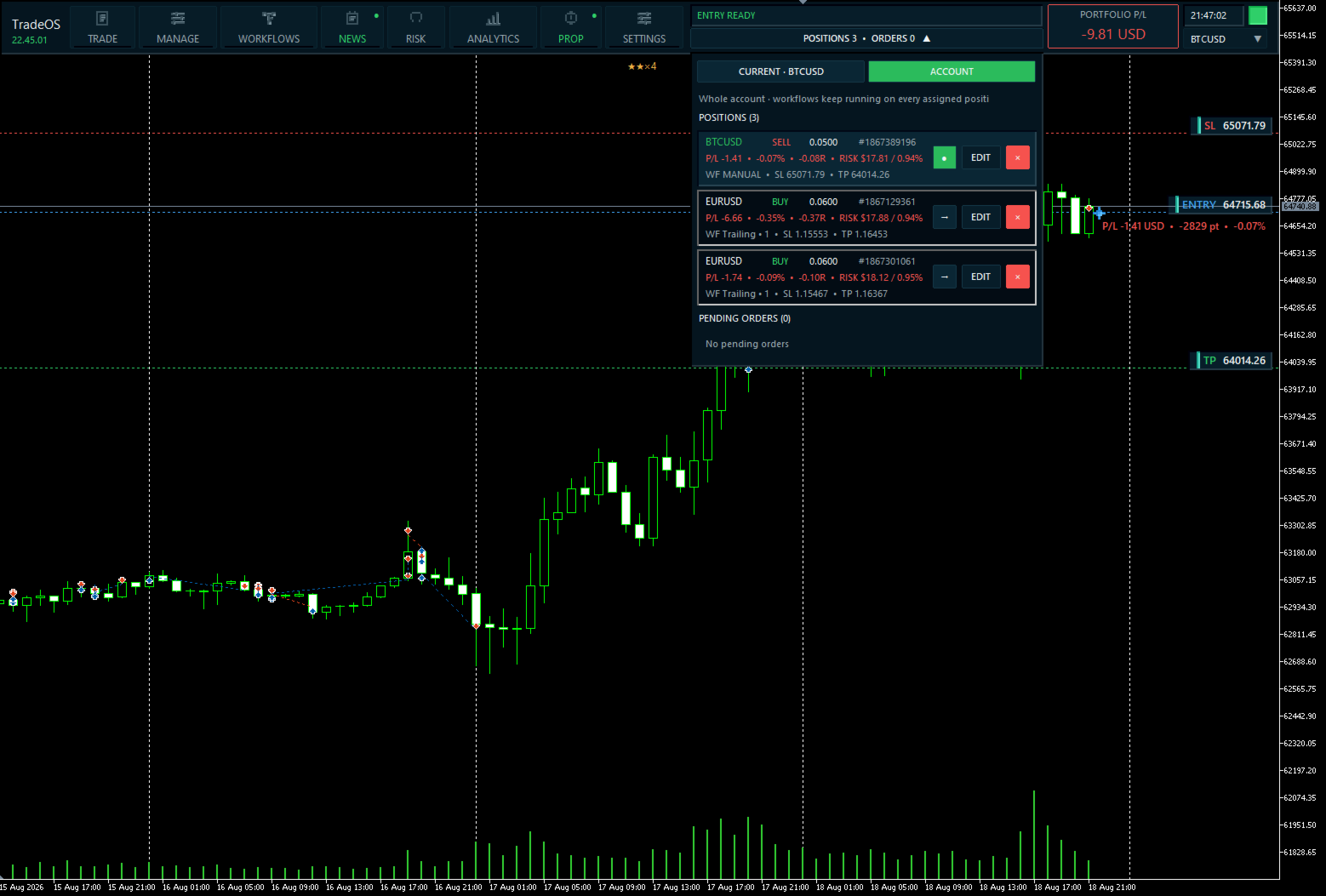
Dopo l’apertura di una posizione, i livelli di protezione possono essere modificati direttamente sul grafico: TradeOS mostra separatamente ENTRY, SL e TP di ogni trade e consente di regolare visivamente la protezione di una posizione esistente.

Workflows — gestisci secondo le tue regole

Crea scenari nel formato QUANDO → ALLORA.

  • raggiunto +1R → SL a Break Even;
  • prezzo raggiunge un livello → chiusura parziale;
  • tempo trascorso → esegui azione;
  • candela chiusa → modifica protezione;
  • attiva trailing ATR;
  • segui lo Stop Loss con candela precedente o R.

Il Workflow viene assegnato a un piano o posizione specifici. Modificare il template non cambia un trade già gestito.

Profit Spike Protection

TradeOS può monitorare un rapido aumento del profitto flottante e reagire automaticamente al raggiungimento della soglia.

La soglia è definita in denaro o R.

News Playbook

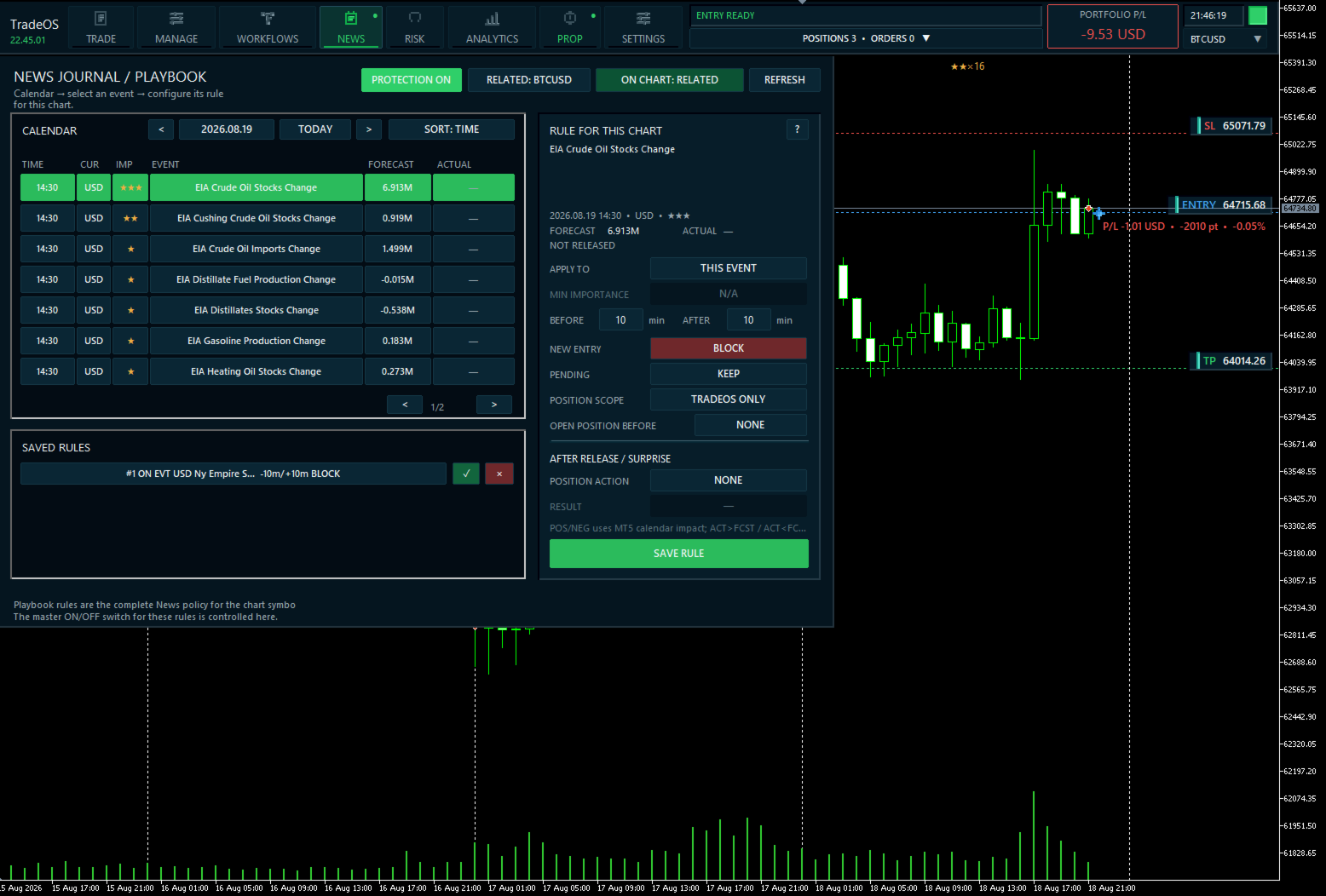
TradeOS utilizza il calendario economico MetaTrader 5 e permette di creare regole di protezione personalizzate per eventi specifici.

Seleziona un evento futuro direttamente nel calendario TradeOS e definisci in anticipo il comportamento del sistema prima e dopo la pubblicazione: limitare nuovi ingressi, gestire pending orders o proteggere una posizione esistente.

Ogni regola può definire la finestra temporale prima/dopo l’evento, l’ambito di applicazione e le azioni successive usando Actual / Forecast.

Gli eventi già pubblicati restano visibili per l’analisi, ma nuove regole possono essere create solo per eventi futuri.

News Playbook viene salvato e ripristinato dopo il riavvio del terminale.

Risk & Discipline Guards

TradeOS controlla il nuovo rischio prima dell’apertura.

  • rischio massimo per trade;
  • rischio aperto totale;
  • numero di posizioni;
  • perdite giornaliere/settimanali;
  • trade al giorno;
  • serie di perdite;
  • sessioni;
  • R:R minimo;
  • uso del margine.

Modalità OFF / WARN / BLOCK.

Principio: limitare nuovo rischio non deve impedire la protezione del capitale.

Anche con nuovi ingressi bloccati, chiusura, parziale, Break Even e altre azioni protettive restano disponibili.

Prop Trading

Il workspace PROP mostra:

  • Profit Target;
  • Daily Loss Limit;
  • Maximum Drawdown;
  • Static / Trailing Drawdown;
  • riferimento Balance / Equity;
  • Minimum Trading Days;
  • reset giornaliero;
  • restrizioni venerdì/weekend.

TradeOS mostra limite utilizzato e spazio residuo.

Prop Guard blocca solo il nuovo rischio; le azioni protettive restano disponibili.

Importante: le regole delle prop firm variano e possono cambiare. Configura TradeOS secondo le regole attuali della tua firm.

Risk & Portfolio

  • rischio aperto da Stop Loss;
  • esposizione valutaria;
  • rischio per simbolo;
  • rischio portafoglio corretto per correlazione;
  • scenari What-If;
  • Margin Stress.

Le azioni di portafoglio sono separate in Manage e richiedono conferma.

Analytics

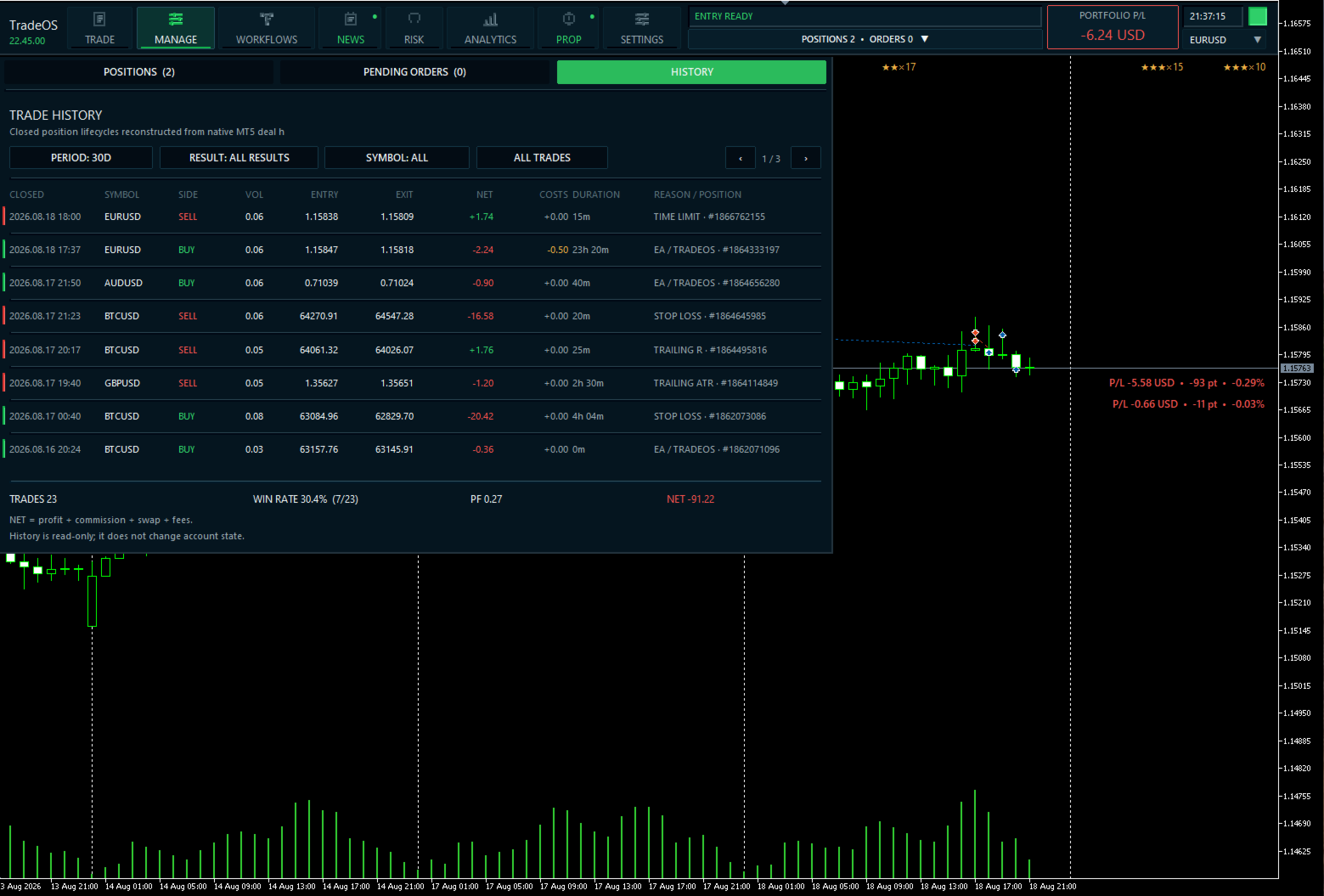
TradeOS analizza profitto e qualità di esecuzione del piano.

  • Trades / Win Rate;
  • Net R / Expectancy;
  • Profit Factor / Drawdown;
  • MAE / MFE;
  • +1R / +2R;
  • MFE realmente catturato;
  • scostamento ENTRY, SL, TP reali dal piano;
  • slippage e costo di esecuzione;
  • statistiche per simbolo/sessione;
  • comportamento dopo trade vincenti/perdenti.

7D / 30D / 90D / ALL.

Manage & PlanBook

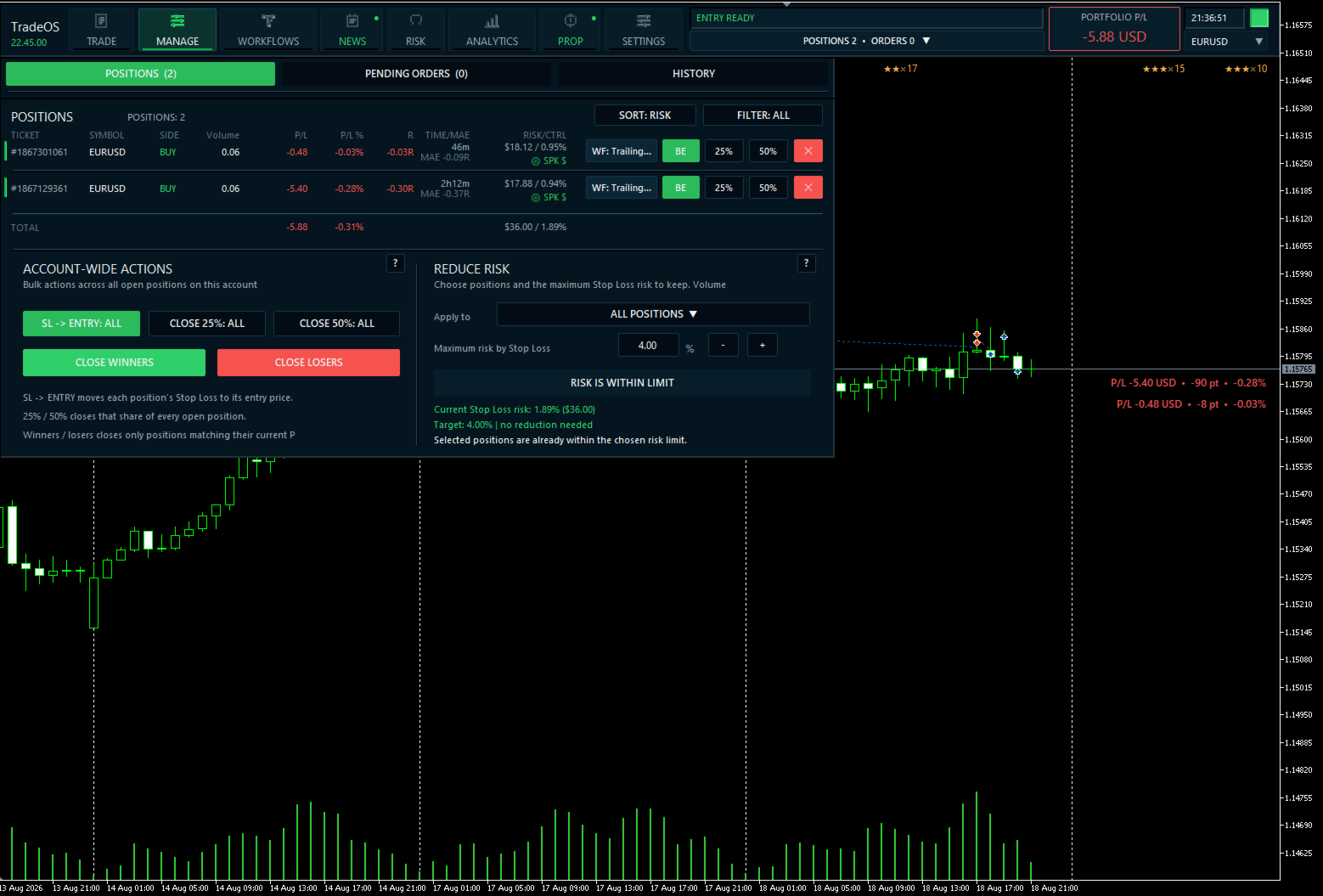
Manage riunisce posizioni, pending orders e portafoglio.

  • SL → Break Even;
  • chiudi 25%;
  • chiudi 50%;
  • chiusura totale;
  • assegna/consulta Workflow.

PlanBook mantiene più piani e consente dipendenze. Un piano successivo può attendere entry, close, Stop Loss o Take Profit del precedente.

Funzioni aggiuntive

  • TTL per pending orders/posizioni.
  • Hotkeys.
  • Hedging e Netting.
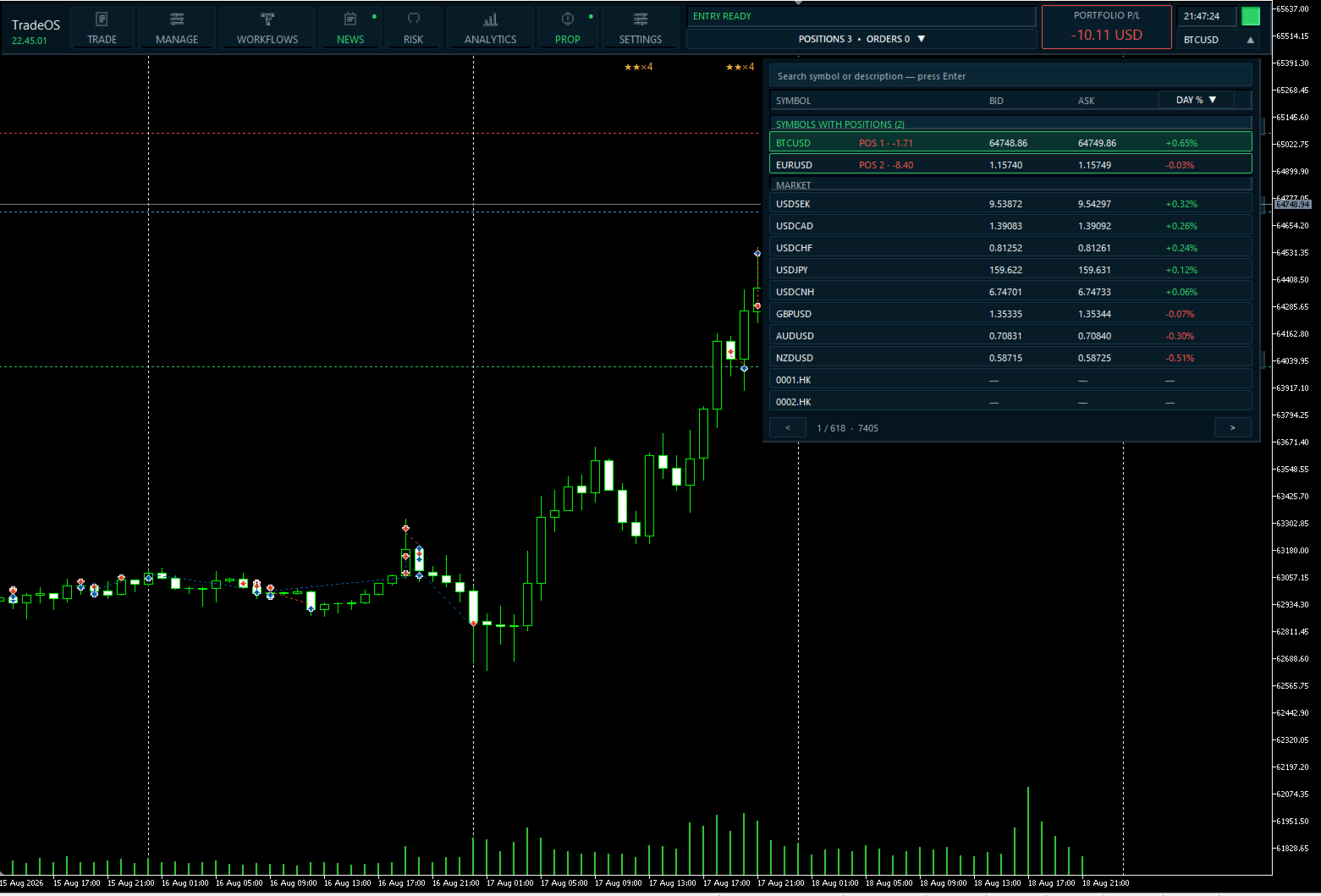
  • Diversi simboli e broker MT5.
  • Persistenza di piani, Workflows, News Playbook e workspace.
  • Aiuto contestuale.
  • Interfaccia scalabile.
  • 7 lingue: English, Русский, Español, Deutsch, Français, Português, 中文.

Per chi è TradeOS

Per trader manuali e semi-automatici che non cercano un altro sistema di segnali, ma un’infrastruttura per eseguire il proprio processo di trading.

  • rischio fisso;
  • parziali e trailing;
  • più scenari di gestione;
  • prop evaluation;
  • trading durante news economiche;
  • controllo della disciplina;
  • più posizioni;
  • separare qualità dell’idea e qualità dell’esecuzione.

Avvio rapido

  1. Aggiungi TradeOS al grafico.
  2. Attiva Algo Trading.
  3. Configura il rischio.
  4. Clicca ADD PLAN.
  5. Scegli BUY/SELL e MARKET/PENDING.
  6. Imposta ENTRY, SL e TP.
  7. Assegna un Workflow se necessario.
  8. Crea il piano.

Requisiti

  • MetaTrader 5.
  • Algo Trading attivo.
  • Conto Hedging o Netting.
  • News Playbook richiede accesso al calendario economico MT5.

Importante

TradeOS non è un segnale, una strategia di trading o un sistema di previsione del mercato.

La decisione di ingresso spetta al trader. TradeOS fornisce strumenti per pianificazione, calcolo del rischio, esecuzione, gestione automatizzata e analisi secondo le regole dell’utente.

I calcoli di correlazione e stress sono stime di risk management, non previsioni di mercato.
Prodotti consigliati
DR Trade and Risk Manager: The Foundational Algorithmic Risk Console for MT5 For the discretionary trader, the greatest adversary is not the market; it is the undisciplined self. You have a solid strategy, but in moments of high pressure, do you follow your rules with perfect consistency? Do you cut losses without hesitation? Do you let winners run without cutting them short out of fear? For most, the answer is no. This gap between strategy and execution is where profits are lost. DR Trade and R
BulkOp Trade Manager
Ahmed Jumaa Saif Ali Almheiri
BulkOp Trade Manager Trade faster. Manage smarter. Close with confidence. BulkOp Trade Manager is a powerful MT5 utility EA built for traders who need speed, control, and clean execution directly from the chart. It is designed for active manual traders, scalpers, gold traders, and anyone who wants to manage multiple positions with less delay and fewer clicks. Why BulkOp? Ultra-fast Buy and Sell execution One-click Bulk Close Profit One-click Bulk Close Loss Keyboard trading control Bulk order e
HedgeSafe Trade Assistant Un pannello per il trading manuale su MetaTrader 5 orientato al controllo del rischio. HedgeSafe aiuta a preparare, verificare e gestire un'operazione direttamente sul grafico prima di premere BUY o SELL. HedgeSafe non è un servizio di segnali, uno strumento di previsione, un bot AI o una strategia automatica. Non sceglie la direzione e non promette profitti. Ogni decisione resta sotto il controllo del trader. Funzioni principali Calcolo del lotto da una percentuale del
Trade Panel Pro — Terminale professionale di gestione del rischio ed esecuzione ordini per MetaTrader 5 Trade Panel Pro è un'utility avanzata "tutto in uno" per il trading e la gestione del rischio su MetaTrader 5, progettata per day trader attivi e professionisti. Combina un calcolo preciso del rischio con un'esecuzione degli ordini fulminea, aiutandoti a proteggere il capitale e a gestire facilmente le operazioni con obiettivi multipli. Principali vantaggi e caratteristiche chiave Calcolo
Bober Real MT5
Arnold Bobrinskii
4.88 (16)
Bober Real MT5 is a fully automatic Forex trading Expert Advisor. This robot was made in 2014 year and did a lot of profitbale trades during this period. So far over 7000% growth on my personal account. There was many updates but 2019 update is the best one. The robot can run on any instrument, but the results are better with EURGBP, GBPUSD, on the M5 timeframe. Robot doesn't show good results in tester or live account if you run incorrect sets. Set files for Live accounts availible only for cu
The Ultimate All-In-One Trade Manager & Prop Firm Guardian for MT5. Nexus Pro Trade Manager is the most advanced, all-in-one trading assistant designed for both manual traders and Prop Firm challengers. Featuring a stunning, lag-free UI (Dark/Light mode), it completely transforms your MT5 into a professional trading terminal. Whether you are trading a personal account or trying to pass evaluations for FTMO, FundedNext, or other prop firms, Nexus Pro protects your capital, automates your risk cal
Margin Call Shield – Defend Your Margin on Your Terms Margin Call Shield is a tool for MetaTrader 5 traders who want to decide for themselves which open positions are closed during margin call situations before the platform does so automatically based on its internal rules. By default, the broker or platform decides which positions to close, often using undisclosed algorithms. Margin Call Shield lets you set this order according to your own strategy. Why Was Margin Call Shield Created? In a mar
TradePilotmt5
Hossein Khalil Alishir
TradePilot Expert Advisor (EA) for MetaTrader 5 TradePilot is a professional and user-friendly Expert Advisor (EA) for MetaTrader 5 (MT5) . It simplifies automated trading , risk management , and trade execution with a smart trading panel . Perfect for beginners and experienced traders looking for a reliable trade manager EA with automated lot size calculation and smart position management. Key Advantages User-Friendly Trading Panel: Customizable panel with buttons and hotkeys for fast ex
# Equity Monitor Pro  ## Short Description Equity Monitor Pro is a professional equity p**Equity Monitor Pro** is a powerful risk management tool that automatically protects your trading account by monitoring equity levels and enforcing prop firm style rules. Whether you're taking an FTMO challenge, trading a funded account, or just want to protect your capital, this EA runs silently alongside your trading strategy and takes action when it matters most. Protection tool designed for prop firm
MT5 To Telegram Copier
Levi Dane Benjamin
3 (2)
Invia segnali completamente personalizzabili da MT5 a Telegram e diventa un fornitore di segnali! Questo prodotto è presentato in un'interfaccia grafica facile da usare e visivamente attraente. Personalizza le tue impostazioni e inizia a utilizzare il prodotto in pochi minuti! Guida dell'utente + Demo  | Versione MT4  | Versione Discord Se desideri provare una demo, consulta la Guida dell'utente. Il mittente di MT5 a Telegram NON funziona nel tester di strategia. Funzionalità di MT5 a Telegram
Turbo Close All
Phami Thanh Hoang
Turbo Close All is a powerful and versatile script designed to help traders quickly and efficiently manage their trading positions and pending orders on MetaTrader 5. With its advanced features and customizable settings, this script is an essential tool for traders who want to streamline their trading process and maintain control over their positions and orders. Key Features: Comprehensive Closing Options: Turbo Close All allows you to close all market positions and/or delete pending orders bas
Auto SLTP Maker MT5
Oleg Remizov
5 (1)
Auto SLTP Maker MT5  is an assistant for all those who forget to set StopLoss and/or TakeProfit in deal parameters, or trade on a very fast market and fail to place them in time. This tool automatically tracks trades without StopLoss and/or TakeProfit and checks what level should be set in accordance with the settings. The tool works both with market and pending orders. The type of orders to work with can be set in the parameters. It can track either trades for the instrument it runs on, or all
GoldEdge Quantum Grid Scalper
Vittaya Klangpimanarkart
Short Description A smart grid scalping system designed to generate consistent profits from market fluctuations, combining precision entries with adaptive grid recovery and controlled risk management. Full Description GoldEdge Grid Scalper Pro is a high-efficiency trading system built to capitalize on small price movements using a structured grid and precision scalping logic. Unlike traditional grid systems that carry high risk, this EA is engineered with controlled exposure and intelligen
Trade Copilot - Pannello semi-automatico di gestione del rischio per l'Oro (XAUUSD) e qualsiasi strumento Trade Copilot è un pannello di trading semi-automatico progettato per i trader manuali che desiderano la disciplina di un EA senza rinunciare al controllo dei propri ingressi. Voi decidete la direzione e il livello; il pannello calcola automaticamente la dimensione del rischio, imposta lo stop-loss, gestisce il take-profit e protegge la posizione. CARATTERISTICHE PRINCIPALI - Calcolo del
ManualEdge ∴ Manual Trading & Basket Risk Panel Trade by hand. Let the system watch your back. ManualEdge is a one-click chart panel built for discretionary traders who want the speed of manual execution combined with the discipline of automated risk management. Instead of choosing between a dumb button panel and a black-box EA, ManualEdge gives you both: you decide when to enter, the panel handles the boring ∴ and dangerous ∴ parts of managing the trade afterward. Protect yourself from bad habb
L'utilità funziona con le linee orizzontali: Prof1, Prof2, Loss1, Loss2. Queste linee, che hanno nomi rigorosamente fissi, vengono tracciate dal trader in modo indipendente su qualsiasi grafico del suo terminale. È possibile creare tutte le linee contemporaneamente oppure selezionarne una qualsiasi delle quattro. Lo scopo delle linee diventa ovvio se si osservano i loro nomi. Le linee Prof1 e Prof2 indicano i livelli Take Profit per la transazione, ma sono presentate in forma visiva, il che ren
Trading panel for manual trading. Has a fairly wide functionality. Allows you to automatically calculate the order size, open both market and pending orders. It has a wide range of options for closing orders, it is possible to partially close orders, close orders after reaching a certain profit or loss, separately close profitable and unprofitable, buy and sell, as well as pending orders. The panel also contains a simple implementation of a grid of pending orders, reverse and lock functions, tr
SL TP Panel
Mikhail Ostashov
SL TP Panel — Visual Trading Panel for MT5 A convenient trading panel that lets you place pending orders by simply dragging lines on the chart. Stop Loss, Take Profit, order type, and lot size — everything is controlled with your mouse in seconds. Who is this for This panel is designed for manual traders who value speed of execution. Instead of opening the order window, filling in fields, and calculating levels — just drag a line to the desired price and click one button. Key Features Visua
No Overnight Closer is a smart risk-management utility designed to automatically close your trades before daily rollover or overnight holding time. It protects your profits from swap fees, spread spikes, sudden volatility, and broker reset risks. This tool is perfect for day traders, scalpers, crypto traders, and prop firm traders who prefer to finish the day flat without exposing capital to unnecessary overnight danger. MT4 Version - https://www.mql5.com/en/market/product/164795/ Join To Lea
Trade Copier Professional — Soluzione di Copia Locale   Trade Copier Professional è un sistema affidabile di copia locale delle operazioni per MetaTrader 4/5. Consente ai trader di replicare istantaneamente posizioni su più conti nello stesso computer, con controlli di sicurezza integrati e un pannello professionale.   Panoramica   L’EA funziona sia in modalità Master che Slave da un unico file, con passaggio fluido tra le due. Le operazioni possono essere copiate tra terminali MT4 e MT5 senza
Timeframe Trading Limiter
AL MOOSAWI ABDULLAH JAFFER BAQER
Timeframe Trading Limiter is a professional risk management and trade discipline utility designed for MetaTrader 5. It empowers traders to enforce strict, automated limits on the number of trades and the maximum allowable drawdown within each trading period, based directly on the chart timeframe selected. Whether you are a discretionary trader prone to overtrading, a prop firm challenge participant needing to adhere to strict rules, or an algorithmic trader running multiple strategies, this tool
Trade Panel by RWBTradeLab — The Ultimate Trade & Risk Management Utility Take full control of your MetaTrader 5 trading with the   Trade Panel by RWBTradeLab ! Designed by RWBTradeLab, this all-in-one utility is built for both professional and beginner traders who want to execute trades faster, manage risk perfectly, and analyse their account performance in real-time. Say goodbye to manual lot calculations and slow trade execution. With a sleek, draggable, and highly intuitive User Interfa
AI Trade Copier
Heri Yusufu Kaniugu
AI Trade Copier – Real time Copy Trading, Prop Firm Hedging & Adaptive Equity Curve Trading AI Trade Copier is a professional Expert Advisor designed to automatically copy trades across multiple accounts while adapting to market conditions and account performance. With advanced AI logic, it supports prop firm hedging ,  adaptive   equity curve trading , exponential growth compounding , and robust account risk management. Price increases by $100 for every 10 purchases, up to $2000. Private Messag
Easy Trade Executor è uno strumento per il calcolo rapido della dimensione della posizione, l'esecuzione degli ordini e la gestione delle operazioni in MT5. Posiziona i livelli di Open Price, Stop Loss e Take Profit direttamente sul grafico, ottieni il calcolo automatico della dimensione della posizione e apri operazioni con un rischio controllato in pochi clic. Perché scegliere Easy Trade Executor? Easy Trade Executor è stato progettato per i trader che desiderano qualcosa di più del semplice
Blocco automatico del profitto al raggiungimento del profitto target EquityTargetCloser   — è un consulente esperto utility per MetaTrader 5 che chiude automaticamente tutte le posizioni di mercato ed elimina gli ordini pendenti non appena   l'equity supera il saldo corrente dell'importo di profitto specificato . Dopo la chiusura di tutte le posizioni, l'obiettivo aumenta automaticamente: la nuova soglia = nuovo saldo + profitto specificato. L'EA non apre operazioni, ma gestisce solo le posizion
Resiko
Monita Melyana Sinurat
This tool functions to: 1. Manage Risk - Set SL and TP for all open orders - Close all open orders according to the set risk 2. Manage Orders - This tool also functions as an assistant for Martingale or Grid trading, according to the set order spacing. This tool is ideal for traders who prefer to use Grid or Martingale systems with strict risk management..........
Trade Manager Simple
Juan Andres Montoya Robledo
Trade Manager Simple NQ and XAUUSD — Manual Trading Panel and Local Replicator Open the trade once. Your other MT5 terminals open it on their own, each with the lot size that fits that account. TMS is two tools in one: a panel for trading by hand with your risk under control, and a replicator that copies your entries to every other MetaTrader 5 terminal running on the same computer. No VPS, no signal service, no connection between brokers. The terminals talk through MetaTrader's shared folder,
Exp5 Duplicator
Vladislav Andruschenko
4.78 (9)
Duplicator per MetaTrader 5 — sistema professionale di duplicazione delle posizioni all'interno di un solo terminale Un Expert Advisor affidabile pensato per i trader che vogliono duplicare automaticamente posizioni già aperte in MetaTrader 5, aumentare il volume complessivo, applicare regole personalizzate sul lotto e gestire i duplicati con una logica precisa. È uno strumento pratico per il trading manuale, per i sistemi automatici e per una gestione più flessibile delle posizioni già esisten
TradePanel EA – Manual + Semi-Auto Trading Dashboard TradePanel EA is a powerful assistant for traders who want precision, speed, and full control over their trades. It combines on-chart execution , basket profit management , drawdown protection , and market/session awareness into one easy-to-use panel. Core Features Click-to-Trade System Place BUY/SELL instantly from the panel Click on the chart to set Stop Loss — TP is auto-calculated by your chosen R:R Risk Control & Lot Sizing Risk
This EA is there to take your trade closing stress away. Quickly close as many trades as you have opened at the click of a button, INCLUDING PENDING ORDERS. This works on the MT5 platform whether it be currencies, Indices, stocks or Deriv synthetic indices. I have saved it under utilities as it is a utility, however, to install this, you have to save the file in you "EA" folder. That is; Go to "File", then "Open Data Folder", "MQL5" and then "Experts". Paste this file there. Restart MT5 and you'
Gli utenti di questo prodotto hanno anche acquistato
Trade Assistant MT5
Evgeniy Kravchenko
4.41 (215)
It helps to calculate the risk per trade, the easy installation of a new order, order management with partial closing functions, trailing stop of 7 types and other useful functions. Additional materials and instructions Installation instructions - Application instructions - Trial version of the application for a demo account Line function -   shows on the chart the Opening line, Stop Loss, Take Profit. With this function it is easy to set a new order and see its additional characteristics bef
Forex Trade Manager MT5
InvestSoft
4.98 (670)
Benvenuto a Trade Manager EA, lo strumento definitivo per la gestione del rischio , progettato per rendere il trading più intuitivo, preciso ed efficiente. Non è solo uno strumento per l'esecuzione degli ordini, ma una soluzione completa per la pianificazione delle operazioni, la gestione delle posizioni e il controllo del rischio. Che tu sia un principiante, un trader avanzato o uno scalper che necessita di esecuzioni rapide, Trade Manager EA si adatta alle tue esigenze, offrendo flessibilità s
TradePanel MT5
Alfiya Fazylova
4.88 (166)
Trade Panel è un assistente commerciale multifunzionale. L'applicazione contiene più di 50 funzioni di trading per il trading manuale e permette di automatizzare la maggior parte delle attività commerciali. Prima dell'acquisto, è possibile testare la versione dimostrativa su un conto demo. Scaricare la versione di prova dell'applicazione per un account dimostrativo: https://www.mql5.com/it/blogs/post/762419 . Istruzioni complete qui . Commercio. Consente di effettuare operazioni di trading con u
================================================================================ POC BREAKOUT - V20.72. Full Professional Grade Toolkit ================================================================================ POC Breakout is a full MetaTrader 5 trading dashboard for discretionary traders who want breakout signals, Point of Control (POC) context, volume profiles, order flow, market structure, news, alerts, and advanced trade planning in one professional workspace. Attached directly to you
Versione Beta Telegram to MT5 Signal Trader è quasi pronto per il rilascio ufficiale in versione alpha. Alcune funzionalità sono ancora in fase di sviluppo e potresti riscontrare piccoli bug. Se riscontri problemi, ti preghiamo di segnalarli, il tuo feedback aiuta a migliorare il software per tutti. Telegram to MT5 Signal Trader è uno strumento potente che copia automaticamente segnali di trading da canali o gruppi Telegram al tuo account MetaTrader 5 . Supporta canali pubblici e privati e cons
Astro Trade MT5
Indra Maulana
5 (2)
AstroTrade Trading Assistant AstroTrade is a comprehensive multi-functional trading utility developed for the MetaTrader 5 platform. It integrates essential tools for trade execution, risk management, and technical monitoring into a single unified interface. The application is designed to assist traders in managing their daily operations through a visual and structured environment. Visual Trade Execution and Risk Management The application includes a specialized trading panel that assists in c
Exp COPYLOT CLIENT for MT5
Vladislav Andruschenko
3.97 (35)
Copiatore professionale di trade per MetaTrader 5 Un copiatore di trade veloce, professionale e affidabile per MetaTrader . COPYLOT consente di copiare operazioni Forex tra terminali MT4 e MT5 con supporto per conti Hedge e Netting . La versione MT5 di COPYLOT supporta: - MT5 Hedge → MT5 Hedge - MT5 Hedge → MT5 Netting - MT5 Netting → MT5 Hedge - MT5 Netting → MT5 Netting - MT4 → MT5 Hedge - MT4 → MT5 Netting Versione MT4 Descrizione completa + DEMO + PDF Come acquistare Come installare Come ot
Power Candles Strategy Scanner - Strumento di ricerca configurazioni multi-simbolo con ottimizzazione automatica Power Candles Strategy Scanner utilizza lo stesso motore di auto-ottimizzazione che alimenta l'indicatore Power Candles, applicandolo a tutti i simboli presenti nel tuo Market Watch, uno accanto all'altro. Un unico pannello ti indica quali simboli sono statisticamente negoziabili in questo momento, quale strategia è vincente su ciascuno di essi, la coppia ottimale di Stop Loss / Take
Telegram to MT5 Multi-Channel Copier copia automaticamente i segnali di trading dai tuoi canali Telegram direttamente in MetaTrader 5. Nessun bot, nessuna estensione del browser, nessuna copia manuale. Ricevi un segnale su Telegram e l'EA apre l'operazione sul tuo terminale in pochi secondi. Il prodotto include due componenti: un'applicazione Windows che ascolta i tuoi canali Telegram, e questo Expert Advisor che esegue i segnali sul tuo terminale MT5. È disponibile anche una versione per MT4. G
FarmedHedge Pair Trading Dashboard
Tanapisit Tepawarapruek
5 (3)
Farmed Hedge Yield Farming | All Markets (Manual - Hybrid - Semi/Automated EA) MULTI-ASSET SUPPORT Trade any asset available on your broker - Forex: Major, Minor, Exotic pairs - Crypto: BTC, ETH, XRP, SOL, BNB - Stocks: Apple, Tesla, Amazon, Google, etc. - Commodities: Gold, Silver, Oil, Gas - Indices: US30, NAS100, SPX500, DAX40 - Any CFD your broker offers VERIFIED TRADING RESULTS - Farmed Hedge Yield Axi Copy:  https://www.mql5.com/en/signals/2356376 - Farmed Hedge Yield Exn Copy:   https:/
Premium Trade Manager - Il pannello di trading con un coach integrato Premium Trade Manager porta un coach di trading direttamente nel tuo grafico, con un motore di esecuzione completo al di sotto. Imposta il trade come fai sempre, poi lascia che Max, il tuo coach di trading IA, legga esattamente quel setup rispetto al tuo conto live e ti dia un verdetto chiaro prima che tu confermi: lo stop rispetta un approccio disciplinato, il rischio è ragionevole, c'è un evento ad alto impatto tra pochi min
Exp5 VirtualTradePad PRO SE for MT5
Vladislav Andruschenko
5 (1)
VirtualTradePad PRO SE MT5 — centro di controllo professionale per il trading su MetaTrader 5 VirtualTradePad PRO SE è un pannello di trading premium basato sul grafico e un ambiente di gestione delle operazioni per MetaTrader 5 . È progettato per i trader che desiderano esecuzione più rapida, controllo più chiaro delle posizioni, gestione strutturata delle operazioni, pianificazione visiva dei livelli e un workflow professionale direttamente dal grafico. Non è soltanto un semplice pannello BUY
Trade Manager DaneTrades
Levi Dane Benjamin
4.23 (30)
Trade Manager per aiutarti a entrare e uscire rapidamente dalle operazioni calcolando automaticamente il tuo rischio. Incluse funzionalità che ti aiutano a prevenire l'eccessivo trading, il vendetta trading e il trading emotivo. Le operazioni possono essere gestite automaticamente e i parametri di performance del conto possono essere visualizzati in un grafico. Queste caratteristiche rendono questo pannello ideale per tutti i trader manuali e aiuta a migliorare la piattaforma MetaTrader 5. Suppo
Anchor Trade Manager
Kalinskie Gilliam
5 (7)
Anchor: The EA Manager Your EAs manage their own trades. Anchor manages the account around them. Anchor gives you one place to control your EAs, manage risk and decide when trading is allowed. Any EA, any vendor, any broker or symbol. No source-code changes required. The Problem Most EAs only know what they are doing. They cannot see when another EA is already trading, when several EAs open and are stacking risk or when the account has reached your loss limit. Even using just one EA, it may not
Custom Alerts AIO: Monitora tutti i mercati — senza alcuna configurazione Panoramica Custom Alerts AIO è una soluzione di monitoraggio dei mercati pronta all’uso che non richiede alcuna configurazione. Tutti gli indicatori necessari — FX Power, FX Volume, FX Dynamic, FX Levels, IX Power — sono integrati internamente. Non vengono mostrati grafici, rendendolo ideale per generare alert in tempo reale in modo discreto ed efficiente. Supporta tutte le classi di asset offerte dal tuo broker: Forex,
Footprint Chart Pro — Professional OrderFlow EA for MetaTrader 5 Version 6.34 | Professional tool for real traders | Institutional-Grade Visualization DEMO USERS - PLEASE SELECT EVERY TICK / REAL TICK WHEN TESTING AND YOU HAVE DOWNLOADED HISTORICAL DATA. IF YOU SEE A WAITING SCREEN AND IT IS NOT DOWNLOADING, IT MEANS YOU HAVE LOW HISTORICAL DATA. TRY 1 MIN AND 5 MIN FIRST ON 1 DAY DATA. ONE DAY DATA SHOULD BE THE NEWEST AND MOST CURRENT DATE. PLEASE WAIT UNTIL THE MARKET HAS ROLLED OVER PERIOD.
Timeless Charts
Samuel Manoel De Souza
5 (8)
Timeless Charts è un'utilità di trading completa progettata per trader professionisti. Combina tipi di grafici personalizzati come Grafici a Secondi e Renko con analisi avanzata del flusso ordini tramite Footprints , Clusters , Profili di Volume , studi VWAP e strumenti di analisi ancorata per una visione più approfondita del mercato. Il trading e la gestione delle posizioni vengono eseguiti direttamente dal grafico tramite un pannello integrato di gestione delle operazioni , mentre Market Repla
YuClusters
Yury Kulikov
4.93 (43)
Attention: You can view the program operation in the free version  YuClusters DEMO .  YuClusters is a professional market analysis system. The trader has unique opportunities to analyze the flow of orders, trade volumes, price movements using various charts, profiles, indicators, and graphical objects. YuClusters operates on data based on Time&Sales or ticks information, depending on what is available in the quotes of a financial instrument. YuClusters allows you to build graphs by combining da
Quant AI Agents
Ho Tuan Thang
5 (1)
Quant AI Agents are independent trading Expert Advisors. Instead of trading using a fixed strategy like other conventional EAs, Quant AI Agents   is a   multi-agent AI trading framework   that turns natural-language strategy prompts into live.  WANT THE SAME RESULTS AS MY LIVE SIGNAL?   Use the exact same brokers I do:   IC MARKETS , IC TRADING   .  Unlike the centralized stock market, Forex has no single, unified price feed.  Every broker sources liquidity from different providers, creating un
The product will copy all telegram signal to MT5 ( which you are member) , also it can work as remote copier.  Easy to set up, copy order instant, can work with almost signal formats, image signal,  s upport to translate other language to English Work with all type of channel or group, even channel have "Restrict Saving Content", work with  multi channel, multi MT5 Work as remote copier: with signal have ticket number, it will copy exactly via ticket number. Support to backtest signal. How to s
Features   With MT5 to Interactive Brokers(IB) Trader, you can: 1. Load chart data from IB to MT5, and Analyze with all standard or customer Indicators. 2. Place Orders to IB Account Directly in MT5. 3. Make your Own EAs upon IB Securities by only making minus changes of the trading function. Usage 1) Installation Copy the "Mt5ToIBTraderEn.ex4" and sample files to [MT5 Data Folder]->MQL5->Experts.  2)  MT5 Settings Add the IP Address to the MT5 Allowed URLs in 'Tools->Options->Expert Adviso
Welcome to ENTRY IN THE ZONE WITH SMC MULTI TIMEFRAME Entry In The Zone and SMC Multi Timeframe is a real-time market analysis tool based on Smart Money Concepts (SMC), designed to analyze market structure, price direction, and key trading zones. It supports both Single-Timeframe Analysis and Multi-Timeframe Analysis, providing a clearer view of the overall market structure across multiple timeframes, with real-time BUY / SELL signals that do not repaint. It is designed to help filter trading op
MT5 to Telegram Signal Provider è un'utilità facile da usare e completamente personalizzabile che consente l'invio di segnali specificati a una chat, canale o gruppo Telegram, rendendo il tuo account un fornitore di segnali. A differenza della maggior parte dei prodotti concorrenti, non utilizza importazioni DLL. [ Dimostrativo ] [ Manuale ] [ Versione MT4 ] [ Versione Discord ] [ Canale Telegram ]  New: [ Telegram To MT5 ] Configurazione Una guida utente passo-passo è disponibile. Nessuna cono
VirtualTradePad One Click Trading Panel
Vladislav Andruschenko
4.59 (74)
Pannello di trading per MetaTrader 5 — controllo professionale del trading in un clic dal grafico e dalla tastiera Un pannello di trading avanzato progettato per trader attivi, pensato per aprire, gestire e chiudere operazioni molto più velocemente rispetto all’interfaccia standard di MetaTrader. Questa soluzione è dedicata a chi desidera controllare posizioni, ordini pendenti, profitto totale ed esecuzione da un unico spazio di lavoro professionale. Non si tratta di un semplice utilitario. È u
EA Auditor
Stephen J Martret
5 (4)
EA Auditor is an independent analysis tool for traders evaluating Expert Advisors and trading signals on MetaTrader 5. It audits backtest reports, reviews posted developer signals, and cross-verifies the two against each other to help traders assess strategies before committing capital. The MQL5 market offers a wide range of Expert Advisors from many developers, with varying approaches, quality, and transparency. EA Auditor provides a consistent, data-driven framework for reviewing them, answer
Take a Break MT5
Eric Emmrich
4.76 (25)
News filter, equity guard & session control for all your EAs — one tool, full protection — Free Demo | Latest Updates v26 (August 2026) is the biggest update ever: the EA now protects your entire account — every chart, no helper needed — and the indicator gives any chart its own protection rules (news, loss limits, trading times and more). Existing setups keep working unchanged until you switch; the legacy Chart-Group mode is removed with v27. Versions are now year.month (26.08 = August 2026). U
The Expert Advisor will help you forward all alert from  MetaTrader 5 to Telegram channel/ group.  All alert must save to folder <Data folder>MQL5\Files\Alerts\ , text file with format *.txt and screenshot with format *.gif or *.png. Parameters: - Telegram Bot Token: - create bot on Telegram and get token. - Telegram Chat ID:  - input your Telegram user ID,  group / channel ID - Forward Alert: - default true, to forward alert. - Send message as caption of Screenshot: - default false, set true t
Copiatrice->Interazione dell'interfaccia comoda e veloce, gli utenti possono utilizzarla subito       ->>>> Si consiglia di utilizzarlo su computer Windows o VPS Windows Caratteristiche: Impostazioni di copy trading diversificate e personalizzate: 1. È possibile impostare diverse modalità di lotto per diverse fonti di segnale 2. È possibile impostare diverse fonti di segnale per il copy trading forward e reverse 3. I segnali possono essere impostati con commenti 4. Se calibrare il lotto in base
FUTURES ORDERFLOW FOOTPRINT CHART Professional OrderFlow EA for MetaTrader 5 Version 1.01| Professional tool for real traders | Institutional-Grade Visualization STRATEGY TESTER USERS - PLEASE SELECT EVERY REAL TICK WHEN TESTING AND YOU HAVE DOWNLOADED HISTORICAL DATA. IF YOU SEE A WAITING SCREEN AND IT IS NOT DOWNLOADING, IT MEANS YOU HAVE LOW HISTORICAL DATA. TRY 1 MIN AND 5 MIN FIRST ON 1 DAY DATA. ONE DAY DATA SHOULD BE THE NEWEST AND MOST CURRENT DATE. PLEASE WAIT UNTIL THE MARKET HAS ROL
Integrazione WhatsApp per MetaTrader 5 - Notifiche di trading in tempo reale Trasforma la tua esperienza di trading con la perfetta integrazione di WhatsApp per MetaTrader 5. Questo expert advisor invia automaticamente notifiche istantanee al tuo WhatsApp ogni volta che si verificano eventi di trading, mantenendoti connesso alle tue posizioni ovunque tu sia. Non perderti mai più importanti movimenti di mercato grazie agli avvisi in tempo reale recapitati direttamente sul tuo smartphone. Cara
Filtro:
Nessuna recensione
Rispondi alla recensione