Go To Time MT4
- Indicators
- Version: 1.0

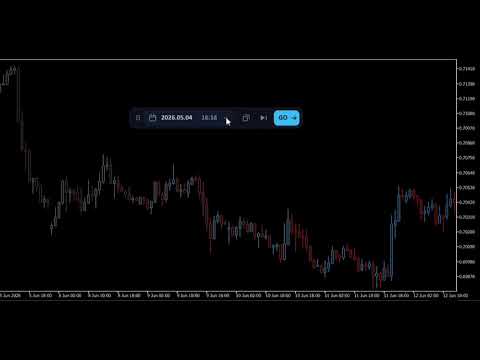
With this product, you no longer need to manually scroll through charts to analyze a particular section of history. Go To Time does it in one click. This indicator allows you to navigate through chart history. Enter a date and time in the compact panel or select it from the drop-down calendar. Click Go, and the indicator will take you to the specified time. You can also synchronize all charts to move to a specified time simultaneously.
Useful links: Other developments - Link, MT5 version - Link
For quick navigation, there are some tools:
- Drop-down calendar: Clicking on the header moves the chart up from days to months and years; any date can be accessed in just a few clicksToday,
- -1D, -1W, -1M chips: shift the date in the field back a day, week, or calendar month; clicks are cumulativeAll charts: The toggle switch applies a jump to all open charts at once; each chart finds the closest bar based on its symbol and timeframe
- Now button: Instantly return to current bars and the familiar autoscroll
- Target marker: A vertical dotted line marks the found candle and automatically disappears, leaving no trace on the charts
Additionally, there are six color schemes for dark and light charts, three interface scales (100, 125, and 150 percent) for high-resolution monitors, a customizable font, and default date and time settings in the launch parameters.