VIX Engine EA
- Experts
- Version: 1.1
- Updated: 11 May 2026
- Activations: 5

VIX Engine EA is based on a fundamental golden rule: every trade opened is a fully assumed trade . Without Stop Loss, no loss is ever crystallized — positions are held until the return to equilibrium ( Zero Point ) .
Advisor (EA) is specifically designed for trading the VIX volatility index and any instrument operating within bounded price ranges . It relies on an automated, intelligent, and self-adapting buying grid, framed by configurable price levels (floor and ceiling), with rigorous capital management based on the Zero Point concept .
It also integrates a unique High Availability ( HA) system allowing multiple servers to operate in Master/Slave mode , ensuring continuity of trading even in the event of hardware failure or internet outage.
Recommended external parameters : Capital 10,000 € - InpTradingTimeframe=PERIOD_M1 InpPointZero=9.0 - InpLotMode=LOT_AUTO - InpMinGridStepPips=500 - InpMinRangePips=4000 - InpHardFloor=12 - InpHardCeiling=28 - InpPriceSource=PRICE_SOURCE_MANUAL - InpTPPerTradePips=500 - To speed up backtests , remember to disable InpShowDebug (InpShowDebug=false)
Operating principle — The self-adaptive grid
The core of VIX Auto EA is a grid of market buy orders , automatically placed at regular intervals between a floor (Hard Floor) and a ceiling (Hard Ceiling) price. No trade is ever executed outside this zone: if the price moves out of the zone, take-profit orders continue to function normally, but any new buy orders are blocked until the price returns to the zone. This approach protects capital by preventing the accumulation of positions at unfavorable prices .
The distance between two trades is not fixed: it is calculated dynamically at each tick by the CalculateAutoStep function, which simulates the maximum number of trades that can be funded with the remaining capital, then divides the price range by this number. The resulting grid step is always greater than or equal to the configured minimum (InpMinGridStepPips), ensuring a grid density consistent with the available capital.
Capital Management and Protection Zero Point
Each new entry is subject to a security check ( CheckSecurityRequirement ) which calculates the total cumulative risk of all open positions, plus the risk of the new position. This risk is calculated as the difference between the opening price of each trade and the Zero Point ( InpPointZero), multiplied by the volume and the monetary value of one point. As long as this cumulative risk remains below the allocated capital , the entry is authorized . The reference capital can be the actual account balance or a configured fixed capital ( InpCapitalFixe ) , allowing for the simulation of regular withdrawals of profits .
Three batch management methods
FIXED_LOT — The lot size for each trade is identical and constant, defined by InpLotSize. This is the simplest and most predictable mode .
PROGRESSIVE LOT — The optimal lot size is recalculated in increments of InpLotIncrement. The EA progressively tests increasing lot sizes and selects the largest lot size that still allows funding for the entire grid within the configured area . This mode allows exposure to automatically increase as capital grows .
LOT_AUTO — A continuous variant of the progressive method: the optimal lot size is calculated without steps (no 0.1 lot increments), aiming for the true maximum that can be financed at any given time. This is the most aggressive method in terms of capital utilization.
Five price sources for the trading zone
The trading zone (floor/ceiling) can be defined in five different ways , selectable via InpPriceSource :
PRICE_SOURCE_MANUAL — HardFloor and HardCeiling levels are entered manually. This is the default mode , ideal for VIX whose historical zones are well known (e.g., 12–28 ) .
PRICE_SOURCE_MEDIAN_BOTH — The floor and ceiling are dynamically calculated as the median of the last N lowest and N highest prices over the configured timeframe . The area automatically adapts to changing market conditions .
PRICE_SOURCE_MEDIAN_MAX_MANUAL_MIN — The ceiling is calculated using a dynamic median , the floor is entered manually. This is useful for allowing the upper part of the area to adapt while maintaining a fixed safety floor .
PRICE_SOURCE_MANUAL_MAX_MEDIAN_MIN — Reverse of the previous one : the ceiling is manual, the floor is median . Ideal for fixing a protective ceiling while allowing the bottom of the area to adapt.
PRICE_SOURCE_CENTERED_ON_PRICE — The zone is dynamically centered on the current price with a half-range defined by InpMinRangePips. The zone follows the price continuously, always bounded by the HardFloor and HardCeiling guardrails.
Calculation of dynamic medians
Median levels are calculated using the `CalculateMedianValue` function, which collects the most recent InpMedian_HighBars and InpMedian_LowBars over the InpMedian_Timeframe, sorts the values, and returns the statistical median (insensitive to extreme values , unlike a mean). A percentage offset (`InpMedian_HighOffsetPct` / `InpMedian_LowOffsetPct`) can be applied to widen or narrow the calculated area . The median history can be plotted directly on the graph ( ` InpShowDebugHistory`) as colored trend lines .
Minimum range and forced zone
If the natural distance between the floor and ceiling is less than the configured InpMinRangePips , the GetEffectiveRange function automatically forces a minimum range centered on the current price. This forced range remains bounded by the hard guardrails, preventing any inconsistent configuration . This mechanism ensures that there is always sufficient range to place at least a few grid levels.
Two exit modes (Take Profit)
MODE_NONE — Individual Take Profits : Each position closes independently as soon as the price reaches its individual Take Profit level (InpTPPerTradePips converted to real price ) . This is the most reactive mode , which collects profits position by position as the VIX rises .
CUMULATIVE MODE — Cumulative Take Profits : No position is closed individually. The Expert Advisor (EA) monitors the sum of floating pips across all open positions. As soon as this sum reaches InpTPPerTradePips (taking into account the number of positions), all positions are closed simultaneously via CloseAllPositions . This mode maximizes overall profit by waiting until the entire portfolio is sufficiently profitable before exiting.
High Availability ( HA ) System — Master / Slave
VIX Auto EA's most advanced feature : an automatic failover system between multiple servers, designed to ensure that only one EA trades at a time, even in the event of a failure. Up to four servers can be configured with their Tailscale IDs and IP addresses. A PHP server hosted on OVH (InpHA_OVH_BaseURL) serves as the central registry: each server sends a regular heartbeat ( InpHA_HeartbeatSec) and consults the registry to determine which server has the highest priority and is still alive (HA_GetHighestPriorityAlive). If the current master has not responded for InpHA_TimeoutSec seconds, the next server in priority automatically takes over as master ( HA_WriteMaster) . If the current master trader experiences a loss of internet connection , they automatically switch to slave mode for security reasons , preventing double trading. The HA (MASTER/SLAVE/internet loss) status is displayed in real time on the graphical dashboard.
Full graphical dashboard
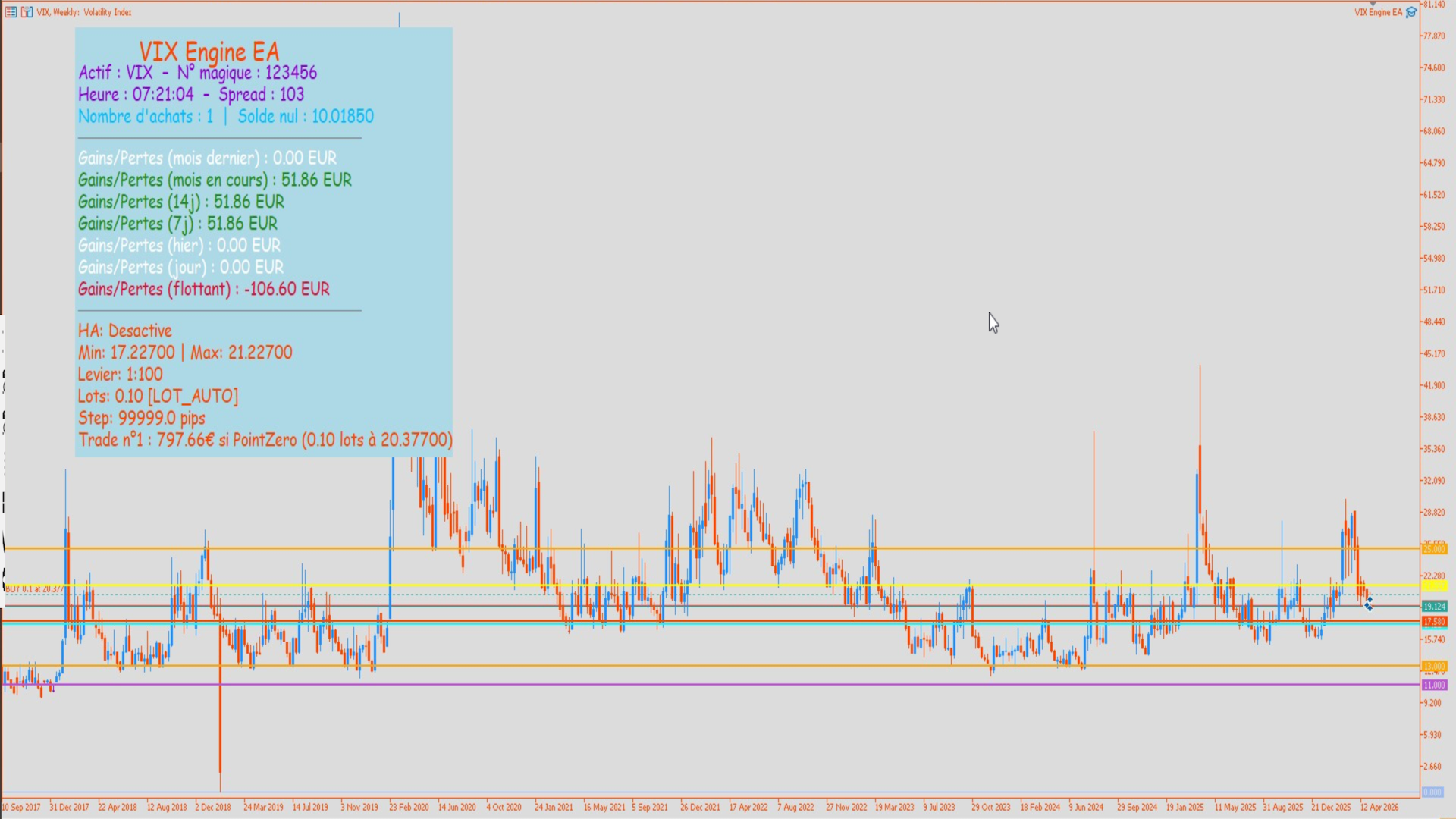
A configurable information panel (colors, font sizes, position, width, automatic or fixed height) displays in real time : the asset and the magic number , the broker time and the spread, the number of open positions and the long break-even level, profits and losses over 7 periods ( previous month , current month, 14 days, 7 days, yesterday , today, floating) with dynamic green/red coloring, the HA status, the active trading zone (min/max), the account leverage, the current lot size and mode, and finally the detailed trade - by-trade cost to Zero Point for each open position. Six horizontal lines are drawn on the chart: active ceiling (yellow), active floor (cyan), next buy level (orange-red), Zero Point (purple), upper guardrail (orange), and lower guardrail (orange).
Monthly report and OnTester score
At the end of each backtest, if InpReportMonthly is enabled , the Expert Advisor (EA) generates a complete monthly report of gains and losses, sorted chronologically , with the month name in French . The OnTester function returns the net return as a percentage of the initial capital, which can be used directly as a selection criterion in the MetaTrader 5 optimizer.
Essential parameters summarized
| Setting | Role |
| InpHardFloor / InpHardCeiling | Fixed trading zone (e.g., 12–28 for the VIX) |
| InpPointZero | Reference price for calculating total risk |
| Fixed Capital Inp | Capital allocated ( 0 = actual account balance ) |
| InpLotMode | Fixed / Progressive / Auto |
| InpMinGridStepPips | Minimum distance between two trades |
| InpPriceSource | Source of levels (manual / median / centered ) |
| InpExitMode | Individual or cumulative practical work |
| InpTPPerTradePips | Target profit per trade (or cumulative profit ) |
| InpHA_Enabled | Activation of the Master / Slave system |
Compatibility and recommendations
VIX Auto EA is optimized for the VIX (CBOE Volatility Index) but works on any instrument with a bounded and predictable price range . It is recommended for traders with sufficient capital to cover the entire calculated grid between HardFloor and HardCeiling, which the EA automatically verifies before each entry . The HA system requires an accessible PHP server (OVH or equivalent ) and Tailscale connectivity between machines. Compatible with MetaTrader 5 and all brokers.