AntiCrashMarti
- Experts
- Version: 2.1
- Updated: 6 May 2026
- Activations: 20

Installation and Start
- Copy the EA files into the MT5 MQL5/Experts/ folder.
- Compile DollarMartinEA.mq5, or use the ready-made DollarMartinEA.ex5.
- Attach DollarMartinEA to a chart in MT5.
- Enable Algo Trading in MT5.
- Edit parameters in EA Properties -> Inputs.
Basic Workflow
- When there is no open position, the EA opens the first order after a valid signal is confirmed.
- Additional DCA orders are calculated from the first entry price, the average-down distance, and the volume multiplier.
- When the basket reaches the take-profit target, the EA closes the whole cycle.
- During a crash, the EA pauses new DCA entries and may catch up missing layers after stabilization.
Key Parameters
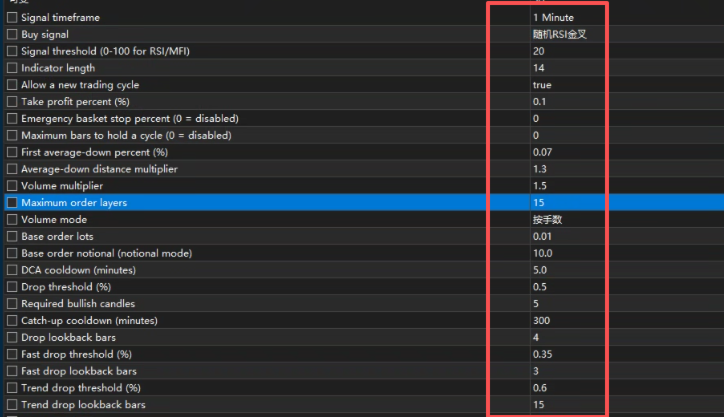
- Signal timeframe / Buy signal / Signal threshold / Indicator length: define the first entry conditions.
- Take profit percent: unified basket take profit.
- First average-down percent / Average-down multiplier: control DCA spacing.
- Volume multiplier / Max orders: control position growth.
- Volume mode / Base order lots / Base order notional: define order sizing.
- Drop threshold / Fast drop threshold / Trend drop threshold: define different crash detections.
- Required bullish candles / Catch-up cooldown: define recovery behavior.
- Tester fast mode: automatically disables panels, drawing, and external communication in MT5 Strategy Tester for faster backtests.
Chart and Panels
- The chart can display first-entry, DCA, average-price, and take-profit lines.
- You can show the Chinese chart panel or keep only the price lines.
- If you want a clean chart, use the standalone Windows control panel.
Notes
- MT5 uses lots, not USD, as the trading unit.
- The EA only manages strategy orders with the same MagicNumber.
- Martingale strategies carry significant risk during strong one-way downtrends. Backtest before using live.