Anchor Trade Manager

5
  • Utilità
  • Kalinskie Gilliam
    Kalinskie Gilliam
    Trident - Professional trading systems built by experienced analysts and developers 🔱
    ABOUT US
    Kalinskie Gilliam — Developer
    - 9 years US Military Intelligence (Special Operations Data Analyst)
    - Master's Degree in Computer Science
    - Based in Switzerland
  • Versione: 3.0
  • Aggiornato: 2 marzo 2026
  • Attivazioni: 8

Anchor: The EA Manager

Run your full EA portfolio without conflicts, without stacked risk, and without watching every chart yourself. Anchor coordinates up to 64 Expert Advisors on a single account so only one trades at a time.

Attach Anchor to any chart. Type your EA names and magic numbers in one line. Anchor handles the rest.

Built for portfolios. Built for discipline. Built for prop firms.


The Problem

Running multiple EAs on the same account creates risk. Two gold EAs can open opposite positions near the same price. Three EAs can stack correlated trades. One bad minute can trigger every system at once.

You planned for 2% risk per trade. Instead you're running 6% because three EAs all fired at the same time on XAUUSD. Even worse if you're running multiple grid strategies.

Manual monitoring doesn't scale. You can't watch every chart 24 hours a day.

The Solution

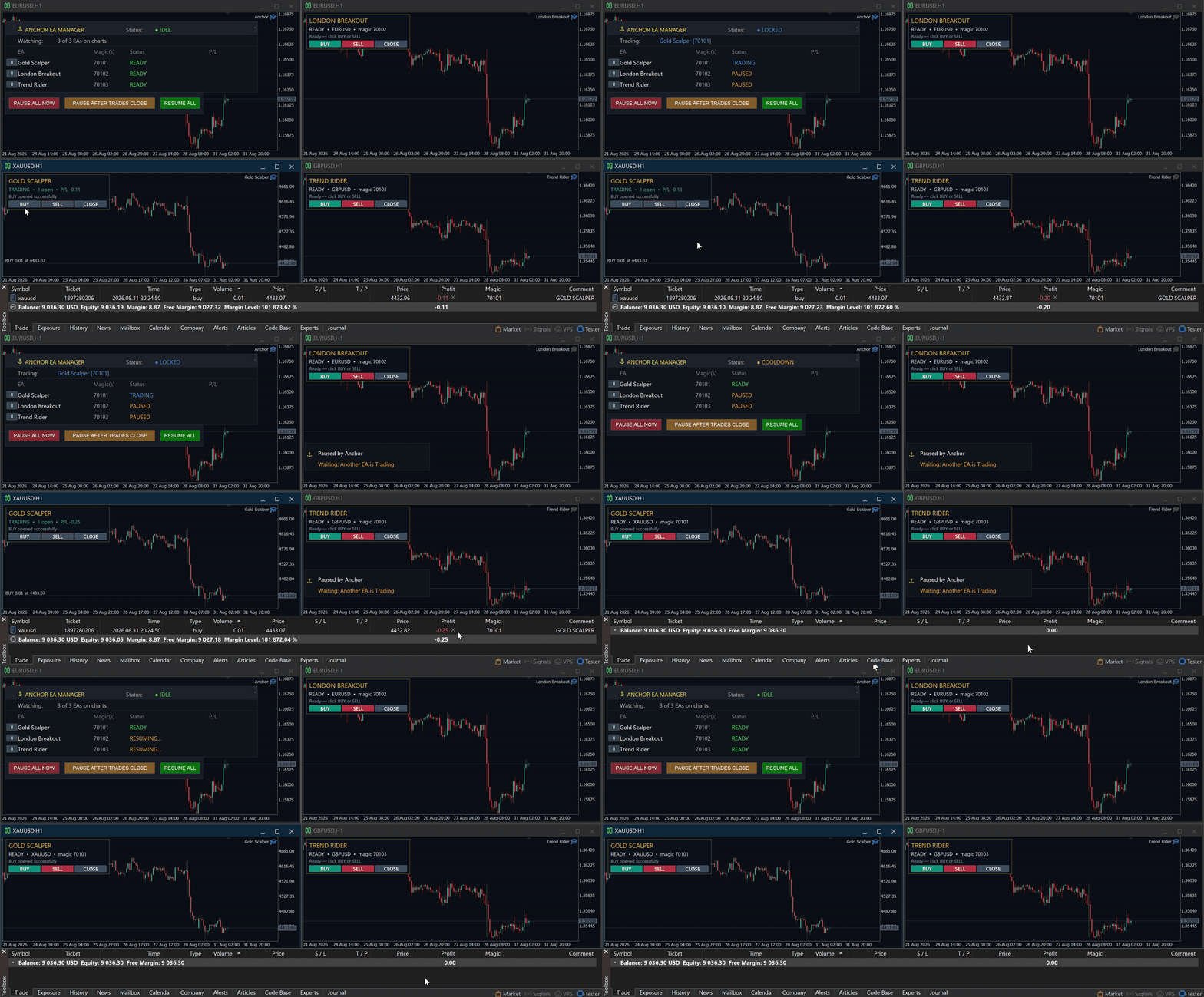
Anchor monitors all your registered EAs in real time. When one EA opens a position, Anchor instantly pauses every other managed EA until that trade closes. No conflicts. No stacking. No surprises.

When the trade closes, all EAs resume automatically. The cycle repeats, every second, without intervention.

Your EAs don't need modification. They don't need to know Anchor exists. Works with any EA, from any vendor, on any symbol.

One trade at a time. Always.

Why Anchor

  • Simple setup. One chart, one line of input. Anchor begins coordinating immediately. No companion indicator on every EA chart, no boilerplate, no EA modification.
  • Up to 64 EAs per instance. Plenty of headroom for full multi-strategy portfolios.
  • Pending order cancellation. No stale buy stops or sell limits filling while an EA is supposed to be inactive.
  • News filter, scheduler, and drawdown limits — all built in. One tool, not a stack of utilities to wire together.
  • Wraps any EA in extra protection. Anchor's drawdown limits and news filter apply to your whole portfolio, so EAs without these features built in get the same safety layer the moment they're registered.
  • Survives terminal restarts. Anchor rebuilds its state from disk and keeps paused EAs paused through unexpected shutdowns.

Drawdown Protection

Set per-EA or account-wide floating loss limits. When an EA's drawdown hits your threshold, Anchor closes its positions and pauses it automatically. Other EAs keep trading normally.

Account-wide protection monitors total floating loss across all managed EAs. Option to close every position on the account, including non-managed trades, when the limit is hit.

Manual resume via an on-chart button when you're ready to restart.

News Filter

Built-in economic news filtering using the ForexFactory calendar feed.

Anchor pauses all managed EAs before high-impact news events and keeps them paused until the volatility window passes. Configurable minutes before and after, currency filters, and impact level selection.

Option to automatically close all managed positions before news, or simply pause new entries and let existing trades manage themselves.

No more NFP or FOMC surprises.

Scheduler

Automated daily and weekly trading windows.

Set a close time and resume time in broker hours. Anchor pauses all EAs outside your defined trading window. Choose every weekday or Friday only for weekend risk protection.

Like the news filter, the scheduler can either pause EAs only or close all positions and pause.

Stop trading at 18:00. Resume at 08:00. Set it once and forget it.

Multi-Pair Portfolio Management

Run a single instance to coordinate one group of EAs, or run multiple instances for independent groups across different instruments.

One instance manages your three gold EAs on XAUUSD. Another manages your two AUDCAD strategies. A gold trade doesn't pause your AUDCAD group. Each instance operates with its own state, its own schedule, and its own news configuration. Fully independent.

Setup

Three steps. Attach Anchor to any chart. Type your EA names and magic numbers in one line:

MyEA1:123456;MyEA2:200000;MyEA3:300000

Click OK. Anchor begins coordinating immediately.

What's Included

  • One-at-a-time trade coordination across up to 64 EAs
  • Automatic pause and restore with full settings preservation, no EA modification required
  • Per-EA and account-wide drawdown protection with automatic position closure and manual resume
  • Pending order cancellation on pause
  • Same-name EA support for running multiple instances of one EA on different symbols
  • Terminal restart recovery — Anchor remembers its state through unexpected shutdowns
  • ForexFactory news filter with configurable currency, impact, and timing windows
  • Daily or Friday-only scheduler with broker-time close and resume
  • Live on-chart status overlay showing state, active EA, paused EAs, news countdown, and schedule status

What's New

Per-EA and account-wide drawdown protection with configurable dollar and percentage limits.

Pending order cancellation when EAs are paused, preventing stale orders from filling outside coordination.

Smart close modes for the news filter and scheduler — pause only, close all, close profitable, or close losing positions.

Improved status panel with live floating P/L per EA and visible drawdown thresholds.

Manual resume button on the chart overlay after a drawdown event.

Requirements

  • MetaTrader 5
  • One chart per Anchor instance — any symbol, any timeframe
  • WebRequest permission for the news filter (optional — URL provided in the input panel for easy setup)
  • Not compatible with the built-in MQL5 VPS. Requires a full MT5 installation (local or Windows VPS).

Important Notes

Do not manually change EA charts managed by Anchor while trades are paused.

The news filter fetches data every 4 hours and caches locally. Multiple instances sharing the same terminal coordinate automatically to avoid duplicate requests.

Anchor is a coordination tool, not a trading strategy. Test your configuration on a demo account first.

Roadmap

Suggestions under exploration: individual drawdown limits per EA, equity-curve dashboard, expanded news source options, and multi-account coordination across linked terminals.

We don't promise features until they're tested. But Anchor will keep evolving alongside the portfolios it manages.

About

Built by Trident Trading Systems for traders managing multi-EA portfolios. We run Anchor on our own accounts every day, coordinating the same EAs we trade. We build tools we use ourselves — and we keep them simple, because portfolio management is hard enough.

Full documentation included. Direct support via MQL5 messages. Active trading community of 200+ traders.

Please message us after purchase for the manual and to join our trading community. Contact us if you need additional license activations.

Anchor is a coordination utility, not a trading strategy or signal provider. Results depend on the EAs you choose to run with it. Always test on demo first. Trade only with capital you can afford to lose.

Recensioni 4
ellisk123
97
ellisk123 2026.03.30 12:19 
 

does exactly what it says on the tin - very helpful for when you don't want to over extend your risk on gold or any symbol + dd protection and a news filter - I use it mostly for my gold grid ea's so they don't open positions at the same time - great job kali :)

Luca Barone
1680
Luca Barone 2026.03.18 18:10 
 

Very useful utility for managing multiple EAs in a single account. I personally use it to limit EAs that don't have DD control Thank again!

Prodotti consigliati
Telegram to mt5 pro
Janet Abu Khalil
3.67 (3)
Telegram to MT5 Pro — Advanced Telegram Signal Copier with Auto-Fix, Multi-TP, Risk Control and Full Trade Management Telegram to MT5 Pro — Copiatore di segnali Telegram professionale Telegram to MT5 Pro è un copiatore di trading ad alte prestazioni che esegue automaticamente i segnali da Telegram direttamente nel tuo account MetaTrader 5, con pieno controllo su rischio, esecuzione e gestione del trading. Il sistema è composto da due componenti: • L’Expert Advisor (EA) che gira all’interno di M
Telegram EA Manager
Ebunoluwa Abimb Owodunni
All in one Multipurpose Telegram Trade Management , Manage and Copy Trades on the go From Telegram Pro Version MT5:  www.mql5.com/en/market/product/95742 Pro Version MT4:  www.mql5.com/en/market/product/85691 Execute Trades on mobile with fast execution When away from desktop MT5, or scalping the market with mobile device, or needed to copy trades from telegram groups while away, or doing some other activities, Telegram EA Manager is an effective tool to perform any trade operation with swift
FREE
I started of as a complete novice in trading not understanding what a pip was, not understanding leverage or how to factor in risk to manage my trades. Its been almost 3 years. I am more knowledgeable in trading. My trading continues to improve as I work on my strategy, technical analysis, trading psychology and risk management. One thing I am not worried about though is getting the right volume to match the risk for each trade. Not too long after I began trading, I learned how to code to make m
What this dashboard does The panel displays: Current Ichimoku signal per symbol Current Ichimoku signal per timeframe Key Ichimoku line values Signal direction summary Instead of switching charts manually, you can analyze the market structure in seconds. Available Ichimoku values Each cell may display: Tenkan-Sen Kijun-Sen Senkou Span A Senkou Span B Chikou Span Span A – Span B difference This allows detailed analysis or quick signal filtering. Signal types The dashboard can detect:
Size Calculator allow you to calculate the size you need for your position giving two parametres: the number of pips risked and the money risked, for example if you want to risk 20 USD on 200 pips, then you will need to input 200 in the case reserved for pips and 20 in the case reserved for risk, the size will appear in left top carner of the chart in your metatrader 4 platform,    Size Calculator  support the following symbols : EURUSD GBPUSD AUDUSD NZDUSD  GOLD WTI  EURJPY GBPJPY USDJPY AUDJP
Blog di MQL5: https://www.mql5.com/en/blogs/post/761446 Versione MT4: https://www.mql5.com/en/market/product/136790 Versione MT5: https://www.mql5.com/en/market/product/136791 Time Wizard è un assistente di trading professionale pensato per i trader che necessitano di velocità, tempismo e controllo dell'esecuzione in un'unica dashboard intuitiva. Questo Expert Advisor è progettato per il trading basato su eventi, l'esecuzione programmata e la gestione semiautomatica rapida degli ordini. Conse
Forget about enabling templates when you launch the window. Auto Template Master Service  is a professional utility tool that runs as a system service in MetaTrader 5, and it will do it for you. Unlike traditional indicators or expert advisors (EAs), the program runs in the background of the entire terminal and doesn't require you to add it to each window individually. As soon as you open a new chart of any instrument (Forex, Stocks, Crypto), the service immediately detects the new window and a
CDS Asian Fakeout MT5
Muammar Cadillac Sungkar
*LIMITED SPECIAL PRICE* Keep It Simple Stupid (KISS) with the CDS Asian Fakeout EA - Standard Version MT5 Tired of false breakouts during the Asian trading session or others session time? The CDS Asian Fake Out Expert Advisor is engineered to identify and capitalize on these deceptive price movements, turning potential frustration into profitable opportunities. This sophisticated tool meticulously monitors price action within a user-defined Asian range (or others), poised to execute precise pend
Rosy Pro Panel MT5
Theresia Yovitha Herwanda
5 (1)
Download DEMO here  https://www.mql5.com/en/blogs/post/759772 An ultimate panel you've never seen before.  Compact and nice Trade panel with large Total P/L and it's percentage display. Groups for trades summary available: Ticket, Symbol, Type, Category, and Magic. Average price field helps you know your trading average price and direction. Set magic and comment of your trading in a very easy way. Group closing by symbol, type, category or magic - only by one click. Close All button for a quick
Target Line Pro
Christian Paul Anasco
Take full control of your trading decisions with Target Line Pro , a smart utility that shows you exactly where your profit targets are and gives you a clear, real-time overview of your open positions. No more guessing. No more manual calculations. Just set it and trade with confidence. Key Features Target Price Calculator – Input your desired profit amount, and instantly see the exact price level needed to reach it. Breakeven & Net Position Display – Know your true breakeven, considering
You can see Binance Spot data instantly in Metatrader 5 and it allows you to use all the features that Metatrader has provided to you. You can access the data of all symbols listed on Binance Futures. Don't forget to set the timezone. Binance it's 00:00 UTC. You need to fix it according to your own country You need to install the free Binance Spot Symbol List plugin. https://www.mql5.com/tr/market/product/83507 After loading, it automatically downloads the data of the cryptos in the market obser
Prendi facilmente il controllo della tua routine di trading con il rivoluzionario Trades Time Manager. Questo potente strumento automatizza l'esecuzione degli ordini in orari prestabiliti, trasformando il tuo approccio al trading. Crea elenchi di attività personalizzati per diverse azioni di trading, dall'acquisto all'impostazione degli ordini, il tutto senza intervento manuale. Trades Time Manager Guida all'installazione e agli input Se desideri ricevere notifiche sull'EA, aggiungi il nostro UR
Auto Stop Loss MT5
Nabil Oukhouma
5 (1)
Il Gestore del Rischio "Set & Forget" per il Trading Multi-Asset ️ Mai lasciare un trade senza protezione. Auto Stop Loss (MT5 Manager) è l'utility di background definitiva per i trader che mettono la sicurezza al primo posto. A differenza dei pannelli standard, questo strumento lavora instancabilmente dietro le quinte per proteggere istantaneamente ogni operazione. Che tu apra trade manualmente o tramite un altro EA, questo manager assicura che ogni posizione abbia immediatamente un Stop Loss
XXXX ATR (Average True Range) Position Manager: ATR StopLoss, ATR Target, ATR Breakeven, ATR Trailing StopLoss, with Risk % Calculation / Position. More about ATR: www.atr-trading.com Key takeaways   One click does it all: SELL and BUY button automatically places ATR stoploss, ATR target, ATR breakeven, ATR trailing stop and Risk % calculation of equity Entire position is calculated based on ATR No more manual position calculations = No more wasted time =  No more late entries Position sizes c
MT5 to Telegram Notification Hub
George Liviu Geambasu
5 (1)
MT5 to Telegram Notification Hub   is a user-friendly tool that connects MetaTrader 5 (MT5) with Telegram, enabling seamless transmission of trade alerts, updates, and custom messages directly from MT5 to your Telegram account or channel. You can easily adjust and enable or disable specific parts of the notifications, making it ideal for signal providers and traders who want to keep their audience informed with real-time updates Setup guide A setup guide is available here . Key Features: Instan
THIS PRODUCT CAN NOT BE TEST IN STRATEGY TESTER. PLEASE TRY DEMO VERSION: https://www.mql5.com/en/market/product/58096 RISK AND TRADE MANAGER RISK AND TRADE MANAGER   is an advanced trading panel designed for manual trading.   Utility helps to manage trades effectively and efficiently with a single click. MAIN FEATURES Convert and display Stop Loss (SL)   Pips into % and amount to view the clear picture of the trades if SL hits. Fund allocation for individual trade in % and in amount. Get alert
Safety Control: Your Ultimate Balance Management Solution for Prop Firm Challenges Overview Tired of manually monitoring your trading activities in prop trading challenges? Meet Safety Control, an advanced Expert Advisor for MetaTrader 5 that will change the way you trade forever. This proprietary software aims to help you manage your balance effortlessly during prop firm challenges. Features Automated Drawdown Control : Safety Control continuously monitors your account's balance and equity in r
Ultimate Drawdown Recovery EA
Freedom Uzochukwu Nnadi
5 (1)
The Ultimate Drawdown Recovery & Trade Protection EA for MT5! Watch tutorial video here: https://youtu.be/QqAbcznNWJA?si=8u7BwPE2OoLiCKTO Your Trades Deserve a Second Chance. Give Them This Soldier. Struggling with floating losses or sudden drawdowns that threaten your account? Stop watching your trades drown in red and let the Ultimate Drawdown Recovery EA (UDR) recover, protect, and empower your trading strategy automatically. What Is UDR? UDR is an ultra-smart, lightning-fast MT5 Expert Advi
Gann Box MT5
Frederic Jacques Collomb
L'indicatore Gann Box è uno strumento potente e versatile progettato per aiutare i trader a identificare e sfruttare i livelli chiave del mercato. Questo indicatore consente di disegnare un rettangolo sul grafico, che viene automaticamente suddiviso in più zone con livelli strategici 0, 0.25, 0.50, 0.75, 1 . Quando il prezzo tocca uno di questi livelli, si attivano degli avvisi, offrendo così un aiuto prezioso per le decisioni di trading. Sapete immediatamente come si sta evolvendo il mercato ri
Prop coach
Godswill Justice Onuchukwu
How To Use Prop Guardian: 1. The enabled/ disabled button is used to turn Prop Guardian On/Off. 2. You can add your name by double clicking the expert advisor icon at the top right corner of the chart, then add your name where it says 'optional default trader name'. Once you add your name Prop guardian will address you by your name anytime it needs to send you a message. 3. You can choose your Prop firm's drawdown type by choosing between the 'Balance', 'Equity' and 'trailing' button .NOTE; this
Real-Time Spread Display Tool A   real-time spread display tool   is a specialized software or application designed to provide traders and investors with instant, live data on the   spread —the difference between the bid price (the price at which buyers are willing to purchase an asset) and the ask price (the price at which sellers are willing to sell it)—for various financial instruments. This tool is critical in markets such as forex (FX), stocks, futures, and cryptocurrencies, where price f
Overview : The Advanced News Trading Panel is a versatile tool designed for traders who rely on news-based trading strategies. This Expert Advisor (EA) provides an intuitive graphical interface that allows users to quickly set up pending orders and manage risk with ease. With the ability to automatically place Buy/Sell Stop orders based on your pre-set stop order distance from the bid/ask price, stop-loss and take-profit levels, the EA allows for precision trading during high-volatility news eve
The “Summary Risk Target” indicator is designed to show the total number of transactions made on a single pair. The transactions counted include active positions as well as pending orders . By setting a stop loss for each trade, this indicator displays the total potential risk (loss) that may be incurred. This helps traders easily understand their overall risk exposure without the need for manual calculations. Likewise, for take profit , if the TP level is defined—either in terms of pips or at a
FREE
Chopar
Sardorbek Sirojiddinov
Chopar MT5 — Transaction Notification Utility This tool is designed exclusively for broadcasting trading account events to Telegram ( @ChoparTradeBot) . It does not perform market analysis or provide financial advice; instead, it functions as an informational bridge between your MT5 terminal and the messenger. What This Monitor Tracks: Opening and Closing Trades: Captures the moment a deal is added to the history ( DEAL_ADD ). For closed positions, it immediately calculates and displays the fin
AW Metatrader to Telegram MT5
AW Trading Software Limited
5 (1)
Un sistema automatizzato per l'invio di notifiche in modo che nessuno dei tuoi abbonati perda i tuoi eventi di trading dal tuo terminale di trading. Un'utilità che invia notifiche al messenger di Telegram su qualsiasi operazione di trading sul tuo account. Istruzioni passo passo per collegare l'utility a un canale in Telegram ->   QUI   / MT4 ->   QUI vantaggi: Installazione semplice e istruzioni dettagliate, Possibilità di inviare screenshot regolabili, Testo di notifica personalizzabile tramit
Ultimate Trade and Alert Assistant Demonstration Video;  https://youtu.be/JEsU5Qic_bo?si=-feUD0Zr3qdPjomg Elevate Your Trading with Precision and Control Introducing the Ultimate Trade and Alert Assistant by Feedosky, a powerful and versatile Expert Advisor (EA) for MetaTrader 5 (MT5) designed to empower traders with precise price alerts, seamless trade execution, and intelligent position management. Whether you are a seasoned trader or just starting out, this EA combines cutting-edge automation
Questo strumento può aiutarti a chiudere tutti gli ordini aperti con un clic, basta fare clic su "Chiudi tutto". Se desideri chiudere solo gli ordini redditizi, fai clic sul pulsante "Chiudi redditizi" Dopo aver cliccato, tutti gli ordini fluttuanti verranno chiusi; Se desideri chiudere solo gli ordini con perdite fluttuanti, fai clic sul pulsante "Chiudi perdibili" Dopo aver cliccato, tutti gli ordini con perdite fluttuanti verranno chiusi. Questo strumento è stato testato per un anno. La funzi
MetaTrade Hub   is an easy-to-use and customizable tool. This product is presented in an attractive   graphical interface  that allows you to send adjustable signals in two ways ( Manual or Automatic ) from   Metatrader5   to the   Telegram channel or Discord channel.   In this case, your account becomes a   Signal Provider.  You can also share N ews reports with others. All   message formats   -   language   -   emojis   can be adjusted and personalized. You can   Enable   or   Disable   certai
News Panel per MetaTrader è uno strumento che visualizza i dati del calendario economico all'interno della piattaforma di trading MetaTrader. Lo strumento estrae notizie economiche e rilasci di dati da fonti esterne, come siti Web di notizie finanziarie o fornitori di dati, e li visualizza in un formato di facile lettura. Lo strumento consente agli operatori di filtrare i comunicati stampa per fonte, fuso orario, livello di impatto, valuta e metodo di notifica. Include anche un pulsante Aggiorn
Position Tool Position Tool is a manual trading assistant for MetaTrader 5, designed to help traders visualize positions, manage risk, and plan trades clearly on the chart . This product does not perform automated trading and does not provide trading signals . It is intended for traders who prefer full control over their trading decisions . Key Features Draw Long and Short positions directly on the chart Automatic Risk/Reward (R:R) visualization Adjustable entry, stop-loss, and take-profit level
Gli utenti di questo prodotto hanno anche acquistato
Trade Assistant MT5
Evgeniy Kravchenko
4.42 (211)
It helps to calculate the risk per trade, the easy installation of a new order, order management with partial closing functions, trailing stop of 7 types and other useful functions. Additional materials and instructions Installation instructions - Application instructions - Trial version of the application for a demo account Line function -   shows on the chart the Opening line, Stop Loss, Take Profit. With this function it is easy to set a new order and see its additional characteristics bef
Forex Trade Manager MT5
InvestSoft
4.98 (658)
Benvenuto a Trade Manager EA, lo strumento definitivo per la gestione del rischio , progettato per rendere il trading più intuitivo, preciso ed efficiente. Non è solo uno strumento per l'esecuzione degli ordini, ma una soluzione completa per la pianificazione delle operazioni, la gestione delle posizioni e il controllo del rischio. Che tu sia un principiante, un trader avanzato o uno scalper che necessita di esecuzioni rapide, Trade Manager EA si adatta alle tue esigenze, offrendo flessibilità s
Quant AI Agents is NOT AN Expert Advisor. Quant AI Agents   is a   multi-agent AI trading framework   that turns natural-language strategy prompts into live.  WANT THE SAME RESULTS AS MY LIVE SIGNAL?   Use the exact same brokers I do:   IC MARKETS , IC TRADING   .  Unlike the centralized stock market, Forex has no single, unified price feed.  Every broker sources liquidity from different providers, creating unique data streams. Other brokers can only achieve trading performance equivalent to 60
TradePanel MT5
Alfiya Fazylova
4.87 (155)
Trade Panel è un assistente commerciale multifunzionale. L'applicazione contiene più di 50 funzioni di trading per il trading manuale e permette di automatizzare la maggior parte delle attività commerciali. Prima dell'acquisto, è possibile testare la versione dimostrativa su un conto demo. Scaricare la versione di prova dell'applicazione per un account dimostrativo: https://www.mql5.com/it/blogs/post/762419 . Istruzioni complete qui . Commercio. Consente di effettuare operazioni di trading con u
Versione Beta Telegram to MT5 Signal Trader è quasi pronto per il rilascio ufficiale in versione alpha. Alcune funzionalità sono ancora in fase di sviluppo e potresti riscontrare piccoli bug. Se riscontri problemi, ti preghiamo di segnalarli, il tuo feedback aiuta a migliorare il software per tutti. Telegram to MT5 Signal Trader è uno strumento potente che copia automaticamente segnali di trading da canali o gruppi Telegram al tuo account MetaTrader 5 . Supporta canali pubblici e privati e cons
FarmedHedge Pair Trading Dashboard
Tanapisit Tepawarapruek
5 (3)
Farmed Hedge Yield Farming | All Markets (Manual - Hybrid - Semi/Automated EA) MULTI-ASSET SUPPORT Trade any asset available on your broker - Forex: Major, Minor, Exotic pairs - Crypto: BTC, ETH, XRP, SOL, BNB - Stocks: Apple, Tesla, Amazon, Google, etc. - Commodities: Gold, Silver, Oil, Gas - Indices: US30, NAS100, SPX500, DAX40 - Any CFD your broker offers VERIFIED TRADING RESULTS - Farmed Hedge Yield Axi Copy:  https://www.mql5.com/en/signals/2356376 - Farmed Hedge Yield Exn Copy:   https:/
Power Candles Strategy Scanner - Strumento di ricerca configurazioni multi-simbolo con ottimizzazione automatica Power Candles Strategy Scanner utilizza lo stesso motore di auto-ottimizzazione che alimenta l'indicatore Power Candles, applicandolo a tutti i simboli presenti nel tuo Market Watch, uno accanto all'altro. Un unico pannello ti indica quali simboli sono statisticamente negoziabili in questo momento, quale strategia è vincente su ciascuno di essi, la coppia ottimale di Stop Loss / Take
YuClusters
Yury Kulikov
4.93 (43)
Attention: You can view the program operation in the free version  YuClusters DEMO .  YuClusters is a professional market analysis system. The trader has unique opportunities to analyze the flow of orders, trade volumes, price movements using various charts, profiles, indicators, and graphical objects. YuClusters operates on data based on Time&Sales or ticks information, depending on what is available in the quotes of a financial instrument. YuClusters allows you to build graphs by combining da
AntiOverfit PRO MT5
Enrique Enguix
5 (5)
Prima di comprare un EA, verifica se regge davvero oppure se in backtest è sembrato forte solo per fortuna. La maggior parte dei robot viene venduta con un backtest bello da vedere. Curva in crescita. Buon profit factor. Pochi dubbi. Eppure molti di questi EA crollano non appena il mercato smette di muoversi come in quello storico. Perché? Perché un backtest dimostra una cosa sola: che quella strategia ha funzionato su un percorso di prezzo ben preciso. Non dimostra che reggerà su percorsi diver
MT5 to Telegram Signal Provider è un'utilità facile da usare e completamente personalizzabile che consente l'invio di segnali specificati a una chat, canale o gruppo Telegram, rendendo il tuo account un fornitore di segnali. A differenza della maggior parte dei prodotti concorrenti, non utilizza importazioni DLL. [ Dimostrativo ] [ Manuale ] [ Versione MT4 ] [ Versione Discord ] [ Canale Telegram ]  New: [ Telegram To MT5 ] Configurazione Una guida utente passo-passo è disponibile. Nessuna cono
Ultimate Extractor
Clifton Creath
5 (9)
Ultimate Extractor - Professional Trading Analytics for MT5 *****this is the local HTML version of Ultimate Extractor. !!!!!it is not compatible with Cloud!!!! For the online version please reach out to me directly****** Ultimate Extractor transforms your MetaTrader 5 trading history into actionable insights with comprehensive analytics, interactive charts, and real-time performance tracking. What It Does Automatically analyzes your MT5 trading history across all Expert Advisors and generates
Trade Manager DaneTrades
Levi Dane Benjamin
4.28 (29)
Trade Manager per aiutarti a entrare e uscire rapidamente dalle operazioni calcolando automaticamente il tuo rischio. Incluse funzionalità che ti aiutano a prevenire l'eccessivo trading, il vendetta trading e il trading emotivo. Le operazioni possono essere gestite automaticamente e i parametri di performance del conto possono essere visualizzati in un grafico. Queste caratteristiche rendono questo pannello ideale per tutti i trader manuali e aiuta a migliorare la piattaforma MetaTrader 5. Suppo
Custom Alerts AIO: Monitora tutti i mercati — senza alcuna configurazione Panoramica Custom Alerts AIO è una soluzione di monitoraggio dei mercati pronta all’uso che non richiede alcuna configurazione. Tutti gli indicatori necessari — FX Power, FX Volume, FX Dynamic, FX Levels, IX Power — sono integrati internamente. Non vengono mostrati grafici, rendendolo ideale per generare alert in tempo reale in modo discreto ed efficiente. Supporta tutte le classi di asset offerte dal tuo broker: Forex,
Timeless Charts
Samuel Manoel De Souza
5 (5)
Timeless Charts è un'utilità di trading completa progettata per trader professionisti. Combina tipi di grafici personalizzati come Grafici a Secondi e Renko con analisi avanzata del flusso ordini tramite Footprints , Clusters , Profili di Volume , studi VWAP e strumenti di analisi ancorata per una visione più approfondita del mercato. Il trading e la gestione delle posizioni vengono eseguiti direttamente dal grafico tramite un pannello integrato di gestione delle operazioni , mentre Market Repla
Footprint Chart Pro — Professional OrderFlow EA for MetaTrader 5 Version 6.34 | Professional tool for real traders | Institutional-Grade Visualization DEMO USERS - PLEASE SELECT EVERY TICK / REAL TICK WHEN TESTING AND YOU HAVE DOWNLOADED HISTORICAL DATA. IF YOU SEE A WAITING SCREEN AND IT IS NOT DOWNLOADING, IT MEANS YOU HAVE LOW HISTORICAL DATA. TRY 1 MIN AND 5 MIN FIRST ON 1 DAY DATA. ONE DAY DATA SHOULD BE THE NEWEST AND MOST CURRENT DATE. PLEASE WAIT UNTIL THE MARKET HAS ROLLED OVER PERIOD.
Signal TradingView to MT5 Pro Automator Esecuzione professionale istantanea tra TradingView e MetaTrader 5 Automatizza la tua strategia di trading con il ponte di comunicazione più robusto tra gli alert di TradingView e l'esecuzione reale in MT5. Progettato per i trader che richiedono velocità, flessibilità e una gestione del rischio impeccabile, questo Expert Advisor trasforma qualsiasi messaggio di avviso in un preciso ordine a mercato o limite. PUNTI DI FORZA E VANTAGGI Motore di Parsing Univ
AlgoRadar
Stephen J Martret
5 (4)
AlgoRadar is an on-chart analytics dashboard for MT5 that aggregates Expert Advisor performance across multiple accounts, brokers, and platforms, including both MT4 and MT5 data, into a single live view on your MT5 chart. All analysis runs from the chart interface, with no external applications or manual report processing required. EA Analysis and Ranking For traders running multiple Expert Advisors, AlgoRadar provides a consolidated view of each EA's performance across accounts. Active EAs a
The product will copy all telegram signal to MT5 ( which you are member) , also it can work as remote copier.  Easy to set up, copy order instant, can work with almost signal formats, image signal,  s upport to translate other language to English Work with all type of channel or group, even channel have "Restrict Saving Content", work with  multi channel, multi MT5 Work as remote copier: with signal have ticket number, it will copy exactly via ticket number. Support to backtest signal. How to s
MT5 Trading Deck
Manuel Michiels
5 (2)
One button. One trade. MT5 Trading Deck is a hotkey trading panel for MetaTrader 5 that turns the platform into a keyboard-driven execution cockpit. Stop loss, take profit and lot size are pre-calculated for every key; the moment you press, a market order is live on the broker. A complete technical user manual is attached in the product Comments section. It documents every input parameter, the full hotkey map, the recommended Stream Deck XL layout, and the advanced workflows for Pre-Limit orders
Comprehensive on chart trade panel with the unique ability to be controllable from mobile as well. Plus has a library of downloadable configuration, e.g. exit rules, extra panel buttons, pending order setup and more. Please see our product video. Works with all symbols not just currency pairs. Features On chart panel plus controllable from free app for Windows, iPhone and Android Built-in script engine with library of downloadable configuration, e.g. add 'Close All Trades in Profit' button, exit
FUTURES ORDERFLOW FOOTPRINT CHART Professional OrderFlow EA for MetaTrader 5 Version 1.01| Professional tool for real traders | Institutional-Grade Visualization STRATEGY TESTER USERS - PLEASE SELECT EVERY REAL TICK WHEN TESTING AND YOU HAVE DOWNLOADED HISTORICAL DATA. IF YOU SEE A WAITING SCREEN AND IT IS NOT DOWNLOADING, IT MEANS YOU HAVE LOW HISTORICAL DATA. TRY 1 MIN AND 5 MIN FIRST ON 1 DAY DATA. ONE DAY DATA SHOULD BE THE NEWEST AND MOST CURRENT DATE. PLEASE WAIT UNTIL THE MARKET HAS ROL
Telegram To MT5 Receiver
Levi Dane Benjamin
4.31 (16)
Copia i segnali da qualsiasi canale di cui sei membro (compresi quelli privati e ristretti) direttamente sul tuo MT5.  Questo strumento è stato progettato con l'utente in mente offrendo molte funzionalità necessarie per gestire e monitorare gli scambi. Questo prodotto è presentato in un'interfaccia grafica facile da usare e visivamente accattivante. Personalizza le tue impostazioni e inizia ad utilizzare il prodotto in pochi minuti! Guida per l'utente + Demo  | Versione MT4 | Versione Discord
Il Local Trade Copier EA è una soluzione per i singoli trader o account manager che devono eseguire segnali commerciali da fonti esterne o che devono gestire più account contemporaneamente, senza la necessità di un account MAM o PAMM. Copia da un massimo di 8 account master su account slave illimitati [ Guida all'installazione | Guida all'aggiornamento | Risoluzione dei problemi | Domande frequenti | Tutti i prodotti ] 100% self-hosted Facile da installare e utilizzare Nessun programma di insta
Bots Builder Pro MT5
Andrey Barinov
4.17 (6)
This is exactly what the name says. Visual strategy builder . One of a kind. Turn your trading strategies and ideas into Expert Advisors without writing single line of code. Generate mql source code files with a few clicks and get your fully functional Expert Advisors, which are ready for live execution, strategy tester and cloud optimization. There are very few options for those who have no programming skills and can not create their trading solutions in the MQL language. Now, with Bots Builde
The product will copy all  Discord  signal   to MT5   ( which you are member  ) , also it can work as remote copier.  Easy to set up. Work with almost signal formats, support to translate other language to English Work with multi channel, multi MT5. Work with Image signal. Copy order instant, auto detect symbol. Work as remote copier: with signal have ticket number, it will copy exactly via ticket number. How to setup and guide: Let read all details about setup and download Discord To MetaTrader
RiskGuard Management
MONTORIO MICHELE
5 (22)
ATTENZIONE  per una versione di prova gratuita visita il mio sito web. Manuale QUANTUM RiskGuard Management — Il tuo alleato definitivo per un trading senza compromessi. Lot Calculator — Calcolo automatico della size. Quantum — Rischio automatico per massimizzare i profitti e ridurre i drawdown. Automatic Journal — Incluso e scaricabile gratuitamente dal mio sito. Automatic Screenshot — Due screenshot: uno in apertura e uno in chiusura del trade. Partial Profit — Uscite parziali gestite in modo
Trade Manager DashPlus
Henry Lyubomir Wallace
5 (13)
DashPlus è uno strumento avanzato di gestione delle operazioni progettato per migliorare l'efficienza e l'efficacia del trading sulla piattaforma MetaTrader 5. Offre una suite completa di funzionalità, tra cui calcolo del rischio, gestione degli ordini, sistemi di griglia avanzati, strumenti basati su grafici e analisi delle prestazioni. Caratteristiche Principali 1. Griglia di Recupero Implementa un sistema di griglia flessibile e di media per gestire le operazioni in condizioni di mercato avve
HINN Lazy Trader
ALGOFLOW OÜ
5 (2)
The core idea: using the user interface, you configure the parameters the chart must meet before entering a position (or positions), choose which entry models to use, and set the rules for when trading and planning should end. Lazy Trader  handles the rest: it  takes over all the routine chart watching and execution! full description  :: 3 key videos [1] ->  [2]   ->  [3] What can it do? - Understands Larry Williams market structure - Understands swing market structure by Michael Huddleston
Assistente: Trade Assistant-MT4 (clicca per scaricare) Trade Assistant-MT5 (clicca per scaricare) Si prega di leggere attentamente le istruzioni per l'uso. Nozioni di base: Apertura e chiusura rapida delle posizioni, apertura e chiusura delle posizioni con un clic, inserimento degli ordini con un clic Commercio di linee di traino Auto sl/tp Chiudi tramite simboli Profitto protetto Sposta SL Proteggi SL in coda Controllo del rischio dell'account L'ombra dell'ordine Aggiungi ordini automatic
Trader Evolution
Siarhei Vashchylka
5 (7)
" Trader Evolution " - A utility designed for traders who use wave and technical analysis in their work. One tab of the utility is capable of money management and opening orders, and the other can help in making Elliott wave and technical analysis. Manual (Be sure to read before purchasing) | Version for MT4 Advantages 1. Trading in a few clicks. Immediate and pending orders are available in the panel 2. Money management. The program automatically selects the appropriate lot size 3. Simplifies
Altri dall’autore
Neptune EA MT5
Kalinskie Gilliam
4.86 (28)
Neptune: A Gold Trend-Following EA A professional trend-following system designed for XAUUSD. Attach to a single chart with any timeframe. Neptune manages its own internal timeframes. Neptune identifies high-probability entries using multi-factor confirmation, then protects profits with adaptive trailing stops and exits. Built for traders who want a genuine system, not gimmicks. Purchase Neptune and receive an additional EA for free. Message us after purchase for details. Price increases with ea
Filtro:
tomtomwazhere
547
tomtomwazhere 2026.05.07 00:41 
 

L'utente non ha lasciato alcun commento sulla valutazione.

ellisk123
97
ellisk123 2026.03.30 12:19 
 

does exactly what it says on the tin - very helpful for when you don't want to over extend your risk on gold or any symbol + dd protection and a news filter - I use it mostly for my gold grid ea's so they don't open positions at the same time - great job kali :)

Dani12555
447
Dani12555 2026.03.22 19:53 
 

L'utente non ha lasciato alcun commento sulla valutazione.

Luca Barone
1680
Luca Barone 2026.03.18 18:10 
 

Very useful utility for managing multiple EAs in a single account. I personally use it to limit EAs that don't have DD control Thank again!

Rispondi alla recensione