Anchor Trade Manager

5

Your EAs cannot see each other, but Anchor can.

Anchor gives you one place to coordinate your EAs, manage risk, and decide when trading is allowed. It works alongside the trading bots you already use without any changes to them.

The Problem

One EA opens a trade. Then another starts trading. The next thing you know, you wake up to multiple grids built across your account. Each EA may be doing exactly what it was designed to do, but together they can place far more risk on your account than you intended.

Even when using just one EA, it may not include the account protection, news controls, or the trading schedule you want. And you cannot watch every chart 24 hours a day.

The Solution

Anchor watches your selected EAs together. It does not replace their strategies or change how they find trades.

You choose exactly which EAs Anchor manages. For example, you can allow only one of multiple grid EAs to trade at a time while your single-trade EAs continue normally.

Anchor will not pause or control the EAs you leave out. Their trades are affected only if you deliberately enable account-wide drawdown protections.

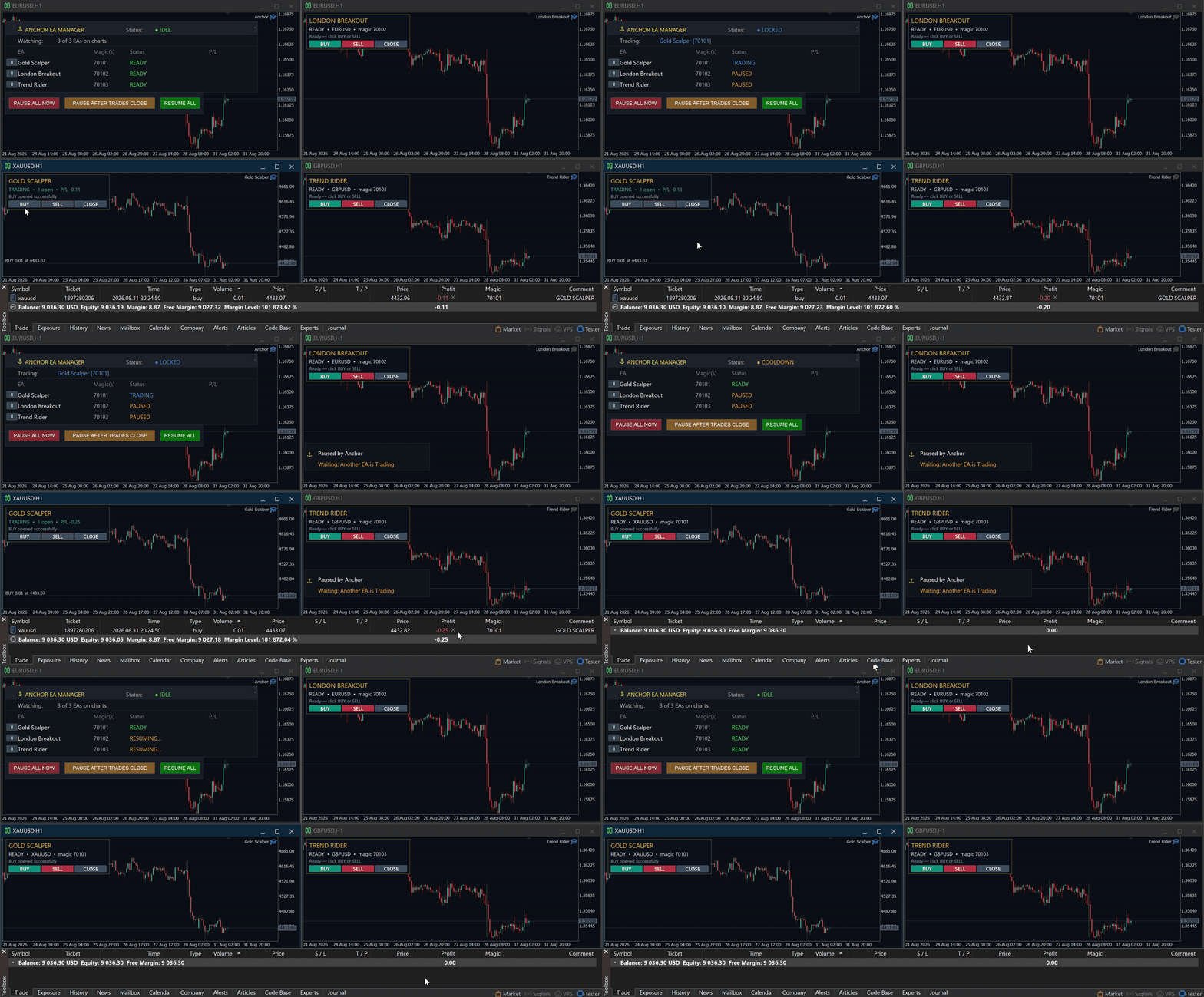
Choose how many managed EAs may trade at once. Set the limit to one and, when one starts trading, the others wait until its trades close. Or allow several to trade while still limiting how many can be active together.

Optional Strict Priority mode decides which EA keeps its trade if several open at almost the same time. Lower-priority EAs are paused and their trades are closed. You can also allow an EA to finish managing its existing trades before it is paused.

Pause or resume individual EAs from the on-chart panel, or control them all at once. Start with one EA and add more later. Anchor supports up to 64 managed EAs.

Need separate groups with different rules? Run another Anchor instance on a separate chart. Each instance manages only the EAs assigned to it.

Setup is simple: attach Anchor to one chart and enter the names and magic numbers found in your EA settings. An EA using several different magic numbers can be organized and managed as a single EA.

(Reach out to me if you need help figuring out your EA's magic numbers!)

Who Is Anchor For?

Use Anchor with one EA or a full EA portfolio, on personal or prop accounts.

Manual traders can also choose to include their open trades in Anchor's drawdown, news and scheduled closing actions.

Protection

Anchor provides three optional layers of drawdown protection. Per-EA limits watch each managed EA's open loss. Account-wide limits watch the whole account. Daily drawdown limits count both closed and open losses, then reset automatically at your chosen time.

Push notifications can report drawdown events, pauses, trading schedule resumes and forced closes through the MT5 mobile app.

News, Schedule and Trade Controls

The news filter can pause managed EAs before selected economic events and resume them after the risk window. Choose the timing, currencies and news importance, or pause only EAs exposed to a specific currency.

The scheduler controls trading hours using your broker's time. Set daily, overnight or weekend windows and choose whether to pause, wait for open trades to close, or completely close those selected trades.

Direction controls can restrict selected EAs to buy-only or sell-only trading. Anchor can also cancel pending orders when an EA is paused so an old order cannot open a new trade.

Clear and Reliable Control

The panel shows which EAs are ready, trading, paused, blocked or waiting. Anchor remembers its control state through chart reloads, terminal interruptions and restarts.

Requirements

MetaTrader 5. One chart per Anchor instance, using any symbol or timeframe.

Before first use, open Tools > Options > Expert Advisors and uncheck the "Disable Algorithmic Trading when..." options.

WebRequest permission is needed only for the optional news filter.

Not compatible with the built-in MQL5 VPS. Anchor requires a full MT5 installation on your computer or a Windows VPS.

Strict Priority and coverage for trades you place manually require a hedging account.

Full documentation and personal setup support are included. Message me after purchasing and I will help you configure Anchor for your EAs.

Anchor is a coordination and risk-control tool, not a trading strategy or signal provider. Test your complete setup on a demo account first. Trading involves risk, and Anchor cannot guarantee trading performance or prevent every loss.

Değerlendirmeler 12
spankler
89
spankler 2026.09.08 10:46 
 

Definitely the best utility on the market for me. It helps manage mutliple EAs, and can ensure that only one fire at each time. Even after I've stopped using grid EAs, I still find a great use for Anchor in assisting my start/end trading hours, or managing drawdowns and configurations. Easily one of the most worthwhile purchases for me!

Developer is also friendly and helpful at each step of the way, and always takes his time offering to check my logs/set files regarding any issues I've faced.

Am totally happy with this purchase and recommend it to anyone who needs a utility tool for their EAs.

KPopMakerHK
153
KPopMakerHK 2026.08.28 01:51 
 

I've been using Anchor EA Manager for months. Highly recommended if you want better control of your trades, account, and capital. 👍 Thank again!

Ferran Lopez Navarro
3514
Ferran Lopez Navarro 2026.08.14 03:54 
 

Anchor has become the control center of my whole EA setup. I run many EAs across several accounts and Anchor handles everything around them — slots, drawdown limits, news filter, scheduling — without touching a single line of their code. It simply works. And Kali is on another level: fast replies, listens to feedback, and every update lands polished. The best tool of its kind on the market, kept to perfection by its developer. 5 stars, easily.

Önerilen ürünler
This tool will perform Trailing stop loss and Break even management for orders. Helps you limit or reduce the time spend watching orders on the screen, especially when you need to go to sleep. Just add this EA to 1 chart, you can manage all pairs. You can filter orders by comment, magic number, symbol and order ticket number. When Breakeven it can add shift/offset pips (to cover the commission...). You can try in strategy tester before purchase. The EA will add Buy and Sell alternately, so you
Ultimate Pro Trading Panel — All-In-One Manual & Grid Trading Dashboard Pro Trading Panel   is an all-in-one on-chart control panel that gives discretionary and semi-automated traders a complete toolkit for entries, exits, risk management, and grid trading — without leaving the chart. Every function is visual, draggable, and updates in real time. If you want to test this utility feel free to download the basic preview version of this tool here:  https://www.mql5.com/en/market/product/181435 Who
Riskinizi otomatik olarak hesaplarken işlemlere hızlı bir şekilde girip çıkmanıza yardımcı olacak Ticaret Yöneticisi. Aşırı Ticaret, İntikam Ticareti ve Duygusal Ticaretten korunmanıza yardımcı olacak özellikler içerir. İşlemler otomatik olarak yönetilebilir ve hesap performans ölçümleri bir grafikte görselleştirilebilir. Bu özellikler, bu paneli tüm manuel yatırımcılar için ideal kılar ve MetaTrader 5 platformunun geliştirilmesine yardımcı olur. Çoklu Dil desteği. MT4 Sürümü  |  Kullanım Kılavu
Product Name MT5 Gold & Silver Multi-Language Trading Panel V17.00 Introduction This is a professional trading panel designed specifically for manual gold and silver traders. It supports five languages: English, Chinese, Spanish, Arabic, and German. The panel automatically detects gold and silver symbols, so users do not need to enter symbol codes manually. It is compatible with most brokers worldwide, including standard accounts, zero spread accounts, and raw spread accounts. Users only need t
Trade Assistant 38 in 1
Makarii Gubaydullin
4.91 (23)
Çok Fonksiyonlu Araç: Lot Hesaplayıcı, Grid Emirleri, R/R Oranı, İşlem Yöneticisi, Arz ve Talep Bölgeleri, Fiyat Hareketi ve çok daha fazlası Demo Sürüm   |   Kullanım Kılavuzu İşlem Asistanı   strateji test cihazında çalışmaz :   Demo Sürümü BURADAN indirerek   aracı test edebilirsiniz. Herhangi bir sorunuz / iyileştirme fikriniz / bulunan bir hata için benimle iletişime geçin MT4 sürümüne ihtiyacınız varsa burada mevcuttur İşlem   sürecinizi basitleştirin, hızlandırın ve otomatikleştirin. Sta
Bastion is a monitor-and-close-only risk manager for prop-firm traders. It watches your account against your firm's daily-loss and maximum-drawdown limits in real time and force-closes your open positions BEFORE you cross a line. It never opens a trade of its own, so it stays fully within the tools allowed by FTMO, FundedNext, The5ers, FTUK and FXIFY. Why traders fail challenges A large share of failed evaluations end on a single daily-loss breach: a moment of inattention, a news spike, one tra
Nebula Trading Manager
Sina Mohammadamin Shahriari Moghadam
This expert advisor named   TradeManager   provides a manual trading management panel in MetaTrader 5 that allows precise control over open positions. It is designed for traders who want dynamic management of Stop Loss (SL), Take Profit (TP), Break Even (BE), and Partial Close functionality. Key Features: Dynamic Trade Management : Manually set or drag-and-drop SL, TP, and BE levels. Supports partial closing at different profit levels (1:1, 1:1.5, 1:2). Automated Drawing : Automatically draw
CYGNIX RISK GLADIATOR — Professional Trade Manager & Risk Guardian for MT5 Guard every position. Manage every trade. Sleep at night. Cygnix Risk Gladiator is a professional-grade position management Expert Advisor that watches every open trade on your account and automatically applies institutional-level risk controls in real time. It does not generate signals — it protects, manages, and exits trades opened by you, your strategies, or any other EA. Built for IC Markets and fully compatible w
SLTPSetter
Raphael Djangmah Osro Agbo
SLTPSetter - StopLoss Take Profit Setter HOW DOES IT WORK? Risk and account management is a very critical aspect of trading. Before entering a position, you must be fully aware how much you will be willing to loss both in percentage and value. This is where SLTPSetter gets you covered.  All you need to do is attach the indicator on the chart and PRESS BUY OR SELL automatically, all parameters needed for placing the trades will be provided at the top left corner of the screen. Feel free to adjust
RRtoolbox - Professional Tools: Risk:Reward Trading Tool (SL/TP Horizontals + Pending orders + Diagonals), Alerts set on trend lines (for alerts on diagonal levels), SelfManagement (BE, partials...), close/cancelling by time, Statistics, Info and trading on chart. One-Click Trading with Visual Risk:Reward Management RRtoolbox is a comprehensive trading panel that combines one-click order execution,  statistics and  powerful visual Risk:Reward tools, alerts set with trendlines, on chart butt
Trading tool combining a sophisticated equity stop-loss, dynamic take-profit management (Breakeven & Trailing), and symbol-group-based closing logic. It is a complete risk management and trade supervision tool. Features: All features of `Equity Master Stop v1` (floating profit/loss limits, exit protection, skip hours). Take-Profit Override: Can force a TP on any order to lock in a `MAX_FLOATING_PROFIT`. Step Breakeven: Locks in increasing amounts of profit as a trade moves favorably (e.g., aft
Chart Pro Classic Dark v1.00 Chart Pro Classic Dark is a professional MT5 chart styling and customization tool designed to give your charts a clean, modern, and professional dark appearance. Key Features Dark Black Background — Applies a clean black background to the chart. ️ Candlestick Chart — Automatically configures the chart to use candlesticks. Bullish Candles — Green/Lime bullish candles. Bearish Candles — White bearish candles. Grid Removal — Hides the chart grid for a clean
FREE
This is a common, simple and easy to use but effective tool to manage trading risks for all traders. It also help trader places stop loss and take profit levels at the same time the order is filled. How to set the expert advisor's parameters to support your trading style? Lots size. Fixed lots size - For traders who prefered to trade with fixed lots size, they can input the lots size in 'User lots' menu in the expert advisor's properties. The input value should be from the 'Minimum Volume' to th
User Manual Buy Trading Utility, Get 1 indicator FREE ! After purchase contact me for your " one indicator GIFT (Any one you want) ", adding you in group. Trading Utility MT5 The manual trader's cockpit. Size every trade by risk, place it from the chart, and manage it without ever opening the order dialog. Eight tabs, seven trailing engines, and every stop and target draggable with one click. One panel between you and the order window. Risk-sized entries, draggable stops, seven trailing modes,
Risk Properly with FXPosition Size Calculator which calculated the optimal Lot sSize based on your desired Risk Percentage and Stop-Loss, ensuring precise Risk Management. Enter your account balance, risk percentage, and Stop-Loss(either in points or price levels), and the calculator instantly determines the required lot size so that you don't risk too much. Protect your capital and trade with confidence with Accurate Position Sizing and Simplicity.
The Stop Loss Manger - SL Mange With the Stop Loss Manager you can finally sleep peacefully while it effectively manages your risk in stock market trading. Simply set your individual stop loss limits and let the manager trade for you. Never worry about losses again - the Stop Loss Manager takes care of it for you! Get the ultimate support for your trading now and maximize your profits with ease. Join the community of successful traders who swear by Stop Loss Manager today. Function overview: 1.
King ElChart Manual Trade Panel
Mohammed Maher Al-sayed Mohammed Ahmed Saleh
King Chart – Manual Trading Panel for MetaTrader 5 Overview King Chart is a simple yet powerful manual trading panel built for traders who want speed, precision, and clarity. It enables quick order execution, clear lot control, and real-time account monitoring  all directly on your MT5 chart. Main Features Multi-Lot Trade Execution 3 Buy and 3 Sell buttons for instant execution Each button is tied to a custom lot size field Designed for flexible scaling in or out of trades Position Management D
Trading Utility for Forex Currency Pairs Only not for Gold  Functions Auto Lot Calculation based on Risk Auto stoploss  Auto TakeProfit Breakeven Auto Close Half % Close in percentage with respect to the PIPs Pending Orders BuyLimit Sell Limit with distances BuyStop Sell Stop    with distances Trading Informations Risk in percentage For Multiple trades Combine Takeprofit and Combine Stoplosses
Recovery Manager Panel MT5 is a manual order management panel for traders who want to manage open positions directly from the chart in a clearer and more organized way. This tool is not a signal robot. It does not predict market direction, generate entry signals, or trade automatically based on market forecasts. Instead, it helps traders work with positions that are already open. You can calculate possible recovery lot sizes, view estimated target levels on the chart, and use available floating
This is a trade manager which is designed to simplify your trading experience and allow you to enter any type of trade with the set risk management within seconds. This trade manager has two modes. (1) The Market order which opens instant orders and the pending orders which consists of buy stop order, buy limit orders, sell stop orders, sell limit order, all these trades can be achieved by moving your stop loss and entry to the desired point and the givn trade will be opened.  You do not need to
Automatic Trade Calculation Panel   One-Klick-Trading Automatic calculation of Lot sice Atuomatic calulation of Stop-Loss and TakeProfit Up to 3 partial closings Trailingstop (Stop-Loss moves automatically)   The lot size is calculated by the previously determined risk (e.g. 1.0% of the account size) and the distance of the Stop Loss from the entry point. The distance from the Stop Loss to the entry point results from the ATR indicator multiplied by a freely selectable factor. The Stop Loss and
Lot2Risk Automator
Muhammad Shamsuddeen Muhammad
Lot2Risk Automator EA - Automated Position Management System     YOUR LOT SIZE = YOUR RISK. PERIOD. 1.00 lot = 1% risk 2.50 lots = 2.5% risk 50.00 lots = 50% risk That’s it. That’s the system. Lot2Risk Automator EA instantly converts your orders into perfectly risk-managed trades: Auto position sizing Auto TP by Risk:Reward Auto Break-Even protection Works on Forex, Metals   & Indices. You decide the trade. The EA enforces discipline. Completely intuitive. What Makes This Different?  
Transform Your Trading with Advanced Automation Management EA TRADE NEXUS PRO is a sophisticated MetaTrader 5 Expert Advisor designed specifically for every trading pair. This EA combines intelligent position management with precise risk control. Key Features That Set Us Apart Position Orchestrator System Risk Calculation Based on Stop Loss in Pips/Points. Orders : You can set pending orders such as limit orders, market orders and stop orders Dynamic Risk Control : Customizable risk p
Recovery Assistant Pro for MT5 Professional Manual Recovery Trading Assistant Recovery Assistant Pro is a powerful and easy-to-use Manual Trading Assistant EA. Helps calculate the appropriate Lot Size . Designed to help traders recover losing positions back to profit based on the desired Target USD . Reduces the complexity of Recovery calculations and minimizes errors caused by manual calculations. With a beautiful and user-friendly trading panel (shown above), you can control your trades qu
Trade Manager Pro A complete discretionary trade-management cockpit for MetaTrader 5 — direction-aware position planning, prop-firm rule enforcement, a live correlation heat map, a pre-trade checklist gate, and one-click execution, all in a single on-chart panel. Overview Trade Manager Pro is not a signal-generating "black box" EA. It does not predict market direction and makes no profitability promises. Instead, it is a risk and execution management tool built for discretionary traders — partic
TradeControl Pro – MetaTrader için Gelişmiş Trade Yönetim Aracı TradeControl Pro , MetaTrader platformu için geliştirilmiş bir trade yönetim aracıdır ve işlemlerin doğrudan grafik üzerinden düzenli ve verimli bir şekilde yönetilmesini sağlar. Uygulama, açık ve anlaşılır bir kullanıcı arayüzünü otomatik hesaplamalar ve farklı işlem yaklaşımlarına uygun esnek kontrol seçenekleri ile birleştirir. Grafik üzerine entegre edilen panel, tablo yapısında tasarlanmış olup üç ana sekmeden oluşur: Execution
Pattern Recognition EA
Claudiu-georgian Zavera
Pattern Recognition EA - From Learn to Earn. The market repeats itself. This EA finds every past repeat of the current candle sequence - and lets history vote the direction. ONE SHAPE. EVERY REPEAT IN HISTORY VOTES. The last N candles on your signal timeframe form a shape. The EA scans the history you choose - a fixed number of bars or everything your broker provides - for the SAME shape, and checks what happened next, every single time. Only when enough repeats exist AND a clear majority of t
Currency Exposure Matrix is a currency-level exposure dashboard derived from current open positions. Key functions: - Gross and net currency exposure - Long and short decomposition - Deposit-currency conversion - Concentration warnings - Transparent handling when conversion symbols are unavailable The utility helps users understand aggregated currency exposure across their portfolio. It does not generate entry signals, predict market direction or guarantee trading results. Review broker symbol
Introducing the Revolutionary   Trade Closing Assistant ! Are you tired of manually closing hundreds trades? Are you a   scalper ,   day trader ,   swing trader   and  you want to maximize your profits and minimize your losses by closing multiple positions at thesame time under different conditions? Are you a   Prop Firm Trader  who wishes to avoid hitting maximum daily drawdown? Search no further. This kit is the ultimate solution for all you. GUIDE TO USE THE KIT 1. Shows the total profit/los
Magic Number Manager , tek bir hesapta aynı anda çalışan 20+ Uzman Danışman (EA) için merkezi izleme ve kontrol sağlayan, MetaTrader 5 için profesyonel bir işlem yönetim yardımcı programıdır. Temel Özellikler: Performans Gösterge Paneli   - Her EA'nın toplam işlem sayısını, kazanma oranını, toplam karı, ortalama işlemi, en iyi/en kötü işlemi, mevcut drawdown'ı ve kar faktörünü gösteren gerçek zamanlı tablo. Anında görsel değerlendirme için renk kodlu metrikler. Toplu İşlem Yönetimi   - Belirli b
Bu ürünün alıcıları ayrıca şunları da satın alıyor
Trade Assistant MT5
Evgeniy Kravchenko
4.41 (216)
It helps to calculate the risk per trade, the easy installation of a new order, order management with partial closing functions, trailing stop of 7 types and other useful functions. Additional materials and instructions Installation instructions - Application instructions - Trial version of the application for a demo account Line function -   shows on the chart the Opening line, Stop Loss, Take Profit. With this function it is easy to set a new order and see its additional characteristics bef
Trade Manager EA’ye hoş geldiniz! Ticaretin daha sezgisel, hassas ve verimli hale gelmesi için tasarlanmış nihai risk yönetim aracı ile tanışın. Bu sadece bir emir verme aracı değil; ticaret planlaması, pozisyon yönetimi ve risk kontrolü için kapsamlı bir çözüm. İster yeni başlayan bir yatırımcı olun, ister deneyimli bir trader ya da hızlı emir gerektiren bir scalper, Trade Manager EA ihtiyaçlarınıza uyum sağlar ve forex, endeksler, emtialar ve kripto paralar dahil tüm piyasalarda esneklik sunar
Farmed Hedge Yield Farming | All Markets (Manual - Hybrid - Semi/Automated EA) VERIFIED TRADING RESULTS - Farmed Hedge Yield Axi Copy:  https://www.mql5.com/en/signals/2356376 - Farmed Hedge Yield Exn Copy:   https://www.mql5.com/en/signals/2356404 - Farmed Hedge Yield V Copy:  https://www.mql5.com/en/signals/2357156 IMPORTANT NOTICE: FarmedHedge is a MANUAL-FOCUSED TRADING UTILITY ,not a fully automated EA. Results shown on this Signal include manual trades and overall strategic management.
Beta Sürümü Telegram to MT5 Signal Trader resmi alfa sürümüne neredeyse hazır. Bazı özellikler hâlâ geliştirilmekte olup küçük hatalarla karşılaşabilirsiniz. Sorun yaşarsanız lütfen bildirin, geri bildiriminiz yazılımın herkes için gelişmesine yardımcı olur. Telegram to MT5 Signal Trader , Telegram kanallarından veya gruplarından gelen işlem sinyallerini otomatik olarak MetaTrader 5 hesabınıza kopyalayan güçlü bir araçtır. Herkese açık ve özel kanalları destekler ve birden fazla sinyal sağlayıc
================================================================================ POC BREAKOUT - V20.72. Full Professional Grade Toolkit ================================================================================ POC Breakout is a full MetaTrader 5 trading dashboard for discretionary traders who want breakout signals, Point of Control (POC) context, volume profiles, order flow, market structure, news, alerts, and advanced trade planning in one professional workspace. Attached directly to you
TradePanel MT5
Alfiya Fazylova
4.88 (167)
Trade Panel, çok işlevli bir ticaret asistanıdır. Uygulama, manuel ticaret için 50'den fazla ticaret fonksiyonu içerir ve çoğu ticaret görevini otomatikleştirmeyi mümkün kılar. Uygulama talimatları + video talimatları: https://www.mql5.com/en/blogs/post/772292 Demo hesabı için uygulamanın deneme sürümü: https://www.mql5.com/en/blogs/post/750865 Uygulamayı nasıl kurulur: https://www.mql5.com/en/blogs/post/756239 Uygulamayı görsel modda nasıl test edilir: https://www.mql5.com/en/blogs/post/770277
EA Overfitter
Stephen J Martret
5 (1)
That backtest looks great. But will it still be making money tomorrow, next week, next month? EA Overfitter re-runs your EA on 100 price histories it has never seen. One score tells you if the edge is real. A backtest tells you what an EA did on one price history — the one that happened to occur. What you cannot tell from it is how much of that result was the strategy and how much was the particular path. EA Overfitter answers that. It builds up to 100 synthetic price histories your EA has n
Welcome to ENTRY IN THE ZONE WITH SMC MULTI TIMEFRAME Entry In The Zone and SMC Multi Timeframe is a real-time market analysis tool based on Smart Money Concepts (SMC), designed to analyze market structure, price direction, and key trading zones. It supports both Single-Timeframe Analysis and Multi-Timeframe Analysis, providing a clearer view of the overall market structure across multiple timeframes, with real-time BUY / SELL signals that do not repaint. It is designed to help filter trading op
Power Candles Strateji Tarayıcısı - Kendi Kendini Optimize Eden Çoklu Sembol Kurulum Bulucu Power Candles Strateji Tarayıcısı , Power Candles göstergesini çalıştıran aynı kendinden optimize edici motoru, Piyasa İzleyicinizdeki her sembol üzerinde yan yana çalıştırır. Tek bir panel, şu anda istatistiksel olarak hangi sembollerin işlem yapılabilir olduğunu, her birinde hangi stratejinin kazandığını, en uygun Stop Loss / Take Profit çiftini gösterir ve yeni bir sinyal geldiği anda size bildirim gön
Footprint Chart Pro — Professional OrderFlow EA for MetaTrader 5 Version 6.34 | Professional tool for real traders | Institutional-Grade Visualization DEMO USERS - PLEASE SELECT EVERY TICK / REAL TICK WHEN TESTING AND YOU HAVE DOWNLOADED HISTORICAL DATA. IF YOU SEE A WAITING SCREEN AND IT IS NOT DOWNLOADING, IT MEANS YOU HAVE LOW HISTORICAL DATA. TRY 1 MIN AND 5 MIN FIRST ON 1 DAY DATA. ONE DAY DATA SHOULD BE THE NEWEST AND MOST CURRENT DATE. PLEASE WAIT UNTIL THE MARKET HAS ROLLED OVER PERIOD.
Timeless Charts
Samuel Manoel De Souza
5 (8)
Timeless Charts, profesyonel yatırımcılar için hepsi bir arada bir trading aracıdır. Saniye Grafikleri ve Renko gibi özel grafik türlerini, Footprints , Clusters , Hacim Profilleri , VWAP çalışmaları ve gelişmiş piyasa analizi sağlayan sabitlenmiş analiz araçlarıyla gelişmiş emir akışı analiziyle birleştirir. İşlem ve pozisyon yönetimi, entegre işlem yönetim paneli aracılığıyla doğrudan grafik üzerinden gerçekleştirilirken, Market Replay ve Sanal Hesaplar trading becerileri ve stratejileri üzeri
Trade Indicator Assistant   is a powerful MT5 utility designed to turn indicators into automated trading systems. Its main feature is the ability to automatically detect an indicator’s   BUY and SELL signal buffers , without requiring you to know the buffer numbers, search through indicator settings, or modify the indicator source code. Bonus Indicator:   After purchasing Trade Indicator Assistant, contact me to receive   Trade Signal Pro   completely free as a bonus indicator. [Download Demo V
Ultimate Extractor - Professional Trading Analytics for MT5 *****this is the local HTML version of Ultimate Extractor. !!!!!it is not compatible with Cloud!!!! For the online version please reach out to me directly****** Ultimate EA manager also now available when you use cloud pro and above for free!! Ultimate Extractor transforms your MetaTrader 5 trading history into actionable insights with comprehensive analytics, interactive charts, and real-time performance tracking. What It Does Automa
Üye olduğunuz herhangi bir kanaldan (özel ve kısıtlı olanlar dahil) sinyalleri doğrudan MT5'inize kopyalayın.  Bu araç, kullanıcıyı göz önünde bulundurarak tasarlanmış olup işlemleri yönetmek ve izlemek için ihtiyacınız olan birçok özelliği sunar. Bu ürün, kullanıcı dostu ve görsel olarak çekici bir arayüzde sunulmaktadır. Ayarlarınızı özelleştirin ve ürünü dakikalar içinde kullanmaya başlayın! Kullanıcı Kılavuzu + Demo  | MT4 Sürümü | Discord Sürümü Demo denemek isterseniz lütfen kullanıcı kı
Prop Firm Os
Gayathiri Gopalakrishnan
5 (1)
PROP FIRM OS Structured Trading Assistant for MetaTrader 5 PROP FIRM OS is a structured trading assistant designed for MetaTrader 5 users who prefer rule-based market analysis and organized trading workflows. The Expert Advisor combines market analysis tools, scanner functions, dashboard monitoring, alerts, risk-control settings, and trade management features inside one system. PROP FIRM OS is designed to help traders follow selected rules, filters, and monitoring conditions during trading activ
EA Auditor
Stephen J Martret
5 (5)
EA Auditor is an independent analysis tool for traders evaluating Expert Advisors and trading signals on MetaTrader 5. It audits backtest reports, reviews posted developer signals, and cross-verifies the two against each other to help traders assess strategies before committing capital. The MQL5 market offers a wide range of Expert Advisors from many developers, with varying approaches, quality, and transparency. EA Auditor provides a consistent, data-driven framework for reviewing them, answer
The product will copy all telegram signal to MT5 ( which you are member) , also it can work as remote copier.  Easy to set up, copy order instant, can work with almost signal formats, image signal,  s upport to translate other language to English Work with all type of channel or group, even channel have "Restrict Saving Content", work with  multi channel, multi MT5 Work as remote copier: with signal have ticket number, it will copy exactly via ticket number. Support to backtest signal. How to s
Grid Manual MT5
Alfiya Fazylova
4.73 (22)
Grid Manual, sipariş ızgarasıyla çalışmak için kullanılan bir ticaret yardımcı programıdır. Yardımcı program evrenseldir, esnek ayarlara ve sezgisel bir arayüze sahiptir. Sadece kayıpların ortalaması yönünde değil, aynı zamanda kazanç artışı yönünde de bir emir ızgarası ile çalışır. Tüccarın bir emir ızgarası oluşturmasına ve eşlik etmesine gerek yoktur, bu yardımcı programı yapacaktır. Emri açmanız yeterlidir ve Grid manual otomatik olarak ona bir emir ızgarası oluşturacak ve kapanana kadar ona
TRUMP SHOCK – Real-Time Market Protection for MT5 TRUMP SHOCK is a MetaTrader 5 risk-management utility designed to react to sudden market-moving news and unexpected volatility. Markets such as Gold, Oil and USD-related instruments can move within seconds following major political statements or breaking news. TRUMP SHOCK monitors important Truth Social posts and general breaking news and can automatically trigger predefined protective actions in MetaTrader 5 — helping you reduce unwanted exposur
Asistan: Ticaret Asistanı-MT4 (indirmek için tıklayın) Ticaret Asistanı-MT5 (indirmek için tıklayın) Lütfen kullanım kılavuzunu dikkatlice okuyunuz. Temel Bilgiler: Pozisyonların hızlı açılıp kapatılması, tek tıklamayla pozisyon açılıp kapatılması, tek tıklamayla emir verilmesi Çizim Hattı Ticareti Otomatik sl/tp Yakındaki Semboller Kar Koruma Altında SL Protect'i taşı SL'yi takip ediyor Hesap Risk Kontrolü Düzenin Gölgesi Otomatik Sipariş Ekleme Otomatik Kapanan Siparişler Kapat Yeniden A
EchoTrade Telegram to MT5 Copier Seamless, Instant, and Reliable Signal Copying - Direct from Telegram to MetaTrader 5! The product does not run in the strategy tester but you can get free trial version here  for testing before purchase. Tired of manually executing trades from Telegram signals? EchoTrade automates the process, instantly copying trades from any Telegram channel or group directly into your MT5 account—accurately, efficiently, and without delay. Key Features: Universal Compatibi
AI Agent Supervisor is NOT an Expert Advisor. AI Agent Supervisor   is a   multi-agent AI risk & portfolio supervisor   that watches every EA on your account and intervenes in real time.  WANT AN AI PORTFOLIO MANAGER WATCHING YOUR FLEET 24/7?   Run your fleet on the same brokers I do:   IC MARKETS , IC TRADING   .  Unlike the centralized stock market, Forex has no single, unified price feed.  Every broker sources liquidity from different providers, creating unique data streams. The Supervisor r
YuClusters
Yury Kulikov
4.93 (43)
Attention: You can view the program operation in the free version  YuClusters DEMO .  YuClusters is a professional market analysis system. The trader has unique opportunities to analyze the flow of orders, trade volumes, price movements using various charts, profiles, indicators, and graphical objects. YuClusters operates on data based on Time&Sales or ticks information, depending on what is available in the quotes of a financial instrument. YuClusters allows you to build graphs by combining da
Copy your MT5 trades to Interactive Brokers You keep using MT5. Every order you open or close is sent to your IB account. In real time. No coding. No changes to your strategy or EA. Try it first Rent 1 month: $30. Test on a live or paper account. What it does Real-time copying: same direction, reverse, or one side only. Map any MT5 symbol to any IB symbol. Set a lot ratio for each. Forex, Futures, Stocks, CFDs, Metals and Crypto. Position sync: both accounts checked, any difference fixed. Optio
VirtualTradePad PRO SE MT5 — MetaTrader 5 için profesyonel işlem kontrol merkezi VirtualTradePad PRO SE , MetaTrader 5 için grafik tabanlı premium bir işlem paneli ve trade yönetim çalışma alanıdır. Daha hızlı emir yürütme, daha net pozisyon kontrolü, yapılandırılmış trade yönetimi, görsel seviye planlama ve doğrudan grafik üzerinden profesyonel bir çalışma akışı isteyen traderlar için tasarlanmıştır. Bu yalnızca basit bir BUY / SELL paneli değildir. PRO SE; manuel işlem, bekleyen emirler, pozis
FUTURES ORDERFLOW FOOTPRINT CHART Professional OrderFlow EA for MetaTrader 5 Version 1.01| Professional tool for real traders | Institutional-Grade Visualization STRATEGY TESTER USERS - PLEASE SELECT EVERY REAL TICK WHEN TESTING AND YOU HAVE DOWNLOADED HISTORICAL DATA. IF YOU SEE A WAITING SCREEN AND IT IS NOT DOWNLOADING, IT MEANS YOU HAVE LOW HISTORICAL DATA. TRY 1 MIN AND 5 MIN FIRST ON 1 DAY DATA. ONE DAY DATA SHOULD BE THE NEWEST AND MOST CURRENT DATE. PLEASE WAIT UNTIL THE MARKET HAS ROL
Quant AI Agents are independent trading Expert Advisors. Instead of trading using a fixed strategy like other conventional EAs, Quant AI Agents   is a   multi-agent AI trading framework   that turns natural-language strategy prompts into live.  WANT THE SAME RESULTS AS MY LIVE SIGNAL?   Use the exact same brokers I do:   IC MARKETS , IC TRADING   .  Unlike the centralized stock market, Forex has no single, unified price feed.  Every broker sources liquidity from different providers, creating un
Custom Alerts AIO: Tüm Piyasaları Takip Et — Hiçbir Kurulum Gerekmez Genel Bakış Custom Alerts AIO , hiçbir ek yapılandırma gerektirmeyen, kullanıma hazır bir piyasa izleme çözümüdür. Gerekli tüm göstergeler — FX Power, FX Volume, FX Dynamic, FX Levels, IX Power — iç yapısına gömülüdür. Grafik görüntülemesi olmadan çalışır, bu da onu sessiz ve verimli bir şekilde gerçek zamanlı alarm üretimi için mükemmel hale getirir. Brokerınızın sunduğu tüm varlık sınıflarını destekler: Forex, Metaller, End
Global Investing FX Terminal
Santiago Nicolas Pla Casuriaga
5 (1)
Global Investing FX Terminal , MetaTrader 5 için hepsi bir arada bir FX dashboard'udur — merkez bankası politika faizleri, CFTC COT pozisyonlanması, carry sıralamaları, ekonomik sürprizler, opsiyon skew'u, perakende duyarlılığı ve korelasyonlar, toplamda on üç panel — titremesiz tek bir canvas katmanında görüntülenir ve tek bir ekli EA'dan her 10 saniyede bir güncellenir. Harici yazılım gerekmez. Profesyonel FX analizi, normalde ayrı platformlarda bulunan verilere eş zamanlı erişim gerektirir: f
Trading Chaos Expert
Gennadiy Stanilevych
5 (11)
This software has no equals in the world and represents a universal trade "console" covering trading signals, automated market entry, setting of Stop Loss and Take Profit, as well as Trailing Profit for multiple trades at the same time in a single open window. Intuitive control of the Expert Advisor in "three clicks" ensures a comprehensive use of all its functions on different computers, including tablets PCs. Interacting with additional signal indicators that mark the chart to give a real mark
Yazarın diğer ürünleri
Neptune EA MT5
Kalinskie Gilliam
4.71 (28)
Neptune: A Gold Trend-Following EA A professional trend-following system designed for XAUUSD. Attach to a single chart with any timeframe. Neptune manages its own internal timeframes. Neptune identifies high-probability entries using multi-factor confirmation, then protects profits with adaptive trailing stops and exits. Built for traders who want a genuine system, not gimmicks. Purchase Neptune and receive an additional EA for free. Message us after purchase for details. Price increases with ea
Filtrele:
spankler
89
spankler 2026.09.08 10:46 
 

Definitely the best utility on the market for me. It helps manage mutliple EAs, and can ensure that only one fire at each time. Even after I've stopped using grid EAs, I still find a great use for Anchor in assisting my start/end trading hours, or managing drawdowns and configurations. Easily one of the most worthwhile purchases for me!

Developer is also friendly and helpful at each step of the way, and always takes his time offering to check my logs/set files regarding any issues I've faced.

Am totally happy with this purchase and recommend it to anyone who needs a utility tool for their EAs.

KPopMakerHK
153
KPopMakerHK 2026.08.28 01:51 
 

I've been using Anchor EA Manager for months. Highly recommended if you want better control of your trades, account, and capital. 👍 Thank again!

Kalinskie Gilliam
1738
Geliştiriciden yanıt Kalinskie Gilliam 2026.09.01 00:19
Greatly appreciate the review KPopMaker! Really glad Anchor's been helping you manage everything. And thank you for sticking with it these past few months! :)
Ferran Lopez Navarro
3514
Ferran Lopez Navarro 2026.08.14 03:54 
 

Anchor has become the control center of my whole EA setup. I run many EAs across several accounts and Anchor handles everything around them — slots, drawdown limits, news filter, scheduling — without touching a single line of their code. It simply works. And Kali is on another level: fast replies, listens to feedback, and every update lands polished. The best tool of its kind on the market, kept to perfection by its developer. 5 stars, easily.

Kalinskie Gilliam
1738
Geliştiriciden yanıt Kalinskie Gilliam 2026.09.01 00:26
Big thanks Ferry! Very glad that Anchor has become such an integral part of your setup. And I really appreciate all the feedback you've shared along the way, it has genuinely helped with new updates and continuous improvements! :)
Michael Arthur Schorr
2287
Michael Arthur Schorr 2026.08.05 20:21 
 

Kullanıcı değerlendirmeye herhangi bir yorum bırakmadı

Kalinskie Gilliam
1738
Geliştiriciden yanıt Kalinskie Gilliam 2026.08.12 11:23
Thanks Michael! Hedging has come up a few times now so it's something I'm looking at. Can't promise anything just yet but it's on the list. Appreciate the review :)
yunkayyy
209
yunkayyy 2026.07.28 01:37 
 

Fantastic well made tool for EA portfolios. Dev is very helpfull and open to feedback

Kalinskie Gilliam
1738
Geliştiriciden yanıt Kalinskie Gilliam 2026.08.12 11:23
Thank you yunkay! Honestly most of what's in Anchor has came from feedback, so please keep it coming!
Thierry Ouellet
3164
Thierry Ouellet 2026.07.16 20:48 
 

A must have tool for anyone running multiple EAs! And even for a single EA, its advanced drawdown protection and news filter is really useful!

Kalinskie Gilliam
1738
Geliştiriciden yanıt Kalinskie Gilliam 2026.08.12 11:24
Thanks Thierry! And good point on the single EA thing. A lot of people don't realize the benefits for a single EA that doesn't have DD control or a news filter built in.
Christopher Robert Walker
325
Christopher Robert Walker 2026.07.12 18:31 
 

Exceptional EA, I use it to protect my balance/equity with the built in DD control. There are some great features that will be very useful to anyone using multiple EA's and don't want them to trade together or only want to allow them to trade to your own schedule. Very unique EA. Highly recommend.

Kalinskie Gilliam
1738
Geliştiriciden yanıt Kalinskie Gilliam 2026.08.12 11:34
Thanks Chris! Glad the DD control is doing its thing. Appreciate you always taking the time to write these up :)
Amit-AX
786
Amit-AX 2026.06.17 16:42 
 

A genius tool every MQL user should have. Saved me from multiple overlapping trades and manage my EA collection. If you run multiple EAs please consider this as it's well worth it and probably save you from losing a lot of money and margin. Thank you to DEV for continuous updates and top quality EA.

Kalinskie Gilliam
1738
Geliştiriciden yanıt Kalinskie Gilliam 2026.08.12 11:51
Appreciate that Amit! I always hated having overlapping trades hit SL and so that was the whole reason I built this in the first place. More updates on the way!
tomtomwazhere
661
tomtomwazhere 2026.05.07 00:41 
 

Kullanıcı değerlendirmeye herhangi bir yorum bırakmadı

Kalinskie Gilliam
1738
Geliştiriciden yanıt Kalinskie Gilliam 2026.08.12 13:13
Thank you Tom! QQ and QA together is one of the more common setups I see. Glad it's working out!
Ellis Jack Kington
210
Ellis Jack Kington 2026.03.30 12:19 
 

does exactly what it says on the tin - very helpful for when you don't want to over extend your risk on gold or any symbol + dd protection and a news filter - I use it mostly for my gold grid ea's so they don't open positions at the same time - great job kali :)

Kalinskie Gilliam
1738
Geliştiriciden yanıt Kalinskie Gilliam 2026.08.12 13:15
Cheers Kington! Gold grids stacking on top of each other is exactly what started this whole thing. And thanks for the feedback along the way too, the EA name section in the manual exists because of you haha
Dani12555
585
Dani12555 2026.03.22 19:53 
 

Kullanıcı değerlendirmeye herhangi bir yorum bırakmadı

Kalinskie Gilliam
1738
Geliştiriciden yanıt Kalinskie Gilliam 2026.08.12 13:16
Thanks Dani! The weekend BTC use case is a good one for Anchor's scheduler windows. Appreciate the detailed writeup! :)
Luca Barone
1830
Luca Barone 2026.03.18 18:10 
 

Very useful utility for managing multiple EAs in a single account. I personally use it to limit EAs that don't have DD control Thank again!

Kalinskie Gilliam
1738
Geliştiriciden yanıt Kalinskie Gilliam 2026.08.12 13:17
Thanks Luca! Wrapping up EAs that have no DD control of their own is honestly one of the best uses for Anchor. Glad it's helping!
Değerlendirmeye yanıt