
Anchor Trade Manager
- 유틸리티
-
Kalinskie Gilliam
 Trident - Professional trading systems built by experienced analysts and developers 🔱
ABOUT US
Kalinskie Gilliam — Developer
- 9 years US Military Intelligence (Special Operations Data Analyst)
- Master's Degree in Computer Science
- Based in Switzerland - 버전: 5.23
- 업데이트됨: 23 8월 2026
- 활성화: 8
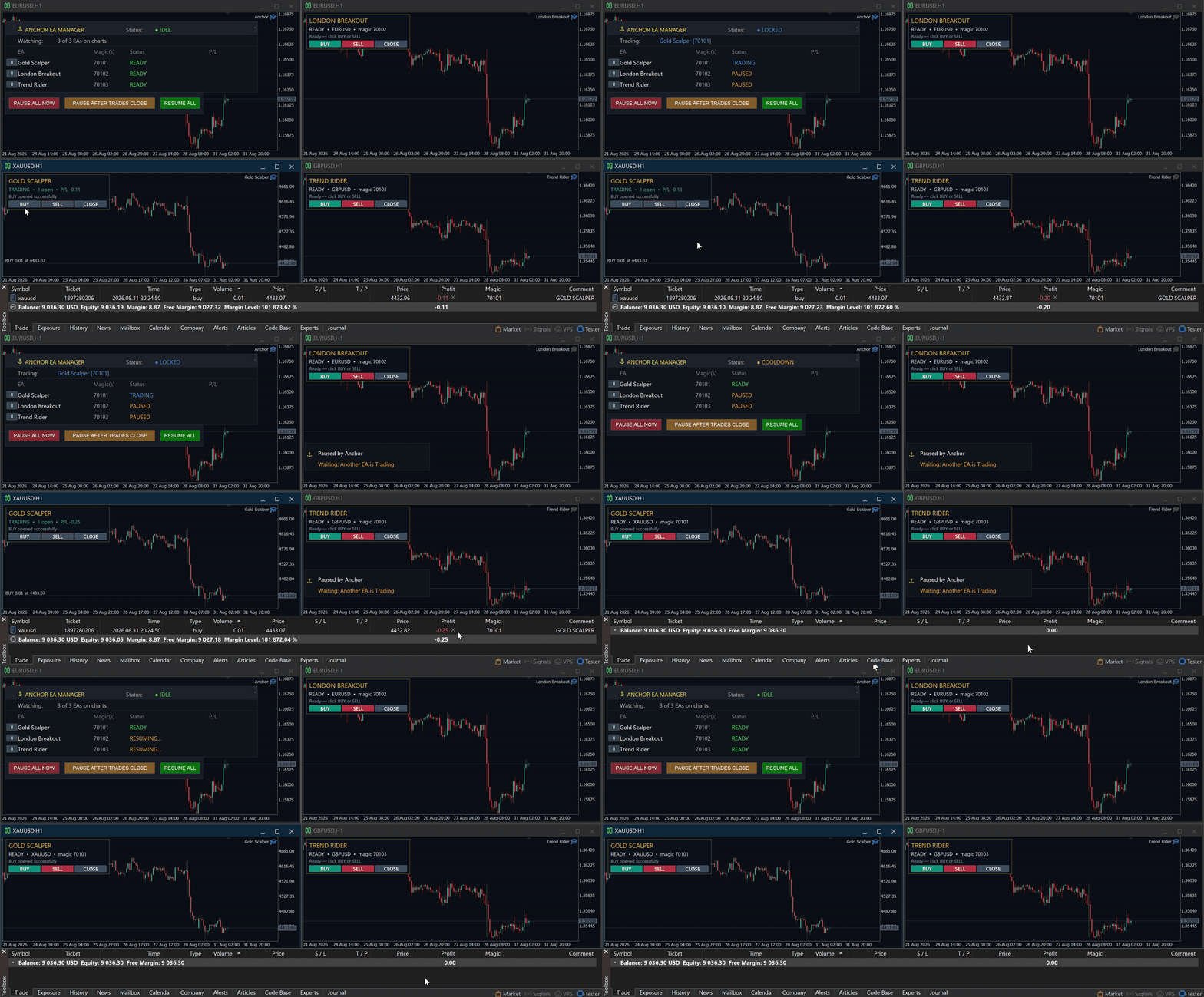
Your EAs cannot see each other, but Anchor can.
Anchor gives you one place to coordinate your EAs, manage risk, and decide when trading is allowed. It works alongside the trading bots you already use without any changes to them.
The Problem
One EA opens a trade. Then another starts trading. The next thing you know, you wake up to multiple grids built across your account. Each EA may be doing exactly what it was designed to do, but together they can place far more risk on your account than you intended.
Even when using just one EA, it may not include the account protection, news controls, or the trading schedule you want. And you cannot watch every chart 24 hours a day.
The Solution
Anchor watches your selected EAs together. It does not replace their strategies or change how they find trades.
You choose exactly which EAs Anchor manages. For example, you can allow only one of multiple grid EAs to trade at a time while your single-trade EAs continue normally.
Anchor will not pause or control the EAs you leave out. Their trades are affected only if you deliberately enable account-wide drawdown protections.
Choose how many managed EAs may trade at once. Set the limit to one and, when one starts trading, the others wait until its trades close. Or allow several to trade while still limiting how many can be active together.
Optional Strict Priority mode decides which EA keeps its trade if several open at almost the same time. Lower-priority EAs are paused and their trades are closed. You can also allow an EA to finish managing its existing trades before it is paused.
Pause or resume individual EAs from the on-chart panel, or control them all at once. Start with one EA and add more later. Anchor supports up to 64 managed EAs.
Need separate groups with different rules? Run another Anchor instance on a separate chart. Each instance manages only the EAs assigned to it.
Setup is simple: attach Anchor to one chart and enter the names and magic numbers found in your EA settings. An EA using several different magic numbers can be organized and managed as a single EA.
(Reach out to me if you need help figuring out your EA's magic numbers!)
Who Is Anchor For?
Use Anchor with one EA or a full EA portfolio, on personal or prop accounts.
Manual traders can also choose to include their open trades in Anchor's drawdown, news and scheduled closing actions.
Protection
Anchor provides three optional layers of drawdown protection. Per-EA limits watch each managed EA's open loss. Account-wide limits watch the whole account. Daily drawdown limits count both closed and open losses, then reset automatically at your chosen time.
Push notifications can report drawdown events, pauses, trading schedule resumes and forced closes through the MT5 mobile app.
News, Schedule and Trade Controls
The news filter can pause managed EAs before selected economic events and resume them after the risk window. Choose the timing, currencies and news importance, or pause only EAs exposed to a specific currency.
The scheduler controls trading hours using your broker's time. Set daily, overnight or weekend windows and choose whether to pause, wait for open trades to close, or completely close those selected trades.
Direction controls can restrict selected EAs to buy-only or sell-only trading. Anchor can also cancel pending orders when an EA is paused so an old order cannot open a new trade.
Clear and Reliable Control
The panel shows which EAs are ready, trading, paused, blocked or waiting. Anchor remembers its control state through chart reloads, terminal interruptions and restarts.
Requirements
MetaTrader 5. One chart per Anchor instance, using any symbol or timeframe.
Before first use, open Tools > Options > Expert Advisors and uncheck the "Disable Algorithmic Trading when..." options.
WebRequest permission is needed only for the optional news filter.
Not compatible with the built-in MQL5 VPS. Anchor requires a full MT5 installation on your computer or a Windows VPS.
Strict Priority and coverage for trades you place manually require a hedging account.
Full documentation and personal setup support are included. Message me after purchasing and I will help you configure Anchor for your EAs.
Anchor is a coordination and risk-control tool, not a trading strategy or signal provider. Test your complete setup on a demo account first. Trading involves risk, and Anchor cannot guarantee trading performance or prevent every loss.




















































Definitely the best utility on the market for me. It helps manage mutliple EAs, and can ensure that only one fire at each time. Even after I've stopped using grid EAs, I still find a great use for Anchor in assisting my start/end trading hours, or managing drawdowns and configurations. Easily one of the most worthwhile purchases for me!
Developer is also friendly and helpful at each step of the way, and always takes his time offering to check my logs/set files regarding any issues I've faced.
Am totally happy with this purchase and recommend it to anyone who needs a utility tool for their EAs.