Multiple Position Opening MT5

1

The Multiple Position Opening is a multi-symbol multi-timeframe script used to open simultaneously various positions. 

Risk Management 

The volume used to open a position is chosen between a fixed and a variable lot size, available through the Volume and Free Margin % input parameters, respectively. If there isn't enough money in the account for the chosen volume, this is reduced to the highest possible value (corresponding to free margin). If this reduction leads to a correct volume (if the free margin is enough, at least, for the minimum volume allowed by the broker), a request for opening the position is sent to the trade server; otherwise, the request isn’t sent. 

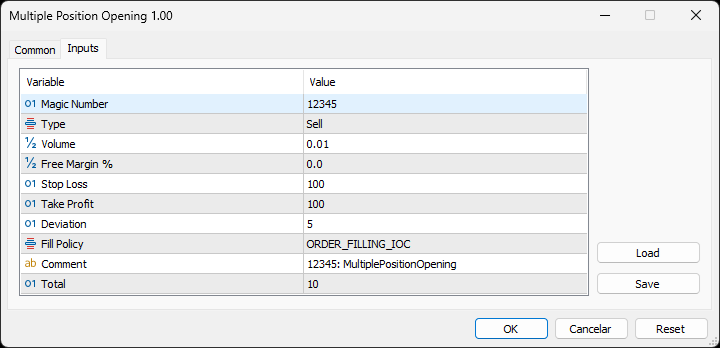
Input Parameters 

  • Magic Number: Script’s identifier. 
  • Type: Position type used. 
  • Volume: Lot size per deal (lots). 
  • Free Margin %: Percentage of account free margin used to calculate the lot size per deal (%). 
  • Stop Loss: Distance from the market price for placing a Stop Loss at a position opening (pips). 
  • Take Profit: Distance from the market price for placing a Take Profit at a position opening (pips). 
  • Deviation: Maximum allowed slippage from the requested price (pips). 
  • Fill Policy: Volume execution policy. 
  • Comment: Text message displayed in the Trade or History tabs of the Toolbox window and Objects list after opening a position (it only allows 31 characters).
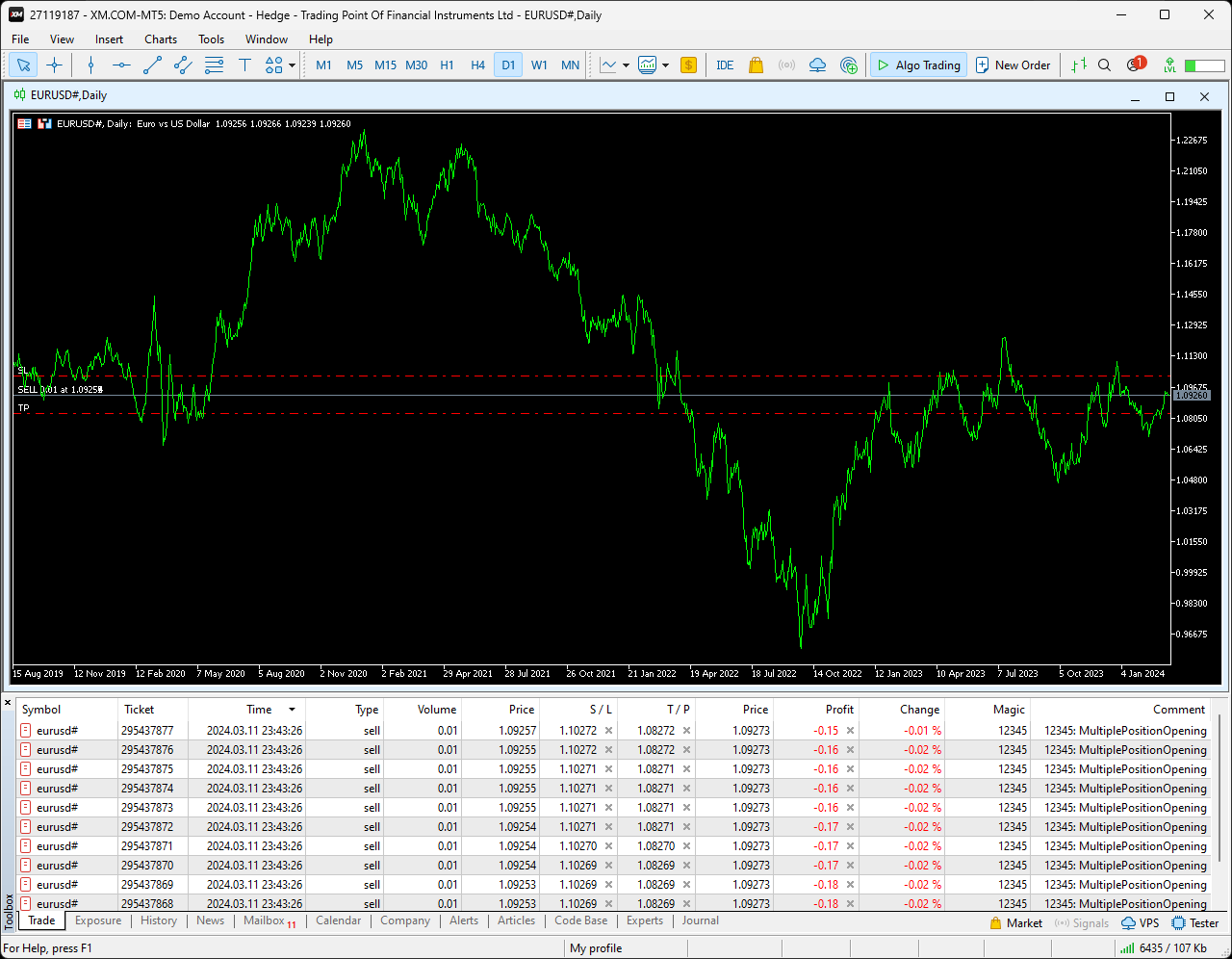
  • Total: Positions number to be open. 

Some of the available parameters accept values that lead to particular options. 

  • Volume: A value lower than the minimum allowed volume by the broker is converted in this last. A value higher than the maximum available volume by the free margin is converted in this last. 
  • Free Margin %: A value whose volume doesn't reach the minimum allowed volume by the broker is converted in this last. A value whose volume exceeds the maximum available volume by the free margin is converted in this last. 
  • Stop Loss or Take Profit: A null value means the parameter’s inactive function. Any value between 0 and the Stop Level is converted in this last. 

Displayed Information 

The script possesses a vast number of messages to inform the user about errors and conditions changes that might occur during its execution. The messages are shown through the Alert function (by a pop-up window), its content includes: 

  1. The warning that an input parameter has been incorrectly set. 
  2. The info that the account doesn't have enough money for the chosen volume (see the Risk Management section above). 
  3. The info that the number of permitted orders by the broker has been reached. 
  4. The Trade Server Return Codes description. 
  5. The symbol’s quotes (immediately) before the trade request’s formation, followed by the symbol’s quotes (immediately) after the trade server’s decision. 
  6. The Runtime Errors description. 
  7. The standard function in the include file where the runtime error was detected (only relevant to the programmer). 

Note: Some elements of the list are displayed simultaneously (in the same text line): 4, 5 and 6; 6 and 7. 

Observation 

During high activity periods, the trade server’s decision on whether a trade request is executed or rejected may suffer significant delays. Some data used in the request sent to the server might become incorrect, leading to the order’s rejection. When the server is evaluating a request and the symbol's quotes are updated, three cases might occur: 

  1. Pending order placing – the pending order’s target price becomes an incorrect distance. 
  2. Position opening/modifying – the position's Stop Loss or Take Profit intended level becomes an incorrect distance. 
  3. Position modifying – the position's Stop Loss or Take Profit previous level takes to its closing. 

The symbol’s quotes mentioned in the fifth element of the list in the Displayed Information section are especially useful here (since firsts usually differ from lasts). A careful analysis of these quotes, knowing the implication that certain quote changes have on the request’s evaluation, permits understanding the reason when these cases occur. To avoid the request’s rejection by the trade server due to “invalid stops” (cases 1 and 2), the prices/levels used should exceed the symbol’s Stop Level by a few pips. 

Conclusion 

The Multiple Position Opening is a helpful and efficient tool regarding the positions manual opening, especially when these represent a significant number, enabling a simple and intuitive setting of the positions to open.

Recommended products
Modern Dark Chart Theme for MT5 Upgrade your MetaTrader 5 chart into a clean, dark, professional trading workspace. Your chart is your trading office. It is where you analyze the market, test Expert Advisors, review setups, record videos, share screenshots, and make trading decisions. If your MT5 chart looks old, bright, noisy, or unprofessional, your trading environment can feel distracted before you even start your analysis. Modern Dark Chart Theme for MT5 helps you create a cleaner, darker,
FREE
Pending Order Architect — Plan pending-order structures with visual levels, risk allocation and a clear order inventory. Who it is for Designed for traders preparing ladder or OCO-style plans who want to inspect volume and broker constraints first. Main functions Draggable base-price and stop-loss lines Equal-risk distribution across pending orders Broker capability and symbol-rule checks Live pending-order inventory Optional sibling cancellation for OCO workflows Guarded order placement and can
MT5 Trade Copier Transmitter & Receiver EA A flexible MetaTrader 5 trade copier system designed to transmit and mirror positions across multiple broker accounts with accurate symbol mapping, including gold/XAU instruments. It supports reliable snapshot-based synchronization, position lifecycle tracking, and broker-specific symbol translation so trades can be copied even when brokers use different contract names or suffixes. Features Copies live positions from transmitter to receiver in near rea
Bneu AI Sentinel Pro
Marvinson Salavia Caballero
``` Bneu AI Sentinel — AI Risk Enforcement for MetaTrader 5 Sentinel is a risk management utility for MetaTrader 5 that monitors all trades on your account from any EA or manual trading. The utility enforces configurable limits through a 6-layer protection system, uses cloud-based analysis to detect trading behavior patterns, and includes a kill switch that closes all positions when limits are breached. What It Does Sentinel runs alongside all your EAs and manual trading. It monitors every
Bneu Market Intelligence System
Marvinson Salavia Caballero
Bneu Market Intelligence System — AI-Powered Market Analysis Dashboard Premium on-chart market analysis utility with 4 dashboard tabs. AI Market Brain reads volatility, currency strength, correlations, sessions, and upcoming events — then returns a plain-English verdict. GREEN / YELLOW / RED traffic light status removes guesswork. 8-currency strength meter with momentum tracking. AI opportunity scanner with per-symbol confidence scoring. DXY Dollar Index tracking with directional analysis. W
# Racing Game 3D - Candlestick-Driven 3D Racing Game ️ `Racing_Game_3D` is an innovative 3D racing game script running inside the MetaTrader 5 (MT5) platform. the game's core highlights include **generating highly winding 3D tracks from the real-time candlestick data (OHLC) of the current chart** , rendering with native DirectX 3D APIs, implementing interactive item boxes, and racing head-to-head against 5 CPU opponents. --- ## Key Concepts & Features 1. **K-Line Driven 3D Winding Tr
Tired of information overload when analyzing forex currency strength? Introducing "All Currency Strength Live", the ultimate dashboard indicator for MetaTrader 5 that simplifies your trading life. This innovative tool provides a clear, concise overview of the strength of all major currencies, empowering you to make informed trading decisions with ease. With "All Currency Strength Live,"  you gain access to real-time insights into both price and volume strength across all major currencies. No mor
CRYPTO ZEUS DUAL-CORE PROTOCOL  Advanced Crypto Matrix: Supertrend AI + External Sync Module - [NEW] 24/7 Crypto Unlock: The EA now fully supports weekend trading by auto-detecting Crypto assets. - [NEW] Continuous Trend Rider: Re-enters trades continuously on pullbacks if the macro-trend remains strong, maximizing profit on long runs. - [NEW] Ghost Trailing Stop: Added a virtual trailing stop to fully ride breakouts instead of exiting at fixed Fibo targets. - [NEW] Preset System: Added a buil
Smart Momentum Flow
Amro Badredin Mohammedalnoor Mohammedahmed
Smart Momentum Flow by Amro Alnoor Smart Momentum Flow is a color-coded oscillator designed to visualize the relationship between short-term fund flow momentum and the underlying trend. It highlights moments where momentum pressure builds, fades, or reverses. How It Works The indicator plots two synchronized layers in a separate window: Momentum Flow Trend: A fast-reacting momentum line derived from a multi-stage stochastic smoothing process, designed to catch early shifts in buying and selling
M1 Liquidity Scalper
Ragil Atwindra Syamsudin
M1 Liquidity Scalper Pro – Professional XAU/USD Scalping Indicator M1 Liquidity Scalper Pro is a high-precision technical indicator designed specifically for XAU/USD (Gold) scalping on the M1 timeframe . Built for traders who rely on Smart Money Concepts (SMC), this tool automates the detection of institutional footprints—identifying Fair Value Gaps, Market Structure Shifts, Liquidity Sweeps, and Order Blocks with strict volume and session filters to ensure only high-probability setups are displ
AI Neural Gold Pro Dynamic - A Trading System for XAUUSD This Expert Advisor is designed for automated trading on the XAUUSD instrument. It employs a systematic approach that utilizes a multi-layer analysis system to identify potential trading opportunities. System Overview The EA's operational logic is based on several concurrent analysis layers: Momentum Analysis Layer:   Processes various technical indicators to assess trend strength and momentum across multiple timeframes. Volatility
VTB High Watermark Drawdown Lock EA for MT5 Advanced Equity Protection & Drawdown Management System VTB High Watermark Drawdown Lock is a professional risk management Expert Advisor designed to protect trading accounts, funded accounts, and proprietary trading challenges from excessive drawdown. Unlike traditional drawdown protection systems that calculate risk from the initial account balance, this EA uses a dynamic High Watermark (HWM) model that continuously protects both your original capita
Hempmend Gold
Agil Okta Yohan Ferzia
IMPORTANT — DETAILED INPUT DESCRIPTION Active HEMPMEND rental users may request the Detailed Input Description through MQL5 Private Message. Please contact the seller through MQL5 Private Message to request your copy. RENTAL PRICING NOTICE Current rental pricing is promotional and valid through December 31, 2026. Rental pricing is scheduled to increase effective January 1, 2027. Current rental terms and pricing are displayed in the MQL5 Market listing. PUBLIC LIVE TRADING MONITORING ACCOUNT 1 —
Double or Nothing Daily Version MT5
Rui Fernando Pimentel De Oliveira
DOUBLEorNOTHING Daily is the version of the DOUBLEorNOTHING family designed to combine an aggressive Gold / XAUUSD trading strategy with a capital-management model focused on frequently protecting realized profits. The core idea behind the DOUBLEorNOTHING family is simple: recovery strategies may generate strong growth, but they can also experience significant drawdowns. For this reason, every version uses the same main trading concept while handling capital and profits differently. In Daily mod
One thousand Pip  Set1:TP/SL 20kpip. Set2:TP/SL 10kpip. Set3: TP/SL 5k pip. Set4:  TP/SL 2k pip. Set5:  TP/SL 500 pip. Rate Prop FTMO Broker.  Only Pair DE40, US100, US30. Automatic added EU London Session. This Version works with fixed Lot and buy/sell. Robot Strategy: Trade open = First "Round Price-Number Entry". Write me a Message of Questions when undecided. I send ex4 Code by Request.
Hi Traders, This MT5 EA provides you with the following impressive  & powerful features (with easy configurations & smooth operations): 1- Trade directly using your keyboard: open Buy/Sell orders, close profitable orders, close losing orders, close Buy orders, close Sell orders or close all orders instantly (very fast closure). You can define your desired keyboard to each function. 2- Turn on the "SLTP Line" button to draw SL TP Lines on the chart. 3- When you drag the SL line, all orders on t
Trade Shot 99
Ricardo Copio Bejenaru Martins
Trade shot is a management tool. Automatically closes pending orders at X profit or Y loss. You define the $ you want to earn or lose per trade, the advantage in relation to take or stop loss is that here you define the money to be gained or lost and not based on points. Ideal for Scalp day trade strategies Your trades will easily be better managed based on what you want to win or lose, orders are closed automatically without worrying about managing money.
Our   Basic Support and Resistance   indicator is the solution you need to boost your technical analysis. This indicator allows you to project support and resistance levels on the chart /   MT4 Version Features Integration of Fibonacci Levels:  With the option to display Fibonacci levels alongside support and resistance levels, our indicator gives you an even deeper insight into market behavior and possible reversal areas. Performance Optimization:  With the option to update extended lines onl
Let us introduce you to a new era of neural indicators for financial markets! Intelligent Moving is a unique indicator that trains its neural network in real time! You no longer need to look for the optimal indicator parameters for each specific situation. No more late signals. The artificial intelligence is able to adapt itself and predict any market movements. Visually, the indicator is drawn as a main solid moving average line, two dotted lines of standard deviations and signal arrows. For
UnifiedSMCSuitePro
Elvin Entero Tomolin
# SMC Suite Pro — Smart Money Concepts & Trend Analysis Workspace **SMC Suite Pro** is an institutional-grade, all-in-one market structure and trend analysis toolkit for MetaTrader 5. By consolidating three powerful analytical methods into a single system, it provides a comprehensive view of market trends, key liquidity zones, and structural breakouts without cluttering your workspace. Unlike traditional indicators that can severely lag your platform, **SMC Suite Pro** has been built from the
Martingale panel MT5
Mohammadbagher Ramezan Akbari
In this article, we would like to introduce the trade panel product with the Martingale panel. This panel is made in such a way that it can meet the needs of traders to a great extent. This trade panel actually consists of two trade panels at the same time, with the first one you can take positions with certain profit and loss limits, and with the second one, you can have positions with profit limits but without loss limits. When positions lose, a new position will be added based on the settings
AUTOMATIC TRADE COPIER for local *   use . (copy trades between several metatrader terminals on the local computer/ *or GLOBALLY after setting your network /server !) Can copy trades from one or   several main MT5 accounts   to several MT5 and MT4 accounts   (no limit). For MT5 to MT4 copy you have to also get version for Metatrader 4 here : https://www.mql5.com/en/market/product/80842 - very fast execution (theoretically up to 5ms delay, depends on computer speed) - user can set speed of copy
The Stop Loss Manger - SL Mange With the Stop Loss Manager you can finally sleep peacefully while it effectively manages your risk in stock market trading. Simply set your individual stop loss limits and let the manager trade for you. Never worry about losses again - the Stop Loss Manager takes care of it for you! Get the ultimate support for your trading now and maximize your profits with ease. Join the community of successful traders who swear by Stop Loss Manager today. Function overview: 1.
Pro Gold System Indicator
PEDRO JOAQUIM GONCALVES GOMES
ADVANCED FUNCTIONALITIES: Trend Score (0-100) with visual bar Intelligent signals with adjustable strength (1-10) Risk management with automatic TP/SL Audible and visual alerts Price zones with smooth filling Multi-indicator analysis (RSI, ATR, BB, EMAs) DESIGN FEATURES Modern Visual: Smooth and well-spaced lines (EMA with 2-3px width) Vibrant and professional colors (Sky Blue, Orange, Gold) Modern arrows (code 233/234) for buy/sell signals Configurable dark/light theme Adjustable transparency f
Product Name: Smart Switch Dashboard STOP WASTING SECONDS. SECONDS COST MONEY. Are you losing trades because you're fumbling through the Market Watch? Is your workspace messy and slowing you down? In trading, Speed is everything. If you aren't organized, you are losing money to traders who are. Smart Switch Dashboard is not just a tool—it is your COMMAND CENTER . Designed for serious Scalpers and Day Traders who demand Speed, Precision, and Zero Lag. DOMINATE YOUR WORKFLOW 1. ULTRA-FAST SY
MACD Sniper Pro
Noppawat Tumjai
MACD Sniper Pro is an advanced automated trading system designed for traders seeking high-precision entries and robust risk management. By combining the classic momentum of MACD Crossover with a strict ADX Volatility Filter and Dynamic ATR Management , this EA completely eliminates emotional trading and filters out dangerous flat/sideways markets. Unlike standard MACD indicators that suffer during consolidation, MACD Sniper Pro verifies trend strength before entering and protects your capital us
Au 79
Ivan Pochta
5 (2)
Launch Promo! 9 copies are available at price $159! Next price $199 - Final Price $999. >> Announcements Channel << Live Signal Exclusive Bonus:   Get free Extended access to   FX Monitor   ( product page >> , contact me for more info)   — an advanced monitoring and analytics service for your MT4/MT5 trading accounts. Track performance, analyze results, and manage your portfolio with professional-grade tools included with your purchase. 79 is the atomic number of gold. Everything else here is
HA Signal MultiFilter MT5 - Technical Operational Manual & Architecture Guide 1. SYSTEM OVERVIEW & ARCHITECTURAL FOUNDATION HA Signal MultiFilter MT5 is a specialized analytical indicator developed for MetaTrader 5 terminal to identify directional momentum expansions and structural trend continuations[cite: 2]. By synthesizing smoothed Heiken Ashi candlestick price discovery with a modular 15-layer secondary confirmation filter suite, the system extracts high-probability market shifts while fil
FREE
Pattern Recognition EA
Claudiu-georgian Zavera
Pattern Recognition EA - From Learn to Earn. The market repeats itself. This EA finds every past repeat of the current candle sequence - and lets history vote the direction. ONE SHAPE. EVERY REPEAT IN HISTORY VOTES. The last N candles on your signal timeframe form a shape. The EA scans the history you choose - a fixed number of bars or everything your broker provides - for the SAME shape, and checks what happened next, every single time. Only when enough repeats exist AND a clear majority of t
Multi Timeframe Smc Bias Finder Trading in alignment with higher timeframe structure is one of the most consistently profitable habits a trader can build. The difficulty has always been execution: switching between timeframes, manually reading structure, and keeping track of whether the Daily, 4-Hour and 1-Hour are all pointing in the same direction before committing to a position. Multi Timeframe Smc Bias Finder resolves that entirely. Three tools in one indicator: A live multi-timeframe bias d
Buyers of this product also purchase
Trade Assistant MT5
Evgeniy Kravchenko
4.43 (216)
It helps to calculate the risk per trade, the easy installation of a new order, order management with partial closing functions, trailing stop of 7 types and other useful functions. Additional materials and instructions Installation instructions - Application instructions Line function -   shows on the chart the Opening line, Stop Loss, Take Profit. With this function it is easy to set a new order and see its additional characteristics before opening.   Risk management  - The risk calculation
Forex Trade Manager MT5
InvestSoft
4.98 (689)
Trade Manager MT5 is an advanced position size calculator and trade management tool for MetaTrader 5, designed to help traders plan trades faster, control risk more precisely, and manage open positions directly from the chart. It combines order placement, risk based lot calculation, Stop Loss and Take Profit management, Break Even, Trailing Stop, Partial Close, Equity Protection, and external trade management in one panel. Whether you trade forex, indices, metals, commodities, crypto, or future
FarmedHedge Pair Trading Dashboard
Tanapisit Tepawarapruek
5 (7)
Farmed Hedge Yield Farming | All Markets (Manual - Hybrid - Semi/Automated EA) VERIFIED TRADING RESULTS - Farmed Hedge Yield Axi Copy:  https://www.mql5.com/en/signals/2356376 - Farmed Hedge Yield Exn Copy:   https://www.mql5.com/en/signals/2356404 - Farmed Hedge Yield V Copy:  https://www.mql5.com/en/signals/2357156 IMPORTANT NOTICE: FarmedHedge is a MANUAL-FOCUSED TRADING UTILITY ,not a fully automated EA. Results shown on this Signal include manual trades and overall strategic management.
Telegram to MT5 MultiChannel Copier
Sergio Marquez Uroz
4.68 (22)
Telegram to MT5 Multi-Channel Copier   automatically copies trading signals from your Telegram and Discord channels straight to MetaTrader 5. No bots, no browser extensions, no manual copying. A signal arrives in Telegram or Discord and the EA opens the trade in your terminal within seconds. And before you copy a channel, the built-in backtester shows you what that channel would have done in your account. The product has two components: a Windows application that listens to your Telegram channel
Local Trade Copier EA MT5
Juvenille Emperor Limited
4.94 (149)
Local Trade Copier EA MT5 is a fast and flexible trade copier for copying and managing trades between multiple MetaTrader 5 accounts on the same Windows computer or Windows VPS. It combines local trade synchronization with Receiver-side controls for lot sizing, risk management, trade filtering, symbol mapping, trade management and account protection. Set up your Transmitter and Receiver terminals in about 1 minute and copy manual or EA trades between accounts at the same or different brokers. U
Strategy Ledger Pro
Abdullah Uygar Tuna
5 (14)
Strategy Ledger Pro is a read-only account analysis panel for MetaTrader 5. It separates account results by Expert Advisor, strategy, symbol, and magic number, so you can see what each one really contributes. The panel is available in 11 languages: English, Français, Deutsch, Español, Italiano, Português, Русский, Türkçe, 中文, 日本語 and 한국어. Before you download the demo. The Market runs the demo of any paid product in the Strategy Tester only. This panel analyses the trades on your own account, and
Copy Telegram signals with your own trading rules Telegram to MT5 Signal Trader automatically copies text-based trading signals from public and private Telegram channels and groups into MetaTrader 5. Manage multiple providers and MT5 accounts from one desktop app, with individual risk and trade settings for each provider . No Telegram bot or API setup needed for copying. Simply sign in with your own Telegram account by phone or QR code and select the channels or groups you have already joined. Y
TradePanel MT5
Alfiya Fazylova
4.88 (170)
Trade Panel is a multi-functional trading assistant. The app contains over 50 trading functions for manual trading and allows you to automate most trading tasks. Application instructions: https://www.mql5.com/en/blogs/post/756482 Trial version of the application for a demo account: https://www.mql5.com/en/blogs/post/750865 How to install the application: https://www.mql5.com/en/blogs/post/756239 How to test the application in visual mode: https://www.mql5.com/en/blogs/post/770277 How to install
VirtualTradePad PRO SE MT5 — professional trading control center for MetaTrader 5 VirtualTradePad PRO SE is a premium chart-based trading panel and trade-management workspace for MetaTrader 5 . It is designed for traders who want faster execution, clearer position control, structured trade management, visual level planning and a professional workflow directly from the chart. This is not only a BUY / SELL panel. PRO SE combines manual trading, pending orders, position management, partial exits, b
================================================================================ POC BREAKOUT - V20.72. Full Professional Grade Toolkit ================================================================================ POC Breakout is a full MetaTrader 5 trading dashboard for discretionary traders who want breakout signals, Point of Control (POC) context, volume profiles, order flow, market structure, news, alerts, and advanced trade planning in one professional workspace. Attached directly to you
REVDEN AI Desk: Run Your Trading From One Conversation With Your Own AI, on REVDEN's Market Context Imagine running your trading from one conversation. REVDEN AI Desk brings it into MetaTrader 5: you ask your own AI how it reads the market, and it answers from REVDEN's full context on the symbols you trade, with their state, their risk picture and the releases ahead. Its proposals arrive with entry, stop, target and risk, and you approve the ones that fit. Your rules change the same way: write w
MT5 to Telegram Signal Provider turns your trading account into a signal provider. Every trade action, whether manual, by EA or from your phone, is instantly sent as a message to Telegram. You can fully customize the format or use a ready-made template for quick setup. [ Demo ] [ Manual ] [ MT4 Version ] [ Discord Version ]     New: [ Telegram To MT5 ] Setup A step by step user guide is available. Key Features Ability to customize order details sent to subscribers You can create a tiered subs
Exp COPYLOT CLIENT for MT5
Vladislav Andruschenko
3.97 (35)
Professional Trade Copier for MetaTrader 5 Fast, professional, and reliable trade copier for MetaTrader . COPYLOT allows you to copy Forex trades between MT4 and MT5 terminals with support for Hedge and Netting accounts. COPYLOT MT5 version supports: - MT5 Hedge to MT5 Hedge - MT5 Hedge to MT5 Netting - MT5 Netting to MT5 Hedge - MT5 Netting to MT5 Netting - MT4 to MT5 Hedge - MT4 to MT5 Netting MT4 version Full Description +DEMO +PDF How To Buy How To Install How to get Log Files H
News Trade EA MT5
Konstantin Kulikov
4.55 (11)
Present to you the useful robot that I have been using for several years. It can be used in both semi-automatic mode and fully automatic mode. >>> Chat <<< The program contains flexible settings for trading on the news of the economic calendar. It cannot be checked in the strategy tester. Only real work. Download the latest archive of settings: https://www.mql5.com/en/blogs/post/747929 Signals monitoring: https://www.mql5.com/en/signals/author/test-standart When creating your own sets of setti
Trade copier MT5
Alfiya Fazylova
4.61 (57)
Trade Copier is a professional utility designed to copy and synchronize trades between trading accounts. Copying occurs from the account / terminal of the supplier to the account / terminal of the recipient, which are installed on the same computer or VPS . Before buying, you can test the demo version on a demo account. Demo version here . Full instruction here . Main functionality and benefits: Supports copying MT5> MT5, MT4> MT5, MT5> MT4, including MT5 netting accounts. * Supports copying Dem
Seconds Chart MT5
Boris Sedov
4.61 (18)
Seconds Chart is a unique tool for creating second-based charts in MetaTrader 5 . With Seconds Chart , you can construct charts with timeframes set in seconds, providing unparalleled flexibility and precision in analysis that is unavailable with standard minute or hourly charts. For example, the S15 timeframe indicates a chart with candles lasting 15 seconds. You can use any indicators and Expert Advisors that support custom symbols. Working with them is just as convenient as on standard charts.
The Patch
Mian Rameez Ali
The Patch It never opens a trade. It walks behind the ones that did. Every open position, every pending order — checked twice a second for the one thing that's easy to forget: a stop, a target. Found bare, it doesn't ask. It writes the missing number in, measured in points from wherever the position began, and moves on to the next. No strategy, no opinion on direction. Just the quiet assumption that nothing should ever sit on the market unprotected — not because someone decided it shouldn't,
EA Overfitter
Stephen J Martret
5 (1)
That backtest looks great. But will it still be making money tomorrow, next week, next month? EA Overfitter re-runs your EA on 100 price histories it has never seen. One score tells you if the edge is real. A backtest tells you what an EA did on one price history — the one that happened to occur. What you cannot tell from it is how much of that result was the strategy and how much was the particular path. EA Overfitter answers that. It builds up to 100 synthetic price histories your EA has n
Next Update — Version 2.52 Coming Soon! [NEW] Get Ready for 4 Major New Features Designed to Enhance Your Market Analysis and Trading Workflow We’re taking market analysis to the next level with 4   new features designed to meet your trading needs. Introducing: TRADE OVERVIEW DASHBOARD CONFLUENCE AT ZONE STRONG & WEAK HIGH/LOW OPTIMAL TRADE ENTRY —  OTE 1. TADE OVERVIEW DASHBOARD  A dashboard that helps you understand the overall market picture more easily, providing guidance to support your
The product will copy all telegram signal to MT5 ( which you are member) , also it can work as remote copier.  Easy to set up, copy order instant, can work with almost signal formats, image signal,  s upport to translate other language to English Work with all type of channel or group, even channel have "Restrict Saving Content", work with  multi channel, multi MT5 Work as remote copier: with signal have ticket number, it will copy exactly via ticket number. Support to backtest signal. How to s
RETAILBERG FOOTPRINT CHART PRO — Order-Flow Workspace for MetaTrader 5 Version 7.00  |  Professional System  |  31 tools  |  One chart A full 150-page illustrated User Manual is included. Please read the full manual to understand this feature packed footprint chart elements and ui. https://www.mql5.com/en/blogs/post/777982 DEMO / STRATEGY TESTER — PLEASE READ FIRST
Astro Trade MT5
Indra Maulana
5 (8)
25% discount on the release of the tool: only for the next 3 buyers Send a message to receive a demo version. AstroTrade Trading Assistant AstroTrade is a comprehensive multi-functional trading utility developed for the MetaTrader 5 platform. It integrates essential tools for trade execution, risk management, and technical monitoring into a single unified interface. The application is designed to assist traders in managing their daily operations through a visual and structured environment. Vi
Timeless Charts
Samuel Manoel De Souza
5 (9)
Timeless Charts is an all-in-one trading utility for professional traders. It combines custom chart types such as Seconds Charts and Renko with advanced order flow analysis using Footprints , Clusters , Volume Profiles , VWAP studies, and anchored analysis tools for deeper market insight. Trading and position management are handled directly from the chart through an integrated trade management panel , while Market Replay and Virtual Accounts provide environments for practicing trading skills and
Floor Watch
Syed Tauqeer Hussain Shah
Floor Watch One number, watched every thirty seconds: how far equity has fallen since the day began — or since its highest point, if it's told to trail the peak instead of the open. Cross the line and it doesn't argue. Every open position closes, every pending order vanishes, and anything that slips through afterward gets shut the moment it appears. Not asked. Removed. The floor holds until the clock turns 5 AM Pakistan time — then, and only then, does the day start over. One rule. No except
Telegram To MT5 Ultra
Mirel Daniel Gheonu
5 (5)
Telegram To MT5 — Signal Copier Turn the trading calls from your Telegram channels into real MT5 orders — automatically, on as many accounts as you like, with risk and rules fully under your control. Telegram To MT5 connects the VIP / signal channels you already follow on Telegram to your MetaTrader 5 terminal. A free companion desktop app reads the messages (even from channels that block bots), and this Expert Advisor executes them on your account — applying your own risk settings, symbol mappi
Power Candles Strategy Scanner - Self-Optimizing Multi-Symbol Setup Finder Self-optimizing settings work one chart at a time, and finding where they pay off right now means opening chart after chart. Power Candles Strategy Scanner runs the same self-optimizing engine as the Power Candles indicator on every symbol in your Market Watch, side by side. One panel ranks where it pays off: the winning strategy per symbol, its optimized Stop Loss and Take Profit. An alert fires the moment a fresh signal
Equity Protect Pro: Your Comprehensive Account Protection Expert for Worry-Free Trading If you're looking for features like account protection, equity protection, portfolio protection, multi-strategy protection, profit protection, profit harvesting, trading security, risk control programs, automatic risk control, automatic liquidation, conditional liquidation, scheduled liquidation, dynamic liquidation, trailing stop loss, one-click close, one-click liquidation, and one-click restore, Equity P
Trader Evolution
Siarhei Vashchylka
5 (7)
" Trader Evolution " - A utility designed for traders who use wave and technical analysis in their work. One tab of the utility is capable of money management and opening orders, and the other can help in making Elliott wave and technical analysis. Manual (Be sure to read before purchasing) | Version for MT4 Advantages 1. Trading in a few clicks. Immediate and pending orders are available in the panel 2. Money management. The program automatically selects the appropriate lot size 3. Simplifies
MT5 Professional Copy Trading System Industrial Grade Ultra Fast Local Trade Copier for Serious Traders The MT5 Professional Copy Trading System is a powerful and ultra fast local trade copier built for serious traders, signal providers, account managers, and advanced multi terminal setups. If you need fast execution, stable synchronization, flexible lot control, and reliable long term performance, this system is designed for exactly that purpose. Unlike many basic retail trade copiers, this sol
YuClusters
Yury Kulikov
4.93 (43)
Attention: You can view the program operation in the free version  YuClusters DEMO .  YuClusters is a professional market analysis system. The trader has unique opportunities to analyze the flow of orders, trade volumes, price movements using various charts, profiles, indicators, and graphical objects. YuClusters operates on data based on Time&Sales or ticks information, depending on what is available in the quotes of a financial instrument. YuClusters allows you to build graphs by combining da
More from author
Pending Order Grid MT5
Francisco Manuel Vicente Berardo
The Pending Order Grid is a multi-symbol multi-timeframe script that enables multi-strategy implementation based on pending order grids.  General Description   The Pending Order Grid allows the performing of a user-defined strategy through the creation of pending order grids. The script places pending orders of a given type (Buy Limit, Sell Limit, Buy Stop, or Sell Stop) at equidistant price levels to form each grid. The beginning and finish of every grid are defined by the Start Price and Sto
Tick Data Record MT5
Francisco Manuel Vicente Berardo
The Tick Data Record is a multi-symbol multi-timeframe Expert Advisor that records tick data for later graphical representation and analysis.  General Description  The Tick Data Record offers a(n) alternative/complement to the online/offline price charts displayed through the MT4/MT5 platform. The Expert Advisor permits to write and save the current/history values of Time, Bid, Ask, Spread, Last and Volume to a text file (“.txt”). The idea is to copy/open the obtained register to/in a spreadshe
FREE
Scientific Calculator MT5
Francisco Manuel Vicente Berardo
The Scientific Calculator is a script designed to compute science, engineering and mathematics expressions.  General Description   The expression to calculate must obey syntax rules and precedence order, being constituted by the following elements:   Integer and real numbers.  Mathematical operators for addition (+), subtraction (-), multiplication (*), division (/) and exponentiation (^).  Mathematical and trigonometric functions .  Curved parentheses (()) to define the precedence and contain
FREE
Order Selective Delete MT5
Francisco Manuel Vicente Berardo
The Order Selective Delete is a multi-symbol multi-timeframe script used to delete simultaneously various pending orders.  General Description   The Order Selective Delete   possesses   three operation modes (Intersection,   Union   and All) that control the way   as   three pending order features (symbol, magic   number   and type) are used. The modes, available through the Selection Mode input parameter, relate to the features, available through the “Select by Feature” and “Feature” input pa
FREE
Environment State Info Print MT4
Francisco Manuel Vicente Berardo
The Environment State Info Print is a script to display the constants that describe the current runtime environment of a MQL4 program.  General Description   The constants are divided into four groups in the Environment State section of the MQL4  documentation and each group is divided into enumerations/subgroups (with designations “ Market Info”, “Integer”, “Double” or “String”). The script displays constants in two ways: a single constant or all group constants. The constants are obtained by
FREE
Position Selective Close MT5
Francisco Manuel Vicente Berardo
The Position Selective Close is a multi-symbol multi-timeframe script used to close simultaneously various positions.  General Description   The Position Selective Close   possesses   three operation modes (Intersection,   Union   and All) that control the way   as   four position features (symbol, magic number,   type   and profit) are used. The modes, available through the Selection Mode input parameter, relate to the features, available through the “Select by Feature” and “Feature” input pa
FREE
Scientific Calculator MT4
Francisco Manuel Vicente Berardo
The Scientific Calculator is a script designed to compute science, engineering and mathematics expressions.   General Description   The expression to calculate must obey syntax rules and precedence order, being constituted by the following elements:   Integer and real numbers.   Mathematical operators for addition (+), subtraction (-), multiplication (*), division (/) and exponentiation (^).   Mathematical and trigonometric functions .   Curved parentheses (()) to define the precedence and co
FREE
Tick Data Record MT4
Francisco Manuel Vicente Berardo
The Tick Data Record is a multi-symbol multi-timeframe Expert Advisor that records tick data for later graphical representation and analysis.  General Description   The Tick Data Record offers a(n) alternative/complement to the online/offline price charts displayed through the MT4/MT5 platform. The Expert Advisor   permits   to write and save the current/history values of Time, Bid, Ask, Spread, Last and Volume to a text file (“.txt”). The idea is to copy/open the obtained register to/in a spr
FREE
Order Selective Delete MT4
Francisco Manuel Vicente Berardo
The Order Selective Delete is a multi-symbol multi-timeframe script used to delete simultaneously various pending orders.  General Description   The Order Selective Delete   possesses   three operation modes (Intersection,   Union   and All) that control the way   as   three pending order features (symbol, magic   number   and type) are used. The modes, available through the Selection Mode input parameter, relate to the features, available through the “Select by Feature” and “Feature” input pa
FREE
Position Selective Close MT4
Francisco Manuel Vicente Berardo
The Position Selective Close is a multi-symbol multi-timeframe script used to close simultaneously various positions.  General Description   The Position Selective Close   possesses   three operation modes (Intersection,   Union   and All) that control the way   as   four position features (symbol, magic number,   type   and profit) are used. The modes, available through the Selection Mode input parameter, relate to the features, available through the “Select by Feature” and “Feature” input pa
FREE
Double Trailing Stop MT4
Francisco Manuel Vicente Berardo
The Double Trailing Stop is a multi-symbol multi-timeframe Expert Advisor that allows the Stop Loss and Take Profit trailing of positions.  General Description   The Double Trailing Stop’s purpose is to secure profit and minimize losses of the opened positions. The Expert Advisor places stop orders (Stop Loss or Take Profit) at the Trailing Stop distance from the market price when the symbol's quote reaches/overcomes the Trailing Start distance from the position’s opening price (a single-time
Multiple Position Opening MT4
Francisco Manuel Vicente Berardo
The Multiple Position Opening is a multi-symbol multi-timeframe script used to open simultaneously various positions.  Risk Management   The volume used to open a position is chosen between a fixed and a variable lot size, available through the Volume and Free Margin % input parameters, respectively. If there isn't enough money in the account for the chosen volume, this is reduced to the highest possible value (corresponding to free margin). If this reduction leads to a correct volume (if the
Pending Order Grid MT4
Francisco Manuel Vicente Berardo
The Pending Order Grid is a multi-symbol multi-timeframe script that enables multi-strategy implementation based on pending order grids.  General Description   The Pending Order Grid allows the performing of a user-defined strategy through the creation of pending order grids. The script places pending orders of a given type (Buy Limit, Sell Limit, Buy Stop, or Sell Stop) at equidistant price levels to form each grid. The beginning and finish of every grid are defined by the Start Price and Sto
Pending Order Grid EA MT4
Francisco Manuel Vicente Berardo
The Pending Order Grid is a multi-symbol multi-timeframe Expert Advisor that enables multi-strategy implementation based on pending order grids.  General Description   The Pending Order Grid allows the performing of a user-defined strategy through the creation of pending order grids. The Expert Advisor places pending orders of a given type (Buy Limit, Sell Limit, Buy Stop, or Sell Stop) at equidistant price levels to form each grid. The user might set up different grids to exist simultaneously
Environment State Info Print MT5
Francisco Manuel Vicente Berardo
The Environment State Info Print is a script to display the constants that describe the current runtime environment of a MQL5 program.  General Description   The constants are divided into four groups in the   Environment State section of the MQL5 documentation and each group is divided into enumerations/subgroups (with designations  “Integer”, “Double” or “String”). The script displays constants in two ways: a single constant or all group constants. The constants are obtained by selecting the
FREE
Double Trailing Stop MT5
Francisco Manuel Vicente Berardo
The Double Trailing Stop is a multi-symbol multi-timeframe Expert Advisor that allows the Stop Loss and Take Profit trailing of positions.  General Description   The Double Trailing Stop’s purpose is to secure profit and minimize losses of the opened positions. The Expert Advisor places stop orders (Stop Loss or Take Profit) at the Trailing Stop distance from the market price when the symbol's quote reaches/overcomes the Trailing Start distance from the position’s opening price (a single-time
Pending Order Grid EA MT5
Francisco Manuel Vicente Berardo
The Pending Order Grid is a multi-symbol multi-timeframe Expert Advisor that enables multi-strategy implementation based on pending order grids.  General Description   The Pending Order Grid allows the performing of a user-defined strategy through the creation of pending order grids. The Expert Advisor places pending orders of a given type (Buy Limit, Sell Limit, Buy Stop, or Sell Stop) at equidistant price levels to form each grid. The user might set up different grids to exist simultaneously
Filter:
GORDONGEKKO888
32
GORDONGEKKO888 2025.10.15 16:54 

Bad Work !!!

Reply to review