

Building a PDF Creation Library in MQL5 (Part1): Writing a PDF by Hand
 606
606
 0
0

Contents
- Introduction
- A PDF is a text file
- The eight kinds of value
- Indirect objects: numbering things so they can be referenced
- The four objects every page needs
- Writing hello.pdf, line by line
- Reading the content stream
- The index at the bottom
- Opening it
- Growing it into something worth sending
- Doing it from MQL5
- When it goes wrong
- The cheat card
- Project structure
- Conclusion
Introduction
Every trading tool eventually needs to hand a document to a human being. A statement for an investor, a signed trade ticket, a monthly performance report, a receipt for a prop-firm review. The terminal gives you an HTML statement. HTML is fine until someone prints it, emails it, or opens it on a phone. Then the columns shift and page breaks can land in the middle of a table.
PDF does not move. That is the entire reason it exists. A PDF says where every character sits, and it says it in a way that a viewer written twenty years from now will still agree with.
The obvious objection is that PDF must be hard. It has a reputation: a binary format, hundreds of pages of specification, an industry of libraries built to hide it. MQL5 has no PDF function, no external library support without a DLL, and no obvious way in.
That reputation is mostly wrong. This article demonstrates why. A PDF is a text file with an index at the bottom. You can type one in Notepad. By the end of this article you will have typed two of them by hand, opened them in a viewer, and understood every character you typed.
This is the first part of a series that builds a complete PDF library in pure MQL5, without DLLs or external dependencies. But the series starts here, with no library at all, because a reader who has hand-written a working PDF will be able to debug a generated one. A reader who has not, never will.
Here is what you will have typed by the end of this article.
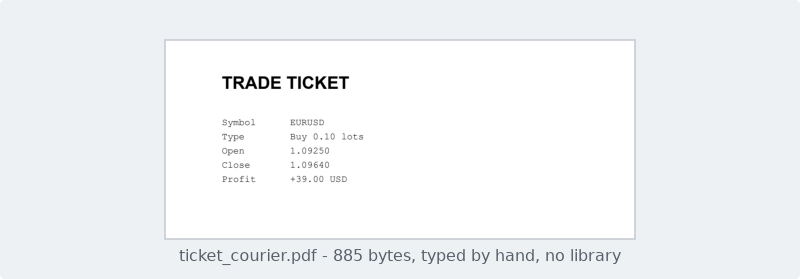
Figure 1. The trade ticket this article types by hand, 885 bytes.
That page has no library behind it. It is 885 bytes of text that you could write on a napkin, and it opens in Acrobat, in Chrome, in Preview and on a phone.
A PDF is a text file
Take any PDF on your machine — not a scanned one, a generated one — and open it in Notepad. Not in a viewer. In Notepad.
You will see something like this at the top:
%PDF-1.4
1 0 obj
<< /Type /Catalog /Pages 2 0 R >>
endobj
That is readable. It is not encrypted, and it is not compiled. Further down you will hit a wall of garbage where the images and the compressed streams live, but the skeleton of the document is plain text, and the skeleton is what holds a PDF together.
Every PDF file, from a 300-page book to the one we are about to write, has the same five regions in the same order.
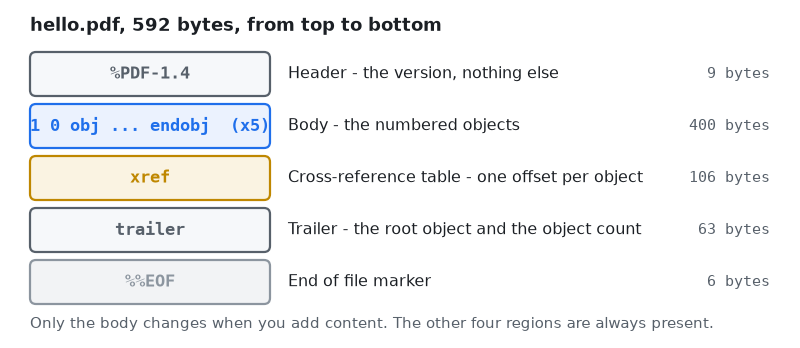
Figure 2. The five regions every PDF file contains, in order.
Read that figure from the top. The header is one line naming the version. The body is a list of numbered objects, and it is the only region that grows when you add content — in our 592-byte file it is 400 of those bytes. The cross-reference table, always written as xref, is an index: one line per object saying where in the file that object starts. The trailer says which object is the document root and how many objects there are. Then %%EOF.
Four of those five regions are nearly the same in every PDF ever made. Only the body carries your document. That is the first piece of good news: most of a PDF is boilerplate, and boilerplate is easy to generate.
The second piece of good news is that the body is a flat list. Objects are not nested inside one another. They sit side by side, numbered 1, 2, 3, and they refer to each other by number, the way rows in a database table do. A page does not contain its content; it names it.
The eight kinds of value
Before writing objects we need the vocabulary they are written in. PDF has exactly eight kinds of value, and you already know six of them from other languages. The whole format is built from this table, so it is worth reading slowly.
| Kind | Written as | Notes |
|---|---|---|
| Boolean | true/false | Rare. |
| Number | 42, -3.5 | No exponent notation. 1e6 is invalid. |
| String | (Hello) | Round brackets. \( escapes a bracket. |
| Name | /Type/Helvetica | A slash plus a word. This is a key, not text. |
| Array | [3 0 R] | Square brackets, space separated, mixed types allowed. |
| Dictionary | << /Key value >> | Double angle brackets. Keys are always names. |
| Stream | << ... >> stream ... endstream | A dictionary plus a block of raw bytes. |
| Null | null | Rare. |
The one that trips people up is the difference between a name and a string. /Helvetica and (Helvetica) are not the same value. A name is an identifier the format itself understands — a key in a dictionary, the name of a font, the type of an object. A string is text you want printed on the page. If you write (Type) where /Type belongs, the viewer will not recognize the key and will behave as if it were absent.
The other one worth pausing on is the stream. A stream is a dictionary with a block of bytes bolted to the end of it, and the dictionary must contain a /Length key giving the exact size of that block. Streams are how PDF carries anything big: the drawing commands for a page, the pixels of an image, the outlines of an embedded font. In this article we use exactly one stream.
Indirect objects: numbering things so they can be referenced
An object in the body is wrapped in a header and a footer that give it a number:
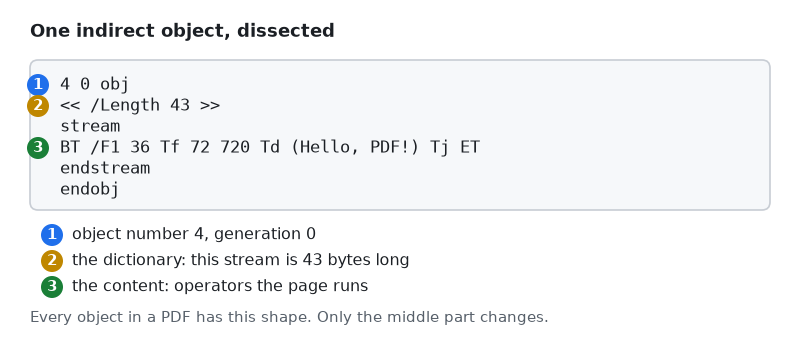
Figure 3. One indirect object, from its number to its endobj.
Look at the first line in that figure. 4 0 obj means "object number 4, generation 0". The generation number exists so that a file can be edited in place without being rewritten; for a file we generate from scratch it is always 0, and you can treat it as noise until Part 2 explains where it shows up again.
Everything between that line and endobj is the object's value. In Figure 3 the value is a stream: a dictionary saying /Length 43, then the word stream, then 43 bytes of drawing commands, then endstream.
Anywhere else in the file, 4 0 R means "the value of object 4". The R stands for reference. This is the mechanism the whole format is built on: objects never contain other objects, they name them by number. So a page does not contain its content stream, it says /Contents 4 0 R. A page does not contain its font, it says /F1 5 0 R.
This indirection is what makes a PDF cheap to assemble and cheap to reuse. One font object can be named by four hundred pages. One logo can be drawn once and referenced everywhere. It is also why the cross-reference table exists: if everything is found by number, something has to translate a number into a position in the file.
The four objects every page needs
A one-page PDF needs four objects, plus one more for each font it uses. They form a chain.
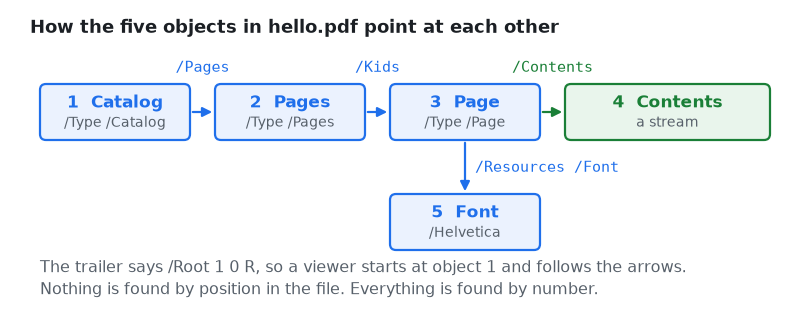
Figure 4. How the five objects of hello.pdf reference each other.
Follow the arrows from the left. The catalog is the root of the document; the trailer points at it with /Root 1 0 R, so it is the first thing a viewer looks at. The catalog points at the page tree, which is a list of pages along with a count. The page tree points at a page, which carries the paper size and the list of resources the page is allowed to use. The page points at its content stream, which is the only object in the whole file that draws anything, and at the font it needs.
The page tree looks like unnecessary bureaucracy for a single page, and for a single page it is. It earns its place in a 400-page document, where a viewer jumping to page 380 walks a balanced tree instead of a list. The format does not offer a shortcut for small files, so we pay the two extra lines.
Notice what is not in the picture: nothing points backwards to say "I am the seventh thing in the file". Position in the file carries no meaning at all. You can write the objects in any order you like, as long as the xref table at the bottom reports where each one ended up.
Writing hello.pdf, line by line
Open Notepad. Not Word, not the MetaEditor — Notepad, or any editor that will save plain text without adding anything. Type the following, and be careful with the spacing inside the xref block, because we will come back to it.
%PDF-1.4
1 0 obj
<< /Type /Catalog /Pages 2 0 R >>
endobj
2 0 obj
<< /Type /Pages /Kids [3 0 R] /Count 1 >>
endobj
3 0 obj
<< /Type /Page /Parent 2 0 R /MediaBox [0 0 595 842]
   /Resources << /Font << /F1 5 0 R >> >>
   /Contents 4 0 R >>
endobj
The first line names the version. It has to be the first line, and nothing may come before it — not a blank line, not a byte-order mark. If your editor helpfully adds a BOM, the file will not open; this is the single most common reason a hand-written PDF refuses to open, and Notepad's "Save as" dialog has an encoding dropdown that must say ANSI or UTF-8 and not "UTF-8 with BOM".
Object 1 is four words long. /Type /Catalog says what it is, /Pages 2 0 R says where the page list lives.
Object 2 lists the pages. /Kids is an array with one reference in it, and /Count 1 states the number of pages below this node. Both are required, and a /Count that disagrees with the number of kids will make some viewers show a blank document rather than complain.
Object 3 is the page. Two things in it matter more than the rest:
- /MediaBox [0 0 595 842] is the paper, given as [left bottom right top] in points, where one point is 1/72 inch. A4 is 210 × 297 mm, which works out to 595 × 842 points. US Letter would be [0 0 612 792]. Part 4 builds proper units on top of this; for now, 842 is the top of the sheet.
- /Resources is a whitelist. A page may only use fonts, images and other resources named here, and it refers to them by the nickname it assigns. We call our font /F1, and /F1 is only meaningful inside this page. Give it the name /Banana and everything still works, as long as the content stream asks for /Banana too.
Now the object that actually draws something:
4 0 obj
<< /Length 43 >>
stream
BT
/F1 36 Tf
72 720 Td
(Hello, PDF!) Tj
ET
endstream
endobj
5 0 obj
<< /Type /Font /Subtype /Type1 /BaseFont /Helvetica >>
endobj
/Length 43 is the number of bytes between the line feed that ends the word stream and the line feed that begins endstream. Count them: BT and its newline is 3, /F1 36 Tf is 10, 72 720 Td is 10, (Hello, PDF!) Tj is 17, ET is 3. Three plus ten plus ten plus seventeen plus three is 43.
If that number is wrong, viewers respond in different ways, and none of them tell you what happened. Some read /Length bytes and then look for endstream where the dictionary promised it would be; if it is not there, they give up. Others scan forward for the word endstream and forgive you. Writing a file that works in Chrome and fails in Acrobat is an unpleasant way to spend an afternoon, so treat /Length as something that must be exact rather than close.
Object 5 names the font. /BaseFont /Helvetica picks one of the 14 standard fonts — four weights of Helvetica, four of Times, four of Courier, plus Symbol and ZapfDingbats — which every PDF viewer is required to provide. Because the viewer already has them, we embed nothing. Part 13 embeds a real font file for readers who want their own brand typeface; until then these fourteen cost us one line each.
Reading the content stream
The five lines inside that stream are the first real drawing code in the series, so they deserve a picture.
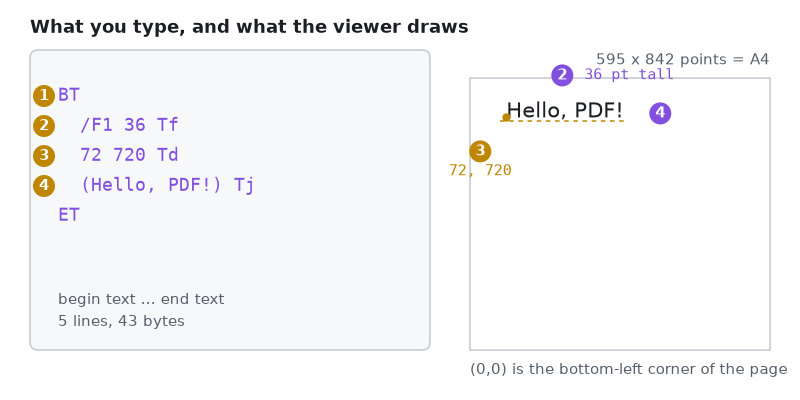
Figure 5. Each operator in the content stream, and its effect on the page.
A content stream is written in reverse Polish order: the arguments come first, then the operator. 72 720 Td is not a function called 72 — it is the operator Td applied to the numbers 72 and 720. Once you see it, every content stream in every PDF becomes readable.
Taking Figure 5 marker by marker:
- BT begins a text object. Text can only be drawn between BT and ET, and the pen position resets every time you write BT. Everything outside this pair is graphics, which Part 4 covers.
- /F1 36 Tf selects a font and a size. /F1 is the nickname from the page's resource dictionary; 36 is the size in points. Get the nickname wrong and nothing is drawn at all — no error, just an empty page.
- 72 720 Td moves the pen. The numbers are points, measured from the bottom-left corner of the page. This surprises most people the first time: y grows upward, so 720 on an 842-point sheet is 122 points from the top, about 43 mm. Part 4 installs a top-left millimeter system so nobody has to do that arithmetic again.
- (Hello, PDF!) Tj draws the string at the pen position. Tj takes one string and paints it in the current font, at the current size, starting at the current point.
ET ends the text object. That is the whole language of this article: four operators, and every one of them takes its arguments in front of it.
The index at the bottom
The last region is the one that makes hand-writing a PDF genuinely fiddly.
xref
0 6
0000000000 65535 f
0000000009 00000 n
0000000058 00000 n
0000000115 00000 n
0000000247 00000 n
0000000339 00000 n
trailer
<< /Size 6 /Root 1 0 R >>
startxref
409
%%EOF
0 6 means "six entries, starting at object number 0". Entry zero is a fixed placeholder that heads the list of deleted objects, and in a freshly written file it is always 0000000000 65535 f. The other five entries are our objects, in order.
Each entry says where its object starts, counted in bytes from the very beginning of the file. Object 1 begins at byte 9, which is right after %PDF-1.4 and its line feed — eight characters plus one. Object 2 begins at byte 58. Object 5 begins at byte 339.
Every entry is exactly twenty bytes long: ten digits, a space, five digits, a space, one flag letter, then a two-byte end of line. Look closely at the listing above and you will see a space after the f and after each n. That space is not decoration — it is the nineteenth byte, and the line feed is the twentieth. Delete it and the entries are nineteen bytes, the viewer's arithmetic lands in the middle of the previous line, and the file will not open.
startxref 409 gives the byte position of the word xref itself. To open a PDF, a viewer seeks to the end of the file, scans backward for startxref , jumps to that offset, and reads the index. Only then does it know where anything is.
This is where hand-writing stops scaling, and it is worth being blunt about why. Add one character to object 2 — a single space, a longer name, one more digit — and objects 3, 4 and 5 all move one byte later. Three entries in the xref become wrong, startxref becomes wrong, and the file breaks. There is no error message that says so. Part 2 is entirely about this problem, and Part 3 hands it to the computer.
Opening it
Save the file as hello.pdf. In Notepad's save dialog, set "Save as type" to All Files, or you will end up with hello.pdf.txt. Then double-click it.
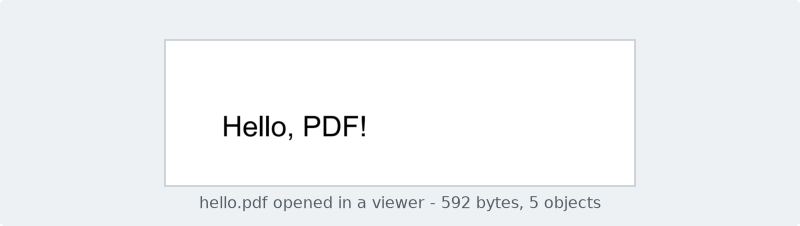
Figure 6. hello.pdf as a viewer draws it, from 592 bytes of typing.
That is a real PDF. It has a page size, a font, and a string positioned to the point. No library produced it, and nothing about it is a toy: the same five objects are present in a PDF that a bank sends you.
If nothing opens, the fault is almost always one of four things, in this order of likelihood: the editor saved a BOM at the front; the editor saved as UTF-16 rather than plain text; /Length does not match the byte count of the stream; a byte offset in the xref is wrong. Part 2 gives you a tool that reports which.
Growing it into something worth sending
Hello, PDF! proves the format works. A trade ticket proves the format is useful, and it needs only two changes: more text, and a second font.
4 0 obj
<< /Length 232 >>
stream
BT
/F1 22 Tf
72 780 Td
(TRADE TICKET) Tj
/F2 12 Tf
0 -46 Td
(Symbol      EURUSD) Tj
0 -18 Td
(Type        Buy 0.10 lots) Tj
0 -18 Td
(Open        1.09250) Tj
0 -18 Td
(Close       1.09640) Tj
0 -18 Td
(Profit      +39.00 USD) Tj
ET
endstream
endobj
The new idea here is that Td is relative. The first 72 780 Td moves the pen to an absolute position, because the pen starts at the origin when BT runs. Every 0 -18 Td after it moves 18 points further down from wherever the pen currently is. Stacking rows is therefore a matter of repeating the same operator, not of computing five absolute y values — and if you decide the rows are too tight, you change -18 once per row rather than re-computing the column.
The /F2 12 Tf in the middle switches fonts partway through the text object. Object 6 declares /F2 as Courier, and object 3's resource dictionary gains a second entry, /F2 6 0 R. Courier is a deliberate choice, not a stylistic one.
To see the effect, build the ticket twice and change only that one word. The script attached to this part does exactly that: it calls the same builder with "Courier" and then with "Helvetica", so the content stream, the pen moves and the space padding are byte-for-byte identical in both files, and the only difference on disk is the /BaseFont name inside object 6. Both pages below are real renders of those two files.
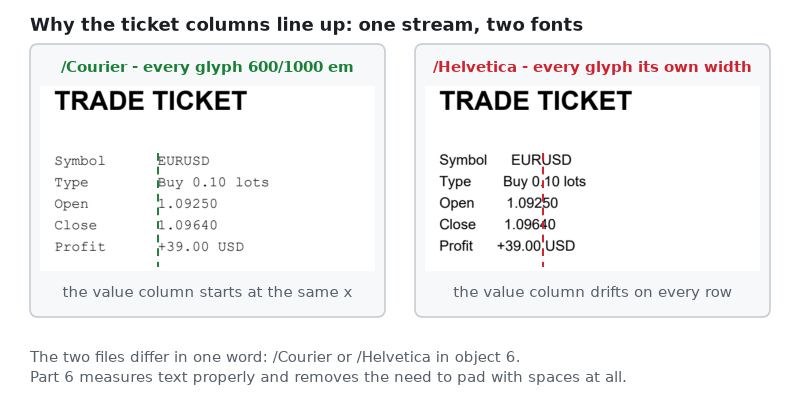
Figure 7. The same content stream, rendered with two different body fonts.
Look at the dashed line. In Courier every glyph occupies the same width — 600 units out of 1000 for the font's design size — so twelve characters of padding are always 12 × 12 × 0.600 = 86.4 points wide, the thirteenth character of one row sits directly above the thirteenth character of the next, and padding a label with spaces produces a real column. On the right the same text is set in Helvetica, where a space is 278 units, S is 667 and l is only 222, so twelve characters of Symbol plus padding measure something different from twelve characters of Profit plus padding, and the value column starts somewhere new on every row.
The proper fix is to measure the width of the label and move the pen by that amount, which requires knowing how wide every glyph in the font is. That is Part 6, and it is the article that makes centering, wrapping and justification possible. Until then, a monospaced font is the honest way to align two columns, and it is worth knowing that this is why so many machine-generated documents have historically been set in Courier.
Doing it from MQL5
Everything above is typing. The script below does the typing for you, and does nothing else — it computes no lengths and no offsets, because every number in it is one we already worked out by counting. That is a fair description of what this part has achieved, and an honest signpost to what Parts 2 and 3 have to fix.
The script starts with the usual properties and two inputs, so you can change the output names without editing code.
//--- Every article in the series writes under one shared root folder, with
//--- its own subfolder, so the output of Part 1 never collides with Part 2.
#define PDF_ROOT_FOLDER  "MQLPDF"
#define PDF_SUB_FOLDER   "Part 01"

//--- File names, relative to the folder above.
input string InpHelloName     = "hello.pdf";             // Minimal PDF
input string InpTicketCourier = "ticket_courier.pdf";    // Ticket, monospaced
input string InpTicketHelv    = "ticket_helvetica.pdf";  // Ticket, proportional
Everything lands in MQL5\Files\MQLPDF\Part 01. MQLPDF is the root every part of this series writes under, and the numbered subfolder keeps each article's output separate, which matters from Part 2 onward when several scripts start producing files with similar names.
Next, the smallest helper in the series, and the one that decides how the whole file is laid out:
//+-------------------------------------------------------------------+
//| Appends one line and the single line feed that ends it.           |
//+-------------------------------------------------------------------+
string L(const string text)
  {
   return(text + "\n");
  }
It would be easy to skip this and write "\r\n" out of Windows habit. Do that and every offset in this article changes, because a two-byte line ending on fifteen lines moves object 4 fifteen bytes later. The format permits CRLF; what it does not permit is you forgetting which one you chose. Fixing the line ending in one function means Part 3 can count bytes without asking.
One more one-liner, so that no call site has to spell the folder out:
//+-------------------------------------------------------------------+
//| Joins the folder parts into a path relative to MQL5\Files.        |
//+-------------------------------------------------------------------+
string OutputPath(const string file_name)
  {
   return(PDF_ROOT_FOLDER + "\\" + PDF_SUB_FOLDER + "\\" + file_name);
  }
Now the file itself. The header and the first two objects:
//+-------------------------------------------------------------------+
//| Builds hello.pdf: the smallest PDF worth writing.                 |
//+-------------------------------------------------------------------+
string BuildHelloPdf(void)
  {
   string s = "";

//--- The header. The version number is the highest feature set the file
//--- uses; 1.4 is old enough that every viewer ever written accepts it.
   s += L("%PDF-1.4");

//--- Object 1: the catalog. /Root in the trailer points here, and this
//--- points at the page tree. It is the root of the whole document.
   s += L("1 0 obj");
   s += L("<< /Type /Catalog /Pages 2 0 R >>");
   s += L("endobj");

//--- Object 2: the page tree. /Kids lists the pages, /Count says how
//--- many there are. One page, so one entry and a count of 1.
   s += L("2 0 obj");
   s += L("<< /Type /Pages /Kids [3 0 R] /Count 1 >>");
   s += L("endobj");
Building the document as one string and writing it once is not an implementation detail — it is the only arrangement that will let us compute offsets later. If the script wrote each object to disk as it went, it would have to ask the file handle where it was after every write. Holding the bytes in memory means the answer is always "the length of what I have so far", which is the idea Part 3 turns into a class.
The page and its resources:
//--- Object 3: the page. /MediaBox is the paper size in points, where
//--- one point is 1/72 inch, so 595 x 842 is A4. /Resources lists what
//--- the page is allowed to use -- here, one font we call /F1.
   s += L("3 0 obj");
   s += L("<< /Type /Page /Parent 2 0 R /MediaBox [0 0 595 842]");
   s += L("   /Resources << /Font << /F1 5 0 R >> >>");
   s += L("   /Contents 4 0 R >>");
   s += L("endobj");
The dictionary is split over three lines purely for readability. PDF does not care about line breaks inside a dictionary — << and >> delimit it, and whitespace between tokens is whitespace. Those three leading spaces on the continuation lines cost three bytes each and buy a listing you can read, which is a trade worth making while a human is still counting the bytes.
The content stream, with the length we counted by hand:
//--- Object 4: the content stream, the only part that draws anything.
//--- /Length must be the exact number of bytes between the line after
//--- "stream" and the line before "endstream". Count them: 43.
   s += L("4 0 obj");
   s += L("<< /Length 43 >>");
   s += L("stream");
   s += L("BT");                       // begin a text object
   s += L("/F1 36 Tf");                // use font /F1 at 36 points
   s += L("72 720 Td");                // move the pen to x=72, y=720
   s += L("(Hello, PDF!) Tj");         // draw this string
   s += L("ET");                       // end the text object
   s += L("endstream");
   s += L("endobj");

//--- Object 5: the font. Helvetica is one of the 14 standard fonts that
//--- every PDF viewer must provide, so we name it and embed nothing.
   s += L("5 0 obj");
   s += L("<< /Type /Font /Subtype /Type1 /BaseFont /Helvetica >>");
   s += L("endobj");
The literal 43 is the weakest line in this file. Change Hello, PDF! to Hello, world! and the stream grows by two bytes, /Length is now wrong, and the file may or may not open depending on which viewer the reader happens to use. A library has to compute this number from the bytes it just wrote; a script that types a constant cannot. Part 3's CPdfBuffer exists to make this class of bug impossible rather than merely unlikely.
The index and the trailer, with the offsets we read off the finished file:
//--- The cross-reference table: one line per object, each giving the
//--- byte position where that object starts. Entry 0 is always the
//--- free-list head. Every entry is exactly 20 bytes, including the
//--- trailing space before the line feed -- do not delete that space.
   s += L("xref");
   s += L("0 6");
   s += L("0000000000 65535 f ");
   s += L("0000000009 00000 n ");      // object 1 starts at byte 9
   s += L("0000000058 00000 n ");      // object 2 starts at byte 58
   s += L("0000000115 00000 n ");      // object 3 starts at byte 115
   s += L("0000000247 00000 n ");      // object 4 starts at byte 247
   s += L("0000000339 00000 n ");      // object 5 starts at byte 339

//--- The trailer: how many entries the xref has, and which object is
//--- the catalog. startxref is the byte position of the word "xref"
//--- above; a viewer reads the file backwards to find it.
   s += L("trailer");
   s += L("<< /Size 6 /Root 1 0 R >>");
   s += L("startxref");
   s += L("409");
   s += L("%%EOF");

   return(s);
  }
Seven hard-coded numbers, every one of which changes if any line above it changes. This is the part that the rest of the series removes.
The ticket is built by a second function of the same shape, except that it takes two parameters. base_font is the PostScript name of the body font, and it is what lets one function produce both ticket_courier.pdf and ticket_helvetica.pdf. start_xref is the byte position of the word xref, and it has to be a parameter for a reason that is worth pausing on: Helvetica is two characters longer than Courier, so object 6 grows by two bytes, so the xref table below it starts two bytes further down the file. Nothing in this script notices that on its own. Part 2 is the article that makes the offsets follow the bytes.
//+-------------------------------------------------------------------+
//| Builds a trade ticket: the same skeleton, more text, two fonts.   |
//+-------------------------------------------------------------------+
string BuildTicketPdf(const string base_font, const int start_xref)
  {
   string s = "";

   s += L("%PDF-1.4");

   s += L("1 0 obj");
   s += L("<< /Type /Catalog /Pages 2 0 R >>");
   s += L("endobj");

   s += L("2 0 obj");
   s += L("<< /Type /Pages /Kids [3 0 R] /Count 1 >>");
   s += L("endobj");

//--- Two fonts this time, so the resource dictionary has two entries.
   s += L("3 0 obj");
   s += L("<< /Type /Page /Parent 2 0 R /MediaBox [0 0 595 842]");
   s += L("   /Resources << /Font << /F1 5 0 R /F2 6 0 R >> >>");
   s += L("   /Contents 4 0 R >>");
   s += L("endobj");
The only change on the page is the second nickname. /F1 and /F2 are local labels, and the numbers they map to — objects 5 and 6 — are what the content stream never sees. Renaming /F2 to /FBody in both places would work identically, and a real library will generate these names rather than let a human pick them.
//--- 232 bytes of operators. Td is relative: after the first "72 780 Td"
//--- every following "0 -18 Td" moves down another 18 points from where
//--- the last one left off, which is how the rows stack.
//---
//--- The labels are padded to 12 characters with spaces. That is the
//--- crutch this part is built on, and the reason the body font matters.
   s += L("4 0 obj");
   s += L("<< /Length 232 >>");
   s += L("stream");
   s += L("BT");
   s += L("/F1 22 Tf");
   s += L("72 780 Td");
   s += L("(TRADE TICKET) Tj");
   s += L("/F2 12 Tf");
   s += L("0 -46 Td");
   s += L("(Symbol      EURUSD) Tj");
   s += L("0 -18 Td");
   s += L("(Type        Buy 0.10 lots) Tj");
   s += L("0 -18 Td");
   s += L("(Open        1.09250) Tj");
   s += L("0 -18 Td");
   s += L("(Close       1.09640) Tj");
   s += L("0 -18 Td");
   s += L("(Profit      +39.00 USD) Tj");
   s += L("ET");
   s += L("endstream");
   s += L("endobj");
The 0 -46 Td after the heading is larger than the 0 -18 Td between rows because the heading is set at 22 points and the rows at 12. Vertical rhythm in a PDF is entirely manual: nothing in the format knows that a line of 12-point text "should" advance 18 points. Part 7 turns this into a layout engine with a cursor and a leading value; here it is five hand-picked numbers, and changing the row spacing means editing five lines.
//--- Object 5: the heading font, bold and the same in both files.
   s += L("5 0 obj");
   s += L("<< /Type /Font /Subtype /Type1 /BaseFont /Helvetica-Bold >>");
   s += L("endobj");

//--- Object 6: the body font, and the one line that differs between
//--- ticket_courier.pdf and ticket_helvetica.pdf.
   s += L("6 0 obj");
   s += L("<< /Type /Font /Subtype /Type1 /BaseFont /" + base_font + " >>");
   s += L("endobj");
Two font objects, two lines each, nothing embedded. Helvetica-Bold, Courier and Helvetica are three more of the standard fourteen, which is why a bold heading and a monospaced body cost this file 137 bytes in total. Object 6 is the one place where base_font is used, and it is the entire difference between the two panels of Figure 7.
//--- Objects 1 to 6 start at the same byte in both files, because the
//--- font name only grows the very last object. Only startxref moves.
   s += L("xref");
   s += L("0 7");
   s += L("0000000000 65535 f ");
   s += L("0000000009 00000 n ");
   s += L("0000000058 00000 n ");
   s += L("0000000115 00000 n ");
   s += L("0000000257 00000 n ");
   s += L("0000000539 00000 n ");
   s += L("0000000614 00000 n ");
   s += L("trailer");
   s += L("<< /Size 7 /Root 1 0 R >>");
   s += L("startxref");
   s += L(IntegerToString(start_xref));
   s += L("%%EOF");

   return(s);
  }
The six object offsets are shared by both tickets, and that is luck rather than design: the body font is the last object in the file, so growing it moves nothing except the xref table that follows it. Put /F2 earlier and every number below it would need two versions.
Compare these offsets with the ones in hello.pdf. Objects 1, 2 and 3 start at bytes 9, 58 and 115 in both files, because those three objects are byte-for-byte identical up to the resources line. From object 4 onward the two files diverge — 247 against 257 — and the gap is the ten extra bytes of /F2 6 0 R in the resource dictionary. That is the whole problem of this series in one number: ten characters added near the top of a file moved everything below it, and every line after that point had to be recalculated.
Writing the bytes is where MQL5 has one real trap:
//+------------------------------------------------------------------+
//| Writes a string to MQL5\Files as raw bytes.                       |
//+------------------------------------------------------------------+
bool WriteRawFile(const string name, const string content)
  {
   int handle = FileOpen(name, FILE_WRITE | FILE_BIN | FILE_ANSI);
   if(handle == INVALID_HANDLE)
     {
      PrintFormat("Cannot open %s for writing, error %d", name,
                  GetLastError());
      return(false);
     }
FileOpen takes a set of flags, and the combination matters more here than anywhere else in the script. FILE_BIN tells the terminal to write what it is given without interpreting it. FILE_ANSI tells it that strings are one byte per character. Leave FILE_ANSI out and MQL5 treats the string as Unicode and writes two bytes per character, so %PDF-1.4 goes to disk as %\0P\0D\0F\0..., and a viewer looking for the eight-byte header finds nothing it recognizes.
//--- The third argument is the character count. Without it MQL5 writes
//--- a length prefix ahead of the text, which would corrupt the file.
   uint written = FileWriteString(handle, content, StringLen(content));
   FileClose(handle);

   if(written != (uint)StringLen(content))
     {
      PrintFormat("Short write on %s: %u of %d bytes", name, written,
                  StringLen(content));
      return(false);
     }

   PrintFormat("%s written, %d bytes", name, StringLen(content));
   return(true);
  }
The length argument to FileWriteString is the second trap. On a binary file, calling it without a length makes MQL5 write the string in its internal form, prefixed with its length. Passing StringLen explicitly makes it write the characters and nothing else. The return value is then checked against the length we asked for, because a full disk reports itself as a short write rather than as an error.
Finally, the entry point:
//+-------------------------------------------------------------------+
//| Script entry point.                                               |
//|                                                                   |
//| Builds the three files and drops them in the article's own output |
//| folder. The two tickets are produced by the same builder, called  |
//| twice with a different body font, so the difference between the   |
//| two pages cannot be anything but the font.                        |
//+-------------------------------------------------------------------+
void OnStart(void)
  {
//--- Create the output folder up front, so a permissions problem is
//--- reported as a folder error and not as an unexplained INVALID_HANDLE.
//--- FolderCreate also succeeds when the folder is already there.
   string folder = PDF_ROOT_FOLDER + "\\" + PDF_SUB_FOLDER;
   if(!FolderCreate(folder))
     {
      PrintFormat("Cannot create folder %s, error %d", folder, GetLastError());
      return;
     }

   if(!WriteRawFile(OutputPath(InpHelloName), BuildHelloPdf()))
      return;

//--- Courier: monospaced, so the padded columns line up. 682 is the byte
//--- offset of the word "xref" in this version of the file.
   if(!WriteRawFile(OutputPath(InpTicketCourier),
                    BuildTicketPdf("Courier", 682)))
      return;

//--- Helvetica: proportional, so the same padding drifts. "Helvetica" is
//--- two characters longer than "Courier", which pushes the xref table
//--- two bytes further down -- hence 684 rather than 682. Getting this
//--- wrong by even one byte is the failure Part 3 dissects.
   if(!WriteRawFile(OutputPath(InpTicketHelv),
                    BuildTicketPdf("Helvetica", 684)))
      return;

   Print("Files written to ", TerminalInfoString(TERMINAL_DATA_PATH),
         "\\MQL5\\Files\\", folder);
   Print("Open both tickets side by side and compare the second column.");
  }
FolderCreate makes the whole path in one call and returns true when the folder already exists, so it is safe to run the script repeatedly. The last two lines print the destination, because the most common question after running a file-writing script for the first time is where the terminal put the file. TerminalInfoString with TERMINAL_DATA_PATH answers it. Running the script prints:
MQLPDF\Part 01\hello.pdf written, 592 bytes
MQLPDF\Part 01\ticket_courier.pdf written, 885 bytes
MQLPDF\Part 01\ticket_helvetica.pdf written, 887 bytes
Files written to C:\Users\...\Terminal\D0E82...\MQL5\Files\MQLPDF\Part 01
Open both tickets side by side and compare the second column.
592, 885 and 887 are the same byte counts we measured by hand — and the two-byte gap between the tickets is the length of Helvetica minus Courier, nothing more. If your numbers differ, the line endings differ, and the offsets in the xref no longer describe the file.
When it goes wrong
Three failures account for almost every broken hand-written PDF, and all three are silent.
The viewer shows a blank page. The file structure is valid, so nothing complains, but nothing is drawn. Nine times out of ten the content stream asked for a font nickname that the page's /Resources does not define — /F2 12 Tf when only /F1 is declared. A missing font is not an error in PDF; the text is simply skipped.
The page opens, but you are not sure it should have. This is the outcome that causes the most trouble later. Most modern viewers repair a damaged index without saying a word: they ignore the table, scan the whole file for obj markers, and rebuild it. Your file looks fine, and it is fine only because the viewer was generous. Part 2 measures how generous, and gives you a tool that tells you the truth instead.
Nothing happens at all when you double-click. The file does not begin with %PDF-. Either the editor added a BOM, or it saved as UTF-16, or the name is really hello.pdf.txt. Open it in a hex viewer and look at the first four bytes; they must be 25 50 44 46.
The cheat card
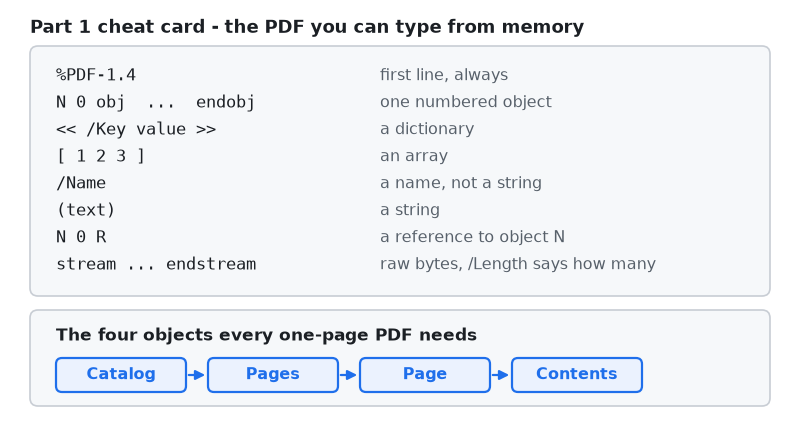
Figure 8. Everything Part 1 introduced, on one card.
Eight pieces of syntax and four objects. That is the entire cost of entry to a format with a reputation for being impenetrable.
Project structure
The attachment holds one script and the three PDF files it produces, so you can compare your own output against a known-good copy.
MQL5/
├── Scripts/
│    └── MQLPDF/
│        └── Part 01/
│            └── Demo01_HelloPdf.mq5    // Create first PDF using hardcoded values
│
└── Files/
     └── MQLPDF/
         └── Part 01/
             └── hello.pdf.txt        // hand-written pdf file in notepad
The script writes its own copies into MQL5\Files\MQLPDF\Part 01. Every part of this series uses that same MQLPDF root with its own numbered subfolder.
There is no Include/ folder yet. Part 1 has no library, on purpose: everything here is the format itself, and none of it is specific to MQL5. Unzip into MQL5\Scripts\, MQL5\Files\ compile the script, and run it on any chart.
Conclusion
A PDF is a text file with five regions: a version line, a flat list of numbered objects, an index of byte offsets, a trailer naming the root object, and an end marker. Objects refer to one another by number rather than by containment, which is why the index has to exist. A page needs four objects and one more per font. Drawing is done by a content stream written in reverse Polish order, where four operators — BT, Tf, Td, Tj — are enough to place text anywhere on the sheet.
You now have two working PDF files that you understand character by character, and a script that writes them from MQL5. That is a real capability: a trade ticket, a signed confirmation or a receipt is not much more than what is already on your disk.
What you do not have is anything that survives being edited. Every number in the xref table is a literal, and the file breaks the moment a single character moves. The library needs to compute those numbers, and before it can do that we need to understand exactly what it is computing.
Part 2, "Why PDFs break: the byte-offset index nobody warns you about" takes hello.pdf apart. We break it three different ways on purpose — shift an offset, change a string, delete the space at the end of an xref entry — and look at what each viewer says about each failure, which turns out to be almost nothing. Then we write the tool this series will lean on for the next twenty parts: a validator in pure MQL5 that reads a PDF, checks every offset against the file, verifies every /Length against its stream, and tells you the object number and the byte position where it went wrong.
| # | File | Directory | Holds |
|---|---|---|---|
| 1 | Demo01_HelloPdf.mq5 | MQL5/Scripts/MQLPDF/Part 01 | create first PDF using hardcoded values |
| 2 | hello.pdf.txt | MQL5/Files/MQLPDF/Part 01 | the version string and basic PDF content |
| 3 | MQLPDF Library - Part 01.zip | archive containing all the attached files and their paths relative to the terminal's root folder. |
The project is supported on MQL5 Algo Forge. Each part of this series has its own release, frozen at exactly the code that part explains, so whichever article you are reading, its release is the one to download.
Part 1 is here: https://forge.mql5.io/SandroBegashvil/MQLPDF/releases/tag/part-01
Warning: All rights to these materials are reserved by MetaQuotes Ltd. Copying or reprinting of these materials in whole or in part is prohibited.
This article was written by a user of the site and reflects their personal views. MetaQuotes Ltd is not responsible for the accuracy of the information presented, nor for any consequences resulting from the use of the solutions, strategies or recommendations described.

 How to Connect an LLM to an MQL5 Expert Advisor via a Python Server
 Replay and Market Simulation: The Grand Finale
 Neural Networks in Trading: The Adaptive Graph Diffusion Model (Attention Module)
 From Basic to Intermediate: Operator Overloading (V)

- Free trading apps
- Over 8,000 signals for copying
- Economic news for exploring financial markets
You agree to website policy and terms of use