

Exporting Symbol Tick Data to Binary Files in MQL5 for Offline Analysis
 813
813
 0
0

Introduction
MetaTrader 5 stores complete tick history for every symbol in the terminal's data cache. Every bid change, ask change, and trade print that arrived during the terminal's connected lifetime is accessible through MQL5's tick history API. That data is valuable for offline analysis: spread distribution studies, microstructure research, feed quality audits, input generation for machine learning models, and backtesting at tick resolution with external tools. The problem is that extracting it in a form that external tools can read efficiently is not straightforward.
The obvious approach is to export ticks to CSV. A CSV file is human-readable and universally supported, but it has serious practical limitations for tick data. A single active trading day for a major forex pair can produce several million ticks. At around 60 bytes per tick in CSV format, one trading day fills roughly 180 MB. Reading and parsing that file in Python or R requires string-buffer allocations, delimiter splits, and per-field text-to-float conversion. Only then do you get usable numeric data. Floating-point values printed as text lose precision at the last decimal place. The parse step dominates the load time for any substantial tick history.
This article builds an MQL5 script that exports tick data to a structured binary file. The binary format stores each tick in a fixed-width 48-byte record with no text conversion, no delimiter parsing, and no precision loss. The same million ticks that occupy 180 MB in CSV occupy roughly 46 MB in this format. A Python reader using NumPy loads and fully decodes that data in under one second using a single array read. The implementation separates the tick record layout, the file header, and the export pipeline into distinct modules with clearly bounded responsibilities.
Why Binary for Tick Data
The case for binary comes down to three properties that text formats cannot provide.
The first is compactness. A double value requires exactly 8 bytes in binary. In CSV, the same value requires between 8 and 20 characters depending on the number of decimal places, plus a delimiter. For tick data where bid, ask, last, volume, and timestamp are written for every tick, the binary representation is consistently three to four times smaller than an equivalent CSV.
The second is read speed. Binary files require no parsing. A fixed-width binary record can be read by mapping the file's bytes directly into a typed array. In Python, NumPy's fromfile() or frombuffer() loads a million 48-byte records in a single system call and produces a structured array with named, typed columns in milliseconds. No string splitting, no type conversion, no intermediate allocations.
The third is precision. MQL5 double values follow the IEEE 754 double-precision standard. Writing them to a binary file preserves every bit of their representation. Writing them to CSV requires converting to a decimal string and back, which introduces rounding at the last decimal digit. For price data where the difference between 1.08499 and 1.08500 carries trading significance, exact binary representation is the correct choice.
The Binary File Format
The output file has two sections: a fixed-size header followed by a contiguous sequence of fixed-size tick records. Both sections are written using FileWriteStruct(), which copies the in-memory bytes of a struct directly to the file without any text conversion.
The header occupies exactly 64 bytes and is always the first thing in the file. Its fields identify the file as a valid tick export, record the symbol and its decimal precision, and store the tick count so a reader knows how many records to expect without scanning the entire file.
HEADER LAYOUT (64 bytes total)
─────────────────────────────────────────────────────
Offset  Size  Type    Field
0       4     uint    magic       = 0x4D51544B ("MQTK")
4       2     ushort  version     = 1
6       2     ushort  digits      = symbol decimal places
8       20    char[20] symbol     = null-padded ASCII symbol name
28      8     long    start_time  = Unix ms timestamp of first tick
36      8     long    end_time    = Unix ms timestamp of last tick
44      8     ulong   tick_count  = number of tick records in file
52      12    byte[12] reserved   = zeros, reserved for future use
─────────────────────────────────────────────────────
TOTAL: 64 bytes
Each tick record occupies exactly 48 bytes. The time_msc field stores the millisecond-precision timestamp because MqlTick provides sub-second resolution through time_msc, which the time field (second precision) discards. The flags field stores the ENUM_TICK_FLAG bitmask that identifies which fields changed in this tick event. A padding field aligns the record to a multiple of 8 bytes, which matters for readers that cast the byte array directly to a typed struct.
TICK RECORD LAYOUT (48 bytes total)
─────────────────────────────────────────────────────
Offset  Size  Type    Field
0       8     long    time_msc    = millisecond timestamp
8       8     double  bid         = bid price
16      8     double  ask         = ask price
24      8     double  last        = last trade price
32      8     ulong   volume      = tick volume
40      4     uint    flags       = ENUM_TICK_FLAG bitmask
44      4     uint    padding     = always zero; aligns record to 8 bytes
─────────────────────────────────────────────────────
TOTAL: 48 bytes
The file layout is therefore: 64 header bytes, then tick_count × 48 tick record bytes. A reader seeking to tick index N jumps to byte offset 64 + N × 48 without scanning preceding records. This random access property is impossible in a text format where records have variable length.
The magic number 0x4D51544B corresponds to the ASCII bytes M, Q, T, K in little-endian order. A reader checks this value first and rejects any file that does not match, providing a basic integrity guard against reading an unrelated binary file as tick data.
The format is little-endian throughout, matching the byte order of the x86 and x86-64 processors on which MetaTrader 5 runs. A reader on a big-endian system would need to byte-swap each field, though such systems are rare for desktop analysis workloads.
The MQL5 Tick Data API
MQL5 provides two functions for retrieving historical tick data. CopyTicksRange() selects ticks by a time range specified in milliseconds. CopyTicks() selects a count of the most recent ticks. This implementation uses CopyTicksRange() because the user supplies a date range as input rather than a tick count.
The function signature is:
int CopyTicksRange(
   const string  symbol,
   MqlTick      &ticks_array[],
   uint          flags,
   ulong         from_msc,
   ulong         to_msc
);
symbol is the instrument name. ticks_array[] is the output array that CopyTicksRange() populates. flags selects which tick types to include: COPY_TICKS_ALL retrieves every tick, COPY_TICKS_INFO retrieves only bid/ask changes, and COPY_TICKS_TRADE retrieves only last price and volume changes. This implementation uses COPY_TICKS_ALL so the exported file contains the complete tick stream. from_msc and to_msc are the range boundaries in milliseconds since the Unix epoch, which is why datetime values from the input must be multiplied by 1000 before passing them.
The function returns the number of ticks copied, or -1 on error. It populates an array of MqlTick structs, each of which carries:
- time — server time in seconds (datetime)
- bid — bid price (double)
- ask — ask price (double)
- last — last trade price (double)
- volume — tick volume (ulong)
- time_msc — server time in milliseconds (long)
- flags — bitmask indicating which fields changed in this tick (uint)
- volume_real — real volume (double, exchange instruments only)
The flags field is a bitmask of the ENUM_TICK_FLAG constants: TICK_FLAG_BID (value 2) indicates the bid changed, TICK_FLAG_ASK (value 4) indicates the ask changed, TICK_FLAG_LAST (value 8) indicates the last price changed, and TICK_FLAG_VOLUME (value 16) indicates the volume changed. A tick with only TICK_FLAG_BID set means only the bid moved; the ask value in that tick record is the last known ask but did not update in this event.
The time_msc field is the critical one for high-resolution analysis. Two ticks that share the same time value (second precision) may have different time_msc values differing by a few milliseconds. Discarding the millisecond component collapses simultaneous-looking events and loses the intra-second ordering that feed-quality analysis depends on.
Binary File I/O in MQL5
MQL5's file API writes binary data through two mechanisms. FileWriteStruct() writes the raw in-memory bytes of any struct directly to the open file. FileReadStruct() reads the same number of bytes back into a struct. Both functions work at the byte level with no formatting, no conversion, and no delimiters.
Opening a file for binary writing requires the FILE_BIN flag. Without it, FileOpen() defaults to text mode and may insert line-ending characters or encoding bytes that corrupt binary data. The complete flag set for a write-only binary file is:
int handle = FileOpen(filename, FILE_WRITE | FILE_BIN);
For a file that will be read back in the same script or EA, adding FILE_READ to the flags opens the file for both reading and writing. Without FILE_READ, FILE_WRITE alone truncates any existing file to zero length before writing begins, which is the correct behavior for an export script that always writes a fresh file.
FileWriteStruct() returns the number of bytes written, which equals sizeof(struct_type) on success and zero on failure. The implementation checks the return value for the header write. Tick records are written in batches with FileWriteArray() to avoid one file-API call per tick in large exports.
FileWriteArray() writes every element of a struct array contiguously. This is safe when the struct contains only simple numeric types with no pointers or string members, which is the case for CTickRecord. The number of bytes written is ArraySize(array) × sizeof(element_type).
Implementation — TickRecord.mqh
CTickRecord defines the binary layout of one tick entry on disk. It contains exactly the fields that belong in the file, in the order they appear in the file, with a padding field to reach a 48-byte total. This struct is written directly to disk by FileWriteArray(), so its in-memory layout must match the documented file format precisely.
Class Declaration
//+------------------------------------------------------------------+
//|                                                   TickRecord.mqh |
//+------------------------------------------------------------------+
#ifndef TICKRECORD_MQH
#define TICKRECORD_MQH
//+------------------------------------------------------------------+
//| One tick record as stored in the binary output file.             |
//| Layout is fixed at 48 bytes: 8+8+8+8+8+4+4.                      |
//| Members must remain in this order; FileWriteArray writes them    |
//| byte-for-byte as laid out in memory.                             |
//+------------------------------------------------------------------+
struct CTickRecord
  {
   long              time_msc; // millisecond timestamp (Unix epoch * 1000)
   double            bid;      // bid price at this tick event
   double            ask;      // ask price at this tick event
   double            last;     // last trade price; zero for forex ticks
   ulong             volume;   // tick volume; zero when no trade occurred
   uint              flags;    // ENUM_TICK_FLAG bitmask: which fields changed
   uint              padding;  // always zero; aligns record to 8-byte boundary

   void              FromMqlTick(const MqlTick &tick);
  };
The layout of CTickRecord maps directly to the documented tick record format from Section 2. time_msc stores the millisecond-precision timestamp from MqlTick.time_msc. bid, ask, last, and volume carry the corresponding MqlTick fields. flags carries the MqlTick.flags bitmask so a reader can determine which fields were updated in each tick event. padding is always written as zero and exists solely to bring the total struct size to 48 bytes, which is a multiple of 8 and ensures natural alignment for all members.
FromMqlTick()
//+------------------------------------------------------------------+
//| Populates the record from an MqlTick, discarding unused fields.  |
//+------------------------------------------------------------------+
void CTickRecord::FromMqlTick(const MqlTick &tick)
  {
   time_msc = tick.time_msc;  // millisecond timestamp is the primary key
   bid      = tick.bid;
   ask      = tick.ask;
   last     = tick.last;
   volume   = tick.volume;    // integer tick volume, not volume_real
   flags    = tick.flags;
   padding  = 0;              // always zero; never read by the reader
  }
FromMqlTick() copies the relevant fields from an MqlTick struct into the record layout. volume_real from MqlTick is not copied because it is non-zero only for exchange instruments with real volume reporting, and adding it would require a second double field that would change the record size. A future format version could include it. MqlTick.time (second precision) is also not stored because time_msc carries strictly more information — the second-precision value can always be recovered by integer division of time_msc by 1000.
Implementation — TickFileHeader.mqh
CTickFileHeader defines the 64-byte file header that precedes the tick records. It carries the magic number for format identification, the format version, the symbol name and its decimal precision, the millisecond timestamps of the first and last tick in the file, the total tick count, and a reserved block for future extensions.
Class Declaration
//+------------------------------------------------------------------+
//|                                               TickFileHeader.mqh |
//+------------------------------------------------------------------+
#ifndef TICKFILEHEADER_MQH
#define TICKFILEHEADER_MQH
//--- magic bytes M=0x4D Q=0x51 T=0x54 K=0x4B stored as little-endian uint
#define TICK_FILE_MAGIC 0x4B54514D
//+------------------------------------------------------------------+
//| File header: always the first 64 bytes of every tick export.     |
//| Written and read with FileWriteStruct / FileReadStruct.          |
//| All integer fields use little-endian (native x86/x64 byte order).|
//+------------------------------------------------------------------+
struct CTickFileHeader
  {
   uint           magic;           // 0x4B54514D = "MQTK"; identifies the format
   ushort         version;         // format version; currently 1
   ushort         digits;          // symbol decimal places (e.g. 5 for EURUSD)
   uchar          symbol[20];      // null-padded ASCII symbol name
   long           start_time_msc;  // time_msc of the first tick record
   long           end_time_msc;    // time_msc of the last tick record
   ulong          tick_count;      // total number of tick records in the file
   uchar          reserved[12];    // always zero; reserved for future fields

   void           Init(const string &sym, int dig,
                       long start_msc, long end_msc, ulong count);
  };
The total size of CTickFileHeader is 4 + 2 + 2 + 20 + 8 + 8 + 8 + 12 = 64 bytes. Each field type is chosen to produce this exact layout without any compiler-inserted padding between members. uint (4 bytes) and ushort (2 bytes) align naturally at their respective boundaries within the struct. The uchar arrays have no alignment requirements. However, because the first 28 bytes precede the first 8-byte field, a compiler may insert 4 bytes of padding before start_time_msc. To avoid this, the struct uses explicit field ordering verified by a sizeof() check in the test script.
Init()
//+------------------------------------------------------------------+
//| Fills the header from the export parameters and tick array.      |
//+------------------------------------------------------------------+
void CTickFileHeader::Init(const string &sym, int dig,
                           long start_msc, long end_msc, ulong count)
  {
   magic          = TICK_FILE_MAGIC;
   version        = 1;
   digits         = (ushort)dig;
   start_time_msc = start_msc;
   end_time_msc   = end_msc;
   tick_count     = count;
//--- zero the reserved block and symbol array before writing
   ::ArrayInitialize(reserved, 0);
   ::ArrayInitialize(symbol,   0);
//--- copy symbol name into the fixed-length array byte by byte
   int sym_len = ::MathMin(::StringLen(sym), 19); // leave room for null terminator
   for(int i = 0; i < sym_len; i++)
      symbol[i] = (uchar)::StringGetCharacter(sym, i);
//--- remaining bytes are already zero from ArrayInitialize
  }
Init() populates every field of the header from the caller-supplied parameters. The symbol name is copied character by character into the fixed-length uchar[20] array, limited to 19 characters to leave at least one zero byte as a null terminator. ArrayInitialize() zeroes both the reserved block and the symbol array before the copy, ensuring that unwritten bytes are always zero rather than holding garbage from prior stack usage. The start_time_msc and end_time_msc values come from the first and last elements of the MqlTick array fetched by CopyTicksRange(), giving the reader the exact millisecond range covered by the file without having to scan all records.
Implementation — TickExporter.mqh
CTickExporter owns the complete export pipeline. It fetches tick data from the terminal, converts each MqlTick to a CTickRecord, writes the header and all records to the binary file, and reports progress and results. It is the only class that calls CopyTicksRange() or any file I/O function.
Class Declaration
//+------------------------------------------------------------------+
//|                                                 TickExporter.mqh |
//+------------------------------------------------------------------+
#ifndef TICKEXPORTER_MQH
#define TICKEXPORTER_MQH

#include "TickRecord.mqh"
#include "TickFileHeader.mqh"
//+-------------------------------------------------------------------+
//| Fetches tick history and writes it to a structured binary file.   |
//| Separates data retrieval, record conversion, and file I/O into    |
//| distinct methods so each can be tested and replaced independently.|
//+-------------------------------------------------------------------+
class CTickExporter
  {
private:
   string         m_symbol;      // symbol to export
   datetime       m_from;        // start of the requested date range
   datetime       m_to;          // end of the requested date range
   string         m_filename;    // output filename relative to MQL5/Files/
   int            m_max_ticks;   // 0 = no limit; positive = cap at this count
   MqlTick        m_ticks[];     // raw tick data from CopyTicksRange()
   int            m_tick_count;  // actual number of ticks fetched

   bool           WriteToFile(void);

public:
                  CTickExporter(void);
                 ~CTickExporter(void);

   void           Init(const string &symbol, datetime from, datetime to,
                       const string &filename, int max_ticks);
   bool           Fetch(void);
   bool           Export(void);
   int            GetCount(void) const;
   string         GetFilename(void) const;
  };
m_ticks[] holds the raw MqlTick array returned by CopyTicksRange(). It lives as a member rather than a local variable in Fetch() so that Export() can access it without passing it as a parameter, keeping the public interface simple. m_tick_count is the count of ticks actually fetched, which may be less than the total available if m_max_ticks is set. WriteToFile() is private because it is the final internal step called from Export().
Constructor
//+------------------------------------------------------------------+
//| Constructor — sets all fields to safe initial values.            |
//+------------------------------------------------------------------+
CTickExporter::CTickExporter(void)
  {
   m_symbol     = "";
   m_from       = 0;
   m_to         = 0;
   m_filename   = "";
   m_max_ticks  = 0;
   m_tick_count = 0;
   ::ArrayResize(m_ticks, 0); // start with an empty tick array
  }
All fields are set to their zero or empty sentinel values. The m_ticks[] array is explicitly resized to zero rather than left uninitialized, ensuring a predictable state before Fetch() is called.
Destructor
//+------------------------------------------------------------------+
//| Destructor — releases the tick array memory.                     |
//+------------------------------------------------------------------+
CTickExporter::~CTickExporter(void)
  {
   ::ArrayFree(m_ticks); // return the potentially large array to the heap
  }
ArrayFree() explicitly releases the memory held by m_ticks[]. Tick arrays can be very large — a million ticks at the size of MqlTick (roughly 64 bytes per element) occupy around 64 MB. Explicit deallocation in the destructor returns that memory immediately rather than waiting for automatic cleanup at script termination.
Init()
//+------------------------------------------------------------------+
//| Stores the export parameters; does not fetch or write anything.  |
//+------------------------------------------------------------------+
void CTickExporter::Init(const string &symbol, datetime from, datetime to,
                         const string &filename, int max_ticks)
  {
   m_symbol    = symbol;
   m_from      = from;
   m_to        = to;
   m_filename  = filename;
   m_max_ticks = max_ticks;
  }
Init() stores the export parameters without performing any work. Separating initialization from execution allows the caller to configure the exporter and inspect its state before committing to a potentially long fetch operation.
Fetch()
//+------------------------------------------------------------------+
//| Fetches tick history from the terminal for the configured range. |
//| CopyTicksRange() takes millisecond timestamps, so from/to are    |
//| multiplied by 1000 before passing. Returns false on error.       |
//+------------------------------------------------------------------+
bool CTickExporter::Fetch(void)
  {
   ::ArrayFree(m_ticks);
   m_tick_count = 0;
//--- convert datetime (seconds) to milliseconds for CopyTicksRange()
   ulong from_msc = (ulong)m_from * 1000;
   ulong to_msc   = (ulong)m_to   * 1000;

   ::PrintFormat("CTickExporter::Fetch: requesting ticks for %s from %s to %s",
                 m_symbol,
                 ::TimeToString(m_from, TIME_DATE | TIME_MINUTES | TIME_SECONDS),
                 ::TimeToString(m_to,   TIME_DATE | TIME_MINUTES | TIME_SECONDS));
//--- fetch all tick types: bid, ask, and last price events
   int fetched = ::CopyTicksRange(m_symbol, m_ticks,
                                  COPY_TICKS_ALL, from_msc, to_msc);
   if(fetched < 0)
     {
      ::PrintFormat("CTickExporter::Fetch: CopyTicksRange failed, error %d",
                    ::GetLastError());
      return(false);
     }

   if(fetched == 0)
     {
      ::Print("CTickExporter::Fetch: no ticks returned for the requested range. "
              "Confirm the symbol has tick history loaded in the terminal.");
      return(false);
     }
//--- apply the optional tick count cap
   m_tick_count = (m_max_ticks > 0 && fetched > m_max_ticks)
                  ? m_max_ticks
                  : fetched;

   ::PrintFormat("CTickExporter::Fetch: received %d ticks, exporting %d",
                 fetched, m_tick_count);
   return(true);
  }
Fetch() converts the datetime range to milliseconds before passing to CopyTicksRange(). The distinction matters: datetime values are in seconds since the Unix epoch, but CopyTicksRange() expects milliseconds. Passing second-precision values directly would return no ticks because the range would span only one millisecond from the terminal's perspective. After a successful fetch, the optional cap is applied. If fetched > m_max_ticks, only the first m_max_ticks elements are exported; m_tick_count controls how many records are written.
WriteToFile()
//+------------------------------------------------------------------+
//| Writes the header and all tick records to the binary output file.|
//| Uses FileWriteArray to write all records in a single call after  |
//| building a CTickRecord array from the MqlTick source data.       |
//+------------------------------------------------------------------+
bool CTickExporter::WriteToFile(void)
  {
//--- open the file in binary write mode; FILE_WRITE truncates existing files
   int handle = ::FileOpen(m_filename, FILE_WRITE | FILE_BIN);
   if(handle == INVALID_HANDLE)
     {
      ::PrintFormat("CTickExporter::WriteToFile: cannot open '%s', error %d",
                    m_filename, ::GetLastError());
      return(false);
     }
//--- build and write the file header
   CTickFileHeader header;
   header.Init(
      m_symbol,
      (int)::SymbolInfoInteger(m_symbol, SYMBOL_DIGITS),
      m_ticks[0].time_msc,                 // start_time_msc from first tick
      m_ticks[m_tick_count - 1].time_msc,  // end_time_msc from last tick
      (ulong)m_tick_count
   );

   uint bytes_written = ::FileWriteStruct(handle, header);
   if(bytes_written != sizeof(CTickFileHeader))
     {
      ::PrintFormat("CTickExporter::WriteToFile: header write failed, "
                    "wrote %d of %d bytes",
                    bytes_written, sizeof(CTickFileHeader));
      ::FileClose(handle);
      return(false);
     }
//--- convert MqlTick array to CTickRecord array for binary output
   CTickRecord records[];
   ::ArrayResize(records, m_tick_count);

   for(int i = 0; i < m_tick_count; i++)
      records[i].FromMqlTick(m_ticks[i]);
//--- write all records in one FileWriteArray call for efficiency
   uint records_written = ::FileWriteArray(handle, records, 0, m_tick_count);
   ::FileClose(handle);

   if((int)records_written != m_tick_count)
     {
      ::PrintFormat("CTickExporter::WriteToFile: record write incomplete, "
                    "wrote %d of %d records",
                    records_written, m_tick_count);
      return(false);
     }

   ::PrintFormat("CTickExporter::WriteToFile: wrote %d records to %s (%I64u bytes)",
                 m_tick_count, m_filename,
                 (ulong)(sizeof(CTickFileHeader) +
                         (ulong)m_tick_count * sizeof(CTickRecord)));
   return(true);
  }
WriteToFile() opens the output file with FILE_WRITE | FILE_BIN. FILE_WRITE alone truncates any existing file to zero before writing, which is correct for an export that always produces a fresh file. The header is written first using FileWriteStruct(), and the return value is compared against sizeof(CTickFileHeader) to confirm all 64 bytes were written. The tick records are then converted from MqlTick to CTickRecord in a loop, and the entire CTickRecord array is written in a single FileWriteArray() call. Writing all records at once is substantially faster than calling FileWriteStruct() in a loop for millions of ticks, because it reduces the number of file API round-trips from one per tick to one for the entire record set. FileClose() is called before checking the record count to ensure the file handle is always released even if the write was incomplete.
Export()
//+------------------------------------------------------------------+
//| Orchestrates the fetch and write steps in the correct order.     |
//+------------------------------------------------------------------+
bool CTickExporter::Export(void)
  {
   if(!Fetch())
      return(false);
   return(WriteToFile());
  }
Export() calls Fetch() then WriteToFile() in sequence. Separating these as distinct methods allows the caller to call them independently if needed — for example, calling Fetch() first to check GetCount() before deciding whether to write, without restructuring the export logic.
GetCount() and GetFilename()
//+-------------------------------------------------------------------+
//| Returns the number of ticks that were fetched and will be written.|
//+-------------------------------------------------------------------+
int CTickExporter::GetCount(void) const
  {
   return(m_tick_count);
  }
//+------------------------------------------------------------------+
//| Returns the output filename for use in log messages.             |
//+------------------------------------------------------------------+
string CTickExporter::GetFilename(void) const
  {
   return(m_filename);
  }
GetCount() returns m_tick_count so the calling script can log the export count without accessing internal state directly. GetFilename() returns the configured output path for the completion log message.
Implementation — TickDataExporter.mq5
TickDataExporter.mq5 is the entry-point script. It accepts five inputs from the user, validates the date range, instantiates the exporter, and reports the result.
Property Block and Inputs
//+------------------------------------------------------------------+
//|                                             TickDataExporter.mq5 |
//+------------------------------------------------------------------+

#property script_show_inputs

//--- Includes
#include <Tick_Exporter/TickRecord.mqh>
#include <Tick_Exporter/TickFileHeader.mqh>
#include <Tick_Exporter/TickExporter.mqh>

//--- Inputs
input string   InpSymbol   = "";          // Symbol (empty = current chart symbol)
input datetime InpFrom     = 0;           // Start date and time
input datetime InpTo       = 0;           // End date and time (0 = now)
input string   InpFilename = "ticks.bin"; // Output filename in MQL5/Files/
input int      InpMaxTicks = 0;           // Max ticks to export (0 = no limit)
InpSymbol defaults to an empty string, which OnStart() resolves to _Symbol, the symbol of the chart the script is attached to. InpFrom and InpTo are datetime inputs that appear as date pickers in the script dialog. InpTo defaults to zero, which OnStart() resolves to the current time. InpMaxTicks provides a safety cap for exploratory use on high-activity symbols where the full range might return tens of millions of ticks.
OnStart()
//+------------------------------------------------------------------+
//| Script entry point: validate inputs, export, and report.         |
//+------------------------------------------------------------------+
void OnStart()
  {
//--- resolve symbol default to the chart symbol
   string symbol = (InpSymbol == "") ? _Symbol : InpSymbol;
//--- resolve end-time default to the current server time
   datetime from = InpFrom;
   datetime to   = (InpTo == 0) ? TimeCurrent() : InpTo;
//--- validate the date range before making any API calls
   if(from >= to)
     {
      ::PrintFormat("TickDataExporter: invalid range - from (%s) must be before to (%s).",
                    ::TimeToString(from), ::TimeToString(to));
      return;
     }
//--- confirm the symbol exists and its tick history is accessible
   if(!::SymbolSelect(symbol, true))
     {
      ::PrintFormat("TickDataExporter: symbol '%s' not found or cannot be selected.",
                    symbol);
      return;
     }

   uint t_start = GetTickCount(); // record start time for elapsed logging

   CTickExporter exporter;
   exporter.Init(symbol, from, to, InpFilename, InpMaxTicks);

   if(!exporter.Export())
     {
      ::Print("TickDataExporter: export failed. Check the journal for details.");
      return;
     }

   uint elapsed = GetTickCount() - t_start; // compute elapsed time in ms
   ::PrintFormat("TickDataExporter: exported %d ticks to MQL5/Files/%s in %d ms.",
                 exporter.GetCount(), exporter.GetFilename(), elapsed);
  }
OnStart() resolves the three defaultable inputs, validates the range, and selects the symbol into the Market Watch using SymbolSelect() before passing it to CopyTicksRange(). A symbol that is not in the Market Watch may not have its tick history available to CopyTicksRange(), even if the terminal has previously downloaded it. Calling SymbolSelect(symbol, true) ensures the symbol is active and its data is accessible. The elapsed time is logged alongside the tick count so the user has a performance baseline for the export.
Verification — TestTickExporter.mq5
TestTickExporter.mq5 is a standalone script that verifies the struct layouts, the header initialization, and the record conversion without requiring a live tick export. It uses the ASSERT macro to check specific conditions and reports all results to the Experts tab.
//+------------------------------------------------------------------+
//|                                            TestTickExporter.mq5  |
//+------------------------------------------------------------------+

#property script_show_inputs

//--- Includes
#include <Tick_Exporter/TickRecord.mqh>
#include <Tick_Exporter/TickFileHeader.mqh>
#include <Tick_Exporter/TickExporter.mqh>

//--- ASSERT: prints PASSED or FAILED with the test description
#define ASSERT(cond, msg) \
   if(!(cond)) { PrintFormat("ASSERT FAILED : %s", msg); } \
   else        { PrintFormat("ASSERT PASSED : %s", msg); }

//--- Inputs
input string InpTestSymbol = "EURUSD"; // Symbol to use for the live export test

//+------------------------------------------------------------------+
//| Script entry point: structural tests then a small live export.   |
//+------------------------------------------------------------------+
void OnStart()
  {
//--- Test 1: CTickRecord must be exactly 48 bytes for the reader to align correctly
   ASSERT(sizeof(CTickRecord) == 48,
          "CTickRecord is exactly 48 bytes");
//--- Test 2: CTickFileHeader must be exactly 64 bytes for the reader to find records
   ASSERT(sizeof(CTickFileHeader) == 64,
          "CTickFileHeader is exactly 64 bytes");
//--- Test 3: record size must be a multiple of 8 for natural alignment on all platforms
   ASSERT(sizeof(CTickRecord) % 8 == 0,
          "CTickRecord size is a multiple of 8 bytes");
//--- Test 4: header magic must match the documented constant
   CTickFileHeader hdr;
   hdr.Init("EURUSD", 5, 1000000LL, 2000000LL, 42);
   ASSERT(hdr.magic == TICK_FILE_MAGIC,
          "Header magic matches TICK_FILE_MAGIC constant");
//--- Test 5: header version must be 1
   ASSERT(hdr.version == 1,
          "Header version field is 1");
//--- Test 6: header digits must store the supplied value exactly
   ASSERT(hdr.digits == 5,
          "Header digits field stores the supplied value");
//--- Test 7: header tick_count must store the supplied value
   ASSERT(hdr.tick_count == 42,
          "Header tick_count field stores the supplied value");
//--- Test 8: header timestamps must store the supplied millisecond values
   ASSERT(hdr.start_time_msc == 1000000LL,
          "Header start_time_msc stores the supplied value");
//--- Test 9: symbol array must start with the first character of the supplied name
   ASSERT(hdr.symbol[0] == (uchar)'E',
          "Header symbol[0] is 'E' for EURUSD");
//--- Test 10: symbol array must contain a null terminator within its 20-byte length
   bool null_found = false;
   for(int i = 0; i < 20; i++)
     {
      if(hdr.symbol[i] == 0)
        {
         null_found = true;
         break;
        }
     }
   ASSERT(null_found, "Header symbol array contains a null terminator within 20 bytes");
//--- Test 11: reserved block must be entirely zero after Init()
   bool reserved_zero = true;
   for(int i = 0; i < 12; i++)
     {
      if(hdr.reserved[i] != 0)
        {
         reserved_zero = false;
         break;
        }
     }
   ASSERT(reserved_zero, "Header reserved block is all zeros");
//--- Test 12: FromMqlTick must copy all fields from the source struct
   MqlTick src;
   src.time_msc = 1705312800000LL; // 2024.01.15 09:00:00 UTC in milliseconds
   src.bid      = 1.08523;
   src.ask      = 1.08526;
   src.last     = 0.0;
   src.volume   = 3;
   src.flags    = TICK_FLAG_BID | TICK_FLAG_ASK;

   CTickRecord rec;
   rec.FromMqlTick(src);

   ASSERT(rec.time_msc == 1705312800000LL,
          "CTickRecord.time_msc matches MqlTick.time_msc");
   ASSERT(rec.bid == 1.08523,
          "CTickRecord.bid matches MqlTick.bid");
   ASSERT(rec.ask == 1.08526,
          "CTickRecord.ask matches MqlTick.ask");
   ASSERT(rec.flags == (TICK_FLAG_BID | TICK_FLAG_ASK),
          "CTickRecord.flags matches the source MqlTick.flags");
   ASSERT(rec.padding == 0,
          "CTickRecord.padding is always zero");
//--- Test 13: live pipeline test using a 60-second window ending 1 hour ago
//--- this range uses historical data so it does not depend on market being open
   datetime to_dt   = TimeCurrent() - 3600; // one hour ago
   datetime from_dt = to_dt - 60;            // sixty seconds before that

   CTickExporter exporter;
   exporter.Init(InpTestSymbol, from_dt, to_dt, "test_ticks.bin", 1000);

   bool exported = exporter.Export();
   if(exported)
     {
      ASSERT(exporter.GetCount() > 0,
             "Live export returned at least one tick");
      ASSERT(exporter.GetFilename() == "test_ticks.bin",
             "GetFilename() returns the configured filename");
      //--- read the header back from the written file to verify round-trip integrity
      int fh = FileOpen("test_ticks.bin", FILE_READ | FILE_BIN);
      if(fh != INVALID_HANDLE)
        {
         CTickFileHeader read_hdr;
         uint bytes_read = FileReadStruct(fh, read_hdr);
         FileClose(fh);

         ASSERT(bytes_read == sizeof(CTickFileHeader),
                "FileReadStruct reads exactly 64 header bytes");
         ASSERT(read_hdr.magic == TICK_FILE_MAGIC,
                "Read-back header magic matches TICK_FILE_MAGIC");
         ASSERT(read_hdr.tick_count == (ulong)exporter.GetCount(),
                "Read-back header tick_count matches exported count");
         ASSERT(read_hdr.version == 1,
                "Read-back header version is 1");
        }
      else
         PrintFormat("TestTickExporter: could not reopen test_ticks.bin, error %d",
                     GetLastError());
     }
   else
      Print("TestTickExporter: live export skipped - no tick history available for ",
            InpTestSymbol, " in the tested window. Structural tests above are still valid.");

   Print("TestTickExporter: all assertions complete.");
  }
//+------------------------------------------------------------------+
The test script covers four categories. Tests 1–3 checks struct sizes: CTickRecord must be 48 bytes and CTickFileHeader must be 64 bytes. If either is wrong, external readers will misalign. Tests 4–11 verifies CTickFileHeader::Init(), checking that each field holds the expected value, the symbol array is null-terminated, and the reserved block is zeroed. Test 12 verifies CTickRecord::FromMqlTick() by confirming that time_msc, bid, ask, flags, and padding are all copied correctly from the source MqlTick. Test 13 runs a live pipeline check: it exports a small one-minute window and reads the file back to verify the header magic, version, and tick count. If no tick history is available, the live test is skipped and the structural tests remain valid.
Reading the File in Python
The following Python script reads a tick export file and loads all records into a NumPy structured array for immediate analysis. It requires only the Python standard library and NumPy.
"""
tick_reader.py
Read a binary tick export file produced by TickDataExporter.mq5.

Header layout (64 bytes, little-endian):
  uint32   magic           = 0x4B54514D ("MQTK")
  uint16   version         = 1
  uint16   digits          = symbol decimal places
  char[20] symbol          = null-padded ASCII name
  int64    start_time_msc  = ms timestamp of first tick
  int64    end_time_msc    = ms timestamp of last tick
  uint64   tick_count      = number of tick records
  byte[12] reserved        = zeros

Tick record layout (48 bytes, little-endian):
  int64    time_msc   millisecond timestamp
  float64  bid        bid price
  float64  ask        ask price
  float64  last       last trade price (0 for forex)
  uint64   volume     tick volume
  uint32   flags      ENUM_TICK_FLAG bitmask
  uint32   padding    always zero

Requirements: Python 3.7+, numpy
Install:  pip install numpy
Usage:    python tick_reader.py ticks.bin
"""

import struct
import sys
import datetime
import numpy as np

# Header format string for struct.unpack (little-endian)
# < = little-endian
# I  = uint32  magic
# H  = uint16  version
# H  = uint16  digits
# 20s = char[20] symbol
# q  = int64   start_time_msc
# q  = int64   end_time_msc
# Q  = uint64  tick_count
# 12s = char[12] reserved
HEADER_FORMAT = '<IHH20sqqQ12s'
HEADER_SIZE   = struct.calcsize(HEADER_FORMAT)  # must equal 64

EXPECTED_MAGIC   = 0x4B54514D  # "MQTK" in little-endian
EXPECTED_VERSION = 1

# NumPy dtype matching the 48-byte CTickRecord binary layout
TICK_DTYPE = np.dtype([
    ('time_msc', '<i8'),   # 8 bytes: millisecond timestamp (signed)
    ('bid',      '<f8'),   # 8 bytes: bid price
    ('ask',      '<f8'),   # 8 bytes: ask price
    ('last',     '<f8'),   # 8 bytes: last trade price
    ('volume',   '<u8'),   # 8 bytes: tick volume (unsigned)
    ('flags',    '<u4'),   # 4 bytes: ENUM_TICK_FLAG bitmask
    ('padding',  '<u4'),   # 4 bytes: always zero
])  # total: 48 bytes per record

def ms_to_datetime(ms):
    """Convert a millisecond Unix timestamp to a UTC datetime string."""
    ts_sec = ms / 1000.0
    dt = datetime.datetime.utcfromtimestamp(ts_sec)
    return dt.strftime('%Y-%m-%d %H:%M:%S.') + f'{ms % 1000:03d}'

def read_tick_file(path):
    """
    Read a tick export binary file and return (symbol, digits, ticks).

    Parameters
    ----------
    path : str
        Path to the .bin file produced by TickDataExporter.mq5.

    Returns
    -------
    symbol : str
        Instrument name stored in the header.
    digits : int
        Decimal places for the instrument.
    ticks : numpy.ndarray
        Structured array with fields: time_msc, bid, ask, last, volume, flags, padding.
    """
    if HEADER_SIZE != 64:
        raise RuntimeError(f"Header format calculates to {HEADER_SIZE} bytes, expected 64")

    with open(path, 'rb') as f:
        raw_header = f.read(HEADER_SIZE)
        if len(raw_header) < HEADER_SIZE:
            raise ValueError(
                f"File too short: expected at least {HEADER_SIZE} header bytes, "
                f"got {len(raw_header)}"
            )

        (magic, version, digits, symbol_bytes,
         start_msc, end_msc, tick_count, reserved) = struct.unpack(
            HEADER_FORMAT, raw_header
        )

        if magic != EXPECTED_MAGIC:
            raise ValueError(
                f"Invalid magic number 0x{magic:08X}, expected 0x{EXPECTED_MAGIC:08X}. "
                "This is not a valid tick export file."
            )

        if version != EXPECTED_VERSION:
            raise ValueError(
                f"Unsupported format version {version}, expected {EXPECTED_VERSION}."
            )

        symbol = symbol_bytes.rstrip(b'\x00').decode('ascii')

        print(f"Symbol     : {symbol}")
        print(f"Digits     : {digits}")
        print(f"Version    : {version}")
        print(f"Tick count : {tick_count}")
        print(f"Start      : {ms_to_datetime(start_msc)} UTC")
        print(f"End        : {ms_to_datetime(end_msc)} UTC")
        print(f"File size  : {HEADER_SIZE + tick_count * 48} bytes (expected)")

        raw_records = f.read()

    # Load all records in a single call; no Python-level loop required
    ticks = np.frombuffer(raw_records, dtype=TICK_DTYPE)

    if len(ticks) != tick_count:
        print(
            f"Warning: header declares {tick_count} ticks but "
            f"file contains {len(ticks)} records."
        )

    return symbol, digits, ticks

def print_sample(ticks, digits, n=5):
    """Print the first n tick records in a readable format."""
    print(f"\nFirst {min(n, len(ticks))} tick(s):")
    for t in ticks[:n]:
        fmt = f"  {ms_to_datetime(t['time_msc'])} UTC" \
              f"  bid={t['bid']:.{digits}f}" \
              f"  ask={t['ask']:.{digits}f}" \
              f"  flags={t['flags']:02d}"
        print(fmt)

def print_spread_stats(ticks, digits):
    """Compute and print spread statistics in points."""
    pip = 10 ** -digits
    # Only use ticks where both bid and ask are non-zero
    valid = ticks[(ticks['bid'] > 0) & (ticks['ask'] > 0)]
    if len(valid) == 0:
        print("\nNo valid bid/ask ticks for spread analysis.")
        return

    spread_points = (valid['ask'] - valid['bid']) / pip
    print(f"\nSpread statistics ({len(valid)} ticks with bid and ask, in points):")
    print(f"  min    = {spread_points.min():.1f}")
    print(f"  p25    = {np.percentile(spread_points, 25):.1f}")
    print(f"  median = {np.median(spread_points):.1f}")
    print(f"  p75    = {np.percentile(spread_points, 75):.1f}")
    print(f"  max    = {spread_points.max():.1f}")
    print(f"  mean   = {spread_points.mean():.2f}")

if __name__ == '__main__':
    file_path = sys.argv[1] if len(sys.argv) > 1 else 'ticks.bin'

    print(f"Reading: {file_path}\n")
    try:
        symbol, digits, ticks = read_tick_file(file_path)
        print_sample(ticks, digits)
        print_spread_stats(ticks, digits)
    except (ValueError, RuntimeError, OSError) as exc:
        print(f"Error: {exc}")
        sys.exit(1)
The Python reader uses two mechanisms. struct.unpack() with the format string '<IHH20sqqQ12s' decodes the 64-byte header field by field, where < specifies little-endian byte order and each letter maps to a field type and size. np.frombuffer() with the TICK_DTYPE structured dtype loads all tick records in a single call with no loop, producing a NumPy array whose columns are named and typed. Accessing ticks['bid'] returns a 64-bit float array over the entire tick set, enabling vectorized spread calculations, histogram binning, and percentile statistics without any Python-level iteration.
The file is located at <MT5 data folder>\MQL5\Files\ticks.bin. The exact path is logged by the script in the Experts tab when the export completes. On Windows, the data folder is typically C:\Users\<username>\AppData\Roaming\MetaQuotes\Terminal\<terminal_id>\.
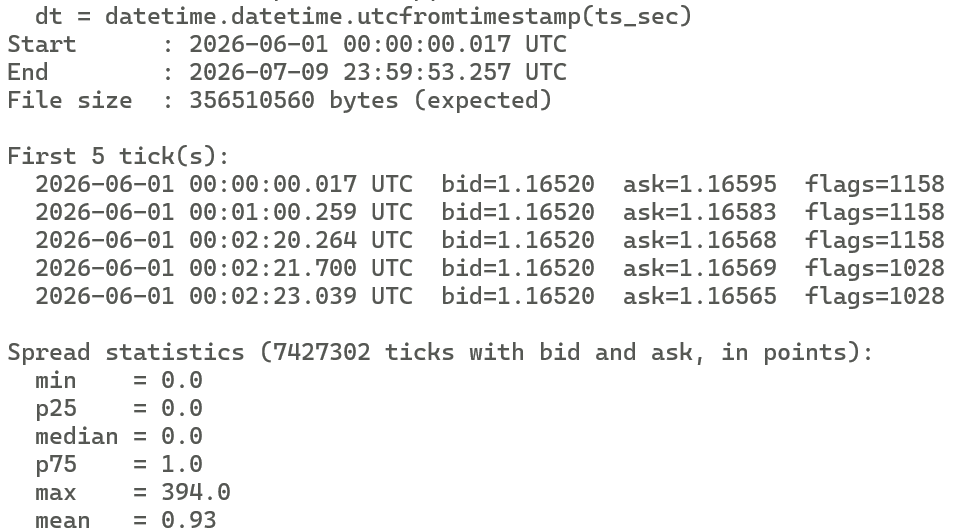
Terminal output of tick_reader.py showing successful integrity verification, sample records, and vectorized spread statistics for 7.4 million binary-exported ticks.
Extending the Exporter
The binary format reserves 12 bytes in the header for future extensions. A version 2 format could use those bytes to store the account server name, the feed provider identifier, or a checksum of the tick record block. A reader checks the version field before parsing these bytes, so version 1 readers remain compatible with version 2 files by ignoring the extended header fields.
The export could be extended to write one binary file per trading day, naming each file with the symbol and date: EURUSD_20240115.bin. This partitioning keeps individual files small, allows incremental exports that append only the current day's file, and lets an analysis pipeline load specific date ranges by selecting files by name rather than scanning a monolithic file. A companion index file listing each day's file path, tick count, and millisecond range would support range queries without opening every file.
The CTickExporter class could be adapted into an EA that writes ticks to binary in real time using OnTick(). On each callback, the EA appends one CTickRecord to the open file handle and updates the header's tick_count and end_time_msc fields in place using FileSeek() to jump back to the header offset after each write. This produces a continuously growing binary file that an analysis process can read incrementally by tracking its own position in the file and reading newly appended records.
Limitations
CopyTicksRange() retrieves ticks from the terminal's local tick history cache. If the requested date range precedes the cache window, CopyTicksRange() returns fewer ticks than the date range implies, or returns zero, without raising an error. The terminal downloads tick history on demand when a chart for the symbol is open, but deep historical ranges may not be cached. The user must ensure the terminal has downloaded tick history for the requested period before running the export script.
For very large date ranges on active symbols, CopyTicksRange() may attempt to return tens of millions of ticks in a single call. Each MqlTick struct is approximately 64 bytes, so 10 million ticks requires around 640 MB of memory. The script does not chunk the request into smaller time windows, which means it can exhaust available memory for long date ranges on liquid symbols during active market sessions. Adding a chunked fetch that loops over sub-ranges and appends to the output file would address this, at the cost of additional code complexity.
The binary file format is little-endian, reflecting the byte order of x86 and x86-64 processors. Python and NumPy handle little-endian natively on the same hardware, but a reader on a big-endian system such as a SPARC or PowerPC workstation would need to byte-swap each field. The version field in the header provides a hook for detecting this in a future format revision.
The format stores MqlTick.volume as a ulong integer but does not store MqlTick.volume_real, the floating-point real volume available for exchange instruments. Analysis of exchange order flow requires volume_real, which would need a format version increment to add a double field to the tick record.
The script exports a snapshot: it reads the tick history at the moment it runs and writes a static file. It does not update the file when new ticks arrive. For continuous logging, the real-time EA adaptation described in Section 11 is the appropriate approach.
Conclusion
This article presents a complete, compilable implementation for exporting MetaTrader 5 tick history to a structured binary file. The reader leaves with four working components. CTickRecord defines the 48-byte binary layout of one tick on disk, with a FromMqlTick() method that converts the terminal's native MqlTick struct. CTickFileHeader defines the 64-byte file header carrying the magic number, symbol, decimal precision, millisecond range, and tick count. CTickExporter owns the complete pipeline: fetching tick data from the terminal with CopyTicksRange(), writing the header with FileWriteStruct(), and writing all records in a single FileWriteArray() call. TickDataExporter.mq5 provides the user-facing script with configurable symbol, date range, output filename, and tick count cap.
The concrete operational guarantees are these: the output file always begins with a 64-byte header whose magic number and version fields allow a reader to validate the format before processing. Every tick record is exactly 48 bytes, enabling random access to any tick by byte offset without scanning. Millisecond-precision timestamps are preserved from MqlTick.time_msc. The flags bitmask is stored so a reader can filter by tick type after the fact. The Python reader provided in Section 10 loads the complete file into a NumPy structured array in a single frombuffer() call, ready for vectorized analysis.
The honest limitations are the dependency on the terminal's tick history cache being populated for the requested date range, the absence of chunked fetching for very large ranges, the little-endian-only format, the omission of volume_real, and the static snapshot nature of the export.
Programs used in the article:
| # | Name | Type | Description |
|---|---|---|---|
| 1 | TickRecord.mqh | Include File | Defines the 48-byte binary layout of one tick record on disk, with a method to populate it from an MqlTick struct. |
| 2 | TickFileHeader.mqh | Include File | Defines the 64-byte file header carrying the magic number, symbol, precision, millisecond range, and tick count. |
| 3 | TickExporter.mqh | Include File | Fetches tick history with CopyTicksRange(), converts records, and writes the complete binary file using FileWriteArray for efficiency. |
| 4 | TickDataExporter.mq5 | Script | Entry-point script that accepts symbol, date range, output filename, and tick count cap as inputs and drives the full export pipeline. |
| 5 | TestTickExporter.mq5 | Script | Verifies struct sizes, header field values, record field copying, and the complete round-trip pipeline through a small live export and file read-back. |
| 6 | tick_reader.py | Python Script | Parses the 64-byte file header and loads the 48-byte records into a NumPy structured array in a single call, validating file integrity and computing vectorized spread statistics. |
| 7 | Tick_Exporter.zip | Zip Archive | Zip archive containing all the attached files and their paths relative to the terminal's root folder. |
Warning: All rights to these materials are reserved by MetaQuotes Ltd. Copying or reprinting of these materials in whole or in part is prohibited.
This article was written by a user of the site and reflects their personal views. MetaQuotes Ltd is not responsible for the accuracy of the information presented, nor for any consequences resulting from the use of the solutions, strategies or recommendations described.

 Hierarchical Risk Parity: A Robust Portfolio Allocator and Expert Advisor
 How to Detect and Normalize Chart Objects in MQL5 (Part 4): Fully Automated Analytical Objects System
 Artificial Coronary Circulation Algorithm (ACCS)
 Neural Networks in Trading: Effective Feature Extraction for Accurate Classification (Building Objects)

- Free trading apps
- Over 8,000 signals for copying
- Economic news for exploring financial markets
You agree to website policy and terms of use