

How to Connect an LLM to an MQL5 Expert Advisor via a Python Server
 160
160
 3
3

Anyone who has ever tried to integrate a large language model into MetaTrader 5 will, sooner or later, run into the same roadblock. You want the AI to analyze the chart in real time, calculate indicators, identify patterns, and generate meaningful signals — not just once every five minutes, but truly in real time, across a portfolio of 8–10 instruments at once. You want the latency to be 3–7 seconds at most, API costs not to eat up the deposit in a week, and the OpenRouter or Anthropic key not to be sitting in the Expert Advisor's code and exposed by any leak.
But in reality, it all breaks on three things at once. First of all, MQL5 is not Python: there is no proper WebSocket out of the box, no asynchronous processing, and no threads — one long request, and the entire Expert Advisor hangs while waiting for a response from the model. Second, free APIs quickly hit their limits: 10–20 requests per minute — and on the M15 timeframe across eight currency pairs, you will be getting HTTP 429 rate-limit responses within half an hour. Paid tiers solve the problem, but the price skyrockets. Third, where should you put the API key? Hard-code it, and sooner or later it will leak. Pass it via parameters — slightly better, but still insecure.
In the end, a great idea gets bogged down in a technical quagmire: either a demo script for a single pair, a blocking monster, a blown budget, or a compromised key. We need a different architecture — one where MetaTrader 5 remains merely a data conduit, while all the heavy lifting, all the logic, and all the secrets live outside it.
A Python Server as a Bridge Between Worlds
The key architectural decision behind the Shtenco AI V17 system is simple: the MetaTrader 5 Expert Advisor should not know anything about AI. Its only task is to collect market data and send it over the network in the required format. All AI logic is moved entirely into a Python server that runs on the same machine at 127.0.0.1 or on the local network. This separation solves all three problems at once.
The Expert Advisor no longer knows which specific AI it is talking to. It does not know which model is processing its data, how much it costs, or where it is physically located. It knows only the server address and the communication protocol. This means you can use one model today and another tomorrow, and the Expert Advisor will not even be aware of it. All you need to do is change one line in the Python script.
MetaTrader 5  →  WebSocket (port 8989)      →  Python Server
Python Server →  HTTPS POST                 →  OpenRouter API
OpenRouter    →  LLM (stepfun/step-3.5-flash)
LLM           →  {"signal":"buy","comment":"..."}
Python Server →  WebSocket                  →  MT5
MT5           →  Trading decision           →  Market
The Python server is the only place in the system where the API key is stored. It resides in a single file on a single machine and is never passed to the Expert Advisor. The Expert Advisor cannot read it, copy it, or accidentally publish it.
Why OpenRouter Instead of Providers’ Direct APIs
OpenRouter is an aggregator of LLM providers that offers a unified API interface to hundreds of models. Instead of having separate keys for OpenAI, Anthropic, Google, and Mistral, you get one key and access to the entire “zoo” of models at competitive prices. But the main advantage is not convenience, but economics: through OpenRouter, you can access paid models that do not have strict rate limits. You pay based on the tokens consumed — no monthly subscriptions and no artificial limits on the number of requests.
The system uses the stepfun/step-3.5-flash model from the Chinese provider StepFun. This choice is based on several practical considerations. The model responds quickly — usually within 2 to 5 seconds, even for a prompt containing the full set of 15 indicators. It works well with numerical time series and patterns, which is critical for technical analysis. Its cost is significantly lower than that of GPT-4, while offering comparable quality specifically for this particular task.
# Change just one line, and we can work with any other model.
MODEL              = "stepfun/step-3.5-flash"
OPENROUTER_URL     = "https://openrouter.ai/api/v1/chat/completions"
OPENROUTER_API_KEY = "sk-or-v1-..."  # The key is only here; the Expert Advisor never sees it.

HEADERS = {
    "Authorization": f"Bearer {OPENROUTER_API_KEY}",
    "Content-Type":  "application/json",
    "HTTP-Referer":  "https://mt5-ai-advisor.local",
    "X-Title":       "MT5 Step35Flash Advisor",
}
The HTTP-Referer header is not an actual website URL, but an arbitrary application identifier for OpenRouter. X-Title appears in the expense statistics on the dashboard, which makes it easy to track spending across different projects.
WebSocket Protocol: Manual Handshake Without Dependencies
MetaTrader 5 supports WebSocket through the WinHTTP library — a standard Windows API that is available in every version of the operating system. During initialization, the Expert Advisor first attempts to establish a WebSocket connection. If, for some reason, this fails, it automatically falls back to a standard TCP socket to ensure compatibility with various network configurations.
//+------------------------------------------------------------------+
//| Initialization                                                   |
//+------------------------------------------------------------------+
int OnInit()
  {
   //--- Attempt 1: WinHTTP WebSocket (preferred)
   if(InitWebSocket())
    {
     g_useWS = true;
     Print("WinHTTP WebSocket connected");
    }
   else
    {
     //--- Attempt 2: fallback to plain TCP Socket
     g_socket = SocketCreate();
     if(g_socket != INVALID_HANDLE && SocketConnect(g_socket, InpHost, InpPort, 3000))
       {
        Print("Socket connected");
       }
     else
      {
       if(g_socket != INVALID_HANDLE)
        {
         SocketClose(g_socket);
         g_socket = INVALID_HANDLE;
        }
       Print("No connection! Launch Shtenco_AI_V17_SERVER.py");
       return(INIT_FAILED);
      }
    }
   return(INIT_SUCCEEDED);
  }
The beauty of this solution is that the SendRaw() and ReceiveRaw() functions automatically select the appropriate transport based on the g_useWS flag. All the rest of the Expert Advisor code — data collection, request construction, and response parsing — does not know and should not know exactly which protocol is used to communicate with the server. This is the classic principle of separating abstraction layers.
How the Server Performs the WebSocket Handshake
The Python server implements the WebSocket protocol entirely by hand, without any third-party libraries such as websockets or aiohttp. This is a fundamental architectural decision: zero deployment dependencies. To run the server, you only need Python 3.8 and two packages: numpy and requests.
WS_GUID = "258EAFA5-E914-47DA-95CA-C5AB0DC85B11"  # RFC 6455 magic constant

def ws_handshake_response(http_request: str) -> str:
    key = ""
    for line in http_request.split("\r\n"):
        if "Sec-WebSocket-Key" in line:
            key = line.split(": ")[1].strip()
            break

    # SHA-1 of (client key + magic string), encoded in Base64
    accept = base64.b64encode(
        hashlib.sha1((key + WS_GUID).encode("utf-8")).digest()
    ).decode("utf-8")

    return (
        "HTTP/1.1 101 Switching Protocols\r\n"
        "Upgrade: websocket\r\n"
        "Connection: Upgrade\r\n"
        f"Sec-WebSocket-Accept: {accept}\r\n\r\n"
    )
The string WS_GUID = "258EAFA5-..." is a magic constant from the RFC 6455 standard; it is the same for every WebSocket server in the world, without exception. It is this value that browsers and clients use to verify the authenticity of the server's response — if this value is not calculated correctly, any client will immediately terminate the connection. After the handshake, the server uses the ws_decode() and ws_encode() functions — about 30 lines of code that ensure full compatibility with WinHTTP in MetaTrader 5.
Technical Indicators: NumPy Instead of TA-Lib
Why the server calculates the indicators, not the Expert Advisor
This architectural decision surprises many developers. An Expert Advisor does not just send a signal — it generates a prompt for the language model. A good prompt should contain ready-to-use numerical data in a structured format. An Expert Advisor is just dumb transport; the server is the brains of the operation. Of the third-party libraries, only NumPy is used. No TA-Lib — a package notorious for its installation issues on various operating systems.
RSI, EMA, ATR, Bollinger Bands — Implementation from Scratchdef calc_rsi(arr: np.ndarray, period: int = 14) -> float: if len(arr) < period + 1: return 50.0 # neutral value when data is insufficient deltas = np.diff(arr) gains = np.where(deltas > 0, deltas, 0.0) losses = np.where(deltas < 0, -deltas, 0.0) avg_gain = np.mean(gains[-period:]) avg_loss = np.mean(losses[-period:]) if avg_loss == 0: return 100.0 rs = avg_gain / avg_loss return round(100.0 - 100.0 / (1.0 + rs), 2) def calc_ema(arr: np.ndarray, period: int) -> float: if len(arr) < 2: return float(arr[-1]) k = 2.0 / (period + 1) # classic smoothing coefficient ema = float(arr[0]) for v in arr[1:]: ema = float(v) * k + ema * (1 - k) return ema def calc_atr(high, low, close, period: int = 14) -> float: tr_list = [] for i in range(1, len(close)): tr = max( high[i] - low[i], abs(high[i] - close[i-1]), abs(low[i] - close[i-1]) ) tr_list.append(tr) return round(float(np.mean(np.array(tr_list)[-period:])), 6) def calc_bb(arr, period: int = 20, mult: float = 2.0): ma = calc_ma(arr, period) std = calc_stddev(arr, period) return round(ma + mult * std, 5), round(ma, 5), round(ma - mult * std, 5)
For each request, the server calculates: the MA for periods of 5, 10, 20, 50, 100, and 200 bars, determining an UP/DOWN trend for each; the EMA for periods of 9, 21, and 55; the RSI for three periods at once — 7, 14, and 21 bars; Stochastic %K and %D; the ATR for 14 and 21 periods; the standard deviation for 10 and 20 periods; Bollinger Bands showing the price’s position relative to the bands; and momentum over 5, 10, and 20 bars. All of this goes into the prompt as a structured text report.
Prompt Generation: A Trader's Language for AI
The prompt is the heart of the system. A poor prompt will produce a meaningless signal even from the most powerful model. In Shtenco AI V17, the prompt is structured like a professional technical briefing.
prompt = (
    f"Symbol: {symbol} | Bars: {ind['n']}\n\n"
    f"Last candle: {ind['candle']}\n"
    f"Volume: {ind['volume']}\n\n"
    f"Moving averages:\n  {ind['ma']}\n  {ind['ema']}\n\n"
    f"Oscillators:\n  {ind['rsi']}\n  Stoch {ind['stoch']}\n\n"
    f"Volatility:\n  {ind['atr']}\n  {ind['stddev']}\n\n"
    f"Bollinger Bands:  {ind['bb']}\n"
    f"Momentum:  {ind['momentum']}\n\n"
    "Give a trading signal. Reply ONLY with JSON, no markdown:\n"
    '{"signal":"buy"|"sell"|"hold","comment":"analysis up to 150 chars"}'
)
An actual prompt for EURUSD at a specific point in time looks like this:
Symbol: EURUSD | Bars: 60

Last candle: BULL O=1.08412 H=1.08456 L=1.08389 C=1.08441 Body=0.00029
Volume: Last=1243 Avg20=987 Ratio=1.26x

Moving averages:
  MA5=1.08398 MA10=1.08371 MA20=1.08312(UP) MA50=1.08145(UP) MA200=1.07891(UP)
  EMA9=1.08407 EMA21=1.08344 EMA55=1.08201

Oscillators:
  RSI7=64.2 RSI14=58.7 RSI21=55.1
  Stoch K=71.3 D=65.8

Volatility:
  ATR14=0.00089 ATR21=0.00094

Bollinger Bands: BB_up=1.08578 BB_mid=1.08312 BB_lo=1.08046 Pos=MID
Momentum: Mom5=+0.00043 Mom10=+0.00156 Mom20=+0.00312

Give a trading signal. Reply ONLY with JSON, no markdown:
{"signal":"buy"|"sell"|"hold","comment":"analysis up to 150 chars"}
The system prompt sets the role: “You are a professional trader and financial market analyst. Analyze the price series data and provide clear trading signals. Keep your answer brief and to the point.” The temperature parameter is set to 0.3. This is a critically important choice — at values between 0.8 and 1.0, the model starts to “hallucinate” and may produce different signals based on exactly the same data. A value of 0.3 makes the behavior deterministic and predictable, which is far more important for a trading system than “creativity.”
PRICES and OHLCV — From Simple to Full
The simplest command sends a symbol and a CSV string containing closing prices in chronological order — from oldest to newest. The chronological order was not chosen at random: LLMs are trained on texts in which events are described in chronological order. “Yesterday it was like this, this morning it was like that, and right now it is like this” — this narrative structure provides higher-quality analysis than the reverse order that MetaTrader uses internally for its own purposes.
double prices[];
ArraySetAsSeries(prices, true);
int copied = CopyClose(sym, PERIOD_CURRENT, 0, InpPriceBars, prices);

string csv = "";
for(int j = copied - 1; j >= 0; j--)
{
   csv += DoubleToString(prices[j], digits);
   if(j > 0) csv += ",";
}

string cmd      = "PRICES:" + sym + ":" + csv;
string response = SendCommand(cmd);
The extended OHLCV mode sends full candlestick data using the | character as a separator between components. This provides the server with everything it needs to accurately calculate the ATR and Stochastic indicators and to analyze candlestick patterns based on the body and wicks. For 60 bars, the volume of data sent increases approximately fivefold, but the quality of the technical context provided to the AI improves significantly.
BATCH — Parallel Analysis of All 8 Pairs in a Single Request
The BATCH command is the most powerful feature in the protocol. With a single network request, the Expert Advisor sends data for all 8 pairs, separated by semicolons. The server parses this packet, creates tasks, and runs them in parallel using a ThreadPoolExecutor with 8 workers. All 8 requests to the OpenRouter API are sent simultaneously, each in its own thread.
if message.upper().startswith("BATCH:"):
    entries = message[6:].split(";")
    tasks   = []

    for entry in entries:
        parts    = entry.split(":", 1)
        sym, csv = parts[0].strip(), parts[1].strip()
        prices   = [float(x) for x in csv.split(",")]
        tasks.append({"symbol": sym, "close": prices})

    batch_result = {}
    with ThreadPoolExecutor(max_workers=8) as pool:
        futures = {pool.submit(analyze_one, t): t["symbol"] for t in tasks}
        for fut in as_completed(futures):
            sym, res = fut.result()
            batch_result[sym] = res

    conn.sendall(ws_encode(json.dumps(batch_result, ensure_ascii=False)))
It is difficult to overstate the practical impact of this decision. If a single AI query takes 3 seconds, then analyzing 8 pairs will not take 24 seconds — it will take the same 3–4 seconds, because all queries are executed in parallel. This is precisely what makes real-world trading on a portfolio of 8 currency pairs practically feasible, rather than just a theoretically interesting exercise.
CHAT — Free-Form Conversation with an AI
A feature that is unusual for an Expert Advisor: a chat mode that saves the chat history. A trader can ask a question in free form — such as “What is happening with the dollar today?” or “Why did you issue a sell signal for GBPUSD when the RSI was still in the neutral zone?” — and receive a detailed response. The last 20 messages of the chat history are retained, allowing for a coherent conversation. The CLEAR command resets the history — useful when you need to start a new analysis without the influence of previous discussions.
def ask_deepseek(user_message: str, system_prompt: str = None) -> str:
    messages = [{"role": "system", "content": system_prompt}]
    with history_lock:               # Mutex for thread safety
        messages += chat_history[-MAX_HISTORY:]
        messages.append({"role": "user", "content": user_message})
    # ... sending a request and saving the response to the history
history_lock = threading.Lock() is not an optional implementation detail here. Without a mutex, several `ThreadPoolExecutor` workers executing parallel requests for different pairs could simultaneously read from and write to the shared `chat_history` list, creating a data race and unpredictable errors. A mutex guarantees the atomicity of all operations involving the history — this is standard practice when working with shared state in multithreaded code.
MQL5 Expert Advisor: Data Architecture and Processing Cycle
The Expert Advisor uses parallel arrays to store the state for each pair. This classic C pattern in MQL5 performs more efficiently than object-oriented approaches for a small, fixed dataset. Index 0 always corresponds to EURUSD, index 1 to GBPUSD, and so on. All arrays have the same size, PAIRS_COUNT = 8, and every operation on a pair is essentially an access to the element by its index.
string   g_pairs   [PAIRS_COUNT];  // Pair symbols
datetime g_lastBar [PAIRS_COUNT];  // Time of the last processed bar
int      g_barCnt  [PAIRS_COUNT];  // Bar counter for the InpAnalysisBars parameter
string   g_signal  [PAIRS_COUNT];  // Latest AI signal: "buy" / "sell" / "hold"
string   g_comment [PAIRS_COUNT];  // Textual rationale from the AI
int      g_buys    [PAIRS_COUNT];  // Statistics of BUY positions opened during the session
int      g_sells   [PAIRS_COUNT];  // Statistics of SELL positions opened during the session
OnTick: Filtering for New Bars and Sending Requests
The OnTick() function is called every time the price changes — potentially thousands of times an hour. Sending a request to the AI on every tick would be pointless and prohibitively expensive. Therefore, the Expert Advisor uses two levels of filtering: first, it checks whether a new bar has appeared for the given symbol; then it checks whether the bar counter is a multiple of the InpAnalysisBars parameter. Only if both conditions are met does the data proceed to analysis.
//+------------------------------------------------------------------+
//| Tick handler                                                     |
//+------------------------------------------------------------------+
void OnTick()
  {
   for(int i = 0; i < PAIRS_COUNT; i++)
    {
     string sym = g_pairs[i];
     if(StringLen(sym) == 0)
        continue;

     //--- Filter 1: Check for a new bar
     datetime barTime = iTime(sym, PERIOD_CURRENT, 0);
     if(barTime == 0 || barTime == g_lastBar[i])
        continue;
     g_lastBar[i] = barTime;

     //--- Filter 2: Analyze every Nth bar to save API tokens
     g_barCnt[i]++;
     if(g_barCnt[i] % InpAnalysisBars != 0)
        continue;

     //--- Collect prices and send them for analysis
     double prices[];
     ArraySetAsSeries(prices, true);
     CopyClose(sym, PERIOD_CURRENT, 0, InpPriceBars, prices);

     string cmd      = "PRICES:" + sym + ":" + csv;
     string response = SendCommand(cmd);

     g_signal[i]  = ParseJson(response, "signal");
     g_comment[i] = ParseJson(response, "comment");
    }
  }
The parameter InpAnalysisBars = 3 means “query the AI every 3 new bars.” On the M15 timeframe, with InpAnalysisBars = 1, this amounts to 96 requests per day per pair and 768 requests per day for all eight pairs. With InpAnalysisBars = 4, there are 192 requests in total. This parameter is the main lever for managing API costs without changing the system logic in any way.
OpenBuy and OpenSell with Correct Level Calculations
After receiving a signal, the Expert Advisor makes a trading decision. The logic is intentionally simple and transparent: when a BUY signal is received, all SELL positions for this symbol are closed first, if the InpCloseOpposite parameter is enabled; then a BUY position is opened — but only if such a position is not already open. Checking whether a position exists prevents duplicate trades in cases where the Expert Advisor receives the same signal on several consecutive bars.
Using SYMBOL_POINT instead of the constant 0.0001 is not a stylistic choice but a technical necessity. USDJPY has 2–3 decimal places; XAUUSD operates on its own scale; some brokers offer non-standard instruments. Universal code using SYMBOL_POINT and SYMBOL_DIGITS works correctly on any symbol without manual adjustments. Using `NormalizeDouble` with the correct number of decimal places is critical — without it, the broker's server will return an invalid price format error.
The InpCloseOpposite parameter deserves a separate explanation. When set to true, the system operates in reversal mode: when the signal changes from "buy" to "sell," the old position is closed and a new one is opened in the opposite direction. When set to false, the system can hold both a BUY and a SELL position on the same pair at the same time — a hedged position, sometimes referred to in retail FX as a ‘lock’. The second mode is useful for hedging strategies but requires additional logic for managing the aggregate risk of the positions.
//+------------------------------------------------------------------+
//| Open BUY position                                                |
//+------------------------------------------------------------------+
void OpenBuy(string sym, int idx, string cmt)
  {
   double ask   = SymbolInfoDouble(sym, SYMBOL_ASK);
   double point = SymbolInfoDouble(sym, SYMBOL_POINT);
   int    digits = (int)SymbolInfoInteger(sym, SYMBOL_DIGITS);

   double sl = (InpSL_Points > 0)
      ? NormalizeDouble(ask - InpSL_Points * point, digits)
      : 0;

   double tp = (InpTP_Points > 0)
      ? NormalizeDouble(ask + InpTP_Points * point, digits)
      : 0;

   if(Trade.Buy(InpLotSize, sym, ask, sl, tp, "ShtAI BUY"))
      g_buys[idx]++;
  }
The ParseJson Function and Double Protection Against Non-Standard Responses
MQL5 does not have a built-in JSON parser. Writing your own parser may seem like an unnecessary complication, but in practice it is just a few dozen lines of code that run more reliably than any third-party library in the exotic MetaTrader environment. The function processes string values enclosed in quotes, numeric values without quotes, and escape sequences within strings — all of which occur in real responses from language models.
//+------------------------------------------------------------------+
//| Parse JSON value by key                                          |
//+------------------------------------------------------------------+
string ParseJson(string json, string key)
  {
   string search = "\"" + key + "\"";
   int pos = StringFind(json, search);
   if(pos < 0)
      return(json);

   pos = StringFind(json, ":", pos);
   pos++;
   while(pos < StringLen(json) && StringSubstr(json, pos, 1) == " ")
      pos++;

   if(StringSubstr(json, pos, 1) == "\"")
    {
     pos++;
     string val = "";
     while(pos < StringLen(json))
      {
       string ch = StringSubstr(json, pos, 1);
       if(ch == "\"")
          break;
       if(ch == "\\" && pos + 1 < StringLen(json))
        {
         pos++;
         ch = StringSubstr(json, pos, 1);
        }
       val += ch;
       pos++;
      }
     return(val);
    }

   string val = "";
   while(pos < StringLen(json))
    {
     string ch = StringSubstr(json, pos, 1);
     if(ch == "," || ch == "}" || ch == "]")
        break;
     val += ch;
     pos++;
    }
   return(val);
  }
In addition to the parser in MQL5, the Python server has a fallback protection mechanism. Sometimes the language model returns JSON with extra spaces, additional text before or after curly braces, or even responds in Russian without using JSON format. In these cases, the server searches for the keywords “buy” and “sell” in the response text and generates a signal based on their presence. This two-tiered protection makes the system resilient to any surprises from the language model — and that is exactly why the system runs reliably in production, not just on demo data.
Deployment: From Scratch to a Working Expert Advisor
OpenRouter and Choosing a Model
Signing up on openrouter.ai takes two minutes. Create a new API key in the Keys section. It is recommended that you set a spending limit right away — for example, USD 10 or USD 20 per month — to prevent an unexpected surge in activity or a coding error from leading to unforeseen expenses. The key looks like sk-or-v1-... and is inserted into a single line of the Python script.
The choice of model depends on your priorities. stepfun/step-3.5-flash is a fast, inexpensive, and stable option used in the system’s default configuration. deepseek/deepseek-chat is a good alternative with a strong understanding of numerical data. google/gemini-flash-1.5 has a free quota, which is useful for initial testing of the architecture at no cost. anthropic/claude-3-haiku features a consistent JSON response format, which reduces the load on the parser. Changing the model is a one-line change in the server configuration.
Starting the Python Server# Installing Dependencies pip install requests numpy # Running python deepseek_server.py # Expected output: # [12:34:56] Server launched. Waiting for MT5 connection...
To keep the server running continuously, you can add it to Windows startup via Task Scheduler or create a simple .bat file in the Startup folder. The server does not require a graphical interface and runs perfectly in the background, using negligible resources while idle.
Expert Advisor in MetaTrader 5
The winhttp.mqh file is located in MQL5/Include/WinAPI/. After compiling in MetaEditor, the Expert Advisor can be attached to any chart — the currency pair on that chart is completely irrelevant. The Expert Advisor manages its own list of 8 pairs, which are specified in the parameters. All pairs are automatically added to Market Watch via SymbolSelect() during initialization, so no additional manual steps are required.
# Diagnostics: the EA writes "No connection!"
netstat -an | findstr :8989

# If the port is in use, change it in both files at the same time:
# Python:  PORT = 9090
# MQL5:    input int InpPort = 9090;

# HTTP 401 — invalid API key
# HTTP 429 — model limit, replace with commercial one
# Timeout  — increase InpReceiveMs up to 120000
Infrastructure, Not a Black Box
The main thing this system provides is not ready-made signals promising profits, but an infrastructure for experimentation. A fully open, modular, and easy-to-understand architecture. To add a ninth pair, you need to change one constant and one line in the InitPairs() function. Trying out a different LLM model takes just one line in the Python script. To add a new indicator to the prompt, write a calculation function and add its result to the prompt string. To extend the protocol with a new command, add a handler to the server's main loop.
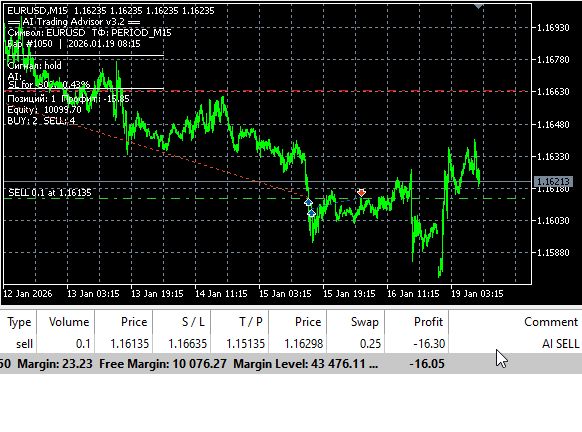
This approach is fundamentally different from proprietary solutions and “signal services.” The trader understands every line of code, can modify any detail of the system's behavior, and does not depend on either the developer or an external service that could shut down or raise its prices.
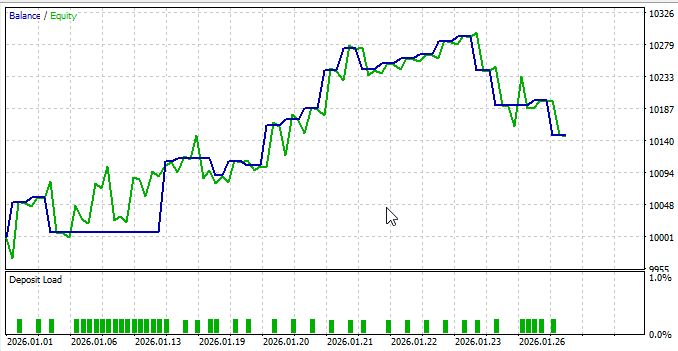
Long backtests have not been run yet, but overall, the results are encouraging:
Transparency of every decision
Each signal contains a comment field — a brief text explanation of why the AI made that particular decision. It is written to the MetaTrader log, displayed as a comment on the chart, and stored in the g_comment[] array. The trader sees not just “buy,” but “MA20 has been broken from below, RSI14=58, the stochastic oscillator is emerging from oversold territory, the price is in the middle of the Bollinger Bands, and momentum is positive across all horizons.” By analyzing comments over several weeks, you can understand which indicator configurations lead the AI to make decisions that later prove profitable. This is the basis for iteratively improving the prompt and selecting the optimal model.
Conclusion: What We Got
A direct connection between MetaTrader 5 and a large language model is not possible — and we did not try to force it. Instead, all the AI logic, all the heavy lifting, and all the secrets were moved to a separate Python server. The Expert Advisor communicates with it over a clean, simple protocol and never sees the model name, the key, or even where exactly the intelligence lives.
Free APIs throttle you with rate limits after just half an hour of normal trading — we chose OpenRouter and a model where you pay strictly for the tokens consumed. And most importantly, BATCH mode has been introduced: a single network request processes eight pairs in parallel, instead of sending eight separate requests and waiting eight times as long.
The key in the Expert Advisor's code is a time bomb that will go off sooner or later. That is why it does not end up there at all. The key exists in one single line on the server, which MT5 has no physical access to.
As a result, after reading this article, you will have a full-fledged, reproducible, production-ready setup: MT5 sends market data via WebSocket (or TCP as a fallback) → a local Python server calculates indicators, builds the prompt, and communicates with the LLM → OpenRouter returns a response → the Expert Advisor receives strict JSON with a signal and a comment. One request analyzes the entire portfolio. Latency of 3–7 seconds. Costs are controlled by a single number: the analysis frequency. OnTick never blocks. The key is completely safe.
Shtenco AI V17 is not just another “smart” Expert Advisor with loud promises of profit. This is infrastructure that, for the first time, makes truly accessible to individual traders what previously required a server farm, a DevOps team, and a corporate budget: actual large language models analyzing the real market in real time across eight or more instruments simultaneously.
All the code is open, transparent, and written so that you can tinker with it hands-on. The same principles work without rewriting on crypto, stocks, and futures. If you want to add a ninth pair, just change one constant. A new model means changing one line. A new indicator in the prompt means adding one function. Nothing breaks.
Now you have everything you need to launch this today. The next step is up to you.
Translated from Russian by MetaQuotes Ltd.
Original article: https://www.mql5.com/ru/articles/21583
Warning: All rights to these materials are reserved by MetaQuotes Ltd. Copying or reprinting of these materials in whole or in part is prohibited.
This article was written by a user of the site and reflects their personal views. MetaQuotes Ltd is not responsible for the accuracy of the information presented, nor for any consequences resulting from the use of the solutions, strategies or recommendations described.

 Neural Networks in Trading: The Adaptive Graph Diffusion Model (Attention Module)
 Building a PDF Creation Library in MQL5 (Part1): Writing a PDF by Hand
 The Dragonfly Algorithm (DA)
 Replay and Market Simulation: The Grand Finale

- Free trading apps
- Over 8,000 signals for copying
- Economic news for exploring financial markets
You agree to website policy and terms of use
A very interesting solution and direction for development. But I have a couple of questions.
Evgeny, whilst running, the expert advisor only opens positions on the chart on which it is running. It does not pull in other symbols from the Market Watch. Also, the article describes functions that I could not find either in the expert advisor’s code or in the script’s code. For example, I didn’t see the InitPairs() function anywhere, nor did I find an implementation of the BATCH function. Furthermore, it’s unclear what response the model is supposed to return if it fails to find a signal to enter the market. In fact, in this case, I get the following error: ERROR: 'NoneType' object has no attribute 'strip'.
My initial impression is that the ‘wrong’ versions of the files have been attached to the article. I would very much like to clarify this issue.
Thank you )
My initial impression is that the ‘wrong’ versions of the files have been attached to the article. I would very much like to clarify this matter.
Thank you )