

Practical Modules from Other Languages in MQL5 (Part 07): The OS Module from Python
 84
84
 0
0

Contents
- Introduction
- os.getcwd()
- pardir()
- os.listdir()
- os.scandir()
- os.remove()
- os.rmdir()
- os.rename()
- os.mkdir()
- os.stat()
- os.path submodule
- os.path.exists()
- os.path.isfile()
- os.path.isdir()
- os.path.join()
- os.path.split()
- Conclusion
Introduction
In a prior article of this series, we introduced file I/O operations similar to those available in Python. In this article, we move to the operating-system level and explore how to perform OS-related operations in MQL5.
The ability to interact with the operating system is one of the things that makes a programming language practical. After all, programming is largely about getting a computer to perform tasks that would otherwise have to be done manually, but doing them faster, more consistently, and more efficiently.
To interact with an operating system effectively, you need to understand some of its basic concepts, particularly how it organizes files, directories, programs, and other resources.
In Python, much of this functionality is exposed through a built-in module called OS, short for Operating System. The OS module provides a portable way to interact with the underlying operating system, including working with files and directories, handling paths, retrieving file information, and accessing other operating-system-level functionality.
According to the Python documentation:
This module provides a portable way of using operating system dependent functionality.
If you just want to read or write a file see open(). To manipulate paths, see the os.path module; To read lines from files on the command line, see the fileinput. For creating temporary files and directories, see the tempfile module, and for high-level file and directory handling see the shutil module.
OS is a powerful module in Python that can help you create, modify, and manage files and paths, as well as processes running in your operating system from a simple interface. For example:
- os.getcwd() — gets the current working directory.
- os.listdir() — lists all items present in a specified directory.
- os.path.exists() — checks the existence of a specified file.
The MQL5 programming language also provides several built-in methods that help in interacting with the operating system, specifically for working with files. Methods like:
- FileIsExist() — checks if a specified file exists, with a flag to specify where you want to check between the common folder of the default files folder.
- FileFindFirst() — searches for files or subdirectories in a directory in accordance with the specified filter.
- FileWrite() — is intended for writing data to a CSV file.
- FileCopy() — copies the original file to another file.
- And others for reading contents of a file such as FileOpen(), FileRead*, etc.
These methods cover trading most-related needs. In this article, we extend MQL5 with additional methods inspired by Python's os module, making file and path operations in MQL5 closer to Python in usage.

Before we proceed, let's address an elephant in the room.
MQL5 provides far less operating-system access than Python. That's understandable, considering that MQL5 was designed primarily for trading and is therefore focused on interacting with the MetaTrader 5 terminal rather than providing unrestricted access to the underlying operating system.
So, don't expect every method available in Python's OS module to have a direct equivalent in MQL5. If you need deeper operating-system functionality, you can take the project further by using DLLs, allowing MQL5 to interact with functionality beyond what is exposed by its native APIs.
For this project, however, we will keep things simple. Rather than trying to replicate Python's OS module in its entirety, we will build a practical helper library on top of the native MQL5 functions available to us.
os.getcwd()
In the OS module, this function returns a string representing the current working directory.
In MQL5, we don't have a function that explicitly returns the current working directory of a program, but we do have a way to obtain the current program's path.
void OnStart()
  {
   Print("Program's path: ",MQLInfoString(MQL_PROGRAM_PATH));
  }
Results:
Program's path: C:\Users\omega\AppData\Roaming\MetaQuotes\Terminal\010E047102812FC0C18890992854220E\MQL5\Scripts\OS module test.ex5
From the returned path, you can easily tell that the current working folder is everything but the program name.
C:\Users\omega\AppData\Roaming\MetaQuotes\Terminal\010E047102812FC0C18890992854220E\MQL5\Scripts\Assuming the script's parent folder is the current working directory. We use the function pardir() to return the parent folder of a path. //+------------------------------------------------------------------+ //| Returns a string representing the current working directory | //+------------------------------------------------------------------+ string COS::getcwd(void) { string file_name = MQLInfoString(MQL_PROGRAM_PATH); return pardir(file_name); }
Example:
#include <PyMQL5\\os.mqh>
COS os;
void OnStart()
  {
   Print("CWD: ", os.getcwd());
  }
Results:
2026.08.10 13:37:48.749 OS module test (XAUUSD,M15) CWD: C:\Users\omega\AppData\Roaming\MetaQuotes\Terminal\010E047102812FC0C18890992854220E\MQL5\Scripts
pardir()
The OS module in Python does not provide a method called pardir(). This is a custom utility function added to the class COS to make it easier to obtain the parent directory from a given path.
The function works by searching the path from right to left until it finds the last backslash (\), which represents the final directory separator in the path. Everything before this separator represents the parent directory, so that portion of the string is returned.
For example, given:
C:\Users\Omega\Projects\MQL5
The function locates the final backslash and returns:
C:\Users\Omega\Projects
//+------------------------------------------------------------------+
//| Extracts the parent folder from a given path.                    |
//|                                                                  |
//| Parameters:                                                      |
//|       path - the original path to extract.                       |
//+------------------------------------------------------------------+
string COS::pardir(string path)
  {
   uchar char_arr[];
   if(StringToCharArray(path, char_arr) < 0)
     {
      printf("%s Failed to convert %s to a char array. Error = %d", __FUNCTION__, path, GetLastError());
      return "";
     }

//---

   uint end_idx = 0;
   for(int i = (int)char_arr.Size() - 1; i >= 0; i--) //A backward loop
     {
      uchar w = char_arr[i];
      if(w == '\\')  //locate the last backslash in the path
        {
         end_idx = i;
         break;
        }
     }

   return CharArrayToString(char_arr, 0, end_idx);  //Convert from the ending point where the final \ was found
  }
Example usage:
void OnStart()
  {
   string scripts_dir = "C:\\Users\\omega\\AppData\\Roaming\\MetaQuotes\\Terminal\\010E047102812FC0C18890992854220E\\MQL5\\Scripts";
   Print("Parent folder: ",os.pardir(scripts_dir));
  }
Results:
2026.08.10 17:08:02.429 OS module test (XAUUSD,M15) Parent folder: C:\Users\omega\AppData\Roaming\MetaQuotes\Terminal\010E047102812FC0C18890992854220E\MQL5
os.listdir()
This function returns a list containing the names of the entries in the directory given by path.
The function name listdir() can be misleading; it doesn't list a directory; it lists everything in a directory (files & folders).
//+------------------------------------------------------------------+
//| Lists the entries contained in a directory.                      |
//|                                                                  |
//| The returned names are relative to the specified directory and   |
//| do not include the full path.                                    |
//|                                                                  |
//| parameters:                                                      |
//|   dirs  -  Output array receiving the entry names.               |
//|   path  -  Directory or wildcard path to search.                 |
//|            Defaults to "*" (parent directory).                   |
//|   folders_only - If true, only directories are returned.         |
//|                    If false, both files and directories are      |
//|                    returned.                                     |
//|   is_common_path  - Whether a folder is located in the common    |
//|                     folder or under Files.                       |
//+------------------------------------------------------------------+
void COS::listdir(string &dirs[],
                  const string path = "*",
                  bool is_common_path = false)
  {
   string file_name;
//--- receive search handle in local folder's root

   int common_flag = is_common_path ? FILE_COMMON : 0;

   long search_handle = FileFindFirst(path, file_name, common_flag);
   int found = 0;

//--- check if FileFindFirst() function executed successfully
   if(search_handle != INVALID_HANDLE)
     {
      //--- check if the passed strings are file or directory names in the loop
      do
        {
         ResetLastError();
         //--- if this is a file, the function will return true, if it is a directory, the function will generate error 5018

         found++;
         ArrayResize(dirs, found);
         dirs[found - 1] = file_name;

         if(MQLInfoInteger(MQL_DEBUG))
            PrintFormat("%d : %s", found, file_name);
        }

      while(FileFindNext(search_handle, file_name));
      //--- close search handle
      FileFindClose(search_handle);
     }
  }
Example usage:
List folders only.
void OnStart()
  {
   string dirs[];
   os.listdir(dirs);

   Print("List dir results:");
   ArrayPrint(dirs);
  }
Results:
KG      0       15:24:51.205    OS module test (XAUUSD,M15)     List dir results:
DO      0       15:24:51.205    OS module test (XAUUSD,M15)     [ 0] "123.bmp"
QN      0       15:24:51.205    OS module test (XAUUSD,M15)     [ 1] "array.txt"
HP      0       15:24:51.205    OS module test (XAUUSD,M15)     [ 2] "five.ico"
LQ      0       15:24:51.205    OS module test (XAUUSD,M15)     [18] "Temp\"
os.scandir()
Unlike listdir(), which returns a list containing the names of all entries in a directory, scandir() returns directory entries as os.DirEntry objects. These objects provide not only the entry name but also additional information and methods for inspecting the entry, such as whether it is a file or directory.
This makes scandir() more efficient than listdir() when you need to inspect the properties of multiple directory entries, because much of the required filesystem metadata can be obtained during the directory scan itself rather than through additional filesystem calls.
To mimic os.DirEntry in MQL5, we first identify which attributes and methods have practical equivalents. Unlike stat result, DirEntry combines path data with helper methods for inspecting an entry.
| Attribute / Method | Description | MQL5 support |
|---|---|---|
| name | The base name of the directory entry, relative to the directory being scanned. | Yes. |
| path | The path to the directory entry, constructed from the scanned directory and the entry name. | Yes. |
| inode() | Returns the inode number identifying the entry on the filesystem. | No. |
| is_dir() | Returns True, if the entry is a directory. | Yes. |
| is_file() | Returns True, if the entry is a regular file. | Yes. |
| is_symlink() | Returns True, if the entry is a symbolic link. | No. |
| is_junction() | Returns True, if the entry is a Windows directory junction. | No. |
| stat() | Returns a stat_result object containing metadata about the entry. | Yes. |
| follow_symlinks | Controls whether symbolic links are followed when checking or retrieving metadata. | No. |
//+------------------------------------------------------------------+
//| Represents an entry contained within a directory.                |
//|                                                                  |
//| A CDirEntry object provides the name and path of a directory     |
//| entry together with methods for determining its type and         |
//| retrieving its file metadata.                                    |
//+------------------------------------------------------------------+
struct CDirEntry
  {
   string            name;
   string            path;
   bool              is_file;
   bool              is_dir;
   stat_result       stat;
  };
The stat_result structure is discussed in os.stat().
MQL5 implementation:
//+------------------------------------------------------------------+
//| Scans a directory and returns information about each entry.      |
//|                                                                  |
//| Unlike listdir(), which returns only the names of directory      |
//| entries, scandir() returns CDirEntry objects containing          |
//| additional information about each entry, including its name,     |
//| path, type, and file metadata.                                   |
//|                                                                  |
//| The search is non-recursive, meaning that only entries directly  |
//| contained within the specified directory are returned.           |
//|                                                                  |
//| parameters:                                                      |
//|   dir_entries     - Output array receiving a CDirEntry object    |
//|                     for each entry found.                        |
//|                                                                  |
//|   path            - Directory or wildcard path to search.        |
//|                     Defaults to "*" (the root of the Files       |
//|                     directory).                                  |
//|                                                                  |
//|   is_common_path  - Whether the directory is located in the      |
//|                     terminal's common Files folder or under the  |
//|                     current terminal's Files folder.             |
//+------------------------------------------------------------------+
void COS::scandir(CDirEntry &dir_entries[], const string path = "*", bool is_common_path = false)
  {
   string file_name;
//--- receive search handle in local folder's root

   int common_flag = is_common_path ? FILE_COMMON : 0;

   long search_handle = FileFindFirst(path, file_name, common_flag);
   int found = 0;

//--- check if FileFindFirst() function executed successfully
   if(search_handle != INVALID_HANDLE)
     {
      //--- check if the passed strings are file or directory names in the loop
      do
        {
         ResetLastError();
         //--- if this is a file, the function will return true, if it is a directory, the function will generate error 5018

         found++;
         ArrayResize(dir_entries, found);

         CDirEntry entry; //An object for each entry
         entry.name = file_name;
         entry.is_dir = CPath::isdir(file_name, is_common_path);
         entry.is_file = CPath::isfile(file_name, is_common_path);

         string parent_dir = is_common_path ? TerminalInfoString(TERMINAL_COMMONDATA_PATH) : TerminalInfoString(TERMINAL_DATA_PATH) + "\\MQL5";
         string seprate_paths[] =
           {
            parent_dir,
            "Files",
            path == "*" ? "" : path,
            file_name
           };

         entry.path = CPath::join(seprate_paths);
         entry.stat = stat(file_name, is_common_path);

         dir_entries[found - 1] = entry; //Assign the object

         if(MQLInfoInteger(MQL_DEBUG))
            PrintFormat("[%d] : name=%s : isdir=%s : isfile=%s : path=%s",
                        found,
                        file_name,
                        entry.is_dir ? "true" : "false",
                        entry.is_file ? "true" : "false",
                        entry.path
                       );
        }

      while(FileFindNext(search_handle, file_name));
      //--- close search handle
      FileFindClose(search_handle);
     }
  }
Example usage:
void OnStart()
  {
   CDirEntry res[];
   os.scandir(res);
  }
Results after running the script in debug mode:
[1] : name=array.txt : isdir=false : isfile=true : path=C:\Users\omega\AppData\Roaming\MetaQuotes\Terminal\010E047102812FC0C18890992854220E\MQL5\Files\array.txt
[3] : name=five.ico : isdir=false : isfile=true : path=C:\Users\omega\AppData\Roaming\MetaQuotes\Terminal\010E047102812FC0C18890992854220E\MQL5\Files\five.ico
[4] : name=Huh\ : isdir=true : isfile=false : path=C:\Users\omega\AppData\Roaming\MetaQuotes\Terminal\010E047102812FC0C18890992854220E\MQL5\Files\Huh\
[5] : name=XAUUSD.PERIOD_H1.csv : isdir=false : isfile=true : path=C:\Users\omega\AppData\Roaming\MetaQuotes\Terminal\010E047102812FC0C18890992854220E\MQL5\Files\XAUUSD.PERIOD_H1.csv
os.remove()
This method removes (deletes) the file at the given path.
The MQL5 built-in function FileDelete() becomes the foundation of the method remove() below.
//+------------------------------------------------------------------+
//| Deletes a file from the MQL5 file sandbox.                       |
//|                                                                  |
//| The file must be located within the terminal's Files folder or   |
//| within the common Files folder when is_common_path is set to     |
//| true.                                                            |
//|                                                                  |
//| parameters:                                                      |
//|   path  -  Name or path of the file to be deleted.               |
//|                                                                  |
//|   is_common_path  - Whether the file is located in the common    |
//|                     folder or under the terminal's Files folder. |
//+------------------------------------------------------------------+
bool COS::remove(const string path, bool is_common_path = false)
  {
   return FileDelete(path, is_common_path ? FILE_COMMON : 0);
  }
Example usage:
void OnStart()
  {
   string f_name = "delete me.txt";
   printf("line %d, exists = %s", __LINE__, os.path.exists(f_name) ? "true" : "false");

   os.remove(f_name);

   printf("line %d, exists = %s", __LINE__, os.path.exists(f_name) ? "true" : "false");
 }
Results:
IM      0       18:04:48.203    OS module test (XAUUSD,M15)     line 37, exists = true
KH      0       18:04:48.203    OS module test (XAUUSD,M15)     line 41, exists = false
os.rmdir()
This removes (deletes) the directory path. Below is its equivalent method in MQL5.
//+------------------------------------------------------------------+
//| Deletes a directory from the MQL5 file sandbox.                  |
//|                                                                  |
//| The directory must be located within the terminal's Files folder |
//| or within the common Files folder when is_common_path is set to  |
//| true. The directory must be empty before it can be deleted.      |
//|                                                                  |
//| parameters:                                                      |
//|   path  -  Name or path of the directory to be deleted.          |
//|                                                                  |
//|   is_common_path  - Whether the directory is located in the      |
//|                     common folder or under the terminal's Files  |
//|                     folder.                                      |
//+------------------------------------------------------------------+
bool COS::rmdir(const string path, bool is_common_path = false)
  {
   return FolderDelete(path, is_common_path ? FILE_COMMON : 0);
  }
Example usage:
void OnStart()
  {
   string f_name = "Temp";
   printf("line %d, folder exists = %s", __LINE__, os.path.exists(f_name) ? "true" : "false");

   os.rmdir(f_name);

   printf("line %d, folder exists = %s", __LINE__, os.path.exists(f_name) ? "true" : "false");
 }
Results:
CQ      0       18:19:11.362    OS module test (XAUUSD,M15)     line 46, folder exists = true
MQ      0       18:19:11.362    OS module test (XAUUSD,M15)     line 50, folder exists = false
os.rename()
According to the docs, this method renames the file or directory src to dst. On windows, if If dst exists, the operation will fail; on Unix, it may replace dst.
If you have ever used a Unix-based operating system from the command line, you may have noticed that renaming a file is essentially the same operation as moving it to a new name or location.
With this in mind, adding file-renaming functionality to MQL5 is straightforward because MQL5 already provides the FileMove() function. We can use it to move a file to a new path, or simply give it a different name while keeping it in the same directory.
//+------------------------------------------------------------------+
//| Renames or moves a file from one location to another.            |
//|                                                                  |
//| parameters:                                                      |
//|   old  - The current name or path of the file to be renamed.     |
//|   new_name  - The new name or path of the file. If a different   |
//|               directory is specified, the file will be moved     |
//|               to that directory.                                 |
//|   is_common_path  - Whether the files are located in the common  |
//|                     folder or under the terminal's Files folder. |
//|                                                                  |
//| returns:                                                         |
//|   true  - If the file was successfully renamed or moved.         |
//|   false - If the operation failed.                               |
//+------------------------------------------------------------------+
bool COS::rename(const string old,
                 const string new_name,
                 bool is_common_path = false)
  {
   uint flags = is_common_path ? FILE_COMMON : 0;
   return FileMove(old, flags, new_name,flags);
  }
Example usage:
I have a file array.txt which has several values.
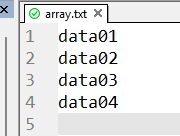
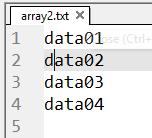
Renaming it to array2.txt.
void OnStart()
  {
   string old_name = "array.txt", new_name = "array2.txt";
   if (!os.rename(old_name, new_name))
      printf("Failed to rename a file from %s -> %s", old_name, new_name);
  }
Contents of the file remained the same; only the filename was altered.
os.mkdir()
Create a directory named path with numeric mode mode. If the directory already exists, FileExistsError is raised. If a parent directory in the path does not exist, FileNotFoundError is raised.
We implement this method using FolderCreate().
//+------------------------------------------------------------------+
//| Creates a new directory in the MQL5 file sandbox.                |
//|                                                                  |
//| The directory is created under the terminal's Files folder by    |
//| default. When is_common_path is set to true, the directory is    |
//| created under the common Files folder shared between terminals.  |
//|                                                                  |
//| parameters:                                                      |
//|   folder_name  - The name or path of the directory to create.    |
//|                                                                  |
//|   is_common_path  - Whether the directory is located in the      |
//|                     common folder or under the terminal's Files  |
//|                     folder.                                      |
//|                                                                  |
//| returns:                                                         |
//|   true  - If the directory was successfully created.             |
//|   false - If the directory could not be created.                 |
//+------------------------------------------------------------------+
bool COS::mkdir(const string folder_name, bool is_common_path = false)
  {
   return FolderCreate(folder_name, is_common_path ? FILE_COMMON : 0);
  }
If it all goes well, the below function call creates a new folder called Test Folder in the terminal data path.
   if(!os.mkdir("Test Folder"))
      printf("Failed to make a folder. Error = %d", GetLastError());
os.stat()
Gets the status of a file or a file descriptor. The method returns a stat_result object.
To mimic this object, we have to understand what the stat_result object holds and what's applicable in MQL5.
| Attribute | Description | MQL5 support. |
|---|---|---|
| st_mode | File type and mode. | Custom. |
| st_ino | Platform-dependent, but if non-zero, uniquely identifies the file for a given value of st_dev. Typically, the inode number on Unix, and the file index on Windows. | No. |
| st_dev | Identifier of the device on which the file resides. | No. |
| st_nlink | Number of hard links | No. |
| st_uid | User identifier of the file owner. | No. |
| st_gid | Group identifier of the file owner. | No. |
| st_size | Size of the file in bytes. | Yes. |
| st_atime | Time of the most recent access expressed in seconds. | Yes. |
| st_mtime | Time of the most recent modification expressed in seconds. | Yes. |
| st_atime_ns | Time of most recent access expressed in nanoseconds as an integer. | Derived. |
| st_mtime_ns | Time of most recent content modification expressed in nanoseconds as an integer. | Derived. |
| st_birthtime | Time of file creation expressed in seconds. | Yes. |
| st_birthtime_ns | Time of file creation expressed in nanoseconds as an integer. | Derived. |
Below is a structure of what is achievable in MQL5.
struct stat_result
  {
   ulong             st_mode;          // File type and mode.
   long              st_size;          // File size in bytes.

   long              st_atime;         // Last access time.
   long              st_mtime;         // Last modification time.

   long              st_atime_ns;      // Last access time in nanoseconds.
   long              st_mtime_ns;      // Last modification time in nanoseconds.

   long              st_birthtime;     // File creation time.
   long              st_birthtime_ns;  // File creation time in nanoseconds.
  };
The method.
//+------------------------------------------------------------------+
//| Returns information about a file or directory.                   |
//|                                                                  |
//| parameters:                                                      |
//|   path  - The name or path of the file or directory.             |
//|                                                                  |
//|   is_common_path  - Whether the path is located in the common    |
//|                     folder or under the terminal's Files folder. |
//|                                                                  |
//| returns:                                                         |
//|   A stat_result structure containing information about the path. |
//|   If the path cannot be accessed, the returned fields are zero.  |
//+------------------------------------------------------------------+
stat_result COS::stat(const string path, bool is_common_path = false)
  {
   stat_result result = {};

   uint flags = is_common_path ? FILE_COMMON : 0;
   ResetLastError();

//---

   int handle = FileOpen(path, FILE_READ | FILE_BIN, 0, flags);
   if(handle == INVALID_HANDLE)
     {
      if(CPath::isdir(path, is_common_path))
        {
         result.st_mode = S_IFDIR;
         return result;
        }

      return result;
     }

//---

   result.st_mode = S_IFREG;

   result.st_size = (long)FileGetInteger(handle, FILE_SIZE);
   result.st_atime = (long)FileGetInteger(handle, FILE_ACCESS_DATE);
   result.st_mtime = (long)FileGetInteger(handle, FILE_MODIFY_DATE);
   result.st_birthtime = (long)FileGetInteger(handle, FILE_CREATE_DATE);

   FileClose(handle);

//--- MQL5 only provides second-resolution timestamps.

   result.st_atime_ns = result.st_atime * 1000000000;
   result.st_mtime_ns = result.st_mtime * 1000000000;
   result.st_birthtime_ns = result.st_birthtime * 1000000000;

   return result;
  }
Below is how you can read some properties representing the status of a file.
void OnStart()
  {
   string file = "array2.txt";

   stat_result statinfo = os.stat(file);
   printf("file: %s\ncreated: %s\nlast modified: %s\nlast accessed: %s\nsize: %d bytes",
          file,
          (string)datetime(statinfo.st_birthtime),
          (string)datetime(statinfo.st_mtime),
          (string)datetime(statinfo.st_atime),
          statinfo.st_size
         );
  }
Results.
FM      0       15:10:22.330    OS module test (XAUUSD,M15)     file: array2.txt
PH      0       15:10:22.330    OS module test (XAUUSD,M15)     created: 2026.02.12 10:52:04
QN      0       15:10:22.330    OS module test (XAUUSD,M15)     last modified: 2026.02.12 10:52:04
DH      0       15:10:22.330    OS module test (XAUUSD,M15)     last accessed: 2026.08.11 11:32:27
HO      0       15:10:22.330    OS module test (XAUUSD,M15)     size: 32 bytes
os.path Submodule
The OS (Operating System) module comes with a submodule called path (common pathname manipulations).
This module implements some useful functions on pathnames. To read or write files, see open(), and for accessing the filesystem see the OS module. The path parameters can be passed as strings, or bytes, or any object implementing the os.PathLike protocol.
Below are some of the useful methods from this submodule, introduced to the MQL5 programming language.
os.path.exists()
This function checks if a path pointing to a file or folder exists. It returns True if it does, and False if it doesn't.
According to the docs:
Return True if path refers to an existing path or an open file descriptor. Returns False for broken symbolic links. On some platforms, this function may return False if permission is not granted to execute os.stat() on the requested file, even if the path physically exists.In the separate class CPath, we have:
//+------------------------------------------------------------------+
//| Checks whether a file or directory exists at the specified path. |
//|                                                                  |
//| The function first checks whether the path refers to an existing |
//| file. If the path is not a file, it then checks the MQL5 error   |
//| code to determine whether the path refers to an existing         |
//| directory.                                                       |
//|                                                                  |
//| parameters:                                                      |
//|   path  - The file or directory path to check.                   |
//|                                                                  |
//|   is_common_path  - Whether the path is located in the common    |
//|                     folder or under the terminal's Files folder. |
//|                                                                  |
//| returns:                                                         |
//|   true  - If the specified file or directory exists.             |
//|   false - If the path does not exist.                            |
//+------------------------------------------------------------------+
bool CPath::exists(const string path, bool is_common_path = false)
  {
   if(FileIsExist(path, is_common_path ? FILE_COMMON : 0))
      return true;

   ResetLastError();
   bool file_exists = FileIsExist(path, is_common_path ? FILE_COMMON : 0); //Check if the file exists, just to read the error code afterwards

   return (GetLastError() == 5018) || file_exists;
  }
In the end, we check whether the function FileIsExist() has returned a true value (a file exists) or an error code 5018 (exists, but it is a folder).
return (GetLastError() == 5018) || file_exists;
This allows us to detect if a given path exists regardless (whether it is a file or folder).
The class is then referenced within the class COS, allowing users to get a familiar interface, similar to Python's os module.
class COS
  {
public:
                     COS(void) {};
                    ~COS(void) {};

   CPath             path;
  }
Example usage:
void OnStart()
  {
   string folder = "Temp";
   printf("%s exists: %s", folder, os.path.exists(folder)?"true":"false");
  }
Results:
2026.08.11 13:26:04.844 OS module test (XAUUSD,M15) Temp exists: true
os.path.isdir()
This method checks whether a specified path is a folder or not. It returns True if this entry is a directory or a symbolic link pointing to a directory; it returns False if the entry is or points to any other kind of file, or if it doesn’t exist anymore.
This method has been used in the previous example inside the function listdir(); below is how it is programmed.
//+------------------------------------------------------------------+
//|  Checks if a given file is a directory.                          |
//|                                                                  |
//|   parameters:                                                    |
//|      path  -  Directory or wildcard path to search.              |
//|      is_common_path  - Whether a folder is located in the common |
//|                     folder or under Files.                       |
//|                                                                  |
//+------------------------------------------------------------------+
bool CPath::isdir(const string path, bool is_common_path = false)
  {
   ResetLastError();
   FileIsExist(path, is_common_path ? FILE_COMMON : 0); //Check if the file exists, just to read the error code afterwards

   return GetLastError() == 5018;
  }
Error code 5018 represents ERR_FILE_IS_DIRECTORY, which means a received path in the function FileIsExist() is not a file; it is a folder. When this specific error code is produced, it indicates the path leads to a folder and the true value is returned.
os.path.isfile()
In OS, the function returns True if a given entry is a file or a symbolic link pointing to a file; returns False if the entry is or points to a directory or other non-file entry, or if it doesn’t exist anymore.
We can reuse isdir(), to detect if a given file is the opposite of a folder.
//+------------------------------------------------------------------+
//| Does the opposite of isdir(), checks if a given path is a file   |
//|                                                                  |
//|   parameters:                                                    |
//|      path  -  Directory or wildcard path to search.              |
//|      is_common_path  - Whether a folder is located in the common |
//|                     folder or under Files.                       |
//|                                                                  |
//+------------------------------------------------------------------+
bool CPath::isfile(const string path, bool is_common_path = false)
  {
   return !isdir(path, is_common_path ? FILE_COMMON : 0);
  }
Example usage:
void OnStart()
  {
   Print("is dir: ", os.path.isdir("Temp"));
   Print("is file: ", os.path.isfile("five.ico"));
  }
Results:
OO      0       16:51:38.107    OS module test (XAUUSD,M15)     is dir: true
PI      0       16:51:38.107    OS module test (XAUUSD,M15)     is file: true
os.path.join()
Join one or more path segments intelligently.
The return value is the concatenation of the path and all members of paths, with exactly one directory separator following each non-empty part, except the last. That is, the result will only end in a separator if the last part is either empty or ends in a separator.
In Python, this method takes an infinite number of arguments (paths), something that isn't feasible in the MQL5 programming language. We'll use an array instead.
//+------------------------------------------------------------------+
//| Joins one or more path components into a single path.            |
//|                                                                  |
//| Path components are separated using the MQL5 path separator.     |
//| Existing separators at the boundary of two components are        |
//| handled automatically to prevent duplicate separators.           |
//|                                                                  |
//| parameters:                                                      |
//|   paths  - path components to append.                            |
//|                                                                  |
//| returns:                                                         |
//|   A string containing the combined path.                         |
//+------------------------------------------------------------------+
string CPath::join(const string &paths[])
  {
   string result = "";
   for(uint i = 0; i < paths.Size(); i++)
     {
      if(result != "" && StringGetCharacter(result, StringLen(result) - 1) != '\\')
         result += "\\";

      string part = paths[i];
      while(StringLen(part) > 0 && (StringGetCharacter(part, 0) == '\\' || StringGetCharacter(part, 0) == '/'))
        {
         part = StringSubstr(part, 1);
        }

      result += part;
     }

   return result;
  }
Example:
void OnStart()
  {
   string paths[] = {"Huh", "no folder"};
   Print("Combined path: ",os.path.join(paths));
  }
Results.
2026.08.11 15:10:22.330 OS module test (XAUUSD,M15) Combined path: Huh\no folder
os.path.split()
This method splits the pathname path into a pair (head, tail), where tail is the last pathname component, and head is everything leading up to that. The tail part will never contain a slash; If the path ends in a slash, tail will be empty. If there is no slash in path, head will be empty. If path is empty, both head and tail will be empty.
Trailing slashes are stripped from head unless it is the root (one or more slashes only). In all cases, join(head, tail) returns a path to the same location as path (but the strings may differ).
Simply put, this method is the opposite of os.path.join().
//+------------------------------------------------------------------+
//| Splits a path into its directory and final component.            |
//|                                                                  |
//| The returned array contains two elements. The first element is   |
//| the directory portion of the path and the second element is the  |
//| final file or directory name.                                    |
//|                                                                  |
//| parameters:                                                      |
//|   path       - The path to split.                                |
//|                                                                  |
//| returns:                                                         |
//|   The result is stored in head & tail arguments                  |
//+------------------------------------------------------------------+
void CPath::split(const string path, string &head, string &tail)
  {
   if(path == "")
      return;

   int last_separator = -1;

//--- Find the final path separator.
   for(int i = StringLen(path) - 1; i >= 0; i--)
     {
      ushort character = StringGetCharacter(path, i);

      if(character == '\\' || character == '/')
        {
         last_separator = i;
         break;
        }
     }

//--- No separator means the entire path is the final component.
   if(last_separator == -1)
     {
      tail = path;
      return;
     }

//--- Extract directory portion.
   head = StringSubstr(path, 0, last_separator);

//--- Get the final component
   tail = StringSubstr(path, last_separator + 1);

// Remove trailing separators from the directory portion.
   while(StringLen(head) > 0)
     {
      int last = StringLen(head) - 1;
      ushort character = StringGetCharacter(head, last);

      if(character != '\\' && character != '/')
         break;

      head = StringSubstr(head, 0, last);
     }
  }
Final Thoughts
“So if you want to go fast, if you want to get done quickly, if you want your code to be easy to write, make it easy to read.”
― Robert C. Martin, Clean Code: A Handbook of Agile Software Craftsmanship
Sometimes, all it takes is a well-designed wrapper around functionality that already exists in a programming language to make an API significantly easier to understand and use. The path and operating-system utilities introduced in this module are a good example of that idea.
Rather than having to work directly with the lower-level MQL5 file and folder functions, these wrappers provide a more consistent and familiar interface for working with paths, files, and directories. Methods such as listdir(), mkdir(), remove(), rename(), and the os.path utilities make common filesystem operations easier to read, understand, and reuse.
The introduction of new methods out of the box, inspired by Python, gives us more functions we can use to work with files efficiently in the MetaTrader 5 terminal.
Attachments Table
| Filename | Description & Usage |
|---|---|
| MQL5\Experts\PyMQL5\OS module test.mq5 | A playground script for testing and debugging methods discussed in this article. |
| MQL5\Include\PyMQL5\os.mqh | It contains COS, stat_results, and CPath modules and their individual methods discussed in this post. |
Warning: All rights to these materials are reserved by MetaQuotes Ltd. Copying or reprinting of these materials in whole or in part is prohibited.
This article was written by a user of the site and reflects their personal views. MetaQuotes Ltd is not responsible for the accuracy of the information presented, nor for any consequences resulting from the use of the solutions, strategies or recommendations described.

 Building AI-Powered Trading Systems in MQL5 (Part 11): Optimizing the UI with Frame Throttling and Partial Rendering
 From Delta-Space Quotes to the FX Volatility Smile: Garman-Kohlhagen and the Convention Problem
 Building a Dynamic and Customizable Table in MQL5
 Uncertainty as a Model (Part 1): Random Variables — The Language of Uncertainty

- Free trading apps
- Over 8,000 signals for copying
- Economic news for exploring financial markets
You agree to website policy and terms of use