

Building AI-Powered Trading Systems in MQL5 (Part 11): Optimizing the UI with Frame Throttling and Partial Rendering
 944
944
 0
0

Introduction
A canvas interface can look finished and still feel sluggish. Ours reached that point. Every hover, scroll tick, and popup forced a full repaint of the dashboard. Each repaint also re-measured text through the operating system from scratch. At rest, the waste is invisible. But if you drag the window or scroll a long chat, redraws accumulate faster than they clear. The interface then stutters when it should feel fluid. The panel was doing an enormous amount of correct work to produce a picture that barely changed from one frame to the next. This article is for MetaQuotes Language 5 (MQL5) developers who build canvas interfaces. It targets those who want their panels to stay responsive under rapid interaction instead of choking on their own redraws.
In our previous article (Part 10), the interface repainted the whole panel on every event and measured every string each time it drew. In this article, we speed it up without changing its appearance. We add a direct-buffer canvas for bulk region copies. We cache text widths and rendered glyphs. We cap repainting at roughly sixty frames per second so event bursts collapse into one frame. We also repaint only the pane or region that changed. We will cover the following topics:
- Understanding Frame Throttling and Partial Rendering
- The Direct-Buffer Canvas and Cached Text
- Frame Throttling and the Repaint Cap
- Partial and Region-Based Rendering
- Visualization
- Conclusion
By the end of this article, you will be able to:
- Throttle a canvas interface to a fixed frame rate so bursts of hover, scroll, and drag events collapse into one repaint per window.
- Repaint only the pane or region an event touches, using a direct-buffer canvas and a frozen backdrop to restore the area under popups instead of rebuilding the panel.
- Cache text widths and rendered glyph coverage so repeated labels are measured and rasterized once rather than on every frame.
Understanding Frame Throttling and Partial Rendering
The root problem is that drawing is expensive and events are cheap. Moving the mouse across the panel can fire dozens of hover events a second, and a scroll wheel or a window drag fires even more. If each one triggers a full repaint of the dashboard, the program spends all its time redrawing, and because a repaint rebuilds the whole picture, most of that work reproduces pixels that did not change. The two techniques in this part attack that waste from two directions: doing fewer repaints, and making each repaint smaller.
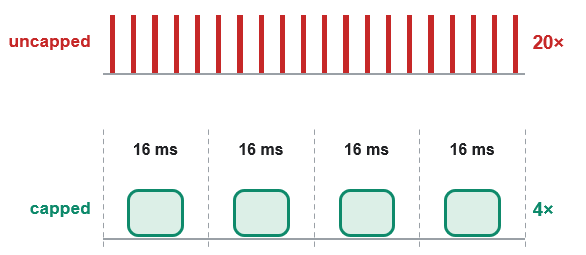
Frame throttling handles the first. Instead of painting on every event, we set a minimum spacing between frames, about sixteen milliseconds, which is roughly sixty frames a second and faster than the eye needs. When an event arrives inside that window, we do not paint it immediately; we mark that a frame is pending and let a short timer flush it once the interval elapses. A burst of forty mouse-move events no longer produces forty repaints; it produces one. Once the burst ends, the timer returns to an idle cadence, so the panel costs nothing while it sits still. The illustration below shows this on a timeline, with a dense burst of events reduced to a single painted frame per window.
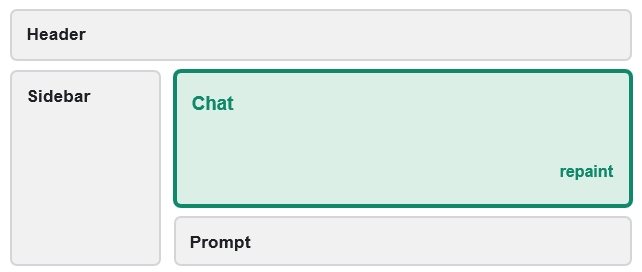
Partial rendering handles the second direction. Rather than rebuilding the entire panel, we repaint only the part that changed: a scroll touches just the chat pane, a hover touches just one region such as the footer, and a popup floats over a frozen snapshot of the panel so the interface beneath it is copied back rather than redrawn. The illustration below maps the dashboard into its regions, with only the pane a scroll actually changes marked for repaint while the rest are left untouched. Both techniques rely on a faster canvas with direct pixel-buffer access for block region copies. They also rely on two caches that store text measurements and rendered glyphs, so the most expensive drawing work is done once and reused. See an illustration of what we mean here.
In practice, the guiding question is always "what actually changed?" Before repainting, identify the smallest surface that the event affects and redraw only that, and before doing any work at all, ask whether enough time has passed to justify a new frame. Measure text once and keep it, since a string's width in a given font never changes. Keep a clean copy of the panel so anything that floats on top can be erased by copying the copy back rather than rebuilding the whole scene. Above all, separate correctness from frequency: every deferred frame must still paint eventually, so a throttle always pairs with a flush that guarantees the final state is drawn once the burst ends.
The Direct-Buffer Canvas and Cached Text
Everything in this part rests on two ideas: a canvas that can move pixels in bulk, and caches that stop us from recomputing text. We start with the canvas. We define the "CAiCanvasFast" class, a subclass of the standard "CCanvas" that adds direct access to the underlying pixel buffer. We define this logic in the primitives file.
//+------------------------------------------------------------------+
//| Fast canvas subclass exposing direct pixel buffer access         |
//+------------------------------------------------------------------+
class CAiCanvasFast : public CCanvas
  {
public:
   //+---------------------------------------------------------------+
   //| Read pixel directly from buffer                               |
   //+---------------------------------------------------------------+
   uint GetPixelDirect(int x, int y) const
     {
      //--- Direct row-major buffer read
      return m_pixels[y * Width() + x];
     }

   //+---------------------------------------------------------------+
   //| Write pixel directly to buffer                                |
   //+---------------------------------------------------------------+
   void SetPixelDirect(int x, int y, uint v)
     {
      //--- Direct row-major buffer write
      m_pixels[y * Width() + x] = v;
     }

   //+---------------------------------------------------------------+
   //| Copy rectangular region from source canvas to this canvas     |
   //+---------------------------------------------------------------+
   void CopyRectFromCanvas(CCanvas &src, int l, int t, int r, int b)
     {
      //--- Get source and destination dimensions
      const int sw = src.Width();
      const int sh = src.Height();
      const int dw = Width();
      const int dh = Height();

      //--- Clamp rectangle bounds to both canvases
      const int cl = MathMax(0, l);
      const int ct = MathMax(0, t);
      const int cr = MathMin(MathMin(r, sw), dw);
      const int cb = MathMin(MathMin(b, sh), dh);

      //--- Copy row by row
      for(int yy = ct; yy < cb; yy++)
        {
         const int rowBase = yy * dw;
         for(int xx = cl; xx < cr; xx++)
            m_pixels[rowBase + xx] = src.PixelGet(xx, yy);
        }
     }

   //+---------------------------------------------------------------+
   //| Copy rectangular region from this canvas to destination       |
   //+---------------------------------------------------------------+
   void CopyRectToCanvas(CCanvas &dst, int l, int t, int r, int b)
     {
      //--- Get destination and source dimensions
      const int dwOther = dst.Width();
      const int dhOther = dst.Height();
      const int sw = Width();
      const int sh = Height();

      //--- Clamp rectangle bounds
      const int cl = MathMax(0, l);
      const int ct = MathMax(0, t);
      const int cr = MathMin(MathMin(r, sw), dwOther);
      const int cb = MathMin(MathMin(b, sh), dhOther);

      //--- Copy row by row
      for(int yy = ct; yy < cb; yy++)
        {
         const int rowBase = yy * sw;
         for(int xx = cl; xx < cr; xx++)
            dst.PixelSet(xx, yy, m_pixels[rowBase + xx]);
        }
     }

   //+---------------------------------------------------------------+
   //| Fast row-block copy between two fast canvases                 |
   //+---------------------------------------------------------------+
   void CopyRectFromCanvas(CAiCanvasFast &src, int l, int t, int r, int b)
     {
      //--- Get source and destination dimensions
      const int sw = src.Width();
      const int sh = src.Height();
      const int dw = Width();
      const int dh = Height();

      //--- Clamp rectangle bounds to both canvases
      const int cl = MathMax(0, l);
      const int ct = MathMax(0, t);
      const int cr = MathMin(MathMin(r, sw), dw);
      const int cb = MathMin(MathMin(b, sh), dh);
      const int cnt = cr - cl;
      if(cnt <= 0) return;

      //--- Copy each row as one contiguous block
      for(int yy = ct; yy < cb; yy++)
         ArrayCopy(m_pixels, src.m_pixels, yy * dw + cl, yy * sw + cl, cnt);
     }

   //+---------------------------------------------------------------+
   //| Fast overload - block row copy out to another fast canvas     |
   //+---------------------------------------------------------------+
   void CopyRectToCanvas(CAiCanvasFast &dst, int l, int t, int r, int b)
     {
      //--- Get destination and source dimensions
      const int dwOther = dst.Width();
      const int dhOther = dst.Height();
      const int sw = Width();
      const int sh = Height();

      //--- Clamp rectangle bounds
      const int cl = MathMax(0, l);
      const int ct = MathMax(0, t);
      const int cr = MathMin(MathMin(r, sw), dwOther);
      const int cb = MathMin(MathMin(b, sh), dhOther);
      const int cnt = cr - cl;
      if(cnt <= 0) return;

      //--- Copy each row as one contiguous block
      for(int yy = ct; yy < cb; yy++)
         ArrayCopy(dst.m_pixels, m_pixels, yy * dwOther + cl, yy * sw + cl, cnt);
     }

   //+---------------------------------------------------------------+
   //| Fill rectangle with solid color directly in buffer            |
   //+---------------------------------------------------------------+
   void FillRectFast(int l, int t, int r, int b, uint argb)
     {
      //--- Clamp rectangle to canvas bounds
      const int w = Width();
      const int h = Height();
      const int cl = MathMax(0, l);
      const int ct = MathMax(0, t);
      const int cr = MathMin(r, w);
      const int cb = MathMin(b, h);

      //--- Fill row by row
      for(int yy = ct; yy < cb; yy++)
        {
         const int rowBase = yy * w;
         for(int xx = cl; xx < cr; xx++)
            m_pixels[rowBase + xx] = argb;
        }
     }
  };
We define the "CAiCanvasFast" class to reach straight into the "m_pixels" buffer instead of going through the slower per-pixel methods the base class offers. The "GetPixelDirect" and "SetPixelDirect" methods read and write a single pixel by its row-major index, and "FillRectFast" floods a rectangle with one color the same way. The methods that matter most for this part are the region copies: "CopyRectFromCanvas" and "CopyRectToCanvas" move a rectangle between two canvases, and when both canvases are of this fast type, the overloads copy each row in a single ArrayCopy block rather than pixel by pixel. That block copy is what makes restoring a saved region cheap enough to run on every scroll and every popup, which is the foundation the partial repaints later stand on. We will now cache font state and hash cache keys.
Cached Font State and a Shared Hash
Before the caches themselves, we add two small helpers they all lean on: one that avoids redundant font changes, and one that turns a string into a lookup key.
//+------------------------------------------------------------------+
//| Cache global font state to skip redundant TextSetFont calls      |
//+------------------------------------------------------------------+
string g_ai_fsName = "";     // Last font name passed to TextSetFont
int    g_ai_fsSize = -12345; // Last font size passed to TextSetFont

//+------------------------------------------------------------------+
//| Set global text font only when it differs from the cached state  |
//+------------------------------------------------------------------+
void AiFontSet(const string fontName, const int fontSize)
  {
//--- Skip the OS call when the font state is unchanged
   if(fontSize == g_ai_fsSize && fontName == g_ai_fsName) return;

//--- Apply and remember the new font state
   TextSetFont(fontName, -(fontSize * 10));
   g_ai_fsName = fontName;
   g_ai_fsSize = fontSize;
  }

//+------------------------------------------------------------------+
//| FNV-1a hash over a string - shared by the metric/glyph caches    |
//+------------------------------------------------------------------+
uint AiStrHash(const string k)
  {
//--- Walk characters and fold into FNV-1a accumulator
   uint h = 2166136261;
   const int n = StringLen(k);
   for(int i = 0; i < n; i++)
     {
      h ^= (uint)StringGetCharacter(k, i);
      h *= 16777619;
     }
   return h;
  }
Here, we define the "AiFontSet" function to set the drawing font only when it actually differs from the last font we set, remembering the current name and size in a pair of globals and returning early when nothing changed. Telling the operating system to switch fonts is slow, and the old code did it before every measurement, so skipping the call when the state is unchanged removes a large amount of repeated work within a single frame. Alongside it, we define the "AiStrHash" function, a Fowler–Noll–Vo (FNV-1a) hash that folds a string into a single number. This is the shared key builder for both caches that follow, since looking something up by a hashed key is far faster than comparing full strings across a table.
The Text-Width Cache
We add a memo table that remembers the pixel width of any text we have already measured, and we make the width function check it before measuring again.
//+------------------------------------------------------------------+
//| Text width memo cache with open-addressed eviction               |
//+------------------------------------------------------------------+
#define AI_TWCACHE_SLOTS 4096          // Power of two
#define AI_TWCACHE_MASK  (AI_TWCACHE_SLOTS - 1)
#define AI_TWCACHE_PROBE 4             // Linear probe depth
string g_ai_twKey[AI_TWCACHE_SLOTS];   // Composite keys (txt|font|size)
int    g_ai_twVal[AI_TWCACHE_SLOTS];   // Cached pixel widths

//+------------------------------------------------------------------+
//| Measure text width in pixels, memoized by text, font and size    |
//+------------------------------------------------------------------+
int AiTextWidth(const string txt, const string fontName, int fontSize)
  {
//--- Bail on empty text
   if(StringLen(txt) == 0) return 0;

//--- Probe the width memo table
   const string wKey = txt + "\x1F" + fontName + "\x1F" + IntegerToString(fontSize);
   const uint wh = AiStrHash(wKey);
   int freeSlot = -1;
   for(int pr = 0; pr < AI_TWCACHE_PROBE; pr++)
     {
      const int cand = (int)((wh + (uint)pr) & AI_TWCACHE_MASK);
      if(StringLen(g_ai_twKey[cand]) == 0)
        {
         if(freeSlot < 0) freeSlot = cand;
         continue;
        }
      if(g_ai_twKey[cand] == wKey) return g_ai_twVal[cand];
     }

//--- Miss - set font (cached) and measure
   AiFontSet(fontName, fontSize);
   uint tw = 0, th = 0;
   TextGetSize(txt, tw, th);

//--- Store into a free probe slot, or evict at the home slot
   const int put = (freeSlot >= 0) ? freeSlot : (int)(wh & AI_TWCACHE_MASK);
   g_ai_twKey[put] = wKey;
   g_ai_twVal[put] = (int)tw;
   return (int)tw;
  }
We build a table of four thousand slots keyed by a "text, font, size" string, and in the "AiTextWidth" function we hash that key and probe a few slots for a match before doing any measuring. On a hit, we return the stored width immediately; only on a miss do we set the font and measure once, then store the result in a free slot. Since a string's width in a given font never changes, this turns a repeated operating-system measurement into a single lookup for every label the interface draws more than once. With the text cache in place, we will define the logic to cache the glyphs the same way.
The Glyph Cache
We add a second, larger cache that stores the finished anti-aliased pixel coverage of a whole text run, not just its width, capped by a memory budget.
//+------------------------------------------------------------------+
//| Glyph-run coverage cache keyed by text, font and size            |
//+------------------------------------------------------------------+
#define AI_GLYPH_SLOTS 1024                     // Power of two
#define AI_GLYPH_MASK  (AI_GLYPH_SLOTS - 1)
#define AI_GLYPH_PROBE 8                        // Linear probe depth
#define AI_GLYPH_BYTE_BUDGET 8388608            // 8 MB alpha-map budget

//--- One cached glyph-run coverage map
struct AiGlyphEntry
  {
   string            key;   // Composite key (txt|font|size)
   int               w;     // Raster width in pixels
   int               h;     // Raster height in pixels
   uchar             a[];   // Coverage map, w*h alpha values
  };

AiGlyphEntry g_ai_glyphCache[AI_GLYPH_SLOTS];   // Slot table
long         g_ai_glyphBytes = 0;               // Total cached bytes

//+------------------------------------------------------------------+
//| Wipe the glyph cache when the byte budget is exceeded            |
//+------------------------------------------------------------------+
void AiGlyphCacheReset()
  {
//--- Free every occupied slot
   for(int i = 0; i < AI_GLYPH_SLOTS; i++)
     {
      if(StringLen(g_ai_glyphCache[i].key) == 0) continue;
      g_ai_glyphCache[i].key = "";
      ArrayFree(g_ai_glyphCache[i].a);
      g_ai_glyphCache[i].w = 0;
      g_ai_glyphCache[i].h = 0;
     }
   g_ai_glyphBytes = 0;
  }
First, we define the "AiGlyphEntry" structure to hold one cached run: its key, its raster width and height, and a coverage map of one alpha value per pixel. A table of these, along with a running byte total, lets us store the expensive part of drawing text once and reuse it. Then, the "AiGlyphCacheReset" function frees every slot and zeroes the counter, which we call when the cached maps would exceed the eight-megabyte budget, so the cache can never grow without bound over a long session. We will now wire the cache logic to the text-stamping routine.
Reusing the Cached Glyphs
Finally, we make the text-stamping routine consult that cache: on a hit it reuses the stored coverage, and only on a miss does it rasterize the text and store it.
//--- Probe the glyph-run cache for this exact (text, font, size)
   const string gKey = txt + "\x1F" + fontName + "\x1F" + IntegerToString(fontSize);
   int slot = -1;
   int freeSlot = -1;
   const uint gh = AiStrHash(gKey);
   for(int pr = 0; pr < AI_GLYPH_PROBE; pr++)
     {
      const int cand = (int)((gh + (uint)pr) & AI_GLYPH_MASK);
      if(StringLen(g_ai_glyphCache[cand].key) == 0)
        {
         if(freeSlot < 0) freeSlot = cand;
         continue;
        }
      if(g_ai_glyphCache[cand].key == gKey) { slot = cand; break; }
     }

   int tw = 0, th = 0;

//--- Cache miss - derive the coverage map once and store it
   if(slot < 0)
     {
      //--- Set font (cached) and measure text
      AiFontSet(fontName, fontSize);
      uint twU = 0, thU = 0;
      TextGetSize(txt, twU, thU);
      tw = (int)twU; th = (int)thU;
      if(tw <= 0 || th <= 0) return;

      //--- Render text on black then white background buffers
      const uint deriveArgb = ColorToARGB(textColor, 255);
      uint bufB[]; ArrayResize(bufB, tw * th);
      ArrayFill(bufB, 0, tw * th, 0xFF000000);
      TextOut(txt, 0, 0, TA_LEFT | TA_TOP, bufB, tw, th, deriveArgb, COLOR_FORMAT_ARGB_NORMALIZE);
      uint bufW[]; ArrayResize(bufW, tw * th);
      ArrayFill(bufW, 0, tw * th, 0xFFFFFFFF);
      TextOut(txt, 0, 0, TA_LEFT | TA_TOP, bufW, tw, th, deriveArgb, COLOR_FORMAT_ARGB_NORMALIZE);

      //--- Enforce the byte budget with a deterministic full reset
      if(g_ai_glyphBytes + (long)(tw * th) > AI_GLYPH_BYTE_BUDGET)
        {
         AiGlyphCacheReset();
         freeSlot = (int)(gh & AI_GLYPH_MASK);
        }

      //--- Choose destination slot - free probe slot or evict at home
      slot = (freeSlot >= 0) ? freeSlot : (int)(gh & AI_GLYPH_MASK);
      if(StringLen(g_ai_glyphCache[slot].key) > 0)
        {
         g_ai_glyphBytes -= (long)(g_ai_glyphCache[slot].w * g_ai_glyphCache[slot].h);
         ArrayFree(g_ai_glyphCache[slot].a);
        }

      //--- Derive color-independent coverage from the black-vs-white difference
      g_ai_glyphCache[slot].key = gKey;
      g_ai_glyphCache[slot].w   = tw;
      g_ai_glyphCache[slot].h   = th;
      ArrayResize(g_ai_glyphCache[slot].a, tw * th);
      const int np = tw * th;
      for(int i = 0; i < np; i++)
        {
         const int dR = (int)((bufW[i] >> 16) & 0xFF) - (int)((bufB[i] >> 16) & 0xFF);
         const int dG = (int)((bufW[i] >>  8) & 0xFF) - (int)((bufB[i] >>  8) & 0xFF);
         const int dB = (int)( bufW[i]        & 0xFF) - (int)( bufB[i]        & 0xFF);
         int a = 255 - (dR + dG + dB) / 3;
         if(a < 0)   a = 0;
         if(a > 255) a = 255;
         g_ai_glyphCache[slot].a[i] = (uchar)a;
        }
      g_ai_glyphBytes += (long)np;
     }
   else
     {
      //--- Cache hit - reuse stored raster dimensions
      tw = g_ai_glyphCache[slot].w;
      th = g_ai_glyphCache[slot].h;
     }
In the text-stamping routine, we now hash the run and probe the glyph cache first. On a hit, we simply take the stored width, height, and coverage map and skip straight to blending them onto the canvas. On a miss, we rasterize the text once against a black and a white background, subtract the two to recover a color-independent coverage value for each pixel, and store that map, first wiping the cache if the new entry would break the byte budget. Because a run's coverage depends only on the text, font, and size and not its color, one cached map serves every future draw of that label in any color, which removes the single most expensive step from most frames. Next, we will handle frame throttling in the rendering pipeline.
Frame Throttling and the Repaint Cap
With the fast canvas and the text caches in place, the next job is to stop painting so often. We give the interface a repaint cap and a small amount of state to track it.
//+------------------------------------------------------------------+
//| Pace interaction frames, capping rasterization near 60fps        |
//+------------------------------------------------------------------+
#ifndef AI_UI_FRAME_MS
   #define AI_UI_FRAME_MS 16          // ~60fps repaint cap
#endif
uint g_ai_lastFrameMs = 0;            // Timestamp of last painted frame
bool g_ai_frameDirty  = false;        // A capped frame was skipped
bool g_ai_timerFast   = false;        // Millisecond timer is in fast mode

//--- Repaint only the scrolled pane since a scroll changes one pane
#define AI_RT_NONE   0
#define AI_RT_CHAT   1
#define AI_RT_SEARCH 2
#define AI_RT_PROMPT 3
int g_ai_partialTarget = AI_RT_NONE;  // Pane to flush on the next timer tick
We fix the cap with the "AI_UI_FRAME_MS" constant at sixteen milliseconds, roughly sixty frames a second, and we surround it with three globals that hold the timestamp of the last painted frame, whether a frame was skipped inside the cap, and whether the fast timer is running. We also name the four "AI_RT_" targets and "g_ai_partialTarget" so we can remember which single pane, if any, is waiting to be flushed. That target is what later lets us defer a scroll to just one pane instead of the whole panel.
Requesting a Frame
We route every full repaint through one function that either paints immediately or arms the timer to flush the frame shortly after.
//+------------------------------------------------------------------+
//| Request a repaint, painting now or arming the fast flush timer   |
//+------------------------------------------------------------------+
void Ai_RequestFrame()
  {
//--- Paint immediately when outside the frame cap window
   const uint nowMs = GetTickCount();
   if(nowMs - g_ai_lastFrameMs >= AI_UI_FRAME_MS)
     {
      g_ai_lastFrameMs   = nowMs;
      g_ai_frameDirty    = false;
      g_ai_partialTarget = AI_RT_NONE;   // full paint covers every pane
      Ai_RenderAll();
      ChartRedraw();
      return;
     }

//--- Inside the cap - defer to the timer flush
   g_ai_frameDirty = true;
   if(!g_ai_timerFast)
     {
      EventSetMillisecondTimer(AI_UI_FRAME_MS);
      g_ai_timerFast = true;
     }
  }
We define the "Ai_RequestFrame" function so that when enough time has passed since the last frame, we paint at once through the "Ai_RenderAll" function and record the moment. When a request lands inside the cap window instead, we do not paint; we mark a frame pending and start the fast timer if it is not already running. This way a burst of events yields at most one paint per window, with the rest folded into a single pending frame we still owe.
Flushing a Deferred Frame
We give the millisecond timer a flush that paints whatever a burst deferred, then relaxes the timer once the work is done.
//+------------------------------------------------------------------+
//| Flush a skipped frame and restore the slow timer after the burst |
//+------------------------------------------------------------------+
void Ai_FlushFrame()
  {
//--- A full-frame request supersedes any pending partial pane
   if(g_ai_frameDirty)
     {
      g_ai_frameDirty    = false;
      g_ai_partialTarget = AI_RT_NONE;
      g_ai_lastFrameMs   = GetTickCount();
      Ai_RenderAll();
      ChartRedraw();
      return;
     }

//--- Otherwise flush the pending scroll pane, if any
   if(g_ai_partialTarget != AI_RT_NONE)
     {
      const int t = g_ai_partialTarget;
      g_ai_partialTarget = AI_RT_NONE;
      g_ai_lastFrameMs   = GetTickCount();
      Ai_RenderPartial(t);
      ChartRedraw();
      return;
     }

//--- Burst over - drop the timer back to its idle cadence
   if(g_ai_timerFast)
     {
      EventSetMillisecondTimer(500);
      g_ai_timerFast = false;
     }
  }
We define the "Ai_FlushFrame" function to pay off whatever we deferred, and we run it from the OnTimer event handler. We give a pending full frame priority and repaint everything; failing that, we flush the one pending pane through the "Ai_RenderPartial" function, which we build next. When we find neither waiting, the burst is over, so we drop the timer from its fast cadence back to a 500 ms idle interval, keeping it fast only while there is work to absorb. Pairing the throttle with this guaranteed flush is what keeps the interface both quick and correct, since every deferred frame is still drawn once the burst settles. The remaining part is partial rendering, and that is handled in the next section.
Partial and Region-Based Rendering
With the throttle in place, we make each repaint smaller by redrawing only the surface an event actually touches, starting with the snapshot that makes popups cheap.
Freezing the Backdrop
First, we keep a clean copy of the whole panel, with no popups on top, so anything that floats over it can later be erased by copying this copy back.
//+------------------------------------------------------------------+
//| Capture a popup-free snapshot of the panel for overlay redraws   |
//+------------------------------------------------------------------+
void Ai_SnapshotBackdrop()
  {
   if(!g_ai_canvMainExists) return;
   const int w = g_ai_canvMain.Width();
   const int h = g_ai_canvMain.Height();
   if(w <= 0 || h <= 0) return;

//--- Lazily create / grow the backdrop canvas
   if(!g_ai_canvBackdropExists || g_ai_canvBackdropW < w || g_ai_canvBackdropH < h)
     {
      if(g_ai_canvBackdropExists) g_ai_canvBackdrop.Destroy();
      const int nw = MathMax(w, g_ai_canvBackdropW);
      const int nh = MathMax(h, g_ai_canvBackdropH);
      if(!g_ai_canvBackdrop.CreateBitmap("AiBackdrop", 0, 0, nw, nh, COLOR_FORMAT_ARGB_NORMALIZE))
         return;
      g_ai_canvBackdropW = nw;
      g_ai_canvBackdropH = nh;
      g_ai_canvBackdropExists = true;
     }

//--- Fast block copy of the whole panel (main UI + border, no overlays yet)
   g_ai_canvBackdrop.CopyRectFromCanvas(g_ai_canvMain, 0, 0, w, h);
  }
We define the "Ai_SnapshotBackdrop" function to freeze the current panel into a spare "g_ai_canvBackdrop" canvas, creating or growing that canvas the first time or whenever the panel gets larger. We take the snapshot at the moment the panel is clean, before any dropdown or history popup is drawn, using the fast block copy from our canvas subclass. This saved image is what lets us restore the area under a popup instead of rebuilding the whole interface behind it. Next, we will define a function to re-render a pane over the existing canvas and a throttled request.
Repainting a Single Pane
We add one function that re-renders just one pane over the existing canvas, and a throttled request that either runs it now or defers it to the flush.
//+------------------------------------------------------------------+
//| Re-render a single scrolling pane over the persistent canvas     |
//+------------------------------------------------------------------+
void Ai_RenderPartial(int target)
  {
   if(!g_ai_canvMainExists) return;

   if(target == AI_RT_CHAT)
      Ai_RenderChatPane();
   else if(target == AI_RT_SEARCH)
      Ai_RenderPopup(0);
   else if(target == AI_RT_PROMPT)
     {
      Ai_RenderPromptPane();
      if(g_ai_canvPromptExists)
        {
         const bool anyPopupUp = g_ai_showSearch || g_ai_showFooterDropdown
                                  || g_ai_showSmallHistory || (StringLen(g_ai_toastText) > 0);
         Ai_RenderPromptPaneOverlay(anyPopupUp);
        }
     }

//--- Re-stamp the panel edge since only the search popup reaches it
   const bool brDirty = (target == AI_RT_SEARCH);
   Ai_DrawPanelBorder(Ai_DashboardW(), Ai_DashboardH(), false, false, false, brDirty);

//--- Push the (mostly unchanged) bitmap to the chart
   g_ai_canvMain.Update();
  }

//+------------------------------------------------------------------+
//| Throttled partial repaint for scroll bursts                      |
//+------------------------------------------------------------------+
void Ai_RequestPartial(int target)
  {
//--- Paint immediately when outside the frame cap window
   const uint nowMs = GetTickCount();
   if(nowMs - g_ai_lastFrameMs >= AI_UI_FRAME_MS)
     {
      g_ai_lastFrameMs   = nowMs;
      g_ai_partialTarget = AI_RT_NONE;
      Ai_RenderPartial(target);
      ChartRedraw();
      return;
     }

//--- Inside the cap - defer this pane to the timer flush
   g_ai_partialTarget = target;
   if(!g_ai_timerFast)
     {
      EventSetMillisecondTimer(AI_UI_FRAME_MS);
      g_ai_timerFast = true;
     }
  }
Here, we define the "Ai_RenderPartial" function to redraw only the chat, search, or prompt pane named by its target, re-stamp the panel edge through the "Ai_DrawPanelBorder" function, and push the mostly unchanged bitmap to the chart. Around it, we define the "Ai_RequestPartial" function, which applies the same repaint cap as a full frame: it paints the one pane at once when the window has elapsed, or records the pending pane and arms the fast timer when it has not. Since a scroll changes only the pane under the wheel, this repaints that pane alone instead of the whole dashboard, on every scroll tick of a burst.
Repainting a Popup Over the Backdrop
We add a repaint that leaves the frozen panel alone and redraws only an open popup on top of it, again behind the frame cap.
//+------------------------------------------------------------------+
//| Repaint only an open top-overlay over the frozen backdrop        |
//+------------------------------------------------------------------+
void Ai_RenderOverlayPartial()
  {
   if(!g_ai_canvMainExists) return;
//--- Force a full render when no popup-free backdrop was captured yet
   if(!g_ai_canvBackdropExists) { Ai_RenderAll(); return; }
   const int m = 2;   // small margin so any 1px AA fringe is covered

   if(g_ai_showFooterDropdown)
     {
      g_ai_canvMain.CopyRectFromCanvas(g_ai_canvBackdrop,
                                        g_ai_footerDdL - m, g_ai_footerDdT - m,
                                        g_ai_footerDdR + m, g_ai_footerDdB + m);
      Ai_RenderFooterDropdown();
     }
   if(g_ai_showSmallHistory)
     {
      g_ai_canvMain.CopyRectFromCanvas(g_ai_canvBackdrop,
                                        g_ai_popupL - m, g_ai_popupT - m,
                                        g_ai_popupR + m, g_ai_popupB + m);
      Ai_RenderPopup(3);
     }

   g_ai_canvMain.Update();
  }

//+------------------------------------------------------------------+
//| Throttled overlay repaint with full-flush fallback               |
//+------------------------------------------------------------------+
void Ai_RequestOverlayFrame()
  {
   const uint nowMs = GetTickCount();
   if(nowMs - g_ai_lastFrameMs >= AI_UI_FRAME_MS)
     {
      g_ai_lastFrameMs   = nowMs;
      g_ai_frameDirty    = false;
      g_ai_partialTarget = AI_RT_NONE;
      Ai_RenderOverlayPartial();
      ChartRedraw();
      return;
     }

//--- Skipped by the cap: defer to a full flush (guaranteed correct)
   g_ai_frameDirty = true;
   if(!g_ai_timerFast)
     {
      EventSetMillisecondTimer(AI_UI_FRAME_MS);
      g_ai_timerFast = true;
     }
  }
We define the "Ai_RenderOverlayPartial" function to restore the region beneath an open popup from the frozen backdrop and then redraw just that popup, adding a two-pixel margin so no anti-aliased fringe is left behind. We fall back to a full render when no backdrop has been captured yet, which keeps the result correct on the first frame. The paired "Ai_RequestOverlayFrame" function throttles this the same way, and because a moving dropdown never disturbs the panel behind it, we rebuild only the popup rather than the whole scene. Finally, we will split the panel into named regions for hover optimization.
Mapping a Hover to Its Region
We split the panel into named regions and add a helper that tells us which region a given hover code belongs to.
//--- Map each hover code to its panel region bitmask for the fast hover frame
#define AI_RG_HEADER   1
#define AI_RG_SIDEBAR  2
#define AI_RG_FOOTER   4
#define AI_RG_CHAT     8
#define AI_RG_UNKNOWN  16
//+------------------------------------------------------------------+
//| Map a hover code to its panel region bitmask                     |
//+------------------------------------------------------------------+
int Ai_HovRegionMask(int h)
  {
   if(h == AI_HOV_NONE) return 0;
   if(h == AI_HOV_CLOSE || h == AI_HOV_THEME || h == AI_HOV_DRAG) return AI_RG_HEADER;
   if(h == AI_HOV_TOGGLE || h == AI_HOV_NEW_CHAT || h == AI_HOV_CLEAR
      || h == AI_HOV_HISTORY || h == AI_HOV_SEARCH) return AI_RG_SIDEBAR;
   if(h >= AI_HOV_SIDE_CHAT_BASE && h < AI_HOV_SIDE_DEL_BASE + 100) return AI_RG_SIDEBAR;
   if(h == AI_HOV_SIGNAL || h == AI_HOV_SIGNAL_DD || h == AI_HOV_SEND
      || h == AI_HOV_REGEN || h == AI_HOV_EXPORT) return AI_RG_FOOTER;
   if(h == AI_HOV_SCROLL_FAB) return AI_RG_CHAT;
   if(h >= AI_HOV_USER_EDIT_BASE && h < AI_HOV_USER_EDIT_BASE + 100) return AI_RG_CHAT;
   return AI_RG_UNKNOWN;
  }
First, we define five "AI_RG_" bit flags for the header, sidebar, footer, chat, and an unknown catch-all, then define the "Ai_HovRegionMask" function to return the flag a hover code falls under. Anything we cannot place returns the unknown flag, which we treat as a signal to repaint everything rather than guess. This mapping is what lets a hover repaint decide, from the code alone, which band of the panel it needs to touch. We will now need to repaint the hovered regions using the following logic.
The Region-Scoped Hover Frame
We add the hover repaint that re-stamps only the regions whose hover changed, and its throttled request.
//+------------------------------------------------------------------+
//| Fast hover repaint that re-stamps only changed chrome regions    |
//+------------------------------------------------------------------+
void Ai_RenderHoverFrame(bool sideDirty, bool headDirty, bool footDirty,
                          bool chatDirty, bool promptDirty)
  {
   if(!g_ai_canvMainExists) return;
   const int dW = Ai_DashboardW();

//--- Re-stamp only the chrome regions whose hover actually changed
   if(sideDirty) Ai_RenderSidebar();
   if(headDirty) Ai_RenderHeader();
   if(footDirty) Ai_RenderFooter();

//--- Redraw dividers cheaply, clipped to the sidebar, header and footer
   g_ai_canvMain.LineHorizontal(0, dW - 1, AI_HEADER_H, ColorToARGB(g_ai_border, 255));
   g_ai_canvMain.LineHorizontal(Ai_MainContentX(), dW - 1, Ai_FooterT() - 1,
                                  ColorToARGB(g_ai_border, 255));

//--- Panes only when their own hover-relevant state changed
   if(chatDirty)   Ai_RenderChatPane();
   if(promptDirty) Ai_RenderPromptPane();

//--- Re-stamp the panel edge, re-stroking corner arcs only for repainted regions
   Ai_DrawPanelBorder(dW, Ai_DashboardH(), headDirty, headDirty, sideDirty, footDirty);

//--- Push the bitmap
   g_ai_canvMain.Update();

//--- Keep the prompt overlay canvas in sync only if the prompt changed
   if(promptDirty && g_ai_canvPromptExists)
      Ai_RenderPromptPaneOverlay(false);
  }

//+------------------------------------------------------------------+
//| Throttled fast-hover repaint with full-flush fallback            |
//+------------------------------------------------------------------+
void Ai_RequestHoverFrame(bool sideDirty, bool headDirty, bool footDirty,
                           bool chatDirty, bool promptDirty)
  {
   const uint nowMs = GetTickCount();
   if(nowMs - g_ai_lastFrameMs >= AI_UI_FRAME_MS)
     {
      //--- Absorb any pending scroll pane so an in-flight scroll is not lost
      if(g_ai_partialTarget == AI_RT_CHAT)   chatDirty   = true;
      if(g_ai_partialTarget == AI_RT_PROMPT) promptDirty = true;
      g_ai_lastFrameMs   = nowMs;
      g_ai_frameDirty    = false;
      g_ai_partialTarget = AI_RT_NONE;
      Ai_RenderHoverFrame(sideDirty, headDirty, footDirty, chatDirty, promptDirty);
      ChartRedraw();
      return;
     }

//--- Skipped by the cap: defer to a full flush (guaranteed correct)
   g_ai_frameDirty = true;
   if(!g_ai_timerFast)
     {
      EventSetMillisecondTimer(AI_UI_FRAME_MS);
      g_ai_timerFast = true;
     }
  }
Here, we define the "Ai_RenderHoverFrame" function to re-stamp only the regions flagged as dirty, cheaply redraw the thin divider lines, and re-stroke the panel edge only for the repainted corners. Around it we define the "Ai_RequestHoverFrame" function, which throttles the repaint and, when it does paint, folds any pending scroll pane back in so an in-flight scroll is never lost. Moving the mouse over a footer button therefore repaints only the footer, and we fall back to a full flush whenever the cap defers the frame. Finally, we will wire the interaction requests into the interaction layer.
Wiring the Requests into the Interaction Layer
Finally, we replace the old blanket repaint in the hover handling with the scoped requests, choosing the smallest correct one from the region flags.
//--- Repaint the chrome regions the hover left and entered; unknown codes force all
   const int hovRgMask = Ai_HovRegionMask(g_ai_hover) | Ai_HovRegionMask(newHov);
   const bool hovRgUnknown = (hovRgMask & AI_RG_UNKNOWN) != 0;
   const bool hoverSideDirty = hovRgUnknown || ((hovRgMask & AI_RG_SIDEBAR) != 0);
   const bool hoverHeadDirty = hovRgUnknown || ((hovRgMask & AI_RG_HEADER)  != 0);
   const bool hoverFootDirty = hovRgUnknown || ((hovRgMask & AI_RG_FOOTER)  != 0);

   // Later, once the pane-level dirty flags are known

   if(popupChanged
      || (anyPopupUp && (g_ai_showSearch || StringLen(g_ai_toastText) > 0)))
      Ai_RequestFrame();
   else if(anyPopupUp && (g_ai_showFooterDropdown || g_ai_showSmallHistory))
      Ai_RequestOverlayFrame();
   else
      Ai_RequestHoverFrame(hoverSideDirty, hoverHeadDirty, hoverFootDirty,
                            hoverChatDirty || hovRgUnknown,
                            hoverPromptDirty || hovRgUnknown);
In the hover handling that runs from the OnChartEvent event handler, we combine the region masks of the code we are leaving and the code we are entering, so a hover repaint covers both ends of the move. We then pick the smallest correct repaint: a full frame only when a popup opened or closed, an overlay frame when a floating dropdown or history popup is up, and otherwise a region-scoped hover frame. This is where the whole scheme pays off, since the interaction layer now asks for only the surface that changed, rather than forcing a full rebuild on every mouse move. What remains is testing the implementation, and that is handled in the next section.
Visualization
We compile the program, load it onto a chart, and interact with the panel to confirm the optimizations hold up under rapid input. The result is captured below as a video.
During testing, hovering across the header, sidebar, and footer repainted only the region under the cursor, and scrolling the chat redrew that pane alone while the rest of the panel stayed put. Opening and moving the dropdowns repainted just the popup over the frozen backdrop, and rapid mouse movement stayed smooth as bursts collapsed into single frames under the repaint cap.
Conclusion
In conclusion, we have made our AI chat interface fast without changing how it looks. We gave it a repaint cap so bursts of events collapse into a single frame, a direct-buffer canvas that copies whole regions in one block, and caches that remember text measurements and rendered glyphs. Building on those, we repaint only what changes: one pane on a scroll, one region on a hover, and a popup over a frozen backdrop rather than the whole panel. Where the interface once redrew everything on every event and re-measured every string as it drew, it now does the smallest correct amount of work and holds a steady frame rate under rapid input.
In the next part, we give the assistant vision and tool access, letting it see the chart through screenshots and image attachments and pull live market data such as open positions, trade history, and indicator values. Stay tuned.
Attachments
| S/N | Name | Type | Description |
|---|---|---|---|
| 1 | AI Canvas Theme.mqh | Include file | Defines the layout constants, font sizes, glyph codes, and the dark and light color palettes applied through a single theme switch |
| 2 | AI Canvas Primitives.mqh | Include file | Provides the low-level drawing primitives and the vector logo and icon drawers, and now adds the "CAiCanvasFast" direct-buffer canvas along with the cached font state, text-width memo, and glyph-run coverage cache |
| 3 | AI JSON FILE.mqh | Include file | Provides the JSON parser and serializer used by the encrypted chat persistence layer |
| 4 | AI Canvas State.mqh | Include file | Holds the program-wide state — the chats array, current chat tracking, dashboard position and visibility flags, and the dispatch tables that map the seven action IDs to their labels and icons |
| 5 | AI Canvas Scrollbar.mqh | Include file | Defines the scrollbar state struct and the helper functions that compute thumb geometry, handle drag and wheel input, and draw the track, with an added grab tolerance around the thumb |
| 6 | AI Canvas Editor.mqh | Include file | Defines the multi-line text editor class with caret blinking, selection, word-wrap, click-to-position, and per-keystroke editing, now rendering onto the fast canvas |
| 7 | AI Canvas Render.mqh | Include file | Renders the entire dashboard and holds the frame-throttle state, the backdrop snapshot, and the partial, overlay, and region-scoped hover repaint routines |
| 8 | AI Logic.mqh | Include file | Implements the AI dispatch protocol, the seven signal actions, the unified order-placement function, the chat-turn injection helper, and the encrypted chat persistence |
| 9 | AI Canvas Interact.mqh | Include file | Routes mouse and keyboard events to the right action, now computing the hover region flags and calling the scoped frame, partial, overlay, and hover requests |
| 10 | AI Canvas Shell.mqh | Include file | Owns the program lifecycle — canvas creation and destruction, layout recomputation, the new-bar auto-signal tick path, and the show-and-hide pair |
| 11 | AI EA PART 11.mq5 | Expert Advisor | The main program entry point that declares the user inputs, includes the ten module headers, and forwards each event to the matching shell function |
| 12 | MQL5.zip | Compiled archive | A ready-to-extract archive containing all 11 project files in a single folder. Unzip it into your MetaTrader 5 terminal data folder; the files will be placed under MQL5/Experts/ with every file in its correct location, ready to compile |
The project is supported in Algo Forge: https://forge.mql5.io/29210372/Article-23867-Building-AI-Powered-Trading-Systems-UI-Optimization
Warning: All rights to these materials are reserved by MetaQuotes Ltd. Copying or reprinting of these materials in whole or in part is prohibited.
This article was written by a user of the site and reflects their personal views. MetaQuotes Ltd is not responsible for the accuracy of the information presented, nor for any consequences resulting from the use of the solutions, strategies or recommendations described.

 Building a Dynamic and Customizable Table in MQL5
 Practical Modules from Other Languages in MQL5 (Part 07): The OS Module from Python
 Neural Networks in Trading: The Adaptive Graph Diffusion Model (Conclusion)
 From Delta-Space Quotes to the FX Volatility Smile: Garman-Kohlhagen and the Convention Problem

- Free trading apps
- Over 8,000 signals for copying
- Economic news for exploring financial markets
You agree to website policy and terms of use