

MQL5 Bootstrap (IV): Trailing and Break-even Stop Helpers
 2 606
2 606
 0
0

Contents
- Introduction
- Understanding a trailing stop loss
- Trailing stop loss using a set of fixed values
- Trailing stop loss based on the moving average
- Trailing stop based on the ATR indicator
- Trailing stop based on parabolic SAR
- Trailing stop loss based on money
- Periodic trailing stop
- Understanding break-0even stop loss
- Break-even stop loss using fixed points
- Break-even stop loss using monetary values
- Conclusion
Introduction
In the previous article, we introduced simplified functions for working with the news to our bootstrap project, in this post, we build common trailing-stops and break-even utilities.
When building EAs or trade-management utilities, developers repeatedly face the same problems: how to move stop losses safely without violating broker stop levels, how to avoid “reverse” modifications when indicator values change, how to correctly convert monetary targets into price distances, and how to apply logic consistently across BUY/SELL, symbols and magic numbers. These recurring tasks often lead to duplicated code, subtle bugs and wasted time. This article presents a set of reusable, consistently designed building blocks for trailing stops and break-even logic that plug into any Bootstrap-based project. The helpers encapsulate common safeguards (level validation, anti‑reverse checks, symbol/magic filtering and proper money-to-price conversion) so you can wire trailing and break-even policies into OnTick with minimal effort and minimal rework.
Trailing stops and break-even stops are essential trade management tools used by traders to protect open positions and manage risk. They allow trading programs to automatically adjust stop loss levels as a position moves into profit, reducing the possibility of giving back accumulated gains when the market reverses.
By definition:
A trailing stop is a modification of a typical stop-loss order that automatically adjusts its trigger price as the market price moves in a profitable direction.
A break-even stop involves moving your stop-loss price to the exact entry price of your trade once the market moves in your favor. This technique eliminates financial risk by ensuring that if the market reverses, the trade closes with zero losses and zero gains (excluding commissions and slippage).

Almost every experienced programmer has written functions and code for automated position monitoring and stop loss updating, making these two operations crucial in many programs.
While there is no single way or best approach to implement them so, don't take our word for it. In this article, we are going to introduce utility functions and classes for trailing and break-even stops in the Bootstrap project so that you don't have to re-write them every time, and improve your productivity as a developer.
Understanding a Trailing Stop Loss
To understand a trailing stop, we first need to understand two important concepts:
01: Trailing Stop Value
This represents the distance you want to keep between the current market price and the stop loss level.
For example, suppose you buy EURUSD at 1.1000 with a trailing stop of 50 points:
- When the price rises to 1.1050, the stop loss moves to 1.1000, maintaining a 50-point gap.
- And when the price rises to 1.1075, the stop loss moves to 1.1025, again staying 50 points behind the current price.
The trailing stop value determines how far behind the market your stop loss follows.
02: Trailing Step Value
The trailing step value defines the minimum price movement required before the stop loss is updated again.
For example:
- Trailing stop = 50 points
- Trailing step = 10 points.
As the price moves:
| Current price | Stop loss | Action |
|---|---|---|
| 1.1050 | 1.1000 | Initial trailing. |
| 1.1055 | 1.1000 | No change (moved only 5 points). |
| 1.1060 | 1.1010 | Stop loss updated (moved 10 points). |
| 1.1065 | 1.1010 | No change (moved 5 points). |
| 1.1070 | 1.1020 | Stop loss updated (10 points increase (step), the gap (points) is respected, 50 points). |
Simply put;
A trailing stop determines how far behind the current price the stop loss should remain.
While trailing step determines how much the price must move before the stop loss is moved again.
Trailing Stop Loss Using a Set of Fixed Values
The most common type of trailing stop loss uses fixed distance values, usually provided as Expert Advisor input parameters.
This approach allows traders to define a specific trailing distance and step size that the program uses when adjusting the stop loss.
input uint TRAILING_STEP = 200;
input uint TRAILING_STOP = 20;
Below is a helper function for the task.
//+------------------------------------------------------------------+
//| Trail open positions using a fixed-point trailing stop.          |
//|                                                                  |
//| Once a position has moved in profit by at least `trail_points`,  |
//| the stop loss is automatically adjusted to remain                |
//| `step_points` behind the current market price. The stop loss is  |
//| updated only when the new level differs from the current one and |
//| satisfies the broker's stop level requirements.                  |
//|                                                                  |
//| Parameters:                                                      |
//|   symbol       - Trading symbol whose positions will be managed. |
//|   trail_points - Minimum profit (in points) required before      |
//|                  trailing begins.                                |
//|   step_points  - Distance (in points) maintained between the     |
//|                  current market price and the stop loss.         |
//|   magic        - Magic number used to filter positions. Specify  |
//|                  -1 to trail all positions on the symbol.        |
//|                                                                  |
//+------------------------------------------------------------------+
void TrailingFixedPoints::TrailStops(string symbol, double trail_points, double step_points, long magic = -1)
  {
   double point = SymbolInfoDouble(symbol, SYMBOL_POINT);
   CPositionInfo pos;

   CTrade trade;

//---

   for(int i = PositionsTotal() - 1; i >= 0; i--)
     {
      if(!pos.SelectByIndex(i))
         continue;

      if(pos.Symbol() != symbol)
         continue;

      long pos_magic = pos.Magic();
      if(magic != -1)
         if(pos_magic != magic)
            continue;

      double sl = pos.StopLoss(), tp = pos.TakeProfit(), open_price = pos.PriceOpen();

      ulong ticket = pos.Ticket();
      ENUM_POSITION_TYPE type = pos.PositionType();

      switch(type)
        {
         case  POSITION_TYPE_BUY:
           {
            //--- Ensure the position has moved enough
            double bid = SymbolInfoDouble(symbol, SYMBOL_BID);
            if(bid - open_price < trail_points * point)
               continue;

            double new_sl = bid - step_points * point;

            if(!isPositionModificationSameLevels(ticket, new_sl, tp))
               continue;

            if(!isValidStoploss_Takeprofit(ORDER_TYPE_BUY, new_sl, tp, symbol))
               continue;

            trade.PositionModify(ticket, new_sl, tp);
           }
         break;
         case  POSITION_TYPE_SELL:
           {
            double ask = SymbolInfoDouble(symbol, SYMBOL_ASK);

            //--- Ensure the position has moved enough
            if(open_price - ask < trail_points * point)
               continue;

            double new_sl = ask + step_points * point;

            if(!isPositionModificationSameLevels(ticket, new_sl, tp))
               continue;

            if(!isValidStoploss_Takeprofit(ORDER_TYPE_SELL, new_sl, tp, symbol))
               continue;

            trade.PositionModify(ticket, new_sl, tp);
           }
         break;
         default:
            break;
        }
     }
  }
Before modifying a position, it first checks whether the trade has moved far enough into profit to activate the trailing stop. This ensures that the stop loss is only adjusted after the configured trailing distance has been reached.
For a buy position.
if(bid - open_price < trail_points * point)
  continue;
For a sell position.
if(open_price - ask < trail_points * point)
  continue;
After the activation condition is satisfied, the stop loss is recalculated using the step_points value. For BUY positions, the stop loss is placed below the current bid price, while for SELL positions, it is placed above the current ask price.
The step_points value determines the distance between the current market price and the new stop loss level, allowing the stop loss to follow the market while maintaining a predefined safety gap.
Example usage.
//+------------------------------------------------------------------+
//| Expert tick function                                             |
//+------------------------------------------------------------------+
void OnTick()
  {

   if(!m_symbol.RefreshRates())
      return;

//---

   double lots = m_symbol.LotsMin();
   double ask = m_symbol.Ask(), bid = m_symbol.Bid();
   double pts = m_symbol.Point();

//---

   if(!PositionExistsByType(POSITION_TYPE_BUY))
      m_trade.Buy(lots, sym, ask, ask - STOPLOSS * pts);

   CTrailingFixedPoints::TrailStops(sym, TRAILING_STOP, TRAILING_STEP, MAGIC_NUMBER);
  }
Outputs:
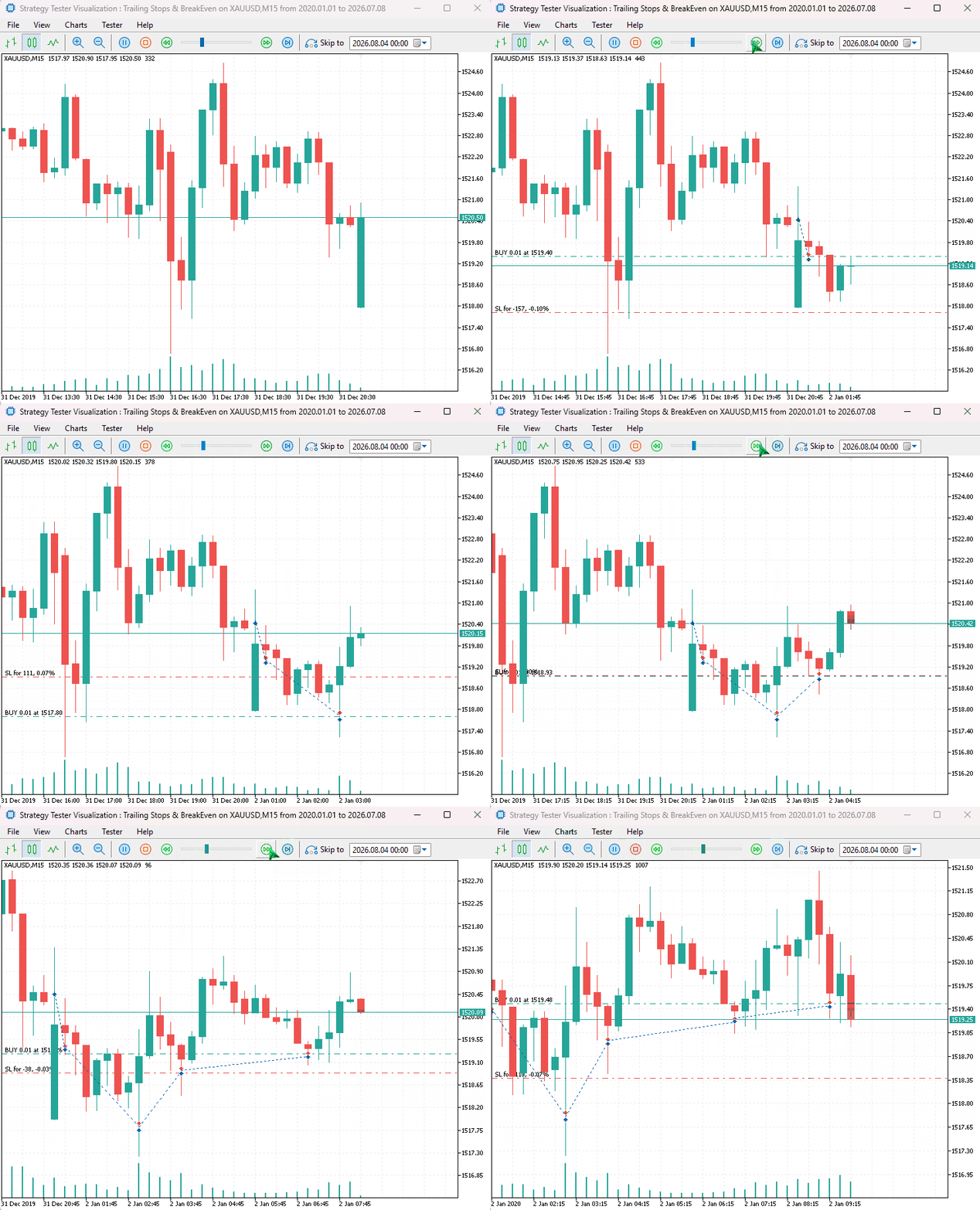
Trailing Stop Loss Based on the Moving Average
One of the simplest and most effective ways to dynamically adjust a stop loss is by using a moving average indicator as a reference for new stop loss levels.
A moving average provides a continuously updated price level that follows the market trend. By using it as a trailing stop reference, the stop loss can automatically move with the direction of the trend while keeping the position open as long as the market remains favorable.
//+------------------------------------------------------------------+
//| Trail open positions using a Moving Average.                     |
//|                                                                  |
//| The stop loss is adjusted to the current value of a Moving       |
//| Average indicator.                                               |
//|                                                                  |
//| Parameters:                                                      |
//|   handle - Handle of the Moving Average indicator created using  |
//|            iMA() or IndicatorCreate().                           |
//|   symbol - Trading symbol whose positions will be managed.       |
//|   magic  - Magic number used to filter positions. Specify -1 to  |
//|            trail all positions on the specified symbol.          |
//|                                                                  |
//+------------------------------------------------------------------+
void CTrailingMA::TrailStops(int handle, string symbol, long magic = -1)
  {
   double point = SymbolInfoDouble(symbol, SYMBOL_POINT);
   CPositionInfo pos;

   CTrade trade;

//---

   double ma[];
   if(!CopyBuffer(handle, 0, 0, 1, ma))
      return;

   double ma_value = ma[0];

//---

   for(int i = PositionsTotal() - 1; i >= 0; i--)
     {
      if(!pos.SelectByIndex(i))
         continue;

      if(pos.Symbol() != symbol)
         continue;

      double sl = pos.StopLoss(),
             open_price = pos.PriceOpen();

      ulong ticket = pos.Ticket();
      ENUM_POSITION_TYPE type = pos.PositionType();
      double tp = pos.TakeProfit();

      //---

      switch(type)
        {
         case  POSITION_TYPE_BUY:
           {
            if(!isPositionModificationSameLevels(ticket, ma_value, tp))
               continue;

            //--- Modify only when the moving average is above the current sl
            if(sl != 0 && ma_value <= sl)
               continue;

            if(!isValidStoploss_Takeprofit(ORDER_TYPE_BUY, ma_value, tp, symbol))
               continue;

            trade.PositionModify(ticket, ma_value, tp);
           }
         break;
         case  POSITION_TYPE_SELL:
           {
            if(!isPositionModificationSameLevels(ticket, ma_value, tp))
               continue;

            //--- Modify only when the moving average is below the current sl
            if(sl != 0 && ma_value >= sl)
               continue;

            if(!isValidStoploss_Takeprofit(ORDER_TYPE_SELL, ma_value, tp, symbol))
               continue;

            trade.PositionModify(ticket, ma_value, tp);
           }
         break;
         default:
            break;
        }
     }
  }
To give users control, the above static function expects the moving average indicator handle, allowing users to specify the version of the indicator they see fit.
Since the moving average can change direction and go the other way, we have to prevent stop loss modifications that go against the position type, e.g.. These modifications increase the stop loss following the moving average that is going down for a buy position.
For a buy position:
//--- Modify only when the moving average is above the current sl
if(sl != 0 && ma_value <= sl)
  continue;
For a sell position:
//--- Modify only when the moving average is below the current sl
if(sl != 0 && ma_value >= sl)
  continue;
The above if statements (conditions) prevent what I call reverse modification.
There is another overload of TrailStops() that takes no parameters. Unlike the static version, this overload uses the handle, symbol, and magic number stored in the class instance. These values are initialized when the object is constructed, allowing you to call TrailStops() directly without supplying the same parameters each time.
class CTrailingMA
  {
protected:
   int               m_handle;
   long              m_magic;
   string            m_symbol;

public:
                     CTrailingMA(const int handle, const string symbol, const long magic=-1);
                    ~CTrailingMA(void);

   void              TrailStops();
   static void       TrailStops(int handle, string symbol, long magic = -1);
  };
Example usage:
#include <Bootstrap\Trailing\TrailingMA.mqh>
#include <Bootstrap\positions.mqh>
#include <Trade\SymbolInfo.mqh>

CTrade m_trade;
CSymbolInfo m_symbol;

#define sym Symbol()
#define MAGIC_NUMBER 112233
int ma_handle;
//+------------------------------------------------------------------+
//| Expert initialization function                                   |
//+------------------------------------------------------------------+
int OnInit()
  {
//---

   m_symbol.Name(sym);
   m_trade.SetExpertMagicNumber(MAGIC_NUMBER);
   m_trade.SetTypeFillingBySymbol(sym);
   m_trade.SetDeviationInPoints(100);

//---

   ma_handle = iMA(sym, PERIOD_CURRENT, 20, 0, MODE_SMA, PRICE_CLOSE);
   if(ma_handle == INVALID_HANDLE)
     {
      printf("Invalid MA handle. Error = %d", GetLastError());
      return INIT_FAILED;
     }

   ChartIndicatorAdd(0, 0, ma_handle); //Attach the indicator to the chart

//---
   return(INIT_SUCCEEDED);
  }
//+------------------------------------------------------------------+
//| Expert tick function                                             |
//+------------------------------------------------------------------+
void OnTick()
  {

   if(!m_symbol.RefreshRates())
      return;

//---

   double lots = m_symbol.LotsMin();
   double ask = m_symbol.Ask(), bid = m_symbol.Bid();


   if(!PositionExistsByType(POSITION_TYPE_BUY))
      m_trade.Buy(lots, sym, ask);

   CTrailingMA::TrailStops(ma_handle, sym, MAGIC_NUMBER); //Trailing stop based on the moving average
  }
Results:
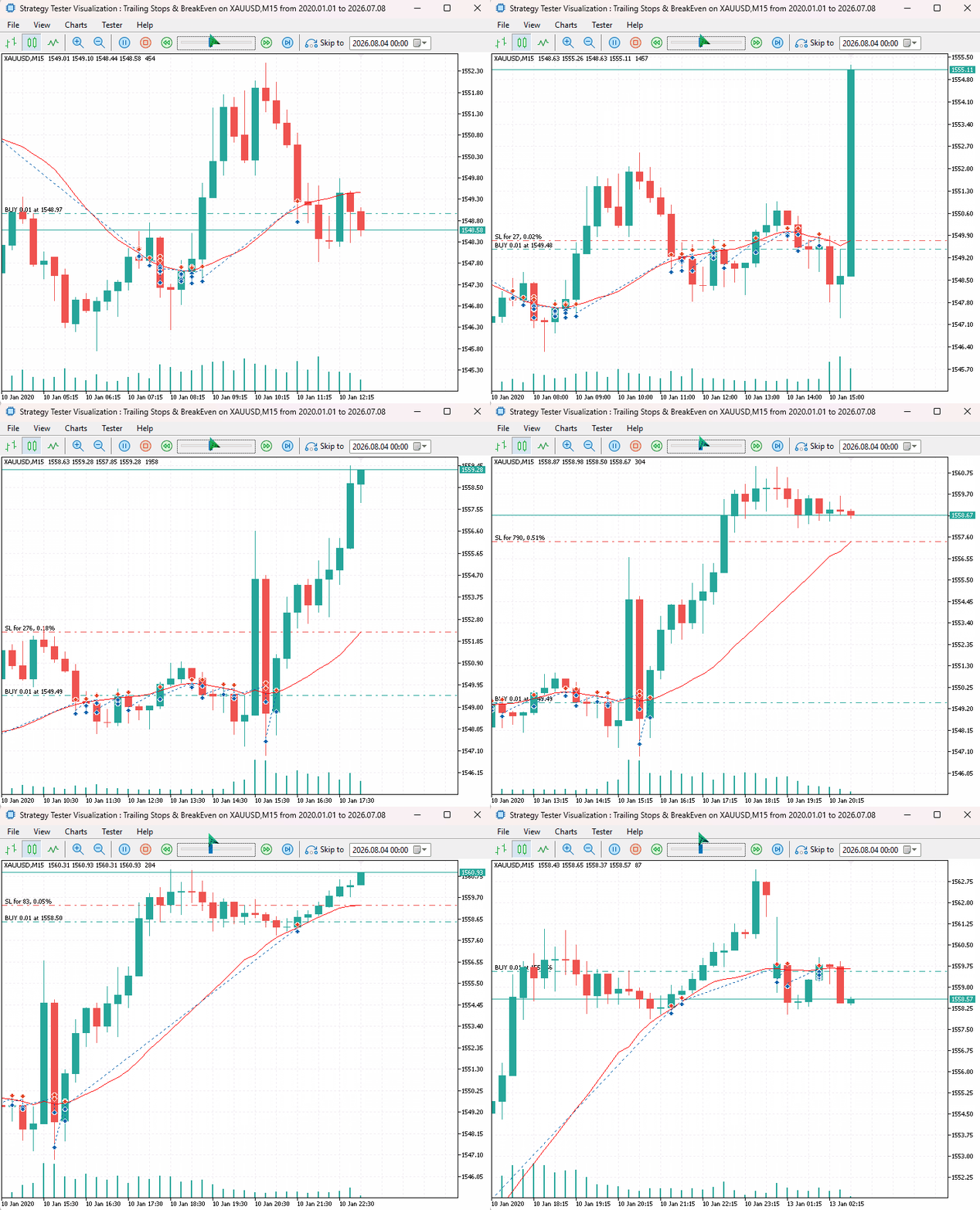
Trailing Stop Based on the Average True Range (ATR) Indicator
The ATR indicator is commonly used for setting stop loss and take profit values. Since it reflects the current market volatility, it is suitable for automatic stop loss adjustments.
Unlike fixed-point trailing stops which maintain the same distance regardless of market behavior, ATR-based trailing stop automatically adapts to changing volatility. During periods of high volatility the stop loss can be adjusted significantly and not so much during periods of low volatility.
//+------------------------------------------------------------------+
//| Trail open positions using the Average True Range (ATR).         |
//|                                                                  |
//| Trailing is based on the current market volatility as measured   |
//| by the Average True Range (ATR).
//|                                                                  |
//| Parameters:                                                      |
//|   handle              - Handle of the ATR indicator created      |
//|                         using iATR() or IndicatorCreate().       |
//|   symbol              - Trading symbol whose positions will be   |
//|                         managed.                                 |
//|   stop_atr_multiplier - ATR multiple required before trailing    |
//|                         is activated.                            |
//|   step_atr_multiplier - ATR multiple maintained between the      |
//|                         current market price and the stop loss.  |
//|   magic               - Magic number used to filter positions.   |
//|                         Specify -1 to trail all positions on     |
//|                         the symbol.                              |
//|                                                                  |
//+------------------------------------------------------------------+
void CTrailingATR::TrailStops(int handle,
                              string symbol,
                              double stop_atr_multiplier = 0.5,
                              double step_atr_multiplier = 0.2,
                              long magic = -1)
  {
   CPositionInfo pos;
   CTrade trade;

//---

   double atr_buff[];
   if(!CopyBuffer(handle, 0, 0, 1, atr_buff))
      return;

   double atr_value = atr_buff[0];

//---

   for(int i = PositionsTotal() - 1; i >= 0; i--)
     {
      if(!pos.SelectByIndex(i))
         continue;

      if(pos.Symbol() != symbol)
         continue;

      long pos_magic = pos.Magic();
      if(magic != -1)
         if(pos_magic != magic)
            continue;

      double sl = pos.StopLoss(), tp = pos.TakeProfit(), open_price = pos.PriceOpen();
      double sl_gap = fabs(open_price - sl);

      //---

      ulong ticket = pos.Ticket();
      ENUM_POSITION_TYPE type = pos.PositionType();

      switch(type)
        {
         case  POSITION_TYPE_BUY:
           {
            //--- Ensure the position has moved enough
            double bid = SymbolInfoDouble(symbol, SYMBOL_BID);
            if(bid - open_price < atr_value * stop_atr_multiplier)
               continue;

            double new_sl = bid - atr_value * step_atr_multiplier;

            if(sl != 0 && new_sl <= sl)
               continue;

            if(!isPositionModificationSameLevels(ticket, new_sl, tp))
               continue;

            if(!isValidStoploss_Takeprofit(ORDER_TYPE_BUY, new_sl, tp, symbol))
               continue;

            trade.PositionModify(ticket, new_sl, tp);
           }
         break;
         case  POSITION_TYPE_SELL:
           {
            double ask = SymbolInfoDouble(symbol, SYMBOL_ASK);

            //--- Ensure the positoin has moved enough
            if(open_price - ask < atr_value * stop_atr_multiplier)
               continue;

            double new_sl = ask + atr_value * step_atr_multiplier;

            if(sl != 0 && new_sl >= sl)
               continue;

            if(!isPositionModificationSameLevels(ticket, new_sl, tp))
               continue;

            if(!isValidStoploss_Takeprofit(ORDER_TYPE_SELL, new_sl, tp, symbol))
               continue;

            trade.PositionModify(ticket, new_sl, tp);
           }
         break;
         default:
            break;
        }
     }
  }
Just like the moving average trailing stop discussed earlier, an ATR-based trailing stop must prevent stop loss levels from moving in the wrong direction.
Since the ATR value changes as market volatility changes, the calculated stop loss distance can also increase or decrease. During periods of increasing volatility, a new ATR calculation may produce a stop loss level that is further away from the current price. Applying such a modification would loosen the stop loss and increase the risk of the position.
To avoid this behavior, the stop loss is only modified when the new level improves the current protection.
For a buy position:
if(sl != 0 && new_sl <= sl)
  continue;
For a sell position:
if(sl != 0 && new_sl >= sl)
  continue;
Example usage:
#include <Bootstrap\Trailing\TrailingATR.mqh>
#include <Bootstrap\positions.mqh>
#include <Trade\SymbolInfo.mqh>

CTrade m_trade;
CSymbolInfo m_symbol;

#define sym Symbol()
#define MAGIC_NUMBER 112233
int atr_handle;
//+------------------------------------------------------------------+
//| Expert initialization function                                   |
//+------------------------------------------------------------------+
int OnInit()
  {
//---

   m_symbol.Name(sym);
   m_trade.SetExpertMagicNumber(MAGIC_NUMBER);
   m_trade.SetTypeFillingBySymbol(sym);
   m_trade.SetDeviationInPoints(100);

//---

   atr_handle = iATR(sym, PERIOD_CURRENT, 13);

   if(atr_handle == INVALID_HANDLE)
     {
      printf("Invalid ATR handle. Error = %d", GetLastError());
      return INIT_FAILED;
     }

//---
   return(INIT_SUCCEEDED);
  }
//+------------------------------------------------------------------+
//| Expert tick function                                             |
//+------------------------------------------------------------------+
void OnTick()
  {

   if(!m_symbol.RefreshRates())
      return;

//---

   double lots = m_symbol.LotsMin();
   double ask = m_symbol.Ask(), bid = m_symbol.Bid();
   double pts = m_symbol.Point();

//---

   if(!PositionExistsByType(POSITION_TYPE_BUY))
      m_trade.Buy(lots, sym, ask, ask - STOPLOSS * pts);

   CTrailingATR::TrailStops(atr_handle, sym, 1, 0.4);
  }
Results:
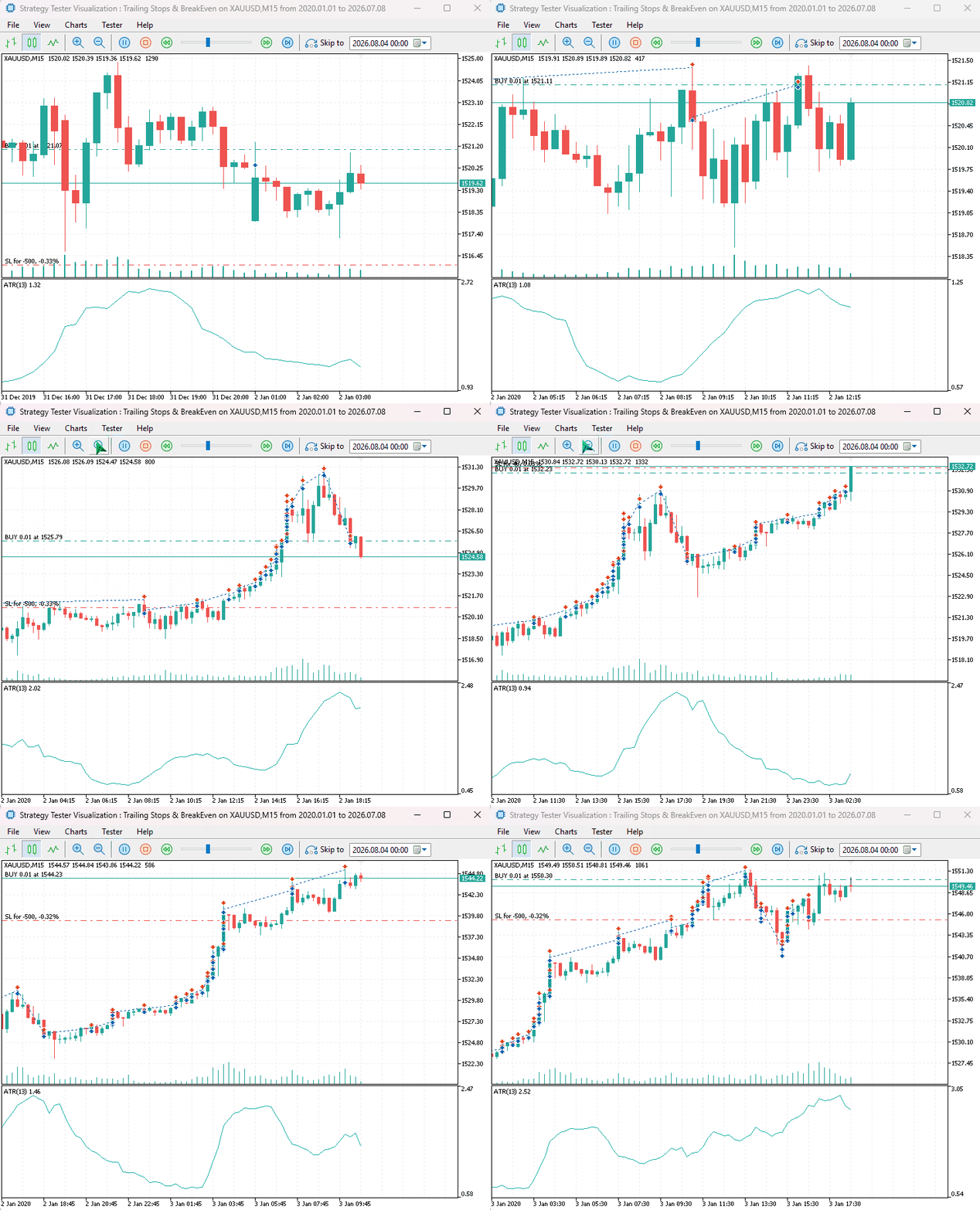
Trailing Stop Based on the Parabolic SAR Indicator
The Parabolic SAR (Stop and Reverse) is a decent trend-following indicator; it can be used for trailing stop modifications using the same approach we used for the moving average indicator.
//+------------------------------------------------------------------+
//| Trail open positions using the Parabolic SAR indicator.          |
//|                                                                  |
//| The stop loss is adjusted to the latest value of the Parabolic   |
//| SAR (Stop and Reverse) indicator.				     |
//|                                                                  |
//| Parameters:                                                      |
//|   handle - Handle of the Parabolic SAR indicator created using   |
//|            iSAR() or IndicatorCreate().                          |
//|   symbol - Trading symbol whose positions will be managed.       |
//|   magic  - Magic number used to filter positions. Specify -1 to  |
//|            trail all positions on the specified symbol.          |
//|                                                                  |
//+------------------------------------------------------------------+
void CTrailingSAR::TrailStops(int handle, string symbol, long magic = -1)
  {
   double point = SymbolInfoDouble(symbol, SYMBOL_POINT);
   CPositionInfo pos;

   CTrade trade;

//---

   double sar_buff[];
   if(!CopyBuffer(handle, 0, 0, 1, sar_buff))
      return;

   double sar_value = sar_buff[0];

//---

   for(int i = PositionsTotal() - 1; i >= 0; i--)
     {
      if(!pos.SelectByIndex(i))
         continue;

      if(pos.Symbol() != symbol)
         continue;

      double sl = pos.StopLoss(), tp = pos.TakeProfit(), open_price = pos.PriceOpen();

      ulong ticket = pos.Ticket();
      ENUM_POSITION_TYPE type = pos.PositionType();

      //---

      switch(type)
        {
         case  POSITION_TYPE_BUY:
           {
            if(!isPositionModificationSameLevels(ticket, sar_value, tp))
               continue;

            //--- Modify only when the SAR is above the current sl
            if(sl != 0 && sar_value <= sl)
               continue;

            if(!isValidStoploss_Takeprofit(ORDER_TYPE_BUY, sar_value, tp, symbol))
               continue;

            trade.PositionModify(ticket, sar_value, tp);
           }
         break;
         case  POSITION_TYPE_SELL:
           {
            if(!isPositionModificationSameLevels(ticket, sar_value, tp))
               continue;

            //--- Modify only when the SAR is below the current sl
            if(sl != 0 && sar_value >= sl)
               continue;

            if(!isValidStoploss_Takeprofit(ORDER_TYPE_SELL, sar_value, tp, symbol))
               continue;

            trade.PositionModify(ticket, sar_value, tp);
           }
         break;
         default:
            break;
        }
     }
  }
For a BUY position, the Parabolic SAR value is typically placed below the current price. As the uptrend continues, the SAR level gradually moves upward providing a dynamic stop loss level that follows the trend and protects accumulated profits.
For a SELL position, the SAR value remains above the current price and moves downward as the market continues lower.
Example usage:
#include <Bootstrap\Trailing\TrailingSAR.mqh>
#include <Bootstrap\positions.mqh>
#include <Trade\SymbolInfo.mqh>

CTrade m_trade;
CSymbolInfo m_symbol;

#define sym Symbol()
#define MAGIC_NUMBER 112233
int sar_handle;
//+------------------------------------------------------------------+
//| Expert initialization function                                   |
//+------------------------------------------------------------------+
int OnInit()
  {
//---

   m_symbol.Name(sym);
   m_trade.SetExpertMagicNumber(MAGIC_NUMBER);
   m_trade.SetTypeFillingBySymbol(sym);
   m_trade.SetDeviationInPoints(100);

//---

   sar_handle = iSAR(sym, PERIOD_CURRENT, 0.02, 0.2);
   if(sar_handle == INVALID_HANDLE)
     {
      printf("Invalid SAR handle. Error = %d", GetLastError());
      return INIT_FAILED;
     }

//---
   return(INIT_SUCCEEDED);
  }
//+------------------------------------------------------------------+
//| Expert tick function                                             |
//+------------------------------------------------------------------+
void OnTick()
  {

   if(!m_symbol.RefreshRates())
      return;

//---

   double lots = m_symbol.LotsMin();
   double ask = m_symbol.Ask(), bid = m_symbol.Bid();
   double pts = m_symbol.Point();

//---

   if(!PositionExistsByType(POSITION_TYPE_BUY))
      m_trade.Buy(lots, sym, ask, ask - STOPLOSS * pts);

   CTrailingSAR::TrailStops(sar_handle, sym, MAGIC_NUMBER);

  }
Results:
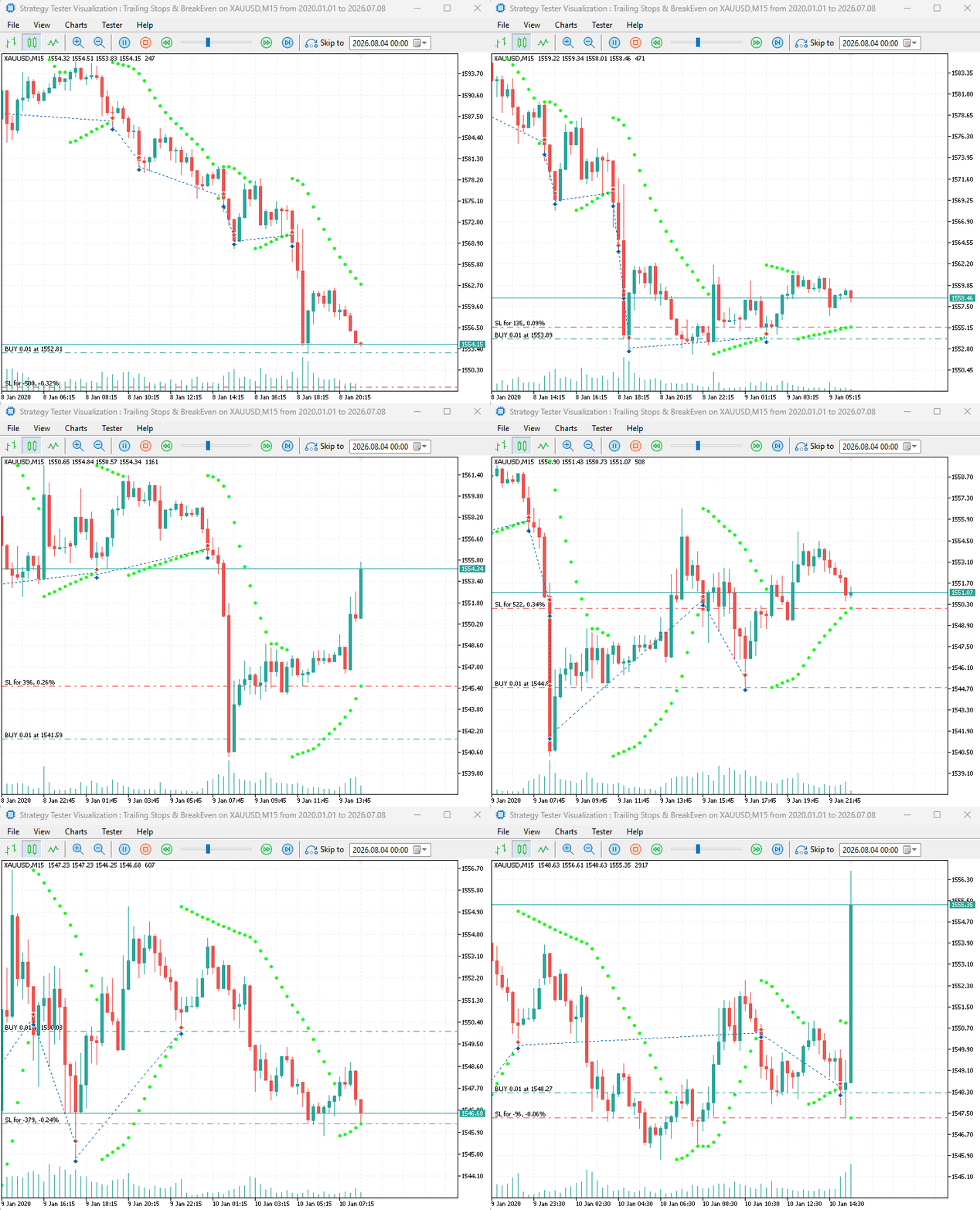
Trailing Stop Loss Based on Money
Although less uncommon than previously discussed methods, some traders prefer managing trailing stops using the actual monetary value of a trade. So, instead of adjusting the stop loss using traditional methods such as pips, points, or indicator values, this approach manages the stop loss based on real account currency.
This allows traders to define their trailing behavior in terms of actual profit or loss rather than price movements, making the system independent of symbol specifications, lot sizes, and market volatility.
//+------------------------------------------------------------------+
//| Trail open positions based on monetary profit.                   |
//|                                                                  |
//| This trailing stop method adjusts the stop loss based on the     |
//| actual monetary value of the position rather than a fixed price  |
//| distance, indicator value, or number of points. Once a position  |
//| reaches the specified profit threshold, the stop loss is moved   |
//| to maintain a defined monetary distance from the current market  |
//| price.                                                           |
//|                                                                  |
//| Parameters:                                                      |
//|   symbol           - Trading symbol whose positions will be      |
//|                      managed.                                    |
//|   activation_money - Minimum profit in account currency required |
//|                      before the trailing stop is activated.      |
//|   trail_money      - Amount of profit in account currency to     |
//|                      maintain as the trailing distance.          |
//|   magic            - Magic number used to filter positions.      |
//|                      Specify -1 to trail all positions on the    |
//|                      specified symbol.                           |
//|                                                                  |
//+------------------------------------------------------------------+
void CTrailingMoney::TrailStops(string symbol,
                                double activation_money,
                                double trail_money,
                                long magic = -1)
  {
   CPositionInfo pos;
   CTrade trade;

   for(int i = PositionsTotal() - 1; i >= 0; i--)
     {
      if(!pos.SelectByIndex(i))
         continue;

      if(pos.Symbol() != symbol)
         continue;

      if(magic != -1 && pos.Magic() != magic)
         continue;

      double profit = pos.Profit();

      // Wait until the desired profit is reached
      if(profit < activation_money)
         continue;

      double volume     = pos.Volume();
      double tick_size  = SymbolInfoDouble(symbol, SYMBOL_TRADE_TICK_SIZE);
      double tick_value = SymbolInfoDouble(symbol, SYMBOL_TRADE_TICK_VALUE);

      if(tick_size <= 0 || tick_value <= 0)
         continue;

      // Convert money into a price distance
      double distance = trail_money * tick_size / (tick_value * volume);

      double tp = pos.TakeProfit();
      double sl = pos.StopLoss();
      ulong ticket = pos.Ticket();

      int digits = (int)SymbolInfoInteger(symbol, SYMBOL_DIGITS);

      switch(pos.PositionType())
        {
         case POSITION_TYPE_BUY:
           {
            double bid = SymbolInfoDouble(symbol, SYMBOL_BID);

            double new_sl = NormalizeDouble(bid - distance, digits);

            if(sl != 0 && new_sl <= sl)
               continue;

            if(!isPositionModificationSameLevels(ticket, new_sl, tp))
               continue;

            if(!isValidStoploss_Takeprofit(ORDER_TYPE_BUY, new_sl, tp, symbol))
               continue;

            if(!trade.PositionModify(ticket, new_sl, tp))
               Print(trade.ResultRetcodeDescription());
           }
         break;

         case POSITION_TYPE_SELL:
           {
            double ask = SymbolInfoDouble(symbol, SYMBOL_ASK);
            double new_sl = NormalizeDouble(ask + distance, digits);

            if(sl != 0 && new_sl >= sl)
               continue;

            if(!isPositionModificationSameLevels(ticket, new_sl, tp))
               continue;

            if(!isValidStoploss_Takeprofit(ORDER_TYPE_SELL, new_sl, tp, symbol))
               continue;

            if(!trade.PositionModify(ticket, new_sl, tp))
               Print(trade.ResultRetcodeDescription());
           }
         break;
        }
     }
  }
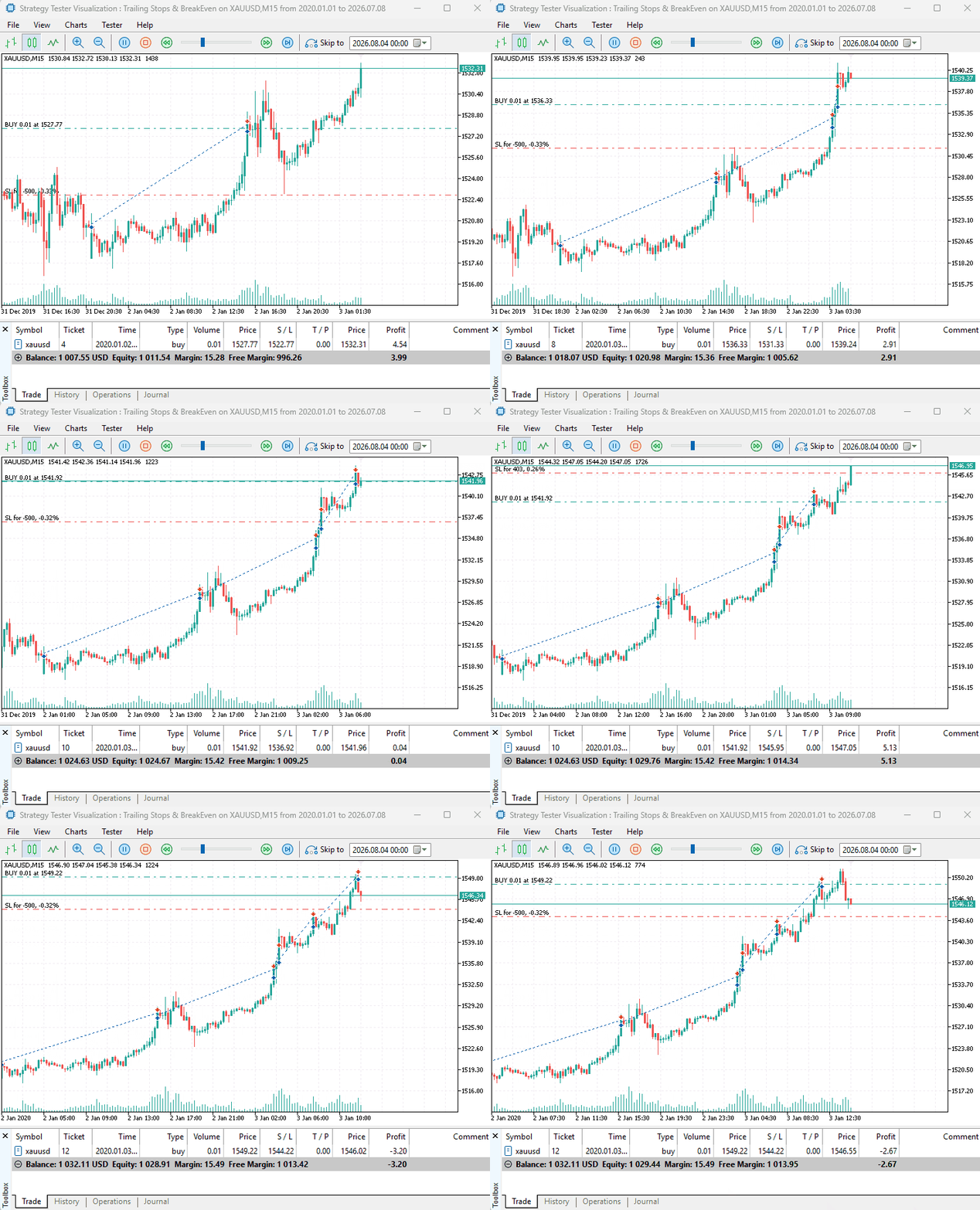
Example, trailing stop (activation money) set to 5 USD and trail step (trail money) set to 1 USD:
#include <Bootstrap\Trailing\TrailingMoney.mqh>
#include <Bootstrap\positions.mqh>
#include <Trade\SymbolInfo.mqh>

CTrade m_trade;
CSymbolInfo m_symbol;

#define sym Symbol()
#define MAGIC_NUMBER 112233
//+------------------------------------------------------------------+
//| Expert initialization function                                   |
//+------------------------------------------------------------------+
int OnInit()
  {
//---

   m_symbol.Name(sym);
   m_trade.SetExpertMagicNumber(MAGIC_NUMBER);
   m_trade.SetTypeFillingBySymbol(sym);
   m_trade.SetDeviationInPoints(100);

//---
   return(INIT_SUCCEEDED);
  }
//+------------------------------------------------------------------+
//| Expert tick function                                             |
//+------------------------------------------------------------------+
void OnTick()
  {

   if(!m_symbol.RefreshRates())
      return;

//---

   double lots = m_symbol.LotsMin();
   double ask = m_symbol.Ask(), bid = m_symbol.Bid();
   double pts = m_symbol.Point();

//---

   if(!PositionExistsByType(POSITION_TYPE_BUY))
      m_trade.Buy(lots, sym, ask, ask - STOPLOSS * pts);

   CTrailingMoney::TrailStops(sym, 5, 1, MAGIC_NUMBER);
  }
Results:
Periodic Trailing Stop
Unlike trailing stop methods discussed above, periodic trailing stop takes a time-based approach. Instead of adjusting the stop loss based on a movement in the market, the method reduces the stop loss gap as time passes.
//+------------------------------------------------------------------+
//| Trail open positions at fixed time intervals.                    |
//|                                                                  |
//| This trailing stop method updates the stop loss only after a     |
//| specified amount of time has elapsed since the last position     |
//| modification.
//|                                                                  |
//| Parameters:                                                      |
//|   interval_seconds - Minimum time in seconds required between    |
//|                      consecutive stop loss modifications.        |
//|   trail_step       - Number of points by which the stop loss is  |
//|                      moved on each update.                       |
//|   symbol           - Trading symbol whose positions will be      |
//|                      managed.                                    |
//|   magic            - Magic number used to filter positions.      |
//|                      Specify -1 to trail all positions on the    |
//|                      specified symbol.                           |
//|                                                                  |
//+------------------------------------------------------------------+
void CTrailingPeriodic::TrailStops(ulong interval_seconds, double trail_step, string symbol, long magic = -1)
  {
   CPositionInfo pos;
   CTrade trade;

   double point = SymbolInfoDouble(symbol, SYMBOL_POINT);

//---

   for(int i = PositionsTotal() - 1; i >= 0; i--)
     {
      if(!pos.SelectByIndex(i))
         continue;

      if(pos.Symbol() != symbol)
         continue;

      long pos_magic = pos.Magic();
      if(magic != -1)
         if(pos_magic != magic)
            continue;

      double sl = pos.StopLoss(), tp = pos.TakeProfit(), open_price = pos.PriceOpen();
      double sl_gap = fabs(open_price - sl);

      //---

      ulong ticket = pos.Ticket();
      ENUM_POSITION_TYPE type = pos.PositionType();
      ulong open_time = (ulong)pos.Time();
      ulong update_time = pos.TimeUpdate();

      //--- modify after a specified number of seconds has passed
      ulong time_diff = (long)TimeCurrent() - update_time;

      if(time_diff < interval_seconds)
         continue;

      switch(type)
        {
         case  POSITION_TYPE_BUY:
           {
            double new_sl = sl + trail_step * point; //increase the stoploss by a given number of points

            if(sl != 0 && new_sl <= sl)
               continue;

            if(!isPositionModificationSameLevels(ticket, new_sl, tp))
               continue;

            if(!isValidStoploss_Takeprofit(ORDER_TYPE_BUY, new_sl, tp, symbol))
               continue;

            trade.PositionModify(ticket, new_sl, tp);
           }
         break;
         case  POSITION_TYPE_SELL:
           {
            double new_sl = sl - trail_step * point; //reduce the stoploss by a given number of points

            if(sl != 0 && new_sl >= sl)
               continue;

            if(!isPositionModificationSameLevels(ticket, new_sl, tp))
               continue;

            if(!isValidStoploss_Takeprofit(ORDER_TYPE_SELL, new_sl, tp, symbol))
               continue;

            trade.PositionModify(ticket, new_sl, tp);
           }
         break;
         default:
            break;
        }
     }
  }
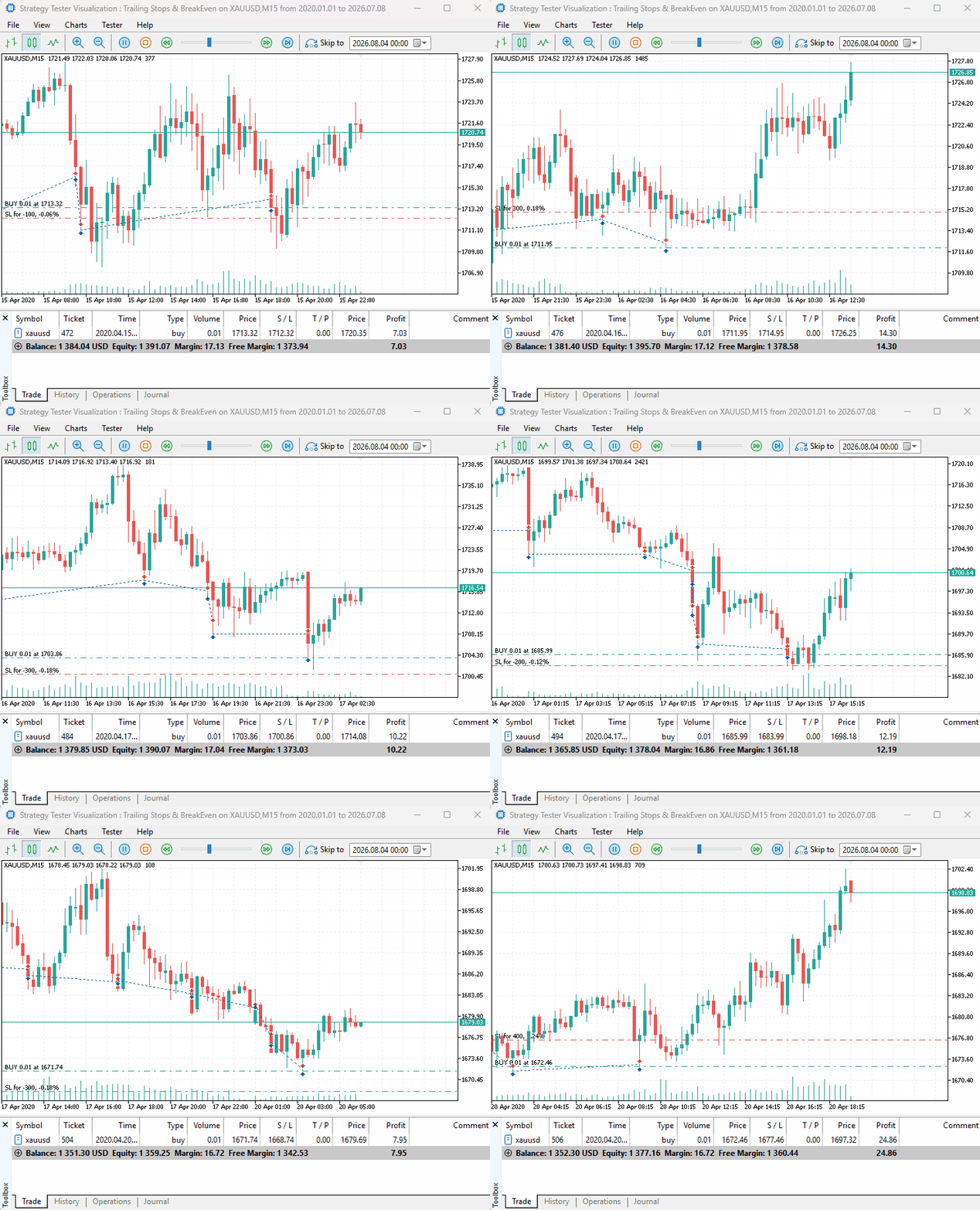
For example, as each hour passes, for a BUY position you reduce it's stop loss by 100 points.
#include <Bootstrap\Trailing\TrailingPeriodic.mqh>
#include <Bootstrap\positions.mqh>
#include <Trade\SymbolInfo.mqh>

CTrade m_trade;
CSymbolInfo m_symbol;
//+------------------------------------------------------------------+
//| Expert initialization function                                   |
//+------------------------------------------------------------------+
int OnInit()
  {
//---

   m_symbol.Name(sym);
   m_trade.SetExpertMagicNumber(MAGIC_NUMBER);
   m_trade.SetTypeFillingBySymbol(sym);
   m_trade.SetDeviationInPoints(100);

//---
   return(INIT_SUCCEEDED);
  }
//+------------------------------------------------------------------+
//| Expert tick function                                             |
//+------------------------------------------------------------------+
void OnTick()
  {

   if(!m_symbol.RefreshRates())
      return;

//---

   double lots = m_symbol.LotsMin();
   double ask = m_symbol.Ask(), bid = m_symbol.Bid();
   double pts = m_symbol.Point();

//---

   if(!PositionExistsByType(POSITION_TYPE_BUY))
      m_trade.Buy(lots, sym, ask, ask - STOPLOSS * pts);

   CTrailingPeriodic::TrailStops(3600, 100, sym, MAGIC_NUMBER);
  }
Results:
Understanding Break-even Stop Loss
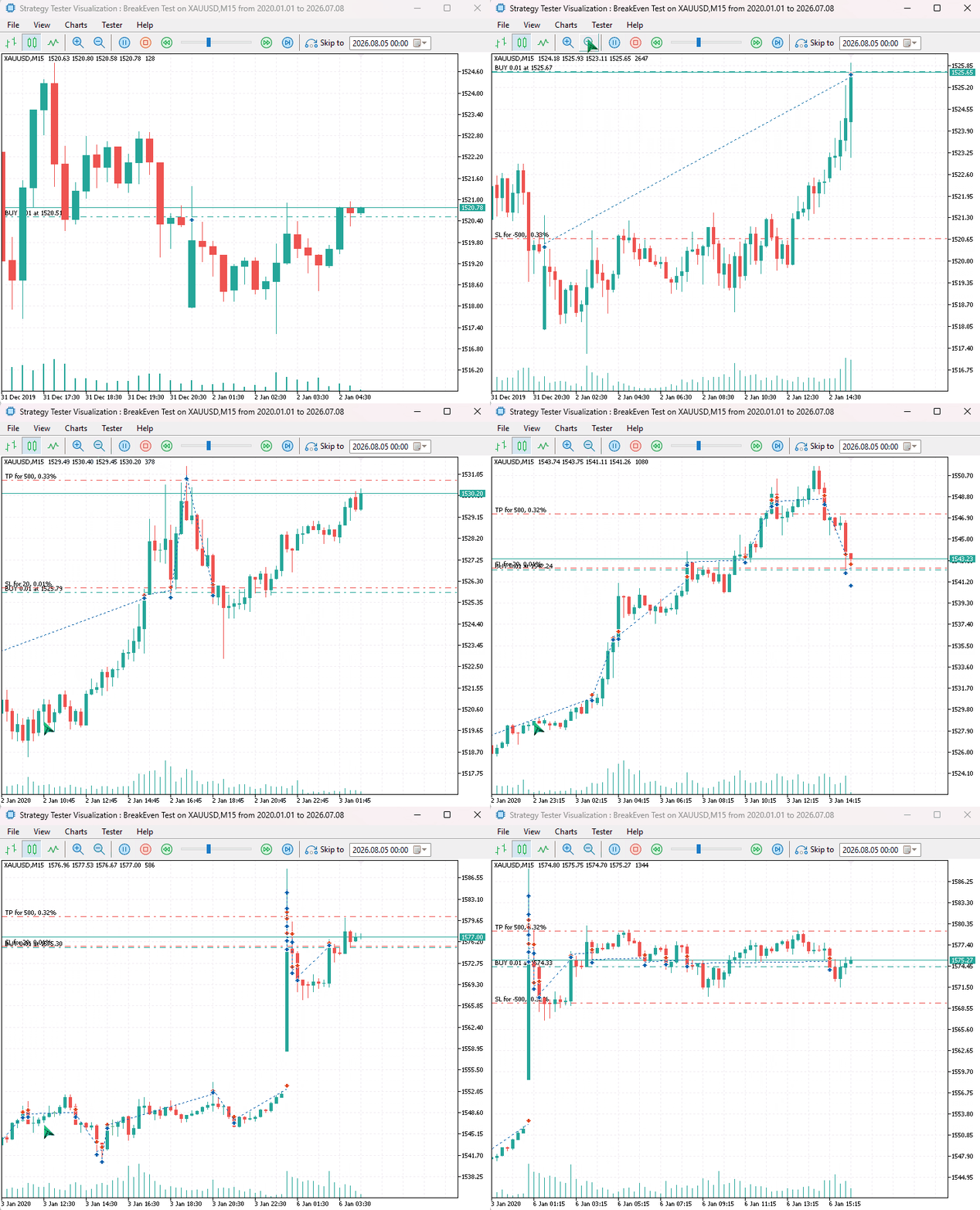
Unlike a trailing stop, which continuously adjusts the stop loss as the market moves in your favor, a break-even stop loss is a one-time modification. Once the position reaches a predefined profit level, the stop loss is moved to the trade's opening price or slightly beyond it using an optional offset.
The primary objective of a break-even stop loss is to eliminate the possibility of turning a winning trade into a losing one. If the market reverses after the break-even adjustment, the position is closed at either the entry price (resulting in no loss) or at a small profit when an offset is applied.
Suppose you open a BUY position at 1.10000 with an initial stop loss at 1.09500.
If the trade gains 300 points, your EA can move the stop loss to 1.10000, ensuring that any subsequent market reversal closes the trade without a loss.
Alternatively, you may choose to move the stop loss to 1.10020, locking in a small profit while still giving the trade some room to continue.
That being said, we have similar methods to the trailing stop loss available in the Bootstrap project as discussed below.
Break-Even Stop Loss Using Fixed Points
The fixed-point break-even method uses two main parameters to determine when and where the stop loss should be moved.
- activation_points — The minimum number of points the position must move into profit before the break-even adjustment is applied. Once the unrealized profit reaches this threshold, the stop loss is moved from its original level to the break-even level.
- offset_points — The number of points added to or subtracted from the opening price when placing the new stop loss. This allows the trader to secure a small profit instead of moving the stop loss exactly to the entry price.
//+------------------------------------------------------------------+
//| Adjusts the stoploss to position's opening price + offset_points |
//|                                                                  |
//| Parameters:                                                      |
//|   symbol       - Trading symbol whose positions will be managed. |
//|   activation_points - Minimum profit (in points) required before |
//|                  break-even begins.                              |
//|   offset_points  - Distance (in points) to add to the new        |
//|                  stoploss.                                       |
//|   magic        - Magic number used to filter positions. Specify  |
//|                  -1 to trail all positions on the symbol.        |
//|                                                                  |
//+------------------------------------------------------------------+
void CBreakEvenFixedPoints::BreakEven(double activation_points, double offset_points, string symbol, long magic = -1)
  {
   double point = SymbolInfoDouble(symbol, SYMBOL_POINT);
   CPositionInfo pos;

   CTrade trade;

//---

   for(int i = PositionsTotal() - 1; i >= 0; i--)
     {
      if(!pos.SelectByIndex(i))
         continue;

      if(pos.Symbol() != symbol)
         continue;

      long pos_magic = pos.Magic();
      if(magic != -1)
         if(pos_magic != magic)
            continue;

      double sl = pos.StopLoss(), tp = pos.TakeProfit(), open_price = pos.PriceOpen();

      ulong ticket = pos.Ticket();
      ENUM_POSITION_TYPE type = pos.PositionType();

      switch(type)
        {
         case  POSITION_TYPE_BUY:
           {
            //--- Ensure the position has moved enough
            double bid = SymbolInfoDouble(symbol, SYMBOL_BID);
            if(bid - open_price <= activation_points * point)
               continue;

            double new_sl = open_price + offset_points * point; //breakeven sl

            //--- Prevent unwanted modifications
            if(new_sl <= open_price)
               continue;

            if(!isPositionModificationSameLevels(ticket, new_sl, tp))
               continue;

            if(!isValidStoploss_Takeprofit(ORDER_TYPE_BUY, new_sl, tp, symbol))
               continue;

            trade.PositionModify(ticket, new_sl, tp);
           }
         break;
         case  POSITION_TYPE_SELL:
           {
            double ask = SymbolInfoDouble(symbol, SYMBOL_ASK);

            //--- Ensure the postion has moved enough
            if(open_price - ask <= activation_points * point)
               continue;

            double new_sl = open_price - offset_points * point;

            //--- Prevent unwanted modifications
            if(new_sl >= open_price)
               continue;

            if(!isPositionModificationSameLevels(ticket, new_sl, tp))
               continue;

            if(!isValidStoploss_Takeprofit(ORDER_TYPE_SELL, new_sl, tp, symbol))
               continue;

            trade.PositionModify(ticket, new_sl, tp);
           }
         break;
         default:
            break;
        }
     }
  }
For example;
#include <Bootstrap\BreakEven\BreakEvenFixedPoints.mqh>
#include <Bootstrap\positions.mqh>
#include <Trade\SymbolInfo.mqh>

CTrade m_trade;
CSymbolInfo m_symbol;

#define sym Symbol()
#define MAGIC_NUMBER 112233
//+------------------------------------------------------------------+
//|                                                                  |
//+------------------------------------------------------------------+
input group "BreakEven";
input uint ACTIVATION_POINTS = 200;
input uint OFFSET = 20;
input group "Orders";
input uint STOPLOSS = 500;
input uint TAKEPROFIT = 500;
//+------------------------------------------------------------------+
//| Expert initialization function                                   |
//+------------------------------------------------------------------+
int OnInit()
  {
//---

   m_symbol.Name(sym);
   m_trade.SetExpertMagicNumber(MAGIC_NUMBER);
   m_trade.SetTypeFillingBySymbol(sym);
   m_trade.SetDeviationInPoints(100);

//---
   return(INIT_SUCCEEDED);
  }
//+------------------------------------------------------------------+
//| Expert tick function                                             |
//+------------------------------------------------------------------+
void OnTick()
  {

   if(!m_symbol.RefreshRates())
      return;

//---

   double lots = m_symbol.LotsMin();
   double ask = m_symbol.Ask(), bid = m_symbol.Bid();
   double pts = m_symbol.Point();

//---

   if(!PositionExistsByType(POSITION_TYPE_BUY))
      m_trade.Buy(lots, sym, ask, ask - STOPLOSS * pts, ask + TAKEPROFIT * pts);

   CBreakEvenFixedPoints::BreakEven(ACTIVATION_POINTS, OFFSET, sym, MAGIC_NUMBER);
  }
Results:
Break-even Stop Loss using Monetary Values
A monetary break-even stop loss works similarly to a fixed-point break-even stop, but instead of measuring profit using points or price distance, it uses the actual profit amount in the account currency.
This approach is useful when the trader wants to manage risk based on real money rather than market movement. The break-even level is activated once the position reaches a predefined profit amount, after which the stop loss is moved to protect the trade.
Two main parameters are used.
- activation_money — The minimum profit in the account currency required before the break-even stop is applied. The position must reach this profit level before any stop loss modification occurs.
- offset_money — The amount of profit in account currency to secure after the break-even adjustment. A value of zero moves the stop loss exactly to the opening price, while a positive value locks in additional profit.
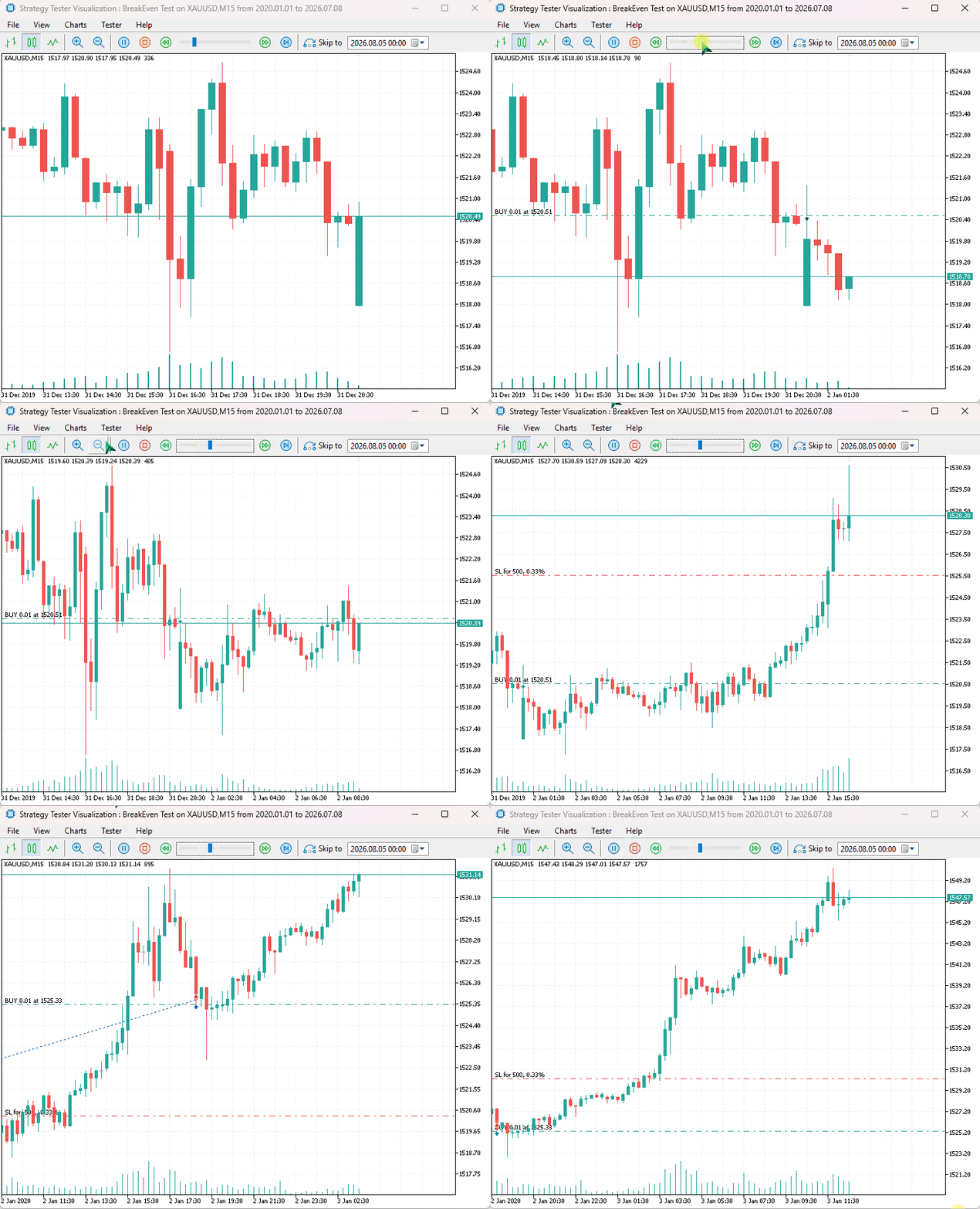
For example, a configuration of an activation profit of $10 and an offset profit of $5.
When the position reaches an unrealized profit of $10, the break-even logic is triggered. The stop loss is then moved to a level where, if the market reverses, the trade closes with approximately $5 profit instead of returning to a loss.
#include <Bootstrap\BreakEven\BreakEvenMoney.mqh>
#include <Bootstrap\positions.mqh>
#include <Trade\SymbolInfo.mqh>

CTrade m_trade;
CSymbolInfo m_symbol;

#define sym Symbol()
#define MAGIC_NUMBER 112233
//+------------------------------------------------------------------+
//|                                                                  |
//+------------------------------------------------------------------+
input group "Orders";
input uint STOPLOSS = 500;
//+------------------------------------------------------------------+
//| Expert initialization function                                   |
//+------------------------------------------------------------------+
int OnInit()
  {
//---

   m_symbol.Name(sym);
   m_trade.SetExpertMagicNumber(MAGIC_NUMBER);
   m_trade.SetTypeFillingBySymbol(sym);
   m_trade.SetDeviationInPoints(100);

//---
   return(INIT_SUCCEEDED);
  }
//+------------------------------------------------------------------+
//| Expert tick function                                             |
//+------------------------------------------------------------------+
void OnTick()
  {

   if(!m_symbol.RefreshRates())
      return;

//---

   double lots = m_symbol.LotsMin();
   double ask = m_symbol.Ask(), bid = m_symbol.Bid();
   double pts = m_symbol.Point();

//---

   if(!PositionExistsByType(POSITION_TYPE_BUY))
      m_trade.Buy(lots, sym, ask, ask - STOPLOSS * pts);

   CBreakEvenMoney::BreakEven(10, 5, sym, MAGIC_NUMBER);
  }
Results:
Final Thoughts
In this article, we expanded the MQL5 Bootstrap library by introducing a collection of reusable trade management tools for handling trailing stops and break-even logic. Instead of repeatedly implementing the same position modification logic in every Expert Advisor (EA), these helpers provide a cleaner and more structured approach that can be reused across different trading systems.
There is no single "best" trailing or break-even method. A trend-following strategy may benefit from an ATR or Parabolic SAR trailing stop, while a scalping system may prefer fixed points or periodic adjustments. Similarly, a trader managing risk in account currency may find monetary-based break-even more intuitive than point-based calculations.
Again, the goal of MQL5 Bootstrap is not to provide a universal trading solution, but to simplify the development process by providing reliable building blocks that developers can combine and extend. By separating trade management logic into reusable classes, Expert Advisors become easier to maintain, test, and improve.
Found an issue, or you want to improve the project? Check out this GitHub repository.
Attachments Table
| Filename | Description & Usage |
|---|---|
| Include\Bootstrap\BreakEven\BreakEvenFixedPoints.mqh | Has utilities for break-even functionality based on a fixed number of points. |
| Include\Bootstrap\BreakEven\BreakEvenMoney.mqh | Contains utilities for break-even functionality based on monetary profit. |
| Include\Bootstrap\Trailing\TrailingATR.mqh | Contains utilities for ATR-based trailing stops. |
| Include\Bootstrap\Trailing\TrailingFixedPoints.mqh | Contains utilities for fixed-point trailing stops. |
| Include\Bootstrap\Trailing\TrailingMA.mqh | Contains utilities for moving average-based trailing stops. |
| Include\Bootstrap\Trailing\TrailingMoney.mqh | Contains utilities for monetary-based trailing stops. |
| Include\Bootstrap\Trailing\TrailingPeriodic.mqh | Contains utilities for periodic trailing stops. |
| Include\Bootstrap\Trailing\TrailingSAR.mqh | Contains utilities for Parabolic SAR-based trailing stops. |
| Experts\Bootstrap\BreakEven\BreakEven Test.mq5 | An EA for testing break-even helper functions discussed above. |
| Experts\Bootstrap\BreakEven\Trailing Stops Test.mq5 | An EA for testing trailing stop functions discussed above. |
Warning: All rights to these materials are reserved by MetaQuotes Ltd. Copying or reprinting of these materials in whole or in part is prohibited.
This article was written by a user of the site and reflects their personal views. MetaQuotes Ltd is not responsible for the accuracy of the information presented, nor for any consequences resulting from the use of the solutions, strategies or recommendations described.

 Automating Classic Market Methods in MQL5 (Part 6): Jesse Livermore's Pivotal Point System
 Implementing a Continuous LLM Adaptation System for Algorithmic Trading
 Building Your Personal Expert Advisor (Part 4): Risk Management III—Risk Models and Order Execution
 Building Your Personal Expert Advisor (Part 3): Risk Management II—Margin and Allowable Risk

- Free trading apps
- Over 8,000 signals for copying
- Economic news for exploring financial markets
You agree to website policy and terms of use