

Exporting MetaTrader 5 Open Positions to a Live-Refreshing HTML Dashboard
 1 398
1 398
 0
0

Introduction
A trader running MetaTrader 5 can see every open position, but only by keeping the terminal window in focus. The Trade tab shows tickets, symbols, volumes, and floating profit, but that view is locked inside the terminal. If the trader is watching charts on a second monitor, reading news in a browser, or running a spreadsheet alongside the platform, checking positions means switching back to the terminal every time. Multi-monitor setups make this worse, not better: the terminal occupies one screen, and the trader must physically look away from everything else to check exposure. The built-in layout cannot be rearranged into a compact summary view, and there is no native way to project position data onto a webpage, a kiosk display, or a secondary application.
This article builds an Expert Advisor that solves that problem directly. On every tick, the EA reads all currently open positions, builds a styled HTML page in memory, and writes that page to a file inside MQL5/Files/. The HTML page uses a small JavaScript timer to reload itself automatically, so once the trader opens the file in any browser, it keeps itself current without any manual refreshing. The result is a self-contained dashboard file that can sit on a second monitor, be shared over a local network folder, or be opened on any machine with access to the terminal's file system.
Why an HTML Dashboard
HTML is the natural output format for this problem because a browser is already present on essentially every machine and operating system, and it requires no companion software to view the result. A plain text log or a CSV export would show the same underlying numbers, but the trader would need a separate application to open it, and that application would have no way of refreshing itself or applying color coding to the data. HTML solves both problems at once: it presents itself, and it can carry its own logic for staying current.
An HTML file also travels well. It can be opened locally on the terminal machine, placed on a second monitor in a dedicated browser window, or shared over a local network drive so a phone or tablet on the same network can view it. Because the file is self-contained, with all styling and refresh logic embedded, there is no dependency on an external stylesheet, a content delivery network, or an active internet connection. This matters for a trading environment where the terminal machine may not always have outbound internet access, or where the trader wants the dashboard to work identically on any device that can open a file.
Reading Open Positions in MQL5
Reading open positions in MQL5 starts with PositionsTotal(), which returns the number of positions currently open on the account. This number is the loop bound for iterating every open position; it changes as positions open and close, so it must be read fresh on every pass rather than cached.
Each position is selected by index with PositionGetTicket(). It returns the ticket number and selects the position for subsequent property reads. Once a position is selected, its properties are read with three parallel functions depending on the data type: PositionGetDouble() for floating-point properties, PositionGetInteger() for integer and enumerated properties, and PositionGetString() for string properties.
The properties this dashboard needs are POSITION_SYMBOL (the traded instrument, a string), POSITION_TYPE (a value of ENUM_POSITION_TYPE indicating buy or sell), POSITION_VOLUME (lot size), POSITION_PRICE_OPEN and POSITION_PRICE_CURRENT (the entry price and the live market price), POSITION_SL and POSITION_TP (stop-loss and take-profit levels, zero if unset), POSITION_PROFIT (floating profit in account currency), POSITION_SWAP (accumulated swap charges), and POSITION_COMMENT (a free-text string attached to the position).
An important property of this data is that it is always live. POSITION_PRICE_CURRENT and POSITION_PROFIT reflect the market price at the instant they are read, so reading the full position list on every tick automatically produces current floating profit and current price without any additional bookkeeping.
HTML Generation Strategy
There are two general ways to produce an HTML file from MQL5. The first is to build the entire page as one string in memory through string concatenation, then write it with a single call to FileWriteString(). The second is to write the file incrementally, line by line, opening the file once and issuing many smaller write calls as each part of the page is generated.
This dashboard uses the single-string approach. The reason is correctness under refresh. The browser reloads the file on a timer, and there is no coordination between the EA's write and the browser's read. If the file were written line by line, the browser could reload the file in the middle of a write, see a partial <table> with no closing tags, and render a broken or empty page for that one refresh cycle. By building the page in memory and writing it in one call, the file on disk is always a complete version (old or new), never a partial update.
Making the page refresh itself in the browser can be done two ways: the HTML <meta http-equiv="refresh" content="N"> tag, or a JavaScript setInterval() call that runs location.reload() on a timer. This dashboard uses setInterval(). Meta refresh triggers a full page reload and cannot be adjusted after load without regenerating the file. The setInterval() approach lets the refresh interval live as a single JavaScript variable embedded in the page, set from an EA input, so the same code path handles any interval the user chooses without special casing. It also behaves more predictably across browsers when the tab is in the background.
HTML Design and Inline Styling
The generated page has no external dependencies of any kind. There is no linked stylesheet, no font loaded from a content delivery network, and no external JavaScript file. All CSS lives in a single <style> block inside the <head>, and the refresh timer is a small inline <script> block also in the <head>. This matters because the terminal machine may not have internet access, and a dashboard that depends on an external resource is one dropped connection away from rendering incorrectly.
The visual design uses a white background so that browser screenshots taken for publication render cleanly on any background. Each table row is color-coded according to its floating profit: a pale green tint for profitable positions, a pale rose tint for losing positions, and a light gray for positions sitting exactly at breakeven. Price and profit columns use a fixed-width monospace font to prevent digit changes from shifting column widths on refresh. The header row is marked position: sticky, so it remains visible at the top of the viewport even as the trader scrolls down through a long list of positions.
The following snippet shows the shape of the generated page:
<!DOCTYPE html>
<html lang="en">
<head>
  <meta charset="UTF-8">
  <title>MT5 Position Dashboard</title>
  <style>
    body { background-color: #FFFFFF; color: #212121;
           font-family: Arial, sans-serif; margin: 16px; }
    table { border-collapse: collapse; width: 100%; }
    th    { position: sticky; top: 0;
            background-color: #37474F; color: #FFFFFF; }
    th, td { border: 1px solid #BDBDBD; padding: 6px 10px; text-align: left; }
    td.numeric { font-family: "Courier New", monospace; }
    p { color: #546E7A; font-size: 0.9em; }
  </style>
  <script>
    setInterval(function() { location.reload(); }, 3000);
  </script>
</head>
<body>
  <h2>MT5 Position Dashboard</h2>
  <p>Last updated: 2026.07.08 11:00:31</p>
  <table>
    <tr><th>Ticket</th><th>Symbol</th><th>Type</th><th>Profit</th></tr>
    <tr style="background-color:#C8E6C9;">
      <td>152309074179</td><td>USDJPY</td><td>BUY</td><td>3.64</td>
    </tr>
    <tr style="background-color:#FFCDD2;">
      <td>152309336221</td><td>USDJPY</td><td>BUY</td><td>-61.64</td>
    </tr>
  </table>
  <p>Total floating profit: -31.10</p>
</body>
</html>
This snippet illustrates the three structural pieces: the <style> block holding every CSS rule, the inline <script> block running setInterval() with the refresh interval in milliseconds as its second argument, and two sample rows whose inline background-color is set according to the profit sign. The full implementation in Section 8 generates this same structure programmatically for every open position, with the row color computed by the CPositionSnapshot::ProfitColor() method.
MQL5 File Overwrite Strategy
Overwriting a file in MQL5 depends on which flag combination is passed to FileOpen(). Opening a file with FILE_WRITE alone truncates any existing file to zero length before the handle is returned, so the first write starts from an empty file. Opening a file with FILE_READ | FILE_WRITE instead opens the existing file for in-place editing, preserving its current content and letting the caller seek and overwrite specific byte ranges without disturbing the rest of the file.
This dashboard always uses FILE_WRITE alone. Truncation is the correct behavior here because the dashboard has no use for its own previous content. Every write represents the complete, current state of every open position at that tick. There is nothing in the previous version of the file worth preserving, so opening in truncate mode is both simpler and faster than opening for in-place editing.
Implementation — PositionSnapshot.mqh
CPositionSnapshot is a plain data struct rather than a class with substantial behavior. It exists as its own file because it is the one piece of data that both CPositionReader and CHtmlBuilder need to agree on. Separating it into its own include file means both classes include the same definition rather than each defining their own local version, which would risk the two falling out of sync as fields are added or changed.
//+------------------------------------------------------------------+
//|                                             PositionSnapshot.mqh |
//+------------------------------------------------------------------+

#ifndef POSITIONSNAPSHOT_MQH
#define POSITIONSNAPSHOT_MQH

//+------------------------------------------------------------------+
//| Plain data holder for one open position.                         |
//| Both CPositionReader and CHtmlBuilder depend on this definition, |
//| so it lives in its own file to guarantee a single shared layout. |
//+------------------------------------------------------------------+
struct CPositionSnapshot
  {
private:
   //--- No private members; all fields are intentionally public so that
   //--- the reader and builder can access them without accessor overhead.

public:
   ulong              ticket;         // Unique position ticket number assigned by the broker.
   string             symbol;         // Traded instrument name, e.g. "EURUSD" or "XAUUSD".
   ENUM_POSITION_TYPE type;           // Direction of the trade: POSITION_TYPE_BUY or POSITION_TYPE_SELL.
   double             volume;         // Position size in lots.
   double             open_price;     // Price at which the position was opened.
   double             current_price;  // Live market price at the moment of the snapshot.
   double             stop_loss;      // Stop-loss level; zero if the trader has not set one.
   double             take_profit;    // Take-profit level; zero if the trader has not set one.
   double             profit;         // Floating profit in account currency, excluding swap.
   double             swap;           // Accumulated swap charges on the position.
   string             comment;        // Free-text comment attached to the position by the trader or EA.
   datetime           open_time;      // Server time at which the position was opened.

   //--- const qualifier allows these methods to be called on a
   //--- const reference, which is how BuildTableRow() receives snap.
   string             TypeString(void) const;
   string             ProfitColor(void) const;
  };
The struct declares twelve fields covering every value the dashboard needs to render one row. ticket is the unique position identifier. symbol is the traded instrument name. For open positions, type is an an ENUM_POSITION_TYPE value: POSITION_TYPE_BUY or POSITION_TYPE_SELL. volume is the lot size. open_price and current_price capture the entry price and the live market price. stop_loss and take_profit hold the position's protective levels, which may be zero if the trader has not set them. swap is the accumulated swap charge, kept separate from profit because the two are reported separately by the terminal. comment is free text, and open_time is the timestamp the position was opened. Both method signatures are declared const so they can be called on a const reference, which is how CHtmlBuilder::BuildTableRow() receives each snapshot.
TypeString()
//+------------------------------------------------------------------+
//| Returns "BUY" when the position is long, "SELL" when short.      |
//| Declared const because it reads fields only and is called from   |
//| BuildTableRow(), which receives the snapshot as a const ref.     |
//+------------------------------------------------------------------+
string CPositionSnapshot::TypeString(void) const
  {
//--- return the buy label when the type matches the buy constant
   if(type == POSITION_TYPE_BUY)
     {
      return("BUY");
     }
//--- every other value of ENUM_POSITION_TYPE for an open position
//--- is POSITION_TYPE_SELL, so fall through to the sell label
   return("SELL");
  }
TypeString() reads the type field and returns the literal string "BUY" when it equals POSITION_TYPE_BUY, and "SELL" in every other case. Since ENUM_POSITION_TYPE has only these two values for open positions, the fall-through return("SELL") is safe and avoids an unnecessary second comparison.
ProfitColor()
//+------------------------------------------------------------------+
//| Maps the profit sign to a light-theme row background tint.       |
//| Pale tints are used instead of saturated fills so that dark body |
//| text remains legible against the white page background, which is |
//| required for MQL5 article publication screenshots.               |
//| Declared const because it reads the profit field only and is     |
//| called from BuildTableRow() via a const reference parameter.     |
//+------------------------------------------------------------------+
string CPositionSnapshot::ProfitColor(void) const
  {
//--- a strictly positive profit earns a pale green background row
   if(profit > 0.0)
     {
      return("#C8E6C9");
     }
//--- a strictly negative profit earns a pale rose background row
   if(profit < 0.0)
     {
      return("#FFCDD2");
     }
//--- exactly zero profit receives a light gray background
   return("#F5F5F5");
  }
ProfitColor() inspects the profit field and returns one of three pale hex color strings: pale green (#C8E6C9) when profit is strictly positive, pale rose (#FFCDD2) when profit is strictly negative, and near-white grey (#F5F5F5) when profit is exactly zero. Pale tints are used rather than saturated fills so that dark body text (#212121) remains legible against the white page background. This method is what CHtmlBuilder calls to decide the background color of each table row.
Implementation — PositionReader.mqh
CPositionReader has one responsibility: turn the terminal's live position list into an array of CPositionSnapshot values. It is the only class in this system that calls the position-reading API functions described in Section 2. Keeping this logic in its own class means CHtmlBuilder never needs to know how position data is retrieved; it only ever receives an already-populated array.
//+------------------------------------------------------------------+
//|                                               PositionReader.mqh |
//+------------------------------------------------------------------+

#ifndef POSITIONREADER_MQH
#define POSITIONREADER_MQH

//--- Pulls in the shared data layout that both reader and builder use.
#include "PositionSnapshot.mqh"

//+------------------------------------------------------------------+
//| Reads all open positions from the terminal into a snapshot array.|
//| This is the only class that calls the position-reading API;      |
//| CHtmlBuilder never needs to know how positions are retrieved.    |
//+------------------------------------------------------------------+
class CPositionReader
  {
private:
   CPositionSnapshot  m_snapshots[];  // Stores the result of the most recent Read() call; resized on every call.
   long               m_magic;        // Magic number filter applied during the last Read(); zero means no filter.

public:
                      CPositionReader(void);   // Sets initial defaults and allocates an empty snapshot array.
                     ~CPositionReader(void);   // No heap resources to release; MQL5 cleans up the array.
   int                Read(long magic);        // Scans all open positions, applies the magic filter, fills m_snapshots[]; returns the count stored.
   bool               GetSnapshot(int idx, CPositionSnapshot &out); // Copies the snapshot at index idx into out; returns false if idx is out of range.
   int                GetCount(void);          // Returns the number of snapshots stored from the last Read().
   double             GetTotalProfit(void);    // Returns the sum of profit + swap across every stored snapshot.
  };
The class holds two private members. m_snapshots[] is the dynamic array that stores the result of the most recent Read() call, and m_magic stores the magic number filter last applied. The public interface exposes four methods beyond the constructor and destructor: Read() performs the actual scan, GetSnapshot() retrieves one entry by index, GetCount() reports how many positions were read, and GetTotalProfit() sums profit and swap across every position held.
Constructor
//+------------------------------------------------------------------+
//| Constructor.                                                     |
//| Initializes the magic filter to zero (accept all positions) and  |
//| explicitly sizes the snapshot array to zero so no stale memory   |
//| is present before the first Read() call.                         |
//+------------------------------------------------------------------+
CPositionReader::CPositionReader(void)
  {
   m_magic = 0;              // Default to no magic number filter so all positions are visible.
   ArrayResize(m_snapshots, 0); // Start with an empty array rather than an undefined allocation.
  }
The constructor initializes m_magic to zero, meaning no magic number filter, and resizes m_snapshots[] to zero length so the array starts empty rather than holding uninitialized memory.
Destructor
//+------------------------------------------------------------------+
//| Destructor.                                                      |
//| m_snapshots[] is a dynamic array of a plain struct; MQL5 handles |
//| its deallocation automatically when the object goes out of scope.|
//+------------------------------------------------------------------+
CPositionReader::~CPositionReader(void)
  {
//--- MQL5 releases the dynamic array automatically; no manual
//--- cleanup is required for a struct array with no heap members.
  }
The destructor body contains only a comment. m_snapshots[] is a dynamic array of a plain struct with no manually allocated resources, so MQL5's own array cleanup handles deallocation automatically. The destructor is still declared and defined explicitly to satisfy this project's class layout rules.
Read()
//+------------------------------------------------------------------+
//| Scans all open positions and populates m_snapshots[].            |
//| Applies magic number filtering when magic is non-zero.           |
//| Skips any position whose PositionGetTicket() returns zero, which |
//| guards against positions closing mid-loop.                       |
//| Returns the number of positions stored after the scan.           |
//+------------------------------------------------------------------+
int CPositionReader::Read(long magic)
  {
   m_magic = magic;              // Store the filter so inspection code can reference it without re-reading an input argument.
   int total = ::PositionsTotal(); // Read the total count once; it is the upper bound for the loop.
   ArrayResize(m_snapshots, 0);  // Clear the previous snapshot set before filling fresh data so no stale rows survive.

//--- iterate every index in the terminal's current position list
   for(int i = 0; i < total; i++)
     {
      //--- select the position at this index and retrieve its ticket;
      //--- PositionGetTicket() also makes this position the "selected"
      //--- position for all subsequent PositionGet*() calls
      ulong ticket = ::PositionGetTicket(i);

      //--- a zero ticket means the position closed between
      //--- PositionsTotal() and this call; skip it safely
      if(ticket == 0)
        {
         continue;
        }

      //--- when a non-zero magic filter is active, skip any position
      //--- whose POSITION_MAGIC value does not match the requested one
      if(m_magic != 0 && ::PositionGetInteger(POSITION_MAGIC) != m_magic)
        {
         continue;
        }

      int idx = ArraySize(m_snapshots); // Get the current occupied size as the index for the new slot.
      ArrayResize(m_snapshots, idx + 1); // Grow the snapshot array by one slot to accommodate this position.

      //--- copy every field from the terminal into the new snapshot slot;
      //--- string fields use PositionGetString(), floating-point fields
      //--- use PositionGetDouble(), integer/enum fields use PositionGetInteger()
      m_snapshots[idx].ticket        = ticket;
      m_snapshots[idx].symbol        = ::PositionGetString(POSITION_SYMBOL);
      m_snapshots[idx].type          = (ENUM_POSITION_TYPE)::PositionGetInteger(POSITION_TYPE);
      m_snapshots[idx].volume        = ::PositionGetDouble(POSITION_VOLUME);
      m_snapshots[idx].open_price    = ::PositionGetDouble(POSITION_PRICE_OPEN);
      m_snapshots[idx].current_price = ::PositionGetDouble(POSITION_PRICE_CURRENT);
      m_snapshots[idx].stop_loss     = ::PositionGetDouble(POSITION_SL);
      m_snapshots[idx].take_profit   = ::PositionGetDouble(POSITION_TP);
      m_snapshots[idx].profit        = ::PositionGetDouble(POSITION_PROFIT);
      m_snapshots[idx].swap          = ::PositionGetDouble(POSITION_SWAP);
      m_snapshots[idx].comment       = ::PositionGetString(POSITION_COMMENT);
      m_snapshots[idx].open_time     = (datetime)::PositionGetInteger(POSITION_TIME);
     }

//--- return the final occupied size so the caller gets a count
//--- without needing a separate GetCount() call
   return(ArraySize(m_snapshots));
  }
Read() takes a magic number filter as its only argument, stores it, then clears m_snapshots[] before rescanning. It reads PositionsTotal() once at the start of the loop and iterates from zero up to that count. For each index it calls PositionGetTicket(), which both returns the ticket and selects that position for the property reads that follow. If the ticket comes back as zero, the position is skipped, which guards against a position closing between the call to PositionsTotal() and the corresponding PositionGetTicket() call inside the same loop.
If a nonzero magic filter is set and the position's own POSITION_MAGIC value does not match, the position is also skipped. Every position that survives both checks is copied field by field into a newly grown slot of m_snapshots[], using PositionGetString() for text fields, PositionGetDouble() for numeric fields, and PositionGetInteger() for the type and time fields. The method returns the final size of m_snapshots[].
GetSnapshot()
//+------------------------------------------------------------------+
//| Copies the snapshot at the given index into the output parameter.|
//| Validates the index before copying to prevent out-of-bounds      |
//| reads in callers that do not check the count themselves.         |
//| Returns true on a successful copy, false when idx is invalid.   |
//+------------------------------------------------------------------+
bool CPositionReader::GetSnapshot(int idx, CPositionSnapshot &out)
  {
//--- reject negative indices and indices beyond the last element
   if(idx < 0 || idx >= ArraySize(m_snapshots))
     {
      return(false);
     }

   out = m_snapshots[idx]; // Copy the struct by value; out now holds an independent copy.
   return(true);
  }
GetSnapshot() validates that idx falls inside the current array bounds before copying. If the index is out of range, it returns false and leaves out untouched. On a valid index, it copies the struct by value into out and returns true.
GetCount()
//+------------------------------------------------------------------+
//| Returns the count of snapshots stored by the last Read() call.  |
//| Wraps ArraySize() so callers do not need to know the private     |
//| array name and the internal representation can change freely.    |
//+------------------------------------------------------------------+
int CPositionReader::GetCount(void)
  {
//--- delegate directly to ArraySize on the private member array
   return(ArraySize(m_snapshots));
  }
GetCount() is a thin wrapper around ArraySize(m_snapshots). It exists so calling code does not need to know the name of the underlying storage array.
GetTotalProfit()
//+------------------------------------------------------------------+
//| Sums profit and swap from every snapshot in m_snapshots[].       |
//| Swap is included because it directly affects floating equity     |
//| even though it is reported as a separate field by the terminal.  |
//| Returns zero immediately when the array is empty.                |
//+------------------------------------------------------------------+
double CPositionReader::GetTotalProfit(void)
  {
   double total = 0.0;                    // Accumulator for the combined profit-plus-swap running total.
   int    count = ArraySize(m_snapshots); // Cache the count to avoid repeated ArraySize() calls in the loop.

//--- add each position's combined floating P&L to the running total;
//--- when the array is empty the loop body is skipped and zero is returned
   for(int i = 0; i < count; i++)
     {
      total += m_snapshots[i].profit + m_snapshots[i].swap;
     }

   return(total);
  }
GetTotalProfit() walks every entry in m_snapshots[] and accumulates profit + swap from each one. Swap is included because it directly affects the account's floating equity. If m_snapshots[] is empty, the loop body never executes and the method correctly returns zero.
Implementation — HtmlBuilder.mqh
CHtmlBuilder turns an array of CPositionSnapshot values into a complete HTML document string. It has no knowledge of how positions were read or how the resulting string will be written to disk; its only job is string generation. This separation means the HTML layout can be redesigned without touching either the position-reading code or the file-writing code.
//+------------------------------------------------------------------+
//|                                                  HtmlBuilder.mqh |
//+------------------------------------------------------------------+

#ifndef HTMLBUILDER_MQH
#define HTMLBUILDER_MQH

//--- The builder consumes CPositionSnapshot values but never creates them,
//--- so the struct definition is the only dependency it requires.
#include "PositionSnapshot.mqh"

//+-------------------------------------------------------------------+
//| Builds a complete, self-refreshing HTML page from position data.  |
//| This class has no knowledge of how positions were read or how the |
//| resulting string will be persisted; it only generates markup.     |
//+-------------------------------------------------------------------+
class CHtmlBuilder
  {
private:
   int                m_refresh_seconds; // Browser reload interval in seconds, embedded into setInterval().
   string             m_page_title;      // Text placed in the HTML <title> tag and the visible <h2> heading.

   string             BuildTableRow(const CPositionSnapshot &snap); // Renders one <tr> element for a single position snapshot.
   string             BuildEmptyState(void);                        // Renders the empty-state row shown when no positions are open.
   string             EscapeHtml(const string &s);                  // Escapes &, <, and > so string fields are safe to embed in markup.
   string             FormatDatetime(datetime dt);                  // Formats a datetime value using date, hour, minute, and second.
   string             FormatDouble(double value, int digits);       // Renders a double with an explicit number of decimal places.

public:
                      CHtmlBuilder(int refresh_seconds, string page_title); // Stores the refresh interval and page title for use during Build().
                     ~CHtmlBuilder(void);                                    // No heap resources held; destructor body is empty but explicit.

   //--- assembles and returns the complete HTML document string;
   //--- snapshots[] holds the position data, count is its used length,
   //--- generated_at is stamped as the "Last updated" timestamp
   string             Build(const CPositionSnapshot &snapshots[],
                            int count,
                            datetime generated_at);
  };
m_refresh_seconds stores the interval in seconds embedded into the page's setInterval() call. m_page_title stores the string placed in the HTML <title> tag and the visible page heading. The five private methods are helpers used internally: BuildTableRow() renders one position as a <tr> element, BuildEmptyState() renders the message shown when there are no open positions, EscapeHtml() sanitizes any string field before it is placed into the page, FormatDatetime() renders a datetime value as a readable string, and FormatDouble() renders a double with a fixed number of decimal places. Only Build() is public.
Constructor
//+------------------------------------------------------------------+
//| Constructor.                                                     |
//| Captures the two configuration values that control the generated |
//| page: how often the browser reloads and what title it displays.  |
//+------------------------------------------------------------------+
CHtmlBuilder::CHtmlBuilder(int refresh_seconds, string page_title)
  {
   m_refresh_seconds = refresh_seconds; // Store the reload interval; converted to milliseconds inside Build().
   m_page_title      = page_title;      // Store the page title for use in <title> and <h2> elements.
  }
The constructor takes the refresh interval and page title as arguments and stores them directly. These values come from the EA's inputs and do not change after the EA starts.
Destructor
//+------------------------------------------------------------------+
//| Destructor.                                                      |
//| CHtmlBuilder holds no heap-allocated resources beyond MQL5       |
//| strings, which are managed automatically by the runtime.         |
//+------------------------------------------------------------------+
CHtmlBuilder::~CHtmlBuilder(void)
  {
//--- MQL5 string memory is released automatically when the object
//--- goes out of scope; no explicit cleanup is required here
  }
The destructor body is empty because CHtmlBuilder owns no dynamically allocated resources beyond ordinary MQL5 strings. It is declared and defined explicitly to satisfy this project's class layout rules.
EscapeHtml()
//+------------------------------------------------------------------+ //| Escapes the three HTML-significant characters in a string. | //| Ampersand is replaced first because the replacements for < and > | //| themselves contain an ampersand; reversing the order would cause | //| double-escaping of the newly inserted entities. | //| Without this function a comment such as "<entry>" would break | //| the table structure and could expose a script-injection vector. | //+------------------------------------------------------------------+ string CHtmlBuilder::EscapeHtml(const string &s) { string result = s; // Work on a local copy so the original string is not modified. //--- replace ampersand first to avoid corrupting the replacement text //--- that is inserted for the less-than and greater-than steps below StringReplace(result, "&", "&"); StringReplace(result, "<", "<"); // Replace the less-than character, which opens HTML tags. StringReplace(result, ">", ">"); // Replace the greater-than character, which closes HTML tags. return(result); }
EscapeHtml() replaces three characters that have special meaning in HTML markup: ampersand, less-than, and greater-than. The ampersand must be replaced first, because the replacement text for the other two characters itself contains an ampersand; escaping in the wrong order would double-escape those replacements. This method matters most for the comment field on a position, which is free text that the trader or another EA may have set to anything, including characters that look like HTML tags. Without this escaping, a comment containing an unescaped < or > could be interpreted by the browser as the start or end of an HTML element, breaking the table layout or, in a worse case, causing the browser to attempt to execute content that resembles a <script> tag. Every string field taken from position data passes through EscapeHtml() before being placed into the generated page.
FormatDatetime()
//+------------------------------------------------------------------+
//| Wraps TimeToString() with a fixed flag set so every date shown   |
//| on the page uses the same format: YYYY.MM.DD HH:MM:SS.           |
//| Called for both position open times and the page timestamp.      |
//+------------------------------------------------------------------+
string CHtmlBuilder::FormatDatetime(datetime dt)
  {
//--- combine date and full time into a single consistent string
   return(TimeToString(dt, TIME_DATE | TIME_MINUTES | TIME_SECONDS));
  }
FormatDatetime() wraps the built-in TimeToString() function with a fixed set of flags, TIME_DATE, TIME_MINUTES, and TIME_SECONDS, so every date shown on the page uses the same format regardless of where it is called from. It is used both for each position's open time and for the "Last updated" timestamp.
FormatDouble()
//+-------------------------------------------------------------------+
//| Renders a double with a caller-specified number of decimal digits.|
//| Wrapping DoubleToString() here ensures every numeric column uses  |
//| an explicit digit count rather than the default, which can vary.  |
//+-------------------------------------------------------------------+
string CHtmlBuilder::FormatDouble(double value, int digits)
  {
//--- delegate to the built-in converter with the requested precision
   return(DoubleToString(value, digits));
  }
FormatDouble() wraps DoubleToString() so every numeric column in the page uses a consistent, explicit number of decimal places rather than relying on default string conversion, which can vary in digit count.
BuildTableRow()
//+------------------------------------------------------------------+
//| Builds one <tr> element representing a single open position.     |
//| The row background color is set inline via ProfitColor() so that |
//| green, red, and grey coding requires no extra CSS classes.       |
//| Numeric columns carry the "numeric" class for monospace styling. |
//| Symbol and comment pass through EscapeHtml() because they are    |
//| free-form strings that could contain HTML-significant characters.|
//+------------------------------------------------------------------+
string CHtmlBuilder::BuildTableRow(const CPositionSnapshot &snap)
  {
   string row = "<tr style=\"background-color:" + snap.ProfitColor() + ";\">"; // Open the row with an inline background color from the snapshot.

   row += "<td>"                + IntegerToString(snap.ticket)              + "</td>"; // Ticket: unique numeric identifier; no escaping needed.
   row += "<td>"                + EscapeHtml(snap.symbol)                   + "</td>"; // Symbol: free-form instrument name; escaped for safety.
   row += "<td>"                + snap.TypeString()                         + "</td>"; // Type: rendered as "BUY" or "SELL" via TypeString().
   row += "<td class=\"numeric\">" + FormatDouble(snap.volume, 2)           + "</td>"; // Volume: lot size rendered to two decimal places.
   row += "<td class=\"numeric\">" + FormatDouble(snap.open_price, 5)       + "</td>"; // Open price: entry price rendered to five decimal places.
   row += "<td class=\"numeric\">" + FormatDouble(snap.current_price, 5)    + "</td>"; // Current price: live market price at snapshot time.
   row += "<td class=\"numeric\">" + FormatDouble(snap.stop_loss, 5)        + "</td>"; // Stop-loss: protective level; five decimal places; may be zero.
   row += "<td class=\"numeric\">" + FormatDouble(snap.take_profit, 5)      + "</td>"; // Take-profit: target level; five decimal places; may be zero.
   row += "<td class=\"numeric\">" + FormatDouble(snap.profit, 2)           + "</td>"; // Profit: floating P&L in account currency to two decimal places.
   row += "<td class=\"numeric\">" + FormatDouble(snap.swap, 2)             + "</td>"; // Swap: accumulated overnight charge to two decimal places.
   row += "<td>"                + EscapeHtml(snap.comment)                  + "</td>"; // Comment: free-form text; escaped to prevent markup injection.
   row += "<td>"                + FormatDatetime(snap.open_time)            + "</td>"; // Open time: server timestamp formatted as a readable date-time.
   row += "</tr>";

   return(row);
  }
BuildTableRow() assembles one <tr> element for a single position. The row's inline background-color style comes directly from snap.ProfitColor(), so color coding is computed once on the struct and simply consumed here. Every column pulls one field. Numeric columns carry the CSS class numeric so they pick up the monospace styling. Both symbol and comment pass through EscapeHtml() because they are free-form strings; the other fields are numeric or come from a fixed enumeration, so no escaping is needed there.
BuildEmptyState()
//+------------------------------------------------------------------+
//| Returns a single table row spanning all twelve columns.          |
//| This row is inserted instead of position rows when the snapshot  |
//| count is zero, so the table never appears completely empty.      |
//+------------------------------------------------------------------+
string CHtmlBuilder::BuildEmptyState(void)
  {
//--- colspan=12 spans the full width of the twelve-column table;
//--- the muted blue-grey color distinguishes the state from an error
//--- and remains legible against the white page background
   string html = "<tr><td colspan=\"12\" style=\"text-align:center;padding:20px;color:#546E7A;\">";
   html += "No open positions."; // Informational text; kept neutral to distinguish from an error.
   html += "</td></tr>";

   return(html);
  }
BuildEmptyState() returns a single table row that spans all twelve columns and displays a centered message. This is what Build() inserts into the table body instead of position rows whenever the snapshot count is zero, so the page never renders an empty, confusing table with only a header row and no explanation.
Build()
//+------------------------------------------------------------------+
//| Assembles the complete HTML document as a single string.         |
//| The page header includes the <style> block (all CSS) and a       |
//| <script> block (the setInterval reload timer). The table body    |
//| is either populated with position rows or shows the empty state. |
//| A total floating profit line appears below the table only when   |
//| at least one position is present.                                |
//+------------------------------------------------------------------+
string CHtmlBuilder::Build(const CPositionSnapshot &snapshots[],
                           int count,
                           datetime generated_at)
  {
//--- open the document with the HTML5 doctype and UTF-8 charset declaration
   string html = "<!DOCTYPE html>\n<html lang=\"en\">\n<head>\n";
   html += "<meta charset=\"UTF-8\">\n";
   html += "<title>" + EscapeHtml(m_page_title) + "</title>\n"; // Set the browser tab title; escape the page title for safety.

//--- open the embedded stylesheet; no external file dependencies exist
   html += "<style>\n";
   html += "body{background-color:#FFFFFF;color:#212121;font-family:Arial,sans-serif;margin:16px;}\n"; // White page background with near-black body text for print-ready screenshots.
   html += "table{border-collapse:collapse;width:100%;}\n";                                             // Collapse borders so adjacent cells share a single rule.
   html += "th,td{border:1px solid #BDBDBD;padding:6px 10px;text-align:left;}\n";                      // Cell padding and a mid-grey border that reads clearly on white.
   html += "th{position:sticky;top:0;background-color:#37474F;color:#FFFFFF;}\n";                      // Dark-slate sticky header with white label text for strong column contrast.
   html += "td.numeric{font-family:\"Courier New\",monospace;}\n";                                      // Monospace font for numeric columns prevents layout shifts on refresh.
   html += "p{color:#546E7A;font-size:0.9em;}\n";                                                      // Muted blue-grey paragraph text for timestamp and total profit lines.
   html += "</style>\n";

//--- embed the auto-refresh script; setInterval fires location.reload()
//--- on the configured interval; m_refresh_seconds * 1000 converts to ms
   html += "<script>\n";
   html += "setInterval(function(){location.reload();}," +
           IntegerToString(m_refresh_seconds * 1000) + ");\n";
   html += "</script>\n";
   html += "</head>\n<body>\n";

   html += "<h2>" + EscapeHtml(m_page_title) + "</h2>\n";                            // Visible page heading matches the browser tab title.
   html += "<p>Last updated: " + FormatDatetime(generated_at) + "</p>\n";            // Timestamp line shows when the current data was last written.

//--- open the positions table and write the sticky header row
   html += "<table>\n";
   html += "<tr>";
   html += "<th>Ticket</th><th>Symbol</th><th>Type</th><th>Volume</th>";
   html += "<th>Open</th><th>Current</th><th>SL</th><th>TP</th>";
   html += "<th>Profit</th><th>Swap</th><th>Comment</th><th>Opened</th>";
   html += "</tr>\n";

//--- branch on position count to select the appropriate table content
   if(count == 0)
     {
      html += BuildEmptyState();            // No positions open: insert the centered informational row.
      html += "</table>\n</body>\n</html>"; // Close the table and the page; no total-profit line needed.
     }
   else
     {
      double total = 0.0; // Accumulator for the combined profit-plus-swap running total.

      //--- render one table row per snapshot and accumulate the total
      for(int i = 0; i < count; i++)
        {
         html  += BuildTableRow(snapshots[i]);
         total += snapshots[i].profit + snapshots[i].swap;
        }

      html += "</table>\n";                                                              // Close the table element before writing the summary line.
      html += "<p>Total floating profit: " + FormatDouble(total, 2) + "</p>\n";         // Display the combined floating P&L beneath the table.
      html += "</body>\n</html>";
     }

   return(html);
  }
Build() is the single public entry point and assembles the entire document as one growing string, consistent with the single-string strategy described in Section 3. It opens with the document header, the <style> block, and a <script> block whose setInterval() call uses m_refresh_seconds converted to milliseconds. It writes the page title and a "Last updated" line using the generated_at timestamp passed in by the caller, then opens the table and writes its header row. If count is zero, it inserts the single row from BuildEmptyState() and closes the table without a total-profit line, since there is nothing to total. Otherwise, it loops over every snapshot appending one row per position and accumulating a running total of profit plus swap, then closes the table and appends the total. Both branches return a fully closed, well-formed HTML document.
Implementation — HtmlWriter.mqh
CHtmlWriter has exactly one job: take a finished HTML string and put it on disk. It does not know how the string was built or what it contains. This narrow responsibility means file-handling errors — permissions, disk space, path issues — are isolated in one place, and the rest of the system never has to think about them.
//+------------------------------------------------------------------+
//|                                                   HtmlWriter.mqh |
//+------------------------------------------------------------------+

#ifndef HTMLWRITER_MQH
#define HTMLWRITER_MQH

//+------------------------------------------------------------------+
//| Writes a complete HTML string to a file inside MQL5/Files.       |
//| This class has no knowledge of how the HTML string was built.    |
//| All file-handling errors are isolated here so the rest of the    |
//| system never needs to deal with file I/O details.                |
//+------------------------------------------------------------------+
class CHtmlWriter
  {
private:
   string             m_filename; // Output filename relative to MQL5/Files/, e.g. "positions.html".

public:
                      CHtmlWriter(string filename);  // Stores the output filename for use in every subsequent Write().
                     ~CHtmlWriter(void);             // No file handle is held between calls; destructor body is empty.
   bool               Write(const string &html);    // Opens the file in truncate mode, writes the HTML string in one call, closes it; returns true on success.
   string             GetFilePath(void);            // Returns a display-only path string for use in log messages.
  };
m_filename stores the output filename relative to MQL5/Files/, as configured by the EA's input. The class exposes two public methods: Write(), which performs the actual file write and reports success or failure, and GetFilePath(), which returns a display string showing where the file lives.
Constructor
//+------------------------------------------------------------------+
//| Constructor.                                                     |
//| Stores the filename that Write() will open on every tick.        |
//| No file handle is opened here; handles are created and released  |
//| within each Write() call to keep the file accessible to readers  |
//| between writes.                                                  |
//+------------------------------------------------------------------+
CHtmlWriter::CHtmlWriter(string filename)
  {
   m_filename = filename; // Retain the caller-supplied filename for all subsequent writes.
  }
The constructor stores the filename passed in from the EA's input. No file handle is opened here; a handle is opened and closed within each call to Write(), since the file must be fully closed between writes for the browser to reliably read a complete version.
Destructor
//+-------------------------------------------------------------------+
//| Destructor.                                                       |
//| No file handle or other resource is held between Write() calls,   |
//| so this body remains intentionally empty. The explicit definition |
//| satisfies the project's class layout rules.                       |
//+-------------------------------------------------------------------+
CHtmlWriter::~CHtmlWriter(void)
  {
//--- all file handles opened in Write() are closed before that method
//--- returns, so there is nothing to release here
  }
The destructor body contains only a comment because no file handle or other resource is held between calls; every handle opened inside Write() is closed before that method returns.
Write()
//+------------------------------------------------------------------+
//| Writes the HTML string to disk, truncating any prior content.    |
//| FILE_WRITE alone (without FILE_READ) truncates the file to zero  |
//| before writing begins. This is intentional: the dashboard always |
//| represents the complete current state, so previous content has   |
//| no value and must not be preserved.                              |
//| FILE_TXT ensures correct line endings on Windows hosts.          |
//| FILE_ANSI writes single-byte characters without a byte order     |
//| mark or Unicode conversion. Because every character this EA      |
//| generates falls within the ASCII range, the resulting bytes are  |
//| are valid UTF-8, consistent with the <meta charset="UTF-8">      |
//| declaration embedded in the page.                                |
//| Returns false and logs the error code if the file cannot open.   |
//+------------------------------------------------------------------+
bool CHtmlWriter::Write(const string &html)
  {
   //--- open the file in write-truncate mode;
   //--- FILE_WRITE alone resets the file to zero length before writing;
   //--- FILE_TXT and FILE_ANSI produce a plain text file without BOM
   int handle = ::FileOpen(m_filename, FILE_WRITE | FILE_TXT | FILE_ANSI);

//--- a return value of INVALID_HANDLE means the open failed,
//--- which can happen due to a permissions error or a bad filename
   if(handle == INVALID_HANDLE)
     {
      ::PrintFormat("CHtmlWriter::Write failed to open '%s', error %d",
                    m_filename, ::GetLastError()); // Log the filename and the MQL5 error code for diagnosis.
      return(false);
     }

   //--- write the entire HTML string in a single call so the file on
   //--- disk is always either the previous complete version or the new
   //--- complete version; no intermediate state is visible to the browser
   ::FileWriteString(handle, html);

   ::FileClose(handle); // Close the handle immediately so the browser can read without encountering a lock held by the terminal.

   return(true);
  }
Write() opens the file with FileOpen(FILE_WRITE | FILE_TXT | FILE_ANSI). As explained in Section 5, FILE_WRITE alone truncates any existing file to zero length before the new content is written. If the file fails to open, FileOpen() returns INVALID_HANDLE, and the method logs the error code from GetLastError() before returning false. On success, it writes the entire HTML string in a single call to FileWriteString(), then closes the handle with FileClose() and returns true. Closing the handle immediately after writing matters because a browser attempting to read the file while it is still open by the terminal could see an incomplete or locked file.
GetFilePath()
//+------------------------------------------------------------------+
//| Returns a human-readable path string for log output only.        |
//| This string is never passed to FileOpen() or any file function;  |
//| it exists solely so the Experts log shows a meaningful location. |
//+------------------------------------------------------------------+
string CHtmlWriter::GetFilePath(void)
  {
//--- prepend the standard sandbox prefix to the stored filename
   return("MQL5/Files/" + m_filename);
  }
GetFilePath() returns a display-only string combining the fixed MQL5/Files/ prefix with the stored filename. This string is never passed to any file function; it exists solely so the trader knows exactly which file to open in their browser.
Implementation — PositionDashboard.mq5
PositionDashboard.mq5 is the Expert Advisor that ties the three classes together. It owns one instance of each class and calls them in sequence on every tick.
//+------------------------------------------------------------------+
//|                                           PositionDashboard.mq5  |
//+------------------------------------------------------------------+

#include <PositionDashboard/PositionSnapshot.mqh> // Shared data structure used by both the reader and the builder.
#include <PositionDashboard/PositionReader.mqh>   // Class that reads open positions from the terminal into snapshots.
#include <PositionDashboard/HtmlBuilder.mqh>      // Class that converts a snapshot array into a complete HTML string.
#include <PositionDashboard/HtmlWriter.mqh>       // Class that writes the finished HTML string to a file on disk.

input long   InpMagic          = 0;                     // Magic number filter: 0 = show all positions regardless of magic.
input string InpOutputFilename = "positions.html";      // Name of the file written to MQL5/Files/ on every tick.
input int    InpRefreshSeconds = 3;                     // How often the open browser tab reloads, in seconds.
input string InpPageTitle      = "MT5 Position Dashboard"; // Text shown in the browser tab title and the page heading.

//--- reader is a plain object; it needs no constructor arguments that
//--- depend on EA inputs, so it can be declared at file scope
CPositionReader ReaderObj;

//--- builder and writer need EA input values in their constructors,
//--- which are not available until OnInit() runs, so they are pointers
CHtmlBuilder   *BuilderObj;
CHtmlWriter    *WriterObj;
The four inputs give the trader full control without recompiling: InpMagic restricts the dashboard to positions from one magic number, or shows every position when left at zero; InpOutputFilename sets the file written under MQL5/Files/; InpRefreshSeconds sets the browser's reload interval; and InpPageTitle sets the page heading and browser tab title. ReaderObj is declared as a plain object since it needs no special lifetime handling, while BuilderObj and WriterObj are declared as pointers, since they take constructor arguments derived from EA inputs that are not known until OnInit() runs.
OnInit()
//+------------------------------------------------------------------+
//| Expert initialization function.                                  |
//| Creates the builder and writer with values from the EA inputs,   |
//| performs one immediate read-build-write cycle so the dashboard   |
//| file exists before the first tick arrives, and logs the path.    |
//+------------------------------------------------------------------+
int OnInit()
  {
   BuilderObj = new CHtmlBuilder(InpRefreshSeconds, InpPageTitle); // Construct the builder with the user-configured reload interval and page title.
   WriterObj  = new CHtmlWriter(InpOutputFilename);                // Construct the writer with the filename for the output file.

   //--- perform an initial position read so the file is written at once
   //--- rather than waiting for the first market tick to arrive
   int count = ReaderObj.Read(InpMagic);

   CPositionSnapshot snapshots[]; // Collect snapshots into a local array for passing to the builder.
   ArrayResize(snapshots, count);
   for(int i = 0; i < count; i++)
     {
      ReaderObj.GetSnapshot(i, snapshots[i]);
     }

   string html = BuilderObj.Build(snapshots, count, TimeCurrent()); // Build the HTML string from the current snapshot set.
   WriterObj.Write(html);                                           // Write the file so the trader can open it immediately.

   PrintFormat("PositionDashboard started. Dashboard file: %s",
               WriterObj.GetFilePath()); // Log the full display path so the trader knows what to open.

   return(INIT_SUCCEEDED);
  }
OnInit() constructs BuilderObj and WriterObj with the input values, then performs one complete read-build-write cycle immediately so the file exists as soon as the EA is attached rather than waiting for the first tick. It logs the resolved file path so the trader knows exactly what to open in a browser.
OnTick()
//+------------------------------------------------------------------+
//| Expert tick function.                                            |
//| Runs the full read-build-write cycle on every incoming tick.     |
//| Position data is always live: POSITION_PRICE_CURRENT and         |
//| POSITION_PROFIT reflect the market price at the moment Read()    |
//| is called, so no additional tracking or calculation is needed.   |
//+------------------------------------------------------------------+
void OnTick()
  {
   int count = ReaderObj.Read(InpMagic); // Re-read all open positions; this updates prices and profit live.

   //--- transfer the reader's internal snapshots to a local array
   //--- that the builder can accept as a const reference parameter
   CPositionSnapshot snapshots[];
   ArrayResize(snapshots, count);
   for(int i = 0; i < count; i++)
     {
      ReaderObj.GetSnapshot(i, snapshots[i]);
     }

   string html = BuilderObj.Build(snapshots, count, TimeCurrent()); // Generate the new HTML page from the freshly read snapshot data.
   WriterObj.Write(html);                                           // Overwrite the existing file; FILE_WRITE truncation replaces the old content atomically.

   PrintFormat("Positions: %d | Floating profit: %.2f",
               count, ReaderObj.GetTotalProfit()); // Log a compact summary to the Experts tab on every tick.
  }
OnTick() runs the same three-step cycle on every tick: ReaderObj.Read() refreshes the snapshot array, BuilderObj.Build() turns it into an HTML string, and WriterObj.Write() overwrites the file. It also logs a one-line summary of position count and total floating profit to the Experts tab on every tick, giving a compact log trail separate from the dashboard file itself.
OnDeinit()
//+------------------------------------------------------------------+
//| Expert deinitialization function.                                |
//| Writes a final "EA stopped" page so the browser displays a clear |
//| offline state rather than leaving stale position data on screen. |
//| Deletes both heap-allocated objects to release memory cleanly.   |
//+------------------------------------------------------------------+
void OnDeinit(const int reason)
  {
   //--- build an empty snapshot array to trigger the BuildEmptyState()
   //--- path inside CHtmlBuilder::Build(), which produces the base
   //--- "No open positions." message used as the offline page template
   CPositionSnapshot empty[];
   ArrayResize(empty, 0);

   string html = BuilderObj.Build(empty, 0, TimeCurrent()); // Generate the base empty-state page with the current timestamp.

   //--- replace the generic empty-state text with an explicit offline
   //--- message so the trader knows the EA has been removed, not just
   //--- that there happen to be no positions at this moment
   StringReplace(html, "No open positions.",
                 "EA stopped — dashboard is offline.");

   WriterObj.Write(html); // Write the offline page so the browser shows it on the next reload cycle.

   delete BuilderObj; // Release the heap-allocated builder to avoid a memory leak on re-attach.
   delete WriterObj;  // Release the heap-allocated writer for the same reason.

   Print("PositionDashboard stopped.");
  }
OnDeinit() builds one final page using an empty snapshot array, triggering the BuildEmptyState() path inside Build(), then replaces the default "No open positions." text with an explicit "EA stopped — dashboard is offline." message before writing it. Without this final write, the dashboard file would be left showing whatever positions existed at the moment the EA was removed, and the trader looking at the browser tab later would have no way of knowing that data was stale rather than current. The method then deletes the two heap-allocated objects to avoid a memory leak across EA reloads.
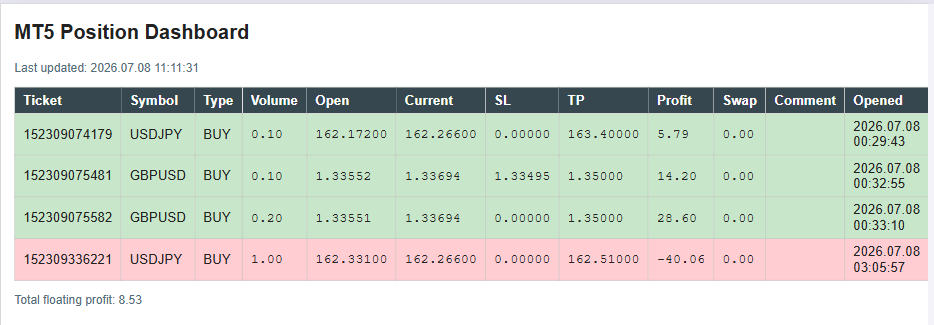
The generated HTML dashboard open in a browser on a white background, showing four open positions: three profitable rows with pale green tints and one losing row with a pale rose tint.
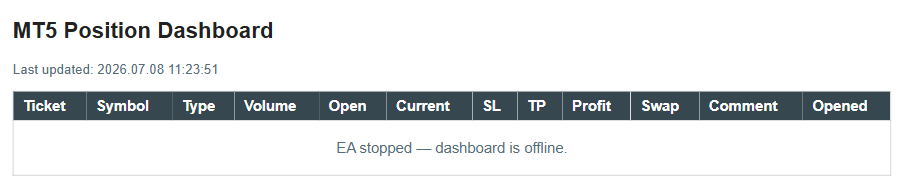
The browser showing the offline page written by OnDeinit() after the EA is removed from the chart, displaying "EA stopped — dashboard is offline." in place of position data.
Verification — TestHtmlBuilder.mq5
TestHtmlBuilder.mq5 is a standalone script that exercises CHtmlBuilder::Build() directly, without needing any real open positions or a running EA. It constructs position data by hand and asserts that the generated HTML contains the expected markers.
//+------------------------------------------------------------------+ //| TestHtmlBuilder.mq5 | //+------------------------------------------------------------------+ #include <PositionDashboard/PositionSnapshot.mqh> // Data structure shared by both the reader and the builder. #include <PositionDashboard/HtmlBuilder.mqh> // The class under test; no reader or writer is needed for this script. //--- ASSERT macro: evaluates a boolean condition and prints PASSED or //--- FAILED with the descriptive message; using a macro keeps call //--- sites concise without hiding the test logic in a function #define ASSERT(cond, msg) \ if(!(cond)) \ { PrintFormat("ASSERT FAILED : %s", msg); } \ else \ { PrintFormat("ASSERT PASSED : %s", msg); } //+-------------------------------------------------------------------+ //| Script entry point. | //| Constructs two hand-built snapshots (one profitable BUY, one | //| losing SELL) and one empty array, then asserts that the generated | //| HTML contains the expected color codes, direction labels, and | //| empty-state text without needing any live terminal positions. | //+-------------------------------------------------------------------+ void OnStart() { //--- build the profitable BUY snapshot: a long EURUSD position currently //--- in profit whose row should receive the green background color CPositionSnapshot winner; winner.ticket = 1001; winner.symbol = "EURUSD"; winner.type = POSITION_TYPE_BUY; winner.volume = 0.10; winner.open_price = 1.10000; winner.current_price = 1.10500; winner.stop_loss = 1.09500; winner.take_profit = 1.11000; winner.profit = 50.00; // Positive: should produce green. winner.swap = -0.50; winner.comment = "test winner"; winner.open_time = TimeCurrent(); //--- build the losing SELL snapshot: a short GBPUSD position currently //--- in loss whose row should receive the red background color CPositionSnapshot loser; loser.ticket = 1002; loser.symbol = "GBPUSD"; loser.type = POSITION_TYPE_SELL; loser.volume = 0.20; loser.open_price = 1.27000; loser.current_price = 1.27300; loser.stop_loss = 1.28000; loser.take_profit = 1.26000; loser.profit = -60.00; // Negative: should produce red. loser.swap = -1.00; loser.comment = "test loser"; loser.open_time = TimeCurrent(); //--- pack both snapshots into a local array for Build() CPositionSnapshot snapshots[]; ArrayResize(snapshots, 2); snapshots[0] = winner; snapshots[1] = loser; CHtmlBuilder builder(3, "Test Dashboard"); // Instantiate the builder; 3-second refresh and a generic title are sufficient for testing. string html = builder.Build(snapshots, 2, TimeCurrent()); // Generate the HTML page for both positions. //--- Assertion 1: pale green tint present. //--- ProfitColor() must return "#C8E6C9" for winner.profit = 50.00; //--- BuildTableRow() inserts that value as an inline background-color; //--- StringFind() returns -1 on failure, so >= 0 confirms presence. ASSERT(StringFind(html, "#C8E6C9") >= 0, "Pale green tint #C8E6C9 present for profitable BUY row"); //--- Assertion 2: pale rose tint present. //--- ProfitColor() must return "#FFCDD2" for loser.profit = -60.00. ASSERT(StringFind(html, "#FFCDD2") >= 0, "Pale rose tint #FFCDD2 present for losing SELL row"); //--- Assertion 3: BUY direction label present. //--- TypeString() on POSITION_TYPE_BUY must return "BUY" and //--- BuildTableRow() must insert it into a <td> element. ASSERT(StringFind(html, "BUY") >= 0, "BUY direction label present in generated page"); //--- Assertion 4: SELL direction label present. //--- TypeString() on POSITION_TYPE_SELL must return "SELL". ASSERT(StringFind(html, "SELL") >= 0, "SELL direction label present in generated page"); //--- Assertion 5: empty state text when count is zero. //--- Build() must take the count == 0 branch and call BuildEmptyState(), //--- which inserts the literal text "No open positions." CPositionSnapshot empty[]; ArrayResize(empty, 0); string empty_html = builder.Build(empty, 0, TimeCurrent()); ASSERT(StringFind(empty_html, "No open positions.") >= 0, "Empty-state text rendered when snapshot count is zero"); //--- build a snapshot whose comment contains a raw less-than sign; //--- EscapeHtml() must convert it to < before it reaches the page, //--- preventing the browser from interpreting it as an HTML tag CPositionSnapshot injected; injected.ticket = 1003; injected.symbol = "USDJPY"; injected.type = POSITION_TYPE_BUY; injected.volume = 0.10; injected.open_price = 150.000; injected.current_price = 150.500; injected.stop_loss = 149.000; injected.take_profit = 152.000; injected.profit = 33.00; injected.swap = -0.10; injected.comment = "<script>alert(1)</script>"; // Injection attempt via the free-text comment field. injected.open_time = TimeCurrent(); CPositionSnapshot injection_test[]; ArrayResize(injection_test, 1); injection_test[0] = injected; string injection_html = builder.Build(injection_test, 1, TimeCurrent()); //--- Assertion 6: raw <script> tag must NOT appear verbatim in the output. ASSERT(StringFind(injection_html, "<script>alert(1)</script>") < 0, "Raw <script> tag in comment is not present verbatim in output"); //--- Assertion 7: escaped form must appear instead, confirming EscapeHtml() ran. ASSERT(StringFind(injection_html, "<script>") >= 0, "Escaped <script> form IS present, confirming EscapeHtml()"); //--- Assertion 8: setInterval appears with the correct millisecond interval. //--- The builder multiplies m_refresh_seconds (3) by 1000; "3000" must //--- appear inside the <script> block of the generated page. ASSERT(StringFind(html, "3000") >= 0, "setInterval delay of 3000 ms present in page script block"); //--- all assertions have been printed above; check the Experts tab //--- for the pass/fail lines; no assertion should read FAILED Print("TestHtmlBuilder complete. Review the lines above for results."); } //+------------------------------------------------------------------+
The script builds two snapshots by hand, one profitable buy and one losing sell, then calls CHtmlBuilder::Build() twice: once with both snapshots and once with an empty array. Assertion 1 checks that the pale green tint #C8E6C9 appears in the output, confirming that ProfitColor() and BuildTableRow() connect correctly for a positive-profit position. Assertion 2 performs the same check for the pale rose tint #FFCDD2. Assertions 3 and 4 confirm that both direction strings appear in the page, verifying TypeString() output reaches the final HTML. Assertion 5 calls Build() with a zero-length array and confirms the empty-state message appears, verifying the count == 0 branch inside Build(). Assertions 6 and 7 test HTML injection defense: a snapshot whose comment contains a raw <script> tag must not appear verbatim in the output, and the escaped form <script> must appear instead, confirming EscapeHtml() ran. Assertion 8 confirms the setInterval millisecond value of 3000 is present in the page's script block.
Extending the Dashboard
A closed-trade summary panel could be added below the open positions table, showing today's realized profit and loss alongside the floating profit already displayed. This would require a second reader class built around the account history functions rather than the live position functions, filtering by today's date, and a corresponding section in CHtmlBuilder::Build() to render the totals.
A color-coded account equity gauge is another natural addition. Given a configurable drawdown threshold as an EA input, the dashboard could compare current equity against the account's starting balance or peak balance and render a simple bar showing how close the account is to that threshold, using the same pale color language already established for position rows.
Serving the HTML file over a local HTTP server, rather than relying on the trader to open the file directly, would let the dashboard be viewed from a phone or another computer on the same network without a shared file path. MQL5 alone cannot run an HTTP server; WebRequest() only makes outbound requests. This extension would need a small companion Python script running a local web server that reads the same HTML file from disk and serves it over HTTP, with the MQL5 side responsible only for keeping the file current.
Limitations
Writing the file on every tick is simple, but on a fast-moving symbol during high volatility this could mean dozens of writes per second. Each write is a full file truncate and rewrite, and on a slow disk or a heavily loaded terminal this could add measurable overhead. A straightforward approach is to add a minimum interval check inside OnTick(), using GetTickCount() to record the last write time and skip the write-and-build cycle unless enough time has passed, effectively decoupling the dashboard's refresh rate from the raw tick rate.
The dashboard file lives on the terminal machine's local disk. It cannot be opened directly from a different machine unless that file is placed on a shared network path or served over a web server, as discussed in Section 12.
The setInterval() and location.reload() approach causes a brief visual flicker on every reload, since the entire page is reloaded from scratch. This is an inherent property of a full page reload and cannot be avoided without moving to a more complex approach involving partial page updates through JavaScript fetch calls, which is beyond the scope of a self-contained static file.
The dashboard reflects positions across every symbol on the account, filtered only by the magic number input. A trader running this EA on a EURUSD chart will still see GBPUSD or gold positions in the same table, provided their magic number matches or the filter is left at zero.
Conclusion
Building this EA leaves the reader with four working pieces: the CPositionSnapshot struct that holds one position's data plus its display helpers, the CPositionReader class that turns the terminal's live position list into an array of those structs, the CHtmlBuilder class that renders that array into a complete styled HTML page, and the CHtmlWriter class that puts the finished page safely on disk. Together they deliver three concrete operational guarantees: the HTML file is overwritten in full on every tick so it always reflects current data, the browser refreshes itself at whatever interval the trader configures without any manual action, and the dashboard handles the zero-position case explicitly by showing a clear message rather than an empty or broken table.
The honest limitations are the write frequency on fast ticks, the file's dependence on local disk access unless extended with a network layer, the small visual flicker on each reload, and the lack of per-symbol filtering beyond the magic number. None of these limitations undermine the core design; they are starting points for the extensions described in Section 12 should the trader need them.
Programs used in the article:
| # | Name | Type | Description |
|---|---|---|---|
| 1 | PositionSnapshot.mqh | Include File | Defines the data structure that holds one open position's fields and two display helper methods. |
| 2 | PositionReader.mqh | Include File | Reads all open positions from the terminal on demand and stores them as an array of snapshot structures. |
| 3 | HtmlBuilder.mqh | Include File | Generates a complete, styled, self-refreshing HTML document string from an array of position snapshots. |
| 4 | HtmlWriter.mqh | Include File | Writes a finished HTML string to a file inside MQL5/Files, truncating any previous content. |
| 5 | PositionDashboard.mq5 | Demo EA | Runs the full read-build-write cycle on every tick and writes a final offline page on removal. |
| 6 | TestHtmlBuilder.mq5 | Script | Constructs sample position data by hand and asserts that the generated HTML contains the expected markers. |
| 7 | Position_Dashboard.zip | Zip Archive | Zip archive containing all the attached files and their paths relative to the terminal's root folder. |
Warning: All rights to these materials are reserved by MetaQuotes Ltd. Copying or reprinting of these materials in whole or in part is prohibited.
This article was written by a user of the site and reflects their personal views. MetaQuotes Ltd is not responsible for the accuracy of the information presented, nor for any consequences resulting from the use of the solutions, strategies or recommendations described.

 How to Research a Trading Idea: A Range Breakout Strategy Case Study
 Where should your stop-loss really sit? An MAE/MFE excursion analyzer in MQL5
 Developing a Multi-Currency Expert Advisor (Part 29): Improving the Conveyor
 Forecasting a Conditional Distribution Using MLP

- Free trading apps
- Over 8,000 signals for copying
- Economic news for exploring financial markets
You agree to website policy and terms of use