

Larry Williams Market Secrets (Part 13): Automating Hidden Smash Day Reversal Patterns
 6 136
6 136
 1
1

Introduction
In Long Term Secrets to Short Term Trading, Larry Williams introduces the Hidden Smash Day as a quieter, more “internal” version of the classic Smash Day. On the chart it looks simple: the bar doesn’t necessarily break an obvious prior high or low, yet it hints at exhaustion because the market fails to carry through when the next session tests the level. The setup is intentionally subtle, and Williams is clear about the key point: the Hidden Smash Day bar is not the trade—the trade only exists after confirmation on the following session, when price breaks the hidden level.
That subtlety is exactly why the pattern becomes frustrating in manual trading. As soon as you try to execute it by hand, it turns into an argument about definitions: where exactly does the “lower/upper portion of the range” begin, what counts as confirmation, whether the stop belongs on the smash bar structure or should expand with volatility, and how to avoid stacking overlapping positions when signals cluster.
If you’re approaching Williams’ work as an algo trader or developer, you don’t need interpretation—you need formal rules: identical conditions across instruments, the same next-session confirmation logic every time, and risk management that is reproducible in the strategy tester. The goal of this article is to translate Hidden Smash Day into unambiguous rules and implement them in MQL5 so that the signal, entry, SL/TP, and position size are calculated automatically and executed consistently on every run—without discretionary wiggle room.
Understanding Hidden Smash Day Reversal Patterns
A Hidden Smash Day is defined by the position of the closing price within the bar’s own range, combined with a comparison to the previous session’s close.
A bullish Hidden Smash Day setup requires four conditions:
- The bar must close higher than the previous bar.
- The bar’s range is measured from its own high to its own low.
- The closing price must lie within the lower twenty-five percent of that range.
- Optionally, the close may be required to remain below the bar’s open for stricter filtering.
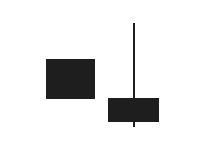
This structure reflects an up close that finishes weakly within its own range, indicating internal exhaustion despite a positive close.
A bearish Hidden Smash Day follows the inverse logic:
- The bar must close lower than the previous bar.
- Its range is defined by its own high and low.
- The close must lie within the upper twenty-five percent of that range.
- Optionally, the close may be required to remain above the open.

In both cases, the smash bar itself is only a setup. It does not trigger a trade. Confirmation is required on the next completed bar.
In this implementation, confirmation occurs only when the confirming bar closes beyond the smash bar's extreme. A buy signal requires a full bar close above the smash bar’s high. A sell signal requires a full bar close below the smash bar’s low.
This closing-price confirmation rule is used consistently throughout the article and the Expert Advisor.
Turning Hidden Smash Days Into Practical Trading Rules
Before automating anything, we had to decide how hidden smash day patterns should be traded in a controlled, repeatable way. The goal of this Expert Advisor is not to trade every possible signal, but to give structure to Larry Williams' idea while keeping flexibility in the trader's hands.
The first design rule concerns when decisions are made. All pattern detection and trade execution logic is evaluated only at the open of a new bar. This ensures that hidden smash day bars are fully formed and that confirmation bars have completed their session. By doing this, we avoid acting on partial price information and stay aligned with how the pattern is defined in the original work.
The second rule is confirmation before entry. A hidden smash day is never traded on its own. In this implementation, confirmation requires a full bar close beyond the smash bar’s extreme. For a buy setup, the next session must close above the high of the hidden smash bar. For a sell setup, the next session must close below its low. All evaluations are performed only at the opening of a new bar, ensuring that both the smash bar and its confirmation bar are fully completed before any trade is considered.
A major design decision in this Expert Advisor is explicit control over trade direction. The system allows three distinct operating modes. It can be restricted to long trades only, short trades only, or allowed to take both. This feature is intentionally exposed as a user input because hidden smash day patterns do not perform equally well in all market conditions. In some markets or periods, buy setups dominate, while in others, sell setups are more reliable. By allowing direction control, the EA becomes a research tool rather than a rigid black box.
Risk management is treated as a core component rather than an afterthought. The stop loss can be calculated in two different ways. One option places the stop loss at the structural level of the hidden smash day, using the pattern's high or low. The second option uses market volatility by applying a user-defined multiple of the Average True Range. This dual approach allows the system to adapt to both price structure and changing volatility conditions.
Position sizing is also flexible by design. The Expert Advisor supports manual lot sizing for traders who prefer fixed exposure, as well as automatic position sizing based on a percentage of account balance. When automatic sizing is enabled, each trade risks a consistent portion of capital, regardless of the symbol or volatility, helping maintain stable long-term performance.
Another important rule is position exclusivity. The Expert Advisor never opens more than one trade at a time. Before placing a new order, it always checks for existing open positions. This prevents overlapping trades, simplifies risk control, and makes performance analysis much clearer during testing.
Together, these rules define how hidden smash day patterns are transformed into a disciplined trading system. Each decision reflects Larry Williams' original intent while adding the structure required for automation, testing, and long-term evaluation.
Hidden Smash Day Strategy Execution Flow
If a new bar has opened
 Update ATR values

 If no open position exists

  Check for Hidden Smash Buy Setup at index two
  If the setup is valid
   Check if the confirming bar is closed above the smash bar high
   If confirmed
    Compute stop loss
    Compute the take profit
    Calculate position size
    Open buy order

  Check for Hidden Smash Sell Setup at index two
  If the setup is valid
   Check if the confirming bar is closed below the smash bar low
   If confirmed
    Compute stop loss
    Compute the take profit
    Calculate position size
    Open sell order
- Setup and confirmation are separated.
- Only completed bars are used.
- Stop and take profit are defined before execution.
- Risk is calculated before sending the order.
- Only one trade can exist at a time.
With this structure defined, the code becomes a direct expression of these steps.
Building the Hidden Smash Day Expert Advisor
This section marks the beginning of the practical implementation phase. Here, we start assembling the Hidden Smash Day Expert Advisor step by step, focusing on structure first before adding trading logic. The goal at this stage is not to trade yet, but to establish a clean and reliable foundation that can support more advanced behavior as development progresses.
Before moving forward, it is important to clarify a few prerequisites. This section assumes familiarity with the MQL5 programming language and its core syntax, including variables, functions, enumerations, and standard libraries. Prior experience using the MetaTrader 5 terminal is also expected, especially navigating charts, attaching Expert Advisors, and running tests. Finally, basic comfort with MetaEditor is required, including creating source files, compiling code, and inspecting compiler messages.
To encourage active learning, the completed Expert Advisor source file is attached to this article as lwHiddenSmashDayExpert.mq5. Keeping this file open in a separate tab while following along makes it easy to compare as new components are introduced.
With that context in place, we begin by creating a new empty Expert Advisor file in MetaEditor and pasting the initial boilerplate code shown below.
//+------------------------------------------------------------------+
//|                                       lwHiddenSmashDayExpert.mq5 |
//|          Copyright 2026, MetaQuotes Ltd. Developer is Chacha Ian |
//|                          https://www.mql5.com/en/users/chachaian |
//+------------------------------------------------------------------+

#property copyright "Copyright 2026, MetaQuotes Ltd. Developer is Chacha Ian"
#property link      "https://www.mql5.com/en/users/chachaian"
#property version   "1.00"

//+------------------------------------------------------------------+
//| Standard Libraries                                               |
//+------------------------------------------------------------------+
#include <Trade\Trade.mqh>

//+------------------------------------------------------------------+
//| Defines how stop loss levels are determined for smash day trades |
//+------------------------------------------------------------------+
enum ENUM_STOP_LOSS_MODE
{
   SL_ATR_BASED,
   SL_SMASH_BAR_STRUCTURE
};

//+------------------------------------------------------------------+
//| Defines the trade direction                                      |
//+------------------------------------------------------------------+
enum ENUM_TRADE_DIRECTION
{
   TRADE_LONG,
   TRADE_SHORT,
   TRADE_BOTH
};

enum ENUM_LOT_SIZE_INPUT_MODE
{
   MODE_MANUAL,
   MODE_AUTO
};

//+------------------------------------------------------------------+
//| User input variables                                             |
//+------------------------------------------------------------------+
input group "Information"
input ulong magicNumber          = 254700680002;
input ENUM_TIMEFRAMES timeframe  = PERIOD_CURRENT;

input group "ATR configuration parameters"
input int32_t atrPeriod          = 14;
input double  atrMultiplier      = 2.0;

input group "Trade and Risk Management"
input ENUM_STOP_LOSS_MODE smashStopLossMode = SL_SMASH_BAR_STRUCTURE;
input double rewardRiskRatio                = 3.0;
input ENUM_TRADE_DIRECTION direction        = TRADE_LONG;
input ENUM_LOT_SIZE_INPUT_MODE lotSizeMode  = MODE_AUTO;
input double riskPerTradePercent            = 1.0;
input double positionSize                   = 0.1;

//+------------------------------------------------------------------+
//| Global Variables                                                 |
//+------------------------------------------------------------------+
//--- Create a CTrade object to handle trading operations
CTrade Trade;

//--- To hep track current market prices for Buying (Ask) and Selling (Bid)
double askPrice;
double bidPrice;

//--- To store current time
datetime currentTime;

//--- To help track new bar open
datetime lastBarOpenTime;

//--- ATR Values
int atrHandle;
double atrValues [];

//--- Protective stops
double stopLossLevel;
double takeProfitLevel;

//+------------------------------------------------------------------+
//| Expert initialization function                                   |
//+------------------------------------------------------------------+
int OnInit(){

   //---  Assign a unique magic number to identify trades opened by this EA
   Trade.SetExpertMagicNumber(magicNumber);

   //--- Initialize global variables
   lastBarOpenTime = 0;

   //--- Initialize the ATR indicator
   atrHandle = iATR(_Symbol, timeframe, atrPeriod);
   if(atrHandle == INVALID_HANDLE){
      Print("Error while initializing the ATR indicator ", GetLastError());
      return(INIT_FAILED);
   }

   //--- Treat the following arrays as timeseries (index 0 becomes the most recent bar)
   ArraySetAsSeries(atrValues, true);

   return(INIT_SUCCEEDED);
}

//+------------------------------------------------------------------+
//| Expert deinitialization function                                 |
//+------------------------------------------------------------------+
void OnDeinit(const int reason){

   //--- Notify why the program stopped running
   Print("Program terminated! Reason code: ", reason);

   //--- Release ATR
   if(atrHandle != INVALID_HANDLE){
      if(IndicatorRelease(atrHandle)){
         Print("The computer memory tracking ATR has been freed.");
      }
   }
}

//+------------------------------------------------------------------+
//| Expert tick function                                             |
//+------------------------------------------------------------------+
void OnTick(){

   //--- Retrieve current market prices for trade execution
   askPrice    = SymbolInfoDouble (_Symbol, SYMBOL_ASK);
   bidPrice    = SymbolInfoDouble (_Symbol, SYMBOL_BID);
   currentTime = TimeCurrent();
}

//+------------------------------------------------------------------+
This code has not placed any trades yet. Instead, it defines the structure, configuration options, and core services that the EA will rely on later.
File Header and Identity
//+------------------------------------------------------------------+
//|                                       lwHiddenSmashDayExpert.mq5 |
//|          Copyright 2026, MetaQuotes Ltd. Developer is Chacha Ian |
//|                          https://www.mql5.com/en/users/chachaian |
//+------------------------------------------------------------------+

#property copyright "Copyright 2026, MetaQuotes Ltd. Developer is Chacha Ian"
#property link      "https://www.mql5.com/en/users/chachaian"
#property version   "1.00"
The opening section defines the Expert Advisor's identity. It specifies the file name, ownership, and version information. While this part does not directly affect trading logic, it plays an important role in code organization, clarity of authorship, and long-term maintenance. Defining these properties early helps ensure that future revisions remain traceable and professional.
Importing the Trading Library
The next step is importing the standard trading library.
//+------------------------------------------------------------------+
//| Standard Libraries                                               |
//+------------------------------------------------------------------+
#include <Trade\Trade.mqh>
This library provides access to the CTrade class, which is later used to execute buy and sell orders. By relying on this standard interface, order execution becomes safer, clearer, and more consistent with MetaTrader's internal trade handling.
At this stage, we only include the library. Actual order execution will be introduced later, once signal logic is in place.
Enumerations That Shape Behavior
Before defining inputs or logic, we introduce a set of enumerations.
//+------------------------------------------------------------------+
//| Defines how stop loss levels are determined for smash day trades |
//+------------------------------------------------------------------+
enum ENUM_STOP_LOSS_MODE
{
   SL_ATR_BASED,
   SL_SMASH_BAR_STRUCTURE
};

//+------------------------------------------------------------------+
//| Defines the trade direction                                      |
//+------------------------------------------------------------------+
enum ENUM_TRADE_DIRECTION
{
   TRADE_LONG,
   TRADE_SHORT,
   TRADE_BOTH
};

//+------------------------------------------------------------------+
//| To track lot size input mode                                     |
//+------------------------------------------------------------------+
enum ENUM_LOT_SIZE_INPUT_MODE
{
   MODE_MANUAL,
   MODE_AUTO
};
These enumerations formalize key design decisions and make the EA behavior explicit and configurable.
The first enumeration defines how stop loss levels are calculated. One mode-based stop is based on market volatility using ATR, while the other anchors stops to the structure of the hidden smash bar itself. This separation is deliberate and reflects two different schools of risk control.
The second enumeration defines trade direction. The EA can be restricted to long trades only, short trades only, or allowed to trade both directions. This is a critical design feature, as hidden smash day patterns do not always perform symmetrically across market conditions.
The final enumeration controls lot sizing behavior. Trades can be sized manually or calculated automatically based on account risk. This distinction allows the EA to function both as a fixed-size execution tool and as a risk-normalized research system.
By defining these options as enumerations, we avoid ambiguous boolean flags and make the EA configuration easier to read and reason about.
User Input Configuration
With the enumerations defined, we move on to user inputs. Inputs are grouped logically to keep the settings panel readable and intuitive.
//+------------------------------------------------------------------+
//| User input variables                                             |
//+------------------------------------------------------------------+
input group "Information"
input ulong magicNumber          = 254700680002;
input ENUM_TIMEFRAMES timeframe  = PERIOD_CURRENT;

input group "ATR configuration parameters"
input int32_t atrPeriod          = 14;
input double  atrMultiplier      = 2.0;

input group "Trade and Risk Management"
input ENUM_STOP_LOSS_MODE smashStopLossMode = SL_SMASH_BAR_STRUCTURE;
input double rewardRiskRatio                = 3.0;
input ENUM_TRADE_DIRECTION direction        = TRADE_LONG;
input ENUM_LOT_SIZE_INPUT_MODE lotSizeMode  = MODE_AUTO;
input double riskPerTradePercent            = 1.0;
input double positionSize                   = 0.1;
The Information group contains the magic number and timeframe. The magic number ensures that positions opened by this EA can always be identified and managed independently of other systems.
The ATR configuration group defines the period and multiplier used for ATR-based stop losses. These values control how volatility is translated into protective distance.
The Trade and Risk Management group brings together the most important behavioral controls. Here, the stop-loss mode, reward-to-risk ratio, trade direction, lot-sizing mode, and risk parameters are defined. Every one of these inputs directly affects how trades are sized, protected, and filtered.
At this stage, these inputs are declared but not yet used. Their purpose is to shape future logic rather than execute trades immediately.
Global State and Market Context
After inputs, we declare global variables. These variables allow different parts of the EA to share state cleanly.
//+------------------------------------------------------------------+
//| Global Variables                                                 |
//+------------------------------------------------------------------+
//--- Create a CTrade object to handle trading operations
CTrade Trade;

//--- To hep track current market prices for Buying (Ask) and Selling (Bid)
double askPrice;
double bidPrice;

//--- To store current time
datetime currentTime;

//--- To help track new bar open
datetime lastBarOpenTime;

//--- ATR Values
int atrHandle;
double atrValues [];

//--- Protective stops
double stopLossLevel;
double takeProfitLevel;
A CTrade object is created to handle order execution later. Market prices, such as ask and bid, are stored globally so they can be reused consistently across functions. The current server time is tracked for timing logic.
To support bar-based decision-making, a variable is reserved to track the most recent bar's open time. This enables precise detection of new trading sessions, which is essential for daily pattern analysis.
ATR-related variables are also declared. The indicator handle connects the EA to the ATR indicator, while the array stores recent ATR values. These values will later be used to calculate volatility-based stop losses.
Finally, placeholders for stop-loss and take-profit levels are defined. These variables will be populated only after valid trade signals appear.
Expert Initialization Logic
The initialization function prepares the EA to run.
//+------------------------------------------------------------------+
//| Expert initialization function                                   |
//+------------------------------------------------------------------+
int OnInit(){

   //---  Assign a unique magic number to identify trades opened by this EA
   Trade.SetExpertMagicNumber(magicNumber);

   //--- Initialize global variables
   lastBarOpenTime = 0;

   //--- Initialize the ATR indicator
   atrHandle = iATR(_Symbol, timeframe, atrPeriod);
   if(atrHandle == INVALID_HANDLE){
      Print("Error while initializing the ATR indicator ", GetLastError());
      return(INIT_FAILED);
   }

   //--- Treat the following arrays as timeseries (index 0 becomes the most recent bar)
   ArraySetAsSeries(atrValues, true);

   return(INIT_SUCCEEDED);
}
First, the magic number is assigned to the trading object. This ensures that all trades opened by this EA are tagged correctly.
Next, the bar tracking variable is initialized. Setting it to zero ensures that the first detected bar change is handled correctly.
The ATR indicator is then initialized using the configured timeframe and period. If this step fails, the EA stops immediately because ATR values are required for one of the supported stop-loss modes.
Finally, the ATR values array is configured as a time series. This ensures that the most recent ATR value is always available at index zero, simplifying future calculations.
At the end of initialization, the EA is fully prepared but still inactive for trading.
Deinitialization and Resource Cleanup
//+------------------------------------------------------------------+
//| Expert deinitialization function                                 |
//+------------------------------------------------------------------+
void OnDeinit(const int reason){

   //--- Notify why the program stopped running
   Print("Program terminated! Reason code: ", reason);

   //--- Release ATR
   if(atrHandle != INVALID_HANDLE){
      if(IndicatorRelease(atrHandle)){
         Print("The computer memory tracking ATR has been freed.");
      }
   }
}
When the Expert Advisor is removed or the terminal shuts down, the deinitialization function is called.
Here, a termination message is logged, and the ATR indicator handle is released. Releasing indicator handles is important to prevent memory leaks and ensure a clean shutdown, especially during repeated testing.
The Tick Function as a Placeholder
//+------------------------------------------------------------------+
//| Expert tick function                                             |
//+------------------------------------------------------------------+
void OnTick(){

   //--- Retrieve current market prices for trade execution
   askPrice    = SymbolInfoDouble (_Symbol, SYMBOL_ASK);
   bidPrice    = SymbolInfoDouble (_Symbol, SYMBOL_BID);
   currentTime = TimeCurrent();
}
At this early stage, the tick function performs only basic tasks. It updates market prices and records the current server time.
No trading decisions have been made yet. This is intentional. The tick function is kept minimal until all detection and risk logic is defined. This approach prevents premature complexity and keeps each development step focused.
Laying the Groundwork
At this point, the Expert Advisor does not trade. That is by design.
What we have built so far is a stable skeleton. It defines configuration options, establishes market context, prepares indicator access, and ensures clean startup and shutdown behavior. Every piece added here exists to support the logic that will follow.
In the next steps, we will begin introducing pattern detection, signal confirmation, and execution rules. Because the foundation is already in place, those additions will integrate cleanly and predictably into the existing structure.
This deliberate pacing is what allows the EA to remain readable, testable, and extensible as complexity increases.
With the foundation in place, we now begin assembling the trading logic piece by piece. Each addition serves a clear purpose and supports the decisions made earlier in the design. The goal in this section is not speed, but clarity. We introduce one component at a time, explain its role, and show how it fits into the broader structure of the Expert Advisor.
Detecting the Start of a New Trading Session
Hidden Smash Day patterns are evaluated on completed bars. For this reason, all trading decisions in this Expert Advisor are made at the opening of a new bar. To support this behavior, we first define a small utility function that tells us when a new bar has formed on the selected timeframe.
//+------------------------------------------------------------------+
//| Function to check if there's a new bar on a given chart timeframe|
//+------------------------------------------------------------------+
bool IsNewBar(string symbol, ENUM_TIMEFRAMES tf, datetime &lastTm){

   datetime currentTm = iTime(symbol, tf, 0);
   if(currentTm != lastTm){
      lastTm       = currentTm;
      return true;
   }
   return false;
}
This function should be added to the utility section of the code. The function compares the opening time of the most recent bar with a previously stored timestamp. When the value changes, a new bar has formed. The timestamp is then updated by reference, allowing the function to work consistently across ticks. To support this logic, a global variable is needed to store the last-known bar opening time.
//--- To help track new bar open
datetime lastBarOpenTime;
This variable is initialized during expert startup to ensure clean state tracking.
//+------------------------------------------------------------------+
//| Expert initialization function                                   |
//+------------------------------------------------------------------+
int OnInit(){

   ...

   //--- Initialize global variables
   lastBarOpenTime = 0;
}
From this point onward, the Expert Advisor has a reliable way to execute logic only once per bar.
Updating ATR Values for Risk Management
One of the stop-loss modes supported by this EA uses the Average True Range. To keep ATR values up to date, we define a function that refreshes the ATR buffer whenever a new bar is formed.
//+------------------------------------------------------------------+
//| To update ATR values                                             |
//+------------------------------------------------------------------+
void UpdateATRValues(){

   //--- Get some ATR Values
   int numberOfCopiedATRValues = CopyBuffer(atrHandle, 0, 0, 5, atrValues);
   if(numberOfCopiedATRValues == -1){
      Print("Error while copying ATR values: ", GetLastError());
   }
}
This function should be placed alongside other helper utilities. The function pulls the most recent ATR values into a time-series array, with index 0 always representing the latest value. This design keeps the stop-loss calculation logic simple and readable.
Inside OnTick, the ATR values are refreshed immediately after a new bar is detected.
//+------------------------------------------------------------------+
//| Returns true if the bar at index forms a Hidden Smash Day Buy Bar |
//| Logic aligned with indicator implementation                       |
//+------------------------------------------------------------------+
bool IsHiddenSmashDayBuyBar(string symbol, ENUM_TIMEFRAMES tf, int index, double closePercentThreshold = 25.0, bool allowBullishClose = true, bool allowBearishClose = true){

   //--- We need at least one previous bar
   if(index < 1){
      return false;
   }

   double high  = iHigh(symbol, tf, index);
   double low   = iLow(symbol, tf, index);
   double open  = iOpen(symbol, tf, index);
   double close = iClose(symbol, tf, index);

   double prevClose = iClose(symbol, tf, index + 1);

   double range = high - low;
   if(range <= 0.0)
      return false;

   //--- 1. Must close higher than previous bar
   if(close <= prevClose)
      return false;

   //--- 2. Close must be in lower portion of its own range
   double closePositionPercent = ((close - low) / range) * 100.0;
   if(closePositionPercent > closePercentThreshold)
      return false;

   //--- 3. Optional candle direction filter
   if(close > open && !allowBullishClose)
      return false;

   if(close < open && !allowBearishClose)
      return false;

   return true;
}
This function evaluates whether the closing price falls within the lower portion of the bar’s range, as defined by the percentage threshold. Optional parameters allow flexibility in whether bullish or bearish closes are permitted, reflecting Larry Williams’ observation that both cases can be valid.
A mirrored function is defined to detect bearish Hidden Smash Day bars.
//+--------------------------------------------------------------------+
//| Returns true if the bar at index forms a Hidden Smash Day Sell Bar |
//| Logic aligned with indicator implementation                        |
//+--------------------------------------------------------------------+
bool IsHiddenSmashDaySellBar(string symbol, ENUM_TIMEFRAMES tf, int index, double closePercentThreshold = 25.0, bool allowBullishClose = true, bool allowBearishClose = true){

   //--- We need at least one previous bar
   if(index < 1){
      return false;
   }

   double high  = iHigh(symbol, tf, index);
   double low   = iLow(symbol, tf, index);
   double open  = iOpen(symbol, tf, index);
   double close = iClose(symbol, tf, index);

   double prevClose = iClose(symbol, tf, index + 1);

   double range = high - low;
   if(range <= 0.0)
      return false;

   //--- 1. Must close lower than previous bar
   if(close >= prevClose)
      return false;

   //--- 2. Close must be in upper portion of its own range
   double closePositionPercent = ((high - close) / range) * 100.0;
   if(closePositionPercent > closePercentThreshold)
      return false;

   //--- 3. Optional candle direction filter
   if(close > open && !allowBullishClose)
      return false;

   if(close < open && !allowBearishClose)
      return false;

   return true;
}
These two functions form the foundation of pattern detection. At this stage, no trade signals are generated yet. We are only identifying candidate bars.
Confirming Valid Trade Signals
A Hidden Smash Day becomes actionable only after confirmation. Larry Williams specifies that confirmation occurs when the following session closes beyond the extreme of the smash bar. To formalize this rule, we define a confirmation function for bullish setups.
//+------------------------------------------------------------------+
//| Confirms a Hidden Smash Day Buy signal using a confirming bar    |
//+------------------------------------------------------------------+
bool IsHiddenSmashDayBuySignal(int confirmingBarIndex){

   int smashBarIndex = confirmingBarIndex + 1;

   //--- Verify smash bar exists and is valid
   if(!IsHiddenSmashDayBuyBar(_Symbol, timeframe, smashBarIndex))
      return false;

   //--- Confirmation requires a close above the smash bar high
   if(iClose(_Symbol, timeframe, confirmingBarIndex) >
      iHigh (_Symbol, timeframe, smashBarIndex)){
      return true;
   }

   return false;
}
The logic checks that a valid hidden smash bar exists and that the next bar closes above its high.
A mirrored function confirms bearish signals.
//+------------------------------------------------------------------+
//| Confirms a Hidden Smash Day Sell signal using a confirming bar   |
//+------------------------------------------------------------------+
bool IsHiddenSmashDaySellSignal(int confirmingBarIndex){

   int smashBarIndex = confirmingBarIndex + 1;

   //--- Verify smash bar exists and is valid
   if(!IsHiddenSmashDaySellBar(_Symbol, timeframe, smashBarIndex))
      return false;

   //--- Confirmation requires a close below the smash bar low
   if(iClose(_Symbol, timeframe, confirmingBarIndex) <
      iLow  (_Symbol, timeframe, smashBarIndex)){
      return true;
   }

   return false;
}
At this point, the Expert Advisor can objectively identify valid trade signals.
Enforcing a One-Position-at-a-Time Rule
To keep risk controlled and logic predictable, the EA is designed to hold only one open position at any time. Two helper functions enforce this rule.
//+------------------------------------------------------------------+
//| To verify whether this EA currently has an active buy position.  |                                 |
//+------------------------------------------------------------------+
bool IsThereAnActiveBuyPosition(ulong magic){

   for(int i = PositionsTotal() - 1; i >= 0; i--){
      ulong ticket = PositionGetTicket(i);
      if(ticket == 0){
         Print("Error while fetching position ticket ", _LastError);
         continue;
      }else{
         if(PositionGetInteger(POSITION_MAGIC) == magic && PositionGetInteger(POSITION_TYPE) == POSITION_TYPE_BUY){
            return true;
         }
      }
   }

   return false;
}

//+------------------------------------------------------------------+
//| To verify whether this EA currently has an active sell position. |                                 |
//+------------------------------------------------------------------+
bool IsThereAnActiveSellPosition(ulong magic){

   for(int i = PositionsTotal() - 1; i >= 0; i--){
      ulong ticket = PositionGetTicket(i);
      if(ticket == 0){
         Print("Error while fetching position ticket ", _LastError);
         continue;
      }else{
         if(PositionGetInteger(POSITION_MAGIC) == magic && PositionGetInteger(POSITION_TYPE) == POSITION_TYPE_SELL){
            return true;
         }
      }
   }

   return false;
}
These functions scan all open positions and return true if a trade with the EA’s magic number is already active. Before opening any new position, both checks are performed.
Computing Stop Loss and Take Profit Levels
Once a valid signal is detected, protective levels must be calculated. The stop loss function supports two modes: ATR-based and smash-bar-structure-based.
//+------------------------------------------------------------------+
//| Computes the stop loss level based on direction and SL mode      |
//+------------------------------------------------------------------+
double ComputeStopLossLevel(ENUM_TRADE_DIRECTION tDirection,
                            ENUM_STOP_LOSS_MODE  slMode,
                            int smashBarIndex)
{
   double slLevel = 0.0;

   //--- ATR based stop loss
   if(slMode == SL_ATR_BASED)
   {
      double atrValue = atrValues[0] * atrMultiplier;

      if(tDirection == TRADE_LONG)
         slLevel = askPrice - atrValue;
      else
         slLevel = bidPrice + atrValue;
   }
   //--- Smash bar structure based stop loss
   else if(slMode == SL_SMASH_BAR_STRUCTURE)
   {
      if(tDirection == TRADE_LONG)
         slLevel = iLow(_Symbol, timeframe, smashBarIndex);
      else
         slLevel = iHigh(_Symbol, timeframe, smashBarIndex);
   }

   return NormalizeDouble(slLevel, Digits());
}
In ATR mode, the stop loss is placed at a multiple of the current ATR away from the entry price. In structure mode, the stop loss is placed at the high or low of the smash bar itself. This flexibility allows different risk philosophies to be tested without changing code.
The take profit level is projected using a fixed reward-to-risk ratio.
//+------------------------------------------------------------------+
//| Computes the take profit level using risk reward ratio           |
//+------------------------------------------------------------------+
double ComputeTakeProfitLevel(ENUM_TRADE_DIRECTION tDirection,
                              double stopLoss)
{
   double entryPrice;
   double riskDistance;
   double takeProfit;

   if(tDirection == TRADE_LONG)
   {
      entryPrice   = askPrice;
      riskDistance = entryPrice - stopLossLevel;
      takeProfit   = entryPrice + (riskDistance * rewardRiskRatio);
   }
   else
   {
      entryPrice   = bidPrice;
      riskDistance = stopLossLevel - entryPrice;
      takeProfit   = entryPrice - (riskDistance * rewardRiskRatio);
   }

   return NormalizeDouble(takeProfit, Digits());
}
By tying take profit directly to risk, the EA maintains consistent position sizing and expectancy logic.
Executing Trades
A helper function is defined to compute automatic position sizing.
//+------------------------------------------------------------------+
//| Calculates position size using OrderCalcProfit for accuracy      |
//+------------------------------------------------------------------+
double CalculatePositionSizeByRisk(ENUM_ORDER_TYPE orderType, double entryPrice, double stopLossPrice){

   //--- Amount willing to risk
   double amountAtRisk = (riskPerTradePercent / 100.0) *
                         AccountInfoDouble(ACCOUNT_BALANCE);

   //--- Calculate loss for 1 lot
   double lossPerLot = 0.0;

   if(!OrderCalcProfit(orderType,
                       _Symbol,
                       1.0,              // 1 lot
                       entryPrice,
                       stopLossPrice,
                       lossPerLot))
   {
      Print("OrderCalcProfit failed: ", GetLastError());
      return 0.0;
   }

   // Loss will be negative for losing scenario
   lossPerLot = MathAbs(lossPerLot);

   if(lossPerLot <= 0.0)
      return 0.0;

   //--- Raw volume
   double volume = amountAtRisk / lossPerLot;

   //--- Apply broker constraints
   double minLot   = SymbolInfoDouble(_Symbol, SYMBOL_VOLUME_MIN);
   double maxLot   = SymbolInfoDouble(_Symbol, SYMBOL_VOLUME_MAX);
   double lotStep  = SymbolInfoDouble(_Symbol, SYMBOL_VOLUME_STEP);

   // Normalize to step
   volume = MathFloor(volume / lotStep) * lotStep;

   if(volume < minLot)
      volume = minLot;

   if(volume > maxLot)
      volume = maxLot;

   return NormalizeDouble(volume, 2);
}
Two simple wrapper functions handle trade execution.
//+------------------------------------------------------------------+
//| Calculates position size using OrderCalcProfit for accuracy      |
//+------------------------------------------------------------------+
double CalculatePositionSizeByRisk(ENUM_ORDER_TYPE orderType, double entryPrice, double stopLossPrice){

   //--- Amount willing to risk
   double amountAtRisk = (riskPerTradePercent / 100.0) *
                         AccountInfoDouble(ACCOUNT_BALANCE);

   //--- Calculate loss for 1 lot
   double lossPerLot = 0.0;

   if(!OrderCalcProfit(orderType,
                       _Symbol,
                       1.0,              // 1 lot
                       entryPrice,
                       stopLossPrice,
                       lossPerLot))
   {
      Print("OrderCalcProfit failed: ", GetLastError());
      return 0.0;
   }

   // Loss will be negative for losing scenario
   lossPerLot = MathAbs(lossPerLot);

   if(lossPerLot <= 0.0)
      return 0.0;

   //--- Raw volume
   double volume = amountAtRisk / lossPerLot;

   //--- Apply broker constraints
   double minLot   = SymbolInfoDouble(_Symbol, SYMBOL_VOLUME_MIN);
   double maxLot   = SymbolInfoDouble(_Symbol, SYMBOL_VOLUME_MAX);
   double lotStep  = SymbolInfoDouble(_Symbol, SYMBOL_VOLUME_STEP);

   // Normalize to step
   volume = MathFloor(volume / lotStep) * lotStep;

   if(volume < minLot)
      volume = minLot;

   if(volume > maxLot)
      volume = maxLot;

   return NormalizeDouble(volume, 2);
}

//+------------------------------------------------------------------+
//| Function to open a market buy position                           |
//+------------------------------------------------------------------+
bool OpenBuy(double entryPrice, double stopLoss, double takeProfit, double lotSize){

   if(lotSizeMode == MODE_AUTO){
      lotSize = CalculatePositionSizeByRisk(ORDER_TYPE_BUY, entryPrice, stopLoss);
   }

   if(!Trade.Buy(lotSize, _Symbol, entryPrice, stopLoss, takeProfit)){
      Print("Error while executing a market buy order: ", GetLastError());
      Print(Trade.ResultRetcode());
      Print(Trade.ResultComment());
      return false;
   }
   return true;
}

//+------------------------------------------------------------------+
//| Function to open a market sell position                          |
//+------------------------------------------------------------------+
bool OpenSell(double entryPrice, double stopLoss, double takeProfit, double lotSize){

   if(lotSizeMode == MODE_AUTO){
      lotSize = CalculatePositionSizeByRisk(ORDER_TYPE_SELL, entryPrice, stopLoss);
   }

   if(!Trade.Sell(lotSize, _Symbol, entryPrice, stopLoss, takeProfit)){
      Print("Error while executing a market sell order: ", GetLastError());
      Print(Trade.ResultRetcode());
      Print(Trade.ResultComment());
      return false;
   }
   return true;
}
If automatic lot sizing is enabled, the lot size is calculated based on the configured risk percentage. Otherwise, the manual position size is used. These functions isolate trade execution from signal logic, improving readability and maintainability.
Bringing Everything Together in OnTick
//+------------------------------------------------------------------+
//| Expert tick function                                             |
//+------------------------------------------------------------------+
void OnTick(){

   //--- Retrieve current market prices for trade execution
   askPrice    = SymbolInfoDouble (_Symbol, SYMBOL_ASK);
   bidPrice    = SymbolInfoDouble (_Symbol, SYMBOL_BID);
   currentTime = TimeCurrent();

   //--- Execute on new bar open
   if(IsNewBar(_Symbol, timeframe, lastBarOpenTime)){

      //--- Update ATR Values
      UpdateATRValues();

      if(IsHiddenSmashDayBuySignal(1)) {

         Print("New Bar!!!");
         stopLossLevel   = ComputeStopLossLevel(TRADE_LONG, smashStopLossMode, 2);
         takeProfitLevel = ComputeTakeProfitLevel(TRADE_LONG, stopLossLevel);

         if(!IsThereAnActiveBuyPosition(magicNumber) && !IsThereAnActiveSellPosition(magicNumber)){
            if(direction == TRADE_LONG || direction == TRADE_BOTH){
               OpenBuy(askPrice, stopLossLevel, takeProfitLevel, positionSize);
            }
         }
      }

      if(IsHiddenSmashDaySellSignal(1)){

         Print("New Bar!!!");
         stopLossLevel   = ComputeStopLossLevel(TRADE_SHORT, smashStopLossMode, 2);
         takeProfitLevel = ComputeTakeProfitLevel(TRADE_SHORT, stopLossLevel);

         if(!IsThereAnActiveBuyPosition(magicNumber) && !IsThereAnActiveSellPosition(magicNumber)){
            if(direction == TRADE_SHORT || direction == TRADE_BOTH){
               OpenSell(bidPrice, stopLossLevel, takeProfitLevel, positionSize);
            }
         }
      }
   }
}
All components come together inside the OnTick function. On each new bar, the EA:
- Updates ATR values
- Checks for confirmed buy or sell signals
- Verifies no active position exists
- Applies trade direction filtering
- Computes stop loss and take profit
- Executes the trade
This structured flow ensures that trades are only taken when all conditions align and that every decision is made on complete price information.
Preparing the Chart for Clear Testing
At this stage, the Expert Advisor logic is complete. Before moving into the testing phase, one more practical step is required. We need to ensure that the visual environment used during testing is clean and readable.
Strategy testing is not only about performance numbers. It is also about observation. We want to clearly see price action, candle structure, and trade placement without visual noise. Default chart settings are often cluttered and may hide important details, especially when reviewing entries and exits bar by bar.
To address this, we define a small utility function whose only responsibility is to configure the chart appearance.
//+------------------------------------------------------------------+
//| This function configures the chart's appearance.                 |
//+------------------------------------------------------------------+
bool ConfigureChartAppearance()
{
   if(!ChartSetInteger(0, CHART_COLOR_BACKGROUND, clrWhite)){
      Print("Error while setting chart background, ", GetLastError());
      return false;
   }

   if(!ChartSetInteger(0, CHART_SHOW_GRID, false)){
      Print("Error while setting chart grid, ", GetLastError());
      return false;
   }

   if(!ChartSetInteger(0, CHART_MODE, CHART_CANDLES)){
      Print("Error while setting chart mode, ", GetLastError());
      return false;
   }

   if(!ChartSetInteger(0, CHART_COLOR_FOREGROUND, clrBlack)){
      Print("Error while setting chart foreground, ", GetLastError());
      return false;
   }

   if(!ChartSetInteger(0, CHART_COLOR_CANDLE_BULL, clrSeaGreen)){
      Print("Error while setting bullish candles color, ", GetLastError());
      return false;
   }

   if(!ChartSetInteger(0, CHART_COLOR_CANDLE_BEAR, clrBlack)){
      Print("Error while setting bearish candles color, ", GetLastError());
      return false;
   }

   if(!ChartSetInteger(0, CHART_COLOR_CHART_UP, clrSeaGreen)){
      Print("Error while setting bearish candles color, ", GetLastError());
      return false;
   }

   if(!ChartSetInteger(0, CHART_COLOR_CHART_DOWN, clrBlack)){
      Print("Error while setting bearish candles color, ", GetLastError());
      return false;
   }

   return true;
}
This function should be added near the end of the source file, alongside other utility helpers. The function applies a high-contrast theme with a white background and clearly distinguishable bullish and bearish candles. Grid lines are disabled to reduce noise, and the chart is explicitly set to candlestick mode. Each setting is validated, and any failure is reported immediately. This approach ensures that when trades are reviewed visually, price structure and execution points are easy to interpret.
With the function defined, the final step is to call it during expert initialization. This ensures the chart is configured once, before any trading logic begins.
Inside the OnInit function, we add the following block.
//+------------------------------------------------------------------+
//| Expert initialization function                                   |
//+------------------------------------------------------------------+
int OnInit(){

   ...

   //--- To configure the chart's appearance
   if(!ConfigureChartAppearance()){
      Print("Error while configuring chart appearance", GetLastError());
      return INIT_FAILED;
   }

   return(INIT_SUCCEEDED);
}
By placing this call in OnInit, we guarantee that the visual environment is ready before testing or live execution begins. If the chart configuration fails for any reason, the Expert Advisor stops immediately rather than running in an unintended state.
With this final step completed, the Expert Advisor is not only logically complete but also properly prepared for analysis and testing. Both the decision logic and the visual feedback now work together, which is essential when evaluating a pattern-based strategy such as the Hidden Smash Day.
At this point, the Expert Advisor is fully functional. The complete implementation is provided in the attached file lwHiddenSmashDayExpert.mq5, allowing readers to inspect, test, and extend the logic without copying large blocks of code from the article.
This structured approach reflects the philosophy behind Larry Williams’ work: clear rules, disciplined execution, and respect for market structure. With the core logic in place, the next step is to test and evaluate how these hidden patterns behave across different markets and conditions.
Testing the Hidden Smash Day Expert Advisor
After completing the development phase, the next step is to verify that the Expert Advisor behaves exactly as intended. This involves two stages. First, a visual inspection of live charts confirms that the system correctly identifies hidden smash bars and opens positions in accordance with the defined rules. Second, historical testing allows the strategy to be evaluated under controlled conditions.
Visual Verification on Chart
The first step is confirming that the Expert Advisor accurately identifies hidden smash day patterns and executes trades only after proper confirmation.
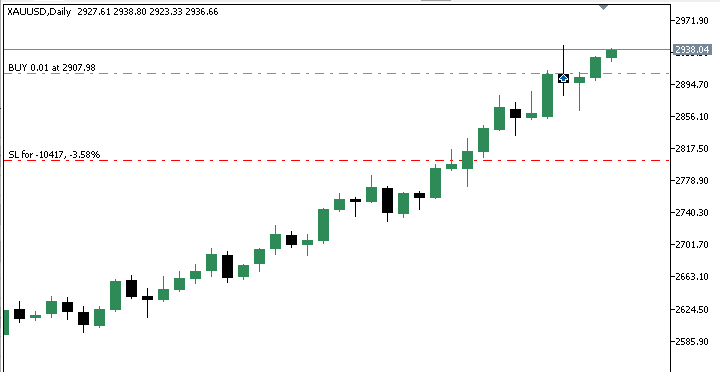
Two screenshots are presented at this stage. One shows an active long position.
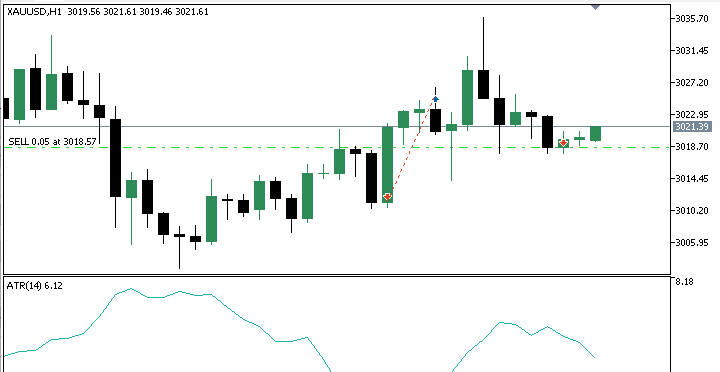
The other shows an active short position opened by the Expert Advisor.
In the long trade example, the hidden smash bar closes in the lower portion of its own range while still closing above the previous bar’s close. This satisfies the structural requirement of a bullish hidden smash day. The next bar then closes above the high of that smash bar, confirming the reversal. Once this confirmation bar completes, the Expert Advisor opens a long position at the opening of the new bar.
The short trade example mirrors the same logic. The hidden smash bar closes in the upper portion of its range while closing below the previous bar’s close. This establishes the bearish hidden smash setup. The following session then closes below the low of the smash bar, confirming the signal. At the opening of the next bar, the Expert Advisor allows a short position.
These examples confirm that the system correctly applies the rules established earlier in the article. The setup bar is detected properly, confirmation is required from a completed bar, and trades are executed only after the signal conditions have been satisfied.
Historical Performance Test
After confirming that the trading logic behaves correctly on the chart, the next step is evaluating the system using historical data.
A historical backtest was conducted on Gold XAUUSD using the daily timeframe. The testing period began on 1 January 2025 and extended to 28 February 2026, covering slightly more than one year of market activity.
During this test, the Expert Advisor was configured to allow both hidden smash day buy and sell setups. Automatic position sizing was enabled, with each trade risking one percent of the account balance.
To make the results fully reproducible, two supporting files are attached to the article. The first file, named configurations.ini, contains the Strategy Tester environment settings. The second file is named parameters.set contains the exact input parameters used during the test.
Backtest Results
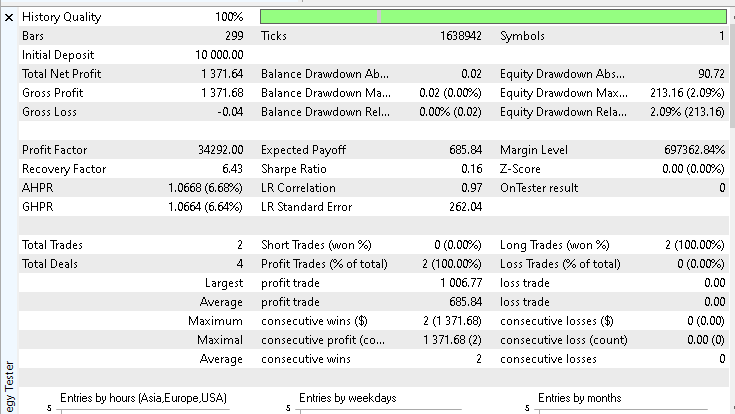
The test began with an initial account balance of 10,000 dollars. Over the test period, the system produced a net profit of 1,371.64 dollars, representing a return slightly above thirteen percent. The win rate during the test was 100%. Only long setups were triggered during this particular sample period.
The equity curve below shows a smooth upward progression, with no sharp drops or large drawdowns.
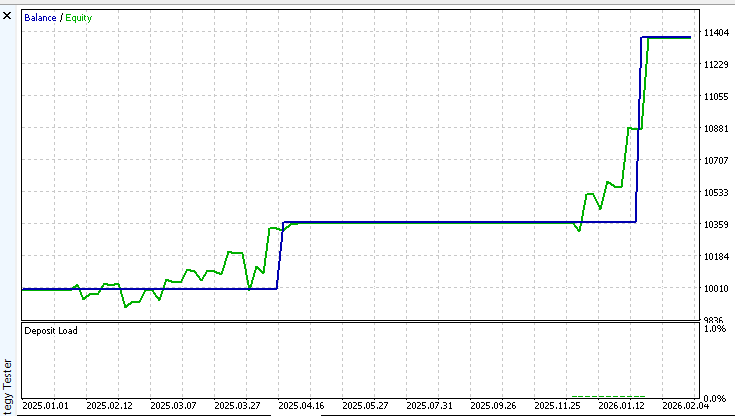
Predefined stop-loss rules controlled losses, and the one-position policy prevented overlapping exposure.
While these results are from a single configuration and market, they confirm that the Expert Advisor consistently executes the hidden smash day logic and produces stable equity behavior under the tested conditions.
Experimenting With the Strategy
One of the main goals of this project is to provide a structured research tool rather than a rigid trading system. The Expert Advisor exposes several parameters that allow experimentation. Direction mode, stop-loss method, reward-to-risk ratio, ATR configuration, and risk percentage can all be modified without changing the source code.
Running additional tests on other symbols, timeframes, or parameter combinations may reveal conditions where the hidden smash day pattern behaves differently or performs more effectively. Exploring these variations is strongly encouraged. Any interesting findings or improvements discovered during testing can be shared in the article comments so that others following the series can benefit from the discussion.
After this article, we can
- Identify hidden smash day setups using precise structural rules.
- Confirm signals using completed bar closes beyond the extreme of the smash bar.
- Execute trades automatically on new bars without discretionary interpretation.
- Control risk using either structural stops or ATR-based stops
- Test the strategy consistently in the MetaTrader Strategy Tester using reproducible settings.
System limitations
This implementation focuses solely on the core hidden-smash-day pattern and its confirmation logic. Several factors that may affect trading performance are intentionally excluded.
The Expert Advisor does not apply trend filters or market regime filters. It does not account for spread variation, trading sessions, or news events. Gap handling and advanced position management techniques are also outside the scope of this implementation.
These omissions are intentional. The purpose of this article is to build a clear and testable foundation that reflects the original pattern structure. Additional filters and extensions can be explored in future experiments or later parts of this series.
Conclusion
This article formalized the Hidden Smash Day reversal pattern into a complete and testable MQL5 Expert Advisor.
The setup rules were defined using measurable conditions based on the bar’s own range and its relationship to the previous close. Confirmation was strictly defined as a full bar close beyond the smash bar extreme. Trade decisions are made only at the open of a new bar to eliminate partial-bar ambiguity.
Risk management was integrated directly into the system. Stop loss can be placed structurally at the smash bar level or calculated using ATR. Profit is derived from a fixed reward-to-risk ratio. Automatic position sizing uses OrderCalcProfit to ensure consistent monetary risk across instruments.
After studying this article, it is now possible to:
- Detect Hidden Smash Day setups objectively.
- Apply a consistent closing-price confirmation rule.
- Execute trades only on fully completed bars.
- Choose between structural and volatility-based stops.
- Control exposure through accurate percentage-based risk.
- Reproduce test results using the provided configuration files.
The final result is a compile-ready Expert Advisor that implements the Hidden Smash Day pattern without discretionary interpretation. The framework can be tested, modified, and extended while preserving the original rule structure.
Attached Files Overview
To make replication and further research easier, all files used and referenced in this article are attached. The table below provides a brief description of each file and its purpose. These attachments allow the strategy to be reviewed, tested, and extended without ambiguity.
| File Name | Description |
|---|---|
| lwHiddenSmashDayExpert.mq5 | The complete Expert Advisor source code developed and explained in this article. |
| configurations.ini | Strategy Tester environment configuration used during the backtest. |
| parameters.set | Input parameter set used to reproduce the exact backtest results shown. |
Warning: All rights to these materials are reserved by MetaQuotes Ltd. Copying or reprinting of these materials in whole or in part is prohibited.
This article was written by a user of the site and reflects their personal views. MetaQuotes Ltd is not responsible for the accuracy of the information presented, nor for any consequences resulting from the use of the solutions, strategies or recommendations described.

 Engineering Trading Discipline into Code (Part 2): Building a Daily Trade Limit Enforcer for All Trades in MQL5
 Neural Networks in Trading: Integrating Chaos Theory into Time Series Forecasting (Final Part)
 MQL5 Trading Tools (Part 22): Graphing the Histogram and Probability Mass Function (PMF) of the Binomial Distribution
 The MQL5 Standard Library Explorer (Part 9): Using ALGLIB to Filter Excessive MA Crossover Signals

- Free trading apps
- Over 8,000 signals for copying
- Economic news for exploring financial markets
You agree to website policy and terms of use
Thanks for idea and shared codes..
with the exact same setting EA performed 4 BUY trades and 2 SL / 2 TP profit 508 usd // i think this caused by firm differences ?!?
tried D1 / H1 / M5 as EA-TF's but exactly same trades taken at same dates and same SL / TP results