

Die Komponenten View und Controller für Tabellen im MQL5 MVC-Paradigma: Veränderbare Elemente
 227
227
 2
2

Inhalt
- Einführung
- Verfeinerung von Basisklassen
- Tooltip-Klasse
- Veredelungskontrollen
- Testen des Ergebnisses
- Schlussfolgerung
Einführung
In modernen Nutzeroberflächen ist die Möglichkeit, die Größe von Elementen mit der Maus zu verändern, eine vertraute und erwartete Funktion. Der Nutzer kann den Rand eines Fensters, eines Bedienfelds oder eines anderen visuellen Blocks „greifen“ und ziehen und so die Größe des Elements in Echtzeit ändern. Eine solche Interaktivität erfordert eine gut durchdachte Architektur, um die Reaktionsfähigkeit und die korrekte Verarbeitung aller Ereignisse zu gewährleisten.
Einer der beliebtesten Architekturansätze für den Aufbau komplexer Schnittstellen ist MVC (Model-View-Controller). In diesem Paradigma:
- Model ist für Daten und Logik zuständig,
- View ist für die Anzeige von Daten und die visuelle Interaktion mit dem Nutzer zuständig,
- Controller ist für die Verarbeitung von Nutzerereignissen und die Kommunikation zwischen dem Modell und der Ansicht zuständig.
Im Zusammenhang mit der Größenänderung von Elementen mit der Maus findet die Hauptarbeit genau auf der Ebene der Ansichtskomponente statt. Es implementiert eine visuelle Darstellung des Elements, verfolgt Mausbewegungen, stellt fest, ob sich der Cursor auf der Begrenzung befindet, und zeigt entsprechende Tooltips an (z. B. Änderung der Cursorform). Die Komponente ist auch für das Rendern des in der Größe veränderten Elements während des Größenänderungsprozesses verantwortlich, wenn es gezogen wird.
Die Controller-Komponente kann sich an der Verarbeitung von Mausereignissen beteiligen, indem sie Befehle an die View-Komponente weitergibt und gegebenenfalls die Model-Komponente aktualisiert (z. B. wenn die Elementabmessungen gespeichert werden sollen oder wenn sie andere Daten betreffen).
Die Implementierung der mausbasierten Größenänderung ist ein typisches Beispiel für die Funktionsweise der View-Komponente in der MVC-Architektur, bei der die visuelle Interaktion und das Nutzerfeedback so interaktiv und visuell wie möglich umgesetzt werden.
Visuelle Tabellen (TableView, DataGrid, Spreadsheet, etc.) sind eines der Schlüsselelemente moderner Schnittstellen zur Anzeige und Bearbeitung von Tabellendaten. Der Nutzer erwartet, dass die Tabelle nicht nur die Daten anzeigt, sondern ihm auch bequeme Werkzeuge zur Verfügung stellt, mit denen er das Erscheinungsbild für seine Aufgaben anpassen kann.
Eine Funktion zur Größenänderung einer Tabelle und ihrer einzelnen Teile (Spaltenbreiten, Zeilenhöhen und Größen des gesamten Tabellenbereichs) mit der Maus ist der De-facto-Standard für das TableView-Steuerelement in professionellen Anwendungen. Die Verfügbarkeit einer solchen Funktionalität ermöglicht:
- Anpassung der Schnittstelle an den Umfang und die Struktur der Daten. Der Nutzer kann eine Spalte mit langen Werten erweitern oder uninformative Spalten eingrenzen.
- Verbesserung der Lesbarkeit und Wahrnehmung von Informationen. Die flexible Größenanpassung hilft, horizontales Scrollen und überflüssige leere Bereiche zu vermeiden.
- Schaffen wir das Gefühl einer „Live“-Oberfläche, wie man sie von Office- und Analyseprogrammen kennt.
- Wir implementieren komplexe Datenszenarien, bei denen sich die Größe von Zellen, Zeilen und Spalten dynamisch ändern kann.
Ohne Unterstützung der Größenänderung wird das TableView-Element statisch und ist für die Arbeit mit Daten ungeeignet. Daher ist die Implementierung des Mechanismus zur Größenänderung von Elementen mit der Maus ein integraler Bestandteil der Schaffung einer modernen, bequemen und professionellen Komponente der Tabelle.
Heute werden wir alle Elemente mit einer Funktion zur Größenänderung durch Ziehen der Kanten und Ecken des Elements mit der Maus hinzufügen. Gleichzeitig erscheinen im Bereich des Cursors grafische Tooltips – Pfeile, die in die Richtung der möglichen Größenänderung zeigen. Wenn wir den Mauszeiger über den Ziehbereich bewegen und klicken (den Bereich erfassen), wird der Größenänderungsmodus aktiviert. Wenn die Maus losgelassen wird, wird der Modus wieder ausgeschaltet. Alle Flags (Aktivierung des Bewegungsmodus und die Richtung der Größenänderung) werden in der Klasse der gemeinsamen Ressourcen festgelegt und sind in jedem grafischen Element lesbar.
Wir fügen allen Elementen neue Eigenschaften hinzu, mit denen sie in ihrer Größe verändert werden können.
Um diese Funktionalität zu implementieren, müssen lediglich die bereits erstellten Klassen verfeinert und eine neue Klasse zur Erstellung von Tooltips hinzugefügt werden. Tooltips sind eine Art von grafischen Elementen, die nach einer kurzen Verzögerung automatisch erscheinen, wenn der Mauszeiger über einem bestimmten Bereich eines grafischen Elements schwebt. Sie enthalten einen Beschreibungstext, ein grafisches Bild oder beides. Auf der Grundlage dieser Klasse können wir weitere Tooltips erstellen. Zum Beispiel Bilder von Pfeilen, die in der Nähe des Cursors erscheinen und die Richtung der Größenänderung anzeigen.
Heute werden wir genau solche Arten von Tooltips erstellen, nämlich doppelte horizontale, vertikale und diagonale Pfeile, die die Richtung der Bewegung von Kanten und Ecken des grafischen Elements angeben. Text-Tooltips können implementiert werden, nachdem das TableView-Steuerelement für die visuelle Gestaltung seiner Zellen, Spalten und Überschriften erstellt wurde.
Fahren wir mit dem Schreiben von Codes in den Bibliotheksdateien unter \MQL5\Indikatoren\Tabellen\Controls\ fort. Die vorherige Version aller Dateien finden Sie im vorherigen Artikel. Die Dateien Base.mqh und Control.mqh werden verfeinert.
Verfeinerung von Basisklassen
Wir öffnen die Datei Base.mqh und geben die Vorwärts-Deklaration der Tooltip-Klasse ein:
//+------------------------------------------------------------------+
//|                                                         Base.mqh |
//|                                  Copyright 2025, MetaQuotes Ltd. |
//|                                             https://www.mql5.com |
//+------------------------------------------------------------------+
#property copyright "Copyright 2025, MetaQuotes Ltd."
#property link      "https://www.mql5.com"

//+------------------------------------------------------------------+
//| Include libraries                                                |
//+------------------------------------------------------------------+
#include <Canvas\Canvas.mqh>              // CCanvas class
#include <Arrays\List.mqh>                // CList class

//--- Forward declaration of control element classes
class    CCounter;                        // Delay counter class
class    CAutoRepeat;                     // Event auto-repeat class
class    CImagePainter;                   // Image drawing class
class    CVisualHint;                     // Hint class
class    CLabel;                          // Text label class
class    CButton;                         // Simple button class
class    CButtonTriggered;                // Two-position button class
class    CButtonArrowUp;                  // Up arrow button class
class    CButtonArrowDown;                // Down arrow button class
class    CButtonArrowLeft;                // Left arrow button class
class    CButtonArrowRight;               // Right arrow button class
class    CCheckBox;                       // CheckBox control class
class    CRadioButton;                    // RadioButton control class
class    CScrollBarThumbH;                // Horizontal scrollbar slider class
class    CScrollBarThumbV;                // Vertical scrollbar slider class
class    CScrollBarH;                     // Horizontal scrollbar class
class    CScrollBarV;                     // Vertical scrollbar class
class    CPanel;                          // Panel control class
class    CGroupBox;                       // GroupBox control class
class    CContainer;                      // Container control class

//+------------------------------------------------------------------+
//| Macro substitutions                                              |
//+------------------------------------------------------------------+
Jedes Element sollte einen bestimmten Bereich entlang seiner Ränder haben, und wenn wir mit dem Mauszeiger darüber fahren, sollte die Größenänderung des Objekts aktiviert werden. Wir geben die Dicke dieser Zone in den Makrosubstitutionsblock ein:
//+------------------------------------------------------------------+
//| Macro substitutions                                              |
//+------------------------------------------------------------------+
#define  clrNULL              0x00FFFFFF  // Transparent color for CCanvas
#define  MARKER_START_DATA    -1          // Data start marker in a file
#define  DEF_FONTNAME         "Calibri"   // Default font
#define  DEF_FONTSIZE         10          // Default font size
#define  DEF_EDGE_THICKNESS   3           // Zone width to capture the border/corner

//+------------------------------------------------------------------+
//| Enumerations                                                     |
//+------------------------------------------------------------------+
Hinzufügen eines neuen Typs von „Hinweisobjekt“ zur Enumeration der grafischen Elementtypen:
//+------------------------------------------------------------------+
//| Enumerations                                                     |
//+------------------------------------------------------------------+
enum ENUM_ELEMENT_TYPE                    // Enumeration of graphical element types
  {
   ELEMENT_TYPE_BASE = 0x10000,           // Basic object of graphical elements
   ELEMENT_TYPE_COLOR,                    // Color object
   ELEMENT_TYPE_COLORS_ELEMENT,           // Color object of the graphical object element
   ELEMENT_TYPE_RECTANGLE_AREA,           // Rectangular area of the element
   ELEMENT_TYPE_IMAGE_PAINTER,            // Object for drawing images
   ELEMENT_TYPE_COUNTER,                  // Counter object
   ELEMENT_TYPE_AUTOREPEAT_CONTROL,       // Event auto-repeat object
   ELEMENT_TYPE_CANVAS_BASE,              // Basic canvas object for graphical elements
   ELEMENT_TYPE_ELEMENT_BASE,             // Basic object of graphical elements
   ELEMENT_TYPE_HINT,                     // Tooltip
   ELEMENT_TYPE_LABEL,                    // Text label
   ELEMENT_TYPE_BUTTON,                   // Simple button
   ELEMENT_TYPE_BUTTON_TRIGGERED,         // Two-position button
   ELEMENT_TYPE_BUTTON_ARROW_UP,          // Up arrow button
   ELEMENT_TYPE_BUTTON_ARROW_DOWN,        // Down arrow button
   ELEMENT_TYPE_BUTTON_ARROW_LEFT,        // Left arrow button
   ELEMENT_TYPE_BUTTON_ARROW_RIGHT,       // Right arrow button
   ELEMENT_TYPE_CHECKBOX,                 // CheckBox control
   ELEMENT_TYPE_RADIOBUTTON,              // RadioButton control
   ELEMENT_TYPE_SCROLLBAR_THUMB_H,        // Horizontal scroll bar slider
   ELEMENT_TYPE_SCROLLBAR_THUMB_V,        // Vertical scroll bar slider
   ELEMENT_TYPE_SCROLLBAR_H,              // ScrollBarHorisontal control
   ELEMENT_TYPE_SCROLLBAR_V,              // ScrollBarVertical control
   ELEMENT_TYPE_PANEL,                    // Panel control
   ELEMENT_TYPE_GROUPBOX,                 // GroupBox control
   ELEMENT_TYPE_CONTAINER,                // Container control
  };
#define  ACTIVE_ELEMENT_MIN   ELEMENT_TYPE_LABEL         // Minimum value of the list of active elements
#define  ACTIVE_ELEMENT_MAX   ELEMENT_TYPE_SCROLLBAR_V   // Maximum value of the list of active elements
Bei der Interaktion des Cursors mit einem Element im Zusammenhang mit der Größenänderung werden bestimmte Konzepte verwendet, z. B. die Position des Cursors auf einem der Ränder des Elements oder auf seinen Ecken sowie die zu einem bestimmten Zeitpunkt ausgeführte Aktion.
Hinzufügen neuer Enumerationen zur Beschreibung solcher Aktionen und Werte:
enum ENUM_CURSOR_REGION                   // Enumerate the cursor location on the element borders
  {
   CURSOR_REGION_NONE,                    // None
   CURSOR_REGION_TOP,                     // On the top border
   CURSOR_REGION_BOTTOM,                  // On the bottom border
   CURSOR_REGION_LEFT,                    // On the left border
   CURSOR_REGION_RIGHT,                   // On the right border
   CURSOR_REGION_LEFT_TOP,                // In the upper left corner
   CURSOR_REGION_LEFT_BOTTOM,             // In the lower left corner
   CURSOR_REGION_RIGHT_TOP,               // In the upper right corner
   CURSOR_REGION_RIGHT_BOTTOM,            // In the lower right corner
  };

enum ENUM_RESIZE_ZONE_ACTION              // List interactions with the element dragging zone
  {
   RESIZE_ZONE_ACTION_NONE,               // None
   RESIZE_ZONE_ACTION_HOVER,              // Hovering the cursor over the zone
   RESIZE_ZONE_ACTION_BEGIN,              // Start dragging
   RESIZE_ZONE_ACTION_DRAG,               // Dragging
   RESIZE_ZONE_ACTION_END                 // Finish dragging
  };

//+------------------------------------------------------------------+
//| Functions                                                        |
//+------------------------------------------------------------------+
Die Interaktion des Cursors mit den Elementgrenzen ist in fünf Meilensteine unterteilt:
- Keine Interaktion. Elementereignisse werden auf die übliche Weise behandelt.
- Der Mauszeiger befindet sich über dem Größenänderungsbereich. Neben dem Cursor sollten Pfeilspitzen angezeigt werden, die in die Richtung der möglichen Größenänderung zeigen. Hier können wir auch ein globales Flag setzen, das es anderen Elementen verbietet, auf Mausinteraktionsereignisse zu reagieren. Dieser Punkt ist derzeit noch nicht umgesetzt worden.
- Der Nutzer hat gerade auf die Maustaste geklickt und damit den Interaktionsbereich des grafischen Elements erfasst. Das öffentliche Flag des aktiven Größenänderungsmodus wird durch Ziehen der erfassten Kante oder Ecke gesetzt, Pfeil-Tooltips werden angezeigt und der Wert der Bewegungsrichtung wird im gemeinsamen Ressourcenmanager angegeben. Ein Handler für die Größenänderung eines grafischen Elements wird aufgerufen.
- Der Nutzer bewegt den Cursor mit dem Rand oder der Ecke des erfassten Elements. Die Richtung, in die die Fläche gezogen wird, wird in der allgemeinen Ressourcenverwaltung festgelegt. Abhängig von diesem Wert wird ein Handler zur Größenänderung eines grafischen Elements aufgerufen, Pfeil-Tooltips, die dem Cursor folgen, werden weiterhin angezeigt.
- Sobald der Nutzer die Maustaste loslässt, während der Größenänderungsmodus aktiv ist, werden alle im Manager für gemeinsam genutzte Ressourcen gesetzten Flags zurückgesetzt und die Pfeil-Tooltips werden ausgeblendet. Das Element hat nun eine neue Größe, die nach dem Bewegen des Cursors in Handlern zur Größenänderung des grafischen Elements geändert wurde.
Diese Logik soll heute umgesetzt werden. Wir werden das oben erwähnte Flag, das anderen Elementen verbietet, auf Mausinteraktionsereignisse zu reagieren, nicht implementieren, da es sich hierbei eher um Servicefunktionen zur Vereinfachung von Manipulationen mit der Größenänderungsfunktionalität unter Verwendung der Edge-Dragging-Methode handelt.
Wenn z. B. ein Rollbalken den unteren Rand eines Elements berührt, kann der Rollbalken auch auf die Interaktion mit dem Mauszeiger reagieren, wenn der Mauszeiger über diesem Rand schwebt. Und statt den Rand zu ziehen, aktivieren wir das Scrollen des Containerinhalts, da die Bildlaufleiste die Kontrolle übernimmt. Und wo haben wir die Elemente gesehen, die keinen Bereich zu erfassen haben? Wahrscheinlich nur irgendwo in den unvollendeten Kontrollen (wie hier im Moment). Die Implementierung einer solchen Dienstfunktionalität wird den ohnehin schon komplizierten Code der Grafikelementklassen noch komplizierter machen.
Fügen wir der Funktion, die eine Kurzbezeichnung des Elements nach Typ zurückgibt, einen neuen Wert für den Namen hinzu:
//+------------------------------------------------------------------+
//|  Return the short name of the element by type                    |
//+------------------------------------------------------------------+
string ElementShortName(const ENUM_ELEMENT_TYPE type)
  {
   switch(type)
     {
      case ELEMENT_TYPE_ELEMENT_BASE      :  return "BASE";    // Basic object of graphical elements
      case ELEMENT_TYPE_HINT              :  return "HNT";     // Tooltip
      case ELEMENT_TYPE_LABEL             :  return "LBL";     // Text label
      case ELEMENT_TYPE_BUTTON            :  return "SBTN";    // Simple button
      case ELEMENT_TYPE_BUTTON_TRIGGERED  :  return "TBTN";    // Toggle button
      case ELEMENT_TYPE_BUTTON_ARROW_UP   :  return "BTARU";   // Up arrow button
      case ELEMENT_TYPE_BUTTON_ARROW_DOWN :  return "BTARD";   // Down arrow button
      case ELEMENT_TYPE_BUTTON_ARROW_LEFT :  return "BTARL";   // Left arrow button
      case ELEMENT_TYPE_BUTTON_ARROW_RIGHT:  return "BTARR";   // Right arrow button
      case ELEMENT_TYPE_CHECKBOX          :  return "CHKB";    // CheckBox control
      case ELEMENT_TYPE_RADIOBUTTON       :  return "RBTN";    // RadioButton control
      case ELEMENT_TYPE_SCROLLBAR_THUMB_H :  return "THMBH";   // Horizontal scroll bar slider
      case ELEMENT_TYPE_SCROLLBAR_THUMB_V :  return "THMBV";   // Vertical scroll bar slider
      case ELEMENT_TYPE_SCROLLBAR_H       :  return "SCBH";    // ScrollBarHorisontal control
      case ELEMENT_TYPE_SCROLLBAR_V       :  return "SCBV";    // ScrollBarVertical control
      case ELEMENT_TYPE_PANEL             :  return "PNL";     // Panel control
      case ELEMENT_TYPE_GROUPBOX          :  return "GRBX";    // GroupBox control
      case ELEMENT_TYPE_CONTAINER         :  return "CNTR";    // Container control
      default                             :  return "Unknown"; // Unknown
     }
  }
In der Klasse des gemeinsamen Ressourcenmanagers fügen wir eine Funktion zum Abrufen und Zurückgeben der Mauszeiger-Koordinaten, des Größenänderungsmodus-Flags und der Elementkante hinzu:
//+------------------------------------------------------------------+
//| Singleton class for common flags and events of graphical elements|
//+------------------------------------------------------------------+
class CCommonManager
  {
private:
   static CCommonManager *m_instance;                          // Class instance
   string            m_element_name;                           // Active element name
   int               m_cursor_x;                               // X cursor coordinate
   int               m_cursor_y;                               // Y cursor coordinate
   bool              m_resize_mode;                            // Resize mode
   ENUM_CURSOR_REGION m_resize_region;                         // The edge of the element where the size is changed

//--- Constructor/destructor
                     CCommonManager(void) : m_element_name("") {}
                    ~CCommonManager() {}
public:
//--- Method for getting a Singleton instance
   static CCommonManager *GetInstance(void)
                       {
                        if(m_instance==NULL)
                           m_instance=new CCommonManager();
                        return m_instance;
                       }
//--- Method for destroying a Singleton instance
   static void       DestroyInstance(void)
                       {
                        if(m_instance!=NULL)
                          {
                           delete m_instance;
                           m_instance=NULL;
                          }
                       }
//--- (1) Set and (2) return the name of the active current element
   void              SetElementName(const string name)            { this.m_element_name=name;   }
   string            ElementName(void)                      const { return this.m_element_name; }

//--- (1) Set and (2) return the X cursor coordinate
   void              SetCursorX(const int x)                      { this.m_cursor_x=x;          }
   int               CursorX(void)                          const { return this.m_cursor_x;     }

//--- (1) Set and (2) return the Y cursor coordinate
   void              SetCursorY(const int y)                      { this.m_cursor_y=y;          }
   int               CursorY(void)                          const { return this.m_cursor_y;     }

//--- (1) Set and return (2) the resizing mode
   void              SetResizeMode(const bool flag)               { this.m_resize_mode=flag;    }
   bool              ResizeMode(void)                       const { return this.m_resize_mode;  }

//--- (1) Set and (2) return the element edge
   void              SetResizeRegion(const ENUM_CURSOR_REGION edge){ this.m_resize_region=edge; }
   ENUM_CURSOR_REGION ResizeRegion(void)                    const { return this.m_resize_region;}

  };
//--- Initialize a static instance variable of a class
CCommonManager* CCommonManager::m_instance=NULL;
Im Event-Handler werden die Cursor-Koordinaten in Klassenvariablen geschrieben und sind überall im Programm verfügbar, was den Zugriff auf die Koordinaten und ihre Verwendung in Steuerelementen vereinfacht. Indem wir das Flag für den Größenänderungsmodus und die Kante des Elements, mit dem der Cursor interagiert, in Variablen schreiben, ermöglichen wir es allen Elementen, diesen Modus zu „sehen“ und ihn entsprechend zu behandeln.
Verfeinerung der Basisklasse der grafischen Elemente Canvas. Wir deklarieren ein Flag, das anzeigt, dass die Elementgröße interaktiv geändert werden kann:
//+------------------------------------------------------------------+
//| Base class of graphical elements canvas                          |
//+------------------------------------------------------------------+
class CCanvasBase : public CBaseObj
  {
private:
   bool              m_chart_mouse_wheel_flag;                 // Flag for sending mouse wheel scroll messages
   bool              m_chart_mouse_move_flag;                  // Flag for sending mouse cursor movement messages
   bool              m_chart_object_create_flag;               // Flag for sending messages about the graphical object creation event
   bool              m_chart_mouse_scroll_flag;                // Flag for scrolling the chart with the left button and mouse wheel
   bool              m_chart_context_menu_flag;                // Flag of access to the context menu using the right click
   bool              m_chart_crosshair_tool_flag;              // Flag of access to the Crosshair tool using the middle click
   bool              m_flags_state;                            // State of the flags for scrolling the chart with the wheel, the context menu, and the crosshair

//--- Set chart restrictions (wheel scrolling, context menu, and crosshair)
   void              SetFlags(const bool flag);

protected:
   CCanvas           m_background;                             // Background canvas
   CCanvas           m_foreground;                             // Foreground canvas
   CBound            m_bound;                                  // Object boundaries
   CCanvasBase      *m_container;                              // Parent container object
   CColorElement     m_color_background;                       // Background color control object
   CColorElement     m_color_foreground;                       // Foreground color control object
   CColorElement     m_color_border;                           // Border color control object

   CColorElement     m_color_background_act;                   // Activated element background color control object
   CColorElement     m_color_foreground_act;                   // Activated element foreground color control object
   CColorElement     m_color_border_act;                       // Activated element frame color control object

   CAutoRepeat       m_autorepeat;                             // Event auto-repeat control object

   ENUM_ELEMENT_STATE m_state;                                 // Control state (e.g. buttons (on/off))
   long              m_chart_id;                               // Chart ID
   int               m_wnd;                                    // Chart subwindow index
   int               m_wnd_y;                                  // Cursor Y coordinate offset in the subwindow
   int               m_obj_x;                                  // Graphical object X coordinate
   int               m_obj_y;                                  // Graphical object Y coordinate
   uchar             m_alpha_bg;                               // Background transparency
   uchar             m_alpha_fg;                               // Foreground transparency
   uint              m_border_width_lt;                        // Left frame width
   uint              m_border_width_rt;                        // Right frame width
   uint              m_border_width_up;                        // Top frame width
   uint              m_border_width_dn;                        // Bottom frame width
   string            m_program_name;                           // Program name
   bool              m_hidden;                                 // Hidden object flag
   bool              m_blocked;                                // Blocked element flag
   bool              m_movable;                                // Moved element flag
   bool              m_resizable;                              // Resizing flag
   bool              m_focused;                                // Element flag in focus
   bool              m_main;                                   // Main object flag
   bool              m_autorepeat_flag;                        // Event sending auto-repeat flag
   bool              m_scroll_flag;                            // Flag for scrolling content using scrollbars
   bool              m_trim_flag;                              // Flag for clipping the element to the container borders
   int               m_cursor_delta_x;                         // Distance from the cursor to the left edge of the element
   int               m_cursor_delta_y;                         // Distance from the cursor to the top edge of the element
   int               m_z_order;                                // Graphical object Z-order
Wir fügen Methoden hinzu, mit denen das Größenänderungsmodus-Flag und die Interaktionszone vom Shared Resource Manager setzen und empfangen können:
//--- (1) Set, return (2) the name and (3) the active element flag
   void              SetActiveElementName(const string name)   { CCommonManager::GetInstance().SetElementName(name);                               }
   string            ActiveElementName(void)             const { return CCommonManager::GetInstance().ElementName();                               }
   bool              IsCurrentActiveElement(void)        const { return this.ActiveElementName()==this.NameFG();                                   }

//--- (1) Set and (2) return the resize mode flag
   void              SetResizeMode(const bool flag)            { CCommonManager::GetInstance().SetResizeMode(flag);                                }
   bool              ResizeMode(void)                    const { return CCommonManager::GetInstance().ResizeMode();                                }

//--- (1) Set and (2) return the element edge, above which the size is changed
   void              SetResizeRegion(const ENUM_CURSOR_REGION edge){ CCommonManager::GetInstance().SetResizeRegion(edge);                          }
   ENUM_CURSOR_REGION ResizeRegion(void)                 const { return CCommonManager::GetInstance().ResizeRegion();                              }

//--- Return the offset of the initial drawing coordinates on the canvas relative to the canvas and the object coordinates
Jetzt kann jedes grafische Element Daten über den Größenänderungsmodus, der allen Elementen gemeinsam ist, einstellen und empfangen.
Wenn wir die Größe des Elements durch Ziehen über den linken oder oberen Rand oder über die an diese Ränder angrenzenden Ecken ändern, müssen wir auch die Koordinaten zusammen mit der Größenänderung des Elements verschieben. Das Testen der sequentiellen Anwendung separater Methoden zum Verschieben von Koordinaten und zur Größenänderung eines Elements deutet darauf hin, dass es innerhalb des Intervalls zwischen den Aufrufen von zwei Methoden möglich ist, das Chart durch das Terminal mit Neuzeichnung zu aktualisieren. Dies führt dazu, dass beim Ziehen der Ränder des Elements zur Größenänderung Artefakte auf dem Chart in Form von Blitzen der vorherigen, unveränderten Größe des Elements zu sehen sind.
Um solche unangenehmen visuellen Effekte zu vermeiden, ist es notwendig, die Verzögerung zwischen der Größenänderung und der Verschiebung der Koordinate zu verringern. Dazu implementieren (deklarieren) wir eine separate Methode, bei der sowohl die Größe als auch die Koordinaten des Elements sofort geändert werden:
//--- Set the graphical object (1) X, (2) Y and (3) both coordinates
   bool              ObjectSetX(const int x);
   bool              ObjectSetY(const int y);
   bool              ObjectSetXY(const int x,const int y)      { return(this.ObjectSetX(x) && this.ObjectSetY(y));                                 }

//--- Set both the coordinates and dimensions of a graphical object
   virtual bool      ObjectSetXYWidthResize(const int x,const int y,const int w,const int h);
Wir brauchen eine Methode, die die Position des Cursors innerhalb der Grenzen des grafischen Elements zurückgibt. Deklarieren wir eine solche Methode:
//--- (1) Set and (2) relocate the graphical object by the specified coordinates/offset size
   bool              ObjectMove(const int x,const int y)       { return this.ObjectSetXY(x,y);                                                     }
   bool              ObjectShift(const int dx,const int dy)    { return this.ObjectSetXY(this.ObjectX()+dx,this.ObjectY()+dy);                     }

//--- Returns the flag indicating whether the cursor is inside the object
   bool              Contains(const int x,const int y);
//--- Return the cursor location on the object borders
   ENUM_CURSOR_REGION CheckResizeZone(const int x,const int y);
Wir deklarieren virtuelle Handler zur Behandlung von Cursor-Interaktionsereignissen an den Grenzen eines Elements, um dessen Größe zu ändern:
//--- Cursor hovering (Focus), (2) button click (Press),
//--- (3) cursor moving (Move), (4) leaving focus (Release), (5) graphical object creation (Create),
//--- (6) wheel scrolling (Wheel) and (7) resizing (Resize) event handlers. Redefined in descendants.
   virtual void      OnFocusEvent(const int id, const long lparam, const double dparam, const string sparam);
   virtual void      OnPressEvent(const int id, const long lparam, const double dparam, const string sparam);
   virtual void      OnMoveEvent(const int id, const long lparam, const double dparam, const string sparam);
   virtual void      OnReleaseEvent(const int id, const long lparam, const double dparam, const string sparam);
   virtual void      OnCreateEvent(const int id, const long lparam, const double dparam, const string sparam);
   virtual void      OnWheelEvent(const int id, const long lparam, const double dparam, const string sparam)         { return;         }  // handler is disabled here
   virtual void      OnResizeZoneEvent(const int id, const long lparam, const double dparam, const string sparam)    { return;         }  // handler is disabled here

//--- Handlers for resizing the element by sides and corners
   virtual bool      OnResizeZoneLeft(const int x, const int y)                                                      { return false;   }  // handler is disabled here
   virtual bool      OnResizeZoneRight(const int x, const int y)                                                     { return false;   }  // handler is disabled here
   virtual bool      OnResizeZoneTop(const int x, const int y)                                                       { return false;   }  // handler is disabled here
   virtual bool      OnResizeZoneBottom(const int x, const int y)                                                    { return false;   }  // handler is disabled here
   virtual bool      OnResizeZoneLeftTop(const int x, const int y)                                                   { return false;   }  // handler is disabled here
   virtual bool      OnResizeZoneRightTop(const int x, const int y)                                                  { return false;   }  // handler is disabled here
   virtual bool      OnResizeZoneLeftBottom(const int x, const int y)                                                { return false;   }  // handler is disabled here
   virtual bool      OnResizeZoneRightBottom(const int x, const int y)                                               { return false;   }  // handler is disabled here
Wir werden diese Handler in geerbten Klassen implementieren.
Hinzufügen von Methoden, die einige Objekt-Flags zurückgeben, was bisher nicht der Fall war:
//--- Return (1) the object's belonging to the program, the flag (2) of a hidden element, (3) a blocked element,
//--- (4) moved, (5) resized, (6) main element, (7) in focus, (8, 9) graphical object name (background, text)
   bool              IsBelongsToThis(const string name)  const { return(::ObjectGetString(this.m_chart_id,name,OBJPROP_TEXT)==this.m_program_name);}
   bool              IsHidden(void)                      const { return this.m_hidden;                                                             }
   bool              IsBlocked(void)                     const { return this.m_blocked;                                                            }
   bool              IsMovable(void)                     const { return this.m_movable;                                                            }
   bool              IsResizable(void)                   const { return this.m_resizable;                                                          }
   bool              IsMain(void)                        const { return this.m_main;                                                               }
   bool              IsFocused(void)                     const { return this.m_focused;                                                            }
   bool              IsAutorepeat(void)                  const { return this.m_autorepeat_flag;                                                    }
   bool              IsScrollable(void)                  const { return this.m_scroll_flag;                                                        }
   bool              IsTrimmed(void)                     const { return this.m_trim_flag;                                                          }
   string            NameBG(void)                        const { return this.m_background.ChartObjectName();                                       }
   string            NameFG(void)                        const { return this.m_foreground.ChartObjectName();                                       }
und von Methoden zum Setzen dieser Flags:
//--- Set (1) movability, (2) main object flag for the object and (3) resizability
   void              SetMovable(const bool flag)               { this.m_movable=flag;                                                              }
   void              SetAsMain(void)                           { this.m_main=true;                                                                 }
   virtual void      SetResizable(const bool flag)             { this.m_resizable=flag;                                                            }
   void              SetAutorepeat(const bool flag)            { this.m_autorepeat_flag=flag;                                                      }
   void              SetScrollable(const bool flag)            { this.m_scroll_flag=flag;                                                          }
   void              SetTrimmered(const bool flag)             { this.m_trim_flag=flag;                                                            }
Wir deklarieren eine Methode, die gleichzeitig die Größe des Elements ändert und es zu neuen Koordinaten verschiebt:
//--- Set the new (1) X, (2) Y, (3) XY coordinate for the object
   virtual bool      MoveX(const int x);
   virtual bool      MoveY(const int y);
   virtual bool      Move(const int x,const int y);

//--- Set both the element coordinates and dimensions
   virtual bool      MoveXYWidthResize(const int x,const int y,const int w,const int h);
In den Konstruktoren der Klasse setzen wir in der Initialisierungsliste den Standardwert für das Größenänderungskennzeichen des Elements:
//--- Constructors/destructor
                     CCanvasBase(void) :
                        m_program_name(::MQLInfoString(MQL_PROGRAM_NAME)), m_chart_id(::ChartID()), m_wnd(0), m_alpha_bg(0), m_alpha_fg(255),
                        m_hidden(false), m_blocked(false), m_focused(false), m_movable(false), m_resizable(false), m_main(false), m_autorepeat_flag(false), m_trim_flag(true), m_scroll_flag(false),
                        m_border_width_lt(0), m_border_width_rt(0), m_border_width_up(0), m_border_width_dn(0), m_z_order(0),
                        m_state(0), m_wnd_y(0), m_cursor_delta_x(0), m_cursor_delta_y(0) { this.Init(); }
                     CCanvasBase(const string object_name,const long chart_id,const int wnd,const int x,const int y,const int w,const int h);
                    ~CCanvasBase(void);
  };
//+------------------------------------------------------------------+
//| CCanvasBase::Constructor                                         |
//+------------------------------------------------------------------+
CCanvasBase::CCanvasBase(const string object_name,const long chart_id,const int wnd,const int x,const int y,const int w,const int h) :
   m_program_name(::MQLInfoString(MQL_PROGRAM_NAME)), m_wnd(wnd<0 ? 0 : wnd), m_alpha_bg(0), m_alpha_fg(255),
   m_hidden(false), m_blocked(false), m_focused(false), m_movable(false), m_resizable(false), m_main(false), m_autorepeat_flag(false), m_trim_flag(true), m_scroll_flag(false),
   m_border_width_lt(0), m_border_width_rt(0), m_border_width_up(0), m_border_width_dn(0), m_z_order(0),
   m_state(0), m_cursor_delta_x(0), m_cursor_delta_y(0)
  {
//--- Get the adjusted chart ID and the distance in pixels along the vertical Y axis
//--- between the upper frame of the indicator subwindow and the upper frame of the chart main window
   this.m_chart_id=this.CorrectChartID(chart_id);

//--- If the graphical resource and graphical object are created
   if(this.Create(this.m_chart_id,this.m_wnd,object_name,x,y,w,h))
     {
      //--- Clear the background and foreground canvases and set the initial coordinate values,
      //--- names of graphic objects and properties of text drawn in the foreground
      this.Clear(false);
      this.m_obj_x=x;
      this.m_obj_y=y;
      this.m_color_background.SetName("Background");
      this.m_color_foreground.SetName("Foreground");
      this.m_color_border.SetName("Border");
      this.m_foreground.FontSet(DEF_FONTNAME,-DEF_FONTSIZE*10,FW_MEDIUM);
      this.m_bound.SetName("Perimeter");

      //--- Remember permissions for the mouse and chart tools
      this.Init();
     }
  }
Außerhalb des Klassenkörpers schreiben wir die deklarierten Methoden.
Eine Methode, die die Position des Cursors auf den Objektgrenzen zurückgibt:
//+--------------------------------------------------------------------+
//|CCanvasBase::Return the cursor location on the object borders       |
//+--------------------------------------------------------------------+
ENUM_CURSOR_REGION CCanvasBase::CheckResizeZone(const int x,const int y)
  {
//--- Coordinates of the element borders
   int top=this.Y();
   int bottom=this.Bottom();
   int left=this.X();
   int right=this.Right();

//--- If outside the object, return CURSOR_REGION_NONE
   if(x<left || x>right || y<top || y>bottom)
      return CURSOR_REGION_NONE;

//--- Left edge and corners
   if(x>=left && x<=left+DEF_EDGE_THICKNESS)
     {
      //--- Upper left corner
      if(y>=top && y<=top+DEF_EDGE_THICKNESS)
         return CURSOR_REGION_LEFT_TOP;
      //--- Bottom left corner
      if(y>=bottom-DEF_EDGE_THICKNESS && y<=bottom)
         return CURSOR_REGION_LEFT_BOTTOM;
      //--- Left edge
      return CURSOR_REGION_LEFT;
     }

//--- Right edge and corners
   if(x>=right-DEF_EDGE_THICKNESS && x<=right)
     {
      //--- Upper right corner
      if(y>=top && y<=top+DEF_EDGE_THICKNESS)
         return CURSOR_REGION_RIGHT_TOP;
      //--- Bottom right corner
      if(y>=bottom-DEF_EDGE_THICKNESS && y<=bottom)
         return CURSOR_REGION_RIGHT_BOTTOM;
      //--- Right side
      return CURSOR_REGION_RIGHT;
     }

//--- Upper edge
   if(y>=top && y<=top+DEF_EDGE_THICKNESS)
      return CURSOR_REGION_TOP;

//--- Bottom edge
   if(y>=bottom-DEF_EDGE_THICKNESS && y<=bottom)
      return CURSOR_REGION_BOTTOM;

//--- The cursor is not on the edges of the element
   return CURSOR_REGION_NONE;
  }
Die Methode prüft, ob sich der Cursor innerhalb eines schmalen Balkens der Dicke DEF_EDGE_THICKNESS um den Umfang der Elementgrenzen befindet und gibt die Fläche oder den Winkel zurück, auf die der Cursor fällt.
Eine Methode, die gleichzeitig die Koordinaten und Abmessungen eines grafischen Objekts festlegt:
//+------------------------------------------------------------------+
//| CCanvasBase::Set coordinates                                     |
//| and size of the graphical object simultaneously                  |
//+------------------------------------------------------------------+
bool CCanvasBase::ObjectSetXYWidthResize(const int x,const int y,const int w,const int h)
  {
//--- If new coordinates are set, return the resize result
   if(this.ObjectSetXY(x,y))
      return this.ObjectResize(w,h);
//--- Failed to set new coordinates - return 'false'
   return false;
  }
Wenn die Koordinaten des Objekts erfolgreich gesetzt wurden, wird das Ergebnis der Größenänderung des grafischen Objekts zurückgegeben. Die Methoden, die innerhalb dieser Methode arbeiten, sprechen die Eigenschaften des grafischen Objekts direkt an, was zu einer geringeren Verzögerung führt als bei der Verwendung von Methoden, die die Größe eines Elements ändern und es zu neuen Koordinaten verschieben, da sie zusätzlich andere Operationen mit seinen Eigenschaften durchführen.
Eine Methode, die gleichzeitig die Koordinaten und Abmessungen eines Elements festlegt:
//+------------------------------------------------------------------+
//| CCanvasBase::Set both the element coordinates and dimensions     |
//+------------------------------------------------------------------+
bool CCanvasBase::MoveXYWidthResize(const int x,const int y,const int w,const int h)
  {
   if(!this.ObjectSetXYWidthResize(x,y,w,h))
      return false;
   this.BoundMove(x,y);
   this.BoundResize(w,h);
   if(!this.ObjectTrim())
     {
      this.Update(false);
      this.Draw(false);
     }
   return true;
  }
Zunächst wird eine Methode aufgerufen, die gleichzeitig die Koordinaten und Abmessungen des grafischen Objekts festlegt. Und dann werden die Eigenschaften des grafischen Elements festgelegt. Anschließend wird das Element auf die Größe seines Containers zugeschnitten.
Verfeinern wir die Ereignisbehandlung so, dass die Größenänderung eines Elements behandelt werden kann, für das die Erlaubnis zur Größenänderung durch den Mauszeiger festgelegt ist. Bei der Erstellung von neuen grafischen Objekten sollte ein solches Ereignis nur von Containerelementen behandelt werden. Hier schreiben wir die Koordinaten des Cursors in den Ressourcenmanager:
//+------------------------------------------------------------------+
//| CCanvasBase::Event handler                                       |
//+------------------------------------------------------------------+
void CCanvasBase::OnChartEvent(const int id,const long& lparam,const double& dparam,const string& sparam)
  {
//--- Chart change event
   if(id==CHARTEVENT_CHART_CHANGE)
     {
      //--- adjust the distance between the upper frame of the indicator subwindow and the upper frame of the chart main window
      this.m_wnd_y=(int)::ChartGetInteger(this.m_chart_id,CHART_WINDOW_YDISTANCE,this.m_wnd);
     }

//--- Graphical object creation event
   if(id==CHARTEVENT_OBJECT_CREATE)
     {
      //--- If this is not a container element, leave
      if(this.Type()<ELEMENT_TYPE_PANEL)
         return;
      //--- Call the handler for creating the graphical object
      this.OnCreateEvent(id,lparam,dparam,sparam);
     }

//--- If the element is blocked or hidden, leave
   if(this.IsBlocked() || this.IsHidden())
      return;

   //--- Mouse cursor coordinates
   int x=(int)lparam;
   int y=(int)dparam-this.m_wnd_y;  // Adjust Y by the height of the indicator window

//--- Cursor move event
   if(id==CHARTEVENT_MOUSE_MOVE)
     {
      //--- Send the cursor coordinates to the resource manager
      CCommonManager::GetInstance().SetCursorX(x);
      CCommonManager::GetInstance().SetCursorY(y);

      //--- Do not handle inactive elements, except for the main one
      if(!this.IsMain() && (this.Type()<ACTIVE_ELEMENT_MIN || this.Type()>ACTIVE_ELEMENT_MAX))
         return;

      //--- Hold down the mouse button
      if(sparam=="1")
        {
         //--- Cursor within the object
         if(this.Contains(x, y))
           {
            //--- If this is the main object, disable the chart tools
            if(this.IsMain())
               this.SetFlags(false);

            //--- If the mouse button was clicked on the chart, there is nothing to handle, leave
            if(this.ActiveElementName()=="Chart")
               return;

            //--- Fix the name of the active element over which the cursor was when the mouse button was clicked
            this.SetActiveElementName(this.ActiveElementName());

            //--- If this is the current active element, handle its movement
            if(this.IsCurrentActiveElement())
              {
               this.OnMoveEvent(id,lparam,dparam,sparam);

               //--- If the element has auto-repeat events active, indicate that the button is clicked
               if(this.m_autorepeat_flag)
                  this.m_autorepeat.OnButtonPress();

               //--- For resizable elements
               if(this.m_resizable)
                 {
                  //--- If the resize mode is not activated,
                  //--- call the resize start handler
                  if(!this.ResizeMode())
                     this.OnResizeZoneEvent(RESIZE_ZONE_ACTION_BEGIN,x,y,this.NameFG());
                  //--- otherwise, when the resizing mode is active
                  //--- call the edge dragging handler for resizing
                  else
                     this.OnResizeZoneEvent(RESIZE_ZONE_ACTION_DRAG,x,y,this.NameFG());
                 }
              }
           }
         //--- Cursor outside the object
         else
           {
            //--- If this is the active main object, or the mouse button is clicked on the chart, and this is not the resizing mode, enable graphical tools
            if(this.IsMain() && (this.ActiveElementName()==this.NameFG() || this.ActiveElementName()=="Chart"))
               if(!this.ResizeMode())
                  this.SetFlags(true);

            //--- If this is the current active element
            if(this.IsCurrentActiveElement())
              {
               //--- If the element is not movable
               if(!this.IsMovable())
                 {
                  //--- call the mouse hover handler
                  this.OnFocusEvent(id,lparam,dparam,sparam);
                  //--- If the element has auto-repeat events active, indicate that the button is released
                  if(this.m_autorepeat_flag)
                     this.m_autorepeat.OnButtonRelease();
                 }
               //--- If the element is movable, call the move handler
               else
                  this.OnMoveEvent(id,lparam,dparam,sparam);

               //--- For resizable elements
               //--- call the edge dragging handler for resizing
               if(this.m_resizable)
                  this.OnResizeZoneEvent(RESIZE_ZONE_ACTION_DRAG,x,y,this.NameFG());
              }
           }
        }

      //--- Mouse button not pressed
      else
        {
         //--- Cursor within the object
         if(this.Contains(x, y))
           {
            //--- If this is the main element, disable the chart tools
            if(this.IsMain())
               this.SetFlags(false);

            //--- Call the cursor hover handler and
            //--- set the element as the current active one
            this.OnFocusEvent(id,lparam,dparam,sparam);
            this.SetActiveElementName(this.NameFG());

            //--- For resizable elements
            //--- call the handler for hovering the cursor over the resizing area
            if(this.m_resizable)
               this.OnResizeZoneEvent(RESIZE_ZONE_ACTION_HOVER,x,y,this.NameFG());
           }

         //--- Cursor outside the object
         else
           {
            //--- If this is the main object
            if(this.IsMain())
              {
               //--- Enable chart tools and
               //--- set the chart as the currently active element
               this.SetFlags(true);
               this.SetActiveElementName("Chart");
              }
            //--- Call the handler for removing the cursor from focus
            this.OnReleaseEvent(id,lparam,dparam,sparam);

            //--- For resizable elements
            //--- call the handler for the non-resizing mode
            if(this.m_resizable)
               this.OnResizeZoneEvent(RESIZE_ZONE_ACTION_NONE,x,y,this.NameFG());
           }
        }
     }

//--- Event of clicking the mouse button on an object (releasing the button)
   if(id==CHARTEVENT_OBJECT_CLICK)
     {
      //--- If the click (releasing the mouse button) was performed on this object
      if(sparam==this.NameFG())
        {
         //--- Call the mouse click handler and release the current active object
         this.OnPressEvent(id, lparam, dparam, sparam);
         this.SetActiveElementName("");

         //--- If the element has auto-repeat events active, indicate that the button is released
         if(this.m_autorepeat_flag)
            this.m_autorepeat.OnButtonRelease();

         //--- For resizable elements
         if(this.m_resizable)
           {
            //--- Disable the resizing mode, reset the interaction area,
            //--- call the handler for completing the resizing by dragging the edges
            this.SetResizeMode(false);
            this.SetResizeRegion(CURSOR_REGION_NONE);
            this.OnResizeZoneEvent(RESIZE_ZONE_ACTION_END,x,y,this.NameFG());
           }
        }
     }

//--- Mouse wheel scroll event
   if(id==CHARTEVENT_MOUSE_WHEEL)
     {
      if(this.IsCurrentActiveElement())
         this.OnWheelEvent(id,lparam,dparam,sparam);
     }

//--- If a custom chart event has arrived
   if(id>CHARTEVENT_CUSTOM)
     {
      //--- do not handle its own events
      if(sparam==this.NameFG())
         return;

      //--- bring the custom event in line with the standard ones
      ENUM_CHART_EVENT chart_event=ENUM_CHART_EVENT(id-CHARTEVENT_CUSTOM);
      //--- In case of the mouse click on the object, call the user event handler
      if(chart_event==CHARTEVENT_OBJECT_CLICK)
        {
         this.MousePressHandler(chart_event, lparam, dparam, sparam);
        }
      //--- If the mouse cursor is moving, call the user event handler
      if(chart_event==CHARTEVENT_MOUSE_MOVE)
        {
         this.MouseMoveHandler(chart_event, lparam, dparam, sparam);
        }
      //--- In case of scrolling the mouse wheel, call the user event handler
      if(chart_event==CHARTEVENT_MOUSE_WHEEL)
        {
         this.MouseWheelHandler(chart_event, lparam, dparam, sparam);
        }
      //--- If the graphical element changes, call the user event handler
      if(chart_event==CHARTEVENT_OBJECT_CHANGE)
        {
         this.ObjectChangeHandler(chart_event, lparam, dparam, sparam);
        }
     }
  }
Der Handler ruft die entsprechenden virtuellen Größenänderungs-Eventhandler in verschiedenen Situationen auf, und alles wird in ihnen behandelt. Wir werden diese Handler später in Steuerklassen schreiben.
Wir haben die Verfeinerung der Basisklassen abgeschlossen. Öffnen wir nun die Klassendatei Controls.mqh für grafische Elemente und nehmen die erforderlichen Änderungen daran vor.
Da die Größe der Steuerelemente manuell geändert werden kann, ist es notwendig, Grenzen für die Mindestabmessungen festzulegen.
Die Tooltip-Klasse bietet die Möglichkeit, verschiedene Arten von Tooltips zu erstellen. Um Typen von Tooltips anzugeben, schreiben wir eine spezielle Enumeration:
//+------------------------------------------------------------------+
//|                                                     Controls.mqh |
//|                                  Copyright 2025, MetaQuotes Ltd. |
//|                                             https://www.mql5.com |
//+------------------------------------------------------------------+
#property copyright "Copyright 2025, MetaQuotes Ltd."
#property link      "https://www.mql5.com"

//+------------------------------------------------------------------+
//| Include libraries                                                |
//+------------------------------------------------------------------+
#include "Base.mqh"

//+------------------------------------------------------------------+
//| Macro substitutions                                              |
//+------------------------------------------------------------------+
#define  DEF_LABEL_W                50          // Text label default width
#define  DEF_LABEL_H                16          // Text label default height
#define  DEF_BUTTON_W               60          // Default button width
#define  DEF_BUTTON_H               16          // Default button height
#define  DEF_PANEL_W                80          // Default panel width
#define  DEF_PANEL_H                80          // Default panel height
#define  DEF_PANEL_MIN_W            60          // Minimum panel width
#define  DEF_PANEL_MIN_H            60          // Minimum panel height
#define  DEF_SCROLLBAR_TH           13          // Default scrollbar width
#define  DEF_THUMB_MIN_SIZE         8           // Minimum width of the scrollbar slider
#define  DEF_AUTOREPEAT_DELAY       500         // Delay before launching auto-repeat
#define  DEF_AUTOREPEAT_INTERVAL    100         // Auto-repeat frequency

//+------------------------------------------------------------------+
//| Enumerations                                                     |
//+------------------------------------------------------------------+
enum ENUM_ELEMENT_SORT_BY                       // Compared properties
  {
   ELEMENT_SORT_BY_ID   =  BASE_SORT_BY_ID,     // Comparison by element ID
   ELEMENT_SORT_BY_NAME =  BASE_SORT_BY_NAME,   // Comparison by element name
   ELEMENT_SORT_BY_X    =  BASE_SORT_BY_X,      // Comparison by element X coordinate
   ELEMENT_SORT_BY_Y    =  BASE_SORT_BY_Y,      // Comparison by element Y coordinate
   ELEMENT_SORT_BY_WIDTH=  BASE_SORT_BY_WIDTH,  // Comparison by element width
   ELEMENT_SORT_BY_HEIGHT= BASE_SORT_BY_HEIGHT, // Comparison by element height
   ELEMENT_SORT_BY_ZORDER= BASE_SORT_BY_ZORDER, // Comparison by element Z-order
   ELEMENT_SORT_BY_TEXT,                        // Comparison by element text
   ELEMENT_SORT_BY_COLOR_BG,                    // Comparison by element background color
   ELEMENT_SORT_BY_ALPHA_BG,                    // Comparison by element background transparency
   ELEMENT_SORT_BY_COLOR_FG,                    // Comparison by element foreground color
   ELEMENT_SORT_BY_ALPHA_FG,                    // Comparison by element foreground transparency color
   ELEMENT_SORT_BY_STATE,                       // Comparison by element state
   ELEMENT_SORT_BY_GROUP,                       // Comparison by element group
  };

enum ENUM_HINT_TYPE                             // Hint types
  {
   HINT_TYPE_TOOLTIP,                           // Tooltip
   HINT_TYPE_ARROW_HORZ,                        // Double horizontal arrow
   HINT_TYPE_ARROW_VERT,                        // Double vertical arrow
   HINT_TYPE_ARROW_NWSE,                        // Double arrow top-left --- bottom-right (NorthWest-SouthEast)
   HINT_TYPE_ARROW_NESW,                        // Double arrow bottom-left --- top-right (NorthEast-SouthWest)
  };
Tooltip-Klasse
Die Klasse der Tooltip-Objekte zeichnet verschiedene Pfeile, um die Richtung anzugeben, in die die Elementgrenzen gezogen werden, um ihre Größe zu ändern. Es gibt eine spezielle Klasse CImagePainter zum Zeichnen verschiedener Bilder.
Hinzufügen (deklarieren) von Methoden zum Zeichnen von Tooltip-Pfeilen:
//--- Clear the area
   bool              Clear(const int x,const int y,const int w,const int h,const bool update=true);
//--- Draw a filled (1) up, (2) down, (3) left and (4) right arrow
   bool              ArrowUp(const int x,const int y,const int w,const int h,const color clr,const uchar alpha,const bool update=true);
   bool              ArrowDown(const int x,const int y,const int w,const int h,const color clr,const uchar alpha,const bool update=true);
   bool              ArrowLeft(const int x,const int y,const int w,const int h,const color clr,const uchar alpha,const bool update=true);
   bool              ArrowRight(const int x,const int y,const int w,const int h,const color clr,const uchar alpha,const bool update=true);

//--- Draw (1) horizontal 17х7 and (2) vertical 7х17 double arrow
   bool              ArrowHorz(const int x,const int y,const int w,const int h,const color clr,const uchar alpha,const bool update=true);
   bool              ArrowVert(const int x,const int y,const int w,const int h,const color clr,const uchar alpha,const bool update=true);

//--- Draw a diagonal (1) top-left --- bottom-right and (2) bottom-left --- up-right 17x17 double arrow
   bool              ArrowNWSE(const int x,const int y,const int w,const int h,const color clr,const uchar alpha,const bool update=true);
   bool              ArrowNESW(const int x,const int y,const int w,const int h,const color clr,const uchar alpha,const bool update=true);

//--- Draw (1) checked and (2) unchecked CheckBox
   bool              CheckedBox(const int x,const int y,const int w,const int h,const color clr,const uchar alpha,const bool update=true);
   bool              UncheckedBox(const int x,const int y,const int w,const int h,const color clr,const uchar alpha,const bool update=true);
Außerhalb des Klassenkörpers schreiben wir die Implementierung der deklarierten neuen Methoden:
//+------------------------------------------------------------------+
//| CImagePainter::Draw a horizontal 17x7 double arrow               |
//+------------------------------------------------------------------+
bool CImagePainter::ArrowHorz(const int x,const int y,const int w,const int h,const color clr,const uchar alpha,const bool update=true)
  {
//--- If the image area is not valid, return 'false'
   if(!this.CheckBound())
      return false;

//--- Shape coordinates
   int arrx[15]={0, 3, 4, 4, 12, 12, 13, 16, 13, 12, 12, 4, 4, 3, 0};
   int arry[15]={3, 0, 0, 2,  2,  0,  0,  3,  6,  6,  4, 4, 6, 6, 3};

//--- Draw the white background
   this.m_canvas.Polyline(arrx,arry,::ColorToARGB(clrWhite,alpha));

//--- Draw the line of arrows
   this.m_canvas.Line(1,3, 15,3,::ColorToARGB(clr,alpha));
//--- Draw the left triangle
   this.m_canvas.Line(1,3, 1,3,::ColorToARGB(clr,alpha));
   this.m_canvas.Line(2,2, 2,4,::ColorToARGB(clr,alpha));
   this.m_canvas.Line(3,1, 3,5,::ColorToARGB(clr,alpha));
//--- Draw the right triangle
   this.m_canvas.Line(13,1, 13,5,::ColorToARGB(clr,alpha));
   this.m_canvas.Line(14,2, 14,4,::ColorToARGB(clr,alpha));
   this.m_canvas.Line(15,3, 15,3,::ColorToARGB(clr,alpha));

   if(update)
      this.m_canvas.Update(false);
   return true;
  }
//+------------------------------------------------------------------+
//| CImagePainter::Draw a vertical 7x17 double arrow                 |
//+------------------------------------------------------------------+
bool CImagePainter::ArrowVert(const int x,const int y,const int w,const int h,const color clr,const uchar alpha,const bool update=true)
  {
//--- If the image area is not valid, return 'false'
   if(!this.CheckBound())
      return false;

//--- Shape coordinates
   int arrx[15]={3, 6, 6, 4,  4,  6,  6,  3,  0,  0,  2, 2, 0, 0, 3};
   int arry[15]={0, 3, 4, 4, 12, 12, 13, 16, 13, 12, 12, 4, 4, 3, 0};

//--- Draw the white background
   this.m_canvas.Polyline(arrx,arry,::ColorToARGB(clrWhite,alpha));

//--- Draw the line of arrows
   this.m_canvas.Line(3,1, 3,15,::ColorToARGB(clr,alpha));
//--- Draw the top triangle
   this.m_canvas.Line(3,1, 3,1,::ColorToARGB(clr,alpha));
   this.m_canvas.Line(2,2, 4,2,::ColorToARGB(clr,alpha));
   this.m_canvas.Line(1,3, 5,3,::ColorToARGB(clr,alpha));
//--- Draw the bottom triangle
   this.m_canvas.Line(1,13, 5,13,::ColorToARGB(clr,alpha));
   this.m_canvas.Line(2,14, 4,14,::ColorToARGB(clr,alpha));
   this.m_canvas.Line(3,15, 3,15,::ColorToARGB(clr,alpha));

   if(update)
      this.m_canvas.Update(false);
   return true;
  }
//+-------------------------------------------------------------------+
//| CImagePainter::Draws a diagonal line from top-left to bottom-right|
//| 13х13 double arrow (NorthWest-SouthEast)                          |
//+-------------------------------------------------------------------+
bool CImagePainter::ArrowNWSE(const int x,const int y,const int w,const int h,const color clr,const uchar alpha,const bool update=true)
  {
//--- If the image area is not valid, return 'false'
   if(!this.CheckBound())
      return false;

//--- Shape coordinates
   int arrx[19]={0, 4, 5, 4, 4, 9, 10, 11, 12, 12,  8,  7,  8, 8, 3, 2, 1, 0, 0};
   int arry[19]={0, 0, 1, 2, 3, 8,  8,  7,  8, 12, 12, 11, 10, 9, 4, 4, 5, 4, 0};

//--- Draw the white background
   this.m_canvas.Polyline(arrx,arry,::ColorToARGB(clrWhite,alpha));

//--- Draw the line of arrows
   this.m_canvas.Line(3,3, 9,9,::ColorToARGB(clr,alpha));
//--- Draw the top-left triangle
   this.m_canvas.Line(1,1, 4,1,::ColorToARGB(clr,alpha));
   this.m_canvas.Line(1,2, 3,2,::ColorToARGB(clr,alpha));
   this.m_canvas.Line(1,3, 3,3,::ColorToARGB(clr,alpha));
   this.m_canvas.Line(1,4, 1,4,::ColorToARGB(clr,alpha));
//--- Draw the bottom-right triangle
   this.m_canvas.Line(11,8, 11, 8,::ColorToARGB(clr,alpha));
   this.m_canvas.Line(9, 9, 11, 9,::ColorToARGB(clr,alpha));
   this.m_canvas.Line(9,10, 11,10,::ColorToARGB(clr,alpha));
   this.m_canvas.Line(8,11, 11,11,::ColorToARGB(clr,alpha));

   if(update)
      this.m_canvas.Update(false);
   return true;
  }
//+------------------------------------------------------------------+
//| CImagePainter::Draw a diagonal line from bottom-left to top-right|
//| 13х13 double arrow (NorthEast-SouthWest)                         |
//+------------------------------------------------------------------+
bool CImagePainter::ArrowNESW(const int x,const int y,const int w,const int h,const color clr,const uchar alpha,const bool update=true)
  {
//--- If the image area is not valid, return 'false'
   if(!this.CheckBound())
      return false;

//--- Shape coordinates
   int arrx[19]={ 0, 0, 1, 2, 3, 8, 8, 7, 8, 12, 12, 11, 10, 9, 4,  4,  5,  4,  0};
   int arry[19]={12, 8, 7, 8, 8, 3, 2, 1, 0,  0,  4,  5,  4, 4, 9, 10, 11, 12, 12};

//--- Draw the white background
   this.m_canvas.Polyline(arrx,arry,::ColorToARGB(clrWhite,alpha));

//--- Draw the line of arrows
   this.m_canvas.Line(3,9, 9,3,::ColorToARGB(clr,alpha));
//--- Draw the bottom-left triangle
   this.m_canvas.Line(1, 8, 1,8, ::ColorToARGB(clr,alpha));
   this.m_canvas.Line(1, 9, 3,9, ::ColorToARGB(clr,alpha));
   this.m_canvas.Line(1,10, 3,10,::ColorToARGB(clr,alpha));
   this.m_canvas.Line(1,11, 4,11,::ColorToARGB(clr,alpha));
//--- Draw the top-right triangle
   this.m_canvas.Line(8, 1, 11,1,::ColorToARGB(clr,alpha));
   this.m_canvas.Line(9, 2, 11,2,::ColorToARGB(clr,alpha));
   this.m_canvas.Line(9, 3, 11,3,::ColorToARGB(clr,alpha));
   this.m_canvas.Line(11,4, 11,4,::ColorToARGB(clr,alpha));

   if(update)
      this.m_canvas.Update(false);
   return true;
  }
An den angegebenen Koordinaten wird zunächst eine weiße Unterlage gezeichnet, auf der dann ein bidirektionaler Pfeil liegt.
Implementieren wir nun eine Klasse von Tooltip-Objekten:
//+------------------------------------------------------------------+
//| Hint class                                                       |
//+------------------------------------------------------------------+
class CVisualHint : public CButton
  {
protected:
   ENUM_HINT_TYPE    m_hint_type;                              // Hint type

//--- Draw (1) a tooltip, (2) a horizontal, (3) a vertical arrow,
//--- arrows (4) top-left --- bottom-right, (5) bottom-left --- top-right
   void              DrawTooltip(void);
   void              DrawArrHorz(void);
   void              DrawArrVert(void);
   void              DrawArrNWSE(void);
   void              DrawArrNESW(void);

//--- Initialize colors for the hint type (1) Tooltip, (2) arrows
   void              InitColorsTooltip(void);
   void              InitColorsArrowed(void);

public:
//--- (1) Set and (2) return the hint type
   void              SetHintType(const ENUM_HINT_TYPE type);
   ENUM_HINT_TYPE    HintType(void)                      const { return this.m_hint_type;             }

//--- Draw the appearance
   virtual void      Draw(const bool chart_redraw);

//--- Virtual methods of (1) comparing, (2) saving to file, (3) loading from file, (4) object type
   virtual int       Compare(const CObject *node,const int mode=0) const;
   virtual bool      Save(const int file_handle)               { return CButton::Save(file_handle);   }
   virtual bool      Load(const int file_handle)               { return CButton::Load(file_handle);   }
   virtual int       Type(void)                          const { return(ELEMENT_TYPE_HINT);           }

//--- Initialize (1) the class object and (2) default object colors
   void              Init(const string text);
   virtual void      InitColors(void);

//--- Constructors/destructor
                     CVisualHint(void);
                     CVisualHint(const string object_name, const long chart_id, const int wnd, const int x, const int y, const int w, const int h);
                    ~CVisualHint (void) {}


  };
Betrachten wir die in der Klasse deklarierten Methoden.
Konstruktoren der Klasse:
//+------------------------------------------------------------------+
//| CVisualHint::Default constructor.                                |
//| Builds an element in the main window of the current chart        |
//| at 0,0 coordinates with default dimensions                       |
//+------------------------------------------------------------------+
CVisualHint::CVisualHint(void) : CButton("HintObject","",::ChartID(),0,0,0,DEF_BUTTON_W,DEF_BUTTON_H)
  {
//--- Initialization
   this.Init("");
  }
//+------------------------------------------------------------------+
//| CVisualHint::Parametric constructor.                             |
//| Builds an element in the specified window of the specified chart |
//| with the specified text, coordinates and dimensions              |
//+------------------------------------------------------------------+
CVisualHint::CVisualHint(const string object_name,const long chart_id,const int wnd,const int x,const int y,const int w,const int h) :
   CButton(object_name,"",chart_id,wnd,x,y,w,h)
  {
//--- Initialization
   this.Init("");
  }
Die an den Konstruktor übergebenen Parameter werden im Objekt der übergeordneten Klasse gesetzt, und die Objektinitialisierungsmethode wird aufgerufen.
Die Methode zur Objektinitialisierung der Klasse:
//+------------------------------------------------------------------+
//| CVisualHint::Initialization                                      |
//+------------------------------------------------------------------+
void CVisualHint::Init(const string text)
  {
//--- Initialize the default colors
   this.InitColors();
//--- Set the offset and dimensions of the image area
   this.SetImageBound(0,0,this.Width(),this.Height());

//--- The object is not clipped to the container boundaries
   this.m_trim_flag=false;

//--- Initialize the auto-repeat counters
   this.m_autorepeat_flag=true;

//--- Initialize the properties of the event auto-repeat control object
   this.m_autorepeat.SetChartID(this.m_chart_id);
   this.m_autorepeat.SetID(0);
   this.m_autorepeat.SetName("VisualHintAutorepeatControl");
   this.m_autorepeat.SetDelay(DEF_AUTOREPEAT_DELAY);
   this.m_autorepeat.SetInterval(DEF_AUTOREPEAT_INTERVAL);
   this.m_autorepeat.SetEvent(CHARTEVENT_OBJECT_CLICK,0,0,this.NameFG());
  }
Hier wird ein Flag für das Objekt gesetzt, das das Beschneiden entlang der Containergrenzen verbietet. Alle Tooltips werden in der Liste der Tooltips der einzelnen UI-Elemente gespeichert. Die Objekte selbst sind zunächst ausgeblendet und sollten nur bei Ereignissen angezeigt werden, bei denen der Cursor mit den Elementgrenzen interagiert. Wenn das Flag für die Beschneidung der Containergröße gesetzt ist, werden die Pfeil-Tooltips immer ausgeblendet, da sie sich immer außerhalb des Elements befinden.
Was den Typ der QuickInfo betrifft, so wird diese immer entlang der Grenzen ihres Containers abgeschnitten, was falsch ist, da die QuickInfo entweder vollständig innerhalb des Elements liegen oder darüber hinausgehen kann, entweder teilweise oder vollständig. Dazu ist es auch erforderlich, die Beschneidungsmarkierung entlang der Containergrenzen zurückzusetzen.
Die Farbinitialisierungsmethode für den Tooltip-Typ Hinweise:
//+------------------------------------------------------------------+
//| CVisualHint::Initialize colors for the Tooltip hint type         |
//+------------------------------------------------------------------+
void CVisualHint::InitColorsTooltip(void)
  {
//--- The background and foreground are opaque
   this.SetAlpha(255);

//--- Initialize the background colors for the normal and activated states and make it the current background color
   this.InitBackColors(clrWhiteSmoke,clrWhiteSmoke,clrWhiteSmoke,clrWhiteSmoke);
   this.InitBackColorsAct(clrWhiteSmoke,clrWhiteSmoke,clrWhiteSmoke,clrWhiteSmoke);
   this.BackColorToDefault();

//--- Initialize the foreground colors for the normal and activated states and make it the current text color
   this.InitForeColors(clrBlack,clrBlack,clrBlack,clrSilver);
   this.InitForeColorsAct(clrBlack,clrBlack,clrBlack,clrSilver);
   this.ForeColorToDefault();

//--- Initialize the border colors for the normal and activated states and make it the current border color
   this.InitBorderColors(clrLightGray,clrLightGray,clrLightGray,clrLightGray);
   this.InitBorderColorsAct(clrLightGray,clrLightGray,clrLightGray,clrLightGray);
   this.BorderColorToDefault();

//--- Initialize the border color and foreground color for the disabled element
   this.InitBorderColorBlocked(clrNULL);
   this.InitForeColorBlocked(clrNULL);
  }
Die Farbinitialisierungsmethode für den Pfeiltyp Hinweise:
//+------------------------------------------------------------------+
//| CVisualHint::Initialize colors for the Arrowed tooltip type      |
//+------------------------------------------------------------------+
void CVisualHint::InitColorsArrowed(void)
  {
//--- Background is transparent, foreground is opaque
   this.SetAlphaBG(0);
   this.SetAlphaFG(255);

//--- Initialize the background colors for the normal and activated states and make it the current background color
   this.InitBackColors(clrNULL,clrNULL,clrNULL,clrNULL);
   this.InitBackColorsAct(clrNULL,clrNULL,clrNULL,clrNULL);
   this.BackColorToDefault();

//--- Initialize the foreground colors for the normal and activated states and make it the current text color
   this.InitForeColors(clrBlack,clrBlack,clrBlack,clrSilver);
   this.InitForeColorsAct(clrBlack,clrBlack,clrBlack,clrSilver);
   this.ForeColorToDefault();

//--- Initialize the border colors for the normal and activated states and make it the current border color
   this.InitBorderColors(clrNULL,clrNULL,clrNULL,clrNULL);
   this.InitBorderColorsAct(clrNULL,clrNULL,clrNULL,clrNULL);
   this.BorderColorToDefault();

//--- Initialize the border color and foreground color for the disabled element
   this.InitBorderColorBlocked(clrNULL);
   this.InitForeColorBlocked(clrNULL);
  }
Jeder Tooltip-Typ hat seine eigene Hintergrund-, Vordergrund- und Rahmenfarbe. Die Standardfarben können jederzeit neu definiert werden, und dann werden die Tooltips die neu eingestellten Farben verwenden.
Die Standardfarbe des Objekts der Initialisierungsmethode:
//+------------------------------------------------------------------+
//| CVisualHint::Initialize the object default colors                |
//+------------------------------------------------------------------+
void CVisualHint::InitColors(void)
  {
   if(this.m_hint_type==HINT_TYPE_TOOLTIP)
      this.InitColorsTooltip();
   else
      this.InitColorsArrowed();
  }
Für jeden der Tooltip-Typen wird die entsprechende Standard-Farbinitialisierungsmethode aufgerufen.
Eine Methode, die den Tooltip-Typ festlegt:
//+------------------------------------------------------------------+
//| CVisualHint::Set the hint type                                   |
//+------------------------------------------------------------------+
void CVisualHint::SetHintType(const ENUM_HINT_TYPE type)
  {
//--- If the passed type matches the set one, leave
   if(this.m_hint_type==type)
      return;
//--- Set a new hint type
   this.m_hint_type=type;
//--- Depending on the hint type, set the object dimensions
   switch(this.m_hint_type)
     {
      case HINT_TYPE_ARROW_HORZ  :  this.Resize(17,7);   break;
      case HINT_TYPE_ARROW_VERT  :  this.Resize(7,17);   break;
      case HINT_TYPE_ARROW_NESW  :
      case HINT_TYPE_ARROW_NWSE  :  this.Resize(13,13);  break;
      default                    :  break;
     }
//--- Set the offset and dimensions of the image area,
//--- initialize colors based on the hint type
   this.SetImageBound(0,0,this.Width(),this.Height());
   this.InitColors();
  }
Ein Objekt kann fünf Arten von Tooltips haben: Tooltip und vier bidirektionale Pfeile. Die Methode stellt den angegebenen Typ ein, ändert die Größe des Objekts und initialisiert die Farben des Objekts entsprechend dem eingestellten Hinweistyp.
Eine Methode, die den Anschein erweckt:
//+------------------------------------------------------------------+
//| CVisualHint::Draw the appearance                                 |
//+------------------------------------------------------------------+
void CVisualHint::Draw(const bool chart_redraw)
  {
//--- Depending on the type of hint, call the corresponding drawing method
   switch(this.m_hint_type)
     {
      case HINT_TYPE_ARROW_HORZ  :  this.DrawArrHorz(); break;
      case HINT_TYPE_ARROW_VERT  :  this.DrawArrVert(); break;
      case HINT_TYPE_ARROW_NESW  :  this.DrawArrNESW(); break;
      case HINT_TYPE_ARROW_NWSE  :  this.DrawArrNWSE(); break;
      default                    :  this.DrawTooltip(); break;
     }

//--- If specified, update the chart
   if(chart_redraw)
      ::ChartRedraw(this.m_chart_id);
  }
Je nach eingestelltem Tooltip-Typ wird die entsprechende Zeichenmethode aufgerufen.
Methoden zum Zeichnen verschiedener Arten von Tooltips:
//+------------------------------------------------------------------+
//| CVisualHint::Draw the tooltip                                    |
//+------------------------------------------------------------------+
void CVisualHint::DrawTooltip(void)
  {
//--- Fill the object with the background color, draw the frame and update the background canvas
   this.Fill(this.BackColor(),false);
   this.m_background.Rectangle(this.AdjX(0),this.AdjY(0),this.AdjX(this.Width()-1),this.AdjY(this.Height()-1),::ColorToARGB(this.BorderColor(),this.AlphaBG()));
   this.m_background.Update(false);
  }
//+------------------------------------------------------------------+
//| CVisualHint::Draw the horizontal arrow                           |
//+------------------------------------------------------------------+
void CVisualHint::DrawArrHorz(void)
  {
//--- Clear the drawing area
   this.m_painter.Clear(this.AdjX(this.m_painter.X()),this.AdjY(this.m_painter.Y()),this.m_painter.Width(),this.m_painter.Height(),false);
//--- Draw the double horizontal arrow
   this.m_painter.ArrowHorz(this.AdjX(this.m_painter.X()),this.AdjY(this.m_painter.Y()),this.m_painter.Width(),this.m_painter.Height(),this.ForeColor(),this.AlphaFG(),true);
  }
//+------------------------------------------------------------------+
//| CVisualHint::Draw the vertical arrow                             |
//+------------------------------------------------------------------+
void CVisualHint::DrawArrVert(void)
  {
//--- Clear the drawing area
   this.m_painter.Clear(this.AdjX(this.m_painter.X()),this.AdjY(this.m_painter.Y()),this.m_painter.Width(),this.m_painter.Height(),false);
//--- Draw the double vertical arrow
   this.m_painter.ArrowVert(this.AdjX(this.m_painter.X()),this.AdjY(this.m_painter.Y()),this.m_painter.Width(),this.m_painter.Height(),this.ForeColor(),this.AlphaFG(),true);
  }
//+------------------------------------------------------------------+
//| CVisualHint::Draw arrows from top-left --- bottom-right          |
//+------------------------------------------------------------------+
void CVisualHint::DrawArrNWSE(void)
  {
//--- Clear the drawing area
   this.m_painter.Clear(this.AdjX(this.m_painter.X()),this.AdjY(this.m_painter.Y()),this.m_painter.Width(),this.m_painter.Height(),false);
//--- Draw a double diagonal arrow from top-left to bottom-right
   this.m_painter.ArrowNWSE(this.AdjX(this.m_painter.X()),this.AdjY(this.m_painter.Y()),this.m_painter.Width(),this.m_painter.Height(),this.ForeColor(),this.AlphaFG(),true);
  }
//+------------------------------------------------------------------+
//| CVisualHint::Draws arrows bottom-left --- top-right              |
//+------------------------------------------------------------------+
void CVisualHint::DrawArrNESW(void)
  {
//--- Clear the drawing area
   this.m_painter.Clear(this.AdjX(this.m_painter.X()),this.AdjY(this.m_painter.Y()),this.m_painter.Width(),this.m_painter.Height(),false);
//--- Draw a double diagonal arrow from bottom-left to top-right
   this.m_painter.ArrowNESW(this.AdjX(this.m_painter.X()),this.AdjY(this.m_painter.Y()),this.m_painter.Width(),this.m_painter.Height(),this.ForeColor(),this.AlphaFG(),true);
  }
Nur Methoden, die Pfeil-Tooltips zeichnen, sind vollständig implementiert. Um einen Hinweis mit dem Typ Tooltip zu erhalten, sollten wir die Zeichenmethode verfeinern und eine Methode implementieren, die den angegebenen Text auf der Hintergrundleinwand anzeigt.
Veredelungskontrollen
In der Klasse der Listenobjekts CListObj ergänzen wir in der Methode zur Erstellung von Elementen ein Tooltip-Objekt:
//+------------------------------------------------------------------+
//| List element creation method                                     |
//+------------------------------------------------------------------+
CObject *CListObj::CreateElement(void)
  {
//--- Create a new object depending on the object type in m_element_type
   switch(this.m_element_type)
     {
      case ELEMENT_TYPE_BASE              :  return new CBaseObj();           // Basic object of graphical elements
      case ELEMENT_TYPE_COLOR             :  return new CColor();             // Color object
      case ELEMENT_TYPE_COLORS_ELEMENT    :  return new CColorElement();      // Color object of the graphical object element
      case ELEMENT_TYPE_RECTANGLE_AREA    :  return new CBound();             // Rectangular area of the element
      case ELEMENT_TYPE_IMAGE_PAINTER     :  return new CImagePainter();      // Object for drawing images
      case ELEMENT_TYPE_CANVAS_BASE       :  return new CCanvasBase();        // Basic object of graphical elements
      case ELEMENT_TYPE_ELEMENT_BASE      :  return new CElementBase();       // Basic object of graphical elements
      case ELEMENT_TYPE_HINT              :  return new CVisualHint();        // Hint
      case ELEMENT_TYPE_LABEL             :  return new CLabel();             // Text label
      case ELEMENT_TYPE_BUTTON            :  return new CButton();            // Simple button
      case ELEMENT_TYPE_BUTTON_TRIGGERED  :  return new CButtonTriggered();   // Toggle button
      case ELEMENT_TYPE_BUTTON_ARROW_UP   :  return new CButtonArrowUp();     // Up arrow button
      case ELEMENT_TYPE_BUTTON_ARROW_DOWN :  return new CButtonArrowDown();   // Down arrow button
      case ELEMENT_TYPE_BUTTON_ARROW_LEFT :  return new CButtonArrowLeft();   // Left arrow button
      case ELEMENT_TYPE_BUTTON_ARROW_RIGHT:  return new CButtonArrowRight();  // Right arrow button
      case ELEMENT_TYPE_CHECKBOX          :  return new CCheckBox();          // CheckBox control
      case ELEMENT_TYPE_RADIOBUTTON       :  return new CRadioButton();       // RadioButton control
      case ELEMENT_TYPE_PANEL             :  return new CPanel();             // Panel control
      case ELEMENT_TYPE_GROUPBOX          :  return new CGroupBox();          // GroupBox control
      case ELEMENT_TYPE_CONTAINER         :  return new CContainer();         // GroupBox control
      default                             :  return NULL;
     }
  }
Hinzufügen (Deklarieren) neuer Variablen und Methoden zur Basisklasse des grafischen Elements:
//+------------------------------------------------------------------+
//| Graphical element base class                                     |
//+------------------------------------------------------------------+
class CElementBase : public CCanvasBase
  {
protected:
   CImagePainter     m_painter;                                // Drawing class
   CListObj          m_list_hints;                             // List of hints
   int               m_group;                                  // Group of elements
   bool              m_visible_in_container;                   // Visibility flag in the container

//--- Add the specified hint object to the list
   bool              AddHintToList(CVisualHint *obj);
//--- Create and add a new hint object to the list
   CVisualHint      *CreateAndAddNewHint(const ENUM_HINT_TYPE type, const string user_name, const int w, const int h);
//--- Add an existing hint object to the list
   CVisualHint      *AddHint(CVisualHint *obj, const int dx, const int dy);
//--- (1) Add to the list and (2) remove tooltip objects with arrows from the list
   bool              AddHintsArrowed(void);
   bool              DeleteHintsArrowed(void);
//--- Displays the resize cursor
   bool              ShowCursorHint(const ENUM_CURSOR_REGION edge,int x,int y);

//--- Handler for dragging element edges and corners
   virtual void      ResizeActionDragHandler(const int x, const int y);

//--- Handlers for resizing the element by sides and corners
   virtual bool      ResizeZoneLeftHandler(const int x, const int y);
   virtual bool      ResizeZoneRightHandler(const int x, const int y);
   virtual bool      ResizeZoneTopHandler(const int x, const int y);
   virtual bool      ResizeZoneBottomHandler(const int x, const int y);
   virtual bool      ResizeZoneLeftTopHandler(const int x, const int y);
   virtual bool      ResizeZoneRightTopHandler(const int x, const int y);
   virtual bool      ResizeZoneLeftBottomHandler(const int x, const int y);
   virtual bool      ResizeZoneRightBottomHandler(const int x, const int y);

//--- Return the pointer to a hint by (1) index, (2) ID and (3) name
   CVisualHint      *GetHintAt(const int index);
   CVisualHint      *GetHint(const int id);
   CVisualHint      *GetHint(const string name);

//--- Create a new hint
   CVisualHint      *CreateNewHint(const ENUM_HINT_TYPE type, const string object_name, const string user_name, const int id, const int x, const int y, const int w, const int h);
//--- (1) Show the specified tooltip with arrows and (2) hide all tooltips
   void              ShowHintArrowed(const ENUM_HINT_TYPE type,const int x,const int y);
   void              HideHintsAll(const bool chart_redraw);

public:
//--- Return the pointer to (1) the drawing class and (2) the list of hints
   CImagePainter    *Painter(void)                             { return &this.m_painter;           }
   CListObj         *GetListHints(void)                        { return &this.m_list_hints;        }

//--- Create and add (1) a new and (2) previously created hint object (tooltip only) to the list
   CVisualHint      *InsertNewTooltip(const ENUM_HINT_TYPE type, const string user_name, const int w, const int h);
   CVisualHint      *InsertTooltip(CVisualHint *obj, const int dx, const int dy);

//--- (1) Set the coordinates and (2) change the image area size
   void              SetImageXY(const int x,const int y)       { this.m_painter.SetXY(x,y);        }
   void              SetImageSize(const int w,const int h)     { this.m_painter.SetSize(w,h);      }
//--- Set the area coordinates and image area dimensions
   void              SetImageBound(const int x,const int y,const int w,const int h)
                       {
                        this.SetImageXY(x,y);
                        this.SetImageSize(w,h);
                       }
//--- Return the (1) X, (2) Y coordinate, (3) width, (4) height, (5) right, (6) bottom image area border
   int               ImageX(void)                        const { return this.m_painter.X();        }
   int               ImageY(void)                        const { return this.m_painter.Y();        }
   int               ImageWidth(void)                    const { return this.m_painter.Width();    }
   int               ImageHeight(void)                   const { return this.m_painter.Height();   }
   int               ImageRight(void)                    const { return this.m_painter.Right();    }
   int               ImageBottom(void)                   const { return this.m_painter.Bottom();   }

//--- (1) Set and (2) return the group of elements
   virtual void      SetGroup(const int group)                 { this.m_group=group;               }
   int               Group(void)                         const { return this.m_group;              }

//--- Set the resizing flag
   virtual void      SetResizable(const bool flag);

//--- (1) Set and (2) return the flag of visibility in the container
   virtual void      SetVisibleInContainer(const bool flag)    { this.m_visible_in_container=flag; }
   bool              IsVisibleInContainer(void)          const { return this.m_visible_in_container;}

//--- Return the object description
   virtual string    Description(void);

//--- Resize handler (Resize)
   virtual void      OnResizeZoneEvent(const int id, const long lparam, const double dparam, const string sparam);

//--- Virtual methods of (1) comparing, (2) saving to file, (3) loading from file, (4) object type
   virtual int       Compare(const CObject *node,const int mode=0) const;
   virtual bool      Save(const int file_handle);
   virtual bool      Load(const int file_handle);
   virtual int       Type(void)                          const { return(ELEMENT_TYPE_ELEMENT_BASE);}

//--- Constructors/destructor
                     CElementBase(void) { this.m_painter.CanvasAssign(this.GetForeground()); this.m_visible_in_container=true; }
                     CElementBase(const string object_name, const string text, const long chart_id, const int wnd, const int x, const int y, const int w, const int h);
                    ~CElementBase(void) {}
  };
Alle Tooltip-Objekte, die dem Element hinzugefügt werden, befinden sich in der Liste m_list_hints. Das Flag m_visible_in_container legt die Sichtbarkeit des Elements im Container fest. Wenn das Flag gesetzt ist, wird die Sichtbarkeit des Elements durch die Methoden Show() und Hide() des Containers gesteuert. Wenn das Flag zurückgesetzt wird, kontrolliert der Programmierer die Sichtbarkeit des Elements.
Wenn z. B. die Bildlaufleisten des Containers ausgeblendet sind (der Inhalt des Containers passt vollständig in den sichtbaren Bereich) und der Container ausgeblendet ist, werden beim Aufruf der Methode Show() des Containers auch die Bildlaufleisten angezeigt, wenn dieses Flag für sie gesetzt ist. So sollte es nicht sein. Daher wird bei Bildlaufleisten das Flag m_visible_in_container zurückgesetzt, und Bildlaufleisten werden entsprechend der internen Logik des Containers nur dann angezeigt, wenn der Containerinhalt nicht in den sichtbaren Bereich passt und gescrollt werden muss.
In den Klassenkonstruktoren wird das Flag für die Sichtbarkeit des Elements im Container gesetzt:
//--- Constructors/destructor
                     CElementBase(void) { this.m_painter.CanvasAssign(this.GetForeground()); this.m_visible_in_container=true; }
                     CElementBase(const string object_name, const string text, const long chart_id, const int wnd, const int x, const int y, const int w, const int h);
                    ~CElementBase(void) {}
  };
//+----------------------------------------------------------------------------------+
//| CElementBase::Parametric constructor. Builds an element in the specified         |
//| window of the specified chart with the specified text, coordinates and dimensions|
//+----------------------------------------------------------------------------------+
CElementBase::CElementBase(const string object_name,const string text,const long chart_id,const int wnd,const int x,const int y,const int w,const int h) :
   CCanvasBase(object_name,chart_id,wnd,x,y,w,h),m_group(-1)
  {
//--- Assign the foreground canvas to the drawing object and
//--- reset the coordinates and dimensions, which makes it inactive,
//--- set the visibility flag of the element in the container
   this.m_painter.CanvasAssign(this.GetForeground());
   this.m_painter.SetXY(0,0);
   this.m_painter.SetSize(0,0);
   this.m_visible_in_container=true;
  }
Eine Methode, die das Resizability-Flag setzt:
//+------------------------------------------------------------------+
//| CElementBase::Set the resizing flag                              |
//+------------------------------------------------------------------+
void CElementBase::SetResizable(const bool flag)
  {
//--- Set the flag to the parent object
   CCanvasBase::SetResizable(flag);
//--- If the flag is passed as 'true', create four hints with arrows for the cursor,
   if(flag)
      this.AddHintsArrowed();
//--- otherwise, remove the arrow hints for the cursor
   else
      this.DeleteHintsArrowed();
  }
Setzt den angegebenen Wert des Flags auf das Objekt. Wenn das Flag als true übergeben wird, werden vier Pfeil-Tooltips für das Element erstellt. Wenn das Flag als false übergeben wird, werden früher erstellte Pfeil-Tooltips gelöscht.
Methoden, die Zeiger auf Hinweise zurückgeben:
//+------------------------------------------------------------------+
//| CElementBase::Return the pointer to a hint by index              |
//+------------------------------------------------------------------+
CVisualHint *CElementBase::GetHintAt(const int index)
  {
   return this.m_list_hints.GetNodeAtIndex(index);
  }
//+------------------------------------------------------------------+
//| CElementBase::Return the pointer to a hint by ID                 |
//+------------------------------------------------------------------+
CVisualHint *CElementBase::GetHint(const int id)
  {
   int total=this.m_list_hints.Total();
   for(int i=0;i<total;i++)
     {
      CVisualHint *obj=this.GetHintAt(i);
      if(obj!=NULL && obj.ID()==id)
         return obj;
     }
   return NULL;
  }
//+------------------------------------------------------------------+
//|CElementBase:: Return the pointer to a hint by name               |
//+------------------------------------------------------------------+
CVisualHint *CElementBase::GetHint(const string name)
  {
   int total=this.m_list_hints.Total();
   for(int i=0;i<total;i++)
     {
      CVisualHint *obj=this.GetHintAt(i);
      if(obj!=NULL && obj.Name()==name)
         return obj;
     }
   return NULL;
  }
Ein Tooltip-Objekt mit dem angegebenen Eigenschaftswert wird in der Liste gesucht, und bei Erfolg wird ein Zeiger auf das gefundene Objekt zurückgegeben.
Eine Methode, die ein angegebenes Tooltip-Objekt zur Liste hinzufügt:
//+------------------------------------------------------------------+
//| CElementBase::Add the specified hint object to the list          |
//+------------------------------------------------------------------+
bool CElementBase::AddHintToList(CVisualHint *obj)
  {
//--- If an empty pointer is passed, report this and return 'false'
   if(obj==NULL)
     {
      ::PrintFormat("%s: Error. Empty element passed",__FUNCTION__);
      return false;
     }
//--- Set the sorting flag for the list by ID
   this.m_list_hints.Sort(ELEMENT_SORT_BY_ID);
//--- If such an element is not in the list, return the result of adding it to the list
   if(this.m_list_hints.Search(obj)==NULL)
      return(this.m_list_hints.Add(obj)>-1);
//--- An element with this ID is already in the list - return 'false'
   return false;
  }
Der Methode wird ein Zeiger auf das Objekt übergeben, das in die Liste aufgenommen werden soll. Tooltip-Objekte werden beim Hinzufügen anhand ihrer ID verfolgt. Das bedeutet, dass jedes dieser Objekte einen eigenen eindeutigen Bezeichner haben muss.
Eine Methode, die ein neues Tooltip-Objekt erzeugt:
//+------------------------------------------------------------------+
//| CElementBase::Create a new hint                                  |
//+------------------------------------------------------------------+
CVisualHint *CElementBase::CreateNewHint(const ENUM_HINT_TYPE type,const string object_name,const string user_name,const int id, const int x,const int y,const int w,const int h)
  {
//--- Create a new hint object
   CVisualHint *obj=new CVisualHint(object_name,this.m_chart_id,this.m_wnd,x,y,w,h);
   if(obj==NULL)
     {
      ::PrintFormat("%s: Error: Failed to create Hint object",__FUNCTION__);
      return NULL;
     }
//--- Set the hint ID, name, and type
   obj.SetID(id);
   obj.SetName(user_name);
   obj.SetHintType(type);

//--- Return the pointer to a created object
   return obj;
  }
Die Methode erstellt ein neues Objekt und setzt den Namen, die ID und den Tooltip-Typ des Nutzers. Sie gibt einen Zeiger auf das erstellte Objekt zurück.
Eine Methode, die Folgendes implementiert implementiert und ein neues Hinweis-Objekt zur Liste hinzufügt:
//+------------------------------------------------------------------+
//| CElementBase::Create and add a new hint object to the list       |
//+------------------------------------------------------------------+
CVisualHint *CElementBase::CreateAndAddNewHint(const ENUM_HINT_TYPE type,const string user_name,const int w,const int h)
  {
//--- Create a graphical object name
   int obj_total=this.m_list_hints.Total();
   string obj_name=this.NameFG()+"_HNT"+(string)obj_total;

//--- Calculate the coordinates of the object below and to the right of the lower right corner of the element
   int x=this.Right()+1;
   int y=this.Bottom()+1;

//--- Create a new hint object
   CVisualHint *obj=this.CreateNewHint(type,obj_name,user_name,obj_total,x,y,w,h);

//--- If a new object is not created, return NULL
   if(obj==NULL)
      return NULL;

//--- Set the image bounds, container, and z-order
   obj.SetImageBound(0,0,this.Width(),this.Height());
   obj.SetContainerObj(&this);
   obj.ObjectSetZOrder(this.ObjectZOrder()+1);

//--- If the created element is not added to the list, report this, remove the created element and return NULL
   if(!this.AddHintToList(obj))
     {
      ::PrintFormat("%s: Error. Failed to add Hint object with ID %d to list",__FUNCTION__,obj.ID());
      delete obj;
      return NULL;
     }

//--- Return a pointer to the created and attached object
   return obj;
  }
Die Hauptmethode zur Erstellung von QuickInfos und deren Platzierung in der Liste der Elementhinweise.
Methode zum Hinzufügen eines Exhisting Tooltip Objekt zur Liste hinzufügt:
//+------------------------------------------------------------------+
//| CElementBase::Add the existing hint object to the list           |
//+------------------------------------------------------------------+
CVisualHint *CElementBase::AddHint(CVisualHint *obj,const int dx,const int dy)
  {
//--- If the passed object is not of the hint type, return NULL
   if(obj.Type()!=ELEMENT_TYPE_HINT)
     {
      ::PrintFormat("%s: Error. Only an object with the Hint type can be used here. The element type \"%s\" was passed",__FUNCTION__,ElementDescription((ENUM_ELEMENT_TYPE)obj.Type()));
      return NULL;
     }
//--- Save the object ID and set a new one
   int id=obj.ID();
   obj.SetID(this.m_list_hints.Total());

//--- Add an object to the list; if adding fails, report it, set the initial ID, and return NULL
   if(!this.AddHintToList(obj))
     {
      ::PrintFormat("%s: Error. Failed to add Hint object to list",__FUNCTION__);
      obj.SetID(id);
      return NULL;
     }
//--- Set new coordinates, container, and z-order of the object
   int x=this.X()+dx;
   int y=this.Y()+dy;
   obj.Move(x,y);
   obj.SetContainerObj(&this);
   obj.ObjectSetZOrder(this.ObjectZOrder()+1);

//--- Return the pointer to the attached object
   return obj;
  }
Mit dieser Methode können wir ein zuvor erstelltes Tooltip-Objekt zur Liste der Element-Hinweise hinzufügen.
Eine Methode zum Hinzufügen von Pfeil-Hinweis-Objekte zur Liste hinzufügt:
//+------------------------------------------------------------------+
//| CElementBase::Add hint objects with arrows to the list           |
//+------------------------------------------------------------------+
bool CElementBase::AddHintsArrowed(void)
  {
//--- Arrays of names and hint types
   string array[4]={"HintHORZ","HintVERT","HintNWSE","HintNESW"};
   ENUM_HINT_TYPE type[4]={HINT_TYPE_ARROW_HORZ,HINT_TYPE_ARROW_VERT,HINT_TYPE_ARROW_NWSE,HINT_TYPE_ARROW_NESW};

//--- In the loop, create four hints with arrows
   bool res=true;
   for(int i=0;i<(int)array.Size();i++)
      res &=(this.CreateAndAddNewHint(type[i],array[i],0,0)!=NULL);

//--- If there were errors during creation, return 'false'
   if(!res)
      return false;

//--- In the loop through the array of names of hint objects
   for(int i=0;i<(int)array.Size();i++)
     {
      //--- get the next object by name,
      CVisualHint *obj=this.GetHint(array[i]);
      if(obj==NULL)
         continue;
      //--- hide the object and draw the appearance (arrows according to the object type)
      obj.Hide(false);
      obj.Draw(false);
     }
//--- All is successful
   return true;
  }
Die Methode erstellt nacheinander alle vier Arten von Pfeil-Tooltips und fügt sie der Liste der Element-Tooltips hinzu.
Eine Methode, die alle Pfeil-Tooltip-Objekte aus der Liste entfernt:
//+------------------------------------------------------------------+
//| CElementBase::Remove tooltip objects with arrows from the list   |
//+------------------------------------------------------------------+
bool CElementBase::DeleteHintsArrowed(void)
  {
//--- In the loop through the list of hint objects
   bool res=true;
   for(int i=this.m_list_hints.Total()-1;i>=0;i--)
     {
      //--- get the next object and, if it is not a tooltip, delete it
      CVisualHint *obj=this.m_list_hints.GetNodeAtIndex(i);
      if(obj!=NULL && obj.HintType()!=HINT_TYPE_TOOLTIP)
         res &=this.m_list_hints.DeleteCurrent();
     }
//--- Return the result of removing the hints with arrows
   return res;
  }
In der Schleife wird die Liste der QuickInfos nach Objekten mit einem Nicht-Tooltip-Hinweistyp durchsucht und jedes einzelne davon aus der Liste gelöscht.
Eine Methode, die ein neues Tooltip-Objekt mit Tooltip-Typ implementiert und zur Liste hinzufügt:
//+------------------------------------------------------------------+
//| CElementBase::Create and add a new hint object to the list       |
//+------------------------------------------------------------------+
CVisualHint *CElementBase::InsertNewTooltip(const ENUM_HINT_TYPE type,const string user_name,const int w,const int h)
  {
//--- If the hint type is not a tooltip, report this and return NULL
   if(type!=HINT_TYPE_TOOLTIP)
     {
      ::PrintFormat("%s: Error. Only a tooltip can be added to an element",__FUNCTION__);
      return NULL;
     }
//--- Create and add a new hint object to the list;
//--- Return a pointer to the created and attached object
   return this.CreateAndAddNewHint(type,user_name,w,h);
  }
Eine Methode, die ein zuvor erstelltes Hinweisobjekt zur Liste hinzufügt:
//+------------------------------------------------------------------+
//| CElementBase::Add a previously created hint object to the list   |
//+------------------------------------------------------------------+
CVisualHint *CElementBase::InsertTooltip(CVisualHint *obj,const int dx,const int dy)
  {
//--- If empty or invalid pointer to the object is passed, return NULL
   if(::CheckPointer(obj)==POINTER_INVALID)
     {
      ::PrintFormat("%s: Error. Empty element passed",__FUNCTION__);
      return NULL;
     }
//--- If the hint type is not a tooltip, report this and return NULL
   if(obj.HintType()!=HINT_TYPE_TOOLTIP)
     {
      ::PrintFormat("%s: Error. Only a tooltip can be added to an element",__FUNCTION__);
      return NULL;
     }
//--- Add the specified hint object to the list;
//--- Return a pointer to the created and attached object
   return this.AddHint(obj,dx,dy);
  }
Diese Methoden ermöglichen es, entweder einen neuen oder einen bestehenden Tooltip zur Liste der Elementhinweise hinzuzufügen. Es ist nützlich, wenn das Element dynamisch Bereiche anzeigt, in denen Tooltips erscheinen sollen, wenn man den Mauszeiger darüber bewegt.
Eine Methode, die den angezeigten Tooltip in den angegebenen Koordinaten anzeigt:
//+------------------------------------------------------------------+
//| CElementBase::Display the specified hint                         |
//| at the specified coordinates                                     |
//+------------------------------------------------------------------+
void CElementBase::ShowHintArrowed(const ENUM_HINT_TYPE type,const int x,const int y)
  {
   CVisualHint *hint=NULL; // Pointer to the object being searched for
//--- In a loop through the list of hint objects
   for(int i=0;i<this.m_list_hints.Total();i++)
     {
      //--- get the pointer to the next object
      CVisualHint *obj=this.GetHintAt(i);
      if(obj==NULL)
         continue;
      //--- If this is the required hint type, save the pointer,
      if(obj.HintType()==type)
         hint=obj;
      //--- otherwise - hide the object
      else
         obj.Hide(false);
     }
//--- If the desired object is found and it is hidden
   if(hint!=NULL && hint.IsHidden())
     {
      //--- place the object at the specified coordinates,
      //--- draw the appearance and bring the object to the front, making it visible
      hint.Move(x,y);
      hint.Draw(false);
      hint.BringToTop(true);
     }
  }
Die Methode sucht nach einem Tooltip des angegebenen Typs und zeigt ihn an den in den formalen Parametern der Methode angegebenen Koordinaten an. Sie zeigt den ersten Zähler-Tooltip des angegebenen Typs an. Alle anderen Tooltips sind ausgeblendet. Die Methode dient der Anzeige von Pfeil-Tooltips, von denen es vier Objekte in der Liste geben sollte. Zunächst werden alle Tooltips in der Schleife ausgeblendet, und erst dann wird der gewünschte angezeigt.
Eine Methode, die alle Tooltips ausblendet:
//+------------------------------------------------------------------+
//| CElementBase::Hide all hints                                     |
//+------------------------------------------------------------------+
void CElementBase::HideHintsAll(const bool chart_redraw)
  {
//--- In the loop through the list of hint objects
   for(int i=0;i<this.m_list_hints.Total();i++)
     {
      //--- get the next object and hide it
      CVisualHint *obj=this.GetHintAt(i);
      if(obj!=NULL)
         obj.Hide(false);
     }
//--- If specified, redraw the chart
   if(chart_redraw)
      ::ChartRedraw(this.m_chart_id);
  }
In einer Schleife durch die Liste der Tooltip-Objekte wird jedes reguläre Objekt aus der Liste ausgeblendet.
Eine Methode, die einen Tooltip neben dem Cursor anzeigt:
//+------------------------------------------------------------------+
//| CElementBase::Displays the resize cursor                         |
//+------------------------------------------------------------------+
bool CElementBase::ShowCursorHint(const ENUM_CURSOR_REGION edge,int x,int y)
  {
   CVisualHint *hint=NULL;          // Pointer to the hint
   int hint_shift_x=0;              // Hint offset by X
   int hint_shift_y=0;              // Hint offset by Y

//--- Depending on the location of the cursor on the element borders
//--- specify the tooltip offsets relative to the cursor coordinates,
//--- display the required hint on the chart and get the pointer to this object
   switch(edge)
     {
      //--- Cursor on the right or left border - horizontal double arrow
      case CURSOR_REGION_RIGHT         :
      case CURSOR_REGION_LEFT          :
         hint_shift_x=1;
         hint_shift_y=18;
         this.ShowHintArrowed(HINT_TYPE_ARROW_HORZ,x+hint_shift_x,y+hint_shift_y);
         hint=this.GetHint("HintHORZ");
        break;

      //--- Cursor at the top or bottom border - vertical double arrow
      case CURSOR_REGION_TOP           :
      case CURSOR_REGION_BOTTOM        :
         hint_shift_x=12;
         hint_shift_y=4;
         this.ShowHintArrowed(HINT_TYPE_ARROW_VERT,x+hint_shift_x,y+hint_shift_y);
         hint=this.GetHint("HintVERT");
        break;

      //--- Cursor in the upper left or lower right corner - a diagonal double arrow from top left to bottom right
      case CURSOR_REGION_LEFT_TOP      :
      case CURSOR_REGION_RIGHT_BOTTOM  :
         hint_shift_x=10;
         hint_shift_y=2;
         this.ShowHintArrowed(HINT_TYPE_ARROW_NWSE,x+hint_shift_x,y+hint_shift_y);
         hint=this.GetHint("HintNWSE");
        break;

      //--- Cursor in the lower left or upper right corner - a diagonal double arrow from bottom left to top right
      case CURSOR_REGION_LEFT_BOTTOM   :
      case CURSOR_REGION_RIGHT_TOP     :
         hint_shift_x=5;
         hint_shift_y=12;
         this.ShowHintArrowed(HINT_TYPE_ARROW_NESW,x+hint_shift_x,y+hint_shift_y);
         hint=this.GetHint("HintNESW");
        break;

      //--- By default, do nothing
      default: break;
     }

//--- Return the result of adjusting the position of the tooltip relative to the cursor
   return(hint!=NULL ? hint.Move(x+hint_shift_x,y+hint_shift_y) : false);
  }
Abhängig von der Kante des Elements oder seinem Winkel wird der entsprechende Tooltip neben dem Cursor angezeigt.
Ein Handler für die Größenänderung:
//+------------------------------------------------------------------+
//| CElementBase::Resize handler                                     |
//+------------------------------------------------------------------+
void CElementBase::OnResizeZoneEvent(const int id,const long lparam,const double dparam,const string sparam)
  {
   int x=(int)lparam;               // Cursor X coordinate
   int y=(int)dparam;               // Cursor Y coordinate
   int shift_x=0;                   // Offset by X
   int shift_y=0;                   // Offset by Y

//--- Get the cursor position relative to the element borders and the interaction mode
   ENUM_CURSOR_REGION edge=(this.ResizeRegion()==CURSOR_REGION_NONE ? this.CheckResizeZone(x,y) : this.ResizeRegion());
   ENUM_RESIZE_ZONE_ACTION action=(ENUM_RESIZE_ZONE_ACTION)id;

//--- If the cursor is outside the resizing boundaries or has just hovered over the interaction zone
   if(action==RESIZE_ZONE_ACTION_NONE || (action==RESIZE_ZONE_ACTION_HOVER && edge==CURSOR_REGION_NONE))
     {
      //--- disable the resizing mode and the interaction region,
      //--- hide all hints
      this.SetResizeMode(false);
      this.SetResizeRegion(CURSOR_REGION_NONE);
      this.HideHintsAll(true);
     }

//--- The cursor is on one of the resizing boundaries
   if(action==RESIZE_ZONE_ACTION_HOVER)
     {
      //--- Display a hint with the arrow for the interaction region
      if(this.ShowCursorHint(edge,x,y))
         ::ChartRedraw(this.m_chart_id);
     }

//--- Start resizing
   if(action==RESIZE_ZONE_ACTION_BEGIN)
     {
      //--- enable the resizing mode and the interaction region,
      //--- display the corresponding cursor hint
      this.SetResizeMode(true);
      this.SetResizeRegion(edge);
      this.ShowCursorHint(edge,x,y);
     }

//--- Drag the border of an object to resize the element
   if(action==RESIZE_ZONE_ACTION_DRAG)
     {
      //--- Call the handler for dragging the object borders to resize,
      //--- display the corresponding cursor hint
      this.ResizeActionDragHandler(x,y);
      this.ShowCursorHint(edge,x,y);
     }
  }
Als Ereignis-Identifier (id) wird die Cursor-Aktion in der Interaktionszone an den Handler übergeben (zeigt auf die Zone, bewegt sich bei gedrückter Taste, die Taste wird losgelassen). Als Nächstes ermitteln wir die Elementgrenze, an der das Ereignis auftritt, und behandeln sie. Die gesamte Logik ist in den Kommentaren zum Code beschrieben und sollte hoffentlich keine Fragen aufwerfen. Alle Situationen werden von speziellen Handlern behandelt, die weiter unten beschrieben werden.
Ein Handler zum Ziehen der Kanten und Ecken eines Elements:
//+------------------------------------------------------------------+
//| CElementBase::Handler for dragging element edges and corners     |
//+------------------------------------------------------------------+
void CElementBase::ResizeActionDragHandler(const int x, const int y)
  {
//--- Resize beyond the right border
   if(this.ResizeRegion()==CURSOR_REGION_RIGHT)
      this.ResizeZoneRightHandler(x,y);
//--- Resize beyond the bottom border
   if(this.ResizeRegion()==CURSOR_REGION_BOTTOM)
      this.ResizeZoneBottomHandler(x,y);
//--- Resize beyond the left border
   if(this.ResizeRegion()==CURSOR_REGION_LEFT)
      this.ResizeZoneLeftHandler(x,y);
//--- Resize beyond the upper border
   if(this.ResizeRegion()==CURSOR_REGION_TOP)
      this.ResizeZoneTopHandler(x,y);
//--- Resize by the lower right corner
   if(this.ResizeRegion()==CURSOR_REGION_RIGHT_BOTTOM)
      this.ResizeZoneRightBottomHandler(x,y);
//--- Resize by the upper right corner
   if(this.ResizeRegion()==CURSOR_REGION_RIGHT_TOP)
      this.ResizeZoneRightTopHandler(x,y);
//--- Resize by the lower left corner
   if(this.ResizeRegion()==CURSOR_REGION_LEFT_BOTTOM)
      this.ResizeZoneLeftBottomHandler(x,y);
//--- Resize by the upper left corner
   if(this.ResizeRegion()==CURSOR_REGION_LEFT_TOP)
      this.ResizeZoneLeftTopHandler(x,y);
  }
Abhängig von der Elementkante oder ihrem Winkel, mit der eine Interaktion stattfindet, werden spezielle Handler für diese Ereignisse aufgerufen:
//+------------------------------------------------------------------+
//| CElementBase::Bottom edge resize handler                         |
//+------------------------------------------------------------------+
bool CElementBase::ResizeZoneBottomHandler(const int x,const int y)
  {
//--- Calculate and set the new element height
   int height=::fmax(y-this.Y(),DEF_PANEL_MIN_H);
   if(!this.ResizeH(height))
      return false;
//--- Get the pointer to the hint
   CVisualHint *hint=this.GetHint("HintVERT");
   if(hint==NULL)
      return false;
//--- Shift the hint by the specified values relative to the cursor
   int shift_x=12;
   int shift_y=4;
   return hint.Move(x+shift_x,y+shift_y);
  }
//+------------------------------------------------------------------+
//| CElementBase::Resize beyond the left border                      |
//+------------------------------------------------------------------+
bool CElementBase::ResizeZoneLeftHandler(const int x,const int y)
  {
//--- Calculate the new X coordinate and element width
   int new_x=::fmin(x,this.Right()-DEF_PANEL_MIN_W+1);
   int width=this.Right()-new_x+1;
//--- Set the new X coordinate and element width
   if(!this.MoveXYWidthResize(new_x,this.Y(),width,this.Height()))
      return false;
//--- Get the pointer to the hint
   CVisualHint *hint=this.GetHint("HintHORZ");
   if(hint==NULL)
      return false;
//--- Shift the hint by the specified values relative to the cursor
   int shift_x=1;
   int shift_y=18;
   return hint.Move(x+shift_x,y+shift_y);
  }
//+------------------------------------------------------------------+
//| CElementBase::Resize beyond the upper border                     |
//+------------------------------------------------------------------+
bool CElementBase::ResizeZoneTopHandler(const int x,const int y)
  {
//--- Calculate the new Y coordinate and element height
   int new_y=::fmin(y,this.Bottom()-DEF_PANEL_MIN_H+1);
   int height=this.Bottom()-new_y+1;
//--- Set the new Y coordinate and element height
   if(!this.MoveXYWidthResize(this.X(),new_y,this.Width(),height))
      return false;
//--- Get the pointer to the hint
   CVisualHint *hint=this.GetHint("HintVERT");
   if(hint==NULL)
      return false;
//--- Shift the hint by the specified values relative to the cursor
   int shift_x=12;
   int shift_y=4;
   return hint.Move(x+shift_x,y+shift_y);
  }
//+------------------------------------------------------------------+
//| CElementBase::Resize by the lower right corner                   |
//+------------------------------------------------------------------+
bool CElementBase::ResizeZoneRightBottomHandler(const int x,const int y)
  {
//--- Calculate and set the new element width and height
   int width =::fmax(x-this.X()+1, DEF_PANEL_MIN_W);
   int height=::fmax(y-this.Y()+1, DEF_PANEL_MIN_H);
   if(!this.Resize(width,height))
      return false;
//--- Get the pointer to the hint
   CVisualHint *hint=this.GetHint("HintNWSE");
   if(hint==NULL)
      return false;
//--- Shift the hint by the specified values relative to the cursor
   int shift_x=10;
   int shift_y=2;
   return hint.Move(x+shift_x,y+shift_y);
  }
//+------------------------------------------------------------------+
//| CElementBase::Resize by the upper right corner                   |
//+------------------------------------------------------------------+
bool CElementBase::ResizeZoneRightTopHandler(const int x,const int y)
  {
//--- Calculate and set the new X coordinate, element width and height
   int new_y=::fmin(y, this.Bottom()-DEF_PANEL_MIN_H+1);
   int width =::fmax(x-this.X()+1, DEF_PANEL_MIN_W);
   int height=this.Bottom()-new_y+1;
   if(!this.MoveXYWidthResize(this.X(),new_y,width,height))
      return false;
//--- Get the pointer to the hint
   CVisualHint *hint=this.GetHint("HintNESW");
   if(hint==NULL)
      return false;
//--- Shift the hint by the specified values relative to the cursor
   int shift_x=5;
   int shift_y=12;
   return hint.Move(x+shift_x,y+shift_y);
  }
//+------------------------------------------------------------------+
//| CElementBase::Resize by the lower left corner                    |
//+------------------------------------------------------------------+
bool CElementBase::ResizeZoneLeftBottomHandler(const int x,const int y)
  {
//--- Calculate and set the new Y coordinate, element width and height
   int new_x=::fmin(x, this.Right()-DEF_PANEL_MIN_W+1);
   int width =this.Right()-new_x+1;
   int height=::fmax(y-this.Y()+1, DEF_PANEL_MIN_H);
   if(!this.MoveXYWidthResize(new_x,this.Y(),width,height))
      return false;
//--- Get the pointer to the hint
   CVisualHint *hint=this.GetHint("HintNESW");
   if(hint==NULL)
      return false;
//--- Shift the hint by the specified values relative to the cursor
   int shift_x=5;
   int shift_y=12;
   return hint.Move(x+shift_x,y+shift_y);
  }
//+------------------------------------------------------------------+
//| CElementBase::Resize by the upper left corner                    |
//+------------------------------------------------------------------+
bool CElementBase::ResizeZoneLeftTopHandler(const int x,const int y)
  {
//--- Calculate and set the new X and Y coordinates, element width and height
   int new_x=::fmin(x,this.Right()-DEF_PANEL_MIN_W+1);
   int new_y=::fmin(y,this.Bottom()-DEF_PANEL_MIN_H+1);
   int width =this.Right() -new_x+1;
   int height=this.Bottom()-new_y+1;
   if(!this.MoveXYWidthResize(new_x, new_y,width,height))
      return false;
//--- Get the pointer to the hint
   CVisualHint *hint=this.GetHint("HintNWSE");
   if(hint==NULL)
      return false;
//--- Shift the hint by the specified values relative to the cursor
   int shift_x=10;
   int shift_y=2;
   return hint.Move(x+shift_x,y+shift_y);
  }
Die Handler berechnen eine neue Größe des Elements und, falls erforderlich, seine neuen Koordinaten. Die neuen Abmessungen (und Koordinaten) werden festgelegt und ein Tooltip mit Pfeilen in der Nähe des Cursors wird angezeigt.
Fügen wir in den Methoden für die Arbeit mit Dateien das Speichern und Laden einer Liste von Tooltips und ein Sichtbarkeitskennzeichen im Container hinzu:
//+------------------------------------------------------------------+
//| CElementBase::Save to file                                       |
//+------------------------------------------------------------------+
bool CElementBase::Save(const int file_handle)
  {
//--- Save the parent object data
   if(!CCanvasBase::Save(file_handle))
      return false;

//--- Save the list of hints
   if(!this.m_list_hints.Save(file_handle))
      return false;
//--- Save the image object
   if(!this.m_painter.Save(file_handle))
      return false;
//--- Save the group
   if(::FileWriteInteger(file_handle,this.m_group,INT_VALUE)!=INT_VALUE)
      return false;
//--- Save the visibility flag in the container
   if(::FileWriteInteger(file_handle,this.m_visible_in_container,INT_VALUE)!=INT_VALUE)
      return false;

//--- All is successful
   return true;
  }
//+------------------------------------------------------------------+
//| CElementBase::Load from file                                     |
//+------------------------------------------------------------------+
bool CElementBase::Load(const int file_handle)
  {
//--- Load parent object data
   if(!CCanvasBase::Load(file_handle))
      return false;

//--- Load the list of hints
   if(!this.m_list_hints.Load(file_handle))
      return false;
//--- Load the image object
   if(!this.m_painter.Load(file_handle))
      return false;
//--- Load the group
   this.m_group=::FileReadInteger(file_handle,INT_VALUE);
//--- Load the visibility flag in the container
   this.m_visible_in_container=::FileReadInteger(file_handle,INT_VALUE);

//--- All is successful
   return true;
  }
Container (Panel, Elementgruppe, Container) müssen ihre eigenen Methoden zur Größenänderung haben.
Implementieren wir einfach diese virtuellen Methoden in der Klasse CPanel und fügen eine Methode hinzu, die gleichzeitig die Größe und die Koordinaten des Elements ändert:
//+------------------------------------------------------------------+
//| Panel class                                                      |
//+------------------------------------------------------------------+
class CPanel : public CLabel
  {
private:
   CElementBase      m_temp_elm;                // Temporary object for element searching
   CBound            m_temp_bound;              // Temporary object for area searching
protected:
   CListObj          m_list_elm;                // List of attached elements
   CListObj          m_list_bounds;             // List of areas
//--- Add a new element to the list
   bool              AddNewElement(CElementBase *element);

public:
//--- Return the pointer to the list of (1) attached elements and (2) areas
   CListObj         *GetListAttachedElements(void)             { return &this.m_list_elm;                         }
   CListObj         *GetListBounds(void)                       { return &this.m_list_bounds;                      }

//--- Return the attached element by (1) index in the list, (2) ID and (3) specified object name
   CElementBase     *GetAttachedElementAt(const uint index)    { return this.m_list_elm.GetNodeAtIndex(index);    }
   CElementBase     *GetAttachedElementByID(const int id);
   CElementBase     *GetAttachedElementByName(const string name);

//--- Return the area by (1) index in the list, (2) ID and (3) specified area name
   CBound           *GetBoundAt(const uint index)              { return this.m_list_bounds.GetNodeAtIndex(index); }
   CBound           *GetBoundByID(const int id);
   CBound           *GetBoundByName(const string name);

//--- Create and add (1) a new and (2) a previously created element to the list
   virtual CElementBase *InsertNewElement(const ENUM_ELEMENT_TYPE type,const string text,const string user_name,const int dx,const int dy,const int w,const int h);
   virtual CElementBase *InsertElement(CElementBase *element,const int dx,const int dy);

//--- Create and add a new area to the list
   CBound           *InsertNewBound(const string name,const int dx,const int dy,const int w,const int h);

//--- Resize the object
   virtual bool      ResizeW(const int w);
   virtual bool      ResizeH(const int h);
   virtual bool      Resize(const int w,const int h);
//--- Draw the appearance
   virtual void      Draw(const bool chart_redraw);

//--- Virtual methods of (1) comparing, (2) saving to file, (3) loading from file, (4) object type
   virtual int       Compare(const CObject *node,const int mode=0) const;
   virtual bool      Save(const int file_handle);
   virtual bool      Load(const int file_handle);
   virtual int       Type(void)                          const { return(ELEMENT_TYPE_PANEL);                      }

//--- Initialize (1) the class object and (2) default object colors
   void              Init(void);
   virtual void      InitColors(void);

//--- Set new XY object coordinates
   virtual bool      Move(const int x,const int y);
//--- Shift the object by XY axes by the specified offset
   virtual bool      Shift(const int dx,const int dy);
//--- Set both the element coordinates and dimensions
   virtual bool      MoveXYWidthResize(const int x,const int y,const int w,const int h);

//--- (1) Hide and (2) display the object on all chart periods,
//--- (3) bring the object to the front, (4) block, (5) unblock the element,
   virtual void      Hide(const bool chart_redraw);
   virtual void      Show(const bool chart_redraw);
   virtual void      BringToTop(const bool chart_redraw);
   virtual void      Block(const bool chart_redraw);
   virtual void      Unblock(const bool chart_redraw);

//--- Display the object description in the journal
   virtual void      Print(void);

//--- Print a list of (1) attached objects and (2) areas
   void              PrintAttached(const uint tab=3);
   void              PrintBounds(void);

//--- Event handler
   virtual void      OnChartEvent(const int id,const long& lparam,const double& dparam,const string& sparam);

//--- Timer event handler
   virtual void      TimerEventHandler(void);

//--- Constructors/destructor
                     CPanel(void);


                     CPanel(const string object_name, const string text, const long chart_id, const int wnd, const int x, const int y, const int w, const int h);
                    ~CPanel (void) { this.m_list_elm.Clear(); this.m_list_bounds.Clear(); }
  };
Außerhalb des Klassenkörpers schreiben wir die Implementierung der Methoden zur Größenänderung des Panels:
//+------------------------------------------------------------------+
//| CPanel::Change the object width                                  |
//+------------------------------------------------------------------+
bool CPanel::ResizeW(const int w)
  {
   if(!this.ObjectResizeW(w))
      return false;
   this.BoundResizeW(w);
   this.SetImageSize(w,this.Height());
   if(!this.ObjectTrim())
     {
      this.Update(false);
      this.Draw(false);
     }
   return true;
  }
//+------------------------------------------------------------------+
//| CPanel::Change the object height                                 |
//+------------------------------------------------------------------+
bool CPanel::ResizeH(const int h)
  {
   if(!this.ObjectResizeH(h))
      return false;
   this.BoundResizeH(h);
   this.SetImageSize(this.Width(),h);
   if(!this.ObjectTrim())
     {
      this.Update(false);
      this.Draw(false);
     }
   return true;
  }
//+------------------------------------------------------------------+
//| CPanel::Change the object size                                   |
//+------------------------------------------------------------------+
bool CPanel::Resize(const int w,const int h)
  {
   if(!this.ObjectResize(w,h))
      return false;
   this.BoundResize(w,h);
   this.SetImageSize(w,h);
   if(!this.ObjectTrim())
     {
      this.Update(false);
      this.Draw(false);
     }
   return true;
  }
Zunächst werden die Abmessungen des grafischen Objekts geändert, dann werden die neuen Abmessungen des Elements und der Zeichenfläche festgelegt. Anschließend wird das Element entlang der Grenzen seines Containers beschnitten.
Bildlaufleisten sollten in der Methode, die das Erscheinungsbild zeichnet, übersprungen werden, da andere Methoden für ihre Darstellung zuständig sind:
//+------------------------------------------------------------------+
//| CPanel::Draw the appearance                                      |
//+------------------------------------------------------------------+
void CPanel::Draw(const bool chart_redraw)
  {
//--- Fill the object with background color
   this.Fill(this.BackColor(),false);

//--- Clear the drawing area
   this.m_painter.Clear(this.AdjX(this.m_painter.X()),this.AdjY(this.m_painter.Y()),this.m_painter.Width(),this.m_painter.Height(),false);
//--- Set the color for the dark and light lines and draw the panel frame
   color clr_dark =(this.BackColor()==clrNULL ? this.BackColor() : this.GetBackColorControl().NewColor(this.BackColor(),-20,-20,-20));
   color clr_light=(this.BackColor()==clrNULL ? this.BackColor() : this.GetBackColorControl().NewColor(this.BackColor(),  6,  6,  6));
   this.m_painter.FrameGroupElements(this.AdjX(this.m_painter.X()),this.AdjY(this.m_painter.Y()),
                                     this.m_painter.Width(),this.m_painter.Height(),this.Text(),
                                     this.ForeColor(),clr_dark,clr_light,this.AlphaFG(),true);

//--- Update the background canvas without redrawing the chart
   this.m_background.Update(false);

//--- Draw the list elements
   for(int i=0;i<this.m_list_elm.Total();i++)
     {
      CElementBase *elm=this.GetAttachedElementAt(i);
      if(elm!=NULL && elm.Type()!=ELEMENT_TYPE_SCROLLBAR_H && elm.Type()!=ELEMENT_TYPE_SCROLLBAR_V)
         elm.Draw(false);
     }
//--- If specified, update the chart
   if(chart_redraw)
      ::ChartRedraw(this.m_chart_id);
  }
Eine Methode, die gleichzeitig die Koordinaten und die Abmessungen des Panels festlegt:
//+------------------------------------------------------------------+
//| CPanel::Set both the element coordinates and dimensions          |
//+------------------------------------------------------------------+
bool CPanel::MoveXYWidthResize(const int x,const int y,const int w,const int h)
  {
   //--- Calculate the element movement distance
   int delta_x=x-this.X();
   int delta_y=y-this.Y();

   //--- Move the element to the specified coordinates with a resize
   if(!CCanvasBase::MoveXYWidthResize(x,y,w,h))
      return false;
   this.BoundMove(x,y);
   this.BoundResize(w,h);
   this.SetImageBound(0,0,this.Width(),this.Height());
   if(!this.ObjectTrim())
     {
      this.Update(false);
      this.Draw(false);
     }

//--- Move all bound elements by the calculated distance
   bool res=true;
   int total=this.m_list_elm.Total();
   for(int i=0;i<total;i++)
     {
      //--- Move the bound element taking into account the offset of the parent element
      CElementBase *elm=this.GetAttachedElementAt(i);
      if(elm!=NULL)
         res &=elm.Move(elm.X()+delta_x,elm.Y()+delta_y);
     }
//--- Return the result of moving all bound elements
   return res;
  }
Zunächst wird das grafische Objekt mit einer Änderung seiner Größe verschoben. Dann werden neue Koordinaten und Abmessungen des Bereichs festgelegt, eine neue Größe des Bildbereichs wird festgelegt, und das Element wird entlang der Grenzen seines Containers beschnitten. Dann werden alle verankerten Elemente um den Versatz der Platte verschoben.
Bei einer Methode, die ein Objekt in allen Perioden des Charts anzeigt, ist es notwendig, die Anzeige von Bildlaufleisten und Objekten mit einem speziellen Sichtbarkeitskennzeichen auszuschließen. Ihre Sichtbarkeit wird durch Methoden der Container-Objektklasse gesteuert:
//+------------------------------------------------------------------+
//| CPanel::Display the object on all chart periods                  |
//+------------------------------------------------------------------+
void CPanel::Show(const bool chart_redraw)
  {
//--- If the object is already visible, or it should not be displayed in the container, leave
   if(!this.m_hidden || !this.m_visible_in_container)
      return;

//--- Display the panel
   CCanvasBase::Show(false);
//--- Display attached objects
   for(int i=0;i<this.m_list_elm.Total();i++)
     {
      CElementBase *elm=this.GetAttachedElementAt(i);
      if(elm!=NULL)
        {
         if(elm.Type()==ELEMENT_TYPE_SCROLLBAR_H || elm.Type()==ELEMENT_TYPE_SCROLLBAR_V)
            continue;
         elm.Show(false);
        }
     }
//--- If specified, redraw the chart
   if(chart_redraw)
      ::ChartRedraw(this.m_chart_id);
  }
In ähnlicher Weise müssen bei der Methode, die ein Objekt in den Vordergrund bringt, Bildlaufleisten übersprungen werden:
//+------------------------------------------------------------------+
//| CPanel::Bring an object to the foreground                        |
//+------------------------------------------------------------------+
void CPanel::BringToTop(const bool chart_redraw)
  {
//--- Bring the panel to the foreground
   CCanvasBase::BringToTop(false);
//--- Bring attached objects to the foreground
   for(int i=0;i<this.m_list_elm.Total();i++)
     {
      CElementBase *elm=this.GetAttachedElementAt(i);
      if(elm!=NULL)
        {
         if(elm.Type()==ELEMENT_TYPE_SCROLLBAR_H || elm.Type()==ELEMENT_TYPE_SCROLLBAR_V)
            continue;
         elm.BringToTop(false);
        }
     }
//--- If specified, redraw the chart
   if(chart_redraw)
      ::ChartRedraw(this.m_chart_id);
  }
Die Bildlaufleisten selbst müssen ein gesetztes Flag haben, das verhindert, dass sie entlang der Containergrenzen abgeschnitten werden. Geschieht dies nicht, wird ihre Sichtbarkeit durch die Methode ObjectTrim() gesteuert, die alle Objekte ausblendet, die über die Grenzen des sichtbaren Bereichs des Containers hinausgehen. Und genau in diesem Bereich befinden sich die Bildlaufleisten.
In den Init-Methoden der beiden Scrollbar-Objekte setzen wir das folgende Flag:
//+------------------------------------------------------------------+
//| CScrollBarThumbH::Initialization                                 |
//+------------------------------------------------------------------+
void CScrollBarThumbH::Init(const string text)
  {
//--- Initialize a parent class
   CButton::Init("");
//--- Set the chart relocation and update flags
   this.SetMovable(true);
   this.SetChartRedrawFlag(false);
//--- The element is not clipped by the container borders
   this.m_trim_flag=false;

//+------------------------------------------------------------------+
//| CScrollBarThumbV::Initialization                                 |
//+------------------------------------------------------------------+
void CScrollBarThumbV::Init(const string text)
  {
//--- Initialize a parent class
   CButton::Init("");
//--- Set the chart relocation and update flags
   this.SetMovable(true);
   this.SetChartRedrawFlag(false);
//--- The element is not clipped by the container borders
   this.m_trim_flag=false;
  }
Fügen wir der Klasse der horizontalen Bildlaufleiste zwei Methoden hinzu – zum Einstellen der Daumenposition und zum Setzen des Sichtbarkeitsflags im Container:
//+------------------------------------------------------------------+
//| Horizontal scrollbar class                                       |
//+------------------------------------------------------------------+
class CScrollBarH : public CPanel
  {
protected:
   CButtonArrowLeft *m_butt_left;                              // Left arrow button
   CButtonArrowRight*m_butt_right;                             // Right arrow button
   CScrollBarThumbH *m_thumb;                                  // Scrollbar slider

public:
//--- Return the pointer to the (1) left, (2) right button and (3) slider
   CButtonArrowLeft *GetButtonLeft(void)                       { return this.m_butt_left;                                              }
   CButtonArrowRight*GetButtonRight(void)                      { return this.m_butt_right;                                             }
   CScrollBarThumbH *GetThumb(void)                            { return this.m_thumb;                                                  }

//--- (1) Sets and (2) return the chart update flag
   void              SetChartRedrawFlag(const bool flag)       { if(this.m_thumb!=NULL) this.m_thumb.SetChartRedrawFlag(flag);         }
   bool              ChartRedrawFlag(void)               const { return(this.m_thumb!=NULL ? this.m_thumb.ChartRedrawFlag() : false);  }

//--- Return (1) the track length (2) start and (3) the slider position
   int               TrackLength(void)    const;
   int               TrackBegin(void)     const;
   int               ThumbPosition(void)  const;

//--- Set the slider position
   bool              SetThumbPosition(const int pos)     const { return(this.m_thumb!=NULL ? this.m_thumb.MoveX(pos) : false);         }
//--- Change the slider size
   bool              SetThumbSize(const uint size)       const { return(this.m_thumb!=NULL ? this.m_thumb.ResizeW(size) : false);      }

//--- Change the object width
   virtual bool      ResizeW(const int size);

//--- Set the flag of visibility in the container
   virtual void      SetVisibleInContainer(const bool flag);

//--- Draw the appearance
   virtual void      Draw(const bool chart_redraw);

//--- Object type
   virtual int       Type(void)                          const { return(ELEMENT_TYPE_SCROLLBAR_H);                                     }

//--- Initialize (1) the class object and (2) default object colors
   void              Init(void);
   virtual void      InitColors(void);

//--- Wheel scroll handler (Wheel)
   virtual void      OnWheelEvent(const int id, const long lparam, const double dparam, const string sparam);

//--- Constructors/destructor
                     CScrollBarH(void);
                     CScrollBarH(const string object_name, const string text, const long chart_id, const int wnd, const int x, const int y, const int w, const int h);
                    ~CScrollBarH(void) {}
  };
Außerhalb des Klassenkörpers implementieren wir die Methode zum Setzen des Sichtbarkeitskennzeichens im Container:
//+------------------------------------------------------------------+
//| CScrollBarH::Set the flag of visibility in the container         |
//+------------------------------------------------------------------+
void CScrollBarH::SetVisibleInContainer(const bool flag)
  {
   this.m_visible_in_container=flag;
   if(this.m_butt_left!=NULL)
      this.m_butt_left.SetVisibleInContainer(flag);
   if(this.m_butt_right!=NULL)
      this.m_butt_right.SetVisibleInContainer(flag);
   if(this.m_thumb!=NULL)
      this.m_thumb.SetVisibleInContainer(flag);
  }
Hier wird für jede Komponente der Bildlaufleiste ein Flag gesetzt, das an die Methode übergeben wird.
In der Initialisierungsmethode setzen wir die Flags für jede Komponente der Bildlaufleiste:
//+------------------------------------------------------------------+
//| CScrollBarH::Initialization                                      |
//+------------------------------------------------------------------+
void CScrollBarH::Init(void)
  {
//--- Initialize a parent class
   CPanel::Init();
//--- background - opaque
   this.SetAlphaBG(255);
//--- Frame width and text
   this.SetBorderWidth(0);
   this.SetText("");
//--- The element is not clipped by the container borders
   this.m_trim_flag=false;

//--- Create scroll buttons
   int w=this.Height();
   int h=this.Height();
   this.m_butt_left = this.InsertNewElement(ELEMENT_TYPE_BUTTON_ARROW_LEFT, "","ButtL",0,0,w,h);
   this.m_butt_right= this.InsertNewElement(ELEMENT_TYPE_BUTTON_ARROW_RIGHT,"","ButtR",this.Width()-w,0,w,h);
   if(this.m_butt_left==NULL || this.m_butt_right==NULL)
     {
      ::PrintFormat("%s: Init failed",__FUNCTION__);
      return;
     }
//--- Customize the colors and appearance of the left arrow button
   this.m_butt_left.SetImageBound(1,1,w-2,h-4);
   this.m_butt_left.InitBackColors(this.m_butt_left.BackColorFocused());
   this.m_butt_left.ColorsToDefault();
   this.m_butt_left.InitBorderColors(this.BorderColor(),this.m_butt_left.BackColorFocused(),this.m_butt_left.BackColorPressed(),this.m_butt_left.BackColorBlocked());
   this.m_butt_left.ColorsToDefault();
   this.m_butt_left.SetTrimmered(false);
   this.m_butt_left.SetVisibleInContainer(false);

//--- Customize the colors and appearance of the right arrow button
   this.m_butt_right.SetImageBound(1,1,w-2,h-4);
   this.m_butt_right.InitBackColors(this.m_butt_right.BackColorFocused());
   this.m_butt_right.ColorsToDefault();
   this.m_butt_right.InitBorderColors(this.BorderColor(),this.m_butt_right.BackColorFocused(),this.m_butt_right.BackColorPressed(),this.m_butt_right.BackColorBlocked());
   this.m_butt_right.ColorsToDefault();
   this.m_butt_right.SetTrimmered(false);
   this.m_butt_right.SetVisibleInContainer(false);

//--- Create a slider
   int tsz=this.Width()-w*2;
   this.m_thumb=this.InsertNewElement(ELEMENT_TYPE_SCROLLBAR_THUMB_H,"","ThumbH",w,1,tsz-w*4,h-2);
   if(this.m_thumb==NULL)
     {
      ::PrintFormat("%s: Init failed",__FUNCTION__);
      return;
     }
//--- Set the slider colors and set its movability flag
   this.m_thumb.InitBackColors(this.m_thumb.BackColorFocused());
   this.m_thumb.ColorsToDefault();
   this.m_thumb.InitBorderColors(this.m_thumb.BackColor(),this.m_thumb.BackColorFocused(),this.m_thumb.BackColorPressed(),this.m_thumb.BackColorBlocked());
   this.m_thumb.ColorsToDefault();
   this.m_thumb.SetMovable(true);
   this.m_thumb.SetTrimmered(false);
   this.m_thumb.SetVisibleInContainer(false);
//--- Prohibit independent chart redrawing
   this.m_thumb.SetChartRedrawFlag(false);
//--- Initially not displayed in the container
   this.m_visible_in_container=false;
  }
Wir werden genau die gleichen Verbesserungen in der Klasse der vertikalen Bildlaufleisten vornehmen:
//+------------------------------------------------------------------+
//| Vertical scrollbar class                                         |
//+------------------------------------------------------------------+
class CScrollBarV : public CPanel
  {
protected:
   CButtonArrowUp   *m_butt_up;                                // Up arrow button
   CButtonArrowDown *m_butt_down;                              // Down arrow button
   CScrollBarThumbV *m_thumb;                                  // Scrollbar slider

public:
//--- Return the pointer to the (1) left, (2) right button and (3) slider
   CButtonArrowUp   *GetButtonUp(void)                         { return this.m_butt_up;      }
   CButtonArrowDown *GetButtonDown(void)                       { return this.m_butt_down;    }
   CScrollBarThumbV *GetThumb(void)                            { return this.m_thumb;        }

//--- (1) Sets and (2) return the chart update flag
   void              SetChartRedrawFlag(const bool flag)       { if(this.m_thumb!=NULL) this.m_thumb.SetChartRedrawFlag(flag);         }
   bool              ChartRedrawFlag(void)               const { return(this.m_thumb!=NULL ? this.m_thumb.ChartRedrawFlag() : false);  }

//--- Return (1) the track length (2) start and (3) the slider position
   int               TrackLength(void)    const;
   int               TrackBegin(void)     const;
   int               ThumbPosition(void)  const;

//--- Set the slider position
   bool              SetThumbPosition(const int pos)     const { return(this.m_thumb!=NULL ? this.m_thumb.MoveY(pos) : false);         }
//--- Change the slider size
   bool              SetThumbSize(const uint size)       const { return(this.m_thumb!=NULL ? this.m_thumb.ResizeH(size) : false);      }

//--- Change the object height
   virtual bool      ResizeH(const int size);

//--- Set the flag of visibility in the container
   virtual void      SetVisibleInContainer(const bool flag);

//--- Draw the appearance
   virtual void      Draw(const bool chart_redraw);

//--- Object type
   virtual int       Type(void)                          const { return(ELEMENT_TYPE_SCROLLBAR_V);                                     }

//--- Initialize (1) the class object and (2) default object colors
   void              Init(void);
   virtual void      InitColors(void);

//--- Wheel scroll handler (Wheel)
   virtual void      OnWheelEvent(const int id, const long lparam, const double dparam, const string sparam);

//--- Constructors/destructor
                     CScrollBarV(void);
                     CScrollBarV(const string object_name, const string text, const long chart_id, const int wnd, const int x, const int y, const int w, const int h);
                    ~CScrollBarV(void) {}
  };

//+------------------------------------------------------------------+
//| CScrollBarV::Initialization                                      |
//+------------------------------------------------------------------+
void CScrollBarV::Init(void)
  {
//--- Initialize a parent class
   CPanel::Init();
//--- background - opaque
   this.SetAlphaBG(255);
//--- Frame width and text
   this.SetBorderWidth(0);
   this.SetText("");
//--- The element is not clipped by the container borders
   this.m_trim_flag=false;

//--- Create scroll buttons
   int w=this.Width();
   int h=this.Width();
   this.m_butt_up = this.InsertNewElement(ELEMENT_TYPE_BUTTON_ARROW_UP, "","ButtU",0,0,w,h);
   this.m_butt_down= this.InsertNewElement(ELEMENT_TYPE_BUTTON_ARROW_DOWN,"","ButtD",0,this.Height()-w,w,h);
   if(this.m_butt_up==NULL || this.m_butt_down==NULL)
     {
      ::PrintFormat("%s: Init failed",__FUNCTION__);
      return;
     }
//--- Customize the colors and appearance of the up arrow button
   this.m_butt_up.SetImageBound(1,0,w-4,h-2);
   this.m_butt_up.InitBackColors(this.m_butt_up.BackColorFocused());
   this.m_butt_up.ColorsToDefault();
   this.m_butt_up.InitBorderColors(this.BorderColor(),this.m_butt_up.BackColorFocused(),this.m_butt_up.BackColorPressed(),this.m_butt_up.BackColorBlocked());
   this.m_butt_up.ColorsToDefault();
   this.m_butt_up.SetTrimmered(false);
   this.m_butt_up.SetVisibleInContainer(false);

//--- Customize the colors and appearance of the down arrow button
   this.m_butt_down.SetImageBound(1,0,w-4,h-2);
   this.m_butt_down.InitBackColors(this.m_butt_down.BackColorFocused());
   this.m_butt_down.ColorsToDefault();
   this.m_butt_down.InitBorderColors(this.BorderColor(),this.m_butt_down.BackColorFocused(),this.m_butt_down.BackColorPressed(),this.m_butt_down.BackColorBlocked());
   this.m_butt_down.SetTrimmered(false);
   this.m_butt_down.SetVisibleInContainer(false);

//--- Create a slider
   int tsz=this.Height()-w*2;
   this.m_thumb=this.InsertNewElement(ELEMENT_TYPE_SCROLLBAR_THUMB_V,"","ThumbV",1,w,w-2,tsz/2);
   if(this.m_thumb==NULL)
     {
      ::PrintFormat("%s: Init failed",__FUNCTION__);
      return;
     }
//--- Set the slider colors and set its movability flag
   this.m_thumb.InitBackColors(this.m_thumb.BackColorFocused());
   this.m_thumb.ColorsToDefault();
   this.m_thumb.InitBorderColors(this.m_thumb.BackColor(),this.m_thumb.BackColorFocused(),this.m_thumb.BackColorPressed(),this.m_thumb.BackColorBlocked());
   this.m_thumb.ColorsToDefault();
   this.m_thumb.SetMovable(true);
   this.m_thumb.SetTrimmered(false);
   this.m_thumb.SetVisibleInContainer(false);
//--- prohibit independent chart redrawing
   this.m_thumb.SetChartRedrawFlag(false);
//--- Initially not displayed in the container
   this.m_visible_in_container=false;
  }

//+------------------------------------------------------------------+
//| CScrollBarV::Set the flag of visibility in the container         |
//+------------------------------------------------------------------+
void CScrollBarV::SetVisibleInContainer(const bool flag)
  {
   this.m_visible_in_container=flag;
   if(this.m_butt_up!=NULL)
      this.m_butt_up.SetVisibleInContainer(flag);
   if(this.m_butt_down!=NULL)
      this.m_butt_down.SetVisibleInContainer(flag);
   if(this.m_thumb!=NULL)
      this.m_thumb.SetVisibleInContainer(flag);
  }
In der Klasse des CContainer-Containerobjekts deklarieren wir neue Variablen und Methoden:
//+------------------------------------------------------------------+
//| Container class                                                  |
//+------------------------------------------------------------------+
class CContainer : public CPanel
  {
private:
   bool              m_visible_scrollbar_h;                    // Visibility flag for the horizontal scrollbar
   bool              m_visible_scrollbar_v;                    // Vertical scrollbar visibility flag
   int               m_init_border_size_top;                   // Initial border size from the top
   int               m_init_border_size_bottom;                // Initial border size from the bottom
   int               m_init_border_size_left;                  // Initial border size from the left
   int               m_init_border_size_right;                 // Initial border size from the right

//--- Return the type of the element that sent the event
   ENUM_ELEMENT_TYPE GetEventElementType(const string name);

protected:
   CScrollBarH      *m_scrollbar_h;                            // Pointer to the horizontal scrollbar
   CScrollBarV      *m_scrollbar_v;                            // Pointer to the vertical scrollbar

//--- Handler for dragging element edges and corners
   virtual void      ResizeActionDragHandler(const int x, const int y);

//--- Check the dimensions of the element to display scrollbars
   void              CheckElementSizes(CElementBase *element);
//--- Calculate and return the size (1) of the slider, (2) the full size, (3) the working size of the horizontal scrollbar track
   int               ThumbSizeHorz(void);
   int               TrackLengthHorz(void)               const { return(this.m_scrollbar_h!=NULL ? this.m_scrollbar_h.TrackLength() : 0);       }
   int               TrackEffectiveLengthHorz(void)            { return(this.TrackLengthHorz()-this.ThumbSizeHorz());                           }
//--- Calculate and return the size (1) of the slider, (2) the full size, (3) the working size of the vertical scrollbar track
   int               ThumbSizeVert(void);
   int               TrackLengthVert(void)               const { return(this.m_scrollbar_v!=NULL ? this.m_scrollbar_v.TrackLength() : 0);       }
   int               TrackEffectiveLengthVert(void)            { return(this.TrackLengthVert()-this.ThumbSizeVert());                           }
//--- The size of the visible content area (1) horizontally and (2) vertically
   int               ContentVisibleHorz(void)            const { return int(this.Width()-this.BorderWidthLeft()-this.BorderWidthRight());       }
   int               ContentVisibleVert(void)            const { return int(this.Height()-this.BorderWidthTop()-this.BorderWidthBottom());      }

//--- Full content size (1) horizontally and (2) vertically
   int               ContentSizeHorz(void);
   int               ContentSizeVert(void);

//--- Content position (1) horizontally and (2) vertically
   int               ContentPositionHorz(void);
   int               ContentPositionVert(void);
//--- Calculate and return the amount of content offset (1) horizontally and (2) vertically depending on the slider position
   int               CalculateContentOffsetHorz(const uint thumb_position);
   int               CalculateContentOffsetVert(const uint thumb_position);
//--- Calculate and return the slider offset (1) horizontally and (2) vertically depending on the content position
   int               CalculateThumbOffsetHorz(const uint content_position);
   int               CalculateThumbOffsetVert(const uint content_position);

//--- Shift the content (1) horizontally and (2) vertically by the specified value
   bool              ContentShiftHorz(const int value);
   bool              ContentShiftVert(const int value);

public:
//--- Return pointers to scrollbars, buttons, and scrollbar sliders
   CScrollBarH      *GetScrollBarH(void)                       { return this.m_scrollbar_h;                                                     }
   CScrollBarV      *GetScrollBarV(void)                       { return this.m_scrollbar_v;                                                     }
   CButtonArrowUp   *GetScrollBarButtonUp(void)                { return(this.m_scrollbar_v!=NULL ? this.m_scrollbar_v.GetButtonUp()   : NULL);  }
   CButtonArrowDown *GetScrollBarButtonDown(void)              { return(this.m_scrollbar_v!=NULL ? this.m_scrollbar_v.GetButtonDown() : NULL);  }
   CButtonArrowLeft *GetScrollBarButtonLeft(void)              { return(this.m_scrollbar_h!=NULL ? this.m_scrollbar_h.GetButtonLeft() : NULL);  }
   CButtonArrowRight*GetScrollBarButtonRight(void)             { return(this.m_scrollbar_h!=NULL ? this.m_scrollbar_h.GetButtonRight(): NULL);  }
   CScrollBarThumbH *GetScrollBarThumbH(void)                  { return(this.m_scrollbar_h!=NULL ? this.m_scrollbar_h.GetThumb()      : NULL);  }
   CScrollBarThumbV *GetScrollBarThumbV(void)                  { return(this.m_scrollbar_v!=NULL ? this.m_scrollbar_v.GetThumb()      : NULL);  }

//--- Set the content scrolling flag
   void              SetScrolling(const bool flag)             { this.m_scroll_flag=flag;                                                       }

//--- Return the visibility flag of the (1) horizontal and (2) vertical scrollbar
   bool              ScrollBarHorzIsVisible(void)        const { return this.m_visible_scrollbar_h;                                             }
   bool              ScrollBarVertIsVisible(void)        const { return this.m_visible_scrollbar_v;                                             }

//--- Return the attached element (the container contents)
   CElementBase     *GetAttachedElement(void)                  { return this.GetAttachedElementAt(2);                                           }

//--- Create and add (1) a new and (2) a previously created element to the list
   virtual CElementBase *InsertNewElement(const ENUM_ELEMENT_TYPE type,const string text,const string user_name,const int dx,const int dy,const int w,const int h);
   virtual CElementBase *InsertElement(CElementBase *element,const int dx,const int dy);

//--- (1) Display the object on all chart periods and (2) brings the object to the foreground
   virtual void      Show(const bool chart_redraw);
   virtual void      BringToTop(const bool chart_redraw);

//--- Draw the appearance
   virtual void      Draw(const bool chart_redraw);

//--- Object type
   virtual int       Type(void)                          const { return(ELEMENT_TYPE_CONTAINER);                                                }

//--- Handlers for custom events of the element when hovering, clicking, and scrolling the wheel in the object area
   virtual void      MouseMoveHandler(const int id, const long lparam, const double dparam, const string sparam);
   virtual void      MousePressHandler(const int id, const long lparam, const double dparam, const string sparam);
   virtual void      MouseWheelHandler(const int id, const long lparam, const double dparam, const string sparam);

//--- Initialize a class object
   void              Init(void);

//--- Constructors/destructor
                     CContainer(void);
                     CContainer(const string object_name, const string text, const long chart_id, const int wnd, const int x, const int y, const int w, const int h);
                    ~CContainer (void) {}
  };
Bei der Initialisierungsmethode behalten wir die ursprünglichen Abmessungen des Rahmens bei:
//+------------------------------------------------------------------+
//| CContainer::Initialization                                       |
//+------------------------------------------------------------------+
void CContainer::Init(void)
  {
//--- Initialize the parent object
   CPanel::Init();
//--- Border width
   this.SetBorderWidth(0);
//--- Save the set border width on each side
   this.m_init_border_size_top   = (int)this.BorderWidthTop();
   this.m_init_border_size_bottom= (int)this.BorderWidthBottom();
   this.m_init_border_size_left  = (int)this.BorderWidthLeft();
   this.m_init_border_size_right = (int)this.BorderWidthRight();

//--- Create a horizontal scrollbar
   this.m_scrollbar_h=dynamic_cast<CScrollBarH *>(CPanel::InsertNewElement(ELEMENT_TYPE_SCROLLBAR_H,"","ScrollBarH",0,this.Height()-DEF_SCROLLBAR_TH-1,this.Width()-1,DEF_SCROLLBAR_TH));
   if(m_scrollbar_h!=NULL)
     {
      //--- Hide the element and disable independent redrawing of the chart
      this.m_scrollbar_h.Hide(false);
      this.m_scrollbar_h.SetChartRedrawFlag(false);
     }
//--- Create a vertical scrollbar
   this.m_scrollbar_v=dynamic_cast<CScrollBarV *>(CPanel::InsertNewElement(ELEMENT_TYPE_SCROLLBAR_V,"","ScrollBarV",this.Width()-DEF_SCROLLBAR_TH-1,0,DEF_SCROLLBAR_TH,this.Height()-1));
   if(m_scrollbar_v!=NULL)
     {
      //--- Hide the element and disable independent redrawing of the chart
      this.m_scrollbar_v.Hide(false);
      this.m_scrollbar_v.SetChartRedrawFlag(false);
     }
//--- Allow content scrolling
   this.m_scroll_flag=true;
  }
Eine Methode, die den Container anzeigt:
//+------------------------------------------------------------------+
//| CContainer::Display the object on all chart periods              |
//+------------------------------------------------------------------+
void CContainer::Show(const bool chart_redraw)
  {
//--- If the object is already visible, or it should not be displayed in the container, leave
   if(!this.m_hidden || !this.m_visible_in_container)
      return;

//--- Display the panel
   CCanvasBase::Show(false);
//--- Display attached objects
   for(int i=0;i<this.m_list_elm.Total();i++)
     {
      CElementBase *elm=this.GetAttachedElementAt(i);
      if(elm!=NULL)
        {
         if(elm.Type()==ELEMENT_TYPE_SCROLLBAR_H && !this.m_visible_scrollbar_h)
            continue;
         if(elm.Type()==ELEMENT_TYPE_SCROLLBAR_V && !this.m_visible_scrollbar_v)
            continue;
         elm.Show(false);
        }
     }
//--- If specified, redraw the chart
   if(chart_redraw)
      ::ChartRedraw(this.m_chart_id);
  }
Zuerst wird das Basis-Panel angezeigt, und dann wird der Inhalt des Containers in einer Schleife durch die Liste der angehängten Objekte angezeigt, mit Ausnahme der Bildlaufleisten, wenn das Anzeigekennzeichen für diese nicht gesetzt ist.
Eine Methode, die den Container in den Vordergrund rückt:
//+------------------------------------------------------------------+
//| CContainer::Bring an object to the foreground                    |
//+------------------------------------------------------------------+
void CContainer::BringToTop(const bool chart_redraw)
  {
//--- Bring the panel to the foreground
   CCanvasBase::BringToTop(false);
//--- Bring attached objects to the foreground
   for(int i=0;i<this.m_list_elm.Total();i++)
     {
      CElementBase *elm=this.GetAttachedElementAt(i);
      if(elm!=NULL)
        {
         if(elm.Type()==ELEMENT_TYPE_SCROLLBAR_H && !this.m_visible_scrollbar_h)
           {
            elm.Hide(false);
            continue;
           }
         if(elm.Type()==ELEMENT_TYPE_SCROLLBAR_V && !this.m_visible_scrollbar_v)
           {
            elm.Hide(false);
            continue;
           }
         elm.BringToTop(false);
        }
     }
//--- If specified, redraw the chart
   if(chart_redraw)
      ::ChartRedraw(this.m_chart_id);
  }
Alles ist ähnlich wie bei der vorherigen Methode.
Verfeinern wir die Methode, die die Elementgröße prüft, um Scrollbars anzuzeigen:
//+------------------------------------------------------------------+
//| CContainer::Checks the dimensions of the element                 |
//| to display scrollbars                                            |
//+------------------------------------------------------------------+
void CContainer::CheckElementSizes(CElementBase *element)
  {
//--- If an empty element is passed, scrolling is prohibited or scrollbars are not created, leave
   if(element==NULL || !this.m_scroll_flag || this.m_scrollbar_h==NULL || this.m_scrollbar_v==NULL)
      return;

//--- Get the element type and, if it is a scrollbar, leave
   ENUM_ELEMENT_TYPE type=(ENUM_ELEMENT_TYPE)element.Type();
   if(type==ELEMENT_TYPE_SCROLLBAR_H || type==ELEMENT_TYPE_SCROLLBAR_V)
      return;

//--- Initialize the scrollbar display flags
   this.m_visible_scrollbar_h=false;
   this.m_visible_scrollbar_v=false;

//--- If the width of the element is greater than the width of the container visible area,
//--- set the flag for displaying the horizontal scrollbar
//--- and display flag in the container
   if(element.Width()>this.ContentVisibleHorz())
     {
      this.m_visible_scrollbar_h=true;
      this.m_scrollbar_h.SetVisibleInContainer(true);
     }
//--- If the height of the element is greater than the height of the container visible area,
//--- set the flag for displaying the vertical scrollbar
//--- and display flag in the container
   if(element.Height()>this.ContentVisibleVert())
     {
      this.m_visible_scrollbar_v=true;
      this.m_scrollbar_v.SetVisibleInContainer(true);
     }

//--- If both scrollbars should be displayed
   if(this.m_visible_scrollbar_h && this.m_visible_scrollbar_v)
     {
      //--- Adjust the size of both scrollbars to the scrollbar width and
      //--- set the slider sizes to the new track sizes
      if(this.m_scrollbar_v.ResizeH(this.Height()-DEF_SCROLLBAR_TH))
         this.m_scrollbar_v.SetThumbSize(this.ThumbSizeVert());
      if(this.m_scrollbar_h.ResizeW(this.Width() -DEF_SCROLLBAR_TH))
         this.m_scrollbar_h.SetThumbSize(this.ThumbSizeHorz());
     }

//--- If the horizontal scrollbar should be displayed
   if(this.m_visible_scrollbar_h)
     {
      //--- Reduce the size of the visible container window at the bottom by the scrollbar width + 1 pixel
      this.SetBorderWidthBottom(this.m_scrollbar_h.Height()+1);
      //--- Adjust the size of the slider to the new size of the scroll bar and
      //--- move the scrollbar to the foreground, making it visible
      this.m_scrollbar_h.SetThumbSize(this.ThumbSizeHorz());

      int end_track=this.X()+this.m_scrollbar_h.TrackBegin()+this.m_scrollbar_h.TrackLength();
      int thumb_right=this.m_scrollbar_h.GetThumb().Right();
      if(thumb_right>=end_track)
        {
         int pos=end_track-this.ThumbSizeHorz();
         this.m_scrollbar_h.SetThumbPosition(pos);
        }
      this.m_scrollbar_h.SetVisibleInContainer(true);
      this.m_scrollbar_h.MoveY(this.Bottom()-DEF_SCROLLBAR_TH);
      this.m_scrollbar_h.BringToTop(false);
     }
   else
     {
      //--- Restore the size of the visible container window below,
      //--- hide the horizontal scrollbar, disable its display in the container
      //--- and set the height of the vertical scrollbar to the height of the container
      this.SetBorderWidthBottom(this.m_init_border_size_bottom);
      this.m_scrollbar_h.Hide(false);
      this.m_scrollbar_h.SetVisibleInContainer(false);
      if(this.m_scrollbar_v.ResizeH(this.Height()-1))
         this.m_scrollbar_v.SetThumbSize(this.ThumbSizeVert());
     }

//--- If the vertical scrollbar should be displayed
   if(this.m_visible_scrollbar_v)
     {
      //--- Reduce the size of the visible container window to the right by the scrollbar width + 1 pixel
      this.SetBorderWidthRight(this.m_scrollbar_v.Width()+1);
      //--- Adjust the size of the slider to the new size of the scroll bar and
      //--- move the scrollbar to the foreground, making it visible
      this.m_scrollbar_v.SetThumbSize(this.ThumbSizeVert());

      int end_track=this.Y()+this.m_scrollbar_v.TrackBegin()+this.m_scrollbar_v.TrackLength();
      int thumb_bottom=this.m_scrollbar_v.GetThumb().Bottom();
      if(thumb_bottom>=end_track)
        {
         int pos=end_track-this.ThumbSizeVert();
         this.m_scrollbar_v.SetThumbPosition(pos);
        }
      this.m_scrollbar_v.SetVisibleInContainer(true);
      this.m_scrollbar_v.MoveX(this.Right()-DEF_SCROLLBAR_TH);
      this.m_scrollbar_v.BringToTop(false);
     }
   else
     {
      //--- Restore the size of the visible container window at the right,
      //--- hide the vertical scrollbar, disable its display in the container
      //--- and set the width of the horizontal scrollbar to the width of the container
      this.SetBorderWidthRight(this.m_init_border_size_right);
      this.m_scrollbar_v.Hide(false);
      this.m_scrollbar_v.SetVisibleInContainer(false);
      if(this.m_scrollbar_h.ResizeW(this.Width()-1))
         this.m_scrollbar_h.SetThumbSize(this.ThumbSizeHorz());
     }
//--- If any of the scrollbars is visible, trim the anchored element to the new dimensions of the visible area
   if(this.m_visible_scrollbar_h || this.m_visible_scrollbar_v)
     {
      element.ObjectTrim();
     }
  }
Die Logik der Methode ist in den Kommentaren im Code detailliert beschrieben und es sollten keine Fragen auftauchen, denke ich. Auf jeden Fall können Sie in der Diskussion zum Artikel immer Fragen stellen.
Ein Handler zum Ziehen der Kanten und Ecken eines Elements:
//+------------------------------------------------------------------+
//| CContainer::Handler for dragging element edges and corners       |
//+------------------------------------------------------------------+
void CContainer::ResizeActionDragHandler(const int x, const int y)
  {
//--- Check the validity of the scrollbars
   if(this.m_scrollbar_h==NULL || this.m_scrollbar_v==NULL)
      return;

//--- Depending on the region of interaction with the cursor
   switch(this.ResizeRegion())
     {
      //--- Resize beyond the right border
      case CURSOR_REGION_RIGHT :
         //--- If the new width is successfully set
         if(this.ResizeZoneRightHandler(x,y))
           {
            //--- check the size of the container contents for displaying scrollbars,
            //--- shift the content to the new position of the horizontal scrollbar slider
            this.CheckElementSizes(this.GetAttachedElement());
            this.ContentShiftHorz(this.m_scrollbar_h.ThumbPosition());
           }
        break;

      //--- Resize beyond the bottom border
      case CURSOR_REGION_BOTTOM :
         //--- If the new height is successfully set
         if(this.ResizeZoneBottomHandler(x,y))
           {
            //--- check the size of the container contents for displaying scrollbars,
            //--- shift the content to the new position of the vertical scrollbar slider
            this.CheckElementSizes(this.GetAttachedElement());
            this.ContentShiftVert(this.m_scrollbar_v.ThumbPosition());
           }
        break;

      //--- Resize beyond the left border
      case CURSOR_REGION_LEFT :
         //--- If the new X coordinate and width are successfully set
         if(this.ResizeZoneLeftHandler(x,y))
           {
            //--- check the size of the container contents for displaying scrollbars,
            //--- shift the content to the new position of the horizontal scrollbar slider
            this.CheckElementSizes(this.GetAttachedElement());
            this.ContentShiftHorz(this.m_scrollbar_h.ThumbPosition());
           }
        break;

      //--- Resize beyond the upper border
      case CURSOR_REGION_TOP :
         //--- If the new X coordinate and height are successfully set
         if(this.ResizeZoneTopHandler(x,y))
           {
            //--- check the size of the container contents for displaying scrollbars,
            //--- shift the content to the new position of the vertical scrollbar slider
            this.CheckElementSizes(this.GetAttachedElement());
            this.ContentShiftVert(this.m_scrollbar_v.ThumbPosition());
           }
        break;

      //--- Resize by the lower right corner
      case CURSOR_REGION_RIGHT_BOTTOM :
         //--- If the new width and height are successfully set
         if(this.ResizeZoneRightBottomHandler(x,y))
           {
            //--- check the size of the container contents for displaying scrollbars,
            //--- shift the content to the new positions of the scrollbar sliders
            this.CheckElementSizes(this.GetAttachedElement());
            this.ContentShiftHorz(this.m_scrollbar_h.ThumbPosition());
            this.ContentShiftVert(this.m_scrollbar_v.ThumbPosition());
           }
        break;

      //--- Resize by the upper right corner
      case CURSOR_REGION_RIGHT_TOP :
         //--- If the new Y coordinate, width, and height are successfully set
         if(this.ResizeZoneRightTopHandler(x,y))
           {
            //--- check the size of the container contents for displaying scrollbars,
            //--- shift the content to the new positions of the scrollbar sliders
            this.CheckElementSizes(this.GetAttachedElement());
            this.ContentShiftHorz(this.m_scrollbar_h.ThumbPosition());
            this.ContentShiftVert(this.m_scrollbar_v.ThumbPosition());
           }
        break;

      //--- Resize by the lower left corner
      case CURSOR_REGION_LEFT_BOTTOM :
         //--- If the new X coordinate, width, and height are successfully set
         if(this.ResizeZoneLeftBottomHandler(x,y))
           {
            //--- check the size of the container contents for displaying scrollbars,
            //--- shift the content to the new positions of the scrollbar sliders
            this.CheckElementSizes(this.GetAttachedElement());
            this.ContentShiftHorz(this.m_scrollbar_h.ThumbPosition());
            this.ContentShiftVert(this.m_scrollbar_v.ThumbPosition());
           }
        break;

      //--- Resize by the upper left corner
      case CURSOR_REGION_LEFT_TOP :
         //--- If the new X and Y coordinate, width, and height are successfully set
         if(this.ResizeZoneLeftTopHandler(x,y)) {}
           {
            //--- check the size of the container contents for displaying scrollbars,
            //--- shift the content to the new positions of the scrollbar sliders
            this.CheckElementSizes(this.GetAttachedElement());
            this.ContentShiftHorz(this.m_scrollbar_h.ThumbPosition());
            this.ContentShiftVert(this.m_scrollbar_v.ThumbPosition());
           }
        break;

      //--- By default - leave
      default: return;
     }
   ::ChartRedraw(this.m_chart_id);
  }
Je nachdem, an welcher Kante oder in welchem Winkel die Abmessungen (und Koordinaten) des Elements geändert werden, werden die entsprechenden Größenänderungs-Handler durch Ziehen der Kante oder Ecke aufgerufen. Nach erfolgreicher Ausführung des Handlers wird die neue Position des Containerinhalts entsprechend der Position der Daumen der Bildlaufleiste angepasst.
Dies sind alle Verbesserungen, die notwendig sind, um die Größe von Elementen mit dem Mauszeiger zu ändern. Einige kleinere Korrekturen und Änderungen am Code haben wir hier nicht berücksichtigt, da sie nur die Wahrnehmung des Codes, der Methoden und einiger visueller Komponenten verbessern, wenn Elemente mit dem Mauszeiger interagieren. Sie können alle Änderungen in den dem Artikel beigefügten Codes einsehen.
Testen des Ergebnisses
Zum Testen erstellen wir im Terminalverzeichnis \MQL5\Indicators\ im Unterordner Tables\ einen neuen Indikator mit dem Namen iTestResize.mq5:
//+------------------------------------------------------------------+
//|                                                  iTestResize.mq5 |
//|                                  Copyright 2025, MetaQuotes Ltd. |
//|                                             https://www.mql5.com |
//+------------------------------------------------------------------+
#property copyright "Copyright 2025, MetaQuotes Ltd."
#property link      "https://www.mql5.com"
#property version   "1.00"
#property indicator_separate_window
#property indicator_buffers 0
#property indicator_plots   0

//+------------------------------------------------------------------+
//| Include libraries                                                |
//+------------------------------------------------------------------+
#include "Controls\Controls.mqh"    // Controls library

CContainer       *container=NULL;   // Pointer to the Container graphical element

//+------------------------------------------------------------------+
//| Custom indicator initialization function                         |
//+------------------------------------------------------------------+
int OnInit()
  {
//--- Search for the chart subwindow
   int wnd=ChartWindowFind();

//--- Create "Container" graphical element
   container=new CContainer("Container","",0,wnd,100,40,300,200);
   if(container==NULL)
      return INIT_FAILED;

//--- Set the container parameters
   container.SetID(1);                    // ID
   container.SetAsMain();                 // The chart should have one main element
   container.SetBorderWidth(1);           // Border width (one pixel margin on each side of the container)
   container.SetResizable(true);          // Ability to resize by dragging edges and corners
   container.SetName("Main container");   // Name

//--- Attach the GroupBox element to the container
   CGroupBox *groupbox=container.InsertNewElement(ELEMENT_TYPE_GROUPBOX,"","Attached Groupbox",4,4,container.Width()*2+20,container.Height()*3+10);
   if(groupbox==NULL)
      return INIT_FAILED;
   groupbox.SetGroup(1);         // Group index

//--- In a loop, create and attach 30 rows of "Text label" elements to the GroupBox element
   for(int i=0;i<30;i++)
     {
      string text=StringFormat("This is test line number %d to demonstrate how scrollbars work when scrolling the contents of the container.",(i+1));
      int len=groupbox.GetForeground().TextWidth(text);
      CLabel *lbl=groupbox.InsertNewElement(ELEMENT_TYPE_LABEL,text,"TextString"+string(i+1),8,8+(20*i),len,20);
      if(lbl==NULL)
         return INIT_FAILED;
     }
//--- Draw all created elements on the chart and display their description in the journal
   container.Draw(true);
   container.Print();

//--- Successful
   return(INIT_SUCCEEDED);
  }
//+------------------------------------------------------------------+
//| Custom deindicator initialization function                       |
//+------------------------------------------------------------------+
void OnDeinit(const int reason)
  {
//--- Remove the Container element and destroy the library's shared resource manager
   delete container;
   CCommonManager::DestroyInstance();
  }
//+------------------------------------------------------------------+
//| Custom indicator iteration function                              |
//+------------------------------------------------------------------+
int OnCalculate(const int rates_total,
                const int prev_calculated,
                const datetime &time[],
                const double &open[],
                const double &high[],
                const double &low[],
                const double &close[],
                const long &tick_volume[],
                const long &volume[],
                const int &spread[])
  {
//---

//--- return value of prev_calculated for the next call
   return(rates_total);
  }
//+------------------------------------------------------------------+
//| ChartEvent function                                              |
//+------------------------------------------------------------------+
void OnChartEvent(const int id,
                  const long &lparam,
                  const double &dparam,
                  const string &sparam)
  {
//--- Call the OnChartEvent handler of the Container element
   container.OnChartEvent(id,lparam,dparam,sparam);
  }
//+------------------------------------------------------------------+
//| Timer                                                            |
//+------------------------------------------------------------------+
void OnTimer(void)
  {
//--- Call the OnTimer handler of the Container element
   container.OnTimer();
  }
Der Indikator unterscheidet sich praktisch nicht von dem Testindikator aus dem vorherigen Artikel.
Kompilieren Sie den Indikator und lassen Sie ihn auf dem Chart laufen:
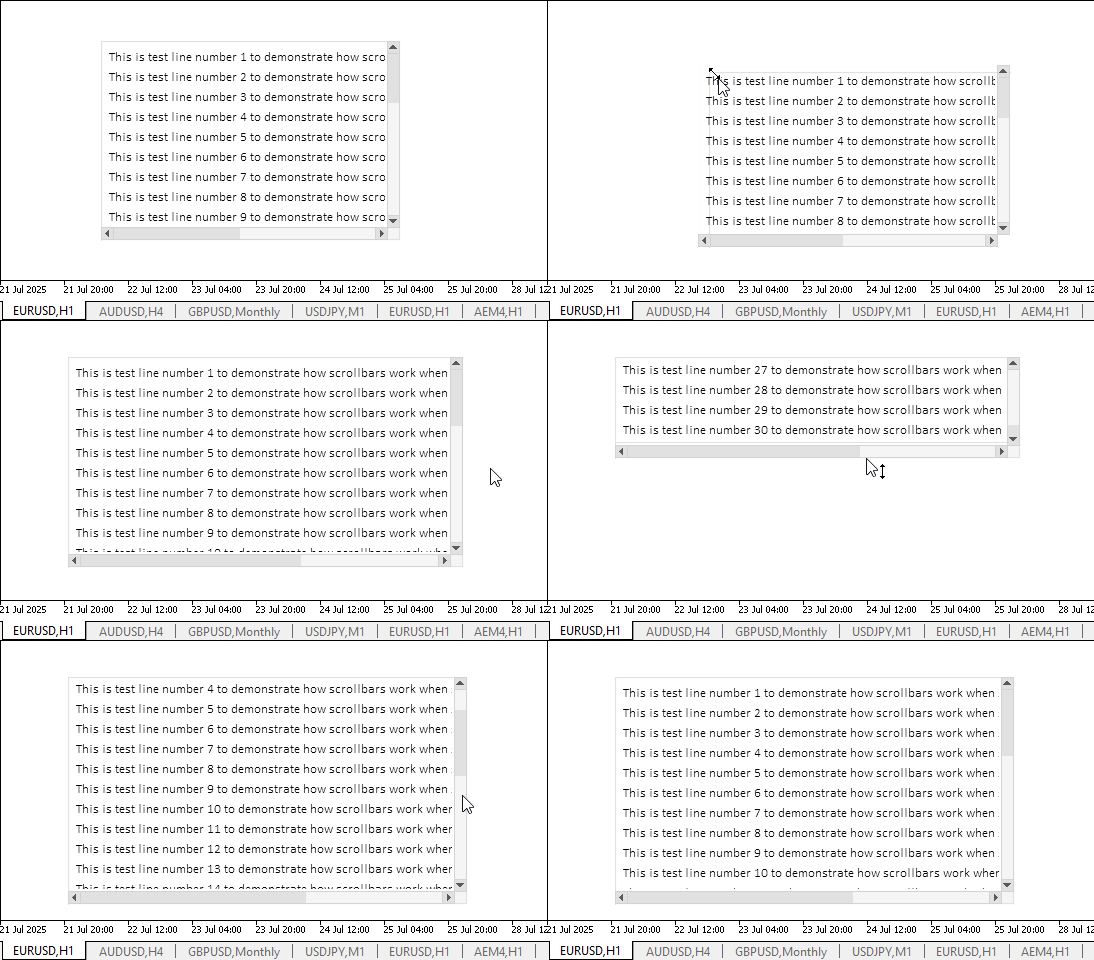
Offensichtlich funktioniert die angegebene Funktionalität korrekt. Es ist schwierig, die Kanten eines Elements dort zu erfassen, wo sie die Bildlaufleisten berühren. Größenveränderbare Elemente bestehen jedoch in der Regel nicht aus einem einzigen Steuerelement. Als Beispiel ein grafisches Element „Form“. Es verfügt über ausreichende Einkerbungen aller Steuerelemente, dank derer der Fangpunkt für das Ziehen der Elementgrenze mit der Maus mühelos gefunden werden kann.
Es gibt noch einige Unzulänglichkeiten, die wir nach und nach beseitigen werden, wenn wir weiter an der Erstellung des grafischen Elements TableView arbeiten.
Schlussfolgerung
Heute sind wir dem Abschluss der Arbeit am TableView-Steuerelement, mit dem wir tabellarische Daten in unseren Programmen erstellen und anzeigen können, einen Schritt näher gekommen. Die Implementierung der View-Komponente ist recht umfangreich und komplex, aber das Ergebnis sollte die meisten Anforderungen an die tabellarische Darstellung von Daten und die Arbeit mit ihnen erfüllen.
Im nächsten Artikel werden wir mit der Erstellung interaktiver Tabellenköpfe beginnen, die es Ihnen ermöglichen, die Spalten der Tabelle und ihre Zeilen zu verwalten.
Die Programme dieses Artikels:
| # | Name | Typ | Beschreibung |
|---|---|---|---|
| 1 | Base.mqh | Klassenbibliothek | Klassen zur Erstellung eines Basisobjekts von Steuerelementen |
| 2 | Controls.mqh | Klassenbibliothek | Kontrollklassen |
| 3 | iTestResize.mq5 | Testindikator | Indikator für das Testen von Manipulationen mit Klassen von Kontrollen |
| 4 | MQL5.zip | Archive | Ein Archiv mit den oben genannten Dateien zum Entpacken in das MQL5-Verzeichnis des Client-Terminals |
Alle erstellten Dateien sind dem Artikel zum Selbststudium beigefügt. Die Archivdatei kann in den Terminalordner entpackt werden, und alle Dateien befinden sich dann im gewünschten Ordner: \MQL5\Indicators\Tables\.
Übersetzt aus dem Russischen von MetaQuotes Ltd.
Originalartikel: https://www.mql5.com/ru/articles/18941
Warnung: Alle Rechte sind von MetaQuotes Ltd. vorbehalten. Kopieren oder Vervielfältigen untersagt.
Dieser Artikel wurde von einem Nutzer der Website verfasst und gibt dessen persönliche Meinung wieder. MetaQuotes Ltd übernimmt keine Verantwortung für die Richtigkeit der dargestellten Informationen oder für Folgen, die sich aus der Anwendung der beschriebenen Lösungen, Strategien oder Empfehlungen ergeben.



 Entwicklung von Trendhandelsstrategien mit maschinellem Lernen
 Einführung in MQL5 (Teil 27): Beherrschung der API- und WebRequest-Funktion in MQL5
 Forex Arbitrage-Handel: Analyse der Bewegungen synthetischer Währungen und ihrer mittleren Umkehrung
 Die View- und Controller-Komponenten für Tabellen im MQL5 MVC-Paradigma: Einfache Steuerung

- Freie Handelsapplikationen
- Über 8.000 Signale zum Kopieren
- Wirtschaftsnachrichten für die Lage an den Finanzmärkte
Sie stimmen der Website-Richtlinie und den Nutzungsbedingungen zu.