

MQL5 MVC 范式下表格的视图与控制器组件:容器
 283
283
 3
3

目录
概述
在现代用户界面中,常常需要简洁且方便地展示大量且多样的数据。为此,我们使用了名为容器的特殊控件,该控件支持滚动内容。这种方法允许在有限的窗口空间内放置表格和其他图形元素,为用户提供快速且直观的信息访问方式。
在 MVC(模型-视图-控制器)范式中开发 TableView 控件的过程中,我们已经创建了模型组件 —— 一个表格模型,并开始创建视图和控制器组件。在上一篇文章中,我们创建了一些简单但功能齐全的控件。复杂的控件将由这些元素组装而成。今天我们将编写如 Panel(面板)、GroupBox(分组框)和 Container(容器)这样的控件类 —— 这三个元素都是用于在其上放置各种控件的容器。
- Panel 控件是一个可以放置任意数量其他控件的面板。当将面板移动到新坐标时,位于面板上的所有控件也会随之移动。因此,面板是位于其上的控件的容器。然而,如果容器内容超出面板边界,此元素没有提供滚动条以实现滚动浏览。此类内容会被简单地裁剪到容器边界内。
- GroupBox 控件是一组组织成一个组的元素。它继承自面板,能够根据某些共同目的对元素进行分组,例如,一组单选按钮(RadioButton)元素,其中整个组中只有一个元素可以被选中,而组中的其他元素则被取消选中。
- Container 控件。只允许附加一个控件。如果附加元素超出容器范围,则容器上会出现滚动条。它们可以滚动浏览容器中的内容。要在容器中放置任意数量的控件,需要在容器中放置一个面板,并将所需数量的控件附加到该面板上。因此,容器将在面板中滚动,而面板将在滚动后调整其内容的位置。
因此,除了前面提到的三个主要控件外,我们还需要为创建滚动条创建两个类 —— 滑块类(Thumb)和滚动条类(ScrollBar)。将会有两个这样的类 —— 分别用于垂直和水平滚动条。
如果你仔细观察滚动条边缘的滚动按钮的操作,你会发现,当长时间按住按钮时,会自动开始滚动。也就是说,按钮会自动开始发送点击事件。为了实现这种行为,我们将创建另外两个辅助类 —— 延迟计数器类和实际事件自动重复类。
延迟计数器类可用于在不冻结程序运行的情况下组织等待,并且将实现事件自动重复类,以便我们可以为其指定应发送的事件。这样不仅可以利用它来组织按钮点击的自动重复,还可以用于任何其他需要在特定时间后以特定频率重复事件的算法。
在最后阶段,表格将被放置在一个通用容器内,该容器将通过滚动条实现滚动功能。这样的容器将成为构建复杂且灵活界面的基础,不仅支持表格操作,还能在其他组件中使用,例如,在为 MetaTrader 5 客户端创建多页记事本或其他用户元素时。
值得注意的是这些控件是如何工作的。每个控件元素都配备了基于事件的功能(控制器组件),并能对与鼠标光标的交互做出适当的反应。
执行某些操作时,被交互的元素会向图表发送事件。该事件应由另一个控件接收和处理。但所有元素都会接收到此类事件。需要确定哪个元素是活动的(即光标当前位于哪个元素之上),并仅处理来自该元素的消息。也就是说,当您将鼠标光标悬停在某个控件上时,该控件应被标记为活动状态,而其余非活动元素则不应被处理。
为了组织对活动元素的选择,必须确保每个控件都能获取到此类信息。有多种方法可以做到这一点。例如,你可以创建一个列表,在其中注册所有已创建元素的名称,然后在这个列表中搜索光标当前所在对象的名称,并使用这个列表中的已找到对象。
这种方法是可行的,但会使代码及其处理变得复杂。在程序中创建一个全局可访问的单个对象,并将活动控件的名称记录到其中,这样更为简便。其余元素将立即看到活动元素的名称,并决定是否处理传入的消息,而无需在任何数据库中进行额外搜索。
单例类可以是这样的公有类:
单例类是一种设计模式,它保证在程序生命周期内给定类只有一个实例,并提供对该实例的全局访问点。
单例模式的目的
当某个对象只需要一个实例,并且该实例可以从程序的任何部分访问时,可以使用单例模式。示例:设置管理器、日志记录器、数据库连接池、资源管理器等。
单例模式的工作原理
- 一个隐藏的构造函数:类构造函数被声明为私有或受保护的,以防止从外部创建实例。
- 静态变量:静态变量是在类内部创建的,用于存储该类的单个实例。
- 静态访问方法:要获取类的实例,可以使用静态方法(例如 Instance() 或 getInstance()),该方法在第一次访问时创建一个对象,并在后续调用时返回该对象。
单例模式是指只能创建一次的类,并且该唯一实例是全局可访问的。这对于管理共享资源或应用程序状态非常有用。
让我们来实现这样一个类。
单例类作为共享数据管理器
在上一篇文章中,所有库代码都位于 \MQL5\Indicators\Tables\Controls\ 目录下。这里我们关注的是以下两个文件:Base.mqh 和 Control.mqh。我们今天将对它们进行完善。
打开 Base.mqh 文件,并在类代码块中写入以下代码:
//+------------------------------------------------------------------+
//| Classes                                                          |
//+------------------------------------------------------------------+
//+------------------------------------------------------------------+
//| Singleton class for common flags and events of graphical elements|
//+------------------------------------------------------------------+
class CCommonManager
  {
private:
   static CCommonManager *m_instance;                          // Class instance
   string            m_element_name;                           // Active element name

//--- Constructor/destructor
                     CCommonManager(void) : m_element_name("") {}
                    ~CCommonManager() {}
public:
//--- Method for getting a Singleton instance
   static CCommonManager *GetInstance(void)
                       {
                        if(m_instance==NULL)
                           m_instance=new CCommonManager();
                        return m_instance;
                       }
//--- Method for destroying a Singleton instance
   static void       DestroyInstance(void)
                       {
                        if(m_instance!=NULL)
                          {
                           delete m_instance;
                           m_instance=NULL;
                          }
                       }
//--- (1) Set and (2) return the name of the active current element
   void              SetElementName(const string name)         { this.m_element_name=name;   }
   string            ElementName(void)                   const { return this.m_element_name; }
  };
//--- Initialize a static instance variable of a class
CCommonManager* CCommonManager::m_instance=NULL;
//+------------------------------------------------------------------+
//| Base class of graphical elements                                 |
//+------------------------------------------------------------------+
一个私有类构造函数和一个用于访问该类实例的静态方法可确保应用程序中只存在一个实例。
- static CCommonManager* GetInstance( void ) 方法 —— 返回指向该类的单个实例的指针,并在首次访问时创建该实例。
- static void DestroyInstance( void ) 方法 —— 销毁类的实例并释放内存。
- void SetElementName( const string name) —— 设置活动图形元素的名称。
- string ElementName( void ) const方法 —— 返回活动图形元素的名称。
现在,每个图形元素都可以访问这个类的实例,以读写活动元素的名称。所有元素共享同一个变量。这确保了多个对象中的每一个都能读写同一个变量的数据。
由于我们不能同时激活多个控件,因此,在不访问控制功能的情况下,这种活动元素管理器的实现已经相当充分了(这样两个或更多元素就无法将其数据写入同一个变量)。
之后,可以将其他数据添加到这个数据管理器类中,例如,工作图的权限标志。目前,每个图形元素的创建都试图记住图表标志的状态。这些数据也可以通过相应的变量传递到该类中。
用于组织自动重复按钮点击的类
上文,我们讨论了如何创建一种自动重复功能,以便在长时间按住滚动条按钮时发送事件。这种行为对于大多数操作系统应用程序来说是标准的。因此,我认为我们有理由在这里也这样做。当你按住按钮时,首先会启动一个计时器来计算按住按钮的时间(通常这段时间为 350-500 毫秒)。此外,如果在保持时间结束前未松开按钮,则第二个计数器(用于发送按钮按下事件间隔的计数器)将启动。在按钮被松开之前,此类事件会以大约 100 毫秒的频率发送。
为了实现这一行为,需要实现两个辅助类 —— 毫秒计时器类和自动事件调度类。
继续在同一个文件 Base.mqh 中编写代码:
//+------------------------------------------------------------------+
//| Millisecond counter class                                        |
//+------------------------------------------------------------------+
class CCounter : public CBaseObj
  {
private:
   bool              m_launched;                               // Launched countdown flag
//--- Start the countdown
   void              Run(const uint delay)
                       {
                        //--- If the countdown has already started, leave
                        if(this.m_launched)
                           return;
                        //--- If a non-zero delay value is passed, set a new value
                        if(delay!=0)
                           this.m_delay=delay;
                        //--- Save the start time and set a flag that the countdown has already started
                        this.m_start=::GetTickCount64();
                        this.m_launched=true;
                       }
protected:
   ulong             m_start;                                  // Countdown start time
   uint              m_delay;                                  // Delay

public:
//--- (1) Set a delay, start the countdown with the (2) set and (3) specified delay
   void              SetDelay(const uint delay)                { this.m_delay=delay;            }
   void              Start(void)                               { this.Run(0);                   }
   void              Start(const uint delay)                   { this.Run(delay);               }
//--- Return the countdown end flag
   bool              IsDone(void)
                       {
                        //--- If the countdown has not started, return 'false'
                        if(!this.m_launched)
                           return false;
                        //--- If more milliseconds have passed than the timeout
                        if(::GetTickCount64()-this.m_start>this.m_delay)
                          {
                           //--- reset the flag of the launched countdown and return true
                           this.m_launched=false;
                           return true;
                          }
                        //--- The specified time has not yet passed
                        return false;
                       }

//--- Virtual methods of (1) saving to file, (2) loading from file and (3) object type
   virtual bool      Save(const int file_handle);
   virtual bool      Load(const int file_handle);
   virtual int       Type(void)                          const { return(ELEMENT_TYPE_COUNTER);  }

//--- Constructor/destructor
                     CCounter(void) : m_start(0), m_delay(0), m_launched(false) {}
                    ~CCounter(void) {}
  };
//+------------------------------------------------------------------+
//| CCounter::Save to file                                           |
//+------------------------------------------------------------------+
bool CCounter::Save(const int file_handle)
  {
//--- Save the parent object data
   if(!CBaseObj::Save(file_handle))
      return false;

//--- Save the delay value
   if(::FileWriteInteger(file_handle,this.m_delay,INT_VALUE)!=INT_VALUE)
      return false;

//--- All is successful
   return true;
  }
//+------------------------------------------------------------------+
//| CCounter::Load from file                                         |
//+------------------------------------------------------------------+
bool CCounter::Load(const int file_handle)
  {
//--- Load parent object data
   if(!CBaseObj::Load(file_handle))
      return false;

//--- Load the delay value
   this.m_delay=::FileReadInteger(file_handle,INT_VALUE);

//--- All is successful
   return true;
  }
毫秒计时器类旨在跟踪以毫秒为单位的指定时间间隔(延迟)的到期情况。它继承自 CBaseObj 基类,可用于实现 MQL5 应用程序中各种操作的计时器、延迟和时间控制。
- void SetDelay( const uint delay ) 设置延迟值(以毫秒为单位)。
- void Start( const uint delay ) 以新的延迟开始倒计时。
- bool IsDone( void ) 如果倒计时完成则返回 true ,否则返回 false 。
- virtual bool Save( const int file_handle) 方法是一个用于将状态保存到文件的虚拟方法。
- virtual bool Load( const int file_handle) 方法是一个用于从文件中加载状态的虚拟方法。
- virtual int Type( void ) const 方法返回要在系统中标识的对象类型。
基于此类,创建一个事件自动重复类:
//+------------------------------------------------------------------+
//| Event auto-repeat class                                          |
//+------------------------------------------------------------------+
class CAutoRepeat : public CBaseObj
  {
private:
   CCounter          m_delay_counter;                          // Counter for delay before auto-repeat
   CCounter          m_repeat_counter;                         // Counter for periodic sending of events
   long              m_chart_id;                               // Chart for sending a custom event
   bool              m_button_pressed;                         // Flag indicating whether the button is pressed
   bool              m_auto_repeat_started;                    // Flag indicating whether auto-repeat has started
   uint              m_delay_before_repeat;                    // Delay before auto-repeat starts (ms)
   uint              m_repeat_interval;                        // Frequency of sending events (ms)
   ushort            m_event_id;                               // Custom event ID
   long              m_event_lparam;                           // long parameter of the user event
   double            m_event_dparam;                           // double parameter of the custom event
   string            m_event_sparam;                           // string parameter of the custom event

//--- Send a custom event
   void              SendEvent() { ::EventChartCustom((this.m_chart_id<=0 ? ::ChartID() : this.m_chart_id), this.m_event_id, this.m_event_lparam, this.m_event_dparam, this.m_event_sparam); }
public:
//--- Object type
   virtual int       Type(void)                          const { return(ELEMENT_TYPE_AUTOREPEAT_CONTROL);   }

//--- Constructors
                     CAutoRepeat(void) :
                        m_button_pressed(false), m_auto_repeat_started(false), m_delay_before_repeat(350), m_repeat_interval(100),
                        m_event_id(0), m_event_lparam(0), m_event_dparam(0), m_event_sparam(""), m_chart_id(::ChartID()) {}

                     CAutoRepeat(long chart_id, int delay_before_repeat=350, int repeat_interval=100, ushort event_id=0, long event_lparam=0, double event_dparam=0, string event_sparam="") :
                        m_button_pressed(false), m_auto_repeat_started(false), m_delay_before_repeat(delay_before_repeat), m_repeat_interval(repeat_interval),
                        m_event_id(event_id), m_event_lparam(event_lparam), m_event_dparam(event_dparam), m_event_sparam(event_sparam), m_chart_id(chart_id) {}

//--- Set the chart ID
   void              SetChartID(const long chart_id)              { this.m_chart_id=chart_id;         }
   void              SetDelay(const uint delay)                   { this.m_delay_before_repeat=delay; }
   void              SetInterval(const uint interval)             { this.m_repeat_interval=interval;  }

//--- Set the ID and parameters of a custom event
   void              SetEvent(ushort event_id, long event_lparam, double event_dparam, string event_sparam)
                       {
                        this.m_event_id=event_id;
                        this.m_event_lparam=event_lparam;
                        this.m_event_dparam=event_dparam;
                        this.m_event_sparam=event_sparam;
                       }

//--- Return flags
   bool              ButtonPressedFlag(void)                const { return this.m_button_pressed;     }
   bool              AutorepeatStartedFlag(void)            const { return this.m_auto_repeat_started;}
   uint              Delay(void)                            const { return this.m_delay_before_repeat;}
   uint              Interval(void)                         const { return this.m_repeat_interval;    }

//--- Handle a button click (starting auto-repeat)
   void              OnButtonPress(void)
                       {
                        if(this.m_button_pressed)
                           return;
                        this.m_button_pressed=true;
                        this.m_auto_repeat_started=false;
                        this.m_delay_counter.Start(this.m_delay_before_repeat);  // Start the delay counter
                       }

//--- Handle button release (stopping auto-repeat)
   void              OnButtonRelease(void)
                       {
                        this.m_button_pressed=false;
                        this.m_auto_repeat_started=false;
                       }

//--- Method for performing auto-repeat (started in the timer)
   void              Process(void)
                       {
                        //--- If the button is held down
                        if(this.m_button_pressed)
                          {
                           //--- Check if the delay before starting the auto-repeat has expired
                           if(!this.m_auto_repeat_started && this.m_delay_counter.IsDone())
                             {
                              this.m_auto_repeat_started=true;
                              this.m_repeat_counter.Start(this.m_repeat_interval); // Start the auto-repeat counter
                             }
                           //--- If auto-repeat has started, check the frequency of sending events
                           if(this.m_auto_repeat_started && this.m_repeat_counter.IsDone())
                             {
                              //--- Send an event and restart the counter
                              this.SendEvent();
                              this.m_repeat_counter.Start(this.m_repeat_interval);
                             }
                          }
                       }
  };
这个类允许您在按住按钮的同时,以设定的频率自动发送用户事件。这确保了用户友好的界面行为(与标准操作系统中的滚动条一样)。
- 当按钮被按下时,会调用 OnButtonPress() 方法;该方法开始计算自动重复前的延迟时间。
- 当按钮被释放时,会调用 OnButtonRelease() 方法;它会停止自动重复。
- Process() 方法是定时器中应该调用的主要方法。它确保在按住按钮时,事件会按所需的频率发送。
- SetEvent(...) 方法 —— 设置自定义事件的参数。
- SetDelay(...), SetInterval(...) 方法 —— 设置延迟和自动重复间隔。
在图形元素画布的基类 CCanvasBase 中声明一个属于自动重复类的对象。这样就可以在任何图形元素对象中使用事件自动重复功能。只需设置延迟和间隔参数,并在需要时启动自动重复即可。
优化基类
我们已经对库进行了大量工作,以修复漏洞和错误。几乎所有类都受到了改进的影响。我们不会在此描述工作中的每一个步骤。当然,关键要点将会公布。
在 Base.mqh 文件中声明我们今天要实现的所有类:
//+------------------------------------------------------------------+
//|                                                         Base.mqh |
//|                                  Copyright 2025, MetaQuotes Ltd. |
//|                                             https://www.mql5.com |
//+------------------------------------------------------------------+
#property copyright "Copyright 2025, MetaQuotes Ltd."
#property link      "https://www.mql5.com"

//+------------------------------------------------------------------+
//| Include libraries                                                |
//+------------------------------------------------------------------+
#include <Canvas\Canvas.mqh>              // CCanvas class
#include <Arrays\List.mqh>                // CList class

//--- Forward declaration of control element classes
class    CCounter;                        // Delay counter class
class    CAutoRepeat;                     // Event auto-repeat class
class    CImagePainter;                   // Image drawing class
class    CLabel;                          // Text label class
class    CButton;                         // Simple button class
class    CButtonTriggered;                // Two-position button class
class    CButtonArrowUp;                  // Up arrow button class
class    CButtonArrowDown;                // Down arrow button class
class    CButtonArrowLeft;                // Left arrow button class
class    CButtonArrowRight;               // Right arrow button class
class    CCheckBox;                       // CheckBox control class
class    CRadioButton;                    // RadioButton control class
class    CScrollBarThumbH;                // Horizontal scrollbar slider class
class    CScrollBarThumbV;                // Vertical scrollbar slider class
class    CScrollBarH;                     // Horizontal scrollbar class
class    CScrollBarV;                     // Vertical scrollbar class
class    CPanel;                          // Panel control class
class    CGroupBox;                       // GroupBox control class
class    CContainer;                      // Container control class
为了确保包含的 Base.mqh 和 Controls.mqh 文件能够无错误编译,此类类的提前声明是必要的,因为对这些类的访问甚至在这些类在文件中实际声明之前就已经进行了。
在图形元素类型枚举中添加新类型,并指定可参与与用户交互的对象类型的常量范围:
//+------------------------------------------------------------------+
//| Enumerations                                                     |
//+------------------------------------------------------------------+
enum ENUM_ELEMENT_TYPE                    // Enumeration of graphical element types
  {
   ELEMENT_TYPE_BASE = 0x10000,           // Basic object of graphical elements
   ELEMENT_TYPE_COLOR,                    // Color object
   ELEMENT_TYPE_COLORS_ELEMENT,           // Color object of the graphical object element
   ELEMENT_TYPE_RECTANGLE_AREA,           // Rectangular area of the element
   ELEMENT_TYPE_IMAGE_PAINTER,            // Object for drawing images
   ELEMENT_TYPE_COUNTER,                  // Counter object
   ELEMENT_TYPE_AUTOREPEAT_CONTROL,       // Event auto-repeat object
   ELEMENT_TYPE_CANVAS_BASE,              // Basic canvas object for graphical elements
   ELEMENT_TYPE_ELEMENT_BASE,             // Basic object of graphical elements
   ELEMENT_TYPE_LABEL,                    // Text label
   ELEMENT_TYPE_BUTTON,                   // Simple button
   ELEMENT_TYPE_BUTTON_TRIGGERED,         // Two-position button
   ELEMENT_TYPE_BUTTON_ARROW_UP,          // Up arrow button
   ELEMENT_TYPE_BUTTON_ARROW_DOWN,        // Down arrow button
   ELEMENT_TYPE_BUTTON_ARROW_LEFT,        // Left arrow button
   ELEMENT_TYPE_BUTTON_ARROW_RIGHT,       // Right arrow button
   ELEMENT_TYPE_CHECKBOX,                 // CheckBox control
   ELEMENT_TYPE_RADIOBUTTON,              // RadioButton control
   ELEMENT_TYPE_SCROLLBAR_THUMB_H,        // Horizontal scroll bar slider
   ELEMENT_TYPE_SCROLLBAR_THUMB_V,        // Vertical scroll bar slider
   ELEMENT_TYPE_SCROLLBAR_H,              // ScrollBarHorisontal control
   ELEMENT_TYPE_SCROLLBAR_V,              // ScrollBarVertical control
   ELEMENT_TYPE_PANEL,                    // Panel control
   ELEMENT_TYPE_GROUPBOX,                 // GroupBox control
   ELEMENT_TYPE_CONTAINER,                // Container control
  };
#define  ACTIVE_ELEMENT_MIN   ELEMENT_TYPE_LABEL         // Minimum value of the list of active elements
#define  ACTIVE_ELEMENT_MAX   ELEMENT_TYPE_SCROLLBAR_V   // Maximum value of the list of active elements
当与鼠标光标交互时,每个图形元素基本上都能处理传入的事件消息。但并非所有元素都应该这样做。换言之,有必要检查元素的类型,并根据其类型做出判断 —— 即该元素是否处理事件。如果遵循检查对象类型的路径,在这种情况下,我们会得到一长串无法处理的元素。这很不方便。添加另一个属性会更容易,即一个标志,用于指示该元素是处于交互状态还是静态状态。那么我们只要检查这个属性来决定是否应该处理该事件。这里我们指定了图形元素类型常量的初始值和最终值。在决定事件处理时,只需检查元素类型是否在此值范围内即可。在此基础上,即可做出决定。
添加一个属性枚举,通过这些属性可以对基对象进行排序和搜索(CBaseObj):
enum ENUM_BASE_COMPARE_BY                 // Compared properties of base objects
  {
   BASE_SORT_BY_ID   =  0,                // Compare base objects by ID
   BASE_SORT_BY_NAME,                     // Compare base objects by name
   BASE_SORT_BY_X,                        // Compare base objects by X coordinate
   BASE_SORT_BY_Y,                        // Compare base objects by Y coordinate
   BASE_SORT_BY_WIDTH,                    // Compare base objects by width
   BASE_SORT_BY_HEIGHT,                   // Compare base objects by height
   BASE_SORT_BY_ZORDER,                   // Compare by objects' Z-order
  };
现在,所有从基类继承的对象都可以根据枚举中指定的属性进行排序,如果对象具有这些属性,那么在创建 CBaseObj 的新派生类时将更具灵活性。
在返回元素类型字符串的函数中,将输出的字母 “V” 和 “H” 添加到可读的 “Vertical”(垂直) 和 “Horizontal” (水平)中:
//+------------------------------------------------------------------+
//|  Return the element type as a string                             |
//+------------------------------------------------------------------+
string ElementDescription(const ENUM_ELEMENT_TYPE type)
  {
   string array[];
   int total=StringSplit(EnumToString(type),StringGetCharacter("_",0),array);
   if(array[array.Size()-1]=="V")
      array[array.Size()-1]="Vertical";
   if(array[array.Size()-1]=="H")
      array[array.Size()-1]="Horisontal";

   string result="";
   for(int i=2;i<total;i++)
     {
      array[i]+=" ";
      array[i].Lower();
      array[i].SetChar(0,ushort(array[i].GetChar(0)-0x20));
      result+=array[i];
     }
   result.TrimLeft();
   result.TrimRight();
   return result;
  }
这将使元素描述更易于阅读。
在创建新元素并将其添加到容器所附加的列表中时,必须创建对象名称。实现一个函数,该函数返回可用于创建元素的元素类型的简写,然后在对象名称中使用此简写来理解它是什么类型的元素:
//+------------------------------------------------------------------+
//|  Return the short name of the element by type                    |
//+------------------------------------------------------------------+
string ElementShortName(const ENUM_ELEMENT_TYPE type)
  {
   switch(type)
     {
      case  ELEMENT_TYPE_ELEMENT_BASE     :  return "BASE";    // Basic object of graphical elements
      case  ELEMENT_TYPE_LABEL            :  return "LBL";     // Text label
      case ELEMENT_TYPE_BUTTON            :  return "SBTN";    // Simple button
      case ELEMENT_TYPE_BUTTON_TRIGGERED  :  return "TBTN";    // Toggle button
      case ELEMENT_TYPE_BUTTON_ARROW_UP   :  return "BTARU";   // Up arrow button
      case ELEMENT_TYPE_BUTTON_ARROW_DOWN :  return "BTARD";   // Down arrow button
      case ELEMENT_TYPE_BUTTON_ARROW_LEFT :  return "BTARL";   // Left arrow button
      case ELEMENT_TYPE_BUTTON_ARROW_RIGHT:  return "BTARR";   // Right arrow button
      case ELEMENT_TYPE_CHECKBOX          :  return "CHKB";    // CheckBox control
      case ELEMENT_TYPE_RADIOBUTTON       :  return "RBTN";    // RadioButton control
      case ELEMENT_TYPE_SCROLLBAR_THUMB_H :  return "THMBH";   // Horizontal scroll bar slider
      case ELEMENT_TYPE_SCROLLBAR_THUMB_V :  return "THMBV";   // Vertical scroll bar slider
      case ELEMENT_TYPE_SCROLLBAR_H       :  return "SCBH";    // ScrollBarHorisontal control
      case ELEMENT_TYPE_SCROLLBAR_V       :  return "SCBV";    // ScrollBarVertical control
      case ELEMENT_TYPE_PANEL             :  return "PNL";     // Panel control
      case ELEMENT_TYPE_GROUPBOX          :  return "GRBX";    // GroupBox control
      case ELEMENT_TYPE_CONTAINER         :  return "CNTR";    // Container control
      default                             :  return "Unknown"; // Unknown
     }
  }
在将元素附加到容器时,它们的名称将根据对象的层次结构来确定:“容器 -- 附加到容器的元素 --- 附加到附加元素的元素”,以此类推。
名称字符串中元素名称之间的分隔符为下划线(“_”)。我们可以使用全名来为整个对象层次结构创建一份名称列表。为此,实现了以下函数:
//+------------------------------------------------------------------+
//| Return the array of element hierarchy names                      |
//+------------------------------------------------------------------+
int GetElementNames(string value, string sep, string &array[])
  {
   if(value=="" || value==NULL)
     {
      PrintFormat("%s: Error. Empty string passed");
      return 0;
     }
   ResetLastError();
   int res=StringSplit(value, StringGetCharacter(sep,0),array);
   if(res==WRONG_VALUE)
     {
      PrintFormat("%s: StringSplit() failed. Error %d",__FUNCTION__, GetLastError());
      return WRONG_VALUE;
     }
   return res;
  }
该函数返回层次结构中的对象数量,并将所有元素的名称填充到数组中。
在 CBound 矩形区域类中,编写一个用于比较两个对象的方法:
//+------------------------------------------------------------------+
//| CBound::Compare two objects                                      |
//+------------------------------------------------------------------+
int CBound::Compare(const CObject *node,const int mode=0) const
  {
   if(node==NULL)
      return -1;
   const CBound *obj=node;
   switch(mode)
     {
      case BASE_SORT_BY_NAME  :  return(this.Name()   >obj.Name()    ? 1 : this.Name()    <obj.Name()    ? -1 : 0);
      case BASE_SORT_BY_X     :  return(this.X()      >obj.X()       ? 1 : this.X()       <obj.X()       ? -1 : 0);
      case BASE_SORT_BY_Y     :  return(this.Y()      >obj.Y()       ? 1 : this.Y()       <obj.Y()       ? -1 : 0);
      case BASE_SORT_BY_WIDTH :  return(this.Width()  >obj.Width()   ? 1 : this.Width()   <obj.Width()   ? -1 : 0);
      case BASE_SORT_BY_HEIGHT:  return(this.Height() >obj.Height()  ? 1 : this.Height()  <obj.Height()  ? -1 : 0);
      default                 :  return(this.ID()     >obj.ID()      ? 1 : this.ID()      <obj.ID()      ? -1 : 0);
     }
  }
以前,比较是使用同名的父类方法进行的。这使得只能比较两个属性:对象的名称和标识符。
大部分改进都涉及 CCanvasBase 图形元素画布对象的基类,因为它是所有图形元素主要属性的集合。
在类的受保护部分,声明新的变量和三个用于操作共享资源管理器的方法:
//+------------------------------------------------------------------+
//| Base class of graphical elements canvas                          |
//+------------------------------------------------------------------+
class CCanvasBase : public CBaseObj
  {
private:
   bool              m_chart_mouse_wheel_flag;                 // Flag for sending mouse wheel scroll messages
   bool              m_chart_mouse_move_flag;                  // Flag for sending mouse cursor movement messages
   bool              m_chart_object_create_flag;               // Flag for sending messages about the graphical object creation event
   bool              m_chart_mouse_scroll_flag;                // Flag for scrolling the chart with the left button and mouse wheel
   bool              m_chart_context_menu_flag;                // Flag of access to the context menu using the right click
   bool              m_chart_crosshair_tool_flag;              // Flag of access to the Crosshair tool using the middle click
   bool              m_flags_state;                            // State of the flags for scrolling the chart with the wheel, the context menu, and the crosshair

//--- Set chart restrictions (wheel scrolling, context menu, and crosshair)
   void              SetFlags(const bool flag);

protected:
   CCanvas           m_background;                             // Background canvas
   CCanvas           m_foreground;                             // Foreground canvas
   CBound            m_bound;                                  // Object boundaries
   CCanvasBase      *m_container;                              // Parent container object
   CColorElement     m_color_background;                       // Background color control object
   CColorElement     m_color_foreground;                       // Foreground color control object
   CColorElement     m_color_border;                           // Border color control object

   CColorElement     m_color_background_act;                   // Activated element background color control object
   CColorElement     m_color_foreground_act;                   // Activated element foreground color control object
   CColorElement     m_color_border_act;                       // Activated element frame color control object

   CAutoRepeat       m_autorepeat;                             // Event auto-repeat control object

   ENUM_ELEMENT_STATE m_state;                                 // Control state (e.g. buttons (on/off))
   long              m_chart_id;                               // Chart ID
   int               m_wnd;                                    // Chart subwindow index
   int               m_wnd_y;                                  // Cursor Y coordinate offset in the subwindow
   int               m_obj_x;                                  // Graphical object X coordinate
   int               m_obj_y;                                  // Graphical object Y coordinate
   uchar             m_alpha_bg;                               // Background transparency
   uchar             m_alpha_fg;                               // Foreground transparency
   uint              m_border_width_lt;                        // Left frame width
   uint              m_border_width_rt;                        // Right frame width
   uint              m_border_width_up;                        // Top frame width
   uint              m_border_width_dn;                        // Bottom frame width
   string            m_program_name;                           // Program name
   bool              m_hidden;                                 // Hidden object flag
   bool              m_blocked;                                // Blocked element flag
   bool              m_movable;                                // Moved element flag
   bool              m_focused;                                // Element flag in focus
   bool              m_main;                                   // Main object flag
   bool              m_autorepeat_flag;                        // Event sending auto-repeat flag
   bool              m_scroll_flag;                            // Flag for scrolling content using scrollbars
   bool              m_trim_flag;                              // Flag for clipping the element to the container borders
   int               m_cursor_delta_x;                         // Distance from the cursor to the left edge of the element
   int               m_cursor_delta_y;                         // Distance from the cursor to the top edge of the element
   int               m_z_order;                                // Graphical object Z-order

//--- (1) Set and (2) return the active element name and (3) flag
   void              SetActiveElementName(const string name)   { CCommonManager::GetInstance().SetElementName(name);                               }
   string            ActiveElementName(void)             const { return CCommonManager::GetInstance().ElementName();                               }
   bool              IsCurrentActiveElement(void)        const { return this.ActiveElementName()==this.NameFG();                                   }

//--- Return the offset of the initial drawing coordinates on the canvas relative to the canvas and the object coordinates
   int               CanvasOffsetX(void)                 const { return(this.ObjectX()-this.X());                                                  }
   int               CanvasOffsetY(void)                 const { return(this.ObjectY()-this.Y());                                                  }
//--- Return the adjusted coordinate of a point on the canvas, taking into account the offset of the canvas relative to the object
   int               AdjX(const int x)                   const { return(x-this.CanvasOffsetX());                                                   }
   int               AdjY(const int y)                   const { return(y-this.CanvasOffsetY());                                                   }

//--- Returns the adjusted chart ID
   long              CorrectChartID(const long chart_id) const { return(chart_id!=0 ? chart_id : ::ChartID());                                     }

public:
- CAutoRepeat m_autorepeat — 事件自动重复对象;任何图形元素都可以具有此对象类提供的功能。
- uint m_border_width_lt — 左侧边框宽度;边框是容器可见区域的边界,而可见区域从元素边缘的缩进量在不同侧边可能不同。
- uint m_border_width_rt — 右侧边框宽度。
- uint m_border_width_up — 顶部边框宽度。
- uint m_border_width_dn — 底部边框宽度。
- bool m_movable — 一个用于指示待移动对象的标志;例如,按钮是不可移动元素,滚动条滑块是可移动元素,等等。
- bool m_main — 主元素的标志;主元素是链接对象层次结构中的第一个元素,例如,一个面板,其他控件位于其上;这通常是一个表单对象。
- bool m_autorepeat_flag — 元素是否启用事件自动重复的标志。
- bool m_scroll_flag — 用于通过滚动条滚动元素的标志。
- bool m_trim_flag — 用于裁剪容器可见区域边缘元素的标志;例如,滚动条位于容器的可见区域之外,但不会在容器边缘被裁剪掉。
- int m_cursor_delta_x — 一个辅助变量,用于存储光标与元素左边界的距离。
- int m_cursor_delta_y — 一个辅助变量,用于存储光标与元素上边界的距离。
- int m_z_order — 图表上图形对象接收鼠标点击事件的优先级;当对象重叠时,CHARTEVENT_CLICK 事件将仅检索优先级高于其他对象的一个对象。
- void SetActiveElementName( const string name) 方法 — 设置共享数据管理器中当前活动元素的名称。
- string ActiveElementName( void ) 方法 — 返回当前活动元素的名称。
- bool IsCurrentActiveElement( void ) 方法 — 返回一个标志,指示此对象当前是否处于活动状态。
在类的受保护部分,添加用于移动鼠标光标和更改控件的处理程序:
//--- Cursor hovering (Focus), (2) button clicks (Press), (3) cursor moving (Move),
//--- (4) wheel scrolling (Wheel), (5) leaving focus (Release) and (6) graphical object creation (Create) event handlers. Redefined in descendants.
   virtual void      OnFocusEvent(const int id, const long lparam, const double dparam, const string sparam);
   virtual void      OnPressEvent(const int id, const long lparam, const double dparam, const string sparam);
   virtual void      OnMoveEvent(const int id, const long lparam, const double dparam, const string sparam);
   virtual void      OnReleaseEvent(const int id, const long lparam, const double dparam, const string sparam);
   virtual void      OnCreateEvent(const int id, const long lparam, const double dparam, const string sparam);
   virtual void      OnWheelEvent(const int id, const long lparam, const double dparam, const string sparam)         { return;   }  // handler is disabled here

//--- Handlers for custom events of the element when hovering, clicking, and scrolling the wheel in the object area, as well as changing it
   virtual void      MouseMoveHandler(const int id, const long lparam, const double dparam, const string sparam)     { return;   }  // handler is disabled here
   virtual void      MousePressHandler(const int id, const long lparam, const double dparam, const string sparam)    { return;   }  // handler is disabled here
   virtual void      MouseWheelHandler(const int id, const long lparam, const double dparam, const string sparam)    { return;   }  // handler is disabled here
   virtual void      ObjectChangeHandler(const int id, const long lparam, const double dparam, const string sparam)  { return;   }  // handler is disabled here
当将光标移动到某个对象上时,必须处理此类事件,并且稍后某些控件将能够通过鼠标进行大小调整。我们已在此声明了此类事件的处理程序。
在类的公共部分,添加用于操作类中某些变量的方法:
public:
//--- Return the pointer to (1) a container and (2) event auto-repeat class object
   CCanvasBase      *GetContainer(void)                  const { return this.m_container;                                                          }
   CAutoRepeat      *GetAutorepeatObj(void)                    { return &this.m_autorepeat;                                                        }
...
//--- (1) Set and (2) return z-order
   bool              ObjectSetZOrder(const int value);
   int               ObjectZOrder(void)                  const { return this.m_z_order;                                                            }

//--- Return (1) the object's belonging to the program, the flag (2) of a hidden element, (3) a blocked element,
//--- (4) moved, (5) main element, (6) in focus, (7) graphical object name (background, text)
   bool              IsBelongsToThis(const string name)  const { return(::ObjectGetString(this.m_chart_id,name,OBJPROP_TEXT)==this.m_program_name);}
   bool              IsHidden(void)                      const { return this.m_hidden;                                                             }
   bool              IsBlocked(void)                     const { return this.m_blocked;                                                            }
   bool              IsMovable(void)                     const { return this.m_movable;                                                            }
   bool              IsMain(void)                        const { return this.m_main;                                                               }
   bool              IsFocused(void)                     const { return this.m_focused;                                                            }
   string            NameBG(void)                        const { return this.m_background.ChartObjectName();                                       }
   string            NameFG(void)                        const { return this.m_foreground.ChartObjectName();                                       }
...
//--- (1) Return and (2) set the left border width
    uint             BorderWidthLeft(void)               const { return this.m_border_width_lt;                                                    }
    void             SetBorderWidthLeft(const uint width)      { this.m_border_width_lt=width;                                                     }

//--- (1) Return and (2) set the right border width
    uint             BorderWidthRight(void)              const { return this.m_border_width_rt;                                                    }
    void             SetBorderWidthRight(const uint width)     { this.m_border_width_rt=width;                                                     }

//--- (1) Return and (2) set the top border width
    uint             BorderWidthTop(void)                const { return this.m_border_width_up;                                                    }
    void             SetBorderWidthTop(const uint width)       { this.m_border_width_up=width;                                                     }

//--- (1) Return and (2) set the bottom border width
    uint             BorderWidthBottom(void)             const { return this.m_border_width_dn;                                                    }
    void             SetBorderWidthBottom(const uint width)    { this.m_border_width_dn=width;                                                     }

//--- Set the same border width on all sides
    void             SetBorderWidth(const uint width)
                       {
                        this.m_border_width_lt=this.m_border_width_rt=this.m_border_width_up=this.m_border_width_dn=width;
                       }

//--- Set the frame width
    void             SetBorderWidth(const uint left,const uint right,const uint top,const uint bottom)
                       {
                        this.m_border_width_lt=left;
                        this.m_border_width_rt=right;
                        this.m_border_width_up=top;
                        this.m_border_width_dn=bottom;
                       }
...
有些方法应该设为虚方法,因为它们对不同的元素必须采取不同的方式。
//--- Set (1) movability and (2) main object flag for the object
   void              SetMovable(const bool flag)               { this.m_movable=flag;                                                              }
   void              SetAsMain(void)                           { this.m_main=true;                                                                 }

//--- Limit the graphical object by the container dimensions
   virtual bool      ObjectTrim(void);

//--- Resize the object
   virtual bool      ResizeW(const int w);
   virtual bool      ResizeH(const int h);
   virtual bool      Resize(const int w,const int h);

//--- Set the new (1) X, (2) Y, (3) XY coordinate for the object
   virtual bool      MoveX(const int x);
   virtual bool      MoveY(const int y);
   virtual bool      Move(const int x,const int y);

//--- Shift the object by (1) X, (2) Y, (3) XY xis by the specified offset

   virtual bool      ShiftX(const int dx);
   virtual bool      ShiftY(const int dy);
   virtual bool      Shift(const int dx,const int dy);
...
//--- Event handler
   virtual void      OnChartEvent(const int id,const long& lparam,const double& dparam,const string& sparam);

//--- (1) Timer and (2) timer event handler
   virtual void      OnTimer()                                 { this.TimerEventHandler();         }
   virtual void      TimerEventHandler(void)                   { return;                           }
在类构造函数中,所有新变量都会使用默认值进行初始化:
//--- Constructors/destructor
                     CCanvasBase(void) :
                        m_program_name(::MQLInfoString(MQL_PROGRAM_NAME)), m_chart_id(::ChartID()), m_wnd(0), m_alpha_bg(0), m_alpha_fg(255),
                        m_hidden(false), m_blocked(false), m_focused(false), m_movable(false), m_main(false), m_autorepeat_flag(false), m_trim_flag(true), m_scroll_flag(false),
                        m_border_width_lt(0), m_border_width_rt(0), m_border_width_up(0), m_border_width_dn(0), m_z_order(0),
                        m_state(0), m_wnd_y(0), m_cursor_delta_x(0), m_cursor_delta_y(0) { this.Init(); }
                     CCanvasBase(const string object_name,const long chart_id,const int wnd,const int x,const int y,const int w,const int h);
                    ~CCanvasBase(void);
  };
//+------------------------------------------------------------------+
//| CCanvasBase::Constructor                                         |
//+------------------------------------------------------------------+
CCanvasBase::CCanvasBase(const string object_name,const long chart_id,const int wnd,const int x,const int y,const int w,const int h) :
   m_program_name(::MQLInfoString(MQL_PROGRAM_NAME)), m_wnd(wnd<0 ? 0 : wnd), m_alpha_bg(0), m_alpha_fg(255),
   m_hidden(false), m_blocked(false), m_focused(false), m_movable(false), m_main(false), m_autorepeat_flag(false), m_trim_flag(true), m_scroll_flag(false),
   m_border_width_lt(0), m_border_width_rt(0), m_border_width_up(0), m_border_width_dn(0), m_z_order(0),
   m_state(0), m_cursor_delta_x(0), m_cursor_delta_y(0)
  {
...
添加虚拟 Compare 方法的实现:
//+------------------------------------------------------------------+
//| CCanvasBase::Compare two objects                                 |
//+------------------------------------------------------------------+
int CCanvasBase::Compare(const CObject *node,const int mode=0) const
  {
   if(node==NULL)
      return -1;
   const CCanvasBase *obj=node;
   switch(mode)
     {
      case BASE_SORT_BY_NAME  :  return(this.Name()         >obj.Name()          ? 1 : this.Name()          <obj.Name()          ? -1 : 0);
      case BASE_SORT_BY_X     :  return(this.X()            >obj.X()             ? 1 : this.X()             <obj.X()             ? -1 : 0);
      case BASE_SORT_BY_Y     :  return(this.Y()            >obj.Y()             ? 1 : this.Y()             <obj.Y()             ? -1 : 0);
      case BASE_SORT_BY_WIDTH :  return(this.Width()        >obj.Width()         ? 1 : this.Width()         <obj.Width()         ? -1 : 0);
      case BASE_SORT_BY_HEIGHT:  return(this.Height()       >obj.Height()        ? 1 : this.Height()        <obj.Height()        ? -1 : 0);
      case BASE_SORT_BY_ZORDER:  return(this.ObjectZOrder() >obj.ObjectZOrder()  ? 1 : this.ObjectZOrder()  <obj.ObjectZOrder()  ? -1 : 0);
      default                 :  return(this.ID()           >obj.ID()            ? 1 : this.ID()            <obj.ID()            ? -1 : 0);
     }
  }
改进沿容器轮廓修剪图形对象的方法:
//+-----------------------------------------------------------------------+
//| CCanvasBase::Crop a graphical object to the outline of its container  |
//+-----------------------------------------------------------------------+
bool CCanvasBase::ObjectTrim()
  {
//--- Check the element cropping permission flag and
//--- if the element should not be clipped by the container borders, return 'false'
   if(!this.m_trim_flag)
      return false;
//--- Get the container boundaries
   int container_left   = this.ContainerLimitLeft();
   int container_right  = this.ContainerLimitRight();
   int container_top    = this.ContainerLimitTop();
   int container_bottom = this.ContainerLimitBottom();

//--- Get the current object boundaries
   int object_left   = this.X();
   int object_right  = this.Right();
   int object_top    = this.Y();
   int object_bottom = this.Bottom();

//--- Check if the object is completely outside the container and hide it if it is
   if(object_right <= container_left || object_left >= container_right ||
      object_bottom <= container_top || object_top >= container_bottom)
     {
      this.Hide(true);
      if(this.ObjectResize(this.Width(),this.Height()))
         this.BoundResize(this.Width(),this.Height());
      return false;
     }
//--- The object is fully or partially located within the visible area of the container
   else
     {
      //--- If the element is completely inside the container
      if(object_right<=container_right && object_left>=container_left &&
         object_bottom<=container_bottom && object_top>=container_top)
        {
         //--- If the width or height of the graphical object does not match the width or height of the element,
         //--- modify the graphical object according to the element dimensions and return 'true'
         if(this.ObjectWidth()!=this.Width() || this.ObjectHeight()!=this.Height())
           {
            if(this.ObjectResize(this.Width(),this.Height()))
               return true;
           }
        }
      //--- If the element is partially within the container visible area
      else
        {
         //--- If the element is vertically within the container visible area
         if(object_bottom<=container_bottom && object_top>=container_top)
           {
            //--- If the height of the graphic object does not match the height of the element,
            //--- modify the graphical object by the element height
            if(this.ObjectHeight()!=this.Height())
               this.ObjectResizeH(this.Height());
           }
         else
           {
            //--- If the element is horizontally within the container visible area
            if(object_right<=container_right && object_left>=container_left)
              {
               //--- If the width of the graphic object does not match the width of the element,
               //--- modify the graphical object by the element width
               if(this.ObjectWidth()!=this.Width())
                  this.ObjectResizeW(this.Width());
              }
           }
        }
     }

//--- Check whether the object extends horizontally and vertically beyond the container boundaries
   bool modified_horizontal=false;     // Horizontal change flag
   bool modified_vertical  =false;     // Vertical change flag

//--- Horizontal cropping
   int new_left = object_left;
   int new_width = this.Width();
//--- If the object extends beyond the container left border
   if(object_left<=container_left)
     {
      int crop_left=container_left-object_left;
      new_left=container_left;
      new_width-=crop_left;
      modified_horizontal=true;
     }
//--- If the object extends beyond the container right border
   if(object_right>=container_right)
     {
      int crop_right=object_right-container_right;
      new_width-=crop_right;
      modified_horizontal=true;
     }
//--- If there were changes horizontally
   if(modified_horizontal)
     {
      this.ObjectSetX(new_left);
      this.ObjectResizeW(new_width);
     }

//--- Vertical cropping
   int new_top=object_top;
   int new_height=this.Height();
//--- If the object extends beyond the top edge of the container
   if(object_top<=container_top)
     {
      int crop_top=container_top-object_top;
      new_top=container_top;
      new_height-=crop_top;
      modified_vertical=true;
     }
//--- If the object extends beyond the bottom border of the container
   if(object_bottom>=container_bottom)
     {
      int crop_bottom=object_bottom-container_bottom;
      new_height-=crop_bottom;
      modified_vertical=true;
     }
//--- If there were vertical changes
   if(modified_vertical)
     {
      this.ObjectSetY(new_top);
      this.ObjectResizeH(new_height);
     }

//--- After calculations, the object may be hidden, but is now in the container area - display it
   this.Show(false);

//--- If the object has been changed, redraw it
   if(modified_horizontal || modified_vertical)
     {
      this.Update(false);
      this.Draw(false);
      return true;
     }
   return false;
  }
首先,该方法采用 bool 类型实现,以便能够理解在方法运行后是否需要重新绘制图表。在各种测试模式下,我们发现该方法存在一个缺陷。它表现为修剪后的元素无法恢复其原有尺寸。如果元素超出了容器的边界,然后又回到了容器的可见区域,就会发生这种情况。通过改变图形对象的坐标和尺寸来裁剪元素。尺寸更改后,它们就再也没有恢复原状。现在这个问题已经解决了。
设置图形对象 z 轴顺序的方法:
//+------------------------------------------------------------------+
//| CCanvasBase::Set the z-order of a graphical object               |
//+------------------------------------------------------------------+
bool CCanvasBase::ObjectSetZOrder(const int value)
  {
//--- If an already set value is passed, return 'true'
   if(this.ObjectZOrder()==value)
      return true;
//--- If failed to set a new value to the background and foreground graphical objects, return 'false'
   if(!::ObjectSetInteger(this.m_chart_id,this.NameBG(),OBJPROP_ZORDER,value) || !::ObjectSetInteger(this.m_chart_id,this.NameFG(),OBJPROP_ZORDER,value))
      return false;
//--- Set the new z-order value to the variable and return 'true'
   this.m_z_order=value;
   return true;
  }
首先,将传递的 z 轴顺序值设置为背景和前景图形对象,然后设置为一个变量。如果无法在图形对象中设置该值,则该方法返回 false 。
调整图形元素大小的方法:
//+------------------------------------------------------------------+
//| CCanvasBase::Change the object width                             |
//+------------------------------------------------------------------+
bool CCanvasBase::ResizeW(const int w)
  {
   if(!this.ObjectResizeW(w))
      return false;
   this.BoundResizeW(w);
   if(!this.ObjectTrim())
     {
      this.Update(false);
      this.Draw(false);
     }
   return true;
  }
//+------------------------------------------------------------------+
//| CCanvasBase::Change the object height                            |
//+------------------------------------------------------------------+
bool CCanvasBase::ResizeH(const int h)
  {
   if(!this.ObjectResizeH(h))
      return false;
   this.BoundResizeH(h);
   if(!this.ObjectTrim())
     {
      this.Update(false);
      this.Draw(false);
     }
   return true;
  }
//+------------------------------------------------------------------+
//| CCanvasBase::Resize the object                                   |
//+------------------------------------------------------------------+
bool CCanvasBase::Resize(const int w,const int h)
  {
   if(!this.ObjectResize(w,h))
      return false;
   this.BoundResize(w,h);
   if(!this.ObjectTrim())
     {
      this.Update(false);
      this.Draw(false);
     }
   return true;
  }
如果图形对象的物理大小无法改变,则该方法返回 false 。成功调整图形对象大小后,我们为描述元素大小的矩形区域对象设置新值,并调用沿容器边界裁剪元素的方法。如果 ObjectTrim 方法返回 false ,则表示它没有更改对象中的任何内容,或者此对象不可修改。在这种情况下,对象仍然应该更新和重绘,但不需要重绘图表。最后,返回 true 。
在移动元素的方法中,必须根据不可修改的坐标相对于容器的实际位置进行调整,这正是AdjX和AdjY方法所做的:
//+------------------------------------------------------------------+
//| CCanvasBase::Set the object new X coordinate                     |
//+------------------------------------------------------------------+
bool CCanvasBase::MoveX(const int x)
  {
   return this.Move(x,this.AdjY(this.ObjectY()));
  }
//+------------------------------------------------------------------+
//| CCanvasBase::Set the object new Y coordinate                     |
//+------------------------------------------------------------------+
bool CCanvasBase::MoveY(const int y)
  {
   return this.Move(this.AdjX(this.ObjectX()),y);
  }
在类初始化方法中初始化毫秒计时器:
//+------------------------------------------------------------------+
//| CCanvasBase::Class initialization                                |
//+------------------------------------------------------------------+
void CCanvasBase::Init(void)
  {
//--- Remember permissions for the mouse and chart tools
   this.m_chart_mouse_wheel_flag   = ::ChartGetInteger(this.m_chart_id, CHART_EVENT_MOUSE_WHEEL);
   this.m_chart_mouse_move_flag    = ::ChartGetInteger(this.m_chart_id, CHART_EVENT_MOUSE_MOVE);
   this.m_chart_object_create_flag = ::ChartGetInteger(this.m_chart_id, CHART_EVENT_OBJECT_CREATE);
   this.m_chart_mouse_scroll_flag  = ::ChartGetInteger(this.m_chart_id, CHART_MOUSE_SCROLL);
   this.m_chart_context_menu_flag  = ::ChartGetInteger(this.m_chart_id, CHART_CONTEXT_MENU);
   this.m_chart_crosshair_tool_flag= ::ChartGetInteger(this.m_chart_id, CHART_CROSSHAIR_TOOL);
//--- Set permissions for the mouse and chart
   ::ChartSetInteger(this.m_chart_id, CHART_EVENT_MOUSE_WHEEL, true);
   ::ChartSetInteger(this.m_chart_id, CHART_EVENT_MOUSE_MOVE, true);
   ::ChartSetInteger(this.m_chart_id, CHART_EVENT_OBJECT_CREATE, true);

//--- Initialize the object default colors
   this.InitColors();
//--- Initialize the millisecond timer
   ::EventSetMillisecondTimer(16);
  }
现在,完善类事件处理程序。模拟用户在操作系统中的日常操作行为。当鼠标悬停在活动元素上时,其颜色应该改变;当鼠标移开时,它应恢复至其原始颜色。当点击一个元素时,它的颜色也会发生变化,表示该元素已准备好进行交互。如果是一个简单的按钮,那么在按钮区域释放鼠标按钮就会产生一个点击事件。如果在按住按钮的同时将光标移开对象,其颜色将会改变,并且当松开按钮时,将不会生成点击事件。如果它是一个可移动的元素,那么按住按钮并移动光标将使被按住的元素移动。在按住鼠标键时,无论光标是位于对象之上还是之外,该元素都会移动,直到松开鼠标键为止。
让我们来看看为此对类事件处理程序做出了哪些改进:
//+------------------------------------------------------------------+
//| CCanvasBase::Event handler                                       |
//+------------------------------------------------------------------+
void CCanvasBase::OnChartEvent(const int id,const long& lparam,const double& dparam,const string& sparam)
  {
//--- Chart change event
   if(id==CHARTEVENT_CHART_CHANGE)
     {
      //--- adjust the distance between the upper frame of the indicator subwindow and the upper frame of the chart main window
      this.m_wnd_y=(int)::ChartGetInteger(this.m_chart_id,CHART_WINDOW_YDISTANCE,this.m_wnd);
     }

//--- Graphical object creation event
   if(id==CHARTEVENT_OBJECT_CREATE)
     {
      this.OnCreateEvent(id,lparam,dparam,sparam);
     }

//--- If the element is blocked or hidden, leave
   if(this.IsBlocked() || this.IsHidden())
      return;

//--- Mouse cursor coordinates
   int x=(int)lparam;
   int y=(int)dparam-this.m_wnd_y;  // Adjust Y by the height of the indicator window

//--- Cursor move event
   if(id==CHARTEVENT_MOUSE_MOVE)
     {
      //--- Do not handle inactive elements, except for the main one
      if(!this.IsMain() && (this.Type()<ACTIVE_ELEMENT_MIN || this.Type()>ACTIVE_ELEMENT_MAX))
         return;

      //--- Hold down the mouse button
      if(sparam=="1")
        {
         //--- Cursor within the object
         if(this.Contains(x, y))
           {
            //--- If this is the main object, disable the chart tools
            if(this.IsMain())
               this.SetFlags(false);

            //--- If the mouse button was clicked on the chart, there is nothing to handle, leave
            if(this.ActiveElementName()=="Chart")
               return;

            //--- Fix the name of the active element over which the cursor was when the mouse button was clicked
            this.SetActiveElementName(this.ActiveElementName());

            //--- If this is the current active element, handle its movement
            if(this.IsCurrentActiveElement())
              {
               this.OnMoveEvent(id,lparam,dparam,sparam);

               //--- If the element has auto-repeat events active, indicate that the button is clicked
               if(this.m_autorepeat_flag)
                  this.m_autorepeat.OnButtonPress();
              }
           }
         //--- Cursor outside the object
         else
           {
            //--- If this is the active main object, or the mouse button is clicked on the chart, enable the chart tools
            if(this.IsMain() && (this.ActiveElementName()==this.NameFG() || this.ActiveElementName()=="Chart"))
               this.SetFlags(true);

            //--- If this is the current active element
            if(this.IsCurrentActiveElement())
              {
               //--- If the element is not movable
               if(!this.IsMovable())
                 {
                  //--- call the mouse hover handler
                  this.OnFocusEvent(id,lparam,dparam,sparam);
                  //--- If the element has auto-repeat events active, indicate that the button is released
                  if(this.m_autorepeat_flag)
                     this.m_autorepeat.OnButtonRelease();
                 }
               //--- If the element is movable, call the move handler
               else
                  this.OnMoveEvent(id,lparam,dparam,sparam);
              }
           }
        }

      //--- Mouse button not pressed
      else
        {
         //--- Cursor within the object
         if(this.Contains(x, y))
           {
            //--- If this is the main element, disable the chart tools
            if(this.IsMain())
               this.SetFlags(false);

            //--- Call the cursor hover handler and
            //--- set the element as the current active one
            this.OnFocusEvent(id,lparam,dparam,sparam);
            this.SetActiveElementName(this.NameFG());
           }
         //--- Cursor outside the object
         else
           {
            //--- If this is the main object
            if(this.IsMain())
              {
               //--- Enable chart tools and
               //--- set the chart as the currently active element
               this.SetFlags(true);
               this.SetActiveElementName("Chart");
              }
            //--- Call the handler for removing the cursor from focus
            this.OnReleaseEvent(id,lparam,dparam,sparam);
           }
        }
     }

//--- Event of clicking the mouse button on an object (releasing the button)
   if(id==CHARTEVENT_OBJECT_CLICK)
     {
      //--- If the click (releasing the mouse button) was performed on this object
      if(sparam==this.NameFG())
        {
         //--- Call the mouse click handler and release the current active object
         this.OnPressEvent(id, lparam, dparam, sparam);
         this.SetActiveElementName("");

         //--- If the element has auto-repeat events active, indicate that the button is released
         if(this.m_autorepeat_flag)
            this.m_autorepeat.OnButtonRelease();
        }
     }

//--- Mouse wheel scroll event
   if(id==CHARTEVENT_MOUSE_WHEEL)
     {
      if(this.IsCurrentActiveElement())
         this.OnWheelEvent(id,lparam,dparam,sparam);
     }

//--- If a custom chart event has arrived
   if(id>CHARTEVENT_CUSTOM)
     {
      //--- do not handle its own events
      if(sparam==this.NameFG())
         return;

      //--- bring the custom event in line with the standard ones
      ENUM_CHART_EVENT chart_event=ENUM_CHART_EVENT(id-CHARTEVENT_CUSTOM);
      //--- In case of the mouse click on the object, call the user event handler
      if(chart_event==CHARTEVENT_OBJECT_CLICK)
        {
         this.MousePressHandler(chart_event, lparam, dparam, sparam);
        }
      //--- If the mouse cursor is moving, call the user event handler
      if(chart_event==CHARTEVENT_MOUSE_MOVE)
        {
         this.MouseMoveHandler(chart_event, lparam, dparam, sparam);
        }
      //--- In case of scrolling the mouse wheel, call the user event handler
      if(chart_event==CHARTEVENT_MOUSE_WHEEL)
        {
         this.MouseWheelHandler(chart_event, lparam, dparam, sparam);
        }
      //--- If the graphical element changes, call the user event handler
      if(chart_event==CHARTEVENT_OBJECT_CHANGE)
        {
         this.ObjectChangeHandler(chart_event, lparam, dparam, sparam);
        }
     }
  }
该方法的全部逻辑已在代码注释中描述,并且目前与所述功能相符。
光标移动处理程序:
//+------------------------------------------------------------------+
//| CCanvasBase::Cursor move handler                                 |
//+------------------------------------------------------------------+
void CCanvasBase::OnMoveEvent(const int id,const long lparam,const double dparam,const string sparam)
  {
//--- The element is in focus when clicked on
   this.m_focused=true;
//--- If the object colors are not for Pressed mode
   if(!this.CheckColor(COLOR_STATE_PRESSED))
     {
      //--- set the Pressed colors and redraw the object
      this.ColorChange(COLOR_STATE_PRESSED);
      this.Draw(true);
     }
//--- Calculate the cursor offset from the upper left corner of the element along the X and Y axes
   if(this.m_cursor_delta_x==0)
      this.m_cursor_delta_x=(int)lparam-this.X();
   if(this.m_cursor_delta_y==0)
      this.m_cursor_delta_y=(int)::round(dparam-this.Y());
  }
当在元素上按住鼠标按钮时,设置一个标志,表示该元素处于按下状态。更改元素颜色,并通过两个轴计算光标与元素左上角的距离。在处理鼠标光标移动时,将使用这些偏移量 —— 这样,对象就会跟随光标移动,不是以原点(左上角)为锚点,而是以这些变量中记录的缩进量为锚点。
在光标获得焦点、离开焦点以及单击对象的处理程序中,将缩进值初始化为零:
//+------------------------------------------------------------------+
//| CCanvasBase::Out of focus handler                                |
//+------------------------------------------------------------------+
void CCanvasBase::OnReleaseEvent(const int id,const long lparam,const double dparam,const string sparam)
  {
//--- The element is not in focus when the cursor is moved away
   this.m_focused=false;
//--- restore the original colors, reset the Focused flag and redraw the object
   if(!this.CheckColor(COLOR_STATE_DEFAULT))
     {
      this.ColorChange(COLOR_STATE_DEFAULT);
      this.Draw(true);
     }
//--- Initialize the cursor offset from the upper left corner of the element along the X and Y axes
   this.m_cursor_delta_x=0;
   this.m_cursor_delta_y=0;
  }
//+------------------------------------------------------------------+
//| CCanvasBase::Hover positioning handler                           |
//+------------------------------------------------------------------+
void CCanvasBase::OnFocusEvent(const int id,const long lparam,const double dparam,const string sparam)
  {
//--- Element in focus
   this.m_focused=true;
//--- If the object colors are not for Focused mode
   if(!this.CheckColor(COLOR_STATE_FOCUSED))
     {
      //--- set the colors and the Focused flag and redraw the object
      this.ColorChange(COLOR_STATE_FOCUSED);
      this.Draw(true);
     }
//--- Initialize the cursor offset from the upper left corner of the element along the X and Y axes
   this.m_cursor_delta_x=0;
   this.m_cursor_delta_y=0;
  }
//+------------------------------------------------------------------+
//| CCanvasBase::Object click handler                                |
//+------------------------------------------------------------------+
void CCanvasBase::OnPressEvent(const int id,const long lparam,const double dparam,const string sparam)
  {
//--- The element is in focus when clicked on
   this.m_focused=true;
//--- If the object colors are not for Pressed mode
   if(!this.CheckColor(COLOR_STATE_PRESSED))
     {
      //--- set the Pressed colors and redraw the object
      this.ColorChange(COLOR_STATE_PRESSED);
      this.Draw(true);
     }
//--- Initialize the cursor offset from the upper left corner of the element along the X and Y axes
   this.m_cursor_delta_x=0;
   this.m_cursor_delta_y=0;
//--- send a custom event to the chart with the passed values in lparam, dparam, and the object name in sparam
   ::EventChartCustom(this.m_chart_id, (ushort)CHARTEVENT_OBJECT_CLICK, lparam, dparam, this.NameFG());
  }
除了初始化变量外,在点击处理程序中,还需向图表发送一个自定义点击事件,该事件的目标元素为前景图形对象的名称。
这些更改(以及其他一些较小但必须的更改)影响了包含基对象类的文件。
现在,完善图形元素类的 Controls.mqh 文件。
添加新的宏替换和图形元素属性枚举常量:
//+------------------------------------------------------------------+
//| Macro substitutions                                              |
//+------------------------------------------------------------------+
#define  DEF_LABEL_W                50          // Text label default width
#define  DEF_LABEL_H                16          // Text label default height
#define  DEF_BUTTON_W               60          // Default button width
#define  DEF_BUTTON_H               16          // Default button height
#define  DEF_PANEL_W                80          // Default panel width
#define  DEF_PANEL_H                80          // Default panel height
#define  DEF_SCROLLBAR_TH           13          // Default scrollbar width
#define  DEF_THUMB_MIN_SIZE         8           // Minimum width of the scrollbar slider
#define  DEF_AUTOREPEAT_DELAY       500         // Delay before launching auto-repeat
#define  DEF_AUTOREPEAT_INTERVAL    100         // Auto-repeat frequency

//+------------------------------------------------------------------+
//| Enumerations                                                     |
//+------------------------------------------------------------------+
enum ENUM_ELEMENT_SORT_BY                       // Compared properties
  {
   ELEMENT_SORT_BY_ID   =  BASE_SORT_BY_ID,     // Comparison by element ID
   ELEMENT_SORT_BY_NAME =  BASE_SORT_BY_NAME,   // Comparison by element name
   ELEMENT_SORT_BY_X    =  BASE_SORT_BY_X,      // Comparison by element X coordinate
   ELEMENT_SORT_BY_Y    =  BASE_SORT_BY_Y,      // Comparison by element Y coordinate
   ELEMENT_SORT_BY_WIDTH=  BASE_SORT_BY_WIDTH,  // Comparison by element width
   ELEMENT_SORT_BY_HEIGHT= BASE_SORT_BY_HEIGHT, // Comparison by element height
   ELEMENT_SORT_BY_ZORDER= BASE_SORT_BY_ZORDER, // Comparison by element Z-order
   ELEMENT_SORT_BY_TEXT,                        // Comparison by element text
   ELEMENT_SORT_BY_COLOR_BG,                    // Comparison by element background color
   ELEMENT_SORT_BY_ALPHA_BG,                    // Comparison by element background transparency
   ELEMENT_SORT_BY_COLOR_FG,                    // Comparison by element foreground color
   ELEMENT_SORT_BY_ALPHA_FG,                    // Comparison by element foreground transparency color
   ELEMENT_SORT_BY_STATE,                       // Comparison by element state
   ELEMENT_SORT_BY_GROUP,                       // Comparison by element group
  };
前七个常量对应于基本对象属性枚举中的相似常量。因此,此枚举继续列出了基对象的属性。
在 CImagePainter 图像绘制类中,声明一个用于绘制一组元素边框的新方法:
//--- Clear the area
   bool              Clear(const int x,const int y,const int w,const int h,const bool update=true);
//--- Draw a filled (1) up, (2) down, (3) left and (4) right arrow
   bool              ArrowUp(const int x,const int y,const int w,const int h,const color clr,const uchar alpha,const bool update=true);
   bool              ArrowDown(const int x,const int y,const int w,const int h,const color clr,const uchar alpha,const bool update=true);
   bool              ArrowLeft(const int x,const int y,const int w,const int h,const color clr,const uchar alpha,const bool update=true);
   bool              ArrowRight(const int x,const int y,const int w,const int h,const color clr,const uchar alpha,const bool update=true);

//--- Draw (1) checked and (2) unchecked CheckBox
   bool              CheckedBox(const int x,const int y,const int w,const int h,const color clr,const uchar alpha,const bool update=true);
   bool              UncheckedBox(const int x,const int y,const int w,const int h,const color clr,const uchar alpha,const bool update=true);

//--- Draw (1) checked and (2) unchecked RadioButton
   bool              CheckedRadioButton(const int x,const int y,const int w,const int h,const color clr,const uchar alpha,const bool update=true);
   bool              UncheckedRadioButton(const int x,const int y,const int w,const int h,const color clr,const uchar alpha,const bool update=true);

//--- Draw a frame for a group of elements
   bool              FrameGroupElements(const int x,const int y,const int w,const int h,const string text,
                                        const color clr_text,const color clr_dark,const color clr_light,
                                        const uchar alpha,const bool update=true);

//--- Virtual methods of (1) comparing, (2) saving to file, (3) loading from file, (4) object type
在类体之外,编写其实现:
//+------------------------------------------------------------------+
//| Draw a frame for a group of elements                             |
//+------------------------------------------------------------------+
bool CImagePainter::FrameGroupElements(const int x,const int y,const int w,const int h,const string text,
                                       const color clr_text,const color clr_dark,const color clr_light,
                                       const uchar alpha,const bool update=true)
  {
//--- If the image area is not valid, return 'false'
   if(!this.CheckBound())
      return false;

//--- Adjust the Y coordinate
   int tw=0, th=0;
   if(text!="" && text!=NULL)
      this.m_canvas.TextSize(text,tw,th);
   int shift_v=int(th!=0 ? ::ceil(th/2) : 0);

//--- Frame coordinates and size
   int x1=x;                  // Frame region upper left corner, X
   int y1=y+shift_v;          // Frame region upper left corner, Y
   int x2=x+w-1;              // Frame region lower right corner, X
   int y2=y+h-1;              // Frame region lower right corner, Y

//--- Draw the top-left part of the frame
   int arrx[3], arry[3];
   arrx[0]=arrx[1]=x1;
   arrx[2]=x2-1;
   arry[0]=y2;
   arry[1]=arry[2]=y1;
   this.m_canvas.Polyline(arrx, arry, ::ColorToARGB(clr_dark, alpha));
   arrx[0]++;
   arrx[1]++;
   arry[1]++;
   arry[2]++;
   this.m_canvas.Polyline(arrx, arry, ::ColorToARGB(clr_light, alpha));
//--- Draw the right-bottom part of the frame
   arrx[0]=arrx[1]=x2-1;
   arrx[2]=x1+1;
   arry[0]=y1;
   arry[1]=arry[2]=y2-1;
   this.m_canvas.Polyline(arrx, arry, ::ColorToARGB(clr_dark, alpha));
   arrx[0]++;
   arrx[1]++;
   arry[1]++;
   arry[2]++;
   this.m_canvas.Polyline(arrx, arry, ::ColorToARGB(clr_light, alpha));

   if(tw>0)
      this.m_canvas.FillRectangle(x+5,y,x+7+tw,y+th,clrNULL);
   this.m_canvas.TextOut(x+6,y-1,text,::ColorToARGB(clr_text, alpha));

   if(update)
      this.m_canvas.Update(false);
   return true;
  }
该方法使用传递给它的两种颜色(浅色和深色)绘制出浮雕边框。如果传递的是空文本,则仅在组对象的周边绘制边框。如果文本包含任何内容,则边框的上部将绘制在组上边界下方,距离组上边界的高度为文本高度的一半。
完善图像绘制类的比较方法:
//+------------------------------------------------------------------+
//| CImagePainter::Compare two objects                               |
//+------------------------------------------------------------------+
int CImagePainter::Compare(const CObject *node,const int mode=0) const
  {
   if(node==NULL)
      return -1;
   const CImagePainter *obj=node;
   switch(mode)
     {
      case ELEMENT_SORT_BY_NAME     :  return(this.Name()   >obj.Name()    ? 1 : this.Name()    <obj.Name()    ? -1 : 0);
      case ELEMENT_SORT_BY_ALPHA_FG :
      case ELEMENT_SORT_BY_ALPHA_BG :  return(this.Alpha()  >obj.Alpha()   ? 1 : this.Alpha()   <obj.Alpha()   ? -1 : 0);
      case ELEMENT_SORT_BY_X        :  return(this.X()      >obj.X()       ? 1 : this.X()       <obj.X()       ? -1 : 0);
      case ELEMENT_SORT_BY_Y        :  return(this.Y()      >obj.Y()       ? 1 : this.Y()       <obj.Y()       ? -1 : 0);
      case ELEMENT_SORT_BY_WIDTH    :  return(this.Width()  >obj.Width()   ? 1 : this.Width()   <obj.Width()   ? -1 : 0);
      case ELEMENT_SORT_BY_HEIGHT   :  return(this.Height() >obj.Height()  ? 1 : this.Height()  <obj.Height()  ? -1 : 0);
      default                       :  return(this.ID()     >obj.ID()      ? 1 : this.ID()      <obj.ID()      ? -1 : 0);
     }
  }
现在,排序将基于对象的所有可用属性。
对象列表类
在本系列关于表格的文章 “在 MQL5 中实现表格模型:应用MVC概念” 中,我们已经讨论过链表类。只需将此类转移到 Controls.mqh 文件中:
//+------------------------------------------------------------------+
//| Linked object list class                                         |
//+------------------------------------------------------------------+
class CListObj : public CList
  {
protected:
   ENUM_ELEMENT_TYPE m_element_type;   // Created object type in CreateElement()
public:
//--- Set the element type
   void              SetElementType(const ENUM_ELEMENT_TYPE type) { this.m_element_type=type;   }

//--- Virtual method (1) for loading a list from a file, (2) for creating a list element
   virtual bool      Load(const int file_handle);
   virtual CObject  *CreateElement(void);
  };
//+------------------------------------------------------------------+
//| Load a list from the file                                        |
//+------------------------------------------------------------------+
bool CListObj::Load(const int file_handle)
  {
//--- Variables
   CObject *node;
   bool     result=true;
//--- Check the handle
   if(file_handle==INVALID_HANDLE)
      return(false);
//--- Load and check the list start marker - 0xFFFFFFFFFFFFFFFF
   if(::FileReadLong(file_handle)!=MARKER_START_DATA)
      return(false);
//--- Load and check the list type
   if(::FileReadInteger(file_handle,INT_VALUE)!=this.Type())
      return(false);
//--- Read the list size (number of objects)
   uint num=::FileReadInteger(file_handle,INT_VALUE);

//--- Sequentially recreate the list elements by calling the Load() method of node objects
   this.Clear();
   for(uint i=0; i<num; i++)
     {
      //--- Read and check the object data start marker - 0xFFFFFFFFFFFFFFFF
      if(::FileReadLong(file_handle)!=MARKER_START_DATA)
         return false;
      //--- Read the object type
      this.m_element_type=(ENUM_ELEMENT_TYPE)::FileReadInteger(file_handle,INT_VALUE);
      node=this.CreateElement();
      if(node==NULL)
         return false;
      this.Add(node);
      //--- Now the file pointer is offset relative to the beginning of the object marker by 12 bytes (8 - marker, 4 - type)
      //--- Set the pointer to the beginning of the object data and load the object properties from the file using the Load() method of the node element.
      if(!::FileSeek(file_handle,-12,SEEK_CUR))
         return false;
      result &=node.Load(file_handle);
     }
//--- Result
   return result;
  }
//+------------------------------------------------------------------+
//| List element creation method                                     |
//+------------------------------------------------------------------+
CObject *CListObj::CreateElement(void)
  {
//--- Create a new object depending on the object type in m_element_type
   switch(this.m_element_type)
     {
      case ELEMENT_TYPE_BASE              :  return new CBaseObj();           // Basic object of graphical elements
      case ELEMENT_TYPE_COLOR             :  return new CColor();             // Color object
      case ELEMENT_TYPE_COLORS_ELEMENT    :  return new CColorElement();      // Color object of the graphical object element
      case ELEMENT_TYPE_RECTANGLE_AREA    :  return new CBound();             // Rectangular area of the element
      case ELEMENT_TYPE_IMAGE_PAINTER     :  return new CImagePainter();      // Object for drawing images
      case ELEMENT_TYPE_CANVAS_BASE       :  return new CCanvasBase();        // Basic object of graphical elements
      case ELEMENT_TYPE_ELEMENT_BASE      :  return new CElementBase();       // Basic object of graphical elements
      case ELEMENT_TYPE_LABEL             :  return new CLabel();             // Text label
      case ELEMENT_TYPE_BUTTON            :  return new CButton();            // Simple button
      case ELEMENT_TYPE_BUTTON_TRIGGERED  :  return new CButtonTriggered();   // Toggle button
      case ELEMENT_TYPE_BUTTON_ARROW_UP   :  return new CButtonArrowUp();     // Up arrow button
      case ELEMENT_TYPE_BUTTON_ARROW_DOWN :  return new CButtonArrowDown();   // Down arrow button
      case ELEMENT_TYPE_BUTTON_ARROW_LEFT :  return new CButtonArrowLeft();   // Left arrow button
      case ELEMENT_TYPE_BUTTON_ARROW_RIGHT:  return new CButtonArrowRight();  // Right arrow button
      case ELEMENT_TYPE_CHECKBOX          :  return new CCheckBox();          // CheckBox control
      case ELEMENT_TYPE_RADIOBUTTON       :  return new CRadioButton();       // RadioButton control
      case ELEMENT_TYPE_PANEL             :  return new CPanel();             // Panel control
      case ELEMENT_TYPE_GROUPBOX          :  return new CGroupBox();          // GroupBox control
      case ELEMENT_TYPE_CONTAINER         :  return new CContainer();         // GroupBox control
      default                             :  return NULL;
     }
  }
在这个类的对象中,我们将存储与父元素相关联的 UI 元素,如有必要,我们还将实现各种对象的列表,作为图形元素类的一部分。从文件中加载元素属性的方法在该类中也是必需的。
图形元素的基类
所有图形元素都具有整个元素列表中每个元素所固有的属性。为了管理这些属性,可以将它们保存到文件中,再从文件中加载出来,或者将它们放在一个单独的类中,所有图形元素都将从这个类继承。这将简化它们的进一步开发。
实现一个新基类,用于表示一个可绘制元素:
//+------------------------------------------------------------------+
//| Graphical element base class                                     |
//+------------------------------------------------------------------+
class CElementBase : public CCanvasBase
  {
protected:
   CImagePainter     m_painter;                                // Drawing class
   int               m_group;                                  // Group of elements
public:
//--- Return the pointer to the drawing class
   CImagePainter    *Painter(void)                             { return &this.m_painter;           }

//--- (1) Set the coordinates and (2) change the image area size
   void              SetImageXY(const int x,const int y)       { this.m_painter.SetXY(x,y);        }
   void              SetImageSize(const int w,const int h)     { this.m_painter.SetSize(w,h);      }
//--- Set the area coordinates and image area dimensions
   void              SetImageBound(const int x,const int y,const int w,const int h)
                       {
                        this.SetImageXY(x,y);
                        this.SetImageSize(w,h);
                       }
//--- Return the (1) X, (2) Y coordinate, (3) width, (4) height, (5) right, (6) bottom image area border
   int               ImageX(void)                        const { return this.m_painter.X();        }
   int               ImageY(void)                        const { return this.m_painter.Y();        }
   int               ImageWidth(void)                    const { return this.m_painter.Width();    }
   int               ImageHeight(void)                   const { return this.m_painter.Height();   }
   int               ImageRight(void)                    const { return this.m_painter.Right();    }
   int               ImageBottom(void)                   const { return this.m_painter.Bottom();   }

//--- (1) Set and (2) return the group of elements
   virtual void      SetGroup(const int group)                 { this.m_group=group;               }
   int               Group(void)                         const { return this.m_group;              }

//--- Return the object description
   virtual string    Description(void);

//--- Virtual methods of (1) comparing, (2) saving to file, (3) loading from file, (4) object type
   virtual int       Compare(const CObject *node,const int mode=0) const;
   virtual bool      Save(const int file_handle);
   virtual bool      Load(const int file_handle);
   virtual int       Type(void)                          const { return(ELEMENT_TYPE_ELEMENT_BASE);}

//--- Constructors/destructor
                     CElementBase(void) {}
                     CElementBase(const string object_name, const string text, const long chart_id, const int wnd, const int x, const int y, const int w, const int h);
                    ~CElementBase(void) {}
  };
参数化构造函数:
//+-------------------------------------------------------------------------------------------+
//| CElementBase::Parametric constructor. Builds an element in the specified                  |
//| window of the specified chart with the specified text, coordinates and dimensions         |
//+-------------------------------------------------------------------------------------------+
CElementBase::CElementBase(const string object_name,const string text,const long chart_id,const int wnd,const int x,const int y,const int w,const int h) :
   CCanvasBase(object_name,chart_id,wnd,x,y,w,h),m_group(-1)
  {
//--- Assign the foreground canvas to the drawing object and
//--- reset the coordinates and dimensions, which makes it inactive
   this.m_painter.CanvasAssign(this.GetForeground());
   this.m_painter.SetXY(0,0);
   this.m_painter.SetSize(0,0);
  }
在初始化列表中,形式构造函数参数的值会被传递给父类的构造函数。然后分配一个画布用于绘制图像。它的大小已重置。在需要使用图形对象时,请设置其坐标和尺寸。绘图区域大小为零时,该区域处于非活动状态。
比较两个对象的方法:
//+------------------------------------------------------------------+
//| CElementBase::Compare two objects                                |
//+------------------------------------------------------------------+
int CElementBase::Compare(const CObject *node,const int mode=0) const
  {
   if(node==NULL)
      return -1;
   const CElementBase *obj=node;
   switch(mode)
     {
      case ELEMENT_SORT_BY_NAME     :  return(this.Name()         >obj.Name()          ? 1 : this.Name()          <obj.Name()          ? -1 : 0);
      case ELEMENT_SORT_BY_X        :  return(this.X()            >obj.X()             ? 1 : this.X()             <obj.X()             ? -1 : 0);
      case ELEMENT_SORT_BY_Y        :  return(this.Y()            >obj.Y()             ? 1 : this.Y()             <obj.Y()             ? -1 : 0);
      case ELEMENT_SORT_BY_WIDTH    :  return(this.Width()        >obj.Width()         ? 1 : this.Width()         <obj.Width()         ? -1 : 0);
      case ELEMENT_SORT_BY_HEIGHT   :  return(this.Height()       >obj.Height()        ? 1 : this.Height()        <obj.Height()        ? -1 : 0);
      case ELEMENT_SORT_BY_COLOR_BG :  return(this.BackColor()    >obj.BackColor()     ? 1 : this.BackColor()     <obj.BackColor()     ? -1 : 0);
      case ELEMENT_SORT_BY_COLOR_FG :  return(this.ForeColor()    >obj.ForeColor()     ? 1 : this.ForeColor()     <obj.ForeColor()     ? -1 : 0);
      case ELEMENT_SORT_BY_ALPHA_BG :  return(this.AlphaBG()      >obj.AlphaBG()       ? 1 : this.AlphaBG()       <obj.AlphaBG()       ? -1 : 0);
      case ELEMENT_SORT_BY_ALPHA_FG :  return(this.AlphaFG()      >obj.AlphaFG()       ? 1 : this.AlphaFG()       <obj.AlphaFG()       ? -1 : 0);
      case ELEMENT_SORT_BY_STATE    :  return(this.State()        >obj.State()         ? 1 : this.State()         <obj.State()         ? -1 : 0);
      case ELEMENT_SORT_BY_GROUP    :  return(this.Group()        >obj.Group()         ? 1 : this.Group()         <obj.Group()         ? -1 : 0);
      case ELEMENT_SORT_BY_ZORDER   :  return(this.ObjectZOrder() >obj.ObjectZOrder()  ? 1 : this.ObjectZOrder()  <obj.ObjectZOrder()  ? -1 : 0);
      default                       :  return(this.ID()           >obj.ID()            ? 1 : this.ID()            <obj.ID()            ? -1 : 0);
     }
  }
该方法通过所有可用属性来比较两个对象。
返回对象描述的方法:
//+------------------------------------------------------------------+
//| CElementBase::Return the object description                      |
//+------------------------------------------------------------------+
string CElementBase::Description(void)
  {
   string nm=this.Name();
   string name=(nm!="" ? ::StringFormat(" \"%s\"",nm) : nm);
   string area=::StringFormat("x %d, y %d, w %d, h %d",this.X(),this.Y(),this.Width(),this.Height());
   return ::StringFormat("%s%s (%s, %s): ID %d, Group %d, %s",ElementDescription((ENUM_ELEMENT_TYPE)this.Type()),name,this.NameBG(),this.NameFG(),this.ID(),this.Group(),area);
  }
该方法根据某些对象属性创建并返回一个字符串,这样便于调试,例如:
Container "Main" (ContainerBG, ContainerFG): ID 1, Group -1, x 100, y 40, w 300, h 200
一个容器对象,用户名为 “Main”,画布背景名为 ContainerBG,前景名为 ContainerFG;对象 ID 为 1,组为 -1(未分配),坐标为 x 100,y 40,宽度为 300,高度为 200。
文件操作方法:
//+------------------------------------------------------------------+
//| CElementBase::Save to file                                       |
//+------------------------------------------------------------------+
bool CElementBase::Save(const int file_handle)
  {
//--- Save the parent object data
   if(!CCanvasBase::Save(file_handle))
      return false;

//--- Save the image object
   if(!this.m_painter.Save(file_handle))
      return false;
//--- Save the group
   if(::FileWriteInteger(file_handle,this.m_group,INT_VALUE)!=INT_VALUE)
      return false;

//--- All is successful
   return true;
  }
//+------------------------------------------------------------------+
//| CElementBase::Load from file                                     |
//+------------------------------------------------------------------+
bool CElementBase::Load(const int file_handle)
  {
//--- Load parent object data
   if(!CCanvasBase::Load(file_handle))
      return false;

//--- Load the image object
   if(!this.m_painter.Load(file_handle))
      return false;
//--- Load the group
   this.m_group=::FileReadInteger(file_handle,INT_VALUE);

//--- All is successful
   return true;
  }
优化简单控件
由于某些属性已移至图形元素的新基础对象,将它们从文本标签对象的类中移除:
//+------------------------------------------------------------------+
//| Text label class                                                 |
//+------------------------------------------------------------------+
class CLabel : public CCanvasBase
  {
protected:
   CImagePainter     m_painter;                                // Drawing class
   ushort            m_text[];                                 // Text
   ushort            m_text_prev[];                            // Previous text
   int               m_text_x;                                 // Text X coordinate (offset relative to the object left border)
   int               m_text_y;                                 // Text Y coordinate (offset relative to the object upper border)

//--- (1) Set and (2) return the previous text
   void              SetTextPrev(const string text)            { ::StringToShortArray(text,this.m_text_prev);  }
   string            TextPrev(void)                      const { return ::ShortArrayToString(this.m_text_prev);}

//--- Delete the text
   void              ClearText(void);

public:
//--- Return the pointer to the drawing class
   CImagePainter    *Painter(void)                             { return &this.m_painter;                       }

//--- (1) Set and (2) return the text
   void              SetText(const string text)                { ::StringToShortArray(text,this.m_text);       }
   string            Text(void)                          const { return ::ShortArrayToString(this.m_text);     }

//--- Return the text (1) X and (2) Y coordinate
   int               TextX(void)                         const { return this.m_text_x;                         }
   int               TextY(void)                         const { return this.m_text_y;                         }

//--- Set the text (1) X and (2) Y coordinate
   void              SetTextShiftH(const int x)                { this.m_text_x=x;                              }
   void              SetTextShiftV(const int y)                { this.m_text_y=y;                              }

//--- (1) Set the coordinates and (2) change the image area size
   void              SetImageXY(const int x,const int y)       { this.m_painter.SetXY(x,y);                    }
   void              SetImageSize(const int w,const int h)     { this.m_painter.SetSize(w,h);                  }
//--- Set the area coordinates and image area dimensions
   void              SetImageBound(const int x,const int y,const int w,const int h)
                       {
                        this.SetImageXY(x,y);
                        this.SetImageSize(w,h);
                       }
//--- Return the (1) X, (2) Y coordinate, (3) width, (4) height, (5) right, (6) bottom image area border
   int               ImageX(void)                        const { return this.m_painter.X();                    }
   int               ImageY(void)                        const { return this.m_painter.Y();                    }
   int               ImageWidth(void)                    const { return this.m_painter.Width();                }
   int               ImageHeight(void)                   const { return this.m_painter.Height();               }
   int               ImageRight(void)                    const { return this.m_painter.Right();                }
   int               ImageBottom(void)                   const { return this.m_painter.Bottom();               }

//--- Display the text
   void              DrawText(const int dx, const int dy, const string text, const bool chart_redraw);

//--- Draw the appearance
   virtual void      Draw(const bool chart_redraw);

//--- Virtual methods of (1) comparing, (2) saving to file, (3) loading from file, (4) object type
   virtual int       Compare(const CObject *node,const int mode=0) const;
   virtual bool      Save(const int file_handle);
   virtual bool      Load(const int file_handle);
   virtual int       Type(void)                          const { return(ELEMENT_TYPE_LABEL);                   }

//--- Constructors/destructor
                     CLabel(void);
                     CLabel(const string object_name, const string text, const int x, const int y, const int w, const int h);
                     CLabel(const string object_name, const string text, const int wnd, const int x, const int y, const int w, const int h);
                     CLabel(const string object_name, const long chart_id, const int wnd, const string text, const int x, const int y, const int w, const int h);
                    ~CLabel(void) {}
  };
为了避免在每个构造函数和每个对象中都指定参数设置,将它们放在单独的方法中:
//+------------------------------------------------------------------+
//| Text label class                                                 |
//+------------------------------------------------------------------+
class CLabel : public CElementBase
  {
protected:

   ushort            m_text[];                                 // Text
   ushort            m_text_prev[];                            // Previous text
   int               m_text_x;                                 // Text X coordinate (offset relative to the object left border)
   int               m_text_y;                                 // Text Y coordinate (offset relative to the object upper border)

//--- (1) Set and (2) return the previous text
   void              SetTextPrev(const string text)            { ::StringToShortArray(text,this.m_text_prev);  }
   string            TextPrev(void)                      const { return ::ShortArrayToString(this.m_text_prev);}

//--- Delete the text
   void              ClearText(void);

public:
//--- (1) Set and (2) return the text
   void              SetText(const string text)                { ::StringToShortArray(text,this.m_text);       }
   string            Text(void)                          const { return ::ShortArrayToString(this.m_text);     }

//--- Return the text (1) X and (2) Y coordinate
   int               TextX(void)                         const { return this.m_text_x;                         }
   int               TextY(void)                         const { return this.m_text_y;                         }

//--- Set the text (1) X and (2) Y coordinate
   void              SetTextShiftH(const int x)                { this.ClearText(); this.m_text_x=x;            }
   void              SetTextShiftV(const int y)                { this.ClearText(); this.m_text_y=y;            }

//--- Display the text
   void              DrawText(const int dx, const int dy, const string text, const bool chart_redraw);

//--- Draw the appearance
   virtual void      Draw(const bool chart_redraw);

//--- Virtual methods of (1) comparing, (2) saving to file, (3) loading from file, (4) object type
   virtual int       Compare(const CObject *node,const int mode=0) const;
   virtual bool      Save(const int file_handle);
   virtual bool      Load(const int file_handle);
   virtual int       Type(void)                          const { return(ELEMENT_TYPE_LABEL);                   }

//--- Initialize (1) the class object and (2) default object colors
   void              Init(const string text);
   virtual void      InitColors(void){}

//--- Constructors/destructor
                     CLabel(void);
                     CLabel(const string object_name, const string text, const int x, const int y, const int w, const int h);
                     CLabel(const string object_name, const string text, const int wnd, const int x, const int y, const int w, const int h);
                     CLabel(const string object_name, const string text, const long chart_id, const int wnd, const int x, const int y, const int w, const int h);
                    ~CLabel(void) {}
  };
现在,不再像以前那样使用这种类型的面向所有对象的构造函数
//+------------------------------------------------------------------+
//| CLabel::Default constructor. Build a label in the main window    |
//| of the current chart at coordinates 0,0 with default dimensions  |
//+------------------------------------------------------------------+
CLabel::CLabel(void) : CCanvasBase("Label",::ChartID(),0,0,0,DEF_LABEL_W,DEF_LABEL_H), m_text_x(0), m_text_y(0)
  {
//--- Assign the foreground canvas to the drawing object and
//--- reset the coordinates and dimensions, which makes it inactive
   this.m_painter.CanvasAssign(this.GetForeground());
   this.m_painter.SetXY(0,0);
   this.m_painter.SetSize(0,0);
//--- Set the current and previous text
   this.SetText("Label");
   this.SetTextPrev("");
//--- Background is transparent, foreground is not
   this.SetAlphaBG(0);
   this.SetAlphaFG(255);
  }
它们看起来都会是这样的:
//+------------------------------------------------------------------+
//| CLabel::Default constructor. Build a label in the main window    |
//| of the current chart at coordinates 0,0 with default dimensions  |
//+------------------------------------------------------------------+
CLabel::CLabel(void) : CElementBase("Label","Label",::ChartID(),0,0,0,DEF_LABEL_W,DEF_LABEL_H), m_text_x(0), m_text_y(0)
  {
//--- Initialization
   this.Init("Label");
  }
//+-----------------------------------------------------------------------------+
//| CLabel::Parametric constructor. Build a label in the main window            |
//| of the current chart with the specified text, coordinates and dimensions    |
//+-----------------------------------------------------------------------------+
CLabel::CLabel(const string object_name, const string text,const int x,const int y,const int w,const int h) :
   CElementBase(object_name,text,::ChartID(),0,x,y,w,h), m_text_x(0), m_text_y(0)
  {
//--- Initialization
   this.Init(text);
  }
//+-------------------------------------------------------------------------------+
//| CLabel::Parametric constructor. Builds a label in the specified window        |
//| of the current chart with the specified text, coordinates and dimensions      |
//+-------------------------------------------------------------------------------+
CLabel::CLabel(const string object_name, const string text,const int wnd,const int x,const int y,const int w,const int h) :
   CElementBase(object_name,text,::ChartID(),wnd,x,y,w,h), m_text_x(0), m_text_y(0)
  {
//--- Initialization
   this.Init(text);
  }
//+---------------------------------------------------------------------------------------+
//| CLabel::Parametric constructor. Builds a label in the specified window                |
//| of the specified chart with the specified text, coordinates and dimensions            |
//+---------------------------------------------------------------------------------------+
CLabel::CLabel(const string object_name,const string text,const long chart_id,const int wnd,const int x,const int y,const int w,const int h) :
   CElementBase(object_name,text,chart_id,wnd,x,y,w,h), m_text_x(0), m_text_y(0)
  {
//--- Initialization
   this.Init(text);
  }
实现初始化方法:
//+------------------------------------------------------------------+
//| CLabel::Initialization                                           |
//+------------------------------------------------------------------+
void CLabel::Init(const string text)
  {
//--- Set the current and previous text
   this.SetText(text);
   this.SetTextPrev("");
//--- Background is transparent, foreground is not
   this.SetAlphaBG(0);
   this.SetAlphaFG(255);
  }
现在,对于从 CLabel 类继承的类,可以使用虚拟方法 InitColors() 来分配一个设置默认颜色的方法。
比较方法中待比较的属性数量现已达到最大。你可以根据图形元素的所有可用属性以及标签文本进行比较:
//+------------------------------------------------------------------+
//| CLabel::Compare two objects                                      |
//+------------------------------------------------------------------+
int CLabel::Compare(const CObject *node,const int mode=0) const
  {
   if(node==NULL)
      return -1;
   const CLabel *obj=node;
   switch(mode)
     {
      case ELEMENT_SORT_BY_NAME     :  return(this.Name()         >obj.Name()          ? 1 : this.Name()          <obj.Name()          ? -1 : 0);
      case ELEMENT_SORT_BY_TEXT     :  return(this.Text()         >obj.Text()          ? 1 : this.Text()          <obj.Text()          ? -1 : 0);
      case ELEMENT_SORT_BY_X        :  return(this.X()            >obj.X()             ? 1 : this.X()             <obj.X()             ? -1 : 0);
      case ELEMENT_SORT_BY_Y        :  return(this.Y()            >obj.Y()             ? 1 : this.Y()             <obj.Y()             ? -1 : 0);
      case ELEMENT_SORT_BY_WIDTH    :  return(this.Width()        >obj.Width()         ? 1 : this.Width()         <obj.Width()         ? -1 : 0);
      case ELEMENT_SORT_BY_HEIGHT   :  return(this.Height()       >obj.Height()        ? 1 : this.Height()        <obj.Height()        ? -1 : 0);
      case ELEMENT_SORT_BY_COLOR_BG :  return(this.BackColor()    >obj.BackColor()     ? 1 : this.BackColor()     <obj.BackColor()     ? -1 : 0);
      case ELEMENT_SORT_BY_COLOR_FG :  return(this.ForeColor()    >obj.ForeColor()     ? 1 : this.ForeColor()     <obj.ForeColor()     ? -1 : 0);
      case ELEMENT_SORT_BY_ALPHA_BG :  return(this.AlphaBG()      >obj.AlphaBG()       ? 1 : this.AlphaBG()       <obj.AlphaBG()       ? -1 : 0);
      case ELEMENT_SORT_BY_ALPHA_FG :  return(this.AlphaFG()      >obj.AlphaFG()       ? 1 : this.AlphaFG()       <obj.AlphaFG()       ? -1 : 0);
      case ELEMENT_SORT_BY_STATE    :  return(this.State()        >obj.State()         ? 1 : this.State()         <obj.State()         ? -1 : 0);
      case ELEMENT_SORT_BY_ZORDER   :  return(this.ObjectZOrder() >obj.ObjectZOrder()  ? 1 : this.ObjectZOrder()  <obj.ObjectZOrder()  ? -1 : 0);
      default                       :  return(this.ID()           >obj.ID()            ? 1 : this.ID()            <obj.ID()            ? -1 : 0);
     }
  }
在处理文件的方法中,我们现在引用的是父类的方法,不是 CCanvasBase 的方法,而是一个新的父类 —— CElementBase 的方法:
//+------------------------------------------------------------------+
//| CLabel::Save to file                                             |
//+------------------------------------------------------------------+
bool CLabel::Save(const int file_handle)
  {
//--- Save the parent object data
   if(!CElementBase::Save(file_handle))
      return false;

//--- Save the text
   if(::FileWriteArray(file_handle,this.m_text)!=sizeof(this.m_text))
      return false;
//--- Save the previous text
   if(::FileWriteArray(file_handle,this.m_text_prev)!=sizeof(this.m_text_prev))
      return false;
//--- Save the text X coordinate
   if(::FileWriteInteger(file_handle,this.m_text_x,INT_VALUE)!=INT_VALUE)
      return false;
//--- Save the text Y coordinate
   if(::FileWriteInteger(file_handle,this.m_text_y,INT_VALUE)!=INT_VALUE)
      return false;

//--- All is successful
   return true;
  }
//+------------------------------------------------------------------+
//| CLabel::Load from file                                           |
//+------------------------------------------------------------------+
bool CLabel::Load(const int file_handle)
  {
//--- Load parent object data
   if(!CElementBase::Load(file_handle))
      return false;

//--- Load the text
   if(::FileReadArray(file_handle,this.m_text)!=sizeof(this.m_text))
      return false;
//--- Load the previous text
   if(::FileReadArray(file_handle,this.m_text_prev)!=sizeof(this.m_text_prev))
      return false;
//--- Load the text X coordinate
   this.m_text_x=::FileReadInteger(file_handle,INT_VALUE);
//--- Load the text Y coordinate
   this.m_text_y=::FileReadInteger(file_handle,INT_VALUE);

//--- All is successful
   return true;
  }
在简单的按钮类中,声明相同的两个初始化方法和一个定时器事件处理程序:
//+------------------------------------------------------------------+
//| Simple button class                                              |
//+------------------------------------------------------------------+
class CButton : public CLabel
  {
public:
//--- Draw the appearance
   virtual void      Draw(const bool chart_redraw);

//--- Virtual methods of (1) comparing, (2) saving to file, (3) loading from file, (4) object type
   virtual int       Compare(const CObject *node,const int mode=0) const;
   virtual bool      Save(const int file_handle)               { return CLabel::Save(file_handle); }
   virtual bool      Load(const int file_handle)               { return CLabel::Load(file_handle); }
   virtual int       Type(void)                          const { return(ELEMENT_TYPE_BUTTON);      }

//--- Initialize (1) the class object and (2) default object colors
   void              Init(const string text);
   virtual void      InitColors(void){}

//--- Timer event handler
   virtual void      TimerEventHandler(void);

//--- Constructors/destructor
                     CButton(void);
                     CButton(const string object_name, const string text, const int x, const int y, const int w, const int h);
                     CButton(const string object_name, const string text, const int wnd, const int x, const int y, const int w, const int h);
                     CButton(const string object_name, const string text, const long chart_id, const int wnd, const int x, const int y, const int w, const int h);
                    ~CButton (void) {}
  };
自动重复事件类的计数器将通过定时器事件处理程序运行。
在类构造函数中,就像在文本标签类中一样,只需调用类初始化方法:
//+-------------------------------------------------------------------+
//| CButton::Default constructor. Builds a button in the main window  |
//| of the current chart at coordinates 0,0 with default dimensions   |
//+-------------------------------------------------------------------+
CButton::CButton(void) : CLabel("Button","Button",::ChartID(),0,0,0,DEF_BUTTON_W,DEF_BUTTON_H)
  {
//--- Initialization
   this.Init("");
  }
//+------------------------------------------------------------------------------+
//| CButton::Parametric constructor. Builds a button in the main window          |
//| of the current chart with the specified text, coordinates and dimensions     |
//+------------------------------------------------------------------------------+
CButton::CButton(const string object_name,const string text,const int x,const int y,const int w,const int h) :
   CLabel(object_name,text,::ChartID(),0,x,y,w,h)
  {
//--- Initialization
   this.Init("");
  }
//+-------------------------------------------------------------------------------+
//| CButton::Parametric constructor. Builds a button in the specified window      |
//| of the current chart with the specified text, coordinates and dimensions      |
//+-------------------------------------------------------------------------------+
CButton::CButton(const string object_name,const string text,const int wnd,const int x,const int y,const int w,const int h) :
   CLabel(object_name,text,::ChartID(),wnd,x,y,w,h)
  {
//--- Initialization
   this.Init("");
  }
//+--------------------------------------------------------------------------------+
//| CButton::Parametric constructor. Builds a button in the specified window       |
//| of the specified chart with the specified text, coordinates and dimensions     |
//+--------------------------------------------------------------------------------+
CButton::CButton(const string object_name,const string text,const long chart_id,const int wnd,const int x,const int y,const int w,const int h) :
   CLabel(object_name,text,chart_id,wnd,x,y,w,h)
  {
//--- Initialization
   this.Init("");
  }
由于所有不同类型的按钮都继承自这个简单的按钮类,因此只需设置自动重复事件标志并初始化一个自动重复事件类的对象即可。然后该按钮将具备此功能。这里,对于一个简单的按钮,自动重复事件标志在初始化方法中被重置:
//+------------------------------------------------------------------+
//| CButton::Initialization                                          |
//+------------------------------------------------------------------+
void CButton::Init(const string text)
  {
//--- Set the default state
   this.SetState(ELEMENT_STATE_DEF);
//--- Background and foreground - opaque
   this.SetAlpha(255);
//--- The default text offset from the left edge of the button
   this.m_text_x=2;
//--- Keystroke auto-repeat disabled
   this.m_autorepeat_flag=false;
  }
比较两个对象的方法返回调用父类中类似方法的结果:
//+------------------------------------------------------------------+
//| CButton::Compare two objects                                     |
//+------------------------------------------------------------------+
int CButton::Compare(const CObject *node,const int mode=0) const
  {
   return CLabel::Compare(node,mode);
  }
事实上,你可以直接从这个类中移除这个虚方法的声明和实现。它的工作方式完全相同 —— 会调用父类的方法。但目前我们还是暂时保持这样,因为库还在开发中,可能有必要在此处对这种方法进行优化。因此,在开发结束时,这里(以及后续将细化的简单元素类中)将明显体现出对该方法的需求。
在定时器事件处理程序中,如果为事件自动重复类设置了事件自动重复标志,则会触发事件自动重复类的主方法:
//+------------------------------------------------------------------+
//| Timer event handler                                              |
//+------------------------------------------------------------------+
void CButton::TimerEventHandler(void)
  {
   if(this.m_autorepeat_flag)
      this.m_autorepeat.Process();
  }
对双位置按钮类的更改:
//+------------------------------------------------------------------+
//| Toggle button class                                              |
//+------------------------------------------------------------------+
class CButtonTriggered : public CButton
  {
public:
//--- Draw the appearance
   virtual void      Draw(const bool chart_redraw);

//--- Virtual methods of (1) comparing, (2) saving to file, (3) loading from file, (4) object type
   virtual int       Compare(const CObject *node,const int mode=0) const;
   virtual bool      Save(const int file_handle)               { return CButton::Save(file_handle);      }
   virtual bool      Load(const int file_handle)               { return CButton::Load(file_handle);      }
   virtual int       Type(void)                          const { return(ELEMENT_TYPE_BUTTON_TRIGGERED);  }

//--- Mouse button click event handler (Press)
   virtual void      OnPressEvent(const int id, const long lparam, const double dparam, const string sparam);

//--- Initialize (1) the class object and (2) default object colors
   void              Init(const string text);
   virtual void      InitColors(void);

//--- Constructors/destructor
                     CButtonTriggered(void);
                     CButtonTriggered(const string object_name, const string text, const int x, const int y, const int w, const int h);
                     CButtonTriggered(const string object_name, const string text, const int wnd, const int x, const int y, const int w, const int h);
                     CButtonTriggered(const string object_name, const string text, const long chart_id, const int wnd, const int x, const int y, const int w, const int h);
                    ~CButtonTriggered (void) {}
  };
//+------------------------------------------------------------------+
//| CButtonTriggered::Default constructor.                           |
//| Builds a button in the main window of the current chart          |
//| at 0,0 coordinates with default dimensions                       |
//+------------------------------------------------------------------+
CButtonTriggered::CButtonTriggered(void) : CButton("Button","Button",::ChartID(),0,0,0,DEF_BUTTON_W,DEF_BUTTON_H)
  {
//--- Initialization
   this.Init("");
  }
//+------------------------------------------------------------------+
//| CButtonTriggered::Parametric constructor.                        |
//| Builds a button in the main window of the current chart          |
//| with the specified text, coordinates and dimensions              |
//+------------------------------------------------------------------+
CButtonTriggered::CButtonTriggered(const string object_name,const string text,const int x,const int y,const int w,const int h) :
   CButton(object_name,text,::ChartID(),0,x,y,w,h)
  {
//--- Initialization
   this.Init("");
  }
//+------------------------------------------------------------------+
//| CButtonTriggered::Parametric constructor.                        |
//| Builds a button in the specified window of the current chart     |
//| with the specified text, coordinates and dimensions              |
//+------------------------------------------------------------------+
CButtonTriggered::CButtonTriggered(const string object_name,const string text,const int wnd,const int x,const int y,const int w,const int h) :
   CButton(object_name,text,::ChartID(),wnd,x,y,w,h)
  {
//--- Initialization
   this.Init("");
  }
//+------------------------------------------------------------------+
//| CButtonTriggered::Parametric constructor.                        |
//| Builds a button in the specified window of the specified chart   |
//| with the specified text, coordinates and dimensions              |
//+------------------------------------------------------------------+
CButtonTriggered::CButtonTriggered(const string object_name,const string text,const long chart_id,const int wnd,const int x,const int y,const int w,const int h) :
   CButton(object_name,text,chart_id,wnd,x,y,w,h)
  {
//--- Initialization
   this.Init("");
  }
//+------------------------------------------------------------------+
//| CButtonTriggered::Initialization                                 |
//+------------------------------------------------------------------+
void CButtonTriggered::Init(const string text)
  {
//--- Initialize the default colors
   this.InitColors();
  }
一般来说,这里的一切都只是为了给简单元素类制定一个通用标准:在类构造函数中调用 Init() 方法,并在其中规定初始化类的必要步骤。现在,所有简单用户界面元素的类都已经完成了这项工作。
在箭头按钮类中,在其初始化方法中,需要设置使用事件自动重复的标志,并设置事件自动重复类对象的参数。
下面以向上箭头按钮类为例,演示如何实现:
//+------------------------------------------------------------------+
//| Up arrow button class                                            |
//+------------------------------------------------------------------+
class CButtonArrowUp : public CButton
  {
public:
//--- Draw the appearance
   virtual void      Draw(const bool chart_redraw);

//--- Virtual methods of (1) comparing, (2) saving to file, (3) loading from file, (4) object type
   virtual int       Compare(const CObject *node,const int mode=0) const;
   virtual bool      Save(const int file_handle)               { return CButton::Save(file_handle);   }
   virtual bool      Load(const int file_handle)               { return CButton::Load(file_handle);   }
   virtual int       Type(void)                          const { return(ELEMENT_TYPE_BUTTON_ARROW_UP);}

//--- Initialize (1) the class object and (2) default object colors
   void              Init(const string text);
   virtual void      InitColors(void){}

//--- Constructors/destructor
                     CButtonArrowUp(void);
                     CButtonArrowUp(const string object_name, const string text, const int x, const int y, const int w, const int h);
                     CButtonArrowUp(const string object_name, const string text, const int wnd, const int x, const int y, const int w, const int h);
                     CButtonArrowUp(const string object_name, const string text, const long chart_id, const int wnd, const int x, const int y, const int w, const int h);
                    ~CButtonArrowUp (void) {}
  };
//+------------------------------------------------------------------+
//| CButtonArrowUp::Default constructor.                             |
//| Builds a button in the main window of the current chart          |
//| at 0,0 coordinates with default dimensions                       |
//+------------------------------------------------------------------+
CButtonArrowUp::CButtonArrowUp(void) : CButton("Arrow Up Button","",::ChartID(),0,0,0,DEF_BUTTON_W,DEF_BUTTON_H)
  {
//--- Initialization
   this.Init("");
  }
//+------------------------------------------------------------------+
//| CButtonArrowUp::Parametric constructor.                          |
//| Builds a button in the main window of the current chart          |
//| with the specified text, coordinates and dimensions              |
//+------------------------------------------------------------------+
CButtonArrowUp::CButtonArrowUp(const string object_name, const string text,const int x,const int y,const int w,const int h) :
   CButton(object_name,text,::ChartID(),0,x,y,w,h)
  {
//--- Initialization
   this.Init("");
  }
//+------------------------------------------------------------------+
//| CButtonArrowUp::Parametric constructor.                          |
//| Builds a button in the specified window of the current chart     |
//| with the specified text, coordinates and dimensions              |
//+------------------------------------------------------------------+
CButtonArrowUp::CButtonArrowUp(const string object_name,const string text,const int wnd,const int x,const int y,const int w,const int h) :
   CButton(object_name,text,::ChartID(),wnd,x,y,w,h)
  {
//--- Initialization
   this.Init("");
  }
//+------------------------------------------------------------------+
//| CButtonArrowUp::Parametric constructor.                          |
//| Builds a button in the specified window of the specified chart   |
//| with the specified text, coordinates and dimensions              |
//+------------------------------------------------------------------+
CButtonArrowUp::CButtonArrowUp(const string object_name, const string text,const long chart_id,const int wnd,const int x,const int y,const int w,const int h) :
   CButton(object_name,text,chart_id,wnd,x,y,w,h)
  {
//--- Initialization
   this.Init("");
  }
//+------------------------------------------------------------------+
//| CButtonArrowUp::Initialization                                   |
//+------------------------------------------------------------------+
void CButtonArrowUp::Init(const string text)
  {
//--- Initialize the default colors
   this.InitColors();
//--- Set the offset and dimensions of the image area
   this.SetImageBound(1,1,this.Height()-2,this.Height()-2);

//--- Initialize the auto-repeat counters
   this.m_autorepeat_flag=true;

//--- Initialize the properties of the event auto-repeat control object
   this.m_autorepeat.SetChartID(this.m_chart_id);
   this.m_autorepeat.SetID(0);
   this.m_autorepeat.SetName("ButtUpAutorepeatControl");
   this.m_autorepeat.SetDelay(DEF_AUTOREPEAT_DELAY);
   this.m_autorepeat.SetInterval(DEF_AUTOREPEAT_INTERVAL);
   this.m_autorepeat.SetEvent(CHARTEVENT_OBJECT_CLICK,0,0,this.NameFG());
  }
同样的方法也适用于向下、向左和向右箭头按钮类。
用于放置控件的容器类
之前创建的所有元素都是简单的控件。它们功能齐全,并具有可定制的用户交互行为。但是…… 这些都是简单的控件。现在需要开发容器元素,允许将其他图形组件附加到其中,并对一组链接的对象进行联合管理。容器列表中的第一个元素是“面板”(Panel)。
面板类
面板图形元素是用户界面的基本容器元素。它旨在将程序图形界面总体概念中的其他图形元素进行分组和整理。面板是构建复杂元素的基础:按钮、标签、输入框和其他控件都放置在面板上。使用该面板,您可以构建视觉空间,创建逻辑区块、设置组以及界面的任何其他组成元素。该面板不仅在视觉上将相关联的元素组合在一起,还能控制它们的位置、可见性、锁定状态、事件处理以及有状态的行为。
面板类将能够定位其上的许多不同控件。所有超出面板边界的元素将在其边缘被裁剪。通过编程对面板执行的所有操作(如隐藏、显示、移动等)也会影响面板中包含的所有控件。
继续在 Controls.mqh 文件中编写代码:
//+------------------------------------------------------------------+
//| Panel class                                                      |
//+------------------------------------------------------------------+
class CPanel : public CLabel
  {
private:
   CElementBase      m_temp_elm;                // Temporary object for element searching
   CBound            m_temp_bound;              // Temporary object for area searching
protected:
   CListObj          m_list_elm;                // List of attached elements
   CListObj          m_list_bounds;             // List of areas
//--- Add a new element to the list
   bool              AddNewElement(CElementBase *element);

public:
//--- Return the pointer to the list of (1) attached elements and (2) areas
   CListObj         *GetListAttachedElements(void)             { return &this.m_list_elm;                         }
   CListObj         *GetListBounds(void)                       { return &this.m_list_bounds;                      }
//--- Return the element by (1) index in the list, (2) ID and (3) specified object name
   CElementBase     *GetAttachedElementAt(const uint index)    { return this.m_list_elm.GetNodeAtIndex(index);    }
   CElementBase     *GetAttachedElementByID(const int id);
   CElementBase     *GetAttachedElementByName(const string name);

//--- Return the area by (1) index in the list, (2) ID and (3) specified area name
   CBound           *GetBoundAt(const uint index)              { return this.m_list_bounds.GetNodeAtIndex(index); }
   CBound           *GetBoundByID(const int id);
   CBound           *GetBoundByName(const string name);

//--- Create and add (1) a new and (2) a previously created element to the list
   virtual CElementBase *InsertNewElement(const ENUM_ELEMENT_TYPE type,const string text,const string user_name,const int dx,const int dy,const int w,const int h);
   virtual CElementBase *InsertElement(CElementBase *element,const int dx,const int dy);

//--- Create and add a new area to the list
   CBound           *InsertNewBound(const string name,const int dx,const int dy,const int w,const int h);

//--- Draw the appearance
   virtual void      Draw(const bool chart_redraw);

//--- Virtual methods of (1) comparing, (2) saving to file, (3) loading from file, (4) object type
   virtual int       Compare(const CObject *node,const int mode=0) const;
   virtual bool      Save(const int file_handle);
   virtual bool      Load(const int file_handle);
   virtual int       Type(void)                          const { return(ELEMENT_TYPE_PANEL);                      }

//--- Initialize (1) the class object and (2) default object colors
   void              Init(void);
   virtual void      InitColors(void);

//--- Set new XY object coordinates
   virtual bool      Move(const int x,const int y);
//--- Shift the object by XY axes by the specified offset
   virtual bool      Shift(const int dx,const int dy);

//--- (1) Hide and (2) display the object on all chart periods,
//--- (3) bring the object to the front, (4) block, (5) unblock the element,
   virtual void      Hide(const bool chart_redraw);
   virtual void      Show(const bool chart_redraw);
   virtual void      BringToTop(const bool chart_redraw);
   virtual void      Block(const bool chart_redraw);
   virtual void      Unblock(const bool chart_redraw);

//--- Display the object description in the journal
   virtual void      Print(void);

//--- Print a list of (1) attached objects and (2) areas
   void              PrintAttached(const uint tab=3);
   void              PrintBounds(void);

//--- Event handler
   virtual void      OnChartEvent(const int id,const long& lparam,const double& dparam,const string& sparam);

//--- Timer event handler
   virtual void      TimerEventHandler(void);

//--- Constructors/destructor
                     CPanel(void);
                     CPanel(const string object_name, const string text, const int x, const int y, const int w, const int h);
                     CPanel(const string object_name, const string text, const int wnd, const int x, const int y, const int w, const int h);
                     CPanel(const string object_name, const string text, const long chart_id, const int wnd, const int x, const int y, const int w, const int h);
                    ~CPanel (void) { this.m_list_elm.Clear(); this.m_list_bounds.Clear(); }
  };
在构造函数中,所有形式参数都会通过初始化字符串传递给父类,然后调用对象初始化方法:
//+------------------------------------------------------------------+
//| CPanel::Initialization                                           |
//+------------------------------------------------------------------+
void CPanel::Init(void)
  {
//--- Initialize the default colors
   this.InitColors();
//--- Background is transparent, foreground is not
   this.SetAlphaBG(0);
   this.SetAlphaFG(255);
//--- Set the offset and dimensions of the image area
   this.SetImageBound(0,0,this.Width(),this.Height());
//--- Border width
   this.SetBorderWidth(2);
  }
默认对象颜色初始化方法:
//+------------------------------------------------------------------+
//| CPanel::Initialize the object default colors                     |
//+------------------------------------------------------------------+
void CPanel::InitColors(void)
  {
//--- Initialize the background colors for the normal and activated states and make it the current background color
   this.InitBackColors(clrWhiteSmoke,clrWhiteSmoke,clrWhiteSmoke,clrWhiteSmoke);
   this.InitBackColorsAct(clrWhiteSmoke,clrWhiteSmoke,clrWhiteSmoke,clrWhiteSmoke);
   this.BackColorToDefault();

//--- Initialize the foreground colors for the normal and activated states and make it the current text color
   this.InitForeColors(clrBlack,clrBlack,clrBlack,clrSilver);
   this.InitForeColorsAct(clrBlack,clrBlack,clrBlack,clrSilver);
   this.ForeColorToDefault();

//--- Initialize the border colors for the normal and activated states and make it the current border color
   this.InitBorderColors(clrNULL,clrNULL,clrNULL,clrNULL);
   this.InitBorderColorsAct(clrNULL,clrNULL,clrNULL,clrNULL);
   this.BorderColorToDefault();

//--- Initialize the border color and foreground color for the disabled element
   this.InitBorderColorBlocked(clrNULL);
   this.InitForeColorBlocked(clrSilver);
  }
在比较两个对象的方法中,返回的是运行父类类似方法的结果:
//+------------------------------------------------------------------+
//| CPanel::Compare two objects                                      |
//+------------------------------------------------------------------+
int CPanel::Compare(const CObject *node,const int mode=0) const
  {
   return CLabel::Compare(node,mode);
  }
面板外观的绘制方法:
//+------------------------------------------------------------------+
//| CPanel::Draw the appearance                                      |
//+------------------------------------------------------------------+
void CPanel::Draw(const bool chart_redraw)
  {
//--- Fill the button with the background color
   this.Fill(this.BackColor(),false);

//--- Clear the drawing area
   this.m_painter.Clear(this.AdjX(this.m_painter.X()),this.AdjY(this.m_painter.Y()),this.m_painter.Width(),this.m_painter.Height(),false);
//--- Set the color for the dark and light lines and draw the panel frame
   color clr_dark =(this.BackColor()==clrNULL ? this.BackColor() : this.GetBackColorControl().NewColor(this.BackColor(),-20,-20,-20));
   color clr_light=(this.BackColor()==clrNULL ? this.BackColor() : this.GetBackColorControl().NewColor(this.BackColor(),  6,  6,  6));
   this.m_painter.FrameGroupElements(this.AdjX(this.m_painter.X()),this.AdjY(this.m_painter.Y()),
                                     this.m_painter.Width(),this.m_painter.Height(),this.Text(),
                                     this.ForeColor(),clr_dark,clr_light,this.AlphaFG(),true);

//--- Update the background canvas without redrawing the chart
   this.m_background.Update(false);

//--- Draw the list elements
   for(int i=0;i<this.m_list_elm.Total();i++)
     {
      CElementBase *elm=this.GetAttachedElementAt(i);
      if(elm!=NULL)
         elm.Draw(false);
     }
//--- If specified, update the chart
   if(chart_redraw)
      ::ChartRedraw(this.m_chart_id);
  }
首先,绘制面板,然后遍历所有附加到面板上的控件。
向列表中添加新元素的方法:
//+------------------------------------------------------------------+
//| CPanel::Add a new element to the list                            |
//+------------------------------------------------------------------+
bool CPanel::AddNewElement(CElementBase *element)
  {
//--- If an empty pointer is passed, report this and return 'false'
   if(element==NULL)
     {
      ::PrintFormat("%s: Error. Empty element passed",__FUNCTION__);
      return false;
     }
//--- Set the sorting flag for the list by ID
   this.m_list_elm.Sort(ELEMENT_SORT_BY_ID);
//--- If such an element is not in the list, return the result of adding it to the list
   if(this.m_list_elm.Search(element)==NULL)
      return(this.m_list_elm.Add(element)>-1);
//--- An element with this ID is already in the list - return 'false'
   return false;
  }
将指向列表中待放置元素的指针传递给该方法。如果已分配 ID 的项目尚未在列表中,则返回将该元素添加到列表后的结果。否则,返回 false。
实现并向列表中添加新元素的方法:
//+------------------------------------------------------------------+
//| CPanel::Create and add a new element to the list                 |
//+------------------------------------------------------------------+
CElementBase *CPanel::InsertNewElement(const ENUM_ELEMENT_TYPE type,const string text,const string user_name,const int dx,const int dy,const int w,const int h)
  {
//--- Create a graphical object name
   int elm_total=this.m_list_elm.Total();
   string obj_name=this.NameFG()+"_"+ElementShortName(type)+(string)elm_total;
//--- Calculate the coordinates
   int x=this.X()+dx;
   int y=this.Y()+dy;
//--- Create a new object depending on the object type
   CElementBase *element=NULL;
   switch(type)
     {
      case ELEMENT_TYPE_LABEL             :  element = new CLabel(obj_name,text,this.m_chart_id,this.m_wnd,x,y,w,h);             break;   // Text label
      case ELEMENT_TYPE_BUTTON            :  element = new CButton(obj_name,text,this.m_chart_id,this.m_wnd,x,y,w,h);            break;   // Simple button
      case ELEMENT_TYPE_BUTTON_TRIGGERED  :  element = new CButtonTriggered(obj_name,text,this.m_chart_id,this.m_wnd,x,y,w,h);   break;   // Toggle button
      case ELEMENT_TYPE_BUTTON_ARROW_UP   :  element = new CButtonArrowUp(obj_name,text,this.m_chart_id,this.m_wnd,x,y,w,h);     break;   // Up arrow button
      case ELEMENT_TYPE_BUTTON_ARROW_DOWN :  element = new CButtonArrowDown(obj_name,text,this.m_chart_id,this.m_wnd,x,y,w,h);   break;   // Down arrow button
      case ELEMENT_TYPE_BUTTON_ARROW_LEFT :  element = new CButtonArrowLeft(obj_name,text,this.m_chart_id,this.m_wnd,x,y,w,h);   break;   // Left arrow button
      case ELEMENT_TYPE_BUTTON_ARROW_RIGHT:  element = new CButtonArrowRight(obj_name,text,this.m_chart_id,this.m_wnd,x,y,w,h);  break;   // Right arrow button
      case ELEMENT_TYPE_CHECKBOX          :  element = new CCheckBox(obj_name,text,this.m_chart_id,this.m_wnd,x,y,w,h);          break;   // CheckBox control
      case ELEMENT_TYPE_RADIOBUTTON       :  element = new CRadioButton(obj_name,text,this.m_chart_id,this.m_wnd,x,y,w,h);       break;   // RadioButton control
      case ELEMENT_TYPE_PANEL             :  element = new CPanel(obj_name,"",this.m_chart_id,this.m_wnd,x,y,w,h);               break;   // Panel control
      case ELEMENT_TYPE_GROUPBOX          :  element = new CGroupBox(obj_name,text,this.m_chart_id,this.m_wnd,x,y,w,h);          break;   // GroupBox control
      case ELEMENT_TYPE_SCROLLBAR_THUMB_H :  element = new CScrollBarThumbH(obj_name,text,this.m_chart_id,this.m_wnd,x,y,w,h);   break;   // Horizontal ScrollBar
      case ELEMENT_TYPE_SCROLLBAR_THUMB_V :  element = new CScrollBarThumbV(obj_name,text,this.m_chart_id,this.m_wnd,x,y,w,h);   break;   // Vertical ScrollBar
      case ELEMENT_TYPE_SCROLLBAR_H       :  element = new CScrollBarH(obj_name,text,this.m_chart_id,this.m_wnd,x,y,w,h);        break;   // Horizontal ScrollBar control
      case ELEMENT_TYPE_SCROLLBAR_V       :  element = new CScrollBarV(obj_name,text,this.m_chart_id,this.m_wnd,x,y,w,h);        break;   // Vertical ScrollBar control
      case ELEMENT_TYPE_CONTAINER         :  element = new CContainer(obj_name,text,this.m_chart_id,this.m_wnd,x,y,w,h);         break;   // Container control
      default                             :  element = NULL;
     }

//--- If the new element is not created, report this and return NULL
   if(element==NULL)
     {
      ::PrintFormat("%s: Error. Failed to create graphic element %s",__FUNCTION__,ElementDescription(type));
      return NULL;
     }
//--- Set the element ID, name, container, and z-order
   element.SetID(elm_total);
   element.SetName(user_name);
   element.SetContainerObj(&this);
   element.ObjectSetZOrder(this.ObjectZOrder()+1);

//--- If the created element is not added to the list, report this, remove the created element and return NULL
   if(!this.AddNewElement(element))
     {
      ::PrintFormat("%s: Error. Failed to add %s element with ID %d to list",__FUNCTION__,ElementDescription(type),element.ID());
      delete element;
      return NULL;
     }
//--- Get the parent element the children ones are attached to
   CElementBase *elm=this.GetContainer();
//--- If the parent element is of Container type, then it has scrollbars
   if(elm!=NULL && elm.Type()==ELEMENT_TYPE_CONTAINER)
     {
      //--- Convert CElementBase to CContainer
      CContainer *container_obj=elm;
      //--- If the horizontal scrollbar is visible,
      if(container_obj.ScrollBarHorIsVisible())
        {
         //--- get the pointer to the horizontal scrollbar and move it to the front
         CScrollBarH *sbh=container_obj.GetScrollBarH();
         if(sbh!=NULL)
            sbh.BringToTop(false);
        }
      //--- If the vertical scrollbar is visible,
      if(container_obj.ScrollBarVerIsVisible())
        {
         //--- get the pointer to the vertical scrollbar and move it to the front
         CScrollBarV *sbv=container_obj.GetScrollBarV();
         if(sbv!=NULL)
            sbv.BringToTop(false);
        }
     }
//--- Return the pointer to the created and attached element
   return element;
  }
在方法注释中,对其所有逻辑都进行了详细描述。需要说明的是,在创建新控件类时,我们将在此处记录要创建的新元素类型。
将指定元素添加到列表中的方法:
//+------------------------------------------------------------------+
//| CPanel::Add the specified item to the list                       |
//+------------------------------------------------------------------+
CElementBase *CPanel::InsertElement(CElementBase *element,const int dx,const int dy)
  {
//--- If empty or invalid pointer to the object is passed, return NULL
   if(::CheckPointer(element)==POINTER_INVALID)
     {
      ::PrintFormat("%s: Error. Empty element passed",__FUNCTION__);
      return NULL;
     }
//--- If a base element is passed, return NULL
   if(element.Type()==ELEMENT_TYPE_BASE)
     {
      ::PrintFormat("%s: Error. The base element cannot be used",__FUNCTION__);
      return NULL;
     }
//--- Remember the element ID and set a new one
   int id=element.ID();
   element.SetID(this.m_list_elm.Total());

//--- Add an element to the list; if adding fails, report it, set the initial ID, and return NULL
   if(!this.AddNewElement(element))
     {
      ::PrintFormat("%s: Error. Failed to add element %s to list",__FUNCTION__,ElementDescription((ENUM_ELEMENT_TYPE)element.Type()));
      element.SetID(id);
      return NULL;
     }
//--- Set new coordinates, container, and z-order of the element
   int x=this.X()+dx;
   int y=this.Y()+dy;
   element.Move(x,y);
   element.SetContainerObj(&this);
   element.ObjectSetZOrder(this.ObjectZOrder()+1);

//--- Return the pointer to the attached element
   return element;
  }
与前一个方法不同,该方法不会创建新元素,而是将一个已存在的元素添加到列表中,并将指向该元素的指针传递给该方法。如果元素被删除,或者指向元素的指针为 NULL ,则该方法返回。如果某个元素仍然无法放入列表中,则将其在尝试加入列表之前设置的标识符返回给它。如果将某个元素添加到列表中,则会为其提供在正式方法参数中指定的新坐标,并为其分配一个容器和一个 z 顺序值。
通过 ID 返回元素的方法:
//+------------------------------------------------------------------+
//| CPanel::Returns an element by ID                                 |
//+------------------------------------------------------------------+
CElementBase *CPanel::GetAttachedElementByID(const int id)
  {
   for(int i=0;i<this.m_list_elm.Total();i++)
     {
      CElementBase *elm=this.GetAttachedElementAt(i);
      if(elm!=NULL && elm.ID()==id)
         return elm;
     }
   return NULL;
  }
遍历所有链接元素,查找具有指定标识符的元素。如果找到,则返回指向列表中该元素的指针。如果未找到,则返回 NULL 。
根据指定对象名称返回元素的方法:
//+------------------------------------------------------------------+
//| CPanel::Return an element by the assigned object name            |
//+------------------------------------------------------------------+
CElementBase *CPanel::GetAttachedElementByName(const string name)
  {
   for(int i=0;i<this.m_list_elm.Total();i++)
     {
      CElementBase *elm=this.GetAttachedElementAt(i);
      if(elm!=NULL && elm.Name()==name)
         return elm;
     }
   return NULL;
  }
遍历所有链接元素,查找具有指定用户名的元素。如果找到,则返回指向列表中该元素的指针。如果未找到,则返回 NULL 。该方法提供了按图形元素名称进行搜索的便捷功能。相较于使用非具象性标识符来引用元素,为元素命名并以其唯一名称进行引用更为便捷。
实现并向列表中添加新区域的方法:
//+------------------------------------------------------------------+
//| Create and add a new area to the list                            |
//+------------------------------------------------------------------+
CBound *CPanel::InsertNewBound(const string name,const int dx,const int dy,const int w,const int h)
  {
//--- Check whether the list contains a region with the specified name and, if it does, report this and return NULL
   this.m_temp_bound.SetName(name);
   if(this.m_list_bounds.Search(&this.m_temp_bound)!=NULL)
     {
      ::PrintFormat("%s: Error. An area named \"%s\" is already in the list",__FUNCTION__,name);
      return NULL;
     }
//--- Create a new area object; if unsuccessful, report it and return NULL
   CBound *bound=new CBound(dx,dy,w,h);
   if(bound==NULL)
     {
      ::PrintFormat("%s: Error. Failed to create CBound object",__FUNCTION__);
      return NULL;
     }
//--- If failed to add the new object to the list, report this, remove the object and return NULL
   if(this.m_list_bounds.Add(bound)==-1)
     {
      ::PrintFormat("%s: Error. Failed to add CBound object to list",__FUNCTION__);
      delete bound;
      return NULL;
     }
//--- Set the area name and ID, and return the pointer to the object
   bound.SetName(name);
   bound.SetID(this.m_list_bounds.Total());
   return bound;
  }
面板上可以标记出几个独立区域。它们可以分别控制。每个单独区域中应放置什么内容由程序员决定,但单独的区域为规划和构建图形界面增加了灵活性。所有区域都存储在一个列表中,上述方法会创建一个新的区域对象并将其添加到列表中,同时为其分配一个名称(该名称由方法的形式参数传入)和一个标识符(该标识符取决于列表中区域的总数)。
将对象描述输出到日志的方法:
//+------------------------------------------------------------------+
//| Display the object description in the journal                    |
//+------------------------------------------------------------------+
void CPanel::Print(void)
  {
   CBaseObj::Print();
   this.PrintAttached();
  }
在日志中打印出对象的描述以及所有相关元素。
打印出已附加对象列表的方法:
//+------------------------------------------------------------------+
//| CPanel::Print a list of attached objects                         |
//+------------------------------------------------------------------+
void CPanel::PrintAttached(const uint tab=3)
  {
//--- In the loop by all bound elements
   int total=this.m_list_elm.Total();
   for(int i=0;i<total;i++)
     {
      //--- get the next element
      CElementBase *elm=this.GetAttachedElementAt(i);
      if(elm==NULL)
         continue;
      //--- Get the element type and, if it is a scrollbar, skip it
      ENUM_ELEMENT_TYPE type=(ENUM_ELEMENT_TYPE)elm.Type();
      if(type==ELEMENT_TYPE_SCROLLBAR_H || type==ELEMENT_TYPE_SCROLLBAR_V)
         continue;
      //--- Print the element description in the journal
      ::PrintFormat("%*s[%d]: %s",tab,"",i,elm.Description());
      //--- If the element is a container, print the list of its bound elements to the journal
      if(type==ELEMENT_TYPE_PANEL || type==ELEMENT_TYPE_GROUPBOX || type==ELEMENT_TYPE_CONTAINER)
        {
         CPanel *obj=elm;
         obj.PrintAttached(tab*2);
        }
     }
  }
该方法记录了附加对象列表中所有元素的描述。
将区域列表打印到日志中的方法:
//+------------------------------------------------------------------+
//| CPanel::Print a list of areas                                    |
//+------------------------------------------------------------------+
void CPanel::PrintBounds(void)
  {
//--- In a loop through the list of element areas
   int total=this.m_list_bounds.Total();
   for(int i=0;i<total;i++)
     {
      //--- get the next area and print its description in the journal
      CBound *obj=this.GetBoundAt(i);
      if(obj==NULL)
         continue;
      ::PrintFormat("  [%d]: %s",i,obj.Description());
     }
设置对象新的 X 和 Y 坐标的方法:
//+------------------------------------------------------------------+
//| CPanel::Set new X and Y coordinates for an object                |
//+------------------------------------------------------------------+
bool CPanel::Move(const int x,const int y)
  {
   //--- Calculate the element movement distance
   int delta_x=x-this.X();
   int delta_y=y-this.Y();

   //--- Move the element to the specified coordinates
   bool res=this.ObjectMove(x,y);
   if(!res)
      return false;
   this.BoundMove(x,y);
   this.ObjectTrim();

//--- Move all bound elements by the calculated distance
   int total=this.m_list_elm.Total();
   for(int i=0;i<total;i++)
     {
      //--- Move the bound element taking into account the offset of the parent element
      CElementBase *elm=this.GetAttachedElementAt(i);
      if(elm!=NULL)
         res &=elm.Move(elm.X()+delta_x, elm.Y()+delta_y);
     }
//--- Return the result of moving all bound elements
   return res;
  }
首先,计算元素将要移动的距离。然后将该元素移动到指定的坐标。之后,所有附加元素都会按照最初计算出的距离进行移动。
使对象沿 X 轴和 Y 轴平移指定距离的方法:
//+-------------------------------------------------------------------------+
//| CPanel::Offset the object along the X and Y axes by the specified offset|
//+-------------------------------------------------------------------------+
bool CPanel::Shift(const int dx,const int dy)
  {
//--- Move the element by the specified distance
   bool res=this.ObjectShift(dx,dy);
   if(!res)
      return false;
   this.BoundShift(dx,dy);
   this.ObjectTrim();

//--- Shift all bound elements
   int total=this.m_list_elm.Total();
   for(int i=0;i<total;i++)
     {
      CElementBase *elm=this.GetAttachedElementAt(i);
      if(elm!=NULL)
         res &=elm.Shift(dx,dy);
     }
//--- Return the result of shifting all bound elements
   return res;
  }
在所有图表周期内隐藏对象的方法:
//+------------------------------------------------------------------+
//| CPanel::Hide the object on all chart periods                     |
//+------------------------------------------------------------------+
void CPanel::Hide(const bool chart_redraw)
  {
//--- If the object is already hidden, leave
   if(this.m_hidden)
      return;

//--- Hide the panel
   CCanvasBase::Hide(false);
//--- Hide attached objects
   for(int i=0;i<this.m_list_elm.Total();i++)
     {
      CElementBase *elm=this.GetAttachedElementAt(i);
      if(elm!=NULL)
         elm.Hide(false);
     }
//--- If specified, redraw the chart
   if(chart_redraw)
      ::ChartRedraw(this.m_chart_id);
  }
在所有图表周期内显示对象的方法:
//+------------------------------------------------------------------+
//| CPanel::Display the object on all chart periods                  |
//+------------------------------------------------------------------+
void CPanel::Show(const bool chart_redraw)
  {
//--- If the object is already visible, leave
   if(!this.m_hidden)
      return;

//--- Display the panel
   CCanvasBase::Show(false);
//--- Display attached objects
   for(int i=0;i<this.m_list_elm.Total();i++)
     {
      CElementBase *elm=this.GetAttachedElementAt(i);
      if(elm!=NULL)
         elm.Show(false);
     }
//--- If specified, redraw the chart
   if(chart_redraw)
      ::ChartRedraw(this.m_chart_id);
  }
将对象置于前景的方法:
//+------------------------------------------------------------------+
//| CPanel::Bring an object to the foreground                        |
//+------------------------------------------------------------------+
void CPanel::BringToTop(const bool chart_redraw)
  {
//--- Bring the panel to the foreground
   CCanvasBase::BringToTop(false);
//--- Bring attached objects to the foreground
   for(int i=0;i<this.m_list_elm.Total();i++)
     {
      CElementBase *elm=this.GetAttachedElementAt(i);
      if(elm!=NULL)
         elm.BringToTop(false);
     }
//--- If specified, redraw the chart
   if(chart_redraw)
      ::ChartRedraw(this.m_chart_id);
  }
屏蔽元素的方法:
//+------------------------------------------------------------------+
//| CPanel::Block the element                                        |
//+------------------------------------------------------------------+
void CPanel::Block(const bool chart_redraw)
  {
//--- If the element has already been blocked, leave
   if(this.m_blocked)
      return;

//--- Block the panel
   CCanvasBase::Block(false);
//--- Block attached objects
   for(int i=0;i<this.m_list_elm.Total();i++)
     {
      CElementBase *elm=this.GetAttachedElementAt(i);
      if(elm!=NULL)
         elm.Block(false);
     }
//--- If specified, redraw the chart
   if(chart_redraw)
      ::ChartRedraw(this.m_chart_id);
  }
解除元素屏蔽的方法:
//+------------------------------------------------------------------+
//| CPanel::Unblock the element                                      |
//+------------------------------------------------------------------+
void CPanel::Unblock(const bool chart_redraw)
  {
//--- If the element has already been unblocked, leave
   if(!this.m_blocked)
      return;

//--- Unblock the panel
   CCanvasBase::Unblock(false);
//--- Unblock attached objects
   for(int i=0;i<this.m_list_elm.Total();i++)
     {
      CElementBase *elm=this.GetAttachedElementAt(i);
      if(elm!=NULL)
         elm.Unblock(false);
     }
//--- If specified, redraw the chart
   if(chart_redraw)
      ::ChartRedraw(this.m_chart_id);
  }
文件操作方法:
//+------------------------------------------------------------------+
//| CPanel::Save to file                                             |
//+------------------------------------------------------------------+
bool CPanel::Save(const int file_handle)
  {
//--- Save the parent object data
   if(!CElementBase::Save(file_handle))
      return false;

//--- Save the list of attached elements
   if(!this.m_list_elm.Save(file_handle))
      return false;
//--- Save the list of areas
   if(!this.m_list_bounds.Save(file_handle))
      return false;

//--- All is successful
   return true;
  }
//+------------------------------------------------------------------+
//| CPanel::Load from file                                           |
//+------------------------------------------------------------------+
bool CPanel::Load(const int file_handle)
  {
//--- Load parent object data
   if(!CElementBase::Load(file_handle))
      return false;

//--- Load the list of attached elements
   if(!this.m_list_elm.Load(file_handle))
      return false;
//--- Load the list of areas
   if(!this.m_list_bounds.Load(file_handle))
      return false;

//--- All is successful
   return true;
  }
事件处理程序:
//+------------------------------------------------------------------+
//| CPanel::Event handler                                            |
//+------------------------------------------------------------------+
void CPanel::OnChartEvent(const int id,const long &lparam,const double &dparam,const string &sparam)
  {
//--- Call the parent class event handler
   CCanvasBase::OnChartEvent(id,lparam,dparam,sparam);
//--- In the loop by all bound elements
   int total=this.m_list_elm.Total();
   for(int i=0;i<total;i++)
     {
      //--- get the next element and call its event handler
      CElementBase *elm=this.GetAttachedElementAt(i);
      if(elm!=NULL)
         elm.OnChartEvent(id,lparam,dparam,sparam);
     }
  }
首先,会调用面板事件处理程序,然后通过遍历附加元素列表的循环来调用附加元素的处理程序。
定时器事件处理程序:
//+------------------------------------------------------------------+
//| CPanel::Timer event handler                                      |
//+------------------------------------------------------------------+
void CPanel::TimerEventHandler(void)
  {
//--- In the loop by all bound elements
   for(int i=0;i<this.m_list_elm.Total();i++)
     {
      //--- get the next element and call its timer event handler
      CElementBase *elm=this.GetAttachedElementAt(i);
      if(elm!=NULL)
         elm.TimerEventHandler();
     }
  }
首先,调用面板定时器处理程序,然后通过附加元素列表循环调用附加元素的处理程序。 如果为任何元素实现了虚拟处理程序,它将处理定时器事件。目前,此类处理程序仅针对按钮实现。
下一个控件是对象组 —— GroupBox。 它可以用来创建“分组框”,这在程序界面中很常见:这些分组框是带有标题的视觉区块,其内部包含相关的控件(例如,一组单选按钮、复选框、按钮、输入框等)。这种方法有助于构建界面结构,提高其可读性和用户友好性。该类将从面板对象类继承,这样你就可以从父类中获取面板的所有功能:添加/移除元素、管理元素位置、事件处理、保存/加载状态等。
分组框类
继续在 Controls.mqh 文件中编写代码:
//+------------------------------------------------------------------+
//| Object group class                                               |
//+------------------------------------------------------------------+
class CGroupBox : public CPanel
  {
public:
//--- Object type
   virtual int       Type(void)                          const { return(ELEMENT_TYPE_GROUPBOX); }

//--- Initialize a class object
   void              Init(void);

//--- Set a group of elements
   virtual void      SetGroup(const int group);

//--- Create and add (1) a new and (2) a previously created element to the list
   virtual CElementBase *InsertNewElement(const ENUM_ELEMENT_TYPE type,const string text,const string user_name,const int dx,const int dy,const int w,const int h);
   virtual CElementBase *InsertElement(CElementBase *element,const int dx,const int dy);

//--- Constructors/destructor
                     CGroupBox(void);
                     CGroupBox(const string object_name, const string text, const int x, const int y, const int w, const int h);
                     CGroupBox(const string object_name, const string text, const int wnd, const int x, const int y, const int w, const int h);
                     CGroupBox(const string object_name, const string text, const long chart_id, const int wnd, const int x, const int y, const int w, const int h);
                    ~CGroupBox(void) {}
  };
这里增加了一种设置组的新方法,并且将重新定义创建元素和向列表添加元素的方法。
在类构造函数的初始化列表中,所有通过形参传递的值都应该传递给父类构造函数。然后调用初始化方法:
//+------------------------------------------------------------------+
//| CGroupBox::Default constructor.                                  |
//| Builds an element in the main window of the current chart        |
//| at 0,0 coordinates with default dimensions                       |
//+------------------------------------------------------------------+
CGroupBox::CGroupBox(void) : CPanel("GroupBox","",::ChartID(),0,0,0,DEF_PANEL_W,DEF_PANEL_H)
  {
//--- Initialization
   this.Init();
  }
//+------------------------------------------------------------------+
//| CGroupBox::Parametric constructor.                               |
//| Builds an element in the main window of the current chart        |
//| with the specified text, coordinates and dimensions              |
//+------------------------------------------------------------------+
CGroupBox::CGroupBox(const string object_name,const string text,const int x,const int y,const int w,const int h) :
   CPanel(object_name,text,::ChartID(),0,x,y,w,h)
  {
//--- Initialization
   this.Init();
  }
//+------------------------------------------------------------------+
//| CGroupBox::Parametric constructor.                               |
//| Builds an element in the specified window of the current chart   |
//| with the specified text, coordinates and dimensions              |
//+------------------------------------------------------------------+
CGroupBox::CGroupBox(const string object_name,const string text,const int wnd,const int x,const int y,const int w,const int h) :
   CPanel(object_name,text,::ChartID(),wnd,x,y,w,h)
  {
//--- Initialization
   this.Init();
  }
//+------------------------------------------------------------------+
//| CGroupBox::Parametric constructor.                               |
//| Builds an element in the specified window of the specified chart |
//| with the specified text, coordinates and dimensions              |
//+------------------------------------------------------------------+
CGroupBox::CGroupBox(const string object_name,const string text,const long chart_id,const int wnd,const int x,const int y,const int w,const int h) :
   CPanel(object_name,text,chart_id,wnd,x,y,w,h)
  {
//--- Initialization
   this.Init();
  }
元素是通过调用父类的初始化方法进行初始化的:
//+------------------------------------------------------------------+
//| CGroupBox::Initialization                                        |
//+------------------------------------------------------------------+
void CGroupBox::Init(void)
  {
//--- Initialize using the parent class
   CPanel::Init();
  }
设置一组元素的方法:
//+------------------------------------------------------------------+
//| CGroupBox::Set a group of elements                               |
//+------------------------------------------------------------------+
void CGroupBox::SetGroup(const int group)
  {
//--- Set the group for this element using the parent class method
   CElementBase::SetGroup(group);
//--- In a loop through the list of bound elements,
   for(int i=0;i<this.m_list_elm.Total();i++)
     {
      //--- get the next element and assign a group to it
      CElementBase *elm=this.GetAttachedElementAt(i);
      if(elm!=NULL)
         elm.SetGroup(group);
     }
  }
为元素设置组之后,循环遍历附加对象列表,为每个从属控件设置组。
创建并向列表中添加新元素的方法:
//+------------------------------------------------------------------+
//| CGroupBox::Create and add a new element to the list              |
//+------------------------------------------------------------------+
CElementBase *CGroupBox::InsertNewElement(const ENUM_ELEMENT_TYPE type,const string text,const string user_name,const int dx,const int dy,const int w,const int h)
  {
//--- Create and add a new element to the list of elements
   CElementBase *element=CPanel::InsertNewElement(type,text,user_name,dx,dy,w,h);
   if(element==NULL)
      return NULL;
//--- Set the created element to a group equal to the group of this object
   element.SetGroup(this.Group());
   return element;
  }
首先,使用父类方法创建一个新元素并将其添加到链接对象列表中。然后,为新创建的元素分配一个属于该对象的组。
将指定元素添加到列表中的方法:
//+------------------------------------------------------------------+
//| CGroupBox::Add the specified item to the list                    |
//+------------------------------------------------------------------+
CElementBase *CGroupBox::InsertElement(CElementBase *element,const int dx,const int dy)
  {
//--- Add a new element to the list of elements
   if(CPanel::InsertElement(element,dx,dy)==NULL)
      return NULL;
//--- Set the added element's group to be equal to the object group
   element.SetGroup(this.Group());
   return element;
  }
这里与前面的方法类似,但传递给方法的指针指向的是之前创建的一个元素,该元素将被添加到列表中。
添加到 CGroupBox 中的所有元素都会自动获得与面板相同的组 ID。这允许你在某些情况下实现逻辑,例如,当一个组中只有一个元素可以处于活动状态时(与单选按钮相关),或者需要对一组元素的状态进行大量控制时。CGroupBox 显示一个带有标题的边框,将其区域与界面的其余部分分隔开来。SetGroup 方法允许您为整个组分配一个新的标识符,并自动将其设置到所有链接的元素上。
接下来是 Container 类,它用于创建界面区域,其中内容可以扩展到可见区域之外。在这种情况下,用户可以选择使用水平和/或垂直滚动条来浏览内容。这对于实现可滚动的列表、表格、大型表单、图表以及其他可能超出容器大小的元素尤为重要。
容器类将继承自面板类。但要创建它,首先需要创建辅助元素:垂直和水平滚动条的类。
滚动条是一种用户界面元素,用于滚动浏览无法在窗口可见区域(容器)内完全显示的内容。滚动条可支持用户进行水平与垂直方向的导航操作,从而控制大型列表、表格、表单及其他元素的显示。在图形界面中,滚动条提供了便捷的导航方式,使得处理大量信息变得对用户友好且熟悉。
用于创建滚动条的类
滚动条类是复合元素,包括:
- 两个箭头按钮(左/右或上/下)用于逐步滚动。
- 可拖动以实现快速滚动的滑块。
- 轨道 —— 滑块移动的区域。
滚动条滑块将由按钮图形元素制成,轨道将由面板元素制成,并且会有现成的箭头按钮。滚动按钮和滑块将附着在面板(轨道)上。
- 当你点击箭头按钮时,滑块会以固定的步长移动,而容器的内容则会根据滑块相对于滑轨的移动量按比例计算出的值进行滚动。
- 当用鼠标拖动滑块或用滚轮滚动时,滑块的位置会发生变化,容器内容也会相应地移动。
- 滚动条将根据内容和容器可见区域的大小来计算轨迹和滑块的大小。
滚动条滑块类
继续在 Controls.mqh 文件中编写代码。
水平滚动条滑块类。
//+------------------------------------------------------------------+
//| Horizontal scrollbar slider class                                |
//+------------------------------------------------------------------+
class CScrollBarThumbH : public CButton
  {
protected:
   bool              m_chart_redraw;                           // Chart update flag
public:
//--- (1) Sets and (2) return the chart update flag
   void              SetChartRedrawFlag(const bool flag)       { this.m_chart_redraw=flag;               }
   bool              ChartRedrawFlag(void)               const { return this.m_chart_redraw;             }

//--- Virtual methods of (1) saving to file, (2) loading from file and (3) object type
   virtual bool      Save(const int file_handle);
   virtual bool      Load(const int file_handle);
   virtual int       Type(void)                          const { return(ELEMENT_TYPE_SCROLLBAR_THUMB_H); }

//--- Initialize (1) the class object and (2) default object colors
   void              Init(const string text);

//--- (1) Cursor movement and (2) wheel scrolling event handlers
   virtual void      OnMoveEvent(const int id, const long lparam, const double dparam, const string sparam);
   virtual void      OnWheelEvent(const int id, const long lparam, const double dparam, const string sparam);

//--- Constructors/destructor
                     CScrollBarThumbH(void);
                     CScrollBarThumbH(const string object_name, const string text, const long chart_id, const int wnd, const int x, const int y, const int w, const int h);
                    ~CScrollBarThumbH (void) {}
  };
该类继承自一个简单的按钮。相应地,它继承了其事件处理程序。一个简单的按钮无法处理鼠标滚轮的移动和滚动事件。因此,这些虚拟方法将在这里实现。并且这里添加了图表自动更新标志。它的目的是什么?如果将此类与容器分开使用(例如,用于带有滑块的控件),那么当滑块位置发生变化时,图表必须立即重新绘制以显示这些变化。为此,需要将此标志设置为 true 。作为容器的一部分,滚动条和图表重绘由容器控制。在这种情况下,应该在此处重置此标志(这是其默认值)。
在类构造函数中,在父类构造函数的初始化字符串中,会设置形式构造函数参数中传递的值,然后调用类初始化方法:
//+------------------------------------------------------------------+
//| CScrollBarThumbH::Default constructor.                           |
//| Builds an element in the main window of the current chart        |
//| at 0,0 coordinates with default dimensions                       |
//+------------------------------------------------------------------+
CScrollBarThumbH::CScrollBarThumbH(void) : CButton("SBThumb","",::ChartID(),0,0,0,DEF_PANEL_W,DEF_SCROLLBAR_TH)
  {
//--- Initialization
   this.Init("");
  }
//+------------------------------------------------------------------+
//| CScrollBarThumbH::Parametric constructor.                        |
//| Builds an element in the specified window of the specified chart |
//| with the specified text, coordinates and dimensions              |
//+------------------------------------------------------------------+
CScrollBarThumbH::CScrollBarThumbH(const string object_name,const string text,const long chart_id,const int wnd,const int x,const int y,const int w,const int h) :
   CButton(object_name,text,chart_id,wnd,x,y,w,h)
  {
//--- Initialization
   this.Init("");
  }
类初始化方法:
//+------------------------------------------------------------------+
//| CScrollBarThumbH::Initialization                                 |
//+------------------------------------------------------------------+
void CScrollBarThumbH::Init(const string text)
  {
//--- Initialize a parent class
   CButton::Init("");
//--- Set the chart relocation and update flags
   this.SetMovable(true);
   this.SetChartRedrawFlag(false);
  }
该元素由于与另一个元素相连,因此可能会发生位移。因此,已为其设定了迁移的标志。图表重绘标志默认情况下是重置的。如有需要,可随时安装。
光标移动处理程序:
//+------------------------------------------------------------------+
//| CScrollBarThumbH::Cursor movement handler                        |
//+------------------------------------------------------------------+
void CScrollBarThumbH::OnMoveEvent(const int id,const long lparam,const double dparam,const string sparam)
  {
//--- Base object cursor movement handler
   CCanvasBase::OnMoveEvent(id,lparam,dparam,sparam);
//--- Get the pointer to the base object ("horizontal scrollbar" control)
   CCanvasBase *base_obj=this.GetContainer();
//--- If the slider's movability flag is not set, or the pointer to the base object is not received, leave
   if(!this.IsMovable() || base_obj==NULL)
      return;

//--- Get the width of the base object and calculate the boundaries of the space for the slider
   int base_w=base_obj.Width();
   int base_left=base_obj.X()+base_obj.Height();
   int base_right=base_obj.Right()-base_obj.Height()+1;

//--- From the cursor coordinates and the slider size, calculate the movement limits
   int x=(int)lparam-this.m_cursor_delta_x;
   if(x<base_left)
      x=base_left;
   if(x+this.Width()>base_right)
      x=base_right-this.Width();
//--- Move the slider to the calculated X coordinate
   if(!this.MoveX(x))
      return;

//--- Calculate the slider position
   int thumb_pos=this.X()-base_left;

//--- Send a custom event to the chart with the slider position in lparam and the object name in sparam
   ::EventChartCustom(this.m_chart_id, (ushort)CHARTEVENT_MOUSE_MOVE, thumb_pos, dparam, this.NameFG());
//--- Redraw the chart
   if(this.m_chart_redraw)
      ::ChartRedraw(this.m_chart_id);
  }
在这里,滑块可以移动的轨道尺寸是根据基准对象的大小计算出来的。接下来,滑块会跟随光标移动,但会受到轨道限制。之后,计算滑块相对于轨道左边缘的偏移量,并将该值发送到用户事件中的图表,其中会指示这是鼠标移动事件以及滑块对象的名称。这些值对于滚动条(它拥有滑块)来说是必要的,以便进一步处理滚动条容器(它拥有滚动条)的内容的移动。
滚轮滚动处理程序:
//+------------------------------------------------------------------+
//| CScrollBarThumbH::Wheel scroll handler                           |
//+------------------------------------------------------------------+
void CScrollBarThumbH::OnWheelEvent(const int id,const long lparam,const double dparam,const string sparam)
  {
//--- Get the pointer to the base object (the "horizontal scroll bar" control)
   CCanvasBase *base_obj=this.GetContainer();
//--- If the slider's movability flag is not set, or the pointer to the base object is not received, leave
   if(!this.IsMovable() || base_obj==NULL)
      return;

//--- Get the width of the base object and calculate the boundaries of the space for the slider
   int base_w=base_obj.Width();
   int base_left=base_obj.X()+base_obj.Height();
   int base_right=base_obj.Right()-base_obj.Height()+1;

//--- Set the offset direction depending on the mouse wheel rotation direction
   int dx=(dparam<0 ? 2 : dparam>0 ? -2 : 0);
   if(dx==0)
      dx=(int)lparam;

//--- If the slider goes beyond the left edge of its area when moving, set it to the left edge
   if(dx<0 && this.X()+dx<=base_left)
      this.MoveX(base_left);
//--- otherwise, if the slider moves beyond the right edge of its area, position it along the right edge
   else if(dx>0 && this.Right()+dx>=base_right)
      this.MoveX(base_right-this.Width());
//--- Otherwise, if the slider is within its area, move it by the offset value
   else if(this.ShiftX(dx))
      this.OnFocusEvent(id,lparam,dparam,sparam);

//--- Calculate the slider position
   int thumb_pos=this.X()-base_left;

//--- Send a custom event to the chart with the slider position in lparam and the object name in sparam
   ::EventChartCustom(this.m_chart_id, (ushort)CHARTEVENT_MOUSE_WHEEL, thumb_pos, dparam, this.NameFG());
//--- Redraw the chart
   if(this.m_chart_redraw)
      ::ChartRedraw(this.m_chart_id);
  }
其逻辑与前一个方法大致相同。但是滚轮滚动事件已发送。
文件操作方法:
//+------------------------------------------------------------------+
//| CScrollBarThumbH::Save to file                                   |
//+------------------------------------------------------------------+
bool CScrollBarThumbH::Save(const int file_handle)
  {
//--- Save the parent object data
   if(!CButton::Save(file_handle))
      return false;

//--- Save the chart update flag
   if(::FileWriteInteger(file_handle,this.m_chart_redraw,INT_VALUE)!=INT_VALUE)
      return false;

//--- All is successful
   return true;
  }
//+------------------------------------------------------------------+
//| CScrollBarThumbH::Load from file                                 |
//+------------------------------------------------------------------+
bool CScrollBarThumbH::Load(const int file_handle)
  {
//--- Load parent object data
   if(!CButton::Load(file_handle))
      return false;

//--- Load the chart update flag
   this.m_chart_redraw=::FileReadInteger(file_handle,INT_VALUE);

//--- All is successful
   return true;
  }
垂直滚动条滑块类:
//+------------------------------------------------------------------+
//| Vertical scrollbar slider class                                  |
//+------------------------------------------------------------------+
class CScrollBarThumbV : public CButton
  {
protected:
   bool              m_chart_redraw;                           // Chart update flag
public:
//--- (1) Sets and (2) return the chart update flag
   void              SetChartRedrawFlag(const bool flag)       { this.m_chart_redraw=flag;               }
   bool              ChartRedrawFlag(void)               const { return this.m_chart_redraw;             }

//--- Virtual methods of (1) saving to file, (2) loading from file and (3) object type
   virtual bool      Save(const int file_handle);
   virtual bool      Load(const int file_handle);
   virtual int       Type(void)                          const { return(ELEMENT_TYPE_SCROLLBAR_THUMB_V); }

//--- Initialize (1) the class object and (2) default object colors
   void              Init(const string text);

//--- (1) Cursor movement and (2) wheel scrolling event handlers
   virtual void      OnMoveEvent(const int id, const long lparam, const double dparam, const string sparam);
   virtual void      OnWheelEvent(const int id, const long lparam, const double dparam, const string sparam);

//--- Constructors/destructor
                     CScrollBarThumbV(void);
                     CScrollBarThumbV(const string object_name, const string text, const long chart_id, const int wnd, const int x, const int y, const int w, const int h);
                    ~CScrollBarThumbV (void) {}
  };
//+------------------------------------------------------------------+
//| CScrollBarThumbV::Default constructor.                           |
//| Builds an element in the main window of the current chart        |
//| at 0,0 coordinates with default dimensions                       |
//+------------------------------------------------------------------+
CScrollBarThumbV::CScrollBarThumbV(void) : CButton("SBThumb","",::ChartID(),0,0,0,DEF_SCROLLBAR_TH,DEF_PANEL_W)
  {
//--- Initialization
   this.Init("");
  }
//+------------------------------------------------------------------+
//| CScrollBarThumbV::Parametric constructor.                        |
//| Builds an element in the specified window of the specified chart |
//| with the specified text, coordinates and dimensions              |
//+------------------------------------------------------------------+
CScrollBarThumbV::CScrollBarThumbV(const string object_name,const string text,const long chart_id,const int wnd,const int x,const int y,const int w,const int h) :
   CButton(object_name,text,chart_id,wnd,x,y,w,h)
  {
//--- Initialization
   this.Init("");
  }
//+------------------------------------------------------------------+
//| CScrollBarThumbV::Initialization                                 |
//+------------------------------------------------------------------+
void CScrollBarThumbV::Init(const string text)
  {
//--- Initialize a parent class
   CButton::Init("");
//--- Set the chart relocation and update flags
   this.SetMovable(true);
   this.SetChartRedrawFlag(false);
  }
//+------------------------------------------------------------------+
//| CScrollBarThumbV::Cursor movement handler                        |
//+------------------------------------------------------------------+
void CScrollBarThumbV::OnMoveEvent(const int id,const long lparam,const double dparam,const string sparam)
  {
//--- Base object cursor movement handler
   CCanvasBase::OnMoveEvent(id,lparam,dparam,sparam);
//--- Get the pointer to the base object (the "vertical scroll bar" control)
   CCanvasBase *base_obj=this.GetContainer();
//--- If the slider's movability flag is not set, or the pointer to the base object is not received, leave
   if(!this.IsMovable() || base_obj==NULL)
      return;

//--- Get the height of the base object and calculate the boundaries of the space for the slider
   int base_h=base_obj.Height();
   int base_top=base_obj.Y()+base_obj.Width();
   int base_bottom=base_obj.Bottom()-base_obj.Width()+1;

//--- From the cursor coordinates and the slider size, calculate the movement limits
   int y=(int)dparam-this.m_cursor_delta_y;
   if(y<base_top)
      y=base_top;
   if(y+this.Height()>base_bottom)
      y=base_bottom-this.Height();
//--- Move the slider to the calculated Y coordinate
   if(!this.MoveY(y))
      return;

//--- Calculate the slider position
   int thumb_pos=this.Y()-base_top;

//--- Send a custom event to the chart with the slider position in lparam and the object name in sparam
   ::EventChartCustom(this.m_chart_id, (ushort)CHARTEVENT_MOUSE_MOVE, thumb_pos, dparam, this.NameFG());
//--- Redraw the chart
   if(this.m_chart_redraw)
      ::ChartRedraw(this.m_chart_id);
  }
//+------------------------------------------------------------------+
//| CScrollBarThumbV::Wheel scroll handler                           |
//+------------------------------------------------------------------+
void CScrollBarThumbV::OnWheelEvent(const int id,const long lparam,const double dparam,const string sparam)
  {
//--- Get the pointer to the base object (the "vertical scroll bar" control)
   CCanvasBase *base_obj=this.GetContainer();
//--- If the slider's movability flag is not set, or the pointer to the base object is not received, leave
   if(!this.IsMovable() || base_obj==NULL)
      return;

//--- Get the height of the base object and calculate the boundaries of the space for the slider
   int base_h=base_obj.Height();
   int base_top=base_obj.Y()+base_obj.Width();
   int base_bottom=base_obj.Bottom()-base_obj.Width()+1;

//--- Set the offset direction depending on the mouse wheel rotation direction
   int dy=(dparam<0 ? 2 : dparam>0 ? -2 : 0);
   if(dy==0)
      dy=(int)lparam;

//--- If the slider goes beyond the top edge of its area when moving, set it to the top edge
   if(dy<0 && this.Y()+dy<=base_top)
      this.MoveY(base_top);
//--- otherwise, if the slider moves beyond the bottom edge of its area, position it along the bottom edge
   else if(dy>0 && this.Bottom()+dy>=base_bottom)
      this.MoveY(base_bottom-this.Height());
//--- Otherwise, if the slider is within its area, move it by the offset value
   else if(this.ShiftY(dy))
      this.OnFocusEvent(id,lparam,dparam,sparam);

//--- Calculate the slider position
   int thumb_pos=this.Y()-base_top;

//--- Send a custom event to the chart with the slider position in lparam and the object name in sparam
   ::EventChartCustom(this.m_chart_id, (ushort)CHARTEVENT_MOUSE_WHEEL, thumb_pos, dparam, this.NameFG());
//--- Redraw the chart
   if(this.m_chart_redraw)
      ::ChartRedraw(this.m_chart_id);
  }
//+------------------------------------------------------------------+
//| CScrollBarThumbV::Save to file                                   |
//+------------------------------------------------------------------+
bool CScrollBarThumbV::Save(const int file_handle)
  {
//--- Save the parent object data
   if(!CButton::Save(file_handle))
      return false;

//--- Save the chart update flag
   if(::FileWriteInteger(file_handle,this.m_chart_redraw,INT_VALUE)!=INT_VALUE)
      return false;

//--- All is successful
   return true;
  }
//+------------------------------------------------------------------+
//| CScrollBarThumbV::Load from file                                 |
//+------------------------------------------------------------------+
bool CScrollBarThumbV::Load(const int file_handle)
  {
//--- Load parent object data
   if(!CButton::Load(file_handle))
      return false;

//--- Load the chart update flag
   this.m_chart_redraw=::FileReadInteger(file_handle,INT_VALUE);

//--- All is successful
   return true;
  }
与上一个类的区别仅在于计算滑块偏移的约束,因为这里它是垂直移动的。其余部分与水平滚动条滑块类相同。
CScrollBarThumbH (水平滑块)和CScrollBarThumbV (垂直滑块)类实现了用户界面中的可移动元素。这些类继承自按钮类,支持沿着滚动条轨道或其他限制元素移动鼠标,并且还可以响应鼠标滚轮的滚动。当滑块位置改变时,类会发送一个包含新位置的事件,从而可以同步显示容器内容。滑块的运动受到轨道边界的限制,它们可以将自己的状态保存到文件中并从文件中下载,还可以控制是否需要重新绘制图表。这些类提供了直观且用户熟悉的与可滚动界面区域的交互方式。
在这种情况下,滑块将作为水平和垂直滚动条类的一部分发挥作用。
水平滚动条类
继续在 Controls.mqh 文件中编写代码:
//+------------------------------------------------------------------+
//| Horizontal scrollbar class                                       |
//+------------------------------------------------------------------+
class CScrollBarH : public CPanel
  {
protected:
   CButtonArrowLeft *m_butt_left;                              // Left arrow button
   CButtonArrowRight*m_butt_right;                             // Right arrow button
   CScrollBarThumbH *m_thumb;                                  // Scrollbar slider

public:
//--- Return the pointer to the (1) left, (2) right button and (3) slider
   CButtonArrowLeft *GetButtonLeft(void)                       { return this.m_butt_left;                                              }
   CButtonArrowRight*GetButtonRight(void)                      { return this.m_butt_right;                                             }
   CScrollBarThumbH *GetThumb(void)                            { return this.m_thumb;                                                  }

//--- (1) Sets and (2) return the chart update flag
   void              SetChartRedrawFlag(const bool flag)       { if(this.m_thumb!=NULL) this.m_thumb.SetChartRedrawFlag(flag);         }
   bool              ChartRedrawFlag(void)               const { return(this.m_thumb!=NULL ? this.m_thumb.ChartRedrawFlag() : false);  }

//--- Return (1) the track length (2) start and (3) the slider position
   int               TrackLength(void)    const;
   int               TrackBegin(void)     const;
   int               ThumbPosition(void)  const;

//--- Change the slider size
   bool              SetThumbSize(const uint size)       const { return(this.m_thumb!=NULL ? this.m_thumb.ResizeW(size) : false);      }

//--- Change the object width
   virtual bool      ResizeW(const int size);

//--- Draw the appearance
   virtual void      Draw(const bool chart_redraw);

//--- Object type
   virtual int       Type(void)                          const { return(ELEMENT_TYPE_SCROLLBAR_H);                                     }

//--- Initialize (1) the class object and (2) default object colors
   void              Init(void);
   virtual void      InitColors(void);

//--- Wheel scroll handler (Wheel)
   virtual void      OnWheelEvent(const int id, const long lparam, const double dparam, const string sparam);

//--- Constructors/destructor
                     CScrollBarH(void);
                     CScrollBarH(const string object_name, const string text, const long chart_id, const int wnd, const int x, const int y, const int w, const int h);
                    ~CScrollBarH(void) {}
  };
声明的方法表明该类具有指向左右箭头按钮和滑块对象的指针。所有这些对象都在类的初始化方法中实现。该类实现了返回指向这些对象的指针的方法。此外,还实现了设置用于使用滚动条滑块更新图表的标志的方法,以及从滑块对象获取此标志状态的方法。
在类构造函数中,在初始化字符串中,形参的值会传递给父类构造函数。然后调用类初始化方法:
//+------------------------------------------------------------------+
//| CScrollBarH::Default constructor.                                |
//| Builds an element in the main window of the current chart        |
//| at 0,0 coordinates with default dimensions                       |
//+------------------------------------------------------------------+
CScrollBarH::CScrollBarH(void) : CPanel("ScrollBarH","",::ChartID(),0,0,0,DEF_PANEL_W,DEF_PANEL_H),m_butt_left(NULL),m_butt_right(NULL),m_thumb(NULL)
  {
//--- Initialization
   this.Init();
  }
//+------------------------------------------------------------------+
//| CScrollBarH::Parametric constructor.                             |
//| Builds an element in the specified window of the specified chart |
//| with the specified text, coordinates and dimensions              |
//+------------------------------------------------------------------+
CScrollBarH::CScrollBarH(const string object_name,const string text,const long chart_id,const int wnd,const int x,const int y,const int w,const int h) :
   CPanel(object_name,text,chart_id,wnd,x,y,w,h),m_butt_left(NULL),m_butt_right(NULL),m_thumb(NULL)
  {
//--- Initialization
   this.Init();
  }
类初始化方法:
//+------------------------------------------------------------------+
//| CScrollBarH::Initialization                                      |
//+------------------------------------------------------------------+
void CScrollBarH::Init(void)
  {
//--- Initialize a parent class
   CPanel::Init();
//--- background - opaque
   this.SetAlphaBG(255);
//--- Frame width and text
   this.SetBorderWidth(0);
   this.SetText("");
//--- The element is not clipped by the container borders
   this.m_trim_flag=false;

//--- Create scroll buttons
   int w=this.Height();
   int h=this.Height();
   this.m_butt_left = this.InsertNewElement(ELEMENT_TYPE_BUTTON_ARROW_LEFT, "","ButtL",0,0,w,h);
   this.m_butt_right= this.InsertNewElement(ELEMENT_TYPE_BUTTON_ARROW_RIGHT,"","ButtR",this.Width()-w,0,w,h);
   if(this.m_butt_left==NULL || this.m_butt_right==NULL)
     {
      ::PrintFormat("%s: Init failed",__FUNCTION__);
      return;
     }
//--- Customize the colors and appearance of the left arrow button
   this.m_butt_left.SetImageBound(1,1,w-2,h-4);
   this.m_butt_left.InitBackColors(this.m_butt_left.BackColorFocused());
   this.m_butt_left.ColorsToDefault();
   this.m_butt_left.InitBorderColors(this.BorderColor(),this.m_butt_left.BackColorFocused(),this.m_butt_left.BackColorPressed(),this.m_butt_left.BackColorBlocked());
   this.m_butt_left.ColorsToDefault();

//--- Customize the colors and appearance of the right arrow button
   this.m_butt_right.SetImageBound(1,1,w-2,h-4);
   this.m_butt_right.InitBackColors(this.m_butt_right.BackColorFocused());
   this.m_butt_right.ColorsToDefault();
   this.m_butt_right.InitBorderColors(this.BorderColor(),this.m_butt_right.BackColorFocused(),this.m_butt_right.BackColorPressed(),this.m_butt_right.BackColorBlocked());
   this.m_butt_right.ColorsToDefault();

//--- Create a slider
   int tsz=this.Width()-w*2;
   this.m_thumb=this.InsertNewElement(ELEMENT_TYPE_SCROLLBAR_THUMB_H,"","ThumbH",w,1,tsz-w*4,h-2);
   if(this.m_thumb==NULL)
     {
      ::PrintFormat("%s: Init failed",__FUNCTION__);
      return;
     }
//--- Set the slider colors and set its movability flag
   this.m_thumb.InitBackColors(this.m_thumb.BackColorFocused());
   this.m_thumb.ColorsToDefault();
   this.m_thumb.InitBorderColors(this.m_thumb.BackColor(),this.m_thumb.BackColorFocused(),this.m_thumb.BackColorPressed(),this.m_thumb.BackColorBlocked());
   this.m_thumb.ColorsToDefault();
   this.m_thumb.SetMovable(true);
//--- prohibit independent chart redrawing
   this.m_thumb.SetChartRedrawFlag(false);
  }
滚动条位于容器底部和右侧,处于容器可视区域之外,而容器内容则位于可视区域内。所有附加到容器的对象都会沿着容器可见区域的边界进行裁剪。滚动条位于容器可见区域之外,这意味着它们会被裁剪掉,变得不可见。为了避免这种行为,所有对象都有一个标志,指示需要沿着容器边界进行裁剪。此标志默认启用。这里我们将此标志设置为 false ,即对象不会沿容器边界裁剪,但其可见性将由容器类控制。
在初始化方法中,所有控件都会被创建和配置 —— 箭头按钮和滑块。使用滑块对象控制图表重绘的标志已重置 —— 容器类将控制重绘。
默认对象颜色初始化方法:
//+------------------------------------------------------------------+
//| CScrollBarH::Initialize the object default colors                |
//+------------------------------------------------------------------+
void CScrollBarH::InitColors(void)
  {
//--- Initialize the background colors for the normal and activated states and make it the current background color
   this.InitBackColors(clrWhiteSmoke,clrWhiteSmoke,clrWhiteSmoke,clrWhiteSmoke);
   this.InitBackColorsAct(clrWhiteSmoke,clrWhiteSmoke,clrWhiteSmoke,clrWhiteSmoke);
   this.BackColorToDefault();

//--- Initialize the foreground colors for the normal and activated states and make it the current text color
   this.InitForeColors(clrBlack,clrBlack,clrBlack,clrSilver);
   this.InitForeColorsAct(clrBlack,clrBlack,clrBlack,clrSilver);
   this.ForeColorToDefault();

//--- Initialize the border colors for the normal and activated states and make it the current border color
   this.InitBorderColors(clrLightGray,clrLightGray,clrLightGray,clrSilver);
   this.InitBorderColorsAct(clrLightGray,clrLightGray,clrLightGray,clrSilver);
   this.BorderColorToDefault();

//--- Initialize the border color and foreground color for the disabled element
   this.InitBorderColorBlocked(clrSilver);
   this.InitForeColorBlocked(clrSilver);
  }
不同状态的颜色被设置为相同,这样在与鼠标交互时,元素的颜色就不会发生变化。
绘制外观的方法:
//+------------------------------------------------------------------+
//| CScrollBarH::Draw the appearance                                 |
//+------------------------------------------------------------------+
void CScrollBarH::Draw(const bool chart_redraw)
  {
//--- Fill the button with the background color, draw the frame and update the background canvas
   this.Fill(this.BackColor(),false);
   this.m_background.Rectangle(this.AdjX(0),this.AdjY(0),this.AdjX(this.Width()-1),this.AdjY(this.Height()-1),::ColorToARGB(this.BorderColor(),this.AlphaBG()));
   this.m_background.Update(false);
//--- Update the background canvas without redrawing the chart
   this.m_background.Update(false);

//--- Draw the list elements without redrawing the chart
   for(int i=0;i<this.m_list_elm.Total();i++)
     {
      CElementBase *elm=this.GetAttachedElementAt(i);
      if(elm!=NULL)
         elm.Draw(false);
     }
//--- If specified, update the chart
   if(chart_redraw)
      ::ChartRedraw(this.m_chart_id);
  }
返回轨道长度的方法:
//+------------------------------------------------------------------+
//| CScrollBarH::Return the track length                             |
//+------------------------------------------------------------------+
int CScrollBarH::TrackLength(void) const
  {
   if(this.m_butt_left==NULL || this.m_butt_right==NULL)
      return 0;
   return(this.m_butt_right.X()-this.m_butt_left.Right());
  }
它返回右按钮的 X 坐标与左按钮右边缘之间的距离(以像素为单位)。
返回轨道起始位置的方法:
//+------------------------------------------------------------------+
//| CScrollBarH::Return the track start                              |
//+------------------------------------------------------------------+
int CScrollBarH::TrackBegin(void) const
  {
   return(this.m_butt_left!=NULL ? this.m_butt_left.Width() : 0);
  }
它返回的是从元素左边缘到按钮宽度的偏移量。
返回滑块位置的方法:
//+------------------------------------------------------------------+
//| CScrollBarH::Return the slider position                          |
//+------------------------------------------------------------------+
int CScrollBarH::ThumbPosition(void) const
  {
   return(this.m_thumb!=NULL ? this.m_thumb.X()-this.TrackBegin()-this.X() : 0);
  }
它返回滑块相对于轨道起始位置的偏移量。
改变对象宽度的方法:
//+------------------------------------------------------------------+
//| CScrollBarH::Change the object width                             |
//+------------------------------------------------------------------+
bool CScrollBarH::ResizeW(const int size)
  {
//--- Get the pointers to the left and right buttons
   if(this.m_butt_left==NULL || this.m_butt_right==NULL)
      return false;
//--- Change the object width
   if(!CCanvasBase::ResizeW(size))
      return false;
//--- Move the buttons to a new location relative to the left and right borders of the resized element
   if(!this.m_butt_left.MoveX(this.X()))
      return false;
   return(this.m_butt_right.MoveX(this.Right()-this.m_butt_right.Width()+1));
  }
水平滚动条只能改变宽度。调整元素大小后,应将按钮移动到新位置,使其位于元素的边缘。
滚轮滚动处理程序:
//+------------------------------------------------------------------+
//| CScrollBarH::Wheel scroll handler                                |
//+------------------------------------------------------------------+
void CScrollBarH::OnWheelEvent(const int id,const long lparam,const double dparam,const string sparam)
  {
//--- Call the scroll handler for the slider
   if(this.m_thumb!=NULL)
      this.m_thumb.OnWheelEvent(id,this.ThumbPosition(),dparam,this.NameFG());

//--- Send a custom event to the chart with the slider position in lparam and the object name in sparam
   ::EventChartCustom(this.m_chart_id,CHARTEVENT_MOUSE_WHEEL,this.ThumbPosition(),dparam,this.NameFG());
  }
当光标位于按钮和滑块之间且滚轮正在滚动时,为了让滚动条滑块能够移动,该方法将事件处理委托给滑块对象,并将滚动事件发送给图表。
当光标位于滚动条元素上方时 —— 即按钮和滑块上方时,会调用所有其他处理程序。这些对象已经包含了事件处理程序。
垂直滚动条类
垂直滚动条类与上面的水平滚动条类相同。唯一的区别在于计算轨道的长度和起始位置、拇指位置以及调整大小的方式 —— 这里的大小只在垂直方向上发生变化。考虑整个类:
//+------------------------------------------------------------------+
//| Vertical scrollbar class                                         |
//+------------------------------------------------------------------+
class CScrollBarV : public CPanel
  {
protected:
   CButtonArrowUp   *m_butt_up;                                // Up arrow button
   CButtonArrowDown *m_butt_down;                              // Down arrow button
   CScrollBarThumbV *m_thumb;                                  // Scrollbar slider

public:
//--- Return the pointer to the (1) left, (2) right button and (3) slider
   CButtonArrowUp   *GetButtonUp(void)                         { return this.m_butt_up;      }
   CButtonArrowDown *GetButtonDown(void)                       { return this.m_butt_down;    }
   CScrollBarThumbV *GetThumb(void)                            { return this.m_thumb;        }

//--- (1) Sets and (2) return the chart update flag
   void              SetChartRedrawFlag(const bool flag)       { if(this.m_thumb!=NULL) this.m_thumb.SetChartRedrawFlag(flag);         }
   bool              ChartRedrawFlag(void)               const { return(this.m_thumb!=NULL ? this.m_thumb.ChartRedrawFlag() : false);  }

//--- Return (1) the track length (2) start and (3) the slider position
   int               TrackLength(void)    const;
   int               TrackBegin(void)     const;
   int               ThumbPosition(void)  const;

//--- Change the slider size
   bool              SetThumbSize(const uint size)       const { return(this.m_thumb!=NULL ? this.m_thumb.ResizeH(size) : false);      }

//--- Change the object height
   virtual bool      ResizeH(const int size);

//--- Draw the appearance
   virtual void      Draw(const bool chart_redraw);

//--- Object type
   virtual int       Type(void)                          const { return(ELEMENT_TYPE_SCROLLBAR_V);                                     }

//--- Initialize (1) the class object and (2) default object colors
   void              Init(void);
   virtual void      InitColors(void);

//--- Wheel scroll handler (Wheel)
   virtual void      OnWheelEvent(const int id, const long lparam, const double dparam, const string sparam);

//--- Constructors/destructor
                     CScrollBarV(void);
                     CScrollBarV(const string object_name, const string text, const long chart_id, const int wnd, const int x, const int y, const int w, const int h);
                    ~CScrollBarV(void) {}
  };
//+------------------------------------------------------------------+
//| CScrollBarV::Default constructor.                                |
//| Builds an element in the main window of the current chart        |
//| at 0,0 coordinates with default dimensions                       |
//+------------------------------------------------------------------+
CScrollBarV::CScrollBarV(void) : CPanel("ScrollBarV","",::ChartID(),0,0,0,DEF_PANEL_W,DEF_PANEL_H),m_butt_up(NULL),m_butt_down(NULL),m_thumb(NULL)
  {
//--- Initialization
   this.Init();
  }
//+------------------------------------------------------------------+
//| CScrollBarV::Parametric constructor.                             |
//| Builds an element in the specified window of the specified chart |
//| with the specified text, coordinates and dimensions              |
//+------------------------------------------------------------------+
CScrollBarV::CScrollBarV(const string object_name,const string text,const long chart_id,const int wnd,const int x,const int y,const int w,const int h) :
   CPanel(object_name,text,chart_id,wnd,x,y,w,h),m_butt_up(NULL),m_butt_down(NULL),m_thumb(NULL)
  {
//--- Initialization
   this.Init();
  }
//+------------------------------------------------------------------+
//| CScrollBarV::Initialization                                      |
//+------------------------------------------------------------------+
void CScrollBarV::Init(void)
  {
//--- Initialize a parent class
   CPanel::Init();
//--- background - opaque
   this.SetAlphaBG(255);
//--- Frame width and text
   this.SetBorderWidth(0);
   this.SetText("");
//--- The element is not clipped by the container borders
   this.m_trim_flag=false;

//--- Create scroll buttons
   int w=this.Width();
   int h=this.Width();
   this.m_butt_up = this.InsertNewElement(ELEMENT_TYPE_BUTTON_ARROW_UP, "","ButtU",0,0,w,h);
   this.m_butt_down= this.InsertNewElement(ELEMENT_TYPE_BUTTON_ARROW_DOWN,"","ButtD",0,this.Height()-w,w,h);
   if(this.m_butt_up==NULL || this.m_butt_down==NULL)
     {
      ::PrintFormat("%s: Init failed",__FUNCTION__);
      return;
     }
//--- Customize the colors and appearance of the up arrow button
   this.m_butt_up.SetImageBound(1,0,w-4,h-2);
   this.m_butt_up.InitBackColors(this.m_butt_up.BackColorFocused());
   this.m_butt_up.ColorsToDefault();
   this.m_butt_up.InitBorderColors(this.BorderColor(),this.m_butt_up.BackColorFocused(),this.m_butt_up.BackColorPressed(),this.m_butt_up.BackColorBlocked());
   this.m_butt_up.ColorsToDefault();

//--- Customize the colors and appearance of the down arrow button
   this.m_butt_down.SetImageBound(1,0,w-4,h-2);
   this.m_butt_down.InitBackColors(this.m_butt_down.BackColorFocused());
   this.m_butt_down.ColorsToDefault();
   this.m_butt_down.InitBorderColors(this.BorderColor(),this.m_butt_down.BackColorFocused(),this.m_butt_down.BackColorPressed(),this.m_butt_down.BackColorBlocked());
   this.m_butt_down.ColorsToDefault();

//--- Create a slider
   int tsz=this.Height()-w*2;
   this.m_thumb=this.InsertNewElement(ELEMENT_TYPE_SCROLLBAR_THUMB_V,"","ThumbV",1,w,w-2,tsz/2);
   if(this.m_thumb==NULL)
     {
      ::PrintFormat("%s: Init failed",__FUNCTION__);
      return;
     }
//--- Set the slider colors and set its movability flag
   this.m_thumb.InitBackColors(this.m_thumb.BackColorFocused());
   this.m_thumb.ColorsToDefault();
   this.m_thumb.InitBorderColors(this.m_thumb.BackColor(),this.m_thumb.BackColorFocused(),this.m_thumb.BackColorPressed(),this.m_thumb.BackColorBlocked());
   this.m_thumb.ColorsToDefault();
   this.m_thumb.SetMovable(true);
//--- prohibit independent chart redrawing
   this.m_thumb.SetChartRedrawFlag(false);
  }
//+------------------------------------------------------------------+
//| CScrollBarV::Initialize the object default colors                |
//+------------------------------------------------------------------+
void CScrollBarV::InitColors(void)
  {
//--- Initialize the background colors for the normal and activated states and make it the current background color
   this.InitBackColors(clrWhiteSmoke,clrWhiteSmoke,clrWhiteSmoke,clrWhiteSmoke);
   this.InitBackColorsAct(clrWhiteSmoke,clrWhiteSmoke,clrWhiteSmoke,clrWhiteSmoke);
   this.BackColorToDefault();

//--- Initialize the foreground colors for the normal and activated states and make it the current text color
   this.InitForeColors(clrBlack,clrBlack,clrBlack,clrSilver);
   this.InitForeColorsAct(clrBlack,clrBlack,clrBlack,clrSilver);
   this.ForeColorToDefault();

//--- Initialize the border colors for the normal and activated states and make it the current border color
   this.InitBorderColors(clrLightGray,clrLightGray,clrLightGray,clrSilver);
   this.InitBorderColorsAct(clrLightGray,clrLightGray,clrLightGray,clrSilver);
   this.BorderColorToDefault();

//--- Initialize the border color and foreground color for the disabled element
   this.InitBorderColorBlocked(clrSilver);
   this.InitForeColorBlocked(clrSilver);
  }
//+------------------------------------------------------------------+
//| CScrollBarV::Draw the appearance                                 |
//+------------------------------------------------------------------+
void CScrollBarV::Draw(const bool chart_redraw)
  {
//--- Fill the button with the background color, draw the frame and update the background canvas
   this.Fill(this.BackColor(),false);
   this.m_background.Rectangle(this.AdjX(0),this.AdjY(0),this.AdjX(this.Width()-1),this.AdjY(this.Height()-1),::ColorToARGB(this.BorderColor(),this.AlphaBG()));
   this.m_background.Update(false);
//--- Update the background canvas without redrawing the chart
   this.m_background.Update(false);

//--- Draw the list elements without redrawing the chart
   for(int i=0;i<this.m_list_elm.Total();i++)
     {
      CElementBase *elm=this.GetAttachedElementAt(i);
      if(elm!=NULL)
         elm.Draw(false);
     }
//--- If specified, update the chart
   if(chart_redraw)
      ::ChartRedraw(this.m_chart_id);
  }
//+------------------------------------------------------------------+
//| CScrollBarV::Return the track length                             |
//+------------------------------------------------------------------+
int CScrollBarV::TrackLength(void) const
  {
   if(this.m_butt_up==NULL || this.m_butt_down==NULL)
      return 0;
   return(this.m_butt_down.Y()-this.m_butt_up.Bottom());
  }
//+------------------------------------------------------------------+
//| CScrollBarV::Return the scrollbar start                          |
//+------------------------------------------------------------------+
int CScrollBarV::TrackBegin(void) const
  {
   return(this.m_butt_up!=NULL ? this.m_butt_up.Height() : 0);
  }
//+------------------------------------------------------------------+
//| CScrollBarV::Return the slider position                          |
//+------------------------------------------------------------------+
int CScrollBarV::ThumbPosition(void) const
  {
   return(this.m_thumb!=NULL ? this.m_thumb.Y()-this.TrackBegin()-this.Y() : 0);
  }
//+------------------------------------------------------------------+
//| CScrollBarV::Change the object height                            |
//+------------------------------------------------------------------+
bool CScrollBarV::ResizeH(const int size)
  {
//--- Get the pointers to the upper and lower buttons
   if(this.m_butt_up==NULL || this.m_butt_down==NULL)
      return false;
//--- Change the object height
   if(!CCanvasBase::ResizeH(size))
      return false;
//--- Move the buttons to a new location relative to the top and bottom borders of the resized element
   if(!this.m_butt_up.MoveY(this.Y()))
      return false;
   return(this.m_butt_down.MoveY(this.Bottom()-this.m_butt_down.Height()+1));
  }
//+------------------------------------------------------------------+
//| CScrollBarV::Wheel scroll handler                                |
//+------------------------------------------------------------------+
void CScrollBarV::OnWheelEvent(const int id,const long lparam,const double dparam,const string sparam)
  {
//--- Call the scroll handler for the slider
   if(this.m_thumb!=NULL)
      this.m_thumb.OnWheelEvent(id,this.ThumbPosition(),dparam,this.NameFG());

//--- Send a custom event to the chart with the slider position in lparam and the object name in sparam
   ::EventChartCustom(this.m_chart_id,CHARTEVENT_MOUSE_WHEEL,this.ThumbPosition(),dparam,this.NameFG());
  }
我们已经为创建容器图形元素做好了所有准备。与面板和元素组不同,容器中只能放置一个控件,例如面板。然后,容器将仅滚动带有滚动条的面板,面板上的各种控件将随之移动,并沿着容器可见区域的边界正确裁剪。可见区域由四个值决定 —— 上、下、左、右四个方向的边框宽度。
CContainer 是一个通用的用户界面容器,旨在容纳单个大型元素,并具有自动水平和/或垂直滚动内容的功能。该类实现了根据嵌套元素在容器可见区域内的大小来显示和控制滚动条的逻辑。
容器类
继续在 Controls.mqh 文件中编写代码:
//+------------------------------------------------------------------+
//| Container class                                                  |
//+------------------------------------------------------------------+
class CContainer : public CPanel
  {
private:
   bool              m_visible_scrollbar_h;                    // Visibility flag for the horizontal scrollbar
   bool              m_visible_scrollbar_v;                    // Vertical scrollbar visibility flag
//--- Return the type of the element that sent the event
   ENUM_ELEMENT_TYPE GetEventElementType(const string name);

protected:
   CScrollBarH      *m_scrollbar_h;                            // Pointer to the horizontal scrollbar
   CScrollBarV      *m_scrollbar_v;                            // Pointer to the vertical scrollbar

//--- Check the dimensions of the element to display scrollbars
   void              CheckElementSizes(CElementBase *element);
//--- Calculate and return the size (1) of the slider, (2) the full size, (3) the working size of the horizontal scrollbar track
   int               ThumbSizeHor(void);
   int               TrackLengthHor(void)                const { return(this.m_scrollbar_h!=NULL ? this.m_scrollbar_h.TrackLength() : 0);       }
   int               TrackEffectiveLengthHor(void)             { return(this.TrackLengthHor()-this.ThumbSizeHor());                             }
//--- Calculate and return the size (1) of the slider, (2) the full size, (3) the working size of the vertical scrollbar track
   int               ThumbSizeVer(void);
   int               TrackLengthVer(void)                const { return(this.m_scrollbar_v!=NULL ? this.m_scrollbar_v.TrackLength() : 0);       }
   int               TrackEffectiveLengthVer(void)             { return(this.TrackLengthVer()-this.ThumbSizeVer());                             }
//--- The size of the visible content area (1) horizontally and (2) vertically
   int               ContentVisibleHor(void)             const { return int(this.Width()-this.BorderWidthLeft()-this.BorderWidthRight());       }
   int               ContentVisibleVer(void)             const { return int(this.Height()-this.BorderWidthTop()-this.BorderWidthBottom());      }

//--- Full content size (1) horizontally and (2) vertically
   int               ContentSizeHor(void);
   int               ContentSizeVer(void);

//--- Content position (1) horizontally and (2) vertically
   int               ContentPositionHor(void);
   int               ContentPositionVer(void);
//--- Calculate and return the amount of content offset (1) horizontally and (2) vertically depending on the slider position
   int               CalculateContentOffsetHor(const uint thumb_position);
   int               CalculateContentOffsetVer(const uint thumb_position);
//--- Calculate and return the slider offset (1) horizontally and (2) vertically depending on the content position
   int               CalculateThumbOffsetHor(const uint content_position);
   int               CalculateThumbOffsetVer(const uint content_position);

//--- Shift the content (1) horizontally and (2) vertically by the specified value
   bool              ContentShiftHor(const int value);
   bool              ContentShiftVer(const int value);

public:
//--- Return pointers to scrollbars, buttons, and scrollbar sliders
   CScrollBarH      *GetScrollBarH(void)                       { return this.m_scrollbar_h;                                                     }
   CScrollBarV      *GetScrollBarV(void)                       { return this.m_scrollbar_v;                                                     }
   CButtonArrowUp   *GetScrollBarButtonUp(void)                { return(this.m_scrollbar_v!=NULL ? this.m_scrollbar_v.GetButtonUp()   : NULL);  }
   CButtonArrowDown *GetScrollBarButtonDown(void)              { return(this.m_scrollbar_v!=NULL ? this.m_scrollbar_v.GetButtonDown() : NULL);  }
   CButtonArrowLeft *GetScrollBarButtonLeft(void)              { return(this.m_scrollbar_h!=NULL ? this.m_scrollbar_h.GetButtonLeft() : NULL);  }
   CButtonArrowRight*GetScrollBarButtonRight(void)             { return(this.m_scrollbar_h!=NULL ? this.m_scrollbar_h.GetButtonRight(): NULL);  }
   CScrollBarThumbH *GetScrollBarThumbH(void)                  { return(this.m_scrollbar_h!=NULL ? this.m_scrollbar_h.GetThumb()      : NULL);  }
   CScrollBarThumbV *GetScrollBarThumbV(void)                  { return(this.m_scrollbar_v!=NULL ? this.m_scrollbar_v.GetThumb()      : NULL);  }

//--- Set the content scrolling flag
   void              SetScrolling(const bool flag)             { this.m_scroll_flag=flag;                                                       }

//--- Return the visibility flag of the (1) horizontal and (2) vertical scrollbar
   bool              ScrollBarHorIsVisible(void)         const { return this.m_visible_scrollbar_h;                                             }
   bool              ScrollBarVerIsVisible(void)         const { return this.m_visible_scrollbar_v;                                             }

//--- Create and add (1) a new and (2) a previously created element to the list
   virtual CElementBase *InsertNewElement(const ENUM_ELEMENT_TYPE type,const string text,const string user_name,const int dx,const int dy,const int w,const int h);
   virtual CElementBase *InsertElement(CElementBase *element,const int dx,const int dy);

//--- Draw the appearance
   virtual void      Draw(const bool chart_redraw);

//--- Object type
   virtual int       Type(void)                          const { return(ELEMENT_TYPE_CONTAINER);                                                }

//--- Handlers for custom events of the element when hovering, clicking, and scrolling the wheel in the object area
   virtual void      MouseMoveHandler(const int id, const long lparam, const double dparam, const string sparam);
   virtual void      MousePressHandler(const int id, const long lparam, const double dparam, const string sparam);
   virtual void      MouseWheelHandler(const int id, const long lparam, const double dparam, const string sparam);

//--- Initialize a class object
   void              Init(void);

//--- Constructors/destructor
                     CContainer(void);
                     CContainer(const string object_name, const string text, const int x, const int y, const int w, const int h);
                     CContainer(const string object_name, const string text, const int wnd, const int x, const int y, const int w, const int h);
                     CContainer(const string object_name, const string text, const long chart_id, const int wnd, const int x, const int y, const int w, const int h);
                    ~CContainer (void) {}
  };
创建容器时,滚动条也会立即创建。它们最初是隐藏的,如果嵌套在容器中的元素大小超过容器可见区域的宽度和/或高度,则可能会显示出来。滚动条出现后,容器内容的位置将通过滚动条自动控制。
在类构造函数中,在初始化列表中,构造函数形参的值会传递给父类构造函数。然后调用类初始化方法:
//+------------------------------------------------------------------+
//| CContainer::Default constructor.                                 |
//| Builds an element in the main window of the current chart        |
//| at 0,0 coordinates with default dimensions                       |
//+------------------------------------------------------------------+
CContainer::CContainer(void) : CPanel("Container","",::ChartID(),0,0,0,DEF_PANEL_W,DEF_PANEL_H), m_visible_scrollbar_h(false), m_visible_scrollbar_v(false)
  {
//--- Initialization
   this.Init();
  }
//+------------------------------------------------------------------+
//| CContainer::Parametric constructor.                              |
//| Builds an element in the main window of the current chart        |
//| with the specified text, coordinates and dimensions              |
//+------------------------------------------------------------------+
CContainer::CContainer(const string object_name,const string text,const int x,const int y,const int w,const int h) :
   CPanel(object_name,text,::ChartID(),0,x,y,w,h), m_visible_scrollbar_h(false), m_visible_scrollbar_v(false)
  {
//--- Initialization
   this.Init();
  }
//+------------------------------------------------------------------+
//| CContainer::Parametric constructor.                              |
//| Builds an element in the specified window of the current chart   |
//| with the specified text, coordinates and dimensions              |
//+------------------------------------------------------------------+
CContainer::CContainer(const string object_name,const string text,const int wnd,const int x,const int y,const int w,const int h) :
   CPanel(object_name,text,::ChartID(),wnd,x,y,w,h), m_visible_scrollbar_h(false), m_visible_scrollbar_v(false)
  {
//--- Initialization
   this.Init();
  }
//+------------------------------------------------------------------+
//| CContainer::Parametric constructor.                              |
//| Builds an element in the specified window of the specified chart |
//| with the specified text, coordinates and dimensions              |
//+------------------------------------------------------------------+
CContainer::CContainer(const string object_name,const string text,const long chart_id,const int wnd,const int x,const int y,const int w,const int h) :
   CPanel(object_name,text,chart_id,wnd,x,y,w,h), m_visible_scrollbar_h(false), m_visible_scrollbar_v(false)
  {
//--- Initialization
   this.Init();
  }
类初始化方法:
//+------------------------------------------------------------------+
//| CContainer::Initialization                                       |
//+------------------------------------------------------------------+
void CContainer::Init(void)
  {
//--- Initialize the parent object
   CPanel::Init();
//--- Border width
   this.SetBorderWidth(0);
//--- Create a horizontal scrollbar
   this.m_scrollbar_h=dynamic_cast<CScrollBarH *>(CPanel::InsertNewElement(ELEMENT_TYPE_SCROLLBAR_H,"","ScrollBarH",0,this.Height()-DEF_SCROLLBAR_TH-1,this.Width()-1,DEF_SCROLLBAR_TH));
   if(m_scrollbar_h!=NULL)
     {
      //--- Hide the element and disable independent redrawing of the chart
      this.m_scrollbar_h.Hide(false);
      this.m_scrollbar_h.SetChartRedrawFlag(false);
     }
//--- Create a vertical scrollbar
   this.m_scrollbar_v=dynamic_cast<CScrollBarV *>(CPanel::InsertNewElement(ELEMENT_TYPE_SCROLLBAR_V,"","ScrollBarV",this.Width()-DEF_SCROLLBAR_TH-1,0,DEF_SCROLLBAR_TH,this.Height()-1));
   if(m_scrollbar_v!=NULL)
     {
      //--- Hide the element and disable independent redrawing of the chart
      this.m_scrollbar_v.Hide(false);
      this.m_scrollbar_v.SetChartRedrawFlag(false);
     }
//--- Allow content scrolling
   this.m_scroll_flag=true;
  }
首先,使用父类的初始化方法初始化对象,然后创建两个隐藏的滚动条,并设置允许滚动容器内容的标志。
绘制方法:
//+------------------------------------------------------------------+
//| CContainer::Draw the appearance                                  |
//+------------------------------------------------------------------+
void CContainer::Draw(const bool chart_redraw)
  {
//--- Draw the appearance
   CPanel::Draw(false);

//--- If scrolling is allowed
   if(this.m_scroll_flag)
     {
      //--- If both scrollbars are visible
      if(this.m_visible_scrollbar_h && this.m_visible_scrollbar_v)
        {
         //--- get pointers to two buttons in the lower right corner
         CButtonArrowDown *butt_dn=this.GetScrollBarButtonDown();
         CButtonArrowRight*butt_rt=this.GetScrollBarButtonRight();
         //--- Get the pointer to the horizontal scroll bar and take its background color
         CScrollBarH *scroll_bar=this.GetScrollBarH();
         color clr=(scroll_bar!=NULL ? scroll_bar.BackColor() : clrWhiteSmoke);

         //--- Determine the dimensions of the rectangle in the lower right corner based on the dimensions of the two buttons
         int bw=(butt_rt!=NULL ? butt_rt.Width() : DEF_SCROLLBAR_TH-3);
         int bh=(butt_dn!=NULL ? butt_dn.Height(): DEF_SCROLLBAR_TH-3);

         //--- Set the coordinates where the filled rectangle will be drawn
         int x1=this.Width()-bw-1;
         int y1=this.Height()-bh-1;
         int x2=this.Width()-3;
         int y2=this.Height()-3;

         //--- Draw a rectangle with the scrollbar background color in the lower right corner
         this.m_foreground.FillRectangle(x1,y1,x2,y2,::ColorToARGB(clr));
         this.m_foreground.Update(false);
        }
     }

//--- If specified, update the chart
   if(chart_redraw)
      ::ChartRedraw(this.m_chart_id);
  }
首先绘制面板,然后检查滚动条可见性标志。如果两个滚动条都可见,则需要在水平滚动条和垂直滚动条的交点处,用滚动条的背景颜色在右下角绘制一个实心矩形,以保持其显示的完整性。
实现并向列表中添加新元素的方法:
//+------------------------------------------------------------------+
//| CContainer::Create and add a new element to the list             |
//+------------------------------------------------------------------+
CElementBase *CContainer::InsertNewElement(const ENUM_ELEMENT_TYPE type,const string text,const string user_name,const int dx,const int dy,const int w,const int h)
  {
//--- Check that there are no more than three objects in the list - two scroll bars and the one being added
   if(this.m_list_elm.Total()>2)
     {
      ::PrintFormat("%s: Error. You can only add one element to a container\nTo add multiple elements, use the panel",__FUNCTION__);
      return NULL;
     }
//--- Create and add a new element using the parent class method
//--- The element is placed at coordinates 0,0 regardless of the ones set in the parameters
   CElementBase *elm=CPanel::InsertNewElement(type,text,user_name,0,0,w,h);
//--- Check the dimensions of the element to display scrollbars
   this.CheckElementSizes(elm);
//--- Return the pointer to the element
   return elm;
  }
一个容器内不能添加超过一个元素和两个滚动条。所有新增元素都包含在一个列表中。创建容器时,列表中会添加两个滚动条,但容器中只能添加一个图形元素。正是这个元素将代表容器的内容,如果其尺寸超过容器可见区域的宽度和/或高度,则将通过滚动条进行滚动。添加元素后,会检查其尺寸,如果元素大于容器的可见部分,则会显示滚动条。
将指定元素添加到列表中的方法:
//+------------------------------------------------------------------+
//| CContainer::Add the specified item to the list                   |
//+------------------------------------------------------------------+
CElementBase *CContainer::InsertElement(CElementBase *element,const int dx,const int dy)
  {
//--- Check that there are no more than three objects in the list - two scroll bars and the one being added
   if(this.m_list_elm.Total()>2)
     {
      ::PrintFormat("%s: Error. You can only add one element to a container\nTo add multiple elements, use the panel",__FUNCTION__);
      return NULL;
     }
//--- Add the specified element using the parent class method
//--- The element is placed at coordinates 0,0 regardless of the ones set in the parameters
   CElementBase *elm=CPanel::InsertElement(element,0,0);
//--- Check the dimensions of the element to display scrollbars
   this.CheckElementSizes(elm);
//--- Return the pointer to the element
   return elm;
  }
该方法与前一个方法类似,唯一的区别在于将先前创建的元素添加到列表中。
检查元素大小以显示滚动条的方法:
//+------------------------------------------------------------------+
//| CContainer::Checks the dimensions of the element                 |
//| to display scrollbars                                            |
//+------------------------------------------------------------------+
void CContainer::CheckElementSizes(CElementBase *element)
  {
//--- If an empty element is passed, or scrolling is prohibited, leave
   if(element==NULL || !this.m_scroll_flag)
      return;

//--- Get the element type and, if it is a scrollbar, leave
   ENUM_ELEMENT_TYPE type=(ENUM_ELEMENT_TYPE)element.Type();
   if(type==ELEMENT_TYPE_SCROLLBAR_H || type==ELEMENT_TYPE_SCROLLBAR_V)
      return;

//--- Initialize the scrollbar display flags
   this.m_visible_scrollbar_h=false;
   this.m_visible_scrollbar_v=false;

//--- If the width of the element is greater than the width of the container visible area,
//--- set the flag for displaying the horizontal scrollbar
   if(element.Width()>this.ContentVisibleHor())
      this.m_visible_scrollbar_h=true;
//--- If the height of the element is greater than the height of the container visible area,
//--- set the flag for displaying the vertical scrollbar
   if(element.Height()>this.ContentVisibleVer())
      this.m_visible_scrollbar_v=true;

//--- If both scrollbars should be displayed
   if(this.m_visible_scrollbar_h && this.m_visible_scrollbar_v)
     {
      //--- Get the pointers to the two scroll buttons in the lower right corner
      CButtonArrowRight *br=this.m_scrollbar_h.GetButtonRight();
      CButtonArrowDown  *bd=this.m_scrollbar_v.GetButtonDown();

      //--- Get the sizes of the scroll buttons in height and width,
      //--- by which the scroll bars need to be reduced, and
      int v=(bd!=NULL ? bd.Height() : DEF_SCROLLBAR_TH);
      int h=(br!=NULL ? br.Width()  : DEF_SCROLLBAR_TH);
      //--- resize both scrollbars to the size of the buttons
      this.m_scrollbar_v.ResizeH(this.m_scrollbar_v.Height()-v);
      this.m_scrollbar_h.ResizeW(this.m_scrollbar_h.Width() -h);
     }
//--- If the horizontal scrollbar should be displayed
   if(this.m_visible_scrollbar_h)
     {
      //--- Reduce the size of the visible container window at the bottom by the scrollbar width + 1 pixel
      this.SetBorderWidthBottom(this.m_scrollbar_h.Height()+1);
      //--- Adjust the size of the slider to the new size of the scroll bar and
      //--- move the scrollbar to the foreground, making it visible
      this.m_scrollbar_h.SetThumbSize(this.ThumbSizeHor());
      this.m_scrollbar_h.BringToTop(false);
     }
//--- If the vertical scrollbar should be displayed
   if(this.m_visible_scrollbar_v)
     {
      //--- Reduce the size of the visible container window to the right by the scrollbar width + 1 pixel
      this.SetBorderWidthRight(this.m_scrollbar_v.Width()+1);
      //--- Adjust the size of the slider to the new size of the scroll bar and
      //--- move the scrollbar to the foreground, making it visible
      this.m_scrollbar_v.SetThumbSize(this.ThumbSizeVer());
      this.m_scrollbar_v.BringToTop(false);
     }
//--- If any of the scrollbars is visible, trim the anchored element to the new dimensions of the visible area
   if(this.m_visible_scrollbar_h || this.m_visible_scrollbar_v)
     {
      CElementBase *elm=this.GetAttachedElementAt(2);
      if(elm!=NULL)
         elm.ObjectTrim();
     }
  }
该方法的逻辑在代码注释中进行了解释。只有当表示其内容的元素添加到容器中时,才会调用该方法。
计算滚动条滑块大小的方法:
//+-------------------------------------------------------------------+
//|CContainer::Calculate the size of the horizontal scrollbar slider  |
//+-------------------------------------------------------------------+
int CContainer::ThumbSizeHor(void)
  {
   CElementBase *elm=this.GetAttachedElementAt(2);
   if(elm==NULL || elm.Width()==0 || this.TrackLengthHor()==0)
      return 0;
   return int(::round(::fmax(((double)this.ContentVisibleHor() / (double)elm.Width()) * (double)this.TrackLengthHor(), DEF_THUMB_MIN_SIZE)));
  }
//+------------------------------------------------------------------+
//| CContainer::Calculate the size of the vertical scrollbar slider  |
//+------------------------------------------------------------------+
int CContainer::ThumbSizeVer(void)
  {
   CElementBase *elm=this.GetAttachedElementAt(2);
   if(elm==NULL || elm.Height()==0 || this.TrackLengthVer()==0)
      return 0;
   return int(::round(::fmax(((double)this.ContentVisibleVer() / (double)elm.Height()) * (double)this.TrackLengthVer(), DEF_THUMB_MIN_SIZE)));
  }
该方法计算滚动条滑块的大小,使其与容器可见区域与内容全尺寸(宽度/高度)之比成正比。可见部分在整个内容中所占比例越大,滑块也会越大。最小尺寸受常量 DEF_THUMB_MIN_SIZE 的限制。
- 如果没有内容(elm== NULL 或者宽度为 0)或滚动条轨道长度为零 —— 该方法返回 0。
- 否则,该方法将计算:
(可见容器大小/完整内容大小)*滚动条轨道长度。 - 将结果取整,并与滑块的最小尺寸进行比较,以避免结果过小。
返回容器内容完整大小的方法:
//+------------------------------------------------------------------+
//| CContainer::Full content size horizontally                       |
//+------------------------------------------------------------------+
int CContainer::ContentSizeHor(void)
  {
   CElementBase *elm=this.GetAttachedElementAt(2);
   return(elm!=NULL ? elm.Width() : 0);
  }
//+------------------------------------------------------------------+
//| CContainer::Full content size vertically                         |
//+------------------------------------------------------------------+
int CContainer::ContentSizeVer(void)
  {
   CElementBase *elm=this.GetAttachedElementAt(2);
   return(elm!=NULL ? elm.Height() : 0);
  }
这些方法返回容器内容的宽度/高度。如果无法检索内容,则返回零。
返回容器内容水平/垂直位置的方法:
//+--------------------------------------------------------------------+
//|CContainer::Return the horizontal position of the container contents|
//+--------------------------------------------------------------------+
int CContainer::ContentPositionHor(void)
  {
   CElementBase *elm=this.GetAttachedElementAt(2);
   return(elm!=NULL ? elm.X()-this.X() : 0);
  }
//+------------------------------------------------------------------+
//|CContainer::Return the vertical position of the container contents|
//+------------------------------------------------------------------+
int CContainer::ContentPositionVer(void)
  {
   CElementBase *elm=this.GetAttachedElementAt(2);
   return(elm!=NULL ? elm.Y()-this.Y() : 0);
  }
这些方法返回容器内容原点相对于容器原点的偏移量。以左上角为原点。
根据滑块位置计算并返回容器内容位移值的方法:
//+------------------------------------------------------------------+
//| CContainer::Calculate and return the offset value                |
//| of the container contents horizontally based on slider position  |
//+------------------------------------------------------------------+
int CContainer::CalculateContentOffsetHor(const uint thumb_position)
  {
   CElementBase *elm=this.GetAttachedElementAt(2);
   int effective_track_length=this.TrackEffectiveLengthHor();
   if(elm==NULL || effective_track_length==0)
      return 0;
   return (int)::round(((double)thumb_position / (double)effective_track_length) * ((double)elm.Width() - (double)this.ContentVisibleHor()));
  }
//+------------------------------------------------------------------+
//| CContainer::Calculate and return the offset value                |
//| of the container contents vertically based on slider position    |
//+------------------------------------------------------------------+
int CContainer::CalculateContentOffsetVer(const uint thumb_position)
  {
   CElementBase *elm=this.GetAttachedElementAt(2);
   int effective_track_length=this.TrackEffectiveLengthVer();
   if(elm==NULL || effective_track_length==0)
      return 0;
   return (int)::round(((double)thumb_position / (double)effective_track_length) * ((double)elm.Height() - (double)this.ContentVisibleVer()));
  }
这些方法会根据滚动条滑块的当前位置计算容器内容应该移动多少像素。
- 有效滚动条轨道长度由轨道长度减去滑块大小确定。
- 如果没有内容或轨道长度为零,则返回 0。
- 内容偏移量是根据滑块位置成比例计算的:
- 水平滚动条:
(滑块位置/轨道长度)*(内容总宽度为可见区域的宽度) - 垂直滚动条:
(滑块位置/轨道长度)*(内容总高度为可见区域的高度)
- 水平滚动条:
- 结果四舍五入到整数。
这些方法同步滑块的位置和内容的滚动:当用户移动滑块时,内容会滚动相应的距离。
根据内容位置计算并返回滑块位移值的方法:
//+----------------------------------------------------------------------+
//| CContainer::Calculate and return the slider horizontal offset value  |
//| depending on the content position                                    |
//+----------------------------------------------------------------------+
int CContainer::CalculateThumbOffsetHor(const uint content_position)
  {
   CElementBase *elm=this.GetAttachedElementAt(2);
   if(elm==NULL)
      return 0;
   int value=elm.Width()-this.ContentVisibleHor();
   if(value==0)
      return 0;
   return (int)::round(((double)content_position / (double)value) * (double)this.TrackEffectiveLengthHor());
  }
//+------------------------------------------------------------------+
//| CContainer::Calculate and return the slider vertical offset value|
//| depending on the content position                                |
//+------------------------------------------------------------------+
int CContainer::CalculateThumbOffsetVer(const uint content_position)
  {
   CElementBase *elm=this.GetAttachedElementAt(2);
   if(elm==NULL)
      return 0;
   int value=elm.Height()-this.ContentVisibleVer();
   if(value==0)
      return 0;
   return (int)::round(((double)content_position / (double)value) * (double)this.TrackEffectiveLengthVer());
  }
这些方法根据容器内容的当前偏移量来计算滚动条滑块的位置(水平或垂直)。
- 确定内容的最大可能偏移量(内容大小减去可见区域大小)。
- 如果没有内容或者内容完全适合容器,则返回 0。
- 滑块位置的计算与内容的偏移量成正比:
- (内容偏移量/最大偏移量)*滚动条轨道长度
- 结果四舍五入到整数。
这些方法确保同步:当以编程方式或手动滚动内容时,滚动条滑块会自动移动到轨道上的适当位置。
将容器内容移动到指定值的方法:
//+-------------------------------------------------------------------+
//|CContainer::Shift the content horizontally by the specified value  |
//+-------------------------------------------------------------------+
bool CContainer::ContentShiftHor(const int value)
  {
//--- Get the pointer to the container contents
   CElementBase *elm=this.GetAttachedElementAt(2);
   if(elm==NULL)
      return false;
//--- Calculate the offset value based on the slider position
   int content_offset=this.CalculateContentOffsetHor(value);
//--- Return the result of shifting the content by the calculated value
   return(elm.MoveX(this.X()-content_offset));
  }
//+------------------------------------------------------------------+
//| CContainer::Shift the content vertically by the specified amount |
//+------------------------------------------------------------------+
bool CContainer::ContentShiftVer(const int value)
  {
//--- Get the pointer to the container contents
   CElementBase *elm=this.GetAttachedElementAt(2);
   if(elm==NULL)
      return false;
//--- Calculate the offset value based on the slider position
   int content_offset=this.CalculateContentOffsetVer(value);
//--- Return the result of shifting the content by the calculated value
   return(elm.MoveY(this.Y()-content_offset));
  }
获取指向容器内容的指针,根据滑块位置计算内容移动量,并返回容器内容移动的结果量。
返回发送事件的滚动条元素类型的方法:
//+------------------------------------------------------------------+
//| Return the type of the element that sent the event               |
//+------------------------------------------------------------------+
ENUM_ELEMENT_TYPE CContainer::GetEventElementType(const string name)
  {
//--- Get the names of all elements in the hierarchy (if an error occurs, return -1)
   string names[]={};
   int total = GetElementNames(name,"_",names);
   if(total==WRONG_VALUE)
      return WRONG_VALUE;

//--- If the name of the base element in the hierarchy does not match the name of the container, then this is not our event - leave
   string base_name=names[0];
   if(base_name!=this.NameFG())
      return WRONG_VALUE;

//--- Events that do not arrive from scrollbars are skipped
   string check_name=::StringSubstr(names[1],0,4);
   if(check_name!="SCBH" && check_name!="SCBV")
      return WRONG_VALUE;

//--- Get the name of the element the event came from and initialize the element type
   string elm_name=names[names.Size()-1];
   ENUM_ELEMENT_TYPE type=WRONG_VALUE;

//--- Check and write the element type
//--- Up arrow button
   if(::StringFind(elm_name,"BTARU")==0)
      type=ELEMENT_TYPE_BUTTON_ARROW_UP;
//--- Down arrow button
   else if(::StringFind(elm_name,"BTARD")==0)
      type=ELEMENT_TYPE_BUTTON_ARROW_DOWN;
//--- Left arrow button
   else if(::StringFind(elm_name,"BTARL")==0)
      type=ELEMENT_TYPE_BUTTON_ARROW_LEFT;
//--- Right arrow button
   else if(::StringFind(elm_name,"BTARR")==0)
      type=ELEMENT_TYPE_BUTTON_ARROW_RIGHT;
//--- Horizontal scroll bar slider
   else if(::StringFind(elm_name,"THMBH")==0)
      type=ELEMENT_TYPE_SCROLLBAR_THUMB_H;
//--- Vertical scroll bar slider
   else if(::StringFind(elm_name,"THMBV")==0)
      type=ELEMENT_TYPE_SCROLLBAR_THUMB_V;
//--- ScrollBarHorisontal control
   else if(::StringFind(elm_name,"SCBH")==0)
      type=ELEMENT_TYPE_SCROLLBAR_H;
//--- ScrollBarVertical control
   else if(::StringFind(elm_name,"SCBV")==0)
      type=ELEMENT_TYPE_SCROLLBAR_V;

//--- Return the element type
   return type;
  }
该方法通过元素名称确定发送事件的元素类型(例如,滚动条按钮、滑块等)。
-
元素名称通过“_”字符分割成多个部分,从而形成嵌套对象的层次结构。
-
它会检查基本名称(层次结构中的第一个元素)是否与当前容器的名称匹配。否则,该事件不适用于此容器,返回 WRONG_VALUE 。
-
接下来,检查层次结构中的第二个元素是否为滚动条(SCBH 或 SCBV)。如果不是,该事件将被忽略。
-
名称的最后一部分(元素本身的名称)决定了元素类型:
- BTARU — 向上箭头按钮
- BTARD — 向下箭头按钮
- BTARL — 左箭头按钮
- BTARR — 右箭头按钮
- THMBH — 水平滑块
- THMBV — 垂直滑块
- CBH — 水平滚动条
- SCBV — 垂直滚动条
-
返回相应的元素类型(ENUM_ELEMENT_TYPE)。如果未定义类型,则返回 WRONG_VALUE 。
这个方法使容器能够快速可靠地了解哪个滚动条元素触发了事件,以便正确处理该事件(例如,滚动浏览内容或移动滑块)。
在对象区域中移动光标时,自定义元素事件的处理程序:
//+------------------------------------------------------------------+
//| CContainer::Element custom event handler                         |
//| when moving the cursor in the object area                        |
//+------------------------------------------------------------------+
void CContainer::MouseMoveHandler(const int id,const long lparam,const double dparam,const string sparam)
  {
   bool res=false;
//--- Get the pointer to the container contents
   CElementBase *elm=this.GetAttachedElementAt(2);
//--- Get the type of the element the event arrived from
   ENUM_ELEMENT_TYPE type=this.GetEventElementType(sparam);
//--- If failed to get the element type or a pointer to the contents, exit
   if(type==WRONG_VALUE || elm==NULL)
      return;

//--- If the event is a horizontal scrollbar slider, shift the content horizontally
   if(type==ELEMENT_TYPE_SCROLLBAR_THUMB_H)
      res=this.ContentShiftHor((int)lparam);

//--- If the event is a vertical scrollbar slider, shift the content vertically
   if(type==ELEMENT_TYPE_SCROLLBAR_THUMB_V)
      res=this.ContentShiftVer((int)lparam);

//--- If the content is successfully shifted, we update the chart
   if(res)
      ::ChartRedraw(this.m_chart_id);
  }
确定事件类型,如果事件来自滚动条,则根据滚动条类型(垂直或水平)调用移动容器内容的方法。
点击对象区域时触发自定义元素事件的处理程序:
//+------------------------------------------------------------------+
//| CContainer::Element custom event handler                         |
//| when clicking in the object area                                 |
//+------------------------------------------------------------------+
void CContainer::MousePressHandler(const int id,const long lparam,const double dparam,const string sparam)
  {
   bool res=false;
//--- Get the pointer to the container contents
   CElementBase *elm=this.GetAttachedElementAt(2);
//--- Get the type of the element the event arrived from
   ENUM_ELEMENT_TYPE type=this.GetEventElementType(sparam);
//--- If failed to get the element type or a pointer to the contents, exit
   if(type==WRONG_VALUE || elm==NULL)
      return;

//--- In case of the events of the horizontal scrollbar buttons,
   if(type==ELEMENT_TYPE_BUTTON_ARROW_LEFT || type==ELEMENT_TYPE_BUTTON_ARROW_RIGHT)
     {
      //--- Check the horizontal scrollbar pointer
      if(this.m_scrollbar_h==NULL)
         return;
      //--- get the pointer to the scrollbar slider
      CScrollBarThumbH *obj=this.m_scrollbar_h.GetThumb();
      if(obj==NULL)
         return;
      //--- determine the direction of the slider movement based on the type of button pressed
      int direction=(type==ELEMENT_TYPE_BUTTON_ARROW_LEFT ? 120 : -120);
      //--- Call the scroll handler of the slider object to move the slider in the specified 'direction'
      obj.OnWheelEvent(id,0,direction,this.NameFG());
      //--- Success
      res=true;
     }

//--- In case of the events of the vertical scrollbar buttons,
   if(type==ELEMENT_TYPE_BUTTON_ARROW_UP || type==ELEMENT_TYPE_BUTTON_ARROW_DOWN)
     {
      //--- Check the vertical scrollbar pointer
      if(this.m_scrollbar_v==NULL)
         return;
      //--- get the pointer to the scrollbar slider
      CScrollBarThumbV *obj=this.m_scrollbar_v.GetThumb();
      if(obj==NULL)
         return;
      //--- determine the direction of the slider movement based on the type of button pressed
      int direction=(type==ELEMENT_TYPE_BUTTON_ARROW_UP ? 120 : -120);
      //--- Call the scroll handler of the slider object to move the slider in the specified 'direction'
      obj.OnWheelEvent(id,0,direction,this.NameFG());
      //--- Success
      res=true;
     }

//--- If the click event is on the horizontal scrollbar (between the slider and the scroll buttons),
   if(type==ELEMENT_TYPE_SCROLLBAR_H)
     {
      //--- Check the horizontal scrollbar pointer
      if(this.m_scrollbar_h==NULL)
         return;
      //--- get the pointer to the scrollbar slider
      CScrollBarThumbH *thumb=this.m_scrollbar_h.GetThumb();
      if(thumb==NULL)
         return;
      //--- Slider shift direction
      int direction=(lparam>=thumb.Right() ? 1 : lparam<=thumb.X() ? -1 : 0);

      //--- Check the divisor for zero value
      if(this.ContentSizeHor()-this.ContentVisibleHor()==0)
         return;

      //--- Calculate the slider offset proportional to the content offset by one screen
      int thumb_shift=(int)::round(direction * ((double)this.ContentVisibleHor() / double(this.ContentSizeHor()-this.ContentVisibleHor())) * (double)this.TrackEffectiveLengthHor());
      //--- call the scroll handler of the slider object to move the slider in the direction of the scroll
      thumb.OnWheelEvent(id,thumb_shift,0,this.NameFG());
      //--- Set the result of the container content offset
      res=this.ContentShiftHor(thumb_shift);
     }

//--- If the click event is on the vertical scrollbar (between the slider and the scroll buttons),
   if(type==ELEMENT_TYPE_SCROLLBAR_V)
     {
      //--- Check the vertical scrollbar pointer
      if(this.m_scrollbar_v==NULL)
         return;
      //--- get the pointer to the scrollbar slider
      CScrollBarThumbV *thumb=this.m_scrollbar_v.GetThumb();
      if(thumb==NULL)
         return;
      //--- Slider shift direction
      int cursor=int(dparam-this.m_wnd_y);
      int direction=(cursor>=thumb.Bottom() ? 1 : cursor<=thumb.Y() ? -1 : 0);

      //--- Check the divisor for zero value
      if(this.ContentSizeVer()-this.ContentVisibleVer()==0)
         return;

      //--- Calculate the slider offset proportional to the content offset by one screen
      int thumb_shift=(int)::round(direction * ((double)this.ContentVisibleVer() / double(this.ContentSizeVer()-this.ContentVisibleVer())) * (double)this.TrackEffectiveLengthVer());
      //--- call the scroll handler of the slider object to move the slider in the direction of the scroll
      thumb.OnWheelEvent(id,thumb_shift,0,this.NameFG());
      //--- Set the result of the container content offset
      res=this.ContentShiftVer(thumb_shift);
     }

//--- If all is well, update the chart
   if(res)
      ::ChartRedraw(this.m_chart_id);
  }
该方法处理鼠标点击滚动条元素(按钮、轨道、滑块)的操作。
- 点击按钮时,拇指的移动控制权会委托给滚动条拇指。因此,拇指发生移动,容器内容开始滚动。
- 点击轨道(位于滑块按钮和滚动条按钮之间)时,内容会滚动到一个屏幕。滚动处理委托给滚动条滑块滚动处理程序。因此,容器中的内容滚动显示在一个屏幕上。
此方法实现了滚动条的标准行为:
- 点击箭头即可逐步滚动查看。
- 点击轨道即可滚动页面。
- 所有操作都与容器内容和滑块位置同步。
这使得使用滚动条的操作变得熟悉且方便。
在滚动条滑块区域滚动滚轮时,自定义元素事件的处理程序:
//+------------------------------------------------------------------+
//| CContainer::Element custom event handler                         |
//| when scrolling the wheel in the scrollbar slider area            |
//+------------------------------------------------------------------+
void CContainer::MouseWheelHandler(const int id,const long lparam,const double dparam,const string sparam)
  {
   bool res=false;
//--- Get the pointer to the container contents
   CElementBase *elm=this.GetAttachedElementAt(2);
//--- Get the type of the element the event arrived from
   ENUM_ELEMENT_TYPE type=this.GetEventElementType(sparam);
//--- If failed to get the pointer to the contents or element type, exit
   if(type==WRONG_VALUE || elm==NULL)
      return;

//--- If the event is a horizontal scrollbar slider, shift the content horizontally
   if(type==ELEMENT_TYPE_SCROLLBAR_THUMB_H)
      res=this.ContentShiftHor((int)lparam);

//--- If the event is a vertical scrollbar slider, shift the content vertically
   if(type==ELEMENT_TYPE_SCROLLBAR_THUMB_V)
      res=this.ContentShiftVer((int)lparam);

//--- If the content is successfully shifted, we update the chart
   if(res)
      ::ChartRedraw(this.m_chart_id);
  }
该方法处理鼠标滚轮滚动到滚动条滑块上的事件。根据触发事件的是水平方向的滑块还是垂直方向的滑块,该方法会将容器内容水平或垂直移动相应的距离。内容成功平移后,图表将更新。
今天,我们就计划实现这些内容。
让我们看看我们有什么。在图表的单独窗口中创建一个指标。实现一个名为 “Container” 的图形元素,该元素将包含一个“元素组”。在元素组中,从“文本标签”元素创建一组字符串。将 GroupBox 元素放大到比容器更大的尺寸,以便显示滚动条。我们会进行测试。
测试结果
在终端目录 \MQL5\Indicators\ 的 Tables\ 子文件夹中,在图表子窗口中创建一个名为 iTestContainer.mq5 的新指标文件。将库连接到容器并声明指向容器图形元素的指针:
//+------------------------------------------------------------------+
//|                                               iTestContainer.mq5 |
//|                                  Copyright 2025, MetaQuotes Ltd. |
//|                                             https://www.mql5.com |
//+------------------------------------------------------------------+
#property copyright "Copyright 2025, MetaQuotes Ltd."
#property link      "https://www.mql5.com"
#property version   "1.00"
#property indicator_separate_window
#property indicator_buffers 0
#property indicator_plots   0

//+------------------------------------------------------------------+
//| Include libraries                                                |
//+------------------------------------------------------------------+
#include "Controls\Controls.mqh"    // Controls library

CContainer       *container=NULL;   // Pointer to the Container graphical element

//+------------------------------------------------------------------+
//| Custom indicator initialization function                         |
//+------------------------------------------------------------------+
int OnInit()
  {
//---
   return(INIT_SUCCEEDED);
  }
//+------------------------------------------------------------------+
//| Custom deindicator initialization function                       |
//+------------------------------------------------------------------+
void OnDeinit(const int reason)
  {
  }
//+------------------------------------------------------------------+
//| Custom indicator iteration function                              |
//+------------------------------------------------------------------+
int OnCalculate(const int rates_total,
                const int prev_calculated,
                const datetime &time[],
                const double &open[],
                const double &high[],
                const double &low[],
                const double &close[],
                const long &tick_volume[],
                const long &volume[],
                const int &spread[])
  {
//--- return value of prev_calculated for the next call
   return(rates_total);
  }
//+------------------------------------------------------------------+
//| ChartEvent function                                              |
//+------------------------------------------------------------------+
void OnChartEvent(const int id,
                  const long &lparam,
                  const double &dparam,
                  const string &sparam)
  {
  }
//+------------------------------------------------------------------+
//| Timer                                                            |
//+------------------------------------------------------------------+
void OnTimer(void)
  {
  }
在指标的处理程序 OnInit() 中创建所有元素:
//+------------------------------------------------------------------+
//| Custom indicator initialization function                         |
//+------------------------------------------------------------------+
int OnInit()
  {
//--- Search for the chart subwindow
   int wnd=ChartWindowFind();

//--- Create "Container" graphical element
   container=new CContainer("Container","",0,wnd,100,40,300,200);
   if(container==NULL)
      return INIT_FAILED;
   container.SetID(1);           // ID
   container.SetAsMain();        // The chart should have one main element
   container.SetBorderWidth(1);  // Border width (one pixel margin on each side of the container)

//--- Attach the GroupBox element to the container
   CGroupBox *groupbox=container.InsertNewElement(ELEMENT_TYPE_GROUPBOX,"","Attached Groupbox",4,4,container.Width()*2+20,container.Height()*3+10);
   if(groupbox==NULL)
      return INIT_FAILED;
   groupbox.SetGroup(1);         // Group index

//--- In a loop, create and attach 30 rows of "Text label" elements to the GroupBox element
   for(int i=0;i<30;i++)
     {
      string text=StringFormat("This is test line number %d to demonstrate how scrollbars work when scrolling the contents of the container.",(i+1));
      int len=groupbox.GetForeground().TextWidth(text);
      CLabel *lbl=groupbox.InsertNewElement(ELEMENT_TYPE_LABEL,text,"TextString"+string(i+1),8,8+(20*i),len,20);
      if(lbl==NULL)
         return INIT_FAILED;
     }

//--- Draw all created elements on the chart and display their description in the journal
   container.Draw(true);
   container.Print();

//--- Successful
   return(INIT_SUCCEEDED);
  }
在指标的 OnDeinit() 处理程序中,删除已创建的容器和库的共享资源管理器:
//+------------------------------------------------------------------+
//| Custom deindicator initialization function                       |
//+------------------------------------------------------------------+
void OnDeinit(const int reason)
  {
//--- Remove the Container element and destroy the library's shared resource manager
   delete container;
   CCommonManager::DestroyInstance();
  }
在 OnChartEvent() 处理程序中,调用类似的容器处理程序:
//+------------------------------------------------------------------+
//| ChartEvent function                                              |
//+------------------------------------------------------------------+
void OnChartEvent(const int id,
                  const long &lparam,
                  const double &dparam,
                  const string &sparam)
  {
//--- Call the OnChartEvent handler of the Container element
   container.OnChartEvent(id,lparam,dparam,sparam);
  }
在指标的 OnTimer() 处理程序中,调用容器的 OnTimer:
//+------------------------------------------------------------------+
//| Timer                                                            |
//+------------------------------------------------------------------+
void OnTimer(void)
  {
//--- Call the OnTimer handler of the Container element
   container.OnTimer();
  }
编译指标并在图表上运行:
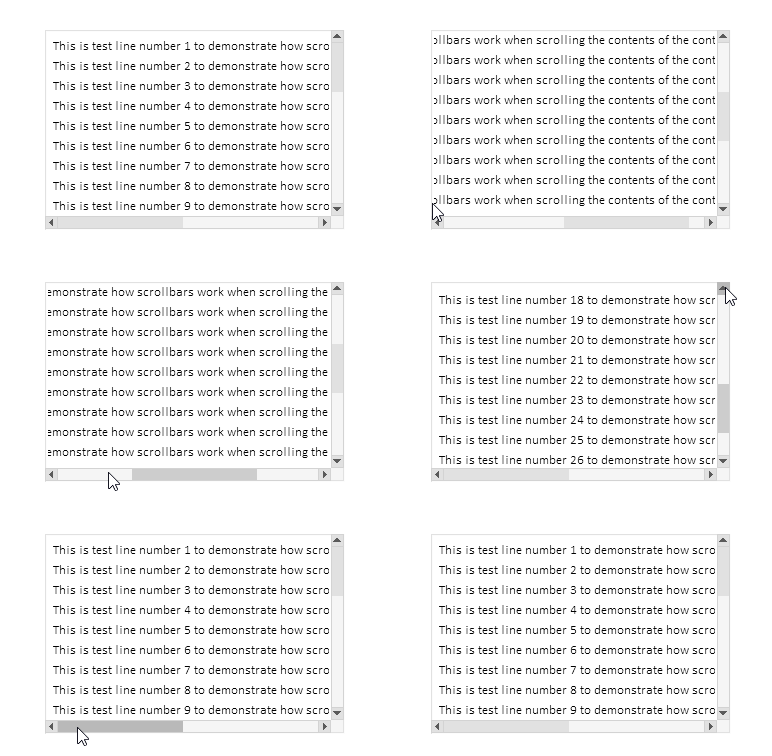
点击轨道时整屏滚动功能有效,点击按钮时切换模式有效,按住按钮时事件自动重复功能有效,滚轮滚动功能有效。
所有控件创建完成后,所有已创建元素的描述信息将打印到日志中:
Container (ContainerBG, ContainerFG): ID 1, Group -1, x 100, y 40, w 300, h 200
   [2]: Groupbox "Attached Groupbox" (ContainerFG_GRBX2BG, ContainerFG_GRBX2FG): ID 2, Group 1, x 100, y 40, w 620, h 610
      [0]: Label "TextString1" (ContainerFG_GRBX2FG_LBL0BG, ContainerFG_GRBX2FG_LBL0FG): ID 0, Group 1, x 108, y 48, w 587, h 20
      [1]: Label "TextString2" (ContainerFG_GRBX2FG_LBL1BG, ContainerFG_GRBX2FG_LBL1FG): ID 1, Group 1, x 108, y 68, w 587, h 20
      [2]: Label "TextString3" (ContainerFG_GRBX2FG_LBL2BG, ContainerFG_GRBX2FG_LBL2FG): ID 2, Group 1, x 108, y 88, w 587, h 20
      [3]: Label "TextString4" (ContainerFG_GRBX2FG_LBL3BG, ContainerFG_GRBX2FG_LBL3FG): ID 3, Group 1, x 108, y 108, w 587, h 20
      [4]: Label "TextString5" (ContainerFG_GRBX2FG_LBL4BG, ContainerFG_GRBX2FG_LBL4FG): ID 4, Group 1, x 108, y 128, w 587, h 20
      [5]: Label "TextString6" (ContainerFG_GRBX2FG_LBL5BG, ContainerFG_GRBX2FG_LBL5FG): ID 5, Group 1, x 108, y 148, w 587, h 20
      [6]: Label "TextString7" (ContainerFG_GRBX2FG_LBL6BG, ContainerFG_GRBX2FG_LBL6FG): ID 6, Group 1, x 108, y 168, w 587, h 20
      [7]: Label "TextString8" (ContainerFG_GRBX2FG_LBL7BG, ContainerFG_GRBX2FG_LBL7FG): ID 7, Group 1, x 108, y 188, w 587, h 20
      [8]: Label "TextString9" (ContainerFG_GRBX2FG_LBL8BG, ContainerFG_GRBX2FG_LBL8FG): ID 8, Group 1, x 108, y 208, w 587, h 20
      [9]: Label "TextString10" (ContainerFG_GRBX2FG_LBL9BG, ContainerFG_GRBX2FG_LBL9FG): ID 9, Group 1, x 108, y 228, w 594, h 20
      [10]: Label "TextString11" (ContainerFG_GRBX2FG_LBL10BG, ContainerFG_GRBX2FG_LBL10FG): ID 10, Group 1, x 108, y 248, w 594, h 20
      [11]: Label "TextString12" (ContainerFG_GRBX2FG_LBL11BG, ContainerFG_GRBX2FG_LBL11FG): ID 11, Group 1, x 108, y 268, w 594, h 20
      [12]: Label "TextString13" (ContainerFG_GRBX2FG_LBL12BG, ContainerFG_GRBX2FG_LBL12FG): ID 12, Group 1, x 108, y 288, w 594, h 20
      [13]: Label "TextString14" (ContainerFG_GRBX2FG_LBL13BG, ContainerFG_GRBX2FG_LBL13FG): ID 13, Group 1, x 108, y 308, w 594, h 20
      [14]: Label "TextString15" (ContainerFG_GRBX2FG_LBL14BG, ContainerFG_GRBX2FG_LBL14FG): ID 14, Group 1, x 108, y 328, w 594, h 20
      [15]: Label "TextString16" (ContainerFG_GRBX2FG_LBL15BG, ContainerFG_GRBX2FG_LBL15FG): ID 15, Group 1, x 108, y 348, w 594, h 20
      [16]: Label "TextString17" (ContainerFG_GRBX2FG_LBL16BG, ContainerFG_GRBX2FG_LBL16FG): ID 16, Group 1, x 108, y 368, w 594, h 20
      [17]: Label "TextString18" (ContainerFG_GRBX2FG_LBL17BG, ContainerFG_GRBX2FG_LBL17FG): ID 17, Group 1, x 108, y 388, w 594, h 20
      [18]: Label "TextString19" (ContainerFG_GRBX2FG_LBL18BG, ContainerFG_GRBX2FG_LBL18FG): ID 18, Group 1, x 108, y 408, w 594, h 20
      [19]: Label "TextString20" (ContainerFG_GRBX2FG_LBL19BG, ContainerFG_GRBX2FG_LBL19FG): ID 19, Group 1, x 108, y 428, w 594, h 20
      [20]: Label "TextString21" (ContainerFG_GRBX2FG_LBL20BG, ContainerFG_GRBX2FG_LBL20FG): ID 20, Group 1, x 108, y 448, w 594, h 20
      [21]: Label "TextString22" (ContainerFG_GRBX2FG_LBL21BG, ContainerFG_GRBX2FG_LBL21FG): ID 21, Group 1, x 108, y 468, w 594, h 20
      [22]: Label "TextString23" (ContainerFG_GRBX2FG_LBL22BG, ContainerFG_GRBX2FG_LBL22FG): ID 22, Group 1, x 108, y 488, w 594, h 20
      [23]: Label "TextString24" (ContainerFG_GRBX2FG_LBL23BG, ContainerFG_GRBX2FG_LBL23FG): ID 23, Group 1, x 108, y 508, w 594, h 20
      [24]: Label "TextString25" (ContainerFG_GRBX2FG_LBL24BG, ContainerFG_GRBX2FG_LBL24FG): ID 24, Group 1, x 108, y 528, w 594, h 20
      [25]: Label "TextString26" (ContainerFG_GRBX2FG_LBL25BG, ContainerFG_GRBX2FG_LBL25FG): ID 25, Group 1, x 108, y 548, w 594, h 20
      [26]: Label "TextString27" (ContainerFG_GRBX2FG_LBL26BG, ContainerFG_GRBX2FG_LBL26FG): ID 26, Group 1, x 108, y 568, w 594, h 20
      [27]: Label "TextString28" (ContainerFG_GRBX2FG_LBL27BG, ContainerFG_GRBX2FG_LBL27FG): ID 27, Group 1, x 108, y 588, w 594, h 20
      [28]: Label "TextString29" (ContainerFG_GRBX2FG_LBL28BG, ContainerFG_GRBX2FG_LBL28FG): ID 28, Group 1, x 108, y 608, w 594, h 20
      [29]: Label "TextString30" (ContainerFG_GRBX2FG_LBL29BG, ContainerFG_GRBX2FG_LBL29FG): ID 29, Group 1, x 108, y 628, w 594, h 20
所述功能运行正常。虽然存在一些小缺陷,但随着 TableView 控件的进一步开发,这些缺陷将会被消除。
结论
今天,我们在正在开发的控件库中实现了相当广泛且必要的功能。
CContainer 类是一个功能强大且方便的工具,可用于在用户界面中创建可滚动区域。它可自动操作滚动条,方便管理大型内容,并提供与可滚动区域的友好交互。由于其灵活的架构以及与其他界面元素的集成,该容器作为复杂图形解决方案的一部分,使用起来非常方便。
我们的下一步将是创建一个表头,例如,允许在其中放置表列标题列表,同时该功能将允许调整每个表头单元格的大小。这将自动调整表格列宽。
文章中用到的程序:
| # | 名称 | 类型 | 描述 |
|---|---|---|---|
| 1 | Base.mqh | 类库 | 用于创建控件基对象的类 |
| 2 | Controls.mqh | 类库 | 控件类 |
| 3 | iTestContainer.mq5 | 测试指标 | 用于测试控件类操作的指标 |
| 4 | MQL5.zip | 存档 | 上述文件的压缩包,用于解压到客户端终端的 MQL5 目录中。 |
本文由MetaQuotes Ltd译自俄文
原文地址: https://www.mql5.com/ru/articles/18658
注意: MetaQuotes Ltd.将保留所有关于这些材料的权利。全部或部分复制或者转载这些材料将被禁止。
本文由网站的一位用户撰写,反映了他们的个人观点。MetaQuotes Ltd 不对所提供信息的准确性负责,也不对因使用所述解决方案、策略或建议而产生的任何后果负责。

 价格行为分析工具包开发(第 35 部分):预测模型训练与部署
 价格行为分析工具包开发(第三十三部分):K线区间理论工具
 MQL5交易工具(第七部分):用于多品种持仓与账户监控的信息仪表盘
 MQL5交易工具(第六部分):带脉冲动画与控件的动态全息仪表盘

我不知道发生了什么,但当我创建原始代码并运行时,显示的结果与文章底部描述的不同。
从图表中删除指标。按 Ctrl+B,在打开的图形对象列表窗口中点击 "全部",删除所有对象。然后重新启动指标。
但最好能说明日志中的内容--很可能是在构建对象时出现了错误。