
Die View- und Controller-Komponenten für Tabellen im MQL5 MVC-Paradigma: Einfache Steuerung
 298
298
 0
0

Inhalt
- Einführung
- Controller-Komponente. Verfeinerung von Basisklassen
- Einfache Steuerelemente
- Hilfsklassen
- Text-Kennzeichnung
- Einfache Taste
- Zwei-Wege-Taste
- Pfeil-nach-oben-Taste
- Pfeil-nach-unten-Taste
- Linke Pfeiltaste
- Rechte Pfeiltaste
- Kontrollkästchen
- Optionsschaltfläche
- Testen des Ergebnisses
- Schlussfolgerung
Einführung
Im Rahmen der Entwicklung des Table View Controls im MVC-Paradigma (Model-View-Controller) haben wir ein Tabellenmodell (die Komponente Model) erstellt und mit der Erstellung der Komponente View begonnen. In der ersten Phase wurde ein Basisobjekt erstellt, das den Vorläufer für alle anderen grafischen Elemente darstellt.
Heute werden wir mit der Entwicklung einfacher Steuerelemente beginnen, die später als Bausteine für zusammengesetzte UI-Elemente dienen werden. Jedes Bedienelement verfügt über Funktionen zur Interaktion mit dem Nutzer und mit anderen Elementen. Mit anderen Worten, dies entspricht im Wesentlichen der Funktionalität der Komponente Controller.
Da in der MQL-Sprache das Ereignismodell in Objekte integriert ist, die mit Hilfe von Chart-Ereignissen erstellt werden, wird die Ereignisbehandlung in allen nachfolgenden Steuerelementen organisiert, um die Verbindung zwischen der View-Komponente und der Controller-Komponente zu implementieren. Dazu muss die Basisklasse der grafischen Elemente verfeinert werden.
Als Nächstes erstellen Sie einfache Steuerelemente – eine Textbeschriftung und verschiedene Schaltflächen. Jedes Element unterstützt das Zeichnen von Symbolen. Dadurch wird es möglich, aus einfachen Schaltflächen völlig unterschiedliche Steuerungen zu erstellen. Wenn Sie sich die Zeichenfolge in der Baumansicht ansehen, bei der links ein Symbol und rechts ein Text steht, scheint es sich um ein separates Steuerelement zu handeln. Aber wir können ein solches Steuerelement leicht erstellen, indem wir eine normale Schaltfläche als Basis verwenden. Gleichzeitig wird es möglich sein, die Parameter der Zeichenkette so anzupassen, dass sie entweder mit einem Farbwechsel reagiert, wenn der Mauszeiger fokussiert und angeklickt wird, oder dass sie statisch ist, aber auf Klicks reagiert.
All dies kann mit nur wenigen Konfigurationszeilen nach der Erstellung des Objekts implementiert werden. Und aus solchen Elementen werden wir weiterhin komplexe zusammengesetzte Steuerelemente erstellen, die vollständig interaktiv und einsatzbereit sind.
Die Komponente Controller. Verfeinerung von Basisklassen
Um unsere Pläne zu verwirklichen, müssen wir also die bereits implementierten Klassen, Makrosubstitutionen und Enumerationen leicht verfeinern. Der größte Teil der erforderlichen Funktionalität wird im Basisobjekt der grafischen Elemente untergebracht sein. Daher wird sie hauptsächlich verfeinert.
Zuvor befand sich diese Klasse unter MQL5\Scripts\Tables\Controls\Base.mqh.
Heute werden wir einen Testindikator schreiben, also erstellen wir einen neuen Ordner \Tables\Controls\ im Indikatorverzeichnis \MQ5\Indicators\ und suchen darin die Datei Base.mqh. Damit werden wir uns heute befassen.
Außerdem enthalten die Objekte Listen mit angehängten Steuerelementen. Container können zum Beispiel solche Objekte sein. Damit diese Listen Dateien korrekt verarbeiten, d. h. in Listen gespeicherte Objekte erzeugen können, müssen alle Klassen der zu erstellenden Elemente im Voraus deklariert werden. Schreiben wir eine Klassendeklaration, neue Makrosubstitutionen, Enumerationen und Enumerationskonstante in die Datei Base.mqh:
//+------------------------------------------------------------------+
//|                                                         Base.mqh |
//|                                  Copyright 2025, MetaQuotes Ltd. |
//|                                             https://www.mql5.com |
//+------------------------------------------------------------------+
#property copyright "Copyright 2025, MetaQuotes Ltd."
#property link      "https://www.mql5.com"

//+------------------------------------------------------------------+
//| Include libraries                                                |
//+------------------------------------------------------------------+
#include <Canvas\Canvas.mqh>              // CCanvas class
#include <Arrays\List.mqh>                // CList class

//--- Forward declaration of control element classes
class    CImagePainter;                   // Image drawing class
class    CLabel;                          // Text label class
class    CButton;                         // Simple button class
class    CButtonTriggered;                // Two-position button class
class    CButtonArrowUp;                  // Up arrow button class
class    CButtonArrowDown;                // Down arrow button class
class    CButtonArrowLeft;                // Left arrow button class
class    CButtonArrowRight;               // Right arrow button class
class    CCheckBox;                       // CheckBox control class
class    CRadioButton;                    // RadioButton control class

//+------------------------------------------------------------------+
//| Macro substitutions                                              |
//+------------------------------------------------------------------+
#define  clrNULL              0x00FFFFFF  // Transparent color for CCanvas
#define  MARKER_START_DATA    -1          // Data start marker in a file
#define  DEF_FONTNAME         "Calibri"   // Default font
#define  DEF_FONTSIZE         10          // Default font size

//+------------------------------------------------------------------+
//| Enumerations                                                     |
//+------------------------------------------------------------------+
enum ENUM_ELEMENT_TYPE                    // Enumeration of graphical element types
  {
   ELEMENT_TYPE_BASE = 0x10000,           // Basic object of graphical elements
   ELEMENT_TYPE_COLOR,                    // Color object
   ELEMENT_TYPE_COLORS_ELEMENT,           // Color object of the graphical object element
   ELEMENT_TYPE_RECTANGLE_AREA,           // Rectangular area of the element
   ELEMENT_TYPE_IMAGE_PAINTER,            // Object for drawing images
   ELEMENT_TYPE_CANVAS_BASE,              // Basic canvas object for graphical elements
   ELEMENT_TYPE_LABEL,                    // Text label
   ELEMENT_TYPE_BUTTON,                   // Simple button
   ELEMENT_TYPE_BUTTON_TRIGGERED,         // Two-position button
   ELEMENT_TYPE_BUTTON_ARROW_UP,          // Up arrow button
   ELEMENT_TYPE_BUTTON_ARROW_DOWN,        // Down arrow button
   ELEMENT_TYPE_BUTTON_ARROW_LEFT,        // Left arrow button
   ELEMENT_TYPE_BUTTON_ARROW_RIGHT,       // Right arrow button
   ELEMENT_TYPE_CHECKBOX,                 // CheckBox control
   ELEMENT_TYPE_RADIOBUTTON,              // RadioButton control
  };

enum ENUM_ELEMENT_STATE                   // Control state
  {
   ELEMENT_STATE_DEF,                     // By default (e.g. button released etc.)
   ELEMENT_STATE_ACT,                     // Activated (e.g. button pressed, etc.)
  };

enum ENUM_COLOR_STATE                     // Enumeration of element state colors
  {
   COLOR_STATE_DEFAULT,                   // Normal state color
   COLOR_STATE_FOCUSED,                   // Color when hovering over an element
   COLOR_STATE_PRESSED,                   // Color when clicking on an element
   COLOR_STATE_BLOCKED,                   // Blocked element color
  };
//+------------------------------------------------------------------+
//| Functions                                                        |
//+------------------------------------------------------------------+
Bei der Erstellung von Methoden zum Speichern und Laden von Objekten in/aus Dateien hat jede Methode konstante, sich wiederholende Strings, die sich von Methode zu Methode nicht ändern:
//--- Check the handle
   if(file_handle==INVALID_HANDLE)
      return false;
//--- Save data start marker - 0xFFFFFFFFFFFFFFFF
   if(::FileWriteLong(file_handle,-1)!=sizeof(long))
      return false;
//--- Save the object type
   if(::FileWriteInteger(file_handle,this.Type(),INT_VALUE)!=INT_VALUE)
      return false;

//--- Save the ID
   if(::FileWriteInteger(file_handle,this.m_id,INT_VALUE)!=INT_VALUE)
      return false;
//--- Save the name
   if(::FileWriteArray(file_handle,this.m_name)!=sizeof(this.m_name))
      return false;
Und es gibt die gleichen Methoden für die Beschreibungen und dem Drucken. Daher ist es sinnvoll, diese Zeichenketten an Lade-/Speichermethoden im Basisobjekt zu übergeben. Dann müssen sie nicht in jeder neuen Lade-/Speichermethode in jeder neuen Klasse geschrieben werden, in der Manipulationen mit Dateien vorgesehen sind.
Wir deklarieren diese Methoden im Basisobjekt:
public:
//--- Set (1) name and (2) ID
   void              SetName(const string name)                { ::StringToShortArray(name,this.m_name);    }
   void              SetID(const int id)                       { this.m_id=id;                              }
//--- Return (1) name and (2) ID
   string            Name(void)                          const { return ::ShortArrayToString(this.m_name);  }
   int               ID(void)                            const { return this.m_id;                          }

//--- Virtual methods of (1) comparing, (2) saving to file, (3) loading from file, (4) object type
   virtual int       Compare(const CObject *node,const int mode=0) const;
   virtual bool      Save(const int file_handle);
   virtual bool      Load(const int file_handle);
   virtual int       Type(void)                          const { return(ELEMENT_TYPE_BASE); }

//--- (1) Return and (2) display the object description in the journal
   virtual string    Description(void);
   virtual void      Print(void);

//--- Constructor/destructor
                     CBaseObj (void) : m_id(-1) { this.SetName(""); }
                    ~CBaseObj (void) {}
  };
Und schreiben ihre Umsetzung:
//+------------------------------------------------------------------+
//| CBaseObj::Return the object description                          |
//+------------------------------------------------------------------+
string CBaseObj::Description(void)
  {
   string nm=this.Name();
   string name=(nm!="" ? ::StringFormat(" \"%s\"",nm) : nm);
   return ::StringFormat("%s%s ID %d",ElementDescription((ENUM_ELEMENT_TYPE)this.Type()),name,this.ID());
  }
//+------------------------------------------------------------------+
//| CBaseObj::Display the object description in the journal          |
//+------------------------------------------------------------------+
void CBaseObj::Print(void)
  {
   ::Print(this.Description());
  }
//+------------------------------------------------------------------+
//| CBaseObj::Save to file                                           |
//+------------------------------------------------------------------+
bool CBaseObj::Save(const int file_handle)
  {
//--- Check the handle
   if(file_handle==INVALID_HANDLE)
      return false;
//--- Save data start marker - 0xFFFFFFFFFFFFFFFF
   if(::FileWriteLong(file_handle,-1)!=sizeof(long))
      return false;
//--- Save the object type
   if(::FileWriteInteger(file_handle,this.Type(),INT_VALUE)!=INT_VALUE)
      return false;

//--- Save the ID
   if(::FileWriteInteger(file_handle,this.m_id,INT_VALUE)!=INT_VALUE)
      return false;
//--- Save the name
   if(::FileWriteArray(file_handle,this.m_name)!=sizeof(this.m_name))
      return false;

//--- All is successful
   return true;
  }
//+------------------------------------------------------------------+
//| CBaseObj::Load from file                                         |
//+------------------------------------------------------------------+
bool CBaseObj::Load(const int file_handle)
  {
//--- Check the handle
   if(file_handle==INVALID_HANDLE)
      return false;
//--- Load and check the data start marker - 0xFFFFFFFFFFFFFFFF
   if(::FileReadLong(file_handle)!=-1)
      return false;
//--- Load the object type
   if(::FileReadInteger(file_handle,INT_VALUE)!=this.Type())
      return false;

//--- Load the ID
   this.m_id=::FileReadInteger(file_handle,INT_VALUE);
//--- Load the name
   if(::FileReadArray(file_handle,this.m_name)!=sizeof(this.m_name))
      return false;

//--- All is successful
   return true;
  }
Nun können für jede neue Klasse die Methoden Description und Print nur dann deklariert und implementiert werden, wenn ihre Logik von der in dieser Klasse vorgeschriebenen Logik abweicht.
Und in den Methoden für die Arbeit mit Dateien in den abgeleiteten Klassen, anstatt immer wieder die gleichen Codezeilen in jeder Methode jeder Klasse zu schreiben, werden wir einfach auf die Methoden der Arbeit mit Dateien dieses Basisobjekts zugreifen.
Wir entfernen aus allen abgeleiteten Klassen dieser Datei (Base.mqh) alle Print-Methoden – sie sind bereits im Basisobjekt enthalten und wiederholen es vollständig.
Bei allen Methoden der Arbeit mit Dateien löschen wir solche Zeichenfolgen:
//+------------------------------------------------------------------+
//| CColor::Save to file                                             |
//+------------------------------------------------------------------+
bool CColor::Save(const int file_handle)
  {
//--- Check the handle
   if(file_handle==INVALID_HANDLE)
      return false;
//--- Save data start marker - 0xFFFFFFFFFFFFFFFF
   if(::FileWriteLong(file_handle,-1)!=sizeof(long))
      return false;
//--- Save the object type
   if(::FileWriteInteger(file_handle,this.Type(),INT_VALUE)!=INT_VALUE)
      return false;

//--- Save the color
   if(::FileWriteInteger(file_handle,this.m_color,INT_VALUE)!=INT_VALUE)
      return false;
//--- Save the ID
   if(::FileWriteInteger(file_handle,this.m_id,INT_VALUE)!=INT_VALUE)
      return false;
//--- Save the name
   if(::FileWriteArray(file_handle,this.m_name)!=sizeof(this.m_name))
      return false;

//--- All is successful
   return true;
  }
Anstelle dieser Zeichenketten haben wir jetzt nur noch einen Aufruf der Basisklassenmethode:
//+------------------------------------------------------------------+
//| CColor::Save to file                                             |
//+------------------------------------------------------------------+
bool CColor::Save(const int file_handle)
  {
//--- Save the parent object data
   if(!CBaseObj::Save(file_handle))
      return false;

//--- Save the color
   if(::FileWriteInteger(file_handle,this.m_color,INT_VALUE)!=INT_VALUE)
      return false;

//--- All is successful
   return true;
  }
Solche Änderungen wurden bereits in allen Methoden der Arbeit mit Dateien in dieser Datei vorgenommen. Wir werden diese Änderungen bei der Erstellung nachfolgender Kurse berücksichtigen.
In der Klasse CColorElement ersetzen wir identische doppelte Zeichenketten in Klassenkonstruktoren.
//+-----------------------------------------------------------------------------+
//| CColorControl::Constructor with setting the transparent colors of the object|
//+-----------------------------------------------------------------------------+
CColorElement::CColorElement(void)
  {
   this.InitColors(clrNULL,clrNULL,clrNULL,clrNULL);
   this.m_default.SetName("Default"); this.m_default.SetID(1);
   this.m_focused.SetName("Focused"); this.m_focused.SetID(2);
   this.m_pressed.SetName("Pressed"); this.m_pressed.SetID(3);
   this.m_blocked.SetName("Blocked"); this.m_blocked.SetID(4);
   this.SetCurrentAs(COLOR_STATE_DEFAULT);
   this.m_current.SetName("Current");
   this.m_current.SetID(0);
  }
mit einer Methode Init():
public:
//--- Return a new color
   color             NewColor(color base_color, int shift_red, int shift_green, int shift_blue);

//--- Class initialization
   void              Init(void);

//--- Initialize colors for different states
...
Die Umsetzung:
//+------------------------------------------------------------------+
//| CColorControl::Class initialization                              |
//+------------------------------------------------------------------+
void CColorElement::Init(void)
  {
   this.m_default.SetName("Default"); this.m_default.SetID(1);
   this.m_focused.SetName("Focused"); this.m_focused.SetID(2);
   this.m_pressed.SetName("Pressed"); this.m_pressed.SetID(3);
   this.m_blocked.SetName("Blocked"); this.m_blocked.SetID(4);
   this.SetCurrentAs(COLOR_STATE_DEFAULT);
   this.m_current.SetName("Current");
   this.m_current.SetID(0);
  }
//+------------------------------------------------------------------+
Wenn eine transparente Farbe an die Farbinitialisierungsmethode übergeben wird, muss sie für keinen Zustand geändert werden.
Beachten wir dies bei der Methodenimplementierung:
//+----------------------------------------------------------------------+
//| CColorControl::Set the colors for all states based on the current one|
//+----------------------------------------------------------------------+
void CColorElement::InitColors(const color clr)
  {
   this.InitDefault(clr);
   this.InitFocused(clr!=clrNULL ? this.NewColor(clr,-20,-20,-20) : clrNULL);
   this.InitPressed(clr!=clrNULL ? this.NewColor(clr,-40,-40,-40) : clrNULL);
   this.InitBlocked(clrWhiteSmoke);
  }
In der Klasse CBound fügen wir eine Methode hinzu, die ein Flag für die Anwesenheit des Cursors innerhalb eines rechteckigen Bereichs zurückgibt. Dies ist bei der Implementierung der Controller-Komponente erforderlich:
//+------------------------------------------------------------------+
//| Rectangular region class                                         |
//+------------------------------------------------------------------+
class CBound : public CBaseObj
  {
protected:
   CRect             m_bound;                                  // Rectangular area structure

public:
//--- Change the bounding rectangular (1) width, (2) height and (3) size
   void              ResizeW(const int size)                   { this.m_bound.Width(size);                                    }
   void              ResizeH(const int size)                   { this.m_bound.Height(size);                                   }
   void              Resize(const int w,const int h)           { this.m_bound.Width(w); this.m_bound.Height(h);               }

//--- Set (1) X, (2) Y and (3) both coordinates of the bounding rectangle
   void              SetX(const int x)                         { this.m_bound.left=x;                                         }
   void              SetY(const int y)                         { this.m_bound.top=y;                                          }
   void              SetXY(const int x,const int y)            { this.m_bound.LeftTop(x,y);                                   }

//--- (1) Set and (2) shift the bounding rectangle by the specified coordinates/offset size
   void              Move(const int x,const int y)             { this.m_bound.Move(x,y);                                      }
   void              Shift(const int dx,const int dy)          { this.m_bound.Shift(dx,dy);                                   }

//--- Returns the object coordinates, dimensions, and boundaries
   int               X(void)                             const { return this.m_bound.left;                                    }
   int               Y(void)                             const { return this.m_bound.top;                                     }
   int               Width(void)                         const { return this.m_bound.Width();                                 }
   int               Height(void)                        const { return this.m_bound.Height();                                }
   int               Right(void)                         const { return this.m_bound.right-(this.m_bound.Width()  >0 ? 1 : 0);}
   int               Bottom(void)                        const { return this.m_bound.bottom-(this.m_bound.Height()>0 ? 1 : 0);}

//--- Returns the flag indicating whether the cursor is inside the area
   bool              Contains(const int x,const int y)   const { return this.m_bound.Contains(x,y);                           }

//--- Return the object description
   virtual string    Description(void);


//--- Virtual methods of (1) comparing, (2) saving to file, (3) loading from file, (4) object type
   virtual int       Compare(const CObject *node,const int mode=0) const;
   virtual bool      Save(const int file_handle);
   virtual bool      Load(const int file_handle);
   virtual int       Type(void)                          const { return(ELEMENT_TYPE_RECTANGLE_AREA);                         }

//--- Constructors/destructor
                     CBound(void) { ::ZeroMemory(this.m_bound); }
                     CBound(const int x,const int y,const int w,const int h) { this.SetXY(x,y); this.Resize(w,h);             }
                    ~CBound(void) { ::ZeroMemory(this.m_bound); }
  };
Jetzt ist es notwendig, alles für die Implementierung der Controller-Komponente zur Basisklasse des grafischen Elements CCanvasBase hinzuzufügen.
Wenn grafische Elemente mit der Maus interagieren, müssen einige Eigenschaften des Charts deaktiviert werden, z. B. das Scrollen des Charts mit dem Mausrad, das Menü der rechten Maustaste usw. Jedes Objekt der grafischen Elemente wird dies tun. Beim ersten Start müssen wir sich jedoch an den Zustand der Chart-Eigenschaften erinnern, wie er vor dem Start des Programms war. Und nach Abschluss der Arbeiten bringen wir alles wieder an seinen Platz zurück.
Dazu deklarieren wir im privaten Abschnitt der Klasse CCanvasBase Variablen zum Speichern von Werten gespeicherter Chart-Eigenschaften und eine Methode zum Festlegen von Einschränkungen für Chart-Eigenschaften:
//+------------------------------------------------------------------+
//| Base class of graphical elements canvas                          |
//+------------------------------------------------------------------+
class CCanvasBase : public CBaseObj
  {
private:
   bool              m_chart_mouse_wheel_flag;                 // Flag for sending mouse wheel scroll messages
   bool              m_chart_mouse_move_flag;                  // Flag for sending mouse cursor movement messages
   bool              m_chart_object_create_flag;               // Flag for sending messages about the graphical object creation event
   bool              m_chart_mouse_scroll_flag;                // Flag for scrolling the chart with the left button and mouse wheel


//--- Set chart restrictions (wheel scrolling, context menu, and crosshair)
   void              SetFlags(const bool flag);

protected:
UI-Elemente können zwei Zustände haben (vielleicht mehr, aber im Moment – zwei). Zum Beispiel für eine Taste – gedrückt, losgelassen. Dies bedeutet, dass wir die Farbzustände des Elements in seinen beiden Zuständen kontrollieren müssen. Im geschützten Abschnitt der Klasse definieren wir eine Variable, die den Zustand des Elements speichert, einen weiteren Satz von Farbmanagementobjekten und eine separate Transparenzsteuerung für die Hintergrund- und Vordergrundleinwand:
protected:
   CCanvas           m_background;                             // Background canvas
   CCanvas           m_foreground;                             // Foreground canvas
   CBound            m_bound;                                  // Object boundaries
   CCanvasBase      *m_container;                              // Parent container object
   CColorElement     m_color_background;                       // Background color control object
   CColorElement     m_color_foreground;                       // Foreground color control object
   CColorElement     m_color_border;                           // Border color control object

   CColorElement     m_color_background_act;                   // Activated element background color control object
   CColorElement     m_color_foreground_act;                   // Activated element foreground color control object
   CColorElement     m_color_border_act;                       // Activated element frame color control object

   ENUM_ELEMENT_STATE m_state;                                 // Control state (e.g. buttons (on/off))
   long              m_chart_id;                               // Chart ID
   int               m_wnd;                                    // Chart subwindow index
   int               m_wnd_y;                                  // Cursor Y coordinate offset in the subwindow
   int               m_obj_x;                                  // Graphical object X coordinate
   int               m_obj_y;                                  // Graphical object Y coordinate
   uchar             m_alpha_bg;                               // Background transparency
   uchar             m_alpha_fg;                               // Foreground transparency
   uint              m_border_width;                           // Frame width
   string            m_program_name;                           // Program name
   bool              m_hidden;                                 // Hidden object flag
   bool              m_blocked;                                // Blocked element flag
   bool              m_focused;                                // Element flag in focus
Hier deklarieren wir auch Methoden für die Steuerung des Mauszeigers, das Farbmanagement und virtuelle Ereignishandler:
//--- Limit the graphical object by the container dimensions
   virtual void      ObjectTrim(void);
//--- Returns the flag indicating whether the cursor is inside the object
   bool              Contains(const int x,const int y);


//--- Check if the set color is equal to the specified one
   bool              CheckColor(const ENUM_COLOR_STATE state) const;
//--- Change the background, text, and border colors depending on the condition
   void              ColorChange(const ENUM_COLOR_STATE state);

//--- Initialize (1) the class object and (2) default object colors
   void              Init(void);
   virtual void      InitColors(void);

//--- (1) Cursor hovering (Focus), (2) button clicks (Press), (3) wheel scrolling (Wheel),
//--- (4) release (Release), (5) graphical object creation (Create) event handlers. Should be identified in the descendants
   virtual void      OnFocusEvent(const int id, const long lparam, const double dparam, const string sparam);
   virtual void      OnPressEvent(const int id, const long lparam, const double dparam, const string sparam);
   virtual void      OnReleaseEvent(const int id, const long lparam, const double dparam, const string sparam);
   virtual void      OnCreateEvent(const int id, const long lparam, const double dparam, const string sparam);
   virtual void      OnWheelEvent(const int id, const long lparam, const double dparam, const string sparam)      { return;   }  // handler is disabled here
//--- Handlers for custom events of the element when hovering, clicking, and scrolling the wheel in the object area
   virtual void      MouseMoveHandler(const int id, const long lparam, const double dparam, const string sparam)  { return;   }  // handler is disabled here
   virtual void      MousePressHandler(const int id, const long lparam, const double dparam, const string sparam) { return;   }  // handler is disabled here
   virtual void      MouseWheelHandler(const int id, const long lparam, const double dparam, const string sparam) { return;   }  // handler is disabled here

public:
Im öffentlichen Abschnitt der Klasse erhänzen wir Methoden zum Abrufen von Farbmanagementobjekten des Elements im aktivierten Zustand und Methoden zum Abrufen von Farben in verschiedenen Zuständen des Elements:
public:
//--- Return the pointer to the canvas (1) background and (2) foreground
   CCanvas          *GetBackground(void)                       { return &this.m_background;                                                        }
   CCanvas          *GetForeground(void)                       { return &this.m_foreground;                                                        }

//--- Return the pointer to the color management object for the (1) background, (2) foreground and (3) border
   CColorElement    *GetBackColorControl(void)                 { return &this.m_color_background;                                                  }
   CColorElement    *GetForeColorControl(void)                 { return &this.m_color_foreground;                                                  }
   CColorElement    *GetBorderColorControl(void)               { return &this.m_color_border;                                                      }

//--- Return the pointer to the color management object for the (1) background, (2) foreground and (3) activated element border
   CColorElement    *GetBackColorActControl(void)              { return &this.m_color_background_act;                                              }
   CColorElement    *GetForeColorActControl(void)              { return &this.m_color_foreground_act;                                              }
   CColorElement    *GetBorderColorActControl(void)            { return &this.m_color_border_act;                                                  }

//--- Return the (1) background, (2) foreground and (3) border color
   color             BackColor(void)         const { return(!this.State() ? this.m_color_background.GetCurrent() : this.m_color_background_act.GetCurrent());  }
   color             ForeColor(void)         const { return(!this.State() ? this.m_color_foreground.GetCurrent() : this.m_color_foreground_act.GetCurrent());  }
   color             BorderColor(void)       const { return(!this.State() ? this.m_color_border.GetCurrent()     : this.m_color_border_act.GetCurrent());      }

//--- Return the DEFAULT color of (1) background, (2) foreground, (3) border
   color             BackColorDefault(void)  const { return(!this.State() ? this.m_color_background.GetDefault() : this.m_color_background_act.GetDefault());  }
   color             ForeColorDefault(void)  const { return(!this.State() ? this.m_color_foreground.GetDefault() : this.m_color_foreground_act.GetDefault());  }
   color             BorderColorDefault(void)const { return(!this.State() ? this.m_color_border.GetDefault()     : this.m_color_border_act.GetDefault());      }

//--- Return the FOCUSED preset color of the (1) background, (2) foreground, (3) border
   color             BackColorFocused(void)  const { return(!this.State() ? this.m_color_background.GetFocused() : this.m_color_background_act.GetFocused());  }
   color             ForeColorFocused(void)  const { return(!this.State() ? this.m_color_foreground.GetFocused() : this.m_color_foreground_act.GetFocused());  }
   color             BorderColorFocused(void)const { return(!this.State() ? this.m_color_border.GetFocused()     : this.m_color_border_act.GetFocused());      }

//--- Return the preset PRESSED color of the (1) background, (2) foreground, (3) frame
   color             BackColorPressed(void)  const { return(!this.State() ? this.m_color_background.GetPressed() : this.m_color_background_act.GetPressed());  }
   color             ForeColorPressed(void)  const { return(!this.State() ? this.m_color_foreground.GetPressed() : this.m_color_foreground_act.GetPressed());  }
   color             BorderColorPressed(void)const { return(!this.State() ? this.m_color_border.GetPressed()     : this.m_color_border_act.GetPressed());      }

//--- Return the BLOCKED color of (1) background, (2) foreground, (3) border
   color             BackColorBlocked(void)              const { return this.m_color_background.GetBlocked();                                      }
   color             ForeColorBlocked(void)              const { return this.m_color_foreground.GetBlocked();                                      }
   color             BorderColorBlocked(void)            const { return this.m_color_border.GetBlocked();                                          }

//--- Set background colors for all states
Nun wird in jeder der Methoden zum Abrufen von Farben der Zustand des Elements überprüft (aktiviert/deaktiviert), und die erforderliche Farbe wird entsprechend dem Zustand des Elements zurückgegeben.
Wir fügen Methoden zum Einstellen der Farben des aktivierten Elements hinzu und Verfeinern die Methoden zum Einstellen der Farben von Elementzuständen relativ zum Mauszeiger, wobei der Zustand des Elements als aktiviert/nicht aktiviert angegeben wird:
//--- Set background colors for all states
   void              InitBackColorsAct(const color clr_default, const color clr_focused, const color clr_pressed, const color clr_blocked)
                       {
                        this.m_color_background_act.InitColors(clr_default,clr_focused,clr_pressed,clr_blocked);
                       }
   void              InitBackColorsAct(const color clr)        { this.m_color_background_act.InitColors(clr);                                      }

//--- Set foreground colors for all states
   void              InitForeColorsAct(const color clr_default, const color clr_focused, const color clr_pressed, const color clr_blocked)
                       {
                        this.m_color_foreground_act.InitColors(clr_default,clr_focused,clr_pressed,clr_blocked);
                       }
   void              InitForeColorsAct(const color clr)        { this.m_color_foreground_act.InitColors(clr);                                      }

//--- Set border colors for all states
   void              InitBorderColorsAct(const color clr_default, const color clr_focused, const color clr_pressed, const color clr_blocked)
                       {
                        this.m_color_border_act.InitColors(clr_default,clr_focused,clr_pressed,clr_blocked);
                       }
   void              InitBorderColorsAct(const color clr)      { this.m_color_border_act.InitColors(clr);                                          }

//--- Initialize the color of (1) background, (2) foreground and (3) frame with initial values
   void              InitBackColorActDefault(const color clr)  { this.m_color_background_act.InitDefault(clr);                                     }
   void              InitForeColorActDefault(const color clr)  { this.m_color_foreground_act.InitDefault(clr);                                     }
   void              InitBorderColorActDefault(const color clr){ this.m_color_border_act.InitDefault(clr);                                         }

//--- Initialize the color of (1) background, (2) foreground and (3) frame on hover with initial values
   void              InitBackColorActFocused(const color clr)  { this.m_color_background_act.InitFocused(clr);                                     }
   void              InitForeColorActFocused(const color clr)  { this.m_color_foreground_act.InitFocused(clr);                                     }
   void              InitBorderColorActFocused(const color clr){ this.m_color_border_act.InitFocused(clr);                                         }

//--- Initialize the color of (1) background, (2) foreground and (3) frame on click with initial values
   void              InitBackColorActPressed(const color clr)  { this.m_color_background_act.InitPressed(clr);                                     }
   void              InitForeColorActPressed(const color clr)  { this.m_color_foreground_act.InitPressed(clr);                                     }
   void              InitBorderColorActPressed(const color clr){ this.m_color_border_act.InitPressed(clr);                                         }

//--- Set the current background color to different states
   bool              BackColorToDefault(void)
                       {
                        return(!this.State() ? this.m_color_background.SetCurrentAs(COLOR_STATE_DEFAULT) :
                                               this.m_color_background_act.SetCurrentAs(COLOR_STATE_DEFAULT));
                       }
   bool              BackColorToFocused(void)
                       {
                        return(!this.State() ? this.m_color_background.SetCurrentAs(COLOR_STATE_FOCUSED) :
                                               this.m_color_background_act.SetCurrentAs(COLOR_STATE_FOCUSED));
                       }
   bool              BackColorToPressed(void)
                       {
                        return(!this.State() ? this.m_color_background.SetCurrentAs(COLOR_STATE_PRESSED) :
                                               this.m_color_background_act.SetCurrentAs(COLOR_STATE_PRESSED));
                       }
   bool              BackColorToBlocked(void)   { return this.m_color_background.SetCurrentAs(COLOR_STATE_BLOCKED);  }

//--- Set the current foreground color to different states
   bool              ForeColorToDefault(void)
                       { return(!this.State() ? this.m_color_foreground.SetCurrentAs(COLOR_STATE_DEFAULT) :
                                                this.m_color_foreground_act.SetCurrentAs(COLOR_STATE_DEFAULT));
                       }
   bool              ForeColorToFocused(void)
                       { return(!this.State() ? this.m_color_foreground.SetCurrentAs(COLOR_STATE_FOCUSED) :
                                                this.m_color_foreground_act.SetCurrentAs(COLOR_STATE_FOCUSED));
                       }
   bool              ForeColorToPressed(void)
                       { return(!this.State() ? this.m_color_foreground.SetCurrentAs(COLOR_STATE_PRESSED) :
                                                this.m_color_foreground_act.SetCurrentAs(COLOR_STATE_PRESSED));
                       }
   bool              ForeColorToBlocked(void)   { return this.m_color_foreground.SetCurrentAs(COLOR_STATE_BLOCKED);  }

//--- Set the current frame color to different states
   bool              BorderColorToDefault(void)
                       { return(!this.State() ? this.m_color_border.SetCurrentAs(COLOR_STATE_DEFAULT) :
                                                this.m_color_border_act.SetCurrentAs(COLOR_STATE_DEFAULT));
                       }
   bool              BorderColorToFocused(void)
                       { return(!this.State() ? this.m_color_border.SetCurrentAs(COLOR_STATE_FOCUSED) :
                                                this.m_color_border_act.SetCurrentAs(COLOR_STATE_FOCUSED));
                       }
   bool              BorderColorToPressed(void)
                       { return(!this.State() ? this.m_color_border.SetCurrentAs(COLOR_STATE_PRESSED) :
                                                this.m_color_border_act.SetCurrentAs(COLOR_STATE_PRESSED));
                       }
   bool              BorderColorToBlocked(void) { return this.m_color_border.SetCurrentAs(COLOR_STATE_BLOCKED);      }
Wir fügen Methoden zum Setzen und Zurückgeben des Zustands eines Elements hinzu:
//--- Create OBJ_BITMAP_LABEL
   bool              Create(const long chart_id,const int wnd,const string object_name,const int x,const int y,const int w,const int h);

//--- (1) Set and (2) return the state
   void              SetState(ENUM_ELEMENT_STATE state)        { this.m_state=state; this.ColorsToDefault();                                       }
   ENUM_ELEMENT_STATE State(void)                        const { return this.m_state;                                                              }

//--- Return (1) the object's belonging to the program, the flag (2) of a hidden element, (3) a blocked element, (4) element in focus and (5) the graphical object name (background, text)
Wenn der Zustand eines Elements gesetzt wird, müssen nach dem Setzen des Statusflags alle Farben des Elements als aktuell erfasst werden. Wenn das Element aktiviert ist, z. B. die Schaltfläche gedrückt wird, werden alle aktuellen Farben als Farben für die gedrückte Schaltfläche festgelegt. Andernfalls werden die aktuellen Farben aus der Farbliste für die freigegebene Schaltfläche übernommen.
Da wir jetzt das Setzen und Zurückgeben der Transparenz für den Hintergrund und den Vordergrund getrennt haben, fügen wir neue Methoden für das Setzen und Zurückgeben der Transparenz hinzu:
   string            NameBG(void)                        const { return this.m_background.ChartObjectName();                                       }
   string            NameFG(void)                        const { return this.m_foreground.ChartObjectName();                                       }

//--- (1) Return and (2) set background transparency
   uchar             AlphaBG(void)                       const { return this.m_alpha_bg;                                                           }
   void              SetAlphaBG(const uchar value)             { this.m_alpha_bg=value;                                                            }
//--- (1) Return and (2) set the foreground transparency
   uchar             AlphaFG(void)                       const { return this.m_alpha_fg;                                                           }
   void              SetAlphaFG(const uchar value)             { this.m_alpha_fg=value;                                                            }

//--- Sets the background and foreground transparency
   void              SetAlpha(const uchar value)               { this.m_alpha_fg=this.m_alpha_bg=value;                                            }

//--- (1) Return and (2) set the frame width
Wir deklarieren eine Ereignisbehandlung, die von der Ereignisbehandlung des Steuerprogramms aufgerufen werden soll:
//--- Event handler                                                    |
   void              OnChartEvent(const int id,const long& lparam,const double& dparam,const string& sparam);

//--- Constructors/destructor
                     CCanvasBase(void) :
                        m_program_name(::MQLInfoString(MQL_PROGRAM_NAME)), m_chart_id(::ChartID()), m_wnd(0),
                        m_alpha_bg(0), m_alpha_fg(255), m_hidden(false), m_blocked(false), m_focused(false), m_border_width(0), m_wnd_y(0), m_state(0) { this.Init(); }
                     CCanvasBase(const string object_name,const long chart_id,const int wnd,const int x,const int y,const int w,const int h);
                    ~CCanvasBase(void);
  };
Im Konstruktor geben wir die Eigenschaften der Schriftart korrekt an, die auf der Leinwand gezeichnet wird, und rufen die Methode Init() auf, um die Eigenschaften des Charts und der Maus zu speichern:
//+------------------------------------------------------------------+
//| CCanvasBase::Constructor                                         |
//+------------------------------------------------------------------+
CCanvasBase::CCanvasBase(const string object_name,const long chart_id,const int wnd,const int x,const int y,const int w,const int h) :
   m_program_name(::MQLInfoString(MQL_PROGRAM_NAME)), m_wnd(wnd<0 ? 0 : wnd), m_alpha_bg(0), m_alpha_fg(255), m_hidden(false), m_blocked(false), m_focused(false), m_border_width(0), m_state(0)
  {
//--- Get the adjusted chart ID and the distance in pixels along the vertical Y axis
//--- between the upper frame of the indicator subwindow and the upper frame of the chart main window
   this.m_chart_id=this.CorrectChartID(chart_id);
   this.m_wnd_y=(int)::ChartGetInteger(this.m_chart_id,CHART_WINDOW_YDISTANCE,this.m_wnd);
//--- If the graphical resource and graphical object are created
   if(this.Create(this.m_chart_id,this.m_wnd,object_name,x,y,w,h))
     {
      //--- Clear the background and foreground canvases and set the initial coordinate values,
      //--- names of graphic objects and properties of text drawn in the foreground
      this.Clear(false);
      this.m_obj_x=x;
      this.m_obj_y=y;
      this.m_color_background.SetName("Background");
      this.m_color_foreground.SetName("Foreground");
      this.m_color_border.SetName("Border");
      this.m_foreground.FontSet(DEF_FONTNAME,-DEF_FONTSIZE*10,FW_MEDIUM);
      this.m_bound.SetName("Perimeter");

      //--- Remember permissions for the mouse and chart tools
      this.Init();
     }
  }
Im Destruktor der Klasse zerstören wir das erstellte Grafikobjekt und stellen Sie die gespeicherten Eigenschaften des Charts und der Mausberechtigungen wieder her:
//+------------------------------------------------------------------+
//| CCanvasBase::Destructor                                          |
//+------------------------------------------------------------------+
CCanvasBase::~CCanvasBase(void)
  {
//--- Destroy the object
   this.Destroy();
//--- Return permissions for the mouse and chart tools
   ::ChartSetInteger(this.m_chart_id, CHART_EVENT_MOUSE_WHEEL, this.m_chart_mouse_wheel_flag);
   ::ChartSetInteger(this.m_chart_id, CHART_EVENT_MOUSE_MOVE, this.m_chart_mouse_move_flag);
   ::ChartSetInteger(this.m_chart_id, CHART_EVENT_OBJECT_CREATE, this.m_chart_object_create_flag);
   ::ChartSetInteger(this.m_chart_id, CHART_MOUSE_SCROLL, this.m_chart_mouse_scroll_flag);
   ::ChartSetInteger(this.m_chart_id, CHART_CONTEXT_MENU, this.m_chart_context_menu_flag);
   ::ChartSetInteger(this.m_chart_id, CHART_CROSSHAIR_TOOL, this.m_chart_crosshair_tool_flag);
  }
Bei der Methode zur Erstellung eines grafischen Elements sollte der Name des zu erstellenden grafischen Objekts keine Leerzeichen enthalten. Dies kann korrigiert werden, indem die Leerzeichen im Namen durch Unterstriche ersetzt werden:
//+------------------------------------------------------------------+
//| CCanvasBase::Create background and foreground graphical objects  |
//+------------------------------------------------------------------+
bool CCanvasBase::Create(const long chart_id,const int wnd,const string object_name,const int x,const int y,const int w,const int h)
  {
//--- Get the adjusted chart ID
   long id=this.CorrectChartID(chart_id);
//--- Correct the passed object name
   string nm=object_name;
   ::StringReplace(nm," ","_");
//--- Create a graphical object name for the background and create a canvas
   string obj_name=nm+"_BG";
   if(!this.m_background.CreateBitmapLabel(id,(wnd<0 ? 0 : wnd),obj_name,x,y,(w>0 ? w : 1),(h>0 ? h : 1),COLOR_FORMAT_ARGB_NORMALIZE))
     {
      ::PrintFormat("%s: The CreateBitmapLabel() method of the CCanvas class returned an error creating a \"%s\" graphic object",__FUNCTION__,obj_name);
      return false;
     }
//--- Create a graphical object name for the foreground and create a canvas
   obj_name=nm+"_FG";
   if(!this.m_foreground.CreateBitmapLabel(id,(wnd<0 ? 0 : wnd),obj_name,x,y,(w>0 ? w : 1),(h>0 ? h : 1),COLOR_FORMAT_ARGB_NORMALIZE))
     {
      ::PrintFormat("%s: The CreateBitmapLabel() method of the CCanvas class returned an error creating a \"%s\" graphic object",__FUNCTION__,obj_name);
      return false;
     }
//--- If created successfully, enter the program name into the OBJPROP_TEXT property of the graphical object
   ::ObjectSetString(id,this.NameBG(),OBJPROP_TEXT,this.m_program_name);
   ::ObjectSetString(id,this.NameFG(),OBJPROP_TEXT,this.m_program_name);

//--- Set the dimensions of the rectangular area and return 'true'
   this.m_bound.SetXY(x,y);
   this.m_bound.Resize(w,h);
   return true;
  }
Eine Methode, die das Flag der Cursorposition innerhalb eines Objekts zurückgibt:
//+-----------------------------------------------------------------------------------+
//| CCanvasBase::Return the flag indicating whether the cursor is inside the object   |
//+-----------------------------------------------------------------------------------+
bool CCanvasBase::Contains(const int x,const int y)
  {
//--- check and return the result
   int left=::fmax(this.X(),this.ObjectX());
   int right=::fmin(this.Right(),this.ObjectRight());
   int top=::fmax(this.Y(),this.ObjectY());
   int bottom=::fmin(this.Bottom(),this.ObjectBottom());
   return(x>=left && x<=right && y>=top && y<=bottom);
  }
Da die Objektgröße und die Größe der Leinwand unterschiedlich sein können (die ObjectTrim-Methode ändert die Größe der Leinwand, ohne die Größe des Objekts zu ändern), wird hier einer der Werte als Grenze genommen, innerhalb derer sich der Cursor befindet: entweder die Objektgrenze oder eine entsprechende Kante der Leinwand. Die Methode gibt ein Flag für die Position der an die Methode übergebenen Koordinaten innerhalb der empfangenen Grenzen zurück.
In der Methode zum Sperren von Elementen muss das Setzen des Sperr-Flag vor dem Aufruf der Methode zum Zeichnen von Elementen erfolgen, fix:
//+------------------------------------------------------------------+
//| CCanvasBase::Block the element                                   |
//+------------------------------------------------------------------+
void CCanvasBase::Block(const bool chart_redraw)
  {
//--- If the element has already been blocked, leave
   if(this.m_blocked)
      return;
//--- Set the current colors as the colors of the blocked element,
//--- set the lock flag and redraw the object
   this.ColorsToBlocked();
   this.m_blocked=true;
   this.Draw(chart_redraw);
  }
Diese Korrektur ermöglicht es, das blockierte Element korrekt zu zeichnen. Vor dieser Korrektur wurden beim Zeichnen eines Elements die Farben aus dem Standardzustand und nicht aus dem gesperrten Zustand übernommen, da das Flag nach dem Sperren gesetzt wurde.
Eine Methode zur Festlegung von Verboten für das Chart:
//+------------------------------------------------------------------+
//| CCanvasBase::Set chart restrictions                              |
//| (wheel scrolling, context menu and crosshair)                    |
//+------------------------------------------------------------------+
void CCanvasBase::SetFlags(const bool flag)
  {
//--- If you need to set flags, and they have already been set before, leave
   if(flag && this.m_flags_state)
      return;
//--- If we need to reset the flags, and they have already been reset earlier, leave
   if(!flag && !this.m_flags_state)
      return;
//--- Set the required flag for the context menu,
//--- crosshair tool and scrolling the chart with the mouse wheel.
//--- After installation, remember the value of the set flag
   ::ChartSetInteger(this.m_chart_id, CHART_CONTEXT_MENU,  flag);
   ::ChartSetInteger(this.m_chart_id, CHART_CROSSHAIR_TOOL,flag);
   ::ChartSetInteger(this.m_chart_id, CHART_MOUSE_SCROLL,  flag);
   this.m_flags_state=flag;
//--- Update the chart to immediately apply the set flags
   ::ChartRedraw(this.m_chart_id);
  }
Die Initialisierungsmethode der Klasse:
//+------------------------------------------------------------------+
//| CCanvasBase::Class initialization                                |
//+------------------------------------------------------------------+
void CCanvasBase::Init(void)
  {
//--- Remember permissions for the mouse and chart tools
   this.m_chart_mouse_wheel_flag   = ::ChartGetInteger(this.m_chart_id, CHART_EVENT_MOUSE_WHEEL);
   this.m_chart_mouse_move_flag    = ::ChartGetInteger(this.m_chart_id, CHART_EVENT_MOUSE_MOVE);
   this.m_chart_object_create_flag = ::ChartGetInteger(this.m_chart_id, CHART_EVENT_OBJECT_CREATE);
   this.m_chart_mouse_scroll_flag  = ::ChartGetInteger(this.m_chart_id, CHART_MOUSE_SCROLL);
   this.m_chart_context_menu_flag  = ::ChartGetInteger(this.m_chart_id, CHART_CONTEXT_MENU);
   this.m_chart_crosshair_tool_flag= ::ChartGetInteger(this.m_chart_id, CHART_CROSSHAIR_TOOL);
//--- Set permissions for the mouse and chart
   ::ChartSetInteger(this.m_chart_id, CHART_EVENT_MOUSE_WHEEL, true);
   ::ChartSetInteger(this.m_chart_id, CHART_EVENT_MOUSE_MOVE, true);
   ::ChartSetInteger(this.m_chart_id, CHART_EVENT_OBJECT_CREATE, true);

//--- Initialize the object default colors
   this.InitColors();
  }
Standardobjektfarbe für die Initialisierungsmethode:
//+------------------------------------------------------------------+
//| CCanvasBase::Initialize the object default colors                |
//+------------------------------------------------------------------+
void CCanvasBase::InitColors(void)
  {
//--- Initialize the background colors for the normal and activated states and make it the current background color
   this.InitBackColors(clrWhiteSmoke);
   this.InitBackColorsAct(clrWhiteSmoke);
   this.BackColorToDefault();

//--- Initialize the foreground colors for the normal and activated states and make it the current text color
   this.InitForeColors(clrBlack);
   this.InitForeColorsAct(clrBlack);
   this.ForeColorToDefault();

//--- Initialize the border colors for the normal and activated states and make it the current border color
   this.InitBorderColors(clrDarkGray);
   this.InitBorderColorsAct(clrDarkGray);
   this.BorderColorToDefault();

//--- Initialize the border color and foreground color for the disabled element
   this.InitBorderColorBlocked(clrLightGray);
   this.InitForeColorBlocked(clrSilver);
  }
Eine Methode, die die eingestellte Farbe auf Gleichheit mit der angegebenen Farbe prüft:
//+------------------------------------------------------------------+
//| CCanvasBase::Check if the set color is equal to the specified one|
//+------------------------------------------------------------------+
bool CCanvasBase::CheckColor(const ENUM_COLOR_STATE state) const
  {
   bool res=true;
 //--- Depending on the event being checked
   switch(state)
     {
//--- check that all STANDARD background, text, and frame colors are equal to the preset values
      case COLOR_STATE_DEFAULT :
        res &=this.BackColor()==this.BackColorDefault();
        res &=this.ForeColor()==this.ForeColorDefault();
        res &=this.BorderColor()==this.BorderColorDefault();
        break;

//--- check if all FOCUSED background, text, and border colors are equal to the preset values
      case COLOR_STATE_FOCUSED :
        res &=this.BackColor()==this.BackColorFocused();
        res &=this.ForeColor()==this.ForeColorFocused();
        res &=this.BorderColor()==this.BorderColorFocused();
        break;

//--- check if all PRESSED background, text, and border colors are equal to the preset values
      case COLOR_STATE_PRESSED :
        res &=this.BackColor()==this.BackColorPressed();
        res &=this.ForeColor()==this.ForeColorPressed();
        res &=this.BorderColor()==this.BorderColorPressed();
        break;

//--- check if all BLOCKED background, text, and border colors are equal to the preset values
      case COLOR_STATE_BLOCKED :
        res &=this.BackColor()==this.BackColorBlocked();
        res &=this.ForeColor()==this.ForeColorBlocked();
        res &=this.BorderColor()==this.BorderColorBlocked();
        break;

      default: res=false;
        break;
     }
   return res;
  }
Um die Elementfarben nur dann zu ändern, wenn der Zustand des Elements umgeschaltet wird, gibt diese Methode das Flag der bereits gesetzten Farben entsprechend dem Elementzustand zurück. Wenn die aktuellen Farben des Elements nicht mit den Farben übereinstimmen, die für den geprüften Zustand festgelegt wurden, ermöglicht die Methode, die Farbe zu ändern und das grafische Element neu zu zeichnen. Wenn die Farben bereits entsprechend dem Zustand des Elements eingestellt sind, besteht keine Notwendigkeit, die Farben zu ändern und das Objekt neu zu zeichnen; die Methode verbietet die Farbänderung.
Eine Methode, die die Farben der Elemente eines Objekts auf der Grundlage eines Ereignisses ändert:
//+------------------------------------------------------------------+
//| CCanvasBase::Change the color of object elements by event        |
//+------------------------------------------------------------------+
void CCanvasBase::ColorChange(const ENUM_COLOR_STATE state)
  {
//--- Depending on the event, set the event colors as primary ones
   switch(state)
     {
      case COLOR_STATE_DEFAULT   :  this.ColorsToDefault(); break;
      case COLOR_STATE_FOCUSED   :  this.ColorsToFocused(); break;
      case COLOR_STATE_PRESSED   :  this.ColorsToPressed(); break;
      case COLOR_STATE_BLOCKED   :  this.ColorsToBlocked(); break;
      default                    :  break;
     }
  }
Je nach Ereignis, für das die Farbe geändert werden muss, werden die aktuellen Farben entsprechend dem Ereignis (Elementzustand) gesetzt.
Ereignisbehandlung:
//+------------------------------------------------------------------+
//| CCanvasBase::Event handler                                       |
//+------------------------------------------------------------------+
void CCanvasBase::OnChartEvent(const int id,const long& lparam,const double& dparam,const string& sparam)
  {
//--- If the chart changes
   if(id==CHARTEVENT_CHART_CHANGE)
     {
      //--- adjust the distance between the upper frame of the indicator subwindow and the upper frame of the chart main window
      this.m_wnd_y=(int)::ChartGetInteger(this.m_chart_id,CHART_WINDOW_YDISTANCE,this.m_wnd);
     }

//--- If the element is blocked or hidden, leave
   if(this.IsBlocked() || this.IsHidden())
      return;

//--- Mouse cursor coordinates
   int x=(int)lparam;
   int y=(int)dparam-this.m_wnd_y;  // Adjust Y by the height of the indicator window

//--- Event of cursor movement or mouse button click
   if(id==CHARTEVENT_MOUSE_MOVE || id==CHARTEVENT_OBJECT_CLICK)
     {
      //--- If the cursor is within the object
      if(this.Contains(x, y))
        {
         //--- If the object is not a part of the container, disable chart scrolling, the context menu, and the Crosshair tool
         if(this.m_container==NULL)
            this.SetFlags(false);
         //--- Get the state of the mouse buttons; if they are pressed, call the click handler
         if(sparam=="1" || sparam=="2" || sparam=="16")
            this.OnPressEvent(id, lparam, dparam, sparam);
         //--- buttons are not pressed - handle the cursor movement
         else
            this.OnFocusEvent(id, lparam, dparam, sparam);
        }
      //--- Cursor outside the object
      else
        {
         //--- Handle the cursor moving beyond the object boundaries
         this.OnReleaseEvent(id,lparam,dparam,sparam);
         //--- If the object is not a part of the container, enable chart scrolling, the context menu, and the Crosshair tool
         if(this.m_container==NULL)
            this.SetFlags(true);
        }
     }

//--- Mouse wheel scroll event
   if(id==CHARTEVENT_MOUSE_WHEEL)
     {
      this.OnWheelEvent(id,lparam,dparam,sparam);
     }

//--- Graphical object creation event
   if(id==CHARTEVENT_OBJECT_CREATE)
     {
      this.OnCreateEvent(id,lparam,dparam,sparam);
     }

//--- If a custom chart event has arrived
   if(id>CHARTEVENT_CUSTOM)
     {
      //--- do not handle its own events
      if(sparam==this.NameBG())
         return;

      //--- bring the custom event in line with the standard ones
      ENUM_CHART_EVENT chart_event=ENUM_CHART_EVENT(id-CHARTEVENT_CUSTOM);
      //--- If clicking an object
      if(chart_event==CHARTEVENT_OBJECT_CLICK)
        {
         this.MousePressHandler(chart_event, lparam, dparam, sparam);
        }
      //--- If the mouse cursor is moving
      if(chart_event==CHARTEVENT_MOUSE_MOVE)
        {
         this.MouseMoveHandler(chart_event, lparam, dparam, sparam);
        }
      //--- If the mouse wheel is scrolling
      if(chart_event==CHARTEVENT_MOUSE_WHEEL)
        {
         this.MouseWheelHandler(chart_event, lparam, dparam, sparam);
        }
     }
  }
Die Logik zur Behandlung der Interaktion des Mauszeigers mit grafischen Elementen ist im Basisobjekt der grafischen Elemente angeordnet. Virtuelle Handler werden für verschiedene zu überwachende Ereignisse aufgerufen. Einige Handler sind direkt in dieser Klasse implementiert, andere tun einfach gar nichts und müssen in nachgeordneten Objekten dieser Klasse implementiert werden.
Die Ereignisbehandler, deren Name auf *Handler endet, sind für die Behandlung von Interaktionen innerhalb von Steuerelementen zwischen den sie bildenden Komponenten vorgesehen. Die Handler mit *Event in ihrem Namen behandeln dagegen direkt Chart-Ereignisse und senden nutzerdefinierte Ereignisse an das Chart, die zur Bestimmung der Art des Ereignisses und des Steuerelements, von dem es gesendet wurde, verwendet werden können. Dies ermöglicht dem Nutzer, solche Ereignisse in seinem Programm zu behandeln.
Nicht-im-Fokus-Handler:
//+------------------------------------------------------------------+
//| CCanvasBase::Out of focus handler                                |
//+------------------------------------------------------------------+
void CCanvasBase::OnReleaseEvent(const int id,const long lparam,const double dparam,const string sparam)
  {
//--- The element is not in focus when the cursor is moved away
   this.m_focused=false;
//--- restore the original colors, reset the Focused flag and redraw the object
   if(!this.CheckColor(COLOR_STATE_DEFAULT))
     {
      this.ColorChange(COLOR_STATE_DEFAULT);
      this.Draw(true);
     }
  }
Cursor-Hover-Handler:
//+------------------------------------------------------------------+
//| CCanvasBase::Hover positioning handler                           |
//+------------------------------------------------------------------+
void CCanvasBase::OnFocusEvent(const int id,const long lparam,const double dparam,const string sparam)
  {
//--- Element in focus
   this.m_focused=true;
//--- If the object colors are not for Focused mode
   if(!this.CheckColor(COLOR_STATE_FOCUSED))
     {
      //--- set the colors and the Focused flag and redraw the object
      this.ColorChange(COLOR_STATE_FOCUSED);
      this.Draw(true);
     }
  }
Objekt-Klick-Handler:
//+------------------------------------------------------------------+
//| CCanvasBase::Object click handler                                |
//+------------------------------------------------------------------+
void CCanvasBase::OnPressEvent(const int id,const long lparam,const double dparam,const string sparam)
  {
//--- The element is in focus when clicked on
   this.m_focused=true;
//--- If the object colors are not for Pressed mode
   if(!this.CheckColor(COLOR_STATE_PRESSED))
     {
      //--- set the Pressed colors and redraw the object
      this.ColorChange(COLOR_STATE_PRESSED);
      this.Draw(true);
     }

   //--- send a custom event to the chart with the passed values in lparam, dparam, and the object name in sparam
   ::EventChartCustom(this.m_chart_id, (ushort)CHARTEVENT_OBJECT_CLICK, lparam, dparam, this.NameBG());
  }
Handler für das Ereignis „Grafische Objekterzeugung“:
//+------------------------------------------------------------------+
//| CCanvasBase::Graphical object creation event handler             |
//+------------------------------------------------------------------+
void CCanvasBase::OnCreateEvent(const int id,const long lparam,const double dparam,const string sparam)
  {
//--- if this is an object belonging to this program, leave
   if(this.IsBelongsToThis(sparam))
      return;
//--- bring the object to the front
   this.BringToTop(true);
  }
Die Logik aller Handler ist im Code ausführlich kommentiert. Tatsächlich wird hier nur eine Reaktion auf ein Ereignis in Form eines Farbwechsels des grafischen Elements veranlasst und, falls erforderlich, das Senden von nutzerdefinierten Ereignissen an das Chart. Der letzte Handler reagiert auf die Erstellung eines grafischen Objekts im Chart und bringt grafische Elemente in den Vordergrund. Auf diese Weise kann z. B. das Panel immer im Vordergrund bleiben.
Alle diese Handler sind virtuell und sollten bei Bedarf in abgeleiteten Klassen neu definiert werden.
Wir sind mit der Verfeinerung des Basisobjekts aller grafischen Elemente fertig. Beginnen wir nun, auf der Grundlage der im Basisobjekt erstellten Controller-Komponente und der zuvor erstellten View-Komponente, mit der Erstellung der einfachsten grafischen Elemente (die auch Teil der View-Komponente sind). Und sie werden die „Bausteine“ sein, aus denen schließlich komplexe Steuerelemente erstellt werden, insbesondere das Steuerelement Tabellenansicht, an dessen Implementierung wir in mehreren Artikeln gearbeitet haben.
Einfache Steuerung
Erstellen wir im gleichen Ordner \MQL5\Indicators\Tables\Controls\ eine neue Include-Datei Controls.mqh.
Wir verbinden mit der erstellten Datei die Datei des Basisobjekts der grafischen Elemente Base.mqh und fügen einige Makrosubstitutionen und Enumerationen hinzu:
//+------------------------------------------------------------------+
//|                                                     Controls.mqh |
//|                                  Copyright 2025, MetaQuotes Ltd. |
//|                                             https://www.mql5.com |
//+------------------------------------------------------------------+
#property copyright "Copyright 2025, MetaQuotes Ltd."
#property link      "https://www.mql5.com"

//+------------------------------------------------------------------+
//| Include libraries                                                |
//+------------------------------------------------------------------+
#include "Base.mqh"

//+------------------------------------------------------------------+
//| Macro substitutions                                              |
//+------------------------------------------------------------------+
#define  DEF_LABEL_W          40          // Text label default width
#define  DEF_LABEL_H          16          // Text label default height
#define  DEF_BUTTON_W         50          // Default button width
#define  DEF_BUTTON_H         16          // Default button height

//+------------------------------------------------------------------+
//| Enumerations                                                     |
//+------------------------------------------------------------------+
enum ENUM_ELEMENT_COMPARE_BY              // Compared properties
  {
   ELEMENT_SORT_BY_ID   =  0,             // Comparison by element ID
   ELEMENT_SORT_BY_NAME,                  // Comparison by element name
   ELEMENT_SORT_BY_TEXT,                  // Comparison by element text
   ELEMENT_SORT_BY_COLOR,                 // Comparison by element color
   ELEMENT_SORT_BY_ALPHA,                 // Comparison by element transparency
   ELEMENT_SORT_BY_STATE,                 // Comparison by element state
  };
//+------------------------------------------------------------------+
//| Functions                                                        |
//+------------------------------------------------------------------+

//+------------------------------------------------------------------+
//| Classes                                                          |
//+------------------------------------------------------------------+
In der Makro-Substitution haben wir Standardgrößen für Textbeschriftungen und Schaltflächen definiert. In der Enumeration haben wir die verfügbaren Eigenschaften des grafischen Basiselements angegeben. Mit diesen Eigenschaften können wir nach Objekten suchen, sie sortieren und vergleichen. Wenn wir neue Eigenschaften zu einem Objekt hinzufügen, fügen wir neue Konstanten zu dieser Enumeration hinzu.
Hilfsklassen
Jedes grafische Element kann ein Bild in seiner Zusammensetzung haben. Dies ermöglicht das Zeichnen von Symbolen für Schaltflächen, Textzeilen usw.
Erstellen wir eine spezielle Klasse zum Zeichnen von Bildern, die ein integraler Bestandteil einfacher Steuerelemente sein wird.
Eine Klasse zum Zeichnen von Bildern innerhalb eines definierten Bereichs
//+------------------------------------------------------------------+
//| Classes                                                          |
//+------------------------------------------------------------------+
//+------------------------------------------------------------------+
//| Image drawing class                                              |
//+------------------------------------------------------------------+
class CImagePainter : public CBaseObj
  {
protected:
   CCanvas          *m_canvas;                                 // Pointer to the canvas where we draw
   CBound            m_bound;                                  // Image coordinates and boundaries
   uchar             m_alpha;                                  // Transparency

//--- Check the canvas validity and correct dimensions
   bool              CheckBound(void);

public:
//--- (1) Assigns the canvas to draw on, (2) sets and (3) returns transparency
   void              CanvasAssign(CCanvas *canvas)             { this.m_canvas=canvas;                }
   void              SetAlpha(const uchar value)               { this.m_alpha=value;                  }
   uchar             Alpha(void)                         const { return this.m_alpha;                 }

//--- (1) Set the coordinates and (2) change the area size
   void              SetXY(const int x,const int y)            { this.m_bound.SetXY(x,y);             }
   void              SetSize(const int w,const int h)          { this.m_bound.Resize(w,h);            }
//--- Set the area coordinates and dimensions
   void              SetBound(const int x,const int y,const int w,const int h)
                       {
                        this.SetXY(x,y);
                        this.SetSize(w,h);
                       }

//--- Returns the image boundaries and dimensions
   int               X(void)                             const { return this.m_bound.X();             }
   int               Y(void)                             const { return this.m_bound.Y();             }
   int               Right(void)                         const { return this.m_bound.Right();         }
   int               Bottom(void)                        const { return this.m_bound.Bottom();        }
   int               Width(void)                         const { return this.m_bound.Width();         }
   int               Height(void)                        const { return this.m_bound.Height();        }

//--- Clear the area
   bool              Clear(const int x,const int y,const int w,const int h,const bool update=true);
//--- Draw a filled (1) up, (2) down, (3) left and (4) right arrow
   bool              ArrowUp(const int x,const int y,const int w,const int h,const color clr,const uchar alpha,const bool update=true);
   bool              ArrowDown(const int x,const int y,const int w,const int h,const color clr,const uchar alpha,const bool update=true);
   bool              ArrowLeft(const int x,const int y,const int w,const int h,const color clr,const uchar alpha,const bool update=true);
   bool              ArrowRight(const int x,const int y,const int w,const int h,const color clr,const uchar alpha,const bool update=true);

//--- Draw (1) checked and (2) unchecked CheckBox
   bool              CheckedBox(const int x,const int y,const int w,const int h,const color clr,const uchar alpha,const bool update=true);
   bool              UncheckedBox(const int x,const int y,const int w,const int h,const color clr,const uchar alpha,const bool update=true);

//--- Draw (1) checked and (2) unchecked RadioButton
   bool              CheckedRadioButton(const int x,const int y,const int w,const int h,const color clr,const uchar alpha,const bool update=true);
   bool              UncheckedRadioButton(const int x,const int y,const int w,const int h,const color clr,const uchar alpha,const bool update=true);

//--- Virtual methods of (1) comparing, (2) saving to file, (3) loading from file, (4) object type
   virtual int       Compare(const CObject *node,const int mode=0) const;
   virtual bool      Save(const int file_handle);
   virtual bool      Load(const int file_handle);
   virtual int       Type(void)                          const { return(ELEMENT_TYPE_IMAGE_PAINTER);  }

//--- Constructors/destructor
                     CImagePainter(void) : m_canvas(NULL)               { this.SetBound(1,1,DEF_BUTTON_H-2,DEF_BUTTON_H-2); this.SetName("Image Painter");  }
                     CImagePainter(CCanvas *canvas) : m_canvas(canvas)  { this.SetBound(1,1,DEF_BUTTON_H-2,DEF_BUTTON_H-2); this.SetName("Image Painter");  }
                     CImagePainter(CCanvas *canvas,const int id,const string name) : m_canvas(canvas)
                       {
                        this.m_id=id;
                        this.SetName(name);
                        this.SetBound(1,1,DEF_BUTTON_H-2,DEF_BUTTON_H-2);
                       }
                     CImagePainter(CCanvas *canvas,const int id,const int dx,const int dy,const int w,const int h,const string name) : m_canvas(canvas)
                       {
                        this.m_id=id;
                        this.SetName(name);
                        this.SetBound(dx,dy,w,h);
                       }
                    ~CImagePainter(void) {}
  };
Betrachten wir die Methoden der Klasse.
Eine Methode zum Vergleich zweier Zeichnungsobjekte:
//+------------------------------------------------------------------+
//| CImagePainter::Compare two objects                               |
//+------------------------------------------------------------------+
int CImagePainter::Compare(const CObject *node,const int mode=0) const
  {
   const CImagePainter *obj=node;
   switch(mode)
     {
      case ELEMENT_SORT_BY_NAME  :  return(this.Name() >obj.Name()   ? 1 : this.Name() <obj.Name() ? -1 : 0);
      case ELEMENT_SORT_BY_ALPHA :  return(this.Alpha()>obj.Alpha()  ? 1 : this.Alpha()<obj.Alpha()? -1 : 0);
      default                    :  return(this.ID()   >obj.ID()     ? 1 : this.ID()   <obj.ID()   ? -1 : 0);
     }
  }
Diese Methode ist notwendig, um das gewünschte Zeichnungsobjekt zu finden. Standardmäßig wird die Suche nach der Objekt-ID durchgeführt. Die Methode wird benötigt, wenn Objekte von Steuerelementen Listen enthalten, in denen Zeichenobjekte gespeichert sind. Zurzeit wird in jedem Steuerelement ein Zeichenobjekt deklariert. Ein solches Zeichenobjekt ist für das Zeichnen des Hauptsymbols des Elements vorgesehen.
Eine Methode zur Überprüfung der Gültigkeit der Leinwand und der korrekten Größe des Bildbereichs:
//+------------------------------------------------------------------+
//|CImagePainter::Check the canvas validity and correct dimensions   |
//+------------------------------------------------------------------+
bool CImagePainter::CheckBound(void)
  {
   if(this.m_canvas==NULL)
     {
      ::PrintFormat("%s: Error. First you need to assign the canvas using the CanvasAssign() method",__FUNCTION__);
      return false;
     }
   if(this.Width()==0 || this.Height()==0)
     {
      ::PrintFormat("%s: Error. First you need to set the area size using the SetSize() or SetBound() methods",__FUNCTION__);
      return false;
     }
   return true;
  }
Wenn dem Objekt kein Zeiger auf die Leinwand übergeben wird oder die Breite und Höhe des Bildbereichs nicht festgelegt sind, gibt die Methode false zurück. Andernfalls – wahr.
Eine Methode, die den Bildbereich löscht:
//+------------------------------------------------------------------+
//| CImagePainter::Clear the area                                    |
//+------------------------------------------------------------------+
bool CImagePainter::Clear(const int x,const int y,const int w,const int h,const bool update=true)
  {
//--- If the image area is not valid, return 'false'
   if(!this.CheckBound())
      return false;
//--- Clear the entire image area with transparent color
   this.m_canvas.FillRectangle(x,y,x+w-1,y+h-1,clrNULL);
//--- If specified, update the canvas
   if(update)
      this.m_canvas.Update(false);
//--- All is successful
   return true;
  }
Bei dieser Methode wird der gesamte Bereich des Bildes vollständig gelöscht und mit einer transparenten Farbe gefüllt.
Eine Methode, die einen schattierten Pfeil nach oben zeichnet:
//+------------------------------------------------------------------+
//| CImagePainter::Draw a filled up arrow                            |
//+------------------------------------------------------------------+
bool CImagePainter::ArrowUp(const int x,const int y,const int w,const int h,const color clr,const uchar alpha,const bool update=true)
  {
//--- If the image area is not valid, return 'false'
   if(!this.CheckBound())
      return false;

//--- Calculate the coordinates of the arrow corners inside the image area
   int hw=(int)::floor(w/2);  // Half width
   if(hw==0)
      hw=1;

   int x1 = x + 1;            // X. Base (left point)
   int y1 = y + h - 4;        // Y. Left base point
   int x2 = x1 + hw;          // X. Vertex (central top point)
   int y2 = y + 3;            // Y. Vertex (highest point)
   int x3 = x1 + w - 1;       // X. Base (right point)
   int y3 = y1;               // Y. Base (right point)

//--- Draw a triangle
   this.m_canvas.FillTriangle(x1, y1, x2, y2, x3, y3, ::ColorToARGB(clr, alpha));
   if(update)
      this.m_canvas.Update(false);
   return true;
  }
Eine Methode zum Zeichnen eines schattierten Pfeils nach unten:
//+------------------------------------------------------------------+
//| CImagePainter::Draw a filled down arrow                          |
//+------------------------------------------------------------------+
bool CImagePainter::ArrowDown(const int x,const int y,const int w,const int h,const color clr,const uchar alpha,const bool update=true)
  {
//--- If the image area is not valid, return 'false'
   if(!this.CheckBound())
      return false;

//--- Calculate the coordinates of the arrow corners inside the image area
   int hw=(int)::floor(w/2);  // Half width
   if(hw==0)
      hw=1;

   int x1=x+1;                // X. Base (left point)
   int y1=y+4;                // Y. Left base point
   int x2=x1+hw;              // X. Vertex (central bottom point)
   int y2=y+h-3;              // Y. Vertex (lowest point)
   int x3=x1+w-1;             // X. Base (right point)
   int y3=y1;                 // Y. Base (right point)

//--- Draw a triangle
   this.m_canvas.FillTriangle(x1, y1, x2, y2, x3, y3, ::ColorToARGB(clr, alpha));
   if(update)
      this.m_canvas.Update(false);
   return true;
  }
Eine Methode zum Zeichnen eines schattierten Pfeils nach links:
//+------------------------------------------------------------------+
//| CImagePainter::Draw a filled left arrow                          |
//+------------------------------------------------------------------+
bool CImagePainter::ArrowLeft(const int x,const int y,const int w,const int h,const color clr,const uchar alpha,const bool update=true)
  {
//--- If the image area is not valid, return 'false'
   if(!this.CheckBound())
      return false;

//--- Calculate the coordinates of the arrow corners inside the image area
   int hh=(int)::floor(h/2);  // Half height
   if(hh==0)
      hh=1;

   int x1=x+w-4;              // X. Base (right side)
   int y1=y+1;                // Y. Base upper corner
   int x2=x+3;                // X. Vertex (left center point)
   int y2=y1+hh;              // Y. Central point (vertex)
   int x3=x1;                 // X. Bottom base corner
   int y3=y1+h-1;             // Y. Bottom base corner

//--- Draw a triangle
   this.m_canvas.FillTriangle(x1, y1, x2, y2, x3, y3, ::ColorToARGB(clr, alpha));

   if(update)
      this.m_canvas.Update(false);
   return true;
  }
Eine Methode zum Zeichnen eines schattierten Pfeils nach rechts:
//+------------------------------------------------------------------+
//| CImagePainter::Draw a filled right arrow                         |
//+------------------------------------------------------------------+
bool CImagePainter::ArrowRight(const int x,const int y,const int w,const int h,const color clr,const uchar alpha,const bool update=true)
  {
//--- If the image area is not valid, return 'false'
   if(!this.CheckBound())
      return false;

//--- Calculate the coordinates of the arrow corners inside the image area
   int hh=(int)::floor(h/2);  // Half height
   if(hh==0)
      hh=1;

   int x1=x+4;                // X. Triangle base (left side)
   int y1=y+1;                // Y. Base upper corner
   int x2=x+w-3;              // X. Vertex (right center point)
   int y2=y1+hh;              // Y. Central point (vertex)
   int x3=x1;                 // X. Bottom base corner
   int y3=y1+h-1;             // Y. Bottom base corner

//--- Draw a triangle
   this.m_canvas.FillTriangle(x1, y1, x2, y2, x3, y3, ::ColorToARGB(clr, alpha));
   if(update)
      this.m_canvas.Update(false);
   return true;
  }
Innerhalb des Bildbereichs wird ein Bereich für einen Pfeil mit einer Einkerbung von einem Pixel auf jeder Seite des rechteckigen Bereichs definiert, und ein schattierter Pfeil wird darin gezeichnet.
Methode zum Zeichnen eine Kontrollkästchen mit Häkchen:
//+------------------------------------------------------------------+
//| CImagePainter::Draw a checked CheckBox                           |
//+------------------------------------------------------------------+
bool CImagePainter::CheckedBox(const int x,const int y,const int w,const int h,const color clr,const uchar alpha,const bool update=true)
  {
//--- If the image area is not valid, return 'false'
   if(!this.CheckBound())
      return false;

//--- Rectangle coordinates
   int x1=x+1;                // Upper left corner, X
   int y1=y+1;                // Upper left corner, Y
   int x2=x+w-2;              // Bottom right corner, X
   int y2=y+h-2;              // Bottom right corner, Y

//--- Draw a rectangle
   this.m_canvas.Rectangle(x1, y1, x2, y2, ::ColorToARGB(clr, alpha));

//--- Checkmark coordinates
   int arrx[3], arry[3];

   arrx[0]=x1+(x2-x1)/4;      // X. Left point
   arrx[1]=x1+w/3;            // X. Central point
   arrx[2]=x2-(x2-x1)/4;      // X. Right point

   arry[0]=y1+1+(y2-y1)/2;    // Y. Left point
   arry[1]=y2-(y2-y1)/3;      // Y. Central point
   arry[2]=y1+(y2-y1)/3;      // Y. Right point

//--- Draw a "tick" with a double-thickness line
   this.m_canvas.Polyline(arrx, arry, ::ColorToARGB(clr, alpha));
   arrx[0]++;
   arrx[1]++;
   arrx[2]++;
   this.m_canvas.Polyline(arrx, arry, ::ColorToARGB(clr, alpha));

   if(update)
      this.m_canvas.Update(false);
   return true;
  }
Methode zum Zeichnen ein nicht angekreuztes Kontrollkästchen:
//+------------------------------------------------------------------+
//| CImagePainter::Draw unchecked CheckBox                           |
//+------------------------------------------------------------------+
bool CImagePainter::UncheckedBox(const int x,const int y,const int w,const int h,const color clr,const uchar alpha,const bool update=true)
  {
//--- If the image area is not valid, return 'false'
   if(!this.CheckBound())
      return false;

//--- Rectangle coordinates
   int x1=x+1;                // Upper left corner, X
   int y1=y+1;                // Upper left corner, Y
   int x2=x+w-2;              // Bottom right corner, X
   int y2=y+h-2;              // Bottom right corner, Y

//--- Draw a rectangle
   this.m_canvas.Rectangle(x1, y1, x2, y2, ::ColorToARGB(clr, alpha));

   if(update)
      this.m_canvas.Update(false);
   return true;
  }
Methode zum Zeichnen einen geprüften RadioButton:
//+------------------------------------------------------------------+
//| CImagePainter::Draw checked RadioButton                          |
//+------------------------------------------------------------------+
bool CImagePainter::CheckedRadioButton(const int x,const int y,const int w,const int h,const color clr,const uchar alpha,const bool update=true)
  {
//--- If the image area is not valid, return 'false'
   if(!this.CheckBound())
      return false;

//--- Circle coordinates and radius
   int x1=x+1;                // Circle region upper left corner, X
   int y1=y+1;                // Circle region upper left corner, Y
   int x2=x+w-2;              // Circle region lower right corner, X
   int y2=y+h-2;              // Circle region lower right corner, Y

//--- Circle coordinates and radius
   int d=::fmin(x2-x1,y2-y1); // Shorter side diameter (width or height)
   int r=d/2;                 // Radius
   int cx=x1+r;               // Center X coordinate
   int cy=y1+r;               // Center Y coordinate

//--- Draw a circle
   this.m_canvas.CircleWu(cx, cy, r, ::ColorToARGB(clr, alpha));

//--- Label radius
   r/=2;
   if(r<1)
      r=1;
//--- Draw a label
   this.m_canvas.FillCircle(cx, cy, r, ::ColorToARGB(clr, alpha));

   if(update)
      this.m_canvas.Update(false);
   return true;
  }
Methode zum Zeichnen einen nicht markierten RadioButton zeichnet:
//+------------------------------------------------------------------+
//| CImagePainter::Draw unchecked RadioButton                        |
//+------------------------------------------------------------------+
bool CImagePainter::UncheckedRadioButton(const int x,const int y,const int w,const int h,const color clr,const uchar alpha,const bool update=true)
  {
//--- If the image area is not valid, return 'false'
   if(!this.CheckBound())
      return false;

//--- Circle coordinates and radius
   int x1=x+1;                // Circle region upper left corner, X
   int y1=y+1;                // Circle region upper left corner, Y
   int x2=x+w-2;              // Circle region lower right corner, X
   int y2=y+h-2;              // Circle region lower right corner, Y

//--- Circle coordinates and radius
   int d=::fmin(x2-x1,y2-y1); // Shorter side diameter (width or height)
   int r=d/2;                 // Radius
   int cx=x1+r;               // Center X coordinate
   int cy=y1+r;               // Center Y coordinate

//--- Draw a circle
   this.m_canvas.CircleWu(cx, cy, r, ::ColorToARGB(clr, alpha));

   if(update)
      this.m_canvas.Update(false);
   return true;
  }
Es handelt sich dabei um einfache Methoden, die es einfach ermöglichen, die gewünschten Formen zu zeichnen, ohne sie selbst umsetzen zu müssen. Als Nächstes fügen wir hier weitere Methoden hinzu, die andere Symbole für die Gestaltung von grafischen Elementen zeichnen.
Methoden zum Speichern einer Zeichnungsfläche in einer Datei und zum Hochladen aus einer Datei:
//+------------------------------------------------------------------+
//| CImagePainter::Save to file                                      |
//+------------------------------------------------------------------+
bool CImagePainter::Save(const int file_handle)
  {
//--- Save the parent object data
   if(!CBaseObj::Save(file_handle))
      return false;

//--- Save transparency
   if(::FileWriteInteger(file_handle,this.m_alpha,INT_VALUE)!=INT_VALUE)
      return false;
//--- Save area data
   if(!this.m_bound.Save(file_handle))
      return false;

//--- All is successful
   return true;
  }
//+------------------------------------------------------------------+
//| CImagePainter::Load from file                                    |
//+------------------------------------------------------------------+
bool CImagePainter::Load(const int file_handle)
  {
//--- Load parent object data
   if(!CBaseObj::Load(file_handle))
      return false;

//--- Load transparency
   this.m_alpha=(uchar)::FileReadInteger(file_handle,INT_VALUE);
//--- Load area data
   if(!this.m_bound.Load(file_handle))
      return false;

//--- All is successful
   return true;
  }
Nun können wir mit den Klassen der einfachen Steuerelemente beginnen. Das kleinste derartige Objekt ist die Klasse Textlabel. Die Klassen der anderen Steuerelemente werden von diesem Element abgeleitet.
Schreiben wir in dieselbe Datei Controls.mqh weiterhin Klassencodes.
Die Kontrollklasse „Text Label“
Diese Klasse wird über eine Reihe von Variablen und Methoden verfügen, die es ermöglichen, mit einem beliebigen Steuerelement zu arbeiten, Objektparameter zu setzen und zu empfangen, seine Eigenschaften zu speichern und zu laden. Die Interaktivität aller Steuerelemente (die Controller-Komponente) wurde heute zur Basisklasse aller Steuerelemente hinzugefügt. Besprechen wir nun die Klasse der Textkennzeichnungen:
//+------------------------------------------------------------------+
//| Text label class                                                 |
//+------------------------------------------------------------------+
class CLabel : public CCanvasBase
  {
protected:
   CImagePainter     m_painter;                                // Drawing class
   ushort            m_text[];                                 // Text
   ushort            m_text_prev[];                            // Previous text
   int               m_text_x;                                 // Text X coordinate (offset relative to the object left border)
   int               m_text_y;                                 // Text Y coordinate (offset relative to the object upper border)

//--- (1) Set and (2) return the previous text
   void              SetTextPrev(const string text)            { ::StringToShortArray(text,this.m_text_prev);  }
   string            TextPrev(void)                      const { return ::ShortArrayToString(this.m_text_prev);}

//--- Delete the text
   void              ClearText(void);

public:
//--- Return the pointer to the drawing class
   CImagePainter    *Painter(void)                             { return &this.m_painter;           }

//--- (1) Set and (2) return the text
   void              SetText(const string text)                { ::StringToShortArray(text,this.m_text);       }
   string            Text(void)                          const { return ::ShortArrayToString(this.m_text);     }

//--- Return the text (1) X and (2) Y coordinate
   int               TextX(void)                         const { return this.m_text_x;                         }
   int               TextY(void)                         const { return this.m_text_y;                         }

//--- Set the text (1) X and (2) Y coordinate
   void              SetTextShiftH(const int x)                { this.m_text_x=x;                              }
   void              SetTextShiftV(const int y)                { this.m_text_y=y;                              }

//--- (1) Set the coordinates and (2) change the image area size
   void              SetImageXY(const int x,const int y)       { this.m_painter.SetXY(x,y);                    }
   void              SetImageSize(const int w,const int h)     { this.m_painter.SetSize(w,h);                  }
//--- Set the area coordinates and image area dimensions
   void              SetImageBound(const int x,const int y,const int w,const int h)
                       {
                        this.SetImageXY(x,y);
                        this.SetImageSize(w,h);
                       }
//--- Return the (1) X, (2) Y coordinate, (3) width, (4) height, (5) right, (6) bottom image area border
   int               ImageX(void)                        const { return this.m_painter.X();                    }
   int               ImageY(void)                        const { return this.m_painter.Y();                    }
   int               ImageWidth(void)                    const { return this.m_painter.Width();                }
   int               ImageHeight(void)                   const { return this.m_painter.Height();               }
   int               ImageRight(void)                    const { return this.m_painter.Right();                }
   int               ImageBottom(void)                   const { return this.m_painter.Bottom();               }

//--- Display the text
   void              DrawText(const int dx, const int dy, const string text, const bool chart_redraw);

//--- Draw the appearance
   virtual void      Draw(const bool chart_redraw);

//--- Virtual methods of (1) comparing, (2) saving to file, (3) loading from file, (4) object type
   virtual int       Compare(const CObject *node,const int mode=0) const;
   virtual bool      Save(const int file_handle);
   virtual bool      Load(const int file_handle);
   virtual int       Type(void)                          const { return(ELEMENT_TYPE_LABEL);                   }

//--- Constructors/destructor
                     CLabel(void);
                     CLabel(const string object_name, const string text, const int x, const int y, const int w, const int h);
                     CLabel(const string object_name, const string text, const int wnd, const int x, const int y, const int w, const int h);
                     CLabel(const string object_name, const long chart_id, const int wnd, const string text, const int x, const int y, const int w, const int h);
                    ~CLabel(void) {}
  };
Die Klasse definiert zwei Arrays vom Typ ushort für Zeichen für den aktuellen und den vergangenen Etikettentext. Dadurch haben wir beim Zeichnen Zugriff auf die Abmessungen des vorherigen Textes und können den vom Text abgedeckten Bereich korrekt löschen, bevor wir einen neuen Text auf der Leinwand anzeigen.
Betrachten wir die angegebenen Methoden.
Die Klasse hat vier Konstruktoren, die es ermöglichen, ein Objekt mit verschiedenen Parametern zu erstellen:
//+------------------------------------------------------------------+
//| CLabel::Default constructor. Build a label in the main window    |
//| of the current chart at coordinates 0,0 with default dimensions  |
//+------------------------------------------------------------------+
CLabel::CLabel(void) : CCanvasBase("Label",::ChartID(),0,0,0,DEF_LABEL_W,DEF_LABEL_H), m_text_x(0), m_text_y(0)
  {
//--- Assign the foreground canvas to the drawing object and
//--- reset the coordinates and dimensions, which makes it inactive
   this.m_painter.CanvasAssign(this.GetForeground());
   this.m_painter.SetXY(0,0);
   this.m_painter.SetSize(0,0);
//--- Set the current and previous text
   this.SetText("Label");
   this.SetTextPrev("");
//--- Background is transparent, foreground is not
   this.SetAlphaBG(0);
   this.SetAlphaFG(255);
  }
//+-----------------------------------------------------------------------------+
//| CLabel::Parametric constructor. Build a label in the main window            |
//| of the current chart with the specified text, coordinates and dimensions    |
//+-----------------------------------------------------------------------------+
CLabel::CLabel(const string object_name, const string text,const int x,const int y,const int w,const int h) :
   CCanvasBase(object_name,::ChartID(),0,x,y,w,h), m_text_x(0), m_text_y(0)
  {
//--- Assign the foreground canvas to the drawing object and
//--- reset the coordinates and dimensions, which makes it inactive
   this.m_painter.CanvasAssign(this.GetForeground());
   this.m_painter.SetXY(0,0);
   this.m_painter.SetSize(0,0);
//--- Set the current and previous text
   this.SetText(text);
   this.SetTextPrev("");
//--- Background is transparent, foreground is not
   this.SetAlphaBG(0);
   this.SetAlphaFG(255);
  }
//+-----------------------------------------------------------------------------+
//| CLabel::Parametric constructor. Builds a label in the specified window      |
//| of the current chart with the specified text, coordinates and dimensions    |
//+-----------------------------------------------------------------------------+
CLabel::CLabel(const string object_name, const string text,const int wnd,const int x,const int y,const int w,const int h) :
   CCanvasBase(object_name,::ChartID(),wnd,x,y,w,h), m_text_x(0), m_text_y(0)
  {
//--- Assign the foreground canvas to the drawing object and
//--- reset the coordinates and dimensions, which makes it inactive
   this.m_painter.CanvasAssign(this.GetForeground());
   this.m_painter.SetXY(0,0);
   this.m_painter.SetSize(0,0);
//--- Set the current and previous text
   this.SetText(text);
   this.SetTextPrev("");
//--- Background is transparent, foreground is not
   this.SetAlphaBG(0);
   this.SetAlphaFG(255);
  }
//+------------------------------------------------------------------------------+
//| CLabel::Parametric constructor. Builds a label in the specified window       |
//| of the specified chart with the specified text, coordinates and dimensions   |
//+------------------------------------------------------------------------------+
CLabel::CLabel(const string object_name,const long chart_id,const int wnd,const string text,const int x,const int y,const int w,const int h) :
   CCanvasBase(object_name,chart_id,wnd,x,y,w,h), m_text_x(0), m_text_y(0)
  {
//--- Assign the foreground canvas to the drawing object and
//--- reset the coordinates and dimensions, which makes it inactive
   this.m_painter.CanvasAssign(this.GetForeground());
   this.m_painter.SetXY(0,0);
   this.m_painter.SetSize(0,0);
//--- Set the current and previous text
   this.SetText(text);
   this.SetTextPrev("");
//--- Background is transparent, foreground is not
   this.SetAlphaBG(0);
   this.SetAlphaFG(255);
  }
Der Zeichnungsbereich (Elementsymbol) ist auf null Dimensionen eingestellt, was bedeutet, dass das Element kein Symbol hat. Der Text des Elements wird festgelegt und dem Hintergrund wird volle Transparenz zugewiesen, während dem Vordergrund volle Deckkraft zugewiesen wird.
Eine Methode zum Vergleich von zwei Objekten:
//+------------------------------------------------------------------+
//| CLabel::Compare two objects                                      |
//+------------------------------------------------------------------+
int CLabel::Compare(const CObject *node,const int mode=0) const
  {
   const CLabel *obj=node;
   switch(mode)
     {
      case ELEMENT_SORT_BY_NAME  :  return(this.Name()     >obj.Name()      ? 1 : this.Name()     <obj.Name()      ? -1 : 0);
      case ELEMENT_SORT_BY_TEXT  :  return(this.Text()     >obj.Text()      ? 1 : this.Text()     <obj.Text()      ? -1 : 0);
      case ELEMENT_SORT_BY_COLOR :  return(this.ForeColor()>obj.ForeColor() ? 1 : this.ForeColor()<obj.ForeColor() ? -1 : 0);
      case ELEMENT_SORT_BY_ALPHA :  return(this.AlphaFG()  >obj.AlphaFG()   ? 1 : this.AlphaFG()  <obj.AlphaFG()   ? -1 : 0);
      default                    :  return(this.ID()       >obj.ID()        ? 1 : this.ID()       <obj.ID()        ? -1 : 0);
     }
  }
Der Vergleich ist nach Objektname, Beschriftungstext, Farbe, Transparenz und Bezeichner möglich. Standardmäßig werden Objekte anhand der Objekt-ID verglichen, da es bei Objekten, die sich in derselben Liste befinden, besser ist, sie anhand der IDs zu unterscheiden, um einen schnellen Zugriff auf das gewünschte Objekt zu ermöglichen.
Eine Methode, die die Textkennzeichnung löscht:
//+------------------------------------------------------------------+
//| CLabel::Delete the text                                          |
//+------------------------------------------------------------------+
void CLabel::ClearText(void)
  {
   int w=0, h=0;
   string text=this.TextPrev();
//--- Get the dimensions of the previous text
   if(text!="")
      this.m_foreground.TextSize(text,w,h);
//--- If the dimensions are received, draw a transparent rectangle in place of the text erasing it
   if(w>0 && h>0)
      this.m_foreground.FillRectangle(this.AdjX(this.m_text_x),this.AdjY(this.m_text_y),this.AdjX(this.m_text_x+w),this.AdjY(this.m_text_y+h),clrNULL);
//--- Otherwise, clear the entire foreground
   else
      this.m_foreground.Erase(clrNULL);
  }
Wenn der Text vorher geschrieben wurde, können wir ihn löschen, indem wir ihn mit einem vollständig transparenten Rechteck übermalen, das der Größe des Textes entspricht. Wenn vorher kein Text vorhanden war, wird der gesamte Leinwandbereich des Objekts gelöscht.
Eine Methode zur Anzeige von Text auf der Leinwand:
//+------------------------------------------------------------------+
//| CLabel::Display the text                                         |
//+------------------------------------------------------------------+
void CLabel::DrawText(const int dx,const int dy,const string text,const bool chart_redraw)
  {
//--- Clear the previous text and set the new one
   this.ClearText();
   this.SetText(text);
//--- Display the set text
   this.m_foreground.TextOut(this.AdjX(dx),this.AdjY(dy),this.Text(),::ColorToARGB(this.ForeColor(),this.AlphaFG()));

//--- If the text goes beyond the object right border
   if(this.Width()-dx<this.m_foreground.TextWidth(text))
     {
      //--- Get the dimensions of the "..." text
      int w=0,h=0;
      this.m_foreground.TextSize("... ",w,h);
      if(w>0 && h>0)
        {
         //--- Erase the text at the right edge of the object to the size of the "..." text and replace the end of the label text with "..."
         this.m_foreground.FillRectangle(this.AdjX(this.Width()-w),this.AdjY(this.m_text_y),this.AdjX(this.Width()),this.AdjY(this.m_text_y+h),clrNULL);
         this.m_foreground.TextOut(this.AdjX(this.Width()-w),this.AdjY(dy),"...",::ColorToARGB(this.ForeColor(),this.AlphaFG()));
        }
     }
//--- Update the foreground canvas and remember the new text coordinates
   this.m_foreground.Update(chart_redraw);
   this.m_text_x=dx;
   this.m_text_y=dy;
//--- Save the rendered text as the previous one
   this.SetTextPrev(text);
  }
Hier wird zunächst der vorherige Text auf der Leinwand gelöscht und dann ein neuer Text angezeigt. Wenn der neue Text die Grenzen des Objekts überschreitet, wird rechts an der Stelle, an der er das Element überschreitet, ein Doppelpunkt angezeigt, der angibt, dass der Text nicht in den Objektbereich passt, etwa so: „This text does not fit..“ (Dieser Text passt nicht...).
Eine Methode, die das Aussehen zeichnet:
//+------------------------------------------------------------------+
//| CLabel::Draw the appearance                                      |
//+------------------------------------------------------------------+
void CLabel::Draw(const bool chart_redraw)
  {
   this.DrawText(this.m_text_x,this.m_text_y,this.Text(),chart_redraw);
  }
Hier wird einfach die Methode zum Zeichnen eines Textkennzeichens aufgerufen.
Methoden der Manipulation mit Dateien:
//+------------------------------------------------------------------+
//| CLabel::Save to file                                             |
//+------------------------------------------------------------------+
bool CLabel::Save(const int file_handle)
  {
//--- Save the parent object data
   if(!CCanvasBase::Save(file_handle))
      return false;

//--- Save the text
   if(::FileWriteArray(file_handle,this.m_text)!=sizeof(this.m_text))
      return false;
//--- Save the previous text
   if(::FileWriteArray(file_handle,this.m_text_prev)!=sizeof(this.m_text_prev))
      return false;
//--- Save the text X coordinate
   if(::FileWriteInteger(file_handle,this.m_text_x,INT_VALUE)!=INT_VALUE)
      return false;
//--- Save the text Y coordinate
   if(::FileWriteInteger(file_handle,this.m_text_y,INT_VALUE)!=INT_VALUE)
      return false;

//--- All is successful
   return true;
  }
//+------------------------------------------------------------------+
//| CLabel::Load from file                                           |
//+------------------------------------------------------------------+
bool CLabel::Load(const int file_handle)
  {
//--- Load parent object data
   if(!CCanvasBase::Load(file_handle))
      return false;

//--- Load the text
   if(::FileReadArray(file_handle,this.m_text)!=sizeof(this.m_text))
      return false;
//--- Load the previous text
   if(::FileReadArray(file_handle,this.m_text_prev)!=sizeof(this.m_text_prev))
      return false;
//--- Load the text X coordinate
   this.m_text_x=::FileReadInteger(file_handle,INT_VALUE);
//--- Load the text Y coordinate
   this.m_text_y=::FileReadInteger(file_handle,INT_VALUE);

//--- All is successful
   return true;
  }
Erstellen wir auf der Grundlage der betrachteten Klasse eine einfache Schaltflächenklasse.
Die Kontrollklasse „Simple Button“
//+------------------------------------------------------------------+
//| Simple button class                                              |
//+------------------------------------------------------------------+
class CButton : public CLabel
  {
public:
//--- Draw the appearance
   virtual void      Draw(const bool chart_redraw);

//--- Virtual methods of (1) comparing, (2) saving to file, (3) loading from file, (4) object type
   virtual int       Compare(const CObject *node,const int mode=0) const;
   virtual bool      Save(const int file_handle)               { return CLabel::Save(file_handle); }
   virtual bool      Load(const int file_handle)               { return CLabel::Load(file_handle); }
   virtual int       Type(void)                          const { return(ELEMENT_TYPE_BUTTON);      }

//--- Constructors/destructor
                     CButton(void);
                     CButton(const string object_name, const string text, const int x, const int y, const int w, const int h);
                     CButton(const string object_name, const string text, const int wnd, const int x, const int y, const int w, const int h);
                     CButton(const string object_name, const long chart_id, const int wnd, const string text, const int x, const int y, const int w, const int h);
                    ~CButton (void) {}
  };
Die Klasse der einfachen Schaltflächen unterscheidet sich von der Klasse der Textbeschriftungen nur durch die Methode, mit der das Aussehen gezeichnet wird.
Die Klasse hat vier Konstruktoren, mit denen eine Schaltfläche mit bestimmten Parametern erstellt werden kann:
//+-------------------------------------------------------------------+
//| CButton::Default constructor. Builds a button in the main window  |
//| of the current chart at coordinates 0,0 with default dimensions   |
//+-------------------------------------------------------------------+
CButton::CButton(void) : CLabel("Button",::ChartID(),0,"Button",0,0,DEF_BUTTON_W,DEF_BUTTON_H)
  {
   this.SetState(ELEMENT_STATE_DEF);
   this.SetAlpha(255);
  }
//+-----------------------------------------------------------------------------+
//| CButton::Parametric constructor. Builds a button in the main window         |
//| of the current chart with the specified text, coordinates and dimensions    |
//+-----------------------------------------------------------------------------+
CButton::CButton(const string object_name,const string text,const int x,const int y,const int w,const int h) :
   CLabel(object_name,::ChartID(),0,text,x,y,w,h)
  {
   this.SetState(ELEMENT_STATE_DEF);
   this.SetAlpha(255);
  }
//+-------------------------------------------------------------------------------+
//| CButton::Parametric constructor. Builds a button in the specified window      |
//| of the current chart with the specified text, coordinates and dimensions      |
//+-------------------------------------------------------------------------------+
CButton::CButton(const string object_name,const string text,const int wnd,const int x,const int y,const int w,const int h) :
   CLabel(object_name,::ChartID(),wnd,text,x,y,w,h)
  {
   this.SetState(ELEMENT_STATE_DEF);
   this.SetAlpha(255);
  }
//+-------------------------------------------------------------------------------+
//| CButton::Parametric constructor. Builds a button in the specified window      |
//| of the specified chart with the specified text, coordinates and dimensions    |
//+-------------------------------------------------------------------------------+
CButton::CButton(const string object_name,const long chart_id,const int wnd,const string text,const int x,const int y,const int w,const int h) :
   CLabel(object_name,chart_id,wnd,text,x,y,w,h)
  {
   this.SetState(ELEMENT_STATE_DEF);
   this.SetAlpha(255);
  }
Den Status „Schaltfläche nicht gedrückt“ legen wir fest und stellen die volle Deckkraft für den Hintergrund und den Vordergrund ein.
Eine Methode zum Vergleich zweier Objekte:
//+------------------------------------------------------------------+
//| CButton::Compare two objects                                     |
//+------------------------------------------------------------------+
int CButton::Compare(const CObject *node,const int mode=0) const
  {
   const CButton *obj=node;
   switch(mode)
     {
      case ELEMENT_SORT_BY_NAME  :  return(this.Name()     >obj.Name()      ? 1 : this.Name()     <obj.Name()      ? -1 : 0);
      case ELEMENT_SORT_BY_TEXT  :  return(this.Text()     >obj.Text()      ? 1 : this.Text()     <obj.Text()      ? -1 : 0);
      case ELEMENT_SORT_BY_COLOR :  return(this.BackColor()>obj.BackColor() ? 1 : this.BackColor()<obj.BackColor() ? -1 : 0);
      case ELEMENT_SORT_BY_ALPHA :  return(this.AlphaBG()  >obj.AlphaBG()   ? 1 : this.AlphaBG()  <obj.AlphaBG()   ? -1 : 0);
      default                    :  return(this.ID()       >obj.ID()        ? 1 : this.ID()       <obj.ID()        ? -1 : 0);
     }
  }
Die Methode ist identisch mit derjenigen der Klasse Textlabel. Wenn die Schaltflächen keine anderen Eigenschaften haben, kann diese Methode höchstwahrscheinlich aus der Klasse entfernt werden, und es wird die Methode der übergeordneten Klasse verwendet.
Eine Methode, die das Erscheinungsbild der Schaltfläche zeichnet:
//+------------------------------------------------------------------+
//| CButton::Draw the appearance                                     |
//+------------------------------------------------------------------+
void CButton::Draw(const bool chart_redraw)
  {
//--- Fill the button with the background color, draw the frame and update the background canvas
   this.Fill(this.BackColor(),false);
   this.m_background.Rectangle(this.AdjX(0),this.AdjY(0),this.AdjX(this.Width()-1),this.AdjY(this.Height()-1),::ColorToARGB(this.BorderColor(),this.AlphaBG()));
   this.m_background.Update(false);
//--- Display the button text
   CLabel::Draw(false);

//--- If specified, update the chart
   if(chart_redraw)
      ::ChartRedraw(this.m_chart_id);
  }
Wir füllen zunächst den Hintergrund mit der eingestellten Farbe, zeichnen dann einen Rahmen und zeigen den Text der Schaltfläche an.
Wir erstellen auf der Grundlage dieser Klasse eine Klasse für Schaltflächen mit zwei Positionen.
Die Kontrollklasse „Two-Position Button“
//+------------------------------------------------------------------+
//| Toggle button class                                              |
//+------------------------------------------------------------------+
class CButtonTriggered : public CButton
  {
public:
//--- Draw the appearance
   virtual void      Draw(const bool chart_redraw);

//--- Mouse button click event handler (Press)
   virtual void      OnPressEvent(const int id, const long lparam, const double dparam, const string sparam);

//--- Virtual methods of (1) comparing, (2) saving to file, (3) loading from file, (4) object type
   virtual int       Compare(const CObject *node,const int mode=0) const;
   virtual bool      Save(const int file_handle)               { return CButton::Save(file_handle);      }
   virtual bool      Load(const int file_handle)               { return CButton::Load(file_handle);      }
   virtual int       Type(void)                          const { return(ELEMENT_TYPE_BUTTON_TRIGGERED);  }

//--- Initialize the object default colors
   virtual void      InitColors(void);

//--- Constructors/destructor
                     CButtonTriggered(void);
                     CButtonTriggered(const string object_name, const string text, const int x, const int y, const int w, const int h);
                     CButtonTriggered(const string object_name, const string text, const int wnd, const int x, const int y, const int w, const int h);
                     CButtonTriggered(const string object_name, const long chart_id, const int wnd, const string text, const int x, const int y, const int w, const int h);
                    ~CButtonTriggered (void) {}
  };
Das Objekt hat vier Konstruktoren, mit denen wir eine Schaltfläche mit den angegebenen Parametern erstellen können:
//+------------------------------------------------------------------+
//| CButtonTriggered::Default constructor.                           |
//| Builds a button in the main window of the current chart          |
//| at 0,0 coordinates with default dimensions                       |
//+------------------------------------------------------------------+
CButtonTriggered::CButtonTriggered(void) : CButton("Button",::ChartID(),0,"Button",0,0,DEF_BUTTON_W,DEF_BUTTON_H)
  {
   this.InitColors();
  }
//+------------------------------------------------------------------+
//| CButtonTriggered::Parametric constructor.                        |
//| Builds a button in the main window of the current chart          |
//| with the specified text, coordinates and dimensions              |
//+------------------------------------------------------------------+
CButtonTriggered::CButtonTriggered(const string object_name,const string text,const int x,const int y,const int w,const int h) :
   CButton(object_name,::ChartID(),0,text,x,y,w,h)
  {
   this.InitColors();
  }
//+------------------------------------------------------------------+
//| CButtonTriggered::Parametric constructor.                        |
//| Builds a button in the specified window of the current chart     |
//| with the specified text, coordinates and dimensions              |
//+------------------------------------------------------------------+
CButtonTriggered::CButtonTriggered(const string object_name,const string text,const int wnd,const int x,const int y,const int w,const int h) :
   CButton(object_name,::ChartID(),wnd,text,x,y,w,h)
  {
   this.InitColors();
  }
//+------------------------------------------------------------------+
//| CButtonTriggered::Parametric constructor.                        |
//| Builds a button in the specified window of the specified chart   |
//| with the specified text, coordinates and dimensions              |
//+------------------------------------------------------------------+
CButtonTriggered::CButtonTriggered(const string object_name,const long chart_id,const int wnd,const string text,const int x,const int y,const int w,const int h) :
   CButton(object_name,chart_id,wnd,text,x,y,w,h)
  {
   this.InitColors();
  }
Die Standard-Farbinitialisierungsmethode wird in jedem Konstruktor aufgerufen:
//+------------------------------------------------------------------+
//| CButtonTriggered::Initialize the object default colors           |
//+------------------------------------------------------------------+
void CButtonTriggered::InitColors(void)
  {
//--- Initialize the background colors for the normal and activated states and make it the current background color
   this.InitBackColors(clrWhiteSmoke);
   this.InitBackColorsAct(clrLightBlue);
   this.BackColorToDefault();

//--- Initialize the foreground colors for the normal and activated states and make it the current text color
   this.InitForeColors(clrBlack);
   this.InitForeColorsAct(clrBlack);
   this.ForeColorToDefault();

//--- Initialize the border colors for the normal and activated states and make it the current border color
   this.InitBorderColors(clrDarkGray);
   this.InitBorderColorsAct(clrGreen);
   this.BorderColorToDefault();

//--- Initialize the border color and foreground color for the disabled element
   this.InitBorderColorBlocked(clrLightGray);
   this.InitForeColorBlocked(clrSilver);
  }
Dies sind die Standardfarben, die für die neu erstellte Schaltfläche festgelegt werden. Nach der Erstellung eines Objekts können alle Farben nach eigenem Ermessen angepasst werden.
Die Vergleichsmethodewurde um einen Vergleich anhand des Zustands der Schaltfläche ergänzt:
//+------------------------------------------------------------------+
//| CButtonTriggered::Compare two objects                            |
//+------------------------------------------------------------------+
int CButtonTriggered::Compare(const CObject *node,const int mode=0) const
  {
   const CButtonTriggered *obj=node;
   switch(mode)
     {
      case ELEMENT_SORT_BY_NAME  :  return(this.Name()     >obj.Name()      ? 1 : this.Name()     <obj.Name()      ? -1 : 0);
      case ELEMENT_SORT_BY_TEXT  :  return(this.Text()     >obj.Text()      ? 1 : this.Text()     <obj.Text()      ? -1 : 0);
      case ELEMENT_SORT_BY_COLOR :  return(this.BackColor()>obj.BackColor() ? 1 : this.BackColor()<obj.BackColor() ? -1 : 0);
      case ELEMENT_SORT_BY_ALPHA :  return(this.AlphaBG()  >obj.AlphaBG()   ? 1 : this.AlphaBG()  <obj.AlphaBG()   ? -1 : 0);
      case ELEMENT_SORT_BY_STATE :  return(this.State()    >obj.State()     ? 1 : this.State()    <obj.State()     ? -1 : 0);
      default                    :  return(this.ID()       >obj.ID()        ? 1 : this.ID()       <obj.ID()        ? -1 : 0);
     }
  }
Eine Methode, die das Erscheinungsbild der Schaltfläche zeichnet:
//+------------------------------------------------------------------+
//| CButtonTriggered::Draw the appearance                            |
//+------------------------------------------------------------------+
void CButtonTriggered::Draw(const bool chart_redraw)
  {
//--- Fill the button with the background color, draw the frame and update the background canvas
   this.Fill(this.BackColor(),false);
   this.m_background.Rectangle(this.AdjX(0),this.AdjY(0),this.AdjX(this.Width()-1),this.AdjY(this.Height()-1),::ColorToARGB(this.BorderColor(),this.AlphaBG()));
   this.m_background.Update(false);
//--- Display the button text
   CLabel::Draw(false);

//--- If specified, update the chart
   if(chart_redraw)
      ::ChartRedraw(this.m_chart_id);
  }
Die Methode ist identisch mit der der Elternklasse, und wenn es keine weiteren Verbesserungen an der Klasse gibt, kann die Methode gelöscht werden – die Zeichenmethode der Elternklasse wird verwendet.
Die Zwei-Positionen-Taste hat zwei Zustände:
- Gerückt,
- Gelöst.
Um seine Zustände zu verfolgen und zu wechseln, wurde der Mausklick-Handler OnPressEvent der Elternklasse hier neu definiert:
//+------------------------------------------------------------------+
//| CButtonTriggered::Mouse button click event handler (Press)       |
//+------------------------------------------------------------------+
void CButtonTriggered::OnPressEvent(const int id,const long lparam,const double dparam,const string sparam)
  {
//--- Set the button state to the opposite of the one already set
   ENUM_ELEMENT_STATE state=(this.State()==ELEMENT_STATE_DEF ? ELEMENT_STATE_ACT : ELEMENT_STATE_DEF);
   this.SetState(state);

//--- Call the parent object handler with the ID in lparam and the state in dparam
   CCanvasBase::OnPressEvent(id,this.m_id,this.m_state,sparam);
  }
Erstellen wir auf der Grundlage der Klasse CButton vier Pfeilschaltflächen: oben, unten, links und rechts. Die Objekte verwenden die Bildzeichenklasse, um Pfeile zu zeichnen.
Kontrollklasse „Pfeiltaste nach oben“
//+------------------------------------------------------------------+
//| Up arrow button class                                            |
//+------------------------------------------------------------------+
class CButtonArrowUp : public CButton
  {
public:
//--- Draw the appearance
   virtual void      Draw(const bool chart_redraw);

//--- Virtual methods of (1) comparing, (2) saving to file, (3) loading from file, (4) object type
   virtual int       Compare(const CObject *node,const int mode=0) const;
   virtual bool      Save(const int file_handle)               { return CButton::Save(file_handle);   }
   virtual bool      Load(const int file_handle)               { return CButton::Load(file_handle);   }
   virtual int       Type(void)                          const { return(ELEMENT_TYPE_BUTTON_ARROW_UP);}

//--- Constructors/destructor
                     CButtonArrowUp(void);
                     CButtonArrowUp(const string object_name, const int x, const int y, const int w, const int h);
                     CButtonArrowUp(const string object_name, const int wnd, const int x, const int y, const int w, const int h);
                     CButtonArrowUp(const string object_name, const long chart_id, const int wnd, const int x, const int y, const int w, const int h);
                    ~CButtonArrowUp (void) {}
  };
Mit vier Konstruktoren können wir ein Objekt mit den angegebenen Parametern erstellen:
//+------------------------------------------------------------------+
//| CButtonArrowUp::Default constructor.                             |
//| Builds a button in the main window of the current chart          |
//| at 0,0 coordinates with default dimensions                       |
//+------------------------------------------------------------------+
CButtonArrowUp::CButtonArrowUp(void) : CButton("Arrow Up Button",::ChartID(),0,"",0,0,DEF_BUTTON_W,DEF_BUTTON_H)
  {
   this.InitColors();
   this.SetImageBound(1,1,this.Height()-2,this.Height()-2);
  }
//+------------------------------------------------------------------+
//| CButtonArrowUp::Parametric constructor.                          |
//| Builds a button in the main window of the current chart          |
//| with the specified text, coordinates and dimensions              |
//+------------------------------------------------------------------+
CButtonArrowUp::CButtonArrowUp(const string object_name,const int x,const int y,const int w,const int h) :
   CButton(object_name,::ChartID(),0,"",x,y,w,h)
  {
   this.InitColors();
   this.SetImageBound(1,1,this.Height()-2,this.Height()-2);
  }
//+------------------------------------------------------------------+
//| CButtonArrowUp::Parametric constructor.                          |
//| Builds a button in the specified window of the current chart     |
//| with the specified text, coordinates and dimensions              |
//+------------------------------------------------------------------+
CButtonArrowUp::CButtonArrowUp(const string object_name,const int wnd,const int x,const int y,const int w,const int h) :
   CButton(object_name,::ChartID(),wnd,"",x,y,w,h)
  {
   this.InitColors();
   this.SetImageBound(1,1,this.Height()-2,this.Height()-2);
  }
//+------------------------------------------------------------------+
//| CButtonArrowUp::Parametric constructor.                          |
//| Builds a button in the specified window of the specified chart   |
//| with the specified text, coordinates and dimensions              |
//+------------------------------------------------------------------+
CButtonArrowUp::CButtonArrowUp(const string object_name,const long chart_id,const int wnd,const int x,const int y,const int w,const int h) :
   CButton(object_name,chart_id,wnd,"",x,y,w,h)
  {
   this.InitColors();
   this.SetImageBound(1,1,this.Height()-2,this.Height()-2);
  }
In den Konstruktoren werden die Standardfarben initialisiert und die Koordinaten sowie die Abmessungen des Bildbereichs festgelegt.
Eine Methode, die das Erscheinungsbild der Schaltfläche zeichnet:
//+------------------------------------------------------------------+
//| CButtonArrowUp::Draw the appearance                              |
//+------------------------------------------------------------------+
void CButtonArrowUp::Draw(const bool chart_redraw)
  {
//--- Fill the button with the background color, draw the frame and update the background canvas
   this.Fill(this.BackColor(),false);
   this.m_background.Rectangle(this.AdjX(0),this.AdjY(0),this.AdjX(this.Width()-1),this.AdjY(this.Height()-1),::ColorToARGB(this.BorderColor(),this.AlphaBG()));
   this.m_background.Update(false);
//--- Display the button text
   CLabel::Draw(false);
//--- Clear the drawing area
   this.m_painter.Clear(this.AdjX(this.m_painter.X()),this.AdjY(this.m_painter.Y()),this.m_painter.Width(),this.m_painter.Height(),false);
//--- Set the arrow color for the normal and disabled states of the button and draw the up arrow
   color clr=(!this.IsBlocked() ? this.GetForeColorControl().NewColor(this.ForeColor(),90,90,90) : this.ForeColor());
   this.m_painter.ArrowUp(this.AdjX(this.m_painter.X()),this.AdjY(this.m_painter.Y()),this.m_painter.Width(),this.m_painter.Height(),clr,this.AlphaFG(),true);

//--- If specified, update the chart
   if(chart_redraw)
      ::ChartRedraw(this.m_chart_id);
  }
Die Methode ist ähnlich wie die des Zeichnens einer Schaltfläche, aber zusätzlich wird ein Pfeil nach oben mit der Methode ArrowUp des Zeichenobjekts angezeigt.
Alle anderen Klassen sind mit der betrachteten identisch, aber die Zeichenmethoden verwenden Symbole, die dem Zweck der Schaltfläche entsprechen.
Kontrollklasse „Pfeil nach unten“
//+------------------------------------------------------------------+
//| Down arrow button class                                          |
//+------------------------------------------------------------------+
class CButtonArrowDown : public CButton
  {
public:
//--- Draw the appearance
   virtual void      Draw(const bool chart_redraw);

//--- Virtual methods of (1) comparing, (2) saving to file, (3) loading from file, (4) object type
   virtual int       Compare(const CObject *node,const int mode=0) const;
   virtual bool      Save(const int file_handle)               { return CButton::Save(file_handle);      }
   virtual bool      Load(const int file_handle)               { return CButton::Load(file_handle);      }
   virtual int       Type(void)                          const { return(ELEMENT_TYPE_BUTTON_ARROW_DOWN); }

//--- Constructors/destructor
                     CButtonArrowDown(void);
                     CButtonArrowDown(const string object_name, const int x, const int y, const int w, const int h);
                     CButtonArrowDown(const string object_name, const int wnd, const int x, const int y, const int w, const int h);
                     CButtonArrowDown(const string object_name, const long chart_id, const int wnd, const int x, const int y, const int w, const int h);
                    ~CButtonArrowDown (void) {}
  };
//+------------------------------------------------------------------+
//| CButtonArrowDown::Default constructor.                           |
//| Builds a button in the main window of the current chart          |
//| at 0,0 coordinates with default dimensions                       |
//+------------------------------------------------------------------+
CButtonArrowDown::CButtonArrowDown(void) : CButton("Arrow Up Button",::ChartID(),0,"",0,0,DEF_BUTTON_W,DEF_BUTTON_H)
  {
   this.InitColors();
   this.SetImageBound(1,1,this.Height()-2,this.Height()-2);
  }
//+------------------------------------------------------------------+
//| CButtonArrowDown::Parametric constructor.                        |
//| Builds a button in the main window of the current chart          |
//| with the specified text, coordinates and dimensions              |
//+------------------------------------------------------------------+
CButtonArrowDown::CButtonArrowDown(const string object_name,const int x,const int y,const int w,const int h) :
   CButton(object_name,::ChartID(),0,"",x,y,w,h)
  {
   this.InitColors();
   this.SetImageBound(1,1,this.Height()-2,this.Height()-2);
  }
//+------------------------------------------------------------------+
//| CButtonArrowDown::Parametric constructor.                        |
//| Builds a button in the specified window of the current chart     |
//| with the specified text, coordinates and dimensions              |
//+------------------------------------------------------------------+
CButtonArrowDown::CButtonArrowDown(const string object_name,const int wnd,const int x,const int y,const int w,const int h) :
   CButton(object_name,::ChartID(),wnd,"",x,y,w,h)
  {
   this.InitColors();
   this.SetImageBound(1,1,this.Height()-2,this.Height()-2);
  }
//+------------------------------------------------------------------+
//| CButtonArrowDown::Parametric constructor.                        |
//| Builds a button in the specified window of the specified chart   |
//| with the specified text, coordinates and dimensions              |
//+------------------------------------------------------------------+
CButtonArrowDown::CButtonArrowDown(const string object_name,const long chart_id,const int wnd,const int x,const int y,const int w,const int h) :
   CButton(object_name,chart_id,wnd,"",x,y,w,h)
  {
   this.InitColors();
   this.SetImageBound(1,1,this.Height()-2,this.Height()-2);
  }
//+------------------------------------------------------------------+
//| CButtonArrowDown::Draw the appearance                            |
//+------------------------------------------------------------------+
void CButtonArrowDown::Draw(const bool chart_redraw)
  {
//--- Fill the button with the background color, draw the frame and update the background canvas
   this.Fill(this.BackColor(),false);
   this.m_background.Rectangle(this.AdjX(0),this.AdjY(0),this.AdjX(this.Width()-1),this.AdjY(this.Height()-1),::ColorToARGB(this.BorderColor(),this.AlphaBG()));
   this.m_background.Update(false);
//--- Display the button text
   CLabel::Draw(false);
//--- Clear the drawing area
   this.m_painter.Clear(this.AdjX(this.m_painter.X()),this.AdjY(this.m_painter.Y()),this.m_painter.Width(),this.m_painter.Height(),false);
//--- Set the arrow color for the normal and disabled states of the button and draw the down arrow
   color clr=(!this.IsBlocked() ? this.GetForeColorControl().NewColor(this.ForeColor(),90,90,90) : this.ForeColor());
   this.m_painter.ArrowDown(this.AdjX(this.m_painter.X()),this.AdjY(this.m_painter.Y()),this.m_painter.Width(),this.m_painter.Height(),clr,this.AlphaFG(),true);

//--- If specified, update the chart
   if(chart_redraw)
      ::ChartRedraw(this.m_chart_id);
  }
Kontrollklasse „Linke Pfeiltaste“
//+------------------------------------------------------------------+
//| Left arrow button class                                          |
//+------------------------------------------------------------------+
class CButtonArrowLeft : public CButton
  {
public:
//--- Draw the appearance
   virtual void      Draw(const bool chart_redraw);

//--- Virtual methods of (1) comparing, (2) saving to file, (3) loading from file, (4) object type
   virtual int       Compare(const CObject *node,const int mode=0) const;
   virtual bool      Save(const int file_handle)               { return CButton::Save(file_handle);      }
   virtual bool      Load(const int file_handle)               { return CButton::Load(file_handle);      }
   virtual int       Type(void)                          const { return(ELEMENT_TYPE_BUTTON_ARROW_DOWN); }

//--- Constructors/destructor
                     CButtonArrowLeft(void);
                     CButtonArrowLeft(const string object_name, const int x, const int y, const int w, const int h);
                     CButtonArrowLeft(const string object_name, const int wnd, const int x, const int y, const int w, const int h);
                     CButtonArrowLeft(const string object_name, const long chart_id, const int wnd, const int x, const int y, const int w, const int h);
                    ~CButtonArrowLeft (void) {}
  };
//+------------------------------------------------------------------+
//| CButtonArrowLeft::Default constructor.                           |
//| Builds a button in the main window of the current chart          |
//| at 0,0 coordinates with default dimensions                       |
//+------------------------------------------------------------------+
CButtonArrowLeft::CButtonArrowLeft(void) : CButton("Arrow Up Button",::ChartID(),0,"",0,0,DEF_BUTTON_W,DEF_BUTTON_H)
  {
   this.InitColors();
   this.SetImageBound(1,1,this.Height()-2,this.Height()-2);
  }
//+------------------------------------------------------------------+
//| CButtonArrowLeft::Parametric constructor.                        |
//| Builds a button in the main window of the current chart          |
//| with the specified text, coordinates and dimensions              |
//+------------------------------------------------------------------+
CButtonArrowLeft::CButtonArrowLeft(const string object_name,const int x,const int y,const int w,const int h) :
   CButton(object_name,::ChartID(),0,"",x,y,w,h)
  {
   this.InitColors();
   this.SetImageBound(1,1,this.Height()-2,this.Height()-2);
  }
//+------------------------------------------------------------------+
//| CButtonArrowLeft::Parametric constructor.                        |
//| Builds a button in the specified window of the current chart     |
//| with the specified text, coordinates and dimensions              |
//+------------------------------------------------------------------+
CButtonArrowLeft::CButtonArrowLeft(const string object_name,const int wnd,const int x,const int y,const int w,const int h) :
   CButton(object_name,::ChartID(),wnd,"",x,y,w,h)
  {
   this.InitColors();
   this.SetImageBound(1,1,this.Height()-2,this.Height()-2);
  }
//+------------------------------------------------------------------+
//| CButtonArrowLeft::Parametric constructor.                        |
//| Builds a button in the specified window of the specified chart   |
//| with the specified text, coordinates and dimensions              |
//+------------------------------------------------------------------+
CButtonArrowLeft::CButtonArrowLeft(const string object_name,const long chart_id,const int wnd,const int x,const int y,const int w,const int h) :
   CButton(object_name,chart_id,wnd,"",x,y,w,h)
  {
   this.InitColors();
   this.SetImageBound(1,1,this.Height()-2,this.Height()-2);
  }
//+------------------------------------------------------------------+
//| CButtonArrowLeft::Draw the appearance                            |
//+------------------------------------------------------------------+
void CButtonArrowLeft::Draw(const bool chart_redraw)
  {
//--- Fill the button with the background color, draw the frame and update the background canvas
   this.Fill(this.BackColor(),false);
   this.m_background.Rectangle(this.AdjX(0),this.AdjY(0),this.AdjX(this.Width()-1),this.AdjY(this.Height()-1),::ColorToARGB(this.BorderColor(),this.AlphaBG()));
   this.m_background.Update(false);
//--- Display the button text
   CLabel::Draw(false);
//--- Clear the drawing area
   this.m_painter.Clear(this.AdjX(this.m_painter.X()),this.AdjY(this.m_painter.Y()),this.m_painter.Width(),this.m_painter.Height(),false);
//--- Set the arrow color for the normal and disabled states of the button and draw the left arrow
   color clr=(!this.IsBlocked() ? this.GetForeColorControl().NewColor(this.ForeColor(),90,90,90) : this.ForeColor());
   this.m_painter.ArrowLeft(this.AdjX(this.m_painter.X()),this.AdjY(this.m_painter.Y()),this.m_painter.Width(),this.m_painter.Height(),clr,this.AlphaFG(),true);

//--- If specified, update the chart
   if(chart_redraw)
      ::ChartRedraw(this.m_chart_id);
  }
Kontrollklasse „Rechte Pfeiltaste“
//+------------------------------------------------------------------+
//| Right arrow button class                                         |
//+------------------------------------------------------------------+
class CButtonArrowRight : public CButton
  {
public:
//--- Draw the appearance
   virtual void      Draw(const bool chart_redraw);

//--- Virtual methods of (1) comparing, (2) saving to file, (3) loading from file, (4) object type
   virtual int       Compare(const CObject *node,const int mode=0) const;
   virtual bool      Save(const int file_handle)               { return CButton::Save(file_handle);      }
   virtual bool      Load(const int file_handle)               { return CButton::Load(file_handle);      }
   virtual int       Type(void)                          const { return(ELEMENT_TYPE_BUTTON_ARROW_DOWN); }

//--- Constructors/destructor
                     CButtonArrowRight(void);
                     CButtonArrowRight(const string object_name, const int x, const int y, const int w, const int h);
                     CButtonArrowRight(const string object_name, const int wnd, const int x, const int y, const int w, const int h);
                     CButtonArrowRight(const string object_name, const long chart_id, const int wnd, const int x, const int y, const int w, const int h);
                    ~CButtonArrowRight (void) {}
  };
//+------------------------------------------------------------------+
//| CButtonArrowRight::Default constructor.                          |
//| Builds a button in the main window of the current chart          |
//| at 0,0 coordinates with default dimensions                       |
//+------------------------------------------------------------------+
CButtonArrowRight::CButtonArrowRight(void) : CButton("Arrow Up Button",::ChartID(),0,"",0,0,DEF_BUTTON_W,DEF_BUTTON_H)
  {
   this.InitColors();
   this.SetImageBound(1,1,this.Height()-2,this.Height()-2);
  }
//+------------------------------------------------------------------+
//| CButtonArrowRight::Parametric constructor.                       |
//| Builds a button in the main window of the current chart          |
//| with the specified text, coordinates and dimensions              |
//+------------------------------------------------------------------+
CButtonArrowRight::CButtonArrowRight(const string object_name,const int x,const int y,const int w,const int h) :
   CButton(object_name,::ChartID(),0,"",x,y,w,h)
  {
   this.InitColors();
   this.SetImageBound(1,1,this.Height()-2,this.Height()-2);
  }
//+------------------------------------------------------------------+
//| CButtonArrowRight::Parametric constructor.                       |
//| Builds a button in the specified window of the current chart     |
//| with the specified text, coordinates and dimensions              |
//+------------------------------------------------------------------+
CButtonArrowRight::CButtonArrowRight(const string object_name,const int wnd,const int x,const int y,const int w,const int h) :
   CButton(object_name,::ChartID(),wnd,"",x,y,w,h)
  {
   this.InitColors();
   this.SetImageBound(1,1,this.Height()-2,this.Height()-2);
  }
//+------------------------------------------------------------------+
//| CButtonArrowRight::Parametric constructor.                       |
//| Builds a button in the specified window of the specified chart   |
//| with the specified text, coordinates and dimensions              |
//+------------------------------------------------------------------+
CButtonArrowRight::CButtonArrowRight(const string object_name,const long chart_id,const int wnd,const int x,const int y,const int w,const int h) :
   CButton(object_name,chart_id,wnd,"",x,y,w,h)
  {
   this.InitColors();
   this.SetImageBound(1,1,this.Height()-2,this.Height()-2);
  }
//+------------------------------------------------------------------+
//| CButtonArrowRight::Draw the appearance                           |
//+------------------------------------------------------------------+
void CButtonArrowRight::Draw(const bool chart_redraw)
  {
//--- Fill the button with the background color, draw the frame and update the background canvas
   this.Fill(this.BackColor(),false);
   this.m_background.Rectangle(this.AdjX(0),this.AdjY(0),this.AdjX(this.Width()-1),this.AdjY(this.Height()-1),::ColorToARGB(this.BorderColor(),this.AlphaBG()));
   this.m_background.Update(false);
//--- Display the button text
   CLabel::Draw(false);
//--- Clear the drawing area
   this.m_painter.Clear(this.AdjX(this.m_painter.X()),this.AdjY(this.m_painter.Y()),this.m_painter.Width(),this.m_painter.Height(),false);
//--- Set the arrow color for the normal and disabled states of the button and draw the right arrow
   color clr=(!this.IsBlocked() ? this.GetForeColorControl().NewColor(this.ForeColor(),90,90,90) : this.ForeColor());
   this.m_painter.ArrowRight(this.AdjX(this.m_painter.X()),this.AdjY(this.m_painter.Y()),this.m_painter.Width(),this.m_painter.Height(),clr,this.AlphaFG(),true);

//--- If specified, update the chart
   if(chart_redraw)
      ::ChartRedraw(this.m_chart_id);
  }
Die Kontrollklasse „Checkbox“
Die Kontrollklasse „Checkbox“ ähnelt den Klassen der Pfeilschaltflächen. In diesem Fall wird der Hintergrund vollständig transparent sein. D.h. es werden nur der Text und das Symbol des Kontrollkästchens gezeichnet. Die „Checkbox“ hat zwei Zustände – angekreuzt und nicht angekreuzt, was bedeutet, dass es von der Klasse der Schaltflächen mit zwei Positionen geerbt wird:
//+------------------------------------------------------------------+
//| Checkbox control class                                           |
//+------------------------------------------------------------------+
class CCheckBox : public CButtonTriggered
  {
public:
//--- Draw the appearance
   virtual void      Draw(const bool chart_redraw);

//--- Virtual methods of (1) comparing, (2) saving to file, (3) loading from file, (4) object type
   virtual int       Compare(const CObject *node,const int mode=0) const;
   virtual bool      Save(const int file_handle)               { return CButton::Save(file_handle);   }
   virtual bool      Load(const int file_handle)               { return CButton::Load(file_handle);   }
   virtual int       Type(void)                          const { return(ELEMENT_TYPE_CHECKBOX);       }

//--- Initialize the object default colors
   virtual void      InitColors(void);

//--- Constructors/destructor
                     CCheckBox(void);
                     CCheckBox(const string object_name, const string text, const int x, const int y, const int w, const int h);
                     CCheckBox(const string object_name, const string text, const int wnd, const int x, const int y, const int w, const int h);
                     CCheckBox(const string object_name, const long chart_id, const int wnd, const string text, const int x, const int y, const int w, const int h);
                    ~CCheckBox (void) {}
  };
Alle Klassen von Steuerelementen haben jeweils vier Konstruktoren:
//+------------------------------------------------------------------+
//| CCheckBox::Default constructor.                                  |
//| Builds a button in the main window of the current chart          |
//| at 0,0 coordinates with default dimensions                       |
//+------------------------------------------------------------------+
CCheckBox::CCheckBox(void) : CButtonTriggered("CheckBox",::ChartID(),0,"CheckBox",0,0,DEF_BUTTON_W,DEF_BUTTON_H)
  {
//--- Set default colors, background and foreground transparency,
//--- as well as coordinates and boundaries of the button icon image area
   this.InitColors();
   this.SetAlphaBG(0);
   this.SetAlphaFG(255);
   this.SetImageBound(1,1,this.Height()-2,this.Height()-2);
  }
//+------------------------------------------------------------------+
//| CCheckBox::Parametric constructor.                               |
//| Builds a button in the main window of the current chart          |
//| with the specified text, coordinates and dimensions              |
//+------------------------------------------------------------------+
CCheckBox::CCheckBox(const string object_name,const string text,const int x,const int y,const int w,const int h) :
   CButtonTriggered(object_name,::ChartID(),0,text,x,y,w,h)
  {
//--- Set default colors, background and foreground transparency,
//--- as well as coordinates and boundaries of the button icon image area
   this.InitColors();
   this.SetAlphaBG(0);
   this.SetAlphaFG(255);
   this.SetImageBound(1,1,this.Height()-2,this.Height()-2);
  }
//+------------------------------------------------------------------+
//| CCheckBox::Parametric constructor.                               |
//| Builds a button in the specified window of the current chart     |
//| with the specified text, coordinates and dimensions              |
//+------------------------------------------------------------------+
CCheckBox::CCheckBox(const string object_name,const string text,const int wnd,const int x,const int y,const int w,const int h) :
   CButtonTriggered(object_name,::ChartID(),wnd,text,x,y,w,h)
  {
//--- Set default colors, background and foreground transparency,
//--- as well as coordinates and boundaries of the button icon image area
   this.InitColors();
   this.SetAlphaBG(0);
   this.SetAlphaFG(255);
   this.SetImageBound(1,1,this.Height()-2,this.Height()-2);
  }
//+------------------------------------------------------------------+
//| CCheckBox::Parametric constructor.                               |
//| Builds a button in the specified window of the specified chart   |
//| with the specified text, coordinates and dimensions              |
//+------------------------------------------------------------------+
CCheckBox::CCheckBox(const string object_name,const long chart_id,const int wnd,const string text,const int x,const int y,const int w,const int h) :
   CButtonTriggered(object_name,chart_id,wnd,text,x,y,w,h)
  {
//--- Set default colors, background and foreground transparency,
//--- as well as coordinates and boundaries of the button icon image area
   this.InitColors();
   this.SetAlphaBG(0);
   this.SetAlphaFG(255);
   this.SetImageBound(1,1,this.Height()-2,this.Height()-2);
  }
Hier werden die Standardobjektfarben initialisiert, ein vollständig transparenter Hintergrund und ein undurchsichtiger Vordergrund eingestellt. Dann werden die Abmessungen und Koordinaten des Bildbereichs festgelegt.
Die Vergleichsmethode gibt das Ergebnis des Aufrufs der Vergleichsmethode der übergeordneten Klasse zurück:
//+------------------------------------------------------------------+
//| CCheckBox::Compare two objects                                   |
//+------------------------------------------------------------------+
int CCheckBox::Compare(const CObject *node,const int mode=0) const
  {
   return CButtonTriggered::Compare(node,mode);
  }
Standardobjektfarbe für die Initialisierungsmethode:
//+------------------------------------------------------------------+
//| CCheckBox::Initialize the object default colors                  |
//+------------------------------------------------------------------+
void CCheckBox::InitColors(void)
  {
//--- Initialize the background colors for the normal and activated states and make it the current background color
   this.InitBackColors(clrNULL);
   this.InitBackColorsAct(clrNULL);
   this.BackColorToDefault();

//--- Initialize the foreground colors for the normal and activated states and make it the current text color
   this.InitForeColors(clrBlack);
   this.InitForeColorsAct(clrBlack);
   this.InitForeColorFocused(clrNavy);
   this.InitForeColorActFocused(clrNavy);
   this.ForeColorToDefault();

//--- Initialize the border colors for the normal and activated states and make it the current border color
   this.InitBorderColors(clrNULL);
   this.InitBorderColorsAct(clrNULL);
   this.BorderColorToDefault();

//--- Initialize the border color and foreground color for the disabled element
   this.InitBorderColorBlocked(clrNULL);
   this.InitForeColorBlocked(clrSilver);
  }
Die Methode zum Zeichnen des Aussehens der Checkbox:
//+------------------------------------------------------------------+
//| CCheckBox::Draw the appearance                                   |
//+------------------------------------------------------------------+
void CCheckBox::Draw(const bool chart_redraw)
  {
//--- Fill the button with the background color, draw the frame and update the background canvas
   this.Fill(this.BackColor(),false);
   this.m_background.Rectangle(this.AdjX(0),this.AdjY(0),this.AdjX(this.Width()-1),this.AdjY(this.Height()-1),::ColorToARGB(this.BorderColor(),this.AlphaBG()));
   this.m_background.Update(false);
//--- Display the button text
   CLabel::Draw(false);

//--- Clear the drawing area
   this.m_painter.Clear(this.AdjX(this.m_painter.X()),this.AdjY(this.m_painter.Y()),this.m_painter.Width(),this.m_painter.Height(),false);
//--- Draw the checked icon for the active state of the button,
   if(this.m_state)
      this.m_painter.CheckedBox(this.AdjX(this.m_painter.X()),this.AdjY(this.m_painter.Y()),this.m_painter.Width(),this.m_painter.Height(),this.ForeColor(),this.AlphaFG(),true);
//--- and unchecked - for inactive state
   else
      this.m_painter.UncheckedBox(this.AdjX(this.m_painter.X()),this.AdjY(this.m_painter.Y()),this.m_painter.Width(),this.m_painter.Height(),this.ForeColor(),this.AlphaFG(),true);

//--- If specified, update the chart
   if(chart_redraw)
      ::ChartRedraw(this.m_chart_id);
  }
Je nach Zustand des Elements wird entweder ein mit einem Häkchen versehenes Quadrat oder nur ein leeres Quadrat gezeichnet.
Erstellen wir nun auf der Grundlage dieses Objekts eine Kontrollklasse „Radio Button“.
Die Kontrollklasse „Radio Button“
Da der Radiobutton immer in einer Gruppe funktioniert – er kann nur ausgeschaltet werden, wenn ein anderer Gruppenbutton eingeschaltet ist, sollten wir hier auch den Handler für den Klick auf ein Objekt der Elternklasse neu definieren.
//+------------------------------------------------------------------+
//| Radio Button control class                                       |
//+------------------------------------------------------------------+
class CRadioButton : public CCheckBox
  {
public:
//--- Draw the appearance
   virtual void      Draw(const bool chart_redraw);

//--- Mouse button click event handler (Press)
   virtual void      OnPressEvent(const int id, const long lparam, const double dparam, const string sparam);

//--- Virtual methods of (1) comparing, (2) saving to file, (3) loading from file, (4) object type
   virtual int       Compare(const CObject *node,const int mode=0) const;
   virtual bool      Save(const int file_handle)               { return CButton::Save(file_handle);   }
   virtual bool      Load(const int file_handle)               { return CButton::Load(file_handle);   }
   virtual int       Type(void)                          const { return(ELEMENT_TYPE_RADIOBUTTON);    }

//--- Constructors/destructor
                     CRadioButton(void);
                     CRadioButton(const string object_name, const string text, const int x, const int y, const int w, const int h);
                     CRadioButton(const string object_name, const string text, const int wnd, const int x, const int y, const int w, const int h);
                     CRadioButton(const string object_name, const long chart_id, const int wnd, const string text, const int x, const int y, const int w, const int h);
                    ~CRadioButton (void) {}
  };
Konstruktoren:
//+------------------------------------------------------------------+
//| CRadioButton::Default constructor.                               |
//| Builds a button in the main window of the current chart          |
//| at 0,0 coordinates with default dimensions                       |
//+------------------------------------------------------------------+
CRadioButton::CRadioButton(void) : CCheckBox("RadioButton",::ChartID(),0,"",0,0,DEF_BUTTON_H,DEF_BUTTON_H)
  {
  }
//+------------------------------------------------------------------+
//| CRadioButton::Parametric constructor.                            |
//| Builds a button in the main window of the current chart          |
//| with the specified text, coordinates and dimensions              |
//+------------------------------------------------------------------+
CRadioButton::CRadioButton(const string object_name,const string text,const int x,const int y,const int w,const int h) :
   CCheckBox(object_name,::ChartID(),0,text,x,y,w,h)
  {
  }
//+------------------------------------------------------------------+
//| CRadioButton::Parametric constructor.                            |
//| Builds a button in the specified window of the current chart     |
//| with the specified text, coordinates and dimensions              |
//+------------------------------------------------------------------+
CRadioButton::CRadioButton(const string object_name,const string text,const int wnd,const int x,const int y,const int w,const int h) :
   CCheckBox(object_name,::ChartID(),wnd,text,x,y,w,h)
  {
  }
//+------------------------------------------------------------------+
//| CRadioButton::Parametric constructor.                            |
//| Builds a button in the specified window of the specified chart   |
//| with the specified text, coordinates and dimensions              |
//+------------------------------------------------------------------+
CRadioButton::CRadioButton(const string object_name,const long chart_id,const int wnd,const string text,const int x,const int y,const int w,const int h) :
   CCheckBox(object_name,chart_id,wnd,text,x,y,w,h)
  {
  }
Nach dem Aufruf des Konstruktors der übergeordneten Klasse sind keine weiteren Aktionen erforderlich. Daher haben Konstruktoren einen leeren Körper.
Die Vergleichsmethode gibt das Ergebnis des Aufrufs der Vergleichsmethode der übergeordneten Klasse zurück:
//+------------------------------------------------------------------+
//| CRadioButton::Compare two objects                                |
//+------------------------------------------------------------------+
int CRadioButton::Compare(const CObject *node,const int mode=0) const
  {
   return CCheckBox::Compare(node,mode);
  }
Die Methode zum Zeichnen des Erscheinungsbildes der Schaltfläche:
//+------------------------------------------------------------------+
//| CRadioButton::Draw the appearance                                |
//+------------------------------------------------------------------+
void CRadioButton::Draw(const bool chart_redraw)
  {
//--- Fill the button with the background color, draw the frame and update the background canvas
   this.Fill(this.BackColor(),false);
   this.m_background.Rectangle(this.AdjX(0),this.AdjY(0),this.AdjX(this.Width()-1),this.AdjY(this.Height()-1),::ColorToARGB(this.BorderColor(),this.AlphaBG()));
   this.m_background.Update(false);
//--- Display the button text
   CLabel::Draw(false);

//--- Clear the drawing area
   this.m_painter.Clear(this.AdjX(this.m_painter.X()),this.AdjY(this.m_painter.Y()),this.m_painter.Width(),this.m_painter.Height(),false);
//--- Draw the checked icon for the active state of the button,
   if(this.m_state)
      this.m_painter.CheckedRadioButton(this.AdjX(this.m_painter.X()),this.AdjY(this.m_painter.Y()),this.m_painter.Width(),this.m_painter.Height(),this.ForeColor(),this.AlphaFG(),true);
//--- and unchecked - for inactive state
   else
      this.m_painter.UncheckedRadioButton(this.AdjX(this.m_painter.X()),this.AdjY(this.m_painter.Y()),this.m_painter.Width(),this.m_painter.Height(),this.ForeColor(),this.AlphaFG(),true);

//--- If specified, update the chart
   if(chart_redraw)
      ::ChartRedraw(this.m_chart_id);
  }
Diese Methode ist identisch mit der Methode der übergeordneten Klasse, aber hier werden die Symbole der Optionsfelder gezeichnet – ausgewählt und nicht ausgewählt.
Maustastenklick-Ereignishandler:
//+------------------------------------------------------------------+
//| CRadioButton::Mouse button click event handler (Press)           |
//+------------------------------------------------------------------+
void CRadioButton::OnPressEvent(const int id,const long lparam,const double dparam,const string sparam)
  {
//--- If the button is already checked, leave
   if(this.m_state)
      return;
//--- Set the button state to the opposite of the one already set
   ENUM_ELEMENT_STATE state=(this.State()==ELEMENT_STATE_DEF ? ELEMENT_STATE_ACT : ELEMENT_STATE_DEF);
   this.SetState(state);

//--- Call the parent object handler with the ID in lparam and the state in dparam
   CCanvasBase::OnPressEvent(id,this.m_id,this.m_state,sparam);
  }
Wenn die Schaltfläche bereits aktiviert ist, sollten hier keine Aktionen ausgeführt werden – verlassen wir die Ereignisbehandlung. Wenn die Schaltfläche deaktiviert ist, kehren wir ihren Zustand um und rufen den Handler der Elternklasse auf (das Basisobjekt aller CCanvasBase-Steuerelemente).
Für heute sind dies alle Kontrollen, die minimal notwendig waren, um komplexe Kontrollen zu implementieren.
Testen wir, was wir hier bekommen.
Testen des Ergebnisses
Wir erstellen im Ordner \MQL5\Indikatoren\Tabellen\ einen neuen Indikator namens iTestLabel.mq5.
Setzen wir die Anzahl der berechneten Puffer und grafischen Reihen des Indikators auf Null – es müssen keine Charts gezeichnet werden. Verbinden wir die erstellte Bibliothek mit grafischen Elementen. Der Indikator zeichnet in einem separaten Fenster grafische Elemente, die nach ihrer Erstellung in einer Liste gespeichert werden, deren Klassendatei mit der Indikatordatei verbunden ist:
//+------------------------------------------------------------------+
//|                                                   iTestLabel.mq5 |
//|                                  Copyright 2025, MetaQuotes Ltd. |
//|                                             https://www.mql5.com |
//+------------------------------------------------------------------+
#property copyright "Copyright 2025, MetaQuotes Ltd."
#property link      "https://www.mql5.com"
#property version   "1.00"
#property indicator_separate_window
#property indicator_buffers 0
#property indicator_plots   0

//+------------------------------------------------------------------+
//| Include libraries                                                |
//+------------------------------------------------------------------+
#include <Arrays\ArrayObj.mqh>
#include "Controls\Controls.mqh"

CArrayObj         list;             // List for storing tested objects
CCanvasBase      *base =NULL;       // Pointer to the base graphical element
CLabel           *label1=NULL;      // Pointer to the Label graphical element
CLabel           *label2=NULL;      // Pointer to the Label graphical element
CLabel           *label3=NULL;      // Pointer to the Label graphical element
CButton          *button1=NULL;     // Pointer to the Button graphical element
CButtonTriggered *button_t1=NULL;   // Pointer to the ButtonTriggered graphical element
CButtonTriggered *button_t2=NULL;   // Pointer to the ButtonTriggered graphical element
CButtonArrowUp   *button_up=NULL;   // Pointer to the CButtonArrowUp graphical element
CButtonArrowDown *button_dn=NULL;   // Pointer to the CButtonArrowDown graphical element
CButtonArrowLeft *button_lt=NULL;   // Pointer to the CButtonArrowLeft graphical element
CButtonArrowRight*button_rt=NULL;   // Pointer to the CButtonArrowRight graphical element
CCheckBox        *checkbox_lt=NULL; // Pointer to the CCheckBox graphical element
CCheckBox        *checkbox_rt=NULL; // Pointer to the CCheckBox graphical element
CRadioButton     *radio_bt_lt=NULL; // Pointer to the CRadioButton graphical element
CRadioButton     *radio_bt_rt=NULL; // Pointer to the CRadioButton graphical element

//+------------------------------------------------------------------+
//| Custom indicator initialization function                         |
//+------------------------------------------------------------------+
Hier werden zur Vereinfachung sofort Zeiger auf die erstellten grafischen Elemente erstellt. Nachdem wir das Element erstellt haben, werden wir diese Zeiger verwenden, um mit Objekten zu arbeiten.
Wir erstellen OnInit() für alle Objekte des Indikators. So geht's: Wir erstellen ein Basisobjekt und färben es so ein, dass es einer Tafel ähnelt.
Innerhalb dieses „Substrats“ implementieren wir alle grafischen Elemente und geben dieses Basisobjekt für sie als Container an.
In OnInit() ist ein solcher Code zu implementieren:
//+------------------------------------------------------------------+
//| Custom indicator initialization function                         |
//+------------------------------------------------------------------+
int OnInit()
  {
//--- Search for the chart subwindow
   int wnd=ChartWindowFind();
//--- Create a basic graphical element
   list.Add(base=new CCanvasBase("Rectangle",0,wnd,100,40,260,160));
   base.SetAlphaBG(250);      // Transparency
   base.SetBorderWidth(6);    // Border width

//--- Initialize the background color, specify the color for the blocked element
//--- and set the default background color of the element as the current color
   base.InitBackColors(clrWhiteSmoke);
   base.InitBackColorBlocked(clrLightGray);
   base.BackColorToDefault();

//--- Fill the background with color and draw a frame with an indent of one pixel from the set frame width
   base.Fill(base.BackColor(),false);
   uint wd=base.BorderWidth();
   base.GetBackground().Rectangle(0,0,base.Width()-1,base.Height()-1,ColorToARGB(clrDimGray));
   base.GetBackground().Rectangle(wd-2,wd-2,base.Width()-wd+1,base.Height()-wd+1,ColorToARGB(clrLightGray));
   base.Update(false);
//--- set the name and ID of the element and display its description in the journal
   base.SetName("Rectangle 1");
   base.SetID(1);
   base.Print();


//--- Create a text label inside the base object
//--- and specify the base element as a container for the label
   string text="Simple button:";
   int shift_x=20;
   int shift_y=8;
   int x=base.X()+shift_x-10;
   int y=base.Y()+shift_y+2;
   int w=base.GetForeground().TextWidth(text);
   int h=DEF_LABEL_H;
   list.Add(label1=new CLabel("Label 1",0,wnd,text,x,y,w,h));
   label1.SetContainerObj(base);
//--- Set the hover and click color to red
//--- (this is a change to the standard parameters of a text label after its creation).
   label1.InitForeColorFocused(clrRed);
   label1.InitForeColorPressed(clrRed);
//--- Set the element ID, draw the element
//--- and display its description to the journal.
   label1.SetID(2);
   label1.Draw(false);
   label1.Print();


//--- Create a simple button inside the base object
//--- and specify the base element as a button container
   x=label1.Right()+shift_x;
   y=label1.Y();
   w=DEF_BUTTON_W;
   h=DEF_BUTTON_H;
   list.Add(button1=new CButton("Simple Button",0,wnd,"Button 1",x,y,w,h));
   button1.SetContainerObj(base);
//--- Set the button text offset along the X axis
   button1.SetTextShiftH(2);
//--- Set the element ID, draw the element
//--- and display its description to the journal.
   button1.SetID(3);
   button1.Draw(false);
   button1.Print();


//--- Create a text label inside the base object
//--- and specify the base element as a container for the label
   text="Triggered button:";
   x=label1.X();
   y=label1.Bottom()+shift_y;
   w=base.GetForeground().TextWidth(text);
   h=DEF_LABEL_H;
   list.Add(label2=new CLabel("Label 2",0,wnd,text,x,y,w,h));
   label2.SetContainerObj(base);
//--- Set the hover and click color to red
//--- (this is a change to the standard parameters of a text label after its creation).
   label2.InitForeColorFocused(clrRed);
   label2.InitForeColorPressed(clrRed);
//--- Set the element ID, draw the element
//--- and display its description to the journal.
   label2.SetID(4);
   label2.Draw(false);
   label2.Print();


//--- Create the toggle button inside the base object
//--- and specify the base element as a button container
   x=button1.X();
   y=button1.Bottom()+shift_y;
   w=DEF_BUTTON_W;
   h=DEF_BUTTON_H;
   list.Add(button_t1=new CButtonTriggered("Triggered Button 1",0,wnd,"Button 2",x,y,w,h));
   button_t1.SetContainerObj(base);

//--- Set the button text offset along the X axis
   button_t1.SetTextShiftH(2);
//--- Set the ID and activated state of the element,
//--- draw the element and display its description to the journal.
   button_t1.SetID(5);
   button_t1.SetState(true);
   button_t1.Draw(false);
   button_t1.Print();


//--- Create the toggle button inside the base object
//--- and specify the base element as a button container
   x=button_t1.Right()+4;
   y=button_t1.Y();
   w=DEF_BUTTON_W;
   h=DEF_BUTTON_H;
   list.Add(button_t2=new CButtonTriggered("Triggered Button 2",0,wnd,"Button 3",x,y,w,h));
   button_t2.SetContainerObj(base);

//--- Set the button text offset along the X axis
   button_t2.SetTextShiftH(2);
//--- Set the element ID, draw the element
//--- and display its description to the journal.
   button_t2.SetID(6);
   button_t2.Draw(false);
   button_t2.Print();


//--- Create a text label inside the base object
//--- and specify the base element as a container for the label
   text="Arrowed buttons:";
   x=label1.X();
   y=label2.Bottom()+shift_y;
   w=base.GetForeground().TextWidth(text);
   h=DEF_LABEL_H;
   list.Add(label3=new CLabel("Label 3",0,wnd,text,x,y,w,h));
   label3.SetContainerObj(base);
//--- Set the hover and click color to red
//--- (this is a change to the standard parameters of a text label after its creation).
   label3.InitForeColorFocused(clrRed);
   label3.InitForeColorPressed(clrRed);
//--- Set the element ID, draw the element
//--- and display its description to the journal.
   label3.SetID(7);
   label3.Draw(false);
   label3.Print();


//--- Create the up arrow button inside the base object
//--- and specify the base element as a button container
   x=button1.X();
   y=button_t1.Bottom()+shift_y;
   w=DEF_BUTTON_H-1;
   h=DEF_BUTTON_H-1;
   list.Add(button_up=new CButtonArrowUp("Arrow Up Button",0,wnd,x,y,w,h));
   button_up.SetContainerObj(base);
//--- Set the image size and offset along the X axis
   button_up.SetImageBound(1,1,w-4,h-3);
//--- Here we can customize the appearance of the button, for example, remove the border
   //button_up.InitBorderColors(button_up.BackColor(),button_up.BackColorFocused(),button_up.BackColorPressed(),button_up.BackColorBlocked());
   //button_up.ColorsToDefault();
//--- Set the element ID, draw the element
//--- and display its description to the journal.
   button_up.SetID(8);
   button_up.Draw(false);
   button_up.Print();


//--- Create the down arrow button inside the base object
//--- and specify the base element as a button container
   x=button_up.Right()+4;
   y=button_up.Y();
   w=DEF_BUTTON_H-1;
   h=DEF_BUTTON_H-1;
   list.Add(button_dn=new CButtonArrowDown("Arrow Down Button",0,wnd,x,y,w,h));
   button_dn.SetContainerObj(base);
//--- Set the image size and offset along the X axis
   button_dn.SetImageBound(1,1,w-4,h-3);
//--- Set the element ID, draw the element
//--- and display its description to the journal.
   button_dn.SetID(9);
   button_dn.Draw(false);
   button_dn.Print();


//--- Create the left arrow button inside the base object
//--- and specify the base element as a button container
   x=button_dn.Right()+4;
   y=button_up.Y();
   w=DEF_BUTTON_H-1;
   h=DEF_BUTTON_H-1;
   list.Add(button_lt=new CButtonArrowLeft("Arrow Left Button",0,wnd,x,y,w,h));
   button_lt.SetContainerObj(base);
//--- Set the image size and offset along the X axis
   button_lt.SetImageBound(1,1,w-3,h-4);
//--- Set the element ID, draw the element
//--- and display its description to the journal.
   button_lt.SetID(10);
   button_lt.Draw(false);
   button_lt.Print();


//--- Create the right arrow button inside the base object
//--- and specify the base element as a button container
   x=button_lt.Right()+4;
   y=button_up.Y();
   w=DEF_BUTTON_H-1;
   h=DEF_BUTTON_H-1;
   list.Add(button_rt=new CButtonArrowRight("Arrow Right Button",0,wnd,x,y,w,h));
   button_rt.SetContainerObj(base);
//--- Set the image size and offset along the X axis
   button_rt.SetImageBound(1,1,w-3,h-4);
//--- Set the element ID, draw the element
//--- and display its description to the journal.
   button_rt.SetID(11);
   button_rt.Draw(false);
   button_rt.Print();


//--- Inside the base object, create a checkbox with a header on the right (left checkbox)
//--- and specify the base element as a button container
   x=label1.X();
   y=label3.Bottom()+shift_y;
   w=DEF_BUTTON_W+30;
   h=DEF_BUTTON_H;
   list.Add(checkbox_lt=new CCheckBox("CheckBoxL",0,wnd,"CheckBox L",x,y,w,h));
   checkbox_lt.SetContainerObj(base);
//--- Set the area coordinates and image area dimensions
   checkbox_lt.SetImageBound(2,1,h-2,h-2);
//--- Set the button text offset along the X axis
   checkbox_lt.SetTextShiftH(checkbox_lt.ImageRight()+2);
//--- Set the element ID, draw the element
//--- and display its description to the journal.
   checkbox_lt.SetID(12);
   checkbox_lt.Draw(false);
   checkbox_lt.Print();


//--- Inside the base object, create a checkbox with a header on the left (right checkbox)
//--- and specify the base element as a button container
   x=checkbox_lt.Right()+4;
   y=checkbox_lt.Y();
   w=DEF_BUTTON_W+30;
   h=DEF_BUTTON_H;
   list.Add(checkbox_rt=new CCheckBox("CheckBoxR",0,wnd,"CheckBox R",x,y,w,h));
   checkbox_rt.SetContainerObj(base);
//--- Set the area coordinates and image area dimensions
   checkbox_rt.SetTextShiftH(2);
//--- Set the button text offset along the X axis
   checkbox_rt.SetImageBound(checkbox_rt.Width()-h+2,1,h-2,h-2);
//--- Set the ID and activated state of the element,
//--- draw the element and display its description to the journal.
   checkbox_rt.SetID(13);
   checkbox_rt.SetState(true);
   checkbox_rt.Draw(false);
   checkbox_rt.Print();


//--- Inside the base object, create a radio button with a header on the right (left RadioButton)
//--- and specify the base element as a button container
   x=checkbox_lt.X();
   y=checkbox_lt.Bottom()+shift_y;
   w=DEF_BUTTON_W+46;
   h=DEF_BUTTON_H;
   list.Add(radio_bt_lt=new CRadioButton("RadioButtonL",0,wnd,"RadioButton L",x,y,w,h));
   radio_bt_lt.SetContainerObj(base);
//--- Set the area coordinates and image area dimensions
   radio_bt_lt.SetImageBound(2,1,h-2,h-2);
//--- Set the button text offset along the X axis
   radio_bt_lt.SetTextShiftH(radio_bt_lt.ImageRight()+2);
//--- Set the ID and activated state of the element,
//--- draw the element and display its description to the journal.
   radio_bt_lt.SetID(14);
   radio_bt_lt.SetState(true);
   radio_bt_lt.Draw(false);
   radio_bt_lt.Print();


//--- Inside the base object, create a radio button with a header on the left (right RadioButton)
//--- and specify the base element as a button container
   x=radio_bt_lt.Right()+4;
   y=radio_bt_lt.Y();
   w=DEF_BUTTON_W+46;
   h=DEF_BUTTON_H;
   list.Add(radio_bt_rt=new CRadioButton("RadioButtonR",0,wnd,"RadioButton R",x,y,w,h));
   radio_bt_rt.SetContainerObj(base);
//--- Set the button text offset along the X axis
   radio_bt_rt.SetTextShiftH(2);
//--- Set the area coordinates and image area dimensions
   radio_bt_rt.SetImageBound(radio_bt_rt.Width()-h+2,1,h-2,h-2);
//--- Set the element ID, draw the element
//--- and display its description to the journal.
   radio_bt_rt.SetID(15);
   radio_bt_rt.Draw(true);
   radio_bt_rt.Print();

//--- Successful initialization
   return(INIT_SUCCEEDED);
  }
Studieren Sie sorgfältig alle Kommentare zum Code. Hier werden alle Schritte zur Erstellung von Objekten hinreichend detailliert beschrieben.
In OnDeinit() des Indikators werden alle Objekte in der Liste zerstört:
//+------------------------------------------------------------------+
//| Custom deindicator initialization function                       |
//+------------------------------------------------------------------+
void OnDeinit(const int reason)
  {
   list.Clear();
  }
Der OnCalculate()-Handler ist leer – es wird nichts berechnet oder im Chart angezeigt:
//+------------------------------------------------------------------+
//| Custom indicator iteration function                              |
//+------------------------------------------------------------------+
int OnCalculate(const int rates_total,
                const int prev_calculated,
                const datetime &time[],
                const double &open[],
                const double &high[],
                const double &low[],
                const double &close[],
                const long &tick_volume[],
                const long &volume[],
                const int &spread[])
  {
//--- return value of prev_calculated for the next call
   return(rates_total);
  }
Um die erstellten grafischen Elemente zu animieren, gehen wir die Liste der erstellten Objekte i der Ereignisbehandlung durch OnChartEvent() durch und rufen den entsprechenden Handler für jedes Element auf. Da Optionsfelder noch nicht in Gruppen verbunden sind (dies wird in den folgenden Artikeln geschehen), emulieren wir das Umschalten von Optionsfeldern, wie es in einer Gruppe von Elementen sein sollte:
//+------------------------------------------------------------------+
//| ChartEvent function                                              |
//+------------------------------------------------------------------+
void OnChartEvent(const int id,
                  const long &lparam,
                  const double &dparam,
                  const string &sparam)
  {
//--- Call the event handler of each of the created objects
   for(int i=0;i<list.Total();i++)
     {
      CCanvasBase *obj=list.At(i);
      if(obj!=NULL)
         obj.OnChartEvent(id,lparam,dparam,sparam);
     }

//--- Emulate radio buttons in the group ---
//--- If a custom event is received
   if(id>=CHARTEVENT_CUSTOM)
     {
      //--- If the left radio button is clicked
      if(sparam==radio_bt_lt.NameBG())
        {
         //--- If the button state changed (was not selected)
         if(radio_bt_lt.State())
           {
            //--- make the right radio button unselected and redraw it
            radio_bt_rt.SetState(false);
            radio_bt_rt.Draw(true);
           }
        }
      //--- If the right radio button is clicked
      if(sparam==radio_bt_rt.NameBG())
        {
         //--- If the button state changed (was not selected)
         if(radio_bt_rt.State())
           {
            //--- make the left radio button unselected and redraw it
            radio_bt_lt.SetState(false);
            radio_bt_lt.Draw(true);
           }
        }
     }
  }
Kompilieren wir den Indikator und lassen ihn im Chart laufen:
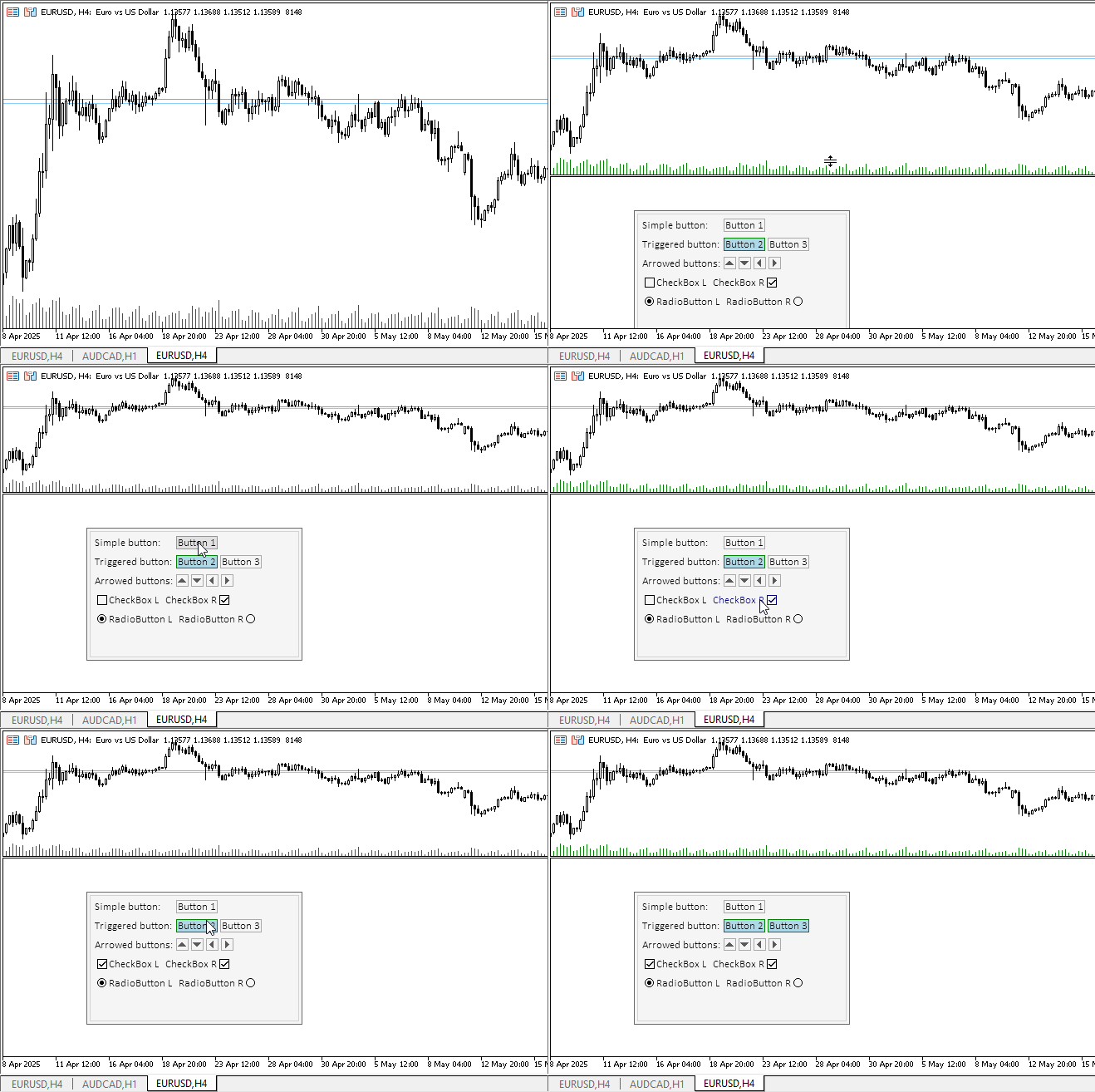
Alle Steuerelemente reagieren auf Mausinteraktion, und die Optionsfelder schalten um, als ob sie gruppiert wären. Die Textbeschriftungen wurden so gestaltet, dass sie ihre Farbe ändern, wenn der Mauszeiger darüber bewegt wird, um visuell darzustellen, dass Sie die Steuerelemente nach eigenem Ermessen anpassen können. Im normalen Zustand sind die Beschriftungstexte statisch.
Allerdings gibt es hier ein Versäumnis: Wenn Sie mit dem Mauszeiger über ein Steuerelement fahren, erscheint ein unnötiger Tooltip mit dem Namen des Indikators. Um dieses Verhalten zu beseitigen, muss für jedes grafische Objekt der Wert „\n“ in seine OBJPROP_TOOLTIP-Eigenschaft eingetragen werden. Reparieren wir es.
Geben Sie in der Klasse CCanvasBase in der Methode Create zwei Zeilen mit der Installation von Tooltips für Hintergrund- und Vordergrund-Grafikobjekte ein:
//+------------------------------------------------------------------+
//| CCanvasBase::Create background and foreground graphical objects  |
//+------------------------------------------------------------------+
bool CCanvasBase::Create(const long chart_id,const int wnd,const string object_name,const int x,const int y,const int w,const int h)
  {
//--- Get the adjusted chart ID
   long id=this.CorrectChartID(chart_id);
//--- Correct the passed object name
   string nm=object_name;
   ::StringReplace(nm," ","_");
//--- Create a graphical object name for the background and create a canvas
   string obj_name=nm+"_BG";
   if(!this.m_background.CreateBitmapLabel(id,(wnd<0 ? 0 : wnd),obj_name,x,y,(w>0 ? w : 1),(h>0 ? h : 1),COLOR_FORMAT_ARGB_NORMALIZE))
     {
      ::PrintFormat("%s: The CreateBitmapLabel() method of the CCanvas class returned an error creating a \"%s\" graphic object",__FUNCTION__,obj_name);
      return false;
     }
//--- Create a graphical object name for the foreground and create a canvas
   obj_name=nm+"_FG";
   if(!this.m_foreground.CreateBitmapLabel(id,(wnd<0 ? 0 : wnd),obj_name,x,y,(w>0 ? w : 1),(h>0 ? h : 1),COLOR_FORMAT_ARGB_NORMALIZE))
     {
      ::PrintFormat("%s: The CreateBitmapLabel() method of the CCanvas class returned an error creating a \"%s\" graphic object",__FUNCTION__,obj_name);
      return false;
     }
//--- If created successfully, enter the program name into the OBJPROP_TEXT property of the graphical object
   ::ObjectSetString(id,this.NameBG(),OBJPROP_TEXT,this.m_program_name);
   ::ObjectSetString(id,this.NameFG(),OBJPROP_TEXT,this.m_program_name);
   ::ObjectSetString(id,this.NameBG(),OBJPROP_TOOLTIP,"\n");
   ::ObjectSetString(id,this.NameFG(),OBJPROP_TOOLTIP,"\n");

//--- Set the dimensions of the rectangular area and return 'true'
   this.m_bound.SetXY(x,y);
   this.m_bound.Resize(w,h);
   return true;
  }
Kompilieren wir den Indikator neu und überprüfen ihn:
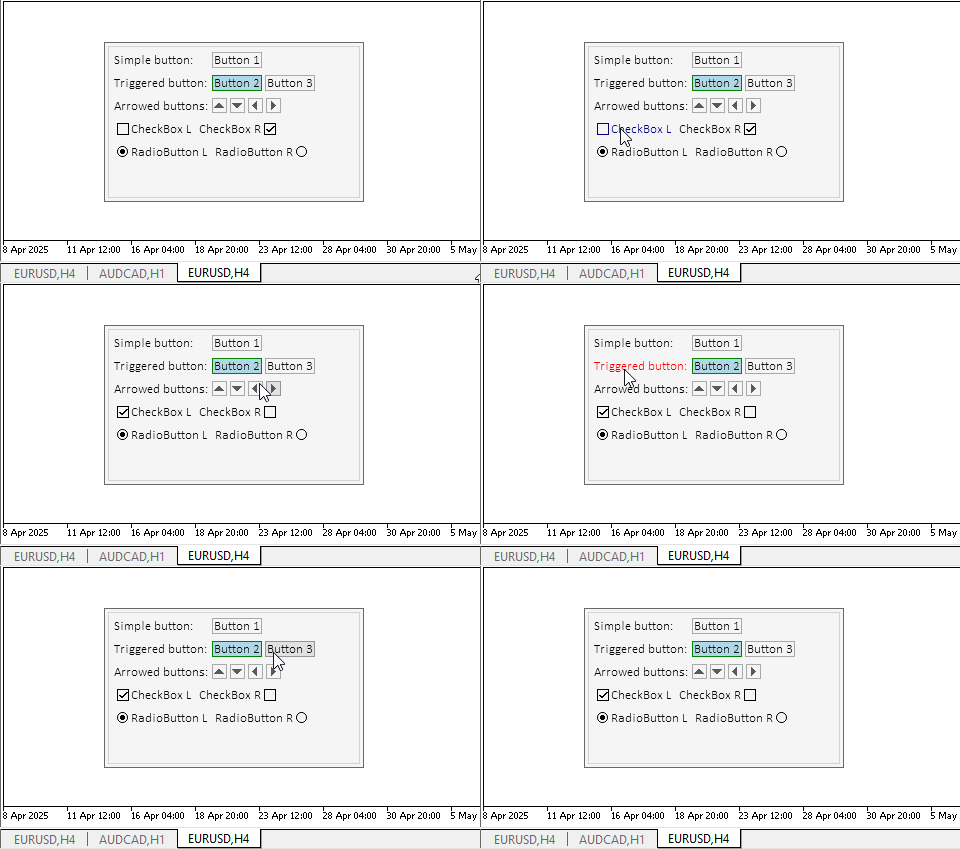
Jetzt ist alles richtig.
Schlussfolgerung
Heute haben wir einen weiteren Schritt zur Erstellung des Table Controls gemacht. Alle komplexen Steuerungen werden aus solchen einfachen, aber hochfunktionalen Objekten zusammengesetzt.
Heute haben wir die Komponente Controller zu allen Objekten hinzugefügt. So kann der Nutzer mit den Steuerelementen interagieren, und die Elemente selbst können miteinander interagieren.
Im nächsten Artikel werden wir die Elemente Panel und Container vorbereiten, die die Hauptkomponenten für die Platzierung anderer Elemente in ihnen sind. Gleichzeitig ermöglicht der Container das Scrollen von untergeordneten Elementen in sich selbst.
Die Programme dieses Artikels:
| # | Name | Typ | Beschreibung |
|---|---|---|---|
| 1 | Base.mqh | Klassenbibliothek | Klassen zur Erstellung eines Basisobjekts von Steuerelementen |
| 2 | Controls.mqh | Klassenbibliothek | Kontrollklassen |
| 3 | iTestLabel.mq5 | Testindikator | Indikator für das Testen von Manipulationen mit Klassen von Kontrollen |
| 4 | MQL5.zip | Archive | Ein Archiv mit den oben genannten Dateien zum Entpacken in das MQL5-Verzeichnis des Client-Terminals |
Klassen innerhalb der Bibliothek Base.mqh:
| # | Name | Beschreibung |
|---|---|---|
| 1 | CBaseObj | Eine Basisklasse für alle grafischen Objekte |
| 2 | CColor | Farbmanagement-Klasse |
| 3 | CColorElement | Eine Klasse zur Verwaltung der Farben der verschiedenen Zustände eines grafischen Elements |
| 4 | CBound | Kontrollklasse Rechteckige Fläche |
| 5 | CCanvasBase | Eine Basisklasse für die Bearbeitung von grafischen Elementen auf der Leinwand |
Klassen innerhalb der Bibliothek Controls.mqh:
| # | Name | Beschreibung |
|---|---|---|
| 1 | CImagePainter | Eine Klasse zum Zeichnen von Bildern in einem durch Koordinaten und Abmessungen definierten Bereich |
| 2 | CLabel | Die Kontrollklasse „Text Label“ |
| 3 | CButton | Die Kontrollklasse „Simple Button“ |
| 4 | CButtonTriggered | Die Kontrollklasse „Two-Position Button“ |
| 5 | CButtonArrowUp | Kontrollklasse „Pfeiltaste nach oben“ |
| 6 | CButtonArrowDown | Kontrollklasse „Pfeil nach unten“ |
| 7 | CButtonArrowLeft | Kontrollklasse „Linke Pfeiltaste“ |
| 8 | CButtonArrowRight | Kontrollklasse „Rechte Pfeiltaste“ |
| 9 | CCheckBox | Die Kontrollklasse „Checkbox“ |
| 10 | CRadioButton | Die Kontrollklasse „Radio Button“ |
Alle erstellten Dateien sind dem Artikel zum Selbststudium beigefügt. Die Archivdatei kann in den Terminalordner entpackt werden, und alle Dateien befinden sich dann im gewünschten Ordner: \MQL5\Indicators\Tables\.
Übersetzt aus dem Russischen von MetaQuotes Ltd.
Originalartikel: https://www.mql5.com/ru/articles/18221
Warnung: Alle Rechte sind von MetaQuotes Ltd. vorbehalten. Kopieren oder Vervielfältigen untersagt.
Dieser Artikel wurde von einem Nutzer der Website verfasst und gibt dessen persönliche Meinung wieder. MetaQuotes Ltd übernimmt keine Verantwortung für die Richtigkeit der dargestellten Informationen oder für Folgen, die sich aus der Anwendung der beschriebenen Lösungen, Strategien oder Empfehlungen ergeben.

 Einführung in MQL5 (Teil 27): Beherrschung der API- und WebRequest-Funktion in MQL5
 Entwicklung eines Expertenberaters für mehrere Währungen (Teil 24): Hinzufügen einer neuen Strategie (II)
 Die Komponenten View und Controller für Tabellen im MQL5 MVC-Paradigma: Veränderbare Elemente
 Die View Komponente für Tabellen im MQL5 MVC Paradigma: Grafisches Basiselement

- Freie Handelsapplikationen
- Über 8.000 Signale zum Kopieren
- Wirtschaftsnachrichten für die Lage an den Finanzmärkte
Sie stimmen der Website-Richtlinie und den Nutzungsbedingungen zu.