
Range Breakout Fusion
- 专家
- 版本: 2.10
- 更新: 8 九月 2026
- 激活: 10

An Opening Range Breakout trend-following strategy, validated on more than 6 years of historical data across three uncorrelated assets: XAUUSD, USDJPY and BTCUSD. No martingale, no grid, no averaging down. One trade per day per symbol, with a fixed stop loss from the moment of execution.
Setup guide. Blog. To understand my approach to trading, risk and portfolio construction, read the article Trading Is Not About Getting Rich Overnight.
How it works
Range Breakout Fusion implements the classic Opening Range Breakout (ORB) concept, adapted independently for each of the three symbols:
Range construction: during a defined session window, the EA observes price and calculates the high and low of that period.
Pending orders: when the range closes, two stop orders are placed at once, a buy stop at the range high and a sell stop at the low. The first to trigger automatically cancels the other (OCO logic).
Fixed stop loss: every trade has a fixed stop loss from the moment of execution. No moving stops, no breakeven hunting, no averaging down.
Session close: any open position is closed at a defined, configurable time, capturing the daily trend without holding positions overnight.
One trade per day per symbol: three symbols mean a maximum of three trades per day across the whole portfolio.
What this EA does not do
Many automated systems use techniques that produce attractive backtests but perform poorly in real conditions. This EA avoids all of them. If you are looking for guaranteed daily profits or a system with no losing trades, this is not the right product for you.
No martingale: it never doubles position size after a loss.
No grid trading: it never opens multiple positions in the same direction.
No averaging down: it never adds to losing positions.
No hedging tricks: there are no safety nets in the opposite direction.
No recovery modes: losses are accepted, not reversed.
No overnight risk: all positions close before the end of the session.
No high-frequency scalping: average trade duration is about 9 hours.
If a trade hits the stop loss, the EA accepts the loss and waits for the next day. There are no hidden risks accumulating in the background.
Main features
Parallel multi-symbol execution: trades XAUUSD, USDJPY and BTCUSD independently from a single chart.
Independent per-symbol settings: each market has its own range hours, close hours and stop loss type, tuned to its behavior.
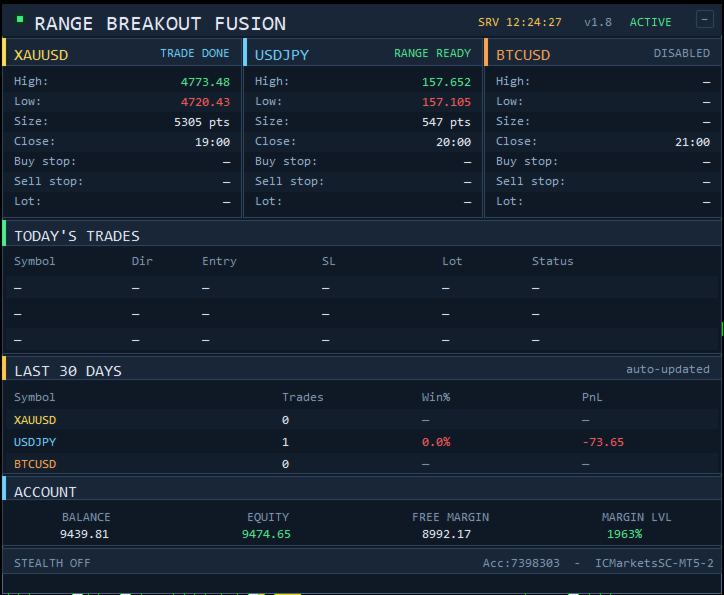
Live dashboard panel: on-chart view of range levels, pending orders, the day's trades, last-30-days statistics and account info.
Smart lot calculation: computes position size from a configurable risk percentage and the actual stop loss distance, with a maximum lot cap as a safety net.
Small-account support (MinLotFallback): on accounts where the calculated lot would fall below the broker minimum, the EA can use the broker minimum lot instead of skipping the trade. The actual risk per trade is logged transparently.
First-day protection (SkipFirstDay): when the EA is first attached, it does not trade that same day. This avoids mid-day setups when the daily range is already partly formed. A popup, panel indicator and Experts log explain everything on first start.
Multi-chart view (AutoOpenCharts): optionally opens clean M30 charts for the other enabled symbols at startup, with range boxes on all charts. Existing charts are reused, no duplicates. Off by default.
Crypto stop loss buffer: optional buffer in points beyond the range, designed to protect against widened spreads on volatile instruments like BTCUSD.
Trade variation option: small optional variation in lot size, close timing and magic numbers, so multiple accounts running the same EA do not produce identical trades.
Trading day filter: easily disable specific days of the week.
Range visualization: optional range boxes on the chart with high and low extension lines, colored per symbol.
Backtest results (2020 to 2026)
Tested on a portfolio of XAUUSD, USDJPY and BTCUSD with 0.5% risk per trade on a 10,000 EUR starting deposit. Spread and commissions enabled. M1 timeframe with real tick data, 99% history quality.
Profit Factor: 1.25
Sharpe Ratio: 3.12
Recovery Factor: 12.31
Max Drawdown: 7.02%
Linear Regression Correlation: 0.93
Total trades: 4,778
Win Rate: 46.67%
Average win / average loss: 274 / -189
A win rate below 50% is normal and healthy in a breakout trend-following strategy: winning trades are on average larger than losing ones, which produces a positive expectancy over time.
Symbols and timeframes
Symbols: XAUUSD (Gold), USDJPY, BTCUSD.
The EA reads M1 data internally, regardless of chart timeframe, so it can be attached to any timeframe.
All session hours are based on the broker server time, not your local time.
Quick start
After purchase, the EA appears in the MT5 Navigator under Expert Advisors / Market.
Drag the EA onto any chart (XAUUSD, USDJPY or BTCUSD).
Enable AutoTrading.
The EA only needs to be attached to one chart. It trades all three symbols independently from there. The chart is cleaned automatically for better range visibility. To keep your chart's current look, set CleanCurrentChart to false.
By default, the EA does not trade on the day you first attach it (SkipFirstDay is true). To start trading immediately, set SkipFirstDay to false.
BTCUSD trading is disabled by default. To enable it, set BTC_Enabled to true. Make sure your broker supports crypto trading and that the symbol name matches (some brokers use BTCUSDm, BTC/USD or Bitcoin). If your broker uses non-standard symbol names, update the XAU_Symbol, JPY_Symbol and BTC_Symbol inputs accordingly.
Recommendations
Broker: use a broker with low spreads, fast execution and ECN-type pricing. The strategy enters at breakout points, where slippage matters more than usual.
Account size: recommended minimum deposit of 2,000 to 3,000 EUR when trading all three symbols at once, due to minimum lot requirements. For 1,000 EUR accounts, consider trading only one or two symbols.
VPS: recommended for 24/7 reliability. The EA must be online during session windows to place and manage orders correctly.
Risk per trade: the default is 0.5% per trade. Conservative users can lower it to 0.25%. Risk above 1% is not recommended, since up to 3 symbols can trigger on the same day.
Inputs overview
The EA exposes a clean set of user-configurable inputs while keeping the critical strategy parameters internal.
General: MaxSlippage, MagicBase, SkipFirstDay, MinLotFallback.
Per symbol (XAU, JPY, BTC): Enabled, Symbol, RiskPct.
Trading days: turn individual weekdays on or off.
Visual: dashboard panel position, range box color and history days, show or hide chart elements, AutoOpenCharts, CleanCurrentChart.
Logs: detailed logging toggle.
Trade variation: lot size variation, close timing variation, per-account magic offset, custom order comment.
Important notes
Past results do not guarantee future results. Backtest results are based on historical data and assume execution conditions that may not match your live account.
Trading involves substantial risk of loss. Trade only with capital you can afford to lose.
No strategy works forever in all market conditions.
Slippage, spread spikes and execution delays can significantly impact live performance versus the backtest. Always test on a demo account first.
All session hours are based on broker server time. Brokers with different timezones will produce different results without a time adjustment.
BTCUSD results are based on backtest data. Live crypto execution may differ due to widened spreads during volatility spikes.
Support
For questions, issues or setup help, use the comments section of this product page. I read all messages and reply as quickly as possible.
If the EA does not behave as expected, include your broker name and account type (demo or live), the exact symbol names visible in your Market Watch, and a screenshot of the Experts tab logs.
Recommended next step: test on a demo account for at least 2 to 3 weeks before going live. Only your own broker's execution quality will determine your real results.




































Really one of the best EA's out there. The developer understands his craft and is always kind to help you with questions and I really had a lot of questions. Since my start on 01.06. I have achieved about 25% return at the smallest risk, which is amazing. If you buy the EA, just leave it and don't look at it, there may be losses, but they were also compensated for by me super fast. All in all, you can only give it 5 stars here. Thanks for this great EA:)