
Sync
- Yardımcı programlar
- Sürüm: 4.12
- Güncellendi: 14 Mayıs 2026
- Etkinleştirmeler: 20

**Sync MT5 – Real-Time Multi-Chart Analysis Manager**
chart sync
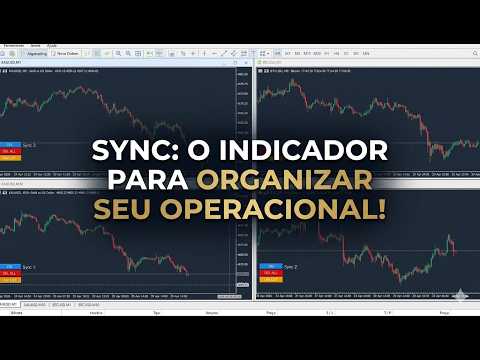
Transform your MT5 platform into a professional analysis workstation. Sync is a comprehensive tool that synchronizes charts, objects, and crosshairs across multiple windows, allowing you to trade with unprecedented precision and efficiency.
**MAIN FEATURES**
1. **Smart Chart Synchronization**
- Synchronize symbols and timeframes across multiple charts with one click.
- Group system – Organize your charts by strategy or asset.
- Adjustable sensitivity to prevent unnecessary updates.
2. **Advanced Dual-Axis Crosshair**
- Crosshair synchronized across all charts in the group.
- Display in local or server time.
- Automatic navigation to the crosshair point on each chart.
- Quick activation/deactivation with the ESC key.
3. **Complete Object Management**
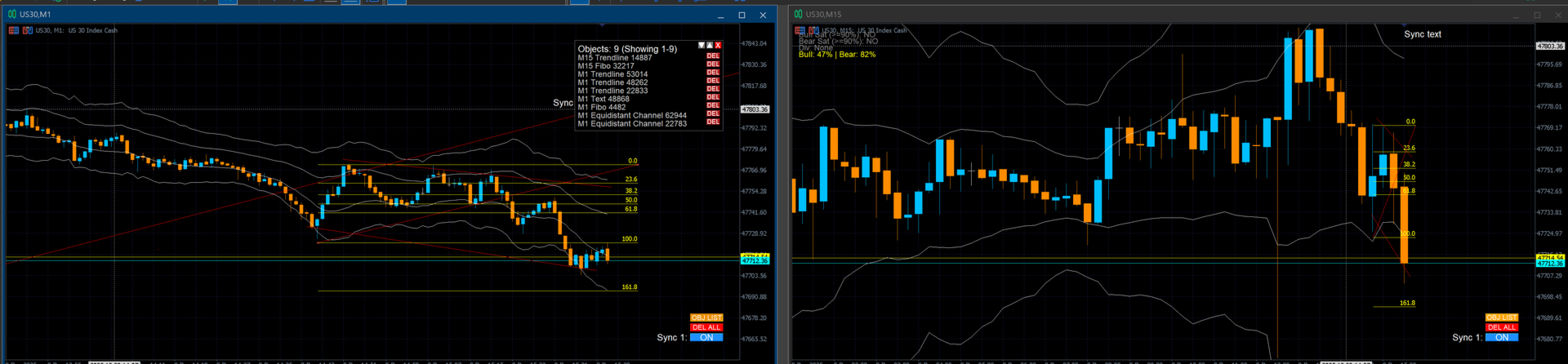
- Automatic synchronization of lines, rectangles, text, and arrows across charts.
- Management panel with scrolling and search.
- History of the last 100 objects created.
- Individual or mass deletion (from current chart only or the entire group).
4. **Smart Group System**
- Up to 32 independent groups (0 = no group, 1-32 specific groups).
- Charts in different groups do not interfere with each other.
- Ideal for traders running multiple strategies simultaneously.
5. **Intuitive Interface with Quick Controls**
- ON/OFF buttons to activate/deactivate synchronization.
- "DEL ALL" button for quick object cleanup.
- Object list panel with "OBJ LIST" button.
- Accidental-click protection.
**PRACTICAL USE CASES**
- **Comparative Analysis:** Compare multiple assets simultaneously with the same crosshair.
- **Multi-Timeframe Analysis:** Keep the same price point visible across different timeframes.
- **Strategy Management:** Separate charts by strategies (e.g., Group 1 for Day Trading, Group 2 for Swing Trading).
- **Professional Technical Analysis:** Draw objects once and see them replicated on all charts.
- **Teaching/Mentoring:** Show specific analysis points in real-time to students.
**CUSTOMIZABLE SETTINGS**
```mql5
// Synchronization
input bool EnableSymbolSync = true; // Synchronize symbols between charts
input bool EnableTimeframeSync = false; // Synchronize timeframes
input bool EnableObjectSync = true; // Synchronize graphic objects
input bool EnableCrosshairSync = true; // Synchronize crosshair
input int AllowedCharts = 1; // Synchronization group ID (0-32)
// Crosshair
input color cursorColor = clrLightGray; // Cursor color
input int crosshairThickness = 1; // Line thickness
input ENUM_LINE_STYLE crosshairStyle = STYLE_DOT; // Line style
// Object Panel
input int RowsPerPage = 20; // Objects per page in the panel
input bool DeleteObjectsOnAllCharts = true; // Delete on all charts
```
**HOW IT WORKS**
1. Install the indicator on each chart you want to synchronize.
2. Configure the same group number (`AllowedCharts`) on all of them.
3. Enable the desired synchronization types.
4. Use the controls:
- **Mouse + Shift:** Move synchronized crosshair.
- **ESC:** Activate/deactivate crosshair.
- **ON/OFF button:** Activate/deactivate synchronization.
- **DEL ALL:** Clear all objects in the group.
- **OBJ LIST:** Open the object management panel.
**BENEFITS**
- **Time-Saving:** Draw once, see on all charts.
- **Accurate Analysis:** Synchronized crosshair eliminates reading errors between charts.
- **Organization:** Separate your trades into independent groups.
- **Flexibility:** Enable only the synchronization types you need.
- **Performance:** Optimized code for smooth operation, even with multiple charts open.









































































Great tools for market review. Works perfectly as described.