Harmonic Pattern EA Pro
- Uzmanlar
- Sürüm: 3.54
- Etkinleştirmeler: 5

Harmonic Pattern EA Pro
Trade the markets with precision using the power of Harmonic Patterns. This fully automated Expert Advisor identifies high-probability setups and manages them with a sophisticated multi-take-profit and break-even system.
Why Choose Harmonic Pattern EA Pro?
Harmonic Pattern EA Pro is not just another trading robot. It's a comprehensive trading solution built around a proven market analysis technique. It merges a powerful Harmonic Pattern Scanner directly into a robust trading framework, designed to maximize profit potential while intelligently managing risk.
Whether you are a beginner or an experienced trader, this EA offers a systematic way to capitalize on the natural ebb and flow of the market as defined by Fibonacci ratios.
Key Features
-
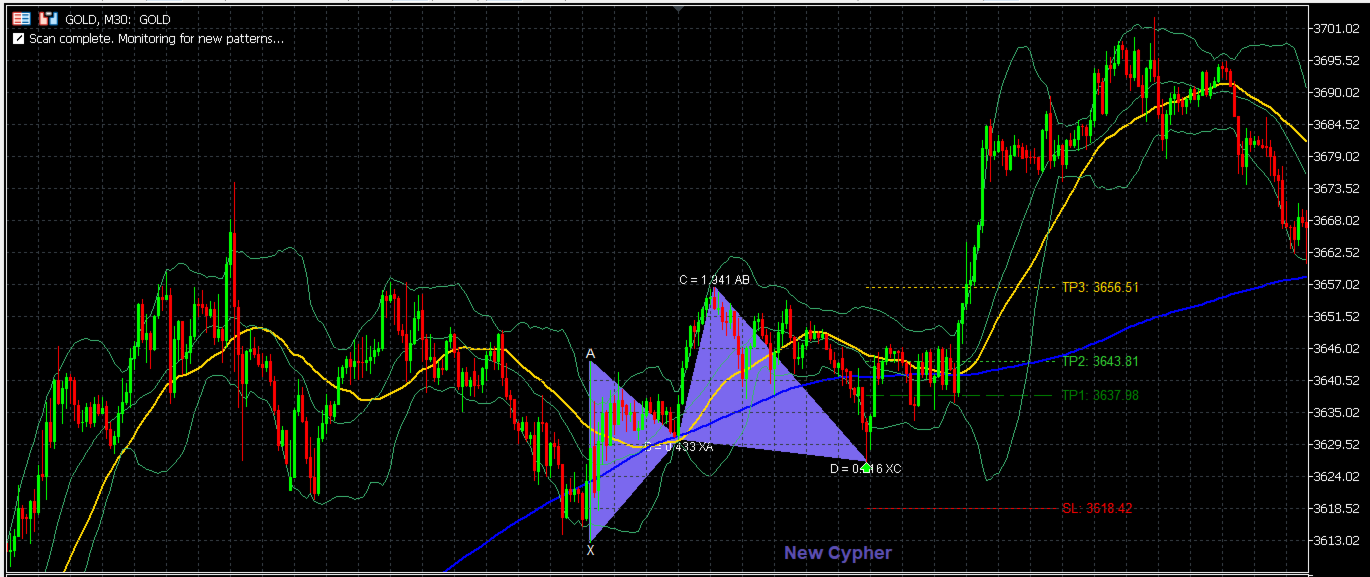
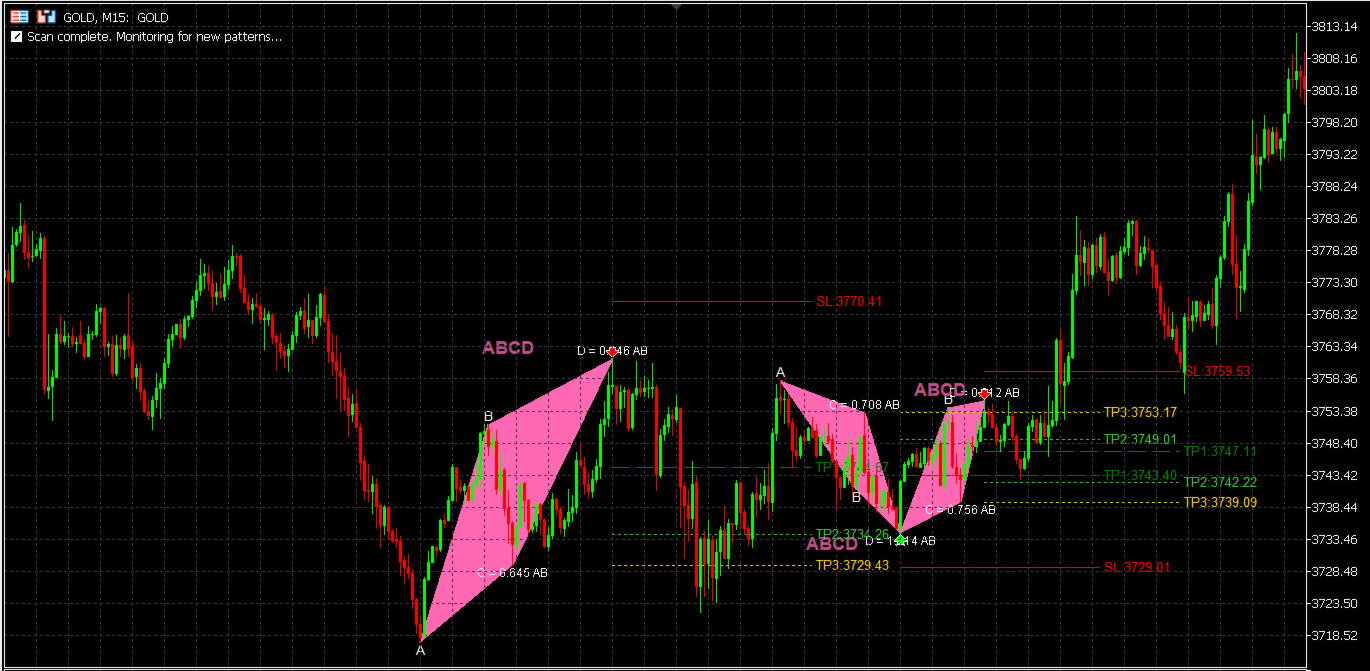
Integrated Harmonic Scanner: Automatically detects 15 different harmonic patterns, including Gartley, Bat, Butterfly, Crab, and more, directly on your chart.
-
Multi-Take-Profit System: For every valid pattern, the EA opens three separate trades, each targeting a different, calculated Take Profit level (TP1, TP2, TP3). This strategy aims to capture both short-term and longer-term price movements.
-
Intelligent Break-Even Logic: The cornerstone of our risk management. Once TP1 is successfully hit, the EA automatically moves the Stop Loss for the remaining trades (TP2 and TP3) to a break-even point (plus a small lock-in profit). This significantly reduces risk and protects your capital.
-
Advanced Risk Management: Choose between a fixed lot size or a dynamic lot size based on a percentage of your account balance. A built-in "Max Lot per Trade" cap acts as a crucial safety net.
-
Comprehensive Filtering: Fine-tune your trading with multiple filters:
-
Market Condition Filter: Use the ADX indicator to trade only in trending or ranging markets.
-
Time Filters: Avoid trading on specific days of the week or during specific hours to sidestep volatile news events or low-liquidity periods.
-
-
Clean On-Chart Visuals: The EA draws completed patterns, entry points, and SL/TP levels directly on the chart for easy analysis and historical review.
The Strategy Explained
The core of the EA is its ability to identify and validate harmonic patterns. These are geometric price patterns that use Fibonacci numbers to determine precise turning points in the financial markets.
-
Scanning: The EA continuously scans the price history using an internal oscillator (MACD) to identify major and minor swing points (highs and lows).
-
Validation: It then measures the Fibonacci ratios between these swing points to see if they match the specific rules of any of the 15 pre-defined harmonic patterns.
-
Confirmation: A signal is confirmed only at the close of a new bar, preventing false signals from intra-bar volatility.
-
Execution: Once a pattern is confirmed, the EA calculates the Stop Loss and three unique Take Profit levels based on the pattern's geometry and executes the trade set.
Scanner Sensitivity & Optimization Tips
Important: The default settings are optimized for major forex pairs on H1/H4 timeframes. If you experience "no trading operations" on other symbols (like XAUUSD) or timeframes, it is not a bug. You need to adjust the scanner's sensitivity.
-
What to Adjust: Go to the "Pattern Detection & Filtering" and "Major/Minor Swing Filter" sections in the EA's inputs.
-
To Find MORE Patterns (Increase Sensitivity):
-
Decrease in_major_atr_multiplier and in_major_bar_distance .
-
Decrease in_minor_atr_multiplier and in_minor_bar_distance .
-
This tells the EA to accept smaller price movements as valid swing points, making it easier to form patterns on volatile or slow-moving pairs.
-
-
To Find FEWER, Higher-Quality Patterns (Decrease Sensitivity):
-
Increase the values mentioned above. This will filter out minor market "noise" and focus only on significant price swings.
-
We strongly recommend running optimizations in the Strategy Tester for these specific parameters to find the best settings for your preferred symbol and timeframe.
Main Input Parameters
-
MagicNumber: A unique ID for this EA's trades. Do not use the same number for other EAs on the same account.
-
RiskType: Choose PERCENT_BALANCE for dynamic lot sizing or FIXED_LOT for a constant lot size.
-
RiskPercent: The percentage of your account balance to risk per trade set (e.g., 1.0 = 1% risk).
-
InpMaxLotPerTrade: A crucial safety feature! This is the absolute maximum lot size the EA is allowed to open for a single trade (TP1, TP2, or TP3), regardless of the risk calculation. Set this to a reasonable value based on your broker's limits to avoid "Volume limit reached" errors.
-
BreakEvenMethod: Set to BE_METHOD_ON_TP1 to enable the core break-even feature.
-
InpBE_LockPips: The number of points in profit to lock in when the break-even is triggered.
Harmonic Pattern EA Pro User Manual
Thank you for choosing Harmonic Pattern EA Pro! This Expert Advisor is designed to detect high-quality Harmonic Patterns and execute trades automatically, complete with advanced risk management and a sophisticated break-even system.
For optimal performance, please read and understand the following parameter settings.
Part 1: Core EA Inputs
This group of parameters controls the EA's core operation and trade management.
General Settings
-
Magic Number: 778899 - The unique ID for this EA. Must not conflict with other EAs.
-
Order Comment Prefix: HPEA - The comment attached to all orders (also used by the Break-Even system).
-
Slippage (in points): 30 - The maximum allowed slippage for trade execution (e.g., 3 pips).
Risk & Trade Management
This is the most critical section for your money management.
-
Risk Management Type:
-
PERCENT_BALANCE (Recommended): The EA automatically calculates the lot size based on your specified risk percentage.
-
FIXED_LOT : The EA uses a fixed lot size for all trades.
-
-
Fixed Lot: 0.01 - The lot size to use if FIXED_LOT is selected.
-
Risk per Trade (%): 1.0 - The percentage of your balance to risk per trade set (e.g., 1%). Used only if PERCENT_BALANCE is selected.
-
Max Lot per Trade: 5.0 - (Very Important) The maximum lot size per single order (e.g., for TP1, for TP2). The EA will not open any single order larger than this value.
Trade Direction
-
Allowed Trade Direction:
-
LONG_AND_SHORT : Trades both Buy (Bullish patterns) and Sell (Bearish patterns).
-
LONG_ONLY : Trades only Buy signals.
-
SHORT_ONLY : Trades only Sell signals.
-
Break-Even Settings
-
Break-Even Method:
-
BE_METHOD_NONE : Disables the break-even feature.
-
BE_METHOD_POINTS : Moves SL to break-even after profit reaches BE_TriggerPips .
-
BE_METHOD_ON_TP1 (Recommended): When the TP1 order is closed (hits its Take Profit), the EA will move the Stop Loss of the remaining orders (TP2, TP3) to secure profit.
-
-
BE_TriggerPips: 150 - (For BE_METHOD_POINTS ) The profit in points required to trigger the break-even.
-
BE_LockPips: 50 - (For BE_METHOD_POINTS and ON_TP1 ) The number of points in profit to lock in when break-even is triggered (e.g., Open Price + 5 pips).
Trailing Stop Settings
-
Enable Trailing Stop: false - Toggles the Trailing Stop feature (Recommended: false if using the Multi-TP system).
-
Trailing Stop (Points): 200 - The distance (in points) the SL will "trail" behind the current price.
-
Trailing Step (Points): 50 - The minimum price movement (in points) required before the SL is adjusted.
Part 2: Filter Inputs
This group of parameters is used to filter out undesirable trading signals.
Market Condition Filter (ADX)
Uses the ADX indicator to filter out ranging or trending markets.
-
Market Condition:
-
TRADE_ANY_CONDITION : Trades in all market conditions.
-
TRADE_TREND_ONLY : Only trades when ADX > ADXLevel (Trending market).
-
TRADE_SIDEWAY_ONLY : Only trades when ADX < ADXLevel (Sideways/Ranging market).
-
-
ADX Period: 14 - The period for the ADX indicator.
-
ADX Level: 25.0 - The ADX level used to differentiate between Trend and Sideway markets.
Time Filter: No Trading Days/Hours
Use this to avoid trading during high-volatility events (like news) or when the market is illiquid.
-
Enable No Trading Days: false - Set to true to enable the day filter.
-
NoTradeSunday to NoTradeSaturday: false - Set to true for any day you wish to avoid trading.
-
Enable No Trading Hours: false - Set to true to enable the hour filter.
-
NoTradeStartTime1 / EndTime1 (up to 6): 0 / 0 - Define time ranges (Server Time) to avoid trading (e.g., Start 23 to End 2 to avoid rollover).
Part 3: Harmonic Scanner Settings (Key for Optimization)
These parameters control the core pattern-finding engine. This is the primary section for optimization.
Swing Detection Settings
-
MACD Settings (!! IMPORTANT !!)
-
in_macd_fast_ema : 12
-
in_macd_slow_ema : 26
-
in_macd_signal_sma (Note: should be _ema ): 9
-
Note: These MACD values are the "heart" of the swing detection. Adjusting them will change how the EA "sees" the price swings.
-
Pattern Detection & Filtering
-
in_scan_history: 200 - The number of past bars to scan for historical patterns.
-
in_fibo_tolerance: 0.25 - (Important) The allowed deviation (tolerance) for Fibonacci ratios (e.g., a 0.618 ratio is valid if it falls within 0.618 ± 0.25).
-
A lower value = Higher precision, fewer signals.
-
A higher value = Lower precision, more signals.
-
-
in_min_phase_duration: 1 - The minimum number of bars in one MACD "phase" (Recommended: 1).
Trade Signal Settings
-
in_sl_method_choice:
-
SL_FIXED_POINTS (Recommended): Uses a fixed offset from the X-point (set by in_fixed_offset_points ).
-
SL_ATR_BASED : Uses the ATR value (multiplied by in_atr_multiplier_sl ).
-
SL_FIXED_PIPS : Uses a fixed pip value (set by in_fixed_offset_pips ).
-
-
in_fixed_offset_points: 20 - (For SL_FIXED_POINTS ) The SL buffer in points added beyond the pattern's X-point.
-
in_atr_multiplier_sl: 1.25 - (For SL_ATR_BASED ) The ATR multiplier for the SL.
Pattern Visibility Toggles
-
in_show_Gartley to in_show_ABCD: true/false - Set to true only for the specific patterns you want the EA to trade.
Part 4: Optimization Guide
The goal of optimization is to find the best parameter set (a ".set file") for a specific symbol and timeframe.
Step 1: Select Key Parameters to Optimize
When using the "Fast Genetic-based algorithm," you should only select the most impactful parameters:
-
MACD Settings: (Controls swing vision)
-
in_macd_fast_ema (e.g., Step 1, Start 5, Stop 20)
-
in_macd_slow_ema (e.g., Step 1, Start 20, Stop 40)
-
in_macd_signal_sma (e.g., Step 1, Start 5, Stop 15)
-
-
Pattern Filtering: (Controls pattern precision)
-
in_fibo_tolerance (e.g., Step 0.05, Start 0.15, Stop 0.35)
-
-
Risk/Reward: (Controls trade management)
-
in_sl_method_choice (Select one method or optimize all)
-
in_fixed_offset_points (e.g., Step 10, Start 10, Stop 100) (If using Fixed Points)
-
in_atr_multiplier_sl (e.g., Step 0.25, Start 1.0, Stop 2.5) (If using ATR)
-
-
Market Filter: (Controls trade environment)
-
InpADXLevel (e.g., Step 5, Start 20, Stop 35)
-
InpMarketCondition (Select TRADE_ANY_CONDITION , TRADE_TREND_ONLY , TRADE_SIDEWAY_ONLY )
-
Step 2: Configure the Strategy Tester
-
Symbol/Timeframe: Choose your target pair (e.g., EURUSD, H1).
-
Date Range: Select a reasonably long period (e.g., 1-2 years).
-
Optimization: Select Fast Genetic-based algorithm .
-
Optimization Criterion: Select Max Profit Factor or Max Complex Criterion (to find a balance between profit and drawdown).
Step 3: Analyze the Results
-
After the optimization finishes, go to the "Optimization Results" tab.
-
Do not just select the set with the highest Profit!
-
Look for a set that has:
-
A high Profit Factor (e.g., > 1.5)
-
A high Sharpe Ratio (stability)
-
A low Drawdown
-
A reasonable Total Trades count (e.g., > 100)
-
-
Double-click the set you are interested in and run a single Backtest using the Every tick model to confirm the equity curve is stable.
Step 4: Save and Use
-
Once you find a set you are happy with, right-click it and "Save as .set".
-
You can now load this .set file for Forward Testing (Demo) or Live Trading.
Recommendation: Harmonic Patterns work well on many timeframes, but the parameters (especially MACD and SL) may need to be optimized to fit the specific behavior of each symbol and timeframe.
-
Recommendations
-
Broker: Use an ECN broker with low spreads and fast execution for best results.
-
VPS (Virtual Private Server): It is highly recommended to run the EA on a VPS to ensure it operates 24/7 without interruption.
-
Backtesting: Always backtest the EA with your preferred settings on the symbol and timeframe you intend to trade.
-
Demo First: Before trading on a live account, run the EA on a demo account for at least a week to understand its behavior and confirm your settings are optimal.
*Disclaimer*: Past performance is not indicative of future results. Trading foreign exchange on margin carries a high level of risk and may not be suitable for all investors.