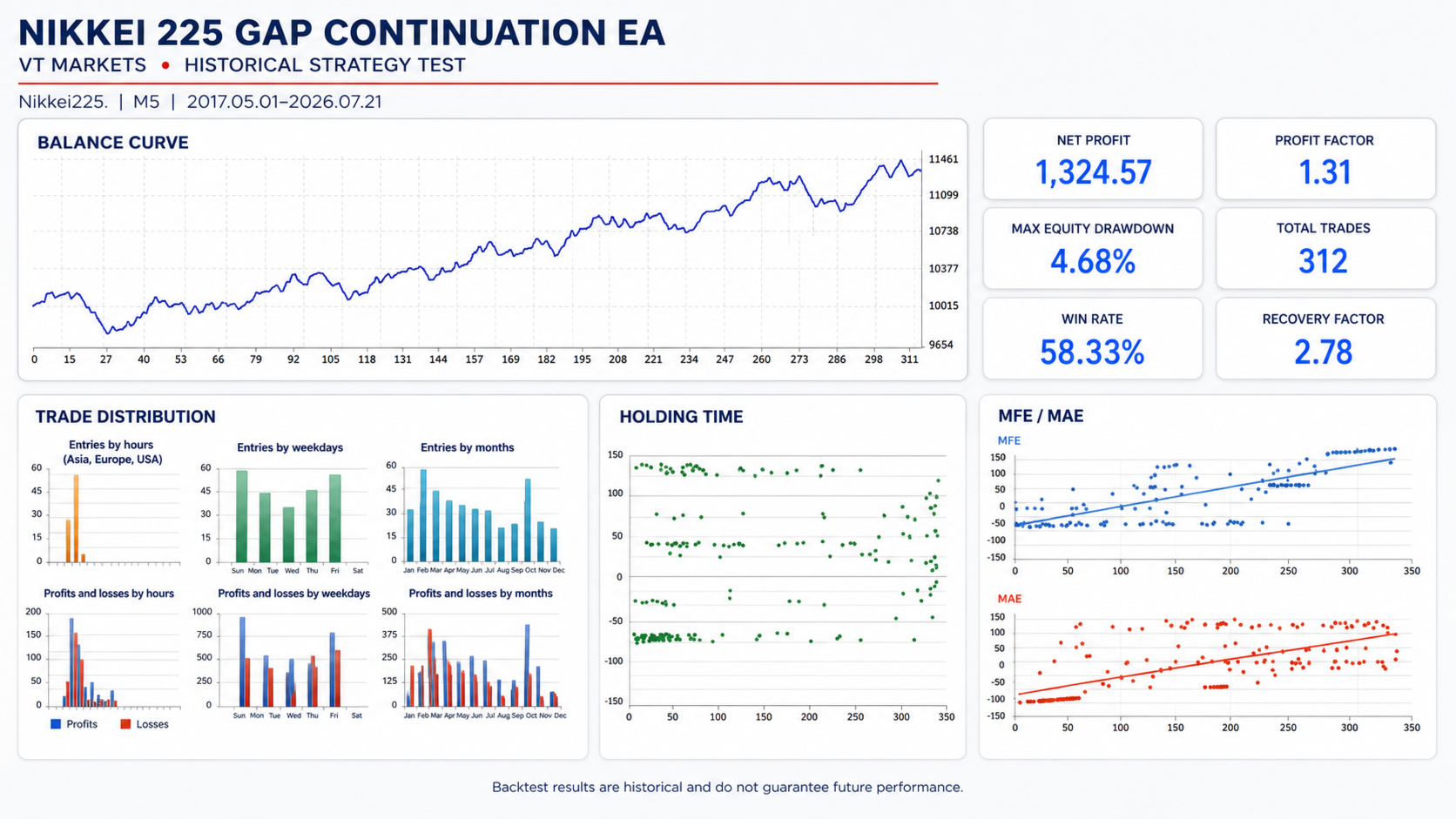
Nikkei225 Gap ContinuationEA
- Эксперты
- Версия: 1.50

Automated opening-gap continuation strategy for the Nikkei 225
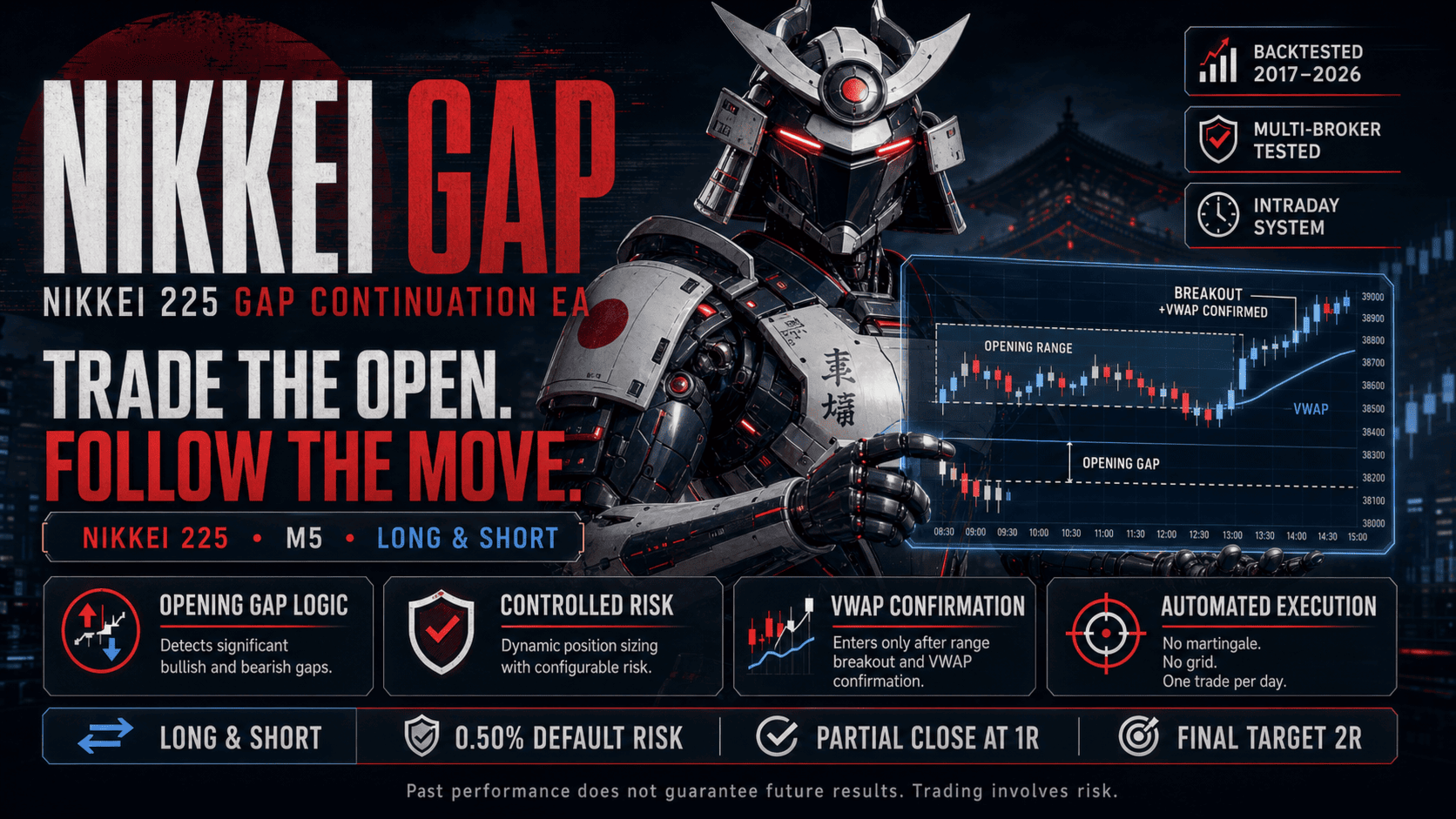
Nikkei 225 Gap Continuation EA is an automated trading system for MetaTrader 5 designed specifically for the Japanese stock index. It searches for significant opening gaps and enters only when price action confirms a possible continuation in the same direction.
The strategy combines the opening gap, a configurable opening range and session VWAP confirmation. It also includes risk-based position sizing, spread protection, partial profit-taking, break-even management and a mandatory end-of-session exit.
Strategy at a Glance
| Platform | MetaTrader 5 |
| Market | Nikkei 225 index CFD |
| Recommended Chart | M5 |
| Internal Data | M1 session data |
| Strategy Type | Opening-gap continuation |
| Trading Style | Intraday |
| Trade Direction | BUY and SELL |
| Maximum Frequency | One entry per trading day |
| Account Types | Netting and Hedging |
| External Dependencies | None |
Main Features
- Developed specifically for the Nikkei 225 index.
- Supports bullish and bearish opening gaps.
- Opening-range breakout confirmation.
- Session VWAP directional confirmation.
- Configurable minimum gap thresholds.
- Risk-based or fixed-lot position sizing.
- Independent BUY and SELL risk settings.
- Optional reduced risk for smaller bearish gaps.
- Stop loss based on the opposite side of the opening range.
- Partial profit-taking at a configurable R multiple.
- Optional stop movement to break-even.
- Configurable final profit target.
- Fixed and dynamic spread filters.
- Maximum one entry per trading day.
- Automatic end-of-session position closing.
- Compatible with Netting and Hedging accounts.
- Informational status panel displayed on the chart.
- No external indicators, DLLs or additional files.
How the Strategy Works
At the beginning of each Japanese cash session, the EA obtains the previous session’s closing price and compares it with the current session’s opening price. If the difference exceeds the configured minimum percentage, the EA identifies either a bullish or bearish gap.
The EA then builds an opening range using the first configurable number of minutes after the market opens. The default opening range is 10 minutes and can be configured between 5 and 15 minutes.
A gap alone is not enough to trigger a trade. Price must confirm the continuation through the opening range and remain on the correct side of the session VWAP.
Bullish Gap Entry
When the market opens above the previous session’s close and the minimum bullish gap requirement is satisfied, the EA searches for a BUY opportunity.
The entry requires price to:
- Remain above the 50% gap-retracement level.
- Break above the opening-range high.
- Trade above the current session VWAP.
- Meet the configured spread restrictions.
- Produce a valid volume within the selected risk limits.
When all conditions are satisfied, the EA opens a BUY position. The initial stop loss is placed below the opening-range low, including any configured stop buffer.
Bearish Gap Entry
When the market opens below the previous session’s close and the minimum bearish gap requirement is satisfied, the EA searches for a SELL opportunity.
The entry requires price to:
- Remain below the 50% gap-retracement level.
- Break below the opening-range low.
- Trade below the current session VWAP.
- Meet the configured spread restrictions.
- Produce a valid volume within the selected risk limits.
When all conditions are satisfied, the EA opens a SELL position. The initial stop loss is placed above the opening-range high, including any configured stop buffer.
Gap-Failure Filter
A continuation setup is cancelled if the market retraces more than 50% of the opening gap before a valid entry occurs.
- For a bullish gap, the setup is cancelled if the session low reaches the half-gap level.
- For a bearish gap, the setup is cancelled if the session high reaches the half-gap level.
Once cancelled, the setup remains inactive for the rest of that trading day. This helps avoid entries when the original opening gap has already lost a significant part of its directional strength.
VWAP Confirmation
The EA calculates session VWAP using one-minute market data. Real volume is used when supplied by the broker. If real volume is unavailable, the EA automatically uses tick volume.
- A BUY entry requires price to be above VWAP.
- A SELL entry requires price to be below VWAP.
This provides an additional session-level directional filter before the EA is allowed to enter the market.
Controlled Entry Window
Entries are permitted only during a configurable period after the cash-session opening. The default entry window is 90 minutes.
If no valid breakout occurs before the deadline, the setup is cancelled. The EA will not chase the market later in the trading session and will never open more than one trade per day.
Risk and Position Sizing
By default, position volume is calculated using account equity, the selected risk percentage and the actual distance between the entry price and stop loss.
The calculation uses the contract specifications supplied by the broker and determines the potential loss in the account currency. This is especially relevant for index CFDs and accounts using different deposit currencies.
- Risk-based sizing: used when Fixed Lots is set to zero.
- Fixed-lot sizing: allows a constant volume to be selected.
- Maximum lots: optionally limits the calculated position size.
- BUY risk: configured independently.
- SELL risk: configured independently.
For bearish gaps, the EA can automatically use a lower risk percentage when the gap is smaller than a configurable threshold. This feature can be disabled if the same risk is preferred for both directions.
Position Management
The initial stop loss is determined by the opposite side of the opening range. Profit objectives are calculated as multiples of the initial price risk, commonly referred to as R.
With the default settings:
- The EA opens a position with an initial stop beyond the opening range.
- When price reaches 1R, it attempts to close 40% of the position.
- The stop loss of the remaining position is moved to break-even.
- The remaining volume is managed toward the final 2R target.
- Any open position is closed before the cash session ends.
The partial-close percentage, partial target, final target and break-even function are fully configurable.
If the broker’s minimum volume or volume step does not allow the position to be divided safely, the EA continues managing the full position instead of repeatedly attempting an invalid partial close.
End-of-Session Protection
Nikkei 225 Gap Continuation EA is designed as an intraday system. Any remaining position is closed automatically before the configured cash-session closing time.
The default setting closes the position five minutes before the end of the session. The strategy does not intentionally carry positions overnight.
Spread Protection
The EA includes two independent spread controls:
- A maximum spread measured in broker points.
- A maximum spread expressed as a percentage of the initial stop distance.
The dynamic filter prevents an entry when the current spread represents an excessive portion of the planned trade risk. Setting either spread limit to zero disables that particular filter.
Session-Time Configuration
The EA provides two different session-time modes:
JST to Darwinex Automatic
This mode converts the configured Japanese cash-session time to the Darwinex server clock. It automatically accounts for the broker’s GMT+2 and GMT+3 daylight-saving schedule.
Manual Server Time
This mode allows the user to enter the opening and closing times directly in the broker’s server time. It should normally be selected when using a broker other than Darwinex.
The default Japanese cash session is:
- Session opening: 09:00 JST
- Session closing: 15:30 JST
Correct session configuration is essential because trading hours, server time zones and daylight-saving rules vary between brokers.
Account Compatibility
The EA supports both MetaTrader 5 Netting and Hedging account models. Partial position reductions are handled according to the account type.
- On Hedging accounts, the EA uses a partial-close operation.
- On Netting accounts, it sends an opposite transaction to reduce the existing net position.
Although it is compatible with Hedging accounts, the strategy itself does not use hedging. It also does not use martingale, grid trading, averaging or recovery methods.
The EA will not open a position if another trade already exists on the same symbol. It is therefore recommended not to combine this EA with manual positions or another automated system on the same Nikkei 225 symbol.
Default Parameters
| Parameter | Default Value |
|---|---|
| Session opening | 09:00 |
| Session closing | 15:30 |
| Opening range | 10 minutes |
| Maximum entry window | 90 minutes |
| Forced exit | 5 minutes before session close |
| Minimum bullish gap | 1.00% |
| Minimum bearish gap | 1.00% |
| BUY risk | 0.50% of equity |
| Full SELL risk | 0.50% of equity |
| Reduced SELL risk | 0.25% of equity |
| Full SELL risk threshold | 1.25% gap |
| Partial close | 40% |
| Partial target | 1R |
| Final target | 2R |
| Break-even after partial close | Enabled |
Installation and Recommended Setup
- Open the Nikkei 225 index chart supplied by your broker.
- Select the M5 timeframe.
- Attach Nikkei 225 Gap Continuation EA to the chart.
- Enable algorithmic trading in MetaTrader 5.
- Select the appropriate session-time mode.
- Confirm the opening and closing times using your broker’s server clock.
- Review the risk and spread settings before allowing the EA to trade.
Depending on the broker, the index may appear under names such as Nikkei225, JP225, JPN225 or another variation. The EA trades the chart symbol to which it is attached, so no specific symbol name is hardcoded.
Before Using the EA
- Confirm the Nikkei 225 cash-session schedule used by your broker.
- Verify the broker’s server time and daylight-saving adjustments.
- Download sufficient M1 historical data.
- Check the symbol’s contract size, point value and minimum volume.
- Run a Strategy Tester backtest using your broker’s own symbol.
- Test the EA on a demo account before considering live trading.
- Use risk settings appropriate for your account and risk tolerance.
Broker Differences
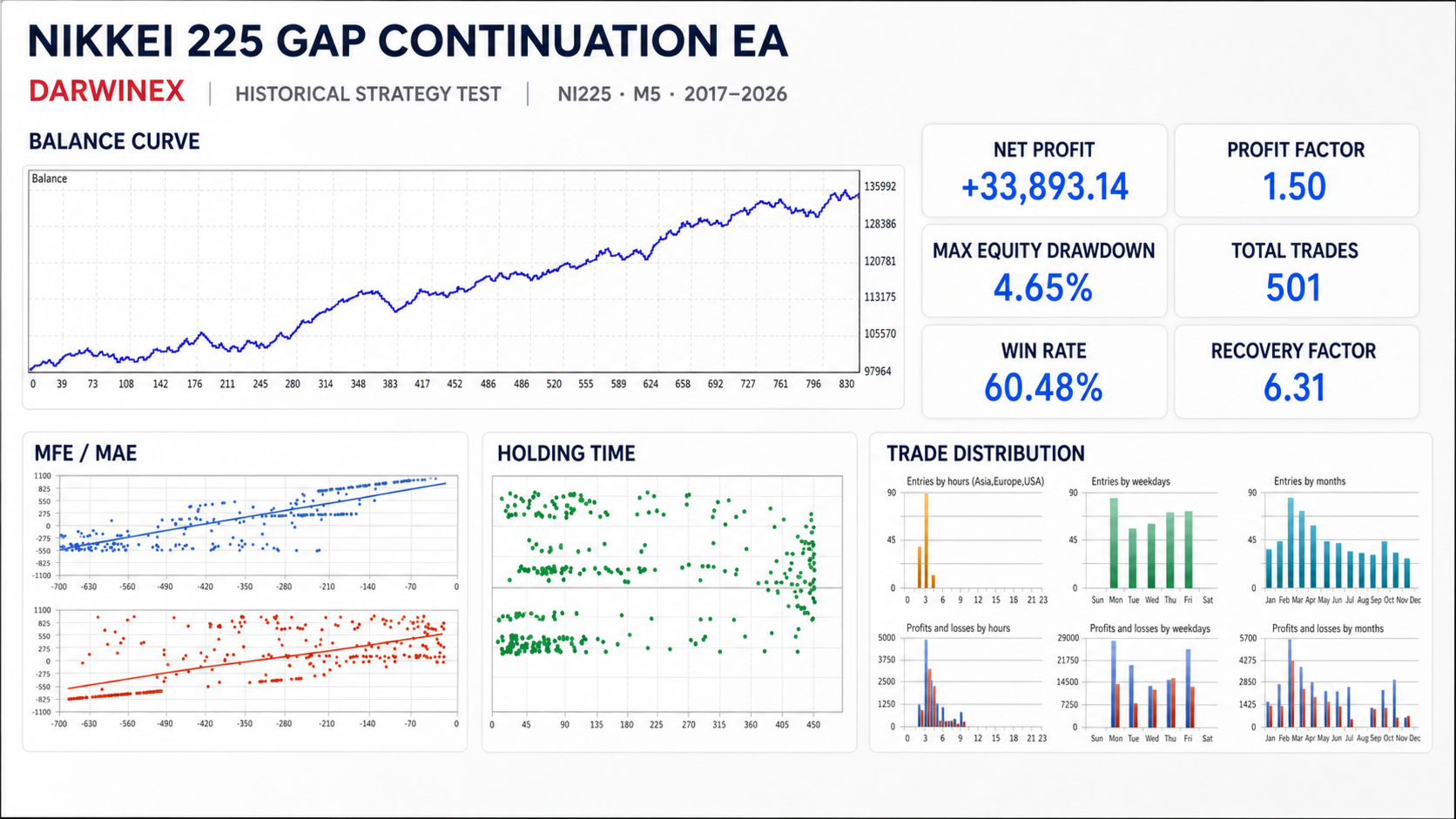
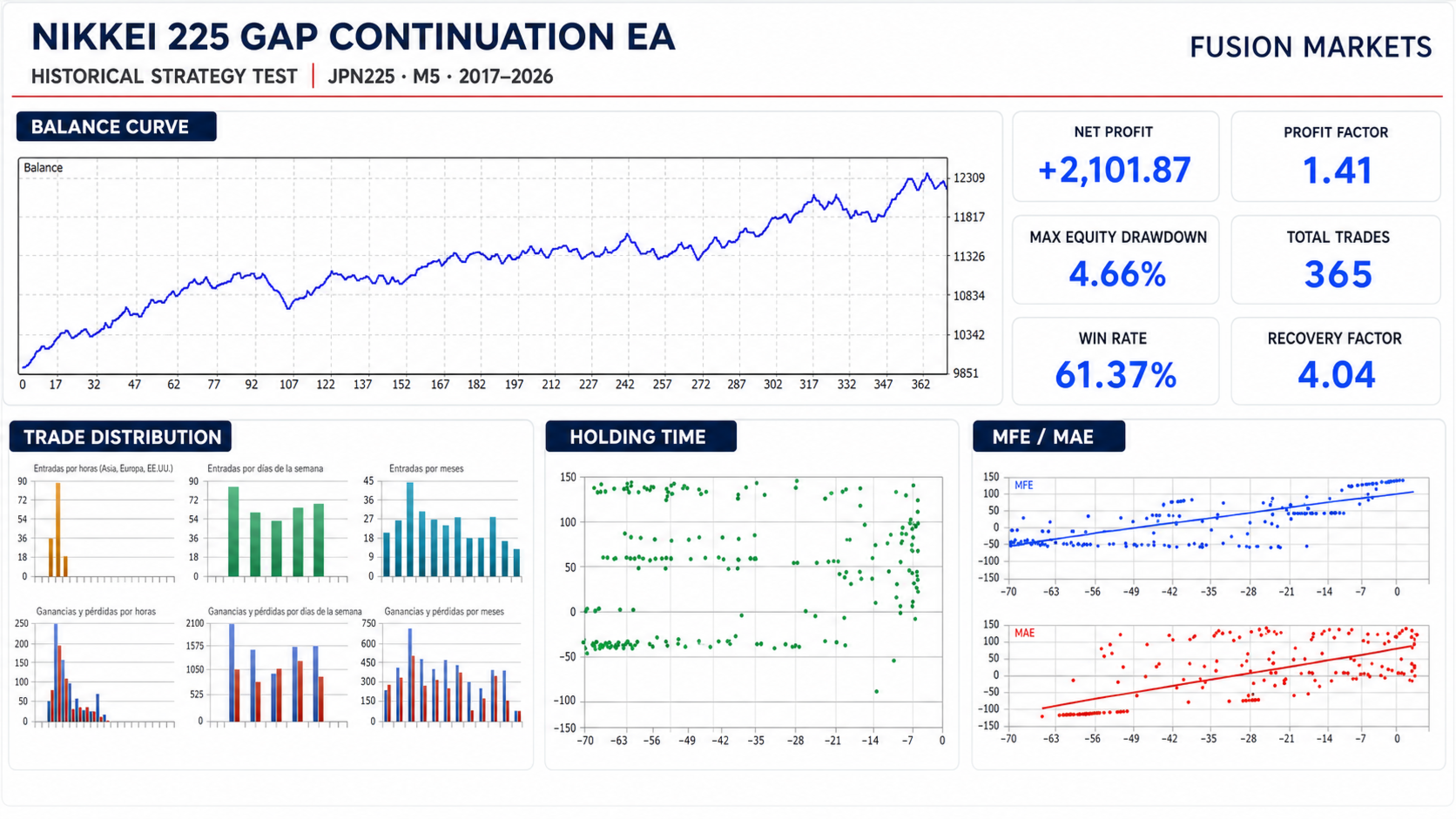
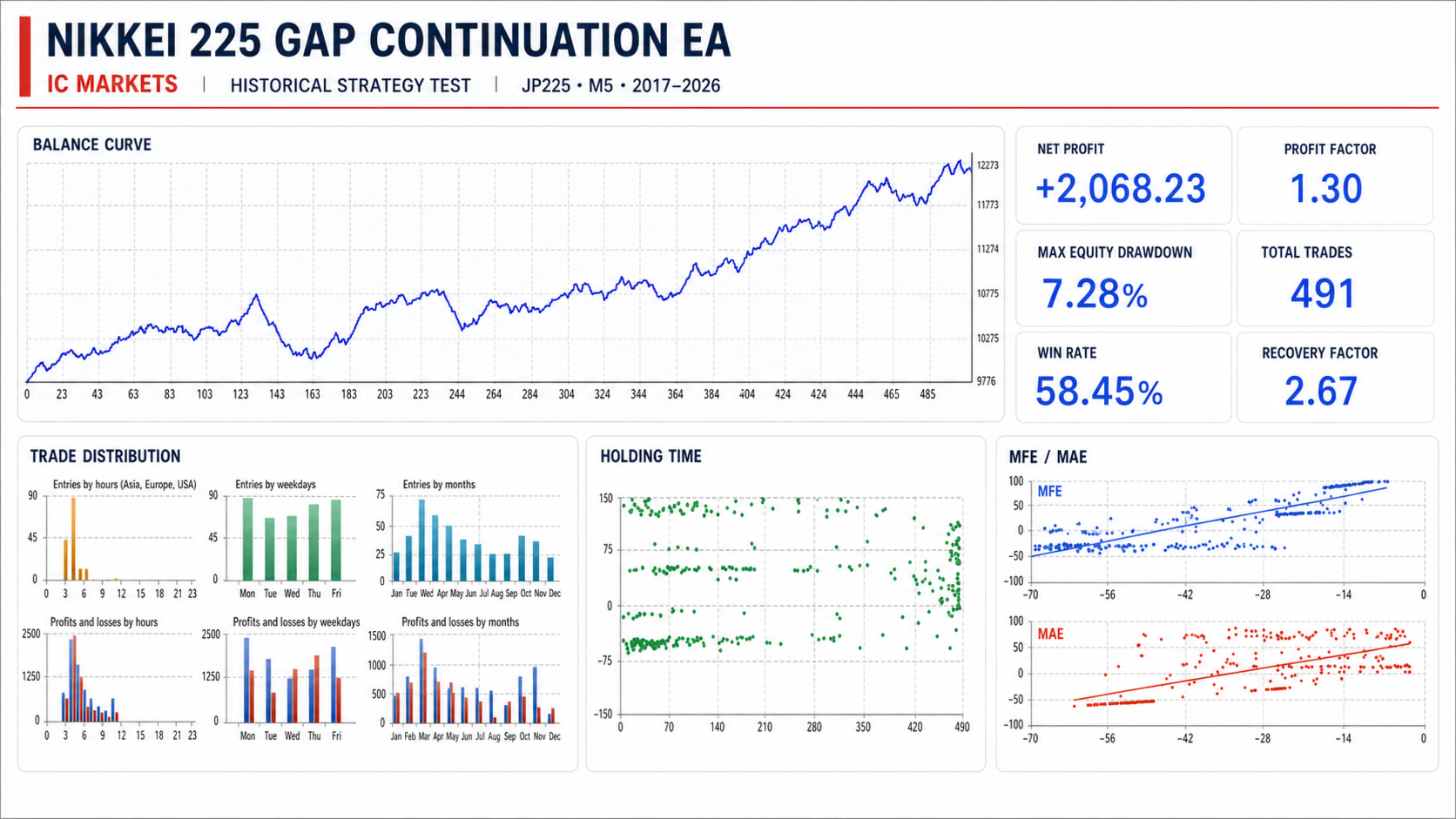
Results may differ between brokers because index CFDs can use different quotations, spreads, commissions, contract sizes, trading schedules and historical data.
The automatic time-conversion mode is designed specifically for the Darwinex server schedule. With other brokers, use Manual Server Time and configure the Japanese session according to the broker’s server clock.
Historical results obtained from one broker should not be assumed to represent the results that will be obtained with another broker.
Important Risk Information
Nikkei 225 Gap Continuation EA is an automated trading tool and does not guarantee profitability.
Backtests and historical performance do not predict future results. Market conditions, spreads, commissions, slippage, execution quality, contract specifications and broker data can materially affect performance.
Trading leveraged financial instruments involves substantial risk. Always test the EA carefully, use conservative risk settings and ensure that automated trading is appropriate for your financial situation.
Discover Another Nikkei 225 Trading Strategy
If you are interested in a different automated approach to the Nikkei 225, you can also explore Kuro225. It uses its own entry logic and position-management system, providing an alternative way to trade the Japanese index.