

From Basic to Intermediate: Struct (III)
 1 228
1 228
 0
0

Introduction
In the previous article "From Basic to Intermediate: Indicator (IV)", we showed how to do something in a simple and clear way that would be very difficult for many beginners. Now everyone knows a simple and easy way to bring their ideas to life. The goal was to create an indicator that, using colors, would display a certain trading system. Of course, there we showed how to implement the inside bar pattern. But this knowledge can be applied to any pattern where the candlestick color pattern indicates (or does not indicate) a trading opportunity.
Well, that was very interesting. However, I think we can address another issue that, in my opinion, is also quite fun and interesting. And we began to consider this issue at the end of the previous article. But before moving on to the topic we will be exploring starting with this article, we need to do a brief retrospective.
In the articles about structures, especially on the website "From Basic to Intermediate: Struct (II)", we explained how to work with structures to create record blocks. In those two articles, we mentioned that structures are a special type of data where you can place various information, but in a logical and simplified way. However, since we hadn't shown anything else before, delving into the details of structures would have been difficult and even unnecessary. But the previous article created a sufficient foundation for us to delve into some other issues. Essentially, we now want to show that structures can be used not only for organizing record data.
So, after this brief introduction, we can finally get down to business and begin to understand the reasons for the emergence of classes. To do this, we will start with the first topic on this issue.
Structured code
Probably what frustrates me the most is when I see code where everything is tangled up. In the days of good old BASIC, there was some logic to having code without a predefined structure. This was due to the very nature of the language. In languages like BATCH, such as script-based batch processing languages (an example is SQL), in a sense, we might not have a very clearly defined structure. After all, in most cases, the tasks that need to be performed are relatively simple, as are the codes, which are usually quite short.
However, everything becomes more complicated when we move to languages with deeper goals, as in the case of MQL5. In this case, we often have an objective that is difficult to achieve with just a few lines of code, even when using a header file to hide much of the complexity. But there are some aspects that make programming tedious and tiresome. One of them is the predisposition of beginner programmers to repeat code fragments that could have been better structured.
And when I talk about structured code, I don't mean using functions or procedures to maintain a certain structuring in the code. In this case, I mean embedding code within structures to facilitate its maintenance and handling. Many programming mentors say that using functions and procedures in code already makes it structured. But this doesn't necessarily mean the code is structured. It's simply better organized, and nothing more.
To achieve truly structured code, we need to use methods and concepts that many consider crazy or, at the very least, too complex. One such tool is classes. But it's not yet time to talk about classes, because classes didn't appear because one fine day programmers woke up and said, «We're going to create something that will make life difficult for everyone just starting their career. That way we'll be the coolest programmers». No, classes emerged to solve the problem of creating truly structured code.
To understand this limitation, we need to delve into more complex issues. So get ready, because from this point on, things will get very interesting and even fun.
Perhaps you're looking at me with some skepticism, not understanding what I want to show. But don't worry, we'll move step by step, as it is extremely important for you to understand our intentions. Otherwise, you'll get confused in what we're about to model to achieve object-oriented programming.
In the previous article, we saw the following code:
01. //+------------------------------------------------------------------+
02. #property copyright "Daniel Jose"
03. //+------------------------------------------------------------------+
04. input bool user01 = true;       //Show time scale
05. input bool user02 = true;       //Show price scale
06. //+----------------+
07. struct st_Mem
08. {
09.     long    View_DateScale,
10.             View_PriceScale;
11. }gl_StyleGraphic;
12. //+------------------------------------------------------------------+
13. int OnInit()
14. {
15.     gl_StyleGraphic.View_DateScale = ChartGetInteger(0, CHART_SHOW_DATE_SCALE);
16.     gl_StyleGraphic.View_PriceScale = ChartGetInteger(0, CHART_SHOW_PRICE_SCALE);
17.
18.     ChartSetInteger(0, CHART_SHOW_DATE_SCALE, user01);
19.     ChartSetInteger(0, CHART_SHOW_PRICE_SCALE, user02);
20.
21.     return INIT_SUCCEEDED;
22. };
23. //+------------------------------------------------------------------+
24. int OnCalculate(const int rates_total, const int prev_calculated, const int begin, const double &price[])
25. {
26.     return rates_total;
27. };
28. //+------------------------------------------------------------------+
29. void OnDeinit(const int reason)
30. {
31.     ChartSetInteger(0, CHART_SHOW_DATE_SCALE, gl_StyleGraphic.View_DateScale);
32.     ChartSetInteger(0, CHART_SHOW_PRICE_SCALE, gl_StyleGraphic.View_PriceScale);
33.     ChartRedraw();
34. };
35. //+------------------------------------------------------------------+
Code 01
This code is quite simple. However, if you are truly curious, you might research chart properties to try to create and manage its appearance directly through code. If you managed to do that, then I congratulate you, because this is one of the necessary conditions for those who want to become good professionals in the future.
However, despite the apparent simplicity of this code, many consider it to be structured code. In my opinion, what we see in code 01 is not exactly structured code, but rather well-organized code. Despite its simplicity, it is not quite the code that, in my view, is ideal for explaining structured code. For that, we will turn to something even simpler: scripts. This is because scripts only respond to the Start event. Once this event ends, the code terminates. It doesn't get any simpler than that.
Alright, let's start with the code shown below.
01. //+------------------------------------------------------------------+
02. #property copyright "Daniel Jose"
03. //+------------------------------------------------------------------+
04. void OnStart(void)
05. {
06.     struct st_Mem
07.     {
08.         long    View_DateScale,
09.                 View_PriceScale;
10.     }StyleGraphic;
11.
12.     StyleGraphic.View_DateScale = ChartGetInteger(0, CHART_SHOW_DATE_SCALE);
13.     StyleGraphic.View_PriceScale = ChartGetInteger(0, CHART_SHOW_PRICE_SCALE);
14.
15.     ChartSetInteger(0, CHART_SHOW_DATE_SCALE, false);
16.     ChartSetInteger(0, CHART_SHOW_PRICE_SCALE, false);
17.     ChartRedraw();
18.
19.     Sleep(2000);
20.
21.     ChartSetInteger(0, CHART_SHOW_DATE_SCALE, StyleGraphic.View_DateScale);
22.     ChartSetInteger(0, CHART_SHOW_PRICE_SCALE, StyleGraphic.View_PriceScale);
23.     ChartRedraw();
24. }
25. //+------------------------------------------------------------------+
Code 02
This code is much simpler than in Code 01 and has the same objective: to hide and then replace the price and time scales. Running this script on a chart, you will see something similar to the animation below:
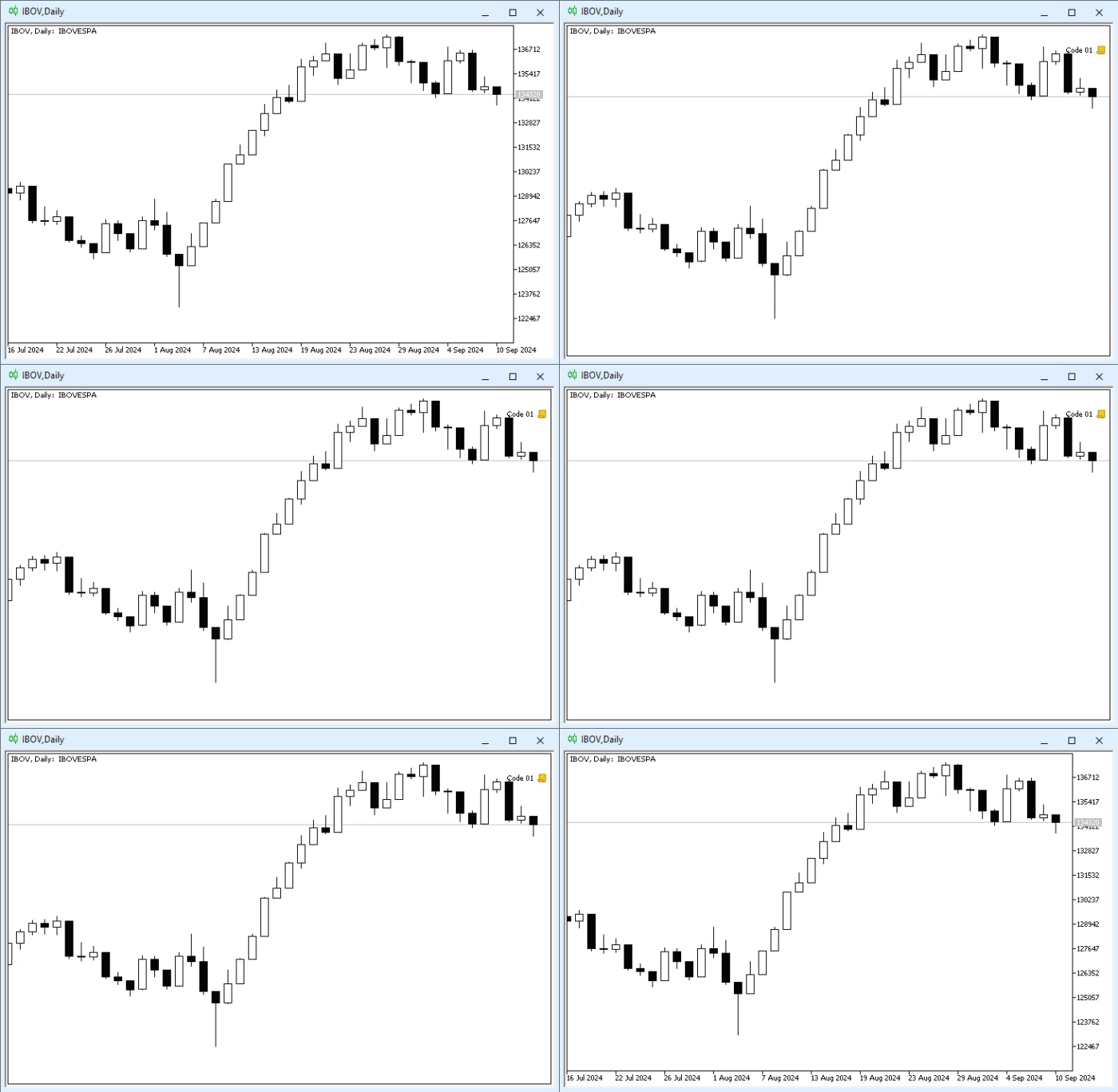
Animation 01
As you can see, everything is very simple: line 19 is responsible for making the scales disappear for a few moments. In it, we specify that we want to pause for about two seconds before executing the code again. However, I want you to pay attention to two points: lines 17 and 23. In the previous article, I explained why this command should be used in code. But here we are working with a script, and the timeout is short, so this command, present in both mentioned lines, is very important. Without it, we likely wouldn't see the price and time scales hide and reappear.
Alright. So far, so good. But Code 02, in my opinion, is not structured code, even though in line 06 we declare a structure. So, let's start writing what many consider to be structured code. To do this, we'll modify Code 02 to the version shown below:
01. //+------------------------------------------------------------------+
02. #property copyright "Daniel Jose"
03. //+------------------------------------------------------------------+
04. struct st_Mem
05. {
06.     long    View_DateScale,
07.             View_PriceScale;
08. };
09. //+------------------------------------------------------------------+
10. void OnStart(void)
11. {
12.     st_Mem StyleGraphic;
13.
14.     StyleGraphic = SAVE();
15.
16.     ChartSetInteger(0, CHART_SHOW_DATE_SCALE, false);
17.     ChartSetInteger(0, CHART_SHOW_PRICE_SCALE, false);
18.     ChartRedraw();
19.
20.     Sleep(2000);
21.
22.     RESTORE(StyleGraphic);
23. }
24. //+------------------------------------------------------------------+
25. st_Mem SAVE(void)
26. {
27.     st_Mem local;
28.
29.     local.View_DateScale = ChartGetInteger(0, CHART_SHOW_DATE_SCALE);
30.     local.View_PriceScale = ChartGetInteger(0, CHART_SHOW_PRICE_SCALE);
31.
32.     return local;
33. }
34. //+------------------------------------------------------------------+
35. void RESTORE(const st_Mem &arg)
36. {
37.     ChartSetInteger(0, CHART_SHOW_DATE_SCALE, arg.View_DateScale);
38.     ChartSetInteger(0, CHART_SHOW_PRICE_SCALE, arg.View_PriceScale);
39.
40.     ChartRedraw();
41. }
42. //+------------------------------------------------------------------+
Code 03
Code 03 will yield the same result as Animation 01, but with a slight nuance. Unlike Code 02, here we have better organization, as we can use the function in line 25 at different times, as well as the procedure in line 35 at any moment. The main advantage of this type of modeling and implementation, which we can see in Code 03, is precisely that we can save and restore all chart property values without worrying about which values will be changed. This avoids the need to create a large number of lines that always contain the same kind of code.
But there is a small problem with this approach, which is visible in Code 03. The problem is as follows: we are working with a structure containing data. So far, so good. But what is the point of implementing a function in line 25 and a procedure in line 35 if the goal is to work directly with the data present in the structure?
At first, this doesn't bother beginners or more experienced programmers, especially when working with simple code, but it becomes a real headache when we start working with more complex code. This happens because we begin to incorporate things that don't make much sense outside the context of the data we used.
Code 03 is very good for explaining this and for you, my dear reader, to understand the concept of what we will be doing soon. Please note the following: we have a structure that can be used in several different places in the code. The purpose of this structure is to store and restore the state the chart is in at a given moment. Therefore, we can implement the code as shown above.
But as we create new elements, the SAVE function and RESTORE procedure begin to fall out of context. We might also need to create another function and procedure with exactly the same name, but with a purpose different from saving and restoring chart properties. At that point, we could use overloading, but it would complicate the code completely unnecessarily. And it is at this moment that the question arises whether the code is structured or not.
In structured code, the SAVE and RESTORE functions will no longer be declared as we see in Code 03, where they are not properly linked to the context of the structure defined in line 04, but will be declared, or rather, implemented within the context of that structure. Since this cannot be shown in fragments, we will move directly to the solution discussed in other codes, only now in a fully structured model. This can be seen in the code below:
01. //+------------------------------------------------------------------+
02. #property copyright "Daniel Jose"
03. //+------------------------------------------------------------------+
04. struct st_PropertyGraphics
05. {
06.     long    View_DateScale,
07.             View_PriceScale;
08. //+----------------+
09.     void SAVE(void)
10.     {
11.         View_DateScale = ChartGetInteger(0, CHART_SHOW_DATE_SCALE);
12.         View_PriceScale = ChartGetInteger(0, CHART_SHOW_PRICE_SCALE);
13.     }
14. //+----------------+
15.     void RESTORE(void)
16.     {
17.         ChartSetInteger(0, CHART_SHOW_DATE_SCALE, View_DateScale);
18.         ChartSetInteger(0, CHART_SHOW_PRICE_SCALE, View_PriceScale);
19.
20.         ChartRedraw();
21.     }
22. //+----------------+
23. };
24. //+------------------------------------------------------------------+
25. void OnStart(void)
26. {
27.     st_PropertyGraphics StyleGraphic;
28.
29.     StyleGraphic.SAVE();
30.
31.     ChartSetInteger(0, CHART_SHOW_DATE_SCALE, false);
32.     ChartSetInteger(0, CHART_SHOW_PRICE_SCALE, false);
33.     ChartRedraw();
34.
35.     Sleep(2000);
36.
37.     StyleGraphic.RESTORE();
38. }
39. //+------------------------------------------------------------------+
Code 04
«Wow! What a chaos. Now my brain has gone crazy because, as far as I understand, a structure is a special kind of variable that can be organized to create small databases of records. But what I see in code 04 makes no sense to me whatsoever».
Well, we've just raised the bar. Those who haven't practiced and studied what is being shown now won't have a way to progress, as from this point forward, the possibilities increase very rapidly, exponentially. However, there is no need to fear code 04. I try to make everything as educational as possible to avoid the need for explanations and focus on something more interesting.
So, let's look at what's happening in code 04. First of all, code 04 will work just like the other codes we've reviewed above. But here we have an advantage, because now the same procedures and functions whose purpose is to store graphic properties are and will always be within the context of the very structure that will contain this data. This is what we call structured programming.
For now, we'll ignore the structure defined on line 04 and focus on the OnStart event handler. On line 27, we declare the structure just as before, meaning the creation of our variable or special record will happen exactly the same way. But pay attention to line 29 and 37. What do you think when you see these lines? You're probably thinking: «Well, on line 29, I'm asking to save something, and on line 37, to restore something». If that's what you thought, we're on the right track.
Look at those same lines again: what are we asking to save and restore? It's indeed the variable we declared on line 27. Interesting. Let's break it down. On line 27, we declare a variable. When line 29 executes, it requests to save that same variable. Alright, since this variable is of a graphic property record type,
So, on line 29, we request to save the graphic properties. This way, in lines 31 and 32, we can change the properties without worrying about potential alterations. «Great, it seems to be getting clearer. When we execute line 37, we ask to restore those same saved properties, thereby discarding all changes made between lines 29 and 37. Is that it, and have I correctly understood what is being done here in the OnStart event handler?» Yes, my dear readers, your guesses were indeed quite adequate.
«Super! But now I have doubts. Comparing code 03 with code 04, I noticed that the way things are declared here is different, concerning the SAVE and RESTORE procedures. Why is there such a difference between these two codes? Since, in principle, both have the same target type and behavior. I still don't understand this».
I'm glad you noticed that, because now, thanks to your understanding of the OnStart code, it's time to explain the structure code declared on line 04. So, this time, I want you to ignore everything else in code 04 and focus only on the structure block.
Please note that I changed the structure's name to simplify the process. However, you can use any name you like. The important thing is that the structure was at the global level. It could even be present in a header file. But for now, we won't worry about that. Just pay attention to what will be explained.
Please note that we are keeping the same variables as in the previous codes. These variables remain accessible and function perfectly, just like in code 03. You can even work with them, but we'll talk about that another time. What's important is what happens inside the subroutine. In this case, we have the SAVE procedure on line 09 and the RESTORE procedure on line 15. Note that they are very similar to the ones in code 03.
But this is where it gets interesting: the variables View_DateScale and View_PriceScale no longer need to be declared, as shown in code 03. The reason is that these variables are part of the context for the compiler and for the programmer. In this case, the context is precisely the st_PropertyGraphics structure.
That is, since we are working within a context that makes sense in the structure, IT IS NOT NECESSARY TO DECLARE THE VARIABLES as was done in code 03 (on lines 29, 30, 37, and 38) where we needed to specify the data types the variables would be associated with, because in code 03, both the SAVE and RESTORE subroutines were not part of the structure's context. This is no longer meaningful in code 04, as both subroutines belong to the structure.
This is what we can call structured programming, because now we can work with elements in their full context without having to represent them or read through all the code to understand what is happening.
Feel free to make changes and experiment with this code to truly grasp what's going on. But before finishing this article, I want to show something else, this time using another code. But since this is related to other issues, we will cover them in a new topic.
Simple manipulations with structures
In the previous topic, we discussed how code gains context through the creation of structured code. But for all its beauty, there are a few points worth considering. Of course, it was precisely because of this «need for care» that the necessity for creating classes arose. But we'll talk about that another time. For now, let's look at some of these «concerns».
First and foremost, in a structure, all data follows a very simple criterion: it can be either public or private. Typically, when declaring a simple structure, we always have public data. But when we are working with structured programming, we do NOT want public data. In such cases, we want to ensure that the data remains intact and secure throughout its lifetime.
To ensure this integrity, we can change the type of access to the data. And now, pay attention. What we will see here should NOT be used in simple constructs, such as those shown above. Use this only in cases where you are implementing structured code and want to have more control over its operation. If you lack the necessary knowledge, using what is shown here will complicate what is, in principle, quite simple.
To explain this properly, let's consider a simple code example, but one suitable for what we want to explain at the moment. It can be seen below:
01. //+------------------------------------------------------------------+
02. #property copyright "Daniel Jose"
03. //+------------------------------------------------------------------+
04. struct st_PropertyGraphics
05. {
06.     long    View_DateScale,
07.             View_PriceScale,
08.             Chart_Mode;
09. //+----------------+
10.     void SAVE(void)
11.     {
12.         View_DateScale = ChartGetInteger(0, CHART_SHOW_DATE_SCALE);
13.         View_PriceScale = ChartGetInteger(0, CHART_SHOW_PRICE_SCALE);
14.         Chart_Mode = ChartGetInteger(0, CHART_MODE);
15.     }
16. //+----------------+
17.     void RESTORE(void)
18.     {
19.         ChartSetInteger(0, CHART_SHOW_DATE_SCALE, View_DateScale);
20.         ChartSetInteger(0, CHART_SHOW_PRICE_SCALE, View_PriceScale);
21.         ChartSetInteger(0, CHART_MODE, Chart_Mode);
22.
23.         ChartRedraw();
24.     }
25. //+----------------+
26. };
27. //+------------------------------------------------------------------+
28. void OnStart(void)
29. {
30.     st_PropertyGraphics StyleGraphic;
31.
32.     StyleGraphic.SAVE();
33.
34.     StyleGraphic.Chart_Mode = CHART_LINE;
35.
36.     ChartSetInteger(0, CHART_SHOW_DATE_SCALE, false);
37.     ChartSetInteger(0, CHART_SHOW_PRICE_SCALE, false);
38.     ChartSetInteger(0, CHART_MODE, CHART_BARS);
39.     ChartRedraw();
40.
41.     Sleep(2000);
42.
43.     StyleGraphic.RESTORE();
44. }
45. //+------------------------------------------------------------------+
Code 05
Please note that code 05 is very similar to code 04. However, to demonstrate what we want to show, we have added a new graphic property to the structure. This property is declared on line 08 of code 05. Note that new lines were added to the SAVE and RESTORE procedures along with it. These changes are not significant enough to warrant a detailed explanation. Minor changes were also made to the OnStart procedure, which are straightforward and do not require detailed explanation. However, when we run this script on a chart, we will see something like this:
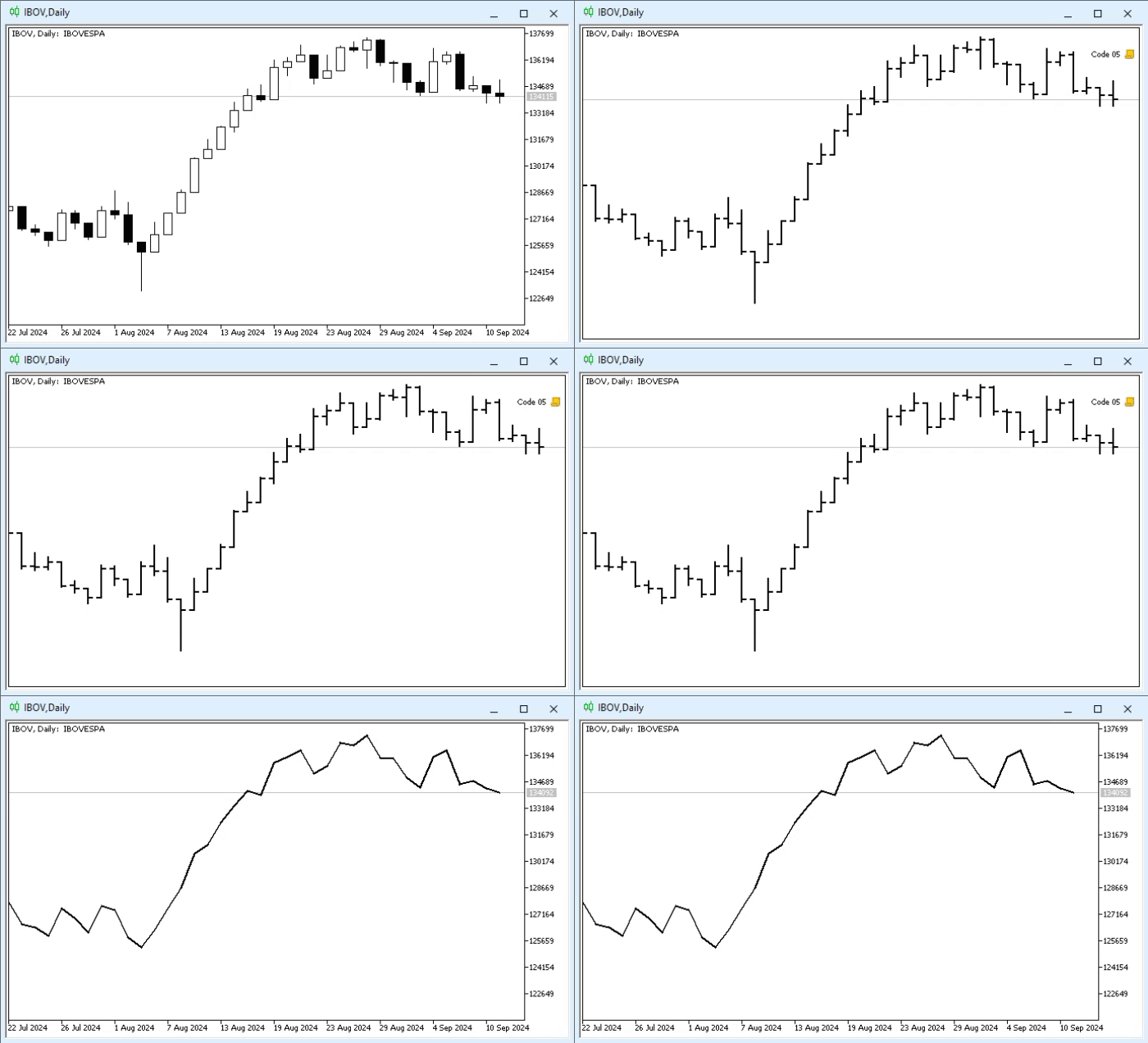
Animation 02
«Wow! Let's stop and rewind the tape, because we just got an unexpected result, and I want to understand why the chart wasn't restored to its original state, since we are preserving the same principle and idea as in code 04. However, I think the error might lie in the new property we just added». Well, that's pretty much it. But the problem isn't exactly that. This issue is known as data leakage or a breach of encapsulation– i.e., something is being done that couldn't be done before. This is precisely what leads to the result seen in animation 02.
Please note that on line 32 we save the graphic properties, and on line 43 we restore them, exactly as in code 04. But here's the problem: line 34. «I don't see a problem with that. Maybe if we remove that line, everything will go back to normal?» Yes, if we remove line 34, everything will fall into place. But that's not the point.
The question is how data is stored in the variable StyleGraphics. This variable is directly linked to a small record database located between lines 06 and 08. Any changes we make to these records will affect the contents of the StyleGraphics variable.
Thus, when we request data restoration on line 43, all the data in the log will be used. However, due to the change made on line 34, the original record was lost. Therefore, we now have a value different from the one that was saved, and it is being applied to the chart, resetting it with incorrect information.
This problem is very serious and, at the same time, very common. To solve it, we must change the condition for declaring values in the structure. Remember, by default, all values are public. But if we change code 05 to the one shown below, everything will be different:
01. //+------------------------------------------------------------------+
02. #property copyright "Daniel Jose"
03. //+------------------------------------------------------------------+
04. struct st_PropertyGraphics
05. {
06.     private:
07. //+----------------+
08.         long    View_DateScale,
09.                 View_PriceScale,
10.                 Chart_Mode;
11. //+----------------+
12.     public:
13. //+----------------+
14.         void SAVE(void)
15.         {
16.             View_DateScale = ChartGetInteger(0, CHART_SHOW_DATE_SCALE);
17.             View_PriceScale = ChartGetInteger(0, CHART_SHOW_PRICE_SCALE);
18.             Chart_Mode = ChartGetInteger(0, CHART_MODE);
19.         }
20. //+----------------+
21.         void RESTORE(void)
22.         {
23.             ChartSetInteger(0, CHART_SHOW_DATE_SCALE, View_DateScale);
24.             ChartSetInteger(0, CHART_SHOW_PRICE_SCALE, View_PriceScale);
25.             ChartSetInteger(0, CHART_MODE, Chart_Mode);
26.
27.             ChartRedraw();
28.         }
29. //+----------------+
30. };
31. //+------------------------------------------------------------------+
32. void OnStart(void)
33. {
34.     st_PropertyGraphics StyleGraphic;
35.
36.     StyleGraphic.SAVE();
37.
38.     StyleGraphic.Chart_Mode = CHART_LINE;
39.
40.     ChartSetInteger(0, CHART_SHOW_DATE_SCALE, false);
41.     ChartSetInteger(0, CHART_SHOW_PRICE_SCALE, false);
42.     ChartSetInteger(0, CHART_MODE, CHART_BARS);
43.     ChartRedraw();
44.
45.     Sleep(2000);
46.
47.     StyleGraphic.RESTORE();
48. }
49. //+------------------------------------------------------------------+
Code 06
In this case, a warning will appear during code compilation, very similar to this:

Figure 01
Note the error, because on line 38 we are trying to access a value that is no longer public; this happens because on line 06 we added the private condition. However, if we remove line 38 from code 06, we will be able to compile the code, since the SAVE and RESTORE subroutines are public, precisely because we added the public condition on line 12. I know everything might seem confusing at this moment, but trust me, it's much simpler than you think, especially because from now on we are starting to use a form of structured programming by including public and private parts in our code.
Concluding thoughts
Well, we have reached the end of today's article. This article is special. This is because, at this stage, we are entering what is called structured programming, where we create small data structures and build a context for them using procedures and functions focused exclusively on processing, maintaining, and analyzing the data present within the code structure.
I know that all of this might seem very complex and confusing at first, especially for many, as this may have been their first real contact with this form of code implementation. In the application, you will find the main codes we reviewed today so that you can practice and study each detail from this article more calmly.
It is very important that you correctly understand the content of this material. If understood properly, the next steps will be much simpler. Furthermore, understanding the lessons we will explain later will become much easier and more straightforward. In any case, this is merely a brief introduction to the topic.
In the next article, we will discuss in more detail what we have seen today. However, do not neglect studying this foundational base, as it will make it much easier for you to grasp the content of the following articles.
Translated from Portuguese by MetaQuotes Ltd.
Original article: https://www.mql5.com/pt/articles/15847
Warning: All rights to these materials are reserved by MetaQuotes Ltd. Copying or reprinting of these materials in whole or in part is prohibited.
This article was written by a user of the site and reflects their personal views. MetaQuotes Ltd is not responsible for the accuracy of the information presented, nor for any consequences resulting from the use of the solutions, strategies or recommendations described.

 Market Simulation (Part 14): Sockets (VIII)
 Larry Williams Market Secrets (Part 11): Detecting Smash Day Reversals with a Custom Indicator
 Market Simulation: (Part 11): Sockets (V)
 Bivariate Copulae in MQL5 (Part 3): Implementation and Tuning of Mixed Copula Models in MQL5

- Free trading apps
- Over 8,000 signals for copying
- Economic news for exploring financial markets
You agree to website policy and terms of use