
TrianglePatternGannEA Pro Standalone
- Experts
- Versione: 7.12
- Aggiornato: 25 giugno 2026

TrianglePatternGannEA Pro v7.0 Standalone - Complete Analysis & Optimization Guide
Overview
TrianglePatternGannEA Pro v7.0 is an advanced all-in-one Expert Advisor that combines Gann Triangle pattern detection with an intelligent anti-extreme filtering system. This EA operates completely standalone without requiring external indicators, making it efficient and reliable for automated trading.
Core Features Analysis
1. Pattern Detection System
Gann Triangle Recognition
The EA identifies classic Gann triangle patterns formed by three pivot points (P1-P2-P3):
Bullish Pattern: Low-High-Low formation
Bearish Pattern: High-Low-High formation
Key Detection Parameters:
Left Bars and Right Bars: Define pivot point sensitivity
Min Bars Between Points: Ensures pattern validity
P3 Retracement Range: Validates pattern structure (38.2% to 78.6%)
Minimum Triangle Height: Filters out insignificant patterns
Signal Quality Scoring (1-5 stars):
The EA rates each signal based on:
Trend alignment confirmation
Volume surge detection
RSI positioning
Optimal P3 retracement ratio (50-61.8%)
Multi-timeframe confirmation
2. Smart Anti-Extreme Filter v7.0
This is the EA's most innovative feature, designed to prevent trading at dangerous market extremes.
Structure-Based Top/Bottom Detection:
Identifies real swing highs/lows using configurable strength parameters
Calculates distance to recent extremes as percentage
Defines "near zone" threshold (default 2% from extreme)
RSI Confirmation Layer:
Separate RSI filter specifically for extreme detection
Configurable extreme levels (default 75/25)
Prevents counter-trend entries at overbought/oversold zones
Breakout Allowance Logic:
The filter intelligently distinguishes between:
False signals near extremes (BLOCKED)
Valid breakout moves with momentum (ALLOWED)
Breakout Requirements:
Price must exceed extreme by configurable ATR multiple
Volume must spike above average (1.5x default)
Momentum confirmation over recent bars
Three Filter Modes:
Conservative: Stricter extreme detection (RSI 70/30)
Balanced: Standard protection (RSI 75/25)
Aggressive: Allows more trades (RSI 80/20)
3. Entry Execution Modes
Entry at P3 (Original):
Immediate entry when P3 pivot forms
Breakout Confirmation:
Waits for price to break P2 level with buffer
Retest Mode:
Waits for breakout followed by retest confirmation
4. Risk Management System
Dynamic ATR-Based Stop Loss:
Automatically adjusts to market volatility
Market-specific ATR multipliers (Gold: 2.5, BTC: 3.0, Forex: 2.0)
Constrained by min/max SL ratios (23.6% to 61.8% of pattern height)
Gann-Based Take Profit Targets:
TP1: 61.8% of pattern height (Preliminary Target)
TP2: 100% of pattern height (Zone 1 Target)
TP3: 161.8% of pattern height (Zone 2 Target)
Position Management Features:
Breakeven activation at configurable profit level
Trailing stop with step-based progression
Partial close at profit milestones
Maximum positions per direction control
Opposite position closure option
5. Multi-Layer Filtering System
Trend Filters:
EMA Trend Filter: Single timeframe confirmation
Multi-TF Trend Filter: Current + Higher timeframe alignment
ADX Trend Strength: Minimum ADX level requirement
Volume Filter:
Volume must exceed moving average by configurable multiplier
RSI Pattern Filter:
Separate from smart filter, validates pattern formation RSI positioning
Session & Time Filters:
Asian Session: 00:00-09:00 GMT
London Session: 08:00-17:00 GMT
New York Session: 13:00-22:00 GMT
Custom hour range filter
News Filter:
Fetches economic calendar from external JSON
Stops trading before/after high-impact news
Configurable time buffer (default 30 minutes)
Spread Filter:
Maximum spread threshold to avoid unfavorable execution
6. Market-Specific Optimization
Auto-Detect Market Type:
Automatically identifies Gold, Bitcoin, or Forex pairs and adjusts:
ATR multipliers for volatility
Minimum pattern heights
Volatility factors for calculations
Custom Override:
Manual ATR multiplier setting for specific optimization
7. Money Management Protection
Account Safety Checks:
Minimum balance requirement
Minimum margin level threshold
Maximum drawdown percentage limit
Required margin validation before trades
Free margin buffer (2x required margin)
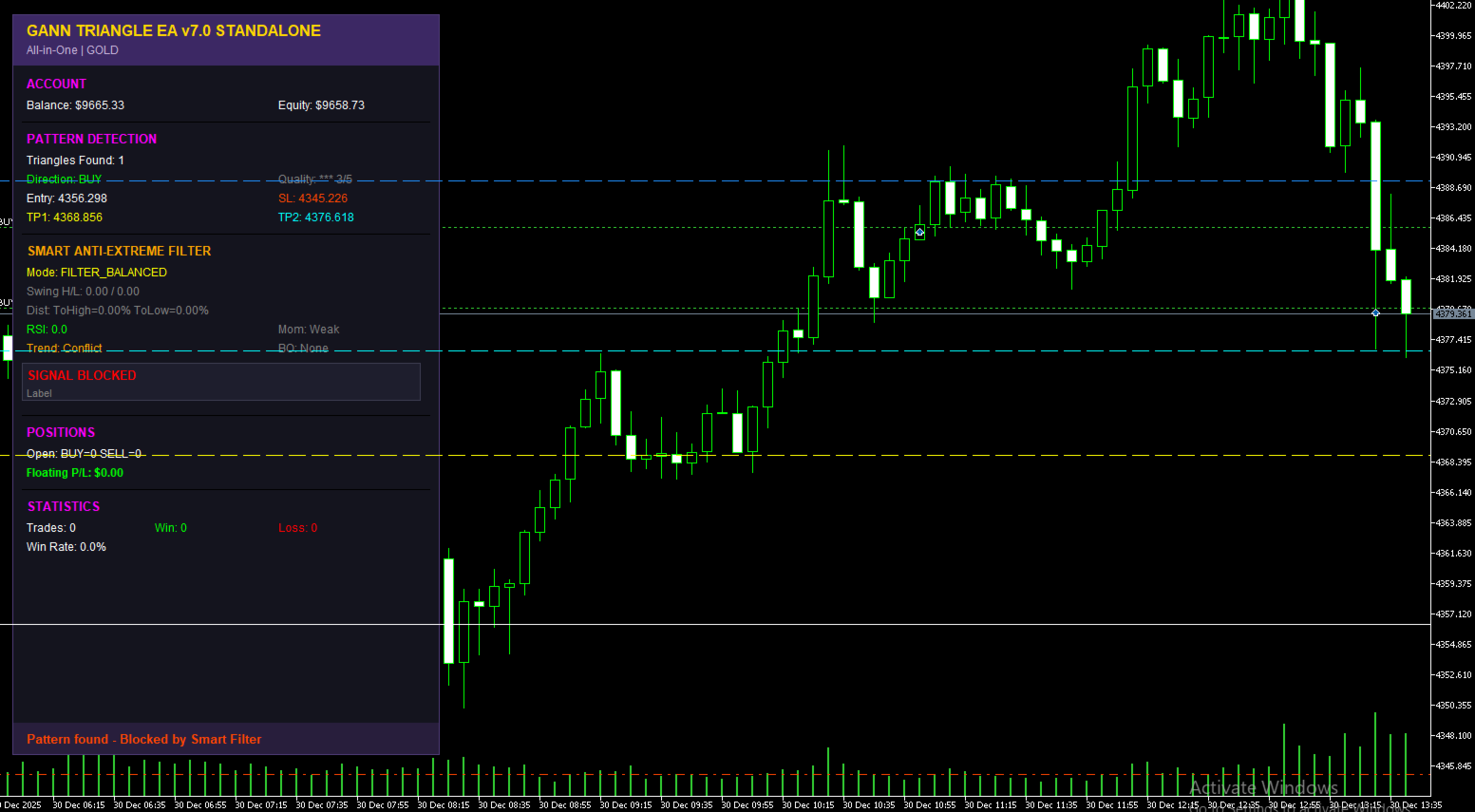
8. Visual Dashboard System
Real-Time Information Display:
Account balance and equity
Pattern detection status and count
Current signal direction and quality
Entry, SL, and TP levels
Smart filter analysis breakdown
Swing high/low levels
Distance to extremes
RSI, momentum, trend status
Breakout detection
Open positions count
Floating profit/loss
Trade statistics and win rate
Color-Coded Indicators:
Green: Approved conditions
Red: Blocked or warning states
Yellow: Pending or neutral
Cyan: Breakout detection
Orange: Caution states
Recommended Settings for Gold (XAUUSD)
Pattern Detection
InpLeftBars = 7
InpRightBars = 3
InpMinBars = 5
InpMinHeightPts = 150
InpMaxTriangles = 2
InpMinP3Retrace = 0.382
InpMaxP3Retrace = 0.786
Entry Configuration
InpEntryMode = ENTRY_BREAKOUT
InpBreakoutBars = 3
InpBreakoutBuffer = 2.0
Pattern Filters
InpTrendFilter = TREND_MTF
InpEMAPeriod = 50
InpHTFTimeframe = PERIOD_H4
InpUseVolumeFilter = true
InpVolumeMultiplier = 1.3
InpVolumePeriod = 20
InpUseRSIFilter = true
InpRSIPeriodPattern = 14
InpRSIOverbought = 70
InpRSIOversold = 30
Signal Quality
InpMinSignalQuality = 3
Dynamic Stop Loss
InpUseDynamicSL = true
InpATRMultiplier = 2.5
InpATRPeriod = 14
InpMinSLRatio = 0.382
InpMaxSLRatio = 0.618
Trading Settings
InpLotSize = 0.1
InpRiskPercent = 2.0
InpTPLevel = TP_ZONE1
InpSlippage = 30
InpMinSLDistance = 150
Smart Anti-Extreme Filter
InpUseSmartFilter = true
InpFilterMode = FILTER_BALANCED
InpSwingLookback = 60
InpSwingStrength = 7
InpNearZonePct = 1.5
InpUseRSISmart = true
InpRSIPeriodSmart = 14
InpRSIExtreme = 75
InpAllowBreakout = true
InpBreakoutATR = 2.0
InpBreakoutVolMult = 1.5
InpUseMomentum = true
InpMomentumBars = 3
InpMomentumATR = 0.8
InpUseTrendSmart = true
InpUseHTFSmart = true
Position Management
InpUseBreakeven = true
InpBEActivateUSD = 15.0
InpBEOffsetUSD = 2.0
InpUseTrailing = true
InpTrailStartUSD = 25.0
InpTrailStepUSD = 8.0
InpPartialClose = true
InpPartialProfitUSD = 30.0
InpPartialPct = 50.0
Session Filter
InpUseSession = true
InpTradeAsian = false
InpTradeLondon = true
InpTradeNewYork = true
Spread & News
InpMaxSpread = 40
InpNewsFilter = true
InpNewsBeforeMin = 45
InpNewsAfterMin = 45
InpHighImpactOnly = true
Recommended Settings for Bitcoin (BTCUSD)
Pattern Detection
InpLeftBars = 8
InpRightBars = 3
InpMinBars = 6
InpMinHeightPts = 300
InpMaxTriangles = 2
InpMinP3Retrace = 0.382
InpMaxP3Retrace = 0.786
Entry Configuration
InpEntryMode = ENTRY_BREAKOUT
InpBreakoutBars = 2
InpBreakoutBuffer = 2.5
Pattern Filters
InpTrendFilter = TREND_MTF
InpEMAPeriod = 50
InpHTFTimeframe = PERIOD_H4
InpUseVolumeFilter = true
InpVolumeMultiplier = 1.5
InpVolumePeriod = 20
InpUseRSIFilter = true
InpRSIPeriodPattern = 14
InpRSIOverbought = 70
InpRSIOversold = 30
Signal Quality
InpMinSignalQuality = 3
Dynamic Stop Loss
InpUseDynamicSL = true
InpATRMultiplier = 3.0
InpATRPeriod = 14
InpMinSLRatio = 0.382
InpMaxSLRatio = 0.618
Trading Settings
InpLotSize = 0.01
InpRiskPercent = 1.5
InpTPLevel = TP_ZONE2
InpSlippage = 50
InpMinSLDistance = 200
Smart Anti-Extreme Filter
InpUseSmartFilter = true
InpFilterMode = FILTER_BALANCED
InpSwingLookback = 50
InpSwingStrength = 6
InpNearZonePct = 2.0
InpUseRSISmart = true
InpRSIPeriodSmart = 14
InpRSIExtreme = 78
InpAllowBreakout = true
InpBreakoutATR = 2.5
InpBreakoutVolMult = 1.8
InpUseMomentum = true
InpMomentumBars = 3
InpMomentumATR = 1.0
InpUseTrendSmart = true
InpUseHTFSmart = true
Position Management
InpUseBreakeven = true
InpBEActivateUSD = 20.0
InpBEOffsetUSD = 3.0
InpUseTrailing = true
InpTrailStartUSD = 35.0
InpTrailStepUSD = 10.0
InpPartialClose = true
InpPartialProfitUSD = 50.0
InpPartialPct = 50.0
Session Filter
InpUseSession = false
Spread & News
InpMaxSpread = 100
InpNewsFilter = false
Optimization Strategy
Step 1: Pattern Detection Calibration
Start with conservative pivot detection settings. Increase left/right bars if too many false patterns appear. Adjust minimum height based on average daily range.
Step 2: Smart Filter Tuning
Begin with BALANCED mode. Monitor blocked vs. allowed signals on the dashboard. Switch to AGGRESSIVE if missing valid breakouts. Use CONSERVATIVE in highly volatile periods.
Step 3: Entry Timing Optimization
Test different entry modes:
ENTRY_AT_P3: Fastest entry, more signals, higher risk
ENTRY_BREAKOUT: Balanced approach, recommended for most scenarios
ENTRY_RETEST: Most conservative, fewer but higher quality trades
Step 4: Risk Parameter Adjustment
Start with 1.5-2% risk per trade. Adjust ATR multiplier based on backtest results. Ensure SL provides adequate breathing room without excessive risk.
Step 5: Exit Strategy Refinement
For scalping: Use TP_PRELIM with aggressive trailing
For swing trading: Use TP_ZONE2 with wider trailing steps
For balanced approach: Use TP_ZONE1 with partial close enabled
Step 6: Filter Combination Testing
Enable filters progressively. Start with trend filter only, then add volume, then RSI. Monitor win rate changes with each addition.
Performance Monitoring
Key Metrics to Track:
Signal quality distribution (aim for 3+ stars majority)
Smart filter block rate (should be 20-40% in balanced mode)
Breakout allowance accuracy (how many allowed breakouts succeed)
Win rate by session (identify optimal trading hours)
Average trade duration vs. profit
Drawdown during news events
Dashboard Interpretation:
Red smart filter status: Wait for better conditions
Cyan breakout detected: High-probability setup
Yellow momentum weak: Consider skipping signal
Green trend aligned: Higher success probability
Common Pitfalls to Avoid
Over-optimization on historical data
Disabling smart filter completely (defeats main protection)
Using too small minimum pattern height
Ignoring session filters for gold (London/NY best)
Setting risk too high (max 2% recommended)
Trading through major news without filter
Using aggressive mode in ranging markets
Disabling volume confirmation
Setting minimum signal quality below 3
Not adjusting settings for different brokers' conditions
Broker Considerations
Ensure your broker supports:
Minimum stop distance requirements (SYMBOL_TRADE_STOPS_LEVEL)
IOC or FOK order filling
Acceptable slippage levels
Spread conditions matching filter settings
Test on demo account first with all filters enabled to verify execution quality.
Conclusion
TrianglePatternGannEA Pro v7.0 represents a sophisticated approach to pattern-based trading with intelligent risk filtering. The Smart Anti-Extreme Filter is its standout feature, preventing many common trading mistakes. Success requires proper parameter tuning for your specific market, broker conditions, and risk tolerance. Always forward test new settings on demo before live deployment.
The recommended settings above provide solid starting points, but continuous monitoring and adjustment based on market conditions will yield optimal long-term results.



































Good EA for triangle detection. Loved this EA.