Pattern Zone AutoTrading Pro
- Experts
- Versione: 3.2

Professional EA Analysis
Core Functionality Overview
PatternZoneAutoTrading DCA Pro v3.00 is a sophisticated MetaTrader 5 Expert Advisor that combines advanced candlestick pattern recognition with dynamic support/resistance zone analysis and an intelligent Dollar-Cost Averaging (DCA) strategy. This EA represents a comprehensive automated trading solution designed for both novice and experienced traders.
Key Technical Features
1. Pattern Recognition System
The EA implements 24 professional candlestick patterns divided into three categories:
Multi-Candle Reversal Patterns: Morning Star, Evening Star, Three White Soldiers, Three Black Crows, Bullish/Bearish Engulfing, Piercing Line, Dark Cloud Cover, Harami patterns, Three Inside/Outside patterns, and Tweezer formations
Single-Candle Patterns: Hammer, Shooting Star, Marubozu variants, Doji types (standard, Gravestone, Dragonfly), and Spinning Top
Mathematical Precision: Each pattern uses precise mathematical calculations including body size ratios, shadow measurements, and ATR-based validation
2. Dynamic Support/Resistance Zones
The zone calculation system employs swing point analysis with configurable sensitivity, creating visual rectangular zones that adapt to market structure. The algorithm identifies key price levels where reversals are most likely to occur.
3. Advanced DCA Strategy
The Dollar-Cost Averaging implementation includes:
- Multiple DCA levels with progressive lot sizing
- Zone-based entry restrictions
- Optional pattern confirmation for DCA entries
- Intelligent position averaging with risk management
4. Comprehensive Risk Management
- Percentage-based position sizing
- Daily loss limits
- Maximum concurrent positions control
- Dynamic stop-loss and take-profit calculation
- Break-even and trailing stop functionality
Trading Modes
The EA offers three operational modes to suit different trading styles:
Alert Only Mode: Monitors patterns and zones, provides notifications without executing trades
Semi-Auto Mode: Alerts with suggested entry, stop-loss, and take-profit levels for manual execution
Full Auto Trading Mode: Complete automation with position management and DCA execution
Strengths
Technical Excellence:
- Clean, well-structured MQL5 code with comprehensive error handling
- Efficient array management and data processing
- Proper memory management with indicator handle cleanup
- Professional object-oriented approach using CTrade library
Trading Logic:
- Sound combination of technical analysis principles
- Multiple confirmation layers (patterns + zones)
- Intelligent position management with partial closes
- Adaptive risk management
User Experience:
- Extensive customization through 50+ input parameters
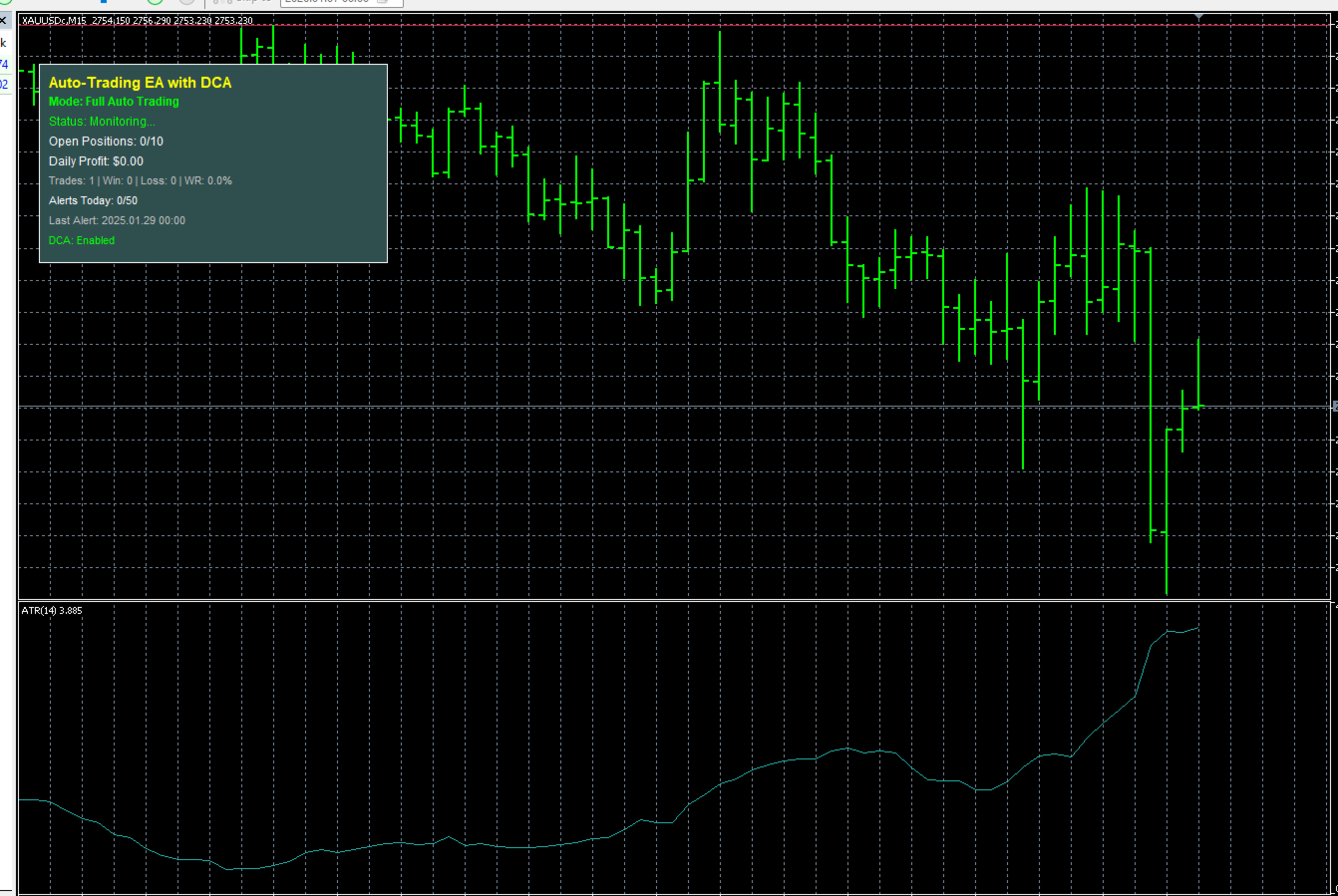
- Real-time on-screen dashboard with trading statistics
- Multiple notification channels (visual, audio, email, push)
- Visual pattern markers and zone drawings
Considerations
Complexity: With 50+ parameters, new users may require time to optimize settings for their trading style and market conditions.
Market Dependency: Pattern-based strategies perform differently across market conditions. Trending vs ranging markets may require parameter adjustments.
DCA Risk: While powerful, the DCA strategy can increase exposure during adverse moves. Proper understanding and risk limits are essential.
Backtesting: Users should thoroughly backtest with historical data before live deployment to understand performance characteristics.
Marketing Materials
Product Title PatternZoneAutoTrading DCA Pro - Professional Automated Trading System for MT5
Headline Transform Your Trading with AI-Powered Pattern Recognition and Intelligent DCA Strategy
Product Description Discover the future of automated trading with PatternZoneAutoTrading DCA Pro, a cutting-edge Expert Advisor that combines institutional-grade pattern recognition with dynamic support/resistance analysis and a sophisticated Dollar-Cost Averaging strategy.
Why Choose PatternZoneAutoTrading DCA Pro?
24 Professional Candlestick Patterns Our EA monitors the market 24/7, instantly identifying high-probability reversal patterns including Morning Star, Evening Star, Engulfing patterns, Hammers, and 20 more proven formations. Each pattern is mathematically validated using ATR-based calculations for maximum accuracy.
Dynamic Support & Resistance Zones Forget static levels. Our advanced swing point algorithm continuously adapts to market structure, identifying key zones where institutional traders make decisions. Visual zone displays keep you informed of critical price levels at all times.
Intelligent DCA Strategy Maximize your edge with our proprietary DCA system that automatically averages positions when price moves in your favor within key zones. Progressive lot sizing and multiple safety layers protect your capital while optimizing profit potential.
Three Trading Modes for Every Style
Alert Only: Perfect for manual traders who want professional signal identification
Semi-Auto: Get suggested entries with calculated SL/TP levels
Full Auto: Complete automation with hands-free position management
Institutional-Grade Risk Management
- Automatic position sizing based on account percentage
- Daily loss limits to protect capital
- Break-even and trailing stop automation
- Partial profit taking at multiple targets
- Maximum position limits
Real-Time Trading Dashboard Monitor everything at a glance with our sleek on-screen panel displaying open positions, daily profit/loss, win rate statistics, and alert counters. Stay informed without cluttering your charts.
Complete Notification System Never miss a trade with multi-channel alerts including on-screen notifications, sound alerts, email notifications, and mobile push notifications to your smartphone.
Who Is This For?
- Traders seeking to automate proven candlestick pattern strategies
- Investors wanting to implement systematic DCA approaches
- Both beginners and professionals looking for complete trading automation
- Anyone who wants to trade without emotional decision-making
Technical Specifications
- Platform: MetaTrader 5
- Compatible with all currency pairs, commodities, indices, and cryptocurrencies
- Works on all timeframes from M1 to MN1
- Optimized for VPS deployment
- Low system resource usage
- Professional code with comprehensive error handling
What You Get
- PatternZoneAutoTrading DCA Pro EA (MQ5 file)
- Comprehensive user manual with optimization guide
- Recommended parameter sets for major pairs
- Email support for setup assistance
- Free lifetime updates
Risk Disclaimer: Trading involves substantial risk of loss. Past performance does not guarantee future results. Always test strategies in demo environments before live trading. Only trade with capital you can afford to lose.
User Guide
PatternZoneAutoTrading DCA Pro - Complete User Guide
Table of Contents
- Installation
- Quick Start Configuration
- Parameter Reference
- Trading Modes Explained
- Risk Management Setup
- DCA Strategy Configuration
- Optimization Tips
- Troubleshooting
1. Installation
Step 1: Download and Install
- Download the PatternZoneAutoTrading_DCA_Pro.mq5 file
- Open MetaTrader 5
- Click File > Open Data Folder
- Navigate to MQL5 > Experts
- Copy the EA file into this folder
- Restart MetaTrader 5
Step 2: Verify Installation
- Open Navigator panel (Ctrl+N)
- Expand "Expert Advisors" section
- You should see "PatternZoneAutoTrading_DCA_Pro"
Step 3: Attach to Chart
- Open any chart (recommended: H1 or H4 timeframe)
- Drag the EA from Navigator onto the chart
- Check "Allow Algo Trading" in the settings window
- Click OK
Step 4: Enable Auto Trading
- Click the "Algo Trading" button in the toolbar (should turn green)
- Verify the EA is running (smiling face icon in top-right corner of chart)
2. Quick Start Configuration
Conservative Settings (Recommended for Beginners)
- Trading Mode: MODE_ALERT_ONLY (start with alerts only)
- Risk Per Trade: 1.0%
- Max Daily Loss: 3.0%
- Max Open Positions: 2
- Enable DCA: false (disable initially)
- Stop Loss Buffer: 10 pips
- Risk Reward Ratio 1: 2.0
- Risk Reward Ratio 2: 3.0
Moderate Settings (After Testing)
- Trading Mode: MODE_FULL_AUTO
- Risk Per Trade: 2.0%
- Max Daily Loss: 5.0%
- Max Open Positions: 3
- Enable DCA: true
- Max DCA Levels: 2
- DCA Distance: 20 pips
- DCA Lot Multiplier: 1.5
Aggressive Settings (Experienced Traders Only)
- Trading Mode: MODE_FULL_AUTO
- Risk Per Trade: 3.0%
- Max Daily Loss: 8.0%
- Max Open Positions: 5
- Enable DCA: true
- Max DCA Levels: 3
- DCA Distance: 30 pips
- DCA Lot Multiplier: 2.0
3. Parameter Reference
TRADING MODE
TradingMode: Select your preferred operation mode
- MODE_ALERT_ONLY: Notifications only, no trades
- MODE_SEMI_AUTO: Alerts with suggested levels
- MODE_FULL_AUTO: Complete automation
RISK MANAGEMENT
RiskPercentPerTrade (default: 2.0%): Percentage of account balance risked per trade
- Conservative: 0.5-1.0%
- Moderate: 1.5-2.5%
- Aggressive: 3.0-5.0%
MaxDailyLossPercent (default: 5.0%): Maximum daily loss before EA stops trading
- Recommended: 2x to 3x your risk per trade
MaxOpenPositions (default: 3): Maximum concurrent positions
- Small accounts: 1-2
- Medium accounts: 3-5
- Large accounts: 5-10
MaxLotSize (default: 1.0): Upper limit for position sizing MinLotSize (default: 0.01): Lower limit for position sizing MagicNumber (default: 123456): Unique identifier for EA trades
STOP LOSS & TAKE PROFIT
StopLossBuffer (default: 10 pips): Distance from zone boundary to place SL
- Tight: 5-10 pips (for major pairs, low volatility)
- Medium: 15-25 pips (for cross pairs)
- Wide: 30-50 pips (for exotic pairs, high volatility)
RiskRewardRatio1 (default: 2.0): First take profit target as multiple of risk RiskRewardRatio2 (default: 3.0): Second take profit target UseBreakEven (default: true): Enable automatic break-even BreakEvenTrigger (default: 1.0): When to move SL to break-even (as R multiple) BreakEvenProfit (default: 5 pips): Profit lock when moving to break-even
TRAILING STOP
UseTrailingStop (default: true): Enable trailing stop TrailingStart (default: 20 pips): Profit level to activate trailing TrailingStep (default: 10 pips): Minimum price movement to update SL TrailingDistance (default: 15 pips): Distance between price and trailing SL UseZoneBasedTrailing (default: true): Respect support/resistance zones when trailing
DCA STRATEGY
EnableDCA (default: true): Activate Dollar-Cost Averaging MaxDCALevels (default: 3): Maximum number of averaging positions
- Conservative: 1-2 levels
- Aggressive: 3-5 levels
DCADistancePips (default: 20): Minimum distance between DCA entries
- Scalping: 10-15 pips
- Day trading: 20-40 pips
- Swing trading: 50-100 pips
DCALotMultiplier (default: 1.5): Lot size multiplier for each DCA level
- Conservative: 1.0-1.3 (equal or slightly increasing)
- Aggressive: 1.5-2.0 (martingale-style)
DCAOnlyInZone (default: true): Only add positions within S/R zones DCARequiresPattern (default: false): Require reversal pattern for DCA entry
PARTIAL CLOSE
UsePartialClose (default: true): Enable partial profit taking PartialClosePercent (default: 50%): Percentage of position to close at TP1 MoveToBreakEvenAfterPartial (default: true): Move SL to BE after partial close
SMART EXIT
ExitOnOppositeSignal (default: true): Close position on opposite pattern ExitOnZoneBreak (default: true): Close when price breaks zone MaxBarsInTrade (default: 100): Maximum bars before forced close (0=disabled)
ALERTS & NOTIFICATIONS
EnableEmailNotifications (default: true): Send email alerts EnablePushNotifications (default: true): Send mobile push notifications EnableAlertSounds (default: true): Play sound on alerts EnableOnScreenAlerts (default: true): Show on-chart dashboard AlertSoundFile (default: "alert.wav"): Sound file name CheckOnNewBar (default: true): Only check patterns on new candle MaxAlertsPerDay (default: 50): Daily alert limit DrawPatternArrows (default: true): Draw arrows on detected patterns BullishArrowColor (default: Green): Color for bullish signals BearishArrowColor (default: Red): Color for bearish signals
SUPPORT/RESISTANCE ZONES
Zone_LookBackPeriod (default: 150): Bars to analyze for zones
- Short-term: 50-100 bars
- Medium-term: 100-200 bars
- Long-term: 200-500 bars
Zone_SwingSensitivity (default: 5): Bars on each side to confirm swing
- Sensitive (more zones): 3-5
- Moderate: 5-8
- Conservative (fewer zones): 8-12
Zone_ZonePadding (default: 20 pips): Zone thickness in pips Zone_SupportColor (default: Blue): Support zone color Zone_ResistanceColor (default: Red): Resistance zone color Zone_ShowZoneLabels (default: true): Display zone labels Zone_DrawZoneRectangles (default: true): Draw zone rectangles
4. Trading Modes Explained
Alert Only Mode
- EA monitors patterns and zones continuously
- Sends notifications when patterns are detected
- No trades are executed
- Perfect for learning the system or manual trading with EA signals
- Use this mode to understand pattern frequency and quality
Semi-Auto Mode
- EA detects patterns and calculates optimal entry levels
- Provides suggested stop-loss and take-profit prices
- Sends detailed alerts with all trading parameters
- You manually place trades based on EA suggestions
- Ideal for traders who want automation assistance but maintain control
Full Auto Trading Mode
- Complete automation from signal detection to position management
- EA opens positions based on patterns and zones
- Automatic stop-loss, take-profit, and DCA management
- Trailing stops, break-even, and partial closes executed automatically
- Best for hands-free trading after thorough testing
5. Risk Management Setup
Calculating Position Size The EA automatically calculates lot size based on your risk percentage: Risk Amount = Account Balance × Risk Percent Lot Size = Risk Amount ÷ (Stop Loss Pips × Pip Value)
Example: Account Balance: $10,000 Risk Per Trade: 2% = $200 Stop Loss: 30 pips Pip Value: $10 (for 1 lot on EUR/USD) Lot Size = $200 ÷ (30 × $10) = 0.67 lots
Daily Loss Limit The EA stops trading when daily loss reaches your specified percentage:
- If MaxDailyLossPercent = 5% on $10,000 account
- EA stops trading after -$500 cumulative loss for the day
- Counter resets at midnight
- Protects against catastrophic drawdown days
Maximum Positions Controls simultaneous exposure:
- MaxOpenPositions = 3 means EA can have 3 trades active
- Prevents over-leverage
- Each position still respects individual risk limits
Recommended Settings by Account Size
Small Account ($500-$2,000)
- Risk Per Trade: 1.0%
- Max Daily Loss: 3.0%
- Max Open Positions: 1-2
- Max Lot Size: 0.10
- Enable DCA: false
Medium Account ($2,000-$10,000)
- Risk Per Trade: 2.0%
- Max Daily Loss: 5.0%
- Max Open Positions: 2-3
- Max Lot Size: 0.50
- Enable DCA: true
- Max DCA Levels: 2
Large Account ($10,000+)
- Risk Per Trade: 2.0%
- Max Daily Loss: 6.0%
- Max Open Positions: 3-5
- Max Lot Size: 2.00
- Enable DCA: true
- Max DCA Levels: 3
6. DCA Strategy Configuration
Understanding DCA Dollar-Cost Averaging in this EA works by adding to winning positions within key zones:
- Initial position opens on pattern signal
- If price moves favorably but stays in zone, EA can add positions
- Each DCA level increases position size (controlled by multiplier)
- Average entry price improves
- Single take-profit target for all positions
DCA Settings Explained
MaxDCALevels: Total number of positions including initial entry
- Level 1: Initial pattern-based entry
- Level 2: First DCA add-on
- Level 3: Second DCA add-on (if MaxDCALevels = 3)