Same PC Trade Copier for MT5

  • Utilities
  • Themistokli Kola
    Themistokli Kola
    MQL4 / MQL5 and Pine Script developer.
    What I do:
    - Pine Script to MQL5 / MQL4 conversions (TradingView indicators and strategies into MT5/MT4 indicators or EAs)
    - Fixes and changes to existing EAs and indicators: bugs, new inputs, filters, daily limits, breakeven and trailing logic
  • Version: 1.0
  • Activations: 5

Same PC Trade Copier copies trades between MetaTrader 5 terminals running on the same computer or VPS. It is one Expert Advisor with a Role input: the source account runs it with Role = Master, and every receiving terminal runs it with Role = Slave. The copies talk through a small file in the terminals' shared Common\Files folder: no internet service, no DLL, no web requests.

Setup in 5 steps

  1. Install both terminals on the same computer (or VPS) and log each in to its account.
  2. Master: in the source terminal, attach Same PC Trade Copier with Role = Master to any one chart. Pick a channel name (for example Copier1) and press OK. Turn on Algo Trading in the toolbar.
  3. Slave: in each receiving terminal, attach Same PC Trade Copier with Role = Slave to any one chart, with the same channel name. Tick Allow Algo Trading in the EA settings and turn on Algo Trading in the toolbar.
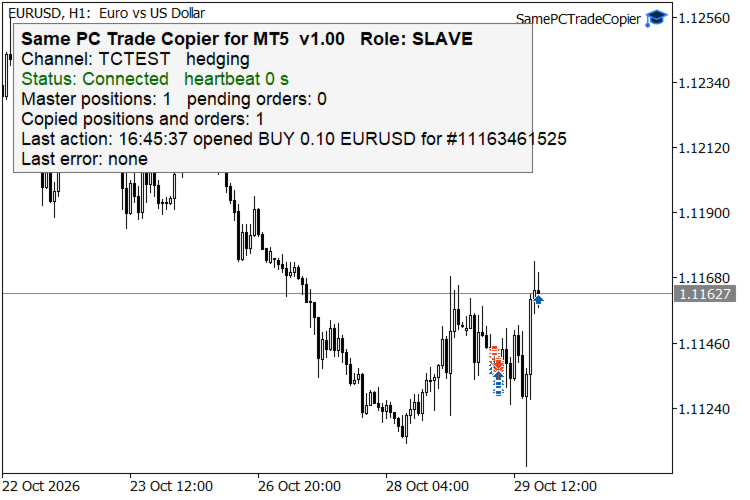
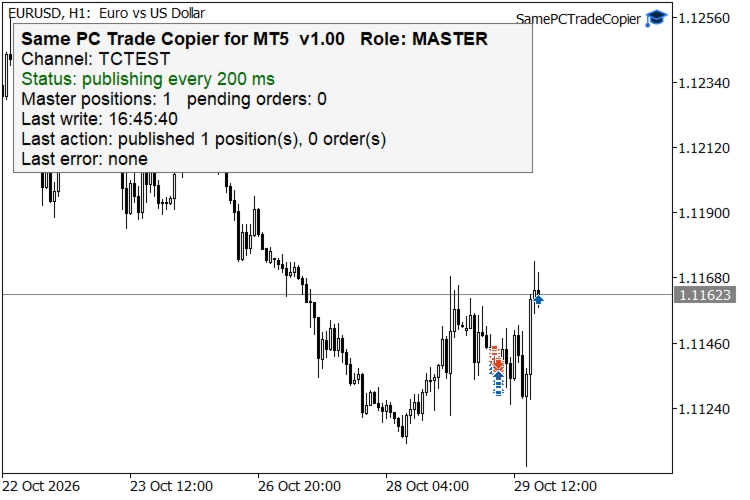
  4. Check the panels. The Slave panel shows Status: Connected and the heartbeat age; the Master panel shows how many positions it publishes. Open a small trade on the Master account and watch it appear on the Slave within a second.
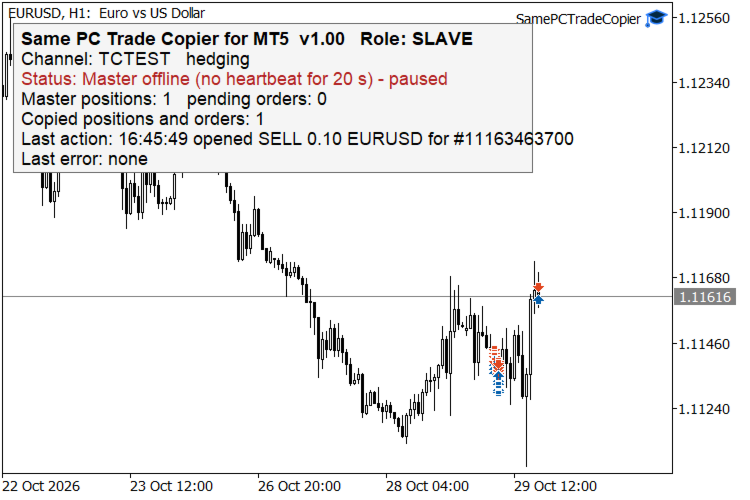
  5. Leave both running. If the Master terminal is closed, the Slave shows "Master offline - paused" and closes nothing; when the Master comes back, copying continues without duplicates. Restarting the Slave is also safe: copies are recognised by their TC# comment and a mapping file.

Use one Master per channel. Several Slaves may read the same channel, and several copier pairs can run side by side with different channel names.

What the Slave does

  • Opens a copy for each new Master position, with the calculated lot.
  • Follows stop loss and take profit changes.
  • Mirrors partial closes in the same proportion and closes the copy when the Master closes.
  • Places, moves and deletes pending copies; when a pending order fills, the copy follows.
  • On a netting account it keeps one net position per symbol equal to the sum of the copied trades.
  • Before every new trade it checks that trading is allowed, the symbol accepts that direction and there is enough free margin. Requotes and busy states are retried; every refusal is printed in the Experts log with the trade server code and shown in plain words on the panel.
  • A copy that you close by hand on the Slave account is not reopened.

Role and channel

  • Role - Master (default) sends this account's trades; Slave copies the Master's trades. Each role reads only its own group of settings.
  • Channel name - name shared by the Master and its Slaves. Letters, digits, _ and -, up to 32 characters.

Master settings

  • Copy pending orders - also publish buy and sell limit and stop orders.
  • Symbols to copy - comma-separated list, e.g. EURUSD,XAUUSD. Empty = all symbols.
  • Magic number to copy - copy only trades with this magic number; -1 = every Expert Advisor.
  • Include manual trades - copy trades opened by hand (magic number 0).
  • Publish interval - how often the Master checks the account, in milliseconds (default 200). Trades are also published at once when the account changes.

Slave settings

  • Lot mode - Same as master; Master lot x multiplier; Fixed lot; Proportional to balance ratio (master lot x slave balance divided by master balance).
  • Multiplier and Fixed lot - used by those lot modes.
  • Max lot per trade - upper limit for any copied trade; 0 = the broker's maximum. Every volume is rounded down to the broker's volume step and kept within its minimum and maximum.
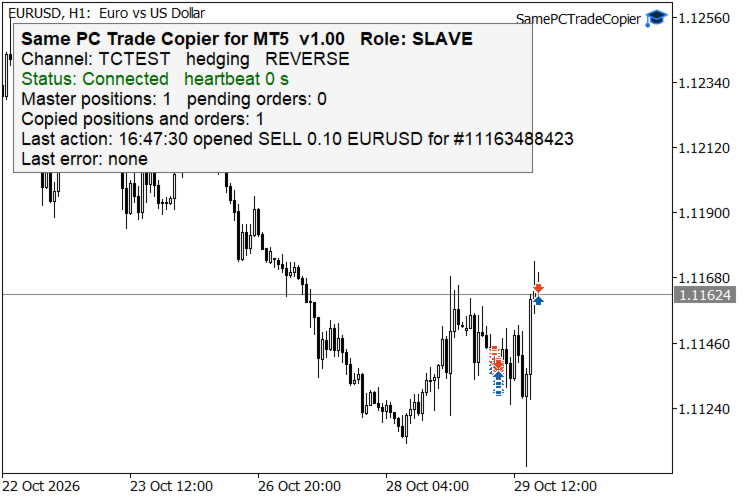
  • Reverse copy - buy becomes sell and sell becomes buy; stop loss and take profit are swapped. Pending orders keep their price and flip direction.
  • Prefix / suffix to remove and Prefix / suffix to add - adapt symbol names between brokers, e.g. suffix .m turns EURUSD.m into EURUSD.
  • Explicit symbol map - pairs that override the prefix and suffix rules, e.g. XAUUSD=GOLD,US500=SP500.
  • Copy SL and TP - copy and keep updating stop loss and take profit. A level the broker would refuse is left unset and shown on the panel.
  • Max slippage - allowed price deviation for market orders, in points.
  • Ignore master trades older than - when the Slave starts, trades already open on the Master for longer than this many seconds are not copied; 0 = copy them all.
  • Copy only new trades - when the Slave starts, nothing already open on the Master is copied, only trades opened later.
  • Magic number of copied trades - marks the Slave's copies. Use a number no other Expert Advisor on the Slave account uses.
  • Master offline after - seconds without a heartbeat before the Slave pauses.
  • Check interval - how often the Slave reads the channel, in milliseconds.

Panel

The EA shows a small panel: product name and role, channel, connection status and heartbeat age, number of Master positions and orders, number of copies, the last action with its time, and the last error in plain words.

Notes

  • Both terminals must be on the same computer: the copier uses the shared Common\Files folder of MetaTrader 5.
  • In the Strategy Tester the EA uses the tester's own folder, so a test never feeds a live copier; with Role = Slave it simply waits for a Master there.
  • The copier only copies trades; it does not decide any trades itself.
Recommended products
Local Copier MT5
Rodrigo Arana Garcia
Local Copier – Trade Copier for MetaTrader 4 and MetaTrader 5 A local trade copier for MetaTrader 4 and MetaTrader 5. It copies trades between terminals that run on the same Windows computer or VPS, in any direction: from MetaTrader 4 to MetaTrader 4, from MetaTrader 5 to MetaTrader 5, and between the two platforms. This is the MetaTrader 5 version. The MetaTrader 4 version is a separate product. To copy between the two platforms, install the matching version in each terminal. Additional materi

Trade Copier Pro for MT5
Kuldeep Krishnat Konde
MT5 to MT5 Trade Copier – Fast and Reliable Trade Copying Solution The MT5 Trade Copier is a powerful tool designed to copy trades seamlessly between MetaTrader 5 accounts with minimal latency and high accuracy. Built for speed, flexibility, and ease of use, the copier works across different brokers, even when symbols use different prefixes or suffixes. This Expert Advisor is suitable for professional traders, signal providers, fund managers, and traders who manage multiple accounts. Key Featur
Fast copier for sending trades to multiple MT4 / MT5 accounts. MT5 Trade Copier Master EA sends trades instantly from your master account to one or multiple slave accounts. Supports copying to: • MT5 accounts • MT4 accounts Perfect for: • Multi-account traders • Signal providers • Account managers • Personal account mirroring Main Features • Fast local trade copying • Low latency execution • Multiple slave accounts support • Copy open positions on startup • Stable file-based communication • Easy
Remote Copier
Thio Tjuan Kwang
EA REMOTE COPIER Copy Your Trades Across Different VPS — Fast, Secure & Reliable EA Remote Copier is a professional Expert Advisor designed to automatically copy trading activity between different VPS, trading accounts, and locations through the Internet . It is suitable for traders, money managers, signal providers, and anyone who needs to synchronize trades across multiple accounts efficiently. Please download master EA here =  https://www.mql5.com/en/market/product/190758 User Manual :  
Trade Copier Professional — Local Copy Solution Trade Copier Professional is a reliable local trade copying system for MetaTrader 4/5. It allows traders to replicate positions instantly across multiple accounts on the same computer, with built‑in safety controls and a professional dashboard. Overview The EA operates in both Master and Slave modes from a single file, with seamless switching. Trades can be copied between MT4 and MT5 terminals without internet dependency, using local file‑based
Broker Connection Monitor MT5
AL MOOSAWI ABDULLAH JAFFER BAQER
• Please test the product in the Strategy Tester before purchasing to understand how it works. • If you face any issues, contact me via private message—I’m always available to help. • After purchase, send me a screenshot of your order to receive a   FREE EA   as a gift. Broker Connection Monitor - Keep Your Trading Secure! Ensure Stable Trading with Real-time Broker Connection Monitoring! Are you tired of unexpected connection drops affecting your trades? Do you want to monitor your broker's co
Copy Trader for MT5   is a professional cross-terminal trade copier that instantly replicates every trade from a Master account to one or more Slave accounts running on the same PC. No third-party servers, no cloud subscriptions, no VPS required — it works entirely through MetaTrader 5's shared common folder, giving you near-zero latency copying between terminals.
Fox Wave Pro Copier - Professional Multi-Master Trade Copier Copy trades from multiple Master accounts simultaneously with advanced risk management Key Features Multi-Master Architecture Copy from unlimited master accounts simultaneously Automatic master account detection or manual configuration Real-time trade synchronization via file system Independent risk management for each master Advanced Risk Management Individual risk settings per master account Automatic lot size calculation based
| Fully-automated Smart Money Concept (ICT) inspired trading solution with multi-strategy capabilities | Built by a grid trader >> for grid traders.  This is MT5 version, click  here  for  Blue CARA MT4  (settings and logics are same in both versions)     Real monitoring signal  -->  Cara Gold Intro Blue CARA EA   ('CARA') - short for  C omprehensive  A lgorithmic   R esponsive   A dvisor is a next-gen  multi-currency    multi-timeframe  EA base on the widely known (and perhaps the most popul
Advanced Multi-Symbol Equity Protection & Hybrid Stops System Overview Professional-grade equity protection system designed for traders managing multiple currency pairs simultaneously. Features both individual symbol controls and master account-wide protection mechanisms. Key Features Hybrid Take Profit System - **Fixed TP:** Set specific profit targets per symbol - **Trailing TP:** Dynamic profit protection that follows price - **Hybrid Mode:** Combines both methods for optimal results
The Superior Remote Trade Copier is a comprehensive MT5 utility that copies trades remotely and privately via Telegram, eliminating the need for external VPS bridges or third-party web servers. The ecosystem consists of a Master EA, a free Desktop App, and a Client EA. Master (Transmitter) Trade Broadcasting: Transmits market orders, pending orders, position modifications, and partial/full closures directly via Telegram. UI Dashboard: Interactive on-chart panel for quick bulk actions (Close All,
Easy Trade Copy Client MT5
Krutik Piyushkumar Parekh
Easy Trade Copy (Client / Receiver) The easiest and most reliable way to copy trades to your account without missing a beat. If you want to copy trades from a master account to your own account, you need a tool you can trust. Most copiers glitch, miss trades, or accidentally open duplicates when your internet drops or your computer restarts. The Easy Trade Copy is built differently. It is a "smart" copier that double-checks every single trade to make sure your account perfectly matches the mast
PROMO: ONLY 10 LEFT AT $90! Next price:        $199 Price will be kept high to limit number of users for this strategy. This EA starts trading at the open of   London (UK) Session . It is based on analysis of advanced statistical distributions combined with short to medium term reversal patterns which have mean-reversion attributes. The EA includes several smart features and allows you to trade with a fixed or automatic lot size. The EA is not sensitive to spreads but can be backtested on both
CopyIQ
Stephen Sanjeeve Sahayam
CopyIQ mirrors your trades between MetaTrader 5 terminals running on the same Windows PC - one source account feeding as many receiver accounts as you need. Everything happens locally on the one machine: no VPS, no DLLs, and no internet link between terminals to lag or break. A trade on your source account reaches every receiver in milliseconds. CopyIQ was built by studying where other local copiers let traders down - copies that arrive late, lot sizes that ignore the receiving account, symbols
Viking Alpha DAX Ivar Edition
Valdeci Carlos Dos Passos Albuquerque
Viking Alpha DAX — Germany 40 Expert Advisor for MetaTrader 5 LAUNCH PROMO Only 10 copies at launch price. Price increases with each sale. Launch price: $297 Next price: $497 Final price: $997 Live Performance: FX Blue — Vikingtradingbots What Makes Viking Alpha DAX Different Most DAX robots fail for one simple reason: they treat the Germany 40 like a forex pair. It isn't. The DAX has a heartbeat — a specific rhythm tied to the Frankfurt Stock Exchange opening, the European session structure, an
Hi Traders, This MT5 EA provides you with the following impressive  & powerful features (with easy configurations & smooth operations): 1- Trade directly using your keyboard: open Buy/Sell orders, close profitable orders, close losing orders, close Buy orders, close Sell orders or close all orders instantly (very fast closure). You can define your desired keyboard to each function. 2- Turn on the "SLTP Line" button to draw SL TP Lines on the chart. 3- When you drag the SL line, all orders on t
Exclusive EA for FOREX HEDGE account The EA (FuzzyLogicTrendEA) is based on fuzzy logic strategies based on the analysis of a set of 5 indicators and filters. Each indicator and filter has a weight in the calculation and, when the fuzzy logic result reaches the value defined in the EA parameter, a negotiation is opened seeking a pre-defined gain. As additional functions it is possible to define maximum spread, stop loss and so on . Recommended Symbol: EURUSD, AUDUSD, GBPUSD, NZDUSD, USDCAD, AU
Server Link >> h ttps://www.mql5.com/en/market/product/160109 CopyTrade Slave is a lightweight, reliable local trade copier for MetaTrader 5 that mirrors positions from a Master account to one or more Slave accounts using a fast shared-file mechanism. It is designed for signal providers, account managers, and traders who need precise synchronization of trades with flexible delay and lot control. ​ Main concept Role: Works as the Slave side of a local copy trading setup and receives trades fr
Customized Copy MT5
Kyra Nickaline Watson-gordon
Customized Copy is a Multi-Terminal visual trade copying utility that supports Metatrader4 and Metatrader5 for Trade Copying.  You can activate EA on 10 different PCs/VPS. On each PC/VPS can install on Unlimited Terminals. Specifications :     Real Time, Multi Terminal - Multi Account - MT4/MT5 trade copying (support over 50 accounts at same time)     All settings are input visually.     Visual display and modify of copy map and network     Each copy path can be used with different settings
Trade copier MT5
Alfiya Fazylova
4.61 (57)
Trade Copier is a professional utility designed to copy and synchronize trades between trading accounts. Copying occurs from the account / terminal of the supplier to the account / terminal of the recipient, which are installed on the same computer or VPS . Before buying, you can test the demo version on a demo account. Demo version here . Full instruction here . Main functionality and benefits: Supports copying MT5> MT5, MT4> MT5, MT5> MT4, including MT5 netting accounts. * Supports copying Dem
BTC Master Pro
Farzad Saadatinia
4.64 (14)
BTC Master Pro – Your trusted partner in disciplined Bitcoin trading. The new version is now enhanced with OpenAI artificial intelligence , delivering smarter execution and improved trade filtering in volatile crypto conditions. This professional Expert Advisor is built specifically for Bitcoin (BTCUSD) trading on MetaTrader 5 , focusing on structured execution, controlled exposure, and intelligent risk management. Price: $699  →  Next: $999  →  Final: $999 LIVE SIGNAL HERE OpenAI-Powered Exec
• Please test the product in the Strategy Tester before purchasing to understand how it works. • If you face any issues, contact me via private message—I’m always available to help. • After purchase, send me a screenshot of your order to receive a   FREE EA   as a gift. Hedge Fragmentation Utility - Comprehensive Product Description Overview The Hedge Fragmentation Utility is a professional-grade MetaTrader 5 tool designed for forex traders who employ hedging strategies. This sophisticated util
Local Trade Sync Copier is a local trade synchronization utility for copying trading activity between MetaTrader 5 accounts running on the same computer or VPS. It supports both one-to-one synchronization and one-to-many synchronization, allowing one Source account to distribute its trading activity to multiple independent Receiver accounts. This product does not generate trading signals or trading strategies. Account A acts as the Source, while one or more Account B terminals act as Receiver
EURUSD ecn
Maryna Kauzova
Only 1 copies at the price of 99 USD. Last price 999 USD   EURUSD ecn  - is a trading algorithm designed for trading on ecn accounts or any other accounts with small margins and small spread! EURUSD ecn trading strategy is based on historical axioms of breaking the daily price range. Why EURUSD ecn belongs to safe trading systems?! - each order has a short fixed Stop Loss - the EA will not open an order if the trading account conditions do not match the recommendations (if orders are not opene
Sonic R Pro Enhanced EA - Version 2025 $249 Only for the First 5 Buyers! Live Signal Check the live performance of Sonic R Pro Enhanced: Live Sonic R Trading Strategy Sonic R Pro Enhanced is an upgraded version of the traditional Sonic R strategy, automating trades based on the Dragon Band (EMA 34 and EMA 89) and incorporating advanced algorithms to maximize performance. Timeframes: M15, M30 Supported Pairs: XAUUSD, BTCUSD, AUDJPY, USDJPY Trading Style: Swing Trading - Pullback & Counter-
The Bitcoin Reaper
Profalgo Limited
3.71 (34)
LAUNCH PROMO: Only a very limited number of copies will be available at current price! Final Price: 999$ NEW (from 349$) --> GET 1 EA FOR FREE (for 2 trade account numbers). Ultimate Combo Deal   ->   click here JOIN PUBLIC GROUP:   Click here LIVE SIGNAL LIVE SIGNAL V2.0 UPDATE 2.0 INFO Welcome to the BITCOIN REAPER!   After the Tremendous success of the Gold Reaper, I decided it is time to apply the same winning principles to the Bitcoin Market, and boy, does it look promising!   I have been
Broker Analysis Utility MT5
AL MOOSAWI ABDULLAH JAFFER BAQER
• Please test the product in the Strategy Tester before purchasing to understand how it works. • If you face any issues, contact me via private message—I’m always available to help. • After purchase, send me a screenshot of your order to receive a   FREE EA   as a gift. Broker Analysis Utility – Your Ultimate Broker Performance Monitor! Get Full Transparency on Your Broker's Execution Quality! Are you a trader who values precision, transparency, and performance? Broker Analysis Utility is an es
Manus Pro
Itumeleng Mohlouwa Kgotso Tladi
MANUS PRO EA The Trading Revolution You've Been Waiting For Are you TIRED of watching other traders make consistent profits while your account bleeds red?   The financial markets don't wait for anyone – and neither should you. MANUS PRO isn't just another Expert Advisor... it's your   TICKET TO FINANCIAL FREEDOM . Why MANUS PRO is Different (And Why Everyone's Talking About It) FOR BEGINNERS: Your Trading Mentor That Never Sleeps Zero Learning Curve   – Install, activate, and watch it wo
Prop Firm Shield Full
Pablo Adolfo Cantos
Prop Firm Shield is a risk management panel for MetaTrader 5, built for prop firm traders who need control over their daily limits. You configure each limit and the tool watches the account around the clock, acting automatically when a limit is reached: closing positions, deleting pending orders and blocking new trading until the next day. Features: - Daily Take Profit - three modes: fixed USD, percent of the day-start balance, or target balance - Daily Stop Loss - three modes: fixed USD, percen
RSI Grid MT5
Joseph Anthony Aya-ay Yutig
GET OTHER EAs FOR FREE!!!  GET OTHER EAs FOR FREE!!!  GET OTHER EAs FOR FREE!!!  GET OTHER EAs FOR FREE!!!  GET OTHER EAs FOR FREE!!!  RSI Grid is based on the RSI overbought and oversold conditions and opens a grid when the trade is on the losing side of the market. The RSI provides technical traders with signals about bullish and bearish price momentum, and it is often plotted beneath the graph of an asset’s price. An asset is usually considered overbought when the RSI is above 70% and overso
Buyers of this product also purchase
Trade Assistant MT5
Evgeniy Kravchenko
4.43 (216)
It helps to calculate the risk per trade, the easy installation of a new order, order management with partial closing functions, trailing stop of 7 types and other useful functions. Additional materials and instructions Installation instructions - Application instructions Line function -   shows on the chart the Opening line, Stop Loss, Take Profit. With this function it is easy to set a new order and see its additional characteristics before opening.   Risk management  - The risk calculation
Forex Trade Manager MT5
InvestSoft
4.98 (689)
Trade Manager MT5 is an advanced position size calculator and trade management tool for MetaTrader 5, designed to help traders plan trades faster, control risk more precisely, and manage open positions directly from the chart. It combines order placement, risk based lot calculation, Stop Loss and Take Profit management, Break Even, Trailing Stop, Partial Close, Equity Protection, and external trade management in one panel. Whether you trade forex, indices, metals, commodities, crypto, or future
FarmedHedge Pair Trading Dashboard
Tanapisit Tepawarapruek
5 (7)
Farmed Hedge Yield Farming | All Markets (Manual - Hybrid - Semi/Automated EA) VERIFIED TRADING RESULTS - Farmed Hedge Yield Axi Copy:  https://www.mql5.com/en/signals/2356376 - Farmed Hedge Yield Exn Copy:   https://www.mql5.com/en/signals/2356404 - Farmed Hedge Yield V Copy:  https://www.mql5.com/en/signals/2357156 IMPORTANT NOTICE: FarmedHedge is a MANUAL-FOCUSED TRADING UTILITY ,not a fully automated EA. Results shown on this Signal include manual trades and overall strategic management.
Telegram to MT5 MultiChannel Copier
Sergio Marquez Uroz
4.68 (22)
Telegram to MT5 Multi-Channel Copier   automatically copies trading signals from your Telegram and Discord channels straight to MetaTrader 5. No bots, no browser extensions, no manual copying. A signal arrives in Telegram or Discord and the EA opens the trade in your terminal within seconds. And before you copy a channel, the built-in backtester shows you what that channel would have done in your account. The product has two components: a Windows application that listens to your Telegram channel
Local Trade Copier EA MT5
Juvenille Emperor Limited
4.94 (149)
Local Trade Copier EA MT5 is a fast and flexible trade copier for copying and managing trades between multiple MetaTrader 5 accounts on the same Windows computer or Windows VPS. It combines local trade synchronization with Receiver-side controls for lot sizing, risk management, trade filtering, symbol mapping, trade management and account protection. Set up your Transmitter and Receiver terminals in about 1 minute and copy manual or EA trades between accounts at the same or different brokers. U
Copy Telegram signals with your own trading rules Telegram to MT5 Signal Trader automatically copies text-based trading signals from public and private Telegram channels and groups into MetaTrader 5. Manage multiple providers and MT5 accounts from one desktop app, with individual risk and trade settings for each provider . No Telegram bot or API setup needed for copying. Simply sign in with your own Telegram account by phone or QR code and select the channels or groups you have already joined. Y
TradePanel MT5
Alfiya Fazylova
4.88 (170)
Trade Panel is a multi-functional trading assistant. The app contains over 50 trading functions for manual trading and allows you to automate most trading tasks. Application instructions: https://www.mql5.com/en/blogs/post/756482 Trial version of the application for a demo account: https://www.mql5.com/en/blogs/post/750865 How to install the application: https://www.mql5.com/en/blogs/post/756239 How to test the application in visual mode: https://www.mql5.com/en/blogs/post/770277 How to install
================================================================================ POC BREAKOUT - V20.72. Full Professional Grade Toolkit ================================================================================ POC Breakout is a full MetaTrader 5 trading dashboard for discretionary traders who want breakout signals, Point of Control (POC) context, volume profiles, order flow, market structure, news, alerts, and advanced trade planning in one professional workspace. Attached directly to you
MT5 to Telegram Signal Provider turns your trading account into a signal provider. Every trade action, whether manual, by EA or from your phone, is instantly sent as a message to Telegram. You can fully customize the format or use a ready-made template for quick setup. [ Demo ] [ Manual ] [ MT4 Version ] [ Discord Version ]     New: [ Telegram To MT5 ] Setup A step by step user guide is available. Key Features Ability to customize order details sent to subscribers You can create a tiered subs
VirtualTradePad PRO SE MT5 — professional trading control center for MetaTrader 5 VirtualTradePad PRO SE is a premium chart-based trading panel and trade-management workspace for MetaTrader 5 . It is designed for traders who want faster execution, clearer position control, structured trade management, visual level planning and a professional workflow directly from the chart. This is not only a BUY / SELL panel. PRO SE combines manual trading, pending orders, position management, partial exits, b
REVDEN AI Desk: Run Your Trading From One Conversation With Your Own AI, on REVDEN's Market Context Imagine running your trading from one conversation. REVDEN AI Desk brings it into MetaTrader 5: you ask your own AI how it reads the market, and it answers from REVDEN's full context on the symbols you trade, with their state, their risk picture and the releases ahead. Its proposals arrive with entry, stop, target and risk, and you approve the ones that fit. Your rules change the same way: write w
News Trade EA MT5
Konstantin Kulikov
4.55 (11)
Present to you the useful robot that I have been using for several years. It can be used in both semi-automatic mode and fully automatic mode. >>> Chat <<< The program contains flexible settings for trading on the news of the economic calendar. It cannot be checked in the strategy tester. Only real work. In the terminal settings, you need to add the news site to the list of allowed URLs. Click Tools > Options > Expert Advisors. Check the option "Allow WebRequests for listed URL:". Add this (de
Exp COPYLOT CLIENT for MT5
Vladislav Andruschenko
3.97 (35)
Professional Trade Copier for MetaTrader 5 Fast, professional, and reliable trade copier for MetaTrader . COPYLOT allows you to copy Forex trades between MT4 and MT5 terminals with support for Hedge and Netting accounts. COPYLOT MT5 version supports: - MT5 Hedge to MT5 Hedge - MT5 Hedge to MT5 Netting - MT5 Netting to MT5 Hedge - MT5 Netting to MT5 Netting - MT4 to MT5 Hedge - MT4 to MT5 Netting MT4 version Full Description +DEMO +PDF How To Buy How To Install How to get Log Files H
RETAILBERG FOOTPRINT CHART PRO — Order-Flow Workspace for MetaTrader 5 Version 7.00  |  Professional System  |  31 tools  |  One chart A full 150-page illustrated User Manual is included. Please read the full manual to understand this feature packed footprint chart elements and ui. https://www.mql5.com/en/blogs/post/777982 DEMO / STRATEGY TESTER — PLEASE READ FIRST
The Patch
Mian Rameez Ali
The Patch It never opens a trade. It walks behind the ones that did. Every open position, every pending order — checked twice a second for the one thing that's easy to forget: a stop, a target. Found bare, it doesn't ask. It writes the missing number in, measured in points from wherever the position began, and moves on to the next. No strategy, no opinion on direction. Just the quiet assumption that nothing should ever sit on the market unprotected — not because someone decided it shouldn't,
Telegram To MT5 Ultra
Mirel Daniel Gheonu
5 (5)
Telegram To MT5 — Signal Copier Turn the trading calls from your Telegram channels into real MT5 orders — automatically, on as many accounts as you like, with risk and rules fully under your control. Telegram To MT5 connects the VIP / signal channels you already follow on Telegram to your MetaTrader 5 terminal. A free companion desktop app reads the messages (even from channels that block bots), and this Expert Advisor executes them on your account — applying your own risk settings, symbol mappi
Next Update — Version 2.52 Coming Soon! [NEW] Get Ready for 4 Major New Features Designed to Enhance Your Market Analysis and Trading Workflow We’re taking market analysis to the next level with 4   new features designed to meet your trading needs. Introducing: TRADE OVERVIEW DASHBOARD CONFLUENCE AT ZONE STRONG & WEAK HIGH/LOW OPTIMAL TRADE ENTRY —  OTE 1. TADE OVERVIEW DASHBOARD  A dashboard that helps you understand the overall market picture more easily, providing guidance to support your
Grid Manual MT5
Alfiya Fazylova
4.73 (22)
Grid Manual is a trading panel for working with grid strategies. The utility is universal, has flexible settings and an intuitive interface. It works with a grid of orders not only in the direction of averaging losses, but also in the direction of increasing profits. The trader does not need to create and maintain a grid of orders, the utility will do it. It is enough to open an order and the "Grid manual" will automatically create a grid of orders for it and will accompany it until the close. F
Anchor Trade Manager
Kalinskie Gilliam
5 (8)
Your EAs cannot see each other, but Anchor can. Anchor gives you one place to coordinate your EAs, manage risk, and decide when trading is allowed. It works alongside the trading bots you already use without any changes to them. The Problem One EA opens a trade. Then another starts trading. The next thing you know, you wake up to multiple grids built across your account. Each EA may be doing exactly what it was designed to do, but together they can place far more risk on your account than you in
EA Portfolio Control & Cloud Monitoring for MetaTrader 5 Your EAs manage trades. KONTROL_01 manages your EAs. A control system for traders running multiple Expert Advisors on the same account. Coordinate EA activity, manage trading risks and monitor your setup remotely. A detailed User Manual is available via DM after purchase. IN PRACTICE Multiple EAs. No coordination. Your EAs trade independently, unaware of each other's activity. KONTROL_01 coordinates them, limits simultaneous activity a
The product will copy all telegram signal to MT5 ( which you are member) , also it can work as remote copier.  Easy to set up, copy order instant, can work with almost signal formats, image signal,  s upport to translate other language to English Work with all type of channel or group, even channel have "Restrict Saving Content", work with  multi channel, multi MT5 Work as remote copier: with signal have ticket number, it will copy exactly via ticket number. Support to backtest signal. How to s
Astro Trade MT5
Indra Maulana
5 (8)
25% discount on the release of the tool: only for the next 3 buyers Send a message to receive a demo version. AstroTrade Trading Assistant AstroTrade is a comprehensive multi-functional trading utility developed for the MetaTrader 5 platform. It integrates essential tools for trade execution, risk management, and technical monitoring into a single unified interface. The application is designed to assist traders in managing their daily operations through a visual and structured environment. Vi
Timeless Charts
Samuel Manoel De Souza
5 (9)
Timeless Charts is an all-in-one trading utility for professional traders. It combines custom chart types such as Seconds Charts and Renko with advanced order flow analysis using Footprints , Clusters , Volume Profiles , VWAP studies, and anchored analysis tools for deeper market insight. Trading and position management are handled directly from the chart through an integrated trade management panel , while Market Replay and Virtual Accounts provide environments for practicing trading skills and
Floor Watch
Syed Tauqeer Hussain Shah
Floor Watch One number, watched every thirty seconds: how far equity has fallen since the day began — or since its highest point, if it's told to trail the peak instead of the open. Cross the line and it doesn't argue. Every open position closes, every pending order vanishes, and anything that slips through afterward gets shut the moment it appears. Not asked. Removed. The floor holds until the clock turns 5 AM Pakistan time — then, and only then, does the day start over. One rule. No except
RS Trade Copier - the ultra-fast local trade copier with a real graphical interface. Stop typing account numbers manually. No more 200+ cryptic inputs. A reliable and flexible tool for copying trading operations between multiple MT5 and MT4 terminals. It suits experienced traders, signal providers, and individual investors. It enables trade synchronization from one or multiple Providers to one or multiple Clients with high precision and minimal latency. It supports simple automatic configuration
Seconds Chart MT5
Boris Sedov
4.61 (18)
Seconds Chart is a unique tool for creating second-based charts in MetaTrader 5 . With Seconds Chart , you can construct charts with timeframes set in seconds, providing unparalleled flexibility and precision in analysis that is unavailable with standard minute or hourly charts. For example, the S15 timeframe indicates a chart with candles lasting 15 seconds. You can use any indicators and Expert Advisors that support custom symbols. Working with them is just as convenient as on standard charts.
Power Candles Strategy Scanner - Self-Optimizing Multi-Symbol Setup Finder Self-optimizing settings work one chart at a time, and finding where they pay off right now means opening chart after chart. Power Candles Strategy Scanner runs the same self-optimizing engine as the Power Candles indicator on every symbol in your Market Watch, side by side. One panel ranks where it pays off: the winning strategy per symbol, its optimized Stop Loss and Take Profit. An alert fires the moment a fresh signal
Trader Evolution
Siarhei Vashchylka
5 (7)
" Trader Evolution " - A utility designed for traders who use wave and technical analysis in their work. One tab of the utility is capable of money management and opening orders, and the other can help in making Elliott wave and technical analysis. Manual (Be sure to read before purchasing) | Version for MT4 Advantages 1. Trading in a few clicks. Immediate and pending orders are available in the panel 2. Money management. The program automatically selects the appropriate lot size 3. Simplifies
MT5 Professional Copy Trading System Industrial Grade Ultra Fast Local Trade Copier for Serious Traders The MT5 Professional Copy Trading System is a powerful and ultra fast local trade copier built for serious traders, signal providers, account managers, and advanced multi terminal setups. If you need fast execution, stable synchronization, flexible lot control, and reliable long term performance, this system is designed for exactly that purpose. Unlike many basic retail trade copiers, this sol
Trade Manager DaneTrades
Levi Dane Benjamin
4.13 (31)
DaneTrades Trade Manager is a professional trade panel for MetaTrader 5, designed for fast, accurate execution with built‑in risk control. Place market or pending orders directly from the chart while the panel automatically calculates position size from your chosen risk, helping you stay consistent and avoid emotional decision‑making. The Trade Manager is built for manual traders who want structure: clear risk/reward planning, automation for repeatable management, and safeguards that help reduc
More from author
Private Trade Alerts to Telegram sends the events of your own MetaTrader 5 account to your own Telegram chat, through your own Telegram bot: positions opened and closed, partial closes, SL and TP changes, pending orders, a daily summary and optional warnings. It only reports what happened on the account. It never opens, changes or closes a trade, and it gives no signals or advice. Setup in 5 steps Create your bot. In Telegram, open the official BotFather chat, send the newbot command and follow
News Blackout for MT5 reads the economic calendar that is built into MetaTrader 5 and keeps a blackout window around the news you choose. During a blackout it can delete pending orders, close positions or move their stop loss to break even, and it sets a terminal global variable that your other Expert Advisors can read to skip new trades. A panel shows the countdown to the next blackout and the next events. It never opens trades and gives no signals. It is useful when your own rules, or your acc
Filter:
No reviews
Reply to review