ManualBacktesterMT5
- Utilities
- Version: 1.0
- Activations: 5

MANUAL BACKTESTER MT5 - manual trade journal and statistics
WHAT IT IS
A MANUAL tool: YOU click the levels on the chart. It records your simulated trades and computes the statistics. Analysis ONLY: it does NOT send, modify or close any order.
THE 3-CLICK RULE (HOW IT WORKS)
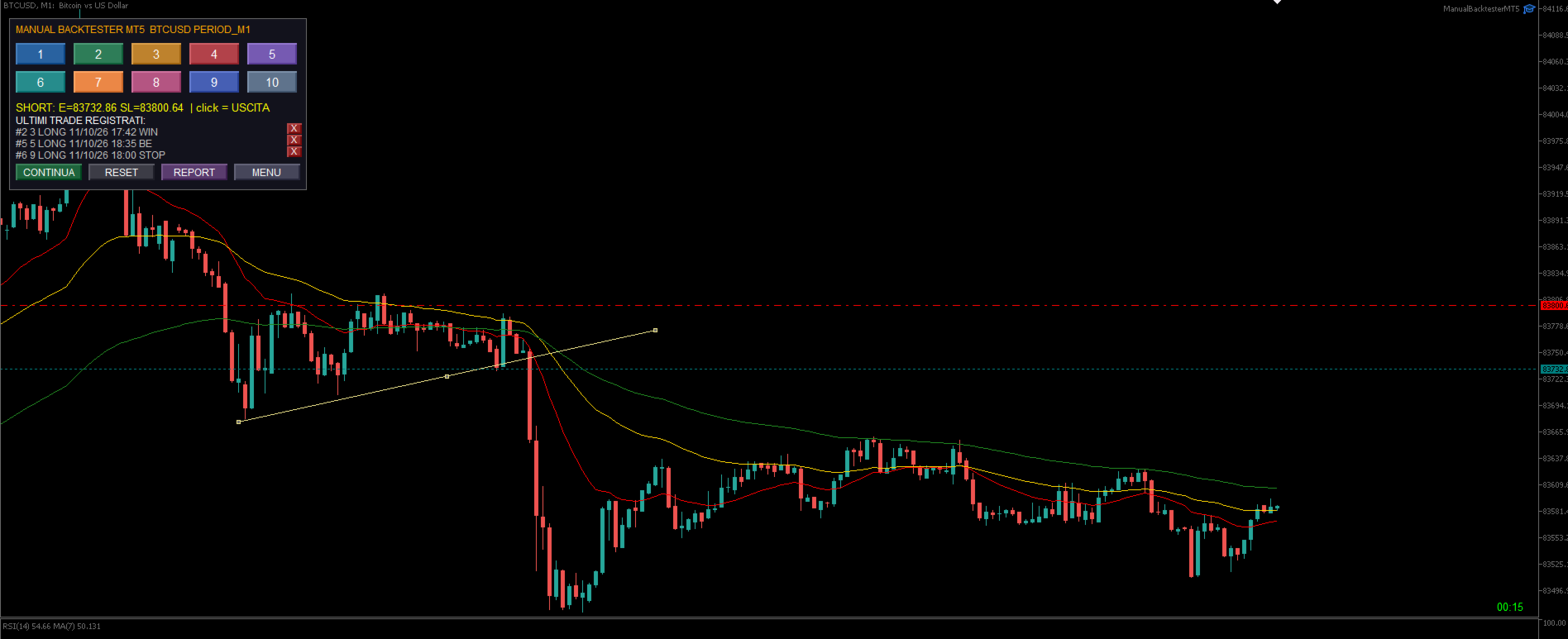
1) FIRST CLICK = ENTRY: the price where you enter.
2) SECOND CLICK = STOP LOSS: the price where you exit at a loss (your stop).
3) THIRD CLICK = TARGET / EXIT: the price where you close the trade.
Direction: stop BELOW the entry = LONG (buy); stop ABOVE the entry = SHORT (sell).
Result (3rd click):
- Exit ABOVE the entry (LONG) = WIN.
- Exit exactly AT the entry = BE (break-even).
- Exit BETWEEN entry and stop = BE (break-even).
- Exit AT or BEYOND the stop = STOP (loss).
ABBREVIATIONS EXPLAINED
- ENTRY = entry price.
- SL = Stop Loss = your stop (loss level).
- EXIT = exit price.
- LONG = buy (profit if price rises); SHORT = sell (profit if price falls).
- WIN = winning trade; STOP = losing trade; BE = break-even.
- R = result in multiples of risk (+2R = twice the risk gained; -1R = stop).
- WinRate = % winning trades; PF = Profit Factor; RR = Risk/Reward; MaxDD = max drawdown; Points = movement in points.
WHERE FILES AND THE REPORT ARE SAVED
Dedicated folder (exact path): MQL5\Files\ManualBacktesterMT5\
- Trades: ManualBacktesterMT5_<SYMBOL>.csv
- Report: ManualBacktesterMT5_<SYMBOL>.html (opens in the browser)
- Backup: .bak ; interrupted-setup state: .state
To open the folder: MetaEditor > Navigator > Files, or MetaTrader > File > Open Data Folder.
AUTOMATIC SAVE AND RESUME (EVEN IF YOU TURN OFF THE PC)
- Every trade is saved IMMEDIATELY to the file (not at the end).
- If you switch off the PC or close MT5 and reopen, it reloads the trades and resumes where you left.
- If you interrupt a setup halfway, on restart press CONTINUE to resume from where you were.
NEW-CANDLE SCROLL
It automatically disables scrolling to a new candle: the chart stays where you are, ideal for working on historical candles.
STATISTICS AND REPORT IN 1 CLICK
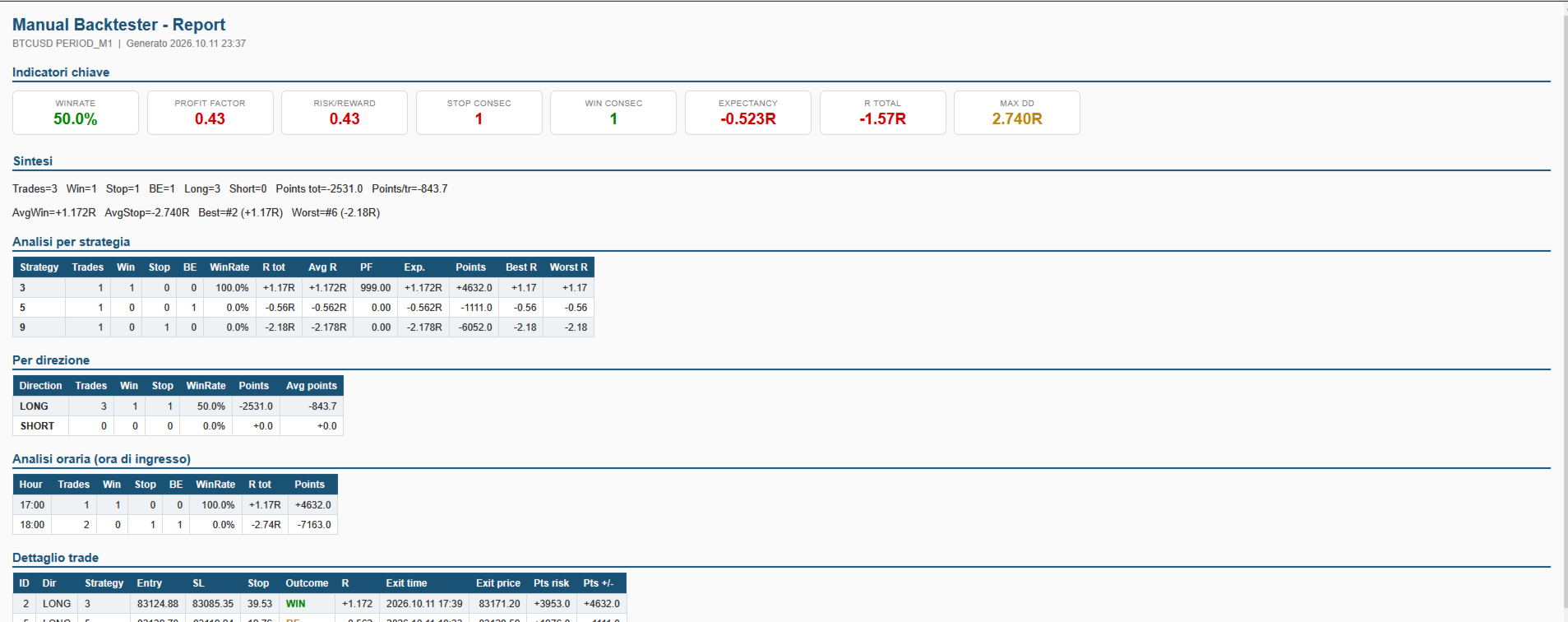
With a SINGLE CLICK on REPORT you get all statistics in a complete HTML report. No manual math.
HELP / GUIDE
- Status line: guides you step by step ("click ENTRY", "click STOP", "click = EXIT").
- Hints at the top: they alternate automatically every few seconds.
- Shortcuts: 1-9 and 0 choose the setup; Q removes the EA from the chart.
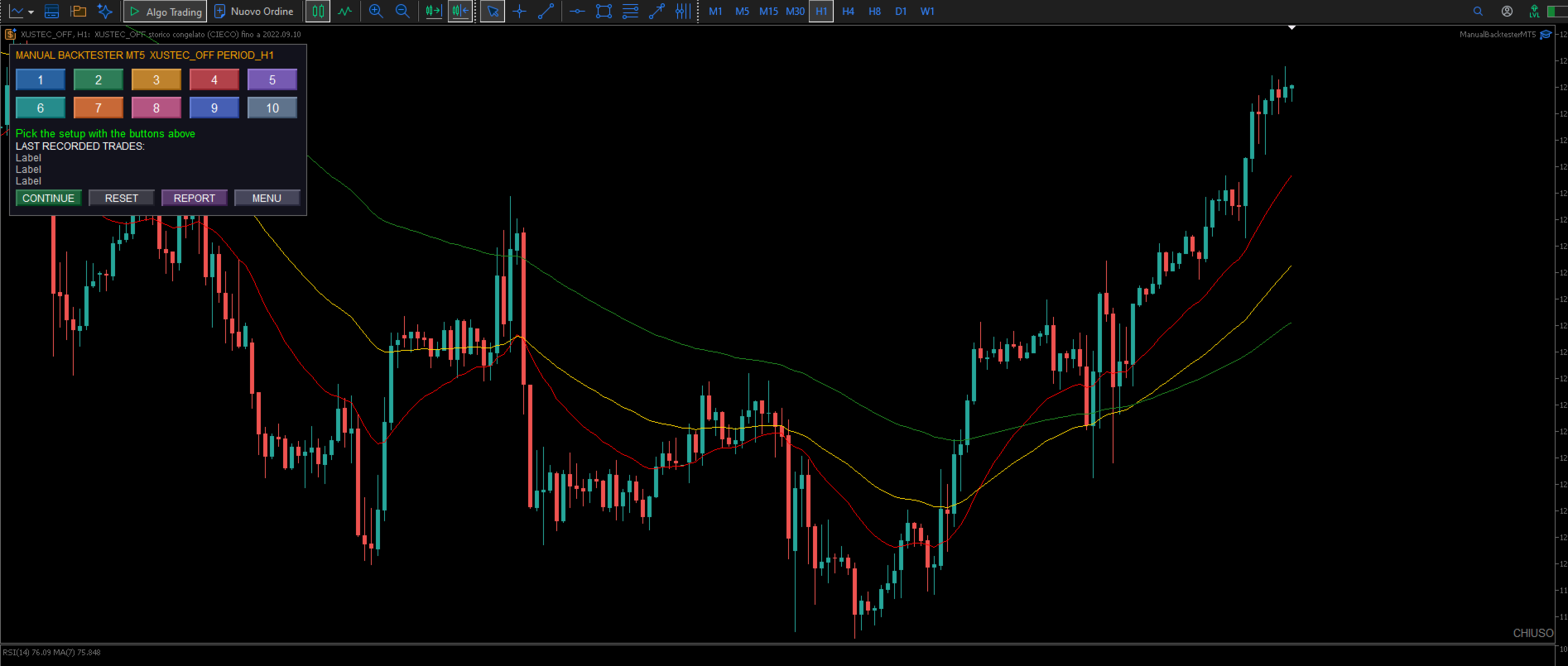
PANEL AND BUTTONS
- 10 setup buttons with editable names (keys 1-9 / 0).
- RESET (cancel), CONTINUE (resume), REPORT (build the HTML), MENU (RISK).
- WIPE ALL / SURE?: deletes ALL trades with double confirmation (irreversible).
- X buttons: delete the last trades (fix mistakes).
STATISTICS COMPUTED
Total trades, WIN/STOP/BE, WinRate, total R, average R (expectancy), avg win, avg loss, Profit Factor, Risk/Reward, Max Drawdown, points total/avg/win/loss, best and worst trade, max consecutive losses/wins, LONG/SHORT count.
HTML REPORT
Key indicators, summary, by strategy, by direction (LONG/SHORT), hourly analysis (entry hour), trade detail, legend.
MULTILINGUAL INTERFACE
English, Italiano, Deutsch, Espanol, Francais, Portugues.
Note: analysis tool, it never sends any order.
WHAT IT IS
A MANUAL tool: YOU click the levels on the chart. It records your simulated trades and computes the statistics. Analysis ONLY: it does NOT send, modify or close any order.
THE 3-CLICK RULE (HOW IT WORKS)
1) FIRST CLICK = ENTRY: the price where you enter.
2) SECOND CLICK = STOP LOSS: the price where you exit at a loss (your stop).
3) THIRD CLICK = TARGET / EXIT: the price where you close the trade.
Direction: stop BELOW the entry = LONG (buy); stop ABOVE the entry = SHORT (sell).
Result (3rd click):
- Exit ABOVE the entry (LONG) = WIN.
- Exit exactly AT the entry = BE (break-even).
- Exit BETWEEN entry and stop = BE (break-even).
- Exit AT or BEYOND the stop = STOP (loss).
ABBREVIATIONS EXPLAINED
- ENTRY = entry price.
- SL = Stop Loss = your stop (loss level).
- EXIT = exit price.
- LONG = buy (profit if price rises); SHORT = sell (profit if price falls).
- WIN = winning trade; STOP = losing trade; BE = break-even.
- R = result in multiples of risk (+2R = twice the risk gained; -1R = stop).
- WinRate = % winning trades; PF = Profit Factor; RR = Risk/Reward; MaxDD = max drawdown; Points = movement in points.
WHERE FILES AND THE REPORT ARE SAVED
Dedicated folder (exact path): MQL5\Files\ManualBacktesterMT5\
- Trades: ManualBacktesterMT5_<SYMBOL>.csv
- Report: ManualBacktesterMT5_<SYMBOL>.html (opens in the browser)
- Backup: .bak ; interrupted-setup state: .state
To open the folder: MetaEditor > Navigator > Files, or MetaTrader > File > Open Data Folder.
AUTOMATIC SAVE AND RESUME (EVEN IF YOU TURN OFF THE PC)
- Every trade is saved IMMEDIATELY to the file (not at the end).
- If you switch off the PC or close MT5 and reopen, it reloads the trades and resumes where you left.
- If you interrupt a setup halfway, on restart press CONTINUE to resume from where you were.
NEW-CANDLE SCROLL
It automatically disables scrolling to a new candle: the chart stays where you are, ideal for working on historical candles.
STATISTICS AND REPORT IN 1 CLICK
With a SINGLE CLICK on REPORT you get all statistics in a complete HTML report. No manual math.
HELP / GUIDE
- Status line: guides you step by step ("click ENTRY", "click STOP", "click = EXIT").
- Hints at the top: they alternate automatically every few seconds.
- Shortcuts: 1-9 and 0 choose the setup; Q removes the EA from the chart.
PANEL AND BUTTONS
- 10 setup buttons with editable names (keys 1-9 / 0).
- RESET (cancel), CONTINUE (resume), REPORT (build the HTML), MENU (RISK).
- WIPE ALL / SURE?: deletes ALL trades with double confirmation (irreversible).
- X buttons: delete the last trades (fix mistakes).
STATISTICS COMPUTED
Total trades, WIN/STOP/BE, WinRate, total R, average R (expectancy), avg win, avg loss, Profit Factor, Risk/Reward, Max Drawdown, points total/avg/win/loss, best and worst trade, max consecutive losses/wins, LONG/SHORT count.
HTML REPORT
Key indicators, summary, by strategy, by direction (LONG/SHORT), hourly analysis (entry hour), trade detail, legend.
MULTILINGUAL INTERFACE
English, Italiano, Deutsch, Espanol, Francais, Portugues.
Note: analysis tool, it never sends any order.