ManualBacktesterMT5

MANUAL BACKTESTER MT5 - diario di trading manuale e statistiche

CHE COS'E'
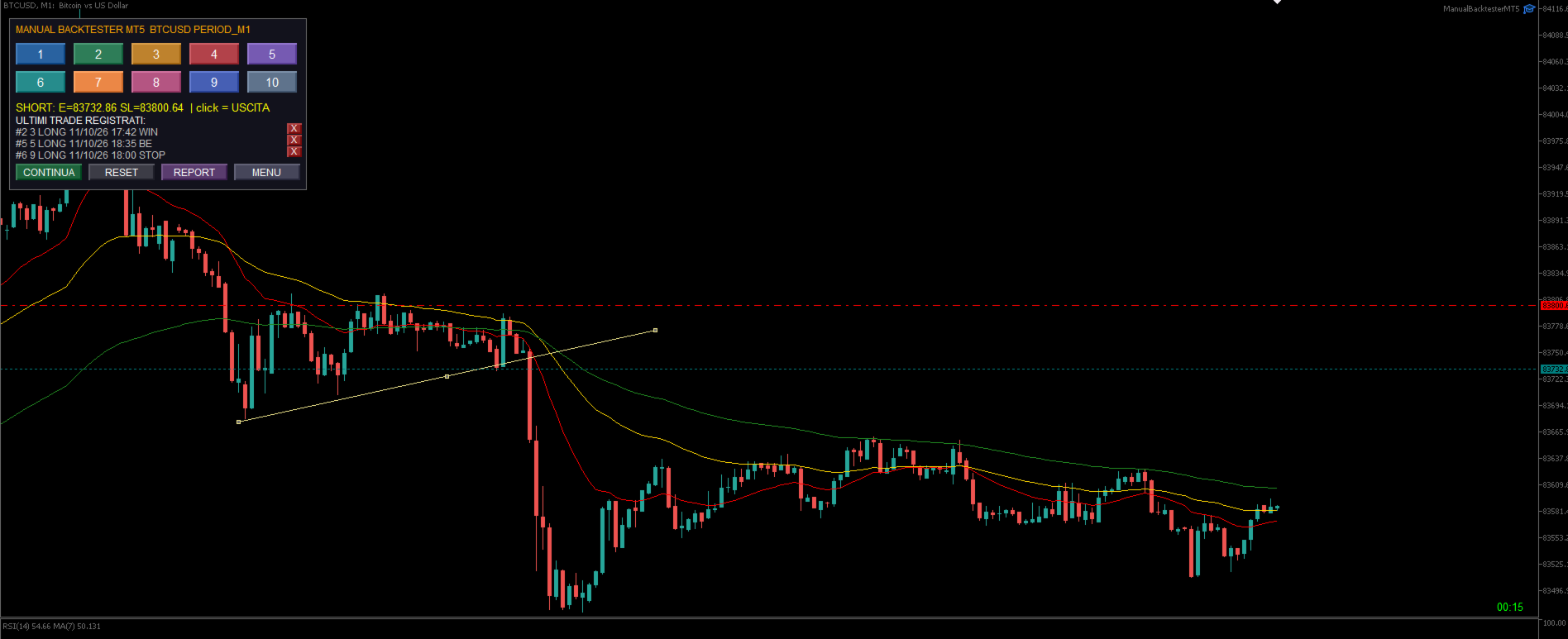
Strumento MANUALE: sei tu a cliccare i livelli sul grafico. Registra i tuoi trade simulati e calcola le statistiche. E' SOLO analisi: NON invia, NON modifica e NON chiude nessun ordine.

LA REGOLA DEI 3 CLICK (COME FUNZIONA)
1) PRIMO CLICK = ENTRY: il prezzo dove entri.
2) SECONDO CLICK = STOP LOSS: il prezzo dove esci in perdita (il tuo stop).
3) TERZO CLICK = TARGET / EXIT: il prezzo dove chiudi il trade.
Direzione: stop SOTTO l'entry = LONG (compri); stop SOPRA l'entry = SHORT (vendi).
Risultato (3o click):
- Uscita SOPRA l'entry (LONG) = WIN (vinto).
- Uscita esattamente SULL'entry = BE (pareggio).
- Uscita TRA entry e stop = BE (pareggio).
- Uscita SULLO stop o oltre = STOP (perdita).

SIGLE SPIEGATE
- ENTRY = prezzo di ingresso.
- SL = Stop Loss = lo stop (livello di perdita).
- EXIT = prezzo di uscita.
- LONG = compra (guadagni se sale); SHORT = vendi (guadagni se scende).
- WIN = vinto; STOP = perso; BE = pareggio.
- R = risultato in volte il rischio (+2R = guadagni il doppio del rischio; -1R = stop).
- WinRate = % trade vinti; PF = Profit Factor; RR = Risk/Reward; MaxDD = massima discesa; Punti = movimento in punti.

DOVE SI SALVANO I FILE E IL REPORT
Cartella dedicata (percorso esatto): MQL5\Files\ManualBacktesterMT5\
- Trade: ManualBacktesterMT5_<SIMBOLO>.csv
- Report: ManualBacktesterMT5_<SIMBOLO>.html (si apre nel browser)
- Backup: .bak ; stato setup interrotto: .state
Per aprire la cartella: MetaEditor > Navigator > Files, oppure MetaTrader > File > Apri cartella dati.

SALVATAGGIO AUTOMATICO E RIPRESA (ANCHE SE SPEGNI IL PC)
- Ogni trade viene salvato SUBITO nel file (non alla fine).
- Se spegni il PC o chiudi MT5 e riapri, ricarica i trade e riprende da dove eri.
- Se interrompi un setup a meta, alla ripartenza premi CONTINUE e riprendi da dove avevi lasciato.

SCROLL NUOVA CANDELA
Disattiva automaticamente lo scorrimento all'arrivo della nuova candela: il grafico resta dove sei tu, ideale per lavorare sulle candele storiche.

STATISTICHE E REPORT IN 1 CLICK
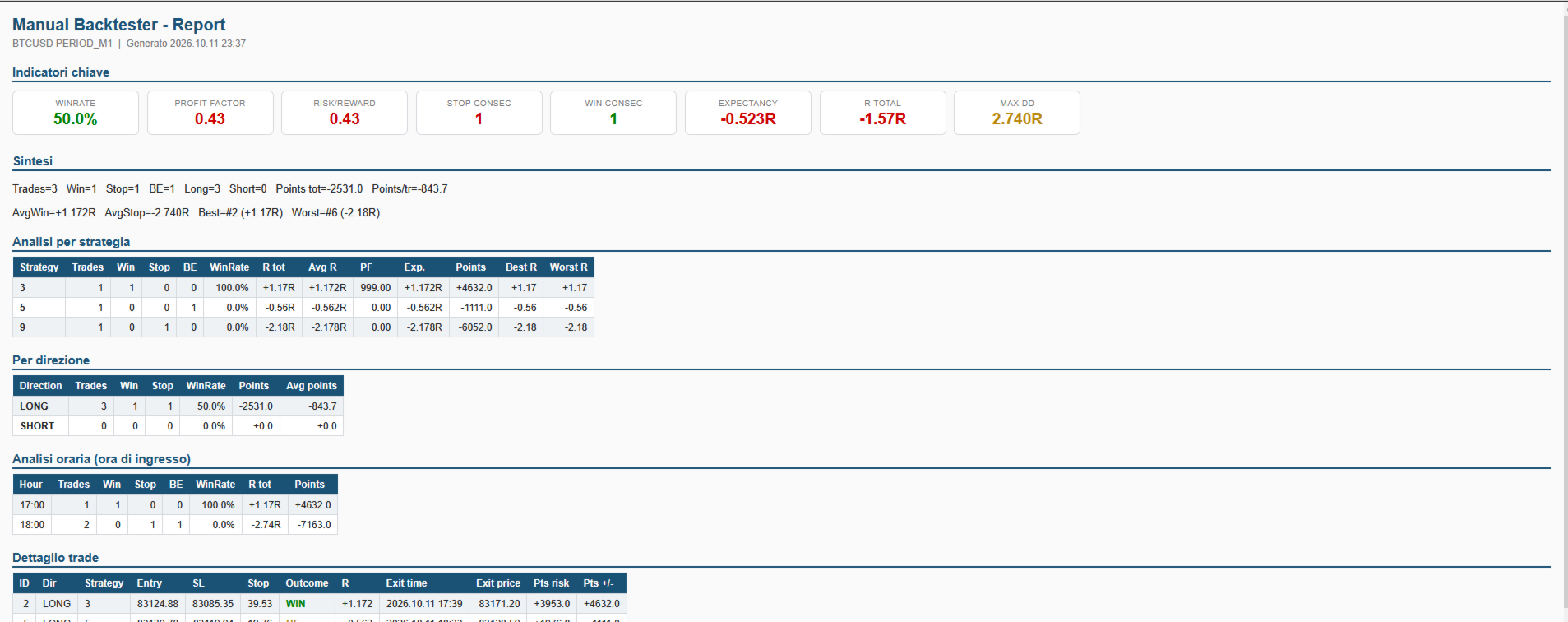
Con UN SOLO CLICK su REPORT ottieni tutte le statistiche in un report HTML completo. Niente calcoli a mano.

HELP / GUIDA
- Riga di stato: ti guida passo passo ("clicca ENTRY", "clicca STOP", "click = USCITA").
- Suggerimenti in alto: si alternano automaticamente ogni pochi secondi.
- Tasti rapidi: 1-9 e 0 scelgono il setup; Q rimuove l'EA dal grafico.

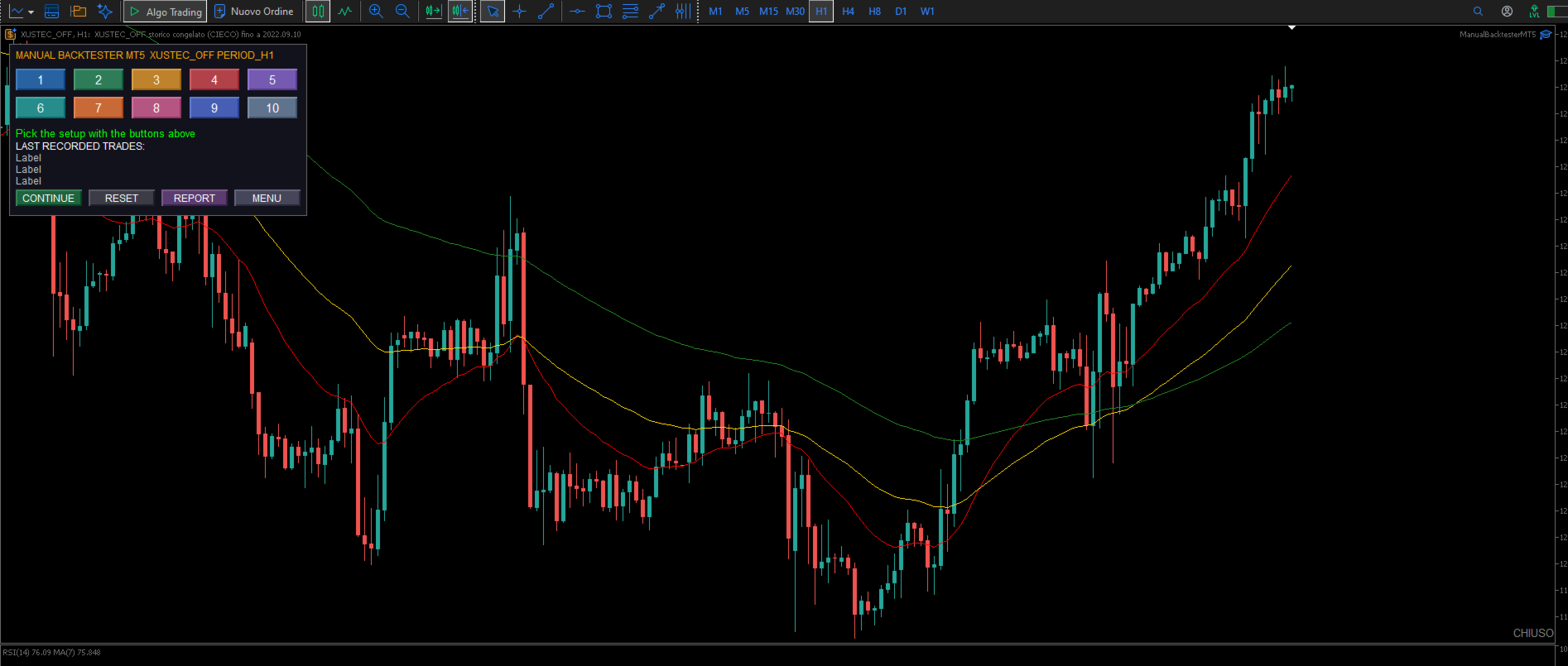
PANNELLO E PULSANTI
- 10 pulsanti setup con nome modificabile (tasti 1-9 / 0).
- RESET (annulla), CONTINUE (riprende), REPORT (crea l'HTML), MENU (RISCHIO).
- WIPE ALL / SURE?: cancella TUTTI i trade con doppia conferma (irreversibile).
- Pulsanti X: cancellano gli ultimi trade (correzione errori).

STATISTICHE CALCOLATE
Trade totali, WIN/STOP/BE, WinRate, R totale, R medio (expectancy), media vinti, media persi, Profit Factor, Risk/Reward, Max Drawdown, punti totali/medi/vinti/persi, miglior e peggior trade, perdite e vincite consecutive, conteggio LONG/SHORT.

REPORT HTML
Key indicators, sintesi, per strategia, per direzione (LONG/SHORT), analisi oraria (ora di ingresso), dettaglio trade, legenda.

INTERFACCIA MULTILINGUE
English, Italiano, Deutsch, Espanol, Francais, Portugues.

Nota: strumento di analisi, non invia alcun ordine.
Prodotti consigliati
One Click Breakeven Function: For multiple orders of the same currency but different order types (sell or buy), under the condition that the overall position is profitable, set the same stop-loss level or take-profit level. For example: there are currently 10 EURUSD orders, including 7 sell orders and 3 buy orders. When the overall position is profitable, if the overall take-profit for sell orders is set to 50 points: (1) When the total profit of the 7 sell orders is greater than the total loss
News Guard EA
Anurak Saetung
News Guard EA - protect your EA portfolio from high-impact news News Guard does NOT open trades. It watches the built-in MetaTrader 5 economic calendar and protects the trades of your other EAs (and your manual trades) before and after high-impact news such as NFP, CPI and FOMC. Most EAs are not built for news. Spreads widen, price jumps and stop losses slip. A few trades opened just before the release can wipe out the profit of many normal trades. News Guard runs on one chart and takes care o
AUTO TP & SL for Averaging The fastest way to manage Take Profit and Stop Loss for multiple trades. AUTO TP & SL is a powerful utility designed specifically for averaging, grid, martingale, and scalping traders . Instead of modifying the TP and SL of every order manually, simply enter your desired profit target or maximum loss in USD, and let the EA handle everything automatically. Free Demo Version =   https://c.mql5.com/6/1021/AUTO_TP_SL_DEMO.zip Key Features Set Target Profit in USD for a
ET WorkStation
EmuTrade Technologies
ET WORKSTATION v1.01 Workstation MetaTrader 5 in sola lettura per quattro tipi di trader: una challenge di una prop firm, un conto finanziato, il tuo fondo e il tuo conto personale. Legge il tuo conto e il tuo piano e non apre mai un'operazione. PANORAMICA Scegli il tuo utilizzo al primo avvio e cambialo in qualsiasi momento senza perdere la tua analisi. ET Workstation mostra le regole con cui operi, il margine rimasto su ciascuna e una scheda di valutazione di come operi, mentre ET Sentinel s
MOST IMPORTANT INFORMATION <1> Exactly this program was used to set World Record in Trading 2020 Account Equity was increased from $1,000,000 to $100,000,000 in 16 days Details => www.mql5.com/en/users/AIS <2> In the last days of this record the position was creating by 1000-2000 orders It was used the computer with 1 core Pentium 4 CPU at 2.8 GHz and 1 GB memory In the last two days the daily profit was $40,000,000 every day <3> It was 100% manual trading And this special program was used to s
Correlation Risk Manager
Eugenio Gustavo Guilarte Homayden
You think you're diversified. Your correlations say otherwise. MetaTrader shows you every position you hold. The margin, the floating P/L, the lot size, all of it. What it doesn't show you is whether your trades are secretly the same bet. And that's usually what takes the account down. Say you open five trades, 1% risk on each. Feels like 5% at stake. Spread out, sensible. But three of them are long the same dollar move under different tickers, so when one bad print hits, all three drop together


Clearstop Trade Manager
Adrien Silvio Felipe Dimino
Ha trovato il suo setup. Ora arriva la parte noiosa: la dimensione del lotto. Distanza dallo stop, valore del tick, valuta del conto, una calcolatrice a lato... e il prezzo continua a muoversi mentre digita. Così arrotonda a «più o meno giusto». E «più o meno giusto» è proprio il modo in cui un rischio previsto dell'1 % diventa una perdita più grande di quella che aveva accettato. Alcuni broker peggiorano le cose. Su un server demo abbiamo trovato l'oro con un valore del tick di 0.1 invece di 1
Account protection tool for MT5: daily and weekly loss limits and a daily profit lock on equity. When a limit is hit it closes the positions and keeps the account flat until the next day. Daily Equity Sentinel is a trading utility for MetaTrader 5 - daily and weekly loss limits for the whole account. Sets a hard floor under your day - and keeps you out once it is hit. It works on any symbol (designed with XAUUSD / gold in mind) and on hedging and netting accounts. What it does Daily loss limit -
SyntheticaFX Scalper Pro Indicator
Hendrik Lodewyk Coetsee
5 (1)
The SyntheticaFX Scalper Pro Indicator is a versatile and user-friendly tool designed to assist traders in identifying high-accuracy entry points across multiple timeframes and all currency pairs. This indicator provides clear visual signals on the chart, along with recommended Stop Loss (SL) and Take Profit (TP) levels, making it easier for traders to plan their trades with confidence. With its built-in dashboard, the SyntheticaFX Scalper Pro Indicator offers real-time trade statistics, helpin
Tick History Inspector helps you check a broker’s price history before you use it for an MT5 backtest. Select a broker day and see which minutes contain ticks, where a scheduled quote session is empty, and where the price history reconstructed from ticks differs from the M1 chart. Inspect one day Attach the utility to a separate chart of the symbol you want to inspect. Use Prev day and Next day to move through broker dates, or enter a date in the inputs. A current-day scan covers completed minut
TradingX Hotkeys
Johannes Stephanus Lombard
Inputs Available Lotsizes Partial Close % You can change lotsizes as you require On an open chart click once to select chart to be able to use hotkeys on specific chart. All Pairs can be used with this expert We created this expert to be able to still trade C300 with a 0.06 Lotsize If you enter a 0.6 lot and close 0.90% you can trade with 0.06 Lot Keys to be used: B -Buy S -Sell C -Close Profitable D -Breakeven (Note if stoploss is set it won't break even) P -Partial close X -Close all
HyperPILOT
Alfred Charano
HyperPILOT – Smart Trade Management Command every trade from one toolbar. Risk-based entries, multi-TP management, chart triggers, one-click scalping, AUTO TRADE from HyperPOWER signals, NEWS TRADE brackets, daily guard, stats, news and key levels – all in one trade manager for MetaTrader 5. Pdf Manual :  https://www.mql5.com/en/blogs/post/781404 FULL DESCRIPTION HyperPILOT is a complete trade management EA for MetaTrader 5. You make the decision, HyperPILOT places, sizes, manages and closes t
CChart
Rong Bin Su
Overview In the fast-paced world of forex and financial markets, quick reactions and precise decision-making are crucial. However, the standard MetaTrader 5 terminal only supports a minimum of 1-minute charts, limiting traders' sensitivity to market fluctuations. To address this issue, we introduce the Second-Level Chart Candlestick Indicator , allowing you to effortlessly view and analyze market dynamics from 1 second to 30 seconds on a sub-chart. Key Features Support for Multiple Second-Level
Chart Watermark
Makarii Gubaydullin
Filigrana sul grafico: Simbolo + Lasso di tempo / o il proprio testo La mia utility #1: include 66 + funzioni / Contattami  se hai domande Nelle impostazioni dell'indicatore, è possibile configurare: Dimensione carattere; Colore testo; Nome carattere; Posizione: 1 = In alto a sinistra; 2 = In alto a destra; 3 = In basso a sinistra; 4 = In basso a destra; 5 = Centro; Mostra intervallo di tempo corrente: on / off; Il prefisso del Simbolo da rimuovere ( n_AUDCAD > > AUDCAD ); Il suffisso del simbo
SMT Trade Planner e un calcolatore di rischio professionale e pannello di esecuzione ordini direttamente sul grafico MetaTrader. Calcola la dimensione del lotto, mostra linee visuali di entrata, Stop Loss e Take Profit trascinabili sul grafico, valida il trade contro regole di rischio configurabili e permette l'esecuzione con un clic.   Come funziona Allega il Trade Planner a qualsiasi grafico. Il pannello mostra le informazioni del conto e pulsanti di selezione rapida del rischio. Tre linee ori
Prop Firm Guard Pro
Shanawaz Mohammed Nabi Rasool Pinjori
Prop Firm Guard Pro protects a prop firm challenge or funded account from breaking its risk rules. It watches the whole account every second and, when a rule is broken, closes the positions, deletes pending orders and blocks new trades for as long as the rule requires. It works with manual trading and with any other Expert Advisor on the same account. It never opens trades on a live chart. Rules it enforces Daily loss limit - measured from the balance, the equity or the higher of the two at the
Manages your open trades for you: automatic SL/TP, break-even, trailing stop by points or ATR, and partial closes at R levels. It works with manual trades and trades from other EAs, and shows its status in an on-chart panel. ClearSpec Trade Manager is a utility. It does not look for entries and does not open trades on a live chart. You open trades the way you normally do, by hand, from your phone, or with another EA, and the manager handles the exits by the rules you set. What it does Automatic
Aurora Apex Trade Desk (formerly MelloDesk Trade Panel). Same tool, new name: the product was renamed as part of the Aurora Apex brand. Existing downloads, settings and templates keep working. In this version the program file and the on-chart panel still use the name MelloDesk. Aurora Apex Trade Desk is a manual trading panel for MetaTrader 5 that puts risk control first. Every order is sized from your stop distance, every new order is checked against your daily loss and open-risk limits, and o
Time Line for MT5 機能: 昨日高値、安値、本日始値、高値、安値の時間から線を引きます。 時間足により表示する時間が変わります。 1分、5分足では1時間ごとの表示 15分、30分足では4時間ごとの表示 1時間、4時間は12時間ごとの表示 日足以降は時間は表示されません。 高値安値は週足より下位足で表示されます。 各ラベルを変更可能になります。 更新頻度を変更できるのでチャート表示が 重くなることはありません。 各パラメータの説明: Server_Time:6 サーバとの時間差を入力 Yesterday_High_Label:昨日高値 Yesterday_Low_Label:昨日安値 Show_Open:true 始値の線を表示するかどうか Today_Open_Label:本日始値 Today_High_Label:本日高値 Today_Low_Label:本日安値 max_bar:true 使用するバーを制限するかどうか Maxbars:1500 制限を使用した場合に1分では5日分 UpdateFrequency:60 更新頻度、ディフォルトは60秒ご
PROP RISK MANAGER MT5 Un gestore del rischio per conti finanziati e conti challenge. Misura quello che stai rischiando davvero, rifiuta l'ordine che violerebbe le tue regole e gestisce l'operazione dopo che sei entrato. Non è uno strumento di segnali. Non prevede nulla. Osserva il tuo conto e applica le regole che gli dai. COSA MISURA Il rischio è il denaro che perdi se viene colpito lo stop, calcolato dal tuo prezzo di apertura ed espresso in percentuale dell'equity attuale. Uno stop a pare
Grid Trading EA is a semi-automated one-click trading EA for both Normal Trading and Grid/Martingale Trading . Normal Trading Simply click Buy or Sell directly from the chart. The EA will automatically manage trades by: Setting Stop Loss and Take Profit Managing Trailing Stop Grid / Martingale Trading (For Hedging Account Type Only) When Grid Trading mode is enabled, the EA will automatically open additional grid orders at specified distances while increasing the lot size based on your settings.
ONE PANEL. COMPLETE CONTROL OF YOUR MT5 TRADING. Plan → Calculate Risk → Price Alert   →   Execute → Protect → Copy   →  Notification ( Telegram/Pushover/ntfy/webhook ) Everything a manual MT5 trader needs in one utility Risk-based lot sizing • R:R planning • Auto BE • Trailing SL • Partial TP • Basket protection • Price alerts • Telegram/Pushover/ntfy notifications • Scheduled trades • Local Copy Trading Trade Manager Ultimate is an on-chart trading utility for discretionary traders who want
AT24 Prop Firm Guard watches the whole account against the rules of a challenge or funded account and closes positions before a limit is broken. It opens no trades. What it does Daily loss: shows how much of your daily limit is used, with a bar and the amount left. The limit can be a percent of the initial balance or of the balance at the start of the day. You choose the server hour when the day starts. Maximum loss: the same for the total limit, counted from the initial balance or from the hi
Drawing Panel V1
Abdul Rahman Bin Mohamad Noh
Smart Money Concept Part 7 This Drawing Panel will show at the chart and make you understand the smart money concept terminology.  Suitable for beginner traders to understand this concept. SMC Structure SMC Zone Liquidity Supply & Demand Text The Drawing Panel is quite interesting, it can show and hide drawings. The Chart won't look messy. This indicator not heavy for the chart *There are many more parts of the next indicator. Also other indicators that help you in trading. You can get it
Tu posizioni lo stop, il pannello calcola la dimensione. Risk Lock Trade Panel è un pannello di trading manuale per MetaTrader 5 che dimensiona ogni ordine a partire dal rischio impostato, lo invia con lo stop già collegato e gestisce la posizione dalla stessa finestra. Non apre operazioni da solo, non dà consigli e non invia segnali. Il rischio si inserisce come percentuale del saldo o del patrimonio, oppure come importo fisso; la distanza dello stop si imposta in punti - oppure si preme Show
QuickTrade Panel – Fast Execution & Smart Risk Management The QuickTrade Panel is a professional trading utility for MetaTrader 5 that makes order execution faster, safer, and easier. It allows traders to place market and pending orders directly from the chart while automatically managing position size based on their risk settings. Key Features Interactive On-Chart Panel: Easily adjust Lot Size, Risk %, Stop Loss (SL), Take Profit (TP), and Pending Order Distance without opening EA settings. Sma
Prop Firm Shield Full
Pablo Adolfo Cantos
Prop Firm Shield is a risk management panel for MetaTrader 5, built for prop firm traders who need control over their daily limits. You configure each limit and the tool watches the account around the clock, acting automatically when a limit is reached: closing positions, deleting pending orders and blocking new trading until the next day. Features: - Daily Take Profit - three modes: fixed USD, percent of the day-start balance, or target balance - Daily Stop Loss - three modes: fixed USD, percen
Risk Lot Calculator Panel answers the question every trader asks before an order: how many lots for this stop? Drag the stop-loss line on the chart, and the panel shows the lot size for your risk, the money at risk and the reward-to-risk ratio. One click then opens the trade with that lot, SL and TP. How it works A red SL line and a green TP line appear on the chart. Drag them with the mouse. The direction follows the SL. If the SL is below the price the button shows BUY, and if it is above, SEL
!!!BEFORE YOU PASS BY, CAREFULLY READ THE DESCRIPTION AND SCREENSHOTS!!! SPECIAL OFFER!!! Purchase the trading system and receive the Trend and Currency dashboard as a free gift ! Message me after your purchase, and I’ll send you your gift! The universal trading system is designed for quick market analysis, indicating potential entry points. One indicator on the chart is a well-thought-out trading system! The timeframe used is any. The account type is any. The traded instruments are Forex, XAUUS
Stormer RSI 2
Ricardo Rodrigues Lucca
This strategy was learned from Stormer to be used on B3. Basically, 15 minutes before closing the market, it will check RSI and decided if it will open an position. This strategy do not define a stop loss. If the take profit reach the entry price it will close at market the position. The same happens if the maximal number of days is reached. It is created to brazilian people, so all configuration are in portuguese. Sorry Activations allowed have been set to 50.
Gli utenti di questo prodotto hanno anche acquistato
FarmedHedge Pair Trading Dashboard
Tanapisit Tepawarapruek
5 (7)
Farmed Hedge Yield Farming | All Markets (Manual - Hybrid - Semi/Automated EA) VERIFIED TRADING RESULTS - Farmed Hedge Yield Axi Copy:  https://www.mql5.com/en/signals/2356376 - Farmed Hedge Yield Exn Copy:   https://www.mql5.com/en/signals/2356404 - Farmed Hedge Yield V Copy:  https://www.mql5.com/en/signals/2357156 IMPORTANT NOTICE: FarmedHedge is a MANUAL-FOCUSED TRADING UTILITY ,not a fully automated EA. Results shown on this Signal include manual trades and overall strategic management.
AI Agents Supervisor
Ho Tuan Thang
5 (1)
AI Agent Supervisor is NOT an Expert Advisor. AI Agent Supervisor   is a   multi-agent AI risk & portfolio supervisor   that watches every EA on your account and intervenes in real time.  WANT AN AI PORTFOLIO MANAGER WATCHING YOUR FLEET 24/7?   Run your fleet on the same brokers I do:   IC MARKETS , IC TRADING   .  Unlike the centralized stock market, Forex has no single, unified price feed.  Every broker sources liquidity from different providers, creating unique data streams. The Supervisor r
News Trade EA MT5
Konstantin Kulikov
4.55 (11)
Presento un utile robot che io stesso utilizzo da diversi anni. Questo robot può essere utilizzato sia in modalità semiautomatica che completamente automatica. >>> Chat <<< Il programma contiene le impostazioni flessibili per fare trading sulle notizie del calendario economico. Non può essere verificato nel tester delle strategie. Soltanto il vero lavoro. Scarica l'ultimo archivio di impostazioni: https://www.mql5.com/en/blogs/post/747929 Monitoraggio dei segnali: https://www.mql5.com/en/signa
REVDEN AI Desk: gestisci il tuo trading da un'unica conversazione con la tua IA, sul contesto di mercato di REVDEN Immagina di gestire il tuo trading da un'unica conversazione. REVDEN AI Desk porta tutto questo in MetaTrader 5: chiedi alla tua IA come legge il mercato, e lei risponde partendo dal contesto completo di REVDEN sui simboli che operi, con il loro stato, il loro quadro di rischio e le pubblicazioni in arrivo. Le sue proposte arrivano con ingresso, stop, target e rischio, e tu approvi
Unlimited Trade Copier Pro MT5 is a tool to copy trade remotely to multiple MT4, MT5 and cTrader accounts at different computers/locations over internet. This is an ideal solution for you if you are a signal provider and want to copy your trades to other receivers globally on your own rules. One provider can copy trades to multiple receivers and one receiver can get trade from multiple providers as well. The provider can even set the subscription expiry for each receiver, so that receiver will n
GRat Crypto
Ivan Titov
4.5 (2)
Trade on crypto exchanges in MT5 with no limits! GRat_Crypto is a tool for manual and automated trading , including ANY available EA, ANY  cryptocurrency  on most popular crypto exchanges in the familiar MT5 environment 24/7. Features 1. ALL instruments of the 9 most popular crypto exchanges are available: Binance, BingX, Bybit, Coinbase, CoinEx, Kraken,   KuCoin, MEXC and OKX . 2. The ability to place ANY type of order available in MT5, both market and pending, to modify orders and positions,
Strategy Builder offers an incredible amount of functionality. It combines a trade panel with configurable automation (covert indicators into an EA), real-time statistics (profit & draw down) plus automatic optimization of SL, TP/exit, trading hours, indicator inputs. Multiple indicators can be combined into an single alert/trade signal and can include custom indicators, even if just have ex4 file or purchased from Market. The system is easily configured via a CONFIG button and associated pop-u
Gamma Edge Pro MT5
Xuan Nam Diep
1 (1)
Gamma Edge Pro MT5 — GexBot Classic API Integration Gamma Edge Pro brings institutional-grade Gamma Exposure (GEX) data directly onto your MetaTrader 5 chart — the same data used by professional options traders to anticipate price magnets, hedging flows, and dealer positioning. Powered by the GexBot Classic API, this indicator automatically maps options market data from US-listed instruments onto any MT5 CFD instrument — Forex pairs, Gold, indices, and more — with intelligent price conversion bu
The Patch
Mian Rameez Ali
The Patch It never opens a trade. It walks behind the ones that did. Every open position, every pending order — checked twice a second for the one thing that's easy to forget: a stop, a target. Found bare, it doesn't ask. It writes the missing number in, measured in points from wherever the position began, and moves on to the next. No strategy, no opinion on direction. Just the quiet assumption that nothing should ever sit on the market unprotected — not because someone decided it shouldn't,
YuClusters
Yury Kulikov
4.93 (43)
Attention: You can view the program operation in the free version  YuClusters DEMO .  YuClusters is a professional market analysis system. The trader has unique opportunities to analyze the flow of orders, trade volumes, price movements using various charts, profiles, indicators, and graphical objects. YuClusters operates on data based on Time&Sales or ticks information, depending on what is available in the quotes of a financial instrument. YuClusters allows you to build graphs by combining da
MT5 Trading Deck
Manuel Michiels
5 (2)
One button. One trade. MT5 Trading Deck is a hotkey trading panel for MetaTrader 5 that turns the platform into a keyboard-driven execution cockpit. Stop loss, take profit and lot size are pre-calculated for every key; the moment you press, a market order is live on the broker. A complete technical user manual is attached in the product Comments section. It documents every input parameter, the full hotkey map, the recommended Stream Deck XL layout, and the advanced workflows for Pre-Limit orders
Floor Watch
Syed Tauqeer Hussain Shah
Floor Watch One number, watched every thirty seconds: how far equity has fallen since the day began — or since its highest point, if it's told to trail the peak instead of the open. Cross the line and it doesn't argue. Every open position closes, every pending order vanishes, and anything that slips through afterward gets shut the moment it appears. Not asked. Removed. The floor holds until the clock turns 5 AM Pakistan time — then, and only then, does the day start over. One rule. No except
FUTURES ORDERFLOW FOOTPRINT CHART Professional OrderFlow EA for MetaTrader 5 Version 1.01| Professional tool for real traders | Institutional-Grade Visualization STRATEGY TESTER USERS - PLEASE SELECT EVERY REAL TICK WHEN TESTING AND YOU HAVE DOWNLOADED HISTORICAL DATA. IF YOU SEE A WAITING SCREEN AND IT IS NOT DOWNLOADING, IT MEANS YOU HAVE LOW HISTORICAL DATA. TRY 1 MIN AND 5 MIN FIRST ON 1 DAY DATA. ONE DAY DATA SHOULD BE THE NEWEST AND MOST CURRENT DATE. PLEASE WAIT UNTIL THE MARKET HAS ROL
The product will copy all  Discord  signal   to MT5   ( which you are member  ) , also it can work as remote copier.  Easy to set up. Work with almost signal formats, support to translate other language to English Work with multi channel, multi MT5. Work with Image signal. Copy order instant, auto detect symbol. Work as remote copier: with signal have ticket number, it will copy exactly via ticket number. How to setup and guide: Let read all details about setup and download Discord To MetaTrader
Un solo acquisto. Tutti i miei indicatori per MT4 e MT5, disponibili oggi e pubblicati in futuro, senza costi aggiuntivi. Dopo l’acquisto, contattami per sapere come riceverli. È previsto un aumento di 50$ ogni 10 acquisti, fino a 999$. Si applica il prezzo del Market al momento del pagamento. Mantieni l’indicatore di cui ti fidi. Automatizza il lavoro che lo circonda. Il tuo segnale. Le tue regole. La tua esecuzione. Hai già un indicatore MT5 su cui fai affidamento, ma devi ancora sorvegliare
Master Your Trading Discipline   Stop losing your hard-earned gains to overtrading and emotional decisions. The Discipline Tool is your ultimate trading assistant, ensuring strict risk management in real-time. Key Protection Features: Advanced Drawdown Defense : Automatically halts trading if your daily drawdown exceeds a preset threshold (percentage or dollar amount). Real-Time Equity Lock : Safeguard profits by referencing peak equity, ensuring drawdown stays within control. Hard Profit Target
Trading Chaos Expert
Hennadii Stanilevych
5 (11)
This software has no equals in the world and represents a universal trade "console" covering trading signals, automated market entry, setting of Stop Loss and Take Profit, as well as Trailing Profit for multiple trades at the same time in a single open window. Intuitive control of the Expert Advisor in "three clicks" ensures a comprehensive use of all its functions on different computers, including tablets PCs. Interacting with additional signal indicators that mark the chart to give a real mark
Dealer Panel
Mian Rameez Ali
Dealer's Panel No signal decides anything here — a hand does. One click, and the panel calculates what's underneath: lot size from risk, target from a 30-step balance ladder that remembers exactly how far an account has climbed. Toggle between market and pending without touching an input field. Set a stop, and the take-profit can write itself — a fixed share of the balance, translated into price with no arithmetic left for the trader to get wrong. One trade live at a time; it won't let a seco
Copy your MT5 trades to Interactive Brokers You keep using MT5. Every order you open or close is sent to your IB account. In real time. No coding. No changes to your strategy or EA. Try it first Rent 1 month: $30. Test on a live or paper account. What it does Real-time copying: same direction, reverse, or one side only. Map any MT5 symbol to any IB symbol. Set a lot ratio for each. Forex, Futures, Stocks, CFDs, Metals and Crypto. Position sync: both accounts checked, any difference fixed. Optio
Quant AI Agents
Ho Tuan Thang
5 (1)
Quant AI Agents are independent trading Expert Advisors. Instead of trading using a fixed strategy like other conventional EAs, Quant AI Agents   is a   multi-agent AI trading framework   that turns natural-language strategy prompts into live.  WANT THE SAME RESULTS AS MY LIVE SIGNAL?   Use the exact same brokers I do:   IC MARKETS , IC TRADING   .  Unlike the centralized stock market, Forex has no single, unified price feed.  Every broker sources liquidity from different providers, creating un
Global Investing FX Terminal
Santiago Nicolas Pla Casuriaga
5 (1)
Il Global Investing FX Terminal è una dashboard FX tutto-in-uno per MetaTrader 5 — tassi di politica monetaria delle banche centrali, posizionamento COT del CFTC, ranking carry, sorprese economiche, skew delle opzioni, sentiment retail e correlazioni, tredici pannelli in totale — resa su un singolo overlay canvas privo di sfarfallio e aggiornata ogni 10 secondi da un singolo EA allegato. Nessun software esterno richiesto. L'analisi FX professionale richiede accesso simultaneo a dati che normalme
Features   With MT5 to Interactive Brokers(IB) Trader, you can: 1. Load chart data from IB to MT5, and Analyze with all standard or customer Indicators. 2. Place Orders to IB Account Directly in MT5. 3. Make your Own EAs upon IB Securities by only making minus changes of the trading function. Usage 1) Installation Copy the "Mt5ToIBTraderEn.ex4" and sample files to [MT5 Data Folder]->MQL5->Experts.  2)  MT5 Settings Add the IP Address to the MT5 Allowed URLs in 'Tools->Options->Expert Adviso
AI Arbitron — an MT5 Spot vs Future Gold Arbitrage Bot designed to capture price discrepancies between correlated Spot and Future instruments through hedged, non-directional trading. Platform: MT5 Use Swap Free Accounts, many of the regulated broker gives swap free accounts for 7 days, make use of it by only buying lower price asset and selling higher price asset, hold your position for 2-3 days. Asset: Mainly Gold (XAUUSD) using Spot + Future/CFD price feeds. Core strategy: It monitors the p
Mentfx Mmanage mt5
Anton Jere Calmes
4.25 (8)
The added video will showcase all functionality, effectiveness, and uses of the trade manager. Drag and Drop Trade Manager. Draw your entry and have the tool calculate the rest. Advanced targeting and close portions of a trade directly available in tool (manage trades while you sleep). Market order or limit order on either side with factored spread. Just draw the entry, the tool does the rest. Hotkey setup to make it simple. Draw where you want to enter, and the stop loss, the tool calculates al
Prop Firm Os
Gayathiri Gopalakrishnan
5 (1)
PROP FIRM OS Structured Trading Assistant for MetaTrader 5 PROP FIRM OS is a structured trading assistant designed for MetaTrader 5 users who prefer rule-based market analysis and organized trading workflows. The Expert Advisor combines market analysis tools, scanner functions, dashboard monitoring, alerts, risk-control settings, and trade management features inside one system. PROP FIRM OS is designed to help traders follow selected rules, filters, and monitoring conditions during trading activ
VERON LINK MASTER MT5 — Real-time Multi-Account Dashboard & Sync Controller Veron Link Master is a high-performance, centralized monitoring and synchronization control center designed for MetaTrader 5. Built specifically for traders managing multiple accounts, prop firm portfolios, grid/martingale EAs, or client networks, Veron Link Master provides a seamless, ultra-modern dark-themed GUI dashboard directly on your MT5 terminal. Pricing Structure: Take advantage of our early-bird pricing before
Veron Link Slave – Synchronized Grid, Martingale & Breakout Management Short Description Advanced synchronization tool designed to manage Grid, Martingale, and Breakout EAs. Automatically sends close-basket signals to the Master account upon profit target completion, minimizing slippage across different brokers. Full Description Veron Link Slave is a specialized utility developed to enhance the execution efficiency and risk management of multi-account or multi-broker trading setups. It is desig
The real‑time view of what is happening inside the market. Footprint Secrets brings detailed analysis directly into MetaTrader 5. It shows where volume is trading, how buyers and sellers are interacting, and how liquidity shifts as the market evolves. Designed for traders who want a precise, real‑time understanding of market behavior. Check out the free preview version here:  https://www.mql5.com/en/market/product/172398 Benefits for the Trader See the real activity behind price . Footprint ch
Titan Machinist - Your Professional Management System for MetaTrader                                                                                                                                 Transform Your Trading with Automated Position Management Tired of having to manually manage every single trade? Titan Machinist is the ultimate solution to automate your trade management, allowing you to trade like a true professional. Suitable for any trading technique: one s
Latency Arbitrage
Heri Yusufu Kaniugu
Latency Arbitrage – Ultra Fast Execution & Price Inefficiency Capture Latency Arbitrage  utility tool is designed to exploit short-term price inefficiencies between fast and slow price feeds. Instead of predicting market direction, the EA focuses on execution speed and price deviation opportunities, allowing traders to capture micro-movements before the market fully adjusts. With built-in risk controls and smart filtering, it ensures precise and disciplined trading performance. Price increases b
Altri dall’autore
Candle Timer & Spread — indicatore MT5 gratuito Un indicatore MetaTrader 5 leggero e puramente visivo che mostra il tempo rimasto sulla candela corrente e segnala quando lo spread diventa anomalo. Non fa trading e non blocca nulla. Cosa mostra Countdown della candela (mm:ss) in basso a destra nel grafico. Il colore dei numeri segue lo spread rispetto allo spread tipico dello strumento: Verde — normale (≤ 1.35× il tipico) Giallo — medio (≤ 2×) Arancio — alto (≤ 3×) Rosso — esagerato (> 3×) Grigio
FREE
Filtro:
Nessuna recensione
Rispondi alla recensione