GPA Smart Risk Manager
- Utilità
- Versione: 2.20
- Attivazioni: 5

GPA_Smart_Risk_Manager Complete User Guide
PRODUCT OVERVIEW
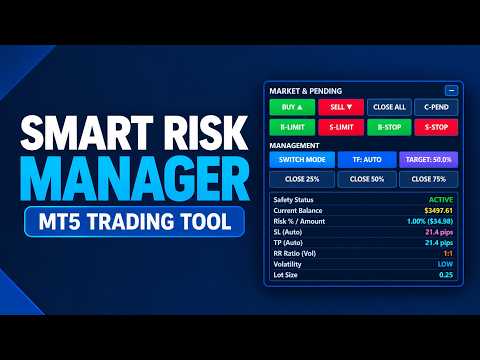
GPA_Smart_Risk_Manager is a professional-grade, all-in-one trading panel and autonomous risk management Expert Advisor for MetaTrader 5. It combines rapid one-click execution, intelligent position sizing, autonomous risk compounding, ATR-based protection, dynamic volatility adjustment, and multi-layered safety controls into a single, modern, on-chart control centre.
Designed for discretionary traders, scalpers, day traders, and swing traders who demand precision, speed, and disciplined risk management without the complexity of traditional EAs.
WHO IS THIS FOR
| Trader Type | Why It Fits |
| Discretionary traders | Fast, precise one-click execution |
| Scalpers | Instant entries with ATR-based tight risk control |
| Day traders | Daily compounding targets and safety guards |
| Swing traders | Volatility-adaptive stops and targets |
| Prop firm traders | Daily, weekly, and drawdown limits enforced |
| Compounding-focused traders | Risk scales automatically with account growth |
| Multi-symbol traders | Works on forex, metals, indices, Crypto |
KEY FEATURES AT A GLANCE
| Feature | Benefit |
| One-Click Trading | Market & pending orders with a single button |
| Autonomous Risk Compounding | Position size grows automatically with balance |
| Dual System Modes | Excel Compounding or Monthly ATR |
| Dynamic ATR-Based SL/TP | Stops adapt to real market volatility |
| Auto Timeframe Adjustment | Switches ATR timeframe per volatility regime |
| Multi-Entry Engine | Split entries into 2–10 positions |
| Advanced Safety Suite | 6 independent safety layers |
| Risk Manager (RM) | Auto SL/TP, breakeven, step trailing |
| Partial Close Tools | Close 25% / 50% / 75% instantly |
| Offline Resilience | Panel remains functional when disconnected |
| Modern UI | Dark theme, bold typography, collapsible |
| State Persistence | Remembers settings across restarts |
Button Reference
Row 1 — Market Execution
| Button | Action |
| BUY ▲ | Opens a market BUY with calculated SL/TP/lot |
| SELL ▼ | Opens a market SELL with calculated SL/TP/lot |
| CLOSE ALL | Closes all positions on the current symbol |
| C-PEND | Cancels all pending orders on the current symbol |
Row 2 — Pending Orders
| Button | Action |
| B-LIMIT | Places a Buy Limit at offset points below Ask |
| S-LIMIT | Places a Sell Limit at offset points above Bid |
| B-STOP | Places a Buy Stop at offset points above Ask |
| S-STOP | Places a Sell Stop at offset points below Bid |
Row 3 — System Controls
| Button | Action |
| SWITCH MODE | Toggles between Excel Compounding and Monthly ATR |
| TF: AUTO / MANUAL | Toggles auto timeframe adjustment |
| TARGET: 50.0% / $X | Toggles between % target and fixed $ target |
Row 4 — Partial Close
| Button | Action |
| CLOSE 25% | Closes 25% of each position on the symbol |
| CLOSE 50% | Closes 50% of each position on the symbol |
| CLOSE 75% | Closes 75% of each position on the symbol |
KEYBOARD SHORTCUTS
| Key | Action |
| N | Toggle panel collapsed / expanded |
| M | Toggle multi-entry mode on/off |
| D | Dump full diagnostic to Experts log |
| < | Decrease multi-entry count |
| > | Increase multi-entry count |
THE TWO TRADING SYSTEMS
System 1 — Monthly ATR (Target-Based)
Purpose: Achieve a specific monthly target.
How it works:
- Set a monthly target either % (e.g., 50%) or fixed $ (e.g., $500)
- EA computes the required daily compounding rate
- Lot size is adjusted each trade to hit the target
- SL/TP calculated from ATR on closed candles (no repainting)
Example — Monthly 50% target:
- Required weekly rate: ~10.7%
- Required daily rate: ~2.05%
- On a $3,918 balance → ~$80.45 risk per trade
Best for: Traders who want to hit specific ROI goals.
System 2 — Excel Compounding (Autonomous)
Purpose: Compound risk as your account grows.
How it works:
- Start with InpStartRiskPct risk per trade (e.g., 1.0%)
- Every time balance doubles, multiply risk by InpRiskMultiplier (e.g., 1.5×)
- Cap the risk at InpMaxRiskPct (e.g., 3.0%)
- SL is calculated from real market range (avg high-low) + spread buffer
- TP is calculated using Dynamic RR:
- Low volatility → 1:1
- Normal volatility → 1:2
- High volatility → 1:3
- If drawdown exceeds threshold, risk is automatically halved
Example progression:
| Balance | Risk % | Position on $1000 base |
| $1,000 (start) | 1.00% | $10 risk |
| $2,000 (2×) | 1.50% | $30 risk |
| $4,000 (4×) | 2.25% | $90 risk |
| $8,000 (8×) | 3.00% (capped) | $240 risk |
Best for: Traders focused on compounding a growing account.
STEP-BY-STEP USAGE
Scenario 1 — Simple One-Click Trade
-
Attach the EA to your chart
-
The panel shows the calculated Lot Size and SL/TP for the current setup
-
Decide your direction based on your own analysis
-
Click BUY ▲ or SELL ▼
-
The EA opens the trade with:
-
Correct lot size for your risk
-
ATR-based stop loss
-
ATR-based take profit
-
Correct magic number for tracking
Scenario 2 — Trading with a Monthly Target
-
Go to Inputs → MONTH INPUT SETTINGS
-
Set InpMonthlyTargetPct = 50.0 (or your target)
-
Set weeks and days per month to match your trading schedule
-
In SYSTEM SWITCH SETTINGS , set InpSystemMode = SYSTEM_MONTHLY_ATR
-
Click OK
-
The panel now shows:
-
Monthly Target = 50.0%
-
Risk = (computed daily % and $)
-
Lot = calculated to hit the target
-
-
Trade with BUY / SELL buttons
Scenario 3 — Switching Between Systems
On the fly, without restarting:
-
Click SWITCH MODE
-
Button label confirms the active mode
-
Panel updates all metrics instantly
-
The system remembers your last choice across restarts
Scenario 4 — Using Multi-Entry
-
Set InpEnableMultiEntries = true and InpNumEntries = 5
-
Set InpEntrySpacingPts = 0 for pending orders
-
Press M to activate Multi
-
Click B-LIMIT — 5 pending orders are placed, 0 pts apart
-
Panel shows Lot Size = 0.20 x5
Scenario 5 — Partial Profit Taking
You have 1.00 lot open and want to lock in profits:
-
Click CLOSE 50% → 0.50 lot closes, 0.50 remains
-
Continue managing the remainder
-
Click CLOSE 75% on the remainder → 0.375 closes
If InpConfirmPartialClose = true , a dialog appears first with a preview.
Scenario 6 — Protecting Profits with Breakeven
Automatic — no action needed:
-
EA constantly monitors open positions
-
When price moves 1× ATR in your favor, SL moves to entry + 0.10× ATR
-
Position is now risk-free (breakeven + a small buffer)
-
If trailing is enabled, SL continues to follow