Repaint Inspector

  • Utilities
  • Quoc Dat Quach
    Quoc Dat Quach
    Software engineer with 8 years in fintech and mobile, writing MQL4/MQL5 since 2017. I build Expert Advisors, indicators, trade and risk-management panels and utilities for MT4/MT5, and I trade forex and gold on MT5 myself.
  • Version: 1.0

Repaint Inspector measures whether an indicator repaints instead of taking the claim on trust. You attach it to a chart, name any custom indicator and its parameter list, and it re-reads that indicator's buffers on bars that have already closed, counting every value that moves, every value that appears and every value that disappears, together with how far back in history that still happens.

It is a measuring tool. On a chart it never sends an order. In the Strategy Tester it opens and closes one minimum-volume position at the start, because the automatic MQL5 Market test checks that an Expert Advisor performs a trading operation; that trade is announced in the journal, is not part of the measurement, and an input switches it off. It uses no DLL and no network access, and writes nothing to disk except its two CSV files in MQL5\Files.

Why it exists: non-repainting is a common claim in an indicator description and a hard one to check. The usual test is to look at the chart, remember roughly where the arrows were, reload and look again. That test misses the two cases that cost money. The first is a value on a bar that closed some time ago changing while the chart stays open: the arrow moves a few pixels, or it is removed while your attention is at the right edge. The second is an indicator that behaves while it lives and publishes a different history after it is reloaded, which is exactly what a timeframe switch, a terminal restart or a fresh chart does to a user. Both are measurable.

How the measurement is defined, which is the part that decides whether the result means anything:

  • A bar is identified by its open time, never by its shift, so new bars, scrolling and history refills cannot be mistaken for a change.
  • Only closed bars are compared, shift 1 and higher. The bar that is still forming changes by definition and says nothing about repainting.
  • The first value seen for a closed bar becomes the reference. Every later reading is compared with the previous reading, which counts an event, and, whenever that counts an event, with the first reading, which measures the drift.
  • Three kinds of event are counted separately, because they are not equally bad. Changed: a value moved to a different value. Appeared: an empty slot received a value, so a signal materialised on a bar that was already closed. Vanished: a published value was erased, which is the serious kind, because the signal a trader acted on is no longer in the history the next reader sees.
  • The headline number is MaxShift, the largest shift at which any event was ever seen. An indicator that only redraws the last closed bar is a different animal from one that rewrites fifteen bars.
  • Every event is written to a CSV file with the detection time, the bar time, the shift at detection, the buffer, the event kind, the old and the new value, the delta, the drift from the first reading and an after-reload flag, so the report can be recounted instead of believed. A second file holds one row per buffer with every counter, refreshed every 15 seconds while the run goes on.
  • The indicator under test is created with IndicatorCreate from a parsed parameter list, so any custom indicator can be inspected without editing or recompiling anything. The parsed list is printed to the journal at start, which makes a wrong parameter list visible instead of silent.
  • The handle can be released and created again every N minutes, with the recorded history deliberately kept, which is meant to catch the indicator that is quiet while it lives and publishes a different past after a reload. The terminal only recalculates on a reload when no other program holds the same indicator with the same parameters, so remove that indicator from your charts while this test runs.
  • A check is discarded and counted as skipped, not as evidence, whenever the handle does not exist yet, the indicator is not calculated yet, there are fewer closed bars than the depth being watched (on the first usable check the depth itself is cut to the history available, and the journal says so), a buffer cannot be copied, or the series moves between reading the times and reading the values.

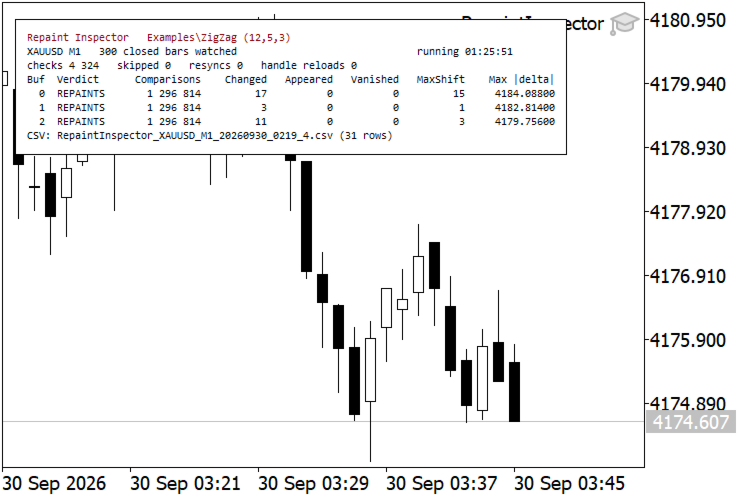
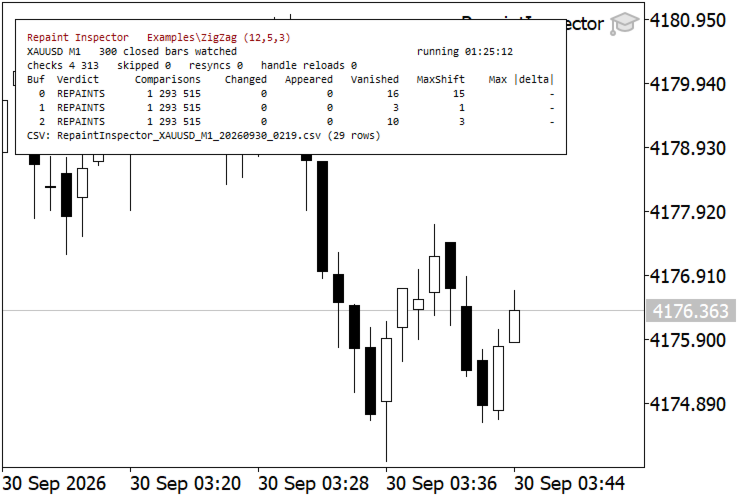
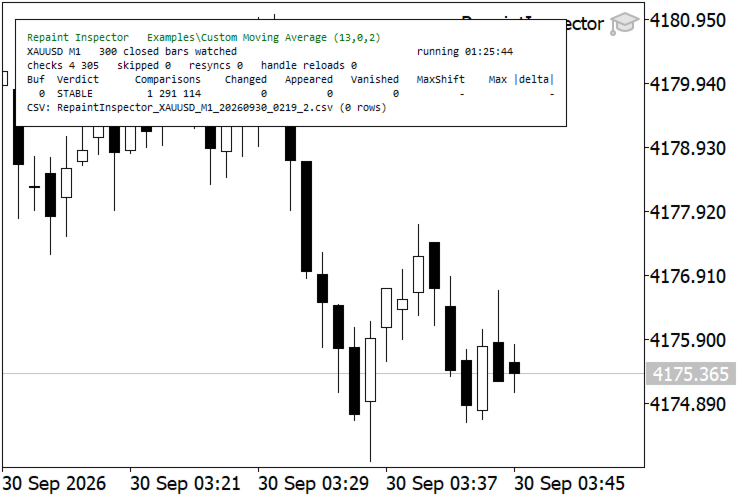
Measurements made with indicators that ship with the terminal, so anyone can repeat them. Four copies on four charts of one terminal, XAUUSD M1, 1 hour 26 minutes, 300 closed bars watched, one check per second:

  • Examples\ZigZag (12,5,3): 1,315,713 comparisons per buffer, 0 changed, 0 appeared, 17 vanished on the plotted buffer with MaxShift 15, and 3 and 10 vanished on the two calculation buffers. Nothing moved, because a ZigZag extreme is the High or the Low of its bar and cannot drift; it is removed and re-published elsewhere.
  • Examples\Custom Moving Average (13,0,2): 1,305,513 comparisons, not one event.
  • Examples\Fractals: 25 events, all of them Appeared, none Changed, none Vanished, all at shift 3. That is not repainting but late confirmation, since a fractal needs two more bars before it can be drawn, on 1,303,713 comparisons. The verdict line still reads REPAINTS, because the tool reports what it saw and leaves the judgement to you: events that are all Appeared at one fixed shift mean a usable indicator with a known delay, events that are Vanished at scattered shifts do not.
  • The fourth copy ran the same ZigZag with 0.0 counted as an ordinary value instead of as no value: 1,308,513 comparisons, 32 events, all of them Changed, the same MaxShift of 15, and a largest absolute delta of 4184.088, which is the gold price, because each deletion is now a peak replaced by 0.0. The same repainting, under a different name.

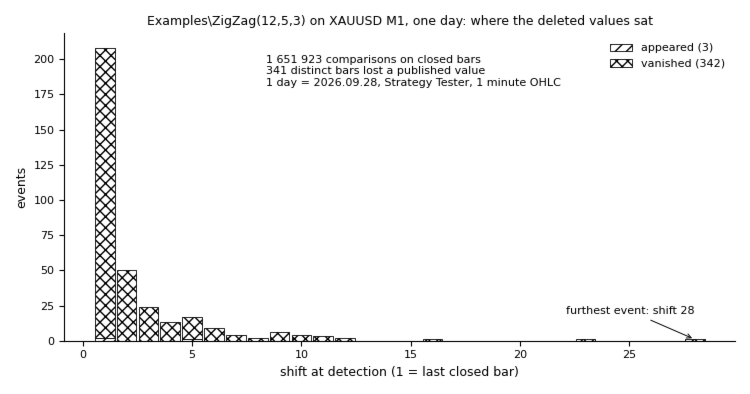
Those three ZigZag, moving average and Fractals runs took 4,387, 4,353 and 4,347 checks. The same instrument in the Strategy Tester compresses a day into seconds: the same ZigZag over one trading day of XAUUSD M1, 1-minute OHLC modelling, gave 5,512 checks, 1,651,923 comparisons, 342 vanished and 3 appeared values on bars that were closed at the time, 343 distinct bars touched, and a MaxShift of 28.

Independent check of the counters. An independent Python re-implementation of Examples\ZigZag was run over the raw candles fetched from the terminal and compared with the event files. Live run: for each of the 17 bars where the plotted buffer lost a value, that value is absent from the replay, and for all 17 the tool's last reading equals the replayed value. Tester run: 343 bars with events, 341 of them bars that lost a value; the same two checks, no mismatch. The comparison counts reconcile as well: 87 new M1 bars opened during the live run, and (checks minus 1) times 300 minus 87 reproduces each reported comparison count exactly.

Inputs: the iCustom path of the indicator to inspect and its parameters as a comma separated list, the number of buffers to watch (1 to 32), symbol and timeframe if you want to inspect them off the chart, the number of closed bars watched (default 300), the minimum seconds between checks (default 1, modelled time in the tester), an absolute tolerance below which a change is ignored, a switch that treats 0.0 as no value for arrow and ZigZag style buffers (on by default), the handle recreate interval, an optional stop after N minutes, the CSV switch, file name and row limit, the panel settings (show or hide, corner, offsets, font size and five colours), and the switch for the Strategy Tester sample trade described above. Every input is documented by its own comment in the terminal. The path is empty by default on purpose: with nothing filled in the tool says so in the journal and on the panel and measures nothing, rather than pointing at an indicator that may not be on your terminal.

Limits, stated plainly. The tool cannot prove the absence of repainting; it can only fail to find any over the period measured, which is why the comparison count stands next to every verdict. It samples at the check interval, so a value that comes and goes inside one interval can be missed: that happened once in the hour and a half above, where the two ZigZag copies, started 14 seconds apart, disagree about one bar (03:32, on two buffers) whose value existed for less than one check interval, so one copy sampled it and the other did not. It measures what an indicator publishes through its buffers, so an indicator that draws chart objects instead of filling buffers is invisible to it. In the Strategy Tester the indicator under test must be present and compiled before the run starts: the tester treats a failed IndicatorCreate as a critical error and unloads the expert, which no error handling inside the tool can change. On a live chart the same wrong path is not fatal, the tool stays attached and retries every 30 seconds, so the input can be corrected without removing it.

The sample trade in the Strategy Tester uses the symbol's minimum volume, is sent without a stop loss or a take profit, and the margin is checked against free margin before it is sent, so a small test deposit produces a journal line instead of a rejected order. It carries its own magic number, it is closed again on a later tick, and no counter, verdict or CSV row of the measurement is touched by it. Measured on a 1000 USD tester deposit: one trade, two deals, 0.06 USD of cost, and with Examples\ZigZag under test over the same range every repaint counter matched the build that carries no trading code at all, down to 3,404,353 comparisons, 10 vanished values and MaxShift 17.

Practical limits. Bars multiplied by buffers may not exceed 200,000 slots, which is a memory guard; above that the depth is reduced and one line is written to the journal. It is an Expert Advisor, so it takes the chart's one expert slot: one copy per chart, not on a chart where your own expert runs, though several charts can run copies at once. Ask only for buffers the indicator actually has, because a buffer that does not exist fails every check, and after five journal lines those failures are only counted as skipped. A CSV name of your own is overwritten at every start; the automatic name carries the start minute. In the Strategy Tester the files are written to the testing agent's own MQL5\Files folder, not the terminal's, and a repaint seen in the tester and a repaint seen live are not automatically the same thing - when the answer matters, run it live. Finally, the tool says nothing about whether an indicator is worth trading: a non-repainting indicator can still be useless, and some repainting indicators are used deliberately and correctly.
Recommended products
FiT Panel Pro
Thonglak Janyakorn
Overview FiT Panel Pro is a professional-grade trade management panel designed for MetaTrader 5 traders who demand speed, precision, and full control over their trades. Built with a modern dark-theme UI, it combines one-click execution with advanced risk management, visual SL/TP drag lines, automatic Fibonacci-based levels, and comprehensive order management — all in a single, compact panel. Whether you are a scalper, day trader, or swing trader, FiT Panel Pro gives you the edge you need to exec
FREE
================================================================ MATRIX CONDITION MONITOR Live Trade Condition Panel for MetaTrader 5 Fully Automatic -- Works with ALL Matrix EAs ================================================================ NEVER MISS A TRADE SETUP AGAIN Matrix Condition Monitor is a free utility that attaches to any chart and automatically checks all 10 trade conditions in real time -- showing you exactly why a trade will or will not open, and alerting you the moment ever
FREE
Professional Trading Dashboard A professional account monitoring panel for MetaTrader 5 that consolidates real-time account data, daily trade history, and monthly statistics into a single on-chart display. Professional Trading Dashboard is a utility indicator for MetaTrader 5 designed to give traders a clear, structured view of their account at all times. Instead of navigating between multiple terminal windows, all essential information is presented in one organized canvas panel directly on the
FREE
The Ultimate Risk Calculator
Elias Jose Vielma Molina
Risk Calculator EA – Utility for Precise Trade Sizing If you find this tool useful consider to  Buy me a coffee!   The Ultimate Risk Calculator is a lightweight in-chart Expert Advisor (EA) designed to help you easily and quickly calculate position size and set stop-loss / take-profit levels with full control over risk management directly on the chart. What it does? It turns manual risk decisions into fast, visual, and accurate calculations. You draw or adjust the Entry, Stop-Loss and Take-P
FREE
Export History Data to CSV
Muhammad Jawad Shabir
5 (1)
Crystal AI Data Extractor — Get Clean MT5 Data Into Excel or Python in One Click If you have ever tried to pull historical data out of MetaTrader 5 and ended up with a messy file where everything lands in one column — this tool is for you. Crystal AI Data Extractor does one job and does it properly: it takes your MT5 chart data and saves it as a clean, properly separated CSV file that opens correctly in Excel, Python, or any other tool you use. No more copying and pasting from the terminal. No m
FREE
Position Size Tool – Smart Risk Management & Trade Execution Panel The Position Size Tool is a powerful and intuitive MT5 panel that simplifies your trading by combining position sizing , risk calculation , risk/reward visualization , and order placement —all in one place. ️ Clean & Functional Interface The tool features a compact, real-time panel with the following: Balance & Equity display Live Price tracking Customizable Risk % input Auto-calculated Lot Size based on SL and Risk Input for S
FREE
Trading Dashboard Pro MT5 Trading Dashboard Pro MT5 is a trading management and monitoring panel designed for Meta Trader 5. The dashboard provides a real-time overview of account activity, trading statistics and open positions in a clean and organized interface. It is designed for traders who want to monitor their accounts and manage trades from a single panel without switching between multiple terminal windows. Main Features Real-Time Account Overview The dashboard displays important account i
FREE
Tollan Account Information
Marcela Martinez Quiroga
This script allows you to visualize the risk of your account based on the open orders you have. * Low risk is between 0 and 10% of handicap * Medium risk is between 11% and 30% of handicap * High risk is more than 31% of handicap The script displays the spread of the current pair, the total of open positions, showing the lotage for both directions (buy, sell) as well as the number of buy and sell operations.
FREE
SmartRisk Trade Tool — One-Click Risk-Based Trade Panel SmartRisk Trade Tool is a manual trading panel for MetaTrader 5 built around position sizing and risk control rather than signal generation. It does not analyze the market or suggest trade direction — it exists so that every order sent from the chart already has a calculated lot size, stop loss, and take profit consistent with a risk value the trader chooses, removing the manual arithmetic that normally happens between deciding to trade and
FREE
GOM Trade Manager
Wannapach Chinnaprapa
GOM Trade Manager helps you execute trades the way you want it. Works on all instruments Forex, Commodities, & Crypto. It helps you with lot calculations, spread addition and balance calculations so you can just focus on actual trading. For full automatic planned management, stackable triggers and spread widening protection >> check out GOM Trade Manager Pro . ------------------------------------------NOTABLE FEATURES------------------------------------------ You set everything based on bid
FREE
The utility is designed to control the update rate of the order book (or several) in the strategy tester. Management is carried out by a library, which is available here https://www.mql5.com/en/market/product/81400 Interface description: S/P   Start and pause playback ---    Decrease the speed by one step +++   Increase speed by one step R      Updating the character list <0>  Slider, moving left/right change the playback speed, after releasing the mouse it is restored to its original state. The
FREE
Exact Time — detailed time on the seconds chart. The utility shows the opening time of the selected candle. This is necessary when working with seconds charts. For example, it can be used on a seconds chart built using the Seconds Chart utility. Inputs Base corner — the chart corner to which an object Is attached. X distance — the horizontal distance from the chart corner. Y distance — the vertical distance from the chart corner. Text font — font name Font size — font size Color — text color
FREE
NAS100 Auto Sl And TP MT5
Moustapha Boulouz
5 (2)
Introducing NAS100 Auto SL and TP Maker for MT5: Never miss setting StopLoss and TakeProfit again with our NAS100 Auto SL and TP Maker, an indispensable assistant for traders navigating the Nasdaq 100 market on MetaTrader 5. This tool is designed for those who seek a seamless solution to automate the management of StopLoss and TakeProfit levels. Key Features: Effortless Automation: Automatically monitors Nasdaq 100 trades without StopLoss and/or TakeProfit. Dynamically adjusts levels based on u
FREE
Export Deals to CSV - Excell File location: HistoryDeals/<SERVER>/<LOGIN>.<DATETIME>.csv Works as an Script, reading all DEALS in history and exporting it as a plain text CSV file There's no option to change. There's no WebRequest. There's no DLL use. I need to write 300 characters to allow this product being exposed at MQL5 market place. It's simple to use, plug it in graph and wait completion.
FREE
SimpleTrade by Gioeste
Giovanni Scelzi
4 (3)
Discover the power of automated trading with **SimpleTradeGioeste**, an Expert Advisor (EA) designed to optimize your trading operations in the Forex market. This innovative EA combines advanced trading strategies with proven technical indicators, offering an unparalleled trading experience. video backtest :  https://youtu.be/OPqqIbu8d3k?si=xkMX6vwOdfmfsE-A ****Strengths**** - **Multi-Indicator Strategy**: SimpleTradeGioeste employs an integrated approach that combines four main technical ind
FREE
Smart Position Manager
Jonathan Mboya Kinaro
5 (1)
Overview Helios Smart Position Manager is a professional trade synchronization tool for MetaTrader 5. When you modify the stop loss or take profit on any position, the EA automatically detects the change and applies it to all other positions on the same symbol. This eliminates the need to manually update each position individually, saving time and preventing errors when managing multiple trades on the same instrument. How It Works The EA continuously monitors all open positions and maintains a s
FREE
Market book player
Aliaksandr Hryshyn
Playback of previously saved data from the order book. Key features: Historical data navigation Adjusting the playback speed with the "---" and "+++" buttons, as well as with the mouse, you can by scrolling the wheel over the area of ​​these buttons and between them Turning Price Centering On and Off Time display accurate to thousandths of a second Attention: This product also needs a utility to save data: https://www.mql5.com/en/market/product/71642
FREE
Position Selective Close MT5
Francisco Manuel Vicente Berardo
The Position Selective Close is a multi-symbol multi-timeframe script used to close simultaneously various positions.  General Description   The Position Selective Close   possesses   three operation modes (Intersection,   Union   and All) that control the way   as   four position features (symbol, magic number,   type   and profit) are used. The modes, available through the Selection Mode input parameter, relate to the features, available through the “Select by Feature” and “Feature” input pa
FREE
Free MetaTrader 5 indicator that displays "CALL IT A DAY" when London & New York sessions close. Customizable alerts, session tracking, and a guilt-free reminder to log off. Perfect for workaholic traders! Tired of staring at charts when the market’s already clocked out? Session Guardian   is your sassy trading assistant that slaps a giant   "CALL IT A DAY"   on your screen when both London   and   New York sessions are closed—because even traders deserve happy hour. Key Features:   Big, Bo
FREE
Trade assistant pro v8
Ahmed Mohammed Bakr Bakr
2 (1)
FREE FREE FREE Trade Assistant MT5 – Professional Trading & Risk Management Panel Trade Assistant MT5 is an advanced trading panel designed to help traders execute orders faster, safer, and more professionally . It simplifies manual trading by combining smart order management , precise risk control , and one-click execution , making it ideal for both beginners and advanced traders. This tool does not trade automatically . Instead, it empowers you with full control while applying professional-gra
FREE
ClearEdge Daily Candle New York-close daily candle on any timeframe, with candle countdown, live spread and volatility information. Overview  ClearEdge Daily Candle draws the current day's candle next to the live price on any chart timeframe. On the 1-minute, 5-minute, 15-minute, 1-hour or higher charts, you can see where the trading day opened, how far price has moved in both directions, and whether the day is currently bullish or bearish, without switching to the daily (D1) chart. Why bro
XAU VWAP Mean Reversion H4 Expert Advisor for MetaTrader 5 — Gold / XAUUSD focus Version: 1.00 What it is XAU VWAP Mean Reversion H4 is an Expert Advisor for gold on the H4 chart. Intraday VWAP mean-reversion style participation on gold H4. Built for structured automated participation — not grid , not martingale . Evaluate on your broker and risk profile before any live use. This product is a technical system . Exact thresholds and entry equations remain internal product design and are not publ
FREE
EdgeZone EA Inspector - FREE Edition Monte Carlo Analysis Tool for Trading Strategies Important: This is an analysis tool, not a trading robot. It does not execute trades but analyzes strategy data through statistical simulations. The Problem Many Expert Advisors show impressive backtest results but fail in live trading. The most common reason: over-optimization - the strategy was adjusted until it looks perfect for past data, but doesn't work for the future. The Solution: EdgeZone EA Inspector
FREE
BB Strategy V5.01 Advanced Bollinger Bands Grid Expert Advisor BB Strategy V5.01 is a fully automated Expert Advisor for MetaTrader 5 that combines Bollinger Bands mean-reversion trading, percentage-based grid management, advanced entry filtering, and intelligent risk control. The EA is designed to identify temporary market overextensions and capture high-probability reversal opportunities while filtering out low-quality entries that often occur during strong trending conditions. Unlike traditio
FREE
Risk Manager Lot Calculator tells you the exact lot size to trade so that a losing trade costs only the amount you decide, no more. You set your risk as a percentage of the account or as a fixed money amount, and you set your stop loss by pips, by price, or by dragging a line on the chart. The panel then shows the correct position size, the money at risk, the pip value and, when you add a take profit, the reward to risk ratio and the potential profit. Position sizing is the part of trading that
FREE
Risk Manager – Account Protection Tool Risk Manager is an Expert Advisor for MetaTrader 5 designed to protect your trading account by applying automatic risk management rules. This tool does not open trades . It continuously monitors your account and enforces predefined limits to help prevent excessive losses and maintain disciplined trading. Risk Manager works in the background and can manage positions opened by manual trading or other Expert Advisors. It is particularly useful for: • Manual tr
FREE
Position Size Caculator
Nguyen Van Chien
5 (3)
Calculating the volume of orders every time you create an order is an extremely important thing in risk management Let this tool simplify your work! ----------------------------------------------------- How to use? Attach the indicator to the chart and set its parameters:  Risk size in %  or money and Risk Reward Ratio. Click on the ON button and locate the horizontal line to your would-be StopLoss level. Options: Click on the Pending/Instant button to locate the horizontal line  to your would-b
FREE
Mobile-EA is an   Android-first   trading companion for MetaTrader 5. This product is the MT5 Expert Advisor that links your MetaTrader 5 terminal to the Mobile-EA Android app, so please note from the start:   the mobile app is for Android, not iPhone/iOS . The Android mobile app is currently in   testing / early access . You can see a full intro of the app here: https://youtu.be/jEDAZ68UpWs FREE access during the testing phase to the Ultimate subscription plan! You can learn more, check the cur
FREE
DF Fib Trader Pro DF Fib Trader Pro is an automated trading system designed for MetaTrader 5. It uses Fibonacci-based price levels combined with trend and structure analysis to define entry and exit points. The EA supports both long and short positions and includes built-in risk management parameters. Core Features: Uses Fibonacci retracement and extension logic to plot entry, SL and TP points. Configurable lot size and stop loss/take profit levels Choice of 1 or 2 entry points Supports fixed o
FREE
Breakup ZeeAM Khan Advanced multi-timeframe breakout Expert Advisor based on a proprietary higher-timeframe pattern and lower-timeframe confirmation system. Features dynamic lot sizing, multi-target profit management, break-even automation, momentum filtering, and fully customizable risk controls. This is the Best for All Brokers. Contact for Set Files or See the Screen Shots WhatsApp: Text only +447716409196 Best for XAUUSD on All Brokers Key Features Proprietary Multi-Timeframe Strategy Det
FREE
Buyers of this product also purchase
Trade Assistant MT5
Evgeniy Kravchenko
4.43 (216)
It helps to calculate the risk per trade, the easy installation of a new order, order management with partial closing functions, trailing stop of 7 types and other useful functions. Additional materials and instructions Installation instructions - Application instructions - Trial version of the application for a demo account Line function -   shows on the chart the Opening line, Stop Loss, Take Profit. With this function it is easy to set a new order and see its additional characteristics bef
Forex Trade Manager MT5
InvestSoft
4.98 (685)
Trade Manager MT5 is an advanced position size calculator and trade management tool for MetaTrader 5, designed to help traders plan trades faster, control risk more precisely, and manage open positions directly from the chart. It combines order placement, risk based lot calculation, Stop Loss and Take Profit management, Break Even, Trailing Stop, Partial Close, Equity Protection, and external trade management in one panel. Whether you trade forex, indices, metals, commodities, crypto, or future
Local Trade Copier EA MT5
Juvenille Emperor Limited
4.94 (149)
Local Trade Copier EA MT5 is a fast and flexible trade copier for copying and managing trades between multiple MetaTrader 5 accounts on the same Windows computer or Windows VPS. It combines local trade synchronization with Receiver-side controls for lot sizing, risk management, trade filtering, symbol mapping, trade management and account protection. Set up your Transmitter and Receiver terminals in about 1 minute and copy manual or EA trades between accounts at the same or different brokers. U
Telegram to MT5 MultiChannel Copier
Sergio Marquez Uroz
4.61 (18)
Telegram to MT5 Multi-Channel Copier   automatically copies trading signals from your Telegram channels straight to MetaTrader 5. No bots, no browser extensions, no manual copying. A signal arrives in Telegram and the EA opens the trade in your terminal within seconds. And before you copy a channel, the built-in backtester shows you what that channel would have done in your account. The product has two components: a Windows application that listens to your Telegram channels, and this Expert Advi
Strategy Ledger Pro
Abdullah Uygar Tuna
5 (7)
Strategy Ledger Pro is a read-only account analysis panel for MetaTrader 5. It separates account results by Expert Advisor, strategy, symbol, and magic number, so you can see what each one really contributes. The panel is available in 11 languages: English, Français, Deutsch, Español, Italiano, Português, Русский, Türkçe, 中文, 日本語 and 한국어. Before you download the demo. The Market runs the demo of any paid product in the Strategy Tester only. This panel analyses the trades on your own account, and
================================================================================ POC BREAKOUT - V20.72. Full Professional Grade Toolkit ================================================================================ POC Breakout is a full MetaTrader 5 trading dashboard for discretionary traders who want breakout signals, Point of Control (POC) context, volume profiles, order flow, market structure, news, alerts, and advanced trade planning in one professional workspace. Attached directly to you
TradePanel MT5
Alfiya Fazylova
4.88 (170)
Trade Panel is a multi-functional trading assistant. The app contains over 50 trading functions for manual trading and allows you to automate most trading tasks. Application instructions: https://www.mql5.com/en/blogs/post/756482 Trial version of the application for a demo account: https://www.mql5.com/en/blogs/post/750865 How to install the application: https://www.mql5.com/en/blogs/post/756239 How to test the application in visual mode: https://www.mql5.com/en/blogs/post/770277 How to install
Copy Telegram signals with your own trading rules Telegram to MT5 Signal Trader automatically copies text-based trading signals from public and private Telegram channels and groups into MetaTrader 5. Manage multiple providers and MT5 accounts from one desktop app, with individual risk and trade settings for each provider . No Telegram bot or API setup needed for copying. Simply sign in with your own Telegram account by phone or QR code and select the channels or groups you have already joined. Y
Power Candles Strategy Scanner - Self-Optimizing Multi-Symbol Setup Finder Self-optimizing settings work one chart at a time, and finding where they pay off right now means opening chart after chart. Power Candles Strategy Scanner runs the same self-optimizing engine as the Power Candles indicator on every symbol in your Market Watch, side by side. One panel ranks where it pays off: the winning strategy per symbol, its optimized Stop Loss and Take Profit. An alert fires the moment a fresh signal
FarmedHedge Pair Trading Dashboard
Tanapisit Tepawarapruek
5 (5)
Farmed Hedge Yield Farming | All Markets (Manual - Hybrid - Semi/Automated EA) VERIFIED TRADING RESULTS - Farmed Hedge Yield Axi Copy:  https://www.mql5.com/en/signals/2356376 - Farmed Hedge Yield Exn Copy:   https://www.mql5.com/en/signals/2356404 - Farmed Hedge Yield V Copy:  https://www.mql5.com/en/signals/2357156 IMPORTANT NOTICE: FarmedHedge is a MANUAL-FOCUSED TRADING UTILITY ,not a fully automated EA. Results shown on this Signal include manual trades and overall strategic management.
Exp COPYLOT CLIENT for MT5
Vladislav Andruschenko
3.97 (35)
Professional Trade Copier for MetaTrader 5 Fast, professional, and reliable trade copier for MetaTrader . COPYLOT allows you to copy Forex trades between MT4 and MT5 terminals with support for Hedge and Netting accounts. COPYLOT MT5 version supports: - MT5 Hedge to MT5 Hedge - MT5 Hedge to MT5 Netting - MT5 Netting to MT5 Hedge - MT5 Netting to MT5 Netting - MT4 to MT5 Hedge - MT4 to MT5 Netting MT4 version Full Description +DEMO +PDF How To Buy How To Install How to get Log Files H
Trade copier MT5
Alfiya Fazylova
4.61 (56)
Trade Copier is a professional utility designed to copy and synchronize trades between trading accounts. Copying occurs from the account / terminal of the supplier to the account / terminal of the recipient, which are installed on the same computer or VPS . Before buying, you can test the demo version on a demo account. Demo version here . Full instruction here . Main functionality and benefits: Supports copying MT5> MT5, MT4> MT5, MT5> MT4, including MT5 netting accounts. * Supports copying Dem
Grid Manual MT5
Alfiya Fazylova
4.73 (22)
Grid Manual is a trading panel for working with grid strategies. The utility is universal, has flexible settings and an intuitive interface. It works with a grid of orders not only in the direction of averaging losses, but also in the direction of increasing profits. The trader does not need to create and maintain a grid of orders, the utility will do it. It is enough to open an order and the "Grid manual" will automatically create a grid of orders for it and will accompany it until the close. F
Footprint Chart Pro — Professional OrderFlow EA for MetaTrader 5 Version 6.34 | Professional tool for real traders | Institutional-Grade Visualization DEMO USERS - PLEASE SELECT EVERY TICK / REAL TICK WHEN TESTING AND YOU HAVE DOWNLOADED HISTORICAL DATA. IF YOU SEE A WAITING SCREEN AND IT IS NOT DOWNLOADING, IT MEANS YOU HAVE LOW HISTORICAL DATA. TRY 1 MIN AND 5 MIN FIRST ON 1 DAY DATA. ONE DAY DATA SHOULD BE THE NEWEST AND MOST CURRENT DATE. PLEASE WAIT UNTIL THE MARKET HAS ROLLED OVER PERIOD.
HINN MagicEntry Extra
ALGOFLOW OÜ
4.74 (19)
HINN MAGIC ENTRY – the ultimate tool for entry and position management! SIMPLE. FASTEST. INTUITIVE. MAX AUTOMATED. Place orders by selecting a level directly on the chart! full description   ::  demo-version  :: 60-sec-video-description Key features: - Market, limit, and pending orders - Automatic lot size calculation - Automatic spread and commission accounting - Unlimited partitial take-profits  - Breakeven and trailing stop-loss and take-profit  functions - Invalidation leves - Intuitive, a
Welcome to ENTRY IN THE ZONE AND SMC MULTI TIMEFRAME /  Official Website :   https://www.fableedge.net Entry In The Zone and SMC Multi Timeframe is a real-time market analysis tool based on Smart Money Concepts (SMC), designed to analyze market structure, price direction, and key trading zones. It supports both Single-Timeframe Analysis and Multi-Timeframe Analysis, providing a clearer view of the overall market structure across multiple timeframes, with real-time BUY / SELL signals that do not
Signal Trading View to MT5 Pro
Mirel Daniel Gheonu
4.5 (2)
Signal TradingView to MT5 Pro  Instant professional execution between TradingView and MetaTrader 5 Automate your trading strategy with the most robust communication bridge between TradingView alerts and real execution in MT5. Designed for traders who demand speed, flexibility, and impeccable risk management, this Expert Advisor transforms any alert message into a precise market or limit order.   Install and TEST the TRIAL version HERE STRENGTHS AND ADVANTAGES Universal Parsing Engine (Propriet
MT5 to Telegram Signal Provider turns your trading account into a signal provider. Every trade action, whether manual, by EA or from your phone, is instantly sent as a message to Telegram. You can fully customize the format or use a ready-made template for quick setup. [ Demo ] [ Manual ] [ MT4 Version ] [ Discord Version ]     New: [ Telegram To MT5 ] Setup A step by step user guide is available. Key Features Ability to customize order details sent to subscribers You can create a tiered subs
Premium Trade Manager - The Trade Panel With a Coach Built In Premium Trade Manager puts a trading coach inside your chart, with a full execution engine underneath it. Set the trade up the way you always do, then let Max, your AI trading coach, read that exact setup against your live account and give you a straight verdict before you commit: is the stop disciplined, is the risk sane, is a high-impact release minutes away, are you near a prop-firm limit. Below sits the engine that runs everything
Anchor Trade Manager
Kalinskie Gilliam
5 (9)
Your EAs cannot see each other, but Anchor can. Anchor gives you one place to coordinate your EAs, manage risk, and decide when trading is allowed. It works alongside the trading bots you already use without any changes to them. The Problem One EA opens a trade. Then another starts trading. The next thing you know, you wake up to multiple grids built across your account. Each EA may be doing exactly what it was designed to do, but together they can place far more risk on your account than you in
Trade Indicator Assistant   is a powerful MT5 utility designed to turn indicators into automated trading systems. Its main feature is the ability to automatically detect an indicator’s   BUY and SELL signal buffers , without requiring you to know the buffer numbers, search through indicator settings, or modify the indicator source code. Bonus Indicator:   After purchasing Trade Indicator Assistant, contact me to receive   Trade Signal Pro   completely free as a bonus indicator. [Download Demo V
Telegram To MT5 Ultra
Mirel Daniel Gheonu
5 (5)
Telegram To MT5 — Signal Copier Turn the trading calls from your Telegram channels into real MT5 orders — automatically, on as many accounts as you like, with risk and rules fully under your control. Telegram To MT5 connects the VIP / signal channels you already follow on Telegram to your MetaTrader 5 terminal. A free companion desktop app reads the messages (even from channels that block bots), and this Expert Advisor executes them on your account — applying your own risk settings, symbol mappi
Trade Manager Panel Pro MT5
VividMind Digital Solutions
5 (6)
Message me after purchase to receive the complete manual kit + 3-day OpenAI API trial to test the AI features + Another bonus gift The current price is a limited discount for August Relaunch Update — secure your edition now before price go up. Next Price: $340 This is completely different from any trading panel you’ve tried or seen on the market. It’s one of the most innovative AI-powered trading panels available in the retail market right now. Imagine connecting   AI directly to your chart   —
Quant Panel
Kevin Craig E Gittins
QUANT PANEL Independent per-algo analytics, protected MT5 history and professional PDF reporting Quant Panel is built for traders who run several Expert Advisors or strategies on one MT5 account and need to know how each algo is actually performing. Instead of treating the terminal as one combined portfolio, Quant Panel groups closed positions by EA comment or magic number and calculates every strategy independently. It gives you one clear dashboard for comparing algos, finding weak systems and
Telegram to MT5 Coppy
Sergey Batudayev
5 (10)
Telegram to MT5: The Ultimate Signal Copying Solution Simplify your trading with Telegram to MT5, the modern tool that copies trading signals directly from Telegram channels and chats to your MetaTrader 5 platform, without the need for DLLs. This powerful solution ensures precise signal execution, extensive customization options, saves time, and boosts your efficiency. [ Instructions and DEMO ] [ FAQ ] [ How atach logs properly ] [ Settings descrition ] Key Features Direct Telegram API Integrati
YuClusters
Yury Kulikov
4.93 (43)
Attention: You can view the program operation in the free version  YuClusters DEMO .  YuClusters is a professional market analysis system. The trader has unique opportunities to analyze the flow of orders, trade volumes, price movements using various charts, profiles, indicators, and graphical objects. YuClusters operates on data based on Time&Sales or ticks information, depending on what is available in the quotes of a financial instrument. YuClusters allows you to build graphs by combining da
Trade Manager DaneTrades
Levi Dane Benjamin
4.23 (30)
DaneTrades Trade Manager is a professional trade panel for MetaTrader 5, designed for fast, accurate execution with built‑in risk control. Place market or pending orders directly from the chart while the panel automatically calculates position size from your chosen risk, helping you stay consistent and avoid emotional decision‑making. The Trade Manager is built for manual traders who want structure: clear risk/reward planning, automation for repeatable management, and safeguards that help reduc
DrawDown Limiter
Haidar Lionel Haj Ali
5 (23)
DrawDown Limiter v5.0 — Advanced Account Protection Controller DrawDown Limiter v5.0 is a client-side account protection controller designed to supervise your trading account and automatically react when configured risk, profit, news, schedule, rollover, or position limits are reached. It can monitor manual trades, automated strategies, multiple Expert Advisors, pending orders and floating positions from one dedicated chart. It can protect the complete account or be configured to supervise a spe
The News Filter MT5
Leolouiski Gan
4.78 (23)
This product filters   all expert advisors and manual charts   during news time.  It is able to remove any of your EA during news and automatically reattach them after news ends. This product also comes with a complete  order management system   that can handle your open positions and pending orders before the release of any news. Once you purchase   The News Filter , you will no longer need to rely on built-in news filters for future expert advisors, as this product can filter them all from her
VirtualTradePad One Click Trading Panel
Vladislav Andruschenko
4.59 (74)
Trading Panel for MetaTrader 5 — professional one-click trading from chart and keyboard A powerful trading panel for active manual trading, designed to open, manage, and close trades far faster and more efficiently than the standard MetaTrader interface. This panel is built for traders who want full control over positions, pending orders, profit management, and trading execution inside one professional workspace. This is not just another utility. It is a complete trading cockpit for MetaTrader
More from author
Symbol Spec Auditor puts the part of a symbol's contract specification that decides position size and trading cost into one panel on the chart: point value, spread cost, margin, swap, execution rules and trading sessions. Raw specification values are converted into money per 1.00 lot in the account currency, and the broker settings that quietly break lot-size code are listed as warnings. One button exports the same audit for every Market Watch symbol to a CSV file. It is a checking tool. It plac
FREE
Spread Profile by Hour builds the spread distribution of one symbol for every hour of the server day from your broker's own tick history, and draws it as 24 bars. The solid part of a bar is the median spread of that hour, the lighter cap reaches the 90th percentile. Enter the stop size you normally use and every bar is labelled with its median spread as a share of that stop, so the cost is in the same unit as your risk. It is a measuring tool. It places no orders, uses no DLL and no WebRequest,
FREE
A local trade copier for MetaTrader 5. It copies positions between MT5 terminals on the same Windows PC or VPS and sizes each copy from both brokers' contract specifications (contract size, tick value, account currency), so a copy carries the same exposure even when the two brokers define a lot differently. It never opens a second copy of the same master position. What it does You attach the same EA to one chart in each terminal: In the master terminal, set the Mode input to Master. In each rece

An account ledger for MetaTrader 5 that splits your results by magic number, symbol, weekday and hour, shows price P/L, commission, swap and fees in separate columns, and measures the spread paid at each fill and the slippage against the price you asked for. The totals are checked against the account balance on every update. It never trades on a chart. What it does Attach it to one chart. It reads the account's deal history, rebuilds every position from its deals and shows the result on a panel:
Filter:
No reviews
Reply to review