Trading Sessions Panel
- Indicators
-
Bartosz Kali
 I am an independent trader and programmer. I have traded cryptocurrencies, currencies, commodities and indices, both intraday and swing, on and off for about ten years. I started on MetaTrader 4 and now use MetaTrader 5. I trade my own accounts only.
- Version: 1.0
- Activations: 5
Trading Sessions Panel
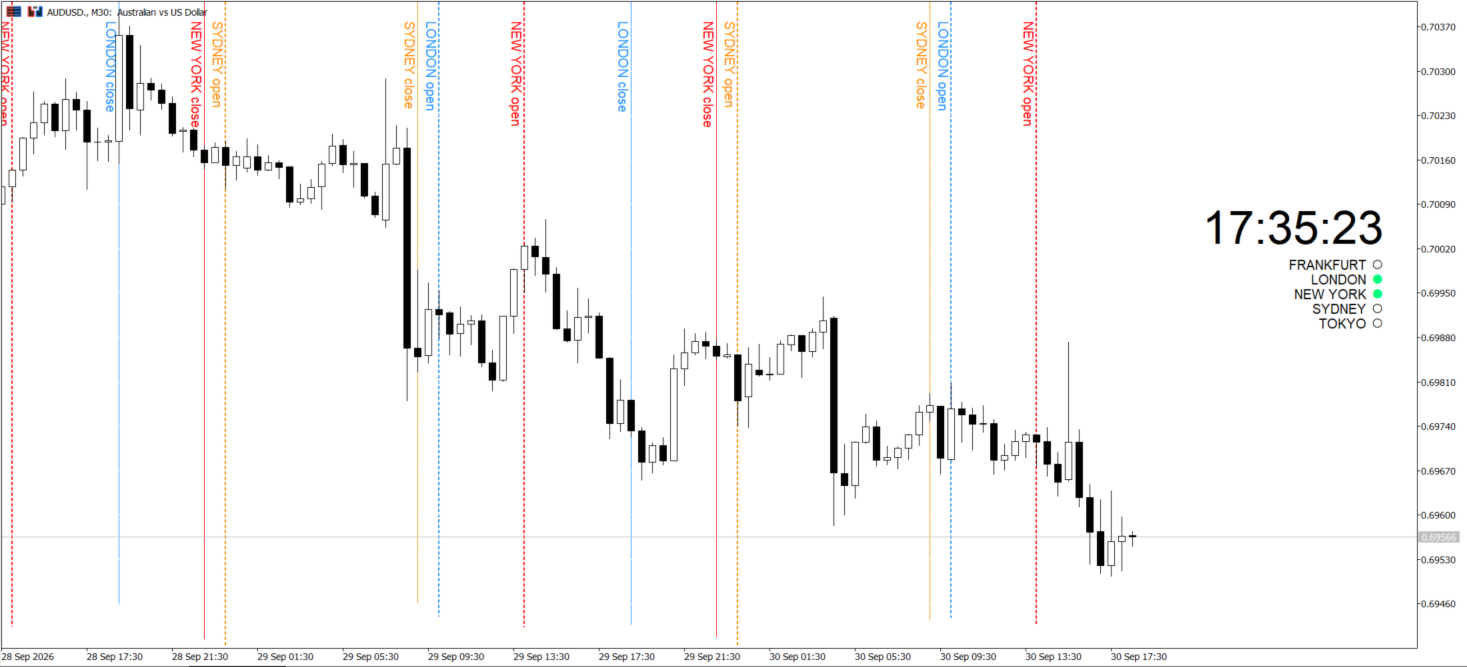
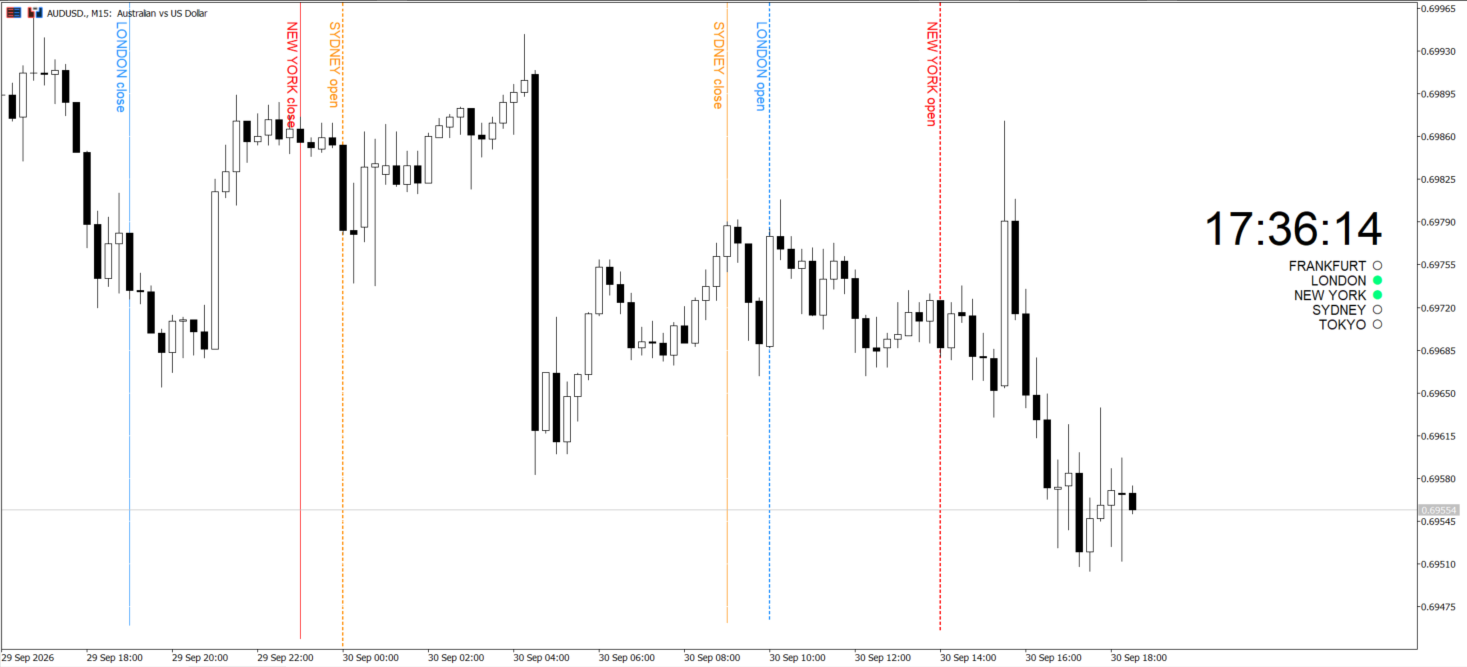
Stop guessing which session you are trading. Trading Sessions Panel puts a live 24 hour clock in the corner of your chart and shows, at a glance, which of your sessions are open right now, and where each one started and ended.
What you see
• A clean 24h clock pinned to any corner: top or bottom, left or right.
• Five session rows, each a dot plus a name. The dot is filled and coloured while the session is live, hollow and grey while it is closed.
• Optional vertical lines at each session open and close, in your own colour, style and width.
• Optional rotated labels at the top of each line, so every line says which session it belongs to.
Why traders keep it on screen
• Session awareness without leaving the chart. No second window, no external site.
• Spot the London and New York overlap instantly, that is where the volatility lives.
• Scalpers get exact open and close marks on M1 and M5. Swing traders get the same view on H1.
• Weekend and holiday safe. Lines are drawn only where the market actually traded, so nothing piles up at the Friday close.
• Light on the terminal. It refreshes on a timer, not on every incoming tick.
Fully configurable
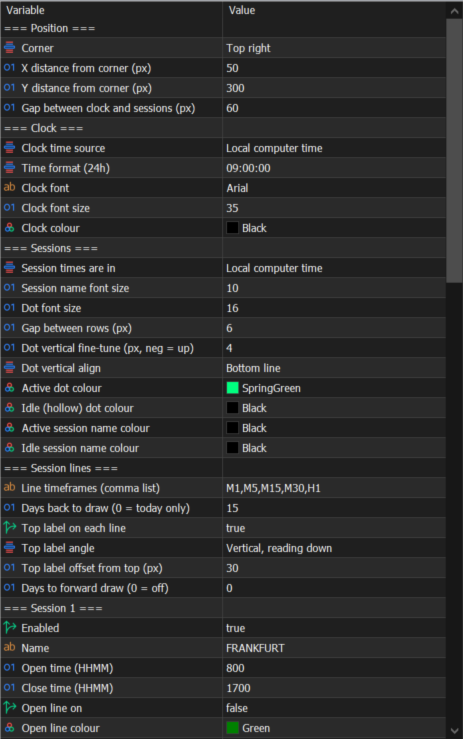
• Clock source: broker server time, local time, GMT/UTC, or New York.
• Five sessions, each with its own name, open and close time, and line colour, style and width.
• Ships with the major markets: Frankfurt, London, New York, Sydney, Tokyo.
• Draw history back up to 90 days, and project ahead up to 90 days.
• Choose which timeframes show the lines.
• Fonts, sizes and colours for every element.
How it works
Set each session's open and close time in the reference zone you pick (GMT, broker server time, or your local time). The panel does the rest: it marks the live session, draws the lines, and labels them. Times are plain manual values, no hidden daylight-saving math you cannot see or correct.
Good to know
• Utility indicator. It shows time and session boundaries only. It makes no trading calls and gives no signals.
• Session times are manual by design, so they stay transparent and under your control.
• Works on any symbol and any timeframe. Add it once and forget it.
Questions before buying or after, message me through MQL5. I support what I sell.
Stop guessing which session you are trading. Trading Sessions Panel puts a live 24 hour clock in the corner of your chart and shows, at a glance, which of your sessions are open right now, and where each one started and ended.
What you see
• A clean 24h clock pinned to any corner: top or bottom, left or right.
• Five session rows, each a dot plus a name. The dot is filled and coloured while the session is live, hollow and grey while it is closed.
• Optional vertical lines at each session open and close, in your own colour, style and width.
• Optional rotated labels at the top of each line, so every line says which session it belongs to.
Why traders keep it on screen
• Session awareness without leaving the chart. No second window, no external site.
• Spot the London and New York overlap instantly, that is where the volatility lives.
• Scalpers get exact open and close marks on M1 and M5. Swing traders get the same view on H1.
• Weekend and holiday safe. Lines are drawn only where the market actually traded, so nothing piles up at the Friday close.
• Light on the terminal. It refreshes on a timer, not on every incoming tick.
Fully configurable
• Clock source: broker server time, local time, GMT/UTC, or New York.
• Five sessions, each with its own name, open and close time, and line colour, style and width.
• Ships with the major markets: Frankfurt, London, New York, Sydney, Tokyo.
• Draw history back up to 90 days, and project ahead up to 90 days.
• Choose which timeframes show the lines.
• Fonts, sizes and colours for every element.
How it works
Set each session's open and close time in the reference zone you pick (GMT, broker server time, or your local time). The panel does the rest: it marks the live session, draws the lines, and labels them. Times are plain manual values, no hidden daylight-saving math you cannot see or correct.
Good to know
• Utility indicator. It shows time and session boundaries only. It makes no trading calls and gives no signals.
• Session times are manual by design, so they stay transparent and under your control.
• Works on any symbol and any timeframe. Add it once and forget it.
Questions before buying or after, message me through MQL5. I support what I sell.